



Trading VPS for NinjaTrader: How to Run Your Full Platform from Any Device
Overview #
Your trading setup has a latency problem you can't fix from home.
Residential internet adds 50-150ms round-trip between your order entry and CME Globex. A co-located trading VPS in Chicago delivers that same round-trip in under 1ms. That gap — 100x faster order delivery — directly determines whether limit orders fill or miss during fast-moving sessions on ES, NQ, CL, and GC.
But latency is only part of what a trading VPS solves. The bigger issue for most futures traders is infrastructure fragility: your ISP drops, Windows decides to update at 9:32 AM, your PC overheats under full indicator load, or you're away from your desk with an open position that needs managing. A trading VPS eliminates all of these failure modes simultaneously.
Ninja Mobile Trader VPS is a purpose-built trading infrastructure provider offering co-located servers in Chicago, New York, and London — with sub-millisecond latency to CME and major prop firm evaluation platforms. The service is platform-neutral: it runs NinjaTrader 8, Sierra Chart, Quantower, CQG, TradeStation, Interactive Brokers, MetaTrader, and any other Windows trading software you prefer.
This guide covers how a trading VPS works mechanically, what latency advantage it provides and how that translates to fill quality, how to access your full NinjaTrader setup from any mobile device, how to size a VPS correctly for your trading style, and the disaster recovery protocols that matter most for futures traders with open positions.
What Is a Trading VPS? #
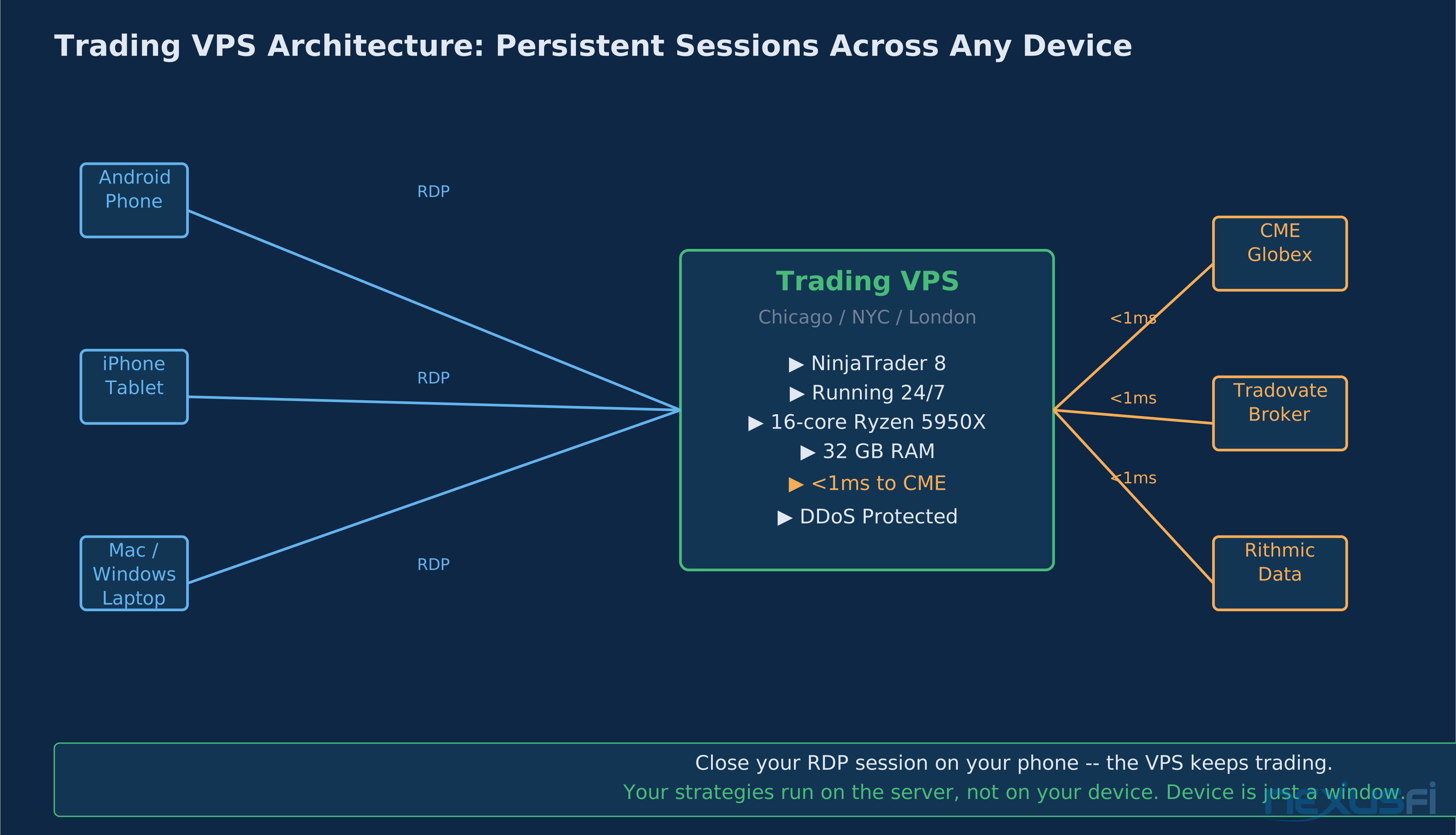
A Virtual Private Server (VPS) is a remote Windows computer running 24/7 in a data center, accessible from any device via Remote Desktop Protocol (RDP). For futures traders, this means your NinjaTrader installation, broker connections, automated strategies, and custom workspaces run on a server that never sleeps, never updates without notice, and never loses its internet connection when your home ISP goes down.
The key distinction from general-purpose cloud services: a trading VPS is specifically configured for the demands of real-time platform execution. That means:
Dedicated resources, not shared. General cloud VPS providers (AWS, Azure, DigitalOcean) pool resources across hundreds of tenants. A trading VPS from a specialized provider gives you dedicated CPU cores, RAM, and NVMe SSD storage that aren't competing with other workloads.
Location matters — a lot. CME Globex processes futures orders at data centers in Aurora, Illinois and in co-location facilities across the US. A VPS sitting in the same data center — or connected via direct fiber — delivers sub-millisecond round-trips. A VPS in Europe or a generic AWS us-east region adds 30-80ms vs. a Chicago co-location.
Windows Server, pre-configured. Trading platforms require Windows. A trading VPS provider handles the OS maintenance, DDoS protection, and hardware redundancy so you don't have to manage infrastructure. You install your platform, connect your broker, and trade.
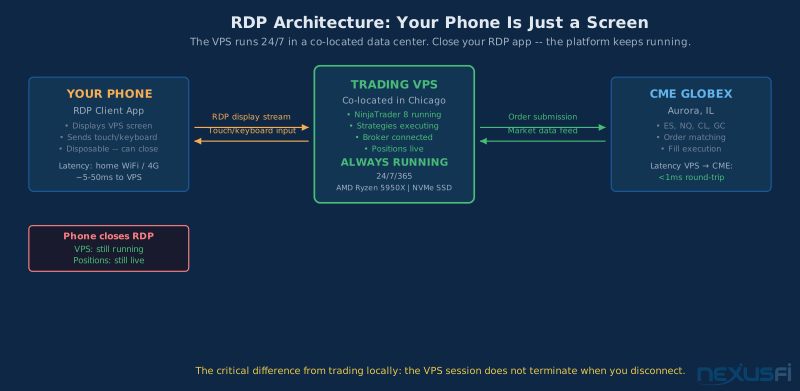
The RDP connection is your window into the server. Open it from your phone and you see your full NinjaTrader workspace — every chart, every indicator, every strategy — running exactly as you left it. Close the RDP app on your phone. The server keeps running. Your positions don't care that you closed the window.
@hyperscalper laid out the latency physics clearly in a 2021 NexusFi thread on micro-scalping infrastructure: "If you are 100 msecs ping time from the exchange versus 1 millisecond ping time from the exchange, there will be much more network congestion and delays. A Virtual Private Server (VPS) is typically what traders will use — but a Dedicated Server will run for months without needing to be restarted, and that is very reassuring."
Infrastructure reliability is not a secondary concern — it's the precondition for everything else.
How Ninja Mobile Trader VPS Works #
Ninja Mobile Trader VPS provides the server infrastructure. Here's the mechanical flow:
1. The server runs 24/7 in a co-located data center. When you sign up, a Windows Server instance is provisioned and you receive RDP credentials (IP address, username, password). The server is running immediately — no setup on your end beyond connecting.
2. You install your trading platform on the server. Download NinjaTrader 8's installer, run it on the VPS via RDP, activate your license, and connect your broker data feed. The NinjaTrader installation lives on the server, not your local machine. Your local machine is just a display.
3. Your workspace is persistent. Configure your charts, indicators, and strategies on the VPS once. They stay configured. Next time you connect — from your phone, your tablet, or a different computer — your workspace is exactly as you left it.
4. RDP gives you full platform access. Remote Desktop Protocol transmits your display from the server to your device and sends mouse/keyboard input back. The server renders NinjaTrader at full resolution. What you see on your phone screen is the actual platform, not a mobile-stripped version.
5. Strategies and connections stay live when you disconnect. This is the critical point: closing your RDP session does not terminate processes on the server. NinjaScript strategies keep executing. Rithmic/CQG/Tradovate connections stay active. Open positions remain in the market. The server doesn't know or care that you closed the window on your phone.
@Big Mike summarized the workflow in the NexusFi forum thread introducing the sponsor: "They offer VPS, dedicated trading servers such as 32GB ram, 16-core Ryzen 5950X, with sub <1ms latency to CME. They also offer 1:1 NinjaTrader support for clients." That combination — hardware spec plus proximity to CME — is the key difference between a purpose-built trading VPS and renting a generic cloud server.
Latency and Fill Quality #
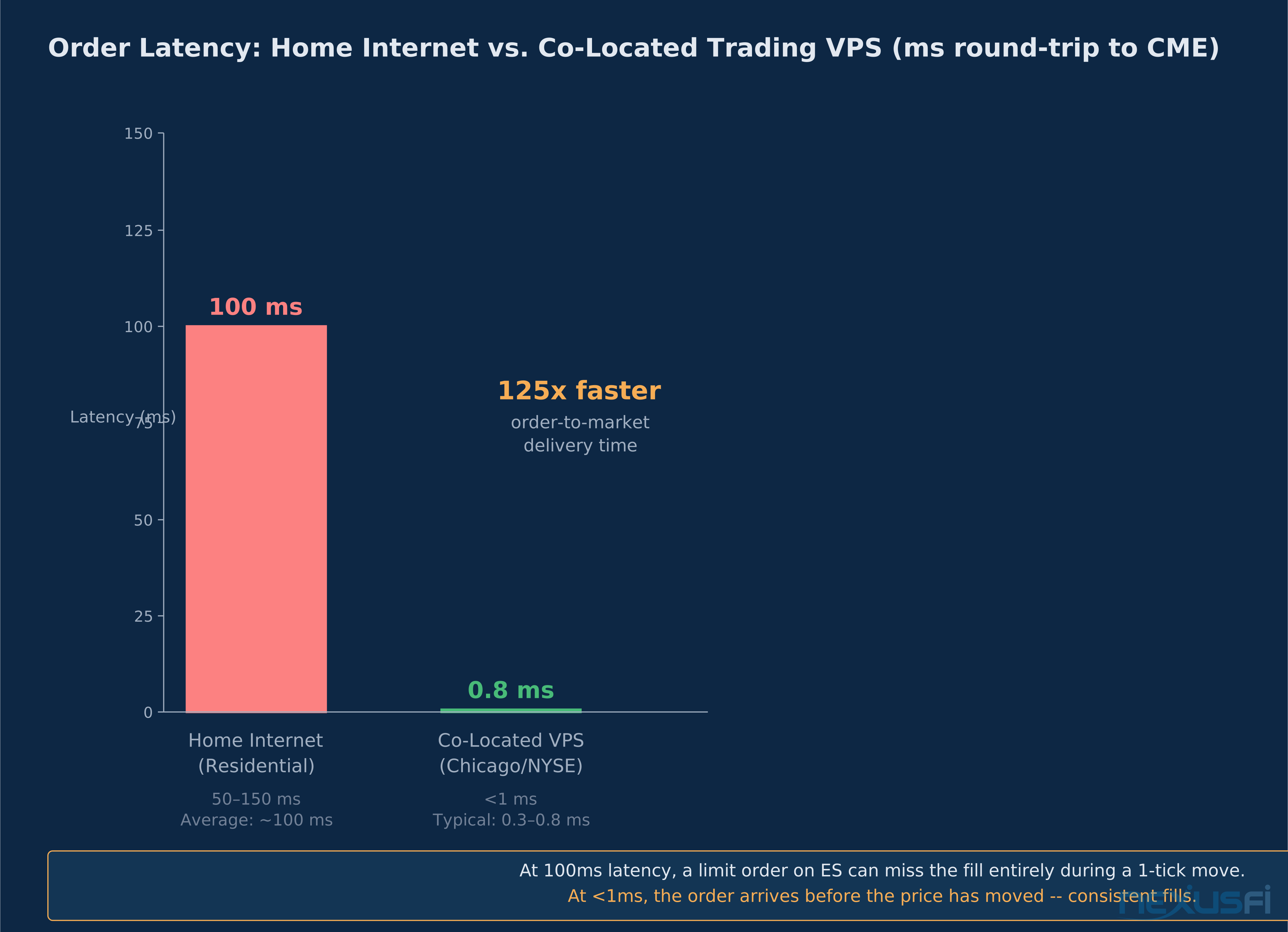
The headline numbers: residential internet delivers 50-150ms round-trip to CME Globex. A co-located trading VPS delivers under 1ms. That's a 100x difference in order-to-market delivery time.
Here's why that matters for limit orders specifically.
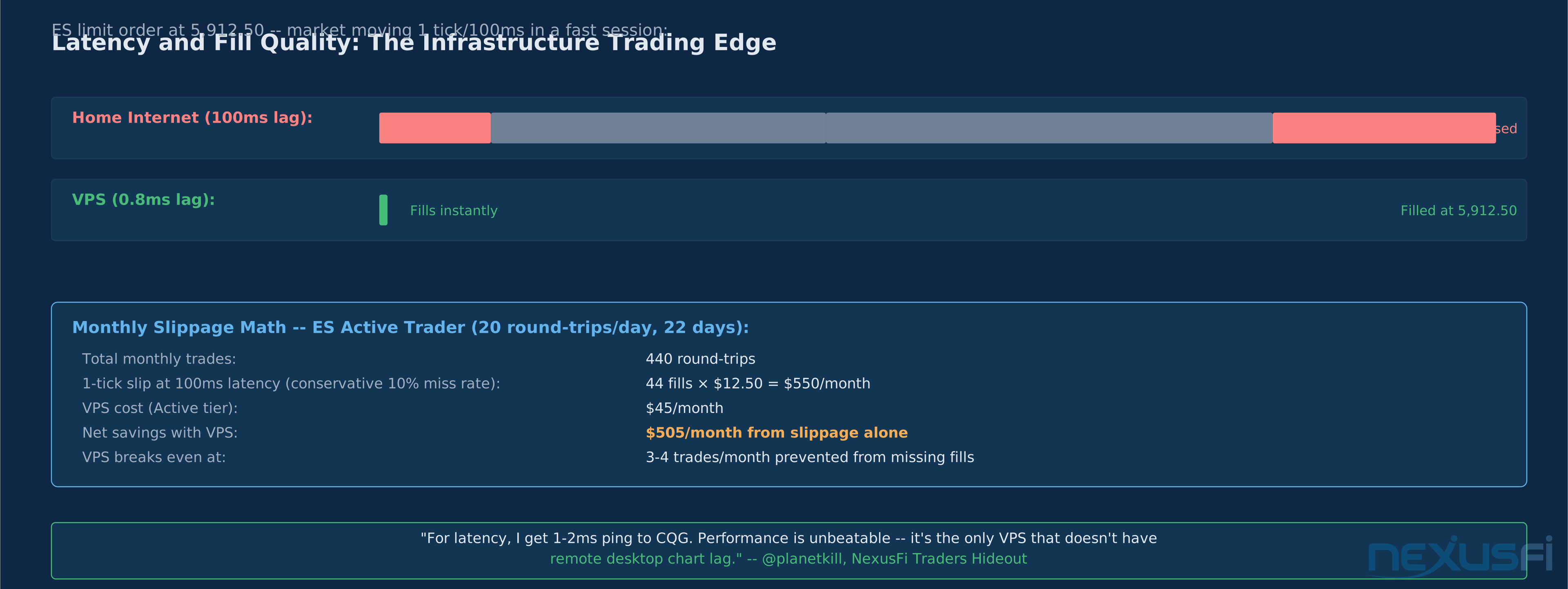
ES trades at 0.25 index points per tick, worth $12.50 per contract. During a high-activity session — economic data release, FOMC announcement, opening range — price can move 1 tick in under 100ms. At 100ms latency, your limit order arrives at CME after the price has already moved. Your fill misses. You're either chasing the market or sitting on the sideline while the setup triggers and moves without you.
At sub-millisecond latency, the order arrives before any meaningful price movement has occurred. Consistent fills on limit orders.
That last point is specific to Ninja Mobile Trader's AMD Ryzen hardware — the high single-thread performance of AMD CPUs makes RDP chart rendering noticeably smoother than generic Intel Xeon server hardware.
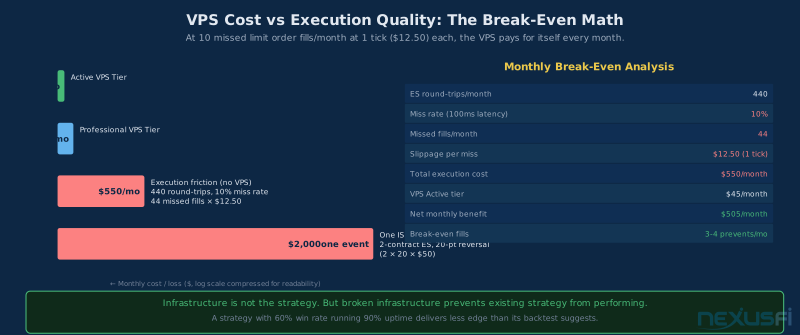
Monthly slippage math for active ES traders. Assume 20 round-trips per day, 22 trading days per month — 440 round-trips monthly. Conservative estimate: 10% of limit order entries miss their fill due to latency on fast ticks. That's 44 fills missed. If each missed fill costs 1 tick of slippage ($12.50), that's $550/month in execution friction. The Active VPS tier runs $35-55/month. The VPS pays for itself when it prevents 3-4 missed fills per month — which it handles in the first hour of any busy session.
For automated strategies the math is even clearer. A NinjaScript strategy running locally has all the home infrastructure risks — ISP drops, PC restarts, power events — stacked on top of the base latency disadvantage. Running the same strategy on a co-located VPS eliminates infrastructure risk entirely and improves execution.
Mobile Trading Workflows #
The way to think about mobile VPS trading is: your phone is a screen, not a trading platform. The trading platform lives on the server. Your phone just displays it.
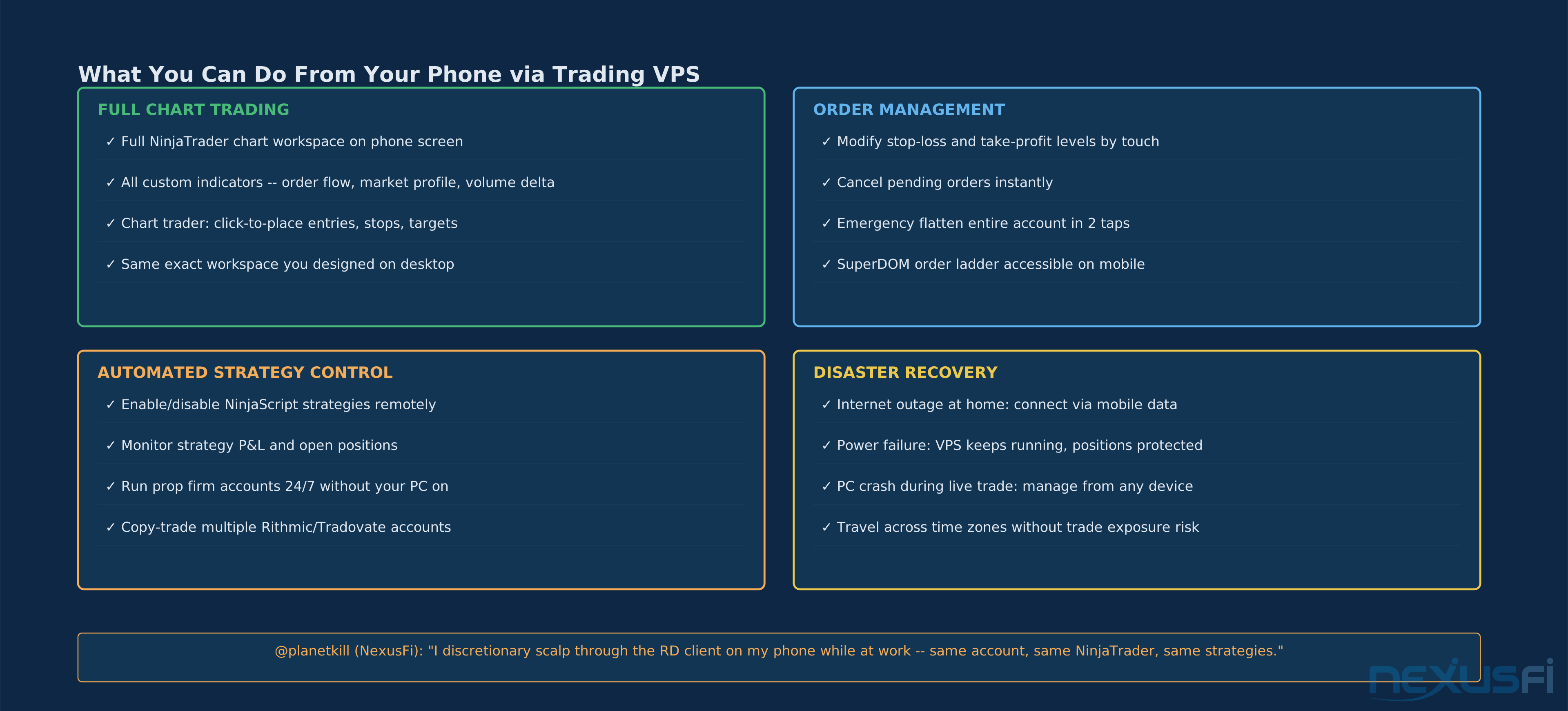
That distinction matters because it means everything you can do on NinjaTrader's desktop — every indicator, every order type, every strategy control — is available on your phone via RDP. You're not limited to a mobile-specific feature set.
@alex7777 described his workflow in the NexusFi "Where and How Do You Trade?" thread: "I trade on my desktop in the morning — if I have open positions I manage them on my phone during work... My trades are simple 50 percent pullback buys/sells with target and stop already set. Markets include forex/futures/metals." The VPS enables exactly this pattern at full platform capability — not just position monitoring.
@planetkill takes it further, running discretionary scalping directly from his phone: "I even have a second user account within the same VPS to run a 2nd instance of NinjaTrader at the same time, where I mostly discretionary scalp through the RD client on my phone while at work." Two NinjaTrader instances on the same VPS, one for automated strategies and one for active discretionary trading — both accessible from mobile.
Specific workflows that work well on mobile:
Position monitoring with alerts — keep a simplified positions window open via RDP, set price alerts in NinjaTrader for critical levels, and get native phone notifications. The alerts fire from the server, not your phone — they work even if your phone app isn't connected.
Order modification — adjusting stop-loss and take-profit levels by dragging them on the chart works perfectly via RDP touch input. The touch translates to mouse movement on the server.
Emergency flatten — the most important mobile use case. If your home internet goes down, you can connect via mobile data and flatten open positions from your phone. The flatten button works the same on mobile as on desktop.
Strategy management — enabling and disabling NinjaScript strategies, checking their status, reviewing real-time P&L — all via RDP touch interface.
The VPS approach is more complete than a broker-specific app — it's full platform access, not just a read-only position view.
Mobile VPS trading overlaps with the broader topic covered in Mobile Trading for Futures — but the VPS approach offers full platform access rather than a broker-specific mobile app.
RDP client recommendations by device:
Android: Microsoft Remote Desktop (free, from Google Play) — optimized for touch input, gestures map intuitively to mouse actions. Ninja Mobile Trader's Google Play app integrates VPS connectivity directly.
iOS: Jump Desktop or Microsoft Remote Desktop — both handle high-DPI displays well for chart trading. Jump Desktop's fluid gesture support is worth the cost for traders doing active chart management.
Mac/Windows: Built-in Remote Desktop client — zero configuration, full keyboard and mouse support.
Platform Compatibility #
Ninja Mobile Trader VPS is platform-neutral. The server is a Windows machine — install whatever trading software you want. There's no lock-in to NinjaTrader or any specific broker.
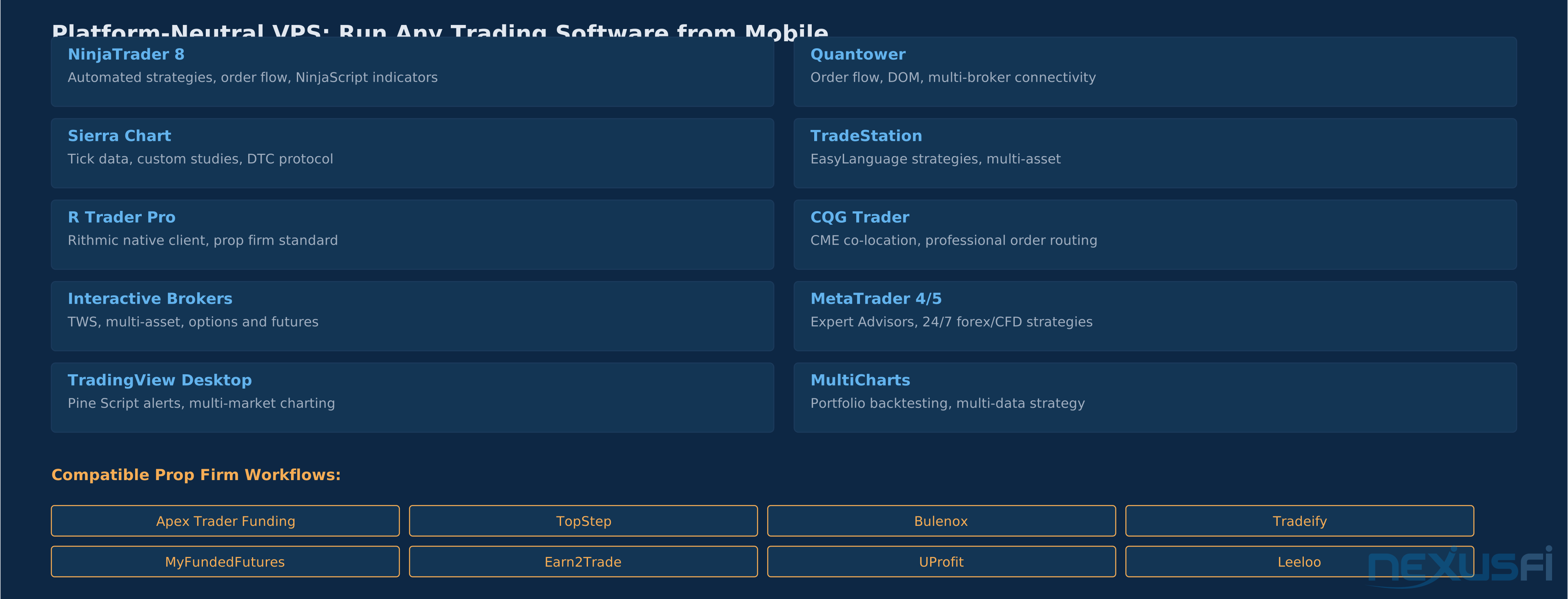
Supported trading platforms (non-exhaustive, any Windows software installs):
- NinjaTrader 8 — primary use case, full NinjaScript and indicator support
- Sierra Chart — tick data, DTC protocol, custom studies
- Quantower — order flow, DOM trading, multi-broker connectivity
- TradeStation — EasyLanguage strategies, multi-asset
- CQG Trader / R Trader Pro — Rithmic-native clients used by most prop firms
- Interactive Brokers TWS — multi-asset, options and futures
- MetaTrader 4/5 — 24/7 forex and CFD Expert Advisors
- TradingView Desktop — Pine Script alerts, multi-market charting
- MultiCharts — portfolio backtesting, multi-data strategy development
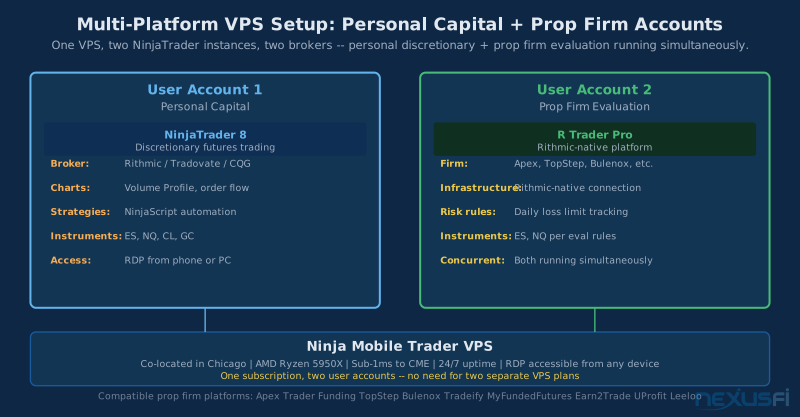
For prop firm traders, this platform neutrality is critical. Most prop firm evaluations run on Rithmic (R Trader Pro) or TopstepX, not NinjaTrader. The VPS supports all of them simultaneously — you can run your funded account on Rithmic while running personal capital on NinjaTrader from the same server.
Compatible prop firm evaluation platforms: Apex Trader Funding, TopStep, Bulenox, Tradeify, MyFundedFutures, Earn2Trade, UProfit, Leeloo, and most other current providers — all use Rithmic or similar infrastructure that runs on Windows.
The practical use case for multi-platform traders: one VPS instance running NinjaTrader for your primary discretionary futures setup, and a second user account on the same server running R Trader Pro for the prop firm evaluation. Both accessible from your phone via RDP. Ninja Mobile Trader's flexible account structure supports this without paying for two separate VPS subscriptions.
Spec Guide: Sizing Your VPS #
Get this wrong and you've either overpaid for resources you don't use or created a performance bottleneck that defeats the purpose of a VPS.
The critical spec is RAM, not CPU clock speed. NinjaTrader 8 is memory-intensive. Each chart with indicators running loads price history and calculates indicator values into RAM. Running three charts with Volume Profile, VWAP, and order flow indicators simultaneously can consume 2-4 GB on its own. Add NinjaScript strategy execution and a data feed connection, and you're at 4-6 GB for a single active trading setup.
CPU: single-thread performance over core count. NinjaTrader processes indicator calculations sequentially, not in parallel across cores. A high-performance CPU with strong single-thread throughput — AMD Ryzen 5950X's architecture excels here — outperforms a higher-core-count Xeon for NinjaTrader's specific workload pattern. This is why @planetkill specifically noted the AMD CPU advantage for RDP chart smoothness: "it's running on AMD cpus instead of Intel Xeons, making remote desktop feel very smooth and not laggy."
Storage: SSD is non-negotiable. NinjaTrader reads tick data and historical bars from disk during platform startup and indicator recalculation. Slow storage (HDD) creates visible pauses when loading charts. NVMe SSD reduces that load time to negligible.
Tier recommendations:
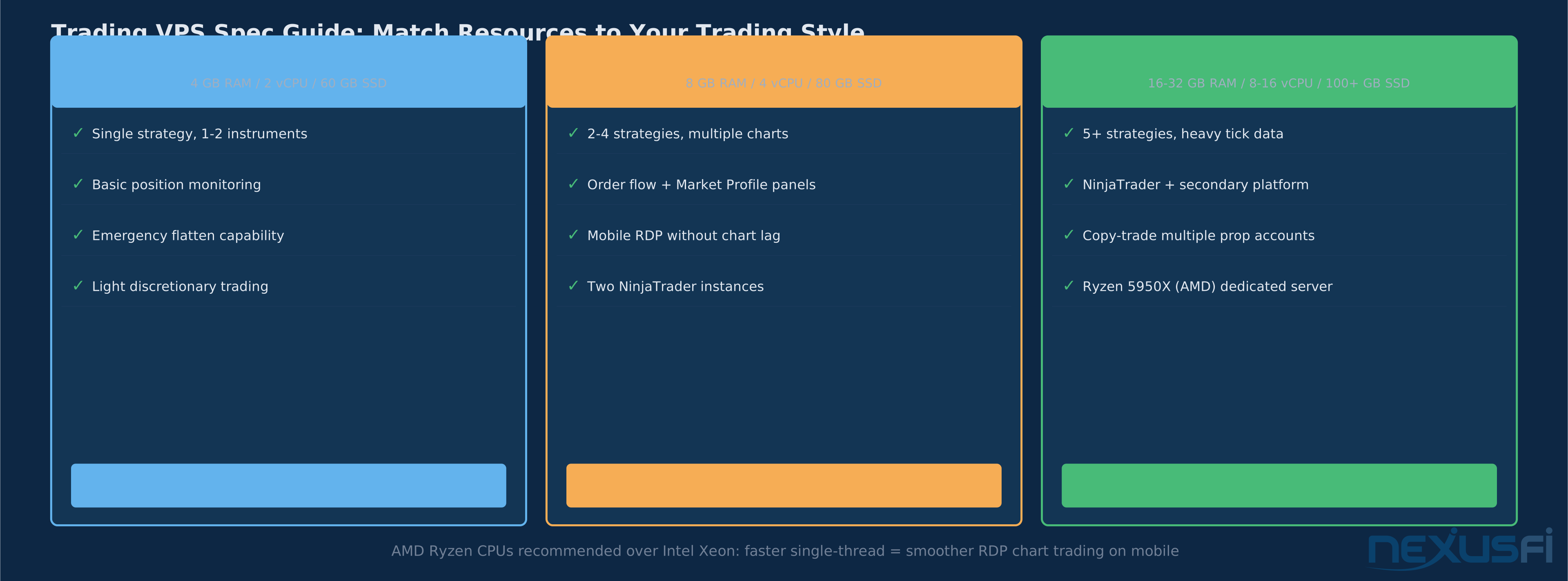
Entry ($15-25/month) — 4 GB RAM, 2 vCPU, 60 GB SSD: Single strategy or single instrument position monitoring. Emergency flatten capability from mobile. Light discretionary trading with 1-2 chart windows. Not suitable for heavy order flow indicators or multi-instrument automation.
Active ($35-55/month) — 8 GB RAM, 4 vCPU, 80 GB SSD: This is the minimum for traders running multiple charts with order flow tools. Volume Profile, Market Profile, or delta footprint charts are memory-intensive — 8 GB gives you room for 3-5 active charts plus strategy execution. Mobile RDP feels smooth at this tier with AMD hardware. Supports two NinjaTrader instances for separate discretionary and automated setups.
Professional ($75-150/month) — 16-32 GB RAM, 8-16 vCPU, 100+ GB SSD, Ryzen 5950X dedicated: For traders running 5+ concurrent strategies, heavy tick data streams (order flow on multiple instruments), or copy-trading multiple prop firm accounts simultaneously. Ninja Mobile Trader's dedicated server options — 32 GB RAM, 16-core Ryzen 5950X — are the specific hardware configuration mentioned by @Big Mike in the sponsor announcement. This tier is overkill for most retail traders but appropriate for full-time algorithmic trading operations.
RAM as the primary decision variable:
- Single-strategy trader with position monitoring only: 4 GB
- Active discretionary trader, 3-5 charts, 1-2 strategies: 8 GB
- Multi-strategy automation, 5+ charts, prop firm + personal accounts: 16 GB
- Heavy tick data, multiple platforms, copy-trading 3+ accounts: 32 GB
Upgrading RAM on a VPS is typically a few minutes of downtime and a plan change. Start conservative and upgrade when you see the platform performance start to degrade under load — the symptom is NinjaTrader freezing briefly during indicator recalculation, which indicates memory pressure.
Setup: From Sign-Up to Mobile Trading #
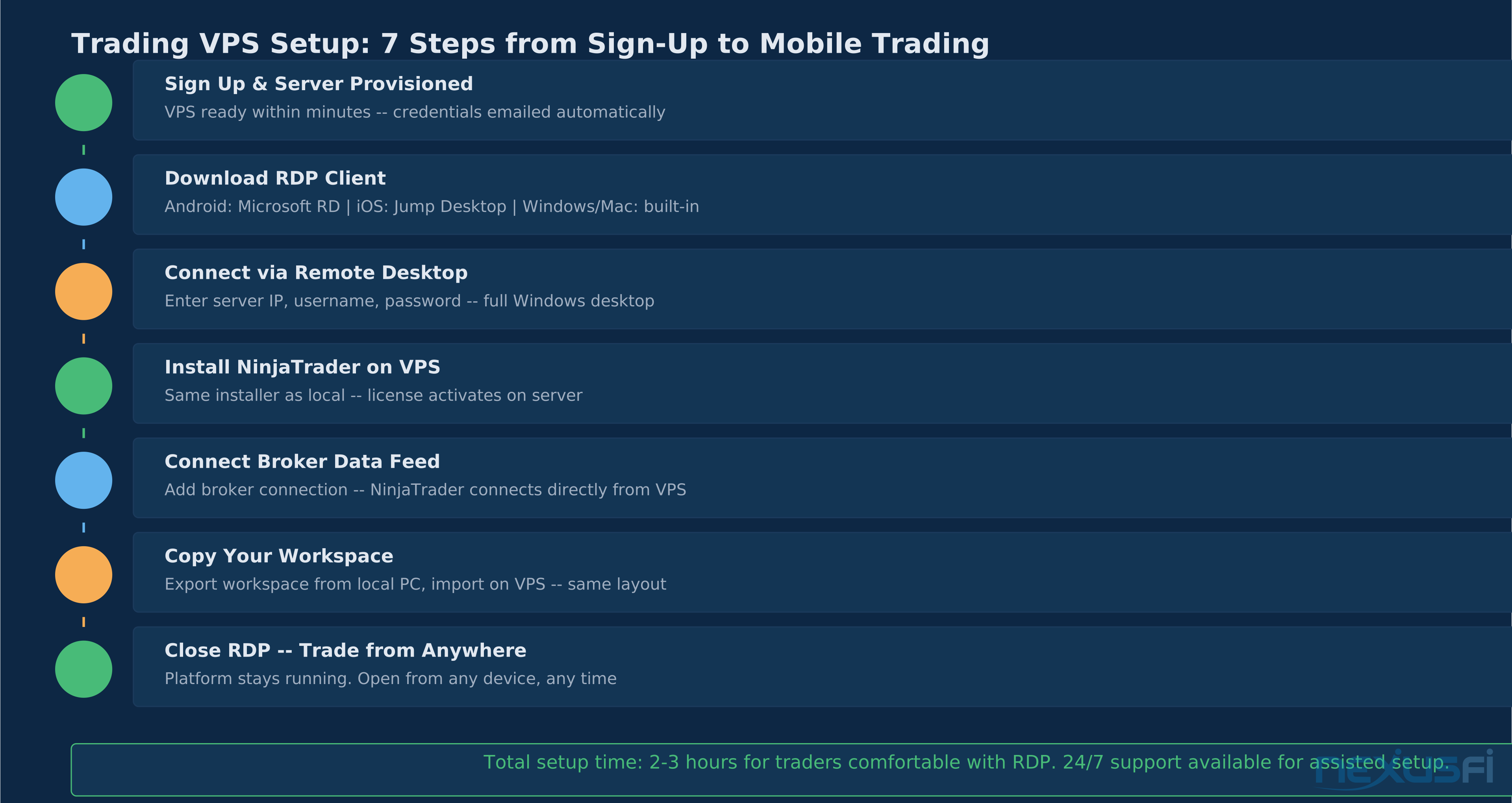
The full setup process runs in 2-3 hours for traders comfortable with Windows and RDP. Ninja Mobile Trader offers 1:1 NinjaTrader support for clients who need assisted setup.
Step 1: Sign up, server provisioned in minutes. VPS credentials (IP address, username, password) are emailed automatically after account creation. No waiting for manual provisioning.
Step 2: Download an RDP client on your devices. On Android, install Microsoft Remote Desktop from the Play Store — or use Ninja Mobile Trader's dedicated app. On iOS, Microsoft Remote Desktop or Jump Desktop. On Mac/Windows, the built-in Remote Desktop Connection client handles everything.
Step 3: Connect via RDP. Enter the server IP, username, and password into your RDP client. You'll see a standard Windows Server desktop — exactly what you'd see if you physically walked up to that machine in the data center.
Step 4: Install NinjaTrader on the VPS. Download the NinjaTrader 8 installer from the NinjaTrader website and run it on the VPS via RDP. License activation is the same process as on a local machine — NinjaTrader allows you to activate on multiple computers (typically 3) including a VPS.
Step 5: Connect your broker data feed. Add your broker connection in NinjaTrader's Connection Manager. The VPS connects directly to the broker's servers — from the broker's perspective, it's just another NinjaTrader connection, same as your local machine.
Step 6: Copy your workspace from your local machine. NinjaTrader's Control Center > File > Backup exports your entire workspace: indicators, strategies, templates, and chart configurations. Transfer the backup file to the VPS via RDP clipboard or a file sharing service, then restore it from the VPS. Your familiar workspace loads exactly as it appears on your desktop.
Step 7: Close RDP. You're done. The platform stays running on the VPS. Connect from any device, any time. Your workspace, your positions, your strategies — all persistent on the server.
Common setup issues and fixes:
NinjaTrader license activation limit — if you've already activated on your maximum number of machines, deactivate one before activating on the VPS. Control Center > Tools > License Manager.
Broker connection timeout — some brokers have idle connection timeouts. Configure NinjaTrader's auto-reconnect settings (Control Center > Tools > Options > General) to reconnect automatically on disconnection.
Chart refresh delay — if charts feel slow to update on the VPS via RDP, check the NinjaTrader performance settings: Tools > Options > Performance. Reduce chart animation to improve RDP responsiveness.
Uptime and Reliability #
Home trading infrastructure fails more often than traders realize, and it always fails at the worst moment.
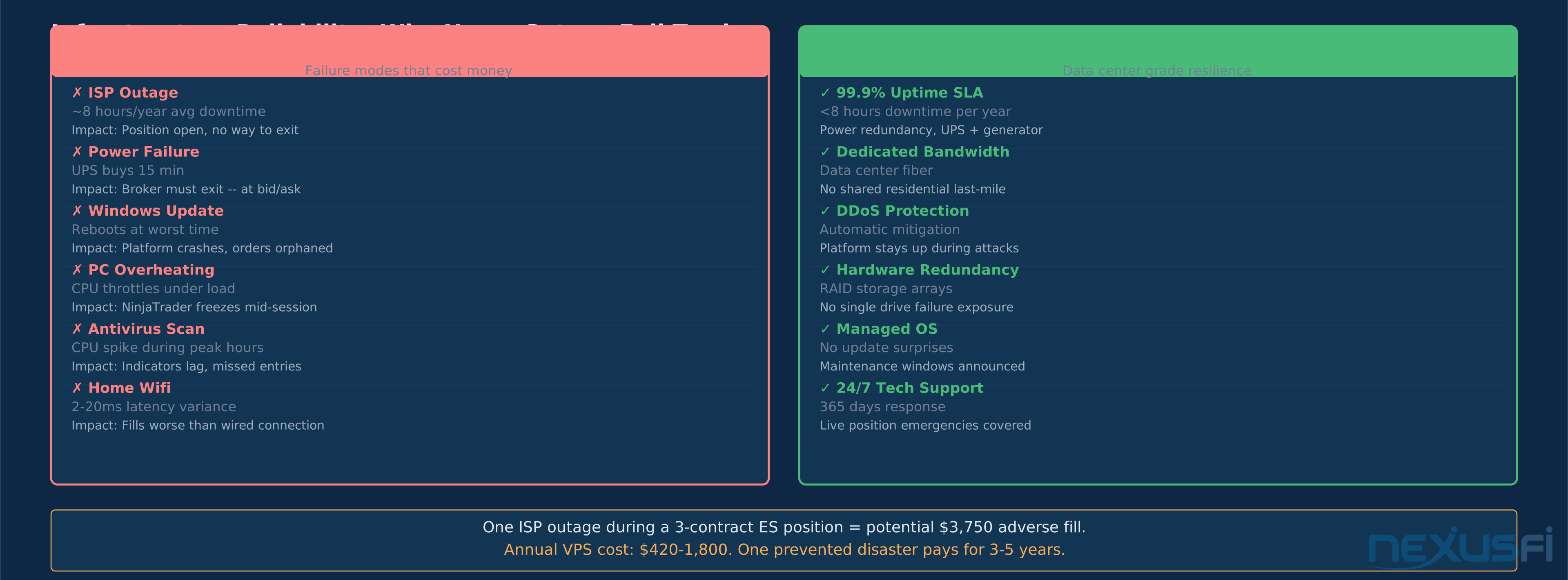
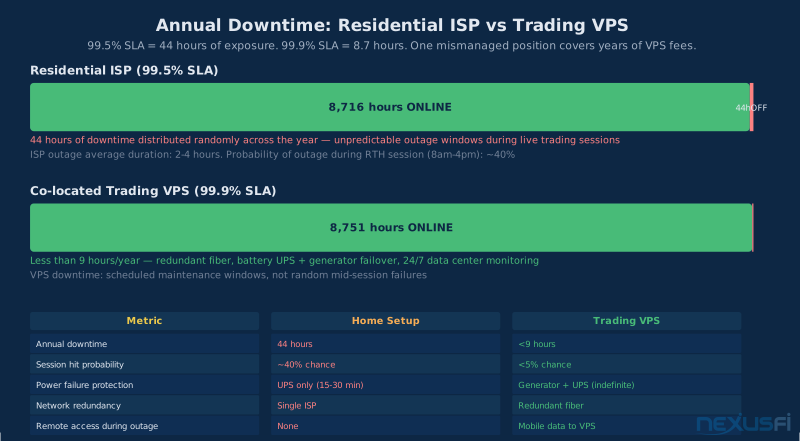
A typical residential ISP delivers about 99.5% uptime — that's roughly 44 hours of downtime per year, distributed randomly across trading sessions. During those 44 hours, any open positions are in the market without active management capability.
The failure scenarios that cost money:
ISP outage — the most common. Average duration 2-4 hours. If you have an open ES position at 2 contracts when your ISP drops, you're either calling your broker (who closes at bid/ask) or waiting for your internet to return while the market does whatever it does.
Power failure — a UPS buys 15-30 minutes. In a house with a surge event or longer outage, the PC shuts down, NinjaTrader closes, and any open orders become broker-managed until you can reconnect. Broker emergency management is not the same as active stop management.
Windows Update — Windows 10 and 11 are aggressive about scheduling updates and reboots. If you haven't locked down the update settings, a reboot during market hours is a real possibility. NinjaTrader restarts on an unclean shutdown and reconnects, but strategies require manual re-enablement.
PC thermal throttling — a PC running NinjaTrader with order flow indicators under full CPU load in a hot environment throttles performance. Indicator calculations slow, the platform becomes unresponsive, and fast-moving sessions are exactly when CPU load is highest.
A data center eliminates all of these. Co-located servers sit on battery-backed UPS with generator failover — no power events reach the hardware. Data center uptime SLAs run 99.9% or higher (under 9 hours annually). Network connectivity is redundant fiber, not residential last-mile. Hardware is monitored 24/7 with automatic failover.
Ninja Mobile Trader provides automatic DDoS protection on all VPS plans and 24/7 technical support — which matters specifically for situations where you have a live position and a VPS connectivity issue at the same time.
@liquidcci made the same discovery after moving his automated futures system from home to a Chicago co-located server:
@Big Mike's note on the sponsor's support offering: "1:1 NinjaTrader support for clients" — this means when you're troubleshooting a connection issue with an open position on the line, you have a support channel that understands both the VPS infrastructure and the NinjaTrader platform.
Disaster Recovery Protocols #
Every futures trader needs a written disaster plan for live positions. A trading VPS changes what's possible in these scenarios.
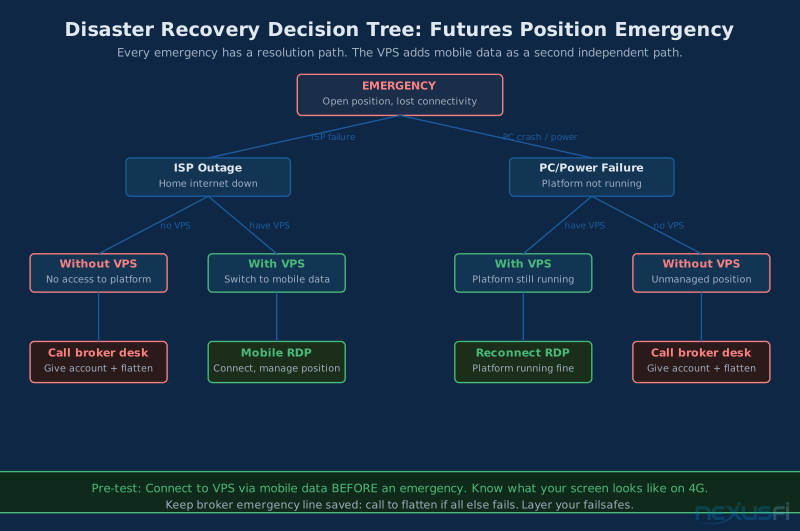
Scenario 1: Home internet drops with an open position.
Without VPS: Call your broker's trade desk. Provide account number, position details, and instructions. Execution is at broker discretion, not your timing. If you can't get through, your position sits unmanaged.
With VPS: Switch to mobile data on your phone. Open your RDP client. Connect to the VPS. Your NinjaTrader session is still live — the ISP outage at home didn't affect the server. Modify your stops or flatten the position directly from the platform.
The key: mobile data and your home internet are independent networks. If your home broadband fails, mobile data is your backup connectivity to the VPS. This is why @steve2222 specifically mentioned mobile as redundancy: "it gives redundancy for my home fibre going down but the mobile network is still up."
Scenario 2: PC crash during active trading.
Without VPS: NinjaTrader closes. Open limit and stop orders that were managed by ATM strategies become unmanaged market/stop orders at the broker level. You lose any bracket management until NinjaTrader restarts and reconnects.
With VPS: PC crash is irrelevant. NinjaTrader is running on the server, not your PC. Connect from any device to see current state. Strategies are running continuously.
Scenario 3: You're traveling with an open swing trade.
Without VPS: You need a laptop with NinjaTrader configured, a reliable internet connection, and the ability to manage positions through your broker's web interface if NinjaTrader isn't available.
With VPS: Your full NinjaTrader workspace is accessible from your phone via RDP from any wifi or mobile data connection worldwide. Connect from a hotel lobby in Singapore to manage an ES swing position.
Building your disaster plan:
- Test your mobile RDP connection before you need it in an emergency. Open a non-trading session, connect via mobile data (not home wifi), verify the platform loads and responds.
- Configure NinjaTrader's auto-reconnect settings for your broker connection. Some broker connections have aggressive timeout settings — set NinjaTrader to reconnect automatically on disconnection.
- Know your broker's emergency flatten procedure. Even with a VPS, you want the broker's trade desk number and your account number accessible without logging in to anything.
- Document your open strategy positions in a note you can access offline. If you need to give flatten instructions to the broker's trade desk, you need position details without requiring an internet connection.
Cost Analysis #
The question isn't whether a trading VPS costs money. It does. The question is whether the total cost of infrastructure failure — missed fills, blown stops during internet outages, strategy execution gaps — exceeds the VPS subscription cost.
Direct execution cost savings:
Active ES trader, 20 trades/day, 22 trading days: 440 round-trips monthly. At 100ms home internet latency, conservative 10% of limit order entries miss their intended fill (missing by 1 tick). That's 44 missed fills at $12.50 each = $550/month in execution friction.
VPS Active tier subscription: $35-55/month.
Net monthly benefit from fill quality alone: $495-515/month. The VPS pays for itself in 3-4 prevented missed fills per month. In a busy session, that's 30 minutes of trading.
Indirect cost avoidance:
One ISP outage during a 2-contract ES swing position: if the position is on a 20-point move and you can't manage it for 2 hours while the market reverses, the cost is $2,000 (2 contracts × 20 points × $50/point). Annual VPS cost: $420-1,800 depending on tier. One prevented disaster covers 1-4 years of VPS fees.
For automated strategy traders:
An automated strategy generates expected value only when it executes reliably. A strategy that runs 95% of intended sessions (home PC uptime) with 100ms latency execution delivers much less edge than its backtest suggests. Moving the strategy to a co-located VPS with 99.9% uptime and sub-millisecond execution brings live results closer to the theoretical edge. The cost of infrastructure inconsistency is hard to measure precisely, but it's real and it compounds across hundreds of strategy executions per month.
Comparison with alternatives:
Azure/AWS general cloud VPS: $30-80/month, but not co-located near CME, not optimized for trading platform performance, and not equipped with 1:1 NinjaTrader support. @planetkill specifically moved away from cloud providers after trying "Speedy, Azure, AWS, RouterHosting, CheapWindowsVPS" — the chart lag on all of them was unworkable for mobile RDP trading.
Dedicated trading server (shared hosting): $150-400/month from other providers. Ninja Mobile Trader's 16-core Ryzen 5950X dedicated option sits below this market range while offering comparable hardware.
Home server colocation: Not realistic for retail traders — requires hardware ownership, data center contract, and ongoing maintenance.
Practical Application #
Setting up your mobile trading workflow:
The first session objective is simple: connect to the VPS from your phone and verify the platform loads and responds. Do this during a non-trading period, not during a live session.
From the Ninja Mobile Trader Google Play app or a generic RDP client, connect with your credentials. NinjaTrader should be visible on the VPS desktop. Work through to a chart, verify indicators load and price is streaming. Modify a simulated order to confirm touch input responds correctly.
Once you've verified the basic connection, the next objective is optimizing the RDP display for mobile. In your RDP client settings, match the resolution to your phone's screen rather than the VPS's native resolution — this reduces the amount of data transmitted over the RDP session and makes touch targets larger.
For traders currently running automated strategies locally:
The migration path is straightforward. Install NinjaTrader on the VPS, connect the same broker data feed, and enable your strategies. Run both setups in parallel for a week — your local machine and the VPS — and compare execution timestamps. The VPS fills should be more consistent, especially during high-volatility periods when 100ms vs. 1ms makes a measurable difference.
Once you've confirmed the VPS produces the expected results, disable the local strategy execution and let the VPS run independently.
For discretionary traders:
The VPS provides position monitoring and emergency management capability even if you don't plan to actively trade from your phone. @Big Mike's setup in the NexusFi thread on mobile trading importance: "Then if I need to take action I just RDP to my trading server to manage a position." Monitor positions via a simplified watchlist during the day, connect via RDP when you need to take action.
The combination of sub-millisecond execution, 24/7 uptime, and full platform access from any device addresses three separate problems that retail futures traders deal with regularly: execution quality, infrastructure reliability, and position management while away from the desk. A trading VPS is infrastructure, not a trading strategy — it doesn't generate alpha directly. But it removes the infrastructure friction that prevents existing alpha from reaching its theoretical performance.
For traders running NinjaTrader specifically, Ninja Mobile Trader is rated #1 by the NexusFi community for a combination of hardware quality (AMD Ryzen vs. Intel Xeon), proximity to CME, platform support, and pricing — with the Elite Member discount making the entry tier accessible for most active retail traders.
Knowledge Map
Prerequisites
Understand these firstGo Deeper
Build on this knowledgeReferences This Article
Articles that build on this topicCitations
- — Ninja Mobile Trader VPS (ninjamobiletrader.com) (2024) 👍 2“They offer VPS, dedicated trading servers such as 32GB ram, 16-core Ryzen 5950X, with sub <1ms latency to CME. They also offer 1:1 NinjaTrader support for clients.”
- — Recommended Windows VPS for NinjaTrader 8. For $7-$12 /month. PiVPS? CheapWindowsVPS? (2021) 👍 4“I've been using them for my automated strategies for about 1 year now, and it's never lost connection or crashed. For latency, I get 1-2ms ping to CQG. It's running on AMD cpus instead of Intel Xeons, making remote desktop feel very smooth and not laggy.”
- — Where and How Do You Trade (via which device)? (2023) 👍 4“I trade on my desktop in the morning -- if I have open positions I manage them on my phone during work. My trades are simple 50 percent pullback buys/sells with target and stop already set.”
- — The HSI Index Futures Scalping Experiment (2020) 👍 5“I have the CQG Mobile app on my phone... I would use it if my trading computer or internet connection packed a sad and I needed to flatten. Because it is on my phone it gives redundancy for my home fibre going down but the mobile network is still up.”
- — The importance of web/mobile trading (2014) 👍 1“Then if I need to take action I just RDP to my trading server to manage a position.”
- — Setup Dedicated Machine Chicago - My experience (2011) 👍 2“In my opinion a server in Chicago is well worth it for anyone who has an automated system that trades futures. The thought of holding hundreds of thousands of dollars in futures contracts with Time Warner cable as my home internet connection now puts me in a cold sweat. The power in my home has gone out twice since I moved to server in Chicago but my auto system just kept purring along.”
- — Discussion of a Micro Scalping Day Trading Facility (2021) 👍 2“If you are 100 msecs ping time from the exchange versus 1 millisecond ping time from the exchange, there will be much more network congestion and delays. A Virtual Private Server (VPS) is typically what traders will use. A Dedicated Server will run for months without needing to be restarted, and that is very reassuring.”
- — Spoo-nalysis ES e-mini futures S&P 500 (2014) 👍 6“I trade from a dedicated server co-lo'd in Chicago, there is no real risk of internet or power failure from that box to CME.”
- — Ninja Mobile Trader VPS - The #1 Top Rated Trading VPS (2024)
- — NinjaTrader VPS Setup: Optimize Your Futures Trading Environment (2024)