



Platform Latency and Execution Speed: What Actually Matters for Futures Traders
Overview #
Every futures trader eventually falls down the latency rabbit hole. You see a fill that should have been yours slip away by one tick, and suddenly you're researching colocation, FPGA processors, and microwave tower networks. Before you spend a week optimizing your setup, here's what you need to know: for 95% of retail futures traders, platform latency matters far less than you think — and in ways you probably haven't considered.
Latency in electronic trading is the total delay between an event occurring in the market and your ability to act on it. It breaks into two measurable components: market data latency (how fast prices reach your screen) and order execution latency (how fast your order reaches the exchange). Both matter, but they matter differently depending on how you trade.
The traders who obsess about latency are usually solving the wrong problem. A 200-millisecond difference in DOM refresh rate doesn't destroy a swing trading edge. But if you're scalping 2-tick moves on ES, that same 200ms can be the difference between a filled limit order and watching price rip through your level.
This article breaks down where latency actually lives in your trading stack, which platforms handle it differently, and where your optimization time is best spent.
Key Concepts #
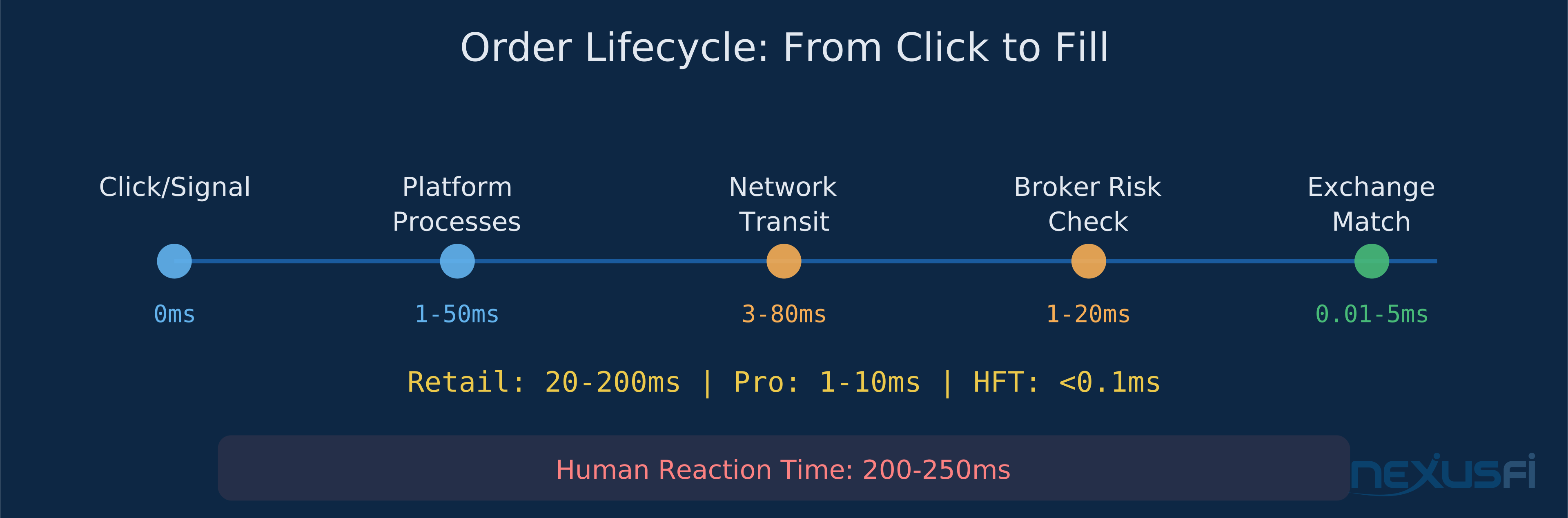
Execution Latency — The time between you clicking "Buy" (or your algo generating an order) and the exchange acknowledging receipt. This includes software processing time, network transit, and exchange queue time. Measured in milliseconds for retail, microseconds for institutional.
Market Data Latency — The time between a trade occurring at the exchange and that price update appearing on your chart or DOM. Your platform's refresh rate caps how fast you can see changes regardless of how fast the data arrives.
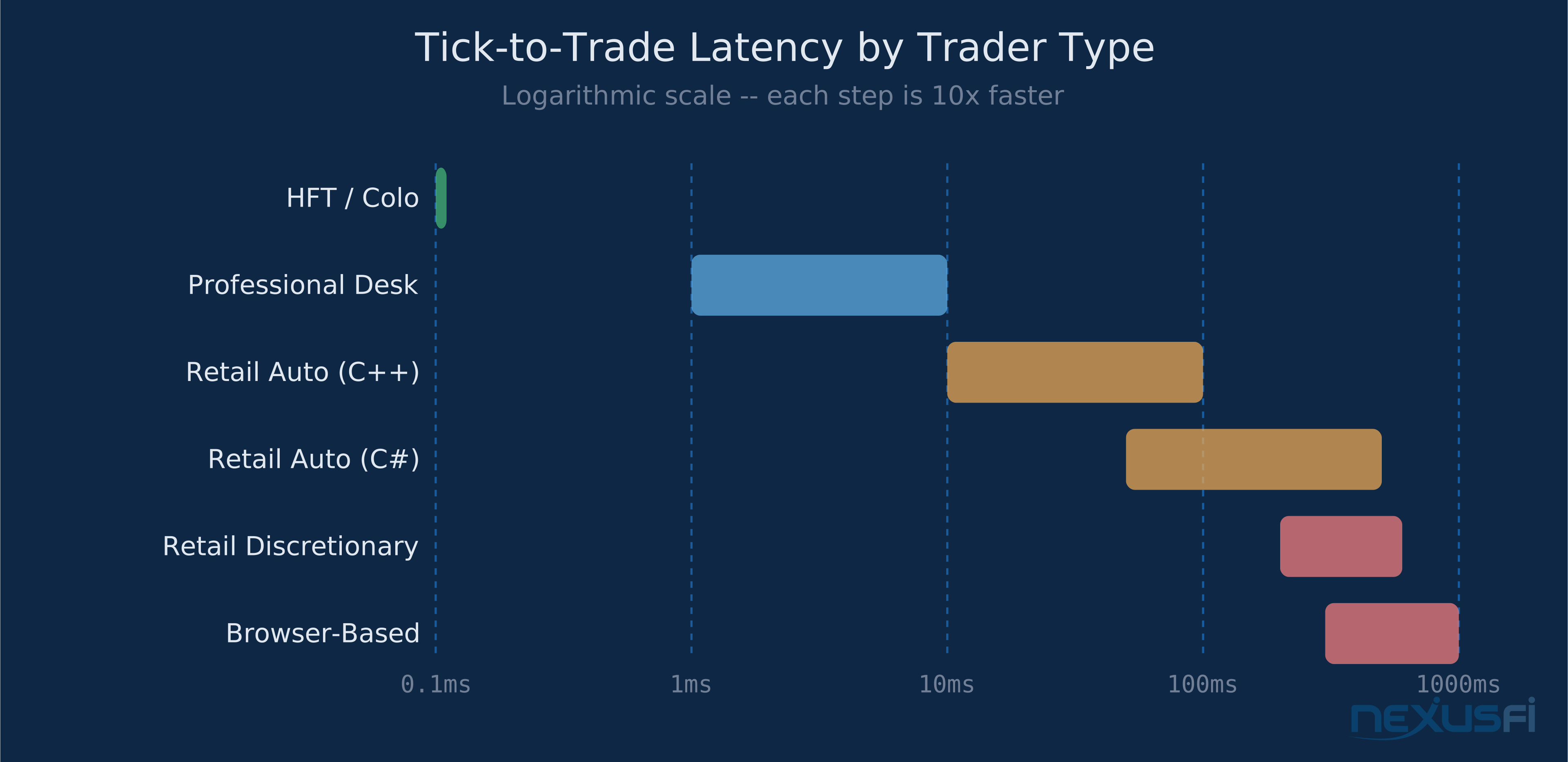
Tick-to-Trade — The complete roundtrip from a market data event triggering a decision to the resulting order reaching the exchange. This is the metric that matters most for automated strategies. Retail systems run 50-500ms. Professional desks run 1-10ms. HFT firms run under 100 microseconds.
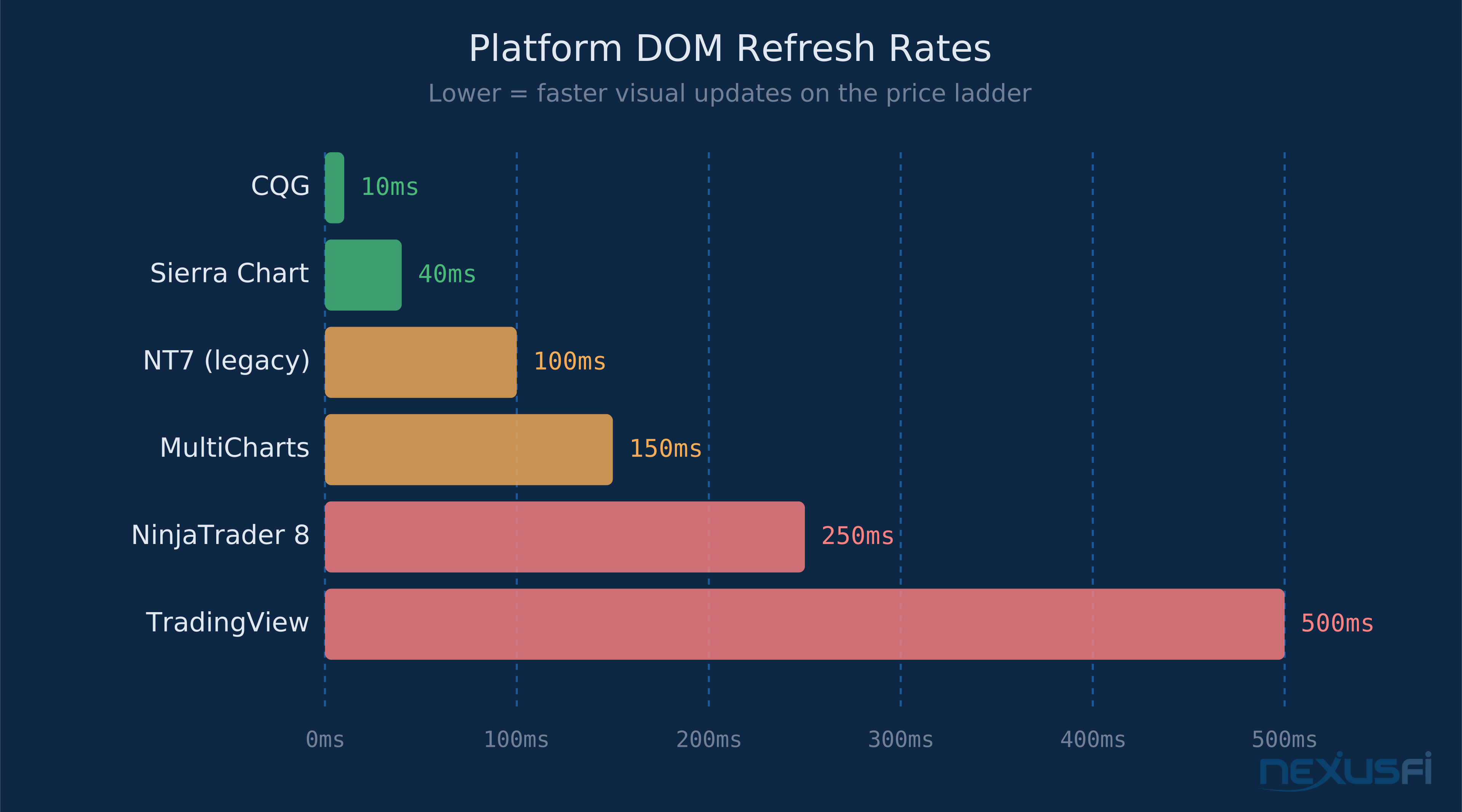
DOM Refresh Rate — How frequently your depth-of-market display updates. This is a platform-level constraint, not a network constraint. NinjaTrader 8 refreshes at 250ms intervals. Sierra Chart can go down to 40ms. The difference is visible when you're reading order flow.
Colocation — Placing your server in the same data center as the exchange's matching engine. CME Group's matching engines sit in Equinix's Aurora, IL data center. If you're colocated there, your roundtrip is measured in microseconds instead of milliseconds. This is HFT territory, not retail.
Market Data vs Order Execution: Two Different Problems #
Traders often conflate market data speed with order execution speed. They're separate systems with separate bottlenecks.
Market data latency determines how current the prices on your screen are. When ES trades 4512.25 at the exchange, there's a delay before that price shows on your DOM. That delay comes from three places: the exchange's multicast feed, your data provider's processing, and your platform's rendering cycle. For most retail setups, total market data latency runs 10-100ms.
Order execution latency determines how fast your orders reach the exchange after you send them. This path runs from your platform through your broker's risk system to the exchange gateway. For retail, this is typically 20-200ms depending on your broker's infrastructure and your distance from Chicago.
Here's what catches traders off guard: you can have fast market data but slow execution, or vice versa. A platform that renders beautiful real-time order flow but routes orders through three intermediaries gives you a front-row seat to watch other traders get your fills.
The practical impact depends on order type. Market orders suffer from execution latency directly — the longer your order takes to reach the exchange, the more the price can move against you. Limit orders suffer from market data latency — if you're placing limits based on what you see on the DOM, stale data means you're reacting to a market that's already moved.
As one NexusFi community member (@Trembling Hand) put it bluntly about NinjaTrader 8's 250ms refresh rate change from NT7's 100ms: the change was a significant step backward for anyone reading order flow on the DOM (Post #829426). That's a market data rendering issue, not an execution issue — but for DOM-based scalpers, the impact on trade quality is real.
Where Speed Actually Differs Across Platforms #
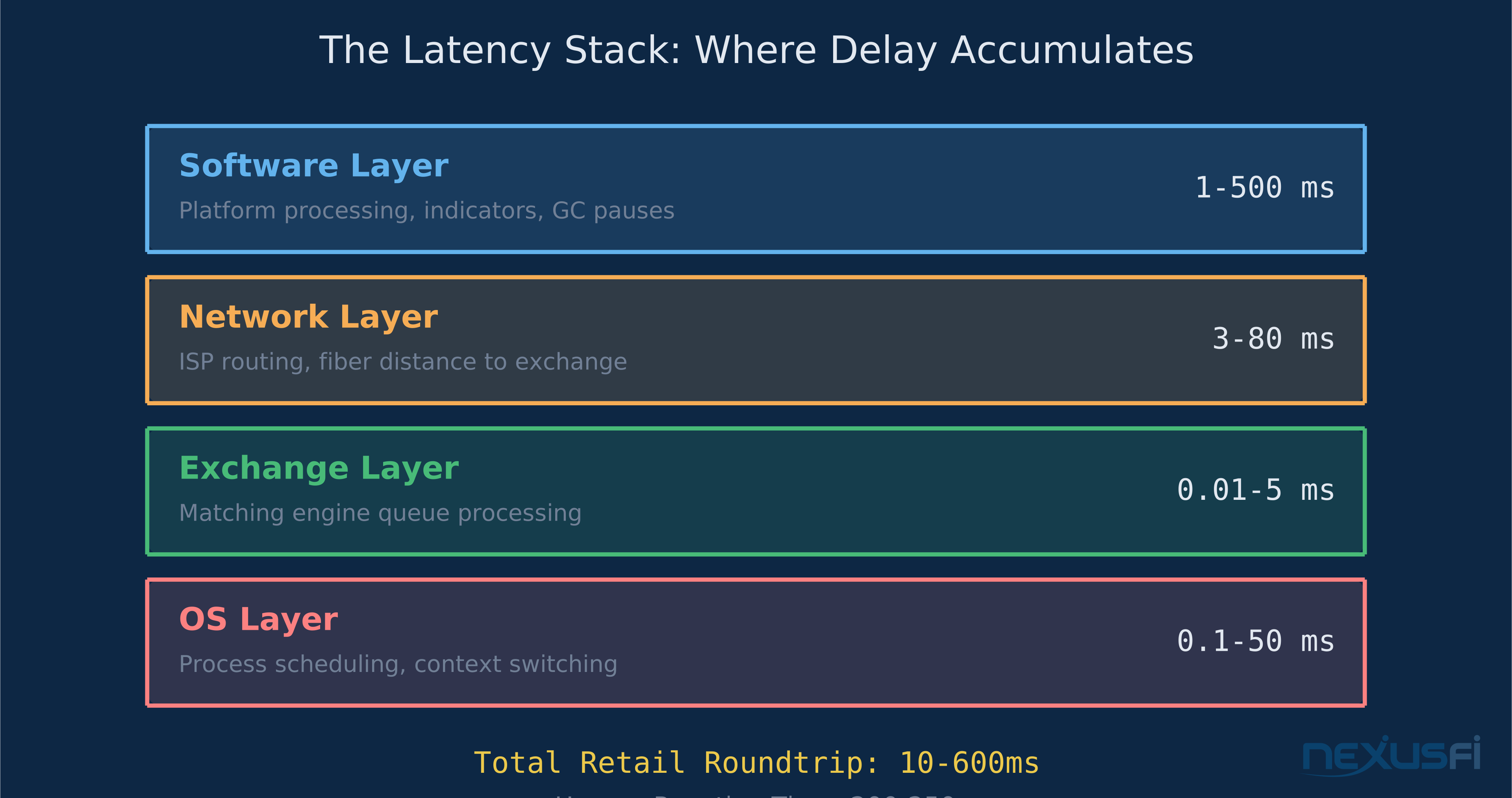
Platform architecture creates hard constraints on latency that no amount of hardware can overcome. Here's where the major platforms stand and why.
C++ Native Platforms #
Sierra Chart runs as compiled C++ with its own FIX engine for exchange connectivity. The DOM refresh rate is configurable down to 40ms or lower. The Advanced Custom Study Interface and Language (ACSIL) lets you write indicators and trading systems in C++ that execute in the same process space as the platform.
@josh measured this directly on NexusFi: "NinjaTrader has a minimum update time of 100ms [at the time in NT7]. Sierra's is more than 2X lower at 40ms" (Post #333303). With NT8 pushing to 250ms, that gap widened further.
@SierraChart stated on the forum that their FIX engine "is monumentally faster than QuickFIX" — the open-source library many other platforms use (Post #350895). This matters because FIX is the protocol that carries orders to the exchange.
CQG is the institutional benchmark. Direct exchange connectivity, sub-10ms DOM updates, and infrastructure designed for professional trading desks. You're paying for this speed — CQG pricing reflects institutional expectations.
Managed Code Platforms #
NinjaTrader 8 runs on C# and the .NET runtime. This adds a layer of abstraction between your code and the hardware. The 250ms DOM refresh rate is a deliberate design choice, not a limitation of .NET per se. Indicators written in NinjaScript (C#) go through garbage collection cycles that can cause momentary pauses.
@gomi reported on NexusFi that NT8 users experience freezing when running multiple indicators — a characteristic of managed memory environments under load (Post #870526). @bobwest ultimately switched away: "I left NT8 some years ago, to Sierra Chart" citing lag as a primary factor (Post #863614).
This doesn't make NinjaTrader bad. It makes it unsuitable for a specific use case: ultra-short-timeframe scalping where milliseconds in market data rendering affect decision quality. For swing traders, position traders, and anyone not staring at a DOM for 1-tick scalps, NinjaTrader's execution infrastructure is perfectly adequate.
MultiCharts uses .NET as well, with PowerLanguage (a TradeStation-derived language) for strategy development. Performance characteristics are similar to NinjaTrader for most use cases.
Browser-Based Platforms #
TradingView runs in a web browser. Every data update traverses JavaScript rendering, DOM manipulation, and the browser's event loop. This adds overhead that native applications avoid entirely. TradingView is excellent for charting and analysis. It's not built for latency-sensitive order execution.
Don't confuse popularity with suitability. TradingView has more users than any other platform. Most of those users are analyzing, not scalping ES on a 1-tick DOM.
What Actually Causes Latency #
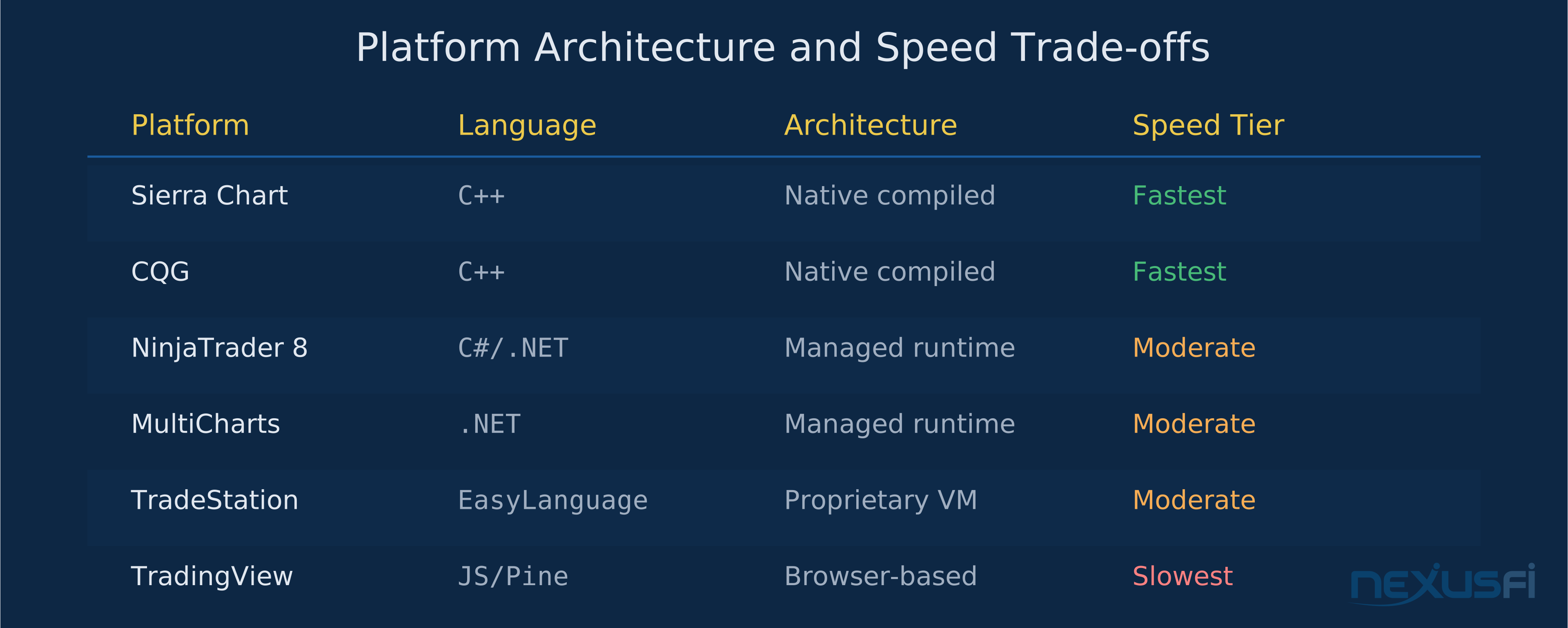
Your trading stack has multiple layers, each adding delay. Understanding where latency accumulates helps you improve the right component.
Software Layer (Your Platform) #
This is where your code runs. Compiled C++ executes faster than interpreted C#, which executes faster than JavaScript. The difference is measurable: a C++ trading system can process a market data event and generate an order in under 1 microsecond. A C# system doing the same work takes 50-500 microseconds. JavaScript in a browser takes 1-10ms.
Every indicator you load adds to software processing time. A clean chart with one simple moving average processes market data faster than a chart with 15 custom indicators, a footprint overlay, and a volume profile. @glennts shared practical optimization tips on NexusFi for reducing NinjaTrader lag: reducing chart update frequency, limiting indicator calculations, and using historical-only calculations where possible (Post #863092).
Network Layer (Your Connection) #
Light travels through fiber optic cable at roughly 200,000 km/s. From New York to Chicago (where CME sits), that's about 3.6ms one way through fiber. From London, about 30ms. From Sydney, about 80ms.
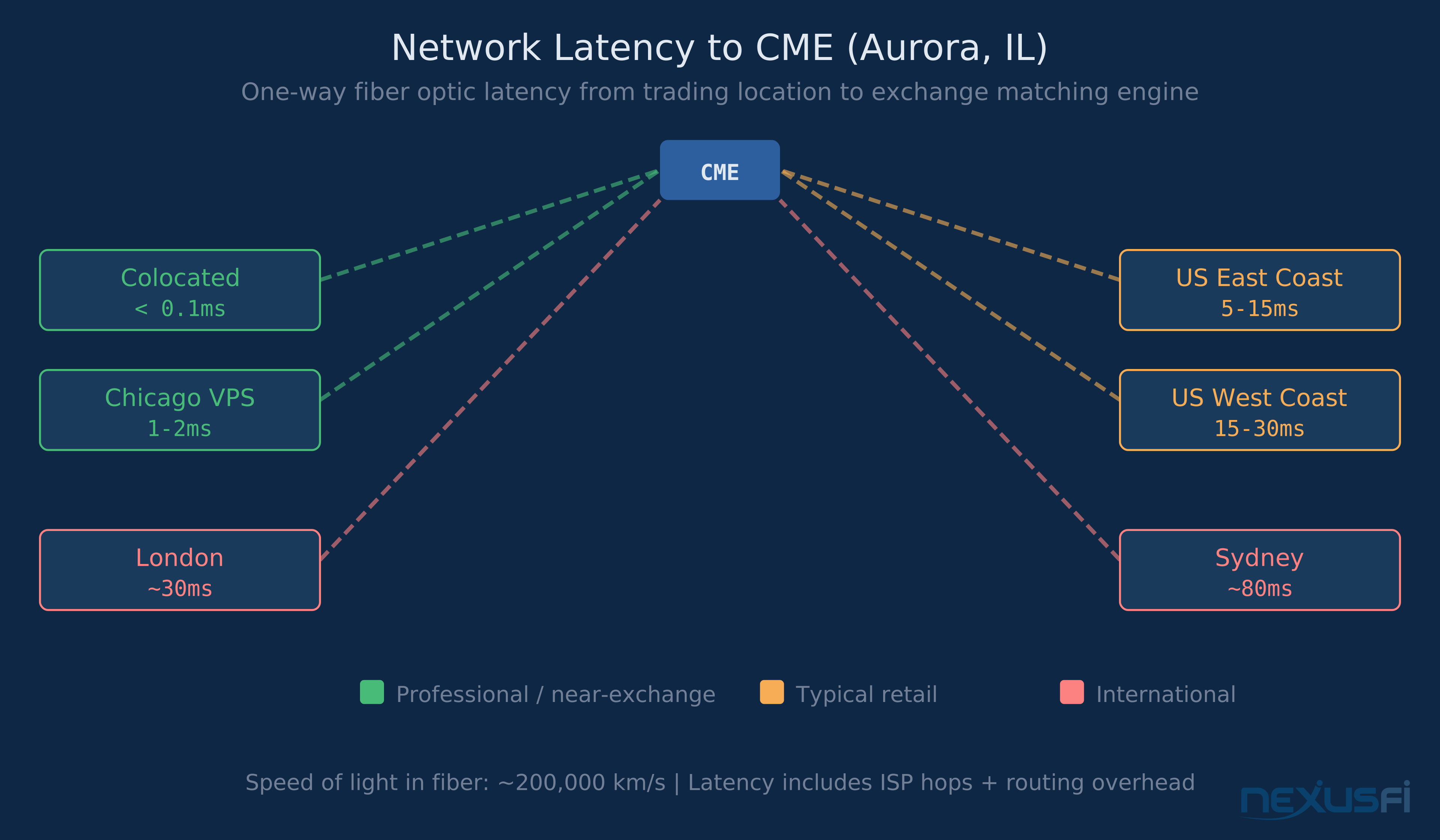
Your ISP adds processing at each hop. A typical retail connection from the US East Coast to CME sees 5-15ms of network latency. VPS providers near the exchange can cut this to 1-2ms.
— the accumulated hops and processing between your home ISP and the exchange add up in ways that simple ping tests don't fully reveal (Post #856437).
Exchange Layer (CME Matching Engine) #
Once your order reaches the exchange, it enters a queue. The matching engine processes orders sequentially. During high-volatility events (FOMC, NFP), this queue can add microseconds to milliseconds of additional delay. Colocated firms see their orders enter the queue first because their packets arrive first.
Operating System Layer #
Your operating system schedules processes. If your trading platform shares CPU time with Chrome, Spotify, and a Discord call, the OS may preempt your platform during a critical market data event. This is especially impactful for garbage-collected languages (C#, Java) where a GC pause can freeze your application for 10-50ms.
Dedicated trading machines with minimal background processes reduce this to a non-issue. No one running a serious scalping operation shares their trading box with consumer applications.
Colocation: When It Matters and When It's Overkill #
Colocation means placing your server physically inside the exchange's data center. For CME, that's the Equinix facility in Aurora, Illinois — Equinix is CME Group's designated co-location vendor, providing direct connectivity to the Globex matching engine via their LNet service. Your server sits in the same building as the matching engine, connected by a few meters of cable instead of hundreds of kilometers of fiber.
Who needs colocation:
- High-frequency trading firms executing thousands of orders per second
- Market makers providing continuous two-sided quotes
- Latency arbitrageurs exploiting price differences between exchanges
- Statistical arbitrage strategies where speed is the primary edge
Who doesn't need colocation:
- Retail discretionary traders (your reaction time is 200-500ms minimum — network latency is rounding error)
- Swing traders holding positions for hours or days
- Position traders using daily or weekly timeframes
- Anyone whose strategy edge doesn't evaporate in 50ms
The math is straightforward. If your average trade holds for 30 minutes and captures 4 ticks on ES, saving 10ms on execution changes your P&L by approximately zero. That 10ms might save you 0.01 ticks of slippage per trade — invisible against the noise of a 4-tick target.
If your average trade holds for 3 seconds and targets 1 tick, that same 10ms might be worth 0.1-0.2 ticks — potentially material across thousands of trades. That's HFT territory, and those firms aren't reading Academy articles about whether colocation matters.
@hyperscalper, who posts extensively about low-latency infrastructure on NexusFi, has built systems at this level. His discussions consistently reinforce that colocation is engineering for microsecond edges, not something retail traders should prioritize (Thread #57897).
Tick-to-Trade: The Metric That Actually Matters #
If you run automated strategies, tick-to-trade (T2T) is the only latency metric worth measuring. It captures the complete pipeline: market data arrival, your strategy processing the event, generating an order, and that order leaving your machine.
Retail automated systems: 50-500ms tick-to-trade. This includes platform overhead, indicator calculations, strategy logic, and order routing. Perfectly adequate for strategies with multi-minute hold times.
Professional trading desks: 1-10ms tick-to-trade. Custom C++ systems, dedicated hardware, optimized network stacks. These are firms that trade for a living and have engineering teams maintaining their infrastructure.
HFT firms: Under 100 microseconds. FPGA-based systems that bypass the CPU entirely, kernel bypass network stacks, and colocation. This is a different industry than retail trading.
For context: human reaction time — the fastest you can click a mouse after seeing a visual stimulus — averages 200-250ms. A large-scale study published in Frontiers in Human Neuroscience measured simple visual reaction time at 231ms across nearly 1,500 subjects, with age-related slowing pushing older populations higher. Your platform could have zero software latency and your orders would still take a quarter-second to generate after you see the setup.
Human reaction time averages 200-250ms. Your platform could have zero software latency and your orders would still take a quarter-second to generate after you see the setup. For discretionary traders, optimizing decision-making beats optimizing hardware every time.
This is why the latency obsession in retail trading forums is often misplaced. If you're discretionary trading, your human latency dwarfs everything else in the stack. Improve your decision-making, not your NIC card.
The exception is automated strategies where the computer makes the decision. There, platform choice genuinely affects T2T. A Sierra Chart ACSIL study running compiled C++ will generate orders faster than a NinjaTrader NinjaScript strategy running managed C#. Whether that difference matters depends entirely on whether your strategy's edge exists in that time window.
Optimizing Speed as a Retail Trader #
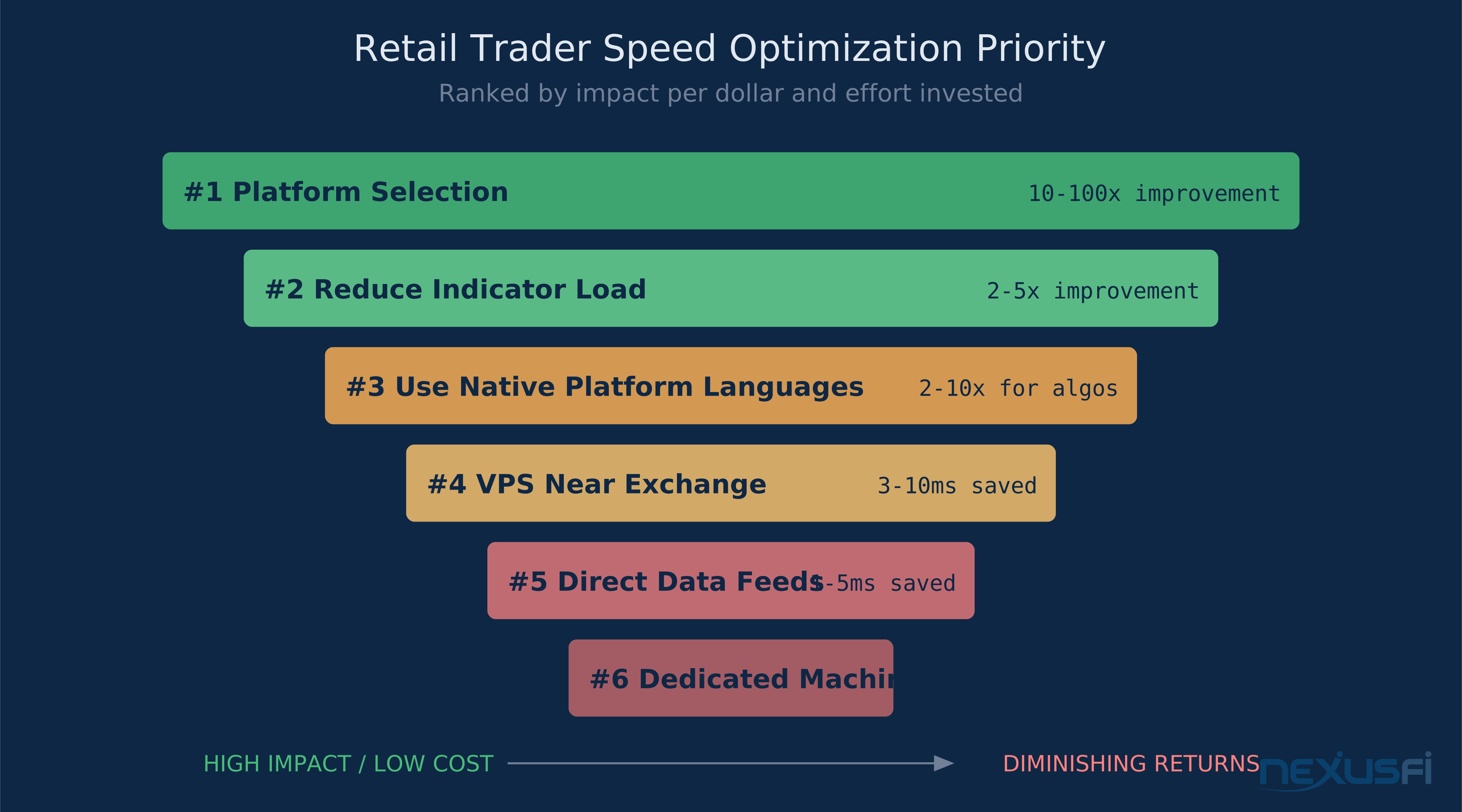
If latency matters to your strategy, here's where to focus — in order of impact.
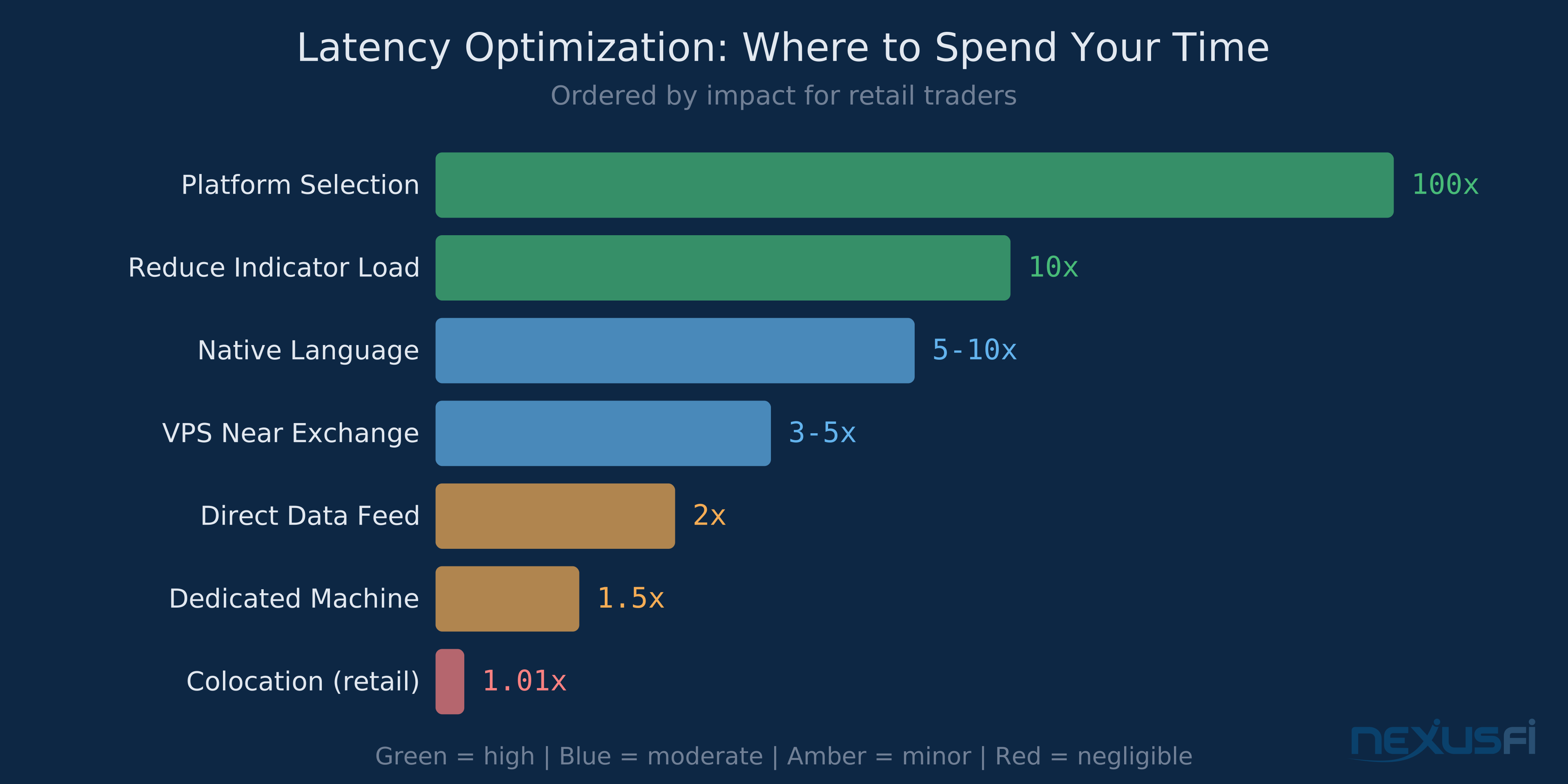
1. Platform selection. This is your biggest lever. Moving from a browser-based platform to a native C++ platform cuts software latency by 10-100x. Moving from NinjaTrader to Sierra Chart cuts DOM refresh rate from 250ms to 40ms. If you trade from the DOM, this difference is visible.
2. Reduce indicator load. Every indicator that recalculates on each tick adds processing time. If your chart has 12 indicators but you only watch 3 during live trading, remove the others from the live chart. Use them on a historical analysis chart instead.
3. Use native platform languages. Sierra Chart's ACSIL (C++) executes faster than NinjaTrader's NinjaScript (C#), which executes faster than TradingView's Pine Script (JavaScript-like). If you're writing automated strategies where tick-to-trade matters, choose the platform that lets you write in the fastest language.
4. Get a VPS near the exchange. A VPS in Chicago puts you 1-2ms from CME instead of 5-15ms from a home connection. Monthly cost: $50-200. If you trade actively and your edge is time-sensitive, this is cheap insurance.
5. Use direct data feeds. Some platforms can connect directly to exchange data feeds (CQG, TT, Rithmic) rather than routing through a broker's data infrastructure. Direct feeds are faster and sometimes more reliable during high-volume events. @SimonC discussed data feed reliability on NexusFi, noting real differences in consistency during fast markets (Post #680699).
6. Dedicated trading machine. A machine that does nothing but run your trading platform eliminates OS-level contention for CPU and memory. Doesn't need to be expensive — it needs to be dedicated.
Prop Firm Speed Considerations #
Most prop firm evaluations don't require low-latency infrastructure. The challenges test whether you can manage risk and extract consistent profit, not whether your setup can front-run other participants.
Where speed matters for prop firms: If you're scalping ES or NQ for 2-4 ticks with tight stops, platform responsiveness affects your fill quality. A 250ms DOM that freezes with indicators loaded costs you edge. Switch to a faster platform or reduce your indicator stack.
Where speed doesn't matter: If you're trading pullbacks in trends, holding for 10+ points on ES, or swing trading crude oil moves — your strategy's edge exists on a timescale where platform latency is irrelevant. Focus on execution plan, risk management, and consistency.
@texastodd documented his scalping path on NexusFi and emphasized that platform performance was a real factor in execution quality during fast-moving markets (Post #632607). For slower strategies, the bottleneck is almost always the trader's decision-making, not the platform's response time.
The practical rule: if you're targeting less than 4 ticks per trade on ES and holding for under 2 minutes, platform speed is a real variable. If you're targeting more than 8 ticks and holding for more than 5 minutes, platform speed is noise.
The Bottom Line #
Latency optimization follows the law of diminishing returns steeply. The jump from a browser-based platform to a native desktop application is massive — potentially 100x improvement in software processing speed. The jump from a managed code platform (C#) to a native C++ platform is meaningful — 5-10x for indicator processing, visible difference in DOM responsiveness. The jump from a well-configured native platform to colocation is marginal for anyone whose strategy horizon exceeds a few seconds.
Know your strategy. Know where your edge lives on the time axis. Then improve the layer of the stack that actually touches your edge. Everything else is engineering for problems you don't have.
See Also #
- DOM Trading Platforms: Choosing the Right Price Ladder for Futures Execution — Deep dive into the platforms where latency meets order execution at the price ladder level.
- Data Feeds and Market Data for Futures Trading — How CQG, Rithmic, IQFeed, and other feeds differ in delivery speed and reliability.
- VPS and Cloud Trading Infrastructure — Practical guide to hosting your trading systems closer to the exchange.
- Latency and Infrastructure for Automated Futures Trading — Co-location, DMA, and the physics of getting orders to the matching engine faster.
- High-Frequency Trading (HFT) in Futures Markets — What HFT actually looks like at the microsecond level and why retail traders shouldn't try to compete there.
Knowledge Map
Go Deeper
Build on this knowledgeReferences This Article
Articles that build on this topicCitations
- — Considering leaving Ninjatrader behind. Alternatives for futures trading? Tradovate? (2022) 👍 12“Hi, It is not normal that your platform should freeze, the problem might probably be with one of your indicators, did you check removing a couple of them so see if you don't have one that is misbehaving ? The "problem" with NT is that it is "too easy...”
- — Ninja Trader or Sierra Charts (2013) 👍 5“In this thread I outlined why I switched from NT to SC. In the 9+ months since then, SC has made continued improvements, making an even stronger case.”
- — Sierra vs. Ninja : why I chose ..... (2012) 👍 13“As if by magic, or perhaps divine inspiration, I found a setting in Sierra under "General Settings" that allows the user to change the chart update interval.”
- — Sierra vs. Ninja : why I chose ..... (2021) 👍 6“I tried both back in the mid 00's. And went with NT because well it was free to sim and it looked nicer. As I advanced I purchased a few licences and and invested a considerable amount in coding. Both time of my own learning C# and paying for coding.”
- — Optimus Futures trading broker review (2018) 👍 5“I never used NT8 because I was running NT7 at 100ms chart update interval (the fastest you can set it). When NT8 came out they fixed the chart refresh data at 250ms (i.e. slower than NT7).”
- — Overwhelmed! Which platform do I choose? Sierra? Ninja? MT5? (2018) 👍 11“I'm responding mainly to your feeling of being overwhelmed with the available choices.... I sympathize, but would like to tell you that you may be giving yourself more grief than you need to, which I hope will come as a relief.”
- — NinjaTrader Brokerage Services (www.ninjatraderbrokerage.com) (2023) 👍 9“I am an extremely technical trader, and use the NT8 platform to host a very complex interactive strategy, written in C#, which uses Unmanaged (very close to raw) Order Management from a Co-located Dedicated 6 Core Xeon 32gb server in Chicago.”
- — Sierra vs. Ninja : why I chose ..... (2013) 👍 8“Market data processing, order processing, and study calculations are all done within the same thread. However all of this is very fast. Also anyone knows how fast C++ based Sierra is - Price feed latency? This is extremely fast processing.”
- — Sierra vs. Ninja : why I chose ..... (2012) 👍 20“I had a rare sit down dinner by myself and had some time to objectively go over my current evaluation of Sierra vs. Ninja, and took some notes at the table. By the way, I don't mean "vs." to create contention, but just to say what it is....”
- — Discussion of a Micro Scalping Day Trading Facility (2021) 👍 2“LOWEST POSSIBLE LATENCIES (COLOCATION?) In most of what I'll discuss, U.S. futures out of Chicago (Aurora) at the CME, for example, is the physical location of the exchanges.”
- — How bad is NT lag? (2022) 👍 5“Heh, heh. I wasn't going to mention Sierra Chart, but since the subject has been raised.... I left NT8 some years ago, to Sierra Chart.”
- — Is NT8 the right platform for scalping? (2021) 👍 2“I would agree 100%. I've been a point & click futs scalper for more than 10 years and NT is too slow if you are talking real scalping. The 250 ms min refresh is a joke.”
- — How bad is NT lag? (2022) 👍 8“If you use Task Manager and locate the NinjaTrader in the Details tab and then right click you can change the priority the CPU gives NT.”
- — The Scalper's Journey (2017) 👍 8“I'm still lurking and finally think I have something to contribute (even though it's an echo from the past): I did this and it was remarkable - there's a thread here on creating a ram drive and putting NT there.”