



Bracket Trading for Futures: The Complete Order Management System
Overview #
Every futures trader eventually learns the same lesson, usually the expensive way: having a good read on the market means nothing if your exits are a mess. You can nail the entry and still blow the trade by hesitating on the stop, missing the target while watching another chart, or freezing when price spikes against you. Bracket trading solves this problem structurally. Instead of managing three separate decisions under pressure, you make one decision at entry and the platform handles the rest.
Entry fires, stop and target activate instantly, linked via OCO logic so filling one automatically cancels the other. No manual cancel-replace in a fast-moving market. No split-second decisions about which order to kill first. The bracket does the work.
This is not a beginner concept. It is the operating system most professional futures day traders run their entire book on. And like any operating system, the details matter enormously. A misconfigured bracket is worse than no bracket — it can leave orphan orders, missize your risk, or give you false confidence that your position is protected when it is not. This guide covers how brackets actually work in ES, NQ, and CL futures, how to configure them correctly by instrument, and how to manage them after entry without breaking the OCO linkage that makes them valuable in the first place.
A bracket order is not a trading strategy. It is infrastructure for executing a strategy without introducing mechanical errors under pressure. You make all the difficult decisions before you are in the trade, when you can think clearly — then the bracket enforces those decisions even when price is moving against you and instinct is screaming to do something different.
What a Bracket Order Actually Is #
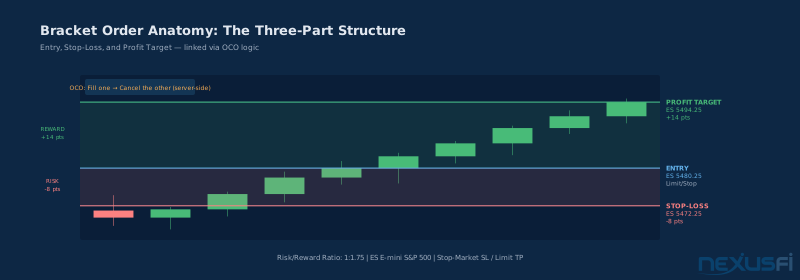
A bracket order has three components: a parent entry order, a profit target (TP), and a stop-loss (SL). The TP and SL are children of the entry and linked to each other as OCO — One Cancels Other. When you enter the trade, both children activate simultaneously. When price reaches the TP, the limit fills and the SL is immediately canceled. If price hits the SL instead, the stop-market executes and the TP cancels. Only one of the two can fill.
This sounds simple. The complications come in implementation.
The most important distinction is between platform-native bracket orders and manual bracketing with OCO. In a platform-native bracket, the children are linked server-side and only transmit after the parent fills. If the parent is rejected or canceled, no orphan orders exist. With manual OCO, you are creating the linkage yourself — which means if the parent fails but you already submitted the children, you have live orders with no position to protect them.
For ES, NQ, and CL day trading, use platform-native brackets wherever possible. NinjaTrader's ATM (Advanced Trade Management) strategies are the most common implementation. Rithmic's R|Trader has server-side OCO as a specific feature. Whatever platform you use, verify — before going live — that your bracket's OCO linkage is server-side, not client-side.
Client-side OCO can break on connectivity issues. Server-side OCO persists even if you lose internet for 10 seconds.
Order Types Inside the Bracket #
This is where most guides skip over important details. The choice of order type for each bracket leg matters.
Entry order: Three options — stop-market (for breakouts), limit (for mean reversion), or market (for immediate entries after confirmation). Each has its place depending on your setup. A breakout entry on an opening range high uses a stop-market: entry fires when price clears the level. A value area fade uses a limit: you are waiting for price to come to you.
Profit target (TP): Almost always a limit order. Limit TPs fill at your specified price or better, with no slippage. In liquid instruments like ES during RTH, limit TPs fill reliably. In NQ, fast-moving markets can occasionally blow through your limit on the initial move — but the fill still happens when price retraces to that level.
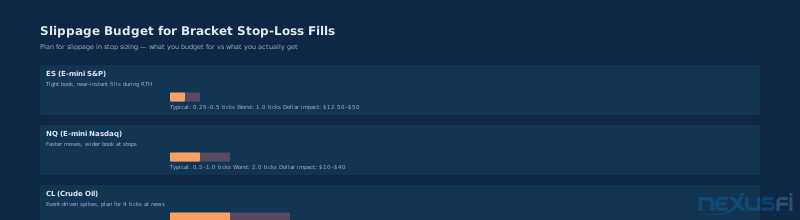
Stop-loss (SL): Stop-market for all three instruments. Not stop-limit. A stop-limit order will not fill if price gaps through your limit price — which is exactly what happens in fast markets. Stop-market guarantees an exit attempt at the market price, accepting the cost of slippage. That slippage is a cost of certainty. Budget for it in your sizing.
Server-Side vs Client-Side OCO #
Before trusting a bracket with real money, you need to know where your OCO linkage lives. This distinction determines whether your position protection survives platform issues.
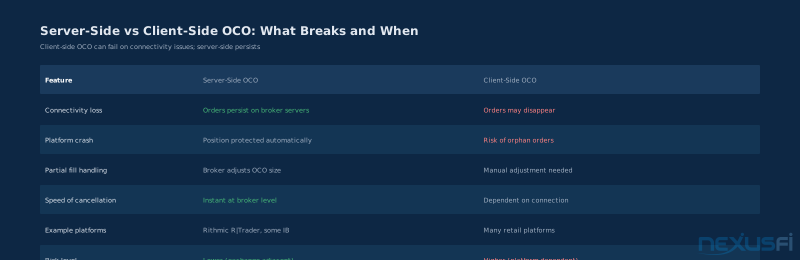
@Fat Tails gave the definitive explanation in the outage thread when NinjaTrader went offline mid-trade: "In most cases OCO orders are not native exchange orders, but the OCO functionality is controlled by the trading front-end or the broker. This is the key difference — if the connection breaks, front-end OCO may fail while server-side OCO persists."
The practical takeaway: ask your broker directly whether their OCO implementation is server-side or client-side. If they hedge or avoid the question, that is your answer.
Platform Verification Before Going Live #
Before trusting a bracket with real money, run through this checklist on your specific platform and broker.
Does the parent order trigger children only after fill, not on submission? Submit a bracket, then cancel the parent before it fills. Check whether TP and SL still show as working orders. If they do, your platform has an orphan order problem.
Does the OCO linkage survive a partial fill? If you are trading 5 contracts and only 3 fill initially, do the TP and SL adjust to 3 contracts? Mismatched quantities mean you are either overprotected or underprotected.
Are all bracket components set to matching time-in-force? A DAY parent with a GTC stop creates mismatched logic. Keep everything on DAY for intraday sessions.
Are your price levels tick-aligned? ES trades in 0.25-point increments. A stop at 5480.30 will be rounded by most platforms — know how your platform rounds, and compute bracket levels explicitly in ticks, not in rough dollar amounts.
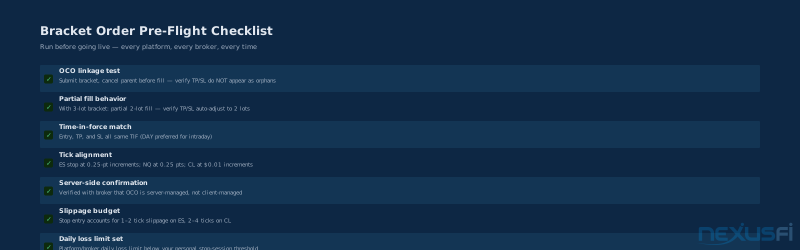
Run the pre-flight checklist in simulation with real market data before switching to a live account on any new broker or platform. A bracket that works in one DOM environment may behave differently in another.
Instrument-Specific Configurations #
ES (E-mini S&P 500)
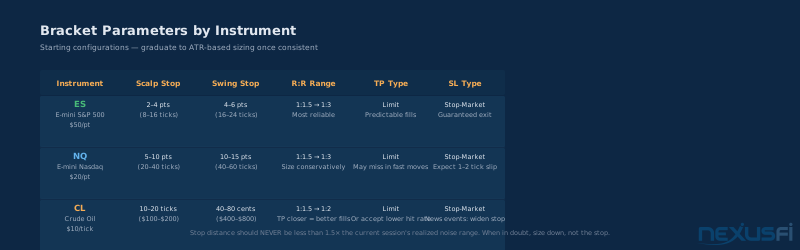
ES is the most forgiving instrument for bracket trading. It is the most liquid futures market in the world during RTH, spreads are tight (0.25 points bid/ask), and order book depth means your stop-market will typically fill within 1--2 ticks of your stop price.
Scalp configurations: 2--4 point stops (8--16 ticks), targeting 1:1.5 to 1:3 R:R. The most common setup: 4-point stop with 6--8 point target for a 1:1.5 to 1:2 ratio. This is the bread-and-butter bracket for trend continuation on a directional day.
Swing configurations within the session: 4--6 point stops with 8--12 point targets. This gives you room for normal intraday chop while keeping meaningful upside.
Breakeven move rule for ES: once price has moved 50%+ toward your target (2+ points on a 4-point target setup), move SL to entry +1 tick. You are now in a free-roll. Worst outcome is a scratch trade. @Fat Tails explored the ATM configuration that automates this in the ATM Strategy Assistance thread: "A 20-period SMA with a band of 2.5 standard deviations around it gives you the dynamic breakeven reference."
NQ (E-mini Nasdaq)
NQ moves faster and wider than ES. A normal session ATR for NQ is roughly 150--200 points — about 600--800 ticks. That scale matters for stop placement. What looks like a tight 10-point stop on NQ is actually 40 ticks, roughly equivalent in dollar risk to a 2-point ES stop.
NQ stops must be wider because NQ's intraday noise is proportionally wider. The minimum practical scalp stop for NQ is 5 points during RTH; most consistent traders use 8--12 points. Trailing brackets work especially well on NQ momentum days — let runners run with a volatility-based trail.
CL (Crude Oil)
CL is the most event-sensitive of the three. EIA inventory reports (Wednesday 10:30 AM ET), geopolitical news, OPEC announcements — any of these can produce 20--40 tick moves in seconds. For routine sessions: 10--20 tick stops, 15--30 tick targets, with tighter initial R:R ratios (1:1.5 rather than 1:2+). Around inventory reports: many CL traders widen initial stops (40--80 cents) immediately around the report, then tighten after the initial reaction settles.
The Anatomy of a Bracket Trade #
Walk through what a bracket trade actually looks like in practice. You are watching ES. Opening range has been established. A pullback to the VWAP bands looks like a clean setup — prior support, volume coming in. You have pre-configured a bracket template: 4-point stop, 7-point target (1:1.75 R:R).
You click buy at the market. Parent fills at 5480.25. Instantly, two child orders activate:
- Limit sell at 5487.25 (profit target, +7 points)
- Stop-market sell at 5476.25 (stop-loss, -4 points)
These two orders are now competing. One will fill; the other will cancel. Price runs to 5484, about 3.75 points in your favor. 50% of target reached. You move the SL to 5480.50 — slightly above entry, now in profit territory no matter what. This modification works only if you verify the TP at 5487.25 is still active and still OCO-linked to the new SL position. Price hits 5487.25. Limit fill confirmed. The SL at 5480.50 auto-cancels. Trade is complete.
This is how it works when everything is right. The discipline is in the setup: knowing your levels before entry, having the template ready, not improvising under pressure.
Position Sizing: The Only Way #
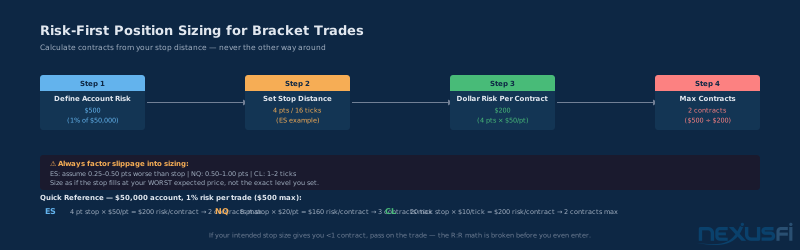
This is where many traders get it backwards. They decide how many contracts they want to trade, then figure out where to put the stop. That is backwards. The stop comes first. Size is derived from the stop.
The correct sequence:
- Define your account risk per trade. For a $50,000 account at 1% risk, that is $500 maximum loss.
- Determine your stop distance based on the setup's invalidation level, not a round number.
- Calculate per-contract dollar risk: stop distance in points × contract point value.
- Divide account risk by per-contract risk. Round down. That is your maximum size.
Example: ES setup with a 4-point stop. ES is $50 per point. Per-contract risk: 4 × $50 = $200. With $500 account risk: floor($500 / $200) = 2 contracts max. Now add slippage: assume ES stop fills 0.25 points worse. Effective stop: 4.25 × $50 = $212.50 per contract. With $500 risk: floor($500 / $212.50) = 2 contracts. Same answer here — but on a tighter stop this would reduce your size.
For NQ with an 8-point stop: $20 per point × 8 = $160 per contract. With $500 risk: floor($500 / $160) = 3 contracts. For CL with a 20-tick stop: $10 per tick × 20 = $200 per contract. With $500 risk: 2 contracts.
The critical rule: if your intended stop gives you less than 1 contract, do not take the trade. The math does not work. Either find a tighter stop with a valid invalidation level, or pass.
@tigertrader's formula from the NYSE TICK thread: "2% of equity risk based on a 1.5 ATR stop." Starting from account risk, using ATR to derive stop distance, produces brackets that adapt to current volatility rather than fixed dollar amounts. @Fat Tails expanded on this in the PositionSizer thread: "Position sizing is really simple. Define acceptable $$$ risk per trade. Know your default money management stop. Divide. Round down."
Volatility-Based Stop Sizing #
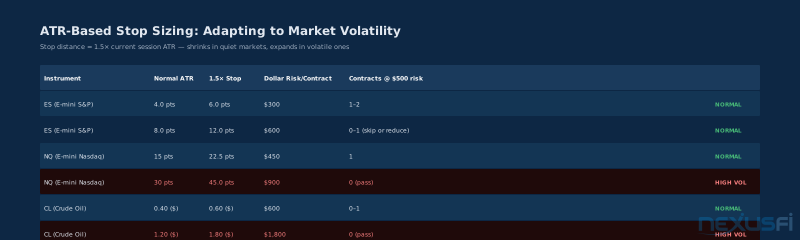
Fixed stop distances (4 points for ES, 8 points for NQ) work as starting configurations. Experienced traders replace them with ATR-based sizing. The concept: a stop sized to 1.5--2× the current session's ATR absorbs normal market noise without being so wide it undermines your R:R ratio.
When volatility spikes (pre-FOMC, CPI, major geopolitical events), ATR expands and your stop expands with it — you trade smaller. When volatility compresses (holiday weeks, summer Fridays), ATR contracts and you can use tighter stops, potentially trading larger.
For ES, a practical implementation: check the 14-period ATR on a 5-minute chart at the start of each session. If ATR is 6 points, your minimum stop is 9 points (1.5×). If ATR is 3 points, 4.5 points minimum. This keeps your brackets consistent with actual market conditions rather than arbitrary fixed distances.
Common Bracket Setups #
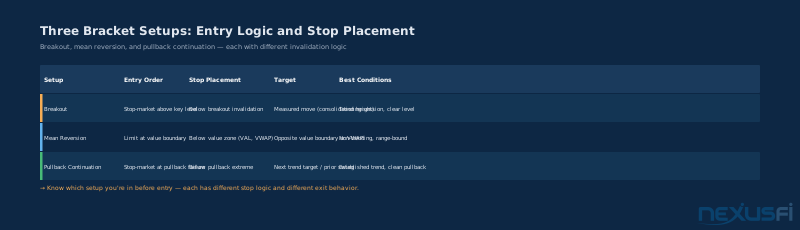
Three setups cover most of what ES/NQ/CL day traders actually use.
Breakout Bracket
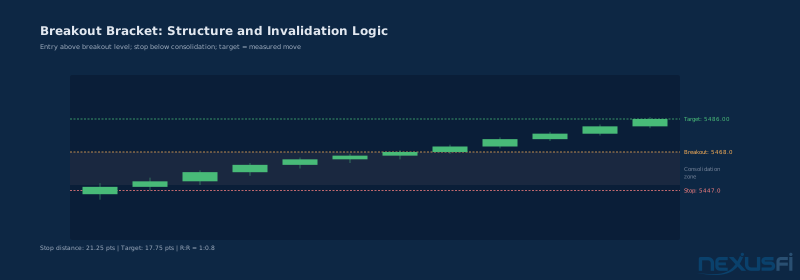
Entry: stop-market order above the breakout level (opening range high, prior swing high, a resistance cluster). Stop: just below the breakout invalidation point — the level price needs to hold for the breakout to be valid. Not just below your entry. Below the level. Target: measured move (height of the consolidation projected above the breakout), next resistance cluster, or R-multiple target.
This is the cleanest bracket setup because the invalidation level is structurally defined.
Mean Reversion Bracket
Entry: limit order near a value area (VWAP, value area low, prior day close). Stop: below the value boundary. Target: toward the opposite value boundary or the VWAP. NQ mean reversion brackets are less reliable than ES on most days because NQ's tighter institutional participation means it trends more aggressively. ES reverts to value more consistently.
Pullback Continuation Bracket
Entry: stop-market order at a pullback failure level in an established trend. Stop: behind the pullback extreme. Target: next logical target in the trend. The pullback bracket works best when the trend structure is clear — defined highs and lows — and the pullback has found support at a structural level.
Managing Live Brackets #
Once in a bracket trade, three types of modifications make sense. Everything else is usually a mistake.
Moving the stop to breakeven
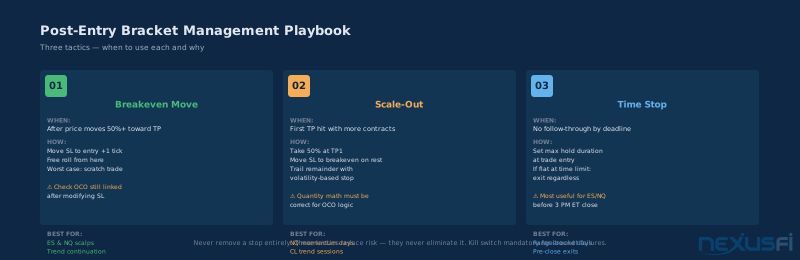
Move the SL to entry (or entry +1 tick) once price has moved meaningfully in your favor — typically 50% toward the TP or more. This is the single most valuable management tactic: turning a risk trade into a free-roll. The worst outcome from here is a scratch trade. What not to do: move the stop early because you are nervous. The market needs room to move.
@"In my opinion stops should be moved based on information that the market is giving you. Whether it be price action, volatility, order flow. But moving a stop to breakeven just because you are up X ticks makes no sense because the market neither knows nor cares where you entered." — @DarkPoolTrading, <a href="https://nexusfi.com/showthread.php?t=28542&p=353024#post353024">Current Thoughts on the old Break Even Move</a> (2013)
Scaling out
With multiple contracts, you can take partial profits at a first target and let the remainder run with a trailing stop. Example: 4 contracts, TP1 at +5 points on 2 contracts, trail the remaining 2 with a 3-point trailing stop. Platform gotcha: when you fill partial at TP1, your OCO linkage must correctly reduce the remaining SL to cover 2 contracts, not 4. Not all platforms handle this automatically. Test this in simulation before going live.
— a direct description of a scale-out plus trail system in practice.
Time stops
If no follow-through by a specified time, exit. Especially useful for ES/NQ before 3 PM ET (avoiding the last 30 minutes of the session with an open position), and for CL positions flat heading into the next inventory report cycle. Time stops work alongside hard stops, never instead of them.
The OCO Failure Mode #
The single most dangerous thing that can happen with bracket orders is an orphan order: a live TP or SL with no position behind it.
This can happen when:
- The parent order is rejected or canceled after children have already been transmitted
- You manually cancel one leg without the other auto-canceling
- A platform connectivity issue breaks the OCO linkage
- You modify a bracket leg in a way that your platform does not support cleanly
After every bracket entry, look at your blotter. Confirm parent filled. Confirm both TP and SL show as working orders in the correct quantity. If something is off — connection issue, partial fill, anything unusual — flatten the position manually and rebuild the bracket from scratch. It takes 10 extra seconds. It prevents the scenario where you think you are protected but you are not.
From @Fat Tails in the NinjaTrader outage thread: "First you need to understand where your order resides. If you have a target and a stop order, they may either be sitting on your machine (simulated by NinjaTrader), sitting with your broker (simulated by your broker) or sitting on the exchange. My broker natively supports OCO orders, and I so do not have orders which are locally held."
This is why platform selection matters — and why knowing your platform's OCO implementation is non-negotiable. The broker comparison in that thread remains one of the best references for which platforms offer true server-side OCO.
Account-Level Risk Controls #
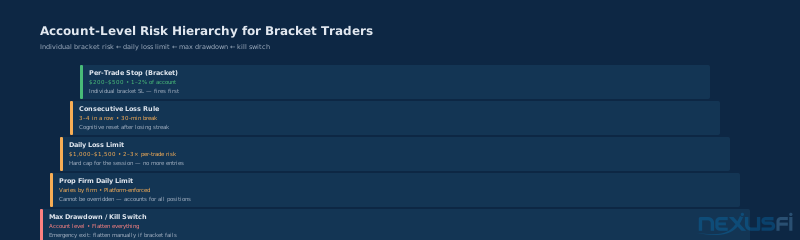
Bracket orders control individual trade risk. Account-level controls protect you from a bad run of brackets.
Daily loss limit: a hard dollar cap on losses per session. When hit, no more entries for the day. Most serious traders set this at 2--3× their per-trade risk. On a $500 per-trade risk, a $1,000--$1,500 daily loss limit makes sense. Most prop firm platforms enforce this automatically.
Maximum consecutive losses: after 3--4 consecutive losers, step away for 30 minutes. Not because the market is against you — markets do not care about your streak. Because your decision-making quality degrades after consecutive losses, and your next bracket entry is statistically more likely to be an error than a setup.
Kill switch: if a bracket fails in an unusual way — partial fill not resolving, orders in unexpected states, platform behaving strangely — flatten everything manually. Market order if necessary. Worry about the analysis after the position is closed, not while it is live and uncertain.
Correlation awareness: if you are running brackets in both ES and NQ simultaneously, your total risk is higher than either bracket in isolation because ES and NQ move together. Two concurrent brackets each risking $500 are not $1,000 of independent risk — they are closer to $900+ of correlated risk because both stop out when the market drops.
Bracket Trading and Prop Firm Rules #
If you are trading on a prop firm account, bracket orders interact with firm-specific rules in ways that matter.
Most prop firms require bracket orders or equivalent protection — they do not want you holding unprotected positions that can breach daily loss limits in seconds. The bracket satisfies this requirement, but verify: some firms have maximum stop distance rules (stops cannot be more than X ticks from entry) that constrain your bracket configuration.
Daily loss limits and max drawdown rules at prop firms are not suggestions. If your bracket SL would breach the firm's daily loss limit, the platform typically has a separate enforced limit that closes everything. Know your firm's rules, set your bracket SL inside those limits, and set your personal daily loss limit even tighter.
@striveforwisdom in the scalping sustainability thread: "I take about 2--4 trades max with the size of only 1 contract during this period if the market is volatile enough for me to take trades on a certain setup." Starting small, bracket-protected, gives prop evaluation traders a path to consistent data without blowing through firm limits.
Bracket discipline helps level that field by removing the hesitation that algos do not have.
The key bracket constraint for prop firm traders: your SL must guarantee you stay within daily loss limits even in the worst-case slippage scenario. If your daily limit is $1,000 and you trade 4 brackets at $250 each, you hit the limit exactly — leaving no buffer for slippage.
Summary #
A bracket order is not a trading strategy. It is infrastructure for executing a strategy without introducing mechanical errors under pressure. The value proposition is simple: you make all the difficult decisions before you are in the trade, when you can think clearly. Once you are in, the bracket enforces those decisions even when price is moving against you and instinct is screaming to do something different.
That discipline — pre-committed, mechanically enforced — is worth more than most technical setups. The edge is not in the entry. It is in the consistency of the exit. A bracket order is the clearest path to exit consistency available to retail futures traders.
Bracket orders do not make the trade easier — they make the exit mechanical and consistent, which removes one dimension of difficulty. That is their entire value.
Configure it correctly. Test it in simulation. Know your platform's specific OCO implementation. Size from the stop, not toward it. Run the account-level controls alongside it, because individual trade risk management is only as good as the system around it.
Knowledge Map
Prerequisites
Understand these firstGo Deeper
Build on this knowledgeReferences This Article
Articles that build on this topicCitations
- — OCO vs bracket, when would you apply? (2021) 👍 3“The term bracket order in my book is when you have a stop loss order and exit target set in your platform order management settings to be entered automatically when you place the entry order. The entry and exit order are brackets above and below your entry order. An OCO order takes it further in that both sides are linked to each other so if one order is hit, the other is cancelled.”
- — Outage with a live position on Ninja (yikes) what to do? (2012) 👍 7“In most cases OCO orders are not native exchange orders, but the OCO functionality is controlled by the trading front-end or the broker. This is the crucial difference -- if the connection breaks, front-end OCO may fail while server-side OCO persists.”
- — Outage with a live position on Ninja (yikes) what to do? (2012) 👍 3“First you need to understand where your order resides. If you have a target and a stop order, they may either be sitting on your machine (simulated by NinjaTrader), sitting with your broker (simulated by your broker) or sitting on the exchange. My broker natively supports OCO orders, and I therefore do not have orders which are locally held.”
- — ATM Strategy Assistance (2011) 👍 7“A 20-period SMA with a band of 2.5 standard deviations around it gives you the dynamic breakeven reference. The key is not where your entry was -- it is where the market currently values your instrument.”
- — Current Thoughts on the old Break Even Move (2013) 👍 7“In my opinion stops should be moved based on information that the market is giving you. Whether it be price action, volatility, order flow. But moving a stop to breakeven just because you are up X ticks makes no sense because the market neither knows nor cares where you entered.”
- — Current Thoughts on the old Break Even Move (2013) 👍 7“I have not yet seen a backtest where the breakeven stop did any good. If you decide to use a trailing stop for an automated strategy, then it should be based on volatility and not on the entry price for the position. The break even move is more of a psychological trick used by discretionary traders.”
- — Fixed vs trailing stops (2020) 👍 5“My stop climbs to +20, and if it reaches 38 pts, my stop climbs to +20. A concrete description of a scale-out plus trail system: partial profit locks in at TP1, and a trailing mechanism manages the remainder.”
- — NYSE $TICK AND $ADD (2011) 👍 47“2% of equity risk based on a 1.5 ATR stop. Starting from account risk, using ATR to derive stop distance, produces brackets that adapt to current volatility rather than fixed dollar amounts.”
- — PositionSizer for ninjatrader (2010) 👍 17“Position sizing is really simple. Define acceptable $$$ risk per trade. Know your default money management stop, for example 12 ticks for ES. Divide. Round down.”
- — Is scalping Emini a sustainable trading strategy? (2021) 👍 16“I take about 2-4 trades max with the size of only 1 contract during this period if the market is volatile enough for me to take trades on a certain setup. Scalping is sustainable but requires iron discipline on entries and exits -- the bracket enforces the exit discipline part.”
- — Is scalping Emini a sustainable trading strategy? (2021) 👍 15“On small timeframes you are competing against robots and algos -- trading is more mechanical and algos excel in that environment. The smaller the timeframe, the more difficult trading becomes.”