



Order Types in Futures Trading: What You're Actually Sending to the Exchange
Overview #
Order Types in Futures Trading: What You're Actually Sending to the Exchange
You'd think order types would be boring infrastructure — the mechanical plumbing you set up once and forget. They're not. The order type you choose determines your fill quality, your risk profile, and whether your stop actually fires where you think it does. Get this wrong and you're not just losing a few ticks — you're building a trading system on a foundation you don't understand.
This article covers every order type you'll encounter on CME Globex and the major US futures exchanges, how they actually work at the matching engine level, and when each one makes sense. Not a perfectly balanced "here are the pros and cons" treatment. Actual positions on what works, what's misunderstood, and what will cost you real money.
Key Concepts #
Before getting into individual order types, three concepts underlie everything:
Matching engine priority: CME Globex uses price-time priority (FIFO) for most contracts. Orders execute in price order first, then time of arrival at that price. Get to the bid or offer first at a given price, and you get filled first. Queue position matters enormously for limit orders.
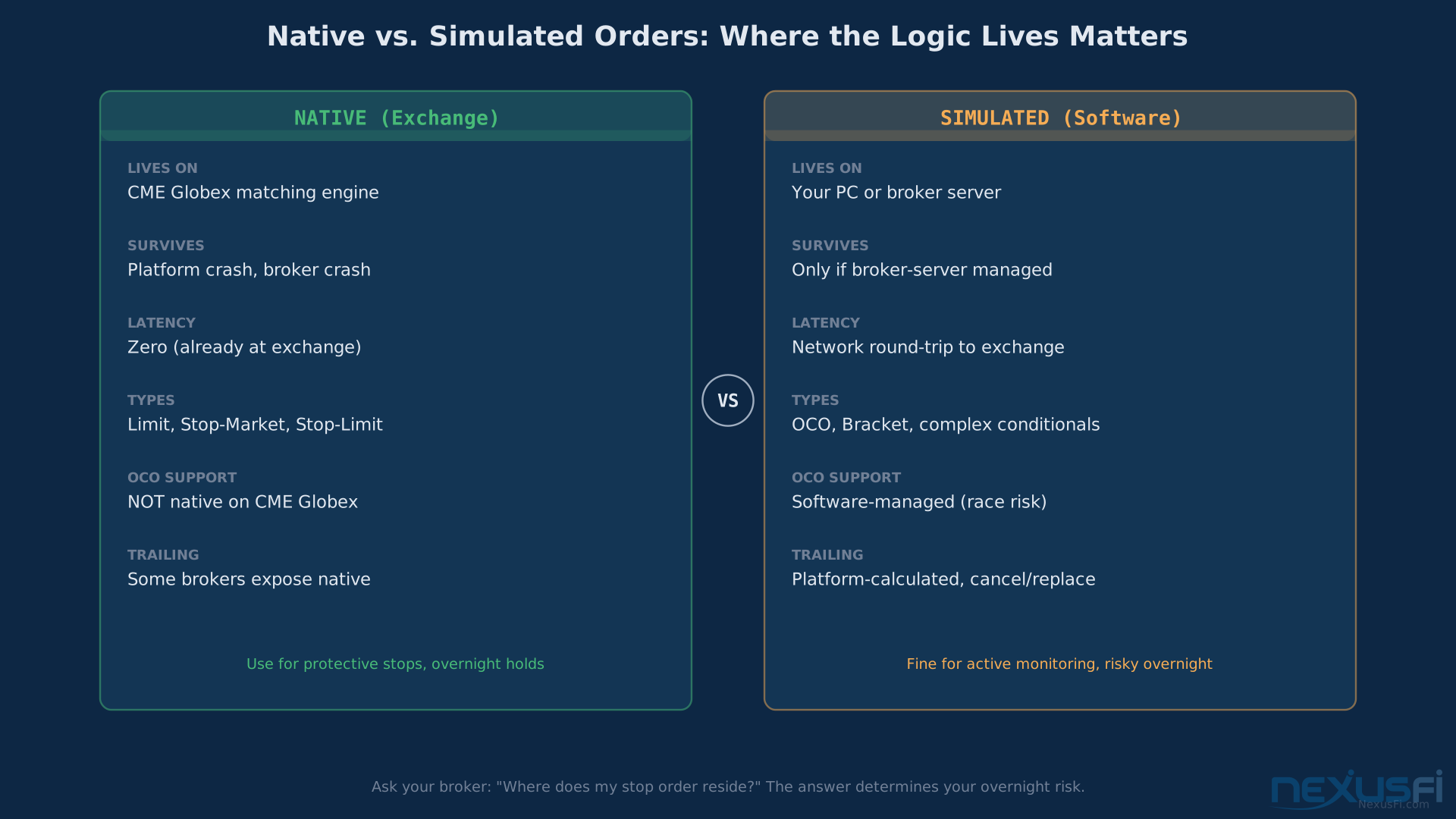
Native vs. simulated orders: Some order types exist on the exchange's matching engine itself — native orders. Others are simulated by your broker or trading platform software: the software watches the market and fires a different order type when conditions are met. Native orders survive connection drops, platform crashes, and server restarts. Simulated orders die with your software. This distinction is critical for stops and OCO orders.
Working orders vs. resting orders: A working order is in the exchange's order book. A resting order is waiting on a server somewhere — either yours or your broker's — and hasn't been submitted to the exchange yet. This distinction matters most for stop orders.
Tick size reference: ES trades in 0.25-point increments ($12.50/contract). NQ in 0.25-point increments ($5.00/contract). CL (crude oil) in $0.01/barrel increments ($10.00/contract). Every slippage calculation below uses these real values.
Core Order Types #
These are the fundamental building blocks — every futures order you place is one of these types, or built from them.
Market Orders
A market order is the simplest instruction: buy or sell immediately at whatever price the market will give you.
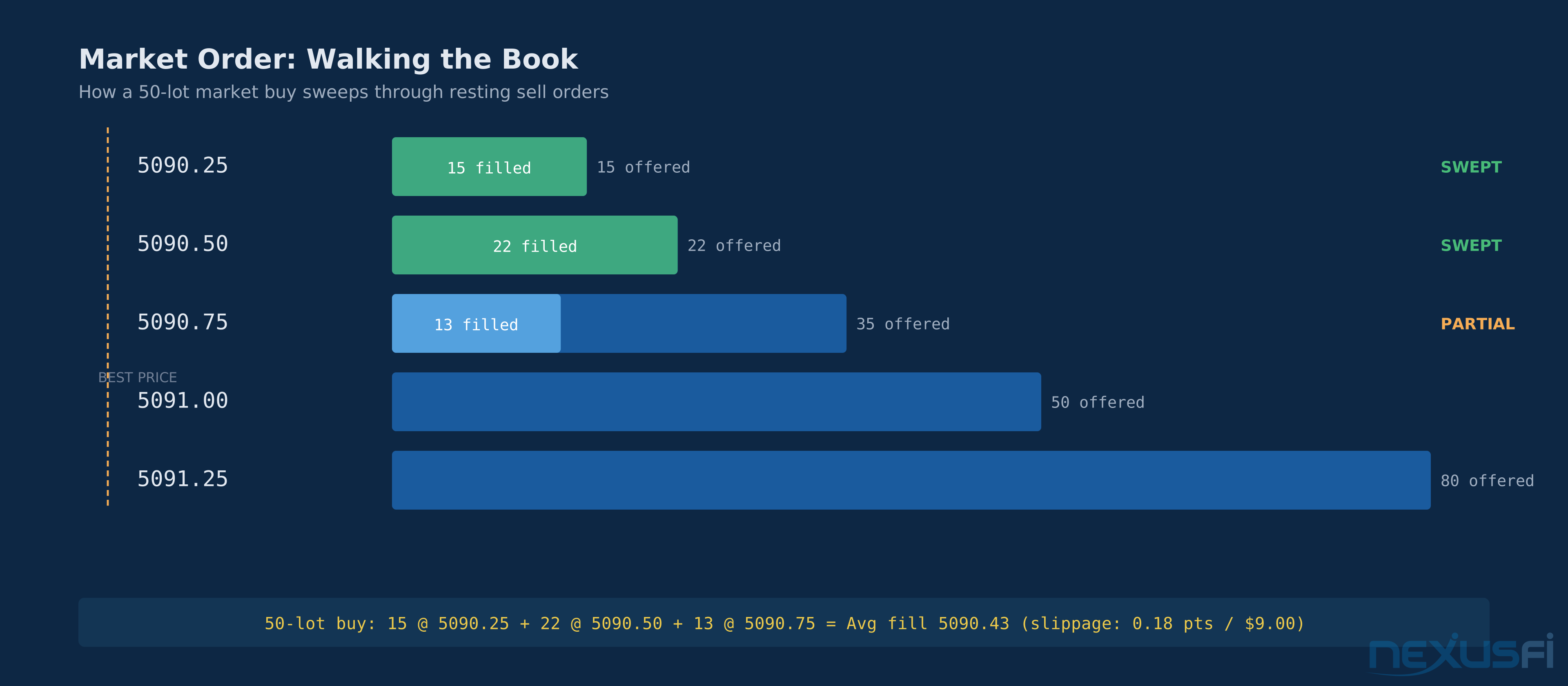
Here's how it works on CME Globex. When you submit a market order to buy, Globex sweeps through resting sell orders from best price upward until your quantity is filled. If you're buying 1 ES contract and there are 400 contracts offered at 5090.25, you fill at 5090.25. Done. But if you're buying 50 contracts and there are only 15 at 5090.25, Globex fills the first 15 there and takes the remaining 35 from the next price level — 5090.50 — and so on. This is called walking the book, and the difference between your expected price and your actual average fill price is slippage.
In liquid contracts like ES during regular trading hours, slippage on small orders is typically 1 tick or less. Community analysis confirms that ES slippage on market orders typically runs 1-2 ticks in normal conditions — so on a single ES contract, you're looking at $12.50-$25.00 per market order round-trip in slippage alone, before commissions.
That number sounds small. It isn't when you're trading frequently. A systematic scalper using market orders exclusively pays 2-4 ticks per round-trip instead of 0-1. At 100 trades per month on ES, that's $2,500-$5,000/month in avoidable friction.
On CL, the slippage picture gets worse because crude oil is more volatile and the book thins during news events. During the 2020 oil volatility spike, traders who habitually used market orders on CL saw fills 10+ ticks away from expected. At $10/tick, that's $100+ of unexpected cost on a single fill.
CME provides some protection via price banding — a mechanism that rejects market orders at prices too far from the current market, preventing catastrophic fills during thin conditions or fat-finger events. Specifically, a Price Band Variation (PBV) is symmetrically applied to both bids and offers, and CME Globex rejects all orders outside this Price Band Variation Range. The reference price recalculates with each price change, using the last trade, best bid/ask, or a theoretical value depending on market state. CME may also temporarily widen these bands during volatile conditions. Fat Tails documented the CME slippage limits and no-bust ranges in detail, covering how these protection mechanisms define the rejection thresholds for market orders. These bands are contract-specific and change periodically.
When market orders make sense: When getting in or out immediately is worth more than a good fill price. Directional news you can't wait on. Your hedge needs to go on now because the underlying just moved 2%. Flash crash reversal where you need out regardless of price.
When market orders don't make sense: Almost any other time. One specific misuse: entering on pullbacks. Price pulls back to your level and you fire a market order — you just paid the full spread when a resting limit would have filled at the offer or better. There's no urgency in a pullback. Use a limit.
Limit Orders
A limit order executes at your specified price or better. Buy limit at 5090.00 means you'll only buy at 5090.00 or lower. Sell limit at 5092.00 means you'll only sell at 5092.00 or higher.
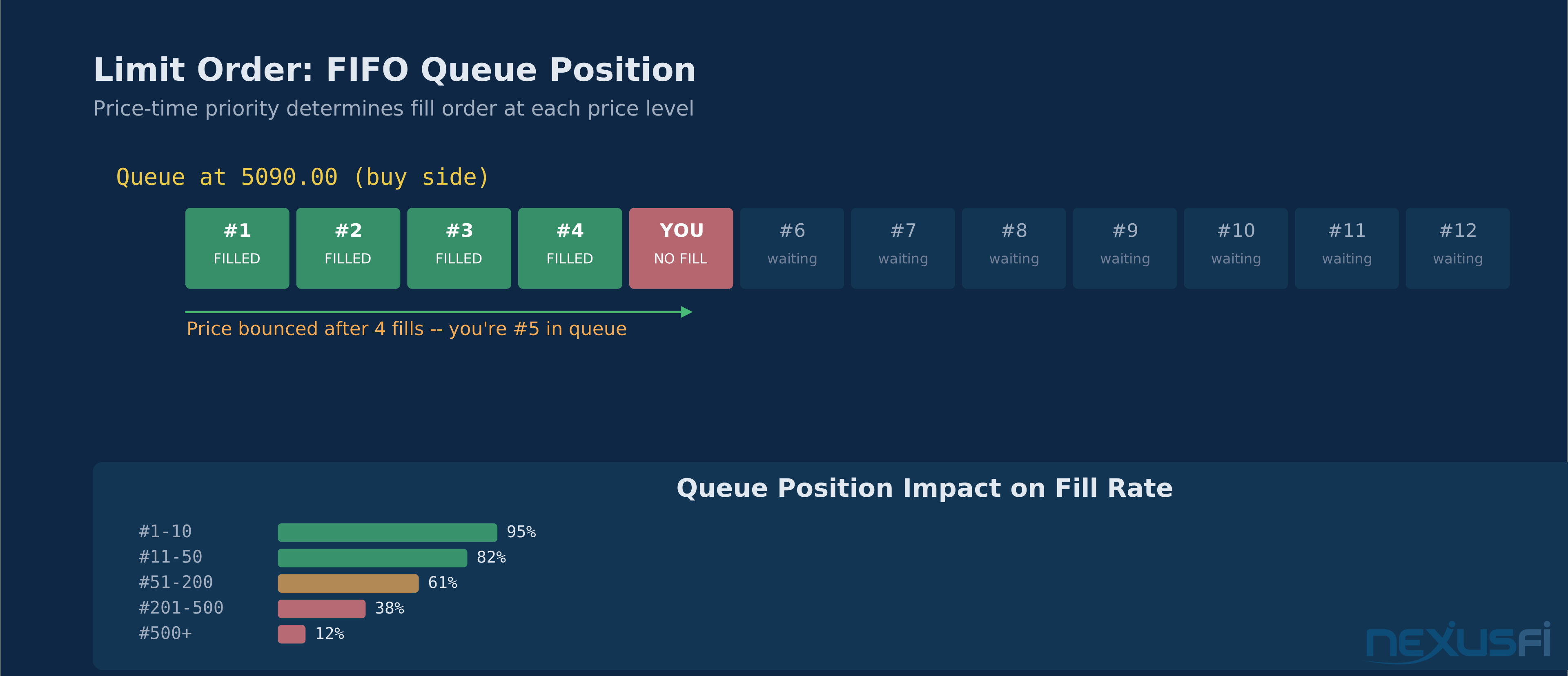
The core mechanic on Globex is FIFO queue priority. When you place a limit order at a price, you join the queue at that price. Every order placed before yours at that same price gets filled first. Move your price or cancel-and-replace, and you go to the back of the new queue.
Price improvement is real and underappreciated. When the market trades through your limit price, you don't just fill at your limit — you fill at the actual transacted price if it's better. Submit a buy limit at 5089.75 and the market gaps down to 5089.25 on a data release? You fill at 5089.25, not 5089.75. This fill-or-better guarantee is built into Globex's matching engine.
The risk with limit orders is the non-fill. Price touches your level, fills the orders ahead of you in queue, then reverses before reaching yours. You miss the trade. This is especially painful when you've identified the exact right level and watched price react from it — filling everyone else before bouncing away from your resting order.
Queue position management matters at busy price levels. On ES at major support during a pullback, you might have 2,000+ contracts resting at the bid. If you're 500 contracts deep and price only trades 400 contracts at that level before bouncing, you don't fill. Active traders who trade specific levels pre-position in the queue — placing limits earlier to gain queue priority rather than waiting until price approaches.
The key advantage of limit orders beyond price: defined cost. You know exactly what you're paying before you enter. That clarity is worth the non-fill risk in most systematic approaches.
Limit orders as exits require different thinking than limit orders as entries. A profit target limit order is fine — price comes to you or it doesn't. A stop-loss as a limit order is dangerous territory covered in the next section.
Stop Orders (Stop-Market)
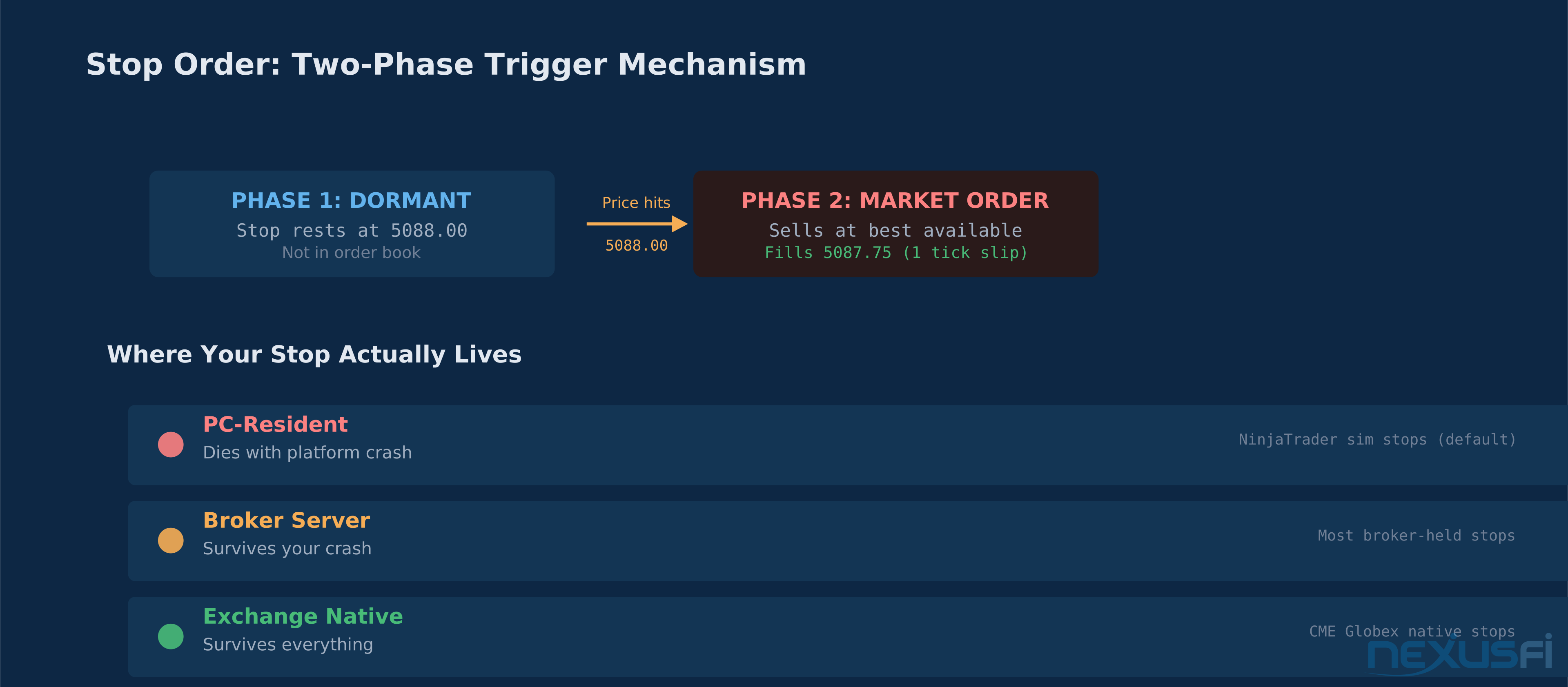
A stop order has two phases. First, a trigger condition — price must trade at or through your stop price. Second, once triggered, it converts to a market order and executes at the best available price.
Buy stop at 5095.00 on ES: nothing happens until price trades at 5095.00 or higher. The moment it does, your order converts to a market order and you buy at whatever's available. Sell stop at 5088.00: nothing until price trades at 5088.00 or lower, then you sell at market.
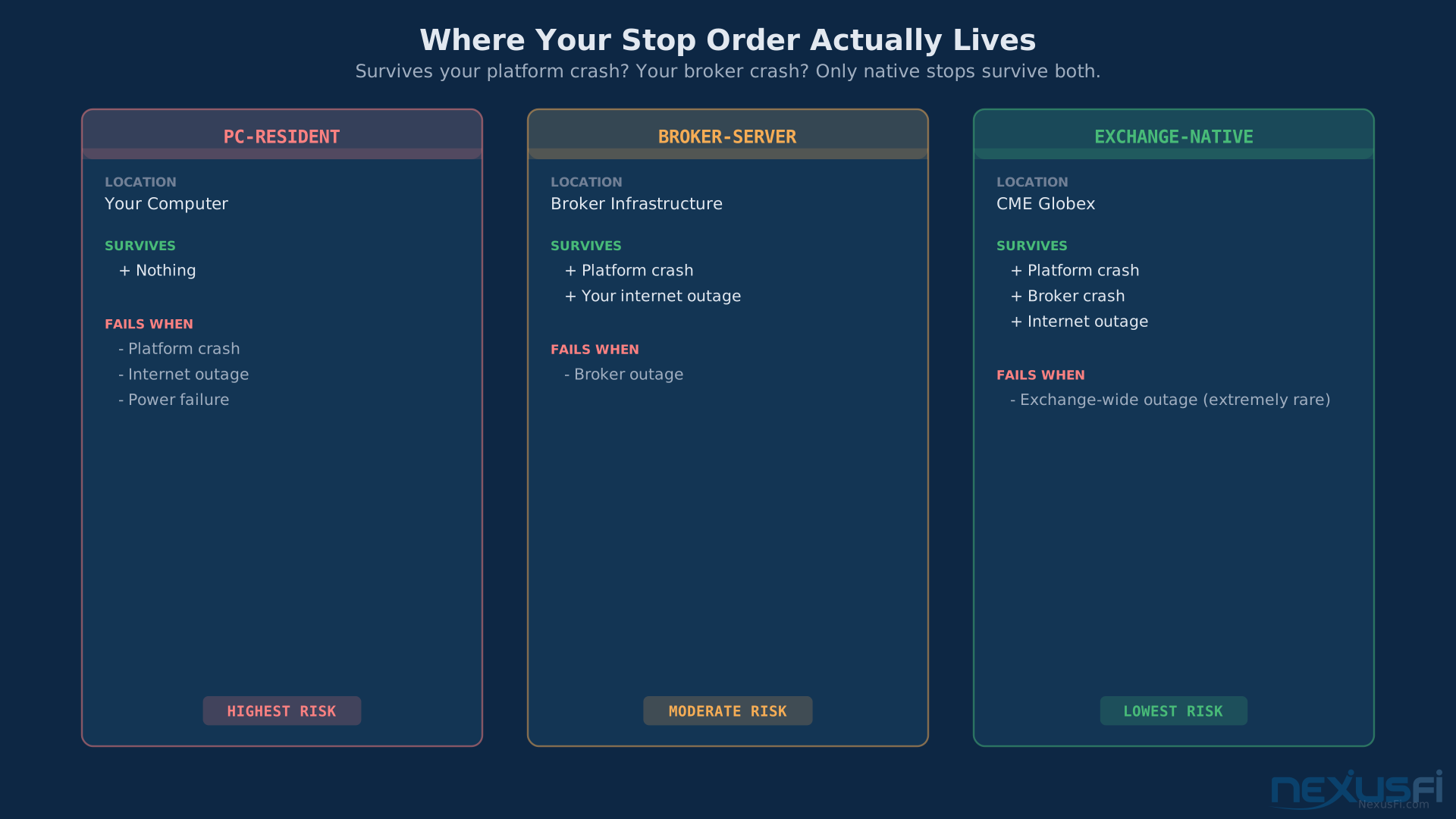
Where stops actually reside is one of the most critical and least understood aspects of stop orders. There are three possible locations, and Fat Tails documented this precisely: stops can reside on your PC, on your broker's server, or on the exchange itself. The difference has enormous practical consequences.
PC-resident stops exist only while your platform is running and connected. Platform crash, internet outage, power failure — your stop disappears. This is the most dangerous configuration and is surprisingly common. NinjaTrader's simulated stop orders are PC-resident unless configured otherwise. If your stop order lives only in your charting software, it exists only while your charting software runs.
Broker-server stops are held on your broker's infrastructure. Your platform can crash, your internet can go down — the broker's server still holds your stop and will fire it when triggered. Better than PC-resident, but still vulnerable to broker-side outages.
Exchange-native stops are held directly on CME Globex's matching engine. These persist through your platform crash, your broker's platform crash, and everything short of CME itself going down. The most strong configuration available to retail traders.
The practical upshot: for any position you hold longer than a single session, your stop needs to be at minimum broker-resident, and ideally exchange-native. Check your platform documentation. Ask your broker specifically: "When I place a stop order, where does it reside?"
The stop hunting myth: Nobody at a hedge fund has access to a feed showing where retail stops cluster at the exchange level. CME Globex doesn't show anyone the order book beyond the best bid and offer. What is real: behavioral clustering. Retail traders disproportionately place stops just below obvious support — the prior day low, the 200-period moving average, a round number. Large players know this not because they can see the orders, but because they understand retail psychology. A probe to just below key support can trigger enough stop-market orders to provide liquidity for a reversal entry. This isn't mystical institutional omniscience — it's understanding where scared money lives.
The defense: don't put your stop at the obvious place. If round number support is 5100.00, every retail trader with a stop "below support" has it at 5099.75 or 5099.50. Move yours to 5097.50. The clustering is the vulnerability.
Stop-Limit Orders
A stop-limit order adds a third component to the stop: instead of converting to a market order when triggered, it converts to a limit order at your specified limit price.
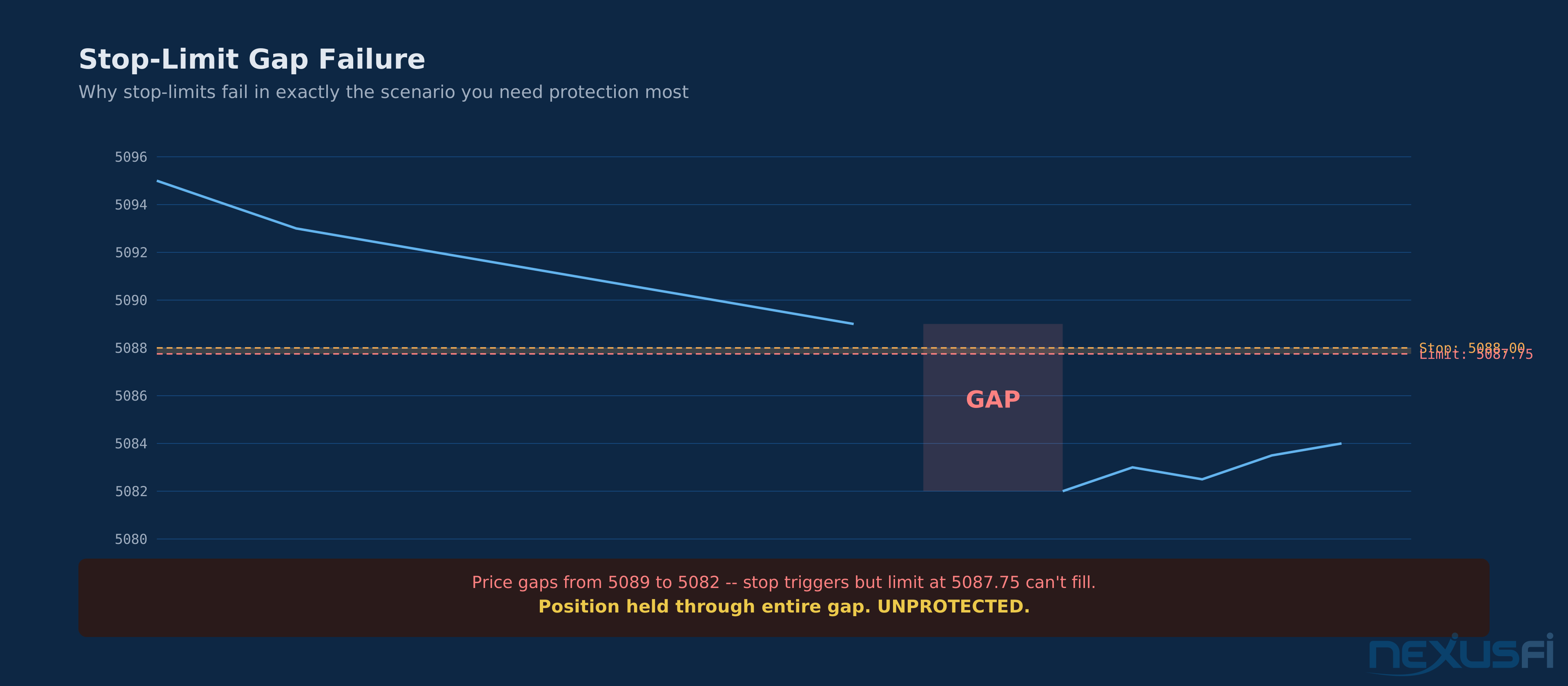
Example: stop-limit on ES with stop at 5088.00 and limit at 5087.75. Price drops to 5088.00, stop triggers, limit order to sell at 5087.75 or better enters the book.
The pitch is price control — you won't sell below 5087.75. The reality is that this "protection" can leave you completely unprotected in exactly the scenario you're most trying to protect against.
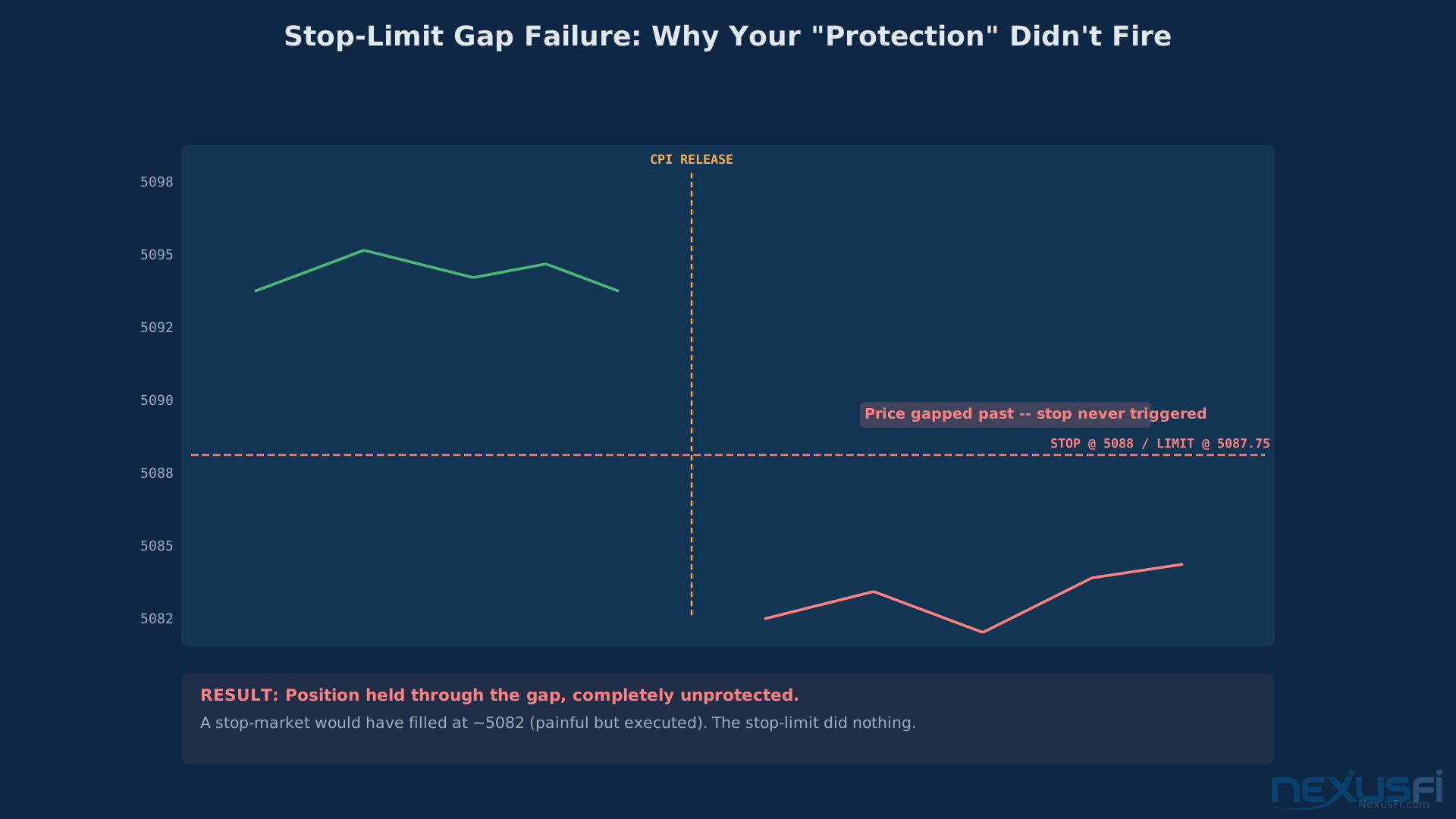
Gap risk is where stop-limits fail catastrophically. CPI data prints, ES gaps from 5095 to 5082 overnight. Your stop-limit with stop at 5088 and limit at 5087.75 does absolutely nothing — price never trades at 5088, it opened below your limit. Your position is held through a gap, unprotected.
Fast markets produce the same failure. Price drops 3 handles in 0.5 seconds. Your stop triggers at 5088.00 and a limit to sell at 5087.75 enters the book. By the time that order reaches the exchange, the best bid is 5083.00. No fill. You're long through a crash because your stop converted to a limit the market already blew past.
The legitimate use case: capping slippage in illiquid contracts where a market order might walk the book 10 ticks. Don't use stop-limits as your primary protective stop on ES, NQ, or CL.
Compound Order Types #
These order types combine core orders into coordinated structures that manage entries, exits, and risk as a unit.
Bracket Orders
A bracket order is a three-part order: an entry, a profit target, and a stop loss. Submit the entry, and the system automatically places the profit target and stop as a linked OCO pair — one cancels the other once the entry fills.
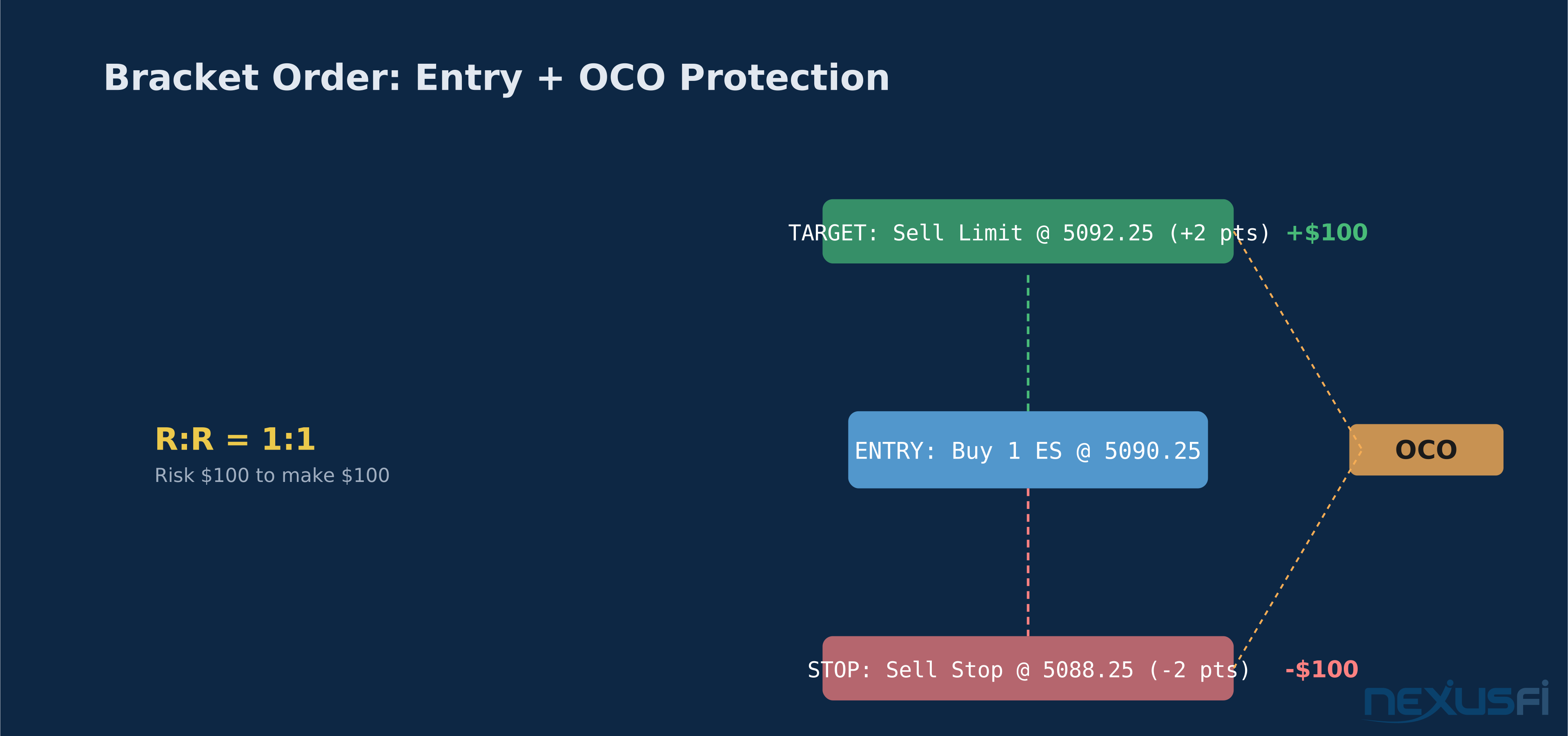
The mechanical flow: buy 1 ES at market, entry fills at 5090.25. Platform immediately places sell limit at 5092.25 (profit target, +2 points) and sell stop at 5088.25 (stop loss, -2 points). Price rises to 5092.25 — profit target fills, stop is automatically cancelled. Price drops to 5088.25 — stop fires, profit target is cancelled.
Brackets enforce discipline mechanically. The profit target and stop are defined at entry, before outcomes are known and before emotions engage. The temptation to move your stop or hold past your target is real in live positions — brackets prevent that interference.
The implementation detail that matters: where does the bracket's OCO logic live? The distinction between bracket orders and OCO orders and how platforms implement the cancellation logic is a practical concern that traders have had to work through with real positions. If the OCO management is done by your platform, both legs disappear if your platform crashes mid-trade. If it's server-side at your broker, you're covered for platform crashes.
Brackets also force you to define risk/reward before entry. The math is visible before you enter: 2 points of reward, 2 points of risk, 1:1 ratio. If your strategy doesn't support that ratio at that setup, the bracket forces the question before money is at risk.
OCO -- One Cancels Other
An OCO pair is two orders where filling one automatically cancels the other. You've seen this inside brackets, but OCO orders work as standalone tools too.
Common standalone OCO use: you see two potential setups — a breakout above resistance at 5095 or a reversal to support at 5085. You place a buy stop at 5095.25 and a sell limit at 5085.00 as an OCO. If price breaks higher and triggers the buy stop, the sell limit cancels. If price drops to 5085 and fills the limit, the buy stop cancels. One trade happens, not both.
The critical implementation question is native vs. simulated OCO. Fat Tails addressed OCO functionality directly, explaining how the cancellation logic works and the practical differences between platform-managed and exchange-native OCO implementations.
CME Globex does not natively support OCO orders at the matching engine level. Every OCO you place is managed by software somewhere — your platform, your broker's server, or your broker's order management system. The cancellation of the second order when the first fills is handled by that software, not by the exchange.
The gap in protection: In a fast market, both orders might attempt to fill before the cancellation message reaches the exchange. You're long from the buy stop fill and short from the sell limit fill simultaneously — flat at net cost. Or one fills, the cancellation races across the network, and the second fills in the 50-100 milliseconds before the cancel arrives. In liquid markets during normal conditions, this is rare. In fast markets — news events, thin overnight sessions — it's a real risk.
Broker-side OCO management mitigates this. When the broker's OMS receives a fill confirmation for leg one, it immediately sends a cancel for leg two from the broker's server, which is co-located with or directly connected to Globex. The cancel arrives faster than if it's being sent from your desktop over a retail internet connection. Check whether your broker offers server-side OCO management.
Practical workflow: pre-position OCO orders before price reaches either trigger level. Don't try to place them as price approaches one side — you'll be rushed, misclick, or the order will arrive too late.
Trailing Stops
A trailing stop adjusts automatically as price moves in your favor. Set a trailing stop on a long ES position with a 2-point trail, entry at 5090.00. Stop starts at 5088.00. Price rises to 5095.00 — stop moves to 5093.00. Price rises to 5100.00 — stop moves to 5098.00. Price reverses from 5100.00 — stop stays at 5098.00 and fires if price drops there.
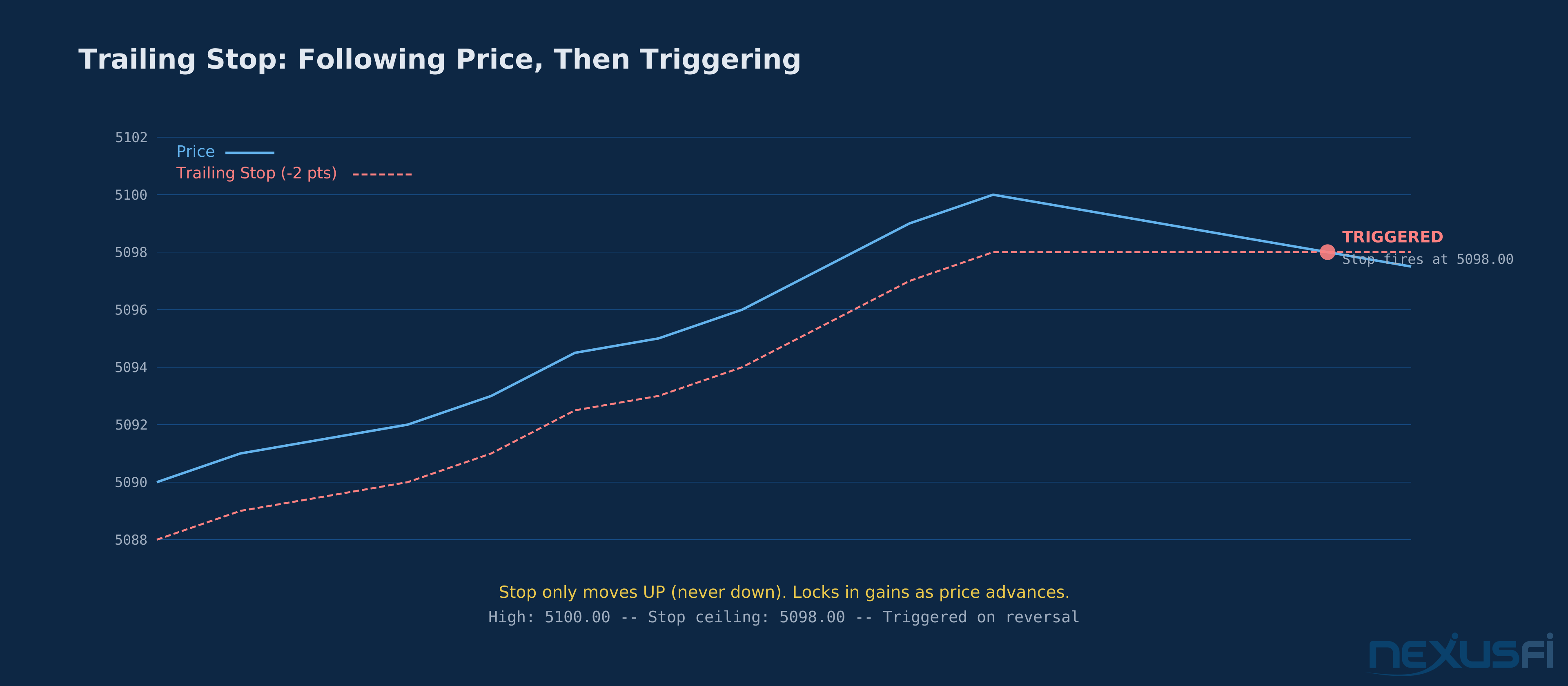
The mechanic is simple. The implementation question is where the trail calculation happens.
Platform trailing stops track price in your charting software and adjust the stop order as price moves, sending cancel-and-replace messages to the exchange. In trending markets, this works. In a fast reversal, there's a race: price drops, the platform calculates the new stop, sends the cancel, sends the new order. In a market moving 5 handles in 10 seconds, that cancel-replace cycle might not complete before price has moved well past your intended level.
Exchange-native trailing stops handle the trailing calculation directly on Globex's matching engine — no cancel-replace cycle, no latency between price movement and stop adjustment. Meaningfully better for fast-market protection. Not all brokers expose exchange-native trailing stops through their retail interfaces.
The core problem with trailing stops: they ignore market structure. A flat 2-point trailing stop on ES fires at the first normal retracement during a trend. Volatility-adjusted trailing stops (ATR-based, or structure-based keeping the stop below the prior swing low) are more durable but require active management or platform automation. Most retail implementations are static tick amounts — crude tools for anything beyond very short-term trades.
Backtesting data on trailing stops tells a different story than the conventional wisdom suggests. A 2023 study by Price Action Lab tested dynamic ATR-based trailing stops against static fixed stops across 23 futures contracts over 23 years of data, finding no significant performance improvement — the annualized return difference was just 50 basis points, with nearly identical Sharpe ratios (0.68 vs 0.70) and maximum drawdowns. The study concluded that the added complexity of monitoring and updating trailing stops was not justified by the marginal performance gains in futures trading. More recent backtest data from Quant Signals across 6 markets confirmed the pattern: ATR trailing stops generated negative expectancy on 5 of 6 tested assets on daily timeframes, underperforming fixed ATR stop losses. The trailing stops did reduce maximum drawdown, but sacrificed profitability in trending markets by exiting too early. For traders who struggle with letting winners run past the original target, mechanical trailing stops remain a useful discipline tool. But for systematic trend traders, the evidence suggests fixed volatility-adjusted stops may actually outperform their trailing counterparts.
Specialized Order Types #
These order types serve specific tactical needs — concealing size or executing at settlement prices.
Iceberg Orders
An iceberg order (also called a reserve order) lets you place a large order while showing only a fraction of it in the public order book. You want to buy 500 ES contracts. You place an iceberg buy limit at 5090.00 with a display quantity of 50 — only 50 contracts show in the DOM, but as each 50-lot fills, another 50-lot automatically appears until all 500 are filled.
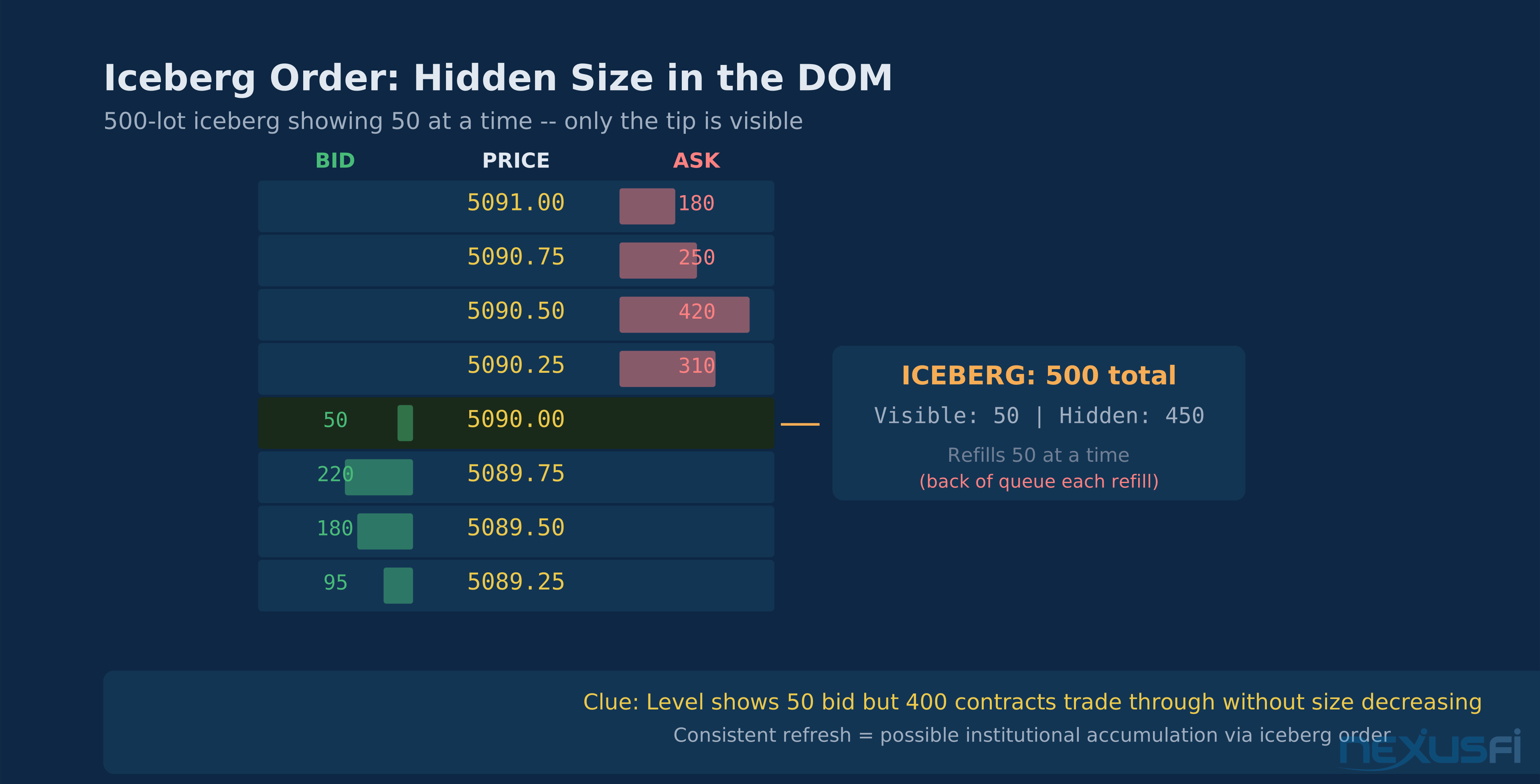
The purpose is concealment. A visible 500-lot resting at 5090.00 immediately signals to other participants that a significant buyer is at that level. Front-runners will move ahead of it, algorithms will lean against it, traders will fade the accumulation. Iceberg orders allow large-scale accumulation without telegraphing the full size.
On CME Globex, iceberg orders are implemented via the exchange's reserve quantity feature on certain contract types. The FIFO detail: when a display tranche fills and refreshes, the new tranche goes to the back of the queue at that price. The replenished 50 lots don't get priority for being part of a larger order — they join the queue like any new order.
How to spot potential iceberg activity: In the DOM, a price level that maintains a consistent visible quantity while significant size trades through it. If 5090.00 consistently shows 50 bids while 400 contracts trade through at that level, you might be looking at an iceberg. The visible quantity never shrinks proportionally to the trades — it keeps refreshing. This pattern isn't definitive proof (a broker might be aggregating multiple orders), but it's worth recognizing as institutional accumulation or distribution behavior.
For retail traders, the practical value is pattern recognition — knowing that depth-level resilience can indicate hidden size changes how you interpret certain DOM behavior. The typical retail position size doesn't require order size concealment.
MOC and MOO Orders
Market on Close (MOC) executes at the settlement price at the end of the trading session. Market on Open (MOO) executes at the opening price of the session.
For CME equity index futures (ES, NQ), the regular trading hours session closes at 4:15 PM Eastern. The settlement price for daily settlement purposes is calculated from trading in this window. Traders using MOC orders on ES are executing at or very near the official daily settlement price.
When would you use MOC? Primarily when your objective is settlement-based — portfolio hedges that need to match settlement prices for accounting or margin purposes, or end-of-day position flattening at a known reference price.
CME implements MOC through a settlement auction rather than continuous FIFO matching. All MOC orders are collected and matched at the settlement price — there's no queue priority advantage to submitting your MOC early vs. late. The settlement price itself is determined through product-specific methodology: for equity index futures like ES, CME Group staff determines settlements based on trading activity during the settlement window, using VWAP calculations, last trade prices, and bid/ask midpoints as tiered fallbacks. If anomalous activity yields results that don't represent fair value, CME staff retains discretion to determine an alternative settlement price.
Practical note on ES: the 4:15 PM close window has reliable liquidity and tighter spreads than earlier in the afternoon as portfolio managers accumulate their settlement-price transactions. Traders who want a defined close price without overnight exposure can use MOC to exit cleanly.
MOO in futures has narrower application than in equities because futures trade nearly continuously. For most active futures traders, MOC and MOO are background knowledge rather than daily tools — the scenarios where you specifically need to transact at settlement rather than near settlement are limited to portfolio and hedging use cases.
Order Type Selection Framework #
Putting it together: which order type belongs in which situation.
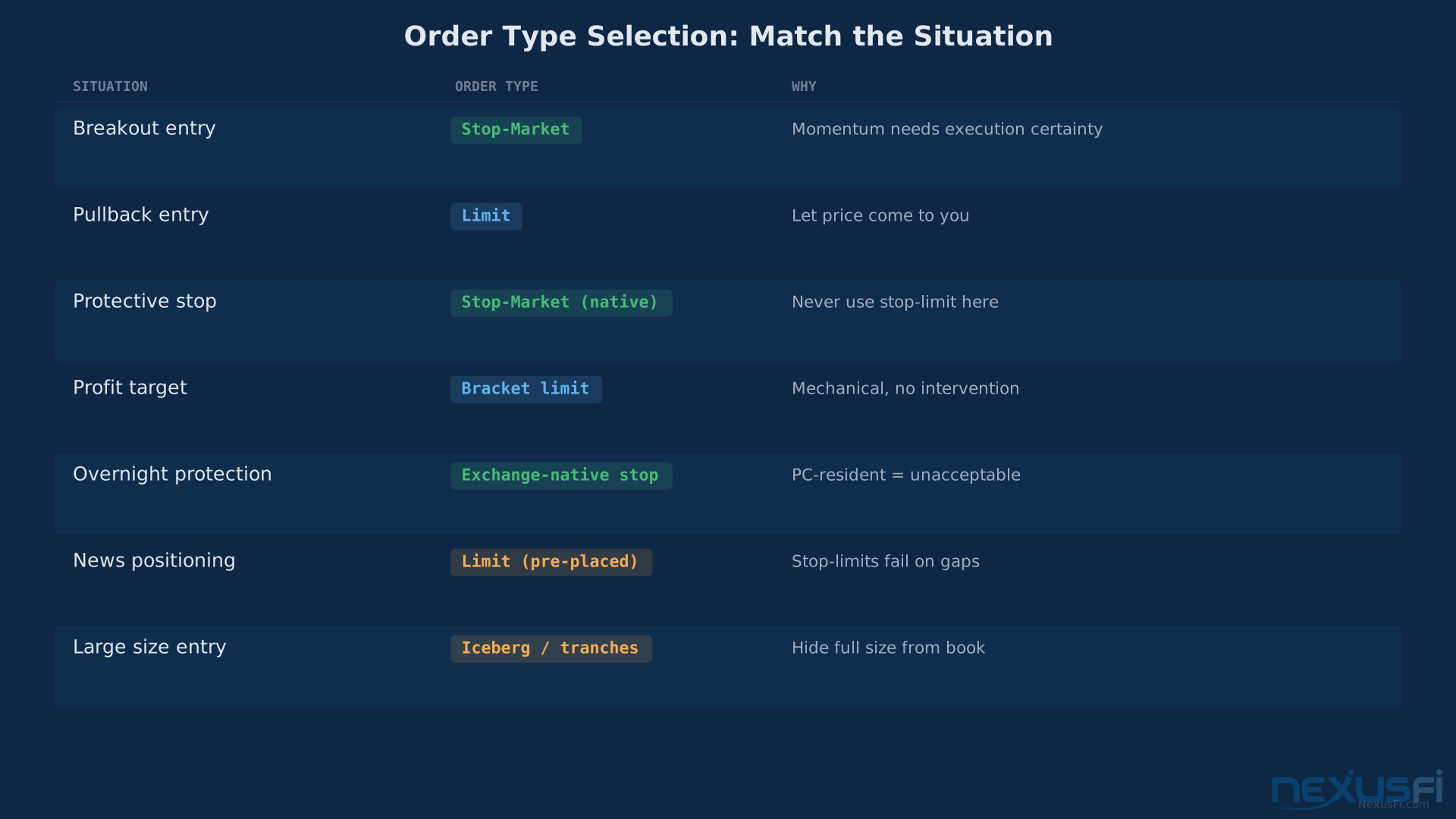
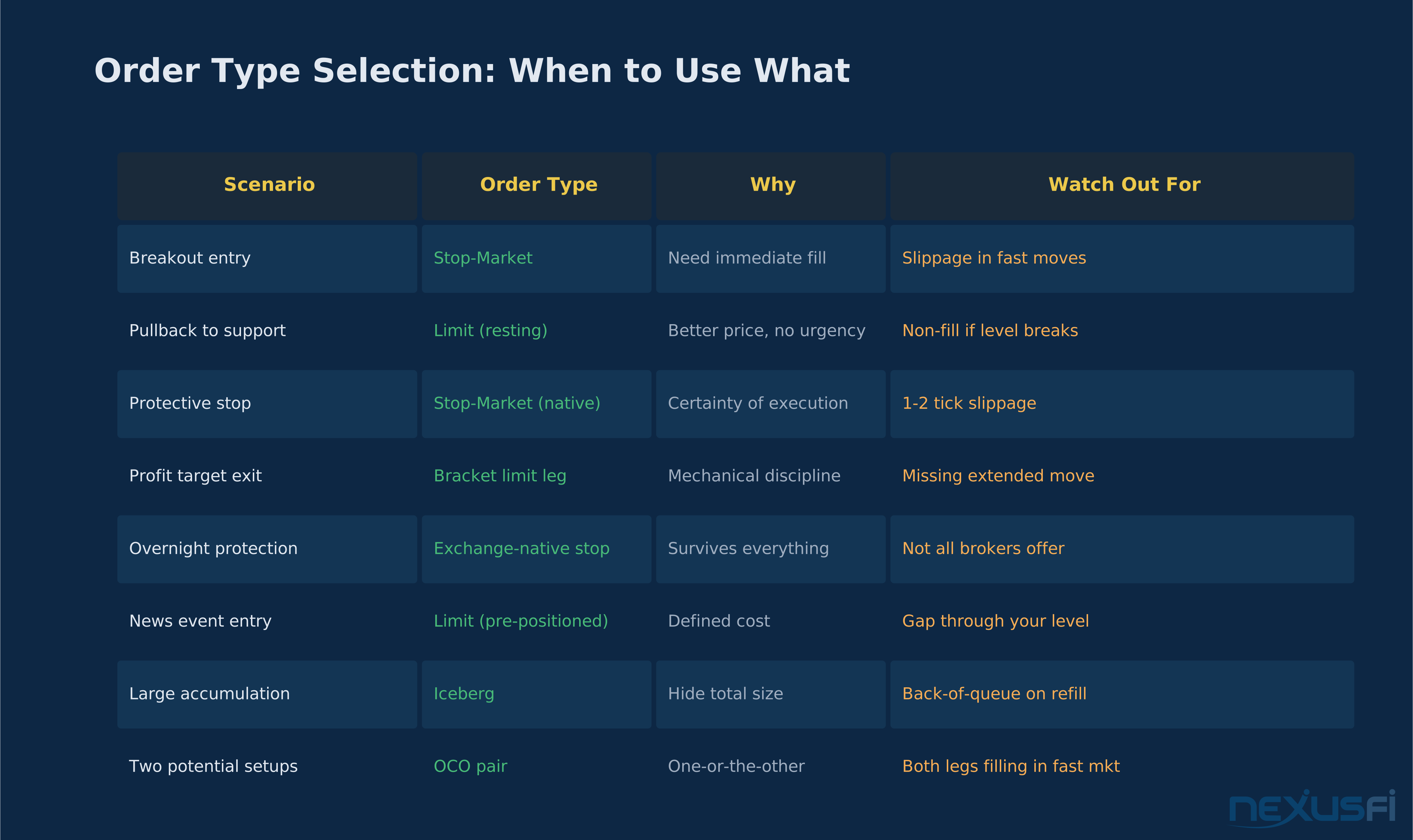
Trend following entry on breakout: Stop-market. Momentum orders require market execution — a limit misses the break.
Pullback entry to support: Limit order, resting at the level. Let price come to you. If the level holds, you fill at a better price than any market-order entrant. If it breaks through, your unfilled order just saved you from a losing trade.
Protective stop on an active position: Stop-market, server-resident or exchange-native. Not stop-limit. Accept 1-2 ticks of potential extra slippage in exchange for certainty of execution.
Systematic profit target exit: Bracket's limit order leg. Mechanical, no intervention required while the trade is live.
Overnight position protection: Exchange-native stop if available, broker-server stop at minimum. A PC-resident stop on an overnight position is an unacceptable risk — your platform isn't running and there's no one watching that order.
News event positioning: Limit placed in advance if directional, market order immediately after the announcement if reacting. Stop-limits around news are dangerous — gap risk is highest during scheduled releases.
Accumulating significant size: Iceberg order if your broker supports it, or work the order manually in tranches. Don't telegraph your full size.
Common Mistakes #
Using stop-limits as protective stops: The gap-through scenario is exactly what you're most trying to protect against. Stop-limits fail in fast markets and gaps — the same conditions that produce the biggest losses. Stop-market orders on protective stops, always.
Assuming simulated OCO equals native OCO: In normal markets, you'll never notice the difference. In fast markets, the race between fill confirmation and cancel message can result in both legs filling. Verify whether your broker provides server-side OCO management.
Stops at round numbers and obvious levels: Everyone's stop is at 5100.00. The path of least resistance during consolidation is to probe these clusters, trigger the stops, and reverse. Randomize or volatility-adjust your stop placement.
Trailing stops sized in absolute ticks regardless of volatility: A 4-tick trailing stop on CL during the 10:30 AM EIA inventory release will fire on normal volatility. The same 4-tick trail during quiet overnight trading works fine. Size trailing stops relative to volatility, not as a fixed value.
Ignoring queue position on limit orders: Placing a limit order five seconds before price touches your level gives you a back-of-queue position. Traders who pre-position get priority fills. The time advantage translates directly to fill rate.
The depth at which you understand your order routing directly affects your trading costs and protection quality. Build an accurate model of what your broker and platform are actually doing on your behalf — then verify it again after the first time a stop doesn't fire when you expected it to.
Knowledge Map
Prerequisites
Understand these firstGo Deeper
Build on this knowledgeReferences This Article
Articles that build on this topicCitations
- — NexusFi Discussion (2023) 👍 6“ES slippage 1-2 ticks”
- — NexusFi Discussion (2010) 👍 3“CME slippage limits and no-bust ranges”
- — NexusFi Discussion (2010) 👍 4“Three places stops reside”
- — NexusFi Discussion (2012) 👍 15“Stop-market vs stop-limit on NinjaTrader DOM”
- — NexusFi Discussion (2021) 👍 3“OCO vs bracket orders”
- — NexusFi Discussion (2012) 👍 7“OCO functionality”
- — Cmegroupclientsite.atlassian.net (2025)
- — Priceactionlab.com (2023)
- — Quant-signals.com (2026)
- — Cmegroup.com (2024)