



PC Case Selection for Trading Workstations: ATX, Micro-ATX, and Silent Case Builds for Futures Traders
Overview #
Your trading rig's case is the one component that shapes everything else. Get it wrong and you're fighting airflow problems, cramped builds, and fan noise that bleeds into calls and breaks concentration at market open. Get it right and you have a foundation that stays quiet under sustained load, keeps temperatures predictable across a 10-hour trading day, and gives you room to expand without rebuilding.
The PC case market is enormous and mostly useless for traders. Gaming cases improve for tempered glass panels and RGB lighting. Enthusiast cases chase benchmark results for short-duration loads. Neither matches what a trading workstation needs: quiet operation under continuous moderate-to-high load, expansion capacity for multi-monitor GPU cards and additional storage, cable routing that survives regular maintenance, and a footprint that fits a home office without dominating the room.
This guide covers the form factor decision that most traders get wrong, the specific case features that matter for trading use (and the ones that don't), airflow configurations for sustained stability, noise management for home office environments, and a decision framework for picking the right case for your setup.
For GPU selection and display output considerations, see GPU Selection for Trading Workstations. For motherboard form factor compatibility, see Motherboard Selection for Trading Workstations. For cooling configuration, see Trading Computer Cooling and Thermal Management.
Why Case Selection Matters More Than Traders Realize #
Most hardware guides treat the case as an afterthought — the box you put real components in. For trading workstations, that framing is backwards. The case determines whether your cooling solution performs as specified, whether your GPU card physically fits, whether you can add components two years from now without rebuilding, and whether the rig stays quiet enough to run in the room where you trade.
Airflow is the primary variable. Your CPU cooler's rated performance assumes adequate case airflow. A CPU cooler that handles 200W in a well-ventilated case might throttle at 150W in a poorly configured one. Trading platforms run sustained moderate load — not the burst workloads that gaming benchmarks measure — and sustained load is where airflow problems become thermal management failures. A case that works fine for a 30-minute gaming session may cause throttling after 3 hours of continuous NinjaTrader operation.
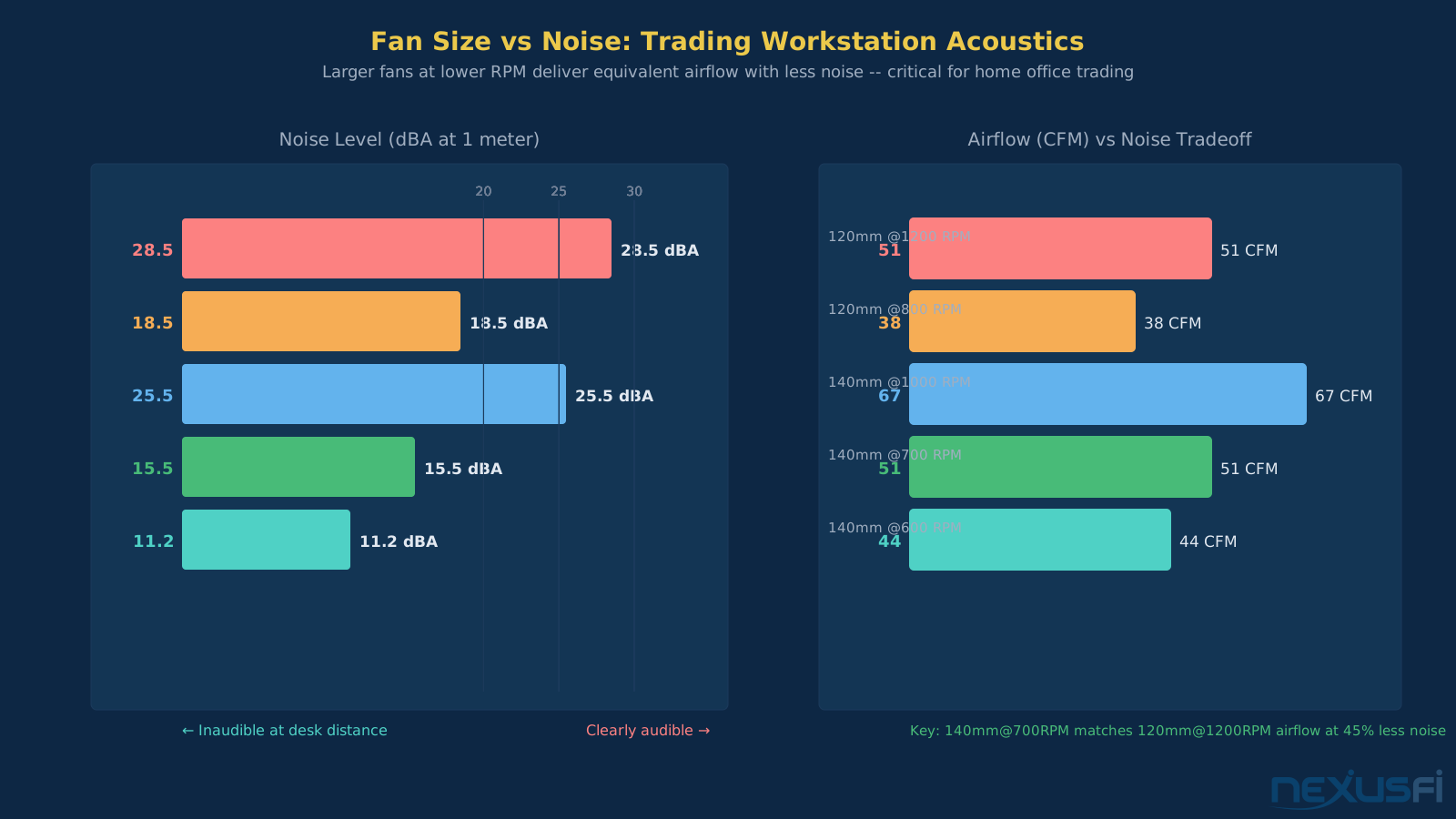
Noise determines usability. Trading is a concentration-dependent activity. A loud computer is a legitimate performance problem, not just an annoyance. This means prioritizing cases designed for low-noise operation: sound dampening panels, filtered intake vents that don't require high RPM to maintain airflow, and enough internal volume to use large-diameter slow-spinning fans. A 140mm fan moving the same volume of air as a 120mm fan runs at lower RPM and generates much less noise.
Expansion capacity ages better than you'd expect. The GPU card you buy for 4-monitor support today may need to be replaced when you expand to 6. The case that had exactly enough room for your current build becomes a liability when you need additional NVMe drives for tick data storage or a second GPU for additional displays. Building into a case with headroom costs nothing upfront and eliminates a full rebuild down the road.
That advice from 2011 still applies. The thermal and acoustic constraints haven't changed. The hardware has gotten faster and denser, which makes case selection more important, not less.
Form Factor Decision Tree #
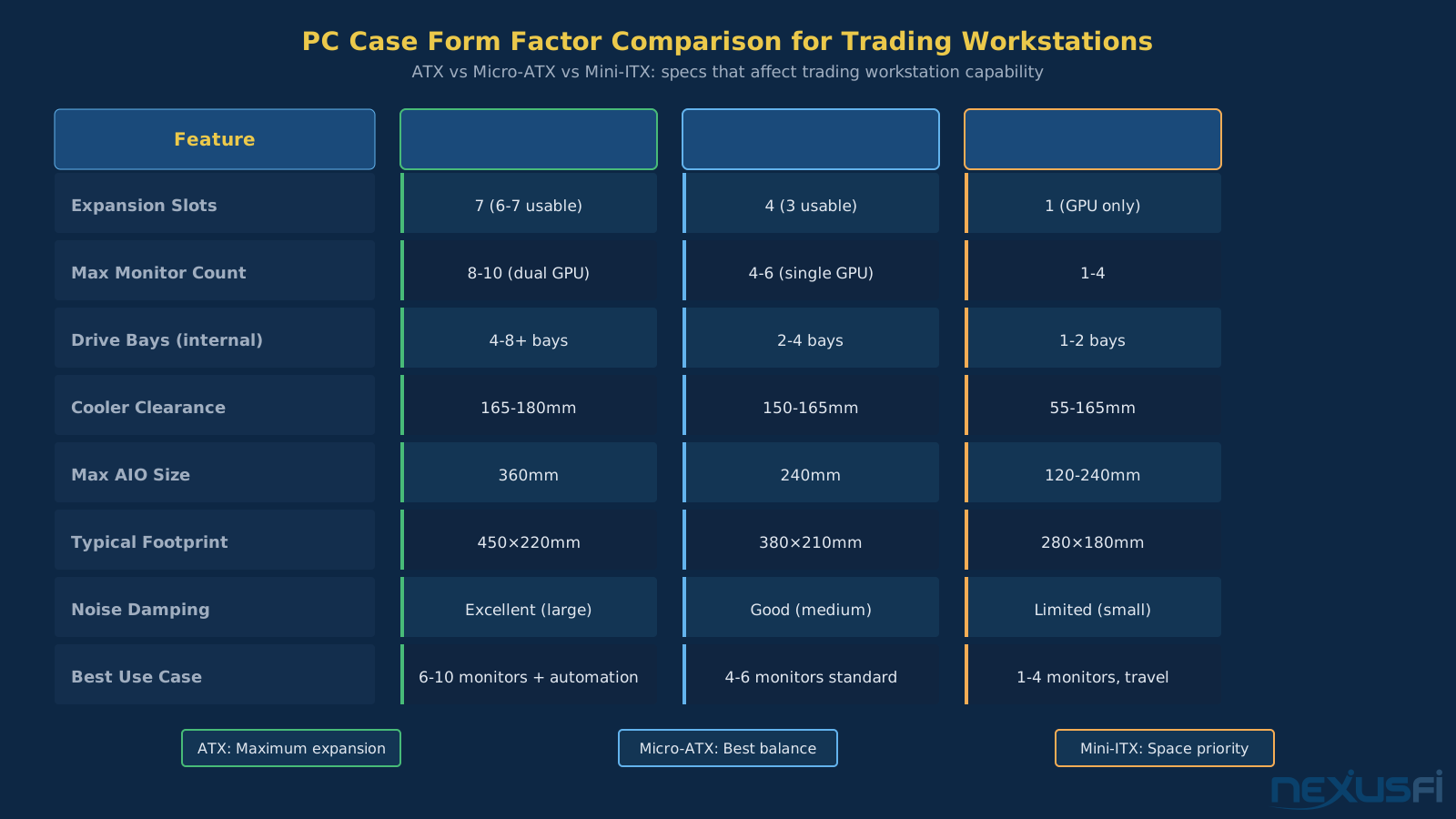
Three form factors cover 95% of trading workstation builds. The decision between them comes down to monitor count, expansion requirements, and desk space. Make this decision first — everything else follows from it.
ATX (Full/Mid Tower)
- Supports up to 7 expansion slots
- Maximum drive bay count (5-10+ bays depending on case)
- Supports dual-GPU configurations for 8+ monitors
- 240-360mm AIO liquid cooling compatibility
- Footprint: 450-550mm tall, 220-250mm wide
Best for: 6-8 monitor setups with two GPU cards, active traders who run automation requiring multiple NVMe drives, builds that need maximum expandability, setups where desk space isn't constrained.
Micro-ATX (mATX)
- 4 expansion slots (usually 3 usable with GPU)
- 2-4 drive bays standard
- Most mATX boards support single-slot full-length GPUs
- 240mm AIO typically the maximum
- Footprint: 350-420mm tall, 200-220mm wide
Best for: 4-6 monitor setups with a single GPU, traders who want a smaller footprint without going mini-ITX, most common form factor for purpose-built trading rigs.
Mini-ITX
- Single PCIe slot
- 1-2 drive bays
- 120-240mm AIO or small tower air cooler only
- Footprint: 250-320mm tall, 170-200mm wide
Best for: 1-4 monitor setups where desk space is genuinely at a premium, backup/travel systems, traders who don't plan to expand.
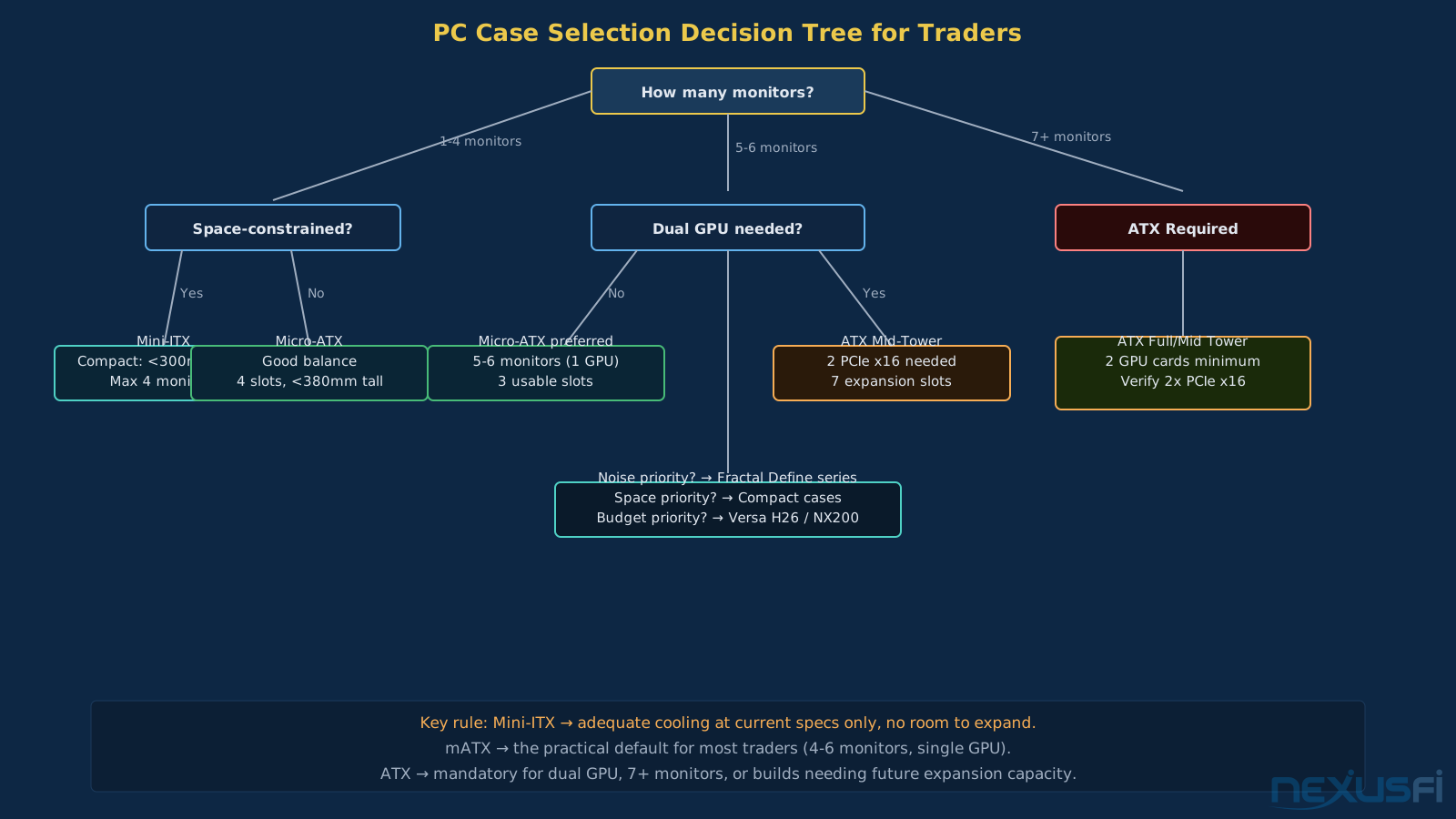
The decision tree is simple:
- Do you need 6+ monitors or plan to expand there? → ATX
- Do you need 4-6 monitors with a single GPU? → Micro-ATX
- Do you need minimal footprint and won't expand beyond 4 monitors? → Mini-ITX
That's it. Everything else is secondary to this form factor decision.
ATX Mid-Tower Cases: Maximum Expansion #
ATX mid-towers are the default choice for serious trading workstations. They accommodate full-length GPU cards without modification, provide adequate airflow volume for sustained operation, support the CPU cooling solutions that perform best under continuous load, and offer enough drive bays to accommodate a data logging setup (OS drive + tick data NVMe + backup).
The key specs to evaluate for an ATX trading case:
Drive bay count. Modern cases have reduced external drive bays (5.25" bays are largely obsolete) but should offer at minimum 2-3 internal 3.5" bays and 2-3 internal 2.5" bays. A trading rig typically needs at minimum: 1 NVMe for OS, 1 NVMe for tick data, 1 SSD for platform data and backups. Cases that only support M.2 NVMe slots on the board are adequate for most builds; cases with additional internal bays provide expansion capacity for traditional SATA SSDs.
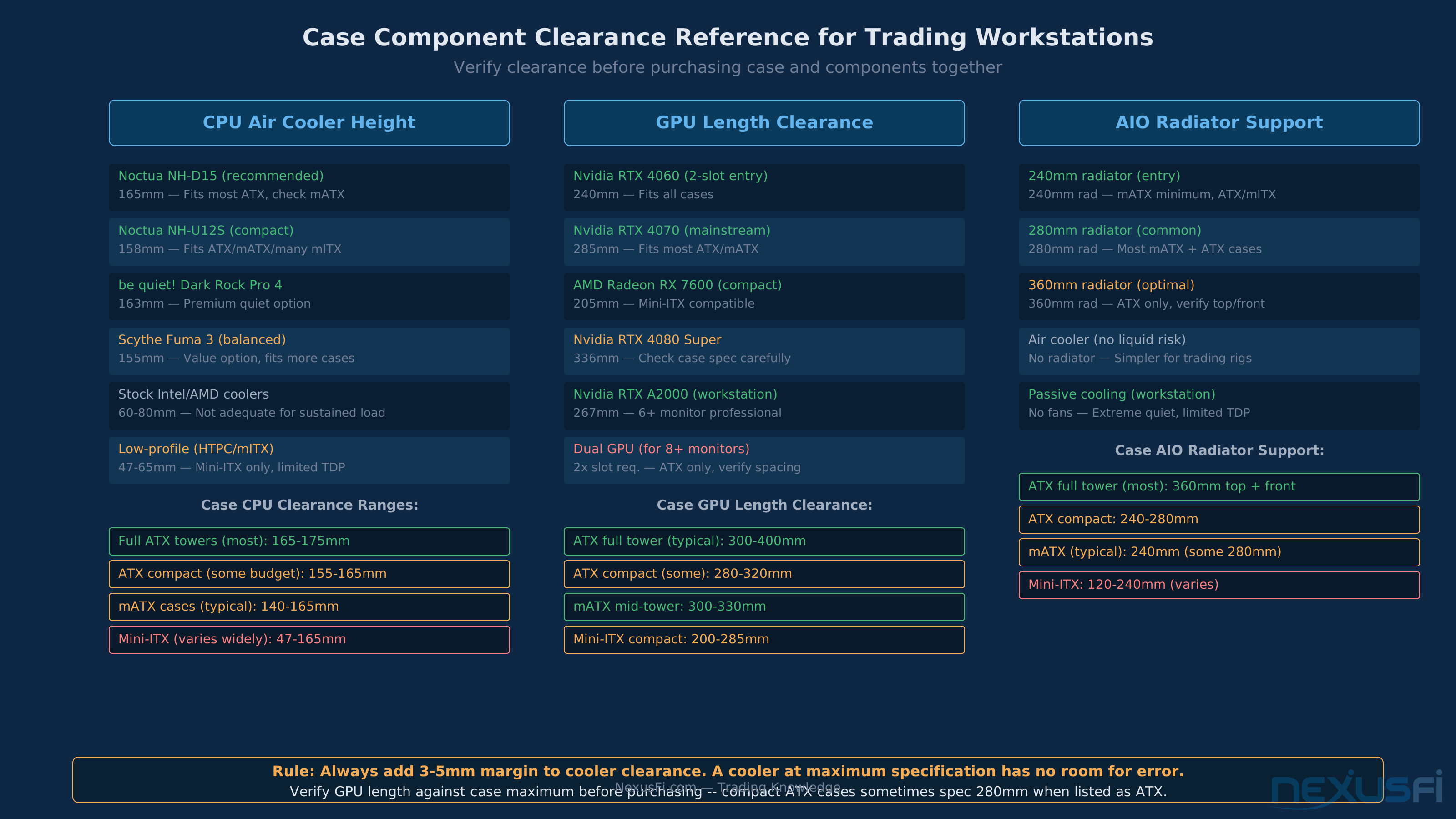
CPU cooler clearance. Tower air coolers for sustained continuous operation typically range 155-175mm tall. Most ATX mid-towers specify clearance of 165-170mm. Verify the specific height of your cooler against the case's rated clearance with 3-5mm margin for safety. A cooler that fits at maximum specification leaves no room for error.
GPU clearance. Professional GPU cards for multi-monitor support (Nvidia RTX A-series, AMD Pro) run 267-300mm long. Gaming-targeted multi-monitor cards (RTX 4070/4080) run similar lengths. Verify case GPU length clearance explicitly — most mid-towers support 300-330mm, but some compact ATX cases drop to 280mm.
Cable routing. Cases with at least 25mm of cable routing space behind the motherboard tray allow proper cable management. Proper routing improves airflow (cables don't block paths) and makes future maintenance faster. Look for multiple cable routing holes with rubber grommets and integrated cable tie points.
@cpolk2013 shared their order flow trading setup in the NexusFi Battlestations: Show us your trading desks! thread, featuring a custom build in a Thermal Take View 31 RGB ATX case running dual Dell 49" curve monitors: "My Battle Station (trading computer) is a custom built system with Dual DELL 49\" Curve Monitors. I LOVE THE DELL 49\" Curve Monitors. Each Dell 49\" Curve Monitor replaces 3 of my previous monitors and got rid of A LOT of cords. Also, NO SPACES between charts and Awesome resolution." (2019)
The dual GPU configuration requiring two Radeon Vega RX 56 cards for a 6+ monitor setup is only possible in an ATX full tower — the physical slot count and power headroom simply aren't available in smaller form factors. (2019)
@luisf shared a budget-conscious ATX build in the NexusFi Battlestations: Show us your trading desks! thread: a Deepcool TESSERACT SW Red ATX mid-tower with a Cooler Master Hyper 212 EVO CPU cooler and GTX 1060, running Jigsaw across ES, CL, YM, and NQ. The Hyper 212 EVO at 159mm height is one of the most popular trading workstation coolers precisely because it fits virtually every ATX and mATX case on the market — a safe clearance default when you're not sure about exact specifications. (2018)
That combination approach (acoustically optimized case + quality quiet cooler) remains the right framework. The specific models have been updated, but the selection criteria are the same.
Micro-ATX Cases: The Practical Middle Ground #
Micro-ATX cases represent the sweet spot for most trading workstations. They're meaningfully smaller than full ATX towers, maintain enough internal volume for effective cooling, support the GPU cards that handle 4-6 monitor setups, and fit more naturally on or under a desk.
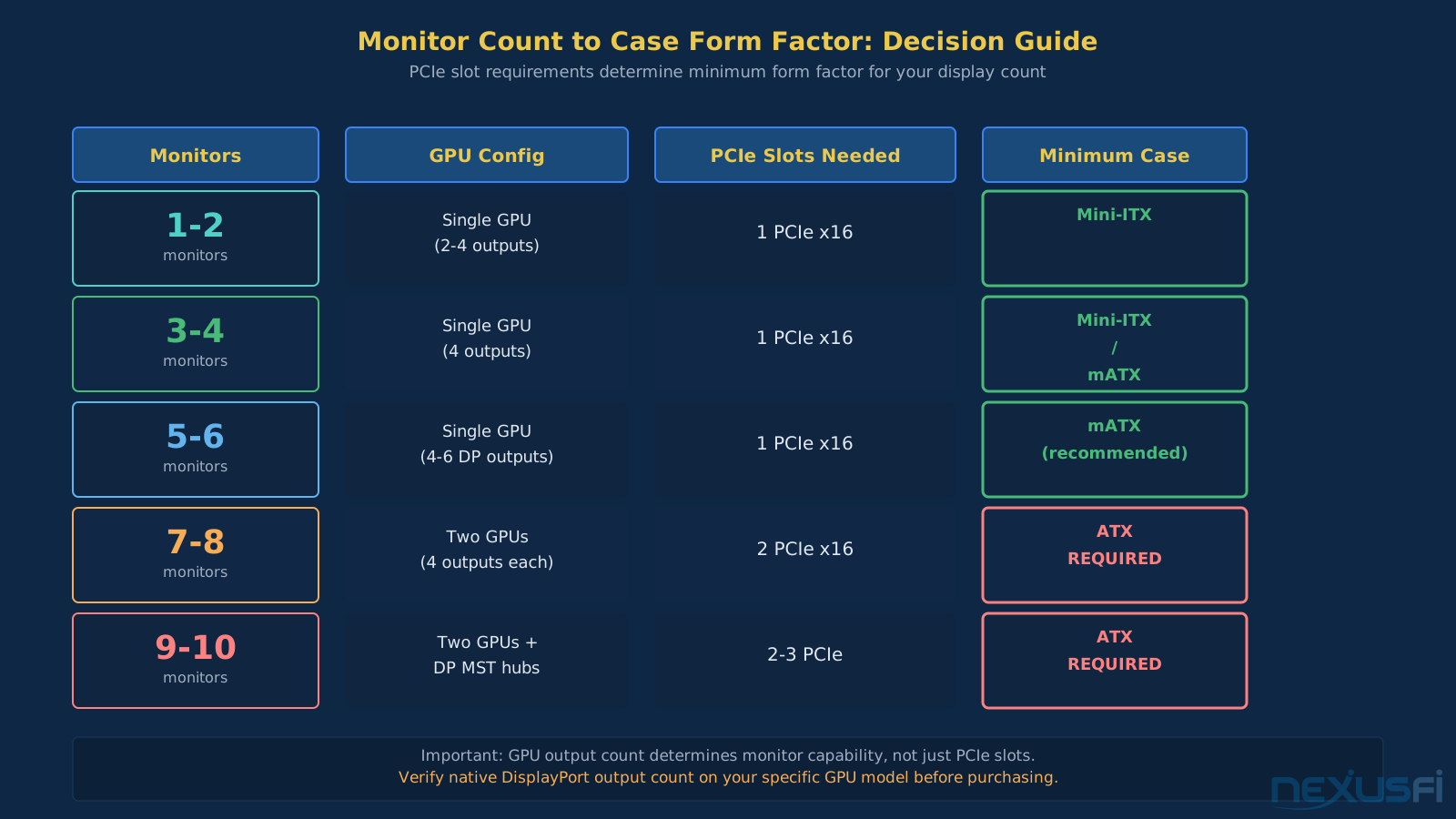
The key constraint of mATX form factor: 4 expansion slots versus ATX's 7. In practice for trading, this means 1 GPU card plus 1 additional card (typically not needed for most setups). For a 6-monitor setup using a single GPU with 4+ native DisplayPort outputs, mATX works without compromise. For 8+ monitors requiring two GPU cards, you need ATX.
mATX case build considerations:
- Compatible CPU cooler clearance is tighter in many mATX cases (140-165mm typical)
- AIO cooling is usually limited to 240mm (some cases support 280mm)
- Most mATX cases support full-length GPUs (verify the specific case)
- Front panel space is more limited — filter quality matters more
The mATX form factor is less about what you're giving up versus ATX and more about whether what you're keeping is enough. For most 4-6 monitor trading setups, it is.
Mini-ITX Cases: When Space Is the Only Priority #
Mini-ITX builds make sense for a specific trader profile: those with severely space-constrained desks, traders who want a secondary workstation for travel or backup, or 1-4 monitor setups that don't require expansion capacity.
The thermal reality of mini-ITX is that the form factor constrains what you can cool effectively. A mini-ITX case typically supports either a 240mm AIO (most compact cases, ceiling-mounted) or a single 120-140mm tower air cooler. That's adequate for most current CPUs at their rated TDPs, but leaves less margin during extended trading sessions with heavy indicator load.
The expansion reality: mini-ITX motherboards have one PCIe slot and usually 2 M.2 NVMe slots. That's 1 GPU, no additional cards, and 2 drives. For a single dedicated trading machine running 1-4 monitors with platform data on NVMe and OS on a second NVMe, this works. For anything more complex, the form factor hits a wall.
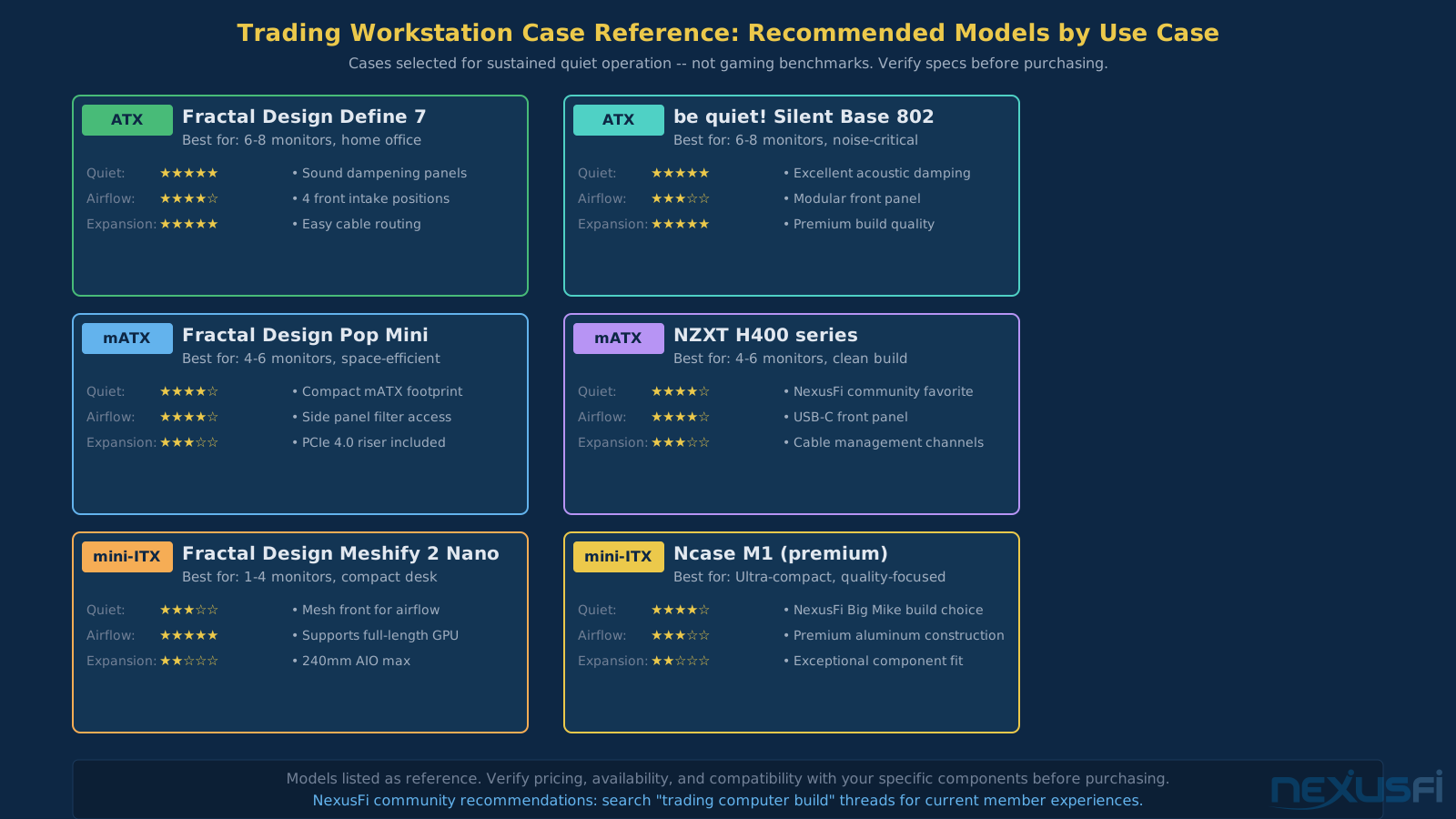
@Big Mike documented his compact NexusFi build in the Terry's Badass Rig thread: Ncase M1 v4 mini-ITX case with ASRock Z170 Gaming ITX board and AMD R9 Nano GPU, powering triple 4K displays, described as "near silent and very compact." (2015)
The Ncase M1 represents the high-end of mini-ITX case engineering: genuine triple-display capability in a compact form factor, with enough internal volume for proper cooling if you're willing to pay the premium. Most budget mini-ITX cases compromise airflow in ways that surface as throttling problems during extended sessions.
Mini-ITX case tradeoffs:
- Minimal desk footprint
- Genuinely portable
- Lower power consumption (limited to single GPU, smaller components)
- No room for expansion
- Harder to work inside during maintenance
- Thermal headroom constrained vs same components in larger case
- Premium quality cases (Ncase M1, Louqe Ghost) cost much more
Airflow Configuration for Trading Workstations #
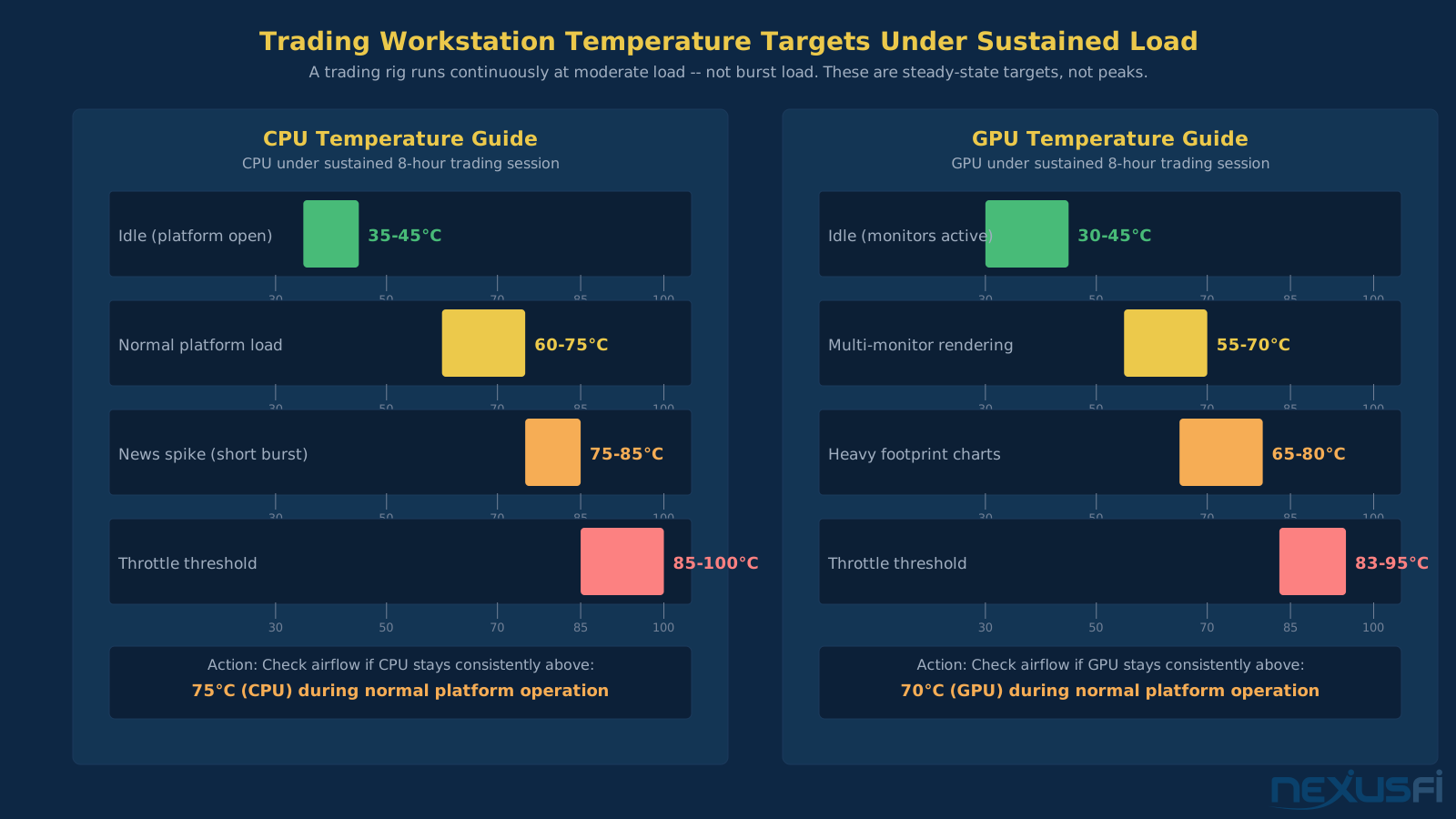
Case airflow is more critical for trading rigs than gaming machines because the thermal load is sustained, not bursty. A gaming session that spikes the CPU to 90°C for 5 minutes then returns to idle is a different thermal problem than NinjaTrader running continuous indicator calculations for 8 hours at 60-70°C.
The positive pressure configuration (more intake than exhaust) reduces dust ingestion and works well for quiet operation. Intake fans run at low RPM, exhausts at similar RPM, but the intake volume is slightly higher. This keeps cool air moving across components without the noise of high-RPM exhaust fans.
Standard configuration for most trading cases:
- Front: 2x 140mm intake (800-1000 RPM)
- Top: 1-2x 140mm exhaust (900-1100 RPM)
- Rear: 1x 120mm exhaust (900-1100 RPM)
This configuration provides adequate airflow for a 65-95W CPU with tower air cooling and a single GPU drawing 150-250W under display output load. Sustained inlet temperature (the temperature of air entering the case) determines how well your cooler can perform. Cases with mesh front panels allow lower-RPM fans to move the same volume; dampened cases with restricted front panels require higher RPM and more noise to move equivalent airflow.
Negative pressure configurations (more exhaust than intake) are common in small form factor builds and some compact cases. They can generate slightly better CPU temperatures in some configurations but allow unfiltered air to enter through case seams and gaps. For a machine running continuously in a dusty environment, positive pressure keeps filters centralized and maintenance simpler.
Temperature targets under sustained trading load:
- CPU: 65-85°C acceptable, 90°C+ indicates airflow problem
- GPU: 70-80°C acceptable under multi-monitor display output load
- NVMe SSD (tick data drive): Under 65°C (some modern drives throttle above 70°C)
- Inlet air: Within 5-10°C of room temperature (high inlet temp = insufficient case airflow)
For specific cooler selection and configuration, see Trading Computer Cooling and Thermal Management.

Noise Management for Home Office Trading #
A trading computer that runs during market hours in a home office needs to stay quiet enough that it doesn't affect concentration. The noise floor for comfortable sustained use is approximately 30-35dB at 1 meter from the case. Most actively cooled gaming cases run 40-55dB under load — loud enough to be noticeable and distracting during 8-hour trading sessions.
Sound dampening panels (foam-lined side panels, top panels with noise-absorbing material) reduce the transmission of fan noise and coil whine from the GPU. Cases specifically designed for quiet operation (Fractal Design Define series, be quiet! Pure Base series) include factory-installed dampening that reduces mid-and-high-frequency noise by 3-8dB. The effect is perceptible and worth the small premium for home office use.
Fan quality matters more than speed control. A low-quality 140mm fan at 800 RPM can produce more irritating noise (bearing whine, blade resonance) than a quality 140mm fan at 1000 RPM. Noctua, be quiet!, and Fractal Design's branded fans consistently test lower for noise at equivalent airflow than budget options. The $15-25 premium per fan pays for itself in noise reduction.
Case resonance amplifies certain frequencies when fan vibration couples to metal panels. Cases with rubber-mounted fans (anti-vibration standoffs) and thicker steel panels (0.7-0.8mm versus budget 0.5mm) transmit much less resonant noise. Heavy cases are quieter cases — the physics is simple.
Fan curve configuration determines noise under real-world trading load. A fan controller or BIOS-configurable fan curve that keeps fans at minimum speed until the CPU hits 65-70°C, then ramps smoothly, keeps the system quieter during the 90% of trading time when the CPU is at moderate load. This requires a case with adequate airflow at minimum fan speed — mesh-front cases can cool adequately at low RPM; restricted-front cases need higher RPM.
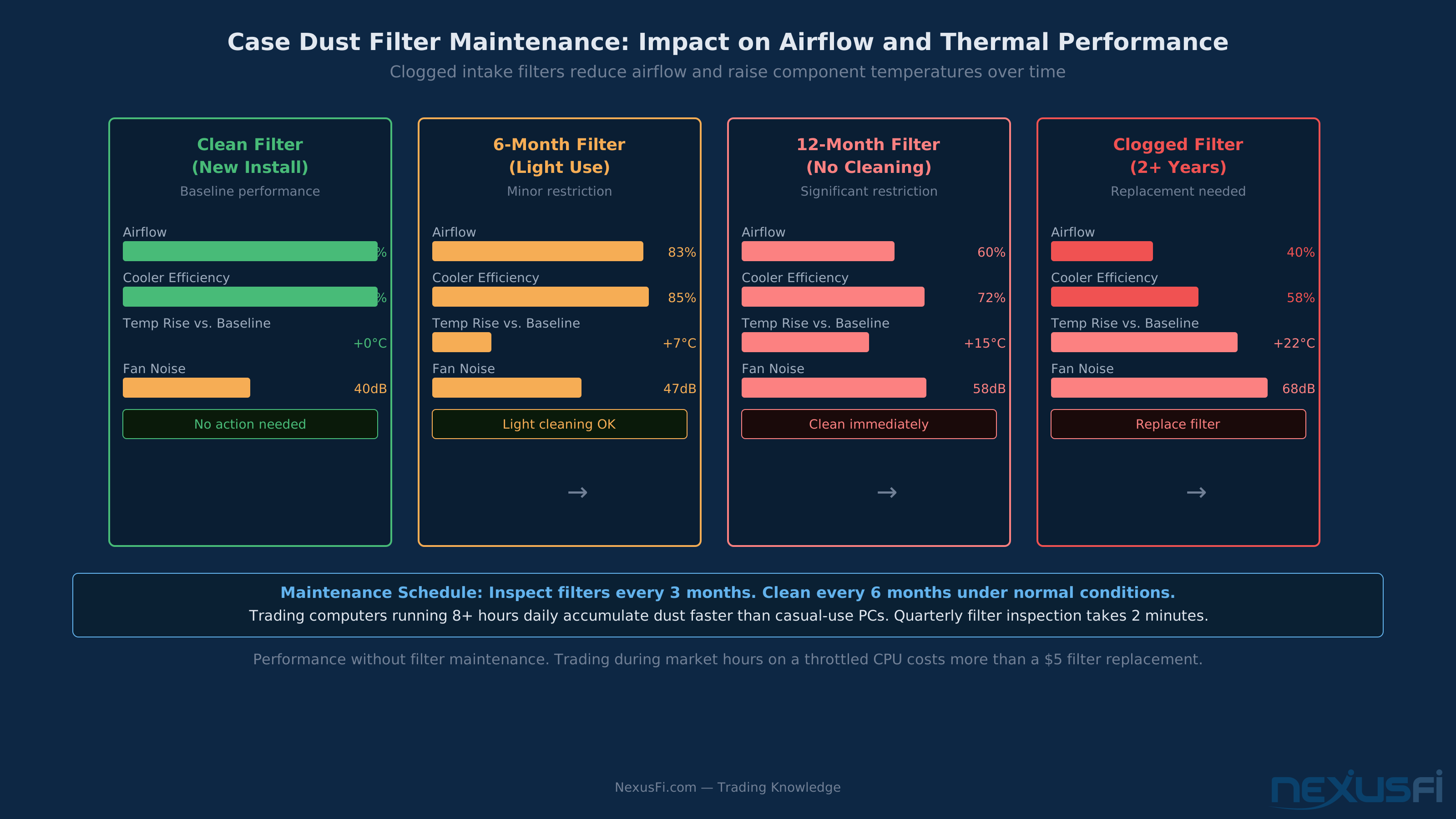
Dust filter maintenance matters more than most guides acknowledge. A clean filter at install becomes a partial obstruction after 6 months and a meaningful airflow problem after a year without cleaning. A trading computer running 8+ hours daily accumulates particulate faster than a machine used casually. Quarterly filter inspection and 6-month cleaning keeps the system running at designed performance. For a machine you depend on during market hours, a 2-minute quarterly filter check is a legitimate maintenance protocol, not optional housekeeping.
Expansion Slots and Drive Bays #
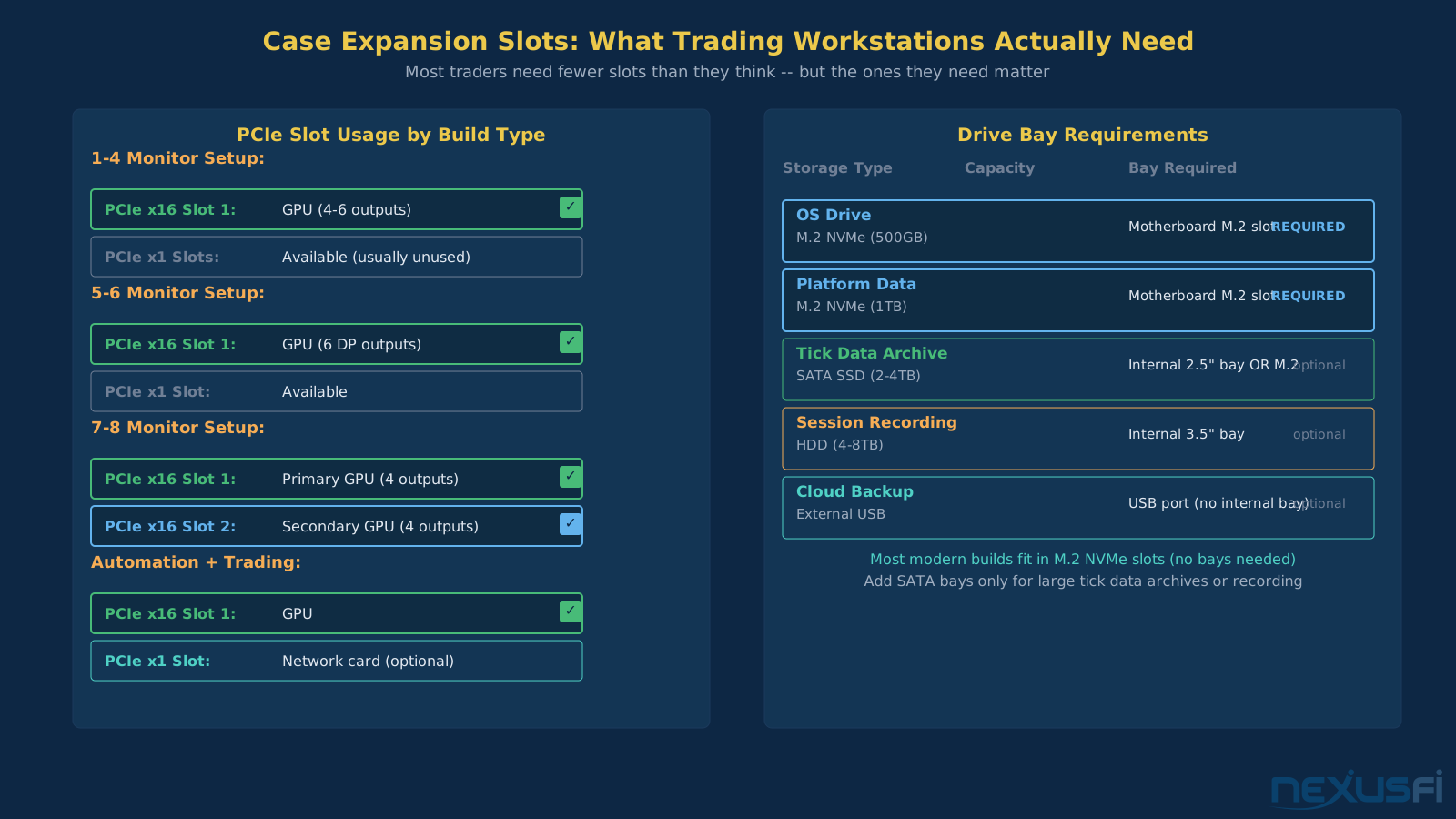
Expansion planning separates purpose-built trading cases from repurposed gaming cases. The components you don't need today — additional drives, a second GPU, a capture card for recording sessions — determine whether your case has headroom or hits a ceiling.
PCIe slot count:
- 7 slots (ATX): Dual-GPU for 8+ monitors + 1-2 additional cards
- 4 slots (mATX): Single-GPU for up to 6 monitors + 1 additional card
- 1 slot (mini-ITX): Single-GPU, no expansion capacity
For most traders building a primary workstation, 4 slots covers the realistic use case. The question is whether you'll eventually want dual GPUs.
Drive bay inventory:
- OS SSD: 1x M.2 NVMe (typically motherboard-mounted, not case-dependent)
- Tick data SSD: 1x M.2 NVMe (second motherboard M.2 slot)
- Backup/archive drive: 1x 3.5" HDD or 2.5" SSD (requires case bay)
- Additional archive: 2nd 3.5" bay (cases with single-bay cost less)
The minimum useful trading setup needs 2x M.2 slots (on the motherboard) and 1x internal bay for a backup drive. Most mATX and ATX cases meet this minimum. Where they differ is in how many additional bays they include for storage expansion.
- Primary NVMe: OS and platform installation (512GB adequate)
- Data NVMe: Tick data storage and real-time logging (1-2TB for heavy historical data)
- Optional: SATA SSD for additional platform data or cold backup
@traderalex81 demonstrated a complementary approach in the NexusFi Battlestations: Show us your trading desks! thread: a custom X99 ATX build with Samsung 950 PRO M.2 NVMe for primary storage, paired with a Synology DS918+ NAS for backups and a CyberPowerPC UPS for power protection. That's the right architecture — fast NVMe inside the case for platform performance, networked storage outside for redundancy. (2019)
Many current cases support 2-4 M.2 NVMe slots on the motherboard without any internal drive bays. For traders who run only NVMe storage, drive bay count is irrelevant — focus on M.2 slot count on the motherboard instead.
If you're running traditional SATA SSDs or HDDs for secondary storage, verify the case provides the necessary bays. HDDs for large tick data archives or video recording are the primary driver for maintaining traditional drive bay requirements.
@cdsmart's multi-display trading setup in the NexusFi Battlestations: Show us your trading desks! thread illustrates the ATX expansion case in practice: a Cooler Master MasterCase H500P running six 32" QHD monitors, two 27" FHD monitors, and a 65" UHD TV across dual Nvidia GTX 1060 cards. (2019) Nine concurrent displays across dual GPUs requires the expansion slot count and physical clearance that only ATX towers provide.
Cable Management and Maintenance Access #
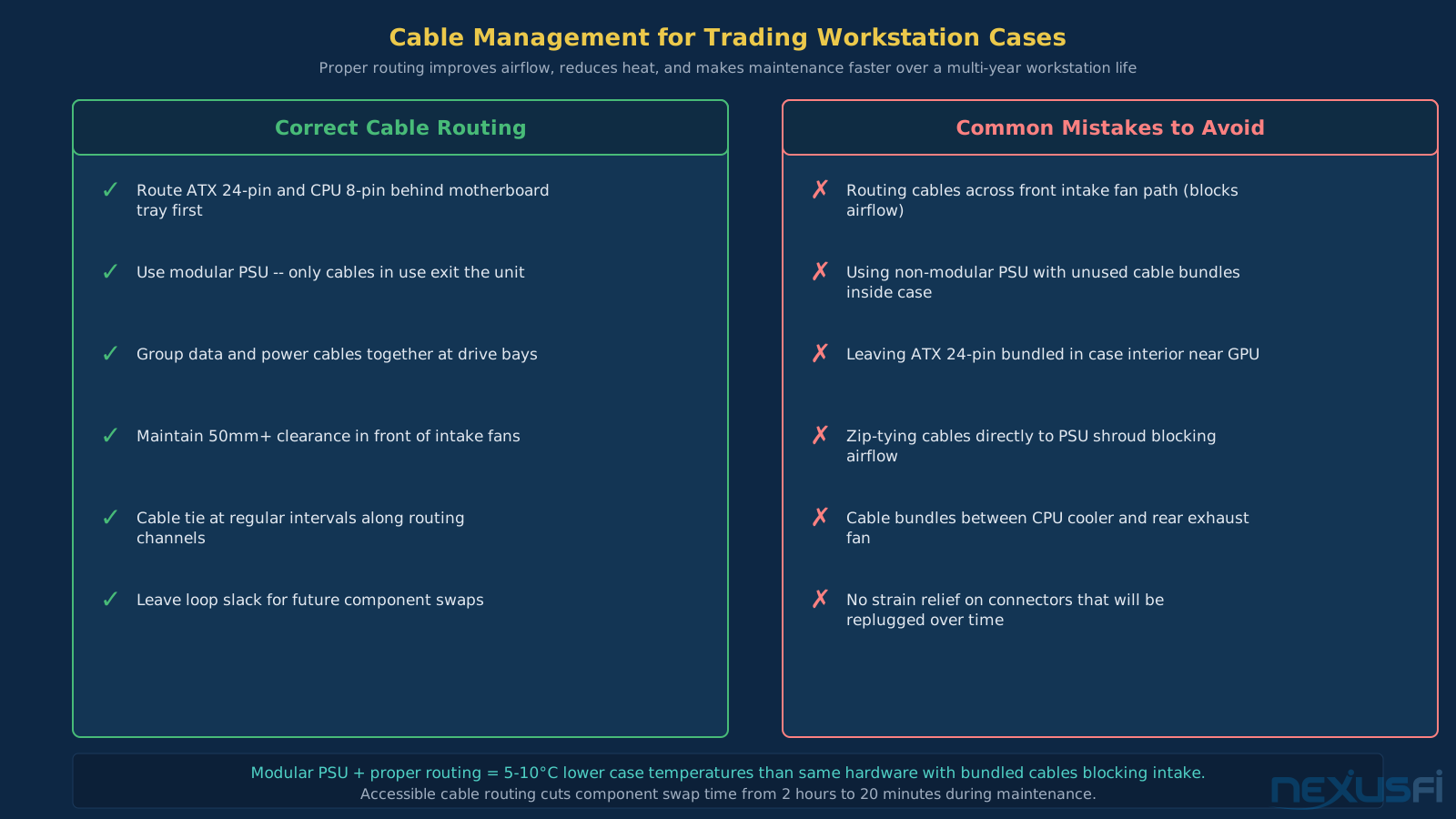
Cable management affects airflow, temperature, and how much time you spend when you open the case for component work. Trading workstations don't get opened frequently — maybe once a year for cleaning, occasionally for component upgrades — but when you do need to work inside, good routing makes the difference between a 10-minute job and an hour of frustration.
Routing space behind the motherboard tray is the most critical case specification for cable management. At minimum 25mm is needed to route power cables without forcing them back around into the main chamber. Cases with 30-35mm of rear routing space are meaningfully easier to manage.
PSU shrouds (the lower floor cover that hides the power supply and cable runs) reduce visual clutter and block bottom-intake airflow from being disrupted by cable mass. Most modern cases include some form of PSU shroud. Cases without them force cables into the main airflow path.
Modular power supplies reduce cable quantity to exactly what you need — no unused cables piled inside the case. The premium for a modular PSU over fixed-cable equivalent is $15-30, which is worth it for a workstation that will run continuously. See PSU and Power Supply Selection for Trading Workstations for full PSU guidance.
Cable tie points determine how much time you spend on maintenance. Integrated routing channels with velcro loops allow cables to be secured without zip ties (which require cutting to reroute). For a trading machine you might open once per year, the quality of tie point coverage determines how organized it stays over time.
Access panel design affects maintenance workflow:
- Thumbscrew side panels: Tool-free access, fast
- Tool-free hinged panels: Fastest access, slightly more expensive
- Magnetic panels: Very fast but can rattle under vibration
- Standard screw panels: Slowest but most secure
For a machine that runs continuously with minimal maintenance, the access panel design matters less than it does for a gaming build that gets opened regularly. Prioritize the cases with the best acoustic performance and airflow over tool-free access if you're choosing between otherwise equivalent options.
Leave at least 50mm clearance in front of intake fans (cables blocking front intake are a common airflow problem) Cable tie points at bottom of case keep PSU cables organized without bulk
Side panel access considerations: Cases that open without tools (thumbscrews, hinged panels, magnetic panels) reduce the friction of maintenance and component swaps. For a workstation that might go 2-3 years without opening, this matters less. For traders who actively monitor hardware temperatures and swap components regularly, tool-free access is worth the preference.
Tempered glass panels: Nearly irrelevant for trading workstations. Glass panels add weight, don't affect airflow, and provide visibility that's only useful if your machine is on display. If glass is present, treat it as neutral (doesn't affect the build's functionality). Don't pay a premium for it or choose a case specifically for it.
Common Case Selection Mistakes #
The errors that surface most frequently when trading workstation builds go wrong:
Choosing a case for its aesthetics, not its acoustics. Gaming case aesthetics (RGB lighting, tempered glass everywhere, aggressive styling) correlate weakly with trading workstation performance. A case that looks aggressive may move air loudly. Priority: sound dampening, airflow path, filter quality.
Under-sizing for monitor expansion. Traders who add monitors regularly outgrow their cases. A mATX build that works for 4 monitors hits its limit when you want 6 with two GPU cards. Build into ATX if you expect to expand beyond 4-6 monitors. The cost difference is small; the rebuild cost is large.
Ignoring CPU cooler clearance. Tower air coolers for trading-appropriate CPUs (sustained low-noise performance) are often 165-170mm tall. Cases with 155-160mm clearance require switching to a lower-profile cooler or AIO liquid cooling. Check clearance before purchasing either the cooler or the case.
Buying compact mATX/ITX cases without checking GPU length. Compact cases sometimes spec 280mm maximum GPU length. Professional and workstation GPU cards are typically longer. Verify GPU physical length against case maximum before finalizing the build.
Overlooking front panel filters. Cases without easily removable front panel dust filters accumulate particulate in intakes that gradually reduces airflow and requires more frequent internal cleaning. For a machine that runs continuously, accessible and cleanable filters are a maintenance quality of life feature, not optional.
Prioritizing looks over build room. Ultra-compact mATX cases with aggressive aesthetics may not have adequate space for a large tower air cooler or proper cable routing. More internal volume generally means better airflow, easier builds, and more flexibility in component selection.
Knowledge Map
Go Deeper
Build on this knowledgeReferences This Article
Articles that build on this topicCitations
- — Trading Workstation (2011) 👍 2“It is worth the extra money to get top of the line fans to keep things quiet. All my fans are Noctua. For GPU I would try to get a passive card, trading computers do not need fast cards -- cool and quiet is better.”
- — New Computer Build (2020) 👍 9“I tried a micro ITX case before, and they are tiny, but just impossible to get decent cooling so decided to go with the micro ATX.”
- — PC build for trading (2015) 👍 3“Fractal Design Define R5 - Probably the most silent case on the market.”
- — Terry Badass Rig (2015) 👍 5“Ncase M1 v4 mini-ITX case -- near silent and very compact.”
- — Battlestations: Show us your trading desks! (2019) 👍 47“My Battle Station is a custom built system with Dual DELL 49 Curve Monitors. Each Dell 49 Curve Monitor replaces 3 of my previous monitors.”
- — Battlestations: Show us your trading desks! (2019) 👍 24“Main trading PC: I7 5930k Corsair Water cooled, 64GB RAM, 2x M2 SSD, GPU 2x Radeon Vega RX 56 8GB, PSU Corsair platinum 1200w.”
- — Battlestations: Show us your trading desks! (2019) 👍 23“Cooler Master MasterCase H500P, dual Nvidia GTX 1060 6Gb GFX cards, 6 32 inch QHD Monitors, 2 27 inch FHD Monitors, 1 65 inch UHD 4K TV. All built by myself. Running Sierra Charts, Ninjatrader, Tradingview, Bookmap and Jigsaw.”
- — Battlestations: Show us your trading desks! (2018) 👍 18“Deepcool TESSERACT SW Red ATX Mid Tower Computer Case with Intel Core i7-6700K, Cooler Master Hyper 212 EVO CPU Cooler, MSI GeForce GTX 1060 6GB, running Jigsaw on CL, YM, NQ and ES.”
- — Battlestations: Show us your trading desks! (2019) 👍 23“Custom build PC: Asus X99 Deluxe 2, Intel i7-6800K, EVGA GTX 1070 -- great cooling on this card, EVGA SuperNOVA 1000W, two LG 43 inch 4K monitors. Running Sierra Charts, NinjaTrader 8, Jigsaw, with Synology NAS backup and CyberPowerPC UPS.”