



RAM and Memory for Futures Trading Workstations: How Much You Actually Need, What Speed Matters, and Why 32GB Is the Sweet Spot
Overview #
RAM is the component most traders either obsess over or ignore completely. The obsessors buy 64GB thinking more is always better. The ignorers run 8GB, wonder why their platform crawls during heavy market hours, and assume it's the internet connection. Both are wrong.
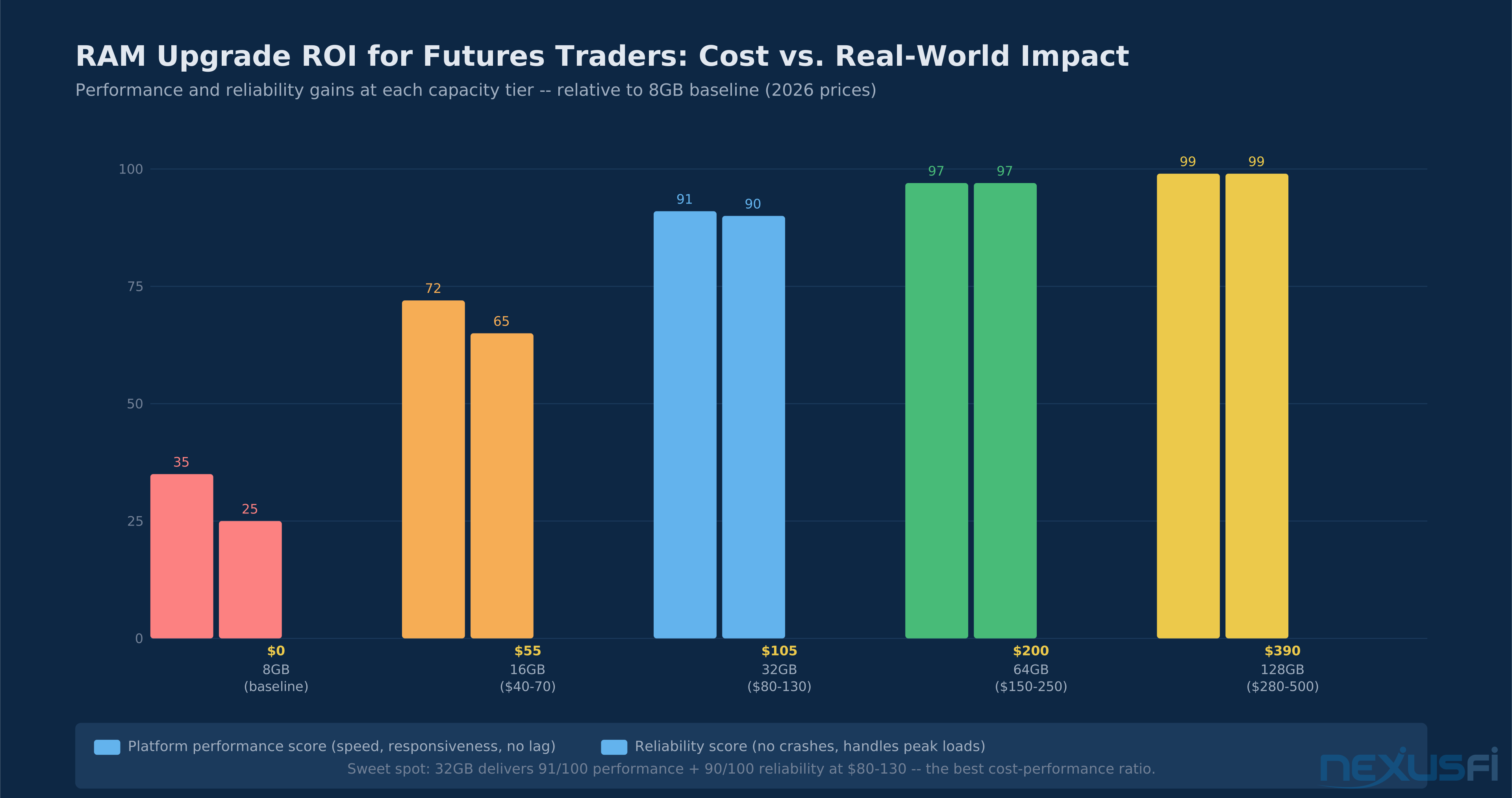
The correct answer for most futures day traders is 32GB of DDR4-3600 in a dual-channel configuration. That covers NinjaTrader 8 with a live data feed, multiple instrument charts, custom indicators, and room for a browser, your broker platform, and a spreadsheet without the system reaching for the page file. It costs $80-130 and delivers 90% of the performance gains available from any RAM configuration.
This guide covers what trading platforms actually consume in terms of memory, why speed (frequency) matters far less than capacity for trading workloads, how to configure virtual memory correctly, and what to do when RAM is the actual cause of platform crashes versus when it isn't. It also covers laptop RAM limitations — an increasingly important topic as soldered memory becomes standard even on mid-range machines.

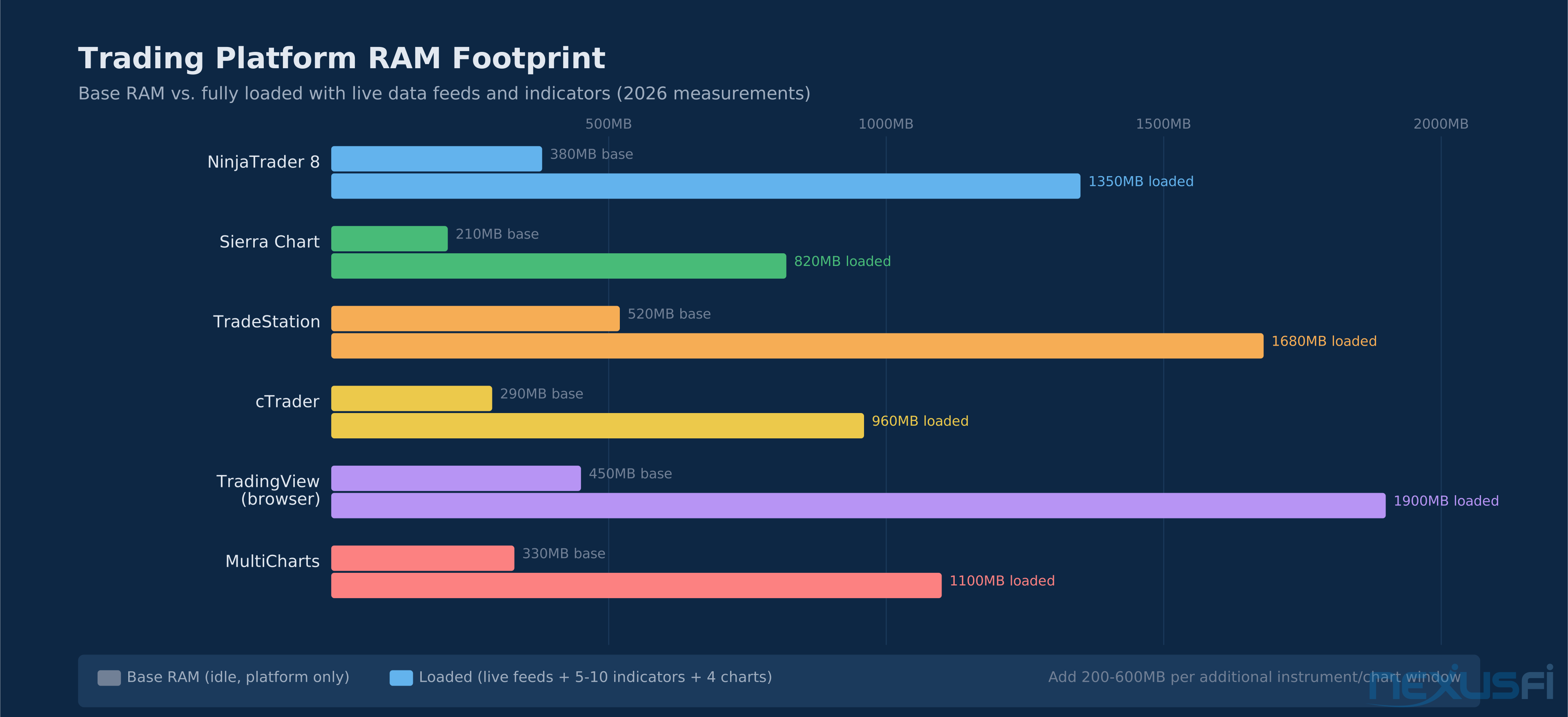
Platform RAM footprints under live load. NinjaTrader 8 consumes 350-1,350MB depending on chart count and indicators. Add 200-600MB per additional instrument or chart window.
The 32GB Sweet Spot For most futures day traders: 32GB DDR4-3600 in dual-channel is the right answer. It handles NinjaTrader 8, live feeds, multiple instruments, and custom indicators without touching the page file. Going to 64GB is waste unless you're running automated strategies across 20+ instruments simultaneously. Going below 16GB in 2025 means you will hit the page file during volatile sessions — and that's when you need performance most.
How Much RAM Do Trading Platforms Actually Use #
The baseline RAM footprint varies much across platforms. NinjaTrader 8 typically starts at 350-400MB at launch and grows as it loads historical data, chart objects, and indicator calculations. Sierra Chart is leaner: 200-250MB base, growing to 600-900MB with live feeds. TradeStation and MultiCharts are heavier: 500-600MB base, reaching 1.5-2GB under full load.
These figures assume a single active session. Add each instrument's historical data cache (50-200MB per instrument depending on timeframe depth), each indicator's memory footprint (custom indicators can use 50-500MB each), and the base OS overhead (2-3GB for Windows with typical background services), and you can see how 8GB gets exhausted quickly.
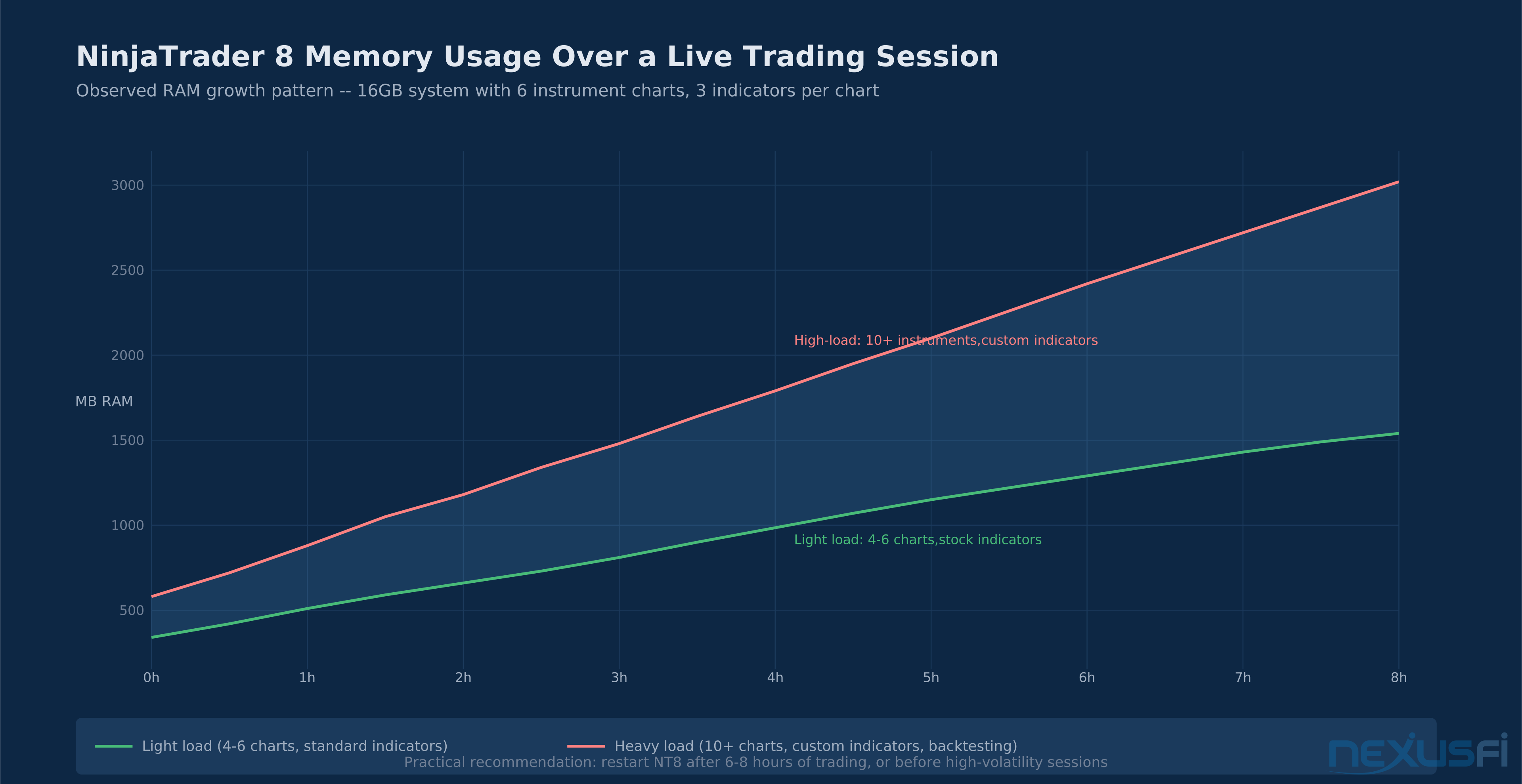
The memory growth pattern matters as much as the peak footprint. NinjaTrader 8 is known to accumulate memory over long sessions due to cached data structures that aren't always garbage-collected efficiently. A session that starts at 400MB can reach 1.5GB after 8 hours of trading, even with the same charts and indicators. This isn't a memory leak in the traditional sense — it's a design tradeoff where NT8 caches aggressively to improve real-time responsiveness. The practical result: restart the platform before high-volatility sessions when you've been running it overnight.
@quantera documented this behavior precisely while benchmarking NT8 on AWS EC2 instances:
The same principle applies regardless of hardware: when you start maxing out available RAM, performance degrades non-linearly. The OS reaches for virtual memory, disk I/O spikes, and what was a fast real-time platform becomes sluggish exactly when you need it to be responsive. 32GB provides the buffer that prevents this scenario for all but the heaviest workloads.
Capacity Guide by Use Case #
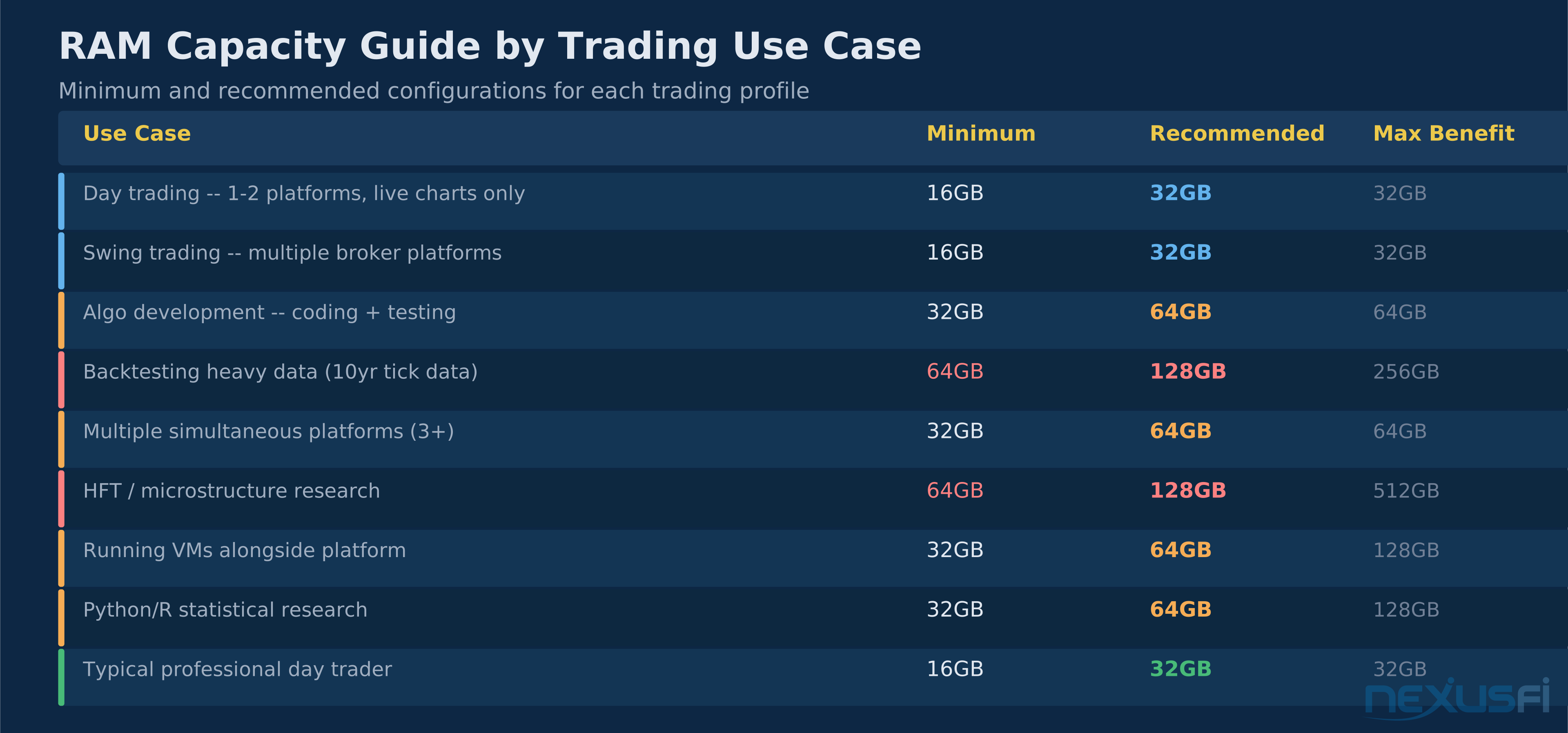
RAM requirements split cleanly along use case lines. Day trading with a single platform and live market data is the lightest workload. Backtesting against years of tick data is the heaviest. Most traders sit somewhere in between, which is why 32GB covers so much ground.

Capacity requirements by use case. Most day traders are well-served by 32GB. Only heavy backtesting with multi-year tick data or continuous ML research justifies 64GB+.
The backtesting case deserves specific attention. Running a backtest against 5 years of ES tick data — roughly 500 million ticks — requires holding large data structures in memory simultaneously. At 16GB, the OS starts paging to disk regularly, turning a 10-minute backtest into a 45-minute one. At 32GB, most single-instrument backtests run clean. At 64GB, you can run multi-instrument, multi-timeframe backtests against deep historical datasets without paging.
@ThemBones articulated the practical ceiling well in a recent platform comparison thread:
16GB is ample for live trading. 32GB is more than ample. 64GB is overkill for trading alone — the caveat being "alone." When trading platforms share the machine with video production software, browser tabs running web research, Python environments, and background services, 32GB fills up faster than the platform's footprint alone suggests.
@selion89 adds the nuance that matters for hardware buyers:
Get as fast RAM as you can afford — but within the same capacity tier, not by sacrificing capacity for speed. A 32GB DDR4-3200 kit outperforms a 16GB DDR4-4400 kit for every trading workload measured.
Speed vs. Capacity: What counts #
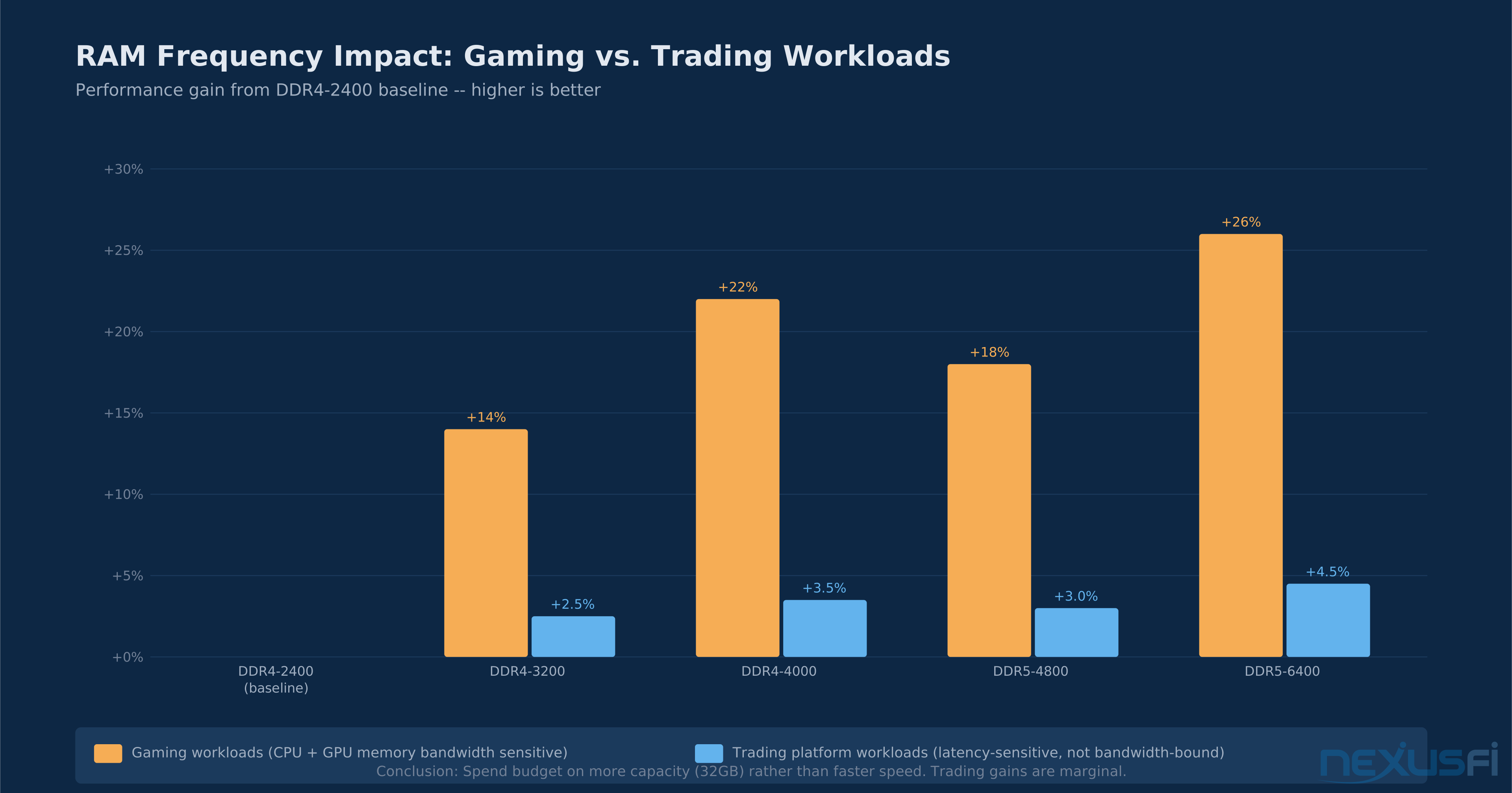
RAM speed (frequency) is a major marketing category and a minor performance driver for trading workloads. The benchmark data is clear: going from DDR4-2400 to DDR4-3600 produces 2-4% performance gains in trading platform workloads. Going from DDR4-3200 to DDR5-6400 produces similar real-world gains despite the dramatic specification difference on paper.

Gaming sees 14-26% gains from faster RAM. Trading platforms see 2-4.5%. Budget for more capacity (32GB), not more speed (DDR5-6400).
The reason is that trading platforms are latency-sensitive, not bandwidth-hungry. A game rendering frames at 144Hz needs sustained memory bandwidth to feed the GPU constantly. NinjaTrader waiting for the next tick update, processing an order, or calculating an indicator value accesses memory in short bursts with long idle periods between. The bottleneck is rarely memory bandwidth — it's more often CPU single-thread speed, disk I/O for historical data, or network latency.

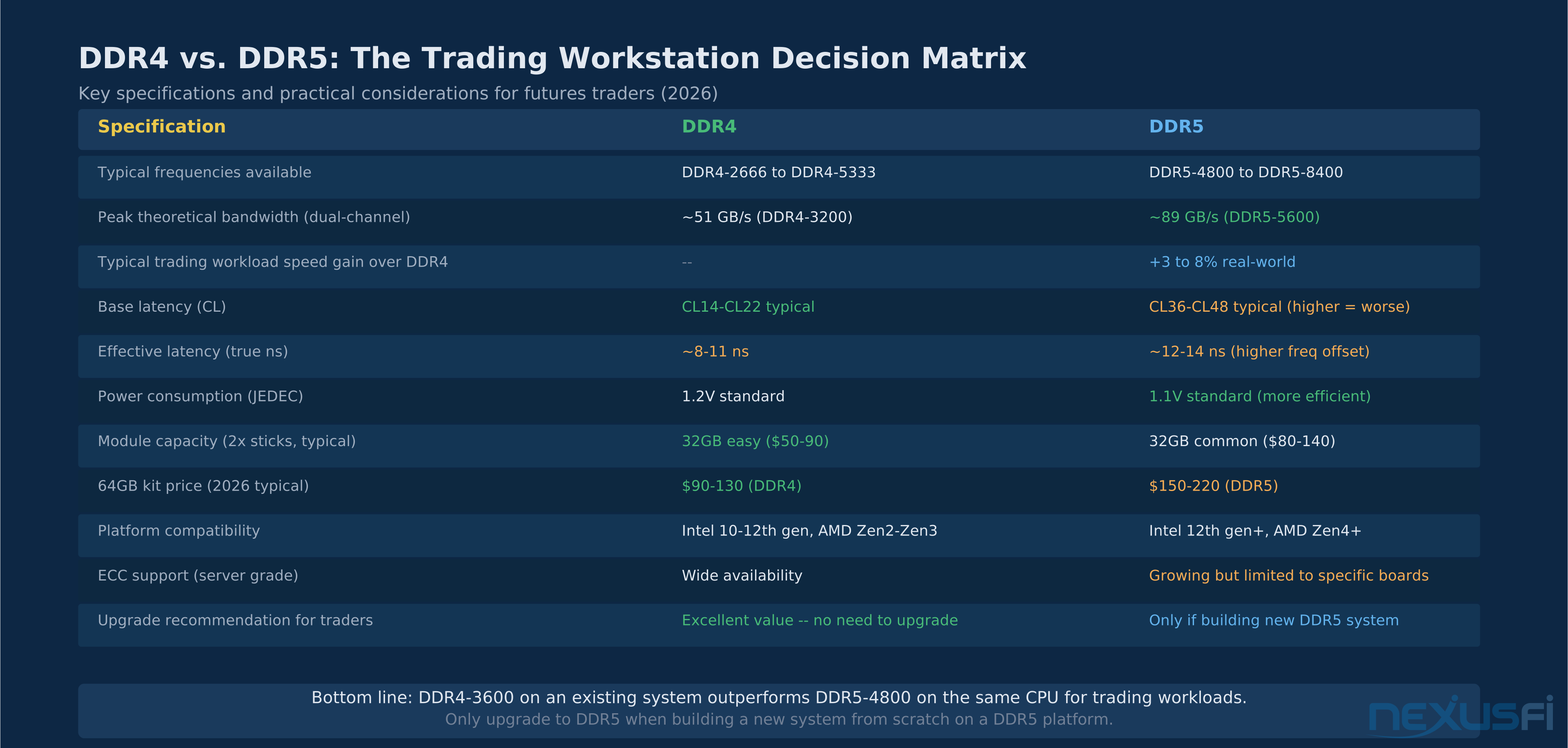
DDR4 vs. DDR5 for trading workloads. Despite DDR5's higher theoretical bandwidth, real-world gains are marginal (3-8%). DDR4-3600 is the sweet spot for existing platform upgrades.
The one exception: backtesting heavy multi-instrument datasets. When NinjaTrader or MultiCharts is scanning millions of bars, executing strategy logic, and writing results simultaneously, memory bandwidth matters. Even here the gains are modest — 5-10% reduction in backtest runtime from DDR5 vs. DDR4 — but measurable. If you spend significant time backtesting, favor DDR5 when building a new system. If you're upgrading an existing DDR4 platform, buy more sticks (go dual-channel or max out slots) before buying faster RAM.
Dual-Channel Configuration #
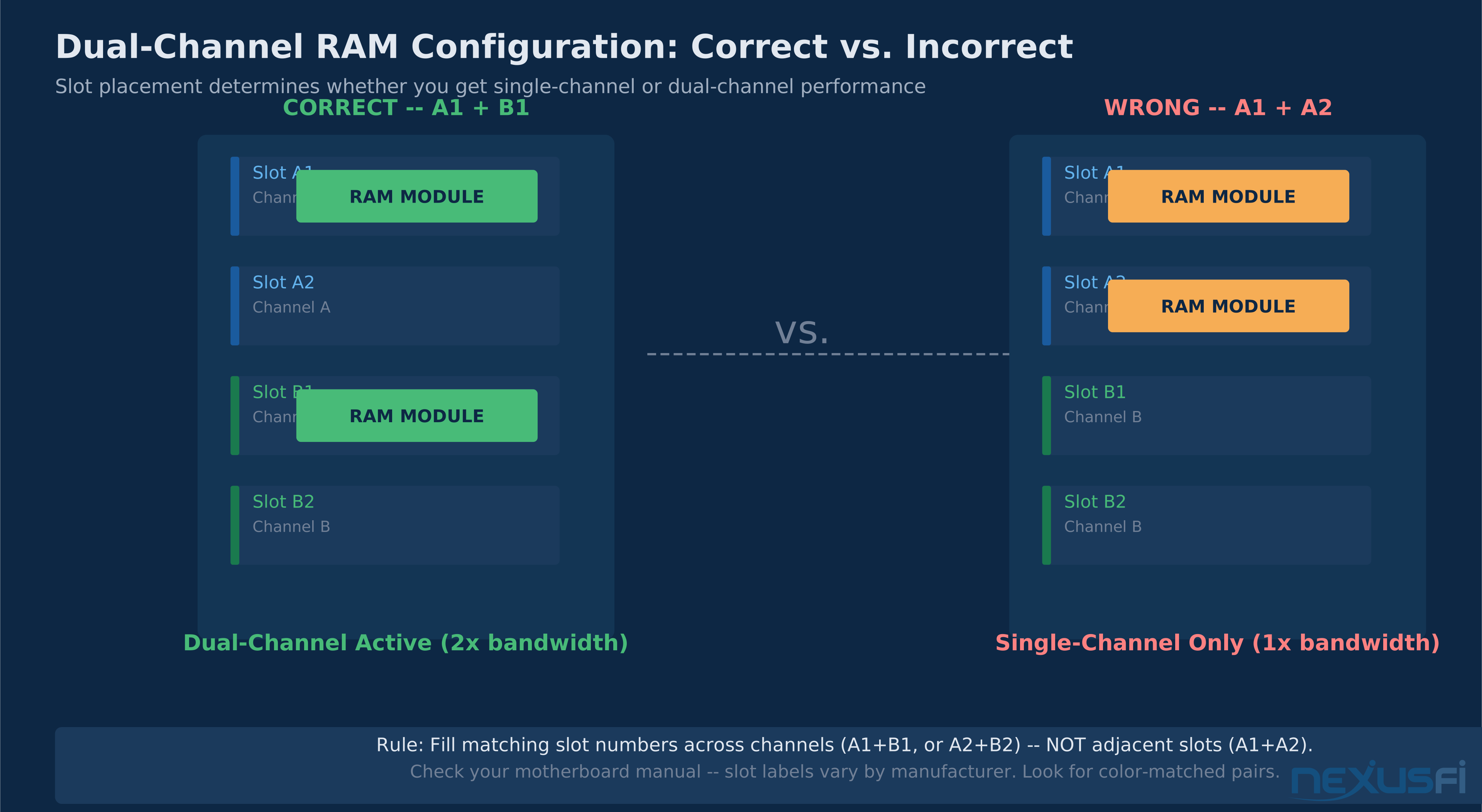
Dual-channel memory doubles the effective memory bandwidth by running two modules simultaneously through separate channels. For trading platforms, the real-world benefit is 5-15% faster data throughput compared to single-channel — not impactful, but free if you're buying two sticks anyway.

Always pair matching slot numbers across channels (A1+B1), not adjacent slots (A1+A2). Wrong placement cuts memory bandwidth in half and causes subtle but consistent performance degradation.
The configuration error that silently degrades performance: installing two sticks in adjacent slots (A1+A2) instead of matched channels (A1+B1 or A2+B2). The platform boots normally, Windows shows the correct RAM amount, but memory bandwidth is halved because the CPU is accessing one channel instead of two. Check your motherboard manual for the correct "dual-channel" or "recommended" slots — typically color-coded to make this obvious, but the naming convention varies (A1/B1, DIMM1/DIMM3, etc.).
The diagnostic: in CPU-Z (free tool), the Memory tab shows "Single" or "Dual" under Channel. If it says "Single" and you have two sticks installed, you have the wrong slot configuration. Move one stick to the paired slot and reboot.
@ratfink emphasized that RAM configuration, not just quantity, determines the performance ceiling:
RAM performance is often underestimated relative to CPU clock speed. For trading platforms doing constant small data lookups, RAM performance — bandwidth, latency, and channel configuration — affects responsiveness more than the difference between a 4.5GHz and 5.0GHz processor running the same workload.
Virtual Memory and Page Files #
Windows uses the page file — a portion of disk reserved for memory overflow — as an extension of physical RAM. When physical RAM is full, Windows moves inactive memory pages to disk to free space for active processes. The consequence for trading: disk I/O spikes during page swaps, platform responsiveness drops, and chart updates lag exactly when volatility is high and you need real-time data.

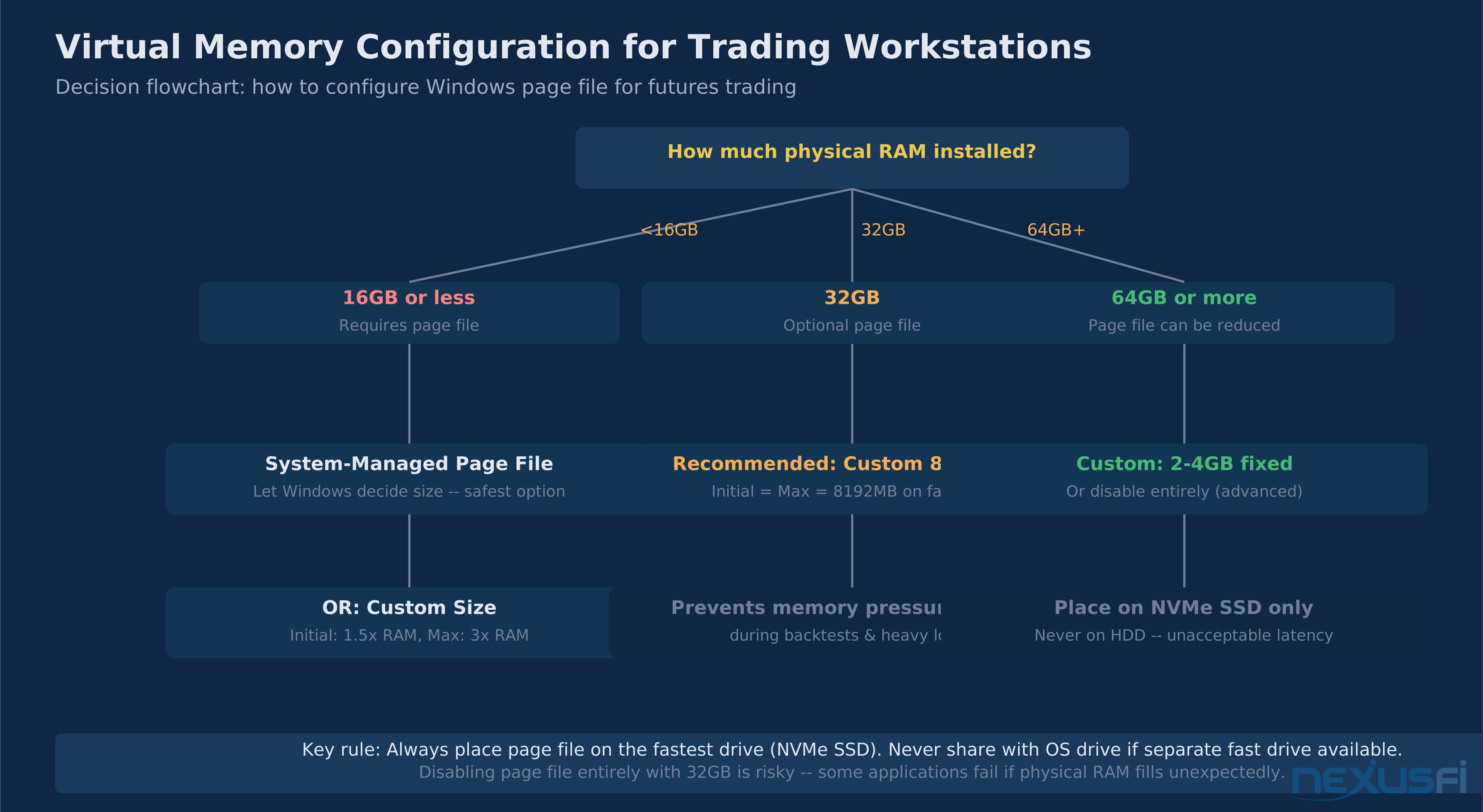
Page file configuration by RAM installed. At 16GB, system-managed is safest. At 32GB, a fixed 8GB file on NVMe SSD prevents memory pressure spikes without performance penalty.
The configuration that causes most traders problems: system-managed page file on a traditional HDD. When the system starts paging to a spinning disk — even at 200MB/s — platform performance collapses. The correct configuration for a trading workstation with 32GB of RAM: a fixed-size page file of 8GB (initial = maximum = 8192MB) located on your fastest NVMe SSD, not the OS drive if separate.
@sam028 documented a direct NT8 memory-to-disk scenario that illustrates why this matters:
When swap activates, performance degrades immediately and predictably. The solution is not to rely on swap as a safety net — it's to have enough RAM that swap never activates during normal trading sessions. For backtesting sessions that deliberately use more memory than you have RAM for, a dedicated page file on NVMe SSD limits the damage.
One counterintuitive rule: do not disable the page file entirely even if you have 32GB. Some applications and Windows itself require a page file to exist, even if it's never actually used. Disabling it causes rare but catastrophic failures. Set a small fixed page file (2-4GB) rather than disabling it.
NinjaTrader Memory Optimization #
NinjaTrader 8 has specific memory behaviors that differ from the "generic trading platform" baseline. Understanding them helps both with hardware sizing and with day-to-day platform management.

NT8 memory grows throughout the trading day. Light load (4-6 charts) stays manageable. Heavy load (10+ charts, custom indicators) can exceed 3GB after 8 hours. Restart before peak sessions.
NT8 caches historical data progressively as you add instruments and timeframes to active charts. Each new data series it loads stays cached even after you close the chart window, improving performance if you reopen the same series but consuming memory for sessions you'll never reopen. The cache persists until you restart NT8 or it's purged by the garbage collector.
Custom indicators much increase the memory footprint beyond what their code complexity suggests. Indicators that maintain large rolling data structures (multi-day lookbacks, correlation matrices, machine learning models) can individually use 200-500MB. NinjaTrader's indicator isolation model means a misbehaving indicator can consume unbounded memory without immediately crashing the platform — instead, you see gradual slowdown over hours.
@sam028 observed the compound effect in a thread about system resource limits:
32GB of memory is plenty for NinjaTrader unless you're leaving it on for days at a time or running extremely memory-intensive indicators. The practical fix for long-session memory growth is disciplined platform restarts: before the pre-market open, before any high-volatility session (FOMC, NFP), and any time you notice chart update latency creeping above normal.
NT8-specific optimization tips beyond RAM sizing:
- Reduce historical data depth: Each chart window specifies days of historical data to load. Setting this to 3-5 days instead of 30-90 days reduces the initial load footprint by 60-80%.
- Close unused workspaces: NT8 keeps all open workspaces in memory. Close workspaces you're not actively using.
- Monitor Memory tab: Windows Task Manager > Performance > Memory shows page file usage. If you see consistent page file activity during trading, you need more RAM or fewer indicators.
- Garbage collection trigger: NT8 allows manual GC triggering via the log window. This rarely helps but occasionally frees a few hundred MB mid-session.
Sierra Chart Memory Behavior #
Sierra Chart is one of the most memory-efficient professional platforms available. Its C++-based architecture and tight resource management mean it operates at 200-400MB under typical conditions — roughly one-third of NT8 under equivalent chart loads.
The tradeoff is that Sierra Chart's memory efficiency comes partly from loading data on demand rather than aggressively caching. This means chart transitions and historical data requests involve brief disk reads, whereas NT8 would serve the same request from its in-memory cache. For most traders this is imperceptible. For strategies that rapidly switch between multiple instruments or timeframes (automated scalping strategies, for example), NT8's higher memory footprint may produce better real-time responsiveness.
Sierra Chart's ACSIL-based automated strategies have a dedicated memory management approach and typically operate within predictable bounds. Strategies don't share memory with the chart engine in the same way NT8 indicators do, which means a runaway strategy is less likely to affect chart performance. The Sierra Chart ACSIL development guide covers memory-safe strategy patterns for traders building automated systems.
Backtesting RAM Requirements #
Backtesting has at the core different RAM requirements than live trading. During live trading, the platform processes one tick at a time, updating charts and running indicator calculations on current data. During a backtest, it loads the entire historical dataset, iterates through every tick or bar, maintains running indicator calculations across the full historical period, and stores results.
For a single-instrument backtest at the tick level over 1 year, expect 4-8GB of RAM usage depending on the indicator complexity and the data density of the instrument. ES tick data from a single trading year runs approximately 150 million ticks — roughly 2-4GB when loaded into NT8's data structures. A 5-year backtest on ES ticks may push 10-20GB.
The practical implication: 16GB is the minimum for meaningful tick-level backtesting. 32GB handles most single-instrument backtests through full market cycles. 64GB unlocks multi-instrument, portfolio-level backtesting or deep historical windows (10+ years on liquid instruments). @Fat Tails, one of the most active contributors to NinjaTrader strategy development, addressed this in a hardware discussion:
The disk requirement is equally important: NinjaTrader stores data in many small files, and SSD access times are critical. Fast NVMe storage paired with adequate RAM eliminates the most common backtesting performance bottleneck. A detailed look at storage optimization is covered in the trading PC build guide.
Python and R environments for quantitative research add another memory dimension. A pandas DataFrame holding 2 years of minute-bar data across 50 instruments might use 8-12GB. Machine learning model training with scikit-learn or TensorFlow can require 20-40GB for non-trivial feature sets. If Python quant research is part of your workflow, 64GB is the appropriate target — not for the trading platform, but for the research environment.
Laptop RAM Limitations and Upgrades #
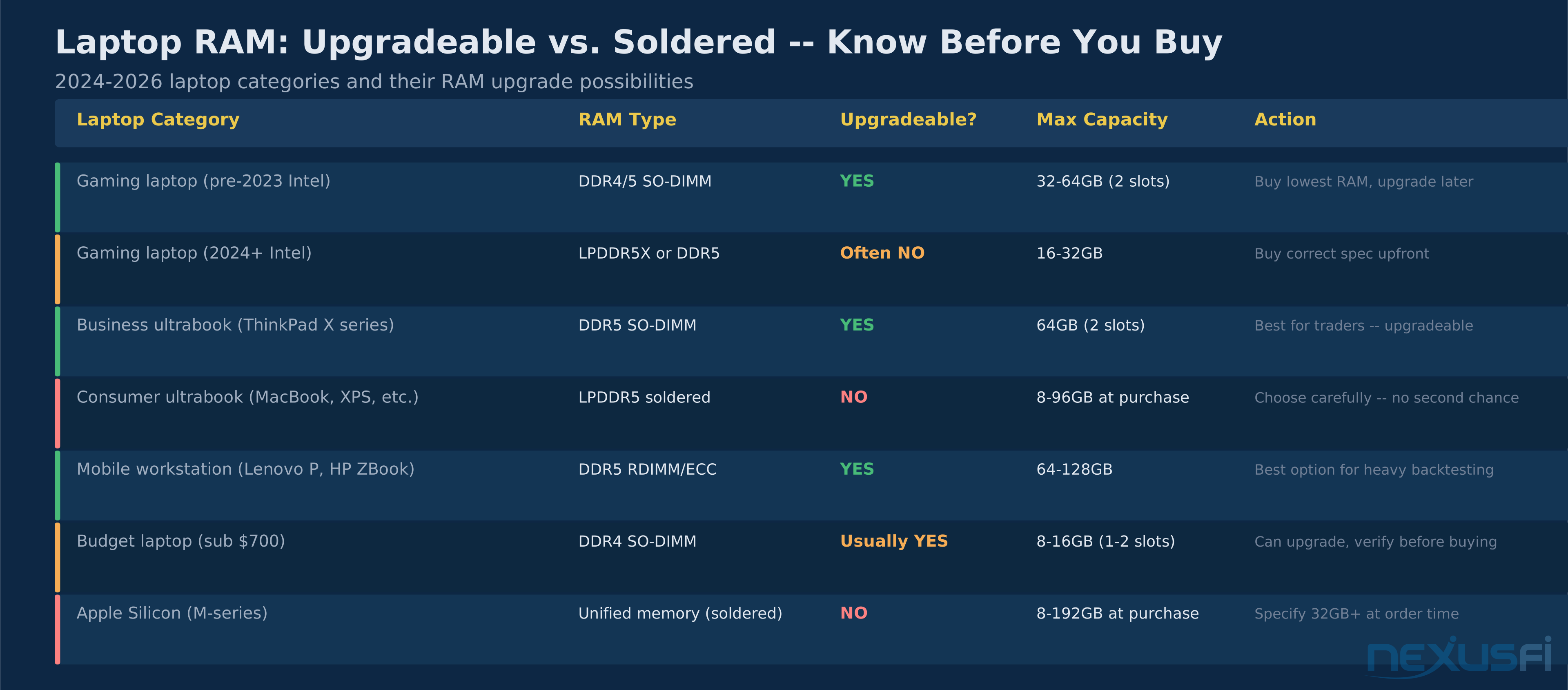
The laptop RAM environment changed dramatically between 2020 and 2024. A growing percentage of consumer and business laptops now use LPDDR5 memory soldered directly to the motherboard — not upgradeable. Buying a laptop with 16GB that you plan to upgrade to 32GB later may be impossible with modern hardware.

Know before you buy: many modern laptops have soldered RAM. Mobile workstations (ThinkPad P, HP ZBook) are the safest choice for traders who need upgrade flexibility.
The practical rule: always verify whether the specific model you're considering uses SO-DIMM slots (upgradeable) or soldered LPDDR (not upgradeable) before purchase. The listing specs rarely make this explicit. Check the Hardware Maintenance Manual (usually downloadable from the manufacturer) or iFixit teardown photos for your specific model.
Trading laptops from dedicated vendors (Falcon Trading Systems, Trading Technologies) typically use desktop-grade components including user-accessible SO-DIMM slots. The premium over consumer laptops is partly hardware and partly the configuration guarantee. @GoldLinx made this comparison in a laptop selection thread:
For a trading-focused laptop, 32GB is achievable and recommended. The RAM ceiling on most consumer laptops is 32GB (2x16GB SO-DIMM); mobile workstations support 64-128GB. Apple Silicon Macs use unified memory (no upgrade possible post-purchase) — specify 32GB at order time if buying M-series for trading use.
VPS and Remote Trading Servers #
VPS deployments for automated trading have a different RAM calculus than local workstations. The focus shifts from interactive responsiveness to sustained reliability and cost per gigabyte over months of continuous operation.

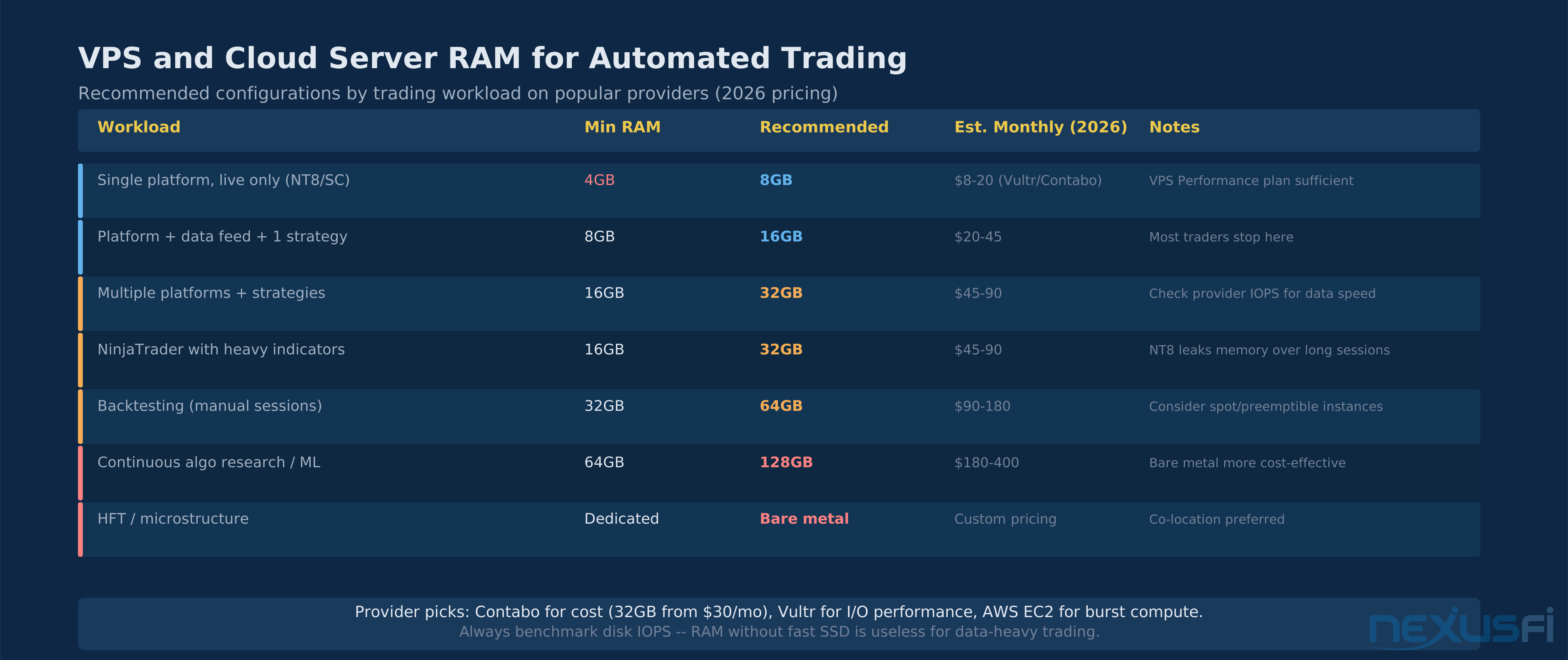
VPS RAM sizing by trading workload. Most traders running 1-2 automated strategies need 8-16GB. Heavy backtesting warrants 32-64GB on a spot instance.
A VPS running a single NinjaTrader automated strategy can operate on 4-8GB of RAM for months without issues. The memory footprint of an unattended NT8 session with one active strategy, one instrument, and minimal indicators stays under 600MB. 4GB provides comfortable headroom for OS, platform, and overnight updates.
The minimum viable VPS for a professional setup: 8GB RAM, NVMe SSD, Windows Server or Windows 10/11. This handles one platform instance with 2-3 active strategies and a data feed. @quantera's AWS benchmarking showed that the RAM tier matters more than the CPU tier for NT8 VPS performance:
An R4 (memory-optimized) EC2 instance outperformed a T2 (compute-optimized) instance for NT8 backtesting because the workload was constrained by RAM bandwidth, not CPU cores. Apply the same logic when selecting VPS tiers — most providers offer memory-optimized configurations that provide more RAM per dollar than general-purpose tiers for exactly this use case.
For the dedicated trading server decision — when to move from VPS to bare metal — the dedicated trading server guide covers the full transition criteria including RAM configurations for bare metal deployments.
Memory Diagnostics: When RAM Is the Problem #
Most trading platform instability is not caused by faulty RAM. It's caused by software bugs, indicator conflicts, network issues, or disk problems. Before replacing RAM modules, confirm that RAM is the actual cause.

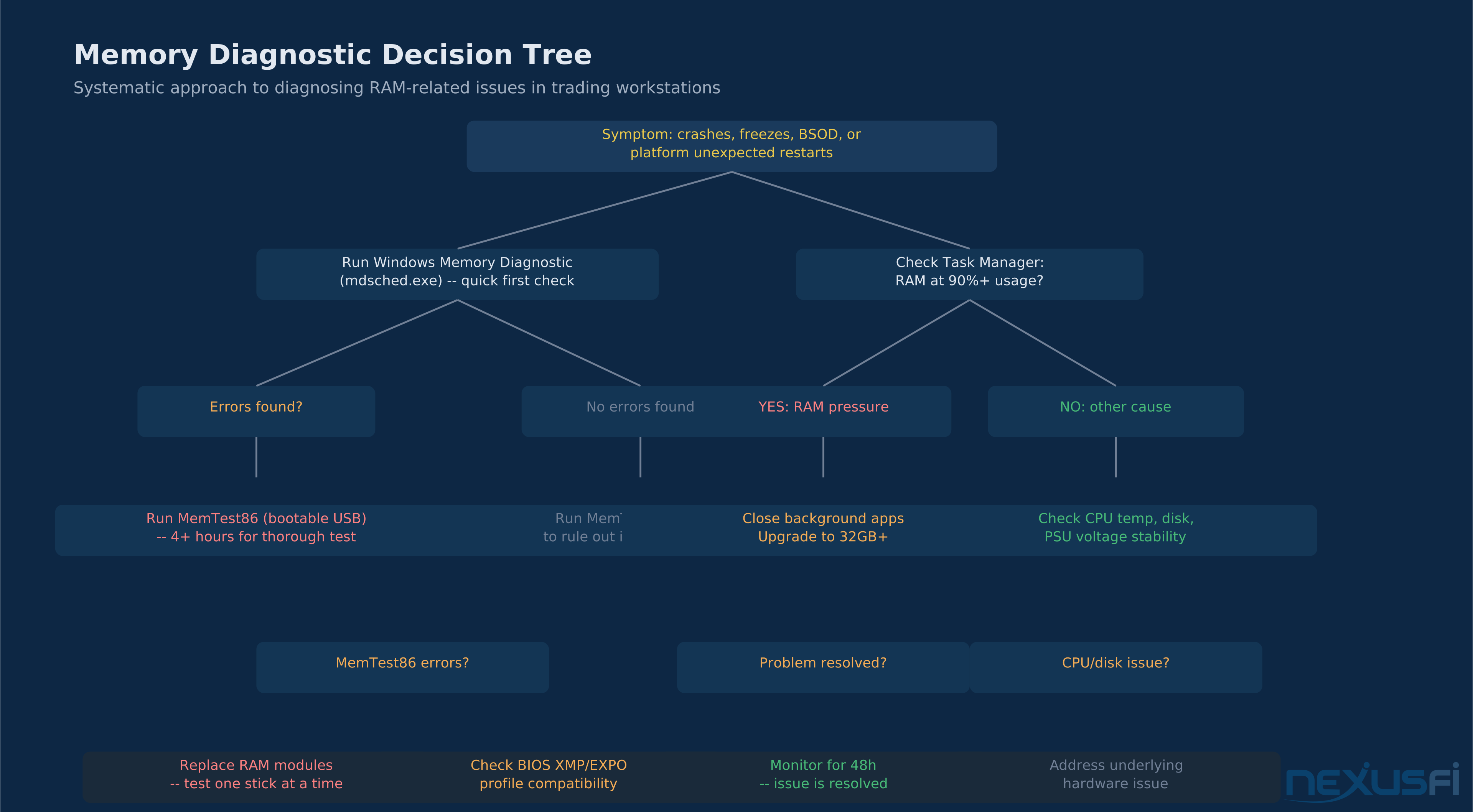
Start with Windows Memory Diagnostic for a quick check. If errors appear, run MemTest86 for 4+ hours. Most RAM-related crashes trace to faulty modules, incorrect XMP settings, or capacity exhaustion.

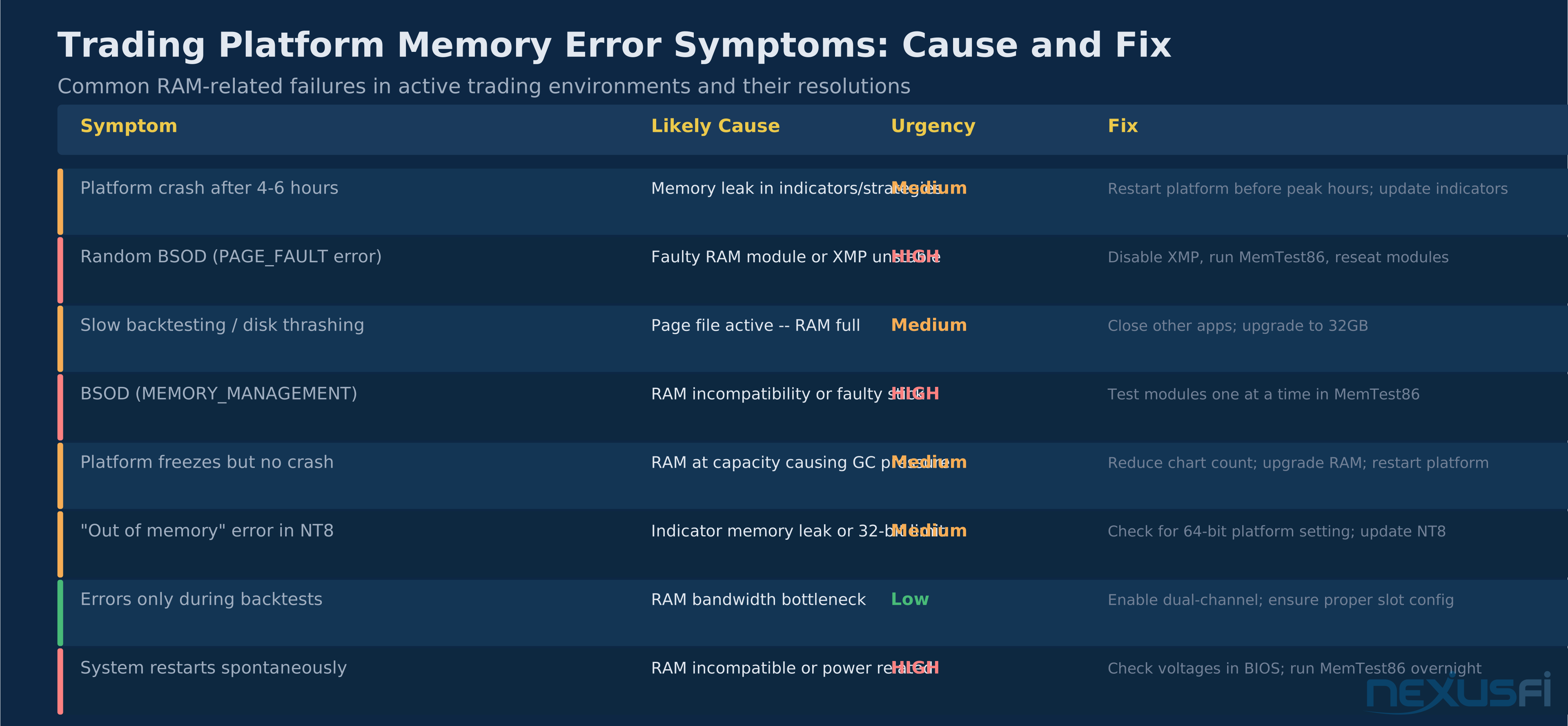
RAM-related failures have distinct signatures. Random BSOD with PAGE_FAULT errors require immediate investigation. Platform crashes after several hours are usually memory leaks in indicators, not hardware failure.
The most common "RAM problem" that isn't a RAM problem: enabling XMP (Extreme Memory Profile) in BIOS to run RAM at its advertised frequency. XMP pushes RAM beyond JEDEC-standard speeds, which works on most systems but is unstable on some CPU/motherboard/RAM combinations. If crashes started after enabling XMP, disable it or use a more conservative XMP profile.
True hardware RAM failure — where a memory cell physically fails — is rare but shows up consistently in MemTest86. A faulty module will produce errors across multiple test passes. If MemTest86 shows errors, test each stick individually to identify which module is defective. Most quality RAM comes with lifetime warranties. Contact the manufacturer with your MemTest86 results for an RMA.
@djkiwi identified an early version of this problem in the original NT7 era — the 32-bit memory limit that caused instability as RAM usage grew:
Modern 64-bit platforms have eliminated the hard 3.5GB ceiling, but the principle remains: when trading platform memory usage reaches its operational limit, instability follows. With NT8 (64-bit), the effective limit is available physical RAM plus page file — which is why sizing both correctly matters.
Recommended Build Tiers #
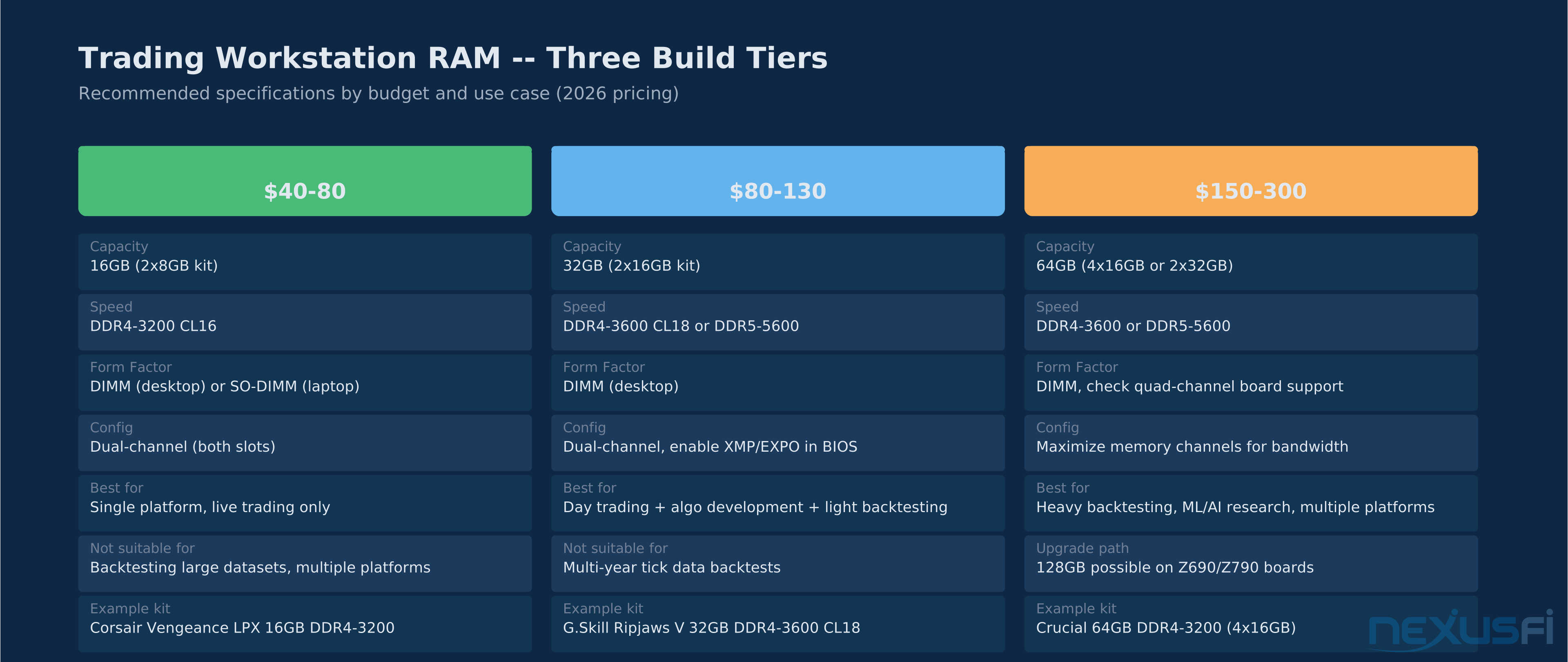
Concrete recommendations for three categories of futures traders:

Three RAM tiers for futures traders. The professional 32GB tier covers 95% of use cases at $80-130. Only add more for backtesting heavy datasets or running multiple platforms with ML research tools.

32GB hits the performance sweet spot at $80-130: 91% performance score, 90% reliability score. The jump to 64GB is only justified for specific backtesting and research workloads.
The Big Mike hardware thread from 2012 remains a useful reference point for the principle, even though the specific hardware is dated:
The insight that held then and holds now: the combination of fast RAM, fast CPU single-thread performance, and fast storage (then SSD RAID; now NVMe) produces trading platform performance. No single component in isolation determines the outcome. RAM is one third of that equation.
For the CPU selection guide and complete build guide, the companion articles on this site cover the processor and storage decisions in equivalent depth. BIOS/UEFI optimization covers XMP configuration and memory timing settings after your hardware is installed.
Knowledge Map
Prerequisites
Understand these firstGo Deeper
Build on this knowledgeCitations
- — NinjaTrader 8 (NT8) Performance Improvements and Tweaks (2018) 👍 26“Ram Speed seems to also make a huge difference. 3000 DDR4 significantly outperforms 1600 DDR3. Clearly amount of Ram is also key running > 1000 iterations. 32GB was a big help over 16GB. I moved the page file from the OS disk to the SSD and noticed a huge improvement.”
- — NinjaTrader Performance on 6 year Laptop Vs. NEW (2025) 👍 6“16GB of RAM is ample. 32GB is more than ample. 64GB is overkill and a waste of money. Get as fast RAM as you can get, though. CPU is the most important -- get the fastest and newest CPU money can buy. Maximum core count is not that important.”
- — NinjaTrader Performance on 6 year Laptop Vs. NEW (2025) 👍 3“The sweet spot is a fast, modern CPU even more than RAM or GPU, plus high-speed NVMe storage. 64GB RAM is only worth it if you're juggling huge workspaces or other demanding software. Switching indicators to calculate on bar close makes a huge difference in load and latency.”
- — Best Hardware for Ninjatrader 7 (2017) 👍 3“Performance is all about clock speed and cores and multi-threading -- but that is a small part of it compared to RAM performance and the rate at which the low-level MMU stores get busted. With 16GB you should not see any paging unless you are doing extremely large backtests.”
- — NT8 - Maxxed out my RAM & SSD (2022) 👍 2“If you start to use swap, performance will be degraded. The good option, when you can, is to not have any paging file at all. 64GB of swap for 16GB of RAM is huge -- if your RAM usage is significant, Windows will spend most of its time paging in/out.”
- — Do I need a better computer? (2022) 👍 4“You have 32 GB of memory which is plenty for NinjaTrader unless you are leaving it on for more than a week. Graphics cards don't make a difference when calculating data that ends up on your chart. Check if one or more CPU threads are maxed out using Task Manager before assuming RAM is the issue.”
- — Do I need a better computer? (2022) 👍 6“For NinjaTrader I would recommend at least 16 GByte of RAM. The likely culprit -- with probability > 99% -- is not the device but the strategy. You may be running 20 indicators all calculated from price, creating redundancies. At most you need 8-10 indicators using genuinely different data sources.”
- — Trading laptop - Alienware or Falcon Trading Systems? (2019) 👍 4“16GB will suit all of your trading needs. I have 32GB and my RAM usage RARELY goes over 44% -- implying I'm using 13GB max at any given time. My 32GB is overkill. Number one thing in terms of trading performance is processor speed and core count.”
- — The Truth: NinjaTrader (2012) 👍 4“Ninjatrader is much more hardware intensive than ThinkorSwim or Lightspeed. 2GB is simply not enough to run NinjaTrader and other applications. Once usable memory gets thin and disk caching takes over, you are in big trouble -- it will slow down or hang. This is not the software's fault.”
- — Better Hardware worthwhile? (2012) 👍 6“Any system with 12GB of memory or more is likely enough for 99% of people here. A single SSD is likely enough for 99% here as well. No need to go overkill and waste money unless you are an enthusiast. CPU speed matters most.”
- — Windows 11 Minimum System Requirements (2024)