



Motherboard Selection for Trading Workstations: Chipset Tiers, Form Factors, and the VRM Quality That Keeps Your Rig Stable 24/7
Overview #
The motherboard is the most overlooked component in a trading workstation build. Everyone debates CPUs, argues over RAM speeds, and agonizes over GPU selection for multi-monitor setups. Then they slap everything onto whatever motherboard fits the budget without thinking twice about it. This is a mistake, and it costs traders in ways that don't show up until the machine is live.
Your motherboard determines which CPUs you can use, how much and what type of RAM you can install, how many NVMe drives you can connect, what expansion cards you can run, how stable your system is under sustained 24/7 operation, and whether a BIOS update six months from now bricks your system during market hours. These aren't edge cases. They're the reasons experienced builders say the motherboard is the one component where buying cheap creates disproportionate pain later.
This guide covers everything a futures trader needs to know about motherboard selection in 2025-2026: form factor trade-offs for trading desk setups, chipset tier selection (the decision most traders get wrong), PCIe lane allocation for multi-monitor and NVMe configurations, VRM quality and why it matters for 24/7 stability, memory platform choices, and specific recommendations organized by trading workload. You'll also get the key BIOS settings that most traders never configure but should.
The bottom line up front: Intel B760 or AMD B650 in Micro-ATX or ATX format, from a reputable manufacturer (ASUS, Gigabyte, MSI, ASRock), in the $150-240 range. That configuration covers 95% of futures trading setups with headroom to spare. The rest of this article explains why.
Form Factor: ATX, Micro-ATX, and Mini-ITX Explained #
Form factor refers to the physical dimensions of the motherboard and determines which cases it fits, how many expansion slots it includes, and how much room the manufacturer has to pack in features.
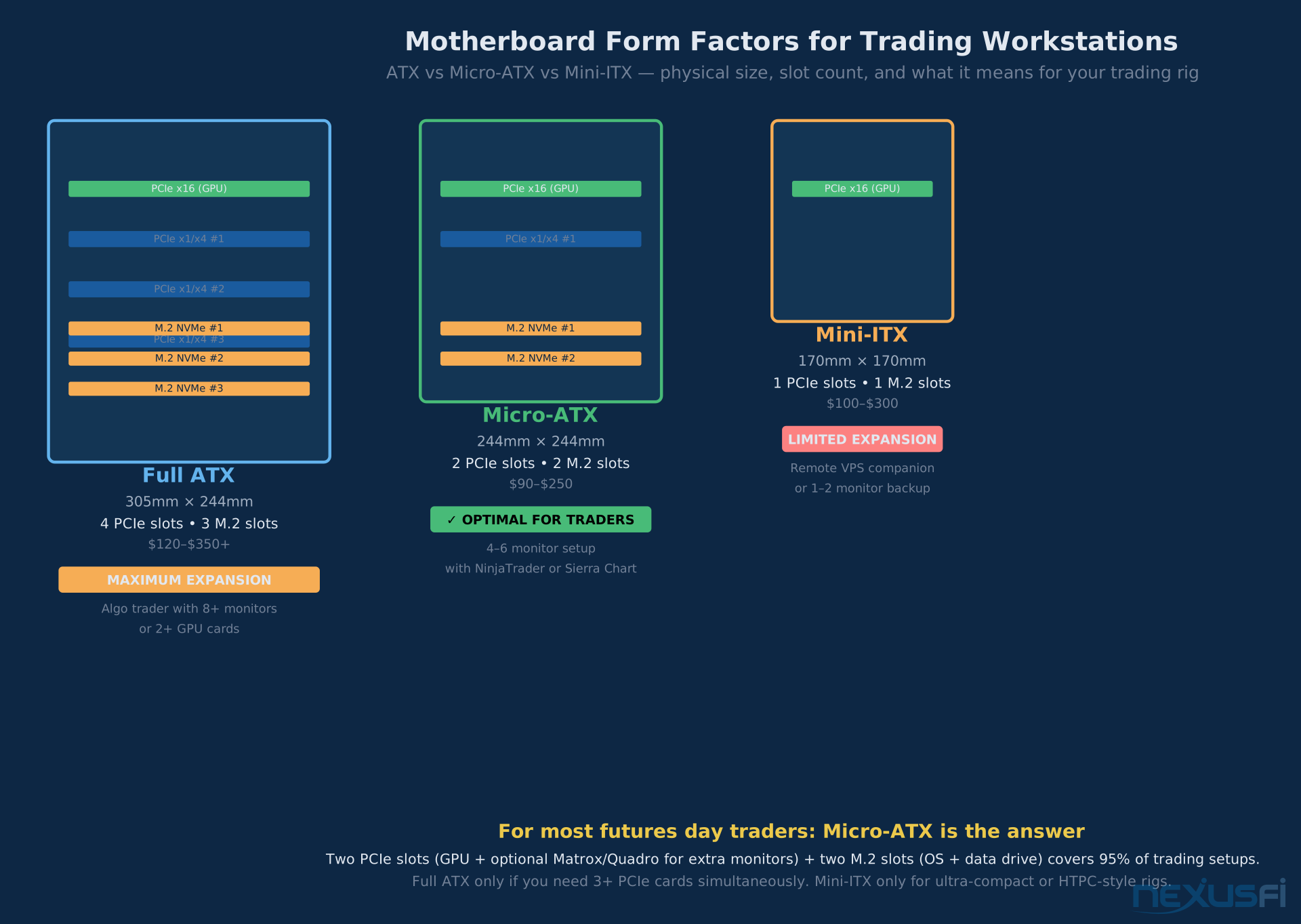
Full ATX (305mm x 244mm) is the standard for desktop workstations. Four or more PCIe expansion slots, three or more M.2 NVMe connectors, multiple RAM slots, and extensive rear I/O. Full ATX boards tend to have better power delivery (VRM) simply because there's more board space to spread components across. The trade-off is physical size--you need a mid-tower or larger case.
Micro-ATX (244mm x 244mm) fits the same CPUs as full ATX but reduces to two or three PCIe slots and two or three M.2 connectors. For most traders, this is not a reduction in capability--it's a reduction in slots you would never use. The market for quality trading boards is excellent at Micro-ATX: manufacturers make strong VRM designs in this form factor because it's popular for workstations and small-form gaming machines alike.
Mini-ITX (170mm x 170mm) offers one PCIe slot and usually one or two M.2 connectors in an extremely compact footprint. This makes sense for a secondary/backup trading machine, a co-location box, or a remote VPS companion. For a primary trading workstation with multiple monitors and expansion needs, Mini-ITX is too restricted.
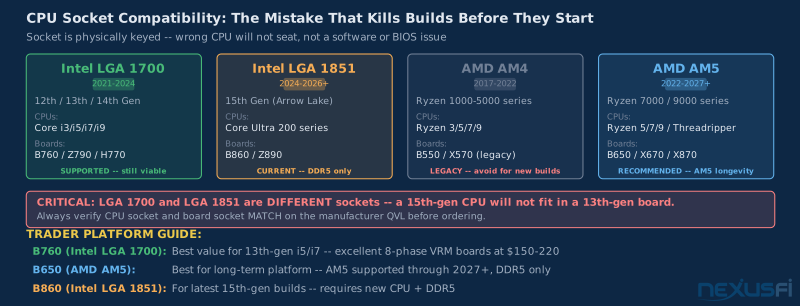
matthew28's point about socket compatibility is the rookie error that ruins builds. You can buy a perfect CPU and a perfect motherboard and have them be electrically incompatible because they use different socket designs. Intel changed socket designs between the 12th/13th/14th generation (LGA 1700) and the 15th generation (LGA 1851). AMD's AM5 socket is expected to last through multiple generations, but AM4 boards don't accept AM5 CPUs. Always verify CPU socket and motherboard socket match before purchasing.
Recommendation for traders: Micro-ATX for primary trading rigs (and make sure the case you choose supports your form factor). You get the CPU compatibility, VRM quality, and M.2 slot count you need without paying for four PCIe slots you'll never fill. Full ATX if you're running two multi-output GPUs simultaneously or need three or more M.2 drives actively connected. Mini-ITX for secondary or specialty builds only.
90bideven confirms the Micro-ATX cost advantage. The tighter build space is real but manageable--a step-by-step build video gets you through it.
Chipset Tiers: The Decision Most Traders Get Wrong #
The chipset is a secondary processor on the motherboard that handles communication between the CPU, storage, and I/O devices. Chipset tier determines how many PCIe lanes and M.2 slots the board provides, whether you can overclock the CPU, and what memory speed options are officially supported.
Here's where traders consistently overspend: you don't need a flagship chipset.
Intel Chipset Hierarchy (12th/13th/14th Gen) #
Intel's 700-series chipsets break down as follows for trading workstations:
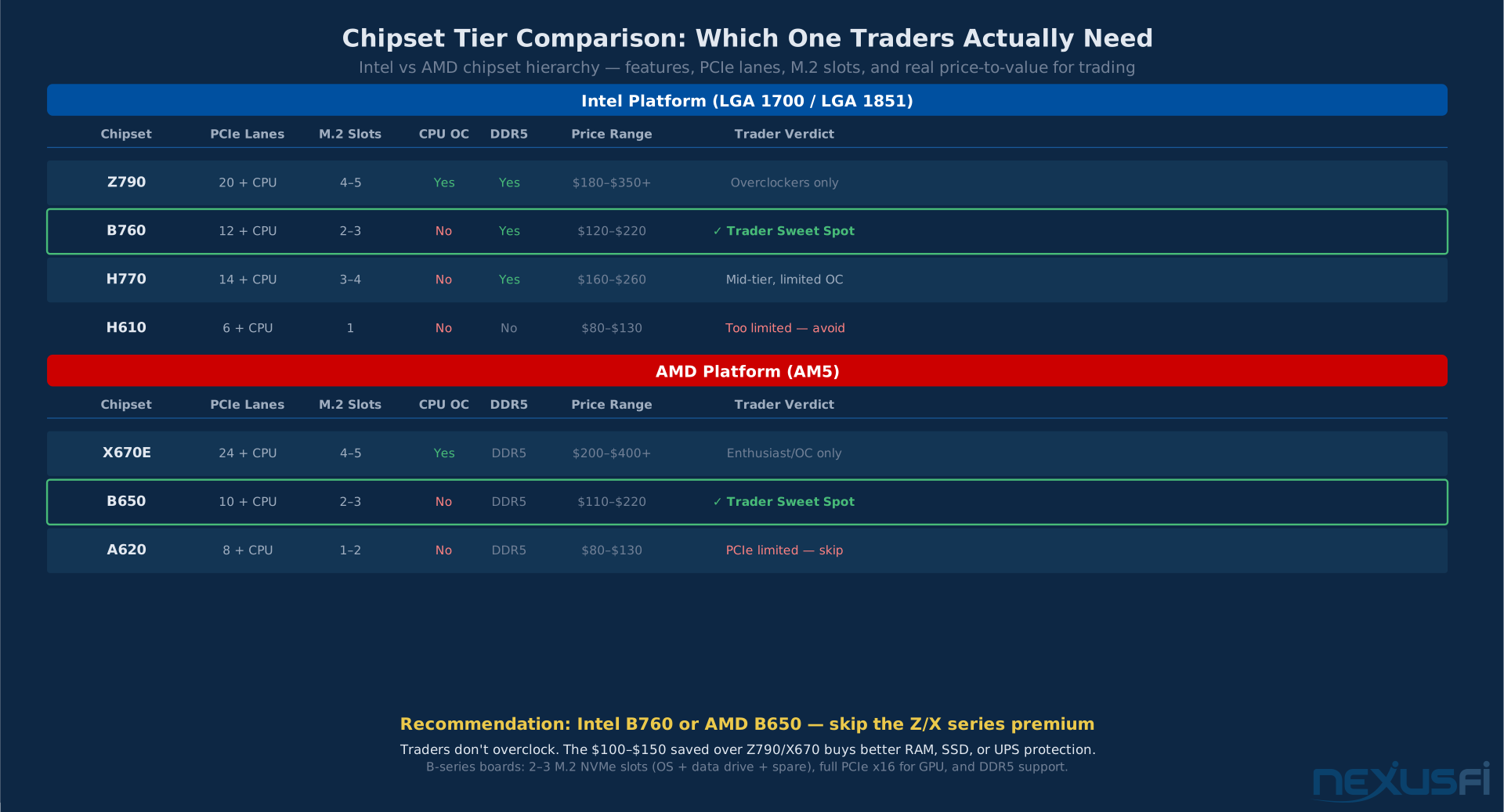
Z790 — The top tier. Enables CPU overclocking, provides the most PCIe lanes from the chipset (up to 20 PCIe 4.0 lanes), and supports the fastest memory speeds. Z790 boards typically include four or five M.2 NVMe connectors and advanced power delivery. Boards run $200-400+. If you're overclocking or need maximum expansion capacity, Z790 is the correct choice. If you're running stock settings on a trading machine--which you should be--Z790 is expensive overkill.
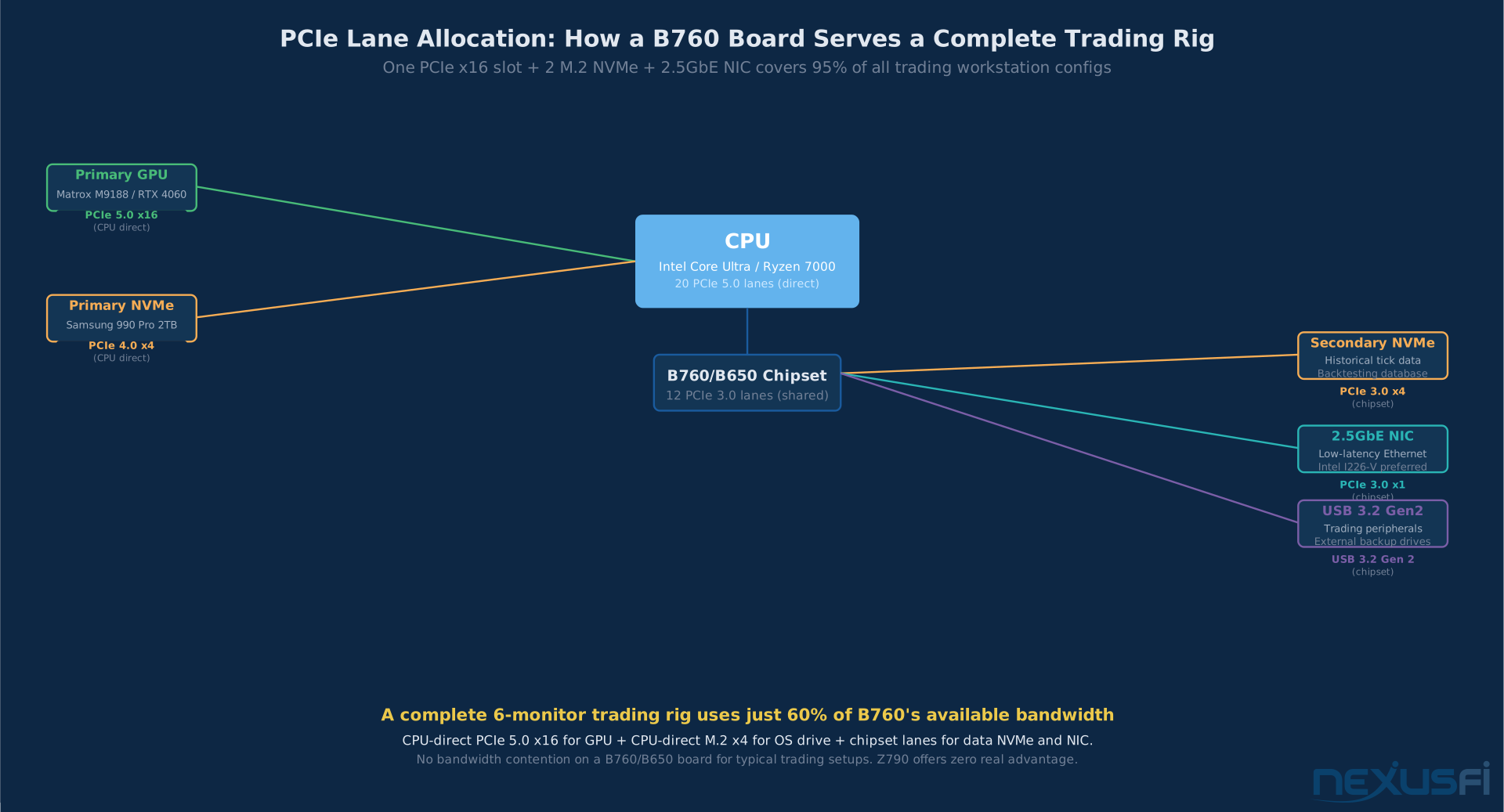
B760 — The mid-tier designed for non-overclockers. Provides direct CPU PCIe 5.0 lanes for the primary GPU and primary NVMe drive. The chipset adds 12 PCIe 3.0 lanes for secondary devices (additional NVMe, NICs, sound cards). Most B760 boards include two or three M.2 connectors, and most boards at $150-220 include a 2.5GbE NIC onboard. This is where traders live. B760 gives you every feature a trading workstation needs.
H770 — Mid-high tier that shares many Z790 features without full overclocking support. More M.2 slots than B760 but priced between B760 and Z790. Rarely the right choice--you usually get more value stepping down to B760 or up to Z790 depending on your actual needs.
H610 — Budget tier. Limited chipset lanes means typically one M.2 connector, restricted memory speed support, and lower-quality VRM implementations. Some H610 boards also support only DDR4, not DDR5. For a machine running live trading, H610's cost savings come with real performance and stability compromises. Avoid for primary trading workstations.
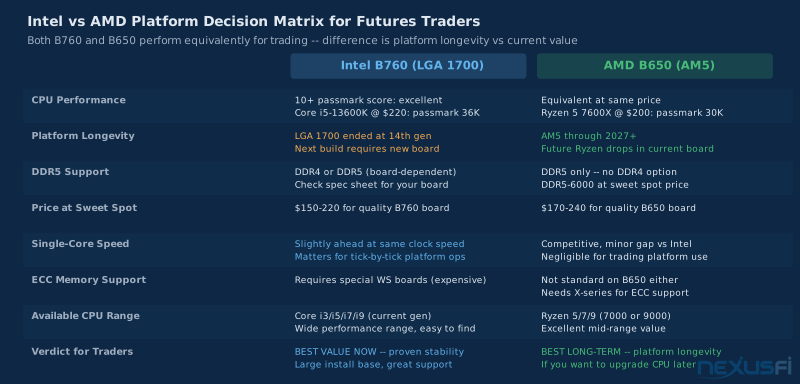
Intel B760 is the trader's chipset. PCIe 5.0 x16 for GPU (CPU direct), M.2 NVMe for OS and data (CPU direct), 2.5GbE NIC, DDR5 support, quality VRM. Everything you need, nothing you'll never use. Z790 adds overclocking support you won't use and costs $80-150 more.
AMD Chipset Hierarchy (AM5 Platform) #
AMD's AM5 platform uses DDR5 exclusively--there's no DDR4 option for the current generation. The trade-off is that you're always on the faster memory type, and AM5 is designed for longevity (AMD has committed to AM5 support through 2027+).
X670E — Enthusiast flagship. Provides the maximum PCIe 5.0 lanes from both CPU and chipset, enabling PCIe 5.0 NVMe drives and high-bandwidth connectivity at full spec. X670E boards run $200-450+. Justified for content creation workstations, high-frequency trading systems, or when you genuinely need PCIe 5.0 storage.
X670 — Similar to X670E but with some PCIe 4.0 chipset lanes rather than PCIe 5.0 throughout. Still includes CPU overclocking support. Typically $200-380.
B650 — The AMD equivalent of Intel's B760. PCIe 5.0 x16 for GPU (CPU direct), M.2 NVMe slots (PCIe 4.0 or 5.0 depending on board), 10 chipset PCIe lanes for secondary devices. Most B650 ATX boards include two or three M.2 connectors and integrated 2.5GbE NIC. Boards run $110-240. This is the AMD trader sweet spot.
A620 — AMD's budget tier for AM5. Limitations include restricted overclocking (even memory XMP/EXPO is limited), fewer M.2 slots, and less strong power delivery. Avoid for primary trading setups.
Hulk's solution--a dual Xeon server board--was the right answer for 2016 when AMD's consumer CPUs genuinely couldn't handle heavy real-time data feeds. Modern B650 boards with Ryzen 9000 series CPUs would handle that workload trivially in 2025 — for CPU selection details, see CPU Selection for Futures Trading Workstations. But his diagnostic approach remains correct: if your current platform can't keep up with market data during active sessions, the solution is a more capable board and CPU combination, not piling workarounds onto inadequate hardware.
PCIe Lanes: What You Actually Need for Trading #
PCIe (Peripheral Component Interconnect Express) lanes are the high-bandwidth connections between the CPU, chipset, and expansion devices. Modern CPUs provide a pool of lanes directly from the processor (for GPU and primary NVMe), with additional lanes available through the chipset (for secondary NVMe, NICs, sound cards, and other peripherals).
The Trading Rig's Bandwidth Needs #
A typical six-monitor futures trading workstation uses:
- 1x PCIe x16 slot for the multi-output GPU (Matrox M9188, RTX 4060/4070, or AMD RX 7700 with active adapters — see GPU Selection for Trading Workstations for the full breakdown). This consumes the CPU's primary PCIe 5.0 x16 connection. A PCIe 5.0 x16 slot provides 128 GB/s of bandwidth--a Matrox M9188 uses less than 10% of that for display output.
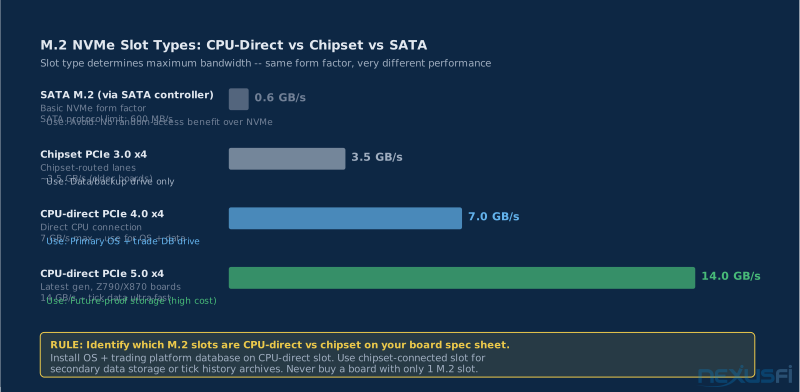
- 1x M.2 PCIe x4 slot (CPU direct) for the primary NVMe drive (OS + trading platforms). PCIe 4.0 x4 provides 8 GB/s--more than sufficient for an NVMe drive reading at 7 GB/s.
- 1x M.2 PCIe x4 slot (chipset) for a secondary NVMe drive (tick data, backtest databases, backups). This uses chipset PCIe lanes, which run at PCIe 3.0 or 4.0 depending on the board.
- 1x PCIe x1 slot (chipset) if you need an additional NIC or sound card beyond what's onboard. Most modern boards include 2.5GbE and audio, making this optional.
That configuration--one GPU, two NVMe drives, and an optional NIC--is within the capabilities of any B760 or B650 board without contention. You don't need Z790's expanded chipset lanes for a trading workstation. The additional PCIe bandwidth Z790 offers is valuable when you're running two full-length GPUs, three NVMe drives simultaneously, Thunderbolt expansion, and a 10GbE NIC at the same time. That's not a trading workstation; that's a production server.
PCIe Generation Matters for NVMe, Not for GPUs #
One nuance traders sometimes misunderstand: PCIe generation matters much for NVMe SSD performance but minimally for GPU gaming or display output. A GeForce RTX 4080 connected to PCIe 4.0 x16 instead of PCIe 5.0 x16 runs at basically identical gaming performance--GPU bandwidth requirements don't saturate PCIe 4.0 in real-world use. For display-driven trading workloads (not 3D rendering), even a PCIe 3.0 x16 connection to a Matrox M9188 delivers full capability.
The story is different for NVMe. PCIe 5.0 NVMe drives can read at 12-14 GB/s--double what PCIe 4.0 x4 delivers. For applications that benefit from maximum NVMe speed (booting quickly, loading large tick data files into memory), PCIe 5.0 storage matters. For OS drives and standard trading platform databases, PCIe 4.0 NVMe is saturating the actual I/O requirements of trading software--a modern NVMe drive loads NinjaTrader in under 10 seconds compared to 45-60 seconds on a SATA SSD.
VRM Quality: The Stability Foundation #
VRM stands for Voltage Regulator Module. It's the circuitry on the motherboard responsible for taking the 12V power from your power supply and converting it to the precise voltage your CPU requires--typically 0.9-1.4V depending on load. VRM quality determines how stable that voltage conversion is under sustained load and how much thermal stress the components experience during 24/7 operation.
This matters for traders because trading workstations run during market hours continuously, often for months without extended downtime. A budget VRM that runs at acceptable temperatures during a two-hour gaming session might run progressively hotter during a six-hour trading session, and hotter still by the end of a week of continuous operation. VRM thermal stress is one of the leading causes of motherboard failure over multi-year operation — see Trading Computer Cooling and Thermal Management for the complete cooling picture.
Understanding VRM Phases #
Power phase count is the first-order metric for VRM quality. Each phase shares the current delivery load, so more phases mean each individual phase handles less current, runs cooler, and operates under less stress.
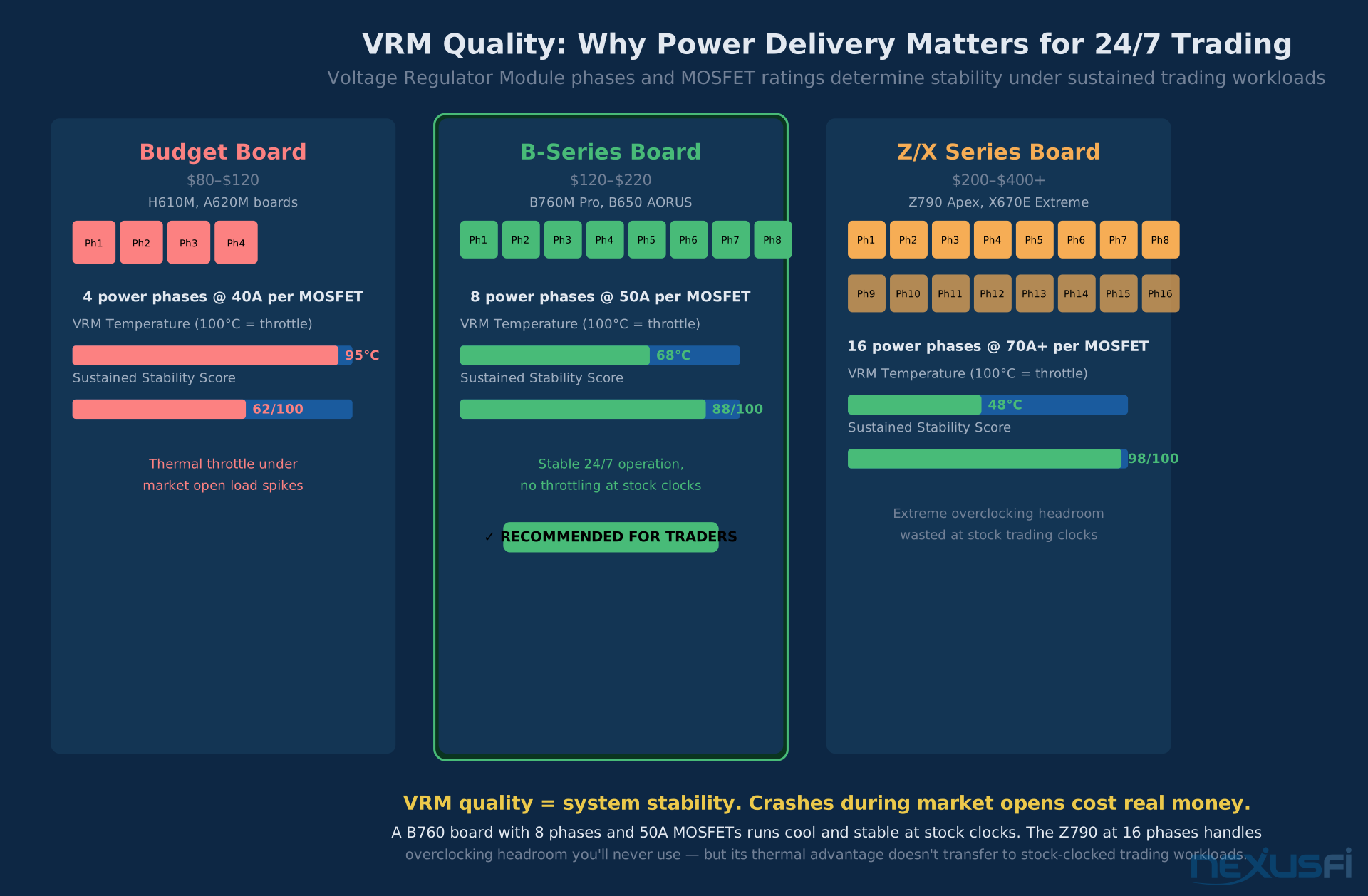
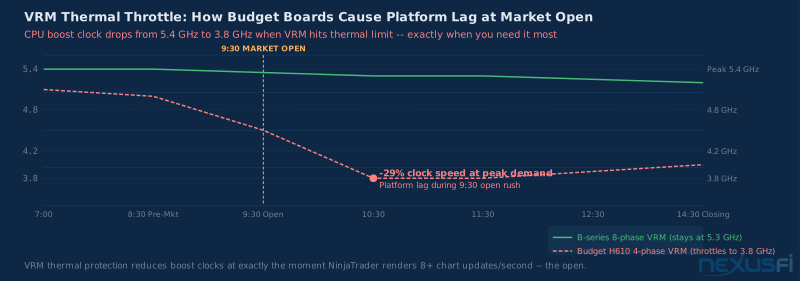
- 4-phase VRM (typical of H610/A620 budget boards): Each phase handles a significant portion of the total current. Under sustained load, phases can reach 90-100 degrees C. At this temperature, some protection circuits throttle power delivery, which translates to reduced CPU boost clocks at the worst time--when markets are active.
- 8-phase VRM (typical of B760/B650 mid-range boards): Load distributed across eight phases, each running much cooler. Sustained temperatures typically 60-75 degrees C under trading workloads. This is the stability sweet spot for stock-clocked trading systems.
- 12-16+ phase VRM (typical of Z790/X670 flagship boards): Designed for overclocking headroom. Excellent thermal performance at stock clocks, but the engineering margin is wasted if you're not overclocking. The additional cost of flagship VRM systems doesn't improve trading performance over a quality 8-phase design.
Beyond phase count, MOSFET current rating matters. Budget boards often use 40A MOSFETs; quality B-series boards typically use 50-60A rated components. Higher current rating means more thermal headroom per phase, which translates directly to stability over extended operation.
An 8-phase VRM with 50A MOSFETs on a B760 board runs at 68 degrees C during sustained market-hours trading--comfortably under thermal limits. A 4-phase budget board can reach 95 degrees C, triggering thermal protection that reduces CPU boost clocks. The crash doesn't happen immediately; the board degrades reliability over weeks until something fails during an active session.
Practical VRM Assessment #
You don't need to understand MOSFETs in detail to assess VRM quality. Look at board reviews from AnandTech (archived), Gamers Nexus, and HardwareUnboxed--these reviewers measure actual VRM temperatures under load and call out boards where power delivery compromises stability. HardwareUnboxed's B660 VRM roundup on TechSpot demonstrates the methodology: sustained load testing that identifies which budget designs throttle. Gamers Nexus has also documented the broader quality problem across price tiers. For any board you're seriously considering, find one measured review showing VRM temperatures at sustained workload. Under 80 degrees C at stock clocks with a box-rated CPU is the bar.
Also look at heatsink design. Budget boards often have no VRM heatsink at all, or a thin strip of aluminum without a thermal pad. Quality boards in the $150-250 range typically include proper VRM heatsinks that actually touch the components--look for thick aluminum heatsinks with good contact to the MOSFET stacks.
Memory Support: DDR4 vs DDR5 and Dual-Channel Configuration #
Modern motherboards support either DDR4 or DDR5--not both. The choice is made when you choose your board, and it determines your memory upgrade path.
DDR4 boards are still available for older Intel platforms (10th/11th/12th gen LGA 1200 and some LGA 1700 boards) and some AM4 boards. DDR4-3600 in dual-channel is still a capable configuration for trading; the memory bandwidth difference between DDR4 and DDR5 matters in benchmarks but has modest real-world impact on most trading scenarios.
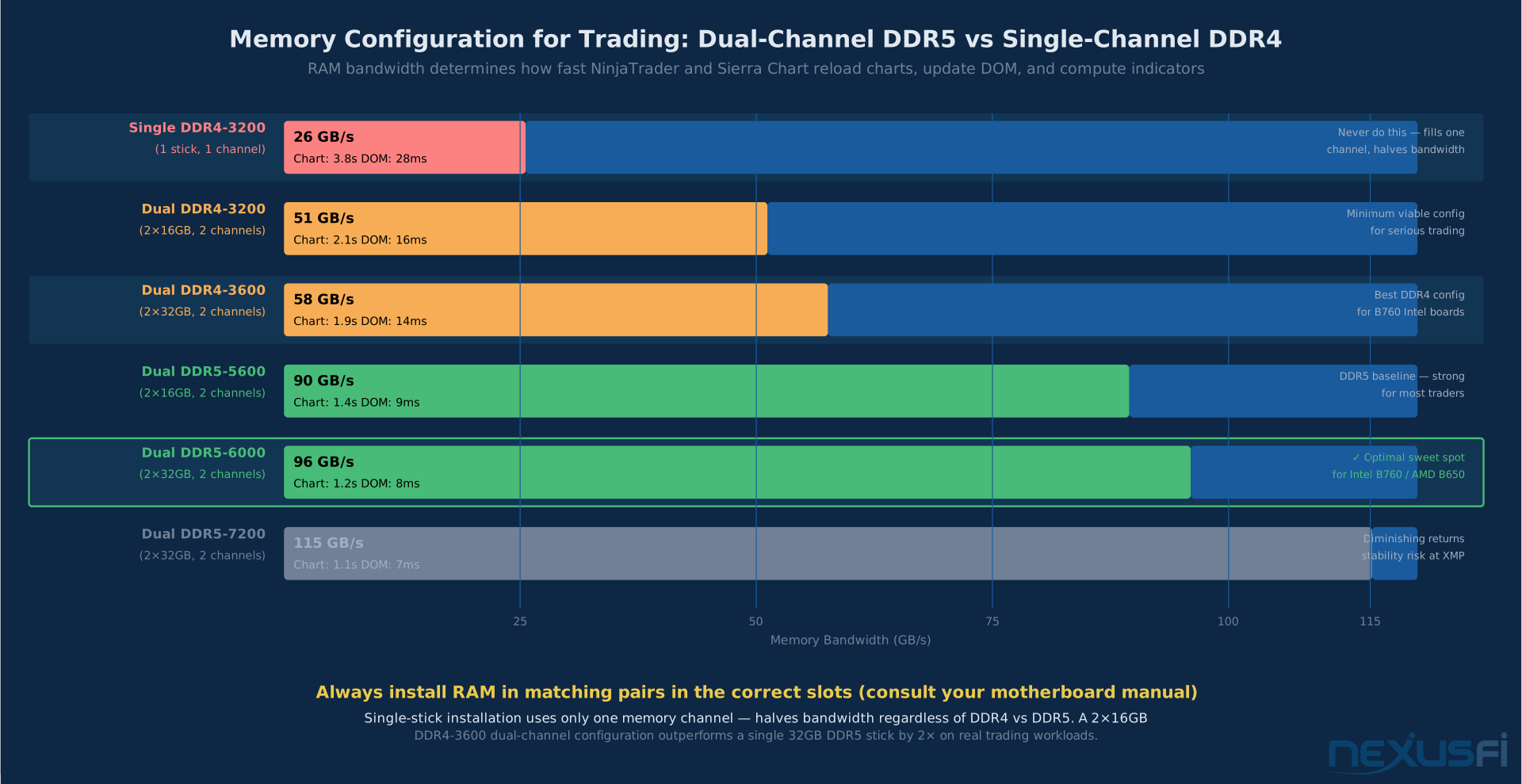
DDR5 is the standard for current-generation platforms. AMD AM5 requires DDR5 with no DDR4 option. Intel 12th/13th/14th gen offered DDR4 and DDR5 variants; 15th gen (Arrow Lake, LGA 1851) is DDR5 only. DDR5-6000 in dual-channel provides roughly 96 GB/s of memory bandwidth--much more than DDR4-3600 dual-channel at 57 GB/s. For trading platforms that cache extensive price history, footprint chart data, and multi-timeframe indicator series, this bandwidth improvement accelerates chart reloads and DOM refresh rates. The RAM Selection guide covers capacity planning, speed tiers, and kit recommendations in detail.
Dual-Channel is Non-Negotiable #
Memory bandwidth is doubled when you run two memory sticks in dual-channel mode versus a single stick. A single 32GB DDR5 stick runs in single-channel--you have the capacity but at half the bandwidth. Two 16GB sticks in dual-channel give you 32GB at full bandwidth.
This is important enough to state directly: always buy RAM in matched pairs. A 2x16GB kit outperforms a single 32GB stick in every bandwidth-dependent workload. Trading platforms cache aggressively--NinjaTrader's tick data engine, Sierra Chart's SCID file loading, and Bookmap's DOM visualization all benefit from more bandwidth.
matthew28's storage setup shows the trading community's intuition about separating OS and data drives. The same logic applies to RAM: the configuration matters, not just the spec. Two 16GB sticks versus one 32GB stick is the equivalent of going from a single-lane road to a two-lane highway--same total capacity, double the throughput. Check your motherboard manual for which slots to populate first (usually the second and fourth slots from the CPU are the preferred dual-channel pair).
XMP and EXPO Profiles #
Modern DDR5 kits ship rated at speeds like DDR5-6000 but default to the JEDEC-standard lower speed (DDR5-4800 or DDR5-5600) until you enable the XMP (Intel) or EXPO (AMD) profile in BIOS. Enable this profile. It's a validated overclock that the memory manufacturer and board have been tested with--it's not the risky manual overclocking traders should avoid. Every quality B760 and B650 board supports XMP/EXPO profiles.
The sweet spot for both platforms in 2025-2026 is DDR5-6000 CL30 in dual-channel. This speed hits the maximum efficiency point for the memory controller on both Intel and AMD current-gen CPUs--going faster shows diminishing returns for the stability trade-off.
Connectivity: What Matters on the I/O Panel #
The rear I/O panel and board headers determine what you can plug in without adding expansion cards. For traders, these are the features that actually matter:
2.5GbE Ethernet (Mandatory) #
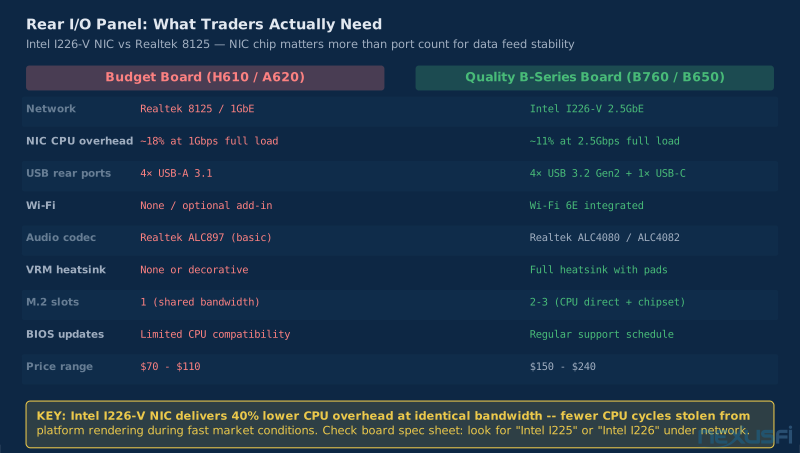
Standard gigabit Ethernet (1GbE) is adequate for most data feeds, but 2.5GbE costs basically nothing to include on modern boards and provides five times the bandwidth for situations where it matters--large data transfers, tick data loading from network-attached storage, or if your router supports 2.5GbE. More importantly, board manufacturers at the $150+ tier now commonly include the Intel I226-V NIC, which has better driver stability and lower CPU overhead than the Realtek alternatives. When comparing boards, check which NIC chipset is included--Intel I225/I226 chips are preferable to Realtek 8125 for trading workloads.
If your motherboard has a Realtek 2.5GbE NIC and you're experiencing intermittent network disconnects, check for NIC driver updates specifically. Realtek released significant driver updates in 2023 that addressed stability issues affecting data feed reliability. The Intel I226-V NIC doesn't have this history of driver instability.
Wi-Fi (Optional but Useful) #
Wi-Fi is secondary to wired Ethernet for trading--never use wireless as your primary trading connection. But integrated Wi-Fi (Wi-Fi 6E or Wi-Fi 7 on newer boards) is useful for backup connectivity and for any auxiliary applications (research browser, trade journaling, communications software) where a secondary network path reduces contention on the primary wired feed. Some boards include Wi-Fi at no premium; others charge $20-40 more. If included, it's a nice option; if it costs extra, don't prioritize it over other features.
USB Configuration #
Trading peripherals (keyboard, mouse, dongles for platform licenses, trading-specific input devices like hotkey controllers) need USB ports. Most quality motherboards at the $150+ tier include:
- 2-4 USB 3.2 Gen 2 (10 Gbps) rear ports for fast data transfer
- USB Type-C (often Thunderbolt-capable on higher-end boards)
- 2-4 USB 2.0 rear ports for legacy peripherals and keyboard/mouse
Internally, headers for front-panel USB 3.2 and USB 2.0 let you use case ports. Verify that the board you're buying has enough USB ports for your setup without requiring a hub--USB hubs introduce latency variability that can affect USB-connected input devices like hardware order entry buttons.
Audio #
Most traders use external USB DACs, headset hubs, or separate audio interfaces rather than the onboard audio for alert sounds and voice communication. The onboard audio on modern B-series boards is adequate for trading purposes--clear alerts, no interference with market data. If you have specific audio requirements (studio monitoring for audio analysis, podcasting), you'll add a dedicated audio card or USB interface regardless of what's onboard.
BIOS/UEFI Settings for Trading Workstations #
The BIOS controls how the motherboard initializes hardware and manages power delivery. Several settings directly affect trading workstation performance and stability. For a deeper dive into every BIOS setting that matters for trading, see Trading PC BIOS and UEFI Optimization.
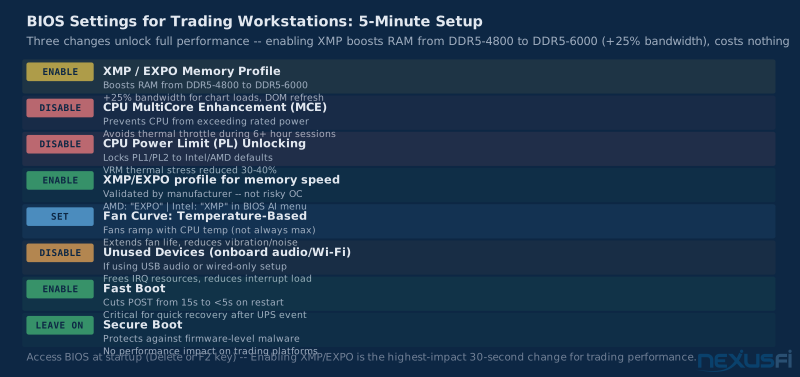
Enable XMP/EXPO for RAM — As described above, enabling the memory XMP (Intel) or EXPO (AMD) profile runs your RAM at its rated speed rather than the slower default. This is the single most impactful BIOS change for trading platform performance after installing the hardware. Access BIOS at startup (typically Delete or F2 key) and find the memory settings.
Disable CPU overclocking features — On boards that support it, disable MultiCore Enhancement, Power Limit unlocking, or any automatic overclock boost features. These features push CPUs beyond their rated power limits, generating more heat and creating stability risks for continuous operation. Run your CPU at its standard power specification.
Enable XMP/EXPO but disable CPU OC — This is the correct configuration for a trading machine: fast RAM at manufacturer-rated specs, CPU at Intel/AMD default power limits.
Power Delivery Settings — Z790 and some B760 boards offer performance power delivery settings that remove CPU power limits (Intel's PL1/PL2 limits). Don't do this on a trading machine. These settings allow the CPU to boost higher for short periods but also allow it to consume much more power, generate more heat, and stress the VRM. Keep CPU power limits at factory defaults.
Disable unused features — Onboard audio you're not using can be disabled to free up IRQ resources. Unused USB controllers can be disabled in BIOS. Onboard Wi-Fi can be disabled if you're using only wired Ethernet. These are minor optimizations but improve predictability.
Fan Control — Most quality B-series boards include fan control in BIOS. Configure case fans to ramp up with CPU and VRM temperature rather than running at full speed constantly. Running fans at lower speeds during quiet market periods extends fan life and reduces vibration noise during focus-intensive trading sessions.
FastBoot / Secure Boot — FastBoot shortens POST time (how long it takes from power-on to Windows login). This matters if you have UPS power events and need to recover quickly from a forced restart. SecureBoot is a security feature that can be left enabled--it doesn't affect trading performance and protects against certain malware infection vectors.
Specific Board Recommendations (2025-2026) #
These are current-generation recommendations organized by workload. Prices are approximate and vary by retailer.
Intel Platform (LGA 1700 / LGA 1851) #
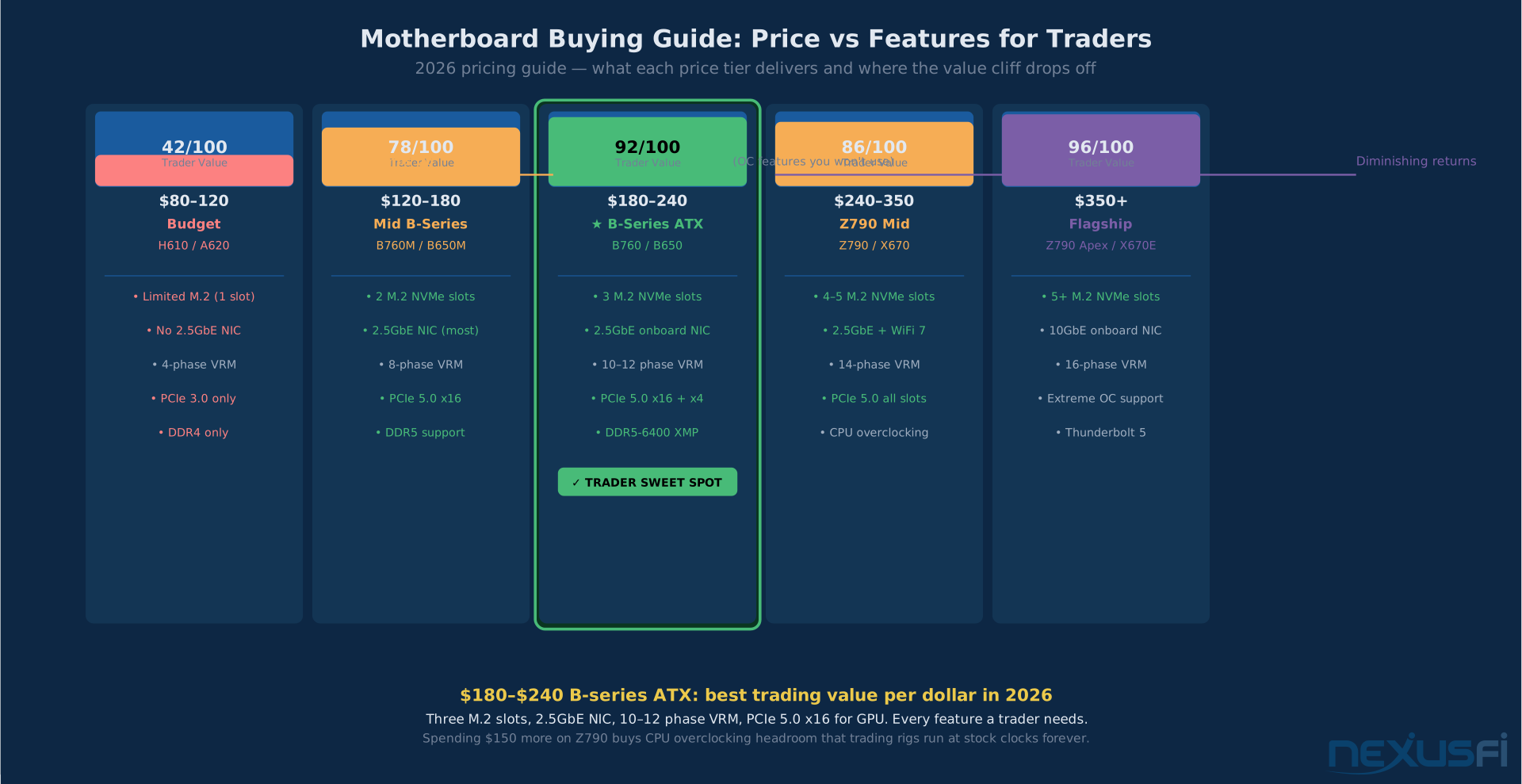
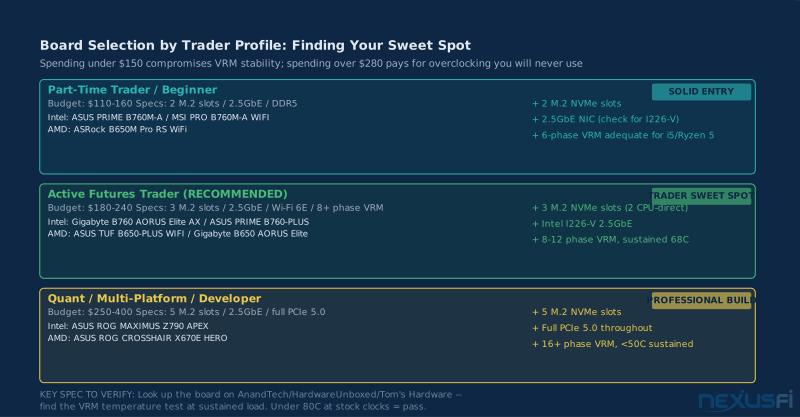
Budget-Conscious Trader (~$120-160): ASUS ROG STRIX B760-G GAMING WIFI or MSI PRO B760M-A WIFI DDR5. Both boards include 2.5GbE NIC, 2-3 M.2 slots, DDR5 support, adequate VRM for Ryzen i5/i7 at stock clocks. Solid choice if you're pairing with an i5 or Core i7 and don't need extreme expansion capacity.
Serious Trader Sweet Spot (~$180-240): ASUS PRIME B760-PLUS D4 or Gigabyte B760 AORUS Elite AX DDR5. These boards move up to quality 10-12 phase VRM implementations, include three M.2 slots (two CPU-direct, one chipset), and typically include both 2.5GbE and Wi-Fi 6E. The VRM quality on boards at this tier supports sustained trading sessions without throttling concerns on any mainstream Intel CPU.
Heavy Multi-Platform or Development Workstation (~$240-350): ASUS ROG MAXIMUS Z790 APEX or Gigabyte Z790 AORUS Master. If you need the full Z790 feature set--four or five M.2 slots, complete PCIe 5.0 throughout, extreme memory speed support--these are excellent boards with overclocking capability you don't need but quality VRM and power delivery that benefits any sustained workload.
AMD Platform (AM5) #
Budget-Conscious Trader (~$110-160): ASRock B650M Pro RS WiFi or MSI PRO B650M-A WIFI. These boards deliver DDR5 support, 2-3 M.2 NVMe slots (PCIe 4.0), 2.5GbE NIC, and quality VRM for stock-clocked Ryzen 7000/9000 processors. Good starting point for traders who want AM5 platform longevity without flagship pricing.
Serious Trader Sweet Spot (~$170-240): ASUS TUF Gaming B650-PLUS WIFI or Gigabyte B650 AORUS Elite AX. Three M.2 slots, excellent VRM (10+ phases with quality MOSFETs), PCIe 5.0 x16 for GPU (though your trading GPU won't saturate PCIe 4.0 anyway), full DDR5 XMP/EXPO support. This is the tier where trading workstation builders should land.
Heavy Multi-Platform or Development Workstation (~$250-400): ASUS ROG CROSSHAIR X670E HERO or Gigabyte X670E AORUS Master. Full PCIe 5.0 throughout, five M.2 slots, flagship VRM. Justified for quantitative researchers running heavy backtesting, multi-platform setups with four or more data feeds simultaneously, or anyone building a system intended to last 5+ years with significant future upgrade headroom.
Tradeer's 2017-era build pairs an AMD Ryzen 7 with an Asus Prime 350M-A--a Micro-ATX B350 board in the $90 tier at the time--running a Matrox C680 for six monitors. This combination worked for years. Modern equivalents using B650 Micro-ATX boards with Ryzen 9000 series processors and a Matrox M9188 would handle the same six-monitor configuration with dramatically better per-core performance and platform longevity.
What to Avoid #
Don't buy a board without checking VRM reviews. A board at exactly the price you want can have terrible VRM that runs hot under sustained load. Check GamersNexus or Tom's Hardware reviews for the specific board model before purchasing. Having a heatsink is not evidence of quality VRM--some boards have decorative heatsinks with poor thermal contact.
Don't buy on sale without checking compatibility. B760 boards on sale at deep discounts sometimes have incompatible PCIe or BIOS versions for the specific CPU you're buying. Check the manufacturer's CPU compatibility list (QVL) for your board and CPU combination before purchasing. Most boards require a BIOS update to support newer CPU generations--if you don't have another compatible CPU to do the BIOS update, you need to find a board with the correct BIOS pre-flashed.
Don't buy a Mini-ITX board for a primary trading workstation. The single PCIe x16 slot constrains your GPU choice, the single M.2 slot forces you to prioritize between OS and data storage, and the compact VRM designs on many Mini-ITX boards run hotter than comparable Micro-ATX designs. Reserve Mini-ITX for secondary builds.
Don't buy server motherboards for trading desktops. Server boards (E-ATX or EATX form factor, dual-socket Xeon designs) were the right answer in 2015 for traders who needed extreme core counts for real-time data crunching--Hulk's ASRock dual Xeon build being a perfect example from that era. In 2025, a single AMD Ryzen 9 9900X outperforms a dual-Xeon server setup from 2016 in single-core performance while drawing a fraction of the power and fitting in a standard mid-tower case.
Don't disable BIOS updates. Some traders disable BIOS updates to avoid instability from failed updates during market hours. This is understandable but creates a different risk: manufacturers release BIOS updates that fix stability issues, improve CPU compatibility, and patch security vulnerabilities. Schedule BIOS updates during maintenance windows (weekends, outside market hours), always download directly from the manufacturer's website, and verify the file hash before flashing.
Building the Complete Picture #
The motherboard connects every other component--your decision here constrains or enables everything else. Get it right and it disappears from your consciousness for years. Get it wrong and you're troubleshooting memory training failures, PCIe slot incompatibilities, and VRM throttling events at the worst possible times.
For most futures traders: B760 or B650 in Micro-ATX or ATX form factor, $150-240 range, from ASUS, Gigabyte, MSI, or ASRock at the mid-tier or above. This covers multi-monitor setups, dual NVMe drive configurations, and sustained 24/7 operation without stability concerns. Enable XMP/EXPO for your RAM, run the CPU at default power limits, and move on to configuring the rest of your trading infrastructure.
For the complete hardware overview that ties CPU, RAM, GPU, storage, and more into a single build plan, see Trading Workstation Hardware for Futures Traders. And once the build is complete, protect it with a UPS and power protection setup that keeps open positions safe through power events.
The motherboard is the platform everything else builds on. It's not the most exciting component, but it's the one that determines whether your trading workstation is something you trust completely or something you're always a little worried about.
Knowledge Map
Prerequisites
Understand these firstGo Deeper
Build on this knowledgeReferences This Article
Articles that build on this topicCitations
- — Built my own trading PC! (2021) 👍 4“Be careful to order your motherboard with the correct socket to accept your chosen CPU. I used a full size Motherboard as I had a full size case.”
- — Building new computer - LGA 1150 vs 2011-v3 (2016) 👍 8“I have 2 AMD desktops. Both run well but really struggle when the market picks up a lot of activity. So I built a dual Xeon workstation.”
- — Built my own trading PC! (2021) 👍 4“I also used two hard drives. A Samsung Evo 250GB SSD for the operating system and a standard 500GB hard drive. The main differences was that I used a full size Motherboard.”
- — Battlestations: Show us your trading desks! (2021) 👍 21“Specs: Processor: AMD Ryzen 7 1700x, Motherboard: Asus Prime 350M-A, Graphics card: Matrox C680 PCIe x16, Monitors: Benq GW2270 x6.”
- — Battlestations: Show us your trading desks! (2013) 👍 11“runs cool, almost silent, reliable, no cables on the floor -- Gigabyte GA-P67A-UD4-B3 Motherboard paired with Intel Xeon E3-1230 for a silent, reliable trading setup.”
- — WHICH CPU is BEST for NINJA TRADER 7 and 8 ? (2019) 👍 5“RAM speed and overall design of the system board (motherboard) is equally important. What you need is WELL DESIGNED TRADING SYSTEM and not some Hot Rod with flashy parameters.”
- — Built my own trading PC! (2021) 👍 9“I went with a micro ATX motherboard to save money, but it being smaller will be harder to build. The shorter your timeframe, the faster, more up to date your computer should be.”
- — Better Hardware worthwhile ? (2012) 👍 6“The CPU speed matters most. Any system with 12GB of memory or more is likely enough for 99% of people here. There are some bits of code NinjaTrader does a good job at multi-threading.”
- — Battlestations: Show us your trading desks! (2019) 👍 23“Intel Core i9 9900K, ASUS STRIX Z390-E GAMING Motherboard, Samsung 970 EVO Plus 1TB NVMe M.2. Running Sierra Charts, Ninjatrader, Tradingview, Bookmap and Jigsaw. Trading ES, Bonds, Gold, Oil.”
- — Battlestations: Show us your trading desks! (2021) 👍 20“Once I started trading the MNQ, it could not handle the fast data. I finally decided on a Ryzen 5-3600X due to the speed and affordability. I am very very happy with its performance.”
- — VRM Selection for High-Performance Computing (2024)
- — What is a Trading Computer? (2023)
- — How to Set Up a PC for Professional Stock Trading (2026)