



PSU and Power Supply Selection for Trading Workstations: Reliability, Efficiency, and the $100 That Protects a $2,000 Build
Overview #
You're short NQ at the open, position is working, and your computer goes dark. Not a browser crash — the whole machine. Power supply failure, mid-session.
That's the moment traders remember when someone asks why they spent $140 on a power supply instead of $40. Not because the $140 unit performs better on benchmarks — both will boot Windows and run a charting platform. Because the $40 unit failed at 07:32 EST on a day NQ was moving 40 points.
The power supply unit is the most ignored component in a trading workstation and the most consequential when it fails. Every component in your system — CPU, GPU, NVMe drives, motherboard — draws its operating power from this single box. When the box degrades, so does your system stability. When it fails, your session ends immediately and unconditionally.
A quality PSU for a trading workstation costs $90--$160 for a Gold-rated fully modular unit from a Tier-A manufacturer. The cost difference between the right PSU and a mediocre one is $50--$80. One rogue tick on a corrupted feed. One missed exit on a blown stop. The math is never close.
This article covers everything a futures trader needs to know about PSU selection: wattage sizing, efficiency ratings, the modular vs non-modular question, which brands and series are actually reliable, what ripple noise does to your hardware over time, how to pair a PSU correctly with a UPS, and when to proactively replace a PSU before it causes a trading loss. There's also a build-specific spec sheet at the end — three profiles covering 99% of trading setups with specific model recommendations.
Wattage Sizing: The 40--60% Rule #
The most common PSU mistake is buying on raw wattage. "I need a 1000W unit to be safe" is backwards thinking. A PSU running at 10% of its rated capacity is less efficient, generates more heat for the work being done, and often runs louder than a correctly-sized unit at 50% load. More headroom is not automatically better.
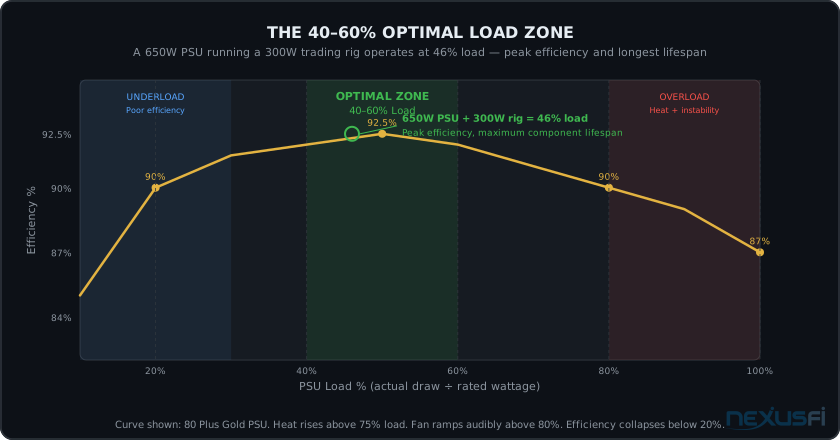
The correct principle is the 40--60% load zone. You want your trading system's actual power draw — measured under realistic working conditions — to fall within 40--60% of your PSU's rated wattage. This is where modern power supplies operate at peak efficiency, minimum heat, quietest fan curves, and longest component lifespan.
A 550W PSU running a 250W system sits at 45% load. A 650W PSU running a 300W trading rig sits at 46% load. Both are in the optimal zone. A 1000W PSU running the same 300W system sits at 30% load — below the efficiency knee, running warmer relative to work performed, and generating more noise for no benefit.
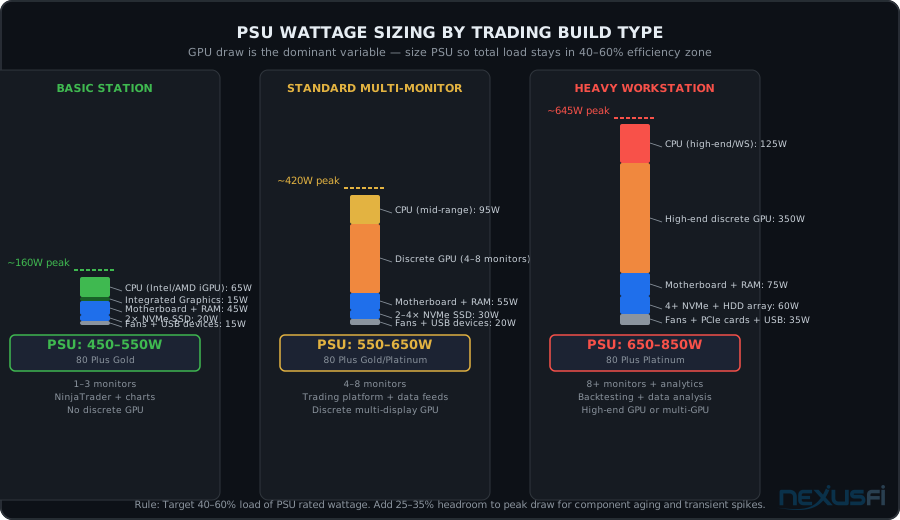
Three trading build tiers and their PSU requirements. GPU draw is the dominant swing factor — integrated graphics builds need half the wattage of multi-display discrete GPU setups.
Wattage by Trading Build Type
Three profiles cover the vast majority of futures trading setups:
Basic Trading Station (450--550W): CPU with integrated graphics, 1--4 monitors, 1--2 NVMe SSDs, 32--64GB RAM. Typical peak draw of 150--220W. A 550W Gold unit puts this at 40--45% load — comfortable, efficient, quiet.
Standard Multi-Monitor Setup (550--650W): Mid-range CPU, discrete GPU driving 4--8 monitors via DisplayPort/HDMI, 2--4 NVMe drives, 64GB RAM. Typical peak draw of 350--420W. A 650W Gold unit at 54--65% load — well within the optimal zone.
Heavy Workstation (650--850W): Higher-end CPU, dedicated high-performance GPU for 8+ monitors or analytics workloads, multiple drives including tick data arrays, numerous peripherals and PCIe cards. Typical peak draw of 500--640W. An 850W Platinum at 60--75% load handles everything including future expansion.
Note the upper bound. Unless you're running a dual-GPU backtesting server or an extreme workstation-class build with Xeon processors, a 1000W+ PSU is almost certainly over-specced for a trading computer. The marketing value of a large wattage number is real; the technical benefit for typical trading use cases is not.
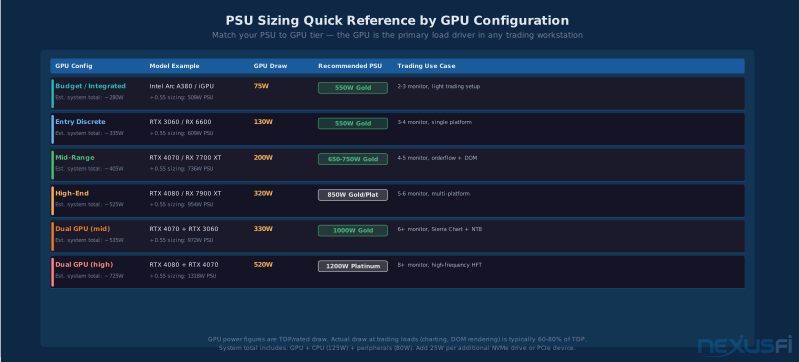
GPU tier is the primary PSU sizing driver. Integrated graphics builds need 100 — 200W less than equivalent setups running discrete display GPUs for the same monitor count and platform software.
80 Plus Efficiency Ratings: What They Actually Mean #
The 80 Plus certification appears on virtually every PSU sold in the last decade. The labels — White, Bronze, Silver, Gold, Platinum, Titanium — imply a hierarchy of quality that doesn't tell the full story.
What 80 Plus measures: the percentage of AC power drawn from the wall that becomes usable DC power for your components. A Gold-rated PSU converts at least 90% at 50% load. A Bronze-rated unit converts at least 85%. The difference at a typical trading workstation running 300W: about $12 per year in electricity costs.
What 80 Plus does not measure: voltage regulation quality, ripple suppression, transient response, capacitor quality, long-term reliability, fan noise, or protection circuit behavior. These are the factors that determine whether your system is stable at 07:31 EST on a volatile opening day.
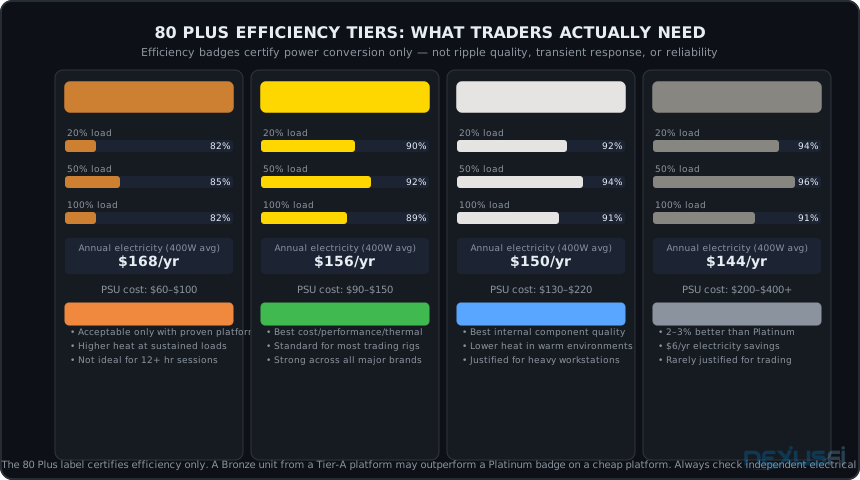
80 Plus tier comparison. The annual electricity savings between Bronze and Platinum is roughly $18 for a typical trading workstation. The real benefit of Gold and above is that those tiers correlate with higher-quality internal component selections — Japanese capacitors and better ripple suppression — not the efficiency number itself.
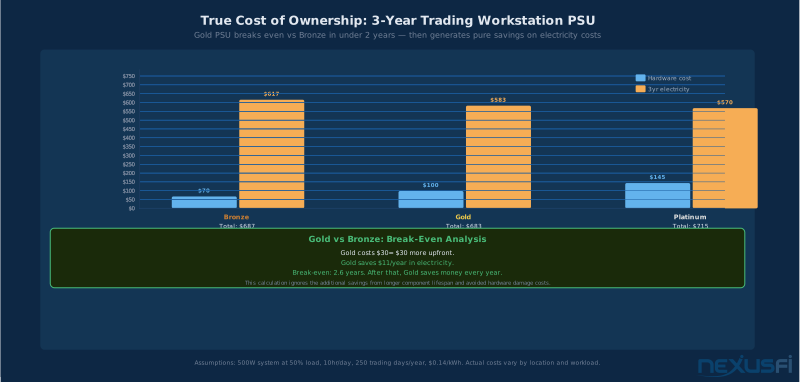
Gold PSU breaks even vs Bronze within 2 years of daily trading use through electricity savings alone. The real advantage is internal component quality — Japanese capacitors and lower ripple — not the electricity math.
Which Tier Is Right for Trading
Bronze: Acceptable only when the specific model has been independently validated for electrical quality. The efficiency rating is the floor for most modern PSUs, and a Bronze badge from a Tier-A platform (see the brand section below) is more reliable than a Platinum badge from a budget OEM. That said, for new builds, Bronze is no longer the pragmatic choice.
@Big Mike has been consistent on this in NexusFi Tech Support: "I would focus on quality PSU (not necessarily more wattage), focus on quiet or near silent PSU." (Computer power thread)
Gold: The consensus sweet spot for trading workstations. The efficiency level is sufficient, the price premium over Bronze is modest ($15--30 typically), and Gold-tier units from Tier-A manufacturers consistently use Japanese capacitors on primary rails, better ripple suppression circuits, and longer warranty terms. This is the minimum recommendation for any new trading workstation build.
Platinum: Preferred for trading systems running 12+ hours daily, for setups in warm rooms without dedicated cooling, or for high-end workstations where component longevity justifies the investment. The electrical quality improvement over Gold is real but incremental. The price premium is $40--80 for comparable models. Justified for serious setups; not mandatory for most.
Titanium: Excellent but rarely justified for trading applications. The efficiency gain over Platinum is 2--3 percentage points. At a 400W average draw, that's about $6/year in electricity savings. The premium over Platinum is often $80--150+. Buy Titanium because you want the absolute best internal components, not to save on your electricity bill.
Critical caveat: An 80 Plus Gold badge from a Tier-B manufacturer can have worse actual ripple behavior than a Bronze-rated unit from a Tier-A manufacturer's top line. Always cross-reference the brand section below with the efficiency tier. The badge does not substitute for platform reputation.
Modular vs Non-Modular: A Thermal Management Question #
Traders ask about modular PSUs as a convenience feature. It's actually a thermal management decision.
Non-modular PSUs come with every cable permanently attached to the unit. A 650W non-modular PSU ships with 24-pin ATX, two 8-pin EPS CPU, six SATA power, four Molex, three PCIe, and various peripheral connectors — whether you use them or not. In a trading workstation that needs two CPU connectors, four SATA, and two PCIe, you have 10+ cables permanently attached with nowhere to go except bundled behind the motherboard tray or stuffed into a drive bay.
That bundled-cable mass blocks airflow. In a case already running a CPU cooler, GPU exhaust, and potentially liquid cooling radiator fans, restricting airflow pathways measurably increases case temperatures. Industry estimates suggest poor cable management raises average case temps by 3--5°C compared to clean routed cable setups. Over months of continuous operation, that thermal load accelerates component aging across the entire system.
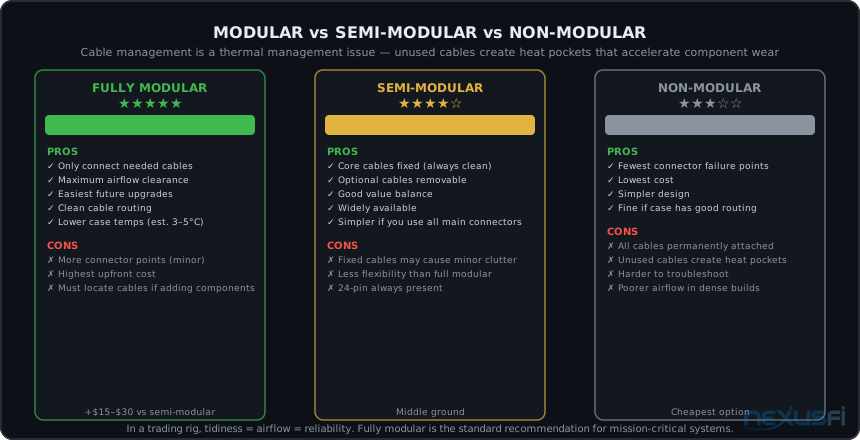
Three PSU form factors. Fully modular is the standard recommendation for trading rigs — connect only what you need, route cleanly, maintain better airflow for long-term component health.
Fully modular: Every cable detaches at the PSU. Connect only the cables you actually need. Maximum airflow, easiest future upgrades, cleanest cable routing. Minor additional cost ($15--30 premium over semi-modular comparable models). The standard recommendation for trading workstations.
Semi-modular: Core cables (24-pin ATX, one or two EPS CPU) are permanently attached; peripheral cables (SATA, PCIe, Molex) are modular. A reasonable middle ground if you consistently use those core cables and want to save some cost. Widely available in Gold-rated configurations from all major manufacturers.
Non-modular: Acceptable only when the PSU is a known high-quality platform and the case has excellent cable management options (generous routing channels, ample room behind the motherboard tray). Not the recommended choice for trading rigs specifically because of the airflow implications. Fine for secondary machines or situations where cost is the primary constraint.
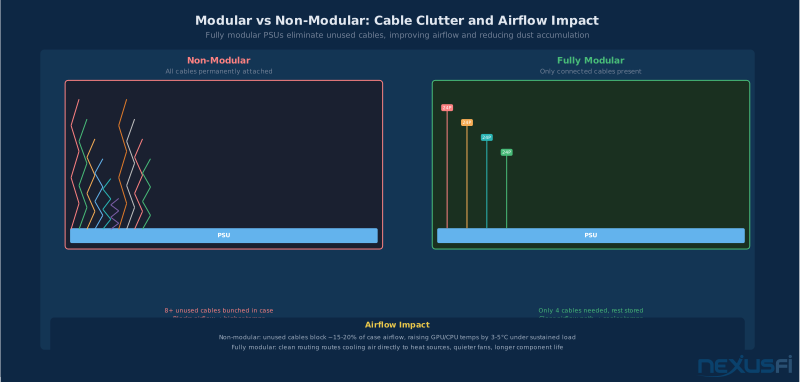
Fully modular PSUs eliminate unused cable clutter, improving airflow by 3 — 5 degrees C in typical cases and reducing dust accumulation on components over years of 24/7 operation.
One practical note: modular cables are proprietary to each PSU model and often to each manufacturer's generation. If you replace a modular PSU, you typically need to use the new unit's cables — using old cables from a different PSU risks reversed pinouts and immediate component damage. Always use the cables shipped with your PSU.
Brands and Platforms: What counts #
NexusFi's hardware veterans have been consistent on PSU brands for years. @Big Mike's advice in the hardware threads remains correct a decade later: "Don't skimp. I would buy Seasonic if you can, or Corsair if you can't." (Hardware lust thread) That's still solid guidance, with important nuance added.
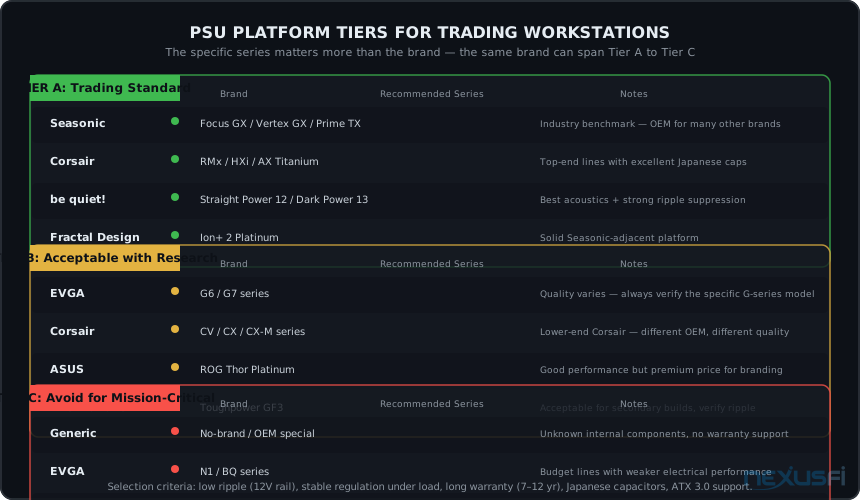
The nuance: major PSU brands source from multiple OEM platforms. Corsair sells units that range from legitimately excellent (RMx series) to mediocre (CV and older CX series). EVGA historically offered everything from Tier-A G2/G3 platforms to budget units that belong in a different category. Buying the brand name without specifying the series is buying the marketing, not the product.
PSU platform tiers for trading workstations. Tier A is the standard for mission-critical use. Note that the same brand (Corsair, EVGA) appears in multiple tiers depending on the specific product line — always verify the series, not just the logo.
Key Metrics for Independent Reviews
Before purchasing any PSU, verify with independent electrical testing. Key numbers: +12V ripple under 50mV at 50% load (Tier-A units run 20 — 40mV; budget units approach the 120mV ATX limit), voltage regulation within ±2%, and hold-up time above 16ms.
Ripple Noise: The Silent Killer #
Ripple noise is the residual AC voltage present on the PSU's DC output rails. Every power supply produces some ripple — the engineering challenge is minimizing it. The ATX specification sets a maximum of 120mV on the +12V rail. Better units run under 30mV. Budget units sometimes approach or exceed the spec limit.
Here's why this matters specifically for trading workstations: ripple doesn't usually cause immediate failures. It causes degradation. Excess ripple stress on GPU voltage regulators, NVMe drive controllers, motherboard VRM capacitors, and RAM ICs shortens their operational lifespan over months and years of exposure. The system continues functioning — until it doesn't.
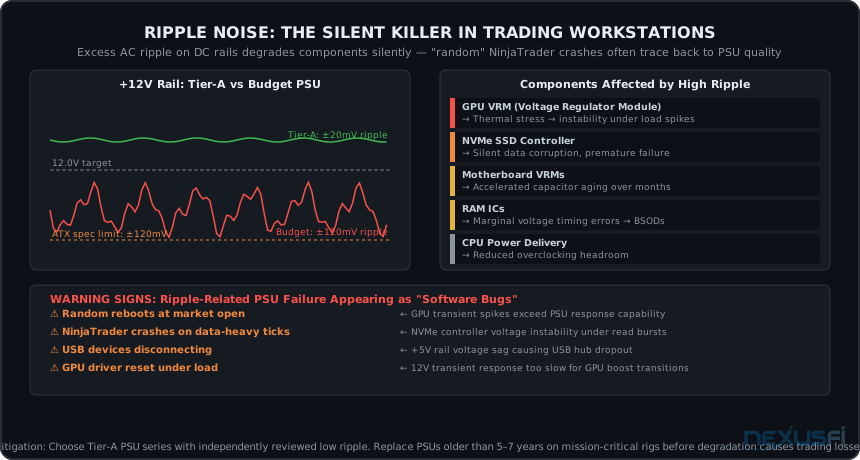
+12V rail comparison: Tier-A PSU ripple (±20mV, barely visible) versus budget unit (±120mV, at the ATX spec limit). The components listed on the right experience accelerated aging at higher ripple levels — often presenting as unexplained trading platform crashes before any clear hardware fault appears.
UPS Integration: Treating the PSU and UPS as a System #
The UPS article in this series covers everything you need to know about selecting and sizing a UPS for futures trading. The critical intersection with PSU selection is compatibility — specifically, the Active Power Factor Correction (APFC) issue.
Modern high-quality PSUs use APFC circuitry to improve power factor (basically, how efficiently they draw power from the wall). APFC circuits are designed to work with utility power — a clean sine wave at 60Hz. They can also work with the pure sine wave output of line-interactive and online/double-conversion UPS systems.
What they don't always work with: the stepped or simulated sine wave output of budget UPS units. Some inexpensive UPS systems produce a crude approximation of a sine wave that looks like a staircase pattern rather than a smooth curve. APFC circuits in high-quality PSUs can interpret this as an anomalous power condition and shut down the PSU — meaning your computer crashes on UPS battery handoff. The backup protection you installed specifically to prevent crashes causes a crash.
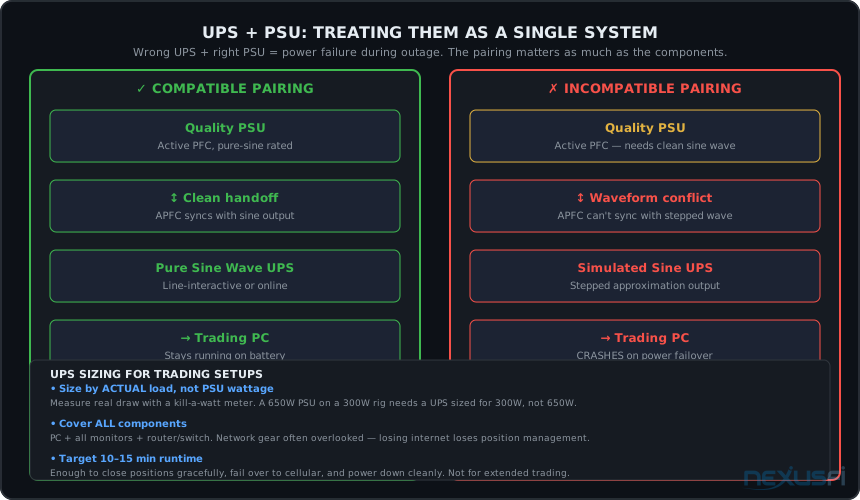
PSU and UPS compatibility. The right PSU with the wrong UPS can cause the exact failure you're trying to prevent. Pure sine wave UPS output (line-interactive or online/double-conversion) is the only safe pairing for quality trading workstation PSUs with APFC.
UPS Selection for PSU Compatibility
Line-interactive UPS with pure sine wave output: The standard recommendation for most trading setups. APC Back-UPS Pro BX series, CyberPower PFC SineWave series, and APC Smart-UPS are common choices that provide pure sine wave output on battery. Prices start around $150 for sufficient capacity to cover a standard trading workstation plus monitors.
Online double-conversion UPS: Provides the highest quality power — the PC always runs from battery-conditioned output, never directly from utility power. The handoff isn't instant because there is no handoff; the transition is uninterrupted. More expensive ($400+) and generates more heat. Justified for trading setups with extremely sensitive hardware or in locations with frequent power quality issues.
What to avoid: Any UPS listed as "simulated sine wave," "stepped approximation," or "modified sine wave" for use with quality PSUs. The original APC Back-UPS ES and some CyberPower value series fall into this category. Fine for desktop computers with lower-grade PSUs that tolerate the waveform; problematic when paired with quality APFC power supplies.
Budget UPS units for backup power can work — but for trading-critical systems, the waveform compatibility matters more than the price. Verify pure sine wave output explicitly before purchasing.
Practical UPS Sizing
Size the UPS for actual load, not PSU rating. A 650W PSU drawing 300W needs a UPS sized for 300W (plus monitors and networking gear). Measure with a kill-a-watt power meter at the wall. Target 10 — 15 minutes of runtime — enough to close open positions or execute an orderly shutdown, not enough to keep trading through an extended outage. The trading redundancy article covers the full power backup stack.
Common Failure Modes and Warning Signs #
PSU failures in trading environments almost never arrive without warning. The typical failure pattern is slow degradation over years — capacitors dry out, fan bearings wear, ripple increases gradually, regulation quality declines — with warning signs appearing months before catastrophic failure. Knowing the signs means you can replace preemptively rather than reactively.
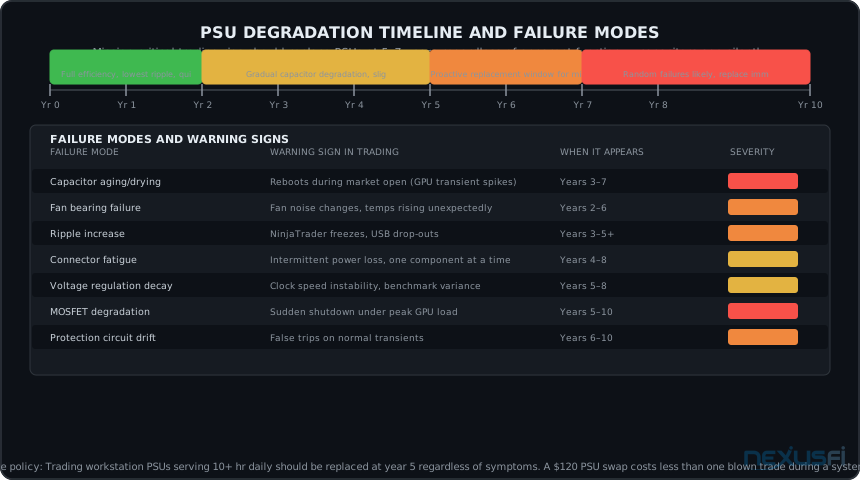
PSU degradation timeline. The Watch Zone (years 5--7) is when proactive replacement makes sense for mission-critical trading setups. By year 7, most capacitors are showing measurable aging even in quality units. The failure modes table maps symptoms to root causes.
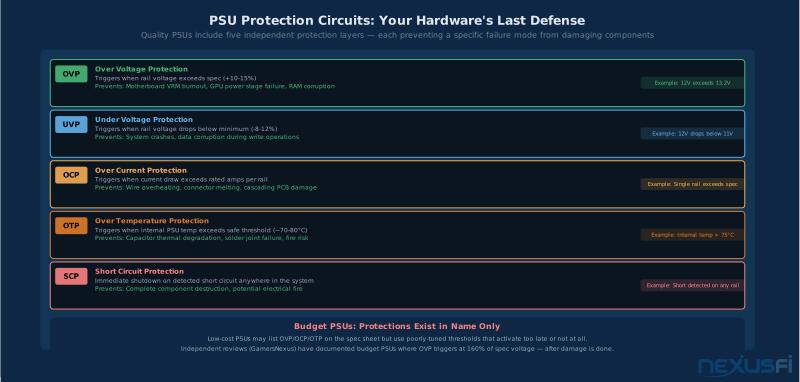
Six independent protection circuits in quality PSUs. Budget units list these on the box but implementation quality varies — the difference shows up in failure mode behavior, not normal operation.
The Seven Failure Modes
Capacitor aging: The most common root cause of long-term PSU failure. Electrolytic capacitors degrade over time, especially in high-temperature environments. Aging capacitors allow more ripple to pass through, reduce hold-up time, and cause voltage instability. Symptoms: random reboots during peak system load, especially GPU-intensive events like market open data surges.
Fan bearing failure: PSU cooling fans have bearings that wear over years of operation. A failing fan reduces airflow through the PSU, raising internal temperatures and accelerating capacitor aging in a compounding failure mode. Warning sign: fan noise characteristics change — either increasingly loud bearing whine or the opposite (fan stops spinning during supposedly temperature-controlled idle operation).
Voltage regulation decay: Output voltages drift as regulation components age. A +12V rail that measured 12.08V on day one may measure 11.92V at year 7. Increasing variance makes the system more sensitive to transient loads. Warning sign: system instability that correlates with GPU load transitions or simultaneous disk access events.
Warning Signs to Watch
Warning patterns that suggest PSU degradation in a trading environment: system reboots at market open but not during stable mid-session conditions (transient load failure); platform freezes on high-tick feeds without driver errors (+12V ripple on the NVMe controller); USB devices disconnecting intermittently (+5V rail instability); GPU driver resets not triggered by temperature (+12V transient response too slow for GPU boost transitions). Any of these symptoms in a PSU older than 4 years warrants a swap-test with a known-good unit before assuming software or driver causes.
Build-Specific PSU Recommendations #
Here's what to actually buy. Three profiles for three build types, with specific model recommendations from Tier-A manufacturers.
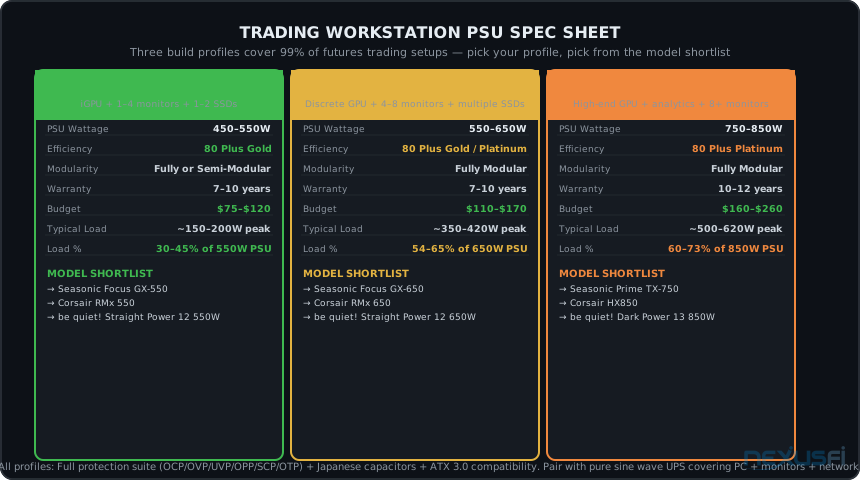
PSU spec sheet for three trading workstation profiles. 99% of futures trading setups fit within these three categories. The model shortlist uses Tier-A manufacturers with independently validated electrical performance.
Basic Trading Station: 450--550W Gold
For setups running integrated graphics (Intel UHD or AMD Radeon integrated), 1--4 monitors, 1--2 NVMe SSDs, and 32--64GB RAM. Typical peak draw of 150--220W.
Target spec: 550W, 80 Plus Gold, Fully Modular, 7--10 year warranty, $75--120 budget.
Recommended models:
- Seasonic Focus GX-550 (550W, Gold, Fully Modular, 10-year warranty)
- Corsair RMx Shift 550W (Gold, Fully Modular, 10-year warranty) -- side-cable variant for improved routing in mid-tower cases
- be quiet! Straight Power 12 550W (Gold, Fully Modular, 10-year warranty)
At 550W with a ~180W actual load, this sits at 33% — slightly below the 40% sweet spot, but Tier-A units don't suffer much from modest underload. The 550W rating provides headroom for a GPU upgrade if you later add a discrete card for additional monitors.
Standard Multi-Monitor: 550--650W Gold
For setups with a discrete GPU driving 4--8 monitors (AMD Radeon RX 6400--7600 or Nvidia RTX 4060-class cards for display-only use), mid-range CPU, multiple NVMe drives, 64GB RAM. Typical peak draw of 350--420W.
This is the most common profile for active futures traders: a capable multi-monitor setup with NinjaTrader or Sierra Charts running across 4--6 screens, separate data feed connections, and order entry. @cdsmart's setup from NexusFi's battlestations thread is representative — "All built by myself. Running Sierra Charts, NinjaTrader, Tradingview, Bookmap and Jigsaw" across multiple monitors.
Heavy Workstation: 750--850W Platinum
For setups with high-end discrete GPUs (RTX 4080-class or AMD RX 7900 XTX) for 8+ monitor 4K setups or heavy analytics workloads, high-end CPU platforms (Intel Core i9 or Ryzen 9 series), multiple NVMe drives, large PCIe card complements, or anticipated significant upgrades. Typical peak draw of 500--640W.
@Spartans, a 20+ year full-time futures trader in the NexusFi Battlestations thread, described his updated AMD build: "I7 5930k Corsair Water cooled Ram - 64GB H/Drives - 2x M2 SSD GPU - 2x Radeon Vega RX 56 8GB PSU - Corsair Platinum." The Corsair Platinum choice reflects the same logic — a serious system deserves serious power delivery infrastructure.
What to Avoid
Price is not the only red flag, but consistently cheap PSUs in the $30--50 range for 500W+ ratings are almost universally compromised on internal component quality, often missing protection circuits, and carry no meaningful warranty. The damage a failed PSU can cause — taking out a GPU, motherboard, or NVMe drives through voltage spike on failure — can cost 10× the PSU replacement cost.
Specific patterns to avoid for trading workstations: non-Gold efficiency ratings in new builds, PSUs without listed warranty terms, brands not found in Tier-A or Tier-B lists above, and any unit described with marketing language like "gaming grade" or "extreme wattage" without technical specifications to back it.
When to Replace Your PSU #
The question most traders never think to ask: how old is your PSU?
For a workstation running 6--10 hours daily in a trading environment, the practical reliability window for quality PSUs is 5--8 years. Beyond that window, the internal capacitors have degraded measurably, ripple has increased, and the PSU is operating on borrowed time.
The challenge is that a degrading PSU often continues to pass basic diagnostics. Windows stability tests show clean results. Voltages read nominally in HWINFO. The system appears healthy — until it fails during a position at max exposure. Unlike a failing hard drive (which produces smart alerts and read errors) or an overheating GPU (which throttles visibly), a degrading PSU fails silently and then catastrophically.
PSU Selection Checklist #
Before purchasing, verify against these criteria:
The most common PSU mistake is buying on raw wattage. The efficiency tier, manufacturer platform, and modular design matter more than the number on the box for 24/7 trading reliability.
- Wattage sized for 40--60% load zone based on calculated component TDP + 25--35% headroom
- 80 Plus Gold minimum rating (Platinum for 12+ hour daily use or warm environments)
- Fully modular (semi-modular acceptable)
- Tier-A manufacturer platform (Seasonic GX/TX, Corsair RMx/HXi, be quiet! Straight Power)
- 7+ year warranty (10+ preferred)
- Full protection suite: OCP, OVP, UVP, OPP, SCP, OTP all listed
- Japanese capacitors confirmed (manufacturer spec or independent review)
- Ripple on +12V rail under 50mV at 50% load (from independent review)
- UPS pairing is pure sine wave output (line-interactive or online/double-conversion)
If you're replacing rather than building new: measure the existing PSU age, document the replacement date, and note the model for future reference. For the broader infrastructure picture, the CPU selection guide, GPU guide, RAM guide, and SSD storage guide cover the components that the PSU powers. Build the system that makes sense for your trading style — then power it correctly.
Knowledge Map
Go Deeper
Build on this knowledgeReferences This Article
Articles that build on this topicCitations
- — Hardware lust: trading PC with 6-monitors“Don't skimp. I would buy Seasonic if you can, or Corsair if you can't.”
- — Battlestations: Show us your trading desks!“I have been trading futures full time for over 20 years. PSU - Corsair Platinum.”
- — Battlestations: Show us your trading desks!“All built by myself. Running Sierra Charts, NinjaTrader, Tradingview, Bookmap and Jigsaw.”
- — Spoo-nalysis ES e-mini futures S&P 500“My computer just fried out on me, (first for everything) and I went dark for about 30 min.”
- — The Scalper's Journey“I bought 2 UPS units for around $40 each and they work like a charm.”
- — Battlestations: Show us your trading desks!“Corsair AX750 PSU.”
- — Hardware lust: trading PC with 6-monitors (2024) 👍 1“Don't skimp. I would buy Seasonic if you can, or Corsair if you can't.”
- — Computer power (2024) 👍 1“I would focus on quality PSU (not necessarily more wattage), focus on quiet or near silent PSU.”
- — Battlestations: Show us your trading desks! (2024) 👍 1“PSU - Corsair platinum 1200w”
- — Building a Crypto Mining Rig (2024) 👍 1“I ordered ... 850W power supply. I know the power is limited but will add another one when needed.”
- — Building a Crypto Mining Rig (2024) 👍 1“The original power supply was not adequate to run both cards.”