



Network Switch Selection for Trading Workstations: Managed vs. Unmanaged, QoS, VLANs, and the Hardware That Keeps Your Orders Moving
Overview #
Your trading platform is only as reliable as the hardware between your machine and your broker. The router gets all the attention. The ISP gets blamed when fills go wrong. But the switch sitting on your desk — or the lack of a proper one — is doing quiet damage you never see: IoT traffic colliding with order flow, 4K streams spiking latency during the open, no visibility into packet errors on a cable that's degrading.
A network switch doesn't add speed. That's the first thing to settle, because it's how most traders think about this hardware. The 5--15 microsecond port-to-port latency difference between a $30 unmanaged switch and a $300 managed switch is real and also completely irrelevant — your CME ping from a US home is 20,000--80,000 microseconds. You're not losing orders because your switch is slow.
You're losing orders because your switch is invisible. No traffic controls, no VLAN isolation, no error counters. A managed switch with QoS and VLAN configured correctly prevents the situations that do lose orders. That's the job. Not speed — control.
This article covers every layer of the decision: unmanaged vs. managed, smart managed vs. fully managed, QoS configuration step-by-step, VLAN design for trading traffic isolation, port speeds that matter vs. ones that don't, PoE for the desk peripherals, and specific product picks by trader tier. By the end you'll know exactly what to buy, what to configure, and what to ignore.
The Bandwidth Myth Applied to LAN Hardware #
That observation applies harder inside your LAN than it does to your WAN connection.
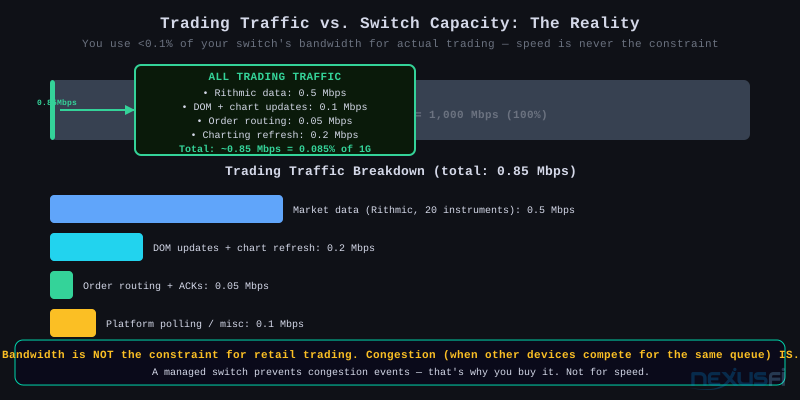
A full trading session — streaming market data, DOM updates, chart refreshes, order routing — consumes under 1 Mbps. A full CME Globex data feed via a broker like Rithmic runs 50--500 Kbps per instrument. Twenty instruments simultaneously, plus order flow, plus your charting platform pinging the server — you're under 5 Mbps total. Your gigabit switch has 1,000 Mbps available. You're using 0.5% of it.
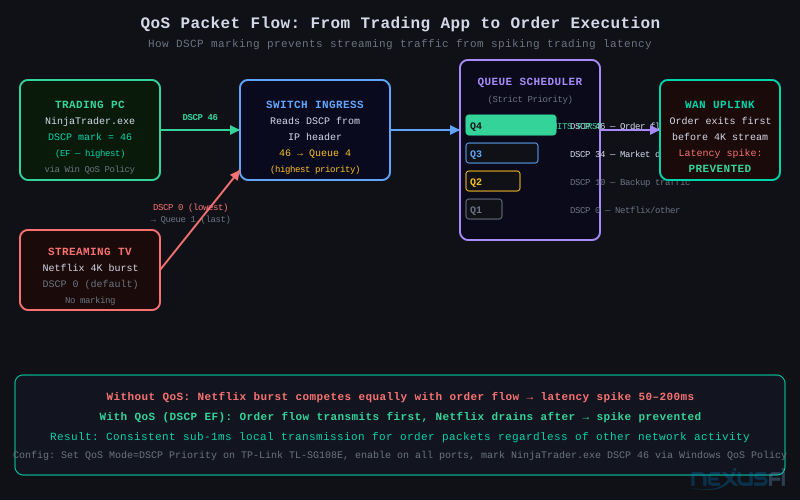
So port speed is not the metric. What kills trading performance at the LAN level is congestion events — moments when a burst of traffic (a Netflix 4K start, a Windows Update, a Dropbox sync) hits the same output queue as your order acknowledgement. Without QoS, these events are invisible and random. They show up as unexplained latency spikes — 50ms, 100ms, 200ms — during exactly the moments when you're entering or exiting.
The second killer is broadcast noise from other devices. Every device on a flat network (no VLANs) hears every ARP request, DHCP broadcast, and multicast packet from every other device. An IoT-dense home with 20+ devices generates real background noise that shows up in network traces. A managed switch with VLANs silences it.
This is the ROI of a managed switch: not faster order fills, but fewer latency spikes and no network surprises during the session.
What matters for trading network quality For trading: 1) Reliability/uptime, 2) Minimum ~1 Mbps bandwidth, 3) Minimal latency. Upgrading to faster broadband has near-zero impact. Focus on stability — outages during live positions are the real threat.
Managed vs. Unmanaged -- What the Difference Actually Means #
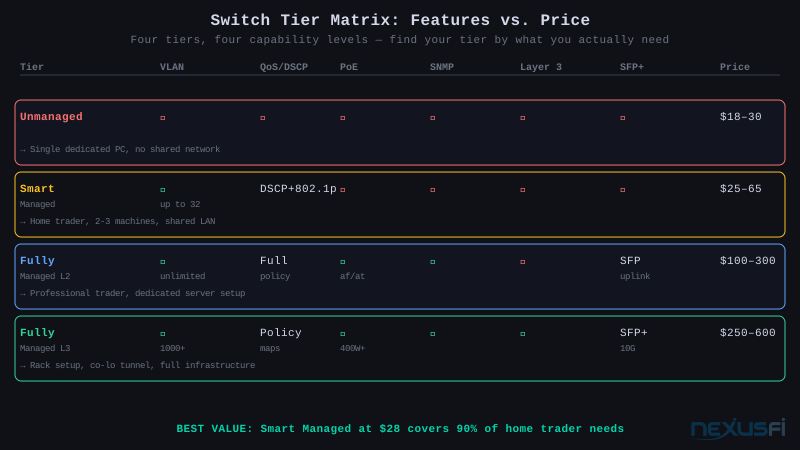
Unmanaged means plug in and forget. The switch learns MAC addresses, builds a forwarding table, and sends frames to the right port. That's it. No web interface, no configuration, no visibility. All ports share the same broadcast domain.
When unmanaged is fine: single trading PC with a direct line, no heavy devices competing for bandwidth, your router handles QoS at the WAN edge.
When unmanaged hurts you: you can't see CRC errors on a degrading cable, you can't prioritize trading traffic over a streaming roommate, you have no isolation from IoT devices, and you'll never know if the random latency spikes are coming from your LAN or your WAN.
Smart managed (also called "easy smart" or "web smart") is the trader sweet spot. Web GUI, no CLI. The critical capabilities: 802.1Q VLANs, port-based or DSCP-based QoS, LACP link aggregation, IGMP snooping, loop detection, port mirroring. Configuration happens through a browser at the switch's local management IP. No vendor certification required.
The TP-Link TL-SG108E ($25--30) is the canonical example. Eight ports, gigabit, supports 32 VLAN groups, DSCP QoS, LACP, port mirroring. More features than most traders will ever use, at a price that needs no justification.
Fully managed Layer 2 adds CLI access, full SNMP monitoring, more granular ACLs, traffic storm control, 802.1X port security, and better QoS queue mapping. The Cisco CBS250/350 series and Ubiquiti UniFi switches live here. Worth it when you're running a serious multi-machine setup and want to monitor everything — port utilization, error counters, traffic rates — through a dashboard.
Fully managed Layer 3 adds inter-VLAN routing in hardware. Instead of hairpinning traffic through your router to move packets between VLANs, the switch does it internally at line rate. This matters when you have dedicated VLANs for trading, management, and general traffic and you want tight control without router dependency.
QoS Deep Dive -- 802.1p, DSCP, and Queue Schedulers #
QoS is the reason you buy a managed switch. Understanding how it works prevents misconfiguration that leaves you with the wrong thing prioritized.
The Two QoS Standards #
802.1p (Layer 2 Class of Service / CoS): A 3-bit field inside the 802.1Q VLAN tag. Eight priority classes (0--7), where 7 is highest. Lives in the Ethernet frame header — requires a VLAN tag to carry it. The switch reads this to assign queue placement. Works within a single LAN segment but doesn't persist across routers.
Standard priority mapping: 0=background, 1=best-effort, 4=video/streaming, 5=voice/interactive, 6=network control, 7=critical/highest. For trading, 7 is your order flow and 5-6 is your market data feed.
DSCP (Differentiated Services Code Point, Layer 3): A 6-bit field in the IP header, 64 possible values. This is what persists across routers — your ISP and WAN equipment reads DSCP, not 802.1p. More granular and more useful for end-to-end QoS.
Key DSCP values:
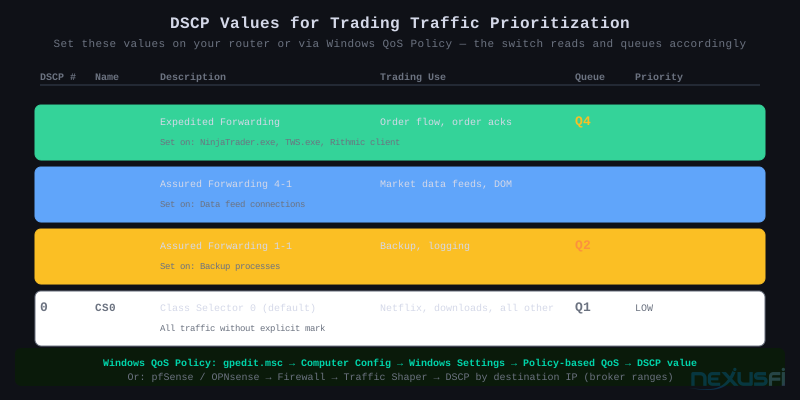
- CS0 (0): Default/best-effort — all traffic without explicit marking
- AF11 (10): Low-priority assured forwarding — backup, logging
- AF41 (34): High-priority video/interactive — market data feed
- EF (46): Expedited Forwarding — highest priority, voice, order flow
- CS6 (48): Network control — routing protocols
For trading traffic prioritization: mark order flow with DSCP EF (46) and market data with DSCP AF41 (34). DSCP CS0 (0) for everything else. Your switch maps EF (46) to the highest internal queue.
Queue Schedulers — How the Switch Decides What Goes First #
Strict Priority (SP): The highest-priority queue drains completely before any lower-priority queue gets service. Trading traffic always transmits first. Clean and predictable, but if trading volume spikes heavily, lower queues can starve — which doesn't matter in practice since trading traffic is always low volume.
Weighted Round Robin (WRR): Each queue gets a weighted share of transmit bandwidth. Queue 4 (highest) might get 60%, Queue 3 gets 25%, Queue 2 gets 10%, Queue 1 gets 5%. Lower queues never fully starve but also never get absolute priority. Better for shared environments where you need guaranteed baseline throughput for multiple device classes.
SP+WRR hybrid: High-priority queues run strict priority; remaining bandwidth is distributed via WRR to lower queues. This is what Cisco CBS350 and Ubiquiti USW-Pro implement. The right choice for a trading desk: order flow gets strict priority, everything else shares remaining bandwidth.
The TP-Link TL-SG108E uses Strict Priority scheduling with four queues (1 = lowest, 4 = highest). Configure QoS mode to DSCP-Based and the switch will map incoming packets to queues by DSCP value.
What Marks the DSCP? #
The switch reads DSCP but doesn't set it — that's done upstream. Three options:
Router-based marking (best): pfSense, OPNsense, and Ubiquiti UDM/USG all support DSCP marking rules. You create a rule: traffic to/from your broker's IP ranges → mark DSCP EF. Traffic to Netflix/streaming → DSCP CS0. The switch trusts and acts on these marks.
Windows QoS Policy (easiest for Windows traders): Via Group Policy (even on Home edition with registry edits), you can assign a DSCP value to specific executables. Set NinjaTrader.exe, TWS.exe, or your Rithmic client to DSCP 46. Windows stamps every packet from that process. The switch sees it and queues it highest.
Switch port-based fallback: If you can't mark DSCP, assign static priority by port. Port 1 (your trading PC) = Priority 7. Port 2 (chart PC) = Priority 6. Port 3 (everything else) = Priority 1. Blunt but effective when the trading machine is the only device on its port.
VLANs for Traffic Isolation -- Why and How #
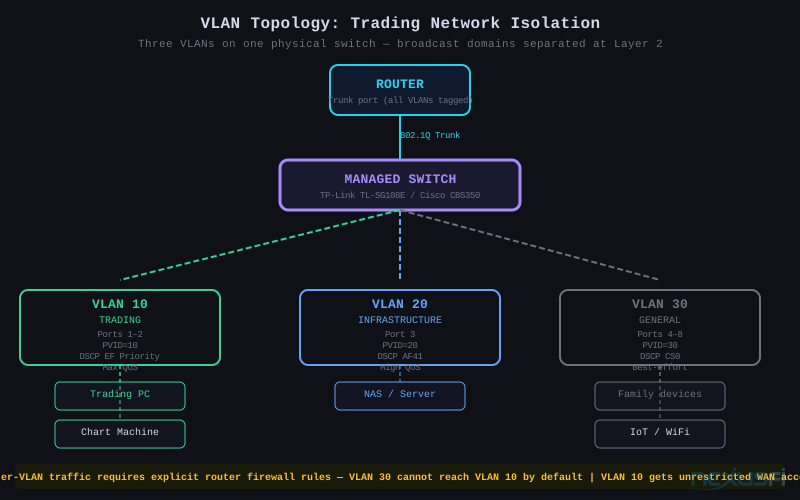
A VLAN (Virtual Local Area Network) creates logical separation on a physical switch. Ports in VLAN 10 can only communicate with other ports in VLAN 10 (plus any trunk port that carries multiple VLANs). Traffic can't cross VLAN boundaries without passing through a router — which means you can apply firewall rules, logging, and rate limits at the crossing point.
Why This Matters for Traders #
Without VLANs, your trading PC shares a broadcast domain with every other device on the network. That means:
- A malware-infected smart camera can ARP-spoof and intercept credentials from your trading application
- A family member's game downloading 50 GB of updates sends ARP storms and multicast traffic that your NIC's interrupt handler processes unnecessarily
- You can't apply different QoS policies to different device groups
With VLANs, your trading machine lives in its own broadcast domain. Traffic from IoT devices never appears on the trading VLAN. Inter-VLAN traffic requires deliberate routing rules — you decide what can reach what.
Practical VLAN Design for Traders #
Minimal (2 VLANs):
- VLAN 10 (Trading): Trading PC only. Maximum QoS priority.
- VLAN 1 (General): Everything else. Best-effort.
Works for: solo trader, single dedicated machine, clean install.
Standard (3 VLANs):
- VLAN 10 (Trading): Trading and chart machines. DSCP EF priority.
- VLAN 20 (Infrastructure): NAS, backup server, management terminal.
- VLAN 30 (General): Family devices, smart home, guest WiFi.
Works for: multi-machine setup with a dedicated server or NAS.
Professional (4 VLANs):
- VLAN 10 (Trading): Order flow machines. Strict QoS, no internet except broker addresses.
- VLAN 20 (Data/Infrastructure): Data feed servers, NAS, monitoring.
- VLAN 30 (VoIP): IP desk phones.
- VLAN 1 (General): Everything else.
Works for: full trading desk with dedicated execution infrastructure.
Port Speeds -- 1GbE vs. 2.5GbE vs. 10GbE #
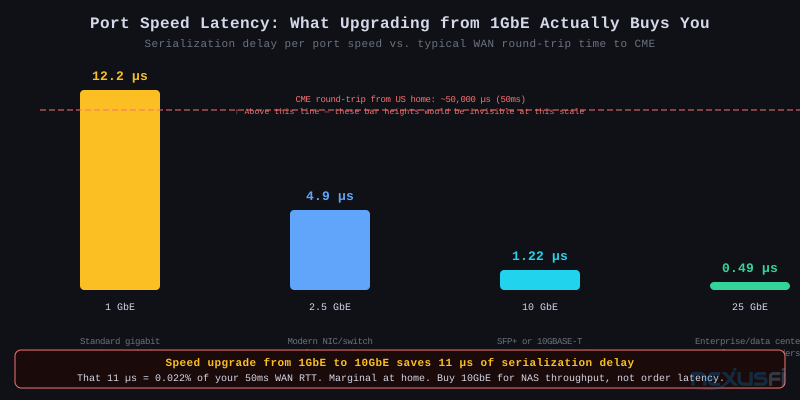
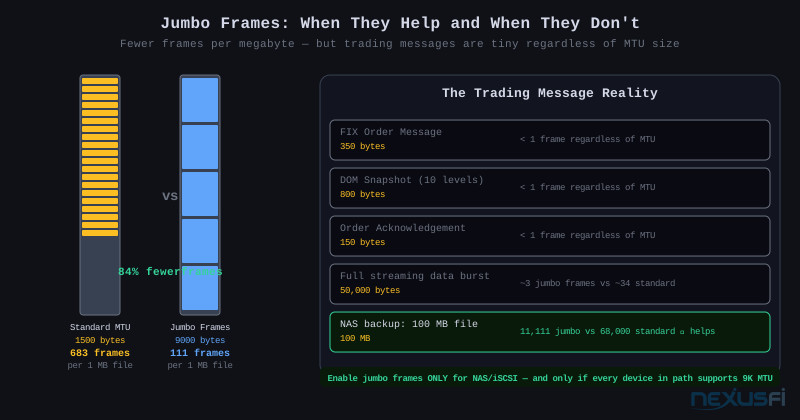
Here's the honest version: 1GbE is sufficient for all trading protocols. You'll never saturate it with market data or order flow. The only reason to care about multi-gig at the LAN level is local file transfers — NAS access, historical tick data moves, large backtesting datasets.
Serialization delay is the only latency argument for higher-speed ports: at 1 GbE, a maximum-size 1518-byte Ethernet frame takes 12.2 microseconds to serialize. At 10 GbE it's 1.22 microseconds. This 11 µs difference is real. It also represents 0.02% of your 50ms WAN round trip. The math kills the argument for retail trading.
Where multi-gig legitimately helps at a trading desk:
- NAS-to-workstation backup: If you record your order flow or store tick data on a local NAS, 10GbE cuts transfer time by 10x. Not a trading performance issue — a workflow issue.
- Server-to-server data feeds: Running a local market replay server or backtesting engine that shares tick data with your execution machine benefits from a fast local pipe.
- Link aggregation: Two 1GbE ports bonded via LACP give you 2 Gbps throughput plus link redundancy. More practical than buying 10GbE hardware for trading-only scenarios.
The 10GBASE-T (copper RJ45 10GbE) trade-off: Convenient but carries higher latency and power consumption than SFP+ fiber or DAC (Direct Attach Copper) twinax. A Cisco CBS350 comparing RJ45 vs. SFP+ ports shows approximately 1.4 µs additional latency for 10GBASE-T's PHY processing vs. SFP+ direct connect. For trading — irrelevant. For NAS throughput — doesn't matter. But if you're buying a multi-gig switch specifically for low latency, buy one with SFP+ ports and use DAC cables.
2.5GbE: Most 2026 desktop motherboards include 2.5GbE NICs. If your switch has 2.5G ports, you automatically get better throughput to the NAS or between machines at no extra cost. TP-Link's Omada series and various managed options now include 2.5G. Not worth buying for, but good to have when choosing between otherwise-equal switches.
Product Guide by Trader Tier #
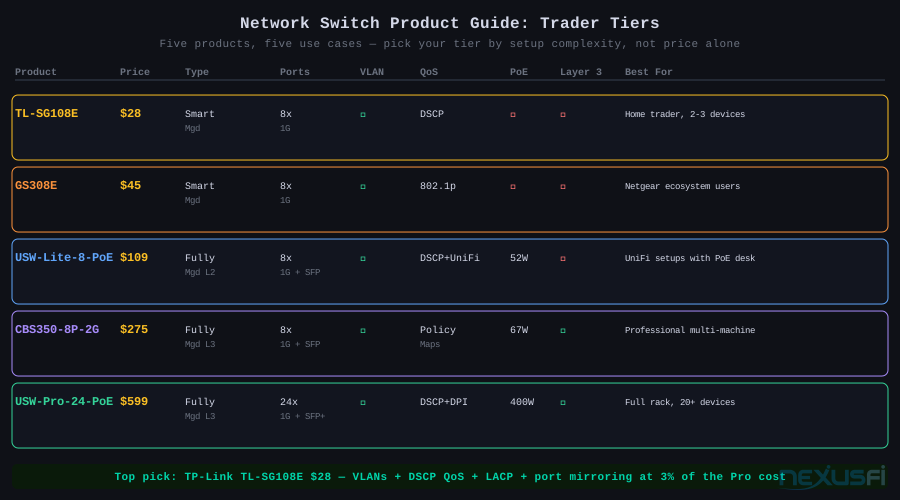
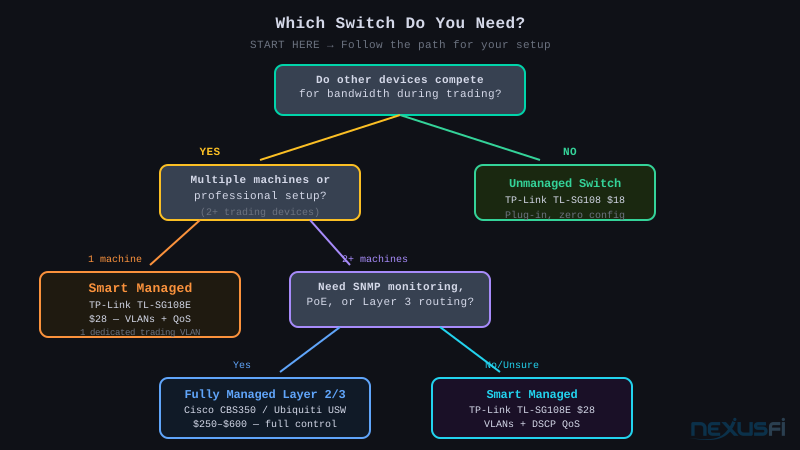
Tier 1 — Unmanaged ($18--30): Netgear GS308 or TP-Link TL-SG108. For a dedicated single-machine setup with zero competing devices. No VLANs, no QoS, no visibility. Skip this tier if your network has family devices.
Tier 2 — Smart Managed ($25--65) — Most home traders stop here: TP-Link TL-SG108E ($28). Eight ports, 802.1Q VLANs (32 groups), DSCP QoS (four queues), LACP, IGMP snooping, port mirroring. Web GUI only — no CLI required. Configuration takes 20 minutes once. Netgear GS308E ($45) for Netgear ecosystem users.
Tier 3 — Fully Managed L2 ($109--300): Ubiquiti UniFi USW-Lite-8-PoE ($109) for UniFi ecosystem users — centralized management, real-time per-port stats, PoE. Cisco CBS250/350 for full CLI, granular DSCP policies, 802.1X port security.
Tier 4 — Fully Managed L3 ($250--600+): Ubiquiti USW-Pro-24-PoE and Cisco Trigger. Inter-VLAN routing, 10GbE uplinks. Overkill for retail trading.
The honest product recommendation Buy the TP-Link TL-SG108E for $28. Configure DSCP QoS (CS6 for trading, AF41 for data feeds) and one VLAN for trading traffic. Done. The $28 switch and the $300 switch deliver identical order execution quality for home trading.
Three Setup Scenarios #
Scenario A: Home Trader, 2--3 Machines, Shared Network #
TP-Link TL-SG108E. VLAN 10 for trading PCs (ports 1--2), VLAN 20 for general, VLAN 30 for IoT. DSCP QoS CS6 for trading ports. Tagged uplink to router (port 8).
@rleplae, documenting his own setup: "Trading is a serious business and the last thing you want is your internet connection going down." VLAN isolation and QoS solves exactly this. See: https://nexusfi.com/showthread.php?t=29487&p=367755#post367755
Scenario B: Professional Trader — Dedicated Server + Multi-Machine #
Ubiquiti USW-Lite-8-PoE or Cisco CBS250. Dedicated trading VLAN (20), management VLAN (99). LACP dual-uplink for active-active redundancy. Per-port traffic stats visible in UniFi or CBS dashboard.
Scenario C: Algo Trader — Remote Server + VPN Tunnel #
MikroTik CRS305 or Cisco CBS350. Separate VLAN (40) for VPN traffic, strict-priority queuing. The switch is the clean local foundation — VPN and strategy code run on top.
PoE -- Powering Desk Peripherals from the Switch #
PoE (Power over Ethernet) delivers DC power through standard Cat5e/Cat6 Ethernet cables, eliminating separate power bricks for compatible devices.
Standards:
- 802.3af (PoE): 15.4W per port. IP phones, access points, basic cameras.
- 802.3at (PoE+): 30W per port. PTZ cameras, more capable access points.
- 802.3bt (PoE++): 60--90W per port. High-end APs, thin clients.
Trading desk applications:
- VoIP desk phone: Call your broker directly from a dedicated desk line. Standard IP phones (Cisco 7965, Yealink T33G) draw 4--8W. 802.3af sufficient. No power brick at the desk.
- IP camera: Monitor your trading desk area for recording your reaction during volatile sessions, or watch for environmental issues (fire, flood) when trading remotely. 802.3at for most 1080p cameras.
- WiFi access point: If you need wireless coverage for a tablet displaying charts while you watch the DOM on the main monitor, a PoE AP eliminates the wall adapter. Ubiquiti U6-Lite: 9W.
- Raspberry Pi / monitoring device: Run a secondary network monitor, tick data logger, or auxiliary display device without hunting for a USB power brick.
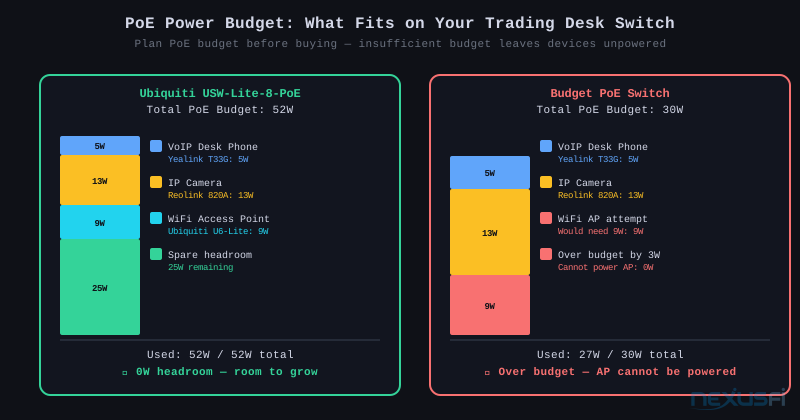
PoE budget: Budget switches have limited total power. The Ubiquiti USW-Lite-8-PoE has 52W — enough for two phones (8W each) and an AP (9W) with headroom. The Cisco CBS350 and Ubiquiti USW-Pro handle much higher budgets for larger deployments.
Link Aggregation (LACP) and Redundancy #
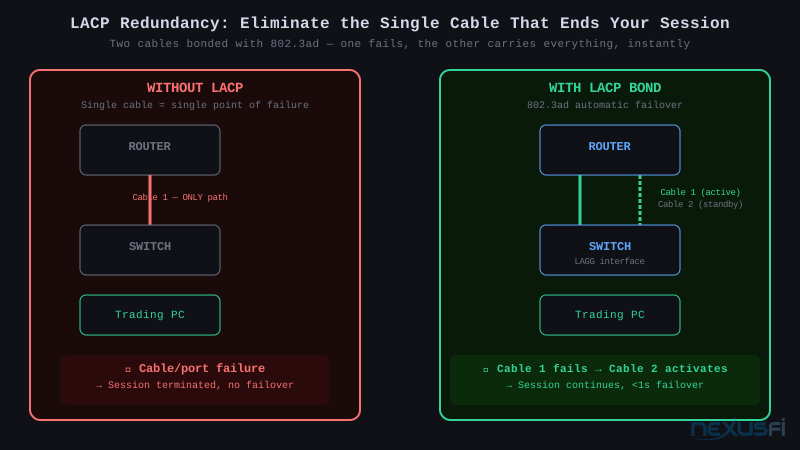
LACP (802.3ad) bonds two or more physical ports into a single logical link.
What you get:
- Redundancy: If one cable or port fails, traffic continues on the remaining links automatically. For a professional trading setup, this eliminates the switch-to-router link as a single point of failure.
- Throughput: Multiple links distribute traffic. Note: a single TCP flow stays on one physical link — LACP doesn't multiply throughput for individual flows. Multiple simultaneous flows get distributed across links.
Configuration: Both switch and router must support LACP. On the TL-SG108E: Switching → LAG → select two ports → LACP mode. On pfSense/OPNsense: Interfaces → Assignments → create LAGG with LACP mode. Connect two cables between switch and router. Done.
Spanning Tree (RSTP): If you have multiple switches connected by redundant cables, STP/RSTP prevents broadcast loops. Use RSTP (Rapid STP, converges in 1--5 seconds) over legacy STP (30--50 seconds). Enable Edge Port / PortFast on all ports connected directly to end devices — this skips the listening/learning states that would otherwise delay traffic for 15--30 seconds when a port comes up.
Management -- Web GUI vs. Controller vs. CLI #
Web GUI (TP-Link Easy Smart, Netgear ProSafe, Cisco CBS web UI): Browser-based, point-and-click. Sufficient for every configuration a retail trader needs. Some features are buried or non-obvious. Best for: traders who want to set it once and never touch it again.
Controller-based (Ubiquiti UniFi): Centralized management of all UniFi devices — switches, access points, gateway — in a single interface. Visual topology map showing all devices and connections. Real-time per-port statistics: bytes in/out, packet rates, error counts. Alerts when a port goes down or a device disconnects. Runs locally on a PC, NAS, or Ubiquiti Cloud Key, or in the cloud via UniFi network.ui.com. The best user experience in the prosumer managed switch space, at a cost premium.
CLI (MikroTik Winbox/RouterOS, Cisco CBS CLI): Most powerful and scriptable. Full access to every configuration parameter. OSPF, BGP, complex queue trees, traffic shaping rules, firewall chains — all available. The Winbox GUI (Windows app for MikroTik) softens the CLI curve much. For advanced traders who want scripted configuration, custom alerting, or need to manage a co-location VPN tunnel with granular traffic shaping.
The Latency Reality Check #
@SMCJB made the key observation in a network discussion thread: "having a small very fast pipe (ie low latency connection) is more important than having a massive but slower pipe." He runs a 2 modem, 1 router, 3 switch, 6 computer, 4 AP setup and monitors his connection continuously. The complexity is worth it — but for traffic management, redundancy, and visibility, not for switch silicon speed.
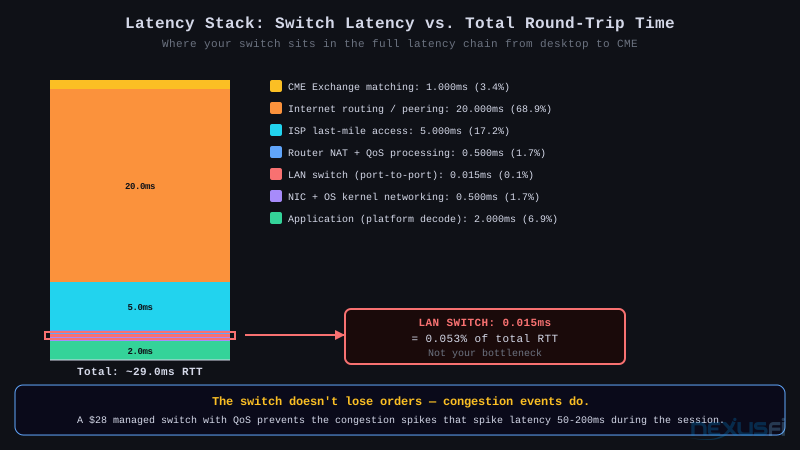
Here's where switches fit in the full latency chain:
| Layer | Latency source | Typical range | Controllable? |
|---|---|---|---|
| Application | Market data decode + DOM render | 1--5ms | Yes (platform settings) |
| OS + NIC | Kernel networking + interrupt latency | 0.1--1ms | Partially (OS tuning) |
| LAN switch | Port-to-port store-and-forward | 5--15 µs | No (buy better tier) |
| Router NAT/QoS | WAN-facing processing | 0.1--2ms | Yes (QoS + hardware) |
| ISP | Last-mile access + backhaul | 1--50ms | Choose better ISP |
| Internet | Peering + routing hops | 5--50ms | No |
| Exchange/matching | CME Globex processing | 0.5--2ms | No |
The switch represents under 1% of total round-trip latency. A $30 unmanaged switch doesn't cost you fills. A managed switch with proper QoS prevents the congestion events that do cost you fills.
@artemiso documented from co-located systems: 99th percentile latency of 34ms, max 63ms, delayed 2.05% of all messages — at dedicated server level in Chicago. Even co-located, network jitter exists and is measurable. For home traders, the right managed switch and QoS configuration tightens the distribution of latency spikes, which is exactly what you want for consistent order execution.
The answer to "do I need a managed switch?":
- Single dedicated machine, no competing traffic, router handles QoS: No.
- Multiple machines, shared network with family, or any uncertainty about competing traffic: Yes. The TP-Link TL-SG108E costs $28 and the QoS configuration takes 20 minutes.
Implementation Checklist #
Hardware:
- [ ] Choose switch tier based on setup complexity (single machine = unmanaged is fine; 2+ machines with shared network = smart managed minimum)
- [ ] Confirm router supports 802.1Q VLAN trunking if deploying VLANs
- [ ] Verify PoE wattage budget if powering desk peripherals
- [ ] Use Cat6 cable minimum for all connections (Cat6a for 10GbE runs)
QoS Configuration:
- [ ] Set QoS mode to DSCP Priority on the switch
- [ ] Verify DSCP 46 (EF) maps to the highest internal queue
- [ ] Enable QoS on all active ports
- [ ] Configure DSCP marking upstream (router or Windows QoS Policy for trading executables)
- [ ] Test: generate streaming traffic on a secondary device and confirm order submission latency is unchanged
VLAN Configuration:
- [ ] Define VLAN IDs (10 = trading, 20 = infrastructure, 30 = general)
- [ ] Set access ports (untagged, PVID matching VLAN ID) for each device
- [ ] Set trunk port (all VLANs tagged) for router uplink
- [ ] Configure router VLAN subinterfaces with firewall rules
- [ ] Test: confirm trading machine cannot ping devices on the general VLAN
Redundancy:
- [ ] Configure LACP bond with two cables between switch and router (if router supports LACP)
- [ ] Enable RSTP on all inter-switch connections
- [ ] Enable PortFast/Edge Port on all host-facing ports
Monitoring:
- [ ] Enable SNMP on managed switches (if available)
- [ ] Review port error counters weekly during initial deployment
- [ ] Set up alerts for port down events
Knowledge Map
Prerequisites
Understand these firstReferences This Article
Articles that build on this topicCitations
- — Data Feed and Internet Connection Quality with ADSL 2+ (2011) 👍 7“Generally speaking, the slowest broadband connection will be plenty fast for trading. Latency matters much more than throughput.”
- — Day Trading (Scalping) with Starlink satellite internet? (2024) 👍 4“having a small very fast pipe (ie low latency connection) is more important than having a massive but slower pipe”
- — Setup Dedicated Machine Chicago - My experience (2011) 👍 26“After switching to dedicated server in Chicago I now have latency in low single digits which makes me sleep better trading.”
- — Setup Dedicated Machine Chicago - My experience (2013) 👍 5“99th percentile 34ms, max 63ms, delayed 2.05% of all messages”
- — Two data feeds on same network (2010) 👍 5“excess is bad for latency. This goes for ISP service, and also goes for inside your home. Best bet, if possible, is to be wired from your ISP (cable), and also wired inside your home.”
- — Discussion: Micro Scalping Day Trading Facility (2018) 👍 3“From within the US typically 100 milliseconds or less is your distance from the Exchange.”
- — Upload, download, ping -- best settings to trade (2012) 👍 3“Latency matters much more than throughput. Upgrading to higher throughput (faster) broadband connections has zero impact for trading, for the most part.”
- — Ask Me Anything (AMA) with NinjaTrader Client Services (2020) 👍 3“My router lets me create a specific WiFi network for each port (UniFi USG) so my office runs that while other normal WiFi in house is a separate network.”
- — Ron's trading journal (2013) 👍 5“Trading is a serious business and the last thing you want to have happening is your internet connection going down.”
- Cisco Systems — Cisco CBS250 Series Smart Switches Administration Guide (2023)
- TP-Link — TP-Link TL-SG108E Easy Smart Switch Configuration Guide (2023)