



Trading Cybersecurity for Futures Traders: Protecting Your Account, Machine, and Positions
Overview #
Your trading account is a high-value target. A $50,000 futures account with margin amplification represents hundreds of thousands in potential exposure — and unlike a bank account, there's no FDIC backstop when someone drains it through an unauthorized wire.
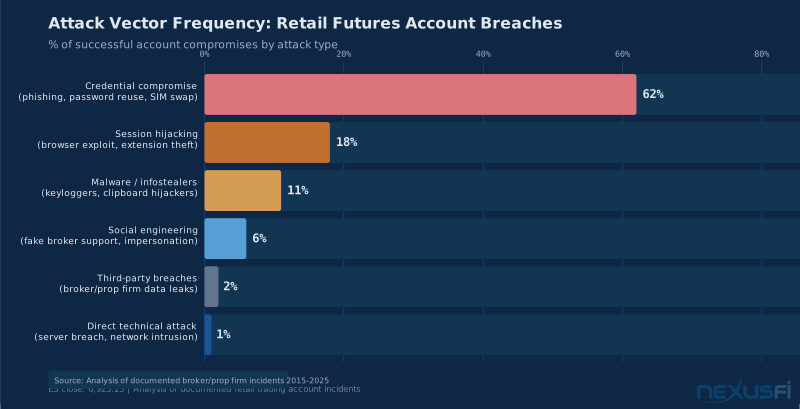
The threat environment for retail futures traders breaks into six categories, ranked by how often they actually cause damage. Credential compromise — password reuse, SIM-swap attacks, phishing — sits at the top. Below that: session hijacking via compromised browsers, malware and infostealers running silently on trading computers, social engineering attacks against broker support staff, third-party infrastructure breaches at providers you rely on, and operational misconfigurations that make all the above easier. Direct platform hacks are at the bottom of the list, not the top. The attacker's path of least resistance runs through you, not through your broker's servers.
The 2017 AMP Global data breach put this in sharp relief. A third party accessed AMP's network through an open network-attached storage device and copied approximately 97,000 files — customer records, internal emails, passport scans, credit reports. Big Mike reported at the time: "It includes credit reports, passport scans, internal company emails, customer chat logs, and basically everything an identity thief would need in order to mount a serious campaign." Plaintext passwords in the leaked chat logs. The CFTC issued a $100,000 fine for supervision failures. The customers got a letter and a new password requirement. That gap — between what you can control at the broker level and what you can control on your own machine — is where this article lives.
The good news: the attacker's job gets dramatically harder with a handful of specific changes. This isn't about being a security professional. It's about making yourself a harder target than the next trader.
Key Concepts #
Two-Factor Authentication (2FA): A second verification step beyond password, requiring something you have (phone, hardware key) in addition to something you know (password). Critically different implementations have dramatically different security profiles.
FIDO2/WebAuthn: The hardware authentication standard for security keys (YubiKey, Google Titan). Phishing-resistant — even a perfect clone of your broker's login page cannot capture a FIDO2 token because the key cryptographically verifies the domain.
TOTP (Time-Based One-Time Password): Authenticator app codes (Google Authenticator, Authy) that cycle every 30 seconds. Stronger than SMS, weaker than hardware keys.
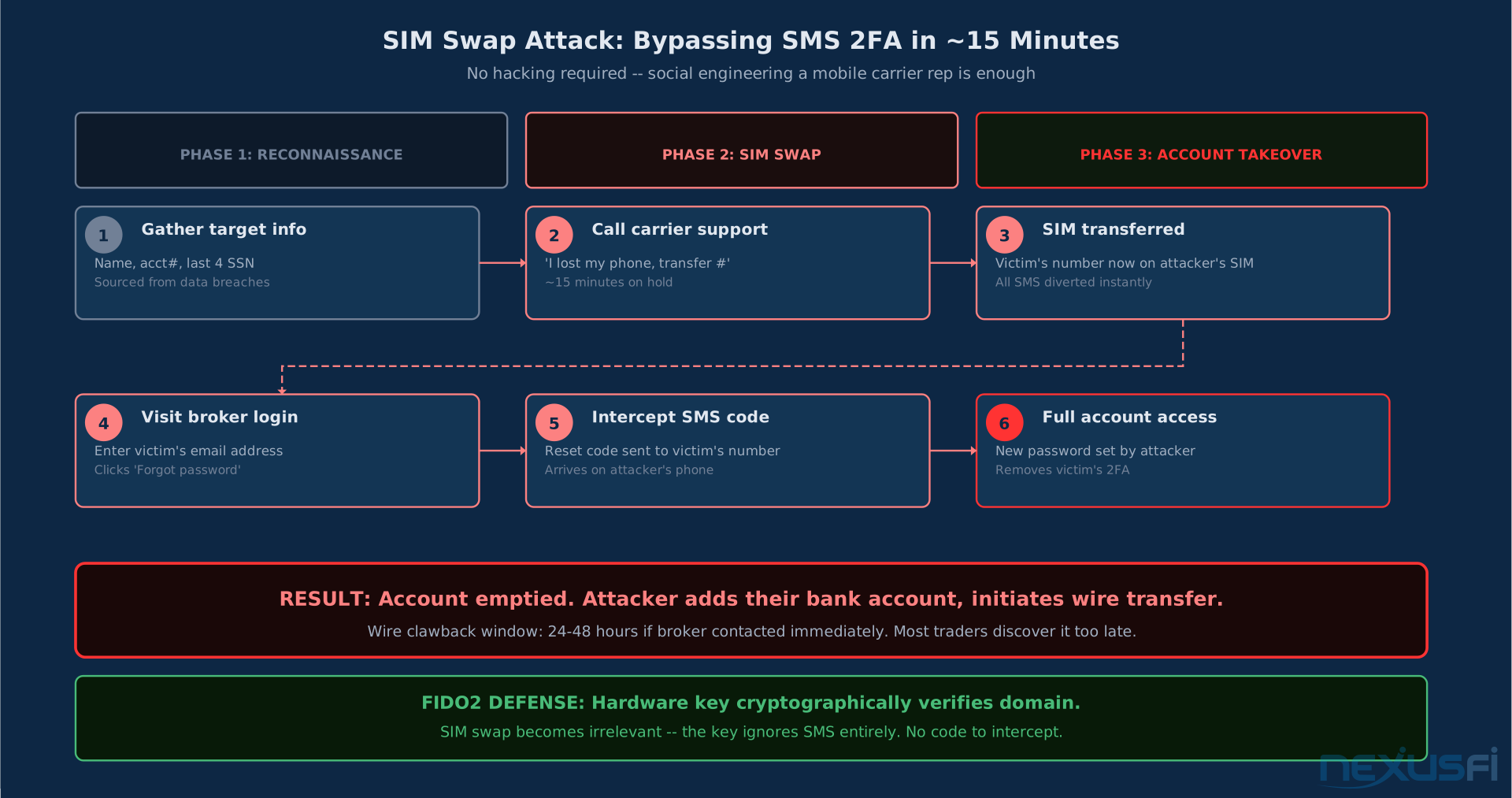
SIM Swap: An attack where a threat actor convinces a mobile carrier to transfer your phone number to their SIM card, intercepting all SMS codes. No technical sophistication required — just social engineering the carrier's support line.
Session Token: The authentication cookie stored in your browser after login. Stealing this gives an attacker authenticated access without needing your password at all. Modern phishing kits relay entire authentication handshakes — including MFA — to capture live session tokens.
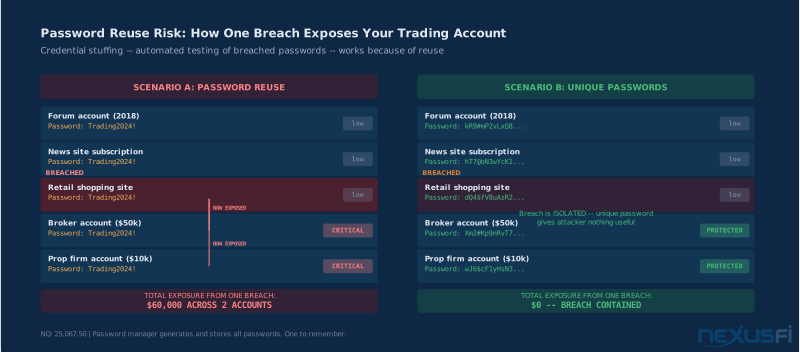
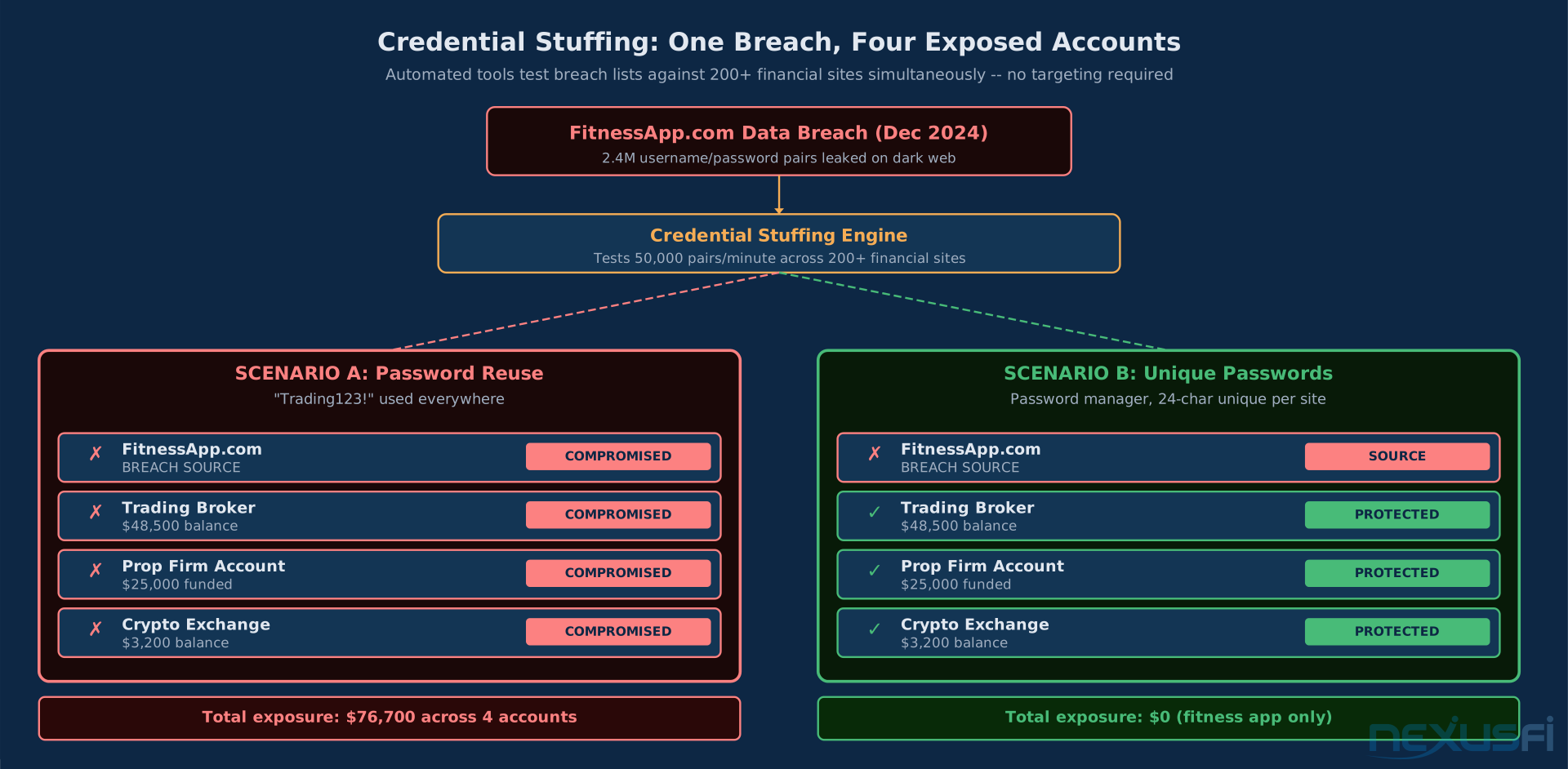
Credential Stuffing: Automated attacks using leaked username/password pairs from data breaches at other sites, tested systematically against your broker's login. Effective when you reuse passwords across services.
Infostealer: A malware category that silently harvests credentials, browser session cookies, clipboard content, and keystrokes. Delivered through malicious downloads, compromised browser extensions, or phishing attachments. File-less variants run entirely in memory and evade traditional antivirus.
Endpoint: Your trading computer, in security terms. The endpoint is where most modern attacks succeed — not the broker's servers.
Network Level Authentication (NLA): A Windows RDP security feature that requires authentication before establishing a full remote desktop connection, blocking unauthenticated remote code execution vulnerabilities.
Withdrawal Whitelisting: A broker security feature that restricts fund withdrawals to pre-approved bank accounts, requiring additional verification to add new destinations.
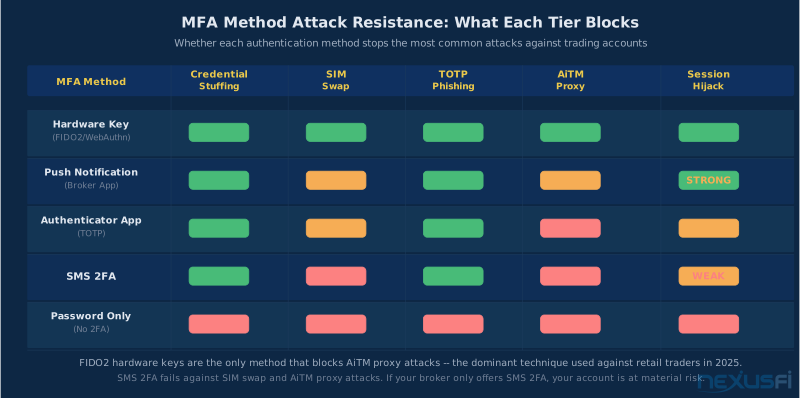
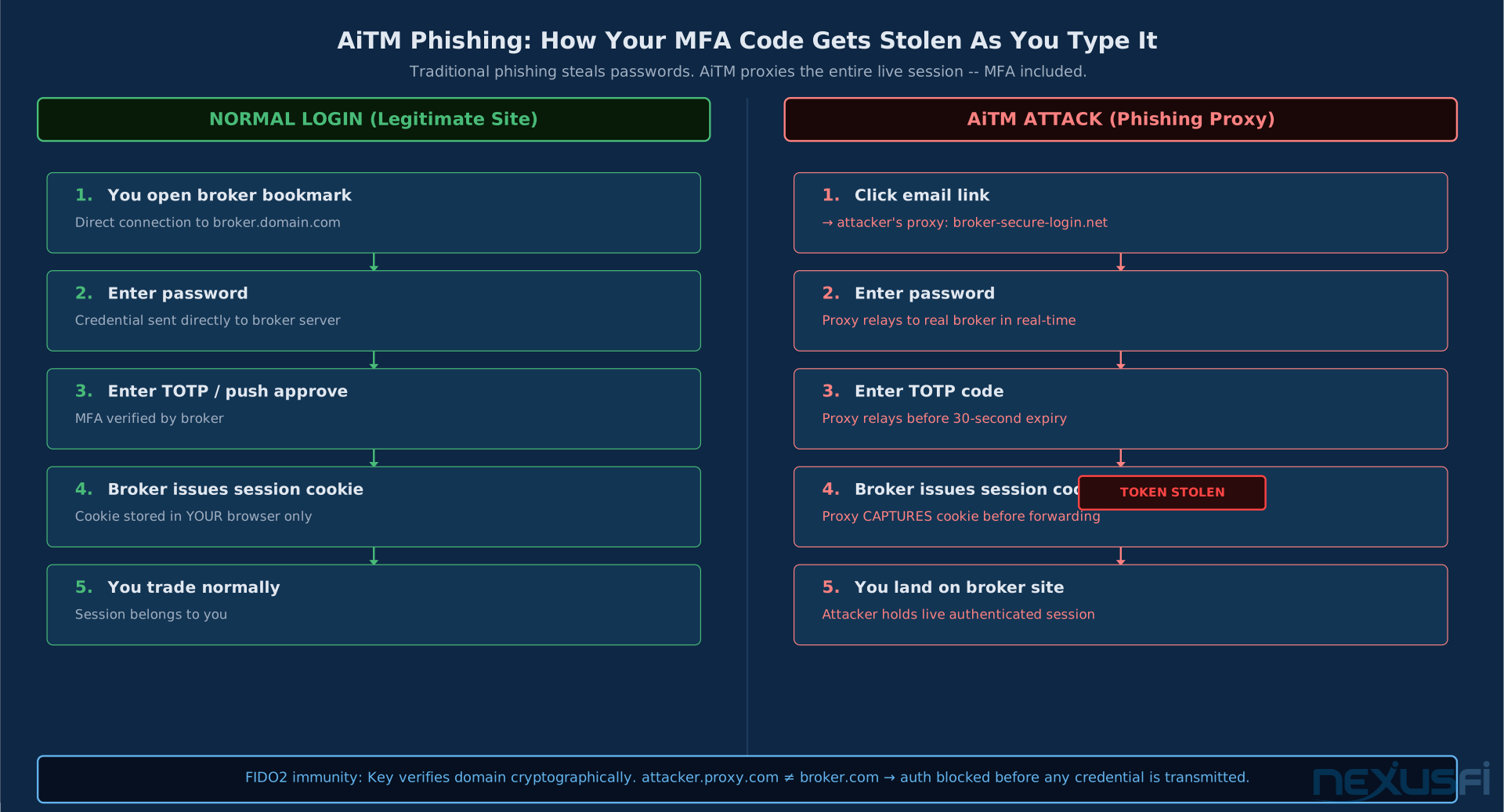
AiTM Phishing (Adversary-in-the-Middle): Modern phishing kits that proxy the entire login flow in real-time, capturing your MFA code and session token simultaneously. FIDO2 hardware keys are the only MFA method that blocks this attack class because the key cryptographically verifies the actual domain.
The Real Threat Model for Futures Traders #
Before configuring anything, understand what you're actually defending against. Most traders imagine a sophisticated hacker targeting their specific account. The reality is different.
Attackers improve for return on effort. Phishing — building a spoofed login page and sending bulk emails — costs nearly nothing and yields thousands of credentials.
That's the mental model. Your defenses don't need to be impenetrable — they need to be more expensive than the alternative target.
Attack Vector 1: Credential Compromise #
The most common path in. You reuse a password from a breach at some other service (a retail site, a forum, anything), that breach becomes public, automated tools test it against every brokerage login in existence. This is credential stuffing — it doesn't require targeting you specifically.
SIM swap is the upgrade. Attacker calls your mobile carrier, claims to be you, requests your number transferred to their SIM. Now they intercept your SMS-based 2FA codes. This works because mobile carrier support staff can't verify identity reliably. Big Mike flagged this dynamic in 2017, noting that Interactive Brokers was basically the only retail broker offering real two-factor authentication at the time — a gap that persisted for years.
Attack Vector 2: Session Hijacking and Token Theft #
Modern attacks don't steal passwords — they steal sessions. AiTM (Adversary-in-the-Middle) phishing kits like Tycoon2FA and Starkiller proxy the entire login flow in real-time. When you enter your credentials and MFA code on what looks like your broker's portal, the phishing kit relays everything through to the real site and captures your authenticated session cookie. Your login succeeds. The attacker now has your live session token — no password needed, MFA bypassed.
Browser extensions are the other major session theft vector. A compromised extension with clipboard access can intercept API keys the moment you paste them. Extensions with network access can monitor all browser traffic including authenticated sessions. The extension doesn't need to compromise your password — it steals access at the session layer.
Attack Vector 3: Infostealers on the Trading Machine #
Silent credential harvesting malware. Keyloggers capture your broker password as you type it. Clipboard monitors replace copied withdrawal addresses with the attacker's address. Browser injectors modify the order ticket form fields after you've reviewed them. File-less variants run in memory without writing to disk, bypassing traditional signature-based antivirus.
These typically arrive through malicious indicator downloads (a common attack vector in trading communities), compromised browser extension updates, or email attachments. The trading community is specifically targeted because the value density of successful compromise is high.
The security software itself causes platform slowdowns — but the underlying principle matters more. The trading machine needs to run a minimal, controlled software stack. Every additional application expands the attack surface.
Attack Vector 4: Social Engineering Against Broker Support #
You call your broker to reset your password. So can an attacker who knows your account number, name, date of birth, and last four digits of your SSN — all of which may be in a data breach. They convince support to reset your credentials, then withdraw your funds.
Real-world example: FXCM was hacked in 2015, resulting in unauthorized wire transfers from customer accounts.
The attack vector wasn't sophisticated — the attacker exploited account security processes themselves.
The defense here is broker-level: withdrawal whitelisting, mandatory callback verification on account changes, and in-app secure message channels that bypass email entirely.
Attack Vector 5: Prop Firm and Third-Party Breaches #
The 2025 wave of prop firm cyberattacks demonstrated that your security depends partly on the firms you give money to.
That advice — different passwords per firm, work through directly rather than clicking links — is the right response. The Ion Markets cyberattack in 2023 disrupted derivatives clearing across the market, with @phantomtrader noting the cascading impact: "The whole supply chain and third-party risk element is quite difficult to be dealt with." Clearing disruptions affect everyone regardless of individual security practices.
Authentication: The Foundation #
Two-factor authentication is not optional. The question is which 2FA implementation you use.
The Tier Hierarchy #
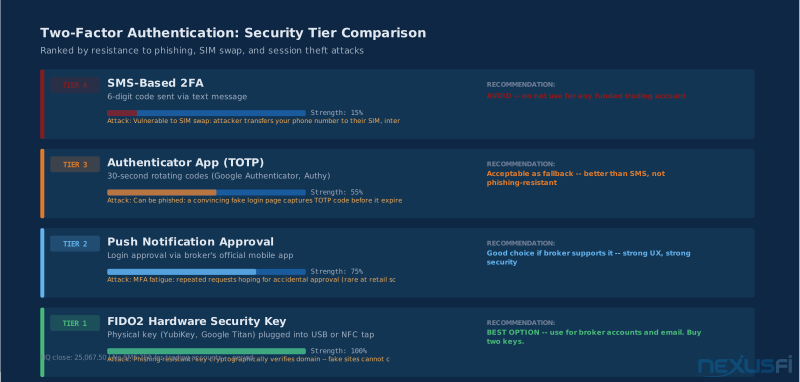
Tier 1 — Hardware security keys (FIDO2/WebAuthn): YubiKey, Google Titan, and similar devices. Plug into USB or tap against NFC. Cryptographically verify the site domain — a perfect phishing clone cannot capture the authentication because the key checks the actual domain. Negligible latency impact. Most expensive option at $25-$50 per key. Buy two — one for daily use, one as a backup. The only MFA method that blocks AiTM phishing attacks.
Tier 2 — Push notification approval via broker's mobile app: Some brokers support this natively. You log in on desktop, push notification appears on your phone, you approve it. Strong security, good UX. Vulnerable to MFA fatigue attacks (repeated approval requests hoping you accidentally approve one) — but for retail accounts this is a theoretical rather than practical concern.
Tier 3 — Authenticator app TOTP: Google Authenticator, Authy, 1Password. 30-second rotating codes. Stronger than SMS, weaker than hardware keys. TOTP is phishable — a proxied login page can relay your code to the real site before it expires. The authenticator app itself must be protected — if someone compromises your phone, they have your TOTP codes.
Tier 4 — SMS 2FA: Do not use this. A SIM swap compromises it in minutes. If your broker only offers SMS 2FA, call them and request hardware key or authenticator app options.
SMS 2FA is not real two-factor authentication for financial accounts. A SIM swap attack requires no hacking skills — just a phone call to your carrier's support line. Once an attacker controls your phone number, they intercept every SMS code you receive. If your broker only offers SMS 2FA, your account is at risk regardless of how strong your password is. Demand better, or switch brokers.
Your email account gets a hardware key before anything else. Email is the root of trust — it's the recovery pathway for every other account. If email is compromised, broker account password resets become trivial. Every broker account and the email account powering your recovery pathway need the strongest MFA you can get.
Store backup recovery codes offline — printed or in a hardware vault. Losing your hardware key during a margin call with no recovery codes is its own category of disaster.
The Dedicated Trading Environment #
This is the single most impactful structural change a retail trader can make.
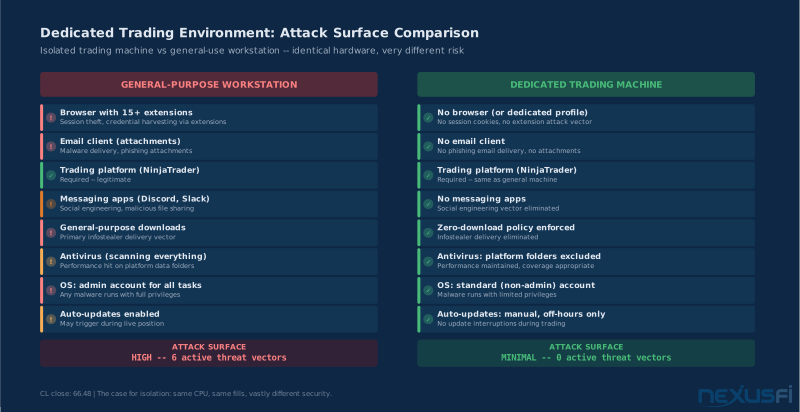
A dedicated trading machine doesn't need antivirus. If you download nothing, run no email client, and don't browse the web on it, there is nothing for malware to attach to. The attack surface is zero. Windows Defender plus platform directory exclusions is all you need. Every additional security product you install is another piece of software that can conflict with your platform and another maintenance burden.
@phantomtrader runs the same setup: "One computer is exclusively for trading — no internet browsing or general email. I setup an email account just for that computer as well."
The logic is sound. The trading machine's attack surface is precisely the software installed on it. If that's NinjaTrader, IQFeed, and nothing else, there's basically nothing for an attacker to target. No browser history to hijack sessions from. No downloads to deliver malware through. No email attachments to click.
"Dedicated" needs to be specific. Three implementation options, in order of security strength:
Option 1 — Separate physical machine: NinjaTrader runs here. Nothing else. No browser for general use, no email client, no additional software. The machine only touches your broker's execution servers and data feed. This is what @Blash and @phantomtrader describe. Maximum isolation, best performance, highest hardware cost.
Option 2 — Separate Windows user account: Create a "Trading" user account on your existing machine with standard (non-admin) privileges. Log into that account exclusively for trading sessions. General browsing and email stay in a different account. The separation prevents session cookies and malware from one context bleeding into the other. Works well if a second machine is impractical.
Option 3 — Virtual machine (VM): Run a dedicated Windows VM for trading only. VMware or VirtualBox. The VM is isolated at the hypervisor level — malware in the VM can't directly access the host. Not as clean as physical separation (host compromise can still affect the VM), but better than no isolation.
The Browser Isolation Rule #
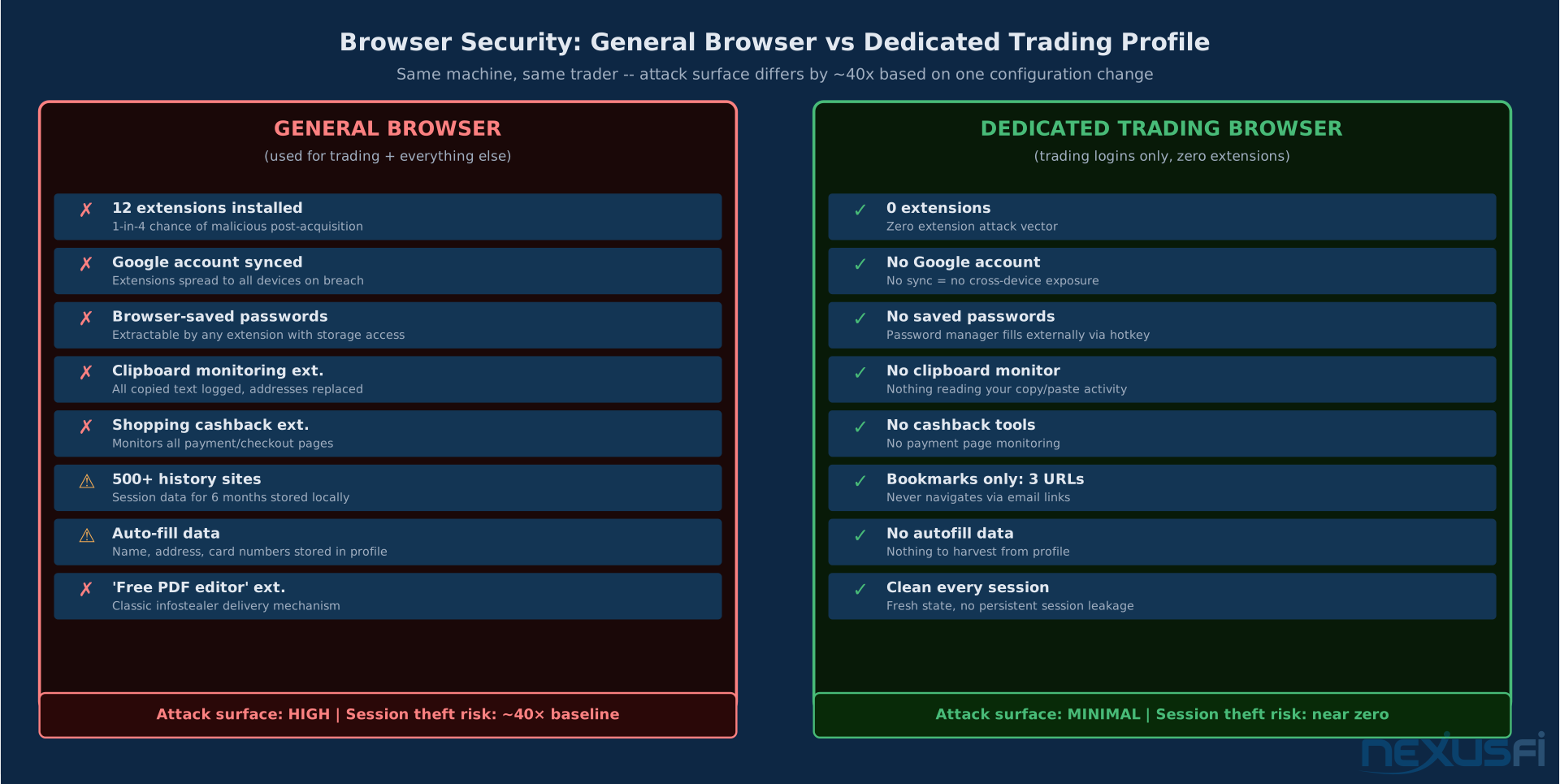
For web-based trading tools and broker portals, use a dedicated browser — or at minimum, a dedicated browser profile — with zero extensions installed. A separate Chrome profile for trading contains no extensions, no logged-in Google account, no sync. The only bookmarks are your broker's login page and essential trading URLs.
Your general browsing browser can have every extension you want. The trading browser has none. Browser extensions are a common infostealer delivery mechanism — legitimate extensions get acquired by malicious actors, update silently, and start harvesting credentials.
The dedicated browser also enforces a critical navigation habit: you never follow email links into your broker portal. You open the browser, use the bookmark. Full stop.
@c12345 formalized this separation into hardware: "I have the VM on the TOP display, and have ONLY my order entry software platforms running on this... I NEVER open up a web page from this computer." When the order entry machine never touches the internet for anything other than the broker connection, the attack surface drops to near zero.
Antivirus and Performance #
The performance conflict between antivirus scanning and trading platform stability is real.
The right configuration: if you're running a genuinely dedicated machine that downloads nothing, the antivirus risk profile is very different from a general-use computer. At minimum, exclude your platform's data directories from antivirus scanning — NinjaTrader's data folder gets excluded, as @bobc635 noted, because Norton would otherwise cause crashes.
On a fully dedicated machine with zero-download policy: Windows Defender active but with platform directories excluded, Windows Firewall on, no other security software needed. The platform-specific exclusions prevent performance interference without exposing the machine.
@Peter2150 runs a more sophisticated defense-in-depth approach for a multi-purpose setup: Sandboxie for running all internet-facing applications in a sandbox, Online Armor firewall with HIPS (Host Intrusion Prevention System), and a second HIPS layer. "I have tested this setup, against some nasty malware, and it protects the system very well." For traders who can't separate concerns into dedicated machines, this layered approach provides real isolation.
Password Management #
One unique password per service. Non-negotiable.
The attack is credential stuffing — automated testing of leaked credentials across services. If your trading broker uses the same password as a forum you joined in 2018, and that forum was breached, your broker account is exposed. The attacker doesn't need to target you. They just need a list of breached credentials and automation.
A password manager (Bitwarden, 1Password, KeePass) generates and stores unique 20+ character random passwords for every service. You remember one master password. Everything else gets auto-filled. The master password gets protected with a hardware security key.
Three things that don't count as passwords: variations on a base password ("Trading2024!" and "Trading2025!"), short passwords under 12 characters, and anything based on personally identifiable information.
Your broker's login password doesn't need to be memorable. It needs to be 24 random characters that you've never typed by hand because you use a password manager that fills it for you.
Cloud-synced vs. local: cloud-synced managers (Bitwarden, 1Password) are convenient and generally secure with proper MFA on the manager account. Local managers (KeePass) are more complex to set up and sync but eliminate the cloud as an attack surface. For most retail traders, a reputable cloud-synced manager with FIDO2 key protection is the right call. The master vault needs phishing-resistant MFA — a password manager secured with SMS 2FA trades one vulnerability for another.
Breach Monitoring #
Enable haveibeenpwned.com monitoring on your primary email addresses. Many password managers do this automatically. When one of your accounts appears in a breach, you find out immediately rather than when someone empties your account.
The breach monitor catches old compromises too. If the service you used in 2019 was breached in 2022, you find out. If you've reused passwords anywhere, that's the signal to change all of them.
Broker Account Lockdown #
The features worth enabling, in priority order:
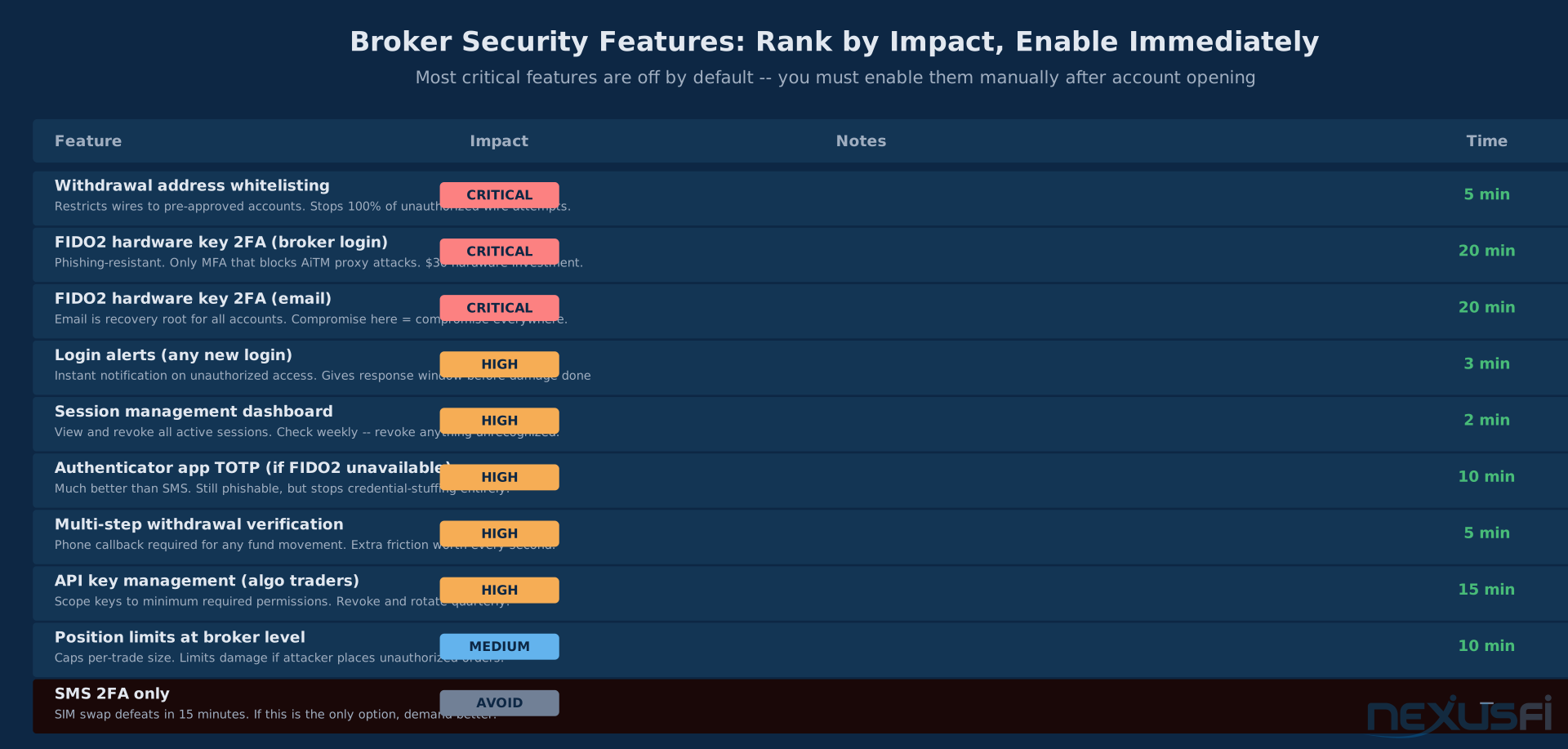
Withdrawal address whitelisting: Restricts fund transfers to pre-approved bank accounts. Adding a new bank account triggers additional verification — typically a wait period, a callback, and email confirmation. This is the single most effective protection against unauthorized withdrawals. If an attacker compromises your account, they can't wire funds to their account because it's not on the whitelist.
Login alerts: Instant notifications when anyone logs into your account. New device, new IP address, any login. Set these to go to both email and mobile push. An alert at 3 AM for a login from an unexpected location gives you time to force-logout all sessions before damage is done.
Session management dashboard: Some brokers show active sessions with device type, IP address, and location. Review this weekly. Revoke any session you don't recognize.
Multi-step withdrawal verification: Beyond whitelisting, some brokers require a phone call or secure message confirmation for any withdrawal. Adds friction — worth it.
The broker security review question to ask directly: "What additional authentication steps are required to change my bank account on file?" If the answer is "just log in and change it," that's a problem. Push for withdrawal whitelisting or a manual verification callback requirement.
For active traders, ask about trading-side controls too: maximum order size limits, price band restrictions, reduce-only mode, and kill switch capability. An attacker who can't withdraw funds immediately may still try to cause losses through unauthorized orders. Position limits at the broker level provide a floor.
@Blash reinforced: "I use Interactive Brokers basically for this exact reason — the account security IB offers and not many others. Talking two factor authentication."
Phishing Defense #
Phishing is the most common attack vector precisely because it works. The attacker builds a login page that looks exactly like your broker's portal, sends emails that look like they're from your broker, and captures your credentials when you log in. Modern AiTM phishing kits go further — they proxy your entire login in real-time, capturing your MFA code and session token simultaneously.
The complete defense has three components:
Never work through via email links. Every time you need to log into your broker, you open your browser and use the bookmark you set up when you first created the account. Not the link in the email. Not the search result. The bookmark. This isn't about being able to tell phishing emails from real ones — it's about making that judgment irrelevant. The attacker's link is never used, period.
Verify domains precisely. ampglobal.com vs amp-global.com vs ampglobal-support.com. Attackers register lookalike domains because most people don't read the full URL. Use a password manager that auto-fills credentials — if it doesn't auto-fill, the domain doesn't match what you registered with. That's your warning. FIDO2 hardware keys take this further: the key cryptographically verifies the exact domain and refuses to authenticate on anything that doesn't match.
Treat all urgent requests as suspicious. The phishing playbook relies on urgency: "Your account will be disabled in 24 hours." "Verify your identity immediately." "Unauthorized access detected." The urgency is designed to bypass rational thinking. Any urgent request gets verified through your broker's in-app secure message center, not through the email itself.
The prop firm attack wave of 2025 demonstrated why this matters in practice. @lightsun47's advice was exactly right: don't click the links in the emails even if they look legitimate. Log in directly and check from there.
VPS and Remote Access Security #
Traders running NinjaTrader or other platforms on a VPS have a different attack surface than local setups.
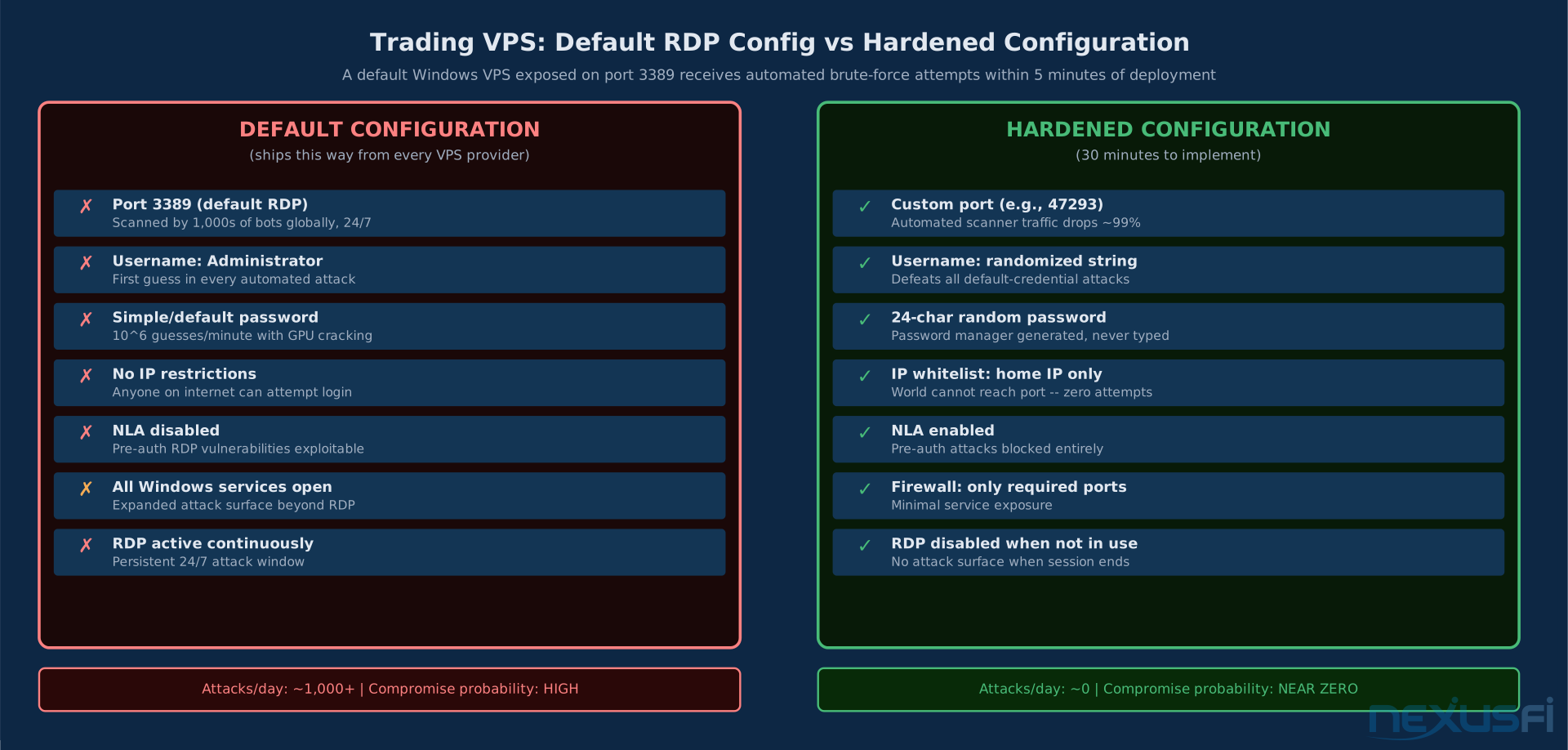
The VPS itself is accessible via Remote Desktop Protocol (RDP). Default RDP configuration on port 3389 with a simple password is actively attacked by automated scanners 24/7. A scan of internet-connected Windows machines finds open RDP ports within minutes of exposure.
Minimum hardening for a trading VPS:
Change the RDP port from 3389 to a non-standard port. This doesn't make the server secure, but it eliminates the automated scanner traffic targeting the default port. Simple noise reduction.
Enable Network Level Authentication (NLA). NLA requires authentication before establishing a full RDP session, blocking unauthenticated attacks against older RDP vulnerabilities.
Restrict access by IP whitelist. Configure your VPS firewall to only accept RDP connections from your home IP address. If you use a dynamic IP, use a VPN with a static exit node as your connection point, then whitelist the VPN's IP. This turns "anyone on the internet can attempt to log in" into "only specific IP addresses can even attempt a connection."
Disable RDP when not in use. For most retail traders, the VPS runs the platform 24/7 but human RDP access happens only for setup and troubleshooting. Configure a firewall rule that allows RDP from your IP only, and disable the rule when not actively using remote access.
@josh's documentation captures the operational mindset: "On a trading machine I see no reason to have anything open to the public. Turn the OS firewall on. Don't download stuff. If you do, verify checksums."
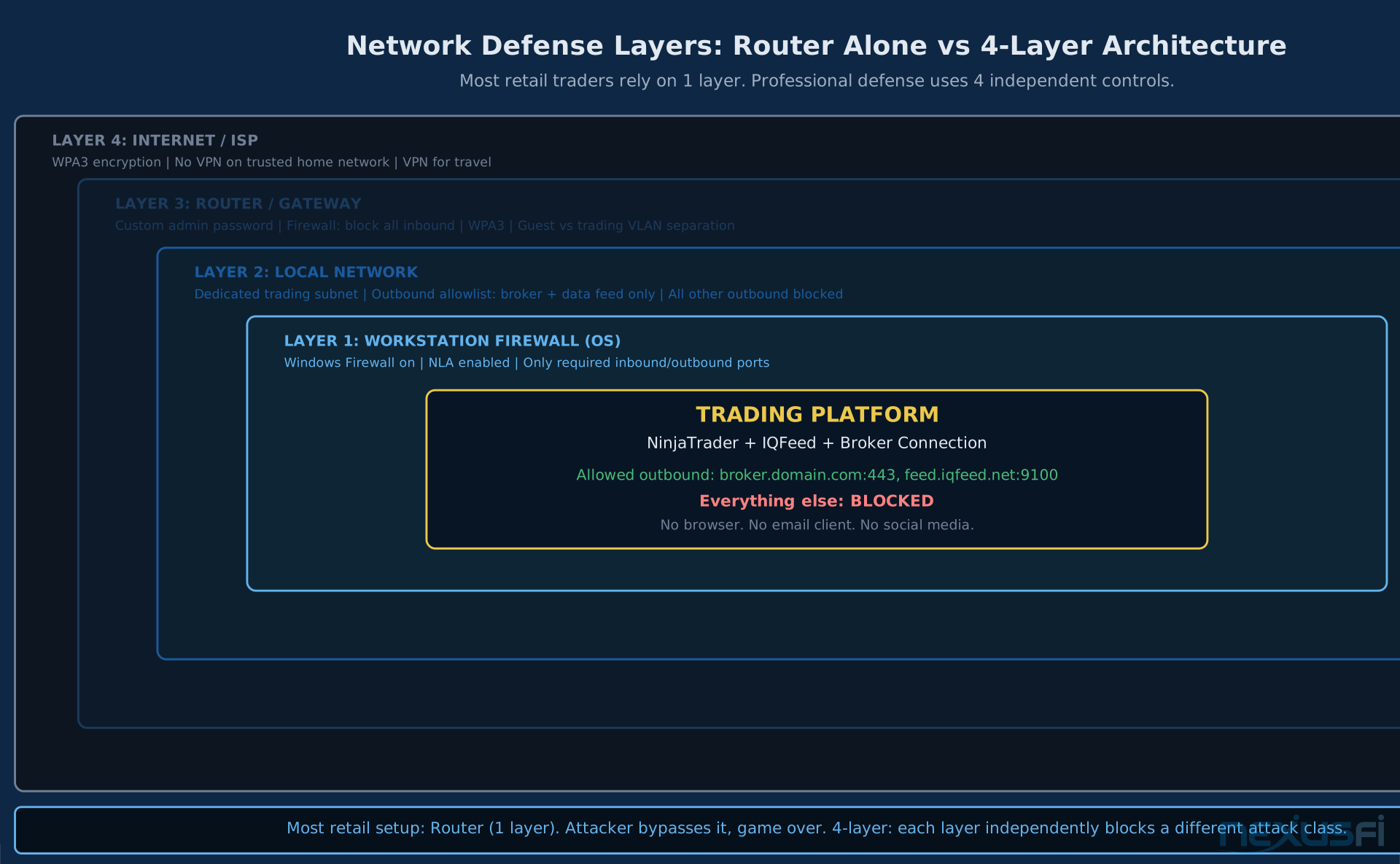
The principle extends to all services: close every port you're not actively using. The default Windows installation opens several. On a dedicated trading machine, the only required outbound connections are to your broker's execution servers and data feed.
Network Security #
Your home router is the first line of defense, and most routers ship with default admin credentials that every attacker knows.
Change default router admin credentials. Not the WiFi password — the admin interface password. Most home routers are shipped with "admin/admin" or "admin/password" as defaults. Change it to something generated by your password manager.
Use WPA3 encryption for your WiFi network if your router supports it. WPA2 is acceptable. WPA or open networks are unacceptable for a trading machine.
Avoid public WiFi for trading. Hotel, coffee shop, airport networks are actively monitored by attackers precisely because financial credentials are captured there. If you must trade from an untrusted network, use a reputable paid VPN with a fixed endpoint. Free VPNs are not acceptable — they monetize your traffic.
The VPN-for-trading nuance: for latency-critical execution, a VPN adds measurable overhead. Milliseconds matter for scalpers. For most retail traders placing market orders on the ES or NQ where the fill quality is what it is, a VPN on an untrusted network is worth the latency cost. On your home connection with proper router security, the VPN adds overhead without adding security.
Configure the VPN to a fixed geographic endpoint if possible, and notify your broker's security team of the IP range you'll use. IP-hopping VPN connections can trigger fraud alerts and force manual account verification at exactly the wrong moment.
Incident Response #
Every trader needs a plan written down before anything happens. When an account is being drained, you have seconds to minutes to respond. Improvising under that pressure doesn't work.
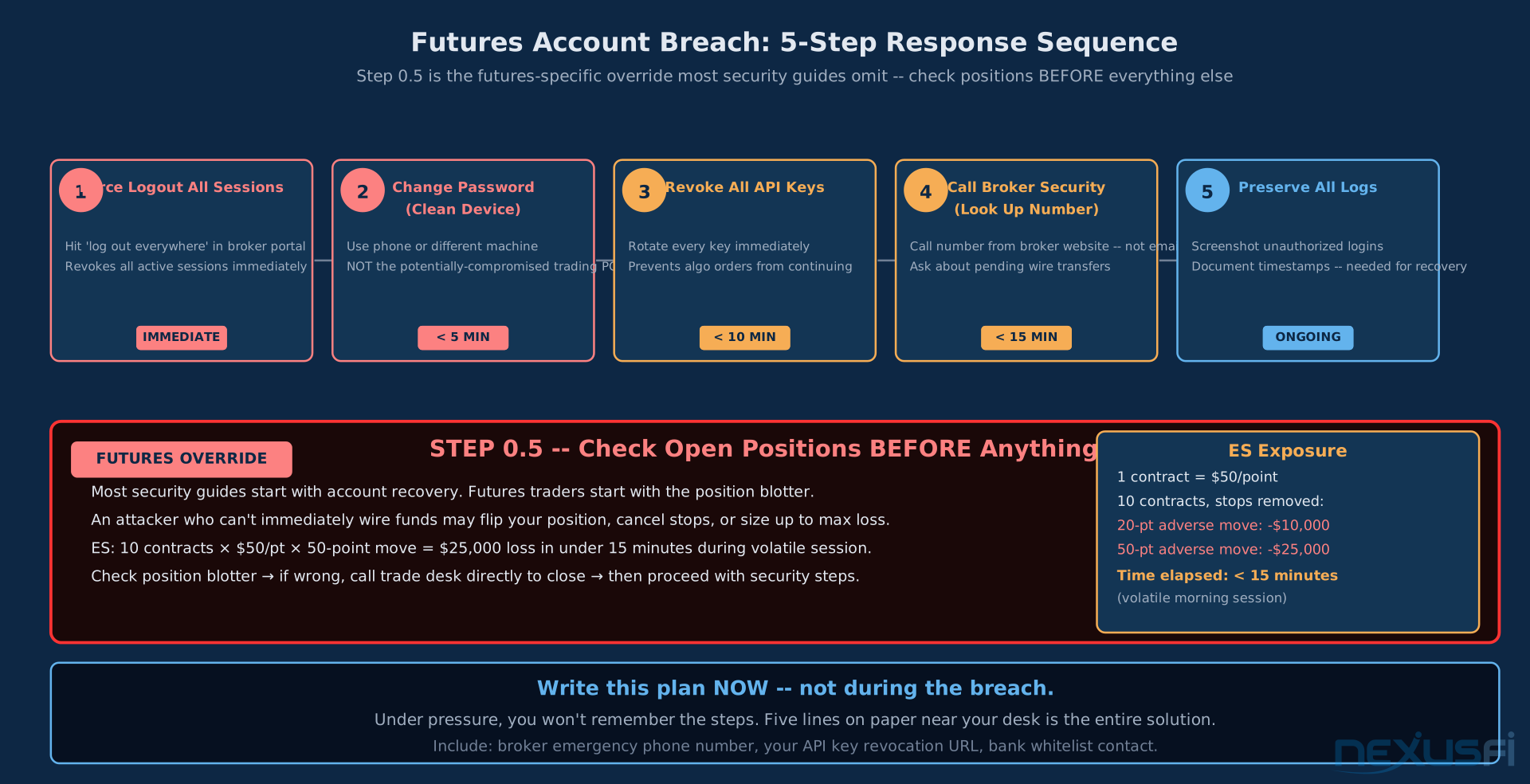
The five-step response plan:
1. Force logout all active sessions. Most broker portals have this capability. Hit it immediately. Even if you can't stop the active session in progress, you can prevent the attacker from maintaining persistent access.
2. Change your password from a known-clean device. If your trading computer is compromised, don't change your password on that machine. Use your phone or a different computer.
3. Revoke all API keys. If you use algorithmic trading with API access, rotate all keys immediately. Compromised API keys allow order execution without account credentials.
4. Contact broker security directly. Use a phone number you looked up independently, not one from an email. Inform them of the suspected breach and ask about pending withdrawals. Many brokers can claw back wire transfers that haven't settled yet. Preserve all logs — timestamps, unauthorized login activity, unexpected orders.
5. Secure open positions before securing systems. This is the futures-specific step generic guides miss. Before doing anything else, confirm your open positions are what you expect. An attacker may flip your position, cancel your stops, or place ruinous orders. Check your position blotter first. If positions are wrong, call your broker's trade desk directly to close them. Then address the account security breach.
Write this plan down. Store it somewhere accessible without logging into any trading account — a note on your phone, a piece of paper near your desk. In the moment, you won't be thinking clearly enough to figure out the steps.
Check open positions before resetting your password. Generic cybersecurity guides get this backwards. For futures traders, a compromised account that still has open positions is a live loss machine. An attacker with ES or NQ exposure against you can generate thousands in losses per minute by canceling your stops. Position triage comes first. Account security comes second.
What Brokers Are Required to Do #
The CFTC's cybersecurity requirements for Futures Commission Merchants establish minimum standards for data protection. AMP's 2018 consent order documented exactly what failure looks like: three consecutive quarterly network risk assessments that missed an open access route, leaving 97,000 customer records exposed for nearly ten months.
The regulatory framework requires FCMs to maintain information systems security programs (ISSPs) covering risk assessment, access controls, and incident response. In practice, the quality of implementation varies considerably. The CFTC enforcement actions — AMP, and others — represent the floor, not the ceiling.
Questions worth asking your broker directly: Do you offer hardware security key support for 2FA? Can I whitelist specific bank accounts for withdrawals? What is your process for verifying account ownership before resetting credentials? Do you provide login alerts and session management? How do you notify customers in the event of a data breach? Is there a maximum order size or position limit I can set?
Brokers that answer these questions clearly and affirmatively have better security postures than those that deflect. @Big Mike noted in 2017 that Interactive Brokers was basically the only retail broker offering real 2FA at the time — a gap that has since narrowed but not disappeared.
The Practical Priority List #
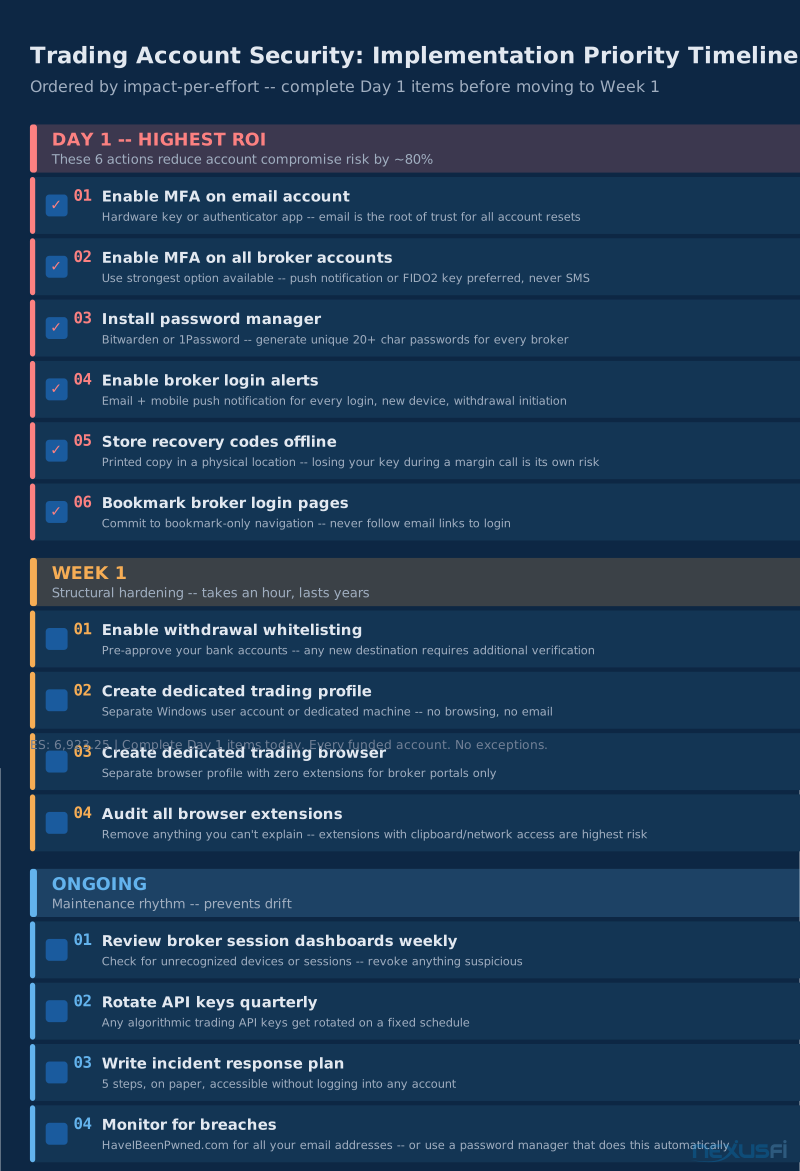
Not everything on this list is equal. Here's what to do first, in order:
Day 1 — Highest ROI
- Enable MFA on your email account using a hardware key or authenticator app. Email is the root of trust.
- Enable MFA on every broker account. Use the strongest option available. If only SMS is available, call and demand better.
- Install a password manager. Generate a new unique password for every broker account.
- Enable broker login alerts on all accounts.
- Store recovery codes offline — printed and filed somewhere physical.
- Bookmark every broker login page. Commit to never following email links to log in.
Week 1
- Enable withdrawal whitelisting on every funded account.
- Create a dedicated Windows user profile for trading, or set up a dedicated machine.
- Create a dedicated browser profile with zero extensions for trading-related logins.
- Audit your browser extensions across all browsers. Remove anything you can't explain.
Ongoing
- Review broker session dashboards weekly.
- Rotate API keys quarterly.
- Write your incident response plan. Five steps. On paper.
- Check haveibeenpwned.com for your email addresses.
The math on this is straightforward. A $50,000 trading account secured with proper 2FA, unique passwords, and withdrawal whitelisting is not worth targeting compared to the thousands of retail traders running SMS-based 2FA with reused passwords. You don't need to be impenetrable — you need to be harder than the next target.
The Day 1 actions — hardware MFA on email, unique passwords for every broker, and withdrawal whitelisting — reduce your account compromise risk by roughly 80%. Everything else on the list is incremental hardening. If you do nothing else from this article, do those three things today. The time investment is under two hours. The protection lasts indefinitely.
Knowledge Map
Go Deeper
Build on this knowledgeReferences This Article
Articles that build on this topicCitations
- — AMP Trading data breach (70 gigs, ~100k files - customer data) (2017) 👍 3“It includes credit reports, passport scans, internal company emails, customer chat logs, and basically everything an identity thief would need in order to mount a serious campaign.”
- — AMP Futures / AMP Global Review (2018) 👍 3“Entities entrusted with sensitive information must work diligently to protect that information.”
- — VPS Recommendations (2012) 👍 2“Those who hack for profit are going to go after targets that involve the least amount of work with the most profitable gain.”
- — Using NT8: Lessons learned (2015) 👍 14“Be sure to exclude the MyDocuments NinjaTrader 8 folder from being scanned by your anti virus program.”
- — FXCM was hacked (2015) 👍 3“FXCM said it received an email from a self-proclaimed hacker who claimed to have access to customer information.”
- — Urgent: Prop firm was hit with a cyberattack (2025) 👍 5“Please DO NOT click on the links you receive in those emails as it might also be a phishing attack.”
- — Derivatives market still hit by fallout from Ion Markets cyber attack (2023) 👍 6“The whole supply chain and third-party risk element is quite difficult to be dealt with.”
- — AMP Trading data breach (2017) 👍 5“AMP is sending you this notice to keep you updated about your data on our servers.”
- — Account Security (2017) 👍 3“I like interactive brokers for their two factor authentication. For some incredible reason, I don't know of any other broker in the retail space that offers it.”
- — Should I be concerned about my trading account? (2020) 👍 5“I use Interactive Brokers basically for this exact reason -- the account security IB offers and not many others.”
- — Account Security (2017) 👍 1“You should not be browsing or on email on the same machine you trade from.”
- — New Computer Build (2020) 👍 3“One computer is exclusively for trading -- no internet browsing or general email.”
- — Using different PC for order/charting (2010) 👍 4“I have the VM on the TOP display, and have ONLY my order entry software platforms running on this. I NEVER open up a web page from this computer.”
- — Safe to trade w/o firewall and/or anti-virus (2011) 👍 2“Turn off ALL Auto Updates! You really don't want things trying to update while your trading!”
- — Safe to trade w/o firewall and/or anti-virus (2011) 👍 1“I did find that Ninja does not play with Norton running and I had to exclude the My Documents Ninja files from the scans to avoid the crashes.”
- — How protected is your Computer??? (2009) 👍 12“I run Sandboxie which allows me to specify what can run in the sandbox. I have tested this setup against some nasty malware and it protects the system very well.”
- — WHICH CPU is BEST for NINJA TRADER 7 and 8? (2020) 👍 2“On a trading machine I see no reason to have anything open to the public. Turn the OS firewall on. Don't download stuff.”
- Microsoft Security Blog — Inside Tycoon2FA: How a leading AiTM phishing kit operated at scale (2026)
- Interactive Brokers — Recommended Cyber Security Practices (2026)