



Order Types and Advanced Order Management for Futures Trading: What Every Order Does, How It Fails, and When to Use Each
Overview #
Every futures trade starts and ends with an order. The order type you choose determines whether you get filled, at what price, and how much slippage you eat. Most traders learn the basics — market orders, limit orders, stops — and never think about it again. That's a mistake. The mechanical differences between order types directly affect your P&L, especially during fast markets, news events, and low-liquidity sessions.
This article breaks down every order type a futures trader needs to understand, from the foundational three to advanced compound orders like OCO brackets and trailing stops. More importantly, it covers the execution mechanics that determine whether your order actually does what you think it does — because the gap between "I placed a stop" and "my stop protected me" is larger than most traders realize.
Key Concepts #
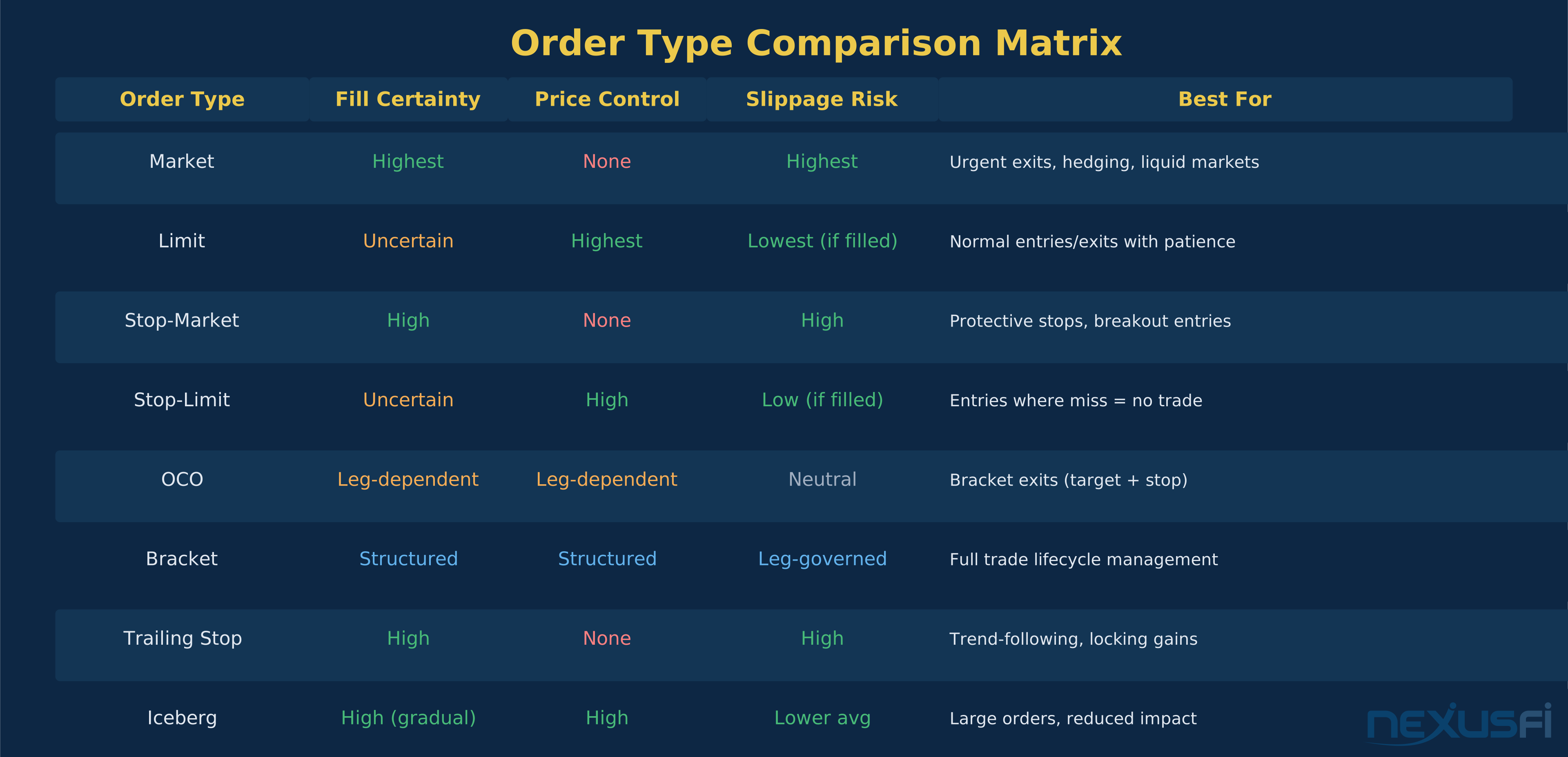
Market order — an instruction to buy or sell immediately at the best available price. No price guarantee. You're a taker, consuming liquidity from the order book.
Limit order — an instruction to buy or sell at a specified price or better. Rests in the order book until filled, canceled, or expired. You're a maker, providing liquidity.
Stop order (stop-market) — a dormant order that becomes a market order when a trigger price is reached. Used primarily for risk management.
Stop-limit order — a dormant order that becomes a limit order (not a market order) when the trigger price is hit. Adds price control but introduces non-fill risk.
OCO (One-Cancels-Other) — two linked orders where execution of one automatically cancels the other. The foundation of bracket exit strategies.
Bracket order — an entry order with pre-attached profit target and stop loss, linked via OCO logic. Automates the full trade lifecycle.
Trailing stop — a stop order that dynamically adjusts its trigger price as the market moves in your favor, locking in gains while maintaining downside protection.
Iceberg order — an order that displays only a fraction of total size, with hidden quantity that replenishes as the visible portion fills. Reduces market impact for large orders.
Native order — an order type supported directly by the exchange matching engine. Your order lives at the exchange.
Synthetic order — an order type simulated by your platform, broker, or order router. The logic runs on a server between you and the exchange, not at the exchange itself.
Price-time priority — the matching principle used by CME, ICE, and most futures exchanges. Best price gets matched first. At the same price, earlier orders get priority.
Slippage — the difference between your expected fill price and your actual fill price. Can be positive (better than expected) or negative (worse).
How Order Types Actually Work #
Market Orders: Speed Over Price #
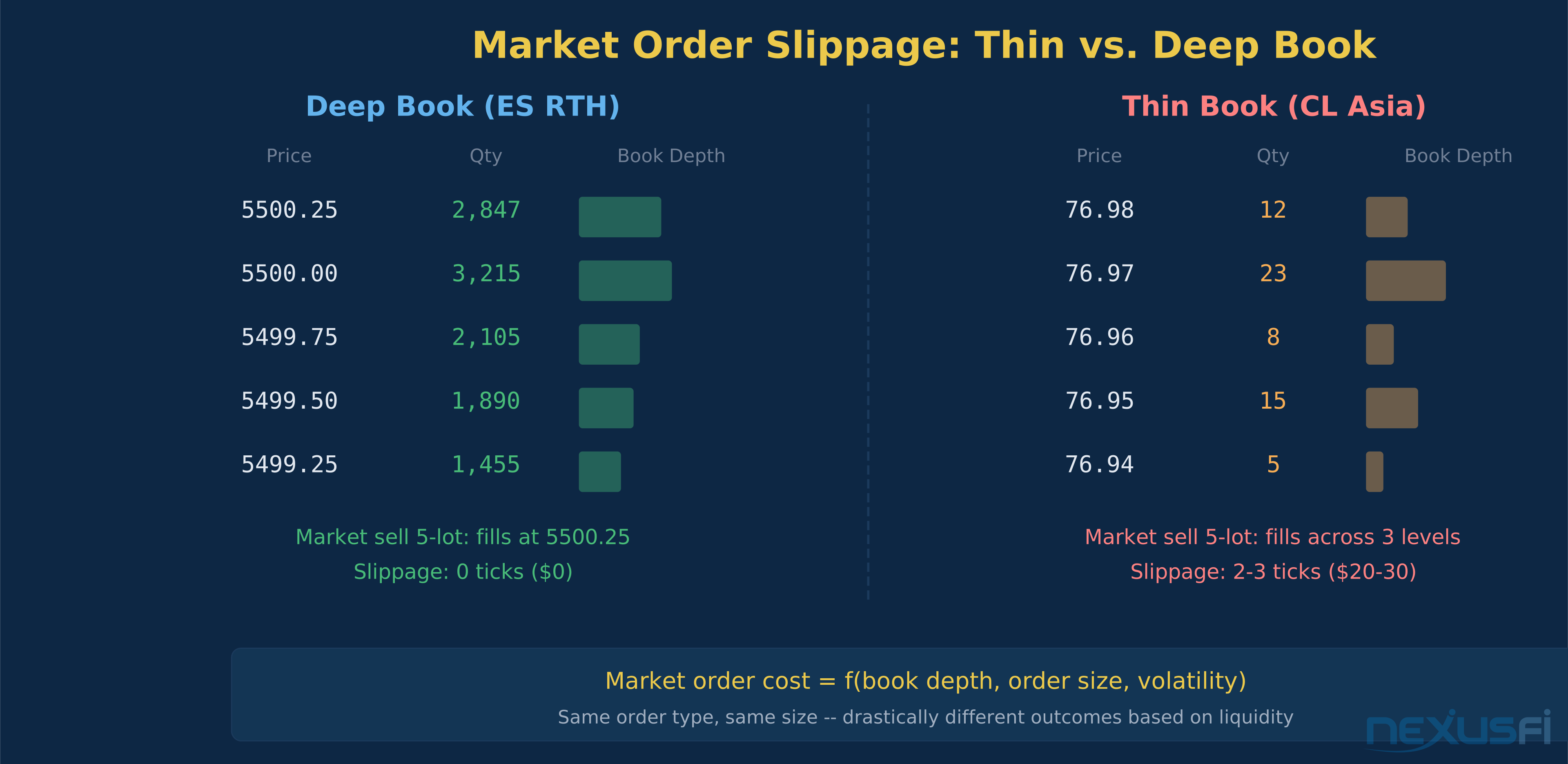
A market order says "fill me now, I don't care about the price." You're crossing the spread and consuming whatever liquidity sits on the other side of the book. In ES during RTH with 2,000+ contracts at the inside, a 1-lot market order typically fills at the bid or ask with zero slippage. In CL during the Asian session with 50 contracts showing, that same market order might sweep two or three price levels.
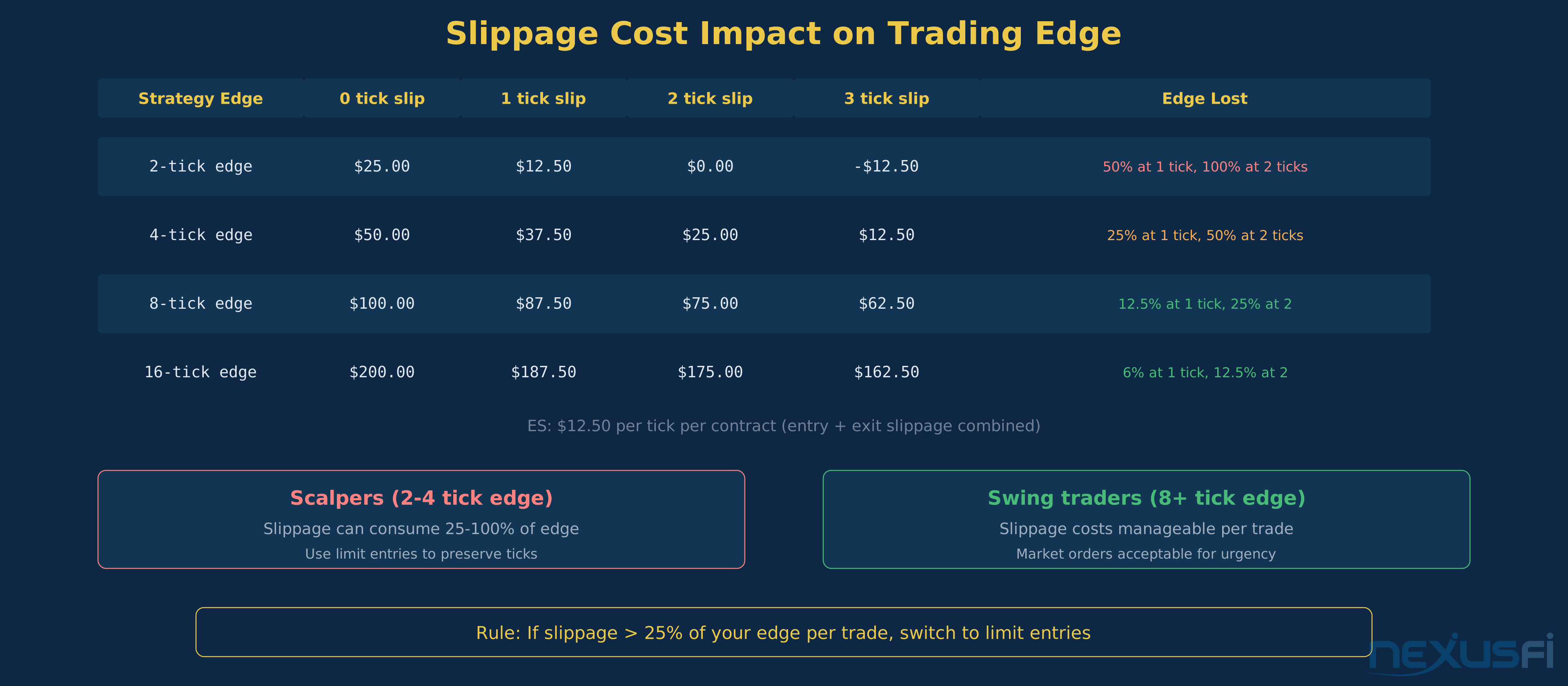
The math matters here. ES trades in 0.25-point ticks worth $12.50 each. One tick of slippage on a 5-lot costs $62.50. If you're scalping for 4 ticks of profit, that's a 25% hit to your gross P&L on the entry alone. Now add slippage on the exit. Market orders in liquid products during active sessions are fine. Market orders in thin conditions or during news events can destroy an edge.
As @Fat Tails explained on NexusFi, the mechanics of order conversion matter — when a stop is triggered, it becomes a market order, and "you are filled at the prevailing market price. Usually this will be at [your stop price], very rarely above, and occasionally below" ([NexusFi] [1]). That "occasionally below" is where accounts get hurt.
When to use market orders: You need to exit a position immediately. You're hedging and speed matters more than price. Liquidity is deep and the spread is tight. You're entering a breakout where missing the fill costs more than the slippage.
When to avoid market orders: Thin markets, overnight sessions, around economic releases, during exchange auctions, or anytime the book shows fewer than 100 contracts at the inside on the product you're trading.
Limit Orders: Price Control, Fill Uncertainty #
Limit orders flip the tradeoff. You specify your price and wait. A buy limit at 5,500.00 in ES means "fill me at 5,500.00 or lower." Your order joins the queue at that price level and waits for a seller to come to you. You're providing liquidity, not consuming it.
The fill probability depends on where you place the limit relative to the current market. A buy limit 1 tick below the current ask has high fill probability but saves you minimal slippage. A buy limit 10 ticks below the current price might never fill, but if it does, you got a great entry.
The hidden cost of limit orders is opportunity cost. @Jigsaw Trading noted that "if you can see the exact point that a move down is cut off, then you simply cannot use a limit order because you will not get filled" ([NexusFi] [2]). This is the information risk vs. price risk tradeoff that FuturesTrader71 popularized. Limit orders give you better price but worse information — by the time your limit fills, the market might be about to reverse through you.
The queue mechanics are straightforward. At CME, limit orders follow price-time priority. If 500 contracts are resting at 5,500.00 and you place a buy limit at the same price, you're 501st in line. Every one of those 500 contracts must fill before yours does — unless someone lifts the entire level with a large market order. Understanding queue position is essential for scalpers who rely on limit fills.
When to use limit orders: Normal entries and exits where you can tolerate some waiting. Adding to positions at predetermined levels. Scaling out at profit targets. Any situation where you have time and want price control.
Stop-Market Orders: The Standard Protective Stop #
Stop orders sit dormant until their trigger price is reached, then fire as a market order. This is the most common risk management tool in futures trading. Place a stop 10 ticks below your entry, and if price drops to that level, you're out.
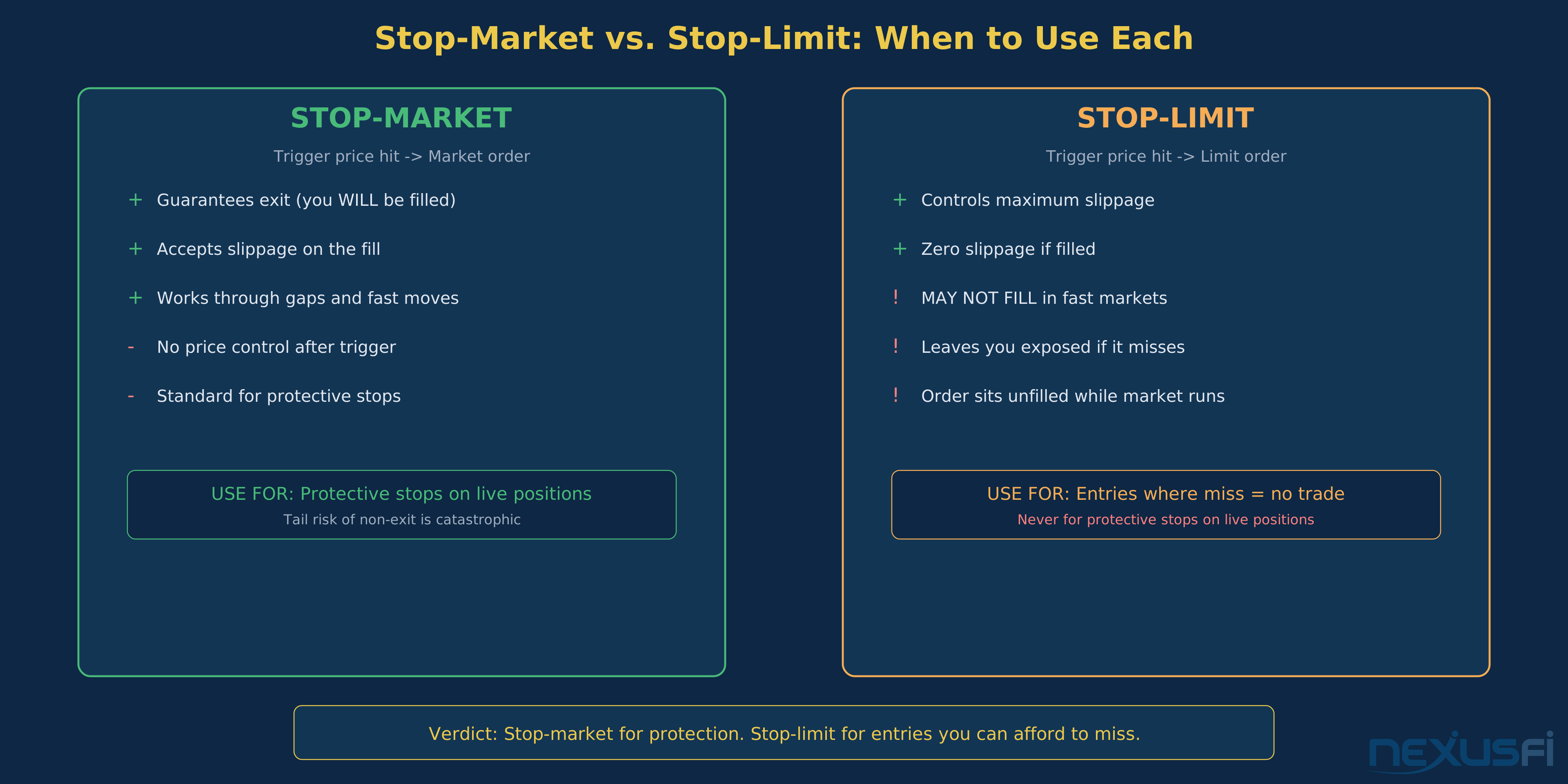
The critical distinction: a stop order is not a limit order. Once triggered, it becomes a market order with all the slippage implications of any market order. In normal conditions on liquid products, the slippage is typically zero or one tick. During a fast move, a gap, or a news event, the slippage can be significant.
([NexusFi] [3]). That's real money evaporating because the stop converted to a market order in a fast-moving book.
The trigger question: What price reference does your platform use to trigger the stop? Last trade price? Bid/ask? Mark price? This matters. A stop triggered by the last trade activates on actual transactions. A stop triggered by the bid/ask can activate on quote changes without a trade occurring. Know your platform's trigger reference before you rely on stops for risk management.
Stop-Limit Orders: Price Control on Your Stops #
A stop-limit adds a second constraint. When the trigger price is hit, instead of becoming a market order, it becomes a limit order at a price you specify. This gives you price control on the exit but introduces a genuinely dangerous failure mode: the order might not fill at all.
([NexusFi] [4]). Note the qualifier: "very likely" — not "guaranteed."
In a gap or fast move, the market can blow right through your limit price. Your stop triggers, converts to a limit, and the limit just sits there unfilled while the market runs away from you. You're still in the position with no protection.
([NexusFi] [5]).
The offset parameter is key. Most platforms let you set a difference between the stop trigger and the limit price. A 2-tick offset on ES means if your stop triggers at 5,500.00, your limit order goes in at 5,499.50 (for a sell). This gives the order room to fill even if price is moving, but you're still capped at 2 ticks of slippage.
The verdict: For protective stops on directional positions, stop-market is almost always safer than stop-limit. The tail risk of non-execution on a stop-limit is asymmetric — you save a tick or two on average but occasionally eat a catastrophic loss when the stop doesn't fill during the exact move you needed protection from.
OCO Orders: Linked Exit Logic #
OCO (One-Cancels-Other) links two orders together. When one fills, the other is automatically canceled. This is the mechanical foundation of every "set your target and stop" strategy.
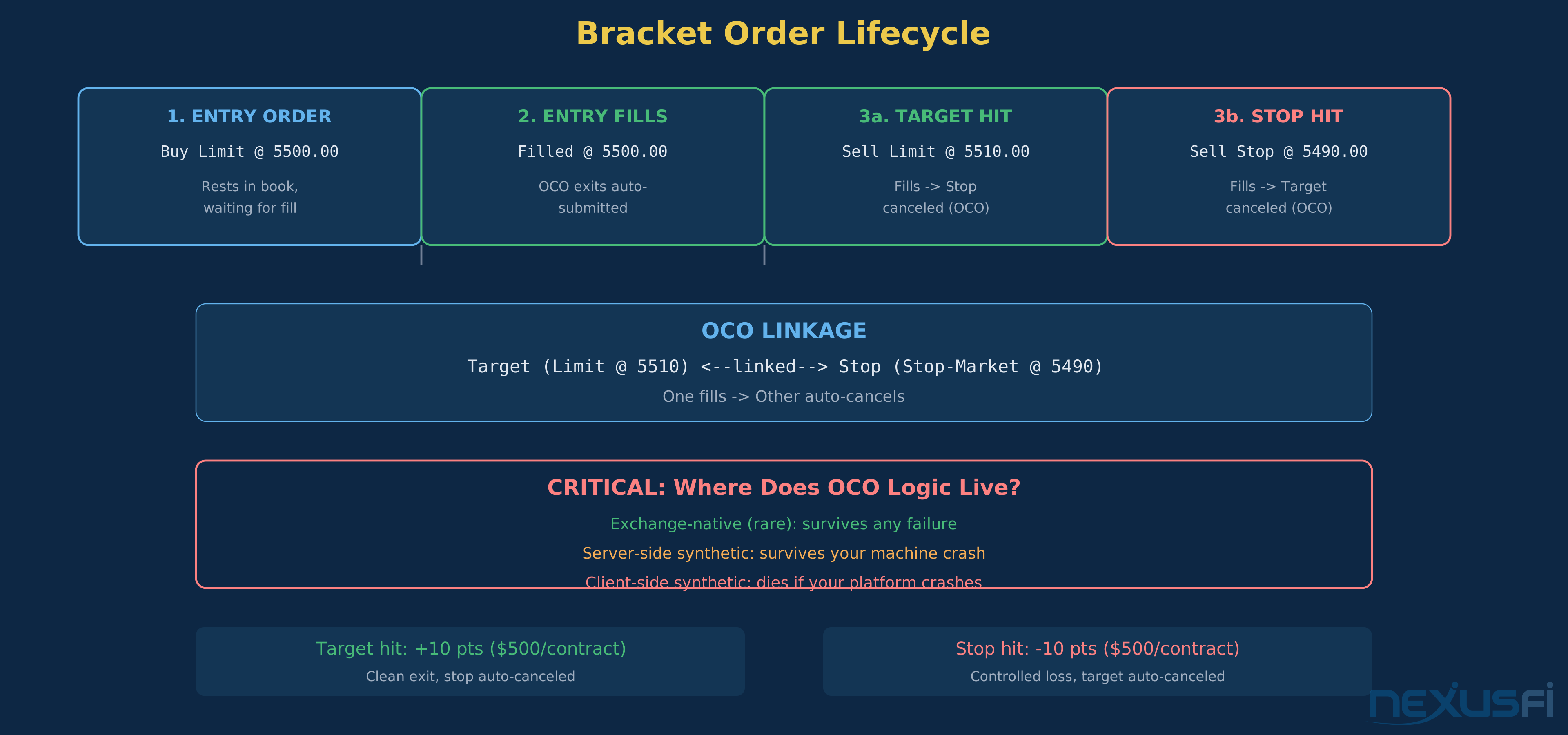
You're long ES at 5,500.00. You want a profit target at 5,510.00 and a stop at 5,490.00. Place both as an OCO pair. If the target fills at 5,510.00, the stop at 5,490.00 is automatically canceled. If the stop fills at 5,490.00, the target at 5,510.00 is automatically canceled. Without OCO, you'd have to manually cancel the other order — and in a fast market, that delay can result in a double fill (target fills, you don't cancel the stop fast enough, stop fills on the next move, and now you're accidentally short).
The critical implementation detail that most traders never think about: where does the OCO logic live?
— not at the exchange ([NexusFi] [6]). CME does not natively support OCO orders. ICE doesn't either. Eurex does. This means your OCO logic is running on your broker's server, your platform's server, or your local machine. If any of those go down while you have a live position with OCO exits, the cancellation logic might not fire.
@bobwest laid out the risk clearly: "The stop and target are passed on as regular ordinary orders to the exchange, and the linkage between them, the 'Order Cancels Order' part, has to be managed either on your computer or someone else's computer" ([NexusFi] [7]). If that computer crashes, both orders are live at the exchange with no cancellation logic. One fills, the other doesn't cancel, and you have an unintended position.
Bracket Orders: Automated Trade Lifecycle #
Bracket orders combine an entry with pre-attached OCO exits. Place a buy limit at 5,500.00 with a 10-point target and 10-point stop. When the entry fills, the target at 5,510.00 and stop at 5,490.00 are automatically submitted as an OCO pair.
This is the correct way to trade with defined risk. No "I'll add the stop after I get filled" — the exits exist before the entry fires. @matthew28 on NexusFi explains: brackets "allow order management settings to be entered automatically when you place the entry order. The entry and exit order are 'brackets' above and below your entry order" ([NexusFi] [8]).
The partial fill problem: If your entry order fills partially — say 3 of 5 contracts — do the exit orders automatically scale down to 3? Or do they remain at 5? This varies by platform. If exits stay at full size, you could end up with a 2-contract position in the wrong direction when the stop fills your "extra" 2 contracts. Verify this behavior on your platform before trading live with brackets.
Trailing Stops: Dynamic Risk Management #
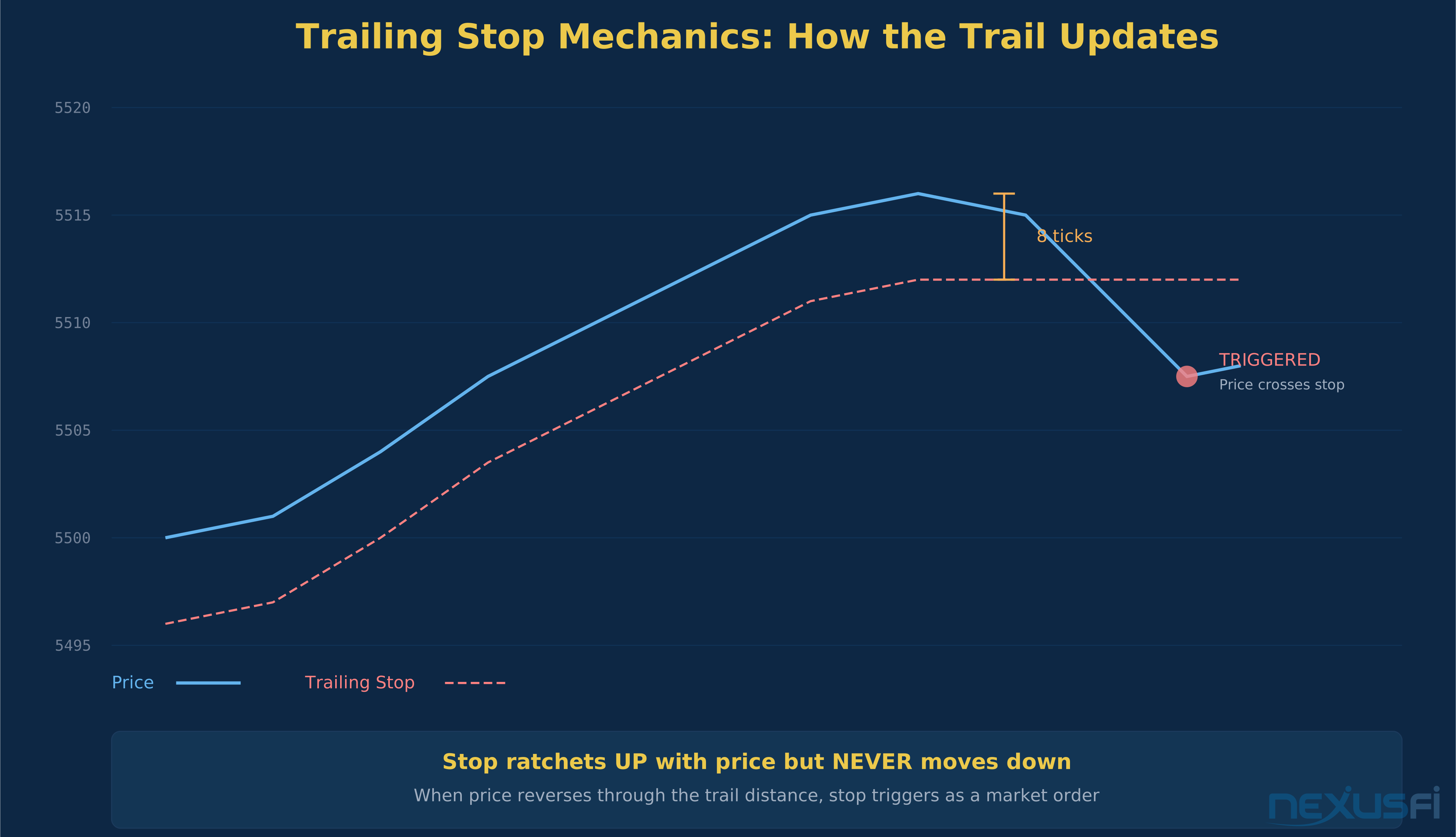
A trailing stop follows price in your favor. You set a trail distance — say 8 ticks on ES. As price moves up, the stop moves up with it, always 8 ticks behind the highest price reached. If price reverses by more than 8 ticks, the stop triggers and exits the position.
The concept is simple. The execution details are not.
Update frequency: Does the trail update on every tick? Every trade print? Or on a time interval? Platform-managed trailing stops might have a slight lag between the market reaching a new high and the stop price being updated. In a fast reversal, that lag means your effective trail distance is wider than you set.
Native vs. synthetic: Most exchanges do not support trailing stops natively. They're almost always synthetic — managed by your platform or broker's server. @GentleTrader on NexusFi noted the importance of "server side synthetic orders" for situations where "the exchange does not have native support for an order type" ([NexusFi] [9]). If your platform manages the trailing logic locally and your machine disconnects, the trail stops updating. Your stop sits at whatever level it was last set to.
ATR-based vs. fixed: Setting a trail based on a fixed number of ticks ignores volatility. 8 ticks is tight on CL during inventory reports and loose on ES during lunch hour. Better approach: set your trail distance as a function of ATR (Average True Range) for the instrument and session you're trading. A 1x ATR trail on the 5-minute timeframe adapts to actual volatility.
Iceberg Orders: Hiding Your Size #
Iceberg orders (also called reserve orders) display only a portion of your total quantity. You want to buy 100 contracts of ES but only show 5 at a time. As each 5-lot fills, the next 5 appears. The exchange manages this — it's a native order type on CME and ICE.
The advantage is reduced market impact. Showing 100 contracts at a price level signals intent and can cause other participants to move away. Showing 5 at a time looks like any other small order.
The limitation: sophisticated participants can detect icebergs by watching the book replenish at the same price level repeatedly. The hidden quantity reduces but doesn't eliminate market impact. Still, for any size above what's normal for the product you're trading, icebergs are standard practice.
Native vs. Synthetic: Where Your Order Actually Lives #
This is arguably the most important concept in order management, and most traders never think about it.
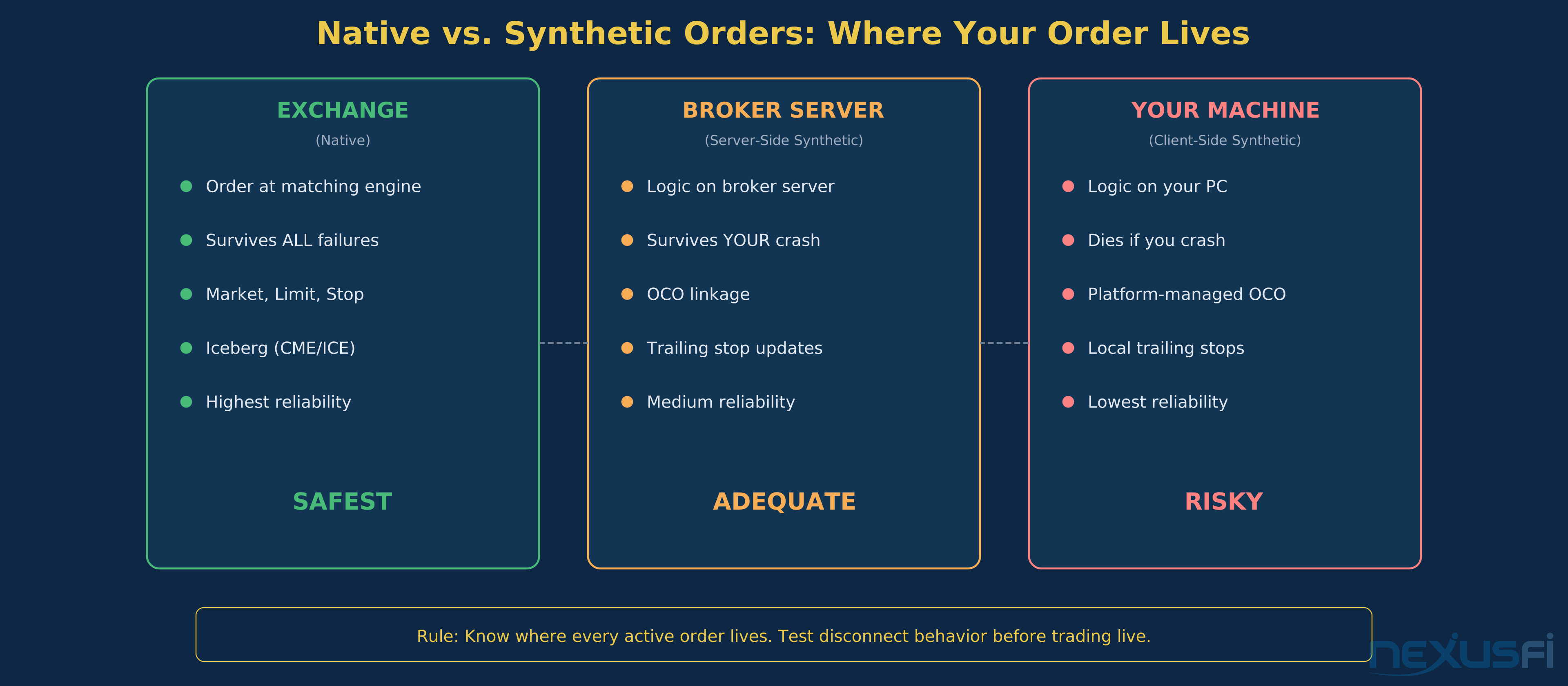
Native (exchange) orders live at the exchange matching engine. If your platform crashes, your broker's server goes down, or your internet drops, the order is still working at the exchange. Market orders, limit orders, and stop orders on CME are native. Your order is physically at the exchange.
Synthetic orders live somewhere between you and the exchange — on your platform, your broker's server, or your local machine. The synthetic logic watches market data and submits native orders to the exchange when conditions are met. OCO linkage, trailing stops, and bracket logic are almost always synthetic in futures.
([NexusFi] [10]). Server-side synthetic is better than client-side synthetic — at least the logic survives your machine going down. But it doesn't survive the server going down.
The practical risk:
([NexusFi] [11]). You hit your profit target, the OCO logic that was supposed to cancel the stop is dead, and now you have a naked stop order that might trigger on the next pullback.
The due diligence checklist:
- For each order type you use, know whether it's native or synthetic
- For synthetic orders, know where the logic runs (your machine, broker server, platform server)
- Know what happens to each order during a disconnect/reconnect
- Test this in simulation before trading live
Exchange Matching: CME vs. ICE #
Both CME and ICE use price-time priority as their core matching principle. Best price gets matched first. At the same price, earlier orders get priority. But the similarities mask important differences.
Auction mechanics: CME and ICE handle opening, closing, and halt-recovery auctions differently. Market orders submitted near auction boundaries can experience larger slippage than during continuous trading. A market order placed at 8:29:59 CT on ES enters the opening auction and matches differently than the same order at 8:30:01.
Stop trigger behavior: Exchange-supported stop orders (native stops) have specific trigger rules. CME triggers stops on the last trade price. Understanding the trigger reference is essential — a stop that triggers on bid/ask behaves differently than one that triggers on last trade, especially around settlement and during thin periods.
Cancel/replace mechanics: Both exchanges support cancel/replace (modifying a working order), but queue priority depends on the implementation. If you modify the price of a resting limit order, you typically lose your time priority and go to the back of the queue at the new price. Frequent modifications can silently turn a maker strategy into a taker strategy by constantly losing priority.
Book depth: The observable depth differs by product and venue. ES shows 10 levels of depth with thousands of contracts. Some ICE energy products show thinner books. The same stop-limit settings can produce very different fill rates across products because of structural differences in liquidity.
Practical Application #
Building Your Order Management Framework #
Every trading strategy needs a defined order management framework — the specific order types, trigger conditions, and failure modes you've planned for in advance.
Step 1: Map your order types to your strategy. If you're a scalper working the DOM, you're probably using limit entries and stop-market exits. If you're a swing trader, you might use stop entries for breakouts and bracket exits for risk management. Write down every order type your strategy uses.
Step 2: Identify the failure mode for each order type. Market orders can slip. Limit orders can miss. Stop-limits can fail to fill. OCO can lose its linkage. For each order type, answer: "What's the worst thing that can happen, and what do I do about it?"
Step 3: Size your positions for worst-case execution. Don't assume your stop fills at your stop price. Assume it fills 2-5 ticks worse in normal conditions and 10-20 ticks worse during a fast move. Size your position so that worst-case stop slippage doesn't take you beyond your maximum loss per trade.
Step 4: Test your order management in simulation. Every platform has a simulation mode. Place every type of order you plan to use. Verify bracket scaling on partial fills. Test what happens when you disconnect. Watch how trailing stops update. Don't discover failure modes with real money.
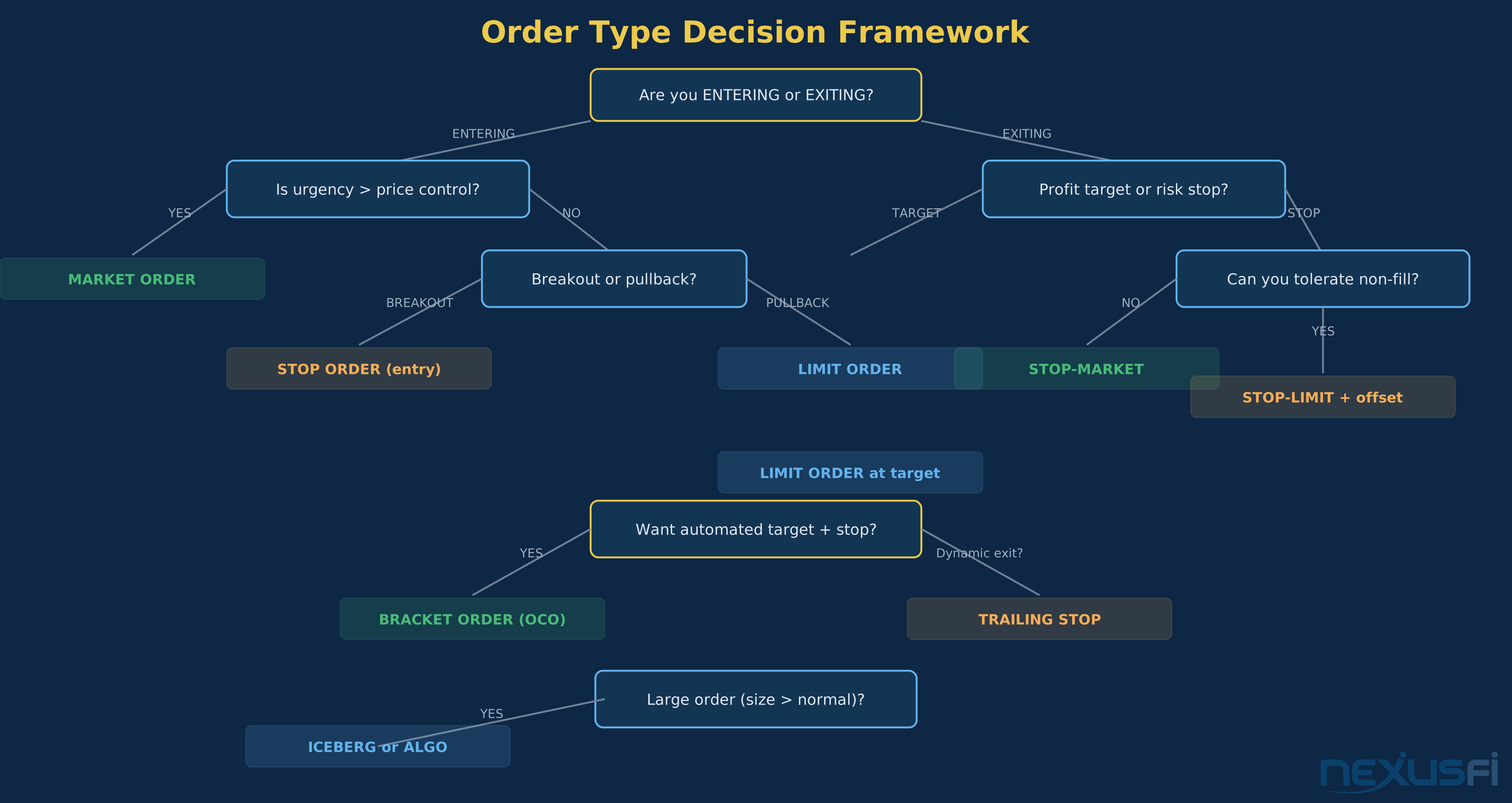
The Order Type Decision Matrix #
Entering a position:
- Breakout entry -> Stop-market order (triggered when price breaks the level)
- Pullback entry -> Limit order (resting at the level you want)
- Urgent entry (hedging, event-driven) -> Market order
- Large position -> Iceberg limit order or algorithmic execution
Exiting a position — profit target:
- Fixed target -> Limit order (resting at target price)
- Scaled exits -> Multiple limit orders at different levels
- Dynamic exit -> Trailing stop
Exiting a position — risk management:
- Standard stop -> Stop-market order
- Gap protection -> Stop-market (stop-limit may not fill through a gap)
- Low-slippage exit -> Stop-limit with 2-3 tick offset (accept non-fill risk)
Combined exits:
- Target + stop -> OCO pair (limit target + stop-market)
- Full automation -> Bracket order (entry + OCO exits)
Common Order Management Mistakes #
Mistake 1: Using stop-limit orders for protective stops without understanding non-fill risk. Stop-limits are fine for entries where a miss just means no trade. For protective stops on a live position, the non-fill risk is catastrophic. Use stop-market for protection.
Mistake 2: Not knowing whether your OCO/bracket is native or synthetic. If it's synthetic and running on your local machine, a crash means your stop and target are both live at the exchange with no linkage. Use server-side orders when available.
Mistake 3: Placing stops at obvious levels without considering slippage. Round numbers, prior highs/lows, and well-known technical levels accumulate stop orders. When those levels break, the cascade of triggered stops can cause significant slippage. @iantg noted on NexusFi that "market even gets near your stop order, you will get filled immediately. This is not black magic, it's just how the orderbook works" ([NexusFi] [12]). Budget for slippage at popular stop levels.
Mistake 4: Not testing platform disconnect behavior. What happens to your orders when your internet drops? Do stops remain at the exchange? Does the OCO linkage survive? @kamaiu's question on NexusFi — "When a stop loss market order doesn't trigger, does the broker/platform compensate?" — reveals how real this risk is ([NexusFi] [13]). The answer in most cases is no. Get on a platform with server-side order management and low-latency routing.
Mistake 5: Ignoring the cost of market orders on tight-edge strategies. If your strategy's edge is 2 ticks per trade and you're using market orders for entry and exit, slippage can consume your entire edge. Switch to limit entries and you keep those ticks — at the cost of missed fills on some trades. Model both scenarios and pick the one with higher expected value after accounting for fill rates and slippage.
Related Academy Pages #
- Futures Trading Platforms — choosing the right platform for your trading style
- DOM Trading Platforms — price ladder execution and order management
- Platform Latency and Execution Speed — how latency affects order fills
- Data Feeds and Market Data — the data pipeline that drives your order triggers
Knowledge Map
Prerequisites
Understand these firstGo Deeper
Build on this knowledgeReferences This Article
Articles that build on this topicCitations
- — ES stop loss fills (2013) 👍 2“When you set this up, are you giving 2 prices for the stop limit order? If you are only giving one price, then you are only doing a simple stop loss order. Here is an example: Price is at 1460. Your are long Option 1: You put a stop loss in at 1450.”
- — FT71's Price Risk vs. Information Risk argument (2012) 👍 5“There is a very good reason for doing this on the ES and not doing it on other markets. Fact is, if you are really good at reading the DOM and you can often see the exact point that a move down is cut off, then you simply cannot use a limit order bec...”
- — How to reduce slippage when stop loss is hit (2017) 👍 3“Let me explain how a stop works. Imagine the market is 1 contracts at 10.1 - 10.2 5 contracts 2 contracts at 9.8 - 10.3 6 contracts 3 contracts at 9.6 An you have a stop/loss for 5 contracts at 10.1 Somebody sells at 10.”
- — Stop Limit Offset (2014) 👍 5“you didn't believe me huh :faint: but we can make this real easy. we can ask Fat Tails to take a look. - when using a stop limit order, an offset is always needed.”
- — Stop Limit Orders - please clarify (2013) 👍 3“1) Normal limit orders do not have to be penetrated to get filled. You may also get a fill when the limit price is touched. Whether you get filled, when the limit price is touched depends on the time priority of your order in the order book.”
- — Outage with a live position on Ninja (yikes) what to do? (2012) 👍 7“Contingent orders (CO) and contingent multiple orders (CMO) are orders, whose execution or cancellation depends upon the execution of another order.”
- — Fail to Plan - Plan to Fail: What can go wrong? (2021) 👍 3“There are three, or actually four, places where stop "functionality" in a broad sense can reside: 1. Your computer. (Bad). 2. Your broker's servers (Better) or your order processing service's servers (Better yet) 3. The exchange's servers (Best).”
- — OCO vs bracket, when would you apply? (2021) 👍 3“The term bracket order in my book is when you have a stop loss order and exit target set in you platform order management settings to be entered automatically when you place the entry order.”
- — Server side synthetic orders (OCO, trailing stops) (2010) 👍 7“Looks like TT with Ninja is client based. Zen-Fire Orders in a state "Accepted" or "Working" are at the exchange. If the exchange does not support a specific order type, the order will be active on the Zen-Fire servers.”
- — Path of a Futures order (2022) 👍 1“Someone correct me if I'm wrong but my understanding is that orders go from your device to the order router to the exchange.”
- — OCOTrader orders will be in market if client down (2012)“I have never used OCO Trader, but I think it is similar. Here is a response from the TradingTechnologies Forum (the post dates back to 2006, so I cannot tell whether is is still up-to-date): "If the exchange does not support stops but TT does, the sy...”
- — Stop Hunts - Are they really what the name entails? Or is there more to them? (2019) 👍 10“Can't say for sure with respect to your trade, but I see this kind of the other way. There are edges out there that operate to hunt thin limit order levels.”
- — When a stop loss market order doesn't trigger, does the broker/platform compensate? (2022) 👍 3“AMP supports a ton of platforms. Get on a low-latency routing platform. I prefer Sierra Chart (Teton Order Routing), but Rithmic is also a good choice. Both have latency”