



Trading Platform Evaluation: The Systematic Framework for Choosing Your Futures Execution Environment
Overview #
Every futures trader eventually faces the platform question. You start with whatever your broker offers, or whatever you heard about in a forum thread, or whatever seemed easiest to open an account with. At some point, the platform either earns your trust or it doesn't — and the process of actually evaluating whether your platform is costing you money tends to happen only after a bad fill, a freeze during an FOMC release, or a migration someone else completed and won't stop talking about.
Here's the framing that matters: a futures trading platform isn't software. It's infrastructure. The distinction matters because infrastructure decisions are structural — they shape what strategies you can run, what execution quality you can achieve, and what happens when markets go sideways at 8:30am. Choosing a platform because it has a clean interface is like choosing a broker because their website looks nice. You're evaluating the wrong thing.
This article is a framework for evaluating execution platforms systematically, before you're in a bad situation. The criteria here come from community experience across thousands of NexusFi discussions — traders who've actually run platforms in live conditions during real volatility events, not feature comparisons on a vendor's marketing page.
The evaluation framework has eight criteria. None of them is optional.
Key Concepts #
Execution lifecycle: The complete sequence from order submission to confirmed fill — submit, acknowledge, fill or reject, and cancel/replace if needed. Every step has latency. Every step can fail.
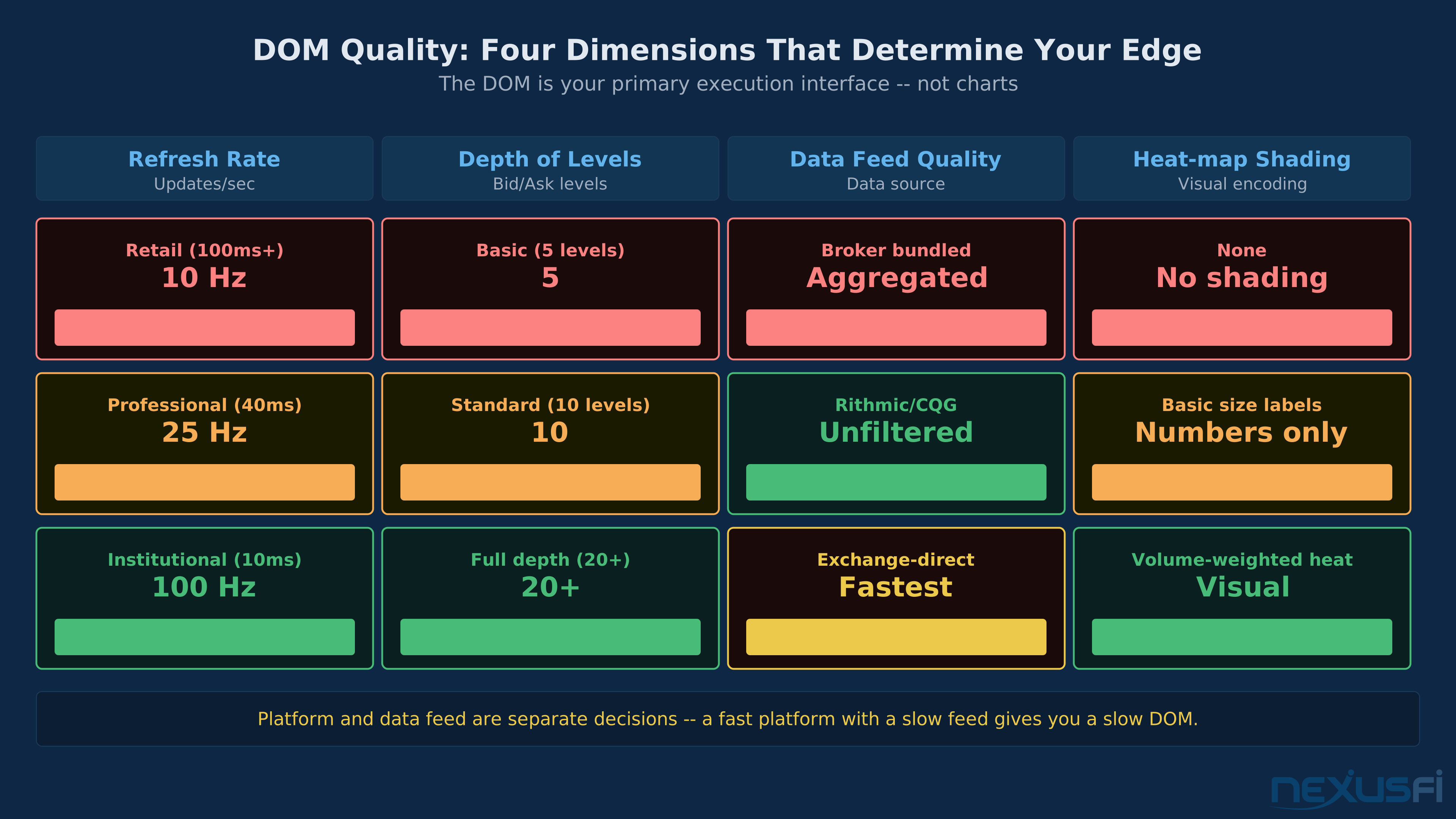
DOM (Depth of Market): The price ladder showing resting limit orders on both sides of the market. For futures traders, the DOM is the primary execution interface — not charts. DOM quality encompasses refresh rate, depth of levels displayed, accuracy relative to the exchange feed, and visual design for rapid decision-making.
Round-trip latency: Time from your order-send action to exchange acknowledgment. Measured in milliseconds for retail, microseconds for co-located institutional traders.
Data feed: The stream of market data — trades, quotes, DOM updates — delivered by a provider like Rithmic, CQG, or TT Core. The platform and the data feed are separate; many platforms support multiple feeds.
Total Cost of Ownership (TCO): All costs of running the platform — licensing, data feed subscriptions, API charges, and the hidden cost of execution friction (slippage from latency or poor routing).
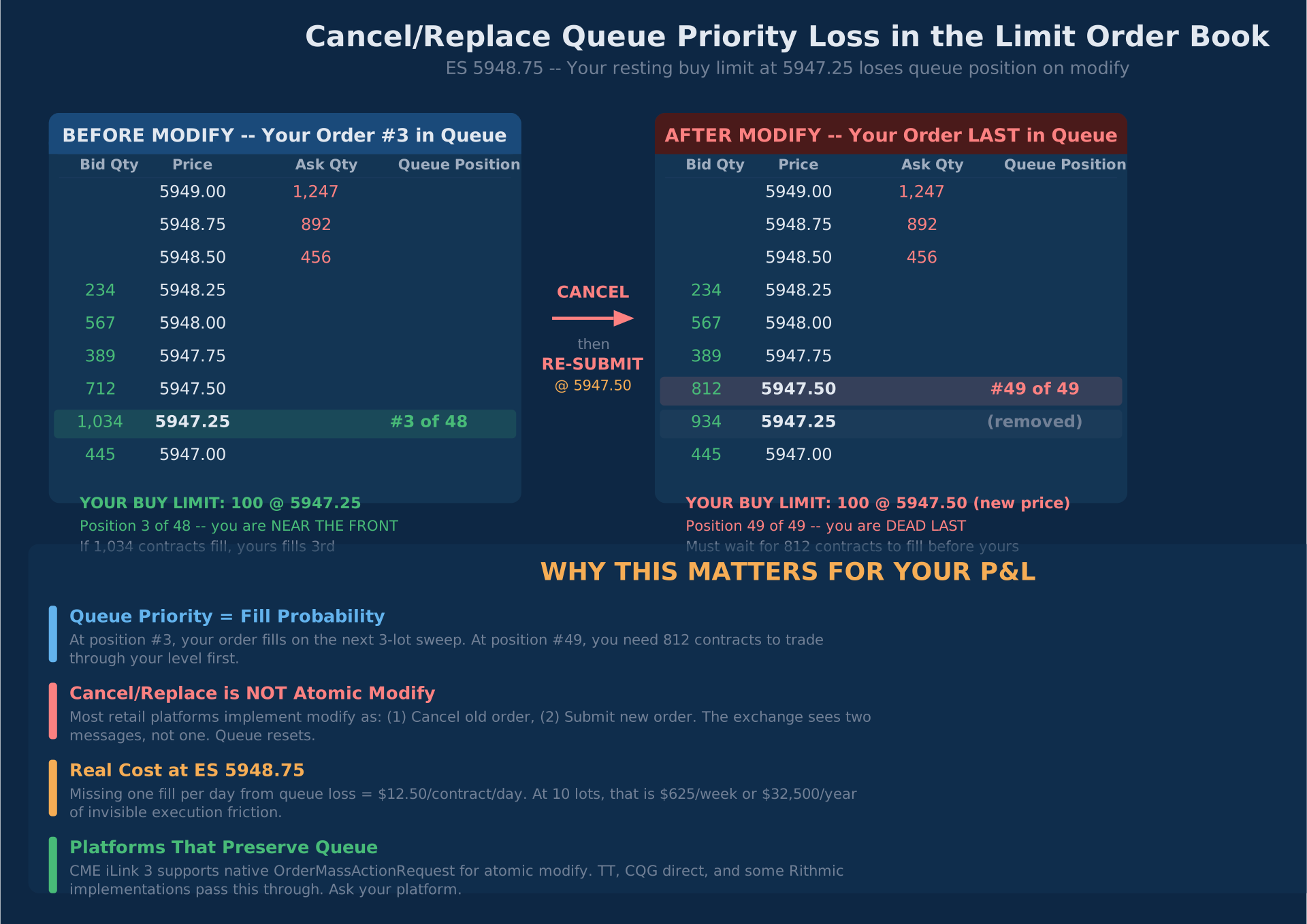
Cancel/replace: Modifying a working order's price or quantity. In many platforms, this is implemented as cancel-then-submit-new, which loses your queue position in the limit order book. This distinction matters for traders who work limit orders actively.
Co-location: Hosting your trading system at the same data center as the exchange (e.g., CME Aurora data center in Illinois). CME Group's GLink architecture provides deterministic routing within the Globex network via a spine-and-leaf topology — Arista switches at 10 Gbps client access and 100 Gbps spine interconnects. Cuts order round-trip latency from 2-10ms to sub-millisecond.
The Eight Evaluation Criteria #
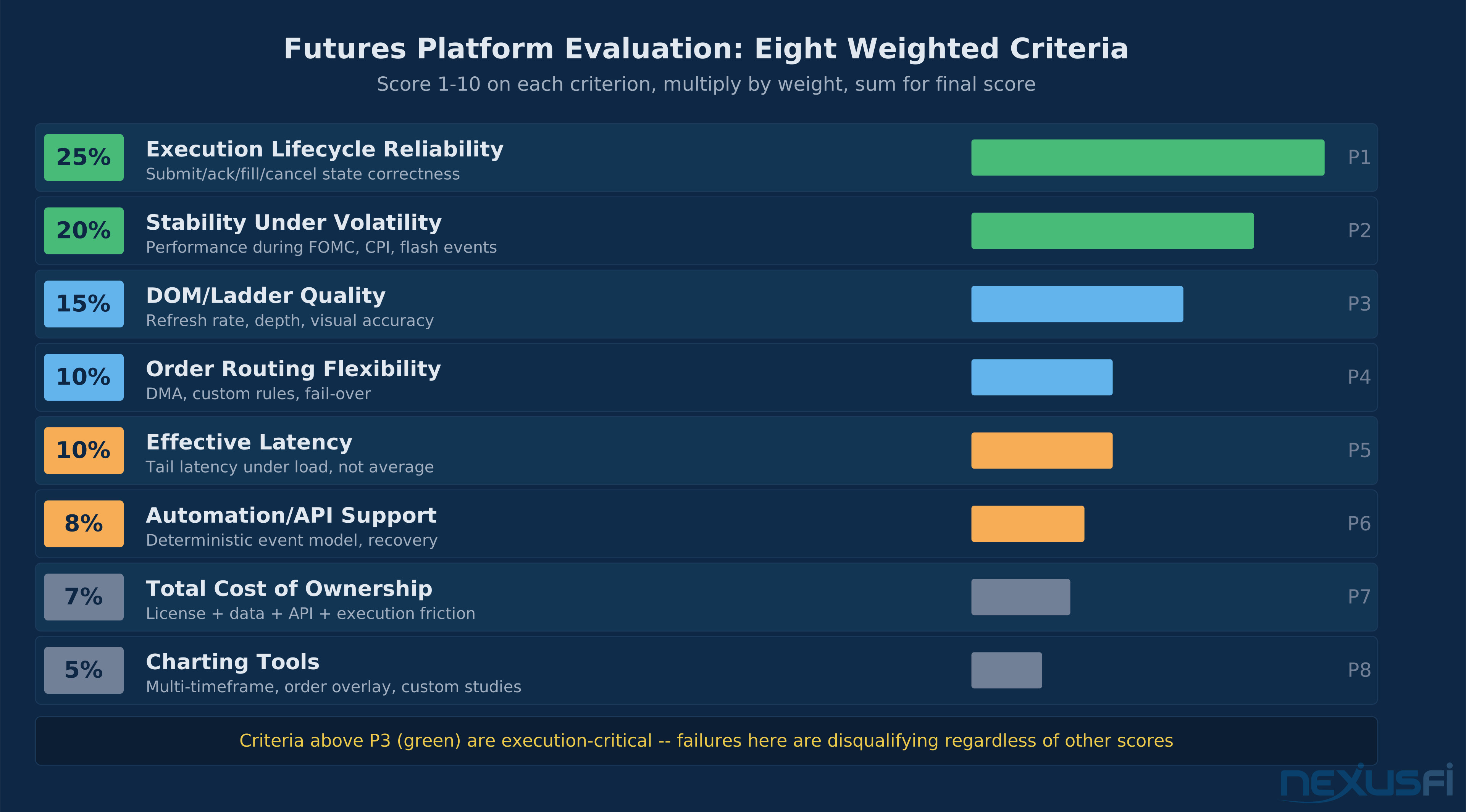
The council of experts reached strong consensus on the order of evaluation criteria for futures traders. The ranking reflects what actually drives trading outcomes — not what platform vendors advertise.
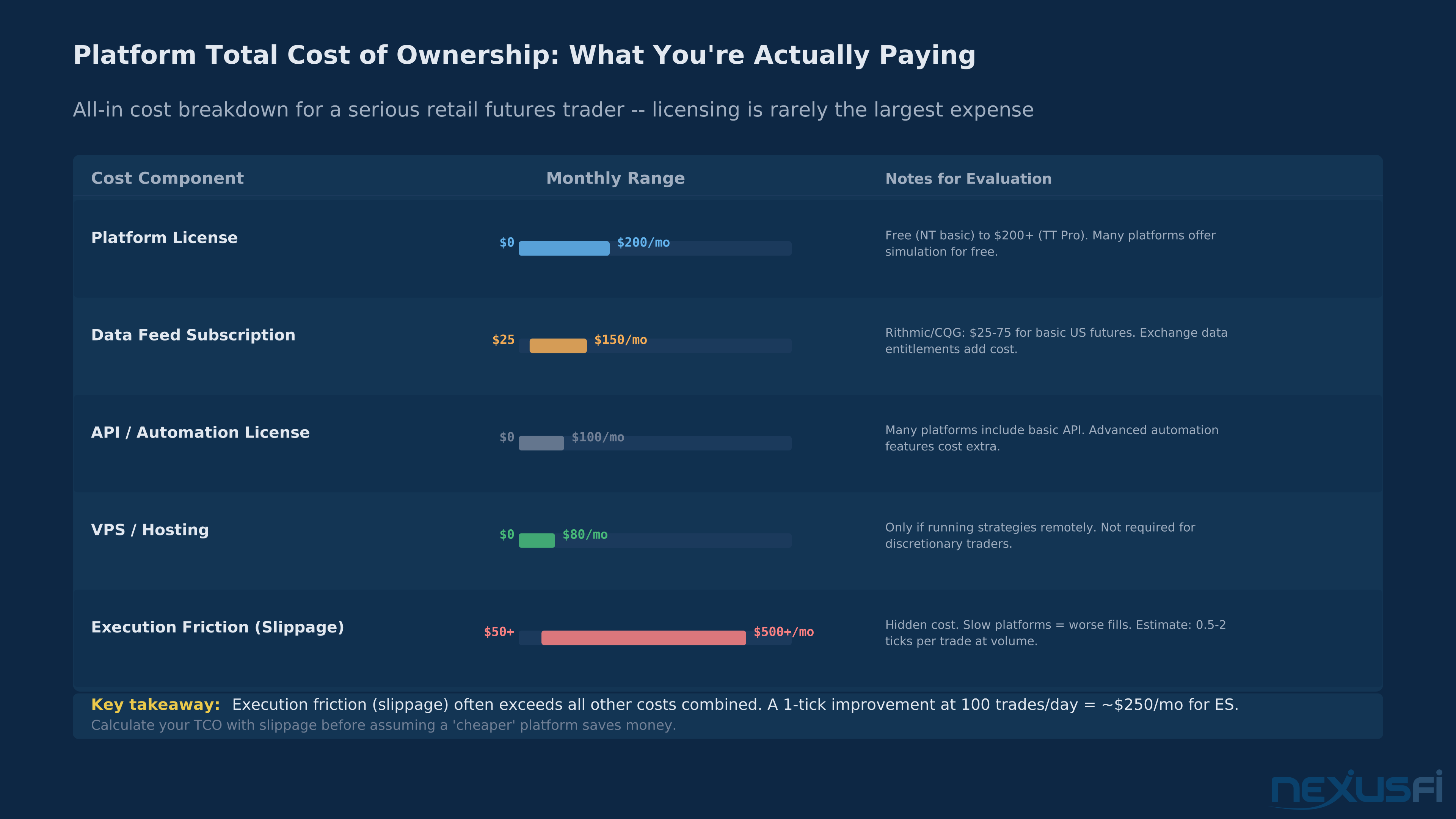
TCO includes execution friction — slippage from platform latency. A 'free' platform may cost more than a $100/month platform once you account for worse fills. Calculate the full cost before deciding.
| Priority | Criterion | Weight | What You're Measuring |
|---|---|---|---|
| 1 | Execution lifecycle reliability | 25% | Order state correctness: submit/ack/fill/cancel without ghosting |
| 2 | Stability under volatility | 20% | Performance during FOMC, CPI, flash events |
| 3 | DOM/ladder quality | 15% | Depth, refresh rate, visual accuracy |
| 4 | Order routing flexibility | 10% | DMA access, custom rules, fail-over |
| 5 | Effective latency | 10% | Tail latency under load, not average |
| 6 | Automation/API support | 8% | Event model, recovery, determinism |
| 7 | Total cost of ownership | 7% | All costs including execution friction |
| 8 | Charting tools | 5% | Multi-timeframe, order overlay, custom studies |
Notice what's at the bottom: charting. Most traders start here because charting is visible. Execution reliability is invisible — until it isn't.
Score each platform 1-10 on these eight criteria, apply the weights, and sum. The platform with the highest weighted score wins. Document the rationale. Revisit quarterly — platforms evolve, and what works in quiet markets may fail in new volatility regimes.
Execution Lifecycle: The Non-Negotiable #
Execution lifecycle reliability is the single most important criterion — and the one that's hardest to evaluate from a demo account.
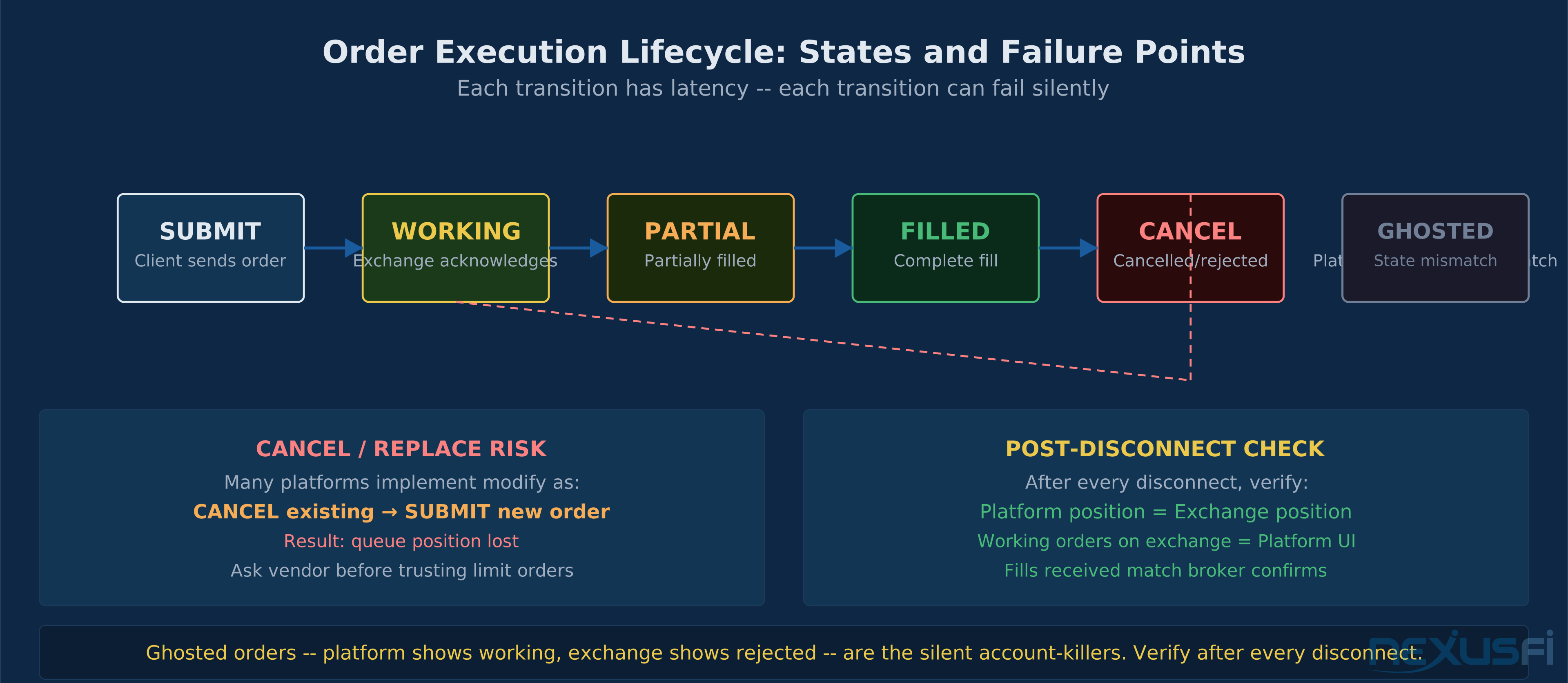
The execution lifecycle for a futures order looks simple:
Submit → Acknowledge → Fill (or reject) → Complete
         ↳ Modify (cancel/replace) if needed
Each transition has latency. Each transition can fail silently. The failures that destroy trading accounts aren't spectacular crashes — they're subtle state inconsistencies: a working order that the platform shows as pending but the exchange already rejected, a fill that appears on the exchange but doesn't register in the platform's position, a cancel-replace that the platform treats as a cancel without a replace.
The cancel/replace problem is especially insidious. Many platforms implement order modification as: cancel existing order, submit new order. This sounds correct but has a critical implication — you lose your queue position in the limit order book. For traders who work limit orders at busy price levels, losing queue priority means worse fills and reduced edge. Ask your platform directly: "Does modify-order preserve my queue position, or does it result in a cancel-then-new?" If they don't know, that's your answer.
Ghosted orders — orders that exist in the platform but not at the exchange — are rare but catastrophic. They typically appear after connection disruptions. When you reconnect, the platform doesn't reconcile its local state against the exchange's actual order book. You think you have a working stop; you don't. This is survivable if you know it can happen and you verify your position and working orders after every disconnect.
Order acknowledgment transparency tells you a lot about platform quality. A professional platform shows you distinct states: submitted (sent to exchange), working (at exchange, in queue), partially-filled, filled, cancelled, rejected. A retail platform may show you only "working" and "filled." The missing states are where problems hide.
What to test: Use a paper/sim account with real-time data to submit, modify, and cancel orders rapidly during an active market session. Verify that the platform's displayed state matches what you see on the exchange order status report. Test rapid cancel/replace cycles — 10-20 modifications in 60 seconds — and confirm the platform handles them without state desynchronization.
DOM Quality: Your Primary Execution Interface #
If you trade from the price ladder — and most serious futures traders do — DOM quality is what you live in every trading session. This is not a preference question. There are measurable dimensions.
Refresh rate is the first dimension. How often does the DOM update? Retail-grade platforms often cap at 100ms (10 updates per second). Professional-grade platforms run at 40ms or better. For scalpers and DOM-based traders, the difference is material — you can act on stale DOM data and get filled at a price that no longer represents the market.
As @josh documented in a direct platform comparison:
This was a direct performance benchmark from a trader who measured DOM update rates on both platforms during live sessions.
Depth of levels matters for context. A DOM that shows 5 levels per side is adequate for basic order placement. A DOM that shows 20+ levels with heat-map shading lets you see the structural liquidity picture — where large limit orders are resting, where thin air begins, where the market is likely to accelerate if price gets there. For order flow traders, more depth with visual encoding is always better.
Data feed dependency is the hidden variable. The DOM you see is only as good as the feed powering it. Rithmic and CQG are the gold standard for professional-grade DOM data for US futures. TT Core is strong. Exchange-direct data (via CME Direct) is fastest but most expensive. The platform and the feed are separate decisions — and some platforms support multiple feeds, giving you flexibility.
Heat-map / volume shading translates raw limit order size into a visual signal. Large bids turn the bid side dark; large offers create visible blocks on the ask side. This reduces cognitive load in fast markets — your eye catches liquidity cliffs instantly instead of reading numbers line by line.
When comparing DOMs across platforms, the differences aren't subtle:
TT's DOM remains the institutional standard; Sierra Chart offers comparable capability at retail pricing. NinjaTrader's DOM has historically lagged, though has improved in recent versions.
Platform Stability: The Volatile Market Test #
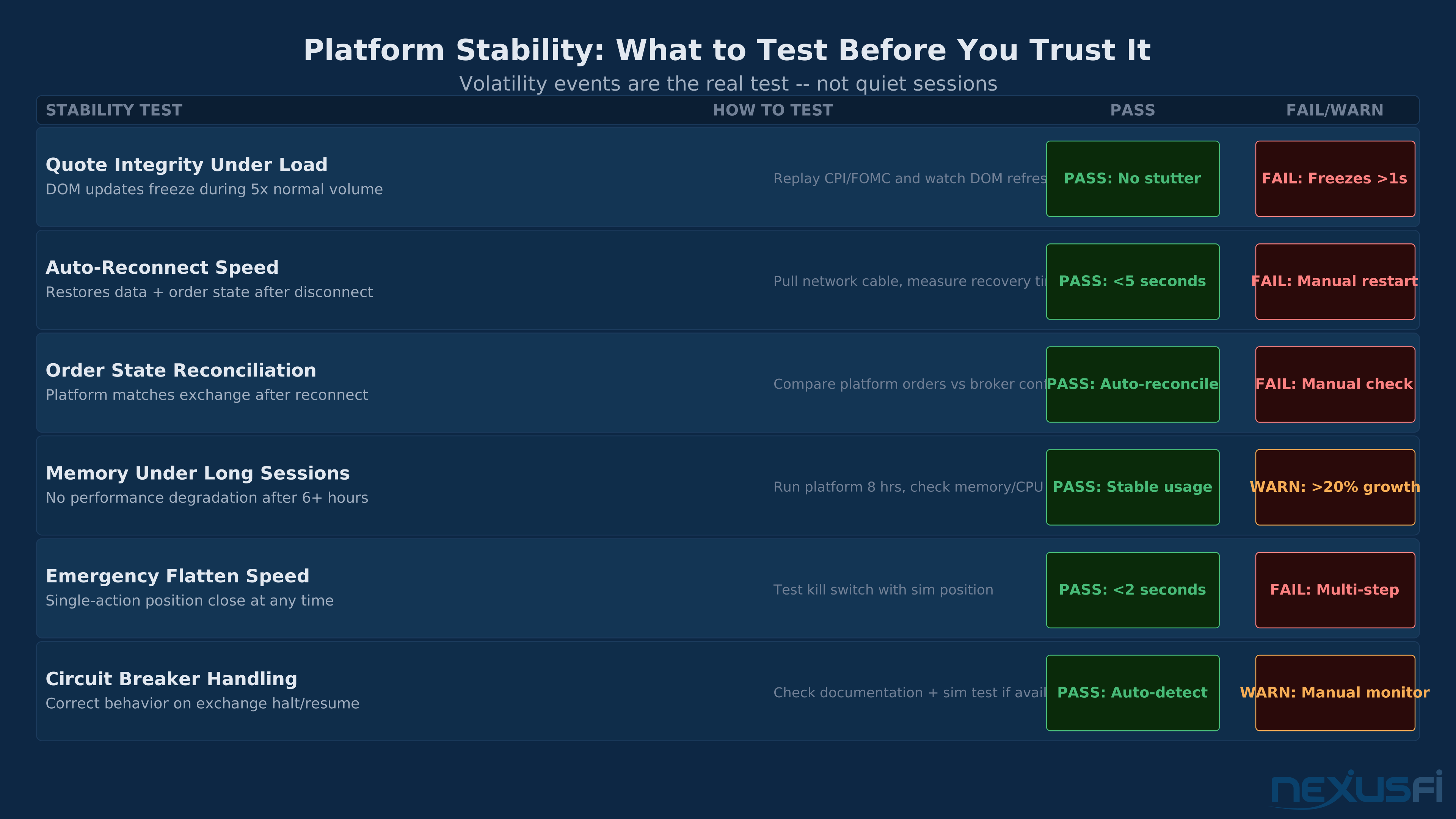
Stability under volatility is where retail platforms fail and professional platforms earn their fees. Every platform looks fine during a quiet ES session with 200,000 volume. The test is 8:30am on a CPI day.
The failure modes during volatile conditions are consistent:
- Quote stuttering: DOM updates freeze for 2-5 seconds while the market is moving fast
- UI unresponsiveness: clicking buttons produces no response, or delayed response
- Connection drops: the platform disconnects from the data feed under message volume
- Order routing timeouts: order submissions time out without confirmation
- Memory leaks in long-running sessions: performance degrades after 4+ hours
The insidious variant: platform stability varies by hardware. A platform that runs fine on a modern workstation with 32GB RAM may stutter on a 16GB laptop. Test on the hardware you'll actually use. Most platform vendors won't tell you this.
Auto-reconnect behavior is the stability test that matters most day-to-day. Disconnects happen. ISPs glitch, exchange gateways burp, VPNs drop. What matters is how the platform recovers. A professional platform: auto-reconnects in <5 seconds, re-subscribes to all data feeds, reconciles local order state against exchange state, alerts you of any discrepancies. A retail platform: asks you to manually reconnect, may require a full platform restart, and doesn't reconcile order state — leaving you to verify manually.
The stress test protocol: replay a historical volatility spike (the 2020 March crash, any CPI print from 2022, the August 2024 Nikkei selloff) on your sim platform. Watch CPU usage, memory consumption, and UI responsiveness. If the platform starts dropping frames or skipping DOM updates during the replay, it will do the same on a live event.
A real stability benchmark from a trader running serious complexity:
That's not a marginal difference. It's an order-of-magnitude difference in resource consumption for equivalent workloads.
Data Feed Compatibility #
The data feed is separate from the platform. This distinction matters operationally: if your data provider has an outage, can you switch feeds without changing platforms? If your platform can only connect to one feed, you've accepted a single point of failure.
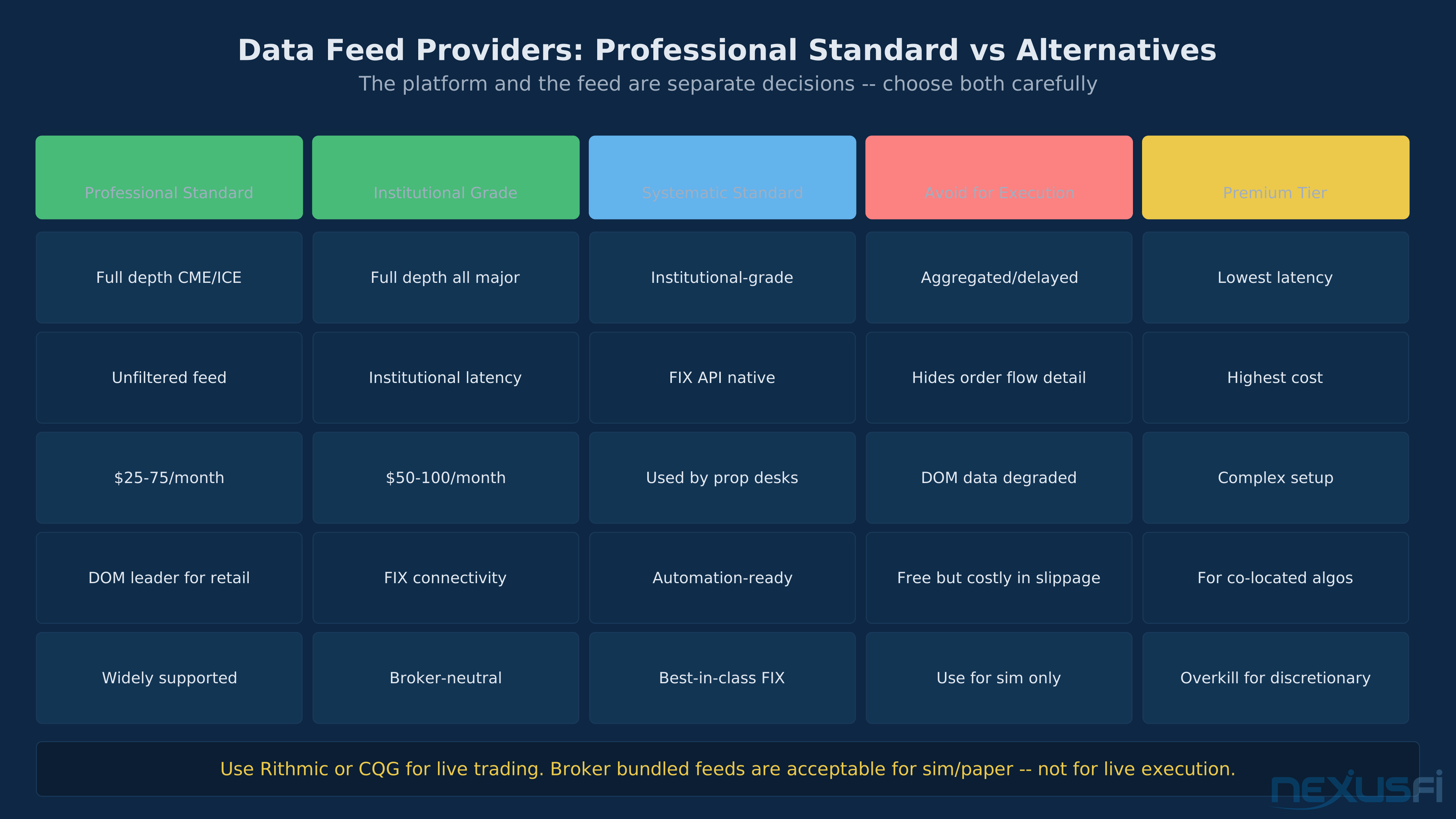
Rithmic and CQG are the professional standard for US futures. Both offer full-depth market data, direct routing to major futures exchanges, and institutional-grade infrastructure. Rithmic is the dominant feed for discretionary order flow traders; CQG is widely used by institutional desks. Both charge for the service — typically $25-75/month depending on exchange data entitlements.
TT (Trading Technologies) Core is the feed underlying many institutional platforms. TT also has a retail-accessible version. Strong for automation due to their FIX API quality.
Infinity Data Feed is worth mentioning for traders who want an alternative. Community feedback on NexusFi is mixed — some find it adequate for sim, others report quality differences visible in DOM stacking.
Exchange-direct data eliminates the middleman but adds cost and complexity. CME Group's primary matching engine operates from CyrusOne Aurora I, a purpose-built 428,000 sq ft facility in Aurora, Illinois — the physical origin point of every CME futures trade. CME Direct gives you the cleanest possible data but requires direct connectivity to this facility, something most retail setups can't justify.
Timestamp coherency is the underappreciated feed quality metric. Are the timestamps on DOM updates, trade prints, and your order confirmations synchronized? A platform that timestamps DOM data on receipt but timestamps fills on exchange confirmation can create subtle discrepancies in post-trade analysis. For automated strategies, this matters.
Practical recommendation: if you're serious about futures trading, use Rithmic or CQG. Don't use your broker's built-in data feed for execution if you can avoid it — these aggregated feeds introduce latency and can hide micro-scale order flow information that matters for intraday trading.
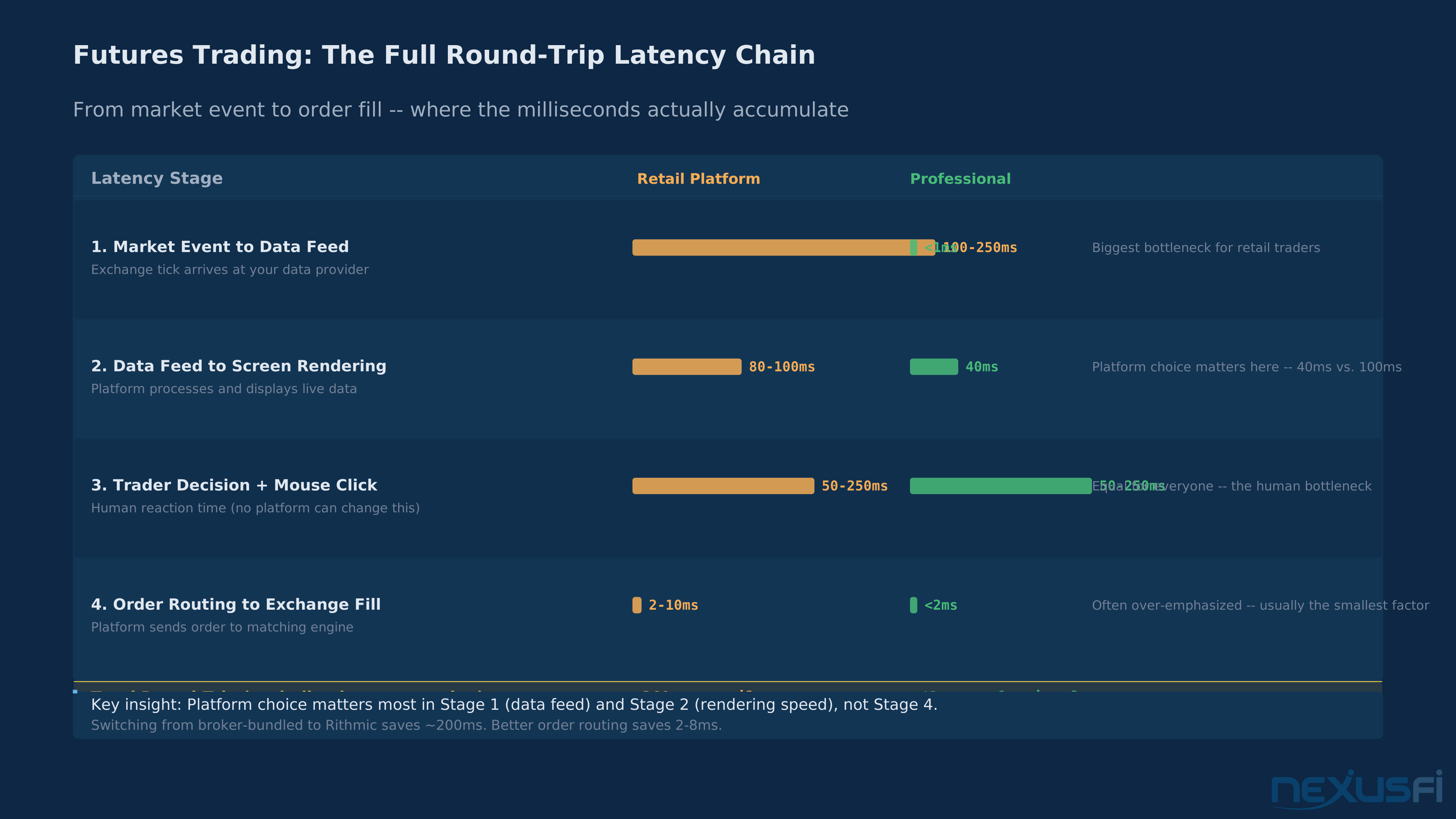
Traders obsess over order routing speed (saves 6ms) while ignoring data feed quality (saves 150-200ms). Stage 1 — the data feed — is where the real latency gap exists.
The Two-Week Chaos Test #
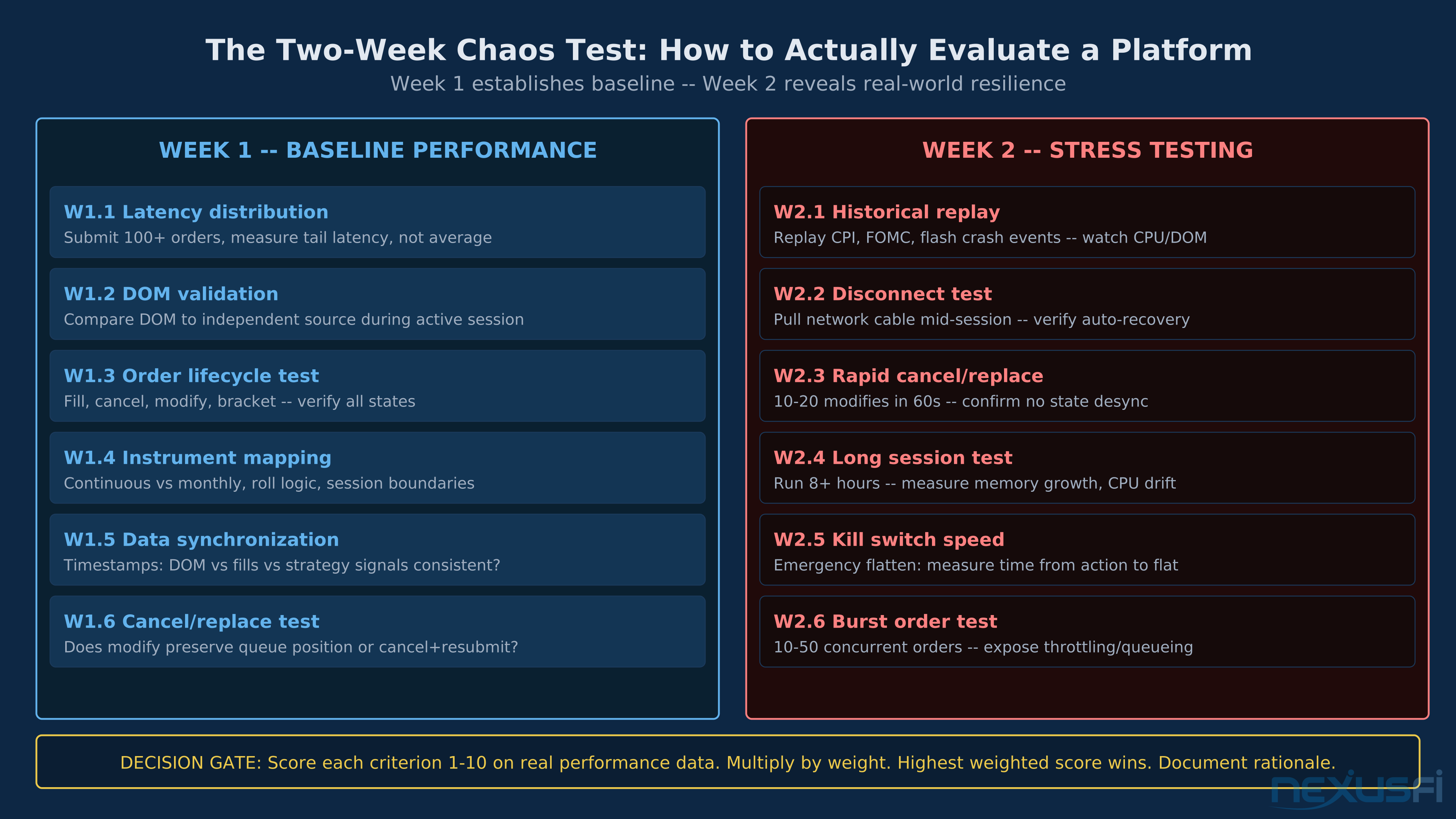
Every platform should pass a structured two-week evaluation before you commit capital. This isn't about whether you like the UI — it's about whether the platform handles failure gracefully.
Week 1 — Baseline performance:
- Run a paper/sim account with real-time exchange data (not delayed)
- Measure round-trip order latency distribution across 100+ orders — not just the average, the tail
- Validate DOM accuracy against an independent source (another platform or raw feed) during a busy session
- Execute fill, cancel, modify, and bracket operations
- Confirm instrument mapping: continuous contracts vs. monthlies, roll logic, session boundaries (RTH vs. ETH)
Week 2 — Stress testing:
- Replay historical high-volatility sessions (CPI, FOMC, flash crash)
- Simulate network disconnects while orders are working — verify auto-reconnect and no duplicate orders
- Execute rapid cancel/replace cycles — confirm order state remains consistent
- Run platform continuously for 6+ hours — check for memory growth and performance degradation
- Test emergency flatten: can you get out of all positions with a single action if your internet drops? Is the broker's trade desk reachable?
The decision gate: after two weeks, score the platform on all eight criteria using real performance data from these tests. Weight appropriately for your trading style. The platform with the highest weighted score is your answer.
Run the stress test on a day with a scheduled economic release. CPI and FOMC days produce message rate spikes 5-10x normal volume. These are the conditions that reveal real platform quality. Paper trading during a live economic event is your best simulation of a real bad day.
Trade-offs: All-in-One vs. Best-of-Breed #
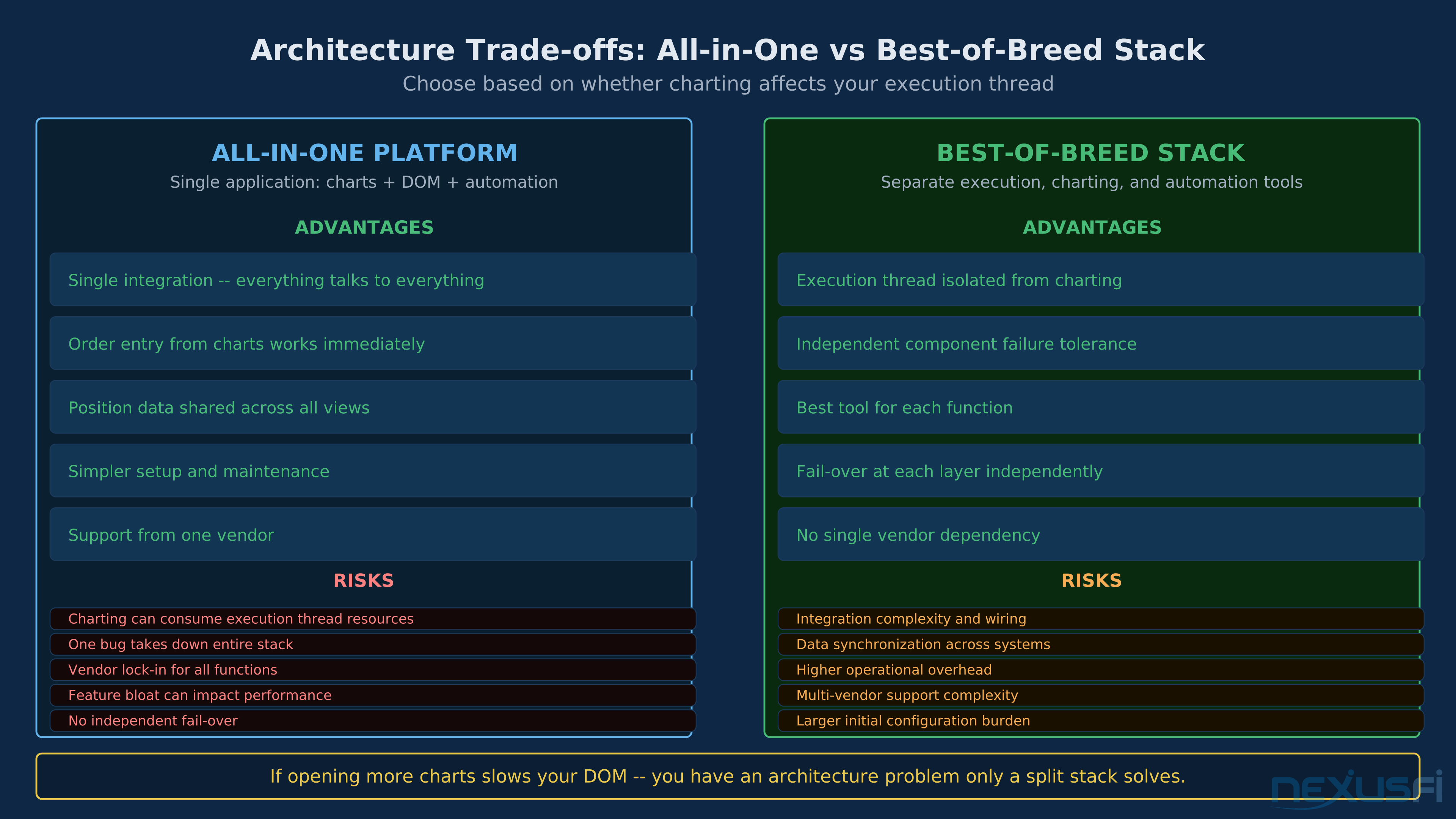
The platform market presents two architectures: all-in-one platforms that handle charting, DOM execution, and automation in a single application, and best-of-breed stacks where you use separate tools for each function.
All-in-one platforms reduce integration risk. Everything talks to everything without API wiring. Order entry from charts works immediately. Position data is shared across all views. The risk: if the charting subsystem consumes resources, it can affect execution responsiveness. If the execution engine has a bug, you lose everything simultaneously.
Best-of-breed stacks are more complex but more resilient. An execution-only platform for order management and DOM trading, a separate charting suite for analysis, and possibly a separate OMS for automation. Each component can fail independently without taking out the others. The risk: integration complexity and potential data synchronization issues across systems.
The practical resolution: if your all-in-one platform's execution thread is genuinely isolated from charting and UI components — meaning heavy chart load doesn't affect DOM refresh rates or order routing speed — prefer the all-in-one for simplicity. If you find that opening more charts slows your DOM, or that your automation scripts compete with UI rendering for CPU, you have an architectural problem that only a split stack solves.
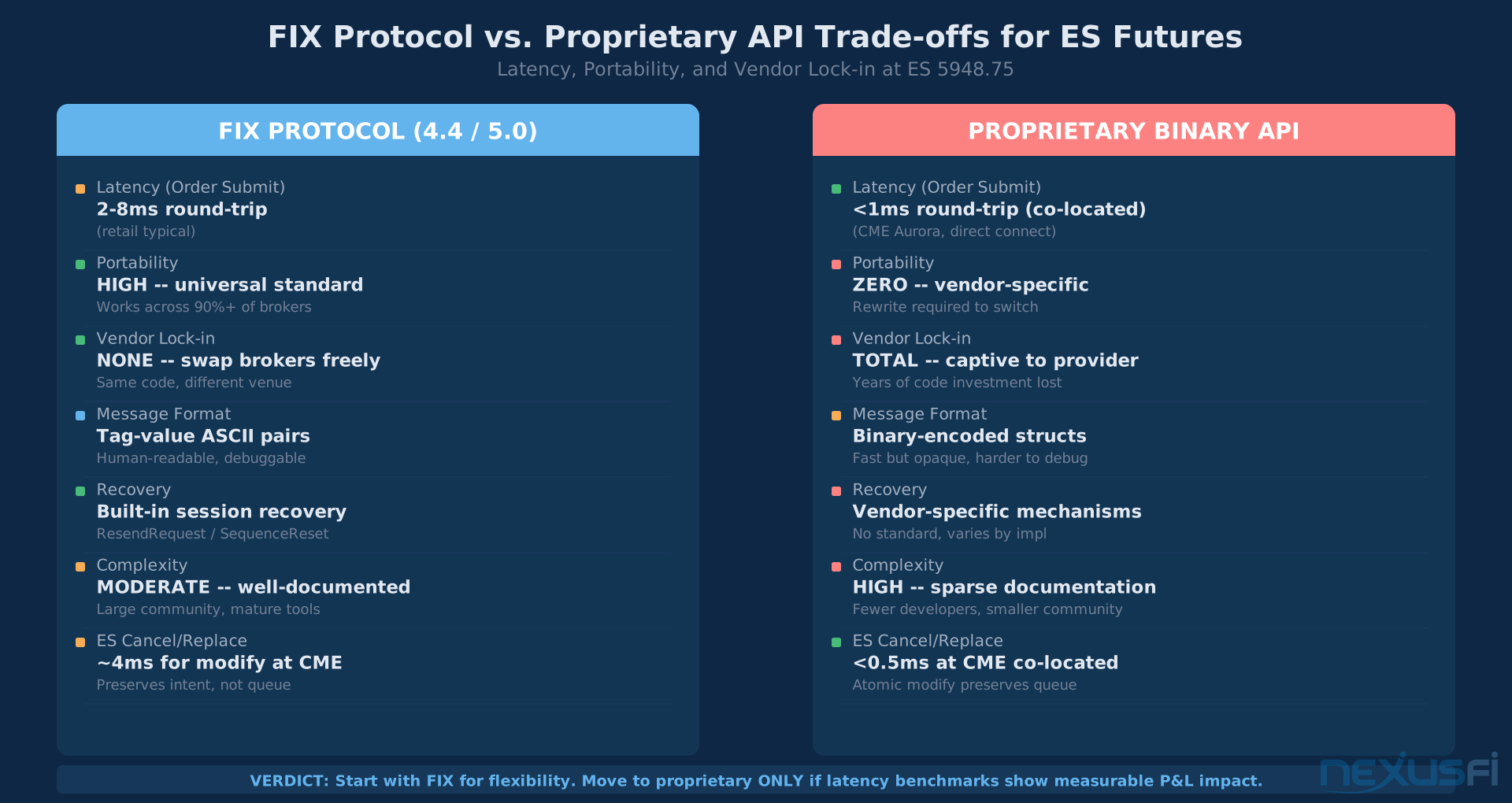
FIX vs. proprietary API is the other major trade-off for automated traders. FIX (4.4/5.0) is the industry standard — portable across platforms and brokers, supported by every institutional execution venue. Proprietary binary APIs (like CME's OUCH or vendor-specific APIs) are faster but create vendor lock-in. Start with FIX for flexibility. Only move to proprietary if latency benchmarks show a measurable P&L impact for your specific strategy.
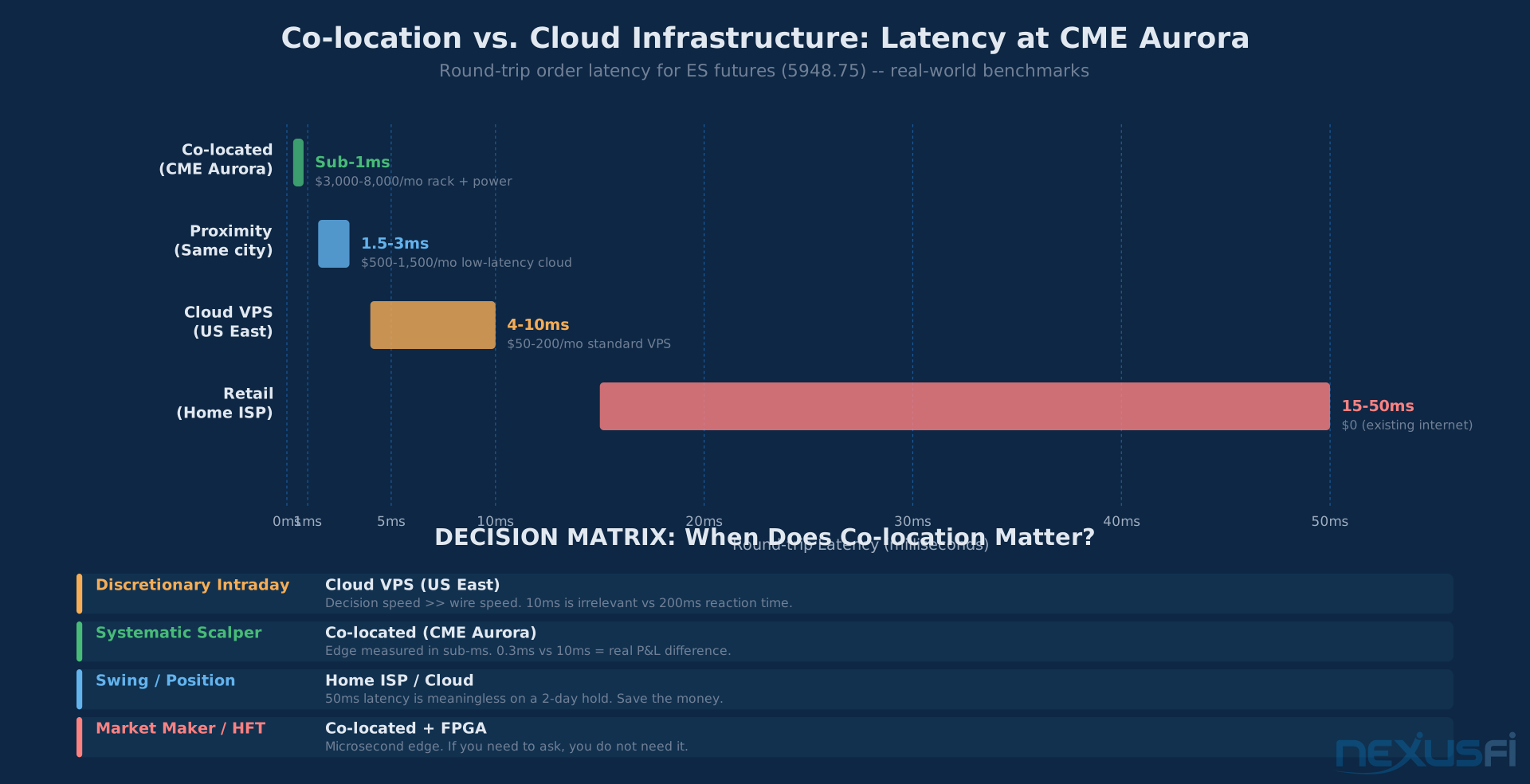
Co-location vs. cloud is a cost-vs-latency trade-off. Co-locating at CME Aurora cuts round-trip to sub-millisecond but requires meaningful capital investment and operational complexity. Cloud infrastructure (including low-latency cloud options near exchange data centers) is more accessible but adds 2-10ms. For discretionary intraday traders, co-location typically doesn't provide edge — the decision happens faster at the chart than at the matching engine. For systematic scalpers with edge measured in milliseconds, it's non-negotiable.
When to Switch Platforms #
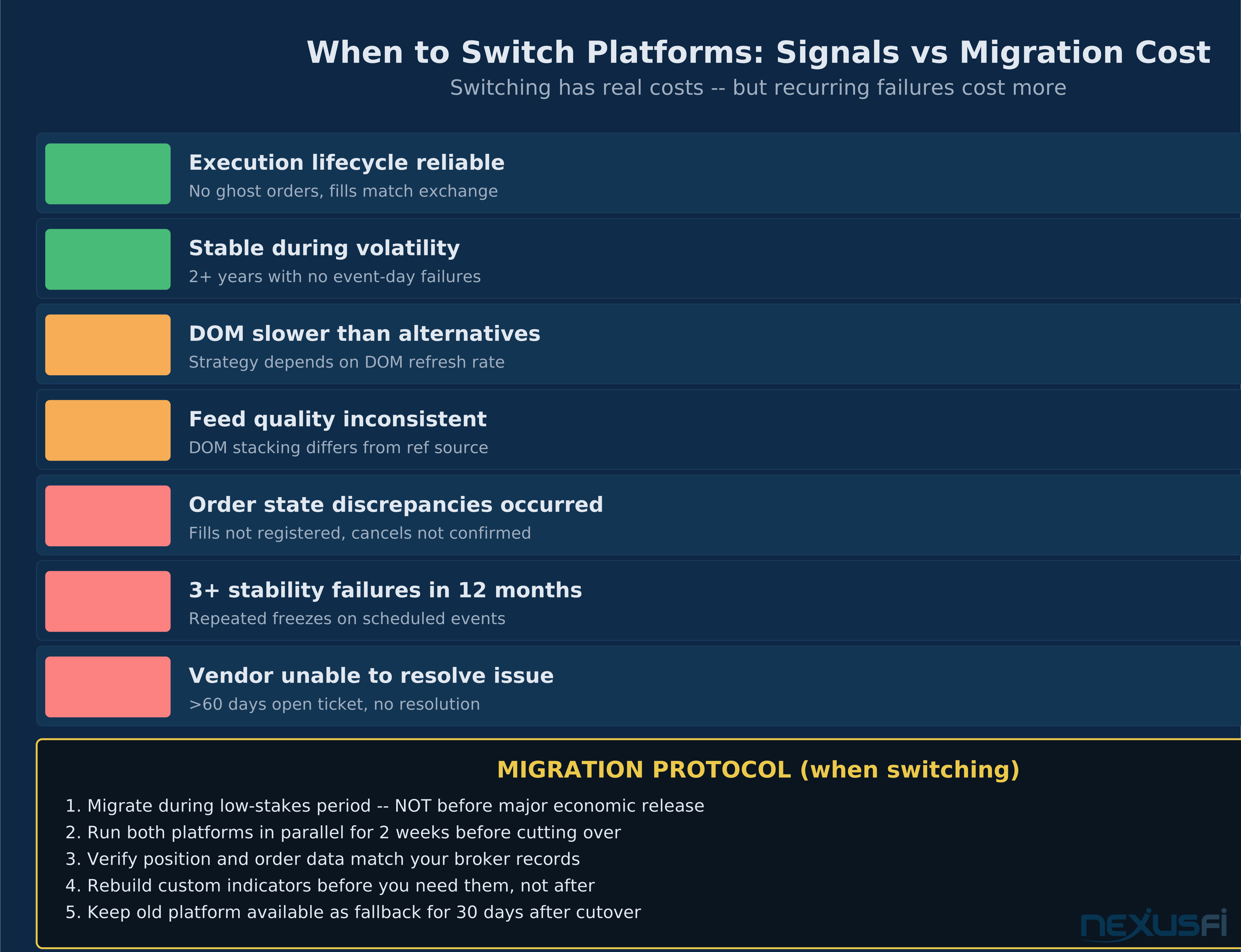
Platform switching has real costs. You lose your custom indicators, saved workspaces, and institutional knowledge of how the platform behaves. You invest significant time in a new learning curve. These costs are real and shouldn't be dismissed.
But there are signals that mean you should switch regardless:
Execution reliability failures: if you've experienced order state discrepancies — fills that didn't register, cancels that didn't confirm, position mismatches between platform and exchange — and the vendor hasn't resolved them, this is disqualifying. No amount of chart features compensates for execution you can't trust.
The community's guidance here is instructive: platform freezes often originate not in the core execution engine but in poorly-written indicator code consuming the same thread. This is an architectural problem with platforms that don't isolate execution from UI/analytics. If removing indicators stops the freezes, you have a platform architecture problem, not a code problem.
Repeated stability failures during volatility: if your platform has frozen or disconnected during three or more scheduled economic events in a year, this is a pattern. Platforms that can't handle message volume spikes on predictable event days (you know CPI and FOMC are coming) will fail on unpredictable ones too.
DOM refresh rate below your strategy's requirements: if you're trading based on DOM information and your platform updates at 100ms but faster-updating platforms are available, you're at a persistent informational disadvantage. This is a strategy-level problem masquerading as a preference.
Feed quality degradation: if your DOM data shows inconsistencies versus independent feeds — different bid/ask stacking, different print sizes, different aggressor attribution — your data feed is filtering or aggregating in ways that obscure market microstructure. Switching feeds (sometimes possible without switching platforms) should be the first step.
The migration protocol: migrate during low-stakes periods, not before a major economic release. Run both platforms in parallel for two weeks before cutting over. Verify that position and order data in the new platform match your broker's records. Rebuild your custom indicators before you need them, not after. Keep the old platform available for 30 days after cutover as a fallback.
Practical Takeaways #
The platform decision looks overwhelming when you're comparing feature lists. It isn't, once you apply the right framework:
- Execution reliability is non-negotiable — test order state correctness with real-time data before trusting a platform with capital. Pay specific attention to cancel/replace behavior and post-disconnect reconciliation.
- Stability under volatility is your stress test — replay historical volatility events on your sim platform and watch what happens. A platform that stutters on a replay will stutter live.
- DOM quality determines your informational edge — refresh rate matters (40ms vs. 100ms is a real difference), depth matters, and data feed quality matters. These are measurable, not preferences.
- Data feed is a separate decision — Rithmic and CQG are the professional standard for US futures. Use them if your strategy depends on accurate real-time order flow data.
- TCO is the honest cost calculation — include data subscriptions, platform licensing, API charges, and the cost of execution friction from latency. The cheapest platform on paper can be the most expensive in practice.
- Run the two-week chaos test before committing capital — Week 1 baseline, Week 2 stress. Score on all eight criteria with real performance data.
- Platform architecture follows your strategy — all-in-one platforms win on simplicity; best-of-breed stacks win on resilience. Choose based on whether your platform's charting affects your execution thread.
- Platform switching has a cost — but recurring execution reliability failures are more expensive. Don't stay on a platform you don't trust because switching is inconvenient.
Traders who've switched platforms — NinjaTrader to Sierra Chart, retail to professional feeds, bundled to split stacks — consistently cite stability and execution reliability as the deciding factors. The platform that works at 8:30am on a bad CPI day is the one worth keeping.
For specific platform comparisons: DOM Trading Platforms, Platform Latency and Execution Speed, Data Feeds and Market Data, and Broker Platform Outages and Business Continuity.
Knowledge Map
Go Deeper
Build on this knowledgeReferences This Article
Articles that build on this topicCitations
- — My algo hit the kill switch, CME said no! (2022) 👍 6“What I was seeing on my screen didn't match reality -- the platform showed working orders that CME had already rejected.”
- — Infinity Data Feed for Sierra Chart vs. Rithmic for Ninja (2019) 👍 2“If you compare the stacking of bids and offers, they differ really a lot. I use SierraChart's DOM, that I customized to look like Jigsaw. The main differences are: stacking of bid/offer: in CTS there are many more.”
- — Ninja Trader or Sierra Charts (2013) 👍 5“NT has a minimum update time of 100ms, whereas Sierra's is more than 2X lower at 40ms, so if you use anything that is sensitive to quick updates (like prints in the DOM), then Sierra is an obvious choice.”
- — Sierra vs. Ninja: why I chose... (2021) 👍 6“One instance of SC has 52 charts open with each chart approx 4000 lines of custom code sending data to an outside application and has never crashed or lagged. 10 instances take up less computer resources combined than 1 NT.”
- — NinjaTrader Brokerage Services (2023) 👍 4“I have been using Ninjatrader for 6 years and been a trader for 30 years. I am in the process of migrating away from ninja to Sierra Charts. My experience with SC is that it is faster, lighter, and more reliable.”
- — Best alternative to NinjaTrader? (2018) 👍 7“You could take a look at Sierra Chart. I recently moved from NT8 to Sierra and I like it much better. Pros: Very stable, runs with many brokers, substantially cheaper, excellent support.”
- — Recommendations of DOM platforms (2020) 👍 5“Sierra DOM -- has essentially the same feature set as Jigsaw. I understand that Ninja's DOM is better than it used to be but it's still far behind Sierra. While TT's DOM is traditionally the gold standard.”
- — Considering leaving NinjaTrader behind (2022) 👍 12“It is not normal that your platform should freeze, the problem might probably be with one of your indicators -- the community's first diagnostic is to separate platform stability from indicator overhead.”
- — Rithmic Latency Calculations (Plus trading remotely) (2022) 👍 5“Retail applications I tested were around 250 milliseconds behind the exchange timestamps. The biggest impacts to your latency are: the data feed lag, the rendering lag converting raw data to screen, your reaction time, and then the order routing.”
- — Overwhelmed! Which platform do I choose? Sierra? Ninja? MT5? (2018) 👍 11“SierraChart is solid and generally faster than NT. The best advice: take each platform out for a spin with a demo version from a broker who provides it. Your personal assessment -- what you personally like or dont like -- may be much more important than the views of others.”
- CME Group Client Systems Wiki — GLink Architecture - Aurora (2025)
- Databento — Where is the CME matching engine located? (2025)