



Data Feeds and Market Data for Futures Trading: CQG, Rithmic, IQFeed, and What Actually Matters
Overview #
Your data feed is the foundation of everything you see on your charts, your DOM, and your footprint. Get it wrong and you're making decisions based on incomplete or delayed information
This isn't a topic most traders think about until something breaks. Your chart freezes during CPI. Your volume profile shows numbers that don't match what actually traded. Your backtest shows profits that evaporate in live trading. Nine times out of ten, the data feed is the culprit.
The futures data feed environment comes down to a handful of major providers
How Data Feeds Actually Work #
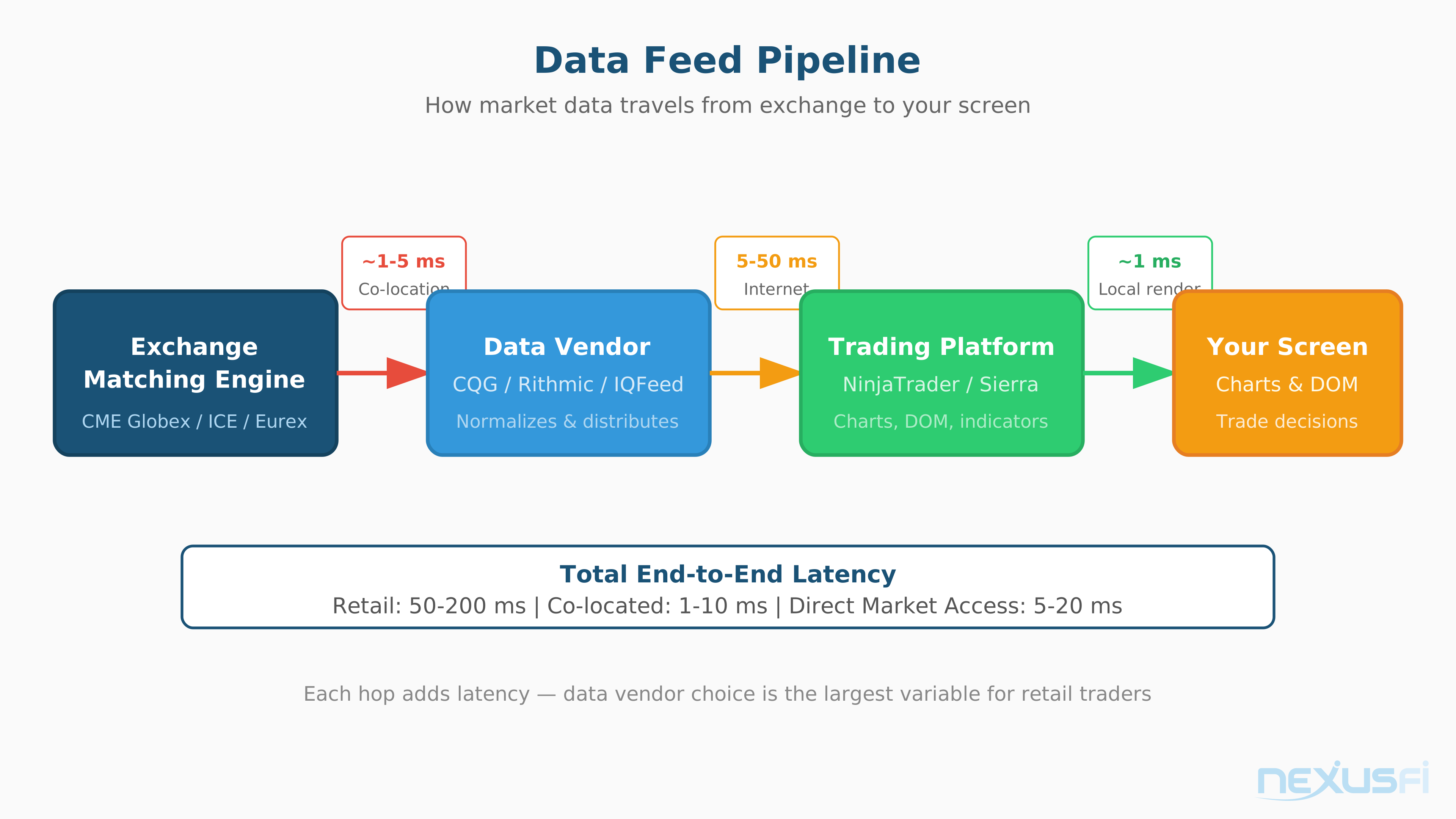
Before comparing providers, understand the pipeline. When a trade executes on the CME matching engine in Aurora, Illinois, that information travels through multiple hops before reaching your screen.
The exchange generates a market data message. That message goes to a data vendor (CQG, Rithmic, etc.) through their infrastructure
Every hop adds latency. Every processing step introduces the possibility of dropped messages, reordered updates, or altered data. The vendor you choose determines how many hops exist, how much processing occurs, and how faithfully the original exchange data reaches your screen.
[1] The same principle applies to data flowing the other direction
The Big Three: CQG, Rithmic, and IQFeed #
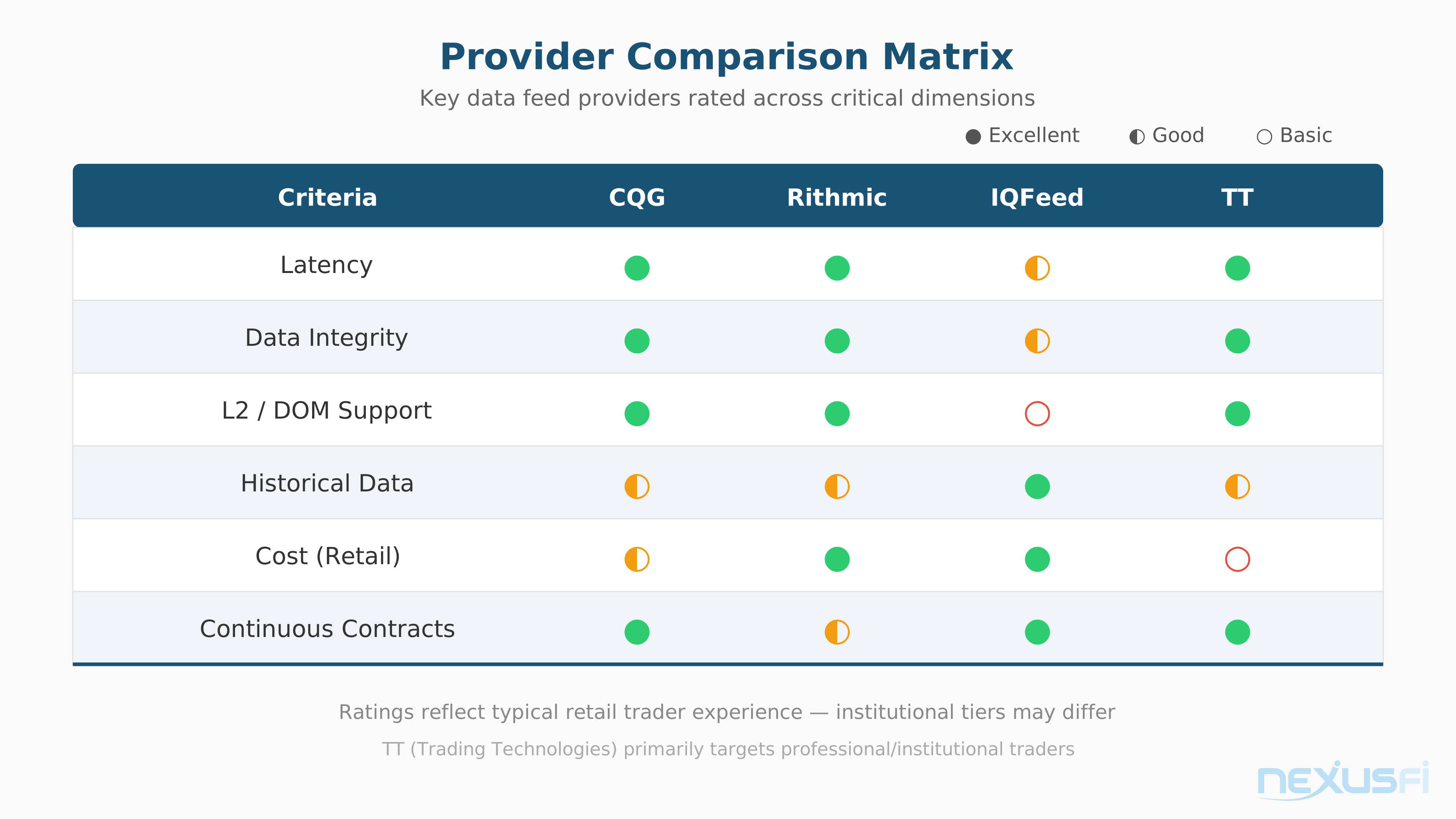
These three providers handle the vast majority of retail and semi-professional futures data. Each has distinct strengths.
CQG #
CQG is the workhorse of professional futures trading. Most institutional desks use CQG, and for good reason
CQG provides both Level 1 and Level 2 data with nanosecond exchange timestamps. Their historical data goes back 30+ years on major CME and ICE contracts, with built-in continuous contract support. You get reliable backfill, clean session handling, and automatic contract rollover.
The tradeoff is cost. CQG data runs $150-250 per month before exchange fees, depending on your subscription tier. For a chart trader running a few EMAs on ES, that's expensive data for a simple use case.
Rithmic #
Rithmic is the speed merchant. Their UDP-based delivery system is built for minimum latency
The key differentiator is Rithmic's Market By Order (MBO) data.
[2] MBO data shows individual orders rather than aggregated price levels
The downside: Rithmic doesn't provide native continuous contracts. You build your own roll logic or rely on your platform to handle it. There's also no historical backfill from Rithmic itself
[4] Individual experiences vary, but Rithmic's consistency under load is a common theme in NexusFi discussions.
IQFeed (DTN) #
IQFeed is the budget champion. For $90-130/month before exchange fees, you get real-time tick data across a broad instrument universe. IQFeed provides 120 days of historical tick data backfill and several years of minute data
[5] IQFeed fills a specific niche
The limitations are real. IQFeed provides Level 1 data by default
IQFeed also uses TCP delivery rather than UDP, which adds some overhead. For chart-based trading, you won't notice the difference. For DOM scalping in fast markets, you might.
Trading Technologies and Direct Exchange Feeds #
Trading Technologies (TT) #
TT dominates the institutional futures trading world. Their data is bundled with the TT platform
@Jigsaw Trading offers a subtle comparison: "CQG, Rithmic & GAIN are all good. Bear in mind that the most popular feed out there
TT pricing typically runs $150-220/month for data plus platform. It's often bundled with execution, making the total cost competitive if you're already using TT for trading.
Direct Exchange Feeds #
Direct exchange feeds (CME MDP, ICE, Eurex) are the source of truth. Raw data from the matching engine, no vendor processing, no aggregation. Latency can be sub-2ms when co-located.
But "direct" doesn't mean "easy." You need to:
- Parse FIX/FAST or proprietary binary protocols
- Handle sequence numbering, gap detection, and state recovery
- Build your own symbol mapping, session handling, and normalization
- Construct continuous contracts from scratch
- Manage reconnection logic and order book rebuild
Direct feeds make sense for HFT firms and quantitative shops with engineering teams. For individual traders, even sophisticated ones, the integration burden almost never justifies the marginal latency improvement over CQG or Rithmic.
Monthly cost for direct exchange data plus infrastructure runs $300-800+, dominated by colocation rack fees and network costs rather than the data fees themselves.
Tick Data Integrity: What counts #
Data integrity isn't a binary thing. It's a spectrum, and where you need to be on that spectrum depends entirely on your trading methodology.
What Can Go Wrong #
Duplicate ticks
Missing ticks
Out-of-order messages
Timestamp drift
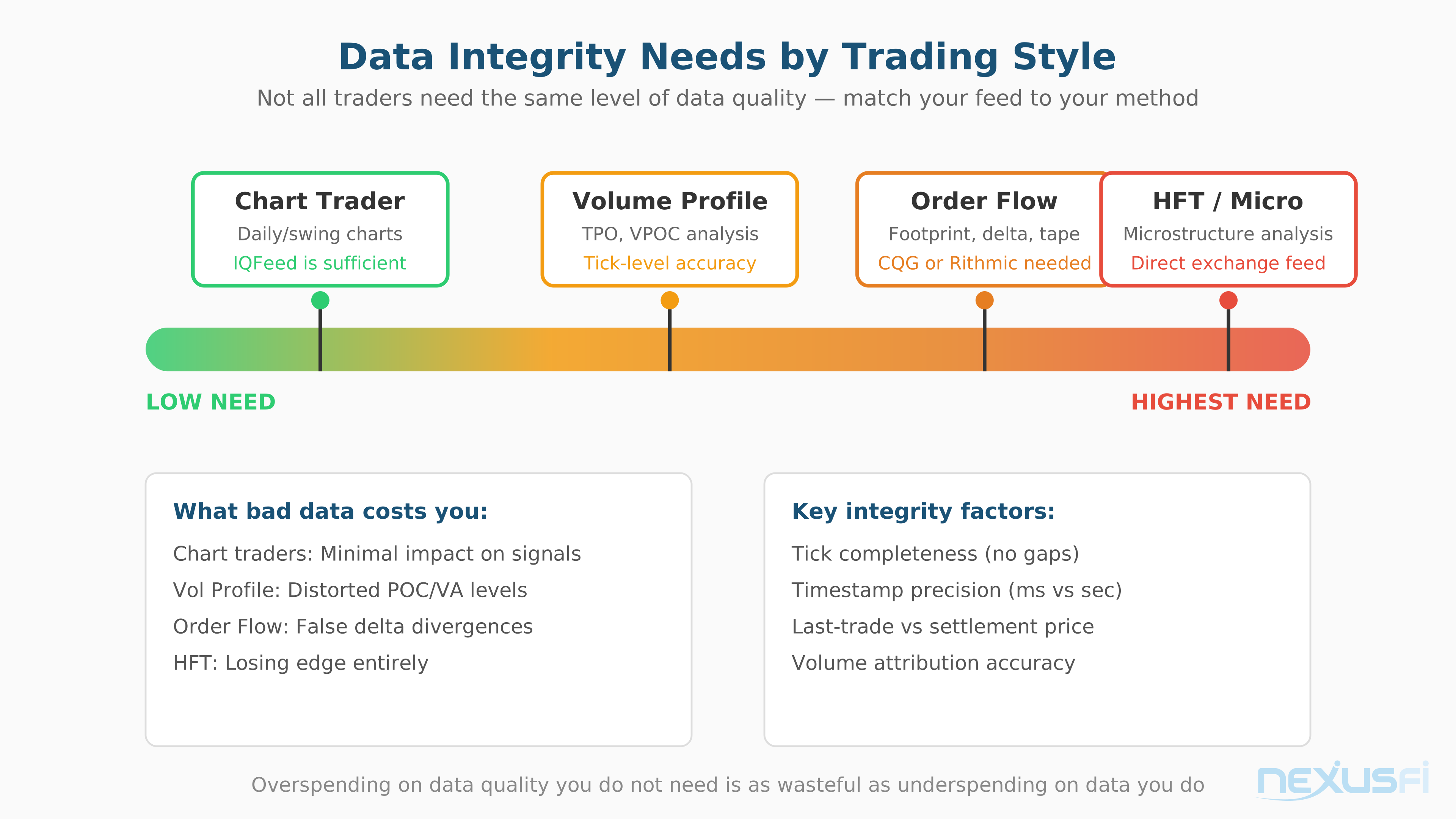
How Much Integrity Do You Actually Need? #
Chart-based discretionary traders
Volume profile and market profile traders
Order flow and footprint traders
Systematic backtesting
Historical Data and Backfill Quality #
Here's where most traders get burned without knowing it. Your live feed might be excellent, but if the historical data you're backtesting against was collected differently, your results are meaningless.
The Parity Problem #
The #1 source of backtest-to-live divergence isn't strategy logic
- Use different tick aggregation than your live feed
- Have different timestamp resolution (millisecond vs nanosecond)
- Exclude certain update types (depth events, trade conditions)
- Handle session boundaries differently
- Apply different normalization or filtering
[8] Your backfill source depends on your platform-feed combination, and each combination has different quality characteristics.
IQFeed's historical bid/ask backfill is a notable feature.
[9] This makes IQFeed especially valuable for traders who need historical bid/ask data for volume analysis and replay.
Continuous Contract Construction #
This is the #1 backtest risk that nobody talks about enough.
Futures contracts expire. When you look at a "continuous" chart of ES going back 5 years, that chart was stitched together from dozens of individual quarterly contracts. How those contracts were joined determines what your backtest sees.
Calendar roll
Volume-based roll
Open interest roll
Back-adjusted vs ratio-adjusted
CQG and TT provide pre-built continuous contracts with specific roll rules. Convenient, but you inherit their methodology. If your strategy is sensitive to roll dates or adjustment method, you need to either verify their approach matches yours or build your own.
Rithmic and IQFeed don't provide native continuous contracts. You build your own, which gives full control but requires more engineering.
The practical rule: For serious backtesting, store individual contract data and build your own continuous series with explicit, documented roll rules. Then verify your roll dates and adjustment methodology match between your backtest data and your live trading data.
Exchange Fees: The Cost Nobody Warns You About #
Exchange fees are separate from your data vendor fees and are often the larger cost component. The CME, ICE, and Eurex charge for access to their market data, and the pricing structure is more complex than most traders realize.
CME Group Fee Structure #
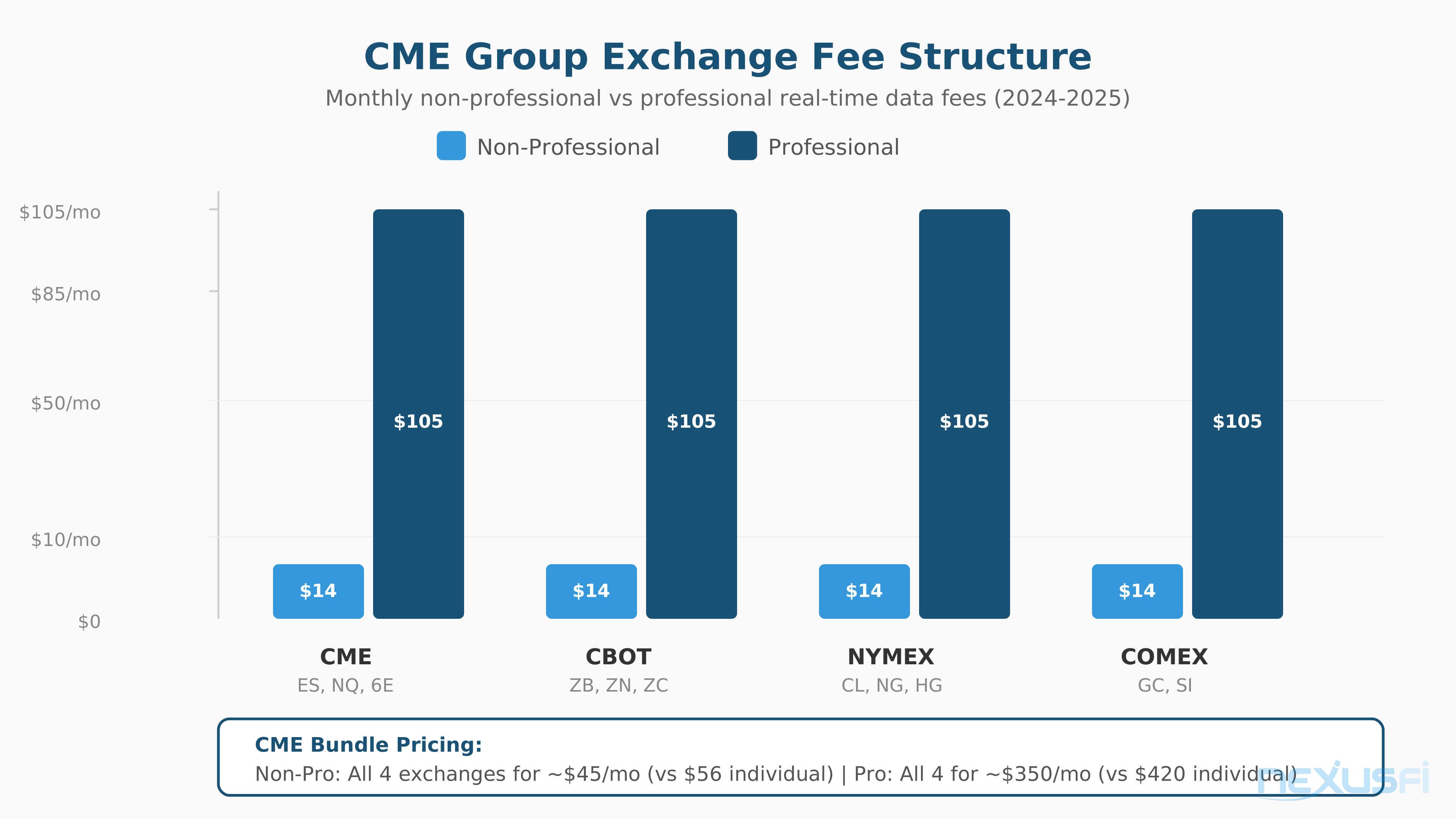
CME Group operates four exchanges under one umbrella: CME, CBOT, NYMEX, and COMEX. Data fees are charged per exchange.
Non-Professional fees: $5 per exchange per month, or a $15 bundle for all four CME Group exchanges. This is what most retail traders pay. [11]
Professional fees: Substantially higher.
[12] At $114.60 per exchange times four exchanges, professional CME data runs $458.40/month
Professional vs Non-Professional: The Classification That Costs You Money #
This distinction matters enormously. The CME defines "professional" broadly
Prop firm traders, pay attention: Getting a funded account through a prop firm evaluation often reclassifies you as professional.
[14] That's a significant additional cost that evaluation firms rarely mention in their marketing.
Level 2 / Depth Data Costs #
Subscribing to full market depth adds another layer of fees. Non-professional full depth on CME runs roughly $22/month for the full depth add-on. Professional depth costs scale up considerably.
@matthew28 asked about full depth pricing: the response confirmed "around $22/month for full depth as a non-professional." [15] For most retail traders using footprint charts or order flow analysis, this is manageable. For professionals subscribing across multiple exchanges, depth costs add up quickly.
Level 1 vs Level 2: Do You Actually Need Depth? #
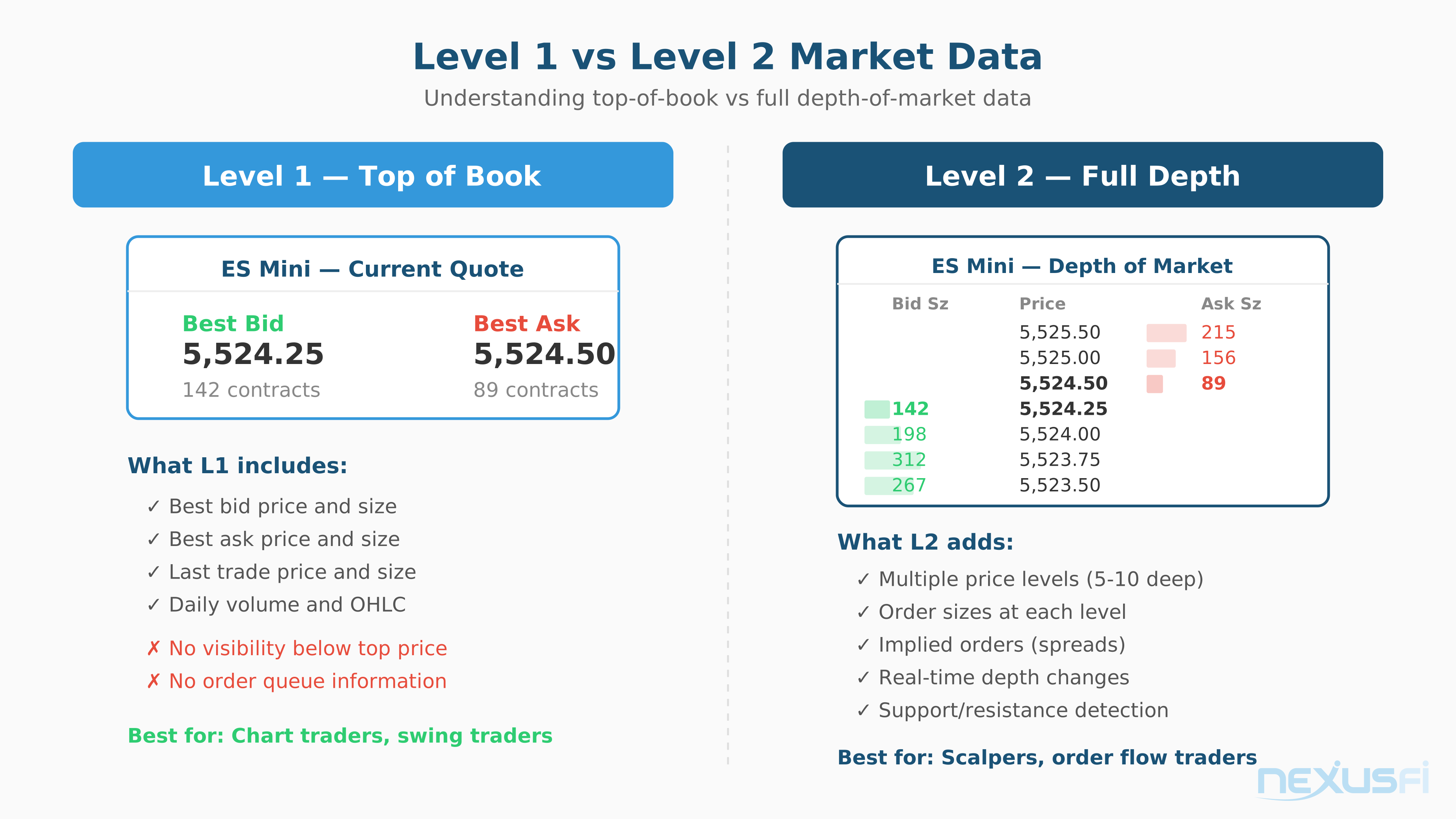
This is where traders overspend most often.
Level 1 (Top of Book) #
Level 1 gives you best bid, best ask, last trade price, and volume. This is sufficient for:
- Chart-based analysis (any timeframe)
- Trend following and momentum strategies
- Swing trading and position trading
- Basic DOM trading without depth analysis
- Most indicator-based approaches
If you trade off charts and don't analyze order book dynamics, Level 1 is all you need. Save the money.
Level 2 (Market Depth) #
Level 2 shows multiple price levels in the order book
- DOM scalping with depth analysis
- Order flow strategies based on book imbalance
- Footprint chart analysis (accurate volume-at-price requires depth data)
- Queue position strategies
- Absorption and iceberg detection
The honest assessment: Most retail traders subscribe to Level 2 because they think they should, not because their strategy requires it. If you're not actively analyzing order book dynamics, Level 1 saves you $20-50/month per exchange with zero impact on your trading results.
Total Cost of Ownership #
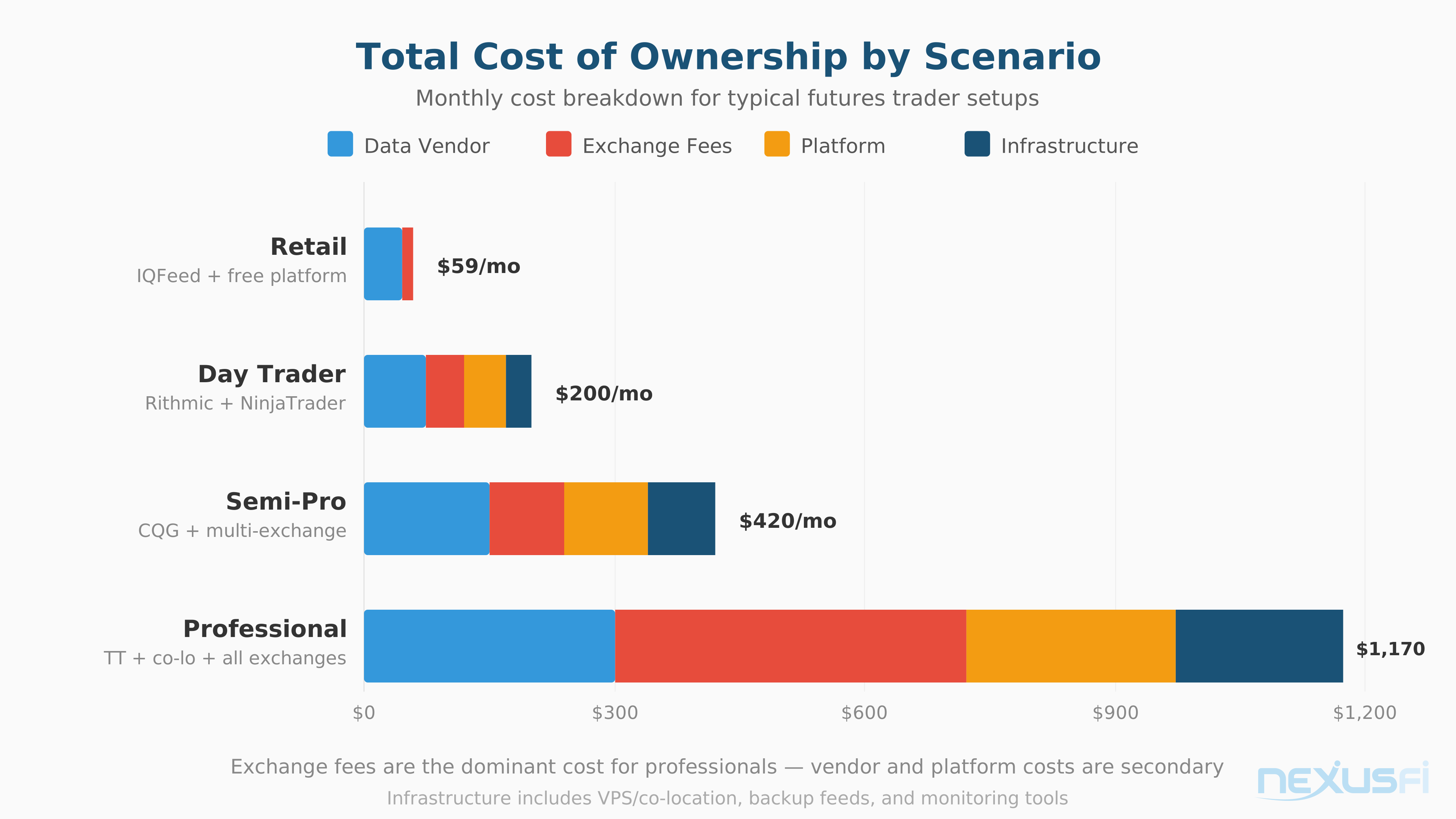
Here's the full picture that most comparison articles ignore.
Scenario 1: Retail trader, ES only, chart-based
- IQFeed data: ~$90/month
- CME exchange fee (non-pro): $5/month
- Platform: $0-50/month (some platforms free with broker)
- Total: ~$95-145/month
Scenario 2: Active day trader, ES + NQ + CL, DOM and footprints
- CQG or Rithmic data: ~$150-180/month
- CME + NYMEX exchange fees (non-pro, L2): ~$50/month
- Platform: ~$50/month
- Total: ~$250-280/month
Scenario 3: Semi-professional, multi-exchange, full depth
- CQG or TT data: ~$200-250/month
- CME + ICE + NYMEX exchange fees (non-pro, L2): ~$100/month
- Hosting/VPS: ~$30-80/month
- Platform: ~$50-100/month
- Total: ~$380-530/month
Scenario 4: Professional with funded account
- Data vendor: ~$180-250/month
- CME Group professional fees (4 exchanges): ~$460/month
- Platform: ~$50-100/month
- Total: ~$690-810/month
As @Big Mike explains: "Charting and execution platform
The takeaway: most beginning traders can get started for under $100/month total. Costs escalate when you add exchanges, depth data, or get classified as professional. Know your actual requirements before subscribing to the premium tier.
Data Feed and Platform Compatibility #
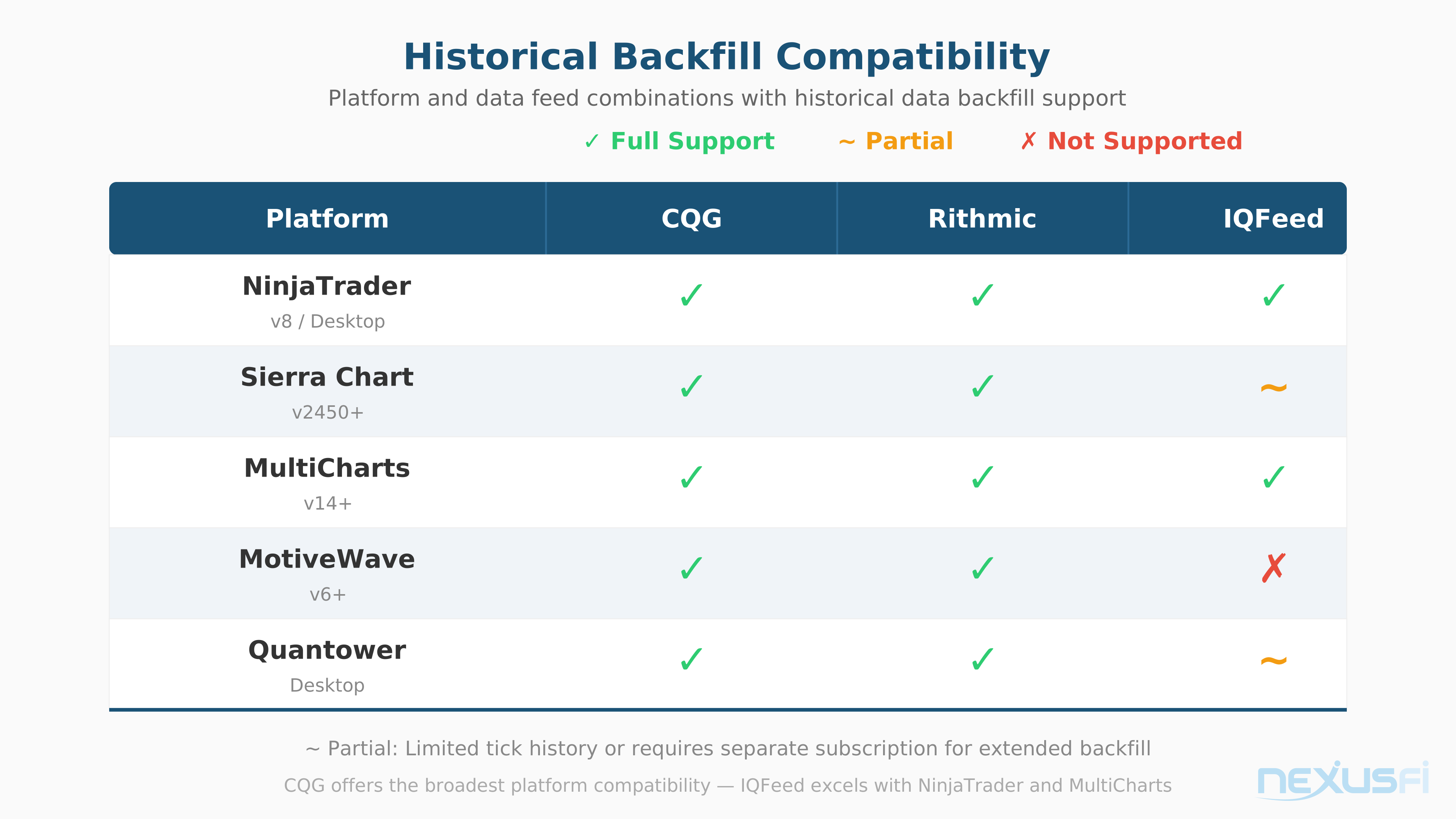
Not every data feed works with every platform. This compatibility matrix matters.
NinjaTrader: Supports CQG (native via NinjaTrader Brokerage), Rithmic (via supported brokers), IQFeed/Kinetick (data-only feed), and others. IQFeed provides the best historical backfill for NinjaTrader users.
Sierra Chart: Supports CQG, Rithmic, IQFeed, Denali Exchange (their own feed), and direct CME via Teton. Sierra Chart's own historical data service provides free tick-level backfill for subscribers. IQFeed gives historical bid/ask backfill through Sierra.
MultiCharts: Supports CQG, Rithmic, IQFeed, and several others. Good flexibility in feed choice.
TradingView: Uses its own data pipeline. You don't choose a traditional feed
Jigsaw Daytradr and Bookmap: Both recommend Rithmic for its MBO data and depth quality. CQG also works well with these platforms. IQFeed can work but lacks the depth data these tools are designed to visualize.
The Backfill Question #
Historical data backfill
IQFeed's 120-day tick backfill is a major advantage for platforms that support it. If you use NinjaTrader with a Rithmic broker, you have no tick backfill from your broker
Choosing Your Data Feed: Decision Framework #
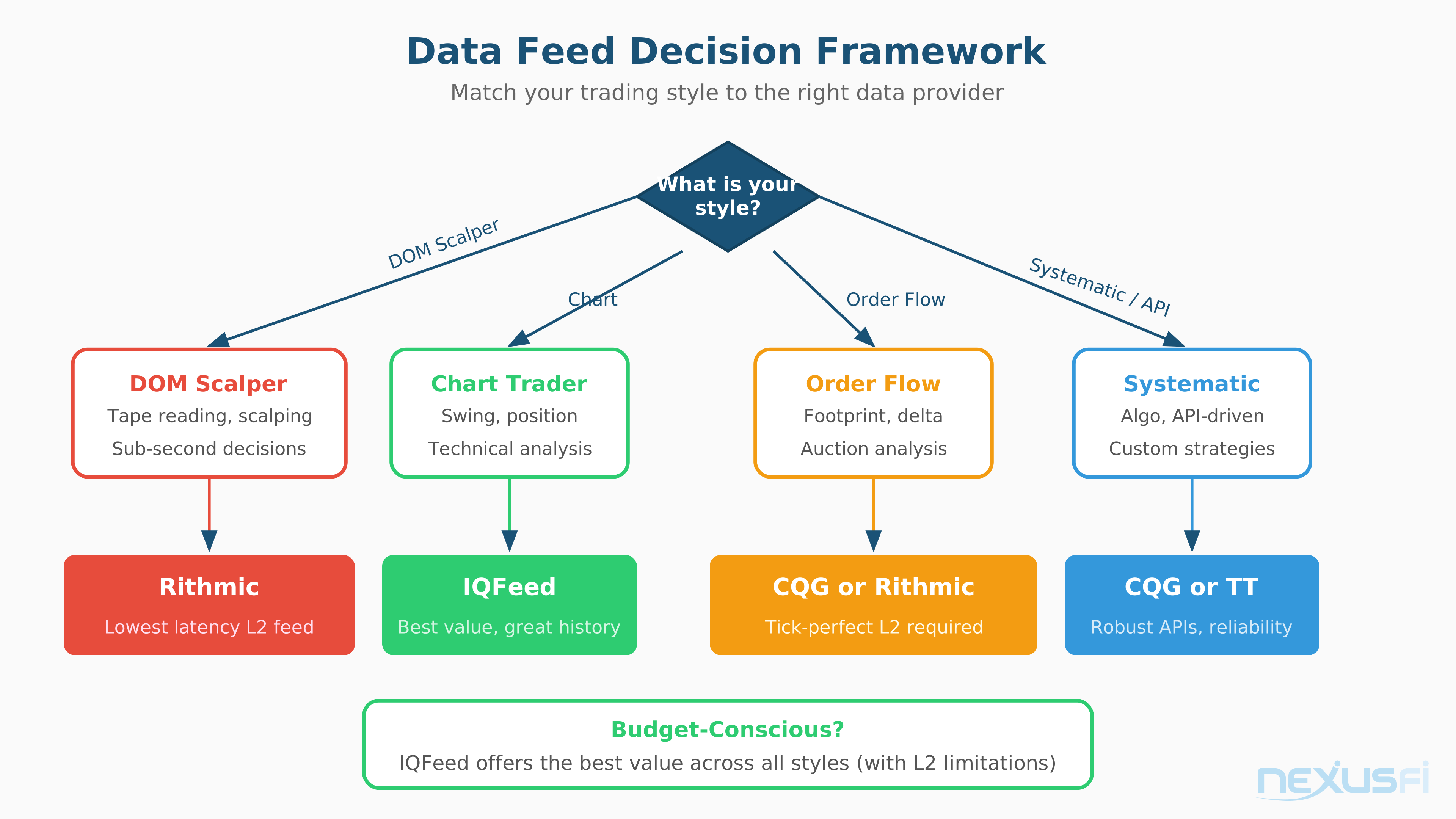
Start With Your Trading Style #
DOM scalper
Chart-based discretionary trader
Order flow / footprint trader
Systematic / algo trader
Prop firm trader
Tight budget
The 30-Day Evaluation #
Before committing to any data feed long-term:
- Run it during market hours for at least 2 weeks
- Trade through at least one scheduled economic release (CPI, NFP, FOMC)
- Compare tick counts against an independent source if possible
- Test reconnection behavior
- Verify historical backfill matches your requirements
- Calculate your total monthly cost including all exchange fees
@bobwest offers practical advice: "The best advice would be to take each out for a spin with a demo version from a broker who provides it... Your personal assessment
When Data Feed Choice Doesn't Matter #
For most futures traders, the differences between CQG, Rithmic, and IQFeed are marginal for their actual trading methodology. If you trade 5-minute charts with a couple of indicators and standard bracket orders, all three deliver more than adequate data.
Data feed choice becomes critical only at the extremes
For everyone else, pick a feed that's supported by your broker and platform, fits your budget, and delivers reliable data during market hours. Then stop second-guessing and focus on your actual trading. The edge is in your methodology, not your data feed.
DTN IQFeed, a NexusFi sponsor, has served the retail futures trading community for decades and remains one of the most cost-effective paths to reliable real-time and historical market data. For traders who need something beyond what their broker provides, it's worth evaluating alongside CQG and Rithmic based on the criteria outlined above.
Knowledge Map
Prerequisites
Understand these firstReferences This Article
Articles that build on this topicCitations
- — NexusFi Discussion
- — Rithmic independent of broker possible? (2021) 👍 3“Hi, I have experience with Rithmic and CQG and Denali. Rithmic Pros: Have MBO and can see all order book(subscribe market depth). cons: Have monthly connect fee about 25. order route fee is 0.1 or 0.25 per side.”
- — NexusFi Discussion
- — Rithmic vs. CQG Question (2014) 👍 6“I disagree. I can see the difference in the two feeds. Especially on days like today (Fed Meeting release days) All day the market has been slow. Just before a Fed decision I always reboot my machine and restart NT.”
- — What is best broker for intermediate term futures trader? (2012) 👍 2“Rithmic (Optimus Futures) is one of the best broker data feeds. There is no backfill with Rithmic, however. IB's data feed is terrible. The best data feed you can get as a retail trader is arguably DTN IQFeed.”
- — Kinetick - A new Market Data Feed Service for NinjaTrader (2011) 👍 2“Kinetick is a branded version of IQFeed for use exclusively with NinjaTrader. IQFeed (and thus Kinetick) offers 120 days of historical tick data backfill, as well as several years of minute data.”
- — reliable datafeed for jigsaw trading (2018) 👍 3“CQG, Rithmic & GAIN are all good. Bear in mind that the most popular feed out there - TT (by the fact so many pros use it) - is a bit less accurate in matching the "side" a trade occured that all 3 of them.”
- — Velocity / NinjaTrader / Trading Technologies (2011) 👍 3“Zen Fire is a brand owned by some partners of Mirus Futures. It is an "copy" of Rithmic, re-branded, and running their own servers. NinjaTrader & Zen Fire are very close partners.”
- — Unfiltered Data (2015) 👍 3“Kinetick is just a NinjaTrader branded version of IQFeed. Yes, it offers historical bid/ask. However, NT7 doesn't support historical bid/ask, so if you want historical bid/ask backfill in NT7 then no data feed is going to help you.”
- — I am being charged $15 fee from the CME every month? (2015) 👍 4“Normally, you have to pay exchange fees to receive real-time data. The reason is that the exchanges are not set up as charitable trusts. Therefore you have to pay fees, if you wish to trade on an exchange.”
- — CME Fee changes 2014, significant impact (2014) 👍 6“CME Market Data Fee Changes Effective March 1, 2014 The CME Group has announced significant changes to its existing Market Data Policy and Fees.”
- — 2022 CME Group Market Data Fees Increase (2021) 👍 7“Not as bad as I feared when I opened the email... Notification: CME Group Market Data Fee Adjustment Effective: January 1, 2022 Starting in January 2022, data fees for most licenses and subscriptions will increase in line with the Organization for Ec...”
- — CME emini data (2019) 👍 5“We may have a little confusion here. These are not separate things. All futures data is supplied by CME, the futures exchange, no matter how it gets to you. If you are using IB, the data started out from CME and is sent to you through IB.”
- — Anybody heard of topsteptrader (review) (2018) 👍 4“The data feed, when it is charged, is levied by the CME; the Combine fee is charged by TST. Two different things. I was talking about the CME data feed fee.”
- — CME with full dept of market data fee(6E, 6B,...) with discount as non-professional? (2021) 👍 1“The currencies are all on one exchange, the CME, so around $11 a month for full depth as a non-professional. You can't sign up directly with the CME.”
- — NexusFi Discussion
- — NexusFi Discussion