



ATM Strategies: Automated Trade Management for Futures Traders
Overview #
When you click buy on the DOM, the trade starts. Everything after that is trade management — and how you manage it determines whether a technically sound entry becomes a winner or just another break-even scratch. ATM strategies (Automated Trade Management — NinjaTrader's term, but the concept is universal across modern futures platforms) let you pre-configure exactly what happens the moment your fill is confirmed: stop-loss placed, profit target set, trailing conditions armed, all without touching another button.
This isn't automation in the algo-trading sense. You're not building a system that finds and enters trades. ATM strategies handle post-entry mechanics only — the moment-to-moment position management that most traders do manually, under pressure, often inconsistently. The automation removes emotional interference from execution. You decide the rules pre-trade when you're calm, the platform executes them in the heat of battle when you might not be.
For active futures traders — whether you're scalping ES for 4-tick targets or swinging CL for 50 ticks — ATM configuration is the practical skill that separates consistent execution from improvised management. A poorly managed winner is indistinguishable from a loss over a long enough sample. Get the mechanics locked in.
Key Concepts #
Bracket Orders and OCO Mechanics
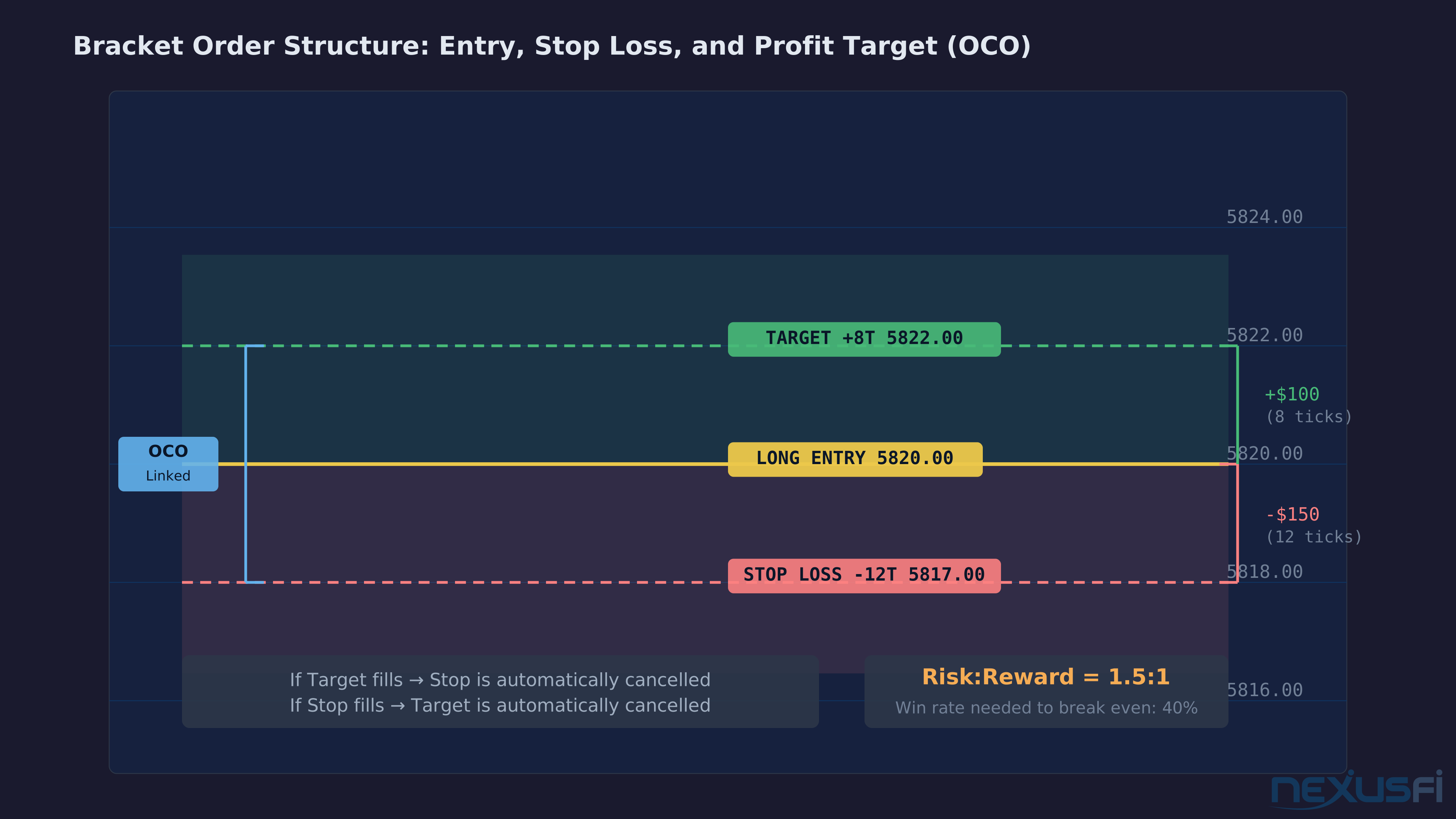
A bracket order wraps your entry with two opposing exit orders: a stop-loss below (for longs) and a profit target above. The stop-loss and profit target are linked as OCO — One-Cancels-Other — if one fires, the platform automatically cancels the other. You're never left with an orphaned order sitting in the book after the trade closes.
In practice traders use the terms interchangeably, but the bracket is pre-attached to entry while an OCO can be applied after.
The OCO Execution Risk Most Traders Miss
Here's what most platforms won't advertise: OCO orders are almost never native to the exchange. CME doesn't support native OCO for futures.
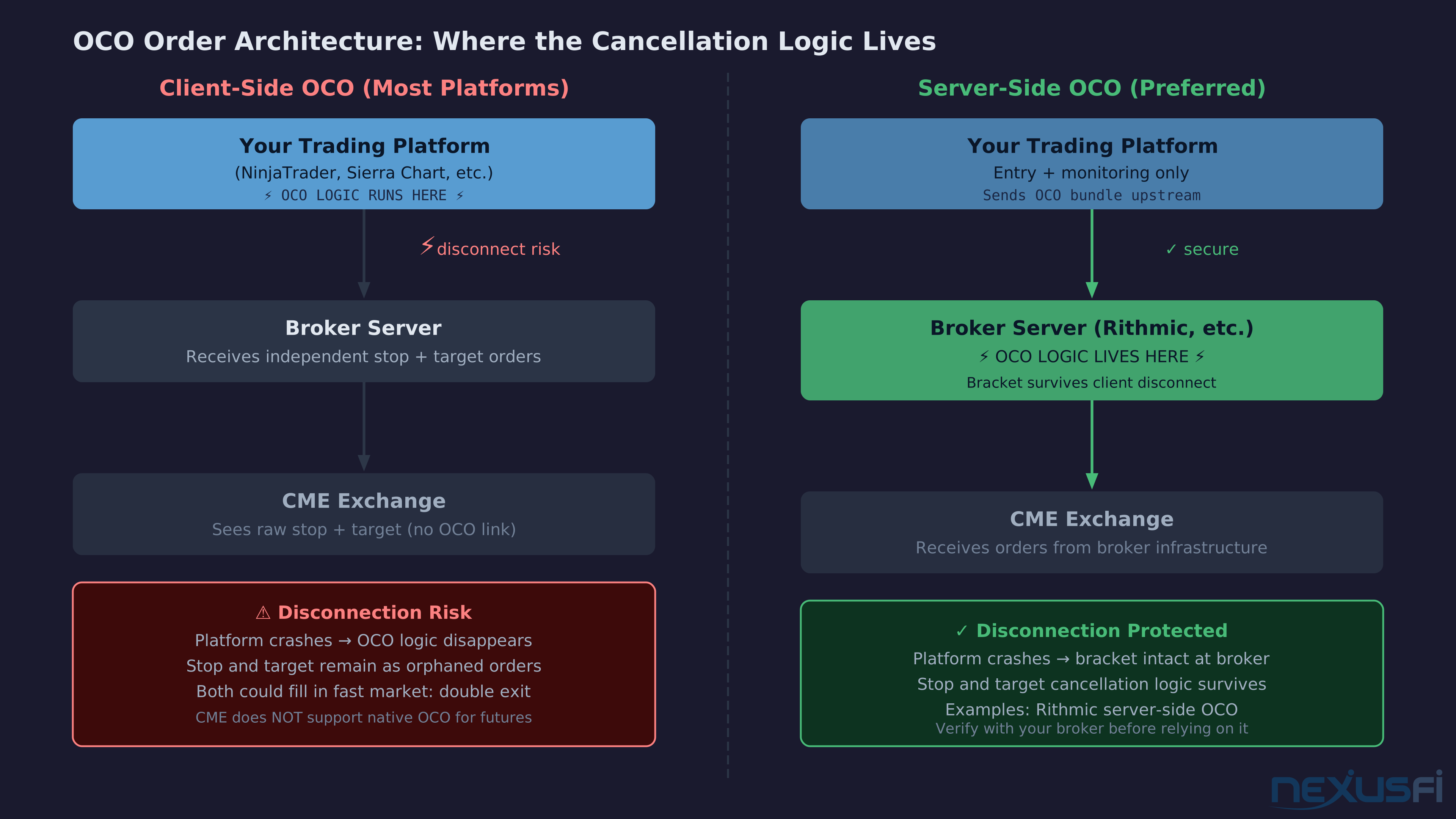
That matters when things go wrong. If your platform disconnects mid-trade, the OCO cancellation logic may vanish with it. Your stop and target remain as independent orders at the exchange, but the instruction linking them — if one fills, cancel the other — is gone. In a fast-moving market, both legs could fill. You end up flat with double the commission and a reconciliation headache.
Server-side OCO — where the broker's infrastructure holds the bracket logic, not your local platform — protects against this. Rithmic's server-side OCO brackets survive client-side disconnection. If you're trading with meaningful size, verify your broker's OCO handling explicitly before assuming you're protected.
ATM Strategy Templates
An ATM strategy template is a saved configuration that specifies every aspect of post-entry management: quantity per tier, initial stop in ticks, profit target per tier, breakeven trigger conditions, and trailing stop mode and parameters. You build it once, name it (ES_2CT_12T_STOP, CL_3CT_15T_TRAIL, etc.), and apply it at entry with a single click or DOM dropdown selection.
The workflow: pre-session, you pick the template appropriate to the day's context. Choppy session developing — use your tight bracket with close target and no runner. Trending open, good volume, clear structure — deploy the wider bracket with a trailing runner. The decision is pre-trade, calm, analytical. The execution is one-click at entry.
NinjaTrader's ATM system is the most fully featured implementation in retail futures platforms, with a complete Stop Strategy subsystem for advanced trailing logic. Sierra Chart's Trade Window bracket orders cover the same ground with different UX. Tradovate and Rithmic's RTrader both support configurable bracket profiles. The concepts apply across all of them.
Build separate ATM templates for different market conditions. A single "default" template that you modify ad-hoc on every trade defeats the purpose of automation. Minimum useful library: one tight bracket for scalp and chop conditions, one wider bracket with trailing runner for trend conditions. Add instrument-specific templates as needed.
Breakeven Automation
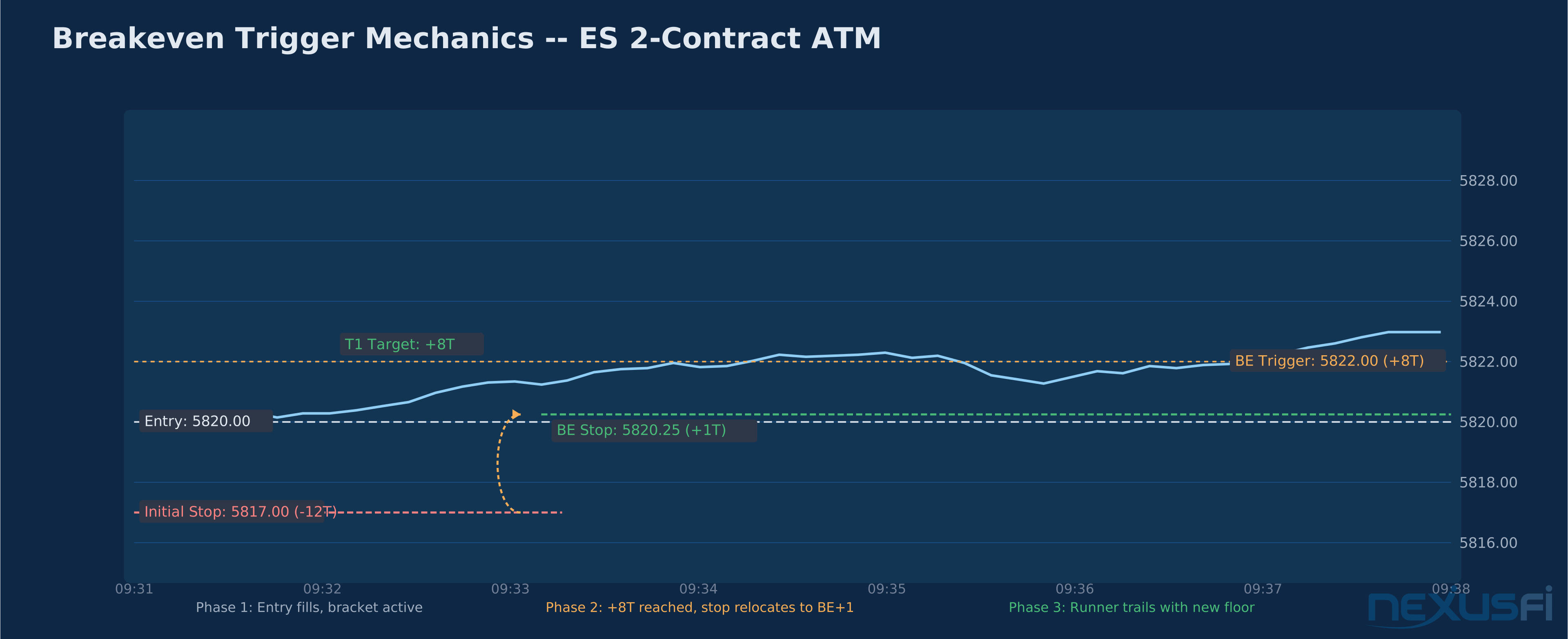
The most common ATM configuration: once price moves X ticks in your favor, the stop-loss automatically relocates to entry. You're in a "risk-free" trade. The math looks clean — you've locked in survival — but the community has stress-tested this extensively and the results are clear.
@DarkPoolTrading ran the test explicitly — same entries, same targets, breakeven stop versus price-action stop over several months of forward testing: "The results were beyond clear. I made almost 10 times the profit using a price action stop." The mechanism: markets move in swings. A breakeven stop configured at an arbitrary tick level gets tagged during the normal oscillation of a legitimate continuation move. The trade exits, the market trends to your original target without you.
The community conclusion: breakeven automation has real psychological value — it reduces monitoring anxiety, removes the "capital at risk" feeling once you're up — but is statistically inferior to market-structure-based stop management. Use it if you need it to manage anxiety and hold positions. Don't mistake it for trading edge. The stop should move when the market tells you it should move, not because of where you entered.
Breakeven stop triggers configured at arbitrary tick levels — move stop to entry after +8 ticks — will tag your runner during normal market oscillation approximately 40-60% of the time in balanced sessions. The move exists independent of your entry price. Configure breakeven triggers at structural levels when possible — the high or low of a significant candle, a tested level — not at a fixed tick count from entry.
@Big Mike reinforces this through empirical testing: "Over the course of your next 500 live cash trades, document both a BE stop at an arbitrary figure of ticks, as well as a stop managed by reading price action, and see which comes ahead. I've done this for both my discretionary trading as well as algorithmic trading, in both cases it was quite obvious a conclusion which is why I do not employ an arbitrary BE in my trading."
Trailing Stop Modes
Most ATM systems offer three trailing modes, each with different behavior profiles:
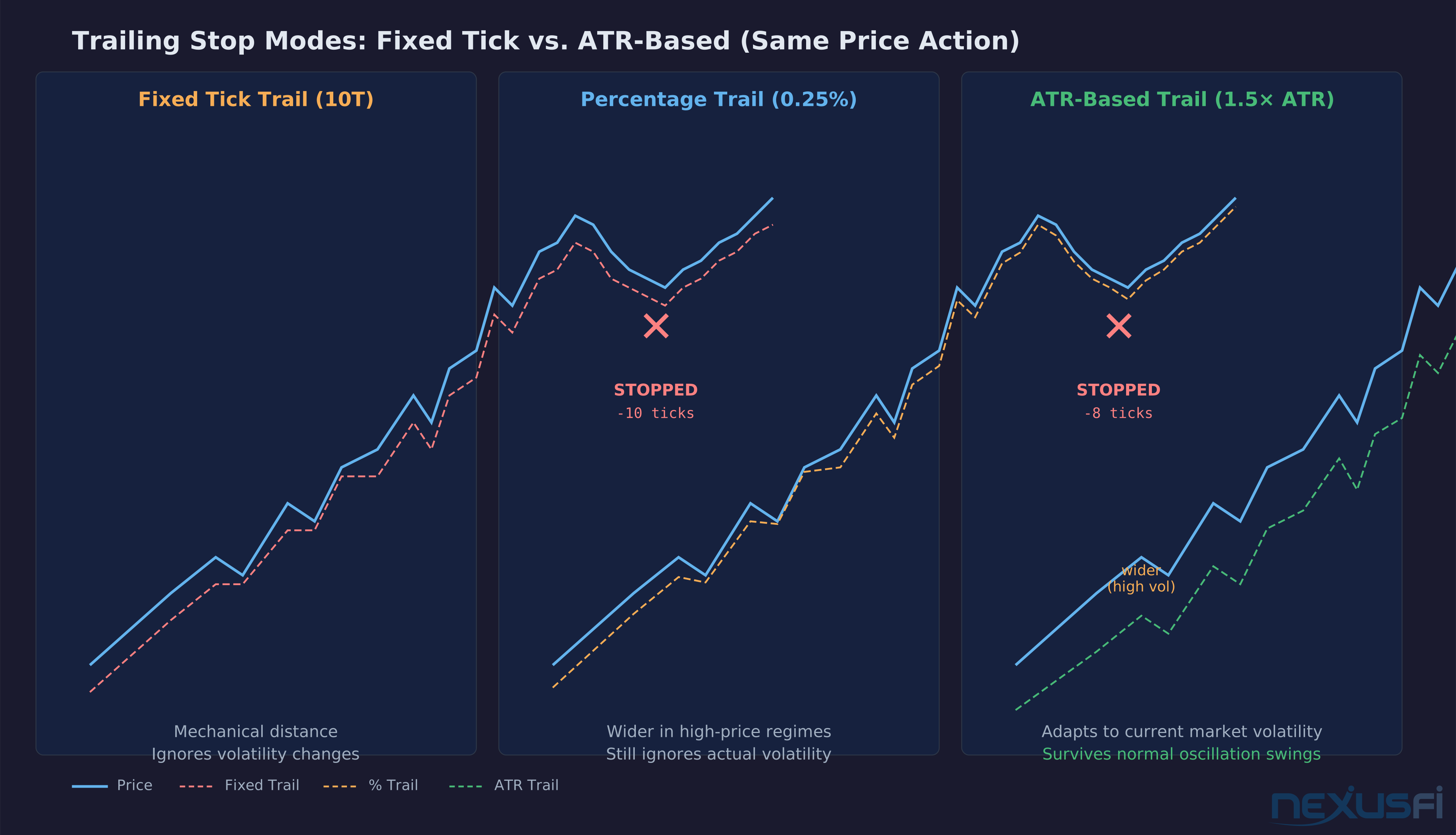
Fixed-tick trail: Stop follows price at a constant tick distance. If you set a 10-tick trail and price moves from 5820 to 5830, the stop follows to 5820. Then to 5822 when price hits 5832. Predictable. Adapts poorly to volatility changes — same 10-tick trail during a slow morning session as during a post-FOMC explosion.
ATR-based trail: Stop distance equals a multiple of Average True Range.
The stop adapts to actual market behavior rather than imposing an arbitrary tick distance onto variable conditions.
ATR-based trailing is theoretically superior for the runner contract. The practical challenge: most ATM systems don't expose ATR trailing natively through the bracket UI. NinjaTrader's Stop Strategy system supports it via custom scripted stops. More configuration, but worth it for active runners.
Multi-Tier Targets and Scale-Out Logic
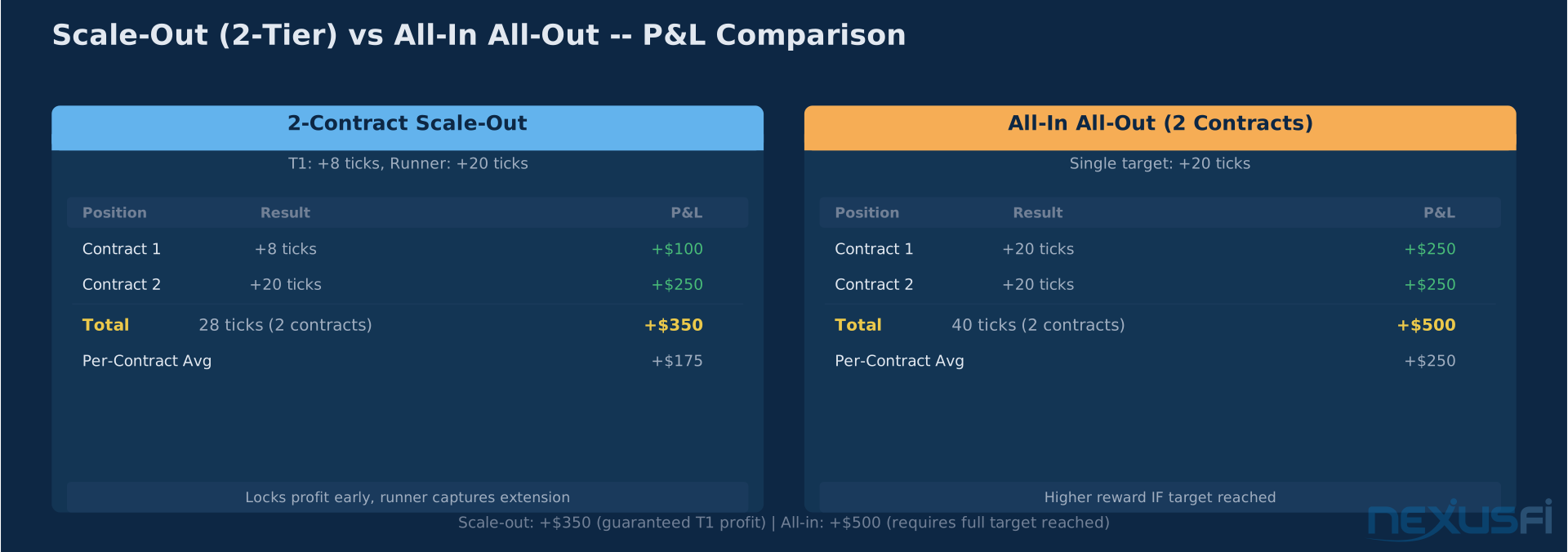
ATM strategies support multiple profit targets across a position split into contract tiers. The canonical setup: trade 2 contracts, take the first at Target 1 (a fixed, calculable level), let the second run with a trailing stop.
The logic holds — scaling out gives up R-multiple on the runner in exchange for locked profit on the early exit.
@Private Banker offers the practical counter: scale-outs "lock in profit in the event the market does not trade up to the final target and comes back against you while you're holding a full position." The goal isn't maximum gain on each trade — it's managed participation with capital protection. Which approach works better depends on your win rate, your average trade duration, and whether your runners actually run.
The mathematical argument against scaling out assumes your runners actually reach large targets. In balanced, range-bound sessions, runners frequently fail to extend. In trending conditions, they succeed. The "correct" approach is regime-dependent. Traders who run a single multi-tier setup across all regimes are averaging two different problems and wondering why their numbers look inconsistent.
How It Works: The Order State Machine #
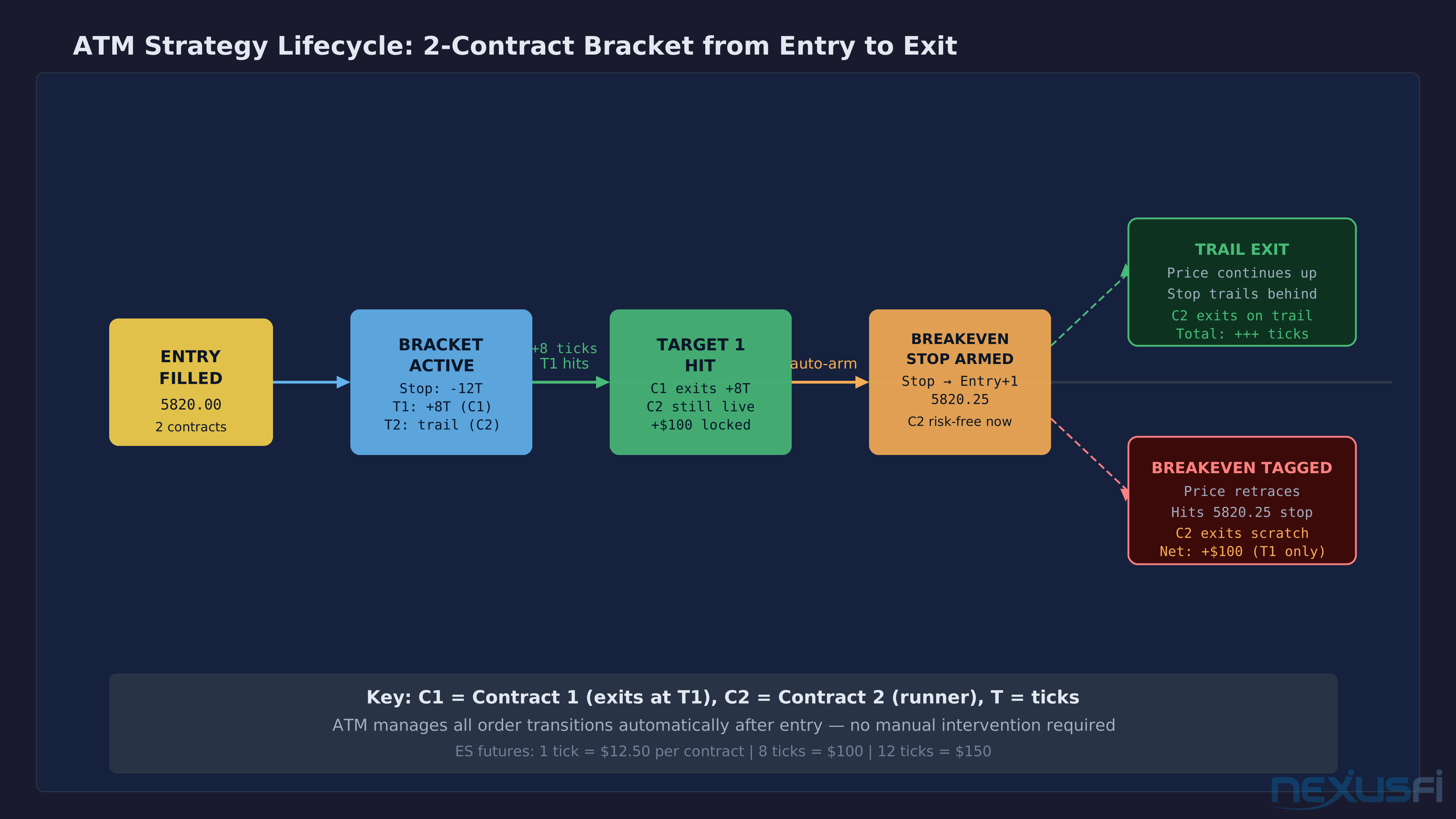
When you enter a trade with an ATM strategy active, the execution sequence is:
- Entry order submitted — limit, market, or stop entry
- Fill confirmed — ATM activates immediately on fill
- Stop-loss and Target 1 submitted as linked OCO bracket
- Multi-tier setup: Target 2 and its trailing stop strategy armed, waiting for T1 trigger
- Breakeven trigger monitored continuously — platform watches price against your configured trigger level
- Breakeven condition met: platform cancels original stop, submits new stop at entry offset
- Trailing logic monitors price: stop updates per configured mode (fixed, percentage, ATR)
Steps 5-7 run on the platform, not the exchange. This is the critical architectural fact: most "automation" in retail ATM systems is platform-side computation operating on market data. Your connectivity to the broker is the weak link.
Client-Side vs. Server-Side OCO
Client-side: Your platform manages the OCO link. If the platform disconnects, the OCO logic is gone. Stop and target remain as independent exchange orders — if price reaches both during the disconnection, both fill. You're flat, but you've paid commissions on both legs and potentially experienced a whipsaw your OCO would have prevented.
Server-side: The broker's infrastructure manages the OCO link. A platform crash doesn't affect the bracket. Your stop and target remain properly linked as long as the broker's systems are up. This is the preferred configuration for any trader managing positions they can't monitor continuously.
Most retail platforms are client-side by default. Rithmic-based platforms (through their server-side OCO bracket feature) offer server-side protection. Tradovate's cloud infrastructure handles order management server-side. Verify explicitly with your broker/platform combination before assuming you have protection.
Practical Application #
Setting Up a Two-Tier ATM with Breakeven
The trigger numbers are your choices — the structure is universal.
Position Sizing Integration
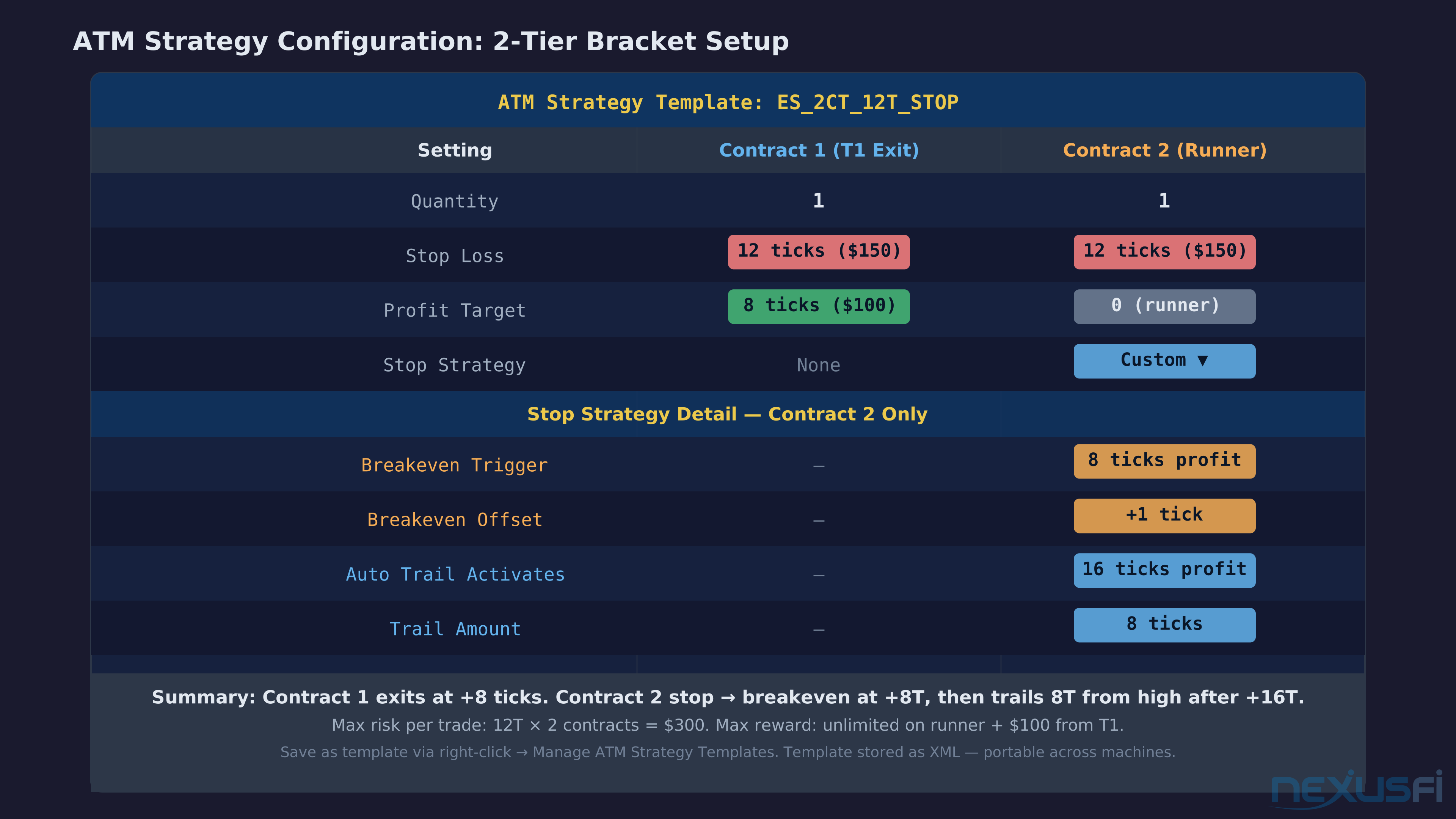
@Fat Tails laid out the integration between position sizing and ATM templates: "Setup a strategy with 2 contracts and a stop-loss of 12 ticks. Then you may add a first target of 12 ticks (1 contract), and a trailing stop (1 contract). If you enter a trader, NinjaTrader will automatically set the required brackets."
The framework: define your dollar risk per trade first (say, $300 on a $30,000 account — 1% of equity). A 12-tick ES stop is $150 per contract — so 2 contracts gives exactly $300 risk, matching your rule. Build the ATM template around those numbers. The template enforces position sizing mechanically.
His Rule of Three for ES: stop > 12 ticks = no trade. Stop 6-12 ticks = 2 contracts. Stop ≤ 6 ticks = 4 contracts. Codify this in named ATM templates and position sizing becomes automatic. The template selection IS the sizing decision.
ATR-Based Trailing Stop Configuration
For platforms supporting ATR trailing — NinjaTrader via Stop Strategy, Sierra Chart via custom study — the workflow:
- Determine ATR lookback (14 periods is standard; shorter lookbacks react faster to volatility changes)
- Set the ATR multiplier (1.5x is common for ES on 5-minute chart during RTH)
- Attach the ATR stop as the runner contract's Stop Strategy
- Test in replay: does the stop survive normal oscillation while tightening during consolidation?
@grausch notes a secondary benefit: ATR trailing forces smaller position sizes during high-volatility periods. If your stop widens because ATR expands, your position size must shrink to maintain constant dollar risk. The volatility normalization is built into the mechanism — you're automatically trading smaller when the market is wilder.
Platform-Specific Implementations
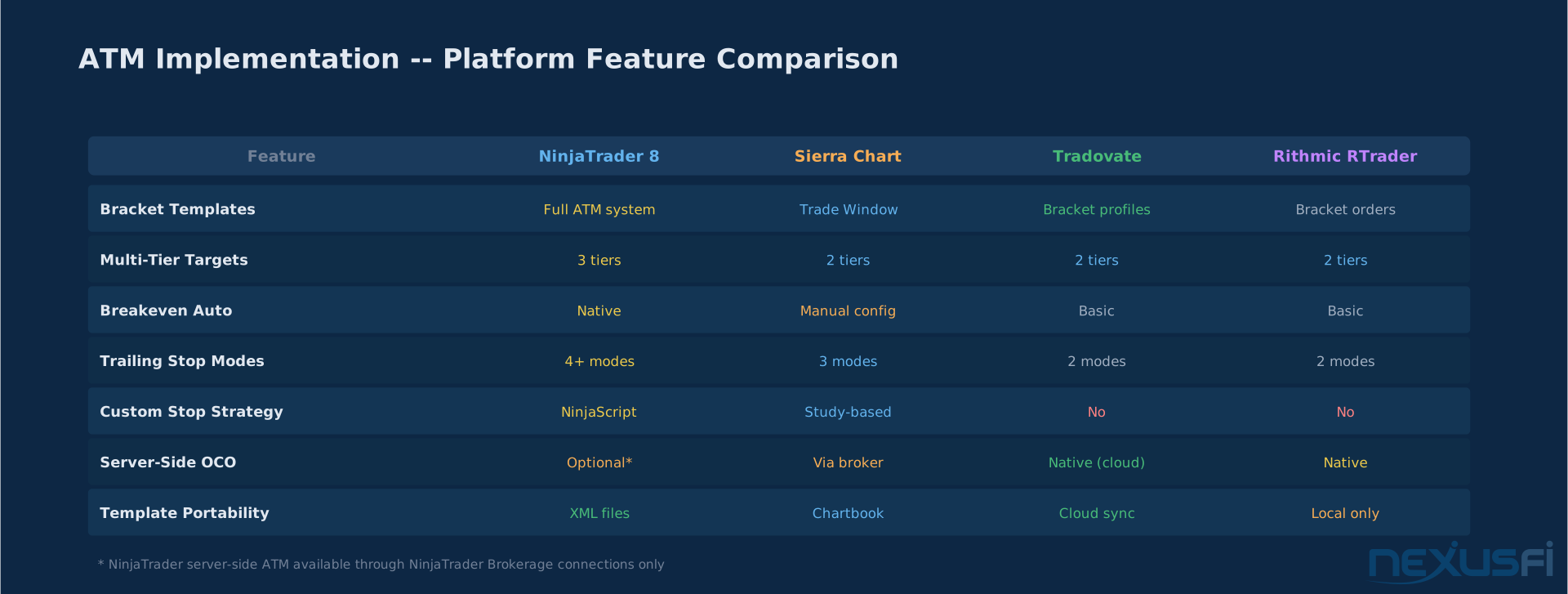
NinjaTrader 8: Most flexible implementation. ATM Strategy plus Stop Strategy systems handle any configuration. Templates stored as XML files — portable and shareable. @JonnyBoy documented template sharing: "Copy cskafan123_atm template.xml to NinjaTrader 8 > templates > AtmStrategy." This portability is underused — veteran traders often share complete template libraries with developing traders in the community.
Sierra Chart: Trade Window bracket configuration via Attached Orders. Stop, target, and trailing stop all configurable per position. Less template-oriented than NT8 but equally capable. The Real-Time Price Stats section can display ATR-based calculations for manual reference.
Tradovate: Cloud-based bracket profiles with server-side order management. The bracket survives client-side disconnection — an architectural advantage for traders on unreliable connections. Templates are account-level rather than machine-local.
Rithmic RTrader: Server-side OCO brackets as standard. The stop-loss and profit target are held at Rithmic's infrastructure level. Platform disconnection doesn't orphan your bracket. For traders stepping away from screens with open positions, this matters enormously.
The procedure is platform-specific but the concept — OCO-linked brackets attached at entry — is universal.
Instrument-Specific Template Libraries
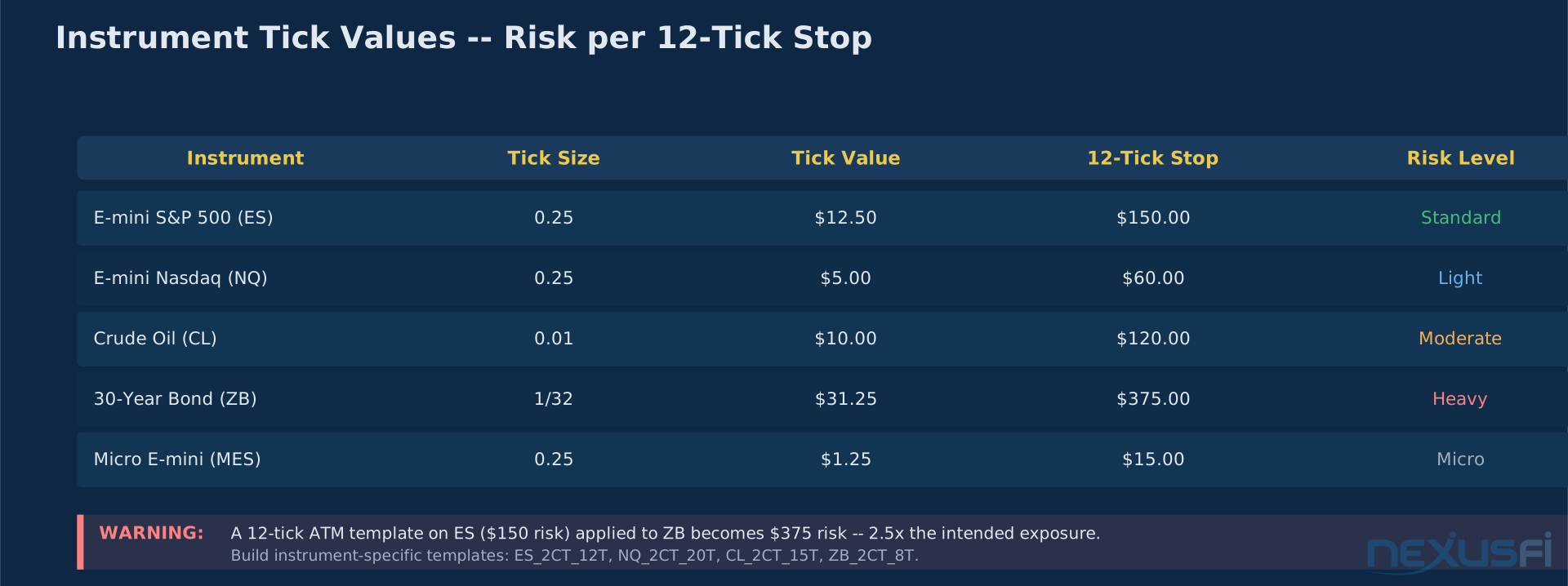
Don't run a single template across instruments. Tick values differ much:
- ES: 1 tick = $12.50. A 12-tick stop = $150 per contract
- NQ: 1 tick = $5.00. A 12-tick stop = $60 per contract
- CL: 1 tick = $10.00. A 12-tick stop = $120 per contract
- ZB (30-yr Bond): 1 tick = $31.25. A 12-tick stop = $375 per contract
A "12-tick ATM" configured on ES and accidentally applied to ZB triples your risk. Build instrument-specific templates and name them clearly: ES_2CT_12T, NQ_2CT_20T, CL_2CT_15T. The naming convention makes misapplication obvious before you enter.
Trade Setups #
Setup 1: ES Range Day Scalp (2-Contract ATM)
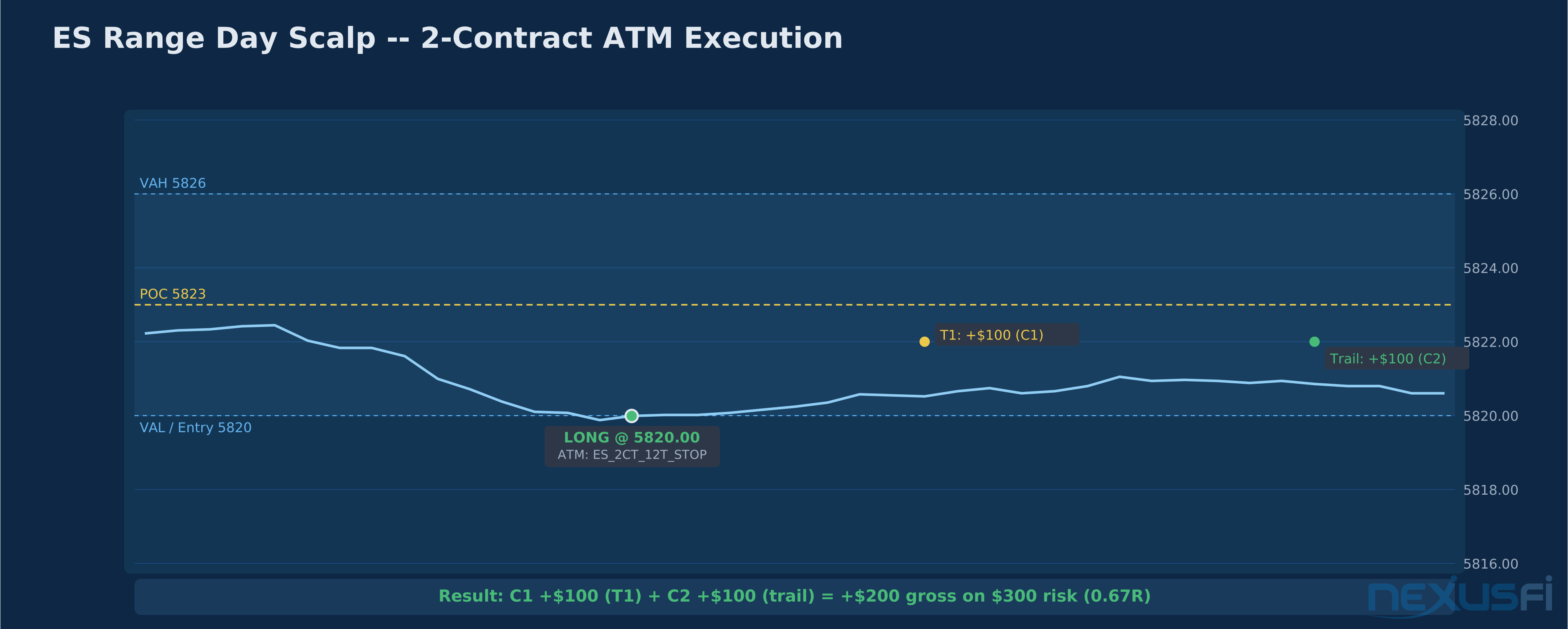
Context: ES morning RTH session, trading around the value area from yesterday's composite profile. Price is in a defined range — balanced, not trending. RTH session has respected VAH and VAL twice each.
Entry: Limit order long at VAL, 5820.00. ATM deployed: ES_2CT_12T_STOP (12T stop, T1 = 8T, breakeven at 8T, trail 8T after 16T MFE).
Execution: Price fills at 5820.00, rallies to 5822.00 — 8 ticks. T1 fires, Contract 1 exits +$100. Stop moves to 5820.25 on Contract 2. Price continues to 5824.00, trailing arm activates. Price reaches 5826.00, stop trails to 5822.00. Price reverses, hits 5822.00. Contract 2 exits +8 ticks.
Result: T1 +$100, T2 +$100. Total +$200 gross on 2 contracts risking $300. Risk-reward delivered.
Setup 2: The Automation Failure Case (Trending Day)
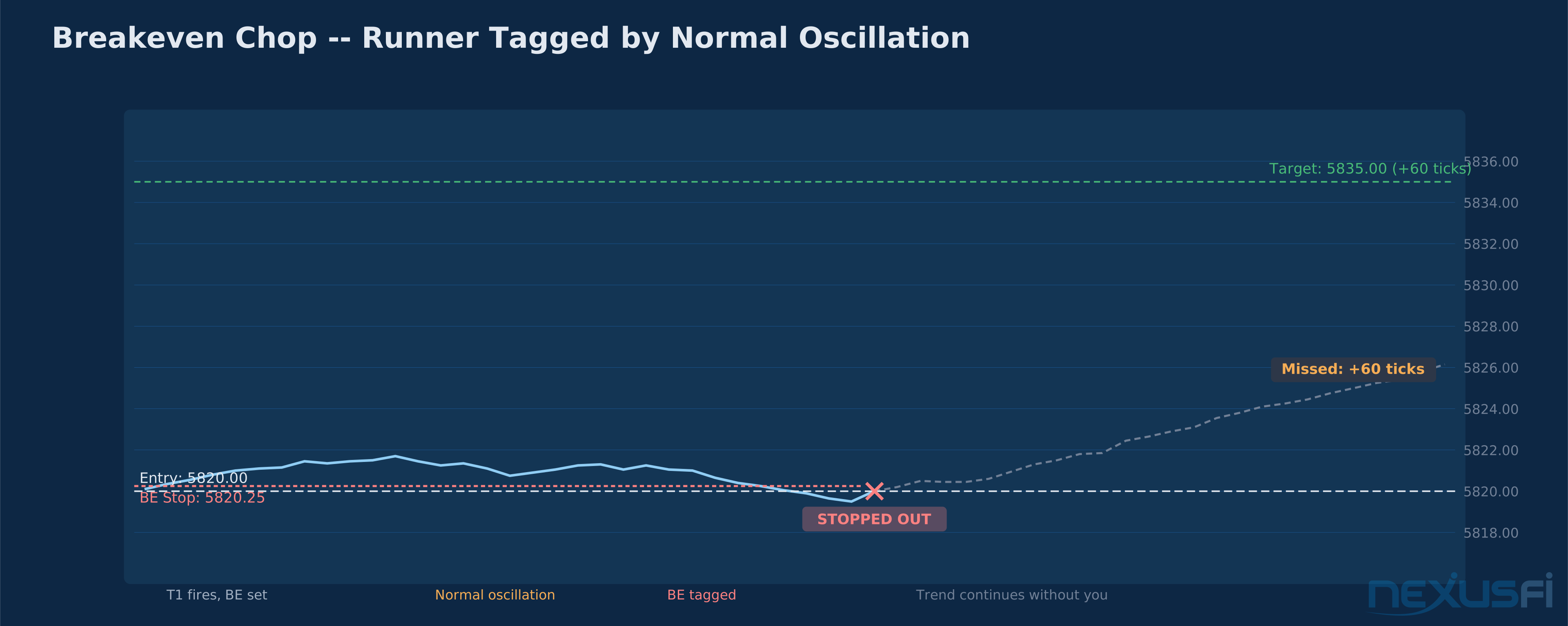
Same setup, different session character. Price fills at 5820.00, moves to 5822.00, T1 fires, stop moves to 5820.25. Then the session oscillates: 5823.00, 5821.50, 5822.75, 5821.00 — the normal microstructure of a trend day's consolidation before continuation. Breakeven stop fires at 5820.25. Runner exits for scratch.
Then price trends to 5835 over the next two hours.
The automation did exactly what it was configured to do — and missed the 30-tick runner. @DarkPoolTrading's observation applies: "Markets oscillate and move in swings... if your original trade premise is still valid, there is no reason to exit." The breakeven stop triggered on oscillation that was a natural part of the trend's structure. The configuration was wrong for a trending regime.
When It Fails #
Platform Disconnection During Active Trail
Any trailing stop computation running client-side disappears on disconnect. Initial bracket orders at the exchange persist, but dynamic stop-movement logic does not. Reconnect and immediately verify stop order placement. Manually update if the trail has fallen behind.
Prevention: know whether your broker/platform combination uses server-side or client-side order management. For managed positions held through volatile periods, use platforms with confirmed server-side support.
@lancelottrader learned this lesson and built a practical backup: "The only drawback is that if you disconnect from Ninja, or your PC goes down, you could have an open position with no stop loss or target. This is a risk I was not willing to take." His solution — keeping R-Trader running on a laptop as a parallel monitoring platform connected to the same Rithmic feed — is a practical failsafe that costs nothing beyond the 5 minutes of setup.
Slippage at Automated Stops
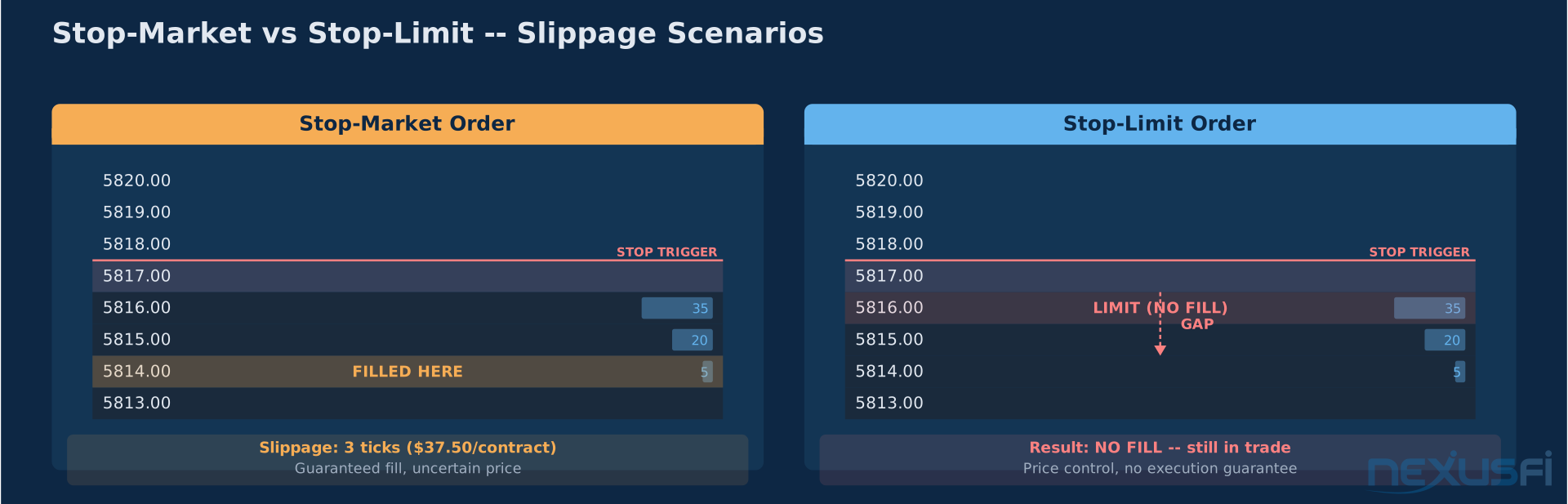
ATM stops submit stop-market orders by default. In a fast market — news, opening volatility, thin periods between sessions — your stop-market can execute 3-5 ticks away from the configured level. The automation guarantees the stop fires. It does not guarantee the price.
Stop-limit configurations reduce worst-case slippage but introduce the risk of a missed fill entirely. A stop-limit on a runaway move could skip your limit level, leaving you long in a market that is going straight down. Most scalpers accept stop-market slippage as part of the cost structure. Swing traders sometimes use stop-limits for the level protection.
Breakeven Chop
The most common ATM failure mode. Trade fills, advances to T1, runner activates with breakeven stop at entry + 1. Session consolidates. The oscillation through entry is normal given the day's range — a 10-point daily range produces 2-3 point oscillations routinely. Runner gets tagged at break-even. Trade exits. Then the trend continues to the 40-tick target you designed the runner for.
The automation executed correctly. The breakeven trigger was set at the wrong level for the current range. In a 10-point daily range, a 1-point breakeven trigger fires on normal oscillation. The trigger needs to account for average oscillation size — which is an ATR calculation — not an arbitrary tick count.
ATM templates optimized for trending sessions perform poorly in choppy conditions and vice versa. Running a single template across all market conditions is one of the most common ATM configuration mistakes. The tight bracket that works for scalping a range destroys your runners on trend days. Build separate templates and select deliberately based on pre-session context.
Over-Automation as a Crutch
ATM strategies remove emotional interference from execution — and they remove discretion from position management. A trade showing adverse tape (heavy size hitting the bid when you're long, delta collapsing) should be exited before the stop fires. The ATM doesn't read the tape. It waits for price to reach the configured level.
Traders who over-rely on ATM automation often give back more on losing trades than discretionary management would allow. The automation handles the expected case. The obvious bail case — where every signal says get out now — still requires manual override. Know where your cancel/exit button is. Use it when the tape tells you the trade is wrong, independent of whether the stop level has triggered.
Integration with Platform Risk Controls #
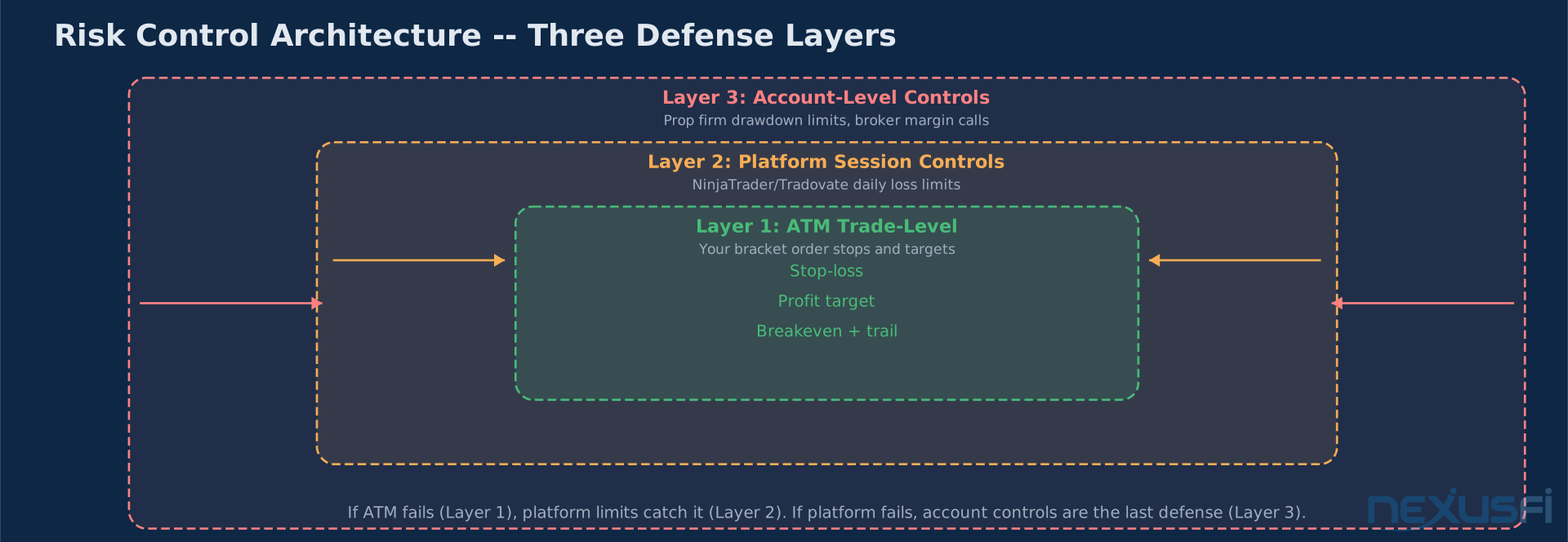
ATM strategy stops are your trade-level risk management. They exist inside a larger risk control layer. NinjaTrader's account-level Maximum Loss limit caps cumulative daily loss regardless of ATM configuration. Tradovate's risk controls enforce position size limits and session maximum loss before locking down trading.
The correct architecture: ATM stops handle individual trade risk. Platform-level limits handle session risk. If an ATM misconfiguration somehow results in a missed stop, the platform's hard limit is the emergency brake.
This matters especially for funded account traders. Prop firm platforms layer drawdown enforcement on top of your ATM settings — if your ATM fails due to connectivity, the platform enforces the drawdown limit as a second line of defense. Know both layers.
ATM strategies enforce execution consistency, not trading strategy. They don't find trades, evaluate context, or override bad entries. Their value is in removing emotional interference from the mechanics you've already decided on. The quality of your automation is only as good as the quality of your configuration — which requires testing your specific parameters against your specific market, timeframe, and session type. Build multiple templates. Test them in replay. Know when to override.
Knowledge Map
Prerequisites
Understand these firstGo Deeper
Build on this knowledgeReferences This Article
Articles that build on this topicCitations
- — Day trading - Smaller profits on size versus larger profits on smaller size? (2021) 👍 2“For those who don't know what ATM strategies in Ninja are -- this is simply a bracket order OCO based on fill price.”
- — ATM Strategy Assistance (2011) 👍 7“At +5 ticks the breakeven stop is activated for the second contract. At +10 ticks the trailing stop is activated.”
- — Buy Stops / Sell Stop and ATM Strategies (2011) 👍 5“Preselect your new strategy before activating your stop order for entering a position.”
- — Ninjatrader 8 ATM strategy help (2020) 👍 8“Copy cskafan123_atm template.xml to NinjaTrader 8 > templates > AtmStrategy.”
- — Fixed vs trailing stops (2020) 👍 5“I use preprogrammed ATM strategies which is the equivalent of an OCO order, or bracket orders to manage my stops.”
- — My NQ Trading Journal (2024) 👍 2“Don't use a target, focus on your entry only and use an automated trailing stop of say 50 ticks via an ATM.”
- — NinjaTrader ATM Strategy Documentation
- — NinjaTrader Server-Side ATM Documentation
- — Optimus Futures trading broker review (2012) 👍 5“The only drawback is that if you disconnect from Ninja, or your PC goes down, you could have an open position with no stop loss or target.”
- — Break Even or Break a Leg (2013) 👍 3“Over the course of your next 500 live cash trades, document both a BE stop at an arbitrary figure of ticks, as well as a stop managed by reading price action.”
- — Ninjatrader Bracket orders (2010) 👍 2“You must have OCO activated first and set the ATM individually for each side of the bracket.”