



Renko and Range Bar Charts for Futures: Trading Price Action Without the Clock
Overview #
Every chart tells a story, but the variable on the x-axis determines which story you're reading. Time-based charts — the 1-minute, 5-minute, 15-minute bars that most traders default to — tell you what price did at regular clock intervals. That's useful. But it's not the only way to look at price action, and for many futures traders, it's not even the best way.
Renko charts and range bar charts flip the premise. Instead of asking "what did price do in the last N minutes?", they ask "how far did price move?" Each bar represents a fixed price movement, not a fixed time interval. The clock becomes irrelevant. A Renko brick forms when price moves a specific number of ticks in one direction from the prior close. A range bar closes when price travels a defined range from high to low. The result: charts where every bar represents the same amount of price work, regardless of how long it took.
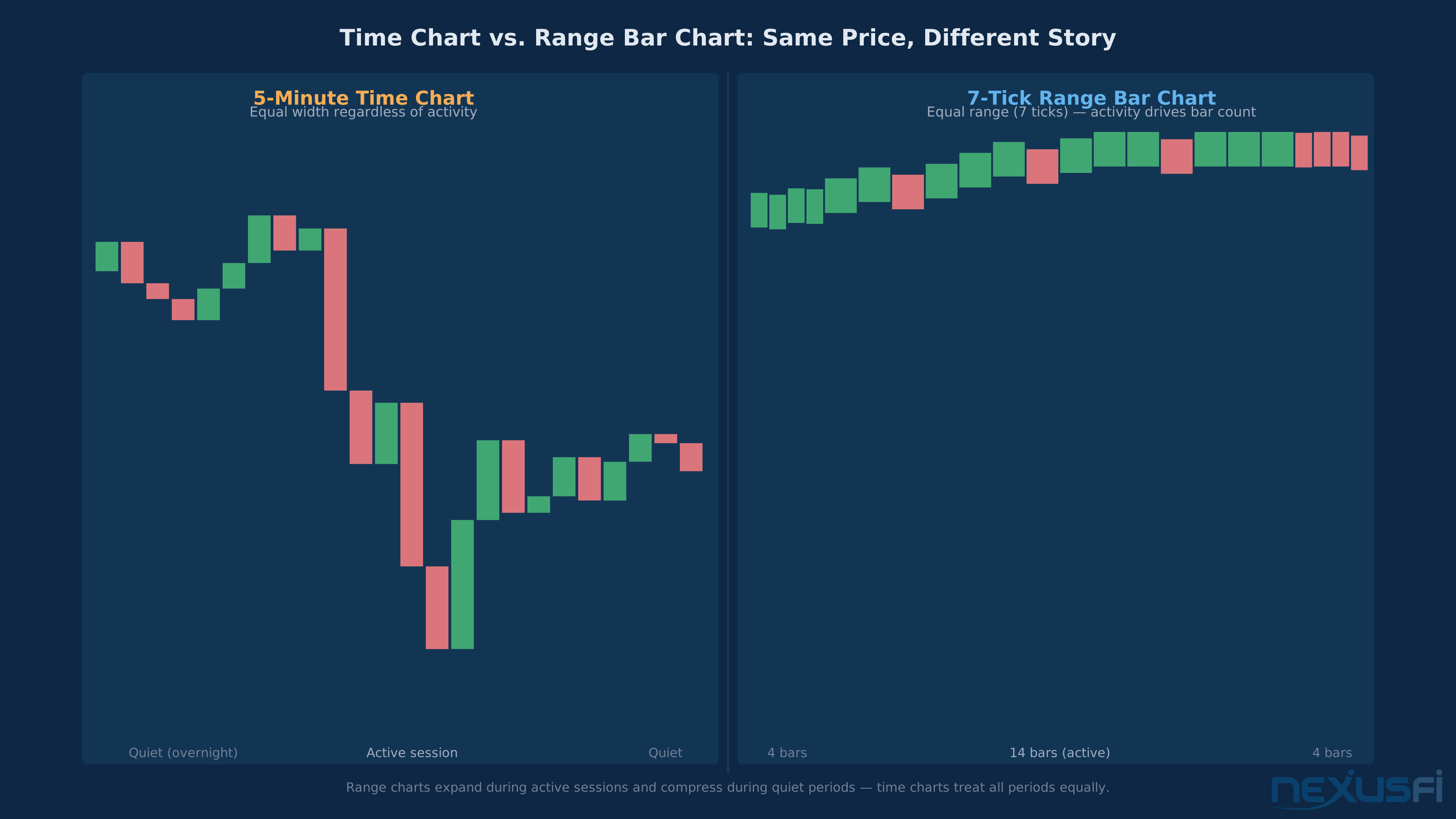
The consequence is profound. In the overnight session when ES is grinding sideways, a 5-minute chart produces 50 identical-looking low-volatility bars. A 7-tick range chart produces three bars — because barely anything happened. At the open when ES rips 10 points, that same 5-minute chart shows one bar. The range chart shows ten — because a lot happened, and each bar captures exactly how it happened.
This is why experienced futures traders — especially scalpers and day traders who need clean price action reads — frequently reach for these charts. They don't replace time charts. They complement them. Used correctly, Renko and range bars cut the noise and expose the structural price moves that get buried in time-chart clutter.
The Core Framework: Price as the X-Axis #
Non-time-based charts share a common premise: price activity, not time elapsed, drives bar formation. This seemingly simple change creates at the core different chart dynamics.
Time-based charts normalize duration: every bar represents the same clock interval regardless of market activity. Quiet markets produce bars indistinguishable from active markets, which misleads price action readers.
Activity-based charts normalize activity: every bar represents the same amount of something — whether that's a price range, a number of trades, or a number of contracts. Quiet markets produce fewer bars, active markets produce more. The chart expands during excitement and contracts during doldrums. That scaling is informative by itself.
For futures traders, this matters in specific ways. The overnight session in ES/NQ runs for roughly 17 hours with a fraction of regular session volume. On a 5-minute chart, that overnight session dominates the left side of your chart and makes the regular session look compressed. On a volume or range chart, overnight shrinks to its actual significance — a thin, low-activity prelude to the real show.
News events create the opposite problem. A Fed announcement can move ES 20 points in 90 seconds. On a 5-minute chart, that appears as one or two bars — same visual weight as a normal 5-minute period. On a range chart, it expands to 10-15 bars showing every wave of the move in detail.
Neither representation is wrong. They answer different questions. The skill is knowing which question you're trying to answer.
The choice between time charts and activity charts isn't about which is "better" — it's about which variable you want to hold constant. Time charts hold time constant and let activity vary. Range charts hold price range constant and let time vary. Each reveals patterns the other hides, and experienced traders typically run both simultaneously.
Range Bar Charts: Construction and Logic #
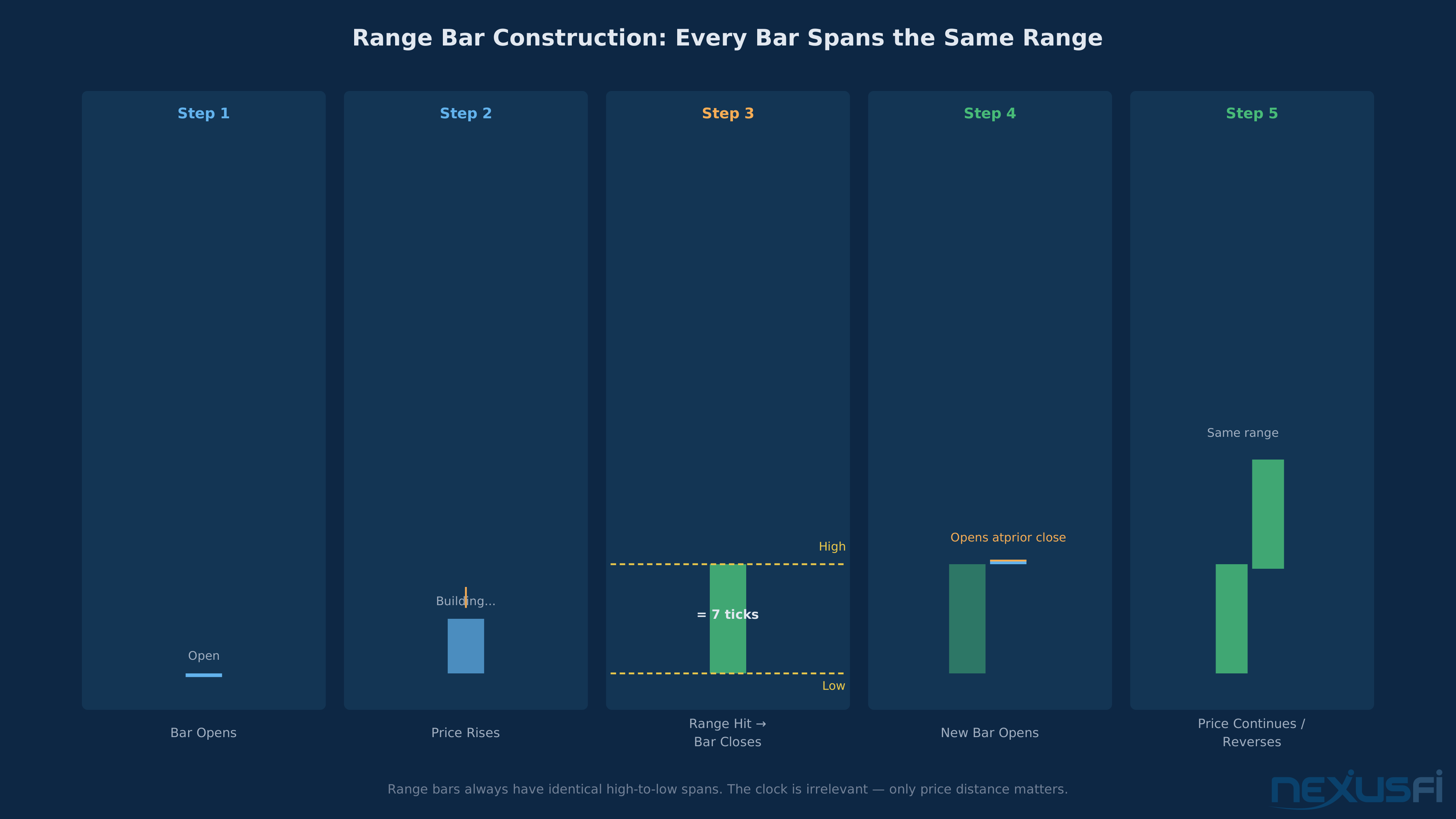
Range bar charts are the simplest non-time chart to understand. Each bar represents a fixed price range from high to low — when that range is reached, the bar closes and a new one opens. Every bar always has the same spread between its high and low.
How they're built: The current bar opens at the prior bar's close plus one tick. It closes when either the bar's range (high minus low) equals the specified range, or price reverses by the specified range in the opposite direction. The result: every bar has an identical high-to-low range. On an ES range bar chart set to 7 ticks (1.75 points), every bar spans exactly 1.75 points from high to low — always. What varies is the time it took to form that bar and which direction it moved.
What this looks like in practice: In a trending session, range bars form quickly — one after another as price marches in one direction. Each bar has the same range. You can count bars to measure the trend's speed. In a choppy session, range bars still form, but they alternate direction frequently — green bar, red bar, green bar — showing the indecision in price structure without the visual clutter of tick noise.
Configuration for futures: Optimal range bar size depends on the instrument's typical volatility.
Classic VSA patterns need to be adapted for equal-range environments. If VSA forms part of your edge, be aware that range bar charts at the core alter how those signals appear.
Volume spread analysis (VSA) is incompatible with range bar charts. VSA relies on detecting wide-range bars relative to volume — but every range bar has an identical range, making spread comparison meaningless. If VSA is part of your edge, stay on time charts or switch to tick charts where spread variation still exists.
Renko Charts: Construction and Logic #
Renko charts look similar to range bars on a glance — equal-sized bricks, clean trends — but their construction logic is at the core different. Understanding the difference matters for trading decisions.
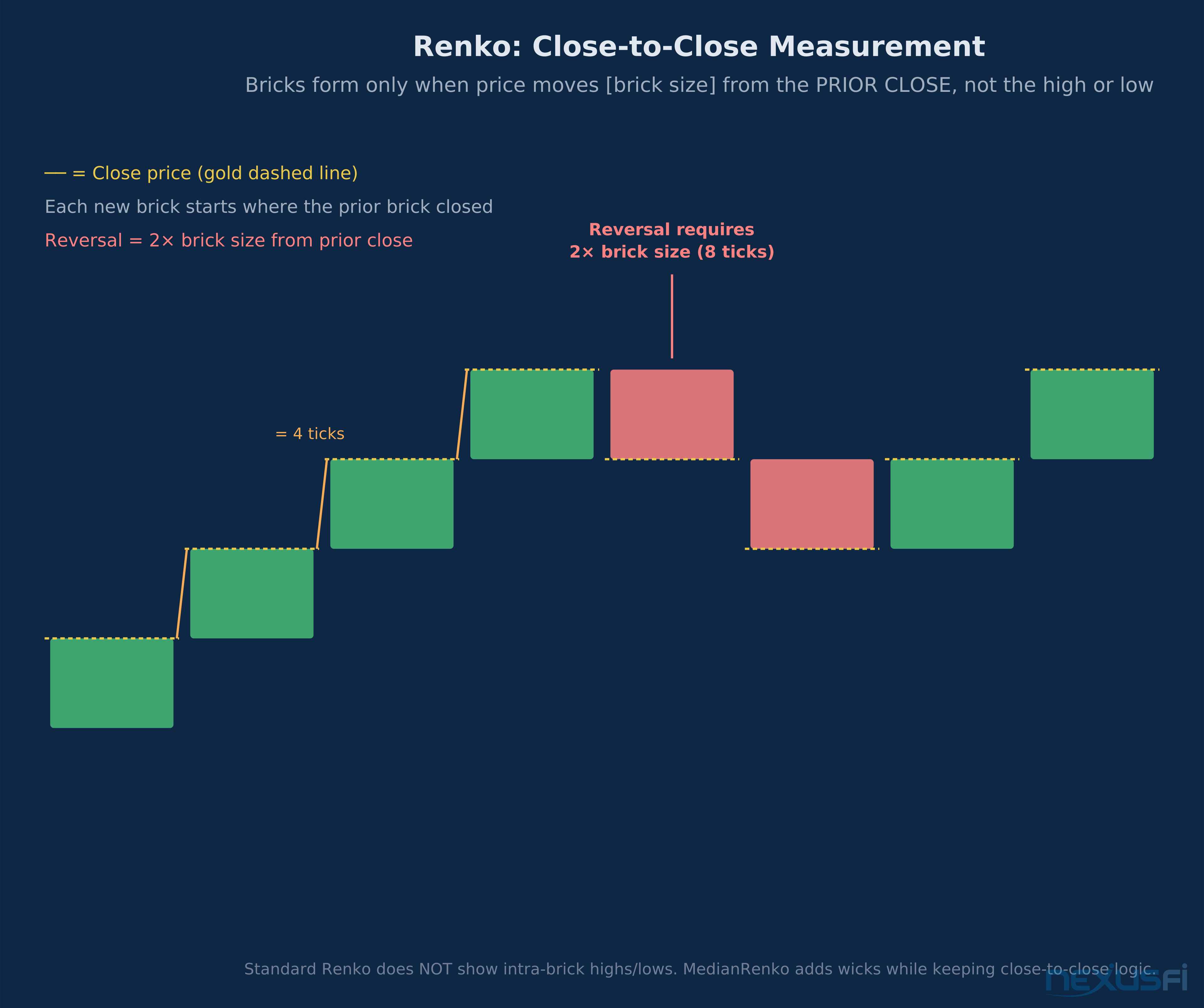
How Renko is built: Renko measures from close to close, not high to low. A new brick forms only when price moves the brick size away from the previous brick's closing price. Renko bars don't show the high and low of price within the brick — they show only where price started and ended relative to the brick size threshold.
@roonius, one of the most respected voices on this topic in the NexusFi community, explained it precisely: "Renko is from close to close. All Renko variations are measuring the distance between current close and LAST BARS CLOSE, not the RANGE OF CURRENT BAR."
This creates important behavioral differences from range bars:
Renko moves smoothly with trends: Because new bricks only form when price extends the previous close by the brick size, Renko charts naturally smooth out counter-trend noise. If ES is in a 30-point rally and briefly pulls back 2 ticks, no new brick forms — the existing brick holds its ground until the rally continues or a real reversal happens. Range bars would form a reversal bar for that 2-tick move if it exceeded their range setting.
Renko reversals require twice the brick size: To reverse direction, price must move 2x the brick size from the previous close. This prevents the whipsawing that can occur with small range bar settings. With a 4-tick Renko on ES, a reversal requires an 8-tick move from the prior close.
Median Renko: A variation that adds wicks to standard Renko, showing the high and low reached during brick formation. roonius developed MedianRenko specifically to address traders' desire to see where price traveled while still maintaining Renko's close-to-close measurement logic. The close is still 4 ticks from the previous close — the wicks show the excursion. As he explains the mechanics: "If setting is 4 ticks, each bar's close will be 4 ticks away from previous bar's close if price is going into the same direction. If price is about to reverse, that means bar should close 2×brick size in opposite direction."
The backtesting problem: Standard Renko bars have a well-documented issue: their historical formation depends on the tick-by-tick path that price actually traveled, not just the closing prices.
with standard Renko implementations due to repainting artifacts in most platform implementations. Platforms like NinjaTrader have addressed this with variants like UniRenko that are designed to be backtestable. Always verify your platform's Renko implementation before systematic testing.
Tick Charts and Volume Charts: The Activity Family #
Renko and range charts filter noise by normalizing price range. Tick charts and volume charts take a different approach: they normalize market activity by number of trades (ticks) or number of contracts traded (volume). Understanding the full family of non-time charts clarifies when to use each.
Tick charts close each bar after a fixed number of trades occur. A 1000-tick ES chart closes each bar after exactly 1000 individual transactions, regardless of how much price moved or how long it took.
Volume charts close after a fixed number of contracts trade. A 30,000-volume ES chart closes each bar after 30,000 contracts change hands. During the overnight session when volume is thin, bars form slowly — one bar might represent 30 minutes of trading. At the cash open, when 30,000 contracts can trade in 30 seconds, bars form rapidly. The chart naturally compresses quiet periods and expands active ones.
This matters enormously for volume-based indicators. A BetterVolume-style indicator on tick charts identifies high-unit-volume (big traders) rather than high-total-volume. Different signal, different edge.
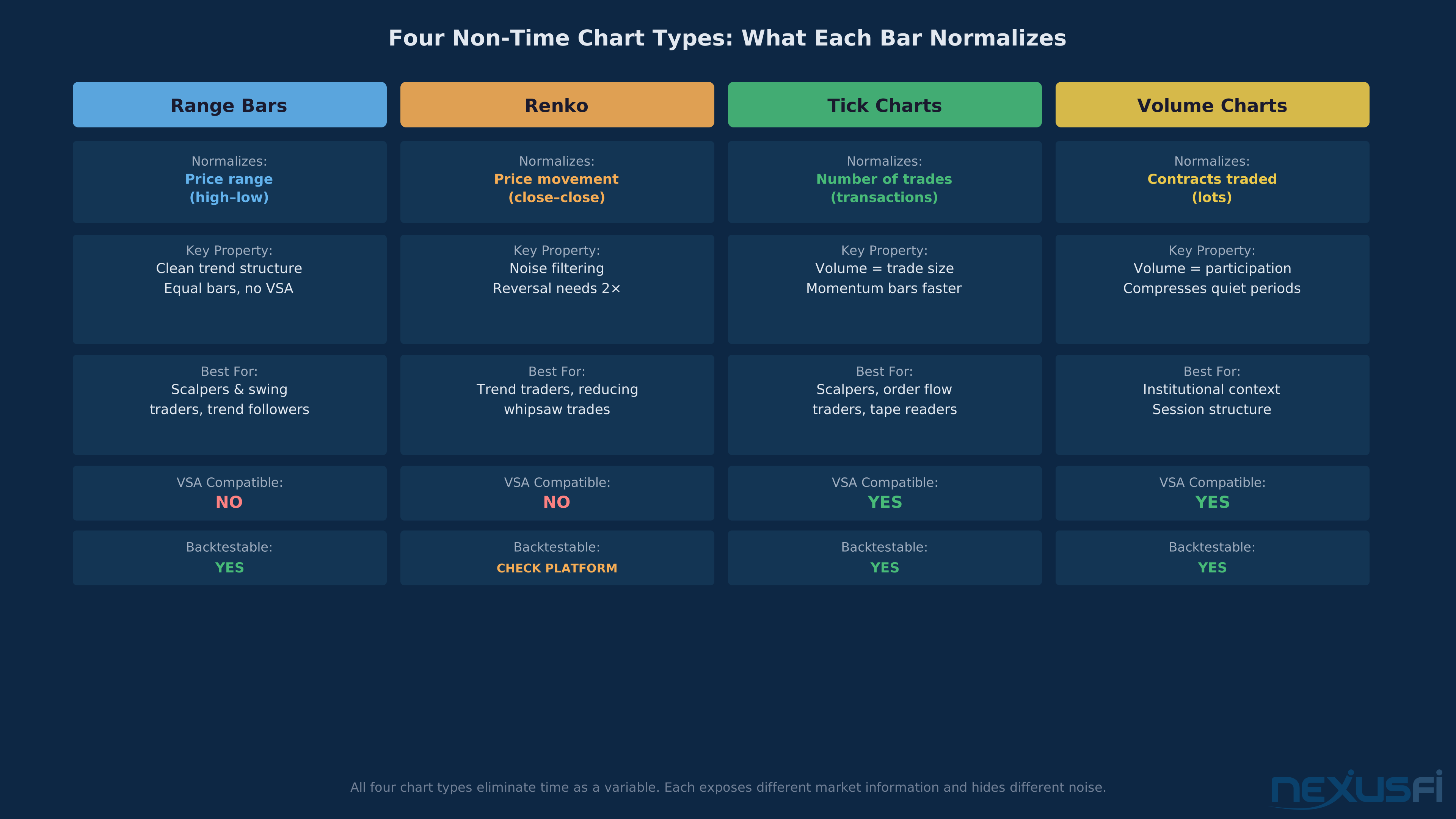
When to choose tick/volume over range/Renko: Use tick or volume charts when you want to track market participation — when you're interested in WHO is behind each move. Use range or Renko charts when you want pure price structure — when you're interested in WHERE price went and how far it went, independent of who drove it.
The four non-time chart types each normalize a different variable: Range bars normalize price spread, Renko normalizes close-to-close movement, tick charts normalize trade count, volume charts normalize contracts traded. Most professional traders use 2-3 chart types in their analysis workflow — one time chart for session context, one non-time chart for cleaner execution signals.
Calibrating Bar Size for Your Instrument #
The most important practical decision when using non-time charts is choosing the right bar size. Too small and you're back in noise territory — the chart looks like a time chart with extra steps. Too large and you're missing meaningful price events and entering trades with enormous heat.
The volatility-based calibration method: @Fat Tails documented a systematic approach: divide the average session range for the instrument by the square root of the number of equivalent time bars. The formula:
Range Bar Size Calibration
Bar Size = Average Session Range ÷ √(Session Minutes ÷ Target Interval)
ES 5-minute equivalent: 65 ticks ÷ √81 = 7 ticks (1.75 points) ES 15-minute equivalent: 65 ticks ÷ √27 ≈ 12 ticks (3.00 points) CL 5-minute equivalent: 108 ticks ÷ √66 ≈ 13 ticks (0.13 points) NQ 5-minute equivalent: 89 ticks ÷ √81 ≈ 10 ticks (2.50 points)
Recalibrate monthly or when instrument volatility shifts much.
This gives you a range bar setting that produces approximately as many bars per session as a 5-minute chart — but with bars that close on meaningful price events instead of clock marks.
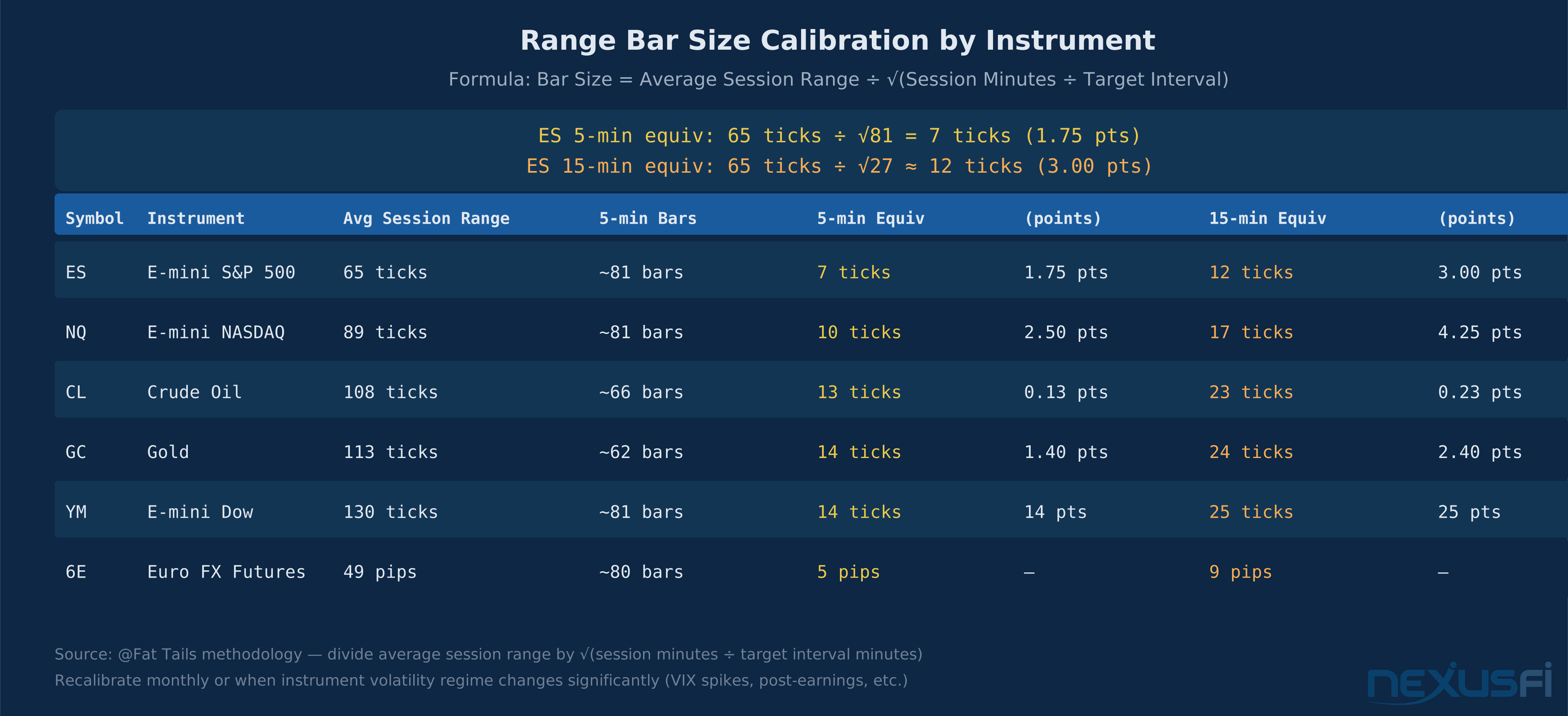
The session-based adjustment: When volatility expands much — VIX spikes, major economic releases, FOMC days — consider doubling your bar size. When volatility compresses to a fraction of normal, halve it. The goal isn't consistency of bar size, it's consistency of information density per bar.
Renko-specific sizing: Renko brick size should be set smaller than you'd initially expect because reversals require 2x. With a 4-tick Renko brick on ES, trend continuation requires 4 ticks but reversal requires 8 ticks. This asymmetry means smaller bricks capture more directional nuance but also more false reversals. Many traders find ES Renko between 4-8 ticks workable for intraday, with larger bricks (12-20 ticks) for swing contexts. @aligator's CL analysis shows the same logic: "CL tends to move in ranges of 10 ticks. So, a UniRenko of the size 10 or 20 makes sense." Instrument-appropriate sizing is everything.
Trade Setups: How These Charts Are Actually Traded #
Non-time charts deliver their value through specific setups that are cleaner on these chart types than on time charts. Here are the setups that work — and the conditions that activate them.
Setup 1: The Range Compression Breakout
Range bars and Renko both naturally visualize compression and expansion. In a balanced, range-bound session, bars form slowly and choppily — short bars in alternating directions. When price breaks from this equilibrium, bars start forming rapidly in one direction.
The trade: wait for a tight consolidation of 8-12 bars within a 2-3 bar range (on a 7-tick ES chart, price oscillating within 2-3 bars means 14-21 ticks of total range). When price breaks above the consolidation high with 3 or more consecutive bars in the same direction, enter in the direction of the break. Stop below the consolidation low. Target the next significant level — value area high/low, prior session extreme, or a measured move equal to the consolidation width.
@sefstrat's observation applies here: "renko bars are great for filtering noise and keeping you in a longer term trend but as with any form of sampling you are sacrificing signal fidelity." The consolidation looks clean because the noise is filtered. That's the edge — and the risk. Sometimes what looks like a consolidation before a breakout is just the market breathing between continuation moves in a trend.
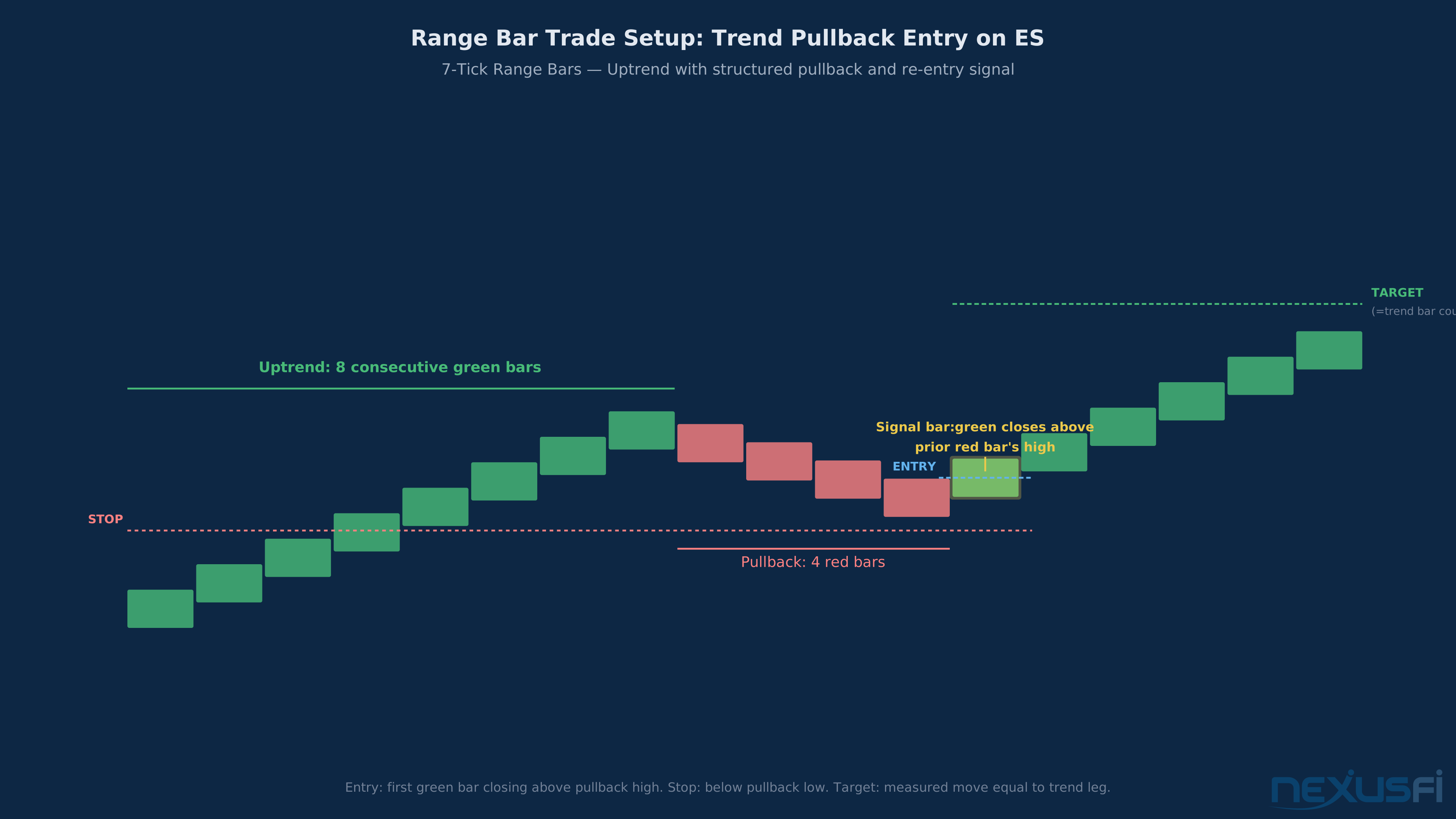
Setup 2: The Trend Pullback Entry (the highest-probability setup)
In a clear trending session, range and Renko charts make trend structure obvious. Every wave of the trend produces a sequence of same-colored bars. Pullbacks show up as opposite-colored bars. The setup is simple: enter during the pullback when price shows a reversal bar back in the trend direction.
On a 7-tick ES range chart in a strong uptrend: the trend produces 6-8 green bars in sequence. Price pulls back and creates 3-5 red bars. When price closes a green bar above the prior red bar's high, that's the entry. Stop below the pullback low. Target a measured move — count the initial trend bars and project the same count forward from the pullback low.
The advantage over time charts: on a 5-minute chart, a shallow pullback might register as barely visible price action. On a range chart, every tick of that pullback creates bars — making the pullback structure visible and giving you a precise entry trigger.
Setup 3: The Renko Brick Reversal (with mandatory confirmation)
Renko's close-to-close construction means the first opposing brick after a trend appears only when price has genuinely moved 2x the brick size against the trend. This is a stronger reversal signal than most time chart patterns.
On a 6-tick ES Renko chart: 8 green bricks form in sequence (a 48-tick move). A red brick appears — which requires a 12-tick reversal from the prior close. That first red brick is NOT the entry. Wait for a second red brick before committing short. Entry at the second brick's open. Stop above the trend's last high. Target the same brick count as the trend, or a prior structural level, whichever comes first.
@aligator's execution advice directly applies: "The entry will be one tick above or below the close of the bar, simple. Otherwise if one waits and enters after so many bars, each additional bar is another 10 ticks. After 3 bars CL has already moved 30 ticks. Do you really want to enter a position there?" Don't wait for so much confirmation that the move is already exhausted. One confirmation brick is enough — the second brick is your signal.
Setup 4: The Dual-Chart Divergence (intermediate to advanced)
When you run a time-based chart alongside a range/Renko chart, divergences between them are meaningful signals. If the 5-minute ES chart shows a higher high but the 7-tick range chart shows fewer bars to reach that high — meaning less price activity per unit of gain — a weakening trend is visible before it reverses on the time chart.
This combination approach — one time chart for context, one non-time chart for execution — is how professionals integrate these tools. The time chart maintains session structure; the non-time chart refines entries. 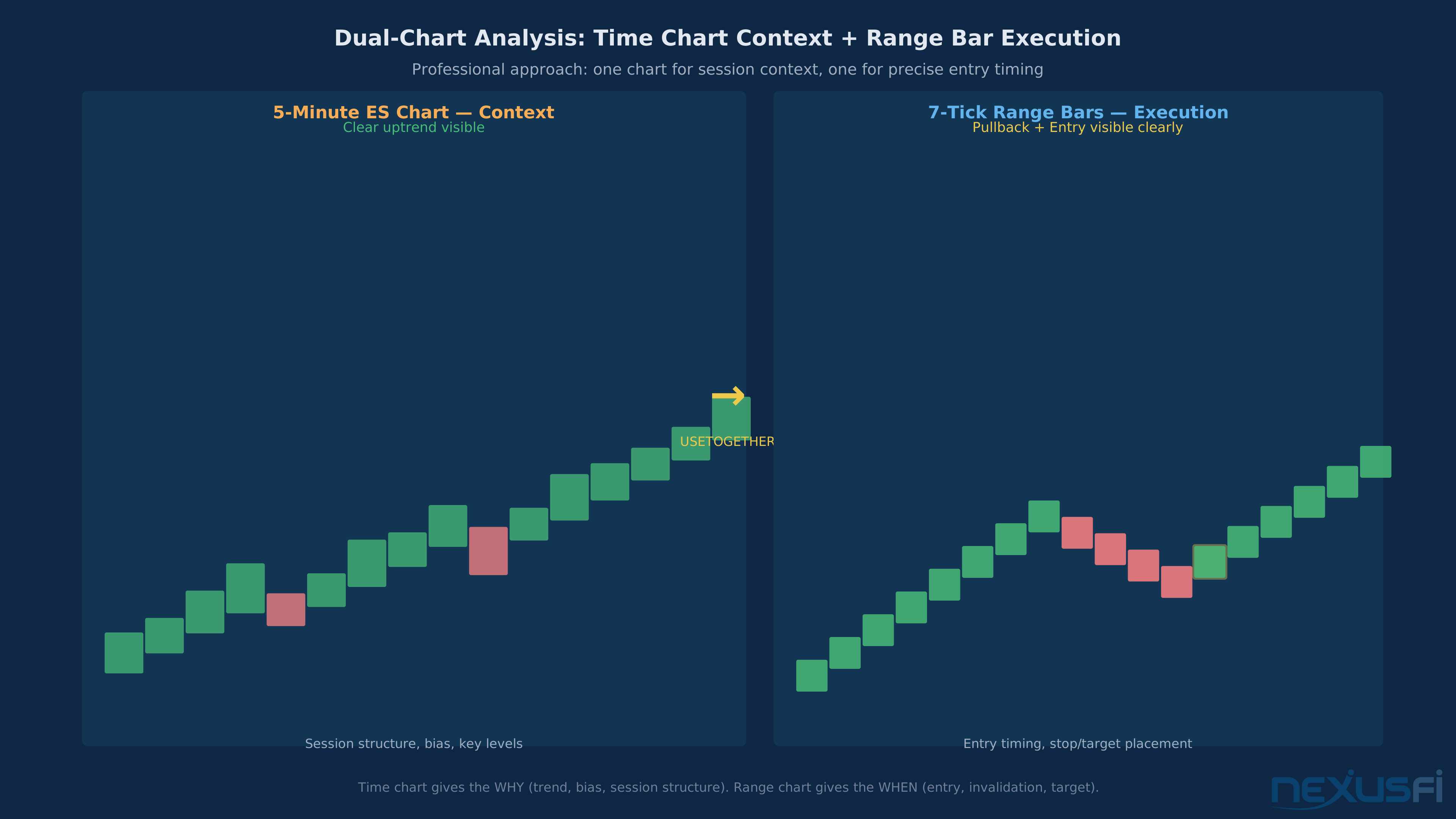
When These Charts Fail #
Non-time charts fail in specific, identifiable conditions. Know them before you trade with these charts.
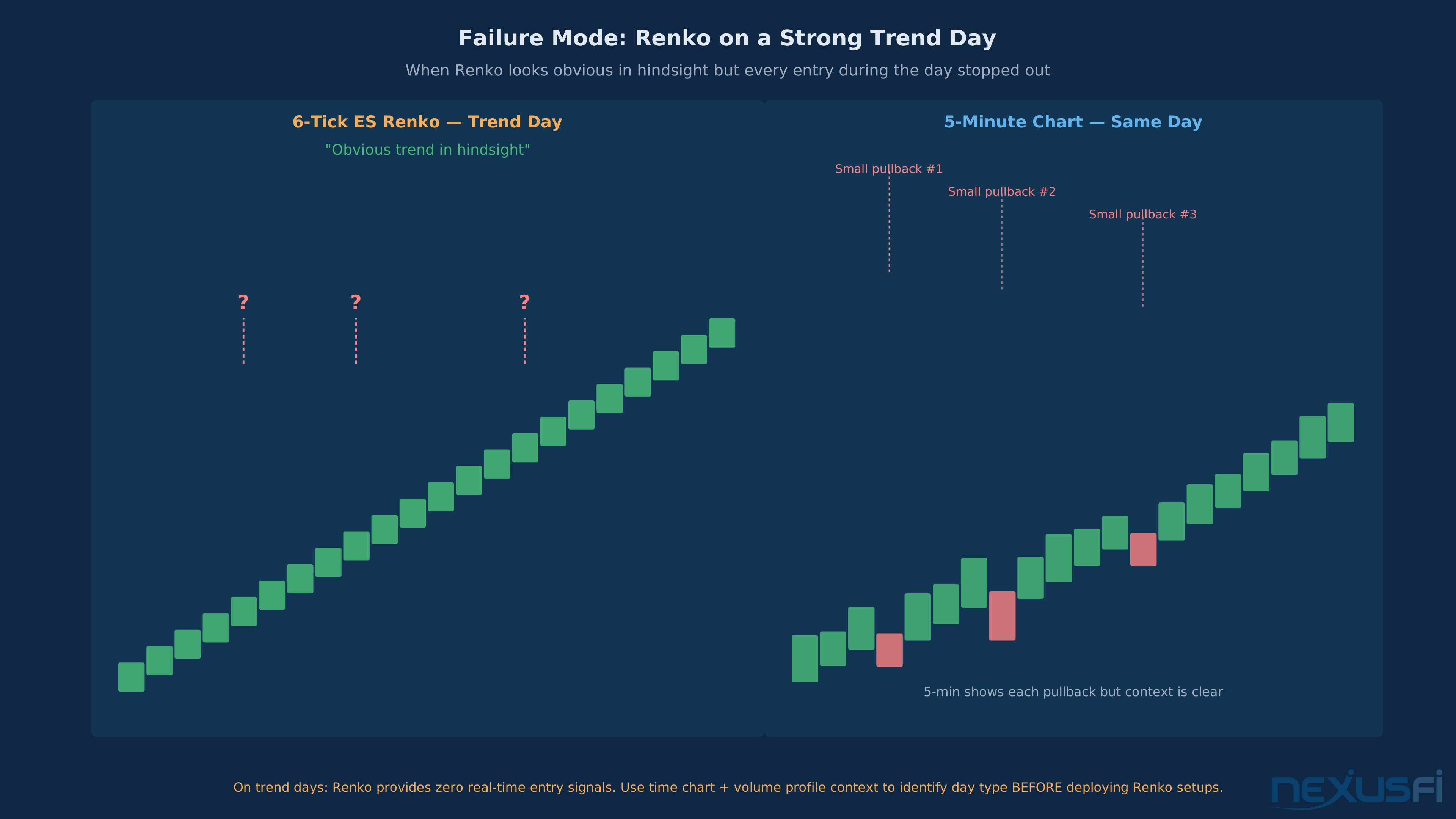
Trend days and Renko: On strong trend days — where ES opens and drives 20-30 points in one direction with minimal pullbacks — Renko charts produce a single-color sequence of bricks that looks obvious in hindsight but is nearly impossible to trade from scratch. Every pullback entry you try gets stopped out before the trend resumes, because the pullbacks are smaller than your stop placement framework expects. The bricks don't tell you it's a trend day until it's already 15 points underway. Use a time chart or volume profile context to identify trend day characteristics before deploying Renko setups.
News events and range bars: When a Fed announcement sends ES moving 20 points in 90 seconds, range bars create the illusion of high-quality trend structure — 12 bars in a row, all green, clean. But those 12 bars represent 1.5 minutes of event-driven panic, not structural price action. Trading the "trend" that appears on range charts during news events is trading in fog. The actual move is over before the pattern becomes tradeable.
Small bar sizes in highly volatile sessions: The volatility calibration that makes range bar size appropriate for average sessions becomes misaligned during VIX spikes. A 7-tick ES range chart calibrated for 65-point average daily range will produce 40% more bars on a 90-point range day — faster, noisier, harder to read. The first 30 minutes of a high-volatility session often require doubling your bar size to maintain pattern clarity.
Renko and backtesting: This deserves emphasis. Standard Renko implementations on most retail platforms cannot be reliably backtested because the historical bar formation depends on the tick-by-tick path price took, which isn't stored precisely in most platforms. If you're backtesting a Renko strategy and getting unrealistically clean results, the backtest is almost certainly wrong. Use only backtestable Renko variants (UniRenko, FlexRenko, or similar purpose-built implementations) and verify with a known reference period of data.
Standard Renko charts cannot be reliably backtested on most retail platforms. Historical bar formation depends on the exact tick path price traveled, not just OHLC data. If your Renko strategy backtest shows very high win rates, verify your platform handles Renko bar construction correctly from tick data — or you're optimizing against fabricated history.
The lag problem on reversals: All range-based charts have inherent lag on reversals. Because the bar closes only after price has moved the full range, you learn about a reversal after it's already happened by the full bar size. In fast markets, that lag means entering a reversal trade after price has already moved 7-10 ticks against you. Account for this in stop placement — don't anchor your stop exactly at the theoretical level, because your actual entry is delayed by one bar.
Platform Support and Practical Implementation #
Not all platforms implement non-time charts with equal quality. Here's what matters when evaluating platform support. 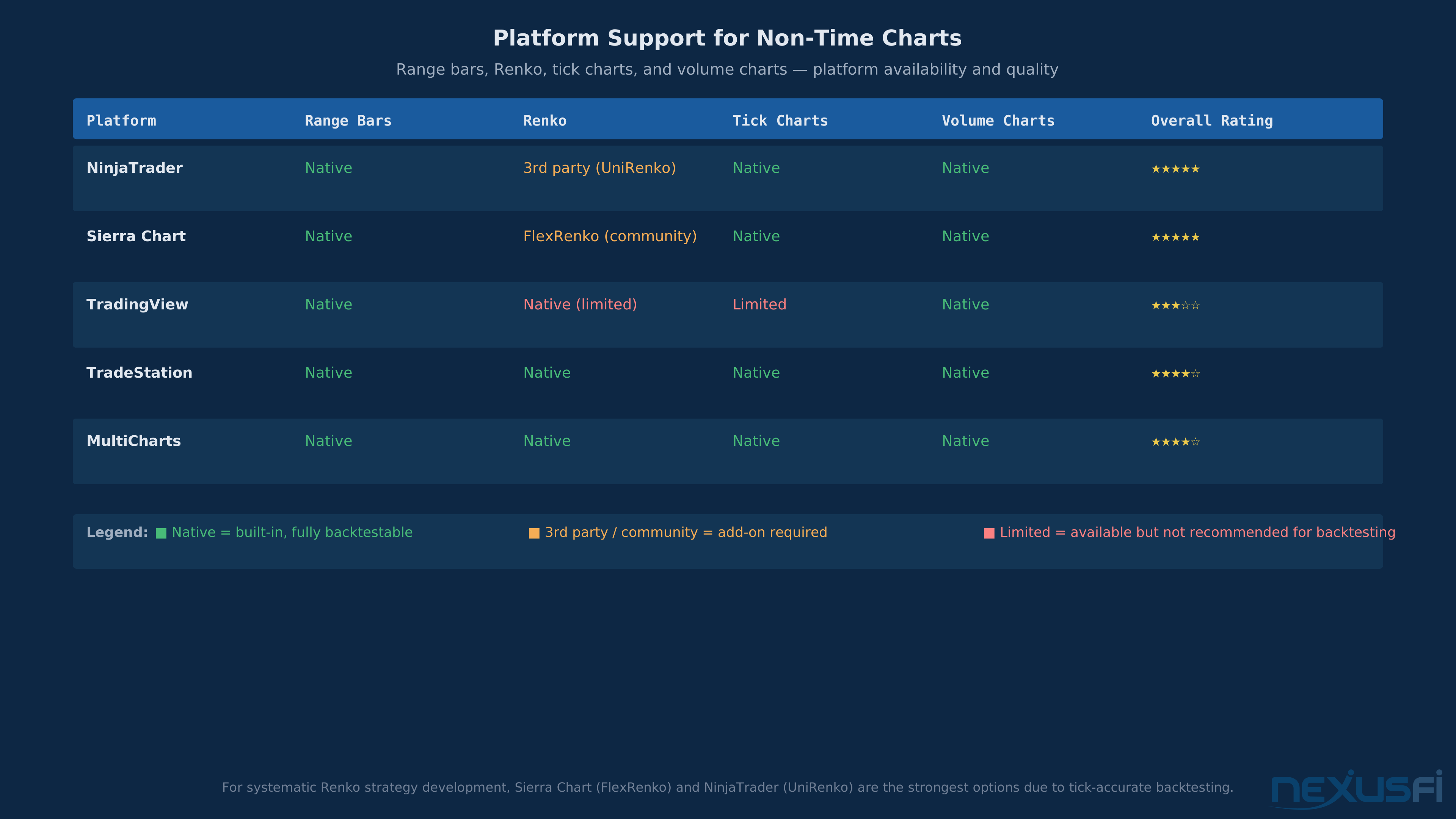
NinjaTrader: Excellent native support for tick charts, volume charts, and range bars. Renko requires third-party add-ons for backtestable implementations — UniRenko is the community standard, with active development and support threads on NexusFi. The NT community is the most resourced for custom bar types.
Sierra Chart: Range bars, tick charts, and volume bars are native and reliable. For Renko, FlexRenko (community-developed) is the standard. Sierra's strength is data integrity — it stores tick-by-tick data that allows genuinely accurate non-time chart backtesting, making it the preferred platform for systematic Renko strategy development.
TradingView: Range bars and Renko charts are available natively. The limitation: TradingView's strategy tester on Renko charts has known accuracy issues for many instruments, making it unreliable for systematic development. Use it for visual analysis; don't trust the backtester results.
TradeStation and MultiCharts: Both support range bars natively and handle backtesting correctly with proper tick data. MultiCharts has especially strong non-time chart backtesting with tick-by-tick simulation.
Data considerations: Non-time charts require tick-by-tick or second-by-second data to form correctly. Charts built from minute or daily data will produce incorrect bar formations. For futures, CQG and Rithmic both support the granularity needed. Verify your data feed before assuming your non-time charts are accurate.
Before trusting any non-time chart in live trading, run a side-by-side comparison of the same historical period using your platform's built-in chart data vs. tick replay. If the bars form differently, your live chart may have data integrity issues that will make your patterns unreliable.
Knowledge Map
Go Deeper
Build on this knowledgeCitations
- — renko bars vs range bars? (2009) 👍 14“Renko's purpose is to filter out the noise. It is nothing like TTM trend or tick bars or volume bars.”
- — MedianRenko Trading Technique (2009) 👍 15“Renko is from close to close. All Renko variations are measuring the distance between current close and LAST BARS CLOSE, not the RANGE OF CURRENT BAR.”
- — renko bars vs range bars? (2009) 👍 6“renko bars are great for filtering noise and keeping you in a longer term trend but as with any form of sampling you are sacrificing signal fidelity and low latency for smoothness”
- — Anyone can advise the right value for Constant Range Charts? (2014) 👍 12“ES: 65 ticks divided by sqrt(81) = 7 ticks / 1.75 points. There is no optimal value for constant range charts.”
- — UniRenko, Universal Renko Bar Type (2013) 👍 15“CL tends to move in ranges of 10 ticks. So, a UniRenko of the size 10 or 20 makes sense. The entry will be one tick above or below the close of the bar, simple.”
- — ES Chart Layout (2016) 👍 10“Tick charts would give a similar view as volume charts, but are based on the number of trades, not the volume. They will be similar to volume charts because the average trade size doesn't vary much.”
- — Best volume indicator when using Tick Charts in NinjaTrader (2011) 👍 16“On minute charts volume measures participation of traders per time unit, on tick charts volume measures trade size.”
- — Better Volume Indicator with Sound Alerts (2011) 👍 21“On range charts the spread cannot be analyzed, because it is constant. You cannot perform volume spread analysis on volume charts or range charts.”
- — UniRenko, Universal Renko Bar Type (2017) 👍 4“Renko is a type of range bar -- it measures whether a given number of points or price ticks has been exceeded. A Renko bar can just sit there for minutes or hours if the market is not moving.”