



Risk Controls and Safety Features in Futures Trading Platforms: The Circuit Breakers Between You and Catastrophic Loss
Overview #
Every futures trader has a story about the day risk management saved them — or the day it didn't. Platform risk controls aren't settings you configure once and forget. They're the circuit breakers standing between a bad trade and an account-ending catastrophe. And most traders don't understand them until it's too late.
Here's the reality: in leveraged futures trading, a single misconfigured risk setting or a missing daily loss limit can turn a $500 loss into a $5,000 one before you can blink. The market doesn't care about your intentions. It cares about your exposure. Platform-level risk controls exist to enforce discipline when your brain can't — and the best ones work server-side, without your intervention, during the exact moments you're least capable of rational decision-making.
Key Concepts #
Daily Loss Limit (DLL) — A platform or broker-enforced cap on how much an account can lose in a single trading session. When the limit is hit, the platform blocks new orders and may flatten existing positions automatically. The single most effective protection against catastrophic loss spirals.
Max Position Limit — A hard cap on the number of contracts or total exposure an account can hold at any time. Prevents accidental oversizing and fat-finger errors that can instantly put an account at risk.
Auto-Flatten — An automated mechanism that liquidates all open positions when a risk threshold is breached — margin violation, daily loss limit hit, or time-based trigger. The emergency brake that fires when the trader can't or won't act.
Emergency Kill Switch — A one-click panic button that cancels all working orders and flattens all positions simultaneously. The manual last resort when markets move faster than your ability to process individual orders.
Server-Side vs. Client-Side Execution — Where the risk control logic actually runs. Server-side controls work even if your platform crashes, your internet drops, or your computer freezes. Client-side controls only work when your software is running and connected. This distinction matters more than any other feature on the list.
Trailing Stop — A dynamic stop-loss order that moves with favorable price action but stays fixed when price reverses. Protects open gains while allowing winners to run. Only truly protective when executed server-side.
How Platform Risk Controls Work #
The Layered Defense Model #
Think of platform risk controls as concentric rings of protection. Each layer catches what the previous one missed:
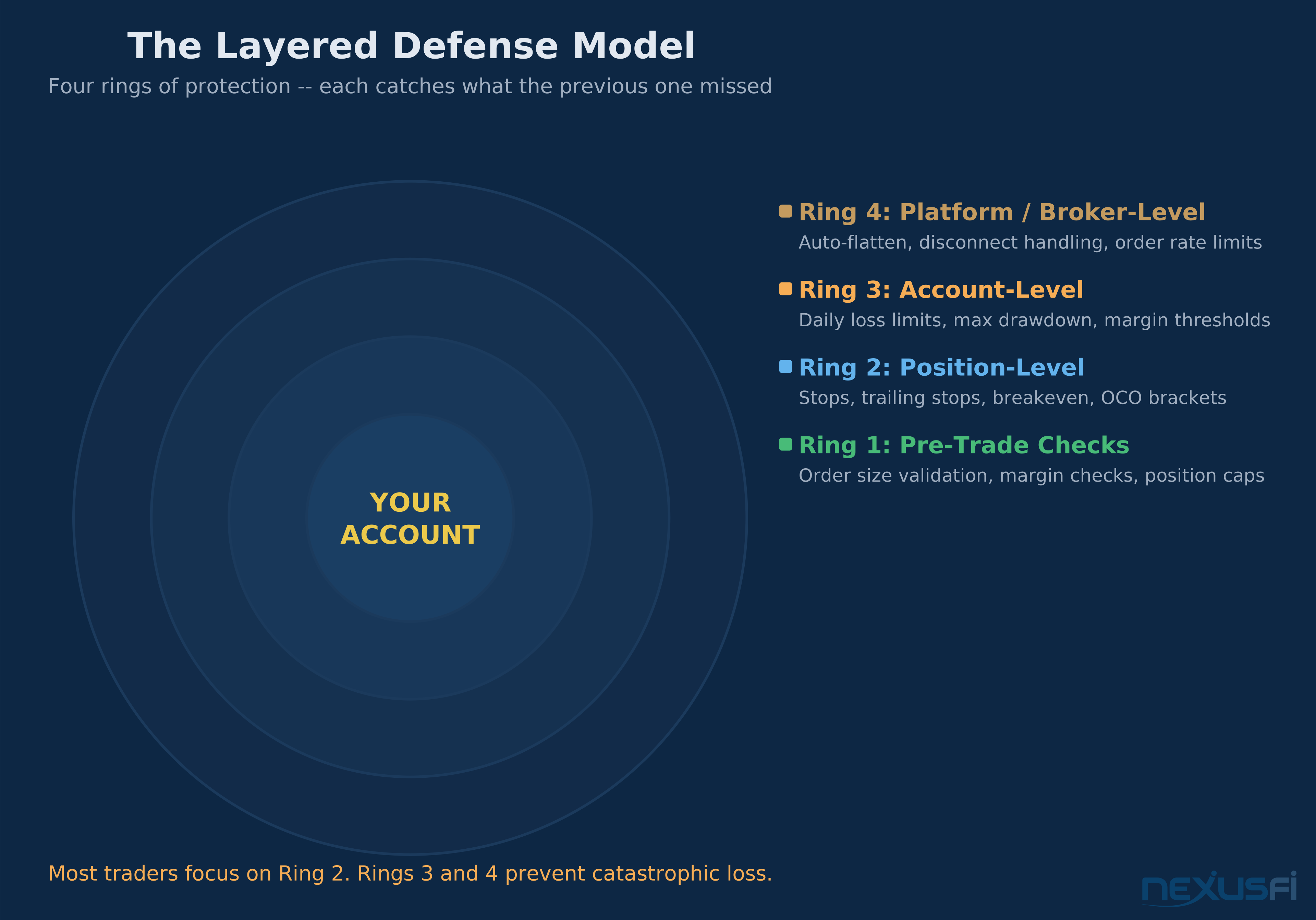
Ring 1: Pre-Trade Checks — Before your order even reaches the exchange, the platform validates it against your account parameters. Does the order exceed your max position size? Will it push your margin utilization past the threshold? Is the order size reasonable for the instrument? If any check fails, the order gets rejected before it leaves your machine.
Ring 2: Position-Level Controls — Once you're in a trade, position-level tools manage the risk of that specific position. Stops, trailing stops, breakeven automation, OCO brackets. These are the most familiar controls — the ones most traders think of when they hear "risk management."
Ring 3: Account-Level Controls — These monitor your aggregate account health across all positions. Daily loss limits, max drawdown limits, margin utilization thresholds. They don't care about any individual trade — they care about whether your account is approaching danger.
Ring 4: Platform/Broker-Level Controls — The final safety net, operating at the firm level. Auto-flatten engines, disconnect handling policies, order rate limits. These fire when everything else has failed and the account is at genuine risk of insolvency.
Most traders spend all their energy on Ring 2 and almost none on Rings 3 and 4. That's backwards. Ring 2 protects individual trades. Rings 3 and 4 protect your account from you.
Daily Loss Limits — The Single Most Important Control #
If you configure nothing else, configure a daily loss limit. Here's why it matters more than any stop-loss or trailing stop you'll ever set.
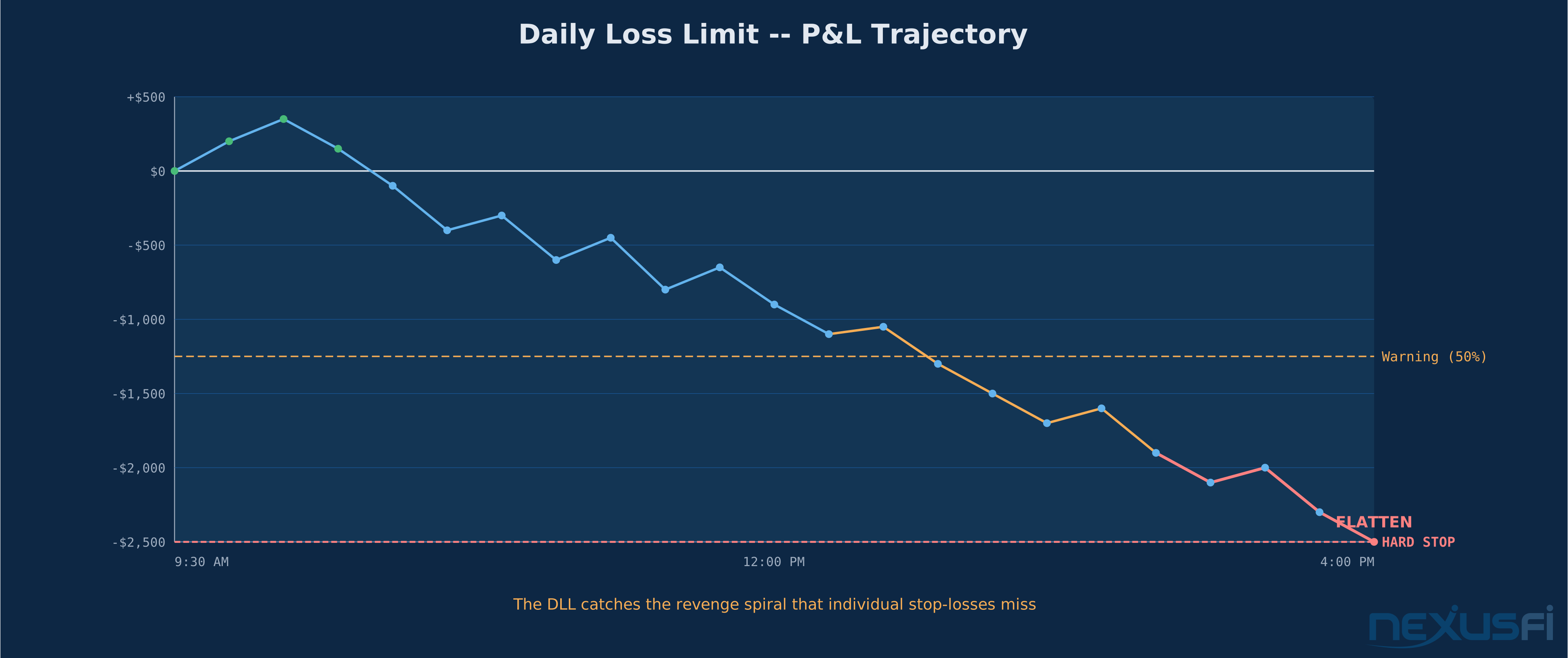
A stop-loss protects one position. A daily loss limit protects your account from the pattern that actually destroys traders: the revenge spiral. You take a loss. You take another. You size up to "make it back." You take a bigger loss. You're tilting now, trading on emotion, and your individual stops are working perfectly — each one limiting that particular trade — but your account is bleeding out because you keep re-entering.
That's the insight. The DLL doesn't protect you from bad trades. It protects you from yourself after bad trades.
How DLLs actually calculate:
- Good implementations include both realized AND unrealized P&L. If you're sitting on a $2,000 open loss and your DLL is $2,500, you've only got $500 of room left — not $2,500.
- Commissions and fees should be included in the calculation. A $50 round-turn on 10 contracts is $500 that counts against your limit.
- The reset time matters. Most platforms reset at the exchange's daily cutoff (5:00 PM CT for CME products), not midnight.
The two-tier approach that works: Set a warning threshold at 50-75% of your limit and a hard stop at 100%. When the warning fires, you know you're in the danger zone. When the hard stop fires, you're done — no override, no "just one more trade," no exceptions.
That's a complete stack. The platform gives you the tools — the question is whether you actually configure them before you need them.
Max Position Limits — Preventing the Fat-Finger Catastrophe #
Every trader thinks they'd never accidentally enter 100 contracts instead of 1. Every broker has a story about the trader who did exactly that.
Max position limits are the simplest control on this list and one of the most valuable. They cap the total number of contracts you can hold in a single instrument at any given time. If your limit is 5 ES contracts and you try to enter a 6th, the order gets rejected.
Why this matters beyond fat-fingers:
- Algorithmic traders running automated strategies need hard caps to prevent runaway position building from stuck loops or bad signals
- Scaling traders who add to winners need a ceiling so a great trade doesn't become an oversized risk
- Multiple platform users need aggregate limits that work across all connected instances
@bwolf's journal documents the practical reality of configuring these properly: "Change my max position size from 10 MES to 2 MES. Change my max position loss from $125 to $37 (14 ticks / 2 lots). Change the time-out setting from 2hrs after 1 loss with 2 max losses per day." That's a trader who's been through the pain of misconfigured limits and learned to set tight constraints. Notice the specificity — exact tick counts, exact dollar amounts, exact lot sizes.
The best implementations tie position limits to risk-based margin rather than raw contract count. A 10-contract crude oil position (CL at ~$68 with $6,800 margin per contract) carries at the core different risk than 10 micro E-mini contracts (MES at ~$5,400 with $1,320 margin per contract). Smart platforms account for this.
Auto-Flatten — When the Platform Takes Control #
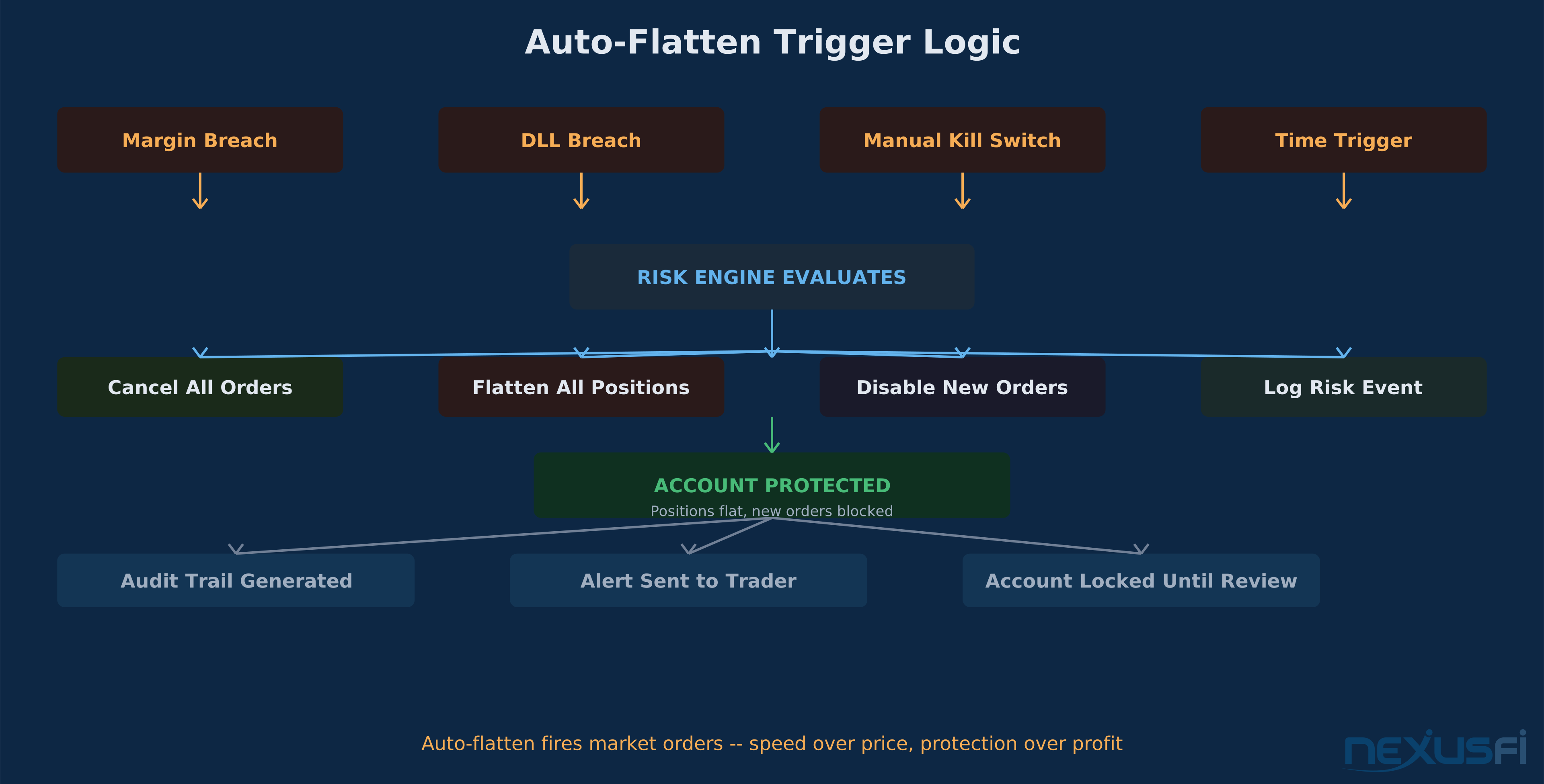
Auto-flatten is the most aggressive risk control in the stack. When it fires, the platform sends market orders to close every open position in your account. No warnings, no confirmations, no "are you sure?" — just immediate liquidation.
Three primary triggers:
Margin breach — Your account equity drops below the maintenance margin requirement. The platform doesn't wait for you to add funds or close positions manually. It starts liquidating. This is the exchange-mandated backstop that protects the clearinghouse, not just your account.
The same principle applies to live brokerage accounts — when the threshold is breached, positions get closed. Period.
Daily loss limit breach — When your DLL triggers with the "flatten on breach" option enabled, auto-flatten fires immediately. This is the preferred configuration for traders who can't trust themselves to stop trading after hitting their limit.
Time-based flatten — Some platforms can automatically flatten positions at a specified time. End-of-day traders use this to ensure no overnight positions are accidentally held. It's less about risk management and more about operational discipline, but it prevents the "I forgot I was still in a trade" scenario that catches more traders than you'd think.
The execution reality: Auto-flatten uses market orders or immediate-or-cancel (IOC) orders. In liquid products like ES or NQ, this works fine — you'll get filled within a tick or two of the current price. In thinner markets like agricultural futures or less-traded months, forced liquidation can create significant slippage. The platform is prioritizing getting you flat over getting you a good price. That's the correct priority.
Emergency Kill Switch — The Manual Last Resort #
Every serious trading platform has some version of a "flatten everything now" button. If yours doesn't, find one that does.
The kill switch serves a different purpose than auto-flatten. Auto-flatten is automated — it triggers on pre-set conditions. The kill switch is manual — it triggers when you see something the automated systems haven't caught yet. Flash crash happening in real time. News event that changes everything about your position thesis. System malfunction where orders are filling at wrong prices.
What a good kill switch does:
- Cancels every working order across all instruments
- Sends market orders to close every open position
- Disables new order entry temporarily
- Logs the event with timestamp and resulting fills
What it shouldn't do: Require multiple confirmations during an emergency. One click, one action. If you accidentally hit it during a calm market, the cost of being accidentally flat is trivial compared to the cost of not being able to flatten during a crisis.
As forum members have noted when discussing catastrophic losses: "Maybe use a platform that has risk controls which can flatten your positions and prevent you from trading if a max daily loss has occurred." The key insight: the best platforms make emergency controls accessible from every screen, including mobile interfaces, because you can't always be at your primary desk when disaster strikes.
Server-Side vs. Client-Side — The Distinction That Actually Matters #
Here's the thing that makes or breaks every other control on this list: where does the logic run?
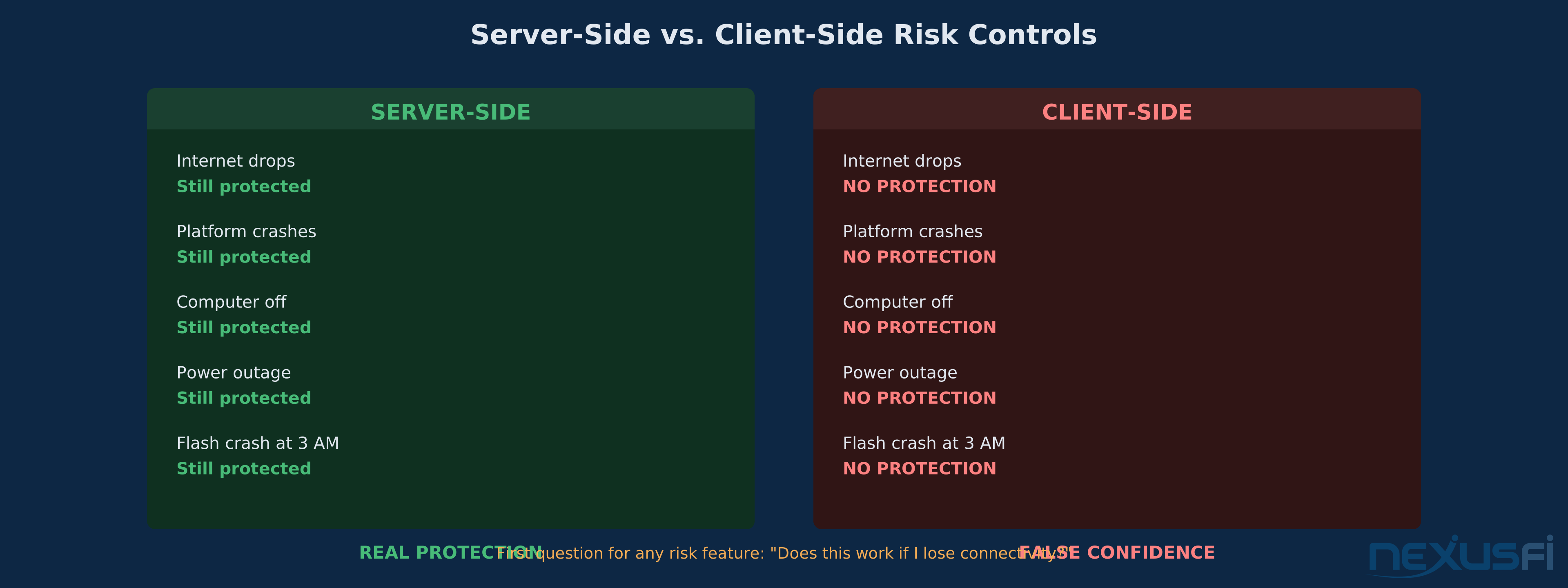
Client-side controls run on your computer. Your stop-loss, your trailing stop, your custom risk indicator — they all depend on your trading platform application being open, connected, and functioning. If your internet drops, your computer crashes, or your platform freezes during a volatile moment, client-side controls stop working. Right when you need them most.
Server-side controls run on the broker's or platform's servers. They keep working even if your computer is off, your internet is down, or your building loses power. Server-side daily loss limits, server-side stops, server-side auto-flatten — these are the controls that protect you during the scenarios you can't plan for.
When evaluating any risk feature, the first question is always: "Does this work if I lose connectivity?" If the answer is no, it's not a safety feature. It's a convenience feature that happens to reduce risk when conditions are normal.
AMP Futures' experience with the TT Platform illustrates this — @TradingTech reported that traders were unable to set certain risk limits directly, requiring the FCM to configure server-side controls. That's actually the correct architecture — firm-level risk controls should be enforced at the server, not delegated to client configuration where they can be circumvented or misconfigured.
Trailing Stops — Protection That Moves With You #
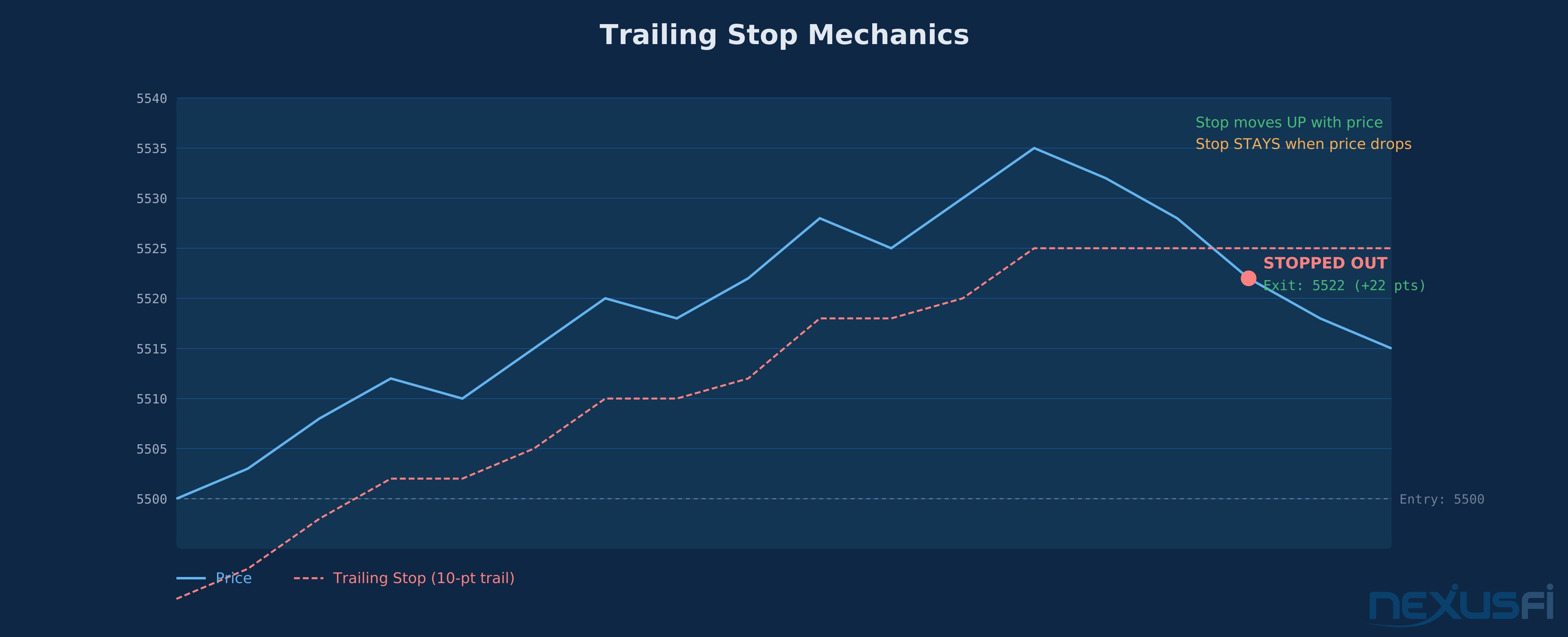
Trailing stops sit at the intersection of risk management and trade management. They protect open profits by moving a stop-loss level in the direction of favorable price action while keeping it fixed when price moves against you.
A basic example: You're long 2 ES contracts at 5500.00 with a 10-point trailing stop. Price moves to 5510.00 — your stop moves to 5500.00 (breakeven). Price moves to 5520.00 — your stop moves to 5510.00. Price reverses to 5510.00 — you're stopped out with 10 points of profit instead of watching the entire gain evaporate.
The critical implementation details:
Tick-based vs. percentage-based: Tick-based trailing (e.g., trail by 40 ticks on ES) gives consistent dollar risk per contract. Percentage-based trailing adapts to different price levels but can create inconsistent risk in dollar terms across instruments.
Last-traded vs. mid-quote: Trailing stops that track the last-traded price can get triggered by thin order-book moves or single prints in low-volume periods. Mid-quote tracking is more stable but slightly less responsive.
Server-side is non-negotiable: A trailing stop that only works while your platform is running isn't protecting you during the moments that matter — unexpected disconnects during volatile moves. Always verify your trailing stop runs server-side before relying on it.
@Big Mike's thread on daily loss limits highlights the operational principle: "VF will close a position when it reaches this, and prevent new positions from being opened. This works with any platform VF supports." The principle applies equally to trailing stops — the best implementations work at the infrastructure level, independent of any specific platform front-end.
Connection and Session Risk Controls #
What happens to your open positions and working orders when your connection drops? This question separates platforms that take risk seriously from platforms that treat it as an afterthought.
Flatten-on-disconnect: Some platforms can be configured to automatically flatten all positions if the connection to the server is lost for more than a specified duration (30 seconds, 60 seconds, etc.). Aggressive, but it prevents the scenario where you're holding a position during a major move with no ability to manage it.
Cancel-on-disconnect: A milder option that cancels all working orders (including stops) when connectivity drops, but leaves positions open. This prevents stale orders from filling at unexpected prices but creates risk from unprotected positions.
Reduce-only mode: The platform allows you to close existing positions but blocks new entries until full connectivity is restored. A balanced approach that prevents adding risk during unstable conditions while giving you control over exits.
The right choice depends on your trading style. Day traders who are always at the screen should consider flatten-on-disconnect as a backstop. Swing traders holding positions overnight might prefer cancel-on-disconnect to avoid unnecessary liquidation from brief connectivity blips.
Order Rate Limits and Algorithmic Safeguards #
For traders running automated strategies or API-connected systems, the platform should enforce limits on order message frequency. Why? Because a bug in an algorithm can generate thousands of orders per second — an "order storm" that overwhelms both the platform and the exchange.
Rate limits cap the number of order messages (new orders, modifications, cancellations) allowed per second or per minute. If the limit is breached, subsequent messages get rejected until the rate drops below the threshold.
This isn't a theoretical risk. Every major exchange has experienced incidents caused by runaway algorithms, and the regulatory response has been to mandate pre-trade risk checks and message throttling. CFTC regulations require futures platforms to implement controls that prevent unintended market disruption from automated trading.
Putting It Together — A Configuration Framework #
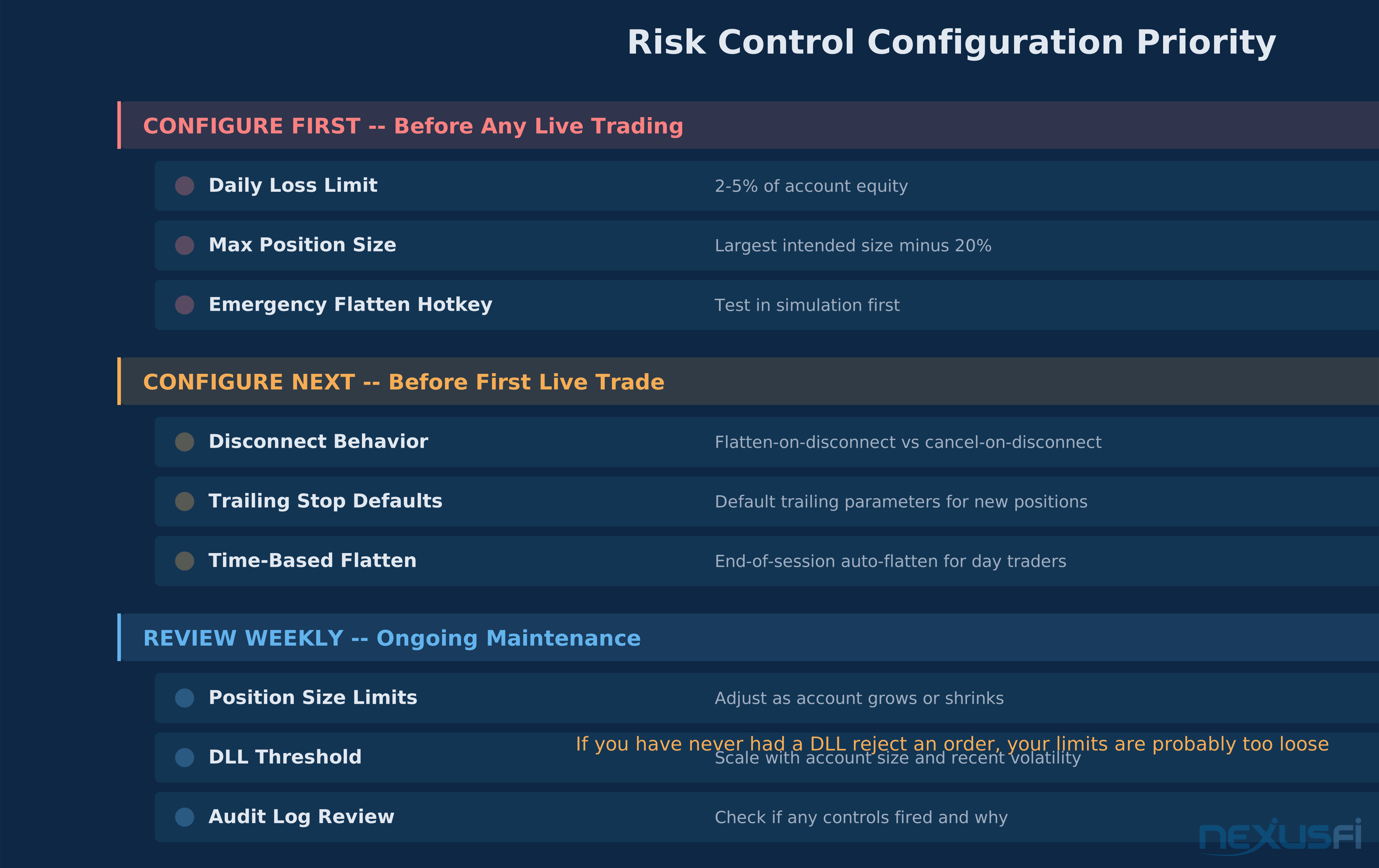
Here's the practical framework for configuring platform risk controls, ordered by priority:
Configure first (before you trade):
- Daily loss limit — Set at the maximum you can lose in a day and still trade tomorrow without emotional impairment. For most retail traders, 2-5% of account equity is the range.
- Max position size — Set at the largest position you'd ever intentionally take, then subtract 20%. You want the limit to catch mistakes, not constrain normal trading.
- Emergency flatten hotkey — Know where it is. Test it in simulation. Make sure it works on every screen of your platform.
Configure next (before your first live trade):
- Disconnect behavior — Choose flatten-on-disconnect or cancel-on-disconnect based on your trading style.
- Trailing stop defaults — Set your default trailing parameters so every new position gets automatic protection.
- Time-based flatten — If you're a day trader, set an end-of-session auto-flatten as a backstop.
Review weekly:
- Position size limits — Adjust as your account grows or shrinks.
- DLL threshold — Should scale with account size and recent volatility.
- Audit log review — Check your platform's risk event history. Did any controls fire? Why?
When Risk Controls Fail #
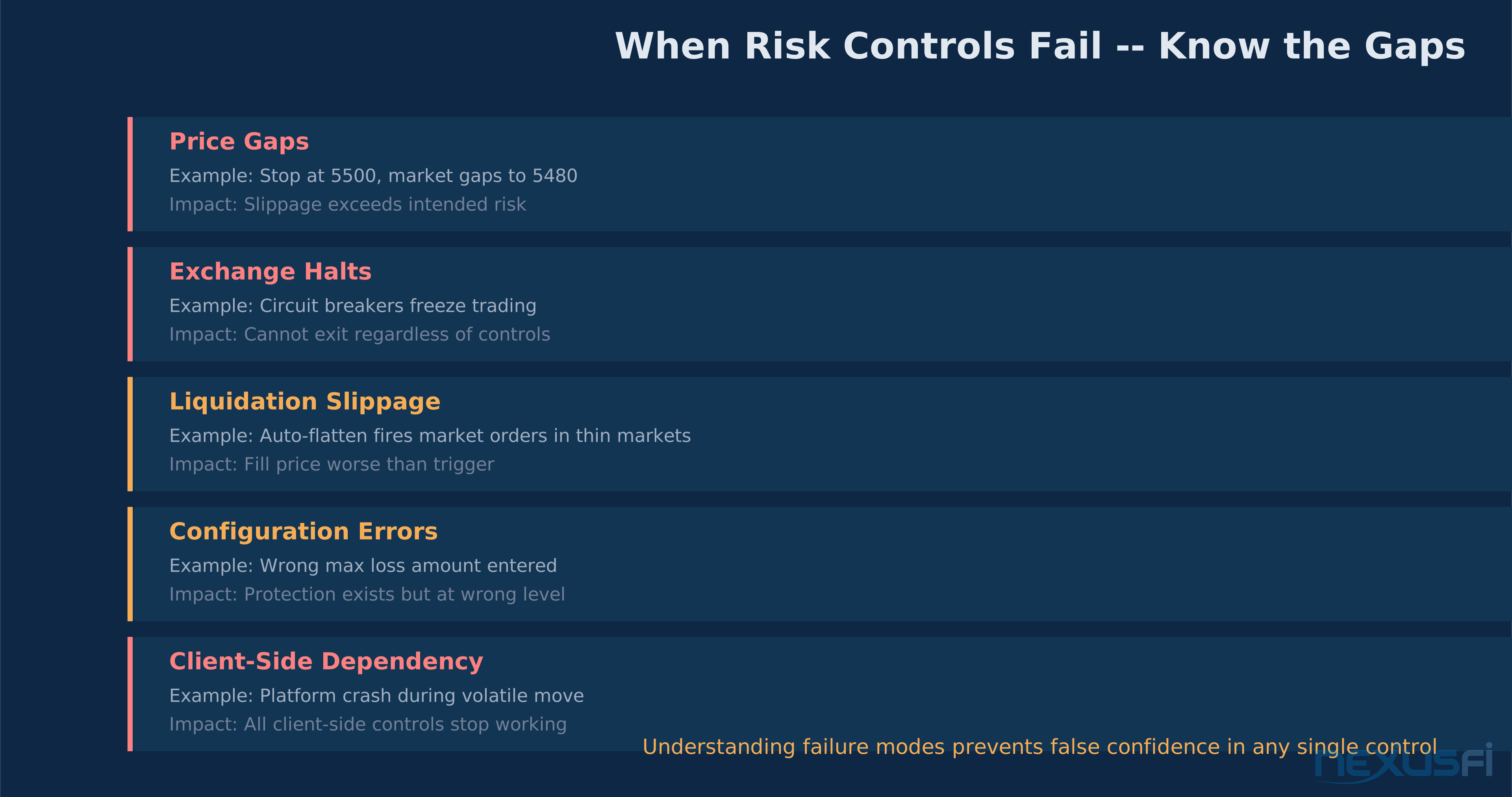
No risk control is perfect. Understanding the failure modes prevents false confidence.
Gaps and limit moves: During extreme events, prices can gap through stop levels. Your stop at 5500.00 might fill at 5485.00 if the market gaps from 5502.00 to 5484.00 on a news event. Daily loss limits and auto-flatten face the same gap risk — the breach might be much worse than the limit you set.
Exchange halts: When exchanges halt trading (circuit breakers), you can't exit positions regardless of what controls you've configured. Your auto-flatten can't flatten if the market isn't accepting orders.
Slippage on forced liquidation: Auto-flatten fires market orders. In thin markets, those fills can be much worse than the price that triggered the flatten. The protection works, but the execution cost can be meaningful.
Configuration errors:
incorrectly. Human error in configuring the controls themselves is one of the most common failure modes. Always verify your settings in simulation before going live.
Client-side dependency: Controls that rely on your trading platform being connected and running provide zero protection during disconnects. This is the most dangerous failure mode because the trader believes they're protected when they're not.
The Configuration Mistake That Costs the Most #
The most expensive risk control mistake isn't setting limits too tight or too loose. It's not setting them at all and assuming you'll manage risk manually.
Manual risk management works perfectly in calm markets with normal volatility. It fails catastrophically in the exact conditions where you need it most — fast markets, gap moves, emotional spirals, news events. Platform risk controls exist because humans are bad at managing risk under stress. The controls work best when they're strict enough that you occasionally bump into them during normal trading. If you've never had a DLL or position limit reject one of your orders, your limits are probably set too loose.
Configure your risk controls before you need them. Test them in simulation. Verify they're server-side. And accept that the day they save you from a catastrophic loss, you probably won't even realize it happened.
Knowledge Map
Prerequisites
Understand these firstGo Deeper
Build on this knowledgeReferences This Article
Articles that build on this topicCitations
- — I finally blew up an account (2021) 👍 7“Using Rithmic feed with your broker you can set a fixed max daily loss so when you hit it, you are done for the day”
- — New Risk Management Settings built-in to NinjaTrader (2023) 👍 6“Daily Loss Limit, Weekly Loss Limit, Daily Profit Trigger, Weekly Profit Trigger, Lock risk settings if trading locked, End-of-Day Trailing Max Drawdown, Real-Time Trailing Max Drawdown”
- — bwolf's ES Daily Trading Journal (2023) 👍 3“Change my max position size from 10 MES to 2 MES. Change my max position loss from $125 to $37 (14 ticks / 2 lots)”
- — Trade Journal (2016) 👍 9“There are two loss control rules for the Combine: Trailing Max Drawdown”
- — Daily Loss Limit (2011) 👍 6“VF will close a position when it reaches this, and prevent new positions from being opened”
- — AMP Futures unable to set risk limits in TT Platform (2016) 👍 2“TT is happy to work with our FCM partners to assist them in setting these controls”
- — bwolf's ES Daily Trading Journal (2023) 👍 3“I had the wrong position max loss amount. These are the new accounts I just configured on Wednesday. I was going too fast and entered a max position loss incorrectly”