



Trading Platform Data Feed Freeze: Silent Disconnect Detection and Watchdog Patterns
Overview #
The green light is lying to you.
Right now — or at some point this week, this month, definitely this year — your trading platform will show "Connected," every indicator will be green, and your market data will have quietly stopped moving. Charts flat. Bid/ask frozen. The last tick you saw was 90 seconds ago. Your strategies are still evaluating against that stale price. If you're in a position, you have no idea what the market is actually doing.
This is the silent data feed freeze, and it's the most dangerous failure mode in platform-based futures trading — more dangerous than an honest disconnect where the lights go red and you know to act.
This article is about detection, not sympathy. You'll understand exactly why this happens, how to build a watchdog that catches it before damage is done, and what to do in the seconds after you discover your feed has been frozen. NinjaTrader 8 examples throughout, but the pattern applies to every platform.
Why the Green Light Is Not What You Think #
Your trading platform monitors the wrong thing.
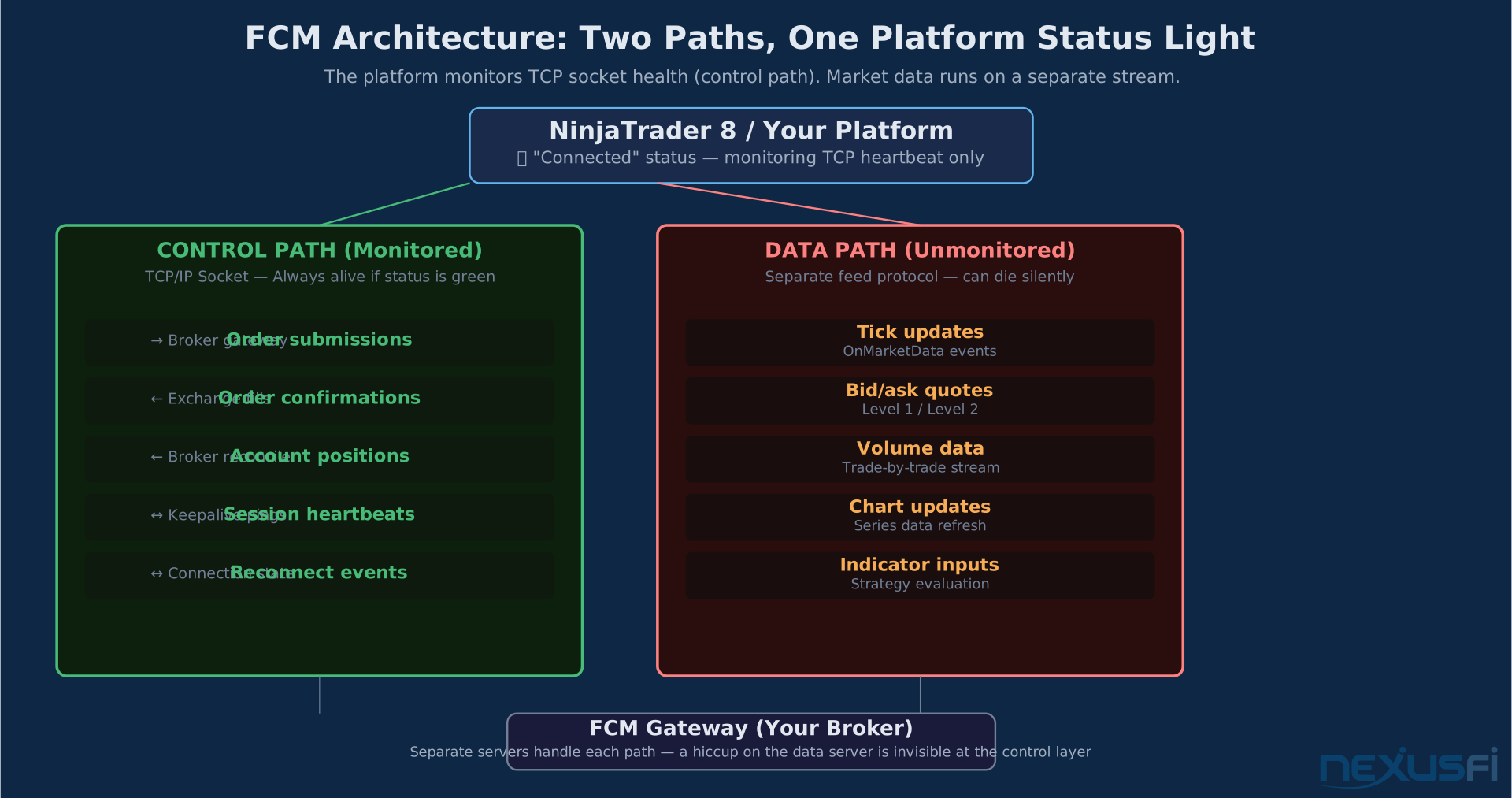
The "Connected" status on most platforms — that green bubble in the NT8 bottom bar, the connection indicators on Sierra Chart, the status icons on TradeStation — is a heartbeat check on the TCP/IP socket. It tells you the network pipe between your machine and the broker's gateway is open. The connection exists.
It tells you nothing about whether market data is flowing through that pipe.
Market data runs on a separate stream. On most broker integrations, it's a different protocol, sometimes a different server, and definitely a different path than order routing. The socket can be alive and healthy while the data subscription is silently stalled, timed out, or black-holed at an upstream gateway.
The software's internal monitor is watching the pipe. Not the flow.
This isn't a bug. It's an architectural reality baked into how network-based trading platforms work. The FCM's data gateway can hiccup, drop your specific multicast feed, reset your session authorization, or hit an internal queue limit — and the platform won't know because the underlying TCP connection is still intact.
Understanding this one distinction — connection status versus data freshness — is the foundation of everything else in this article.
The Two Failure Modes Every Futures Trader Should Know #
Not all disconnects are the same. There are two completely different ways your data feed can die, and they require different responses.
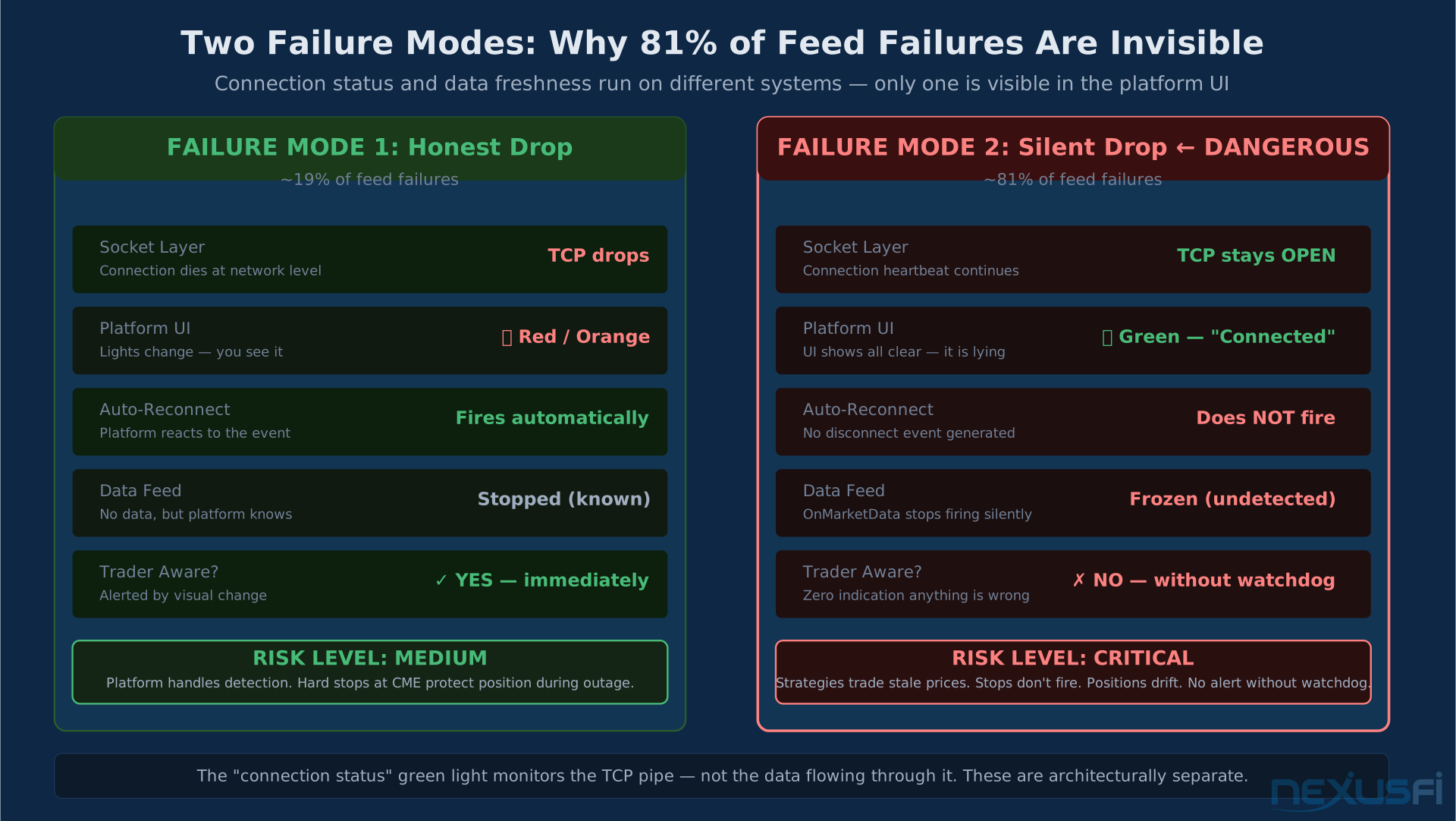
Failure Mode 1: The Honest Drop
The socket to the broker dies. NinjaTrader fires its standard disconnect event, the connection indicator goes red or orange. You know something is wrong. NT8's own reconnect logic kicks in, tries a few times, usually gets you back within 30-60 seconds.
This is annoying. It's not especially dangerous if you have hard stops at the exchange.
Sometimes it enters what the NinjaTrader community has called "panic mode" for years — lights cycling between red and yellow, reconnect attempts looping, nothing comes back. @hayday documented the exact failure pattern that gets traders most frustrated: NinjaTrader won't reconnect (2014).
Failure Mode 2: The Silent Drop
The socket stays open. The connection light stays green. NT8 reports "Connected." Order routing may still work.
The last tick on the ES front-month was 2 minutes ago.
NT8 has no disconnect event to fire because, at the transport layer, it isn't disconnected. The OnMarketData event simply stops firing. No notification. No alarm. Your indicators are plotting the last-known price. Your strategies are evaluating against a market that no longer exists.
This is the one that kills accounts.
If you're in a position and your data freezes, you have no idea where the market is. Your conditional orders won't fire on fresh prices — they're watching stale ones. If you're running automated strategies, they're making decisions based on fiction.
The dangerous asymmetry: the honest drop is detectable by the platform. The silent drop is only detectable by you, through independent monitoring that doesn't trust the connection status.
Community threads documenting this exact pattern: @mjwfinc's thread on NT8 charts not updating with IB data (2022) and @andorre's report on chart delays when volume increases (2016) both capture the silent-drop pattern independently across different brokers.
What Causes the Silent Freeze #
Root causes, in rough order of frequency:
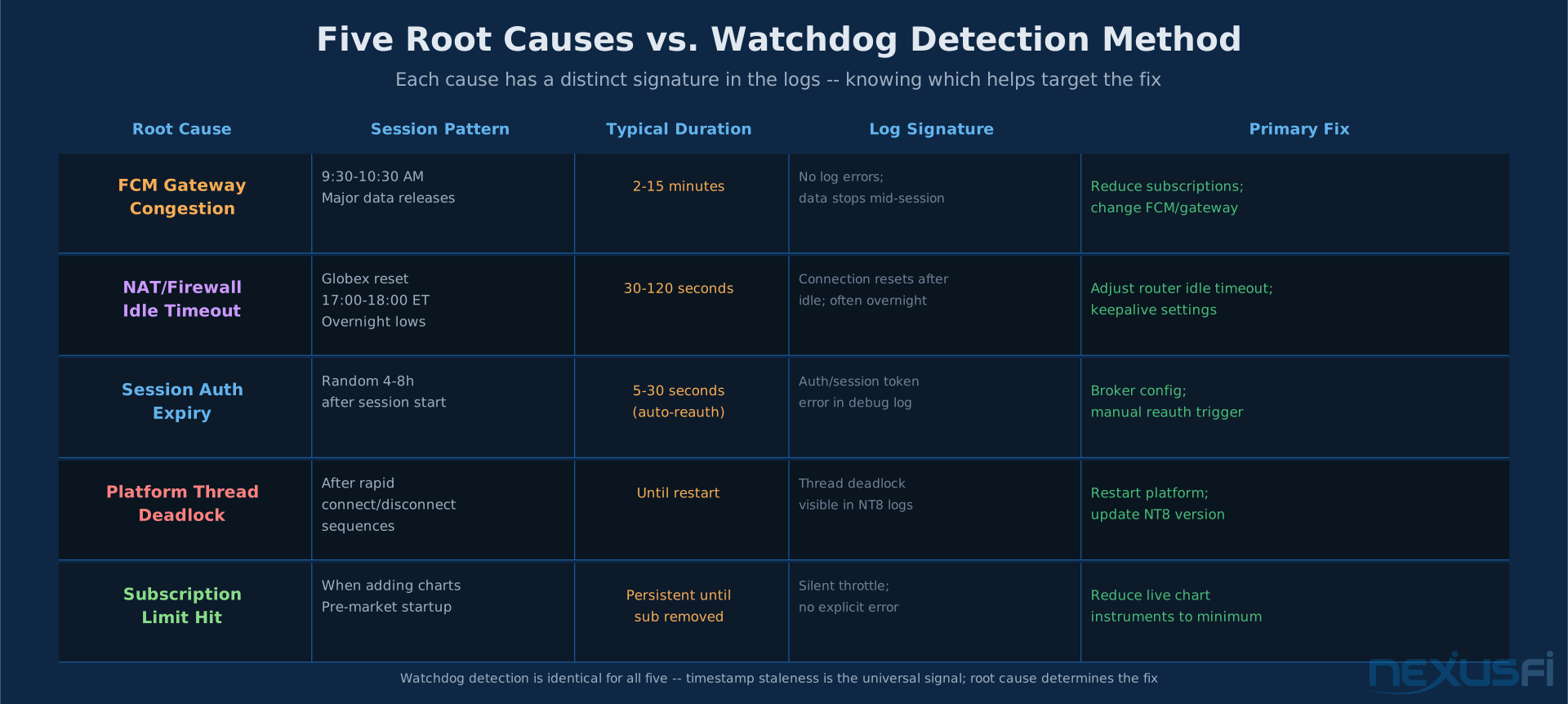
FCM gateway congestion. During high-volatility events — CPI prints, FOMC decisions, geopolitical shocks — some FCM gateways hit internal queue limits and drop data feeds selectively while maintaining control channels. You can still send orders. You can't see the market. The 10:00 AM data release is the most common trigger.
NAT/firewall idle timeouts. Your ISP router or corporate firewall has idle connection timeouts. The data stream, which goes quiet during globex reset hours or low-vol overnight sessions, can get silently dropped at the network edge while the control heartbeats keep the session "open."
Session authorization expiry. Some broker integrations have separate session keys for market data subscriptions. The control channel stays alive when those keys expire, but the data stops flowing until reauthorization — which NT8 may not initiate automatically.
Platform thread deadlocks. Less common but real: NT8's data handling can deadlock under specific sequences of connection events, leaving the UI reporting healthy while the internal data processing thread is stuck.
Subscription limits. Subscribe to too many instruments simultaneously and some brokers silently throttle data delivery rather than returning an error.
@SpencerEng's thread Rithmic vs. CQG Question (2014) covers which feed shows higher raw reconnect rates under what conditions. Rithmic tends to show higher per-account reconnect rates. CQG is generally more stable but has its own failure modes. The right choice depends on your FCM and trading style. What's consistent across both: the silent freeze can happen to either.
The pattern recognition shortcut: if your freezes always happen at roughly the same time of day, you have a scheduled cause — NAT idle timeouts during overnight lows, FCM congestion at 9:30 open, session auth expiry on a 4-8h cycle. Log timestamps and look for clustering before spending time on hardware or broker changes.
The Watchdog Pattern: Only Reliable Detection #
The fix is conceptually simple. Watch the last tick time, not the connection status.
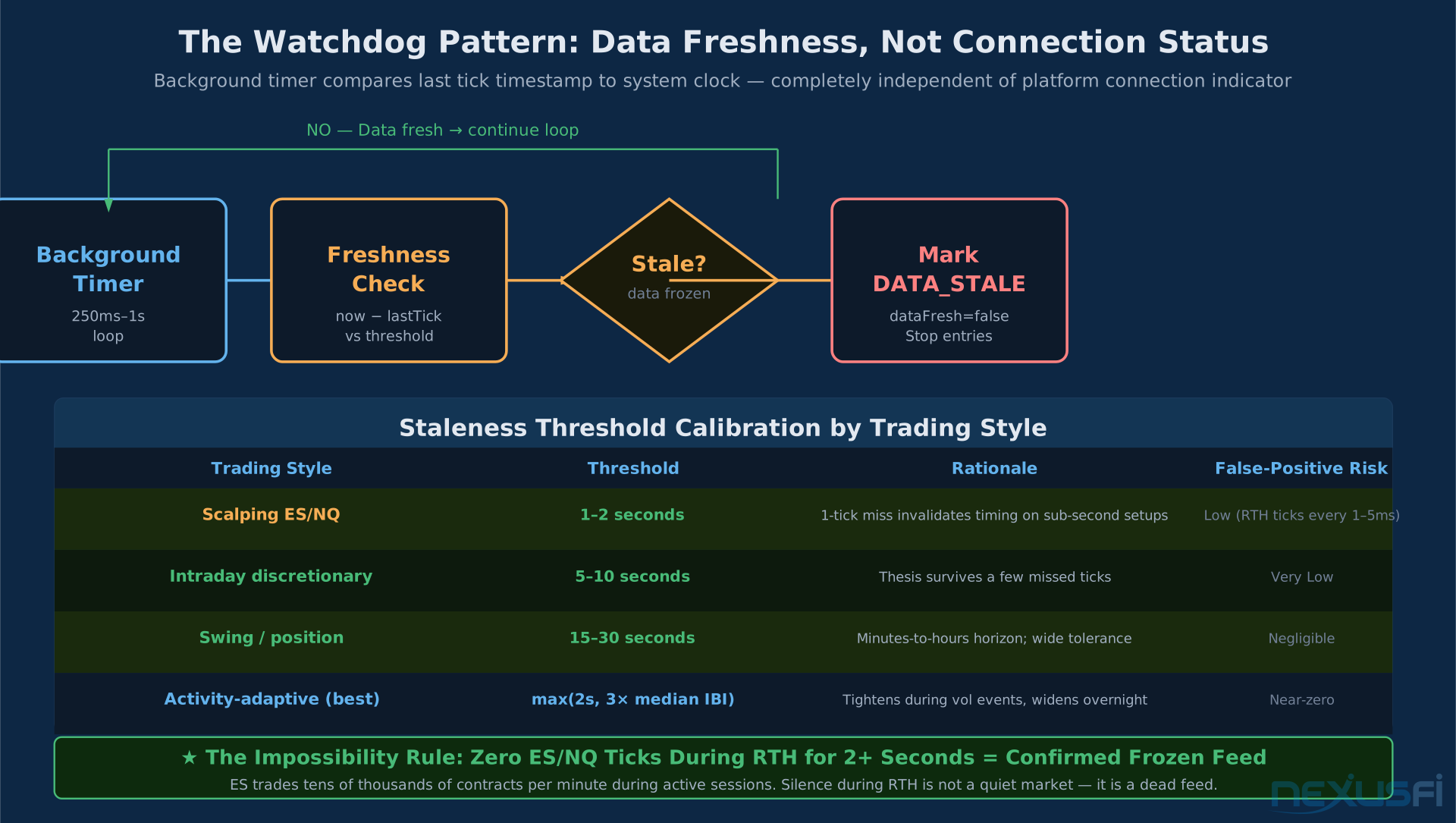
A watchdog is a background process that subscribes to a reference instrument — typically the ES front-month or whatever liquid instrument you're trading — and checks the wall-clock age of the last received tick. Every 250ms to 1 second, it asks: "How long ago did I get a tick on this instrument?"
If the answer is longer than your threshold, and the market is open, the feed is frozen.
The "impossible" rule: Zero tick updates on a liquid futures instrument (ES, NQ, CL, NQ) for more than 1-2 seconds during Regular Trading Hours is statistically impossible. The ES trades tens of thousands of times per minute during active sessions. If your watchdog sees nothing for 5 seconds on an ES subscription during RTH, you don't have a quiet market. You have a frozen feed.
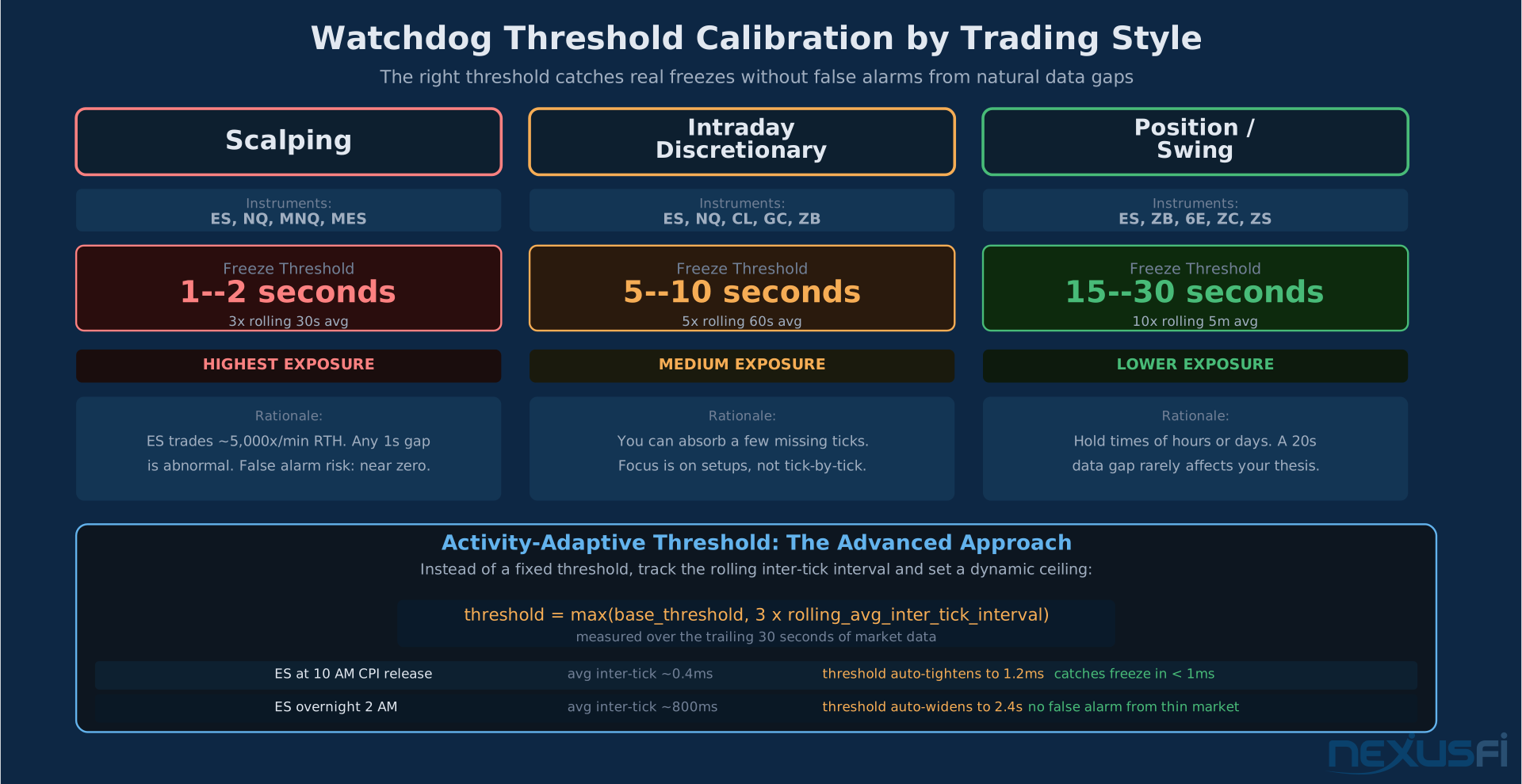
Threshold calibration by trading style:
- Scalping ES/NQ: 1-2 seconds. You need to know the instant data stops.
- Intraday discretionary: 5-10 seconds. A few missed ticks won't change your thesis.
- Position/swing: 15-30 seconds. Acceptable gap before action is required.
A more sophisticated approach is the activity-adaptive threshold: track the rolling average inter-tick interval over the last 30 seconds, then set your freeze threshold at max(2 seconds, 3x that average). During high-volatility sessions, ticks arrive every millisecond and your threshold tightens. During overnight lows, the naturally slower feed doesn't trigger false alarms.
The dual-path sanity check: If account events and order confirmations are still flowing while market data is frozen, you have a data-path freeze (the more common failure). If both are frozen, you have a broader connectivity problem. Treating these the same leads to the wrong recovery action.
What NT8 exposes in NinjaScript:
In NinjaTrader 8, you can implement this in a strategy or add-on by maintaining a DateTime lastTickTime variable updated on every OnMarketData call. A separate timer fires every second and compares DateTime.Now - lastTickTime against your threshold. When breached, set dataFresh = false and gate all trading logic on that boolean.
Enable Debug logging on your data provider (Tools > Options > Log Level) — silent freezes often leave breadcrumbs in the log file: SocketException, ConnectionReset, or gateway timeout messages that the UI suppresses to avoid alarming users. The log tells you what the green light won't.
@Righteous7's thread Is Kinetick stable? Any disconnections? (2013) is one of the earlier NexusFi discussions of this pattern — worth reading for the FCM context even though the data feed has since changed.
For automated trading strategies, consider moving from managed to unmanaged order methods and implementing explicit state-recovery logic in OnConnectionStatusUpdate. Managed orders are convenient but their state recovery during partial connection events is less predictable.
The Staged Escalation Ladder #
When your watchdog fires, don't panic and restart everything. That's the wrong response for most freezes, and it creates new problems.
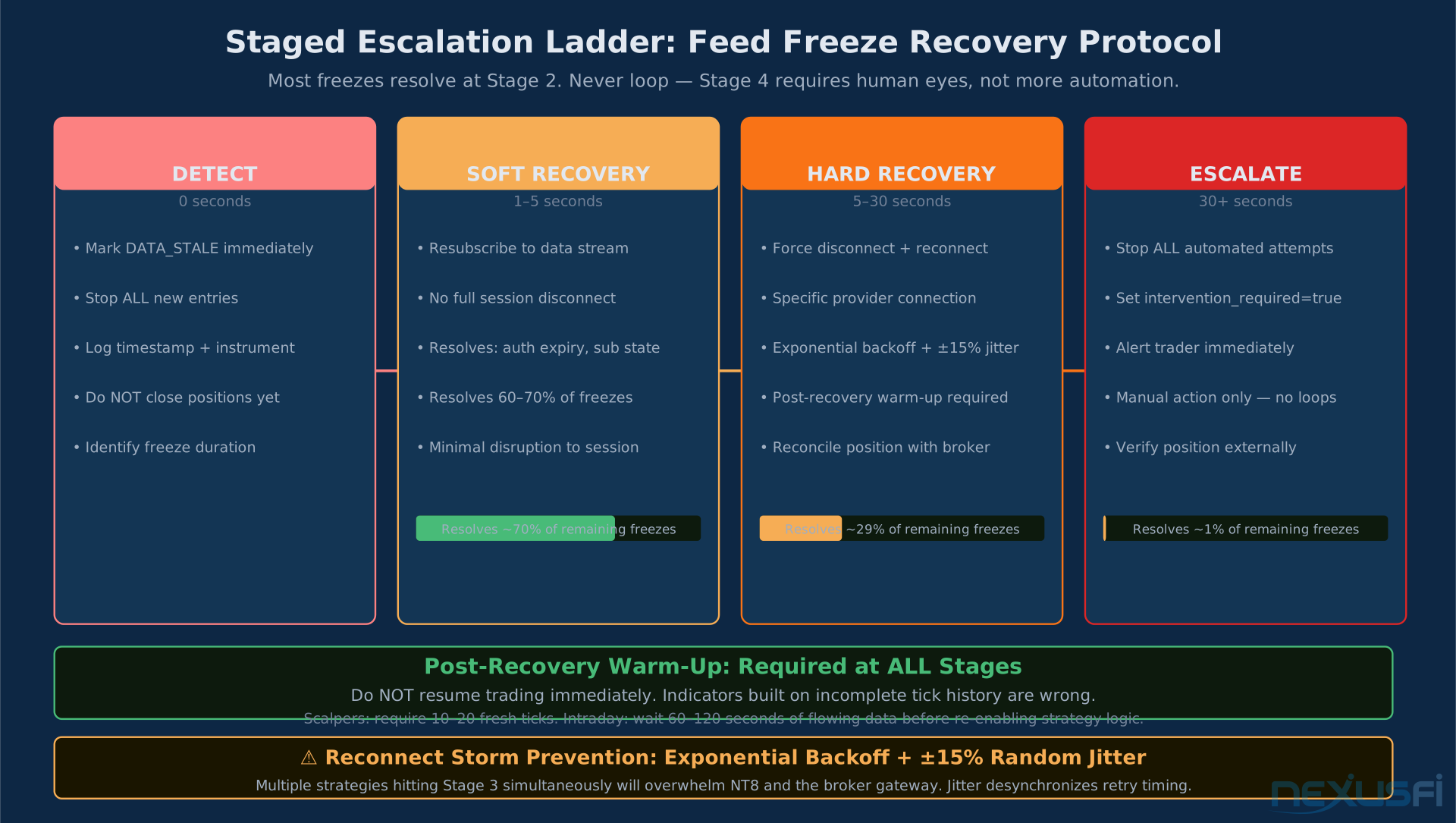
The correct response is staged escalation:
Stage 1: Detect (immediate, 0 seconds)
- Mark
dataFresh = false - Stop all new entries immediately
- Log the event with timestamp
- Do NOT close existing positions yet
Stage 2: Soft recovery (1-5 seconds) Attempt to restart the data subscription without tearing down the connection. In NT8 terms, this means resubscribing to the instrument without a full disconnect/reconnect. For most freezes caused by session authorization or subscription state, a soft resubscribe resolves it within 2-3 seconds.
Stage 3: Hard recovery (5-30 seconds) If soft recovery fails, force-disconnect and reconnect the specific provider connection. This is different from restarting the platform. NT8 allows programmatic connect/disconnect of individual connections. @luvashem documented the silent freeze pattern that requires this level of intervention in Problems with Rithmic? (2022) — soft resubscribe didn't work; hard reconnect did.
Stage 4: Escalate (30+ seconds) If the feed is still not flowing after two hard recovery attempts, stop. Don't loop. Most situations that aren't resolved by Stage 3 require human attention — either the broker has an outage, or something in your network configuration needs manual intervention.
Set a boolean flag that prevents further automated reconnect attempts. Alert yourself. Manual intervention is the only remaining option.
Critical: the reconnect storm problem. If you're running multiple strategies on multiple instruments and all of them hit the watchdog simultaneously, they'll all try to reconnect at the same second. NT8 can't handle this gracefully. Implement exponential backoff with random jitter (plus or minus 15% on each retry interval) so strategies desynchronize their recovery attempts.
Post-recovery warm-up: After data resumes, you missed ticks. Possibly many. Your indicators are calculated on incomplete history. Don't resume trading immediately. Require N fresh ticks before re-enabling strategy logic — typically 10-20 ticks for a scalper, 1-2 minutes of data for intraday trading. Treat the reconnect as a fresh session start for indicator state.
Reconcile your position with broker account state after every hard recovery. Managed order state in NT8 can desynchronize from broker state during connection events. Never assume what you think you're holding matches what the broker has on record.
Position Management During a Data Freeze #
The question traders always ask: should I flatten my position when the feed freezes?
There's no universal answer, but here's the decision framework:
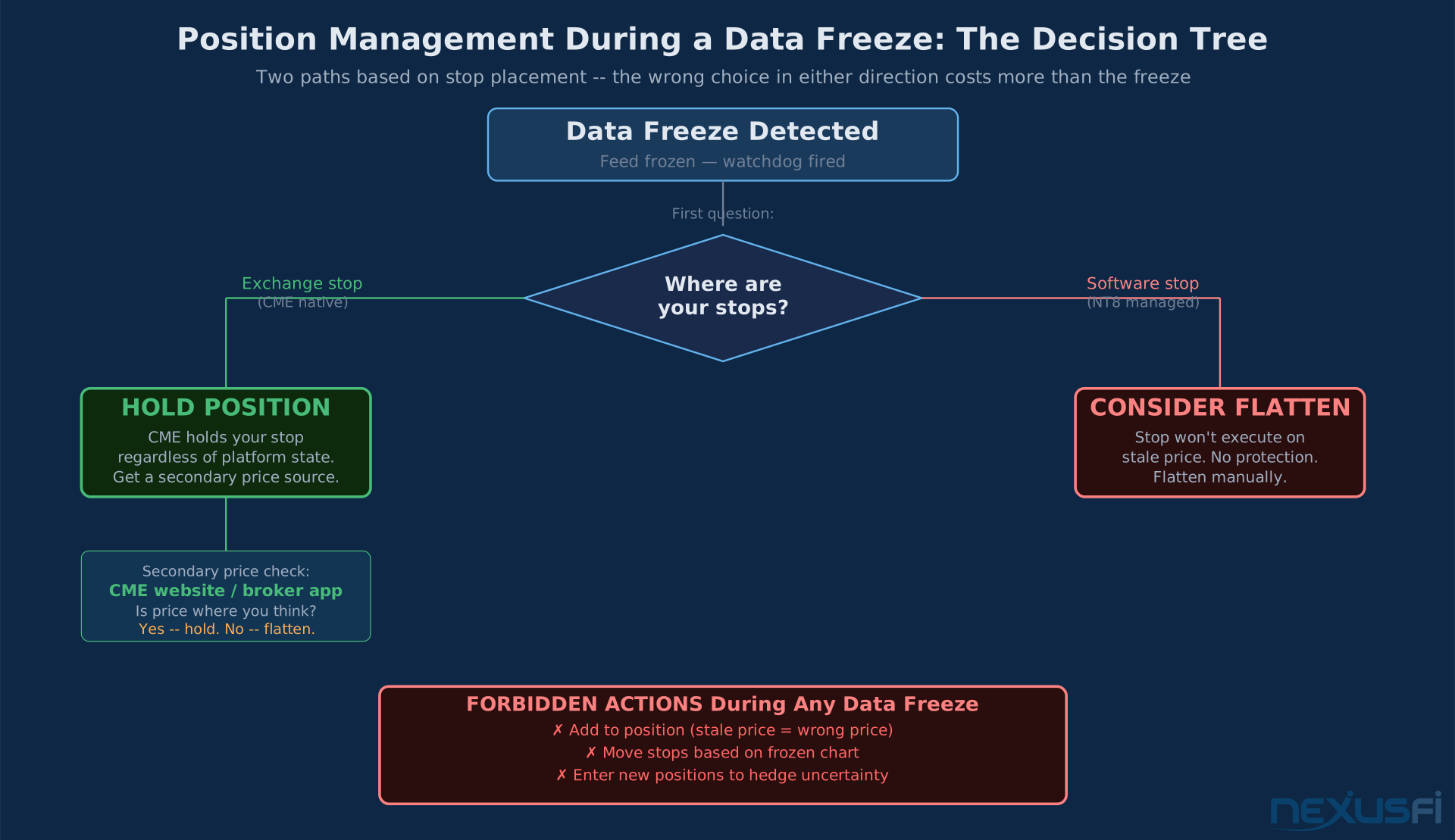
Flatten if:
- You're running tight stops that depend on real-time prices
- You're in a position against the news (you were short when a macro event hit)
- Your stop is not at the exchange (it's a software stop in NT8, not a native exchange stop)
- You've been frozen more than 30 seconds with no recovery
Hold if:
- You have hard stops sitting at the exchange (CME holds them regardless of your platform state)
- Your position is size-appropriate to weather a gap
- You have a secondary way to monitor prices (phone app, broker web portal, CME website)
What you cannot do safely:
- Add to a position on stale data. The current "price" on your frozen chart isn't real.
- Move your stop based on a frozen chart. You don't know where the market is.
- Enter new positions to "hedge" against uncertainty. You're trading blind.
The classic disaster scenario: your platform freezes, you add size because "price looks cheap" based on the frozen chart, data comes back and you're now massively offside at a real price 50 ticks away from where your chart showed.
When data is stale, your only job is damage control, not profit optimization.
Broker and FCM Infrastructure: The Variables You Don't Control #
Your local setup is only half the equation.
Connection reliability in futures trading depends heavily on your FCM's gateway infrastructure. Two traders using identical hardware and the same platform can have radically different silent-freeze rates based purely on their FCM choice and the specific gateway routing their data.
Things that vary by FCM:
- Gateway redundancy and load balancing
- Market data path versus order routing path (whether they share infrastructure or are separated)
- Data subscription limits per session
- Session authorization renewal behavior
- Gateway-level buffering during high-volatility events
Practical steps:
- Keep your market data subscriptions minimal. Every instrument you subscribe to is another feed that can freeze independently. If you're only trading ES and NQ, don't have live charts open for CL, GC, and 6E simultaneously.
- Test your reconnection behavior during deliberately low-volatility times. Set your watchdog threshold to 1 second and watch how often it triggers. Log it. You want to know your MTBF (mean time between failures) before you're relying on the system in a live trade.
- Consider a secondary data provider for verification. If your NT8 feed freezes and you have a browser tab open with CME futures prices or your broker's web portal, you can verify the market in 10 seconds without touching your platform.
For more on building a reliable trading infrastructure including backup data sources: Internet Redundancy and Backup Connectivity
Building a Data Health Monitor Into Your Workflow #
If you trade with NT8 and have any automation — even semi-automated strategies that alert you when to click — you need a data health indicator in your workflow.
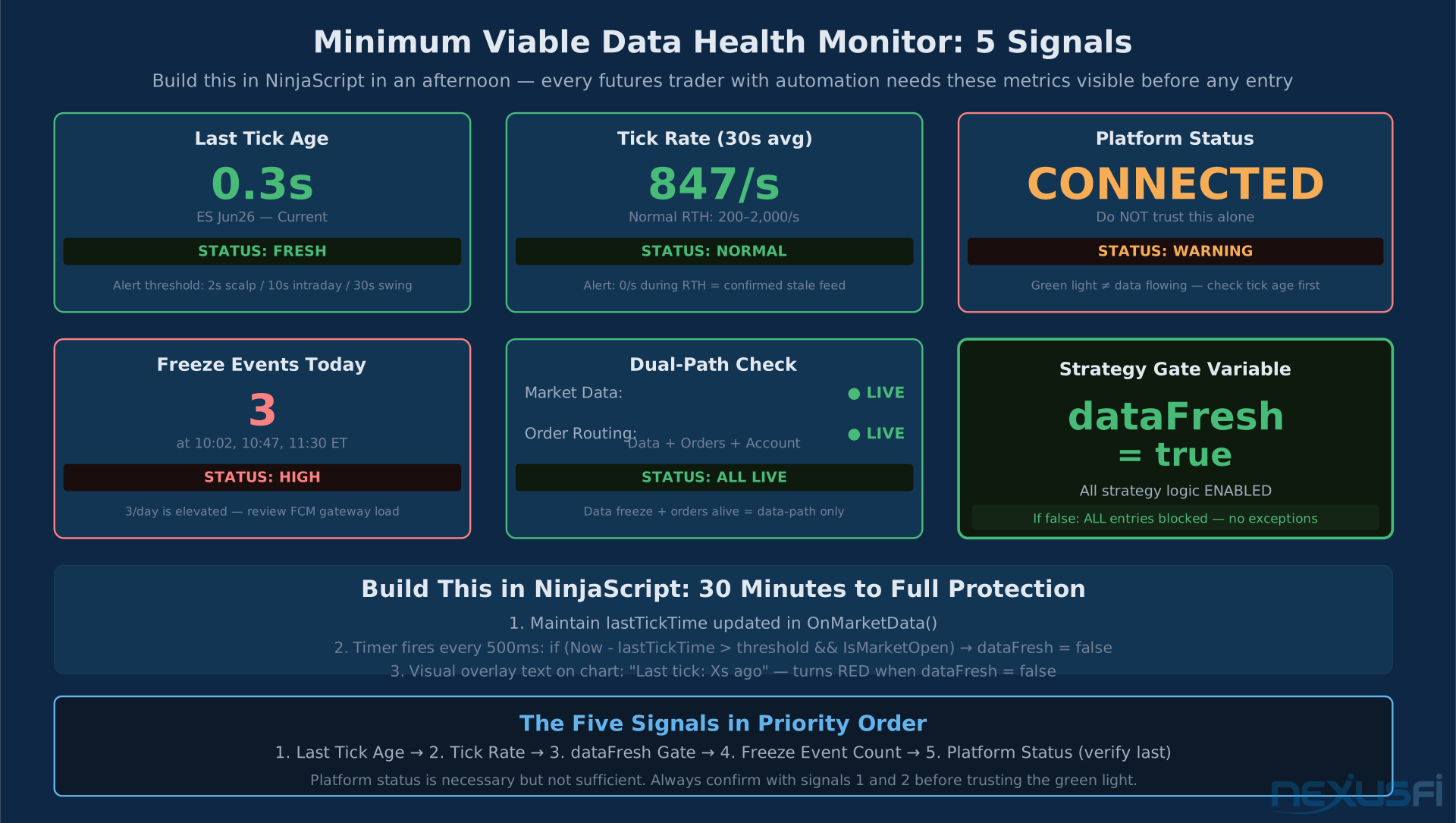
The minimum viable implementation:
- A text indicator on your main chart showing "Last Tick: X seconds ago"
- A color that turns red when that number exceeds your threshold
- A sound alert when it fires
This takes about 30 minutes to implement in NinjaScript. Full implementation guide with the event-driven architecture: NinjaScript Strategy Development
For algo traders, the data freshness check belongs inside your strategy framework, not as an afterthought. Every strategy should have a dataFresh gate that blocks order submission when the watchdog is tripped.
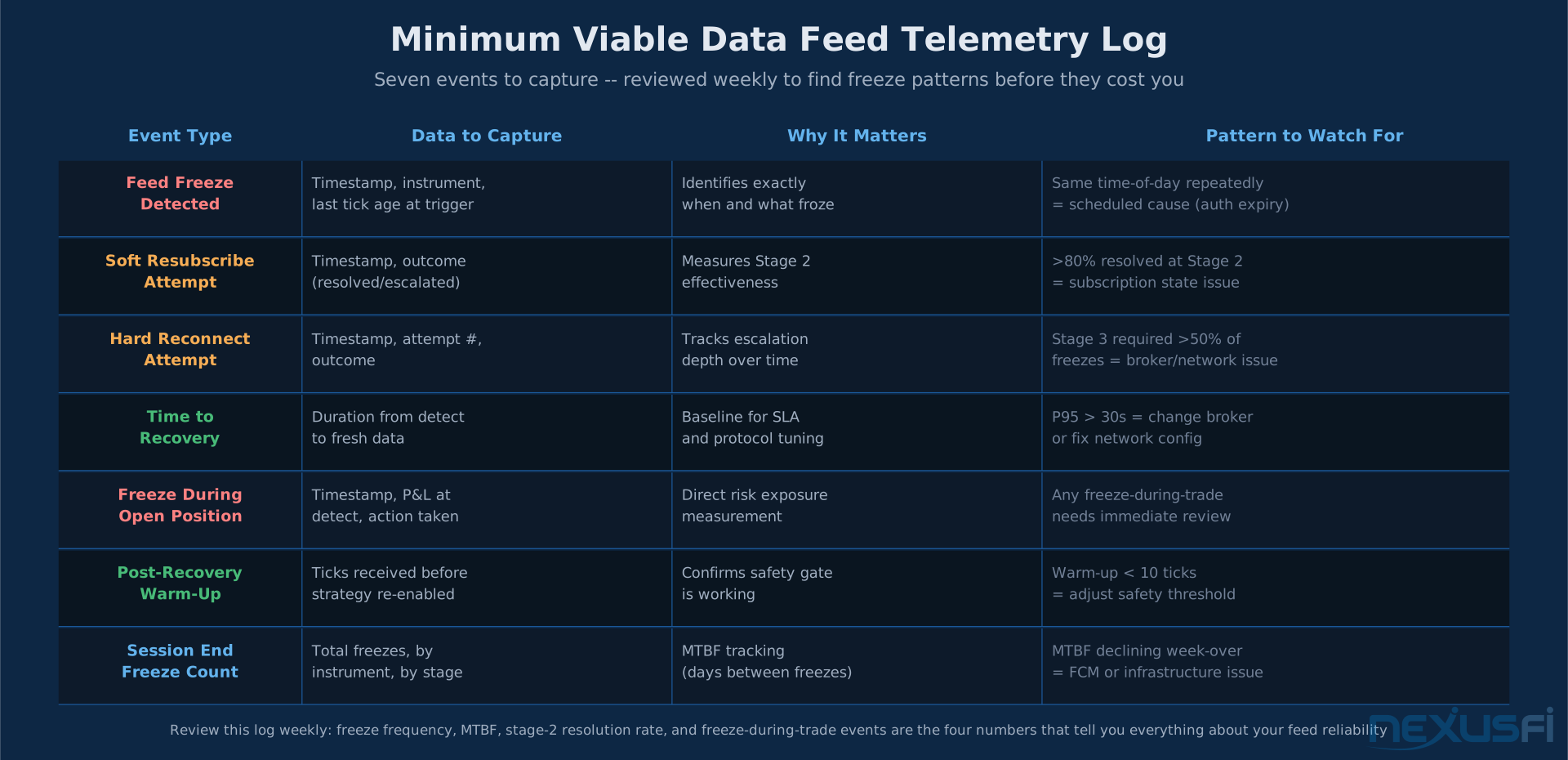
What to log (minimum viable telemetry):
- Connection state changes with timestamps
- Last tick time per instrument when connection events occur
- Resubscribe/reconnect attempt timestamps and outcomes
- Time-to-recovery from each freeze event
Review this log weekly. Patterns will emerge: maybe your feed always freezes between 3:00-3:15 PM during globex rollover. Maybe it's correlated with high-volatility events. Maybe it's always after 4+ hours of continuous operation. That pattern tells you when to be most vigilant and when to schedule proactive reconnects.
If you're running NT8 on a VPS, see Windows VPS for Futures Trading for the OS-level settings that affect connection stability.
Network latency testing and diagnostics for isolating whether your connection issues are local or FCM-side: Network Latency Testing and Diagnostics
What the Community Knows (And Has Known for Years) #
This isn't new. The NexusFi NinjaTrader forum has threads going back to 2014 documenting the same behavior — connection shows active, charts frozen, NT8 giving no indication anything is wrong.
The community workarounds that have persisted through multiple NT8 versions:
- Proactive reconnects scheduled during globex reset hours (17:00-18:00 ET)
- Watching tick timestamps independently of connection status
- Keeping data subscriptions minimal (one chart per instrument maximum)
- Running NT8 on a VPS closer to the exchange to reduce latency-related disconnects
- Having a phone backup app open for position monitoring
None of these are perfect. They're all workarounds for an architectural limitation that the platform owns.
The underlying issue — the separation between connection status and data freshness — is something every platform vendor could address with better UI design. A status indicator that shows "Connected / Data Live" versus "Connected / Data Stale" would eliminate most of the confusion. The socket being open and the data flowing are different facts; the UI should show both.
Until that changes, the watchdog is your job.
Quick Reference: Data Feed Freeze Checklist #
When you suspect your feed is frozen:
- Check tick timestamps — what was the last update time on your primary instrument?
- Open an external price source — CME website, broker mobile app, Bloomberg
- Compare to live price — is your chart price more than a few ticks away?
- Attempt soft resubscribe — Tools > Data Feed > [Provider] > Actions > Reconnect
- If unresolved in 30 seconds, manually disconnect and reconnect the provider
- Check position at broker — verify actual holdings before taking any action
- Log the event — timestamp, duration, instrument affected, FCM
- Do not add size until fresh data is confirmed and has been flowing for 60+ seconds
The risks during a data freeze aren't just about the current trade. They're about the decision-making framework you operate from. If your market data is stale and you don't know it, everything downstream — your entries, your exits, your risk sizing — is built on a false foundation.
The solution is not sophisticated. Watch the timestamp. Not the light.
Knowledge Map
Go Deeper
Build on this knowledgeCitations
- — NinjaTrader won't reconnect (AKA I hate this software so much!) (2014) 👍 2“Platform won't reconnect -- lights cycling between red and yellow. Manual reconnection required.”
- — NT8 Charts for futures dont update with IB data (2022)“Charts completely stopped updating despite the connection showing active and green. Silent feed freeze with IB data provider.”
- — NinjaTrader 8 chart delays if volume increases (2016)“Chart delays and data freezes correlate with high-volume events -- a silent freeze triggered by FCM gateway congestion.”
- — Rithmic vs. CQG Question (2014)“Rithmic vs CQG stability comparison -- which feed shows higher reconnect rates per account and under what FCM configurations.”
- — Is Kinetick stable? Any disconnections? (2013)“Early community discussion of silent data feed instability -- connection showing active but market data not updating.”
- — Problems with Rithmic? (2022) 👍 1“Silent freeze requiring full hard reconnect -- soft resubscribe was insufficient for this Rithmic gateway issue.”
- NinjaTrader Support — Connection Status and Data Provider Connectivity Guide (2024)