



Automated Trading Emergency Protocols: Kill Switches, Recovery Procedures, and the Systems That Protect Your Account When Your Bot Goes Wrong
Overview #
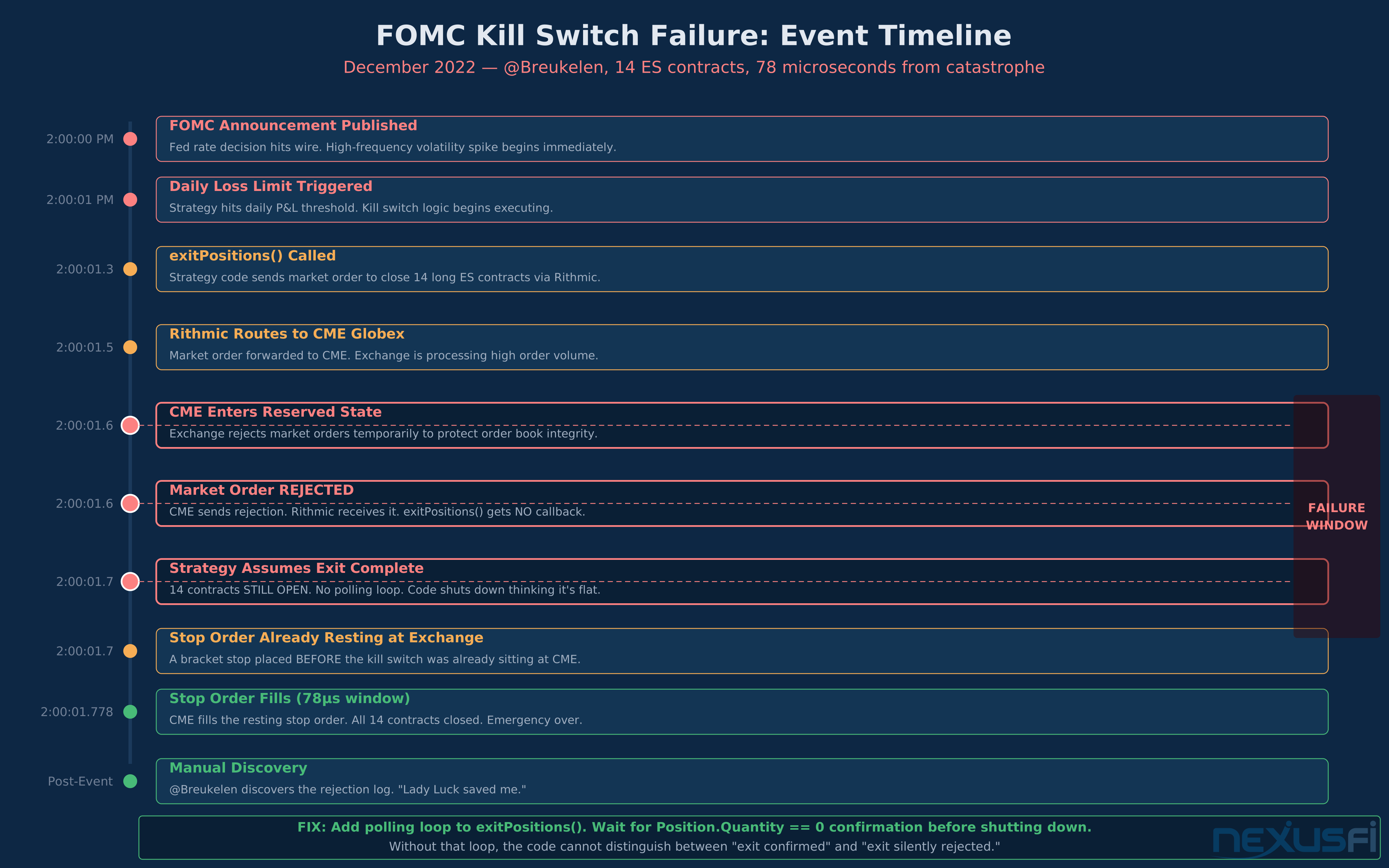
It's 2:00 PM on an FOMC day. Your algo just hit its daily loss limit with 14 long ES contracts open. The kill switch fires. Rithmic sends a market order to exit all positions — but CME is in a reserved state during the announcement and rejects market orders entirely. Your code waits for confirmation that never comes, then shuts down. You now have 14 unhedged contracts with no automated exit logic running, no bracket orders remaining, and no idea what just happened.
This story is real. It happened to @Breukelen in December 2022, and he was saved by 78 microseconds — a stop order that CME nearly cancelled but filled instead. Most traders running automated systems have no plan for when the plan fails. They've stress-tested their entries, optimized their exits, and run thousands of backtests — but never once asked: what happens when the whole system breaks at the worst possible moment?
Emergency protocols for automated trading cover four distinct failure domains: the code fails, the platform fails, the broker or data feed fails, or the exchange itself behaves unexpectedly. Each layer requires its own safeguards, and the layers must be designed to back each other up. A kill switch that depends on the same connection it's trying to close isn't a kill switch — it's wishful thinking.
The most dangerous moment in automated trading isn't a bad signal — it's a partially executed emergency shutdown that leaves positions open without active management. Know your failure modes before they happen.
This article covers the architecture of a complete emergency protocol stack: code-level kill switches, platform risk controls, broker-enforced hard stops, external watchdog systems, position state recovery after reconnection, and the redundant infrastructure that makes all of it work when your primary setup goes dark. If you're running an automated strategy without at least three of these layers in place, you're not trading a system — you're gambling that nothing will ever go wrong.
The Failure Taxonomy: What Actually Goes Wrong #
Before designing safeguards, categorize what you're protecting against. Automated trading failures fall into four groups, each with different characteristics, timescales, and appropriate responses.
Logic failures occur inside your strategy code. These include runaway entry loops that fire duplicate orders, incorrect position tracking that causes the strategy to believe it's flat when it has open contracts, and parameter drift where a strategy continues running after conditions that justified its use have changed. Logic failures are typically fast — a bad loop can stack up dozens of unintended orders in seconds. They require code-level protection: profit/loss guards, order count limits, position size validation before every submission.
Platform failures occur in the trading software itself: NinjaTrader crashes mid-trade, Sierra Chart freezes during a reconnect, the data feed drops and the platform continues processing stale bars. Platform failures are the most common category. Every experienced automated trader has lost connection during a live position at least once. Platform failures require external redundancy — you cannot rely on the platform to monitor itself.
Connectivity failures are broker or data feed outages: Rithmic feed drops, the connection between your platform and the FCM times out, or your internet goes down. The critical distinction is whether orders already submitted to the exchange survive. If you sent a bracket order and the FCM acknowledged it, your stops remain at the exchange even if you lose connectivity. If you sent the entry but the stop acknowledgement was in transit, you're exposed. Connectivity failures require both pre-submission confirmation protocols and broker-level backup protections.
Exchange-level events are the rarest but most severe: CME enters a reserved state during extreme volatility (rejecting market orders), circuit breakers halt trading, or the exchange itself experiences a technical outage. During the August 2015 flash crash and the March 2020 COVID sell-off, exchange systems implemented restrictions that caused automated kill switches to behave unexpectedly. At this layer, the only protection is having limit orders already resting at the exchange rather than depending on sending market orders during crisis conditions.
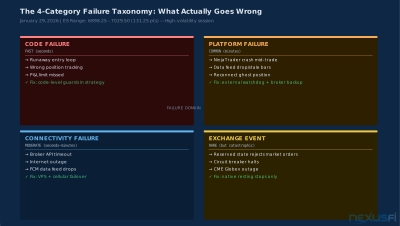
These four failure categories can occur simultaneously. A volatile macro event that triggers your daily loss limit may also cause Rithmic to reject market orders (exchange reserved state), your platform to freeze on reconnect (platform failure), and your internet to spike in latency (connectivity failure) — all at once. Design for the compound failure, not just the individual ones.
Kill Switch Architecture: Four Layers of Protection #
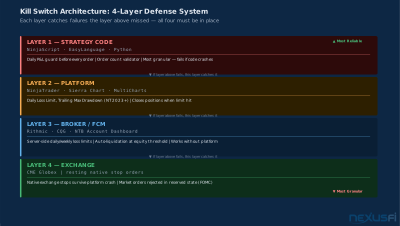
A complete emergency protocol isn't a single mechanism — it's a stack of four independent layers, each designed to catch what the layer above it missed. The outermost layer (exchange) enforces hard limits regardless of everything else. The innermost layer (your strategy code) provides the finest control but is the most vulnerable to failure. Both are required. Neither is sufficient alone.
Think of it this way: if your code-level kill switch fires but your broker connection drops before the order is confirmed, your broker-level daily loss limit catches it. If the broker-level limit fails because you're at a broker without proper risk controls, your exchange orders (resting stops already placed) cover you. The layers aren't redundant — they cover different failure scenarios.
The four layers, from innermost to outermost:
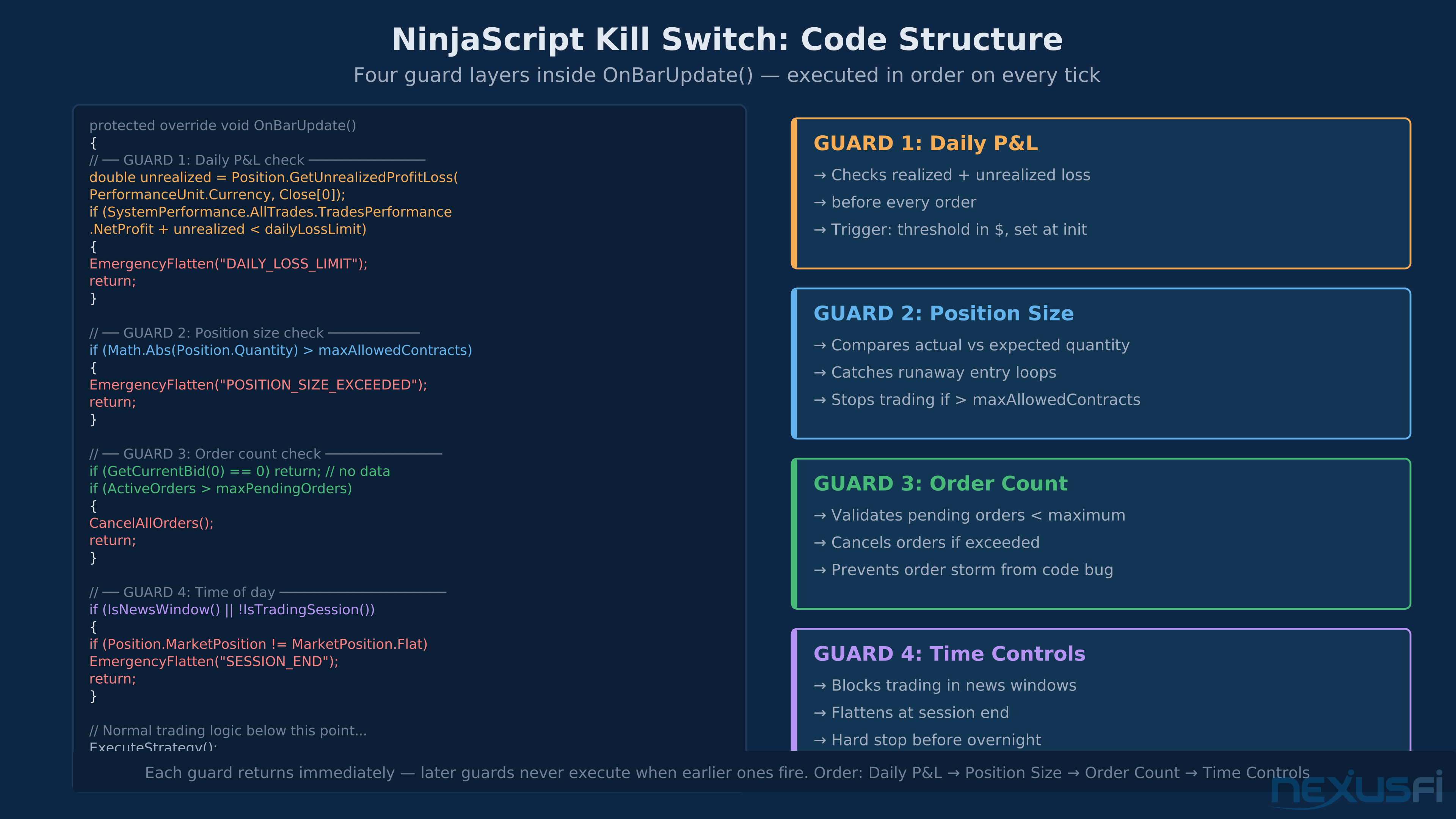
Layer 1 — Code-level guards: Built into your strategy logic. These include daily P&L monitors that check realized + unrealized loss against a threshold before every new order submission, order count validators that abort if pending orders exceed an expected maximum, position size checks that compare actual broker position against expected position and halt if they diverge, and time-of-day controls that prevent trading during news events or outside defined session windows.
Layer 2 — Platform-level controls: Built into the trading software. NinjaTrader's broker-side risk settings (available since March 2023 via account.ninjatrader.com) include Daily Loss Limit, Weekly Loss Limit, Real-Time Trailing Max Drawdown, and End-of-Day Trailing Max Drawdown. Sierra Chart has a built-in daily loss limit that closes positions when hit. When these limits trigger, open positions are liquidated at the platform level without requiring your strategy code to take any action. As @Liberty88 documented in 2023, these settings exist and are configured via the broker web portal — most NT users don't know they're there.
Layer 3 — Broker/FCM-level enforcement: The FCM (Futures Commission Merchant) that holds your account can enforce risk parameters server-side, independent of any platform. Rithmic provides configurable auto-liquidation through their risk management infrastructure. CQG supports broker-enforced position limits and daily loss stops. @Big Mike confirmed in 2011 that brokers like Velocity Futures allow custom daily loss limits that work across all supported platforms. This layer operates even if your trading platform crashes completely — the FCM monitors your account balance and triggers liquidation when thresholds are crossed.
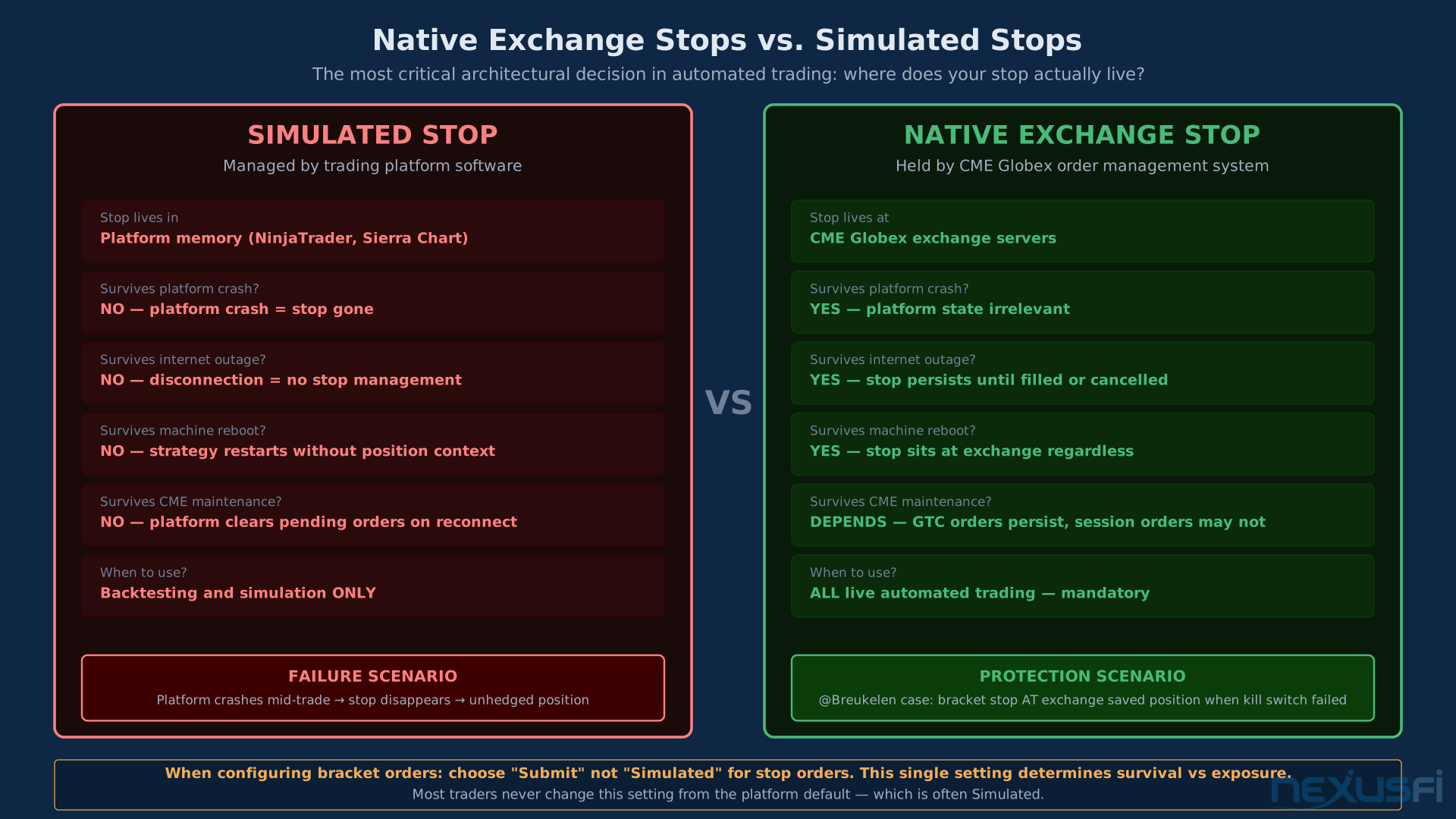
Layer 4 — Exchange-level protections: CME Globex maintains resting orders even when the connection between your platform and the exchange is severed, as long as the order was acknowledged before disconnection. This is why using native exchange orders (stop-limit rather than simulated stops held by the platform) is critical for live automated trading. A native CME stop order survives a platform crash. A simulated stop order managed by your strategy code does not.
Configure all four layers before going live. Layer 3 (broker-level) requires a phone call or form submission to most brokers — this is not done automatically. If you've never contacted your broker to set a maximum daily loss limit, you don't have one.
Code-Level Emergency Logic #
Inside your strategy, emergency logic needs to be separated from trading logic. @Koepisch laid this out clearly in the NexusFi community: keep your emergency procedure code in a separate indicator, not embedded in the strategy. The emergency indicator runs on a timed interval (not just on bar updates), checks for abnormal trade distributions — position size above expected maximum, open orders without corresponding stops, positions lasting longer than the maximum allowed duration — and when an emergency case is detected, calls flatten recursively until no active or pending orders remain.
The critical failure mode to guard against in code: assuming a function worked because you sent the command. @Breukelen learned this directly when Rithmic's exitPositions() function sent a market order that CME rejected with no callback mechanism to report the failure. The fix is to send the exit order and then poll for confirmation: wait in a loop until actual position = 0, with a timeout that triggers an alert if confirmation doesn't arrive within N seconds.
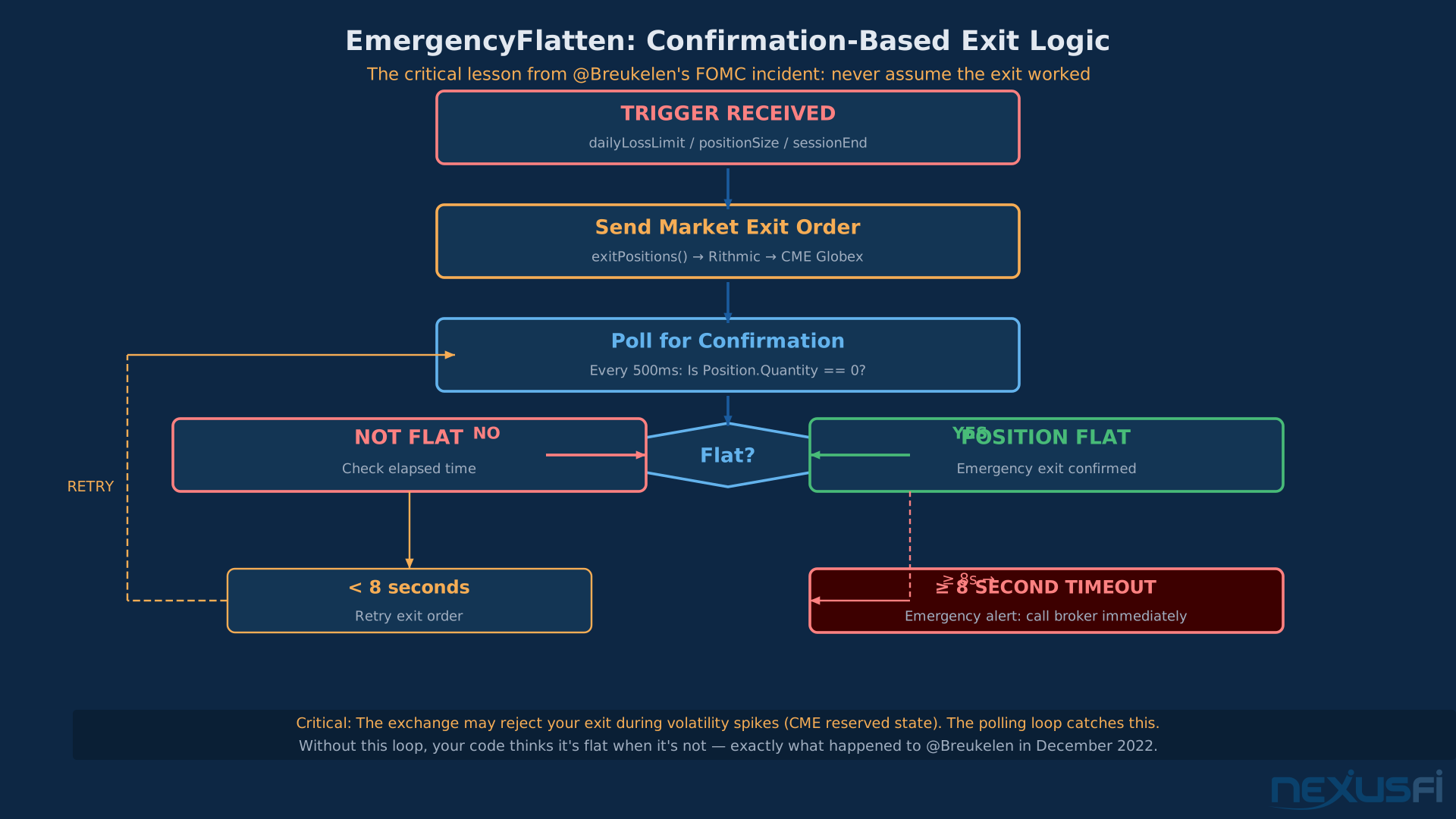
Practical code-level guards for NinjaTrader/NinjaScript:
Daily P&L monitor: Before every order submission, calculate (realized P&L + unrealized P&L). If the total is below your daily loss limit (negative), cancel the order and disable the strategy. Separate this check from your entry logic — it should run independently so it can catch losses from manual trades or other strategies running simultaneously.
Order count guard: Track the number of pending orders. If pending orders exceed the expected maximum for your strategy (typically 1-2 for a simple directional system), cancel all pending orders immediately and investigate before resuming. A runaway entry loop typically manifests as rapidly escalating pending order counts before it escalates to fills.
Position reconciliation: On every bar update, compare your strategy's internal position tracking against the actual broker position. If they diverge, halt order submissions until the state is manually reconciled. This is the core protection against ghost positions (discussed in detail below).
OnTermination() cleanup: Override OnTermination() in your strategy and cancel all open orders before the strategy exits. As @dom993 documented, keeping track of open positions and orders in persistent files (written on every bar, overwritten atomically) means you can read the last known state when reconnecting and reconcile against what the broker actually shows.
Daily P&L check logic: maxDailyLoss = -1500 USD if (realizedPnL + unrealizedPnL) < maxDailyLoss: CancelAllOrders() FlattenAllPositions() DisableStrategy() Alert("Daily loss limit hit — all positions closed")
The Ghost Position Problem #
A ghost position is when your trading platform shows you in a position that doesn't exist at the broker, or vice versa. This is one of the most dangerous failure modes in automated trading because the platform's position tracking drives subsequent order logic. If your strategy thinks it's long 2 contracts but the broker shows flat, and then a long signal fires again, you've just doubled a position that doesn't exist — and then you're actually long 2 with no knowledge it happened.
Ghost positions arise from three primary causes: fill confirmations that arrived out of order, connection drops that occurred between order submission and fill acknowledgement, and exit orders that were cancelled but whose cancellation notification was lost. NinjaTrader is especially susceptible to this, as @Miesto explained: when NT doesn't receive the confirmation message from the broker that a trade is closed, it maintains the position as open internally while the broker shows flat. The result is that clicking "close position" creates a new opposing position rather than closing the phantom one.
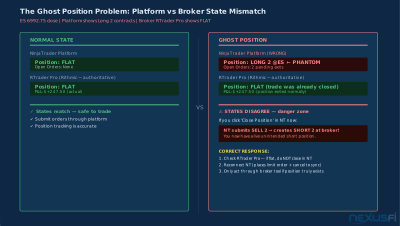
The standard defense, used by experienced algo traders, is a parallel position monitor that operates independently of the trading platform. Keep an active connection to the broker's native execution tool (RTrader Pro for Rithmic, CQG Trader for CQG) running alongside your platform. The native tool shows actual broker positions — these are authoritative. Your platform's displayed positions are derived. When they disagree, trust the broker tool and act through it.
For the strategy code itself, @Adamus's recommendation is to use "Sync account position" = OFF in NT strategy settings and handle position reconciliation manually in your code. The automatic sync functionality has known bugs where NT fires orders to adjust positions and often gets them wrong, compounding the problem. Manual reconciliation — reading the actual broker position via the API and comparing against your internal state — is more reliable despite requiring more code.
Never click "close position" in your platform without first verifying the position is real at the broker level. A phantom position close creates a real opposing position at the broker. This is how traders end up long when they meant to close a short — and short when they meant to close a long.
Broker-Level Risk Controls: Hard Stops That Work Even When You Can't #
Platform and code-level protections fail when the platform or code fails. Broker-level risk controls operate on the FCM's servers and require only that your account exist — not that your trading software is running or that you have internet access at all.
Rithmic's risk management infrastructure, used by NinjaTrader Brokerage, TopstepX, Apex, and many other prop firms and brokers, allows broker-side enforcement of:
- Daily loss limit: When your account's net realized + unrealized P&L hits the specified threshold, all positions are closed automatically and new orders are blocked for the remainder of the session
- Maximum position size: Orders that would exceed a specified contract limit are rejected at the FCM before reaching the exchange
- Auto-liquidation triggers: Account equity thresholds that trigger immediate position closure regardless of market conditions
NinjaTrader's broker-side risk settings, added in March 2023, include not just daily loss limits but weekly loss limits, daily and weekly profit triggers (lock trading once you've hit a profit target for the day), and two trailing max drawdown options (end-of-day and real-time). As @Liberty88 documented, these settings are configured via account.ninjatrader.com under Account Dashboard > Settings > Risk Settings. They're broker-side, not platform-side — they work whether you're running NT, Sierra Chart, or anything else connected to the NinjaTrader FCM.
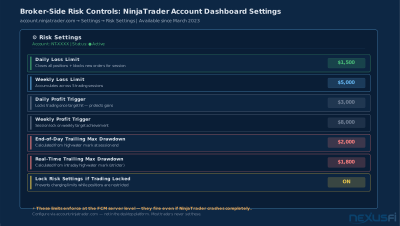
For brokers that don't have built-in risk management interfaces, direct contact is required. As @Big Mike confirmed with Velocity Futures, brokers will configure custom daily loss limits when requested — you need to call or email them and specify the threshold. The limit is then enforced server-side. The same applies to most other FCMs. If you've never made this request, your broker has no knowledge of where your risk tolerance ends.
One important limitation: broker-level daily loss limits typically close positions and block new orders for the remainder of the trading session, not the calendar day. If you hit your daily limit at 10 AM, most FCMs reopen your ability to trade at the next session open (typically 5 PM CT or 6 PM CT). Some brokers allow this to be configured. Know your specific broker's reset schedule before setting a daily limit.
Set your broker-side daily loss limit at 80-90% of your absolute maximum acceptable loss. Leave 10-20% buffer for slippage and spread during the automated liquidation itself. If your true max is $2,000, set the broker limit at $1,600-1,800.
Dead Man's Switch: External Monitoring Systems #
A dead man's switch is a monitoring system that runs on a completely separate server and connection from your primary trading system. Its only job is to verify that your primary system is alive and to flatten your positions if it isn't. @NetTecture described the architecture precisely: a secondary server that your Ninja instance pings regularly via a dummy strategy. If the ping is not received within a defined timeout window (typically 30-60 seconds), the secondary server connects to the broker independently, reads all open positions, and submits market orders to close everything.
This is the single most strong protection against catastrophic failure scenarios where both your trading software and your backup platform fail simultaneously. The dead man's switch has no trading logic — it only has emergency flatten logic. Its simplicity is its strength. It can be implemented in Python (a 50-line script with a broker API library), deployed on a VPS at a separate data center ($5-15/month), and left running indefinitely with minimal maintenance.
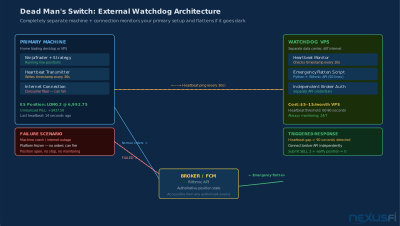
The implementation requires:
- Heartbeat transmitter: A lightweight process in your primary strategy that writes a timestamp to a shared resource every N seconds while the strategy is running and in an expected state.
- Watchdog process: A script running on a separate VPS that reads the heartbeat timestamp every M seconds. If the most recent heartbeat is older than a configurable threshold (e.g., 90 seconds), trigger the emergency flatten.
- Independent broker connection: The watchdog must maintain its own authenticated connection to the broker API -- not reliant on your primary machine's connection. This means a separate API key or login credential with permission to view and close positions.
- Flatten logic with confirmation: The watchdog submits a close-all request and then polls the broker API until all positions show zero. Unlike the simple "send and hope" approach, it verifies the closure and can retry with modified order types if market orders are rejected during volatile conditions.
The key architectural requirement is geographic and infrastructure separation. Your watchdog must be on different hardware, ideally a different internet connection, and preferably a different data center from your primary system. A watchdog running on the same machine as your trading platform fails if that machine fails. A watchdog on your home network fails if your internet goes down. Neither qualifies as a true dead man's switch.
Reconnection and State Recovery #
When your system reconnects after a disconnect — whether from a brief internet glitch or a full platform restart — the most dangerous moment is the first few seconds when position state may not have synchronized correctly. Order submission before state is confirmed is how ghost positions happen. The correct protocol is: connect, read actual positions from broker, reconcile against expected positions, and only then resume normal order submission.
@dom993's solution for a 24/7 always-in-the-market strategy is the most complete documented approach in the community: maintain a persistent log of all open positions and open orders, updated on every bar and written atomically to a private file. On reconnection, the strategy reads the log (expected state) and reads the actual broker position via the API. If they match, resume. If they differ, submit orders to reconcile to the expected state before resuming.
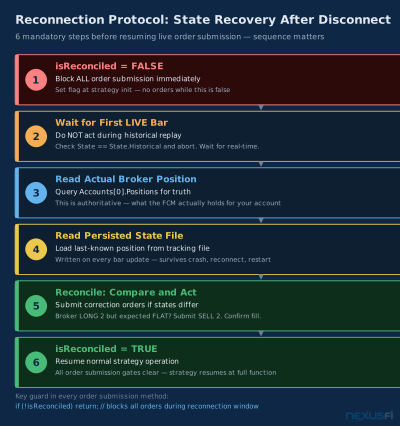
NinjaTrader's "immediately submit live working historical orders" option (Tools > Options > NinjaScript) causes NT to submit orders based on historical replay during reconnect. As @Adamus documented, this creates position size errors when account balance changed since the last session. Disable it and handle reconciliation manually.
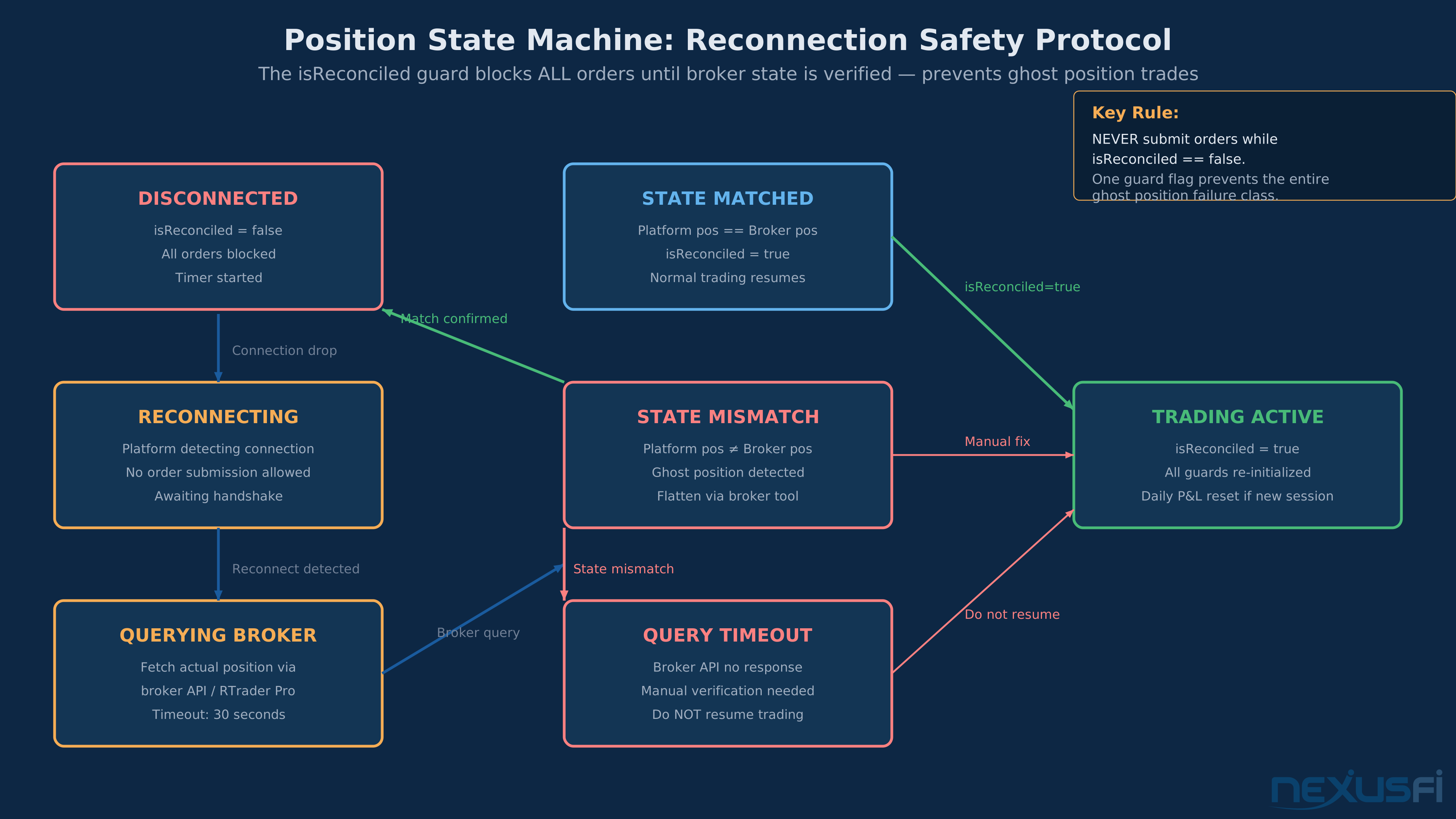
The reconnection protocol in sequence: (1) Block all orders while in historical replay — check State == State.Historical before every submission. (2) Wait for the first live bar to confirm real-time data. (3) Read actual broker position via Accounts[0].Positions. (4) Compare against your persisted tracking file. (5) Submit reconciliation orders if states differ. (6) Resume only after reconciliation is confirmed.
Set a flag variable isReconciled = false at strategy initialization. Set it to true only after the reconciliation check completes on the first live bar. In all order submission logic, check if !isReconciled: return; before proceeding. This single guard prevents the entire class of reconnection-related ghost position errors.
Infrastructure Redundancy: Your Trading Setup as a Business #
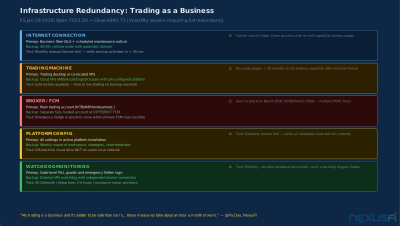
He maintains fully funded standby accounts at a second broker, a business-grade internet connection at home that doesn't drop during scheduled maintenance windows, and a complete backup regime that takes about an hour a month to maintain.
For automated traders, infrastructure redundancy means having pre-configured fallback options for every single point of failure in your setup:
Internet connection: Business-grade internet with a cellular 4G/5G failover. Consumer internet has scheduled maintenance windows (often 3-5 AM) that can affect overnight systems. A cellular backup via a router with automatic failover means a cut fiber line or ISP outage doesn't leave you exposed. The cellular connection doesn't need high bandwidth — it just needs enough to maintain broker connectivity and submit emergency flatten orders.
Backup broker account: A second, funded account at a different FCM. Not for regular trading — specifically for hedging or closing a position when your primary broker becomes inaccessible. This sounds extreme until you've experienced a broker platform outage during a live position. During Brexit in 2016 and during the 2020 COVID volatility spike, multiple FCMs experienced systems instability. Traders with funded backup accounts could hedge their exposure. Traders without them could only watch.
Platform configuration backup: Full export of all strategy settings, chart templates, workspace layouts, and connection configurations. Stored off-machine (cloud drive or external drive not located in your trading room). After a machine failure, the goal is to be trading on a replacement machine within 30 minutes. Without configuration backups, this is impossible. With complete backups, it's straightforward.
VPS for unattended strategies: Overnight and 24/7 strategies should run on a VPS, not your home machine. Data center VPS has redundant power, redundant internet, and hardware monitoring your home setup lacks. US-based VPS latency to CME Globex is typically 5-20ms — sufficient for retail intraday automated strategies.
The Emergency Response Playbook #
When something goes wrong in a live automated system, the instinct is to start clicking buttons and trying to fix things. This is exactly wrong. The checklist approach — following a pre-defined decision tree rather than improvising — produces better outcomes because it prevents the compounding errors that happen when you're operating under stress with incomplete information.
Step 1 — Don't touch anything for 10 seconds. Read the screen. Identify what you can confirm as true: what does the broker tool show for your current position? What does your P&L show? Is the strategy still running or has it stopped? You need ground truth before you act. Acting on a misread of the situation is worse than the original problem.
Step 2 — Verify position at the broker, not at the platform. Open RTrader Pro (Rithmic), CQG Trader, or your broker's web interface. This is authoritative. Whatever it shows for your position is reality. Your platform's displayed position is derived from order confirmations that may be stale or incomplete.
Step 3 — If you need to flatten, do it through the broker tool, not the platform. If the platform's order tracking is out of sync (ghost positions, stuck orders), submitting a flatten through the platform may create unintended positions. The broker's native tool doesn't care what your platform thinks — it submits directly to the exchange and closes whatever position actually exists at the FCM.
Step 4 — Stop the strategy before reconnecting. If you need to restart your platform, disable the automated strategy before you do. A strategy that auto-starts on platform launch will attempt to submit orders during the reconnection window before state is synchronized. Disable it, restart the platform, verify state, then re-enable.
Step 5 — Document what happened before you do anything else. Screenshot the order log, the position window, and the P&L. Note the time. This documentation is essential for understanding whether the failure was a code issue, a platform issue, or a broker issue — and for preventing recurrence. If you just flatten and move on without capturing the state, you'll have the same problem again.
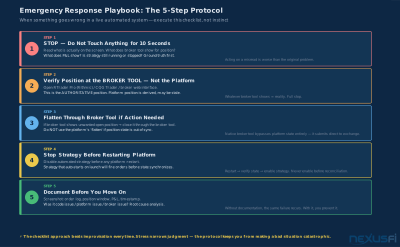
Print the emergency playbook and keep it physically at your trading desk — not on a monitor that might be part of the same machine that failed. The 30 minutes you spend writing it will pay for itself the first time you use it.
Knowledge Map
Prerequisites
Understand these firstGo Deeper
Build on this knowledgeReferences This Article
Articles that build on this topicCitations
- — My algo hit the kill switch, CME said no! Lady Luck Saved Me! (2022) 👍 6“I am going to add another fail safe. But imo Rithmic deserves some blame also, the server should have some sort of fail safe for this.”
- — [Release] SuperFlattenSafetyNet (2025) 👍 3“SuperFlattenSafetyNet: a background risk-management utility designed to act as a fail-safe, bridging the gap between Managed strategies and Manual trades.”
- — Live Trading Bugs that NT Blames on Custom Indicators (2025) 👍 3“I have a separate window open with all open positions at my broker (RTrader Pro from Rithmic). That way I always know the real positions I have.”
- — Phantom trades in NT? - Emergency Procedures (2012) 👍 1“Keep your Emergency Procedure code separated from your other code. I would never let an automated system running without any Emergency Procedure.”
- — server based auto strat (2012) 👍 2“The ONLY sensible solution is a dead man switch -- a second server, separate data center, that gets regularly pinged by the Ninja instance.”
- — Best way to sync positions on re-connecting (2013) 👍 3“Keep track at all time of your open positions and open orders in private files. Cancel all open orders in OnTermination(). When you start your strategy, do not fire any order while Historical.”
- — Best way to sync positions on re-connecting (2013) 👍 3“My testing with the NT7 sync functionality is that it caused NT to fire off orders to adjust positions and it was often unsuccessful, often messing it up completely.”
- — PA Dax CL, ES and Bund Price Action Trading Log (2018) 👍 6“Trading is risk management, so I want to be fully redundant on my trading equipment and account. These measures take about an hour a month of work.”
- — Daily Loss Limit (2011) 👍 6“A user can request their own personal daily loss limit with Velocity and VF will close a position when it reaches this, and prevent new positions from being opened.”
- — New Risk Management Settings built-in to NinjaTrader (2023) 👍 6“NinjaTrader now has built-in Risk Management Settings -- Daily Loss Limit, Weekly Loss Limit, Real-Time Trailing Max Drawdown. They are activated on the broker side via account.ninjatrader.com.”
- — Daily Loss Limit supervised by Broker/Software (2020) 👍 6“Sierra Chart lets you put in a daily loss limit and it closes any open positions if you hit it. I have used the Sierra Chart loss limit, and it works.”