



Maximum Adverse Excursion (MAE): The Data Behind Your Stop Loss Placement
Overview #
Every trader picks a stop loss. Most pick it wrong. They grab a round number, eyeball a support level, or use whatever the last YouTube video suggested. Maximum Adverse Excursion — MAE — replaces guessing with data.
MAE measures the worst drawdown a trade experiences before closing. Not the loss you took. The deepest point the trade went against you while it was still open. When you collect MAE data across hundreds of trades, patterns emerge that tell you exactly where your stop loss should sit.
John Sweeney introduced MAE in his 1996 book "Maximum Adverse Excursion" and the concept has become standard in professional trade analysis. As @iantg explained on [NexusFi][1], "MAE shows you the most ticks you were upside down in a given trade. Your worst position."
Key Concepts #
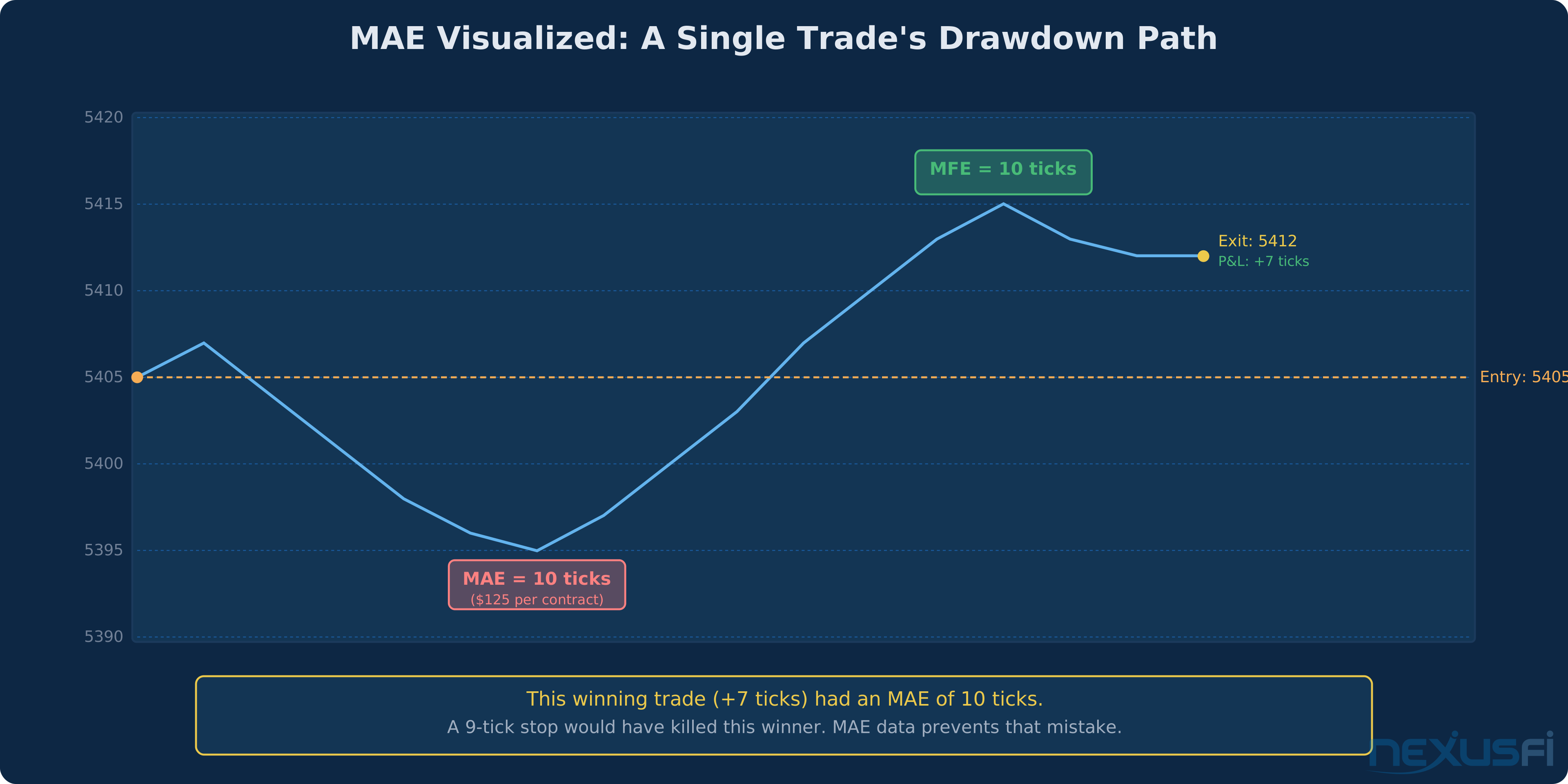
Maximum Adverse Excursion (MAE) — The largest unrealized loss a trade reaches from entry to exit. If you buy ES at 5405 and price drops to 5395 before recovering and closing at 5412, your MAE is 10 ticks ($125 per contract) — even though the trade was a winner.
Maximum Favorable Excursion (MFE) — The mirror image. The largest unrealized profit a trade reaches before closing. Same trade: price hits 5415 at its peak, so MFE is 10 ticks. MAE and MFE together give you the full picture of how a trade behaved.
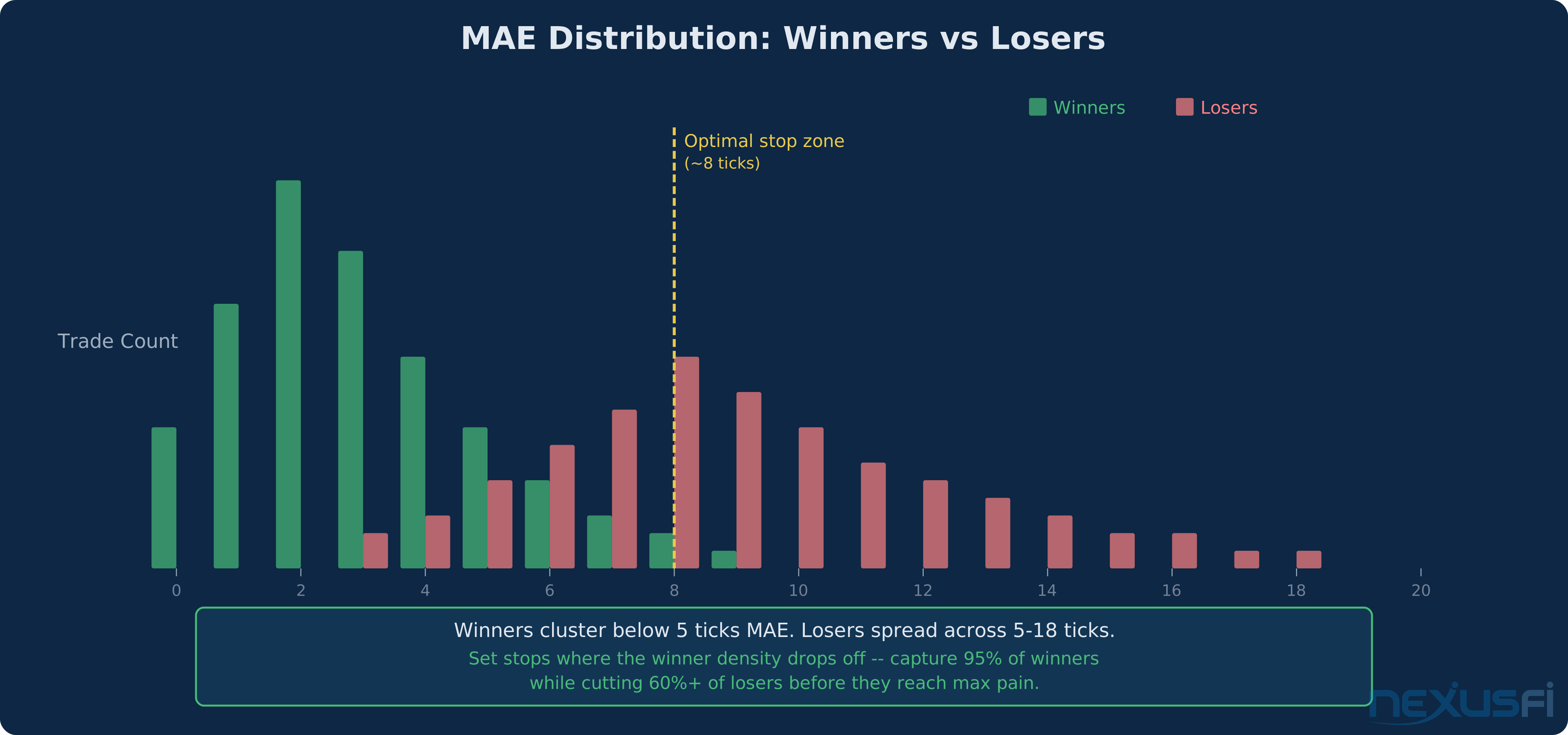
MAE Distribution — When you plot the MAE of every trade on a histogram, winners and losers separate. Winning trades cluster at low MAE values (they don't go far against you). Losing trades spread across higher MAE values. The gap between these clusters is where your stop belongs.
For each trade, record: - Entry price - Worst price reached during the trade (the MAE) - Exit price - Whether the trade was a winner or loser Now separate winners from losers and look at their MAE distributions.
Optimal Stop Zone — The MAE value where you capture 90-95% of eventual winners while cutting a significant percentage of eventual losers. This is a data-driven stop, not an opinion.
Trade-Relative MAE — MAE expressed as a percentage of the trade's eventual result. A trade with MAE of 5 ticks and final P&L of +10 ticks had 50% trade-relative MAE. Useful for comparing across instruments with different tick values.
How MAE Works #
The logic is straightforward: your historical trades contain information about how far winners go against you before recovering.
Collect data on 200+ trades. For each trade, record:
- Entry price
- Worst price reached during the trade (the MAE)
- Exit price
- Whether the trade was a winner or loser
Now separate winners from losers and look at their MAE distributions.
What you'll see: Most winning trades have small MAE. They go slightly against you, then move in your direction. Losing trades have MAE that's equal to your stop loss (they hit the stop) or, if you manage trades manually, their MAE spreads across a wider range.
As @Fat Tails described on [NexusFi][2], "The best approach to define the trailing stop for a given entry method is to look at the maximum adverse excursion that the system generates without a trailing stop. You can then plot the P&L of each trade against its MAE."
The MAE-Based Stop Placement Method #
Here's the practical workflow:
Step 1: Collect raw data. Trade your strategy for 200+ trades with a wide stop loss (wider than you'd normally use). You want to capture the natural MAE of your entries without artificial truncation from a tight stop.
Step 2: Sort trades by outcome. Split into winners and losers. Calculate MAE for each.
Step 3: Find the separation point. Plot winners' MAE as a histogram. Look for where the density drops off. If 95% of your winners have MAE under 8 ticks, that's your signal.
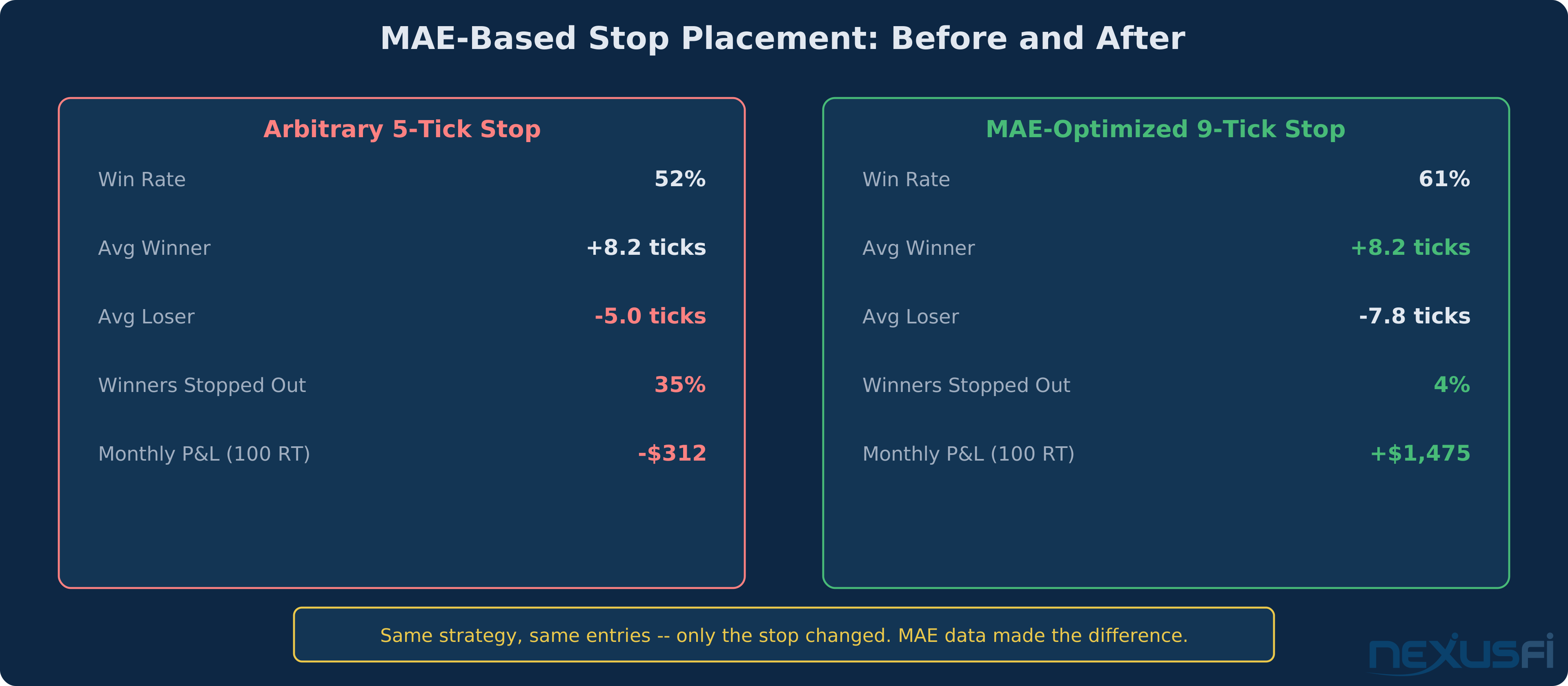
Step 4: Set your stop. Place it 1-2 ticks beyond the 95th percentile MAE of your winners. This means only 5% of eventual winners would get stopped out, while many losers get cut before reaching their worst point.
Step 5: Validate. Run your strategy again with the MAE-based stop. Compare win rate, expectancy, and drawdown against your previous stop.
As @HumbleTrader noted on [NexusFi][3], "MAE data is key in knowing how much room to give a trade. You focus on your winners, giving them room to breathe."
MAE and MFE Together #
MAE alone tells you where to place your stop. MFE tells you where to place your target. Together they answer the two fundamental trade management questions.
The MAE/MFE matrix:
- Low MAE, High MFE: Clean entries. Trades move in your favor quickly without much drawdown. Your entries are well-timed.
- High MAE, High MFE: Sloppy entries, but the direction is right. You're getting into good trades at bad prices. Work on entry timing.
- Low MAE, Low MFE: Quick, small moves. Either the market is choppy or your targets are too tight.
- High MAE, Low MFE: Bad entries in the wrong direction. The market goes against you immediately and never recovers much. Rethink the setup.
As @iantg explained on [NexusFi][4], "One of the best optimization tools out there is the MAE/MFE stat. This may give you clues about the overall edge of your strategy."
Practical Application #
Recording MAE in NinjaTrader: NinjaTrader's Account Performance window shows MAE and MFE for every trade in the Strategy Analyzer. Export to CSV for deeper analysis. As @mahlonhersh noted in a [NexusFi guide][5], the formula is: "MAE = |worst price trade reached - entry price| x quantity."
Recording MAE in Sierra Chart: Sierra Chart's Trade Activity Log includes MAE/MFE columns. Use the Spreadsheet Study to export data for analysis.
The spreadsheet approach: If your platform doesn't calculate MAE automatically, track it manually. As @Gary documented in his [NexusFi journal][6], "MAE: Maximum Adverse Excursion, or how many ticks price went against you in a given trade." A simple spreadsheet with columns for entry, worst price, exit price, and outcome gives you everything you need.
Sample sizes matter: Don't draw conclusions from 20 trades. You need 200+ for statistically meaningful MAE distributions. Anything less and you're curve-fitting noise.
Market regime changes: MAE distributions shift with volatility. A stop that works in normal conditions might be too tight during FOMC weeks. Consider separate MAE analysis for different volatility regimes.
Position sizing integration: Your MAE-based stop defines your risk per trade. Combined with a fixed percentage risk model (1-2% of account per trade), MAE directly determines your position size. Tighter MAE-based stops mean you can trade larger size with the same dollar risk.
Common Mistakes #
Ignoring sample size. Optimizing a stop on 30 trades is overfitting. Wait for 200+.
Using MAE from backtests only. Backtested MAE is cleaner than live MAE because it doesn't account for slippage, hesitation, and late entries. Live data is more reliable.
Setting stops at the exact MAE percentile. If 95% of winners have MAE under 8 ticks, don't set your stop at 8.0 ticks. Add a buffer — 9 or 10 ticks. Markets aren't precise.
Forgetting to update. As @DarkPoolTrading showed in an [Elite Circle discussion][7], cumulative MAE vs MFE analysis reveals whether your execution is improving or degrading over time. Re-run the analysis quarterly.
Applying across instruments blindly. MAE distributions are instrument-specific. ES, CL, and NQ all have different typical MAE profiles. Analyze each instrument separately.
MAE by Trading Style #
MAE analysis reveals different patterns depending on how you trade:
Scalping (1-5 tick targets): Your MAE window is tiny. Winners should show MAE of 1-3 ticks maximum. If your winners regularly go 5+ ticks against you before recovering, your entries are too early or your trade location is off. Scalpers need the tightest MAE-based stops because the profit target is small — a 5-tick stop on a 3-tick target gives you terrible math regardless of win rate.
Day trading (5-20 tick targets): MAE has the most diagnostic value here. You have enough room for the trade to develop, and enough data density to build reliable distributions within a few months of trading. Most ES day traders find their winners cluster below 6-8 ticks MAE, with losers spreading from 8 to the full stop distance.
Swing trading (20+ tick targets): MAE becomes less useful for stop optimization and more useful for entry quality assessment. A swing trade that goes 40 ticks against you before recovering is a poor entry, even if it eventually wins. Use MAE to grade your entries, not just to set stops.
Advanced: The MAE/MFE Scatter Plot #
The most powerful MAE tool is the scatter plot. Place MAE on the X-axis and MFE on the Y-axis. Plot every trade as a dot, coloring winners green and losers red.
In a well-calibrated strategy, you will see distinct clustering. Winners should cluster in the upper-left quadrant (low MAE, high MFE — good entries that move in your favor). Losers should cluster in the lower-right quadrant (high MAE, low MFE — bad entries that move against you).
The trades in the upper-right quadrant (high MAE, high MFE) are your improvement opportunities. These are trades where your direction was right but your entry was poor. If you can shift these entries earlier or later by even a few ticks, they move from the upper-right to the upper-left — same winners, less pain getting there.
The most dangerous pattern is a uniform scatter with no clustering. This means your entries have no structural edge — the market is as likely to go against you as for you regardless of your setup. If your MAE/MFE scatter looks random, the problem is not stop placement. The problem is the strategy itself.
The Bottom Line #
MAE replaces stop-loss guessing with empirical evidence. Instead of asking "where should my stop go?" and getting a dozen opinions, you ask your own data "how far do my winners actually go against me?" and let the distribution answer. The answer is specific to your strategy, your instrument, and your execution. No one else's MAE data is relevant to your trading — but your own MAE data is the most actionable performance metric you can track.
Knowledge Map
Prerequisites
Understand these firstReferences This Article
Articles that build on this topicCitations
- — MAE and MFE metrics ....... The "How to" and "where to find"“MAE shows you the most ticks you were upside down in a given trade. Your worst position.”
- — Calculating Stop and Profit Target via ATR“The best approach to define the trailing stop is to look at the maximum adverse excursion that the system generates.”
- — HumbleTrader's next chapter“MAE data is crucial in knowing how much room to give a trade. You focus on your winners.”
- — Outside the Box and then some....“One of the best optimization tools out there is the MAE/MFE stat.”
- — Reading the Account Performance/Trading“MAE where MAE (max. adverse excursion) is defined as |worst price trade reached - entry price|.”
- — Gary's CL method“MAE: Maximum Adverse Excursion, or how many ticks price went against you in a given trade.”
- — Trading stats - Dig deeper“Cumulative MAE vs Cumulative MFE shows how far trades go in our favor vs against us.”