



Automated Contract Roll Management: Building the System That Handles Futures Expiry Without Manual Intervention
Overview #
Every futures contract has an expiration date. That's not a quirk — it's fundamental to how futures markets work. For manual traders, rolling is an annual chore: check the calendar, watch for the volume shift, make the trades, move on. For automated systems, it's a different problem entirely. Your algo doesn't have a calendar. It doesn't notice when ES December volume explodes past ES September. It just keeps sending orders — to the expiring contract, with thinning liquidity, until either you notice or something breaks.
This article covers how to build the code architecture that detects roll conditions, executes the transition cleanly, maintains position and P&L continuity, and doesn't get caught holding an expiring contract at 3 AM while your system happily continues trading. If you run more than two automated strategies across more than two instruments, manual roll management is already failing you.
The core goal: turn roll operations from a human obligation into a programmatic routine. Automate roll detection, execution, P&L adjustment, and failure recovery — the system should handle expiry cycles without any manual intervention required.
Key Concepts #
Front month: The contract with the highest trading volume at any given time. After the volume crossover, the deferred contract becomes the new front month. Your algo should always be in the front month unless you have a specific reason to trade a deferred contract.
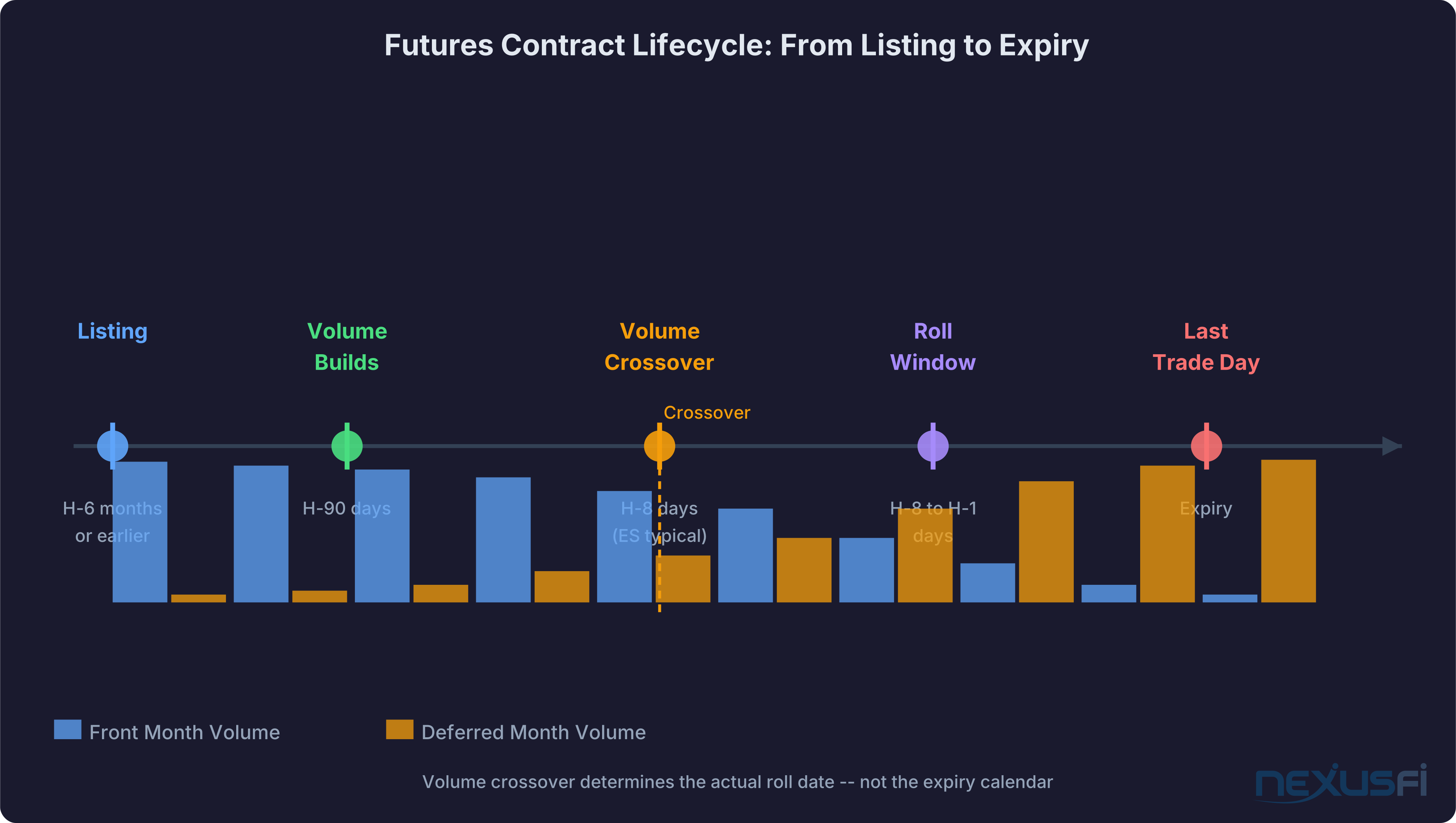
Roll date vs. expiry date: These aren't the same. Expiry is the last trading day — the absolute deadline. Roll date is when you should actually switch, typically when volume has shifted to the deferred contract. For ES/NQ, @max-td documented the standard pattern: "Rollover is 8 days before expiration" and "volume shifts to the new contract at market open (09:30 EST) on Rollover day." [1]
Volume crossover: The moment when the deferred contract's volume first exceeds the front month's volume. This is the primary trigger for volume-rule roll timing. For ES,
Calendar rule: Roll on a fixed date regardless of volume. Simpler to automate, but you can end up in a thin contract if the volume shift is early or late.
Hybrid rule: Roll when volume crossover occurs OR when the calendar date arrives, whichever comes first. The preferred approach for production systems.
Roll gap: The price difference between the expiring and deferred contract at roll time. In contango (normal futures curve), the deferred is priced higher — you pay a carry premium to roll forward. In backwardation, you receive a credit.
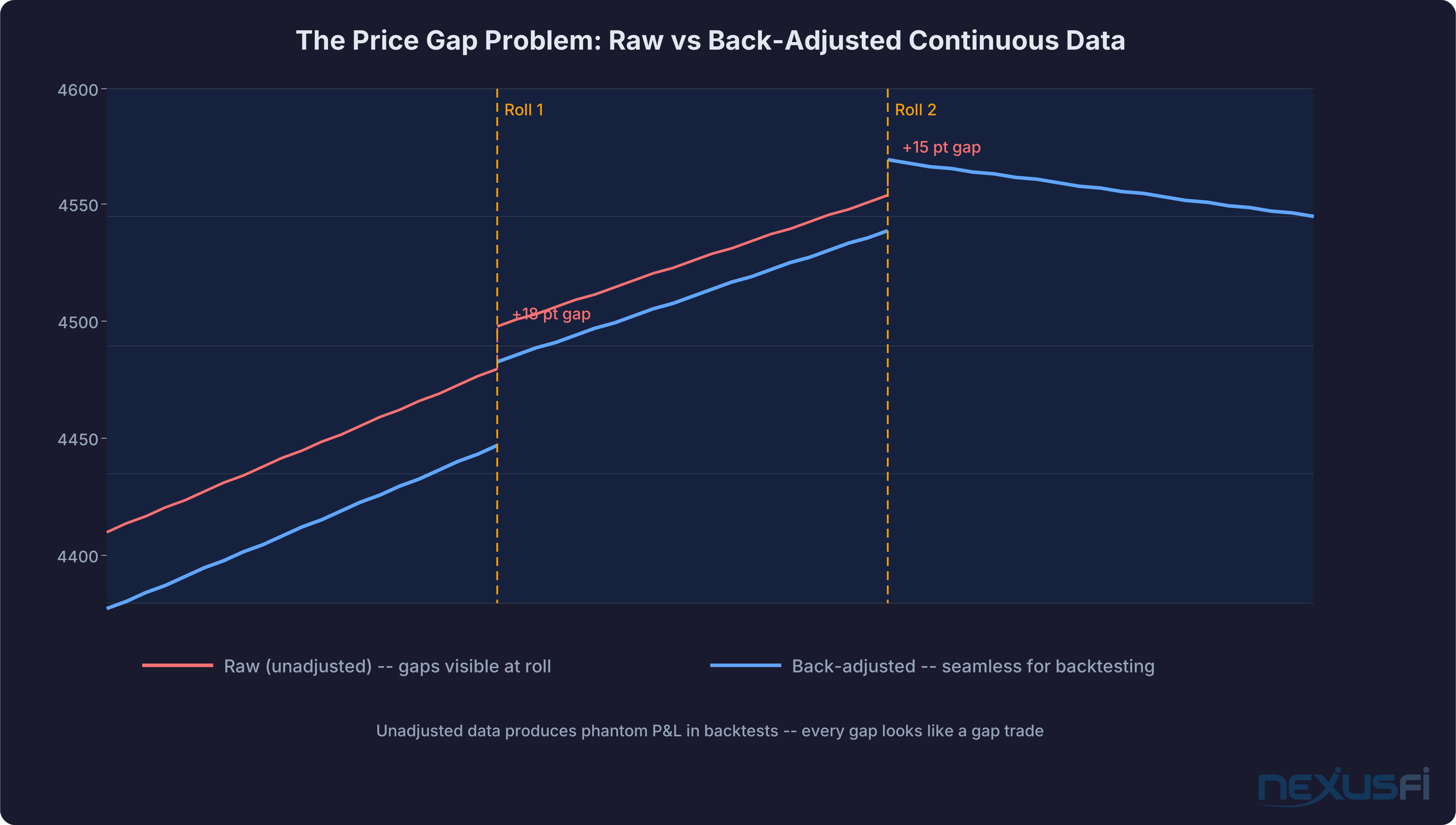
Back-adjusted continuous contract: A synthetic price series where prior contract prices are shifted to eliminate roll gaps. Used for backtesting — accurate relative price movements, but absolute prices are artificially adjusted.
Position continuity: When your algo rolls, it isn't closing a trade and opening a new one. The trade is still open — it just moved to a different contract month. Your system needs to track this distinction correctly.
First notice day (FND): For physically delivered contracts (CL, GC, ZN, ZB), this is the first day delivery notices may be issued. You must be flat before FND if you're not equipped to take delivery. For cash-settled index futures (ES, NQ), FND doesn't exist.
Why Manual Roll Management Fails Automated Systems #
The basic argument: if your strategy runs autonomously, your roll process needs to as well. Any manual step is a failure point.
The overnight expiry trap. You run a strategy on ES December. December expiry is Friday. Your system runs overnight. Your roll alert fires at 3 AM but your phone is on silent. You wake up to a position in an expiring contract with 2-3 point spreads and dwindling liquidity.
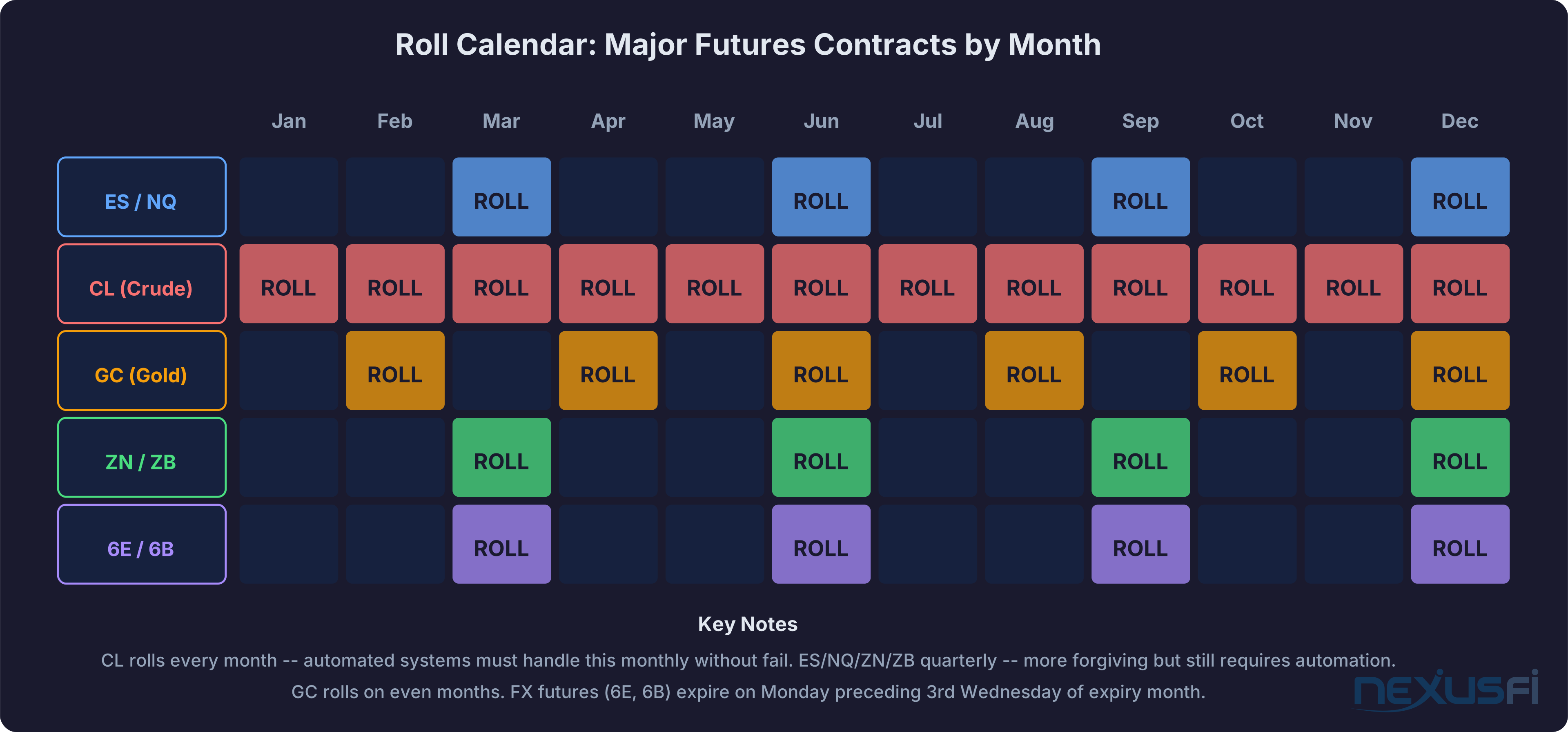
The multi-instrument multiplication problem. ES, NQ, CL, GC, ZN. ES/NQ/ZN roll quarterly — same week. CL rolls every month. GC rolls every other month. Without automation, you're managing 8-10 roll operations per quarter across different calendars and crossover timing. Missing one is inevitable.
The backtest vs. live discrepancy. You backtested on back-adjusted data. Your live system trades specific contracts. @kevinkdog is direct about the risk: "If you want to backtest for 10 years, then you DO want to test with continuous back adjusted contracts, since if you use a continuous unadjusted contract, you will get incorrect backtest results due to rollover gaps." [5] If your live system isn't tracking the same adjustments your backtest used, performance will diverge in ways that are hard to diagnose.
The P&L ghost. Your strategy entered in the expiring contract. You roll to the deferred. The deferred is priced higher by the carry premium. If your system treats the roll as a new trade, it sees an immediate phantom loss equal to the carry — and your performance reporting becomes noise.
Physical delivery. CL is the one that gets discussed. If you miss a CL roll on a long position, you may receive notice of obligation to take physical delivery of 1,000 barrels of crude oil at Cushing. Some brokers have auto-close policies, but don't rely on that.
Never trust that your broker will catch a missed roll. Build the automation. The FCM's job is order execution — expiry risk management is yours.
Roll Detection Architecture #
Three detection approaches exist, with different tradeoffs between simplicity and accuracy.
Calendar-Based Detection #
Hard-code the roll dates. For ES: second Thursday of March, June, September, December. For CL: approximately 3 business days before the 25th of the month preceding expiry. For GC: even months, approximately 5 business days before month end.
Build a roll calendar database with instrument-level rules:
instrument: ES
contract_months: [H, M, U, Z]
roll_rule: "2nd_thursday_of_expiry_month_minus_7_days"
expiry_rule: "3rd_friday_of_expiry_month"
Completely deterministic. No market data needed. The system knows 12 months in advance when it will roll. For ES, this works extremely well — the volume shift is highly predictable. For CL and commodities, the crossover timing is more variable and calendar alone is less reliable.
Volume-Based Detection #
Roll when deferred volume first exceeds front month volume. @Aufidius built a clean Python implementation to monitor this: "I always forget to rollover contracts so I wrote a simple python script that looks at the front month/following month to see which contract has the most volume and emails me when this shift happens." [7]
The logic:
front_vol = get_volume(front_month_symbol)
defer_vol = get_volume(deferred_month_symbol)
if defer_vol > front_vol * 1.05:  # 5% buffer confirms crossover
    trigger_roll_alert()
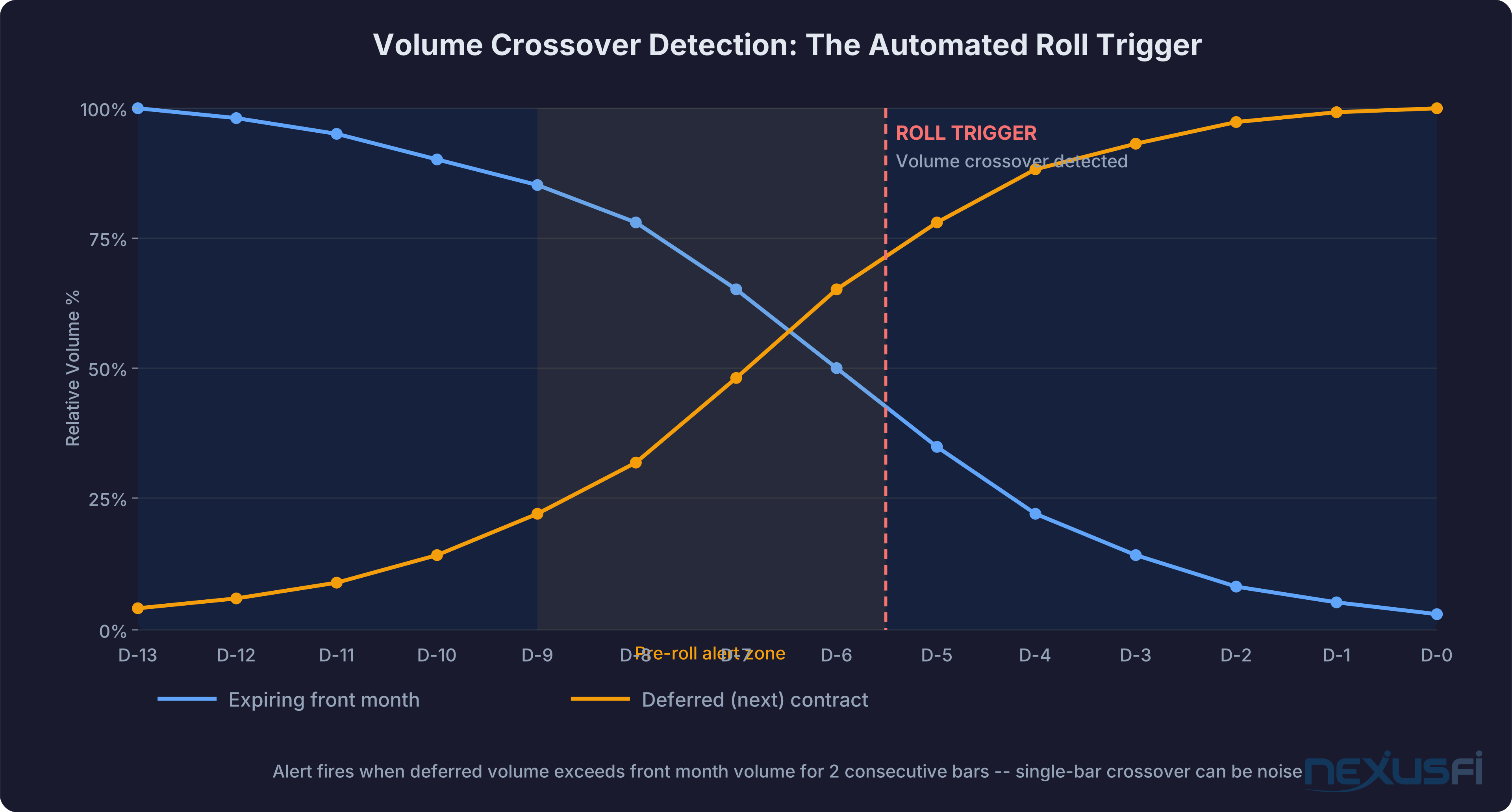
Use a two-bar confirmation rule: the deferred must exceed the front for 2 consecutive checks before triggering. Single-bar crossovers in overnight sessions can be noise. For @Lancer's approach: track EOD volume on roll day and the day before, rolling once the volume shift is confirmed. [11]
Volume detection requires live market data subscriptions for both front and deferred contracts simultaneously. Confirm your data feed supports parallel subscriptions before building on it.
Hybrid Detection (Recommended) #
Trigger roll on EITHER condition, whichever fires first:
roll_trigger = (deferred_volume_crossover confirmed for 2 bars)
             OR (calendar_roll_date reached)
Add a pre-roll alert zone starting 24-72 hours before the expected roll date. During this window: verify the deferred contract symbol is correctly configured, cancel any pending orders that shouldn't carry to the new contract, check position limits, and confirm your data feed shows valid quotes for the deferred contract.
Roll Execution Methods #
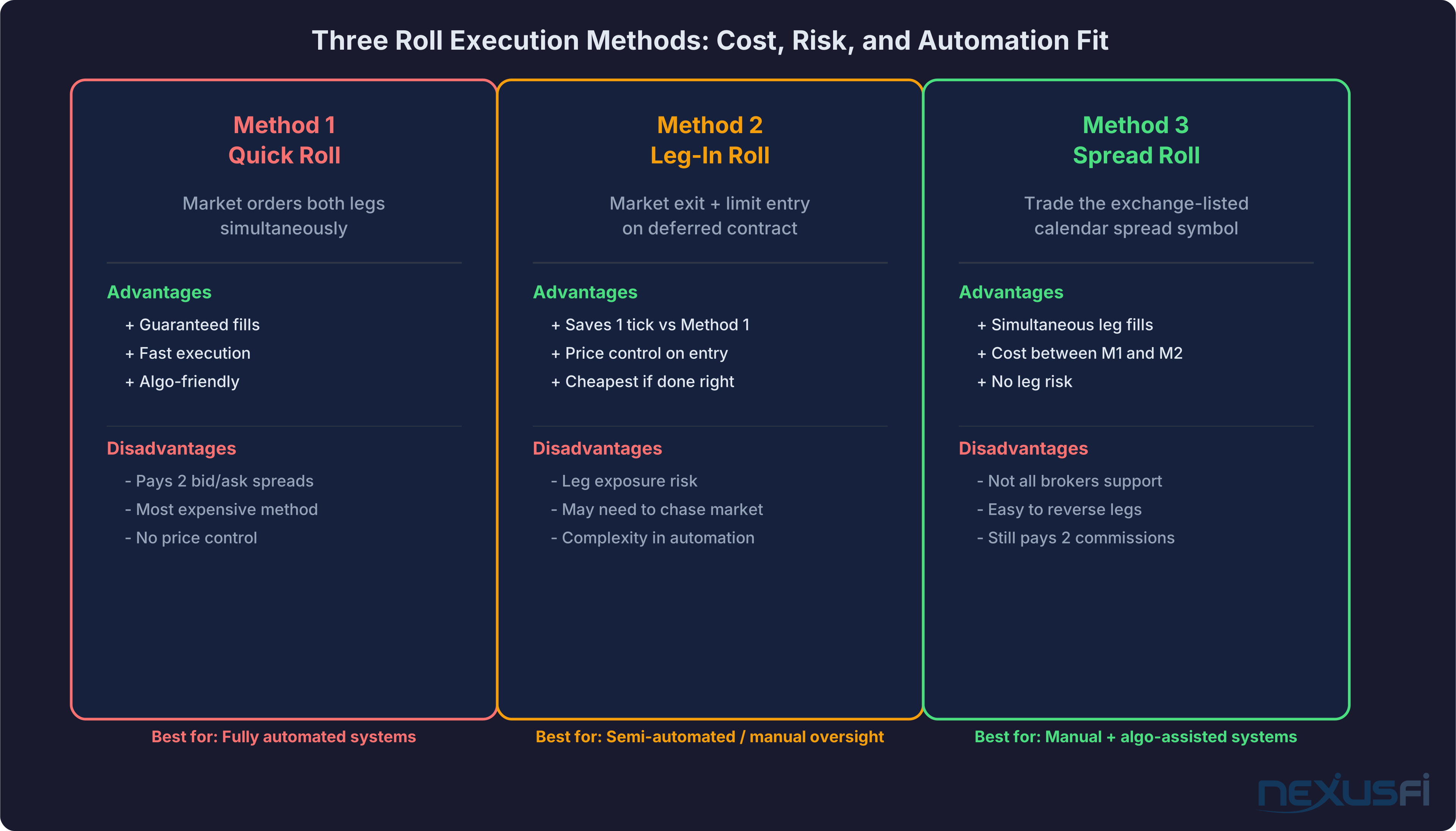
Once roll is detected, you need to execute the transition. @kevinkdog, who has automated this extensively, documents three approaches using the Euro FX roll as an example. [4]
Method 1: Quick Roll (standard for fully automated systems)
Market order to exit the front month. Market order to enter the deferred contract. Both fire as close to simultaneously as your system allows. Guarantees fills. No exposure gap. You pay two bid/ask spreads plus commissions — typically 2-3 ticks on ES. Not zero, but the cost is predictable, and predictability is worth the premium for automation.
Method 2: Leg-In Roll (cheapest, but introduces execution risk)
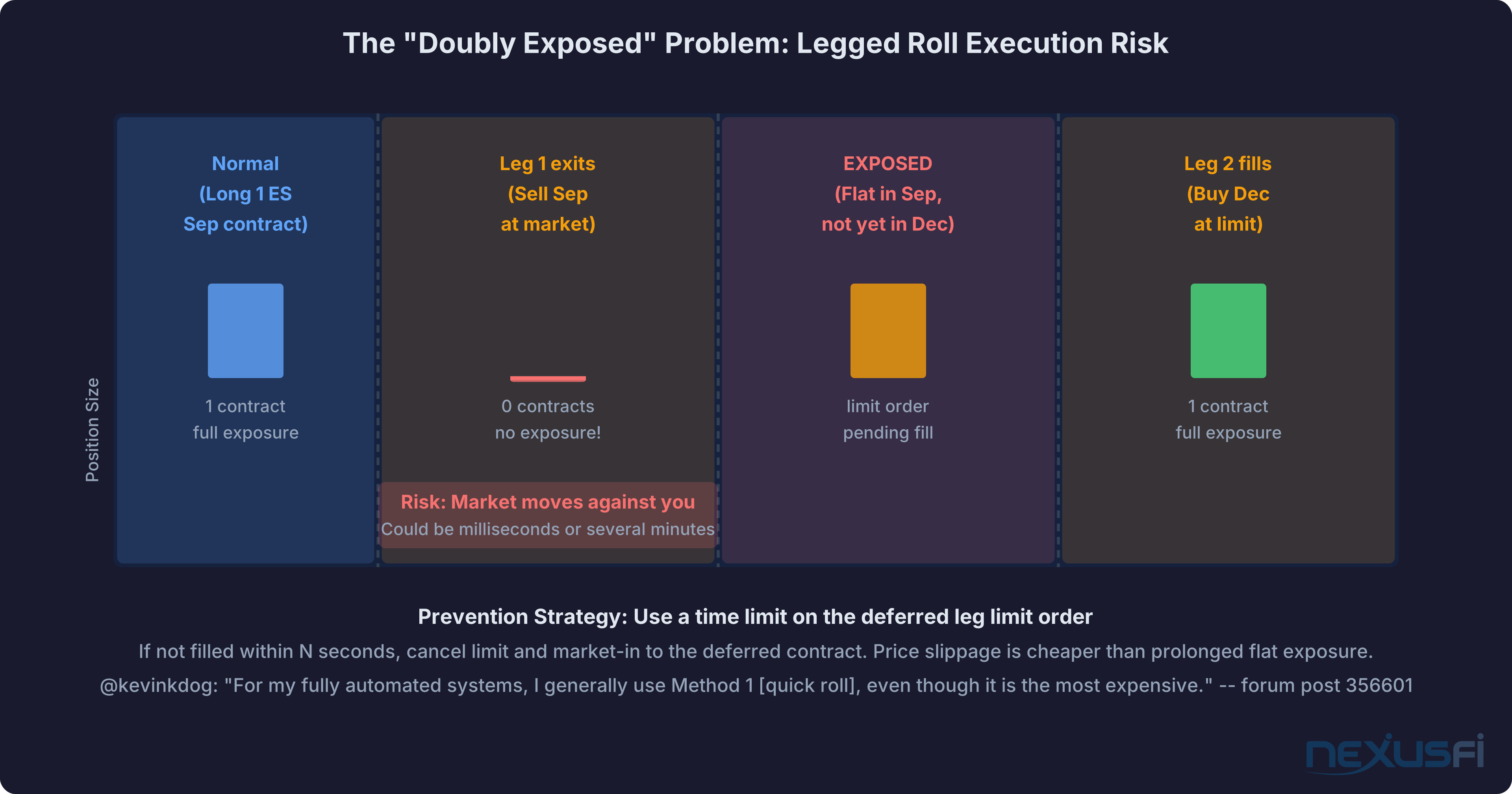
Market order to exit the front month. Limit order at the bid to enter the deferred. In theory, you save 1 tick on the deferred entry. In practice, the limit order may not fill, leaving you flat — no position in either contract — while the market moves. If you use Method 2, build a timeout: if the deferred limit order isn't filled within N seconds, cancel it and submit a market order. The timeout prevents spending minutes in a limbo state.
Method 3: Exchange Spread Roll
The exchange lists a calendar spread symbol — for ES, this is the front/deferred spread — that fills both legs simultaneously at the spread price. No leg risk. No timing gap. The limitation: not all broker APIs expose calendar spread symbols for programmatic submission. Confirm support before designing around it.
The transaction cost analysis for each method differs. For the economics, see Transaction Cost Analysis for Automated Futures Trading. For physically delivered contracts, the cost of a missed roll vastly exceeds any transaction cost savings from Method 2.
The State Machine #
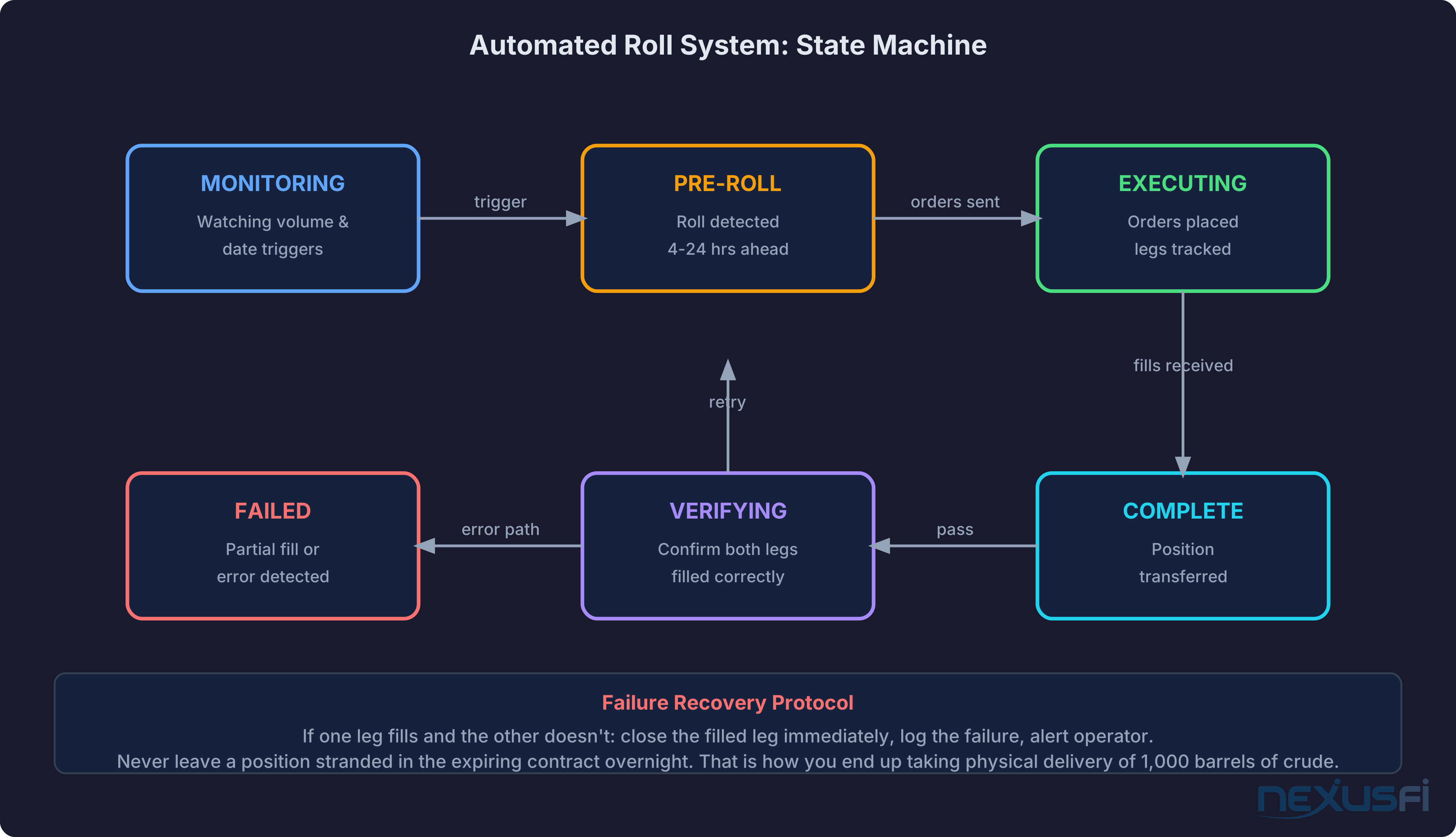
Implement automated roll management as a state machine. The system is always in one of six states:
MONITORING: Normal operation. Watching volume triggers and calendar dates.
PRE_ROLL: Roll trigger detected but not yet executing. Cancel pending orders that shouldn't carry to the new contract. Verify deferred contract configuration. Prepare execution logic.
EXECUTING: Roll orders are live. Log timestamps for each leg fill.
VERIFYING: Confirm both legs filled at expected prices. Compute the roll gap. Update P&L tracking with the adjusted virtual entry price.
COMPLETE: Position confirmed in the deferred contract. Return to MONITORING with new contract symbol active.
FAILED: One leg filled, the other didn't. Close the open leg immediately. Log the failure. Alert the operator. Halt the strategy until manual confirmation.
The transition from FAILED back to a clean state always requires human confirmation. Never automatically retry a failed roll — the risk of creating an unintended position is too high.
NinjaScript Implementation #
For NinjaTrader users, the platform exposes the RollOverCollection object on each instrument for programmatic access to scheduled rollover dates. @Christophe posted a production pattern in 2015 that forms the basis of most NT-based roll systems: [6]
private DateTime nextRollover;
private DateTime prevRollover;

private void updateRollover(Instrument inst)
{
    if(inst.Expiry != null)
    {
        for(int i = 0; i < inst.MasterInstrument.RollOverCollection.Count; i++)
        {
            if(inst.MasterInstrument.RollOverCollection[i].ContractMonth.Equals(inst.Expiry))
            {
                nextRollover = inst.MasterInstrument.RollOverCollection[i+1].Date;
                prevRollover = inst.MasterInstrument.RollOverCollection[i].Date;
            }
        }
    }
}
Inside OnBarUpdate, the system checks whether Time[0] is within the valid roll window and refuses new entries outside it. Existing positions get closed when Time[0] exceeds nextRollover.
The elegant part: run the same strategy simultaneously on multiple contract months (CL 01-26, CL 02-26, etc.), and only the "current" contract actually trades. The others sit dormant. When roll day arrives, the current contract stops entering trades and exits positions, while the next contract's strategy picks up. The transition is parallel, not sequential — no timing dependency.
For data merge policy: @Fat Tails explains the three modes in NinjaTrader. [3] For backtesting, use MergeBackAdjusted. For live position tracking, track specific contract months, not the merged view. Don't conflate the two — your backtest data view and your live position tracking need different contract representations.
Python Implementation for Volume Detection #
For Python-based systems via Nasdaq Data Link (formerly Quandl):
import requests
import os
from datetime import datetime, timedelta

API_KEY = os.environ['NASDAQ_API_KEY']

def get_contract_volume(symbol, days_back=3):
    end = datetime.now().strftime('%Y-%m-%d')
    start = (datetime.now() - timedelta(days=days_back)).strftime('%Y-%m-%d')
    url = f"https://data.nasdaq.com/api/v3/datasets/{symbol}.json"
    resp = requests.get(url, params={'start_date': start, 'end_date': end, 'api_key': API_KEY})
    data = resp.json()['dataset']['data']
    return data[0][5] if data else 0  # Volume at index 5 for CHRIS datasets

def check_roll_needed(front_symbol, defer_symbol):
    front_vol = get_contract_volume(front_symbol)
    defer_vol = get_contract_volume(defer_symbol)
    return defer_vol > front_vol * 1.05  # 5% buffer

if check_roll_needed('CME/ES1', 'CME/ES2'):
    send_roll_alert('ES: deferred volume exceeds front month')
The CHRIS database on Nasdaq Data Link provides free continuous futures data for major contracts. [13] Run the volume check every 15 minutes during RTH in the week before the expected roll date.
Contract-Specific Roll Calendars #
Each futures product has its own roll mechanics. Always verify against the exchange's current product calendar before relying on hardcoded dates.
ES / NQ (equity index, quarterly)
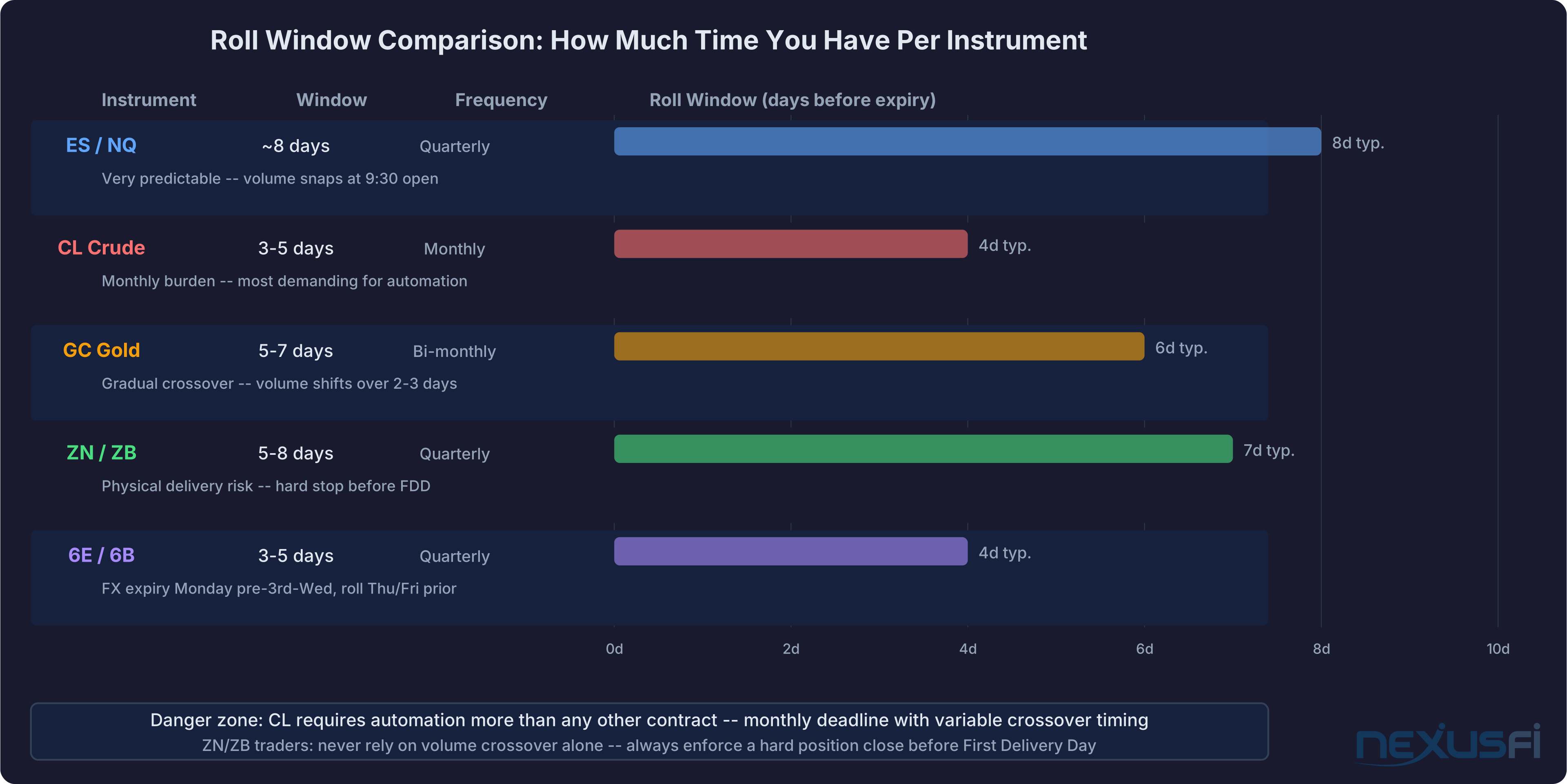
Roll 8 days before expiry. Expiry is the third Friday of March, June, September, December. CME publishes official roll dates. [12] Volume crossover is highly predictable — almost always at 9:30 EST open on roll day. @max-td: "Rollover is on a Thursday. Rollover is usually on the second Thursday of the month but will be on the first Thursday if the first day of the month falls on a Friday." [1] The volume shift is binary. Easiest contract for automated roll management.
CL (crude oil, monthly)
Every month, with variable timing. CL rolls around the 20th of the month BEFORE the delivery month. @Fat Tails on the variability: "There is no fixed rule for CL rollover dates... many traders roll on the day when the volume of the new front month contract first exceeds the volume of the old front month contract." [10] The spread between front and deferred widens significantly as the roll approaches. Monthly burden makes this the highest-priority instrument to automate.
GC (gold, even months)
February, April, June, August, October, December. Volume crossover happens gradually over 2-3 days rather than snapping at the open. Use the 2-bar confirmation rule. Roll approximately 5 business days before end of the contract month.
ZN / ZB (treasury notes and bonds, quarterly)
Physical delivery means you need a hard stop before the First Delivery Day (typically the first business day of the delivery month), not just before the last trading day. Run an automated ZN/ZB system without a hard "close all positions before FDD" rule and you're accepting significant operational risk.
6E / 6B (FX futures, quarterly)
Expiry is Monday preceding the third Wednesday of the expiry month. @Fat Tails: "FX futures typically expire on Monday preceding the third Wednesday of the expiry month. Volume is set to switch to the new contract on Thursday or Friday" — about 4-5 business days before the Monday expiry. [8] Always use the exchange's official session templates, not a 24/7 template, which affects how ExitOnClose behaves.
P&L Continuity #
Roll execution is mechanical. P&L continuity is where most system builders get tripped up.
The issue: your strategy entered a long ES September at 5400. You roll to December. December is trading at 5408 (an 8-point carry premium). If your system treats the roll as a new trade, it records "long ES December from 5408." The 8-point gap is not a loss — it's the fair value of carrying the position forward. But a naive system shows it as a phantom loss, and your performance reports become noise.
The correct approach: maintain a "virtual entry" price that persists across rolls.
virtual_entry = original_entry + (deferred_contract_price - expiring_contract_price)
             = 5400 + (5408 - 5412)  # sold Sep at 5412, bought Dec at 5420... wait
More precisely: you close the September position at some execution price, and open December at a different execution price. The virtual entry for the continued trade adjusts for the roll spread. Your P&L tracking should show the trade's performance from 5400 — including the carry cost embedded in the roll.
@Fat Tails on why back-adjusted data gets this right conceptually: "the relative values are correct and rollover cost is accounted for." [2] The same principle applies to live tracking: track relative price movement, not absolute contract prices.
Build a "roll events" table in your trading database: timestamp, instrument, front_contract, deferred_contract, execution_prices, roll_gap, virtual_entry_adjustment. This is your forensic trail when performance looks wrong after a roll day.
The formula:
adjusted_virtual_entry = original_entry + roll_gap
roll_gap = deferred_price_at_roll - expiring_price_at_roll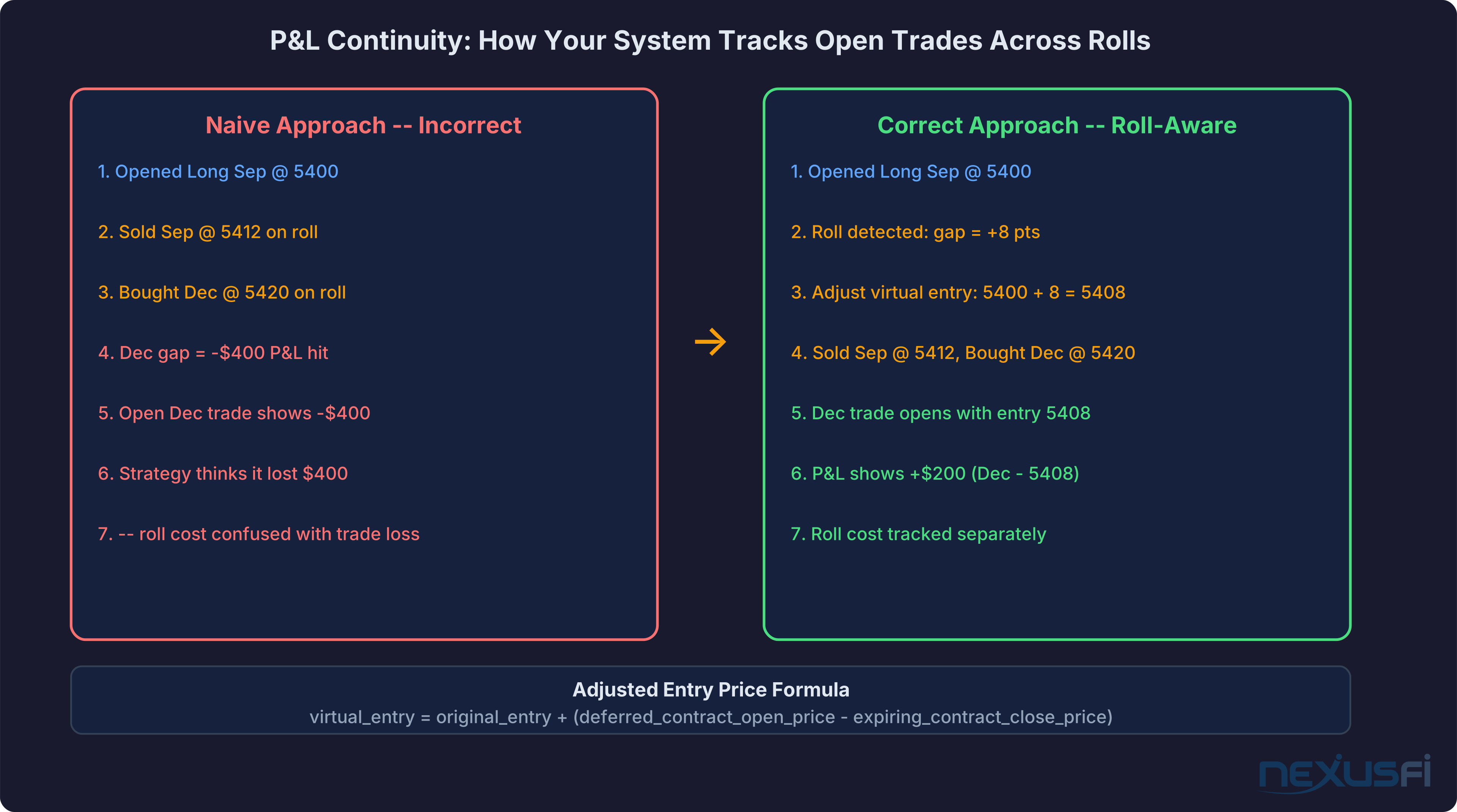
Edge Cases and Failure Modes #
Automated roll systems break in predictable ways. Build defenses against these before they happen in production.
The partial fill problem. September exits. December order bounces. You're flat with a running strategy generating signals but no position to execute on. Detection: monitor the position state against expected state after each roll order. If position count doesn't match expected within 5 seconds of roll confirmation, halt the strategy and alert.
Exchange-declared early close. If your roll is scheduled for a specific time and the session ends early, your roll window closes before your orders execute. Monitor for exchange notifications, and build a "last resort roll 15 minutes before close" check.
Low liquidity overnight. For instruments where delivery deadlines require overnight rolls, use limit orders with maximum slippage thresholds rather than market orders.
Multiple strategies rolling simultaneously. 5 strategies on ES, all rolling at the same time. Some position limit checks may fire on aggregate order size before netting. Stagger roll submissions by a few seconds for more than 10 strategies on the same instrument.
Holiday overlap. Some roll dates land near exchange holidays, shifting the effective crossover date. Add an exchange holiday calendar and shift roll dates that fall on market holidays.
Data feed outage during roll window. Volume-based detection loses its feed and doesn't detect the crossover. A fallback calendar-based rule prevents sitting in an expiring contract because of a data outage.
Production Architecture #
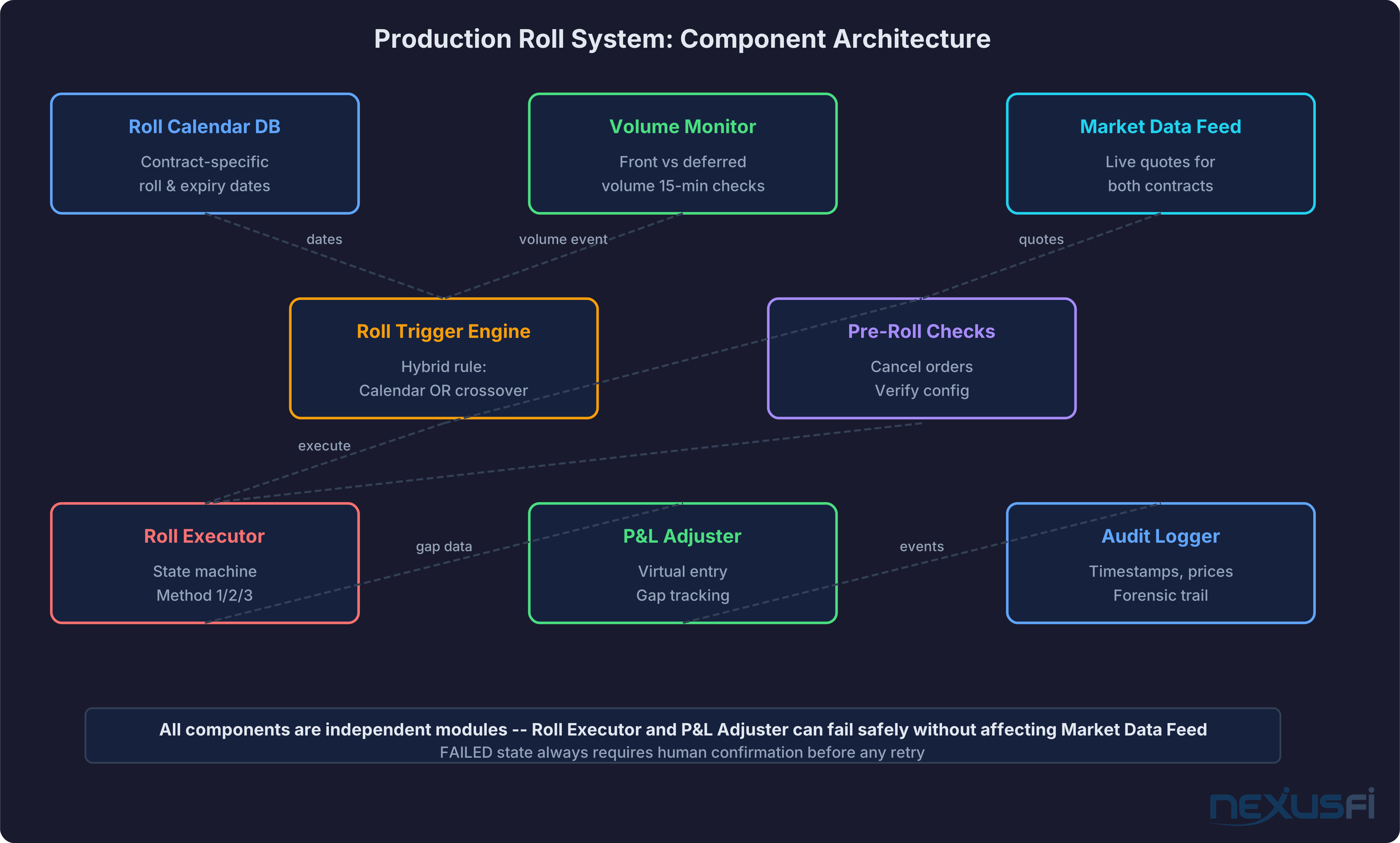
The complete component list for a production roll system:
Roll Calendar Database: Stores scheduled roll dates, expiry dates, first notice dates, and last trading days per instrument. Updated when the exchange publishes product calendars.
Volume Monitor: Subscribes to live market data for front month and first deferred. Checks volume ratio every 15 minutes during RTH in roll week. Fires crossover event when deferred exceeds front for N consecutive checks.
Roll Trigger Engine: Receives events from calendar check and volume monitor. Applies hybrid rule. Transitions to PRE_ROLL state.
Pre-Roll Checks: Cancels pending orders in expiring contract. Verifies deferred contract symbol. Sends notification.
Roll Executor: Implements chosen execution method. Manages state machine transitions. Handles partial fill timeouts.
P&L Adjuster: Computes roll gap. Updates virtual entry prices for all open trades. Records the roll event.
Audit Logger: Every roll event logged with timestamp, instrument, front/deferred contracts, execution prices, gap size, and P&L adjustment.
See the Trading System Architecture article for how this roll subsystem fits into a full production algo infrastructure. For the risk controls that wrap the roll executor, see Automated Risk Controls.
Testing Your Roll System #
Before trusting your automated roll system with live capital:
Paper trading through a live roll. Run simulation mode for at least one full roll cycle. Confirm the roll trigger fires correctly, orders execute correctly in sim, P&L adjustments are computed correctly, and the system transitions cleanly to the new contract.
Historical simulation. Replay historical data through your roll management code for the last 4-8 expiry cycles. Check that the roll fires at the right bar and the virtual entry adjustment is correct.
Manual override testing. Force a roll by injecting a fake crossover event. Confirm all downstream effects fire in the right sequence.
Failure mode testing. Set up a test where the deferred leg doesn't fill. Confirm the timeout fires, the fallback market order submits, and FAILED triggers the correct alerts. You don't want to discover this doesn't work during a real failure.
Stress test. Replay your roll execution logic through a volatile period — ES roll week during March 2020, for example. If your system would roll into a market dropping 100+ points per day, does the execution logic handle it? Does the P&L adjustment still work correctly when the roll gap is unusually large?
Knowledge Map
Prerequisites
Understand these firstGo Deeper
Build on this knowledgeReferences This Article
Articles that build on this topicCitations
- — Rollover Days - some Quick Facts about (2009) 👍 22“Rollover is 8 days before expiration. Volume shifts to the new contract at market open (09:30 EST) on Rollover day. New day trading or swing trading positions opened on rollover day should use the new contract month irrespective of when you plan to close it.”
- — continuous contract in NT7 /merge policy / rollover (2011) 👍 31“My preferred way of displaying intraday data is to use MergeBackAdjusted Futures. They do not show any gap on rollover date, so you can use them for backtesting. Also the swing sizes are not distorted.”
- — continuous contract in NT7 /merge policy / rollover (2011) 👍 6“If you use a mergebackadjusted contract, this will close the gaps. However, the relative values are correct and rollover cost is accounted for. So you can use this type of contract for backtesting.”
- — KJ Trading Systems Kevin Davey - Ask Me Anything (AMA) (2013) 👍 9“For my fully automated systems, I generally use Method 1 [quick roll], even though it is the most expensive. When I use Method 2, I sometimes find myself chasing the market with my order, or worse yet, I forget about the rollover for a while, leaving me temporarily doubly exposed.”
- — Why Back Adjustments on Prior Contracts? (2021) 👍 5“If you want to backtest for 10 years, then you DO want to test with continuous back adjusted contracts, since if you use a continuous unadjusted contract, you will get incorrect backtest results due to rollover gaps.”
- — snippet of code to handle rollover in NT7 (2015) 👍 2“I will create the same strategies for CL 01-16, CL 02-16, CL 03-16 and start them all. With the code below trades will only be placed on the current live contract.”
- — Python Script to see which contract has the most volume (2015) 👍 7“I always forget to rollover contracts so I wrote a simple python script that looks at the front month/following month to see which contract has the most volume and emails me when this shift happens.”
- — Rollover date vs Expiration date (2014) 👍 6“FX futures typically expire on Monday preceding the third Wednesday of the expiry month. Volume is set to switch to the new contract on Thursday or Friday this week. You should therefore consider rolling on Thursday.”
- — Confused on roll date for ES? (2022) 👍 6“You always want the 'front month,' which (using the volume rule, at least) is the contract with the most volume.”
- — Changing rollover dates for CL (2012) 👍 4“There is no fixed rule for CL rollover dates. Many traders roll on the day when the volume of the new front month contract first exceeds the volume of the old front month contract.”
- — Historical Rollover Dates (2022) 👍 2“Roll EOD on day before roll date or EOD on roll date. NG: Volume shift on day before calendar roll date or on roll date, so roll EOD two days before roll date or EOD one day before.”
- — CME Group E-mini S&P 500 Futures Product Calendar
- — Nasdaq Data Link CHRIS Continuous Futures Database