



Rithmic R|Protocol Setup and Configuration Guide
Overview #
Rithmic R|Protocol is the data feed technology that powers the order flow and market depth your NinjaTrader, Sierra Chart, Quantower, or Jigsaw platform shows you in real time. It's not just a quote feed. It's a binary TCP protocol designed from the ground up for futures markets — with session management, symbol subscriptions, and order routing all handled through a single persistent connection. Understanding how it works, how to connect it correctly, and what to do when it breaks is non-negotiable if you're trading futures seriously.
Here's what sets Rithmic apart from the broader market data environment: it's embedded into your broker's infrastructure. When you open an account at any Rithmic-powered broker — AMP Futures, Tradovate, Earn2Trade, dozens of prop firms — you're not just getting trade execution. You're getting access to Rithmic's exchange-direct data network. The same connection that routes your orders is the same connection that delivers your ticks. That tight coupling is what makes Rithmic fast and also what makes configuration mistakes so consequential.
This article covers everything you need to connect Rithmic to your platform correctly, validate that you're actually receiving the data you think you are, and troubleshoot the failures that derail most traders' setups. It doesn't cover order routing strategy or platform performance tuning — those are separate topics. It covers the feed itself: what it is, how it works, and how to keep it healthy.
What Rithmic Actually Is #
Rithmic LLC is an order routing and market data company that sits between futures exchanges (CME, ICE, CBOT, Eurex) and the software platforms traders use. They've built proprietary infrastructure for receiving exchange data, normalizing it, and distributing it to brokers and platforms via their R|Protocol API. That API is what you're using — indirectly — every time you watch ES tick by tick.
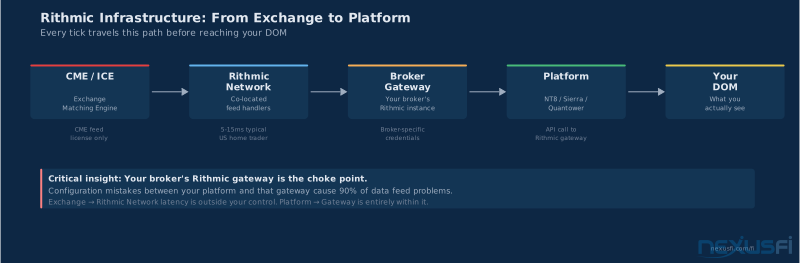
The chain looks like this: Exchange matching engine → CME feed handler → Rithmic data aggregation network → your broker's Rithmic gateway → your platform. When Rithmic says "low latency," they mean their network component. You can't improve the exchange leg or the last mile from your desk. What you can improve is the configuration between your platform and the Rithmic gateway — and that's where most problems live.
Two things Rithmic provides are commonly conflated and need to stay separate in your head:
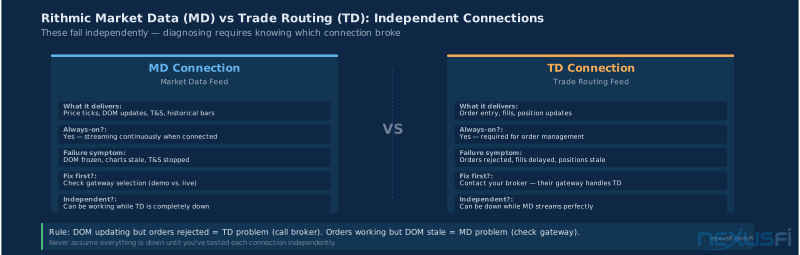
Market Data (MD) — price ticks, order book depth, time and sales. This is what you see on your charts and DOM. The MD connection is always-on and streaming.
Trade Routing (TD) — order entry, fills, position updates. This is the connection your broker uses to route orders to the exchange. As Fi noted in a NexusFi thread on Rithmic status: "These are independent connections for market data and order routing. You can be getting perfectly clean data while the trading side is completely down."
Keep this separation in mind. When your DOM isn't updating, check the MD connection. When your orders aren't filling, check the TD connection. These fail independently and get fixed independently.
Data Types: BBO, Full Depth, and Trade Prints #
Rithmic delivers three types of market data, and your platform will use some combination of them depending on how you've configured it. Getting the wrong type — or not knowing which type you're receiving — is the source of a lot of "something feels off" experiences.
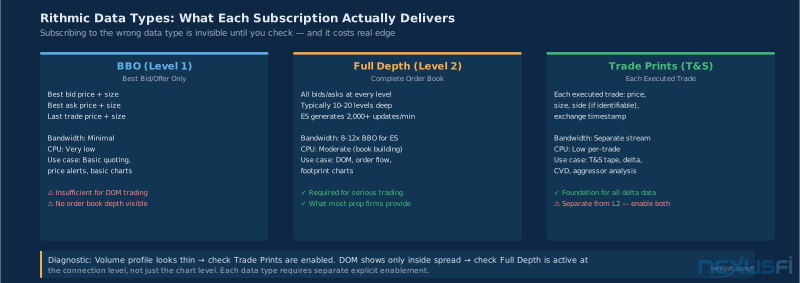
Best Bid/Offer (BBO, also called Level 1) — The inside market only: best bid price and size, best offer price and size, last trade price and size. This is the minimum you need for basic trading. It uses the least bandwidth and CPU. If you're running a strategy that only needs last price and current spread, BBO is sufficient.
Full Market Depth (Level 2) — The complete order book: all bids and offers at every price level up to the platform's configured depth (typically 10-20 levels in each direction for ES). This is what the DOM shows. Each price change generates an update message — which means Full Depth generates much more data volume than BBO, especially in ES and NQ during active sessions. If your DOM appears empty or updates sluggishly, this is the first thing to check: is Full Depth actually enabled at the connection level?
Trade Prints (Time and Sales) — Each executed trade: price, size, side (if identifiable), timestamp. The time and sales window you use to read aggression lives on this data stream. Most platforms that show you cumulative delta are building it from trade prints. This stream is separate from the order book update stream — you can have one without the other.
The practical implication: if you're running a volume profile analysis and the profile looks thin or incomplete, check that your platform is actually receiving trade prints. If your DOM looks flat and shows only the inside spread, check that Full Depth is enabled at the connection level, not just the chart level.
One more thing worth knowing: the overhead of Full Depth varies dramatically by instrument. ES with 20 levels of depth generates roughly 8-12x the message volume of BBO during RTH. If you're subscribing to depth on 20 instruments simultaneously — which happens when you load a multi-instrument workspace — your platform is processing a significant data stream. This matters for performance and is covered in detail in the Performance section below.
Connection Architecture and Authentication #
Every Rithmic connection starts with a gateway. The gateway is a named server endpoint that corresponds to a specific Rithmic infrastructure cluster. The most common ones you'll encounter:
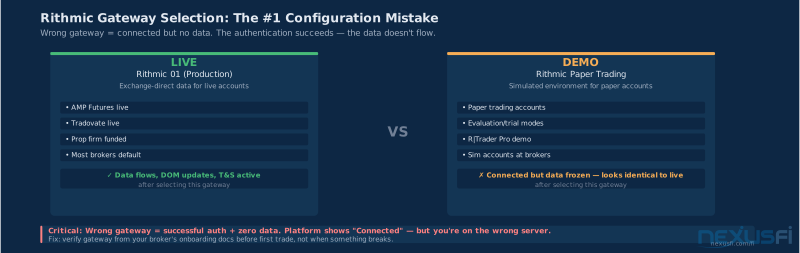
- Rithmic 01 -- Live trading and market data, most CME Group-connected brokers
- Rithmic Paper Trading -- Simulated trading environment, uses same data infrastructure as live
- Rithmic 04 -- Used by some brokers for specific regional or latency-optimized routing
- Broker-specific gateways -- Some large brokers run their own Rithmic gateway instances
This is the single most common configuration mistake: using "Rithmic Paper Trading" with a live account, or vice versa. When you select the wrong gateway, you'll authenticate successfully (the credentials are usually the same across environments), connect, subscribe to symbols — and receive nothing. No data, no depth, no DOM updates. The platform shows "connected" and you stare at a frozen screen wondering what's wrong.
Your broker's onboarding documentation will tell you which gateway to use. If it's unclear, call them. Don't guess — the gateway selection isn't something you can diagnose from your side once you're connected.
Wrong gateway = authenticated connection, zero data. If your platform shows "Connected" but your DOM is empty and charts won't load, gateway selection is the first thing to check — not your credentials, not your platform version, not your firewall. The wrong gateway accepts your login and delivers nothing.
Authentication uses the username and password associated with your Rithmic account, which is separate from your trading account credentials at the broker. If you've never logged into the Rithmic R|Trader Pro desktop application, you may not have set your Rithmic credentials yet. The password field is also case-sensitive and will reject connections with invisible trailing spaces — a problem that's derailed enough traders that it's worth checking explicitly.
Port and firewall considerations: Rithmic uses TCP over specific ports (typically in the range 3000-3100, depending on the gateway). Corporate networks, hotel WiFi, and cellular connections with carrier NAT filtering will sometimes block these ports. If Rithmic connects fine at home but fails elsewhere, port filtering is the first suspect. A simple test: if your browser loads nexusfi.com but your platform won't connect to Rithmic on a specific network, the issue is almost certainly the network, not your credentials or platform config.
NinjaTrader 8 Setup #
Before touching any other NT8 setting, confirm your Rithmic gateway selection matches your account type. Go to Tools → Connections → [your connection] → Properties and verify the gateway name. "Rithmic Paper Trading" is a completely different server from "Rithmic 01" — you can be authenticated and connected on the wrong one for hours without realizing it.
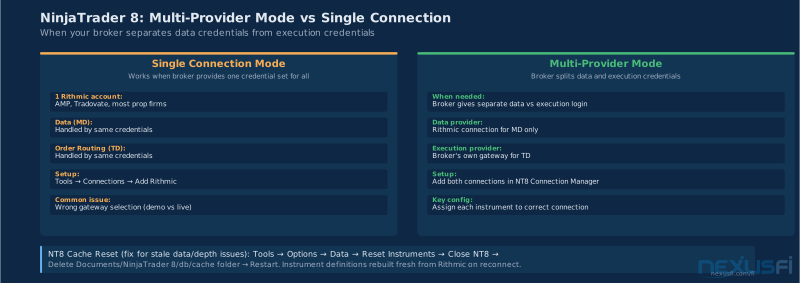
NT8's Rithmic integration runs through the Connection Manager (Tools → Connections → Add). When you add a Rithmic connection, you're creating a connection profile that specifies: which Rithmic gateway, your credentials, and whether this connection handles market data, trading, or both.
Here's what most traders get wrong in the NT8 setup:
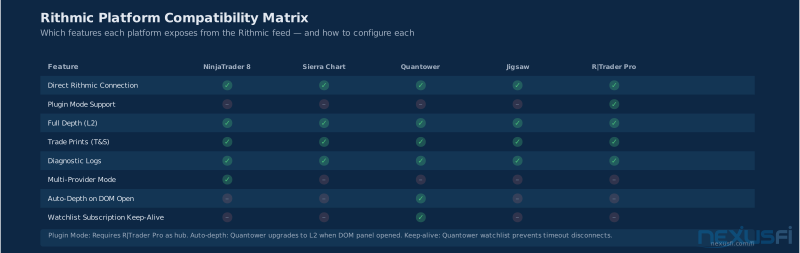
Multi-Provider Mode — NT8 supports a mode where one connection handles data (typically Rithmic) and a different connection handles order routing (typically the broker's own execution connection). This is commonly called "Multi-Provider Mode" and it solves a specific problem: some brokers issue Rithmic credentials for data only, with order routing going through their own gateway. If you don't configure Multi-Provider Mode correctly, NT8 will try to route orders through the Rithmic data connection and fail.
— but "should" doesn't mean "will" without explicit configuration.
Instrument granularity and connection assignment — When you have multiple connections active in NT8, each instrument subscription gets assigned to a connection. The assignment logic isn't always obvious. A chart of ES that was saved when only Rithmic was connected may try to use the Rithmic connection for data even after you've switched to a different primary data provider. Check the instrument properties on any chart that's showing stale data to confirm which connection is serving it.
Cache and database resets — NT8 caches instrument definitions, historical data, and connection state locally. When connection behavior feels inconsistent — depth showing sometimes, not others; charts loading stale data after reconnect — the cache is frequently the culprit. @TheWizard documented the exact fix in the NexusFi Brokers forum:
This resets NT8 to re-request all instrument definitions from Rithmic fresh on next connect.
Historical vs. realtime loading — NT8 uses your Rithmic connection for both real-time streaming and historical data requests. When you load a new chart, NT8 fires a historical data request to fill the chart before beginning real-time streaming. If this request fails or times out, the chart will load with no historical data but still stream real-time. This looks like missing bars behind the current price. Check the Connection panel (Control Center → Connections) for any data request errors.
Sierra Chart Setup #
Sierra Chart's Rithmic connection lives in File → Data/Trade Service Settings. Sierra exposes more of the underlying Rithmic connection behavior than NT8 does — which makes it better for diagnostics but more complex to configure correctly.
Sierra uses its own symbol format that doesn't always map directly to Rithmic's symbol IDs. For ES, Sierra's format is "ESM25-CME" (June 2025 contract on CME), while Rithmic uses "ESM5" internally. Sierra handles this translation automatically for most standard contracts, but for newer instruments or non-US exchanges, you may need to manually map symbols in the Symbol Settings window.
Continuous contracts in Sierra behave differently from single-month contracts when connected via Rithmic. Sierra's "Continuous Futures" (e.g., "ES-CME") are internally rolled — Sierra constructs the continuous price series from underlying monthly contracts rather than Rithmic providing it directly. This means the continuous contract data quality depends on Sierra's roll logic, not Rithmic's delivery. If you see price discontinuities on a Sierra continuous chart that don't show on a monthly contract chart, the issue is the roll methodology, not the feed.
Sierra's System Log (Help → System Log) is the most useful diagnostic tool for Rithmic issues in Sierra. Every connection event, data request, and error is logged there. When something isn't working, open the System Log before trying anything else. You'll typically see explicit error messages like "Rithmic: No response to login" or "Symbol not found" that tell you exactly what's wrong.
Quantower Setup #
Quantower's Rithmic integration sits under Connections → Add Connection → Rithmic. Quantower's connection panel shows you connection status for MD (market data) and TD (trading) independently — which is valuable because you can see immediately whether the issue is on the data side or the execution side.
Depth in Quantower: by default, Quantower subscribes to BBO for instruments not actively open in a DOM panel. When you open a DOM panel for a specific instrument, it automatically upgrades to Full Depth subscription for that symbol. When you close the DOM, it downgrades back to BBO. This behavior is by design — it keeps bandwidth usage under control — but it can create confusing situations where an ES chart shows correct price action while an ES DOM panel shows a completely flat book for several seconds after opening (while the depth subscription is being established).
Quantower's watchlist handles Rithmic subscriptions more gracefully than some platforms: instruments on the watchlist maintain a persistent low-overhead subscription, which prevents the timeout disconnects that @mgcharl documented on NexusFi:
Jigsaw Setup #
Jigsaw's Rithmic module is purpose-built for order flow traders — the platform is designed around the DOM and tape, which means depth and trade print subscriptions are core, not optional. Jigsaw connects via its own Rithmic connection manager and exposes the gateway, username, and password fields similar to other platforms.
One Jigsaw-specific consideration: subscription scaling. Because Jigsaw encourages multi-instrument analysis (you'll often have several DOMs and tape windows open simultaneously), it's easy to build up a large number of active depth subscriptions without realizing it. Each open DOM that's actively receiving depth data counts against your subscription capacity and consumes CPU on your local machine for book building. If you open five DOMs with full depth, you're processing five simultaneous order book streams. The performance section below covers when this starts causing problems.
Jigsaw's reconnection behavior after a feed drop is more conservative than some platforms — it waits for a confirmed clean reconnect before re-enabling trading controls. This is deliberate: Jigsaw's assumption is that a data gap should prevent trading until data integrity is reconfirmed. If your DOM goes blank and your trading buttons become unavailable, don't panic — it's the reconnection logic working correctly. Wait 30-60 seconds for the feed to re-establish before manually intervening.
Plugin Mode: Running Multiple Platforms #
A common scenario in prop firm trading: you have an evaluation account at one firm using Rithmic credentials, a funded account at a second firm using different Rithmic credentials, and you want to run NinjaTrader for execution while also running Sierra Chart for analysis.
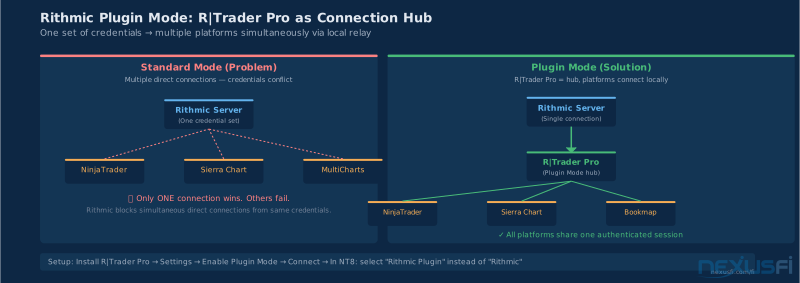
The default Rithmic architecture limits each set of credentials to one active platform connection at a time. This is where Plugin Mode solves a real problem. @tr8er explains it on NexusFi:
Plugin Mode makes R|Trader Pro the primary Rithmic connection, and other platforms (NinjaTrader, Sierra Chart, MultiCharts) connect through R|Trader Pro as a local relay rather than establishing independent Rithmic connections. All platforms share the same Rithmic session.
The practical setup:
- Install and launch Rithmic R|Trader Pro
- In R|Trader Pro, go to Settings → System and enable Plugin Mode
- Connect R|Trader Pro to the Rithmic gateway (it authenticates and establishes the primary session)
- In NinjaTrader (or Sierra Chart), select "Rithmic Plugin" instead of "Rithmic" as the connection type
- NT and Sierra now receive data through R|Trader Pro's local relay rather than direct Rithmic connection
Important: if R|Trader Pro loses its connection, all downstream plugin connections also lose data simultaneously. R|Trader Pro must stay running.
The implication: the Rithmic MD connection isn't required if you have another quality data source; the TD (trading) connection is what you need for order execution.
Feed Validation and Health Monitoring #
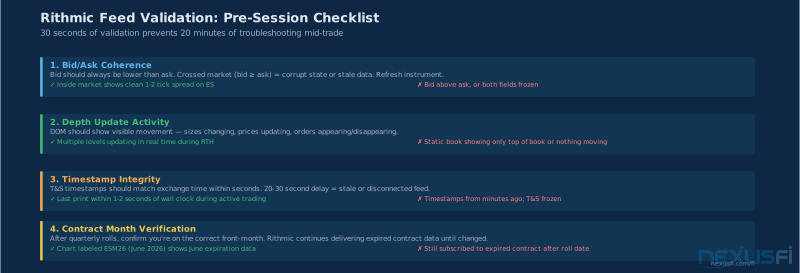
Run the five-point validation checklist below before every session. It takes 30 seconds and catches 90% of feed problems before they become trade problems. Most traders only do this after something breaks — which is too late.
Verifying that your feed is actually delivering what you think it's delivering is a discipline most traders skip until something goes wrong. Here's the validation checklist you should run when setting up or after any significant reconnect event:
1. Bid/Ask coherence — The bid should always be lower than the ask. If you ever see a crossed market (bid ≥ ask), the order book data is corrupt or the platform is showing stale state. This is rare but happens during reconnect recovery. Refresh the instrument.
2. Depth update presence — Load a DOM panel for ES and watch it during any RTH session. You should see visible activity at multiple price levels — size updates, prices changing, resting orders appearing and disappearing. If your DOM is static (only showing numbers, nothing moving), either Full Depth isn't enabled or the connection is receiving BBO only. Compare to a known-good reference: if another trader in a chatroom with the same broker shows an active DOM and yours is frozen, your depth subscription is broken, not the market.
3. Timestamp integrity — Your platform's time and sales should show timestamps matching exchange time (not much behind wall clock time). If the last print is 20-30 seconds old during active trading, you're looking at a stale or disconnected feed. Some platforms show the exchange timestamp, others show local receive time — know which one you're looking at.
4. Contract and session correctness — Confirm you're looking at the correct contract month and trading session. A chart labeled "ESZ25" should show December 2025 expiration data. After quarterly rollover, check that your platform has updated the front-month contract. Rithmic continues delivering data for expired contracts until you explicitly change the subscription — it doesn't automatically roll you over.
5. Historical vs. realtime continuity — After the platform connects and loads a chart, look at the boundary between historical bars and realtime bars. There should be no visible gap, no price jump, and the volume profile should look continuous. A break at the realtime/historical boundary means the historical data request returned data from a different session or timeframe than the realtime stream is delivering.
Common Failure Modes and Troubleshooting #
Here are the failures you'll actually encounter, in order of frequency:
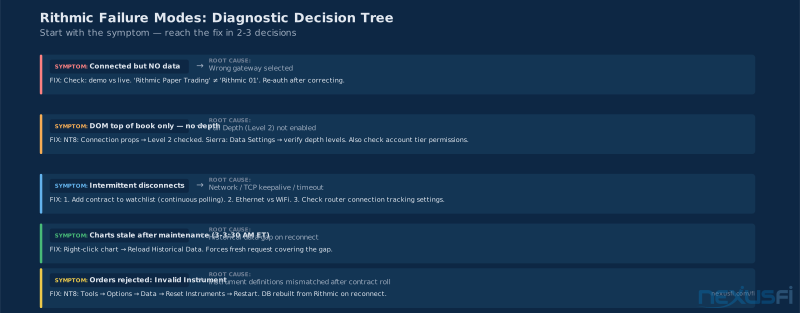
Connected but no data — Wrong gateway selected (demo vs. live). Check platform connection settings → gateway name. "Rithmic Paper Trading" and "Rithmic 01" are different servers. If you're on a live account, you need Rithmic 01 (or your broker's specific gateway). Re-authenticate after correcting the gateway.
DOM shows top of book only — Full Depth not enabled. In NinjaTrader: Connection properties → confirm Level 2 / Depth data is checked. In Sierra Chart: Data/Trade Service settings → verify depth levels. In Quantower: may need to explicitly open a DOM panel (BBO-only mode for charts is intentional). Also check your broker's account permissions — some basic account tiers restrict Level 2 data access.
Intermittent disconnects — Usually network or timeout-related. The Rithmic connection requires consistent TCP throughput; it doesn't handle packet loss as gracefully as some other feeds. Solutions in order: (1) Check for other applications consuming bandwidth during trading hours. (2) Switch from WiFi to ethernet — seriously, Rithmic disconnects on WiFi are a real and common problem. (3) Add the primary trading instrument to a watchlist to maintain a continuous polling signal (per @mgcharl's approach). (4) Check for router or firewall firmware doing "connection tracking" that resets long-lived TCP sessions.
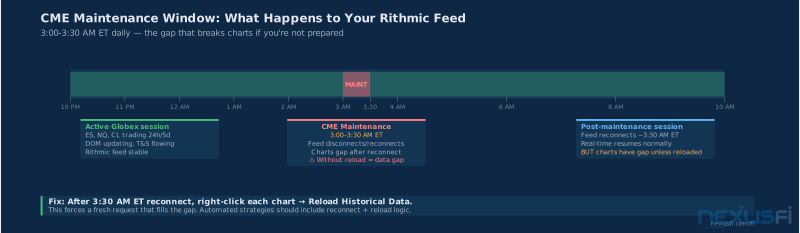
Charts stale after session gaps — The feed technically reconnects after maintenance (3-3:30 AM ET for CME instruments) but the platform's historical data isn't refreshed. On reconnect, charts show real-time ticks from the reconnect point but miss the gap period. Fix: on reconnect after a maintenance window, right-click charts → Reload Historical Data to force a fresh historical request that covers the gap.
Order rejected — Invalid Instrument — Your platform's instrument definition is mismatched with Rithmic's product codes. This happens most often after contract rolls (when the front month changes from March to June) or when subscribing to newer products. Fix for NT8: Tools → Options → Data → Reset Instruments → restart NT8. The instrument database gets rebuilt from Rithmic's current definition list on reconnect.
Feed works on some networks but not others — Port blocking. Rithmic uses non-standard ports that corporate networks, some ISPs, and many hotel/coffee shop networks block by default. VPNs also interfere because they change the apparent network path and can introduce latency spikes that trigger reconnects. If you must trade on a restricted network, contact Rithmic support or your broker about alternative port configurations.
Depth performance degradation during heavy sessions — Too many depth subscriptions active simultaneously. Watch your CPU usage at 9:30 AM ET when markets open. If you see spikes above 80%, and you have multiple DOM panels open across several instruments with depth enabled, the platform is book-building for all of them simultaneously. Close DOM panels for instruments you're not actively watching, or switch non-primary instruments to BBO-only mode.
Data inconsistency between historical and live data — Time zone mismatch. Rithmic delivers timestamps in exchange local time (Central time for CME products). Some platforms convert this to local time; others display it as received. If your platform is configured to UTC and Rithmic is sending Central time timestamps, bars will appear shifted. Check the Time Zone setting in your platform's connection or chart configuration. All timestamps should match before you trust what you're looking at.
Performance and Subscription Management #
The relationship between your Rithmic subscription load and perceived data quality is direct and measurable. Here's what traders consistently observe:
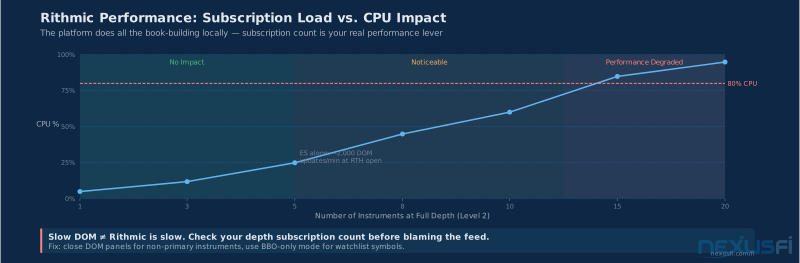
With 1-3 instruments at full depth: no performance impact on a modern machine. ES, NQ, and CL with full depth simultaneously is completely manageable even on mid-range hardware.
With 5-10 instruments at full depth during active RTH: CPU usage becomes noticeable. Most of the load isn't from network — it's from the platform's book-building logic, which processes every order book update and reconstructs the bid/offer stack. ES alone generates thousands of DOM updates per minute at the open.
With 15+ instruments at full depth: this is where most traders see the degradation that gets misattributed to "Rithmic being slow." The feed itself is fine; the local machine is overloaded. You'll see delayed DOM updates, indicators lagging, and chart stutter. The fix is to reduce depth subscriptions — use BBO for watchlist instruments and only activate Full Depth for instruments you have active DOM panels open for.
One legitimate latency consideration: Rithmic's geographic gateway placement affects your round-trip time to the exchange. CME data originates in Aurora, Illinois. Rithmic's primary gateways are co-located or near-co-located in Chicago. From a US home trading setup, typical receive latency is 5-20ms depending on your ISP and geographic location. This is not a problem for discretionary trading. For systematic strategies where sub-millisecond fill decisions matter, the latency profile changes much and co-location becomes relevant — but that's a different article.
Operational Best Practices #
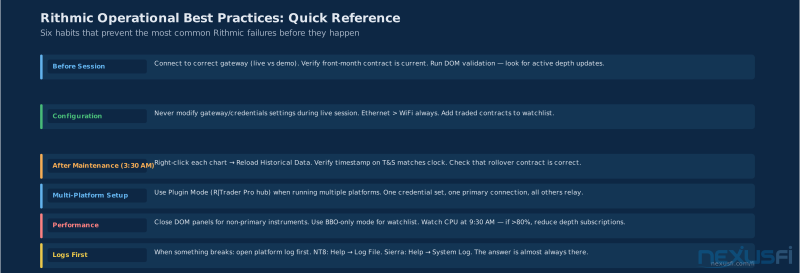
The traders who have the fewest Rithmic problems aren't lucky — they have a routine. Pre-session validation, post-maintenance reloads, and not touching connection settings during RTH. These habits prevent 80% of the issues discussed in the troubleshooting section above.
Don't modify connection settings during live sessions. Changes to gateway selection, credential settings, or subscription configuration require a reconnect. Any reconnect during trading hours creates a window where you're not receiving data. Make configuration changes before the session starts. If something breaks mid-session, decide whether you need to fix it (which requires reconnecting and accepting the data gap) or whether you can wait for the maintenance window.
Test on non-trading hours first. Before bringing a new platform configuration live, connect during overnight (Globex) hours or on a Sunday when CME instruments are thin but live. Verify that all instruments populate, depth shows correctly, and historical data loads cleanly. Don't learn about configuration mistakes when the market is moving.
Maintain a validation routine. At the start of each trading session: check that your main instrument's DOM is showing depth updates, verify the current front-month contract is correct, and confirm the timestamp on the last trade in time and sales matches your clock. Thirty seconds of validation at session start prevents twenty minutes of troubleshooting mid-trade.
Separate your data and execution monitoring. Because Rithmic provides independent MD and TD connections, a TD outage doesn't mean your data is bad. If you can't route orders but your charts are live and the DOM is updating, the market data is intact — the execution problem is on the TD connection. Contact your broker about the trading connection specifically rather than assuming the entire feed is down.
Log your connection events. Every platform maintains a connection log. When something goes wrong, the first thing to do is read it. NT8's log is in Help → Log File. Sierra's is in Help → System Log. Most traders never look at these until they're desperate — but the logs almost always contain the answer to what failed and when.
For prop firm accounts especially — keep your Rithmic credentials for your live trading account and your evaluation account organized and separate. It's easy to accidentally authenticate into the wrong environment, trade all day on paper, and wonder why your draws aren't showing up. The gateway selection and credentials need to match the account you intend to be in.
Rithmic configuration problems follow predictable patterns: wrong gateway, missing Full Depth subscription, cache holding stale instrument definitions, or too many simultaneous depth subscriptions. All fixable. The troubleshooting section above covers each one. When something breaks, start with symptoms — not with random settings changes.
Where Rithmic Ends #
This article covers Rithmic from the gateway to your platform — the feed itself. Adjacent topics that deserve separate treatment:
Platform-specific performance tuning (NinjaTrader threading, Sierra Chart chart refresh rates, Quantower buffer settings) is a deeper topic where each platform has its own set of knobs. The feed being healthy is a prerequisite; platform performance optimization is the next layer.
Latency benchmarking and co-location are relevant for systematic strategies where microseconds matter. For the discretionary trader, getting Rithmic connected correctly and stable is the entire problem. For a systematic trader running strategies that compete on fill speed, co-location and direct market access via Rithmic's DMA infrastructure become relevant — those topics live in their own articles.
Order routing strategy and execution logic — how you build and submit orders — is completely separate from the feed. Rithmic delivers the market picture; what you do with it is your strategy, your platform, and your broker's execution infrastructure working together. The data feed doesn't have an opinion on your trade.
Knowledge Map
Go Deeper
Build on this knowledgeReferences This Article
Articles that build on this topicCitations
- — Broker dilemma (2019) 👍 3“Add the current contract you are trading; it must continuously poll the Rithmic API which prevents the timeout issue that causes the disconnects. I just leave the quote board minimized and have not had any problems since.”
- — Rithmic with MC & NT (2023)“Download R-Trader Pro and check plug-in mode, thereafter check plug-in mode in all other connections (NT and MC) and connect your R|Trader Pro first. Keep in mind, you always have to open R-Trader Pro first (and never close it).”
- — Rithmic feed and rissues (2015) 👍 1“In the Options window select the Data tab, Press the Reset Instruments button, Close NinjaTrader, Go to Documents NinjaTrader 8 db, Right click on the folder cache and select delete.”
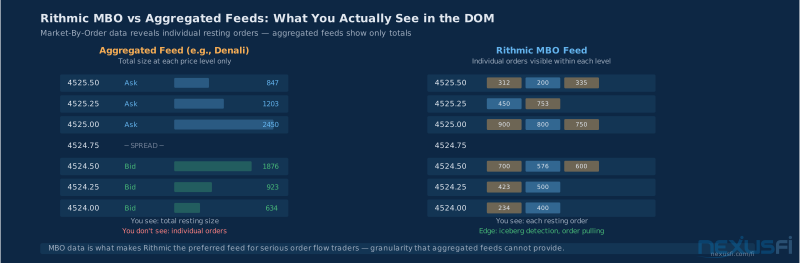
- — Rithmic independent of broker possible? (2021) 👍 3“Rithmic: Have MBO and can see all order book (subscribe market depth). Have monthly connect fee about 25. Order route fee is 0.1 or 0.25 per side. And historically tick data only have 1 day.”
- — Battlestations: Show us your trading desks! (2024) 👍 7“Rtrader allows cached connections. So your rithmic connection goes to rtrader and you connect both ninja trader and bookmap to rtrader. I think the limit is 2 applications can be connected to rtrader.”
- — connection Rithmic to Ninja (2020) 👍 2“I am using bookmap through rithmic and have used the same connection for both bookmap and RTrader, so I do not think using it with ninja will be a problem. The only issue would be getting professional data feed pricing, but I think that is if you use more than 2 platforms.”
- — Rithmic vs Denali - Market Depth Difference (2022) 👍 6“My best guess is that Rithmic must be using a pure MBO parser of MDP 3.0 so they are excluding implied depth from their book. This probably explains why it is strongly biased downwards from depths on the other feeds.”
- — 2+ instances of Ninjatrader (2023) 👍 6“For those interested, normally, you cannot install 2 or more instances of Rithmic R|Trader Pro and NinjaTrader on the same machine. I was able to find a workaround to install 2 instances of NT8 on the same machine using Sandboxie.”
- — Earn2Trade - Orianna Foucault (Director of Support) - Ask Me Anything (AMA) (2020) 👍 2“I use the Denali datafeed + Rithmic order routing. Perhaps the Rithmic datafeed is top-tier but there are clearly issues with Rithmic outside of just their datafeed that is causing these disconnects.”
- — Rithmic Rtrader Pro Plugin Platforms (2020) 👍 1“There are several great platforms that connect to Rithmic data and routing including Motive Wave, Bookmap, Sierra Chart, Multicharts, Jigsaw, Investor RT.”
- — Rithmic R|Protocol -- Market Data and Order Routing for Futures Brokers and Trading Platforms (2024)
- — CME Group Market Data -- MDP 3.0 Data Protocol Documentation (2024)