



Tick Charts for ES and NQ Futures: How Activity-Based Bars Reveal What Time Charts Hide
Overview #
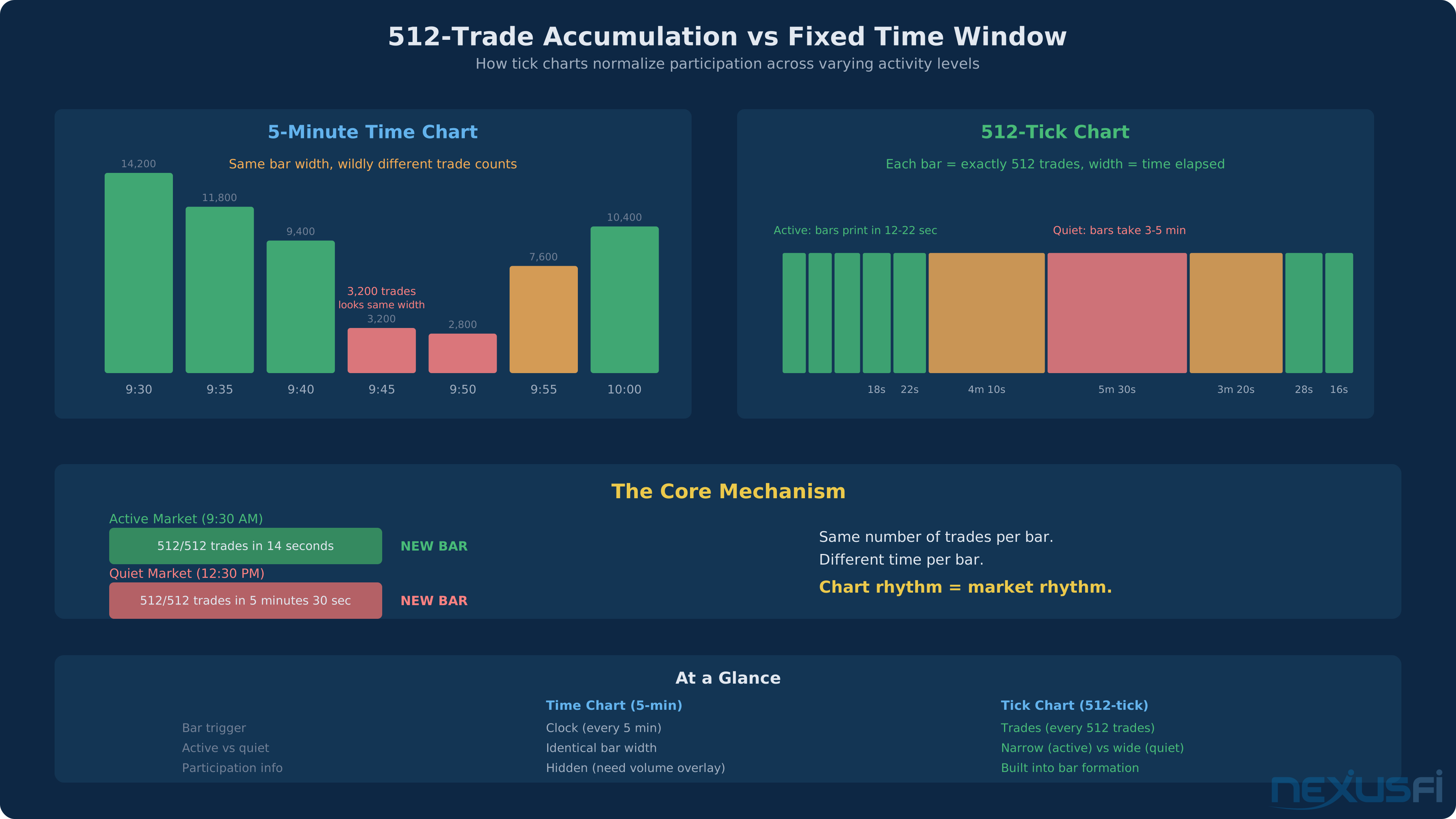
A 5-minute bar during the 9:30 AM opening rush on ES might contain 15,000 trades. A 5-minute bar during the post-lunch lull? Maybe 400. Same bar width on your chart, same visual weight--but one captures a tidal wave of institutional participation while the other records near-silence. Time charts treat both identically. Tick charts don't.
A tick chart creates a new bar after a fixed number of trades execute, regardless of how much time passes. A 512-tick chart on ES prints a new bar after 512 completed transactions--not after 5 minutes, not after a specific volume--after 512 individual trades. When the market is active, bars print quickly. When the market is quiet, bars take longer. The chart's rhythm tracks the market's rhythm.
This is the core advantage of tick charts for ES and NQ futures trading: they normalize participation. Instead of a fixed temporal grid that treats silence and noise equally, you get an activity-responsive canvas where the structure you see reflects how much is actually happening.
Tick charts don't replace time charts--they complement them. You still need the 5-minute chart to see overnight levels, gaps, and prior day structure. But for reading intraday momentum, identifying real breakouts from false ones, and timing entries with precision, tick charts reveal dynamics that time charts routinely obscure.
How Tick Charts Work #
When you set up a 512-tick chart on ES, your platform monitors every completed trade on the exchange. After exactly 512 trades have executed, it closes the current bar and opens a new one. The price range of that bar (high, low, open, close) reflects the price action during those 512 transactions, regardless of whether they took 10 seconds or 10 minutes.
The counting mechanism varies slightly by platform. Most professional platforms--NinjaTrader, Sierra Chart, TradeStation, CQG, Rithmic-connected tools--count individual transaction prints. Some platforms count bid-ask changes or feed updates rather than actual trades, which can produce different bar formations. Confirm with your platform documentation what "tick" means in their context.
What this means in practice: During the 9:30-9:35 AM opening on a high-volume ES day, a 512-tick bar might print every 12-15 seconds--you'll see 20-25 bars in the first 5 minutes. During the 12:00-1:00 PM lunch lull, that same chart might print one bar every 5-6 minutes. The chart reflects activity honestly rather than filling your screen with bars representing noise.
BarTypes ninjatrader 8 (@bebbus)
Tick Charts vs. Time Charts: The Core Difference #
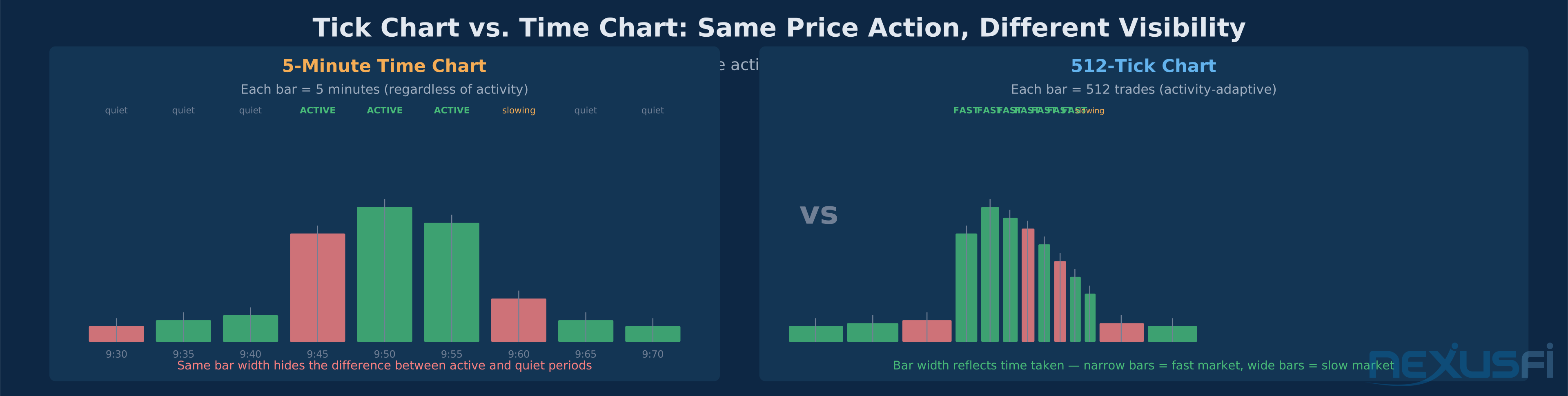
The comparison between tick and time charts isn't about which is "better"--it's about what each one is designed to show.
Time charts excel at:
- Overnight and prior session context (gaps, support/resistance levels)
- Structural patterns that need a consistent time axis (head and shoulders, channels)
- Comparing activity across the same time period on different days
- Calculating opening range (always use minute bars for this--see Opening Range Warning below)
Tick charts excel at:
- Revealing participation intensity in real time
- Distinguishing genuine breakouts from noise
- Identifying trend exhaustion through bar-speed changes
- Providing clean entry timing during high-activity sessions
The practical difference becomes visceral during a major economic release. On a 5-minute chart, the 8:30 AM NFP print produces one or two massive bars. On a 512-tick chart, that same window might produce 30-40 bars showing exactly how price absorbed the shock, where sellers and buyers stepped in, and where the sustainable direction emerged.
Day Trading the ES PATS style- 1 point at a time (@welly192)
Because bars aren't time-aligned, the 9:30 AM session boundary falls mid-bar. For opening range calculation, you need minute bars. For everything else intraday, tick charts often provide superior granularity.
The Fibonacci Settings: 233, 512, and 1597 #
The most commonly used tick chart settings--233, 512, 1597--are Fibonacci numbers. Fibonacci relationships appear repeatedly in market structure, and many traders use Fibonacci-based tick counts on the theory that the market naturally "breathes" in these rhythms. A 2022 study in Expert Systems with Applications found that prices bounce on Fibonacci retracement levels no more often than non-Fibonacci levels — but for tick chart settings, that actually reinforces the practical point: these settings are widely adopted, making them self-reinforcing through shared observation.
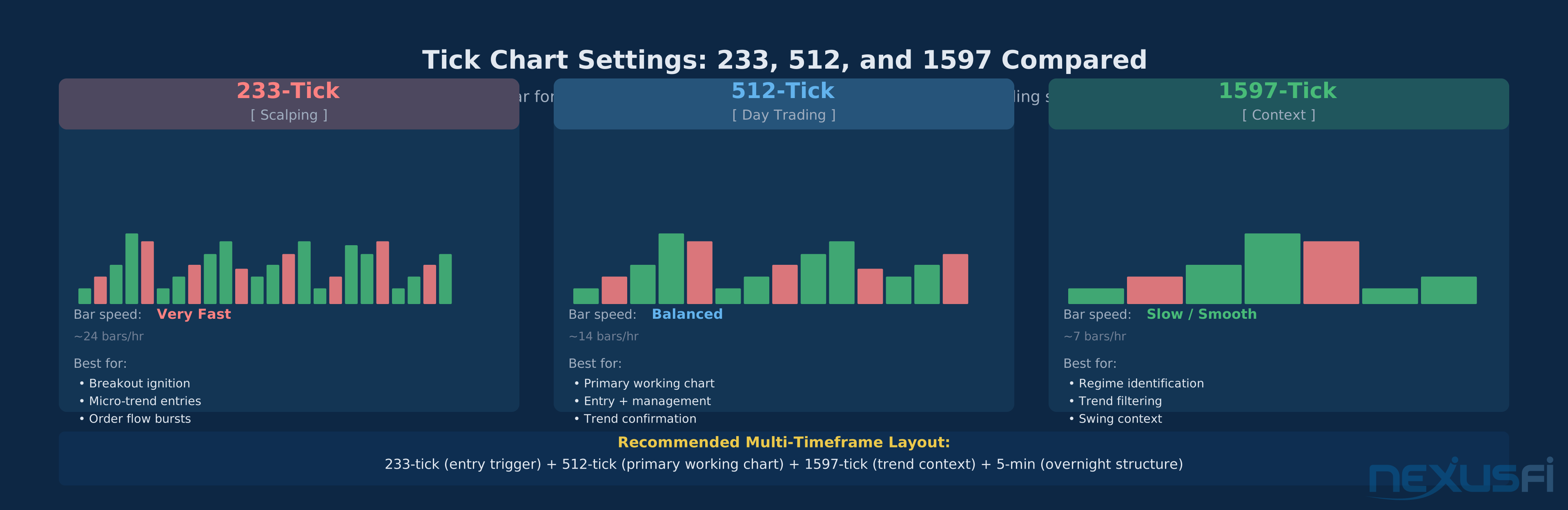
The Fibonacci rationale is secondary to the practical one: these three settings provide meaningfully different levels of granularity.
233-Tick: Scalping and Breakout Ignition #
The 233-tick chart is fast. During active periods on ES, bars print every 10-20 seconds, letting you watch price action develop in near real-time--absorption sequences, stacking of bids or offers, the first hint of directional conviction before slower charts show it.
Primary uses:
- Scalping setups: 1-3 point targets on ES require precise entry timing. The 233-tick shows micro-pullbacks within larger moves.
- Breakout ignition detection: A breakout attempt on the 512-tick often appears first on the 233-tick as bar printing accelerates.
- Divergence identification: Price pushing to new highs on the 512-tick but 233-tick bars taking progressively longer to form flags potential exhaustion.
The cost is noise. More bars means more apparent setups, and not all are meaningful.
Perry's Method Continuation and Advancement (@rptrader)
The 233-tick works best as a divergence and entry filter, not as a standalone signal generator.
512-Tick: The Day Trading Sweet Spot #
The 512-tick chart is the workhorse for most ES day traders. During active sessions, it produces bars roughly every 30-90 seconds--fast enough for timely signals, slow enough to filter most noise.
Primary uses:
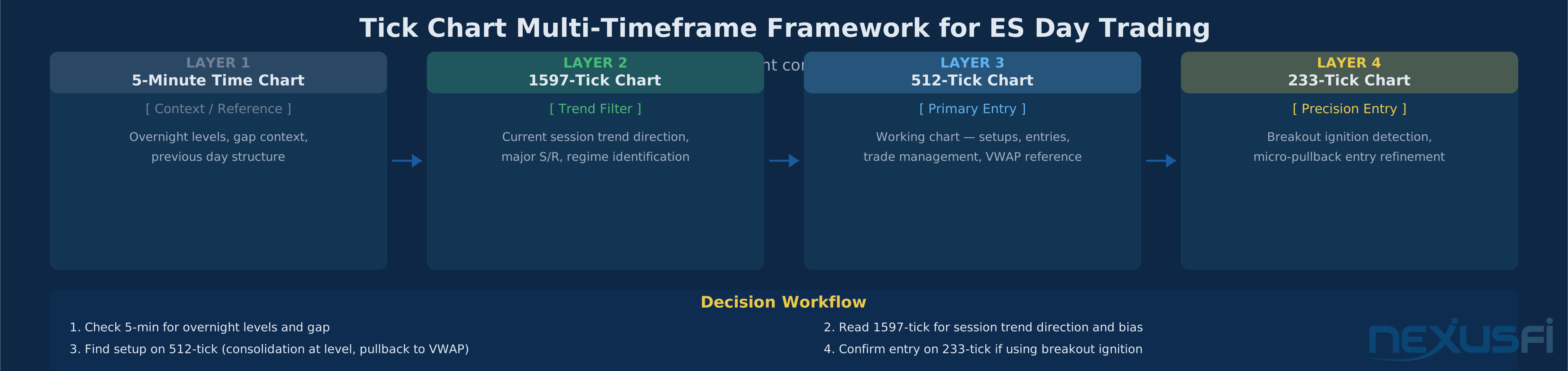
- Entry execution: Finding the specific bar to enter after a setup on the 1597-tick context chart
- Trade management: Monitoring whether a trade is working (bars printing quickly) or stalling (bars slowing, overlap increasing)
- VWAP reference: VWAP works well on 512-tick charts for value area and reversion targets
- Moving average dynamics: A 20-period EMA on the 512-tick acts as dynamic support in strong trends
On @cjbooth's observation about choosing settings on 6E: "I settled on the 377 because I felt it offered the best trade setups with a moderate amount of risk. The 233 was too fast it might be better for scalping but thats not what I do, the 510 tick was smoother but was too much risk on the entries."
My 6E trading strategy (@cjbooth)
Each trader's "sweet spot" depends on holding time and risk tolerance. For most day traders targeting 4-10 ES points per trade, 512 lands in the useful zone.
1597-Tick: Context and Trend Confirmation #
The 1597-tick chart runs slower--during active periods it produces bars roughly equivalent to a 3-5 minute time chart, useful for identifying the session's trend structure.
Primary uses:
- Session trend identification: Consistent higher highs/higher lows or the opposite
- Key level definition: Swing highs and lows on the 1597-tick are significant turning points, not micro-noise
- Regime filtering: Before any trade on the 512-tick, confirm 1597-tick direction. Trading against it is low-probability.
- Exhaustion signals: When the 1597-tick starts forming bars more slowly after a fast trending period, the move may be running out of fuel.
The multi-timeframe framework works because each layer provides different information: 1597 defines the regime, 512 provides the entry signal, 233 refines the timing.
Calibrating Tick Count to Market Activity #
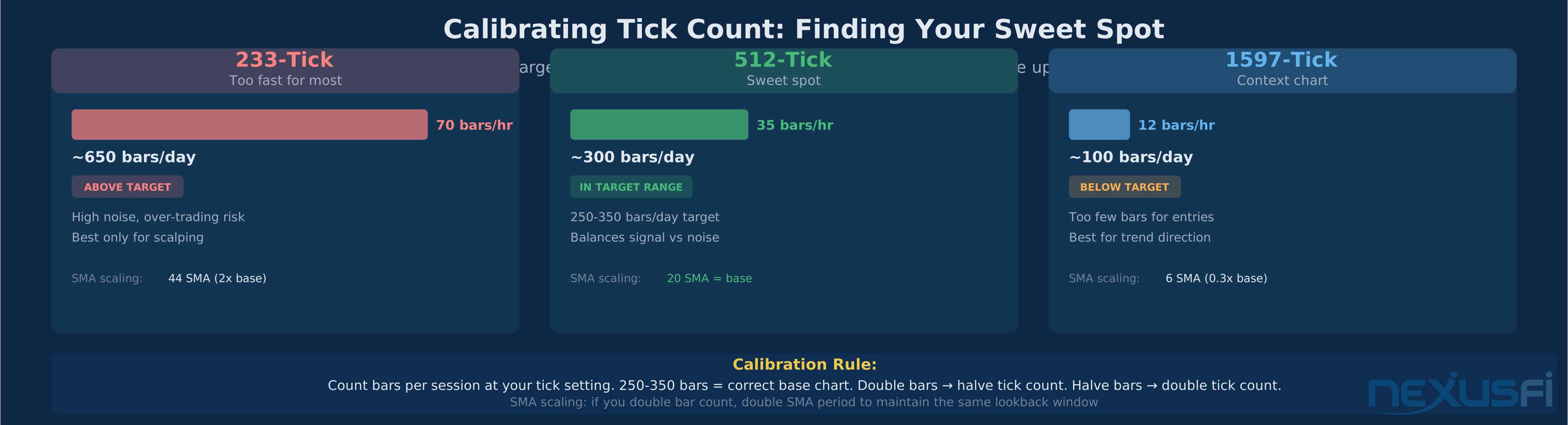
The "right" tick count is relative to market activity. A 512-tick chart that works on ES would produce bars far too quickly on NQ during active periods.
Tick chart orientation (@worldwary)
worldwary also noted a useful scaling property: "One cool thing about tick charts is that once you've worked out the base tick chart, you can use simple math to apply that same 12 SMA support/resistance line on other size charts... if you double the number of bars on the chart, you should also double the number of bars used in the SMA." Your indicator settings scale consistently once you have the base calibration right.
Activity-based reference points for common ES tick counts:
| Tick Count | Typical Bar Speed (Active Hours) | Typical Bars Per Day | Primary Use |
|---|---|---|---|
| 233 | 10-30 seconds | 500-800+ | Scalping, entry refinement |
| 512 | 30-90 seconds | 200-400 | Day trading primary |
| 1200 | 2-4 minutes | 100-200 | Context / trend filter |
| 1597 | 3-5 minutes | 80-160 | Regime identification |
| 2000 | 4-8 minutes | 60-120 | Swing context |
Tick charts for the ES (@cronosis79)
Tick count calibration isn't set-and-forget. When volume conditions change much--summer, holidays, post-rollover--monitor bar formation speed and adjust.
ES vs. NQ: Why Tick Counts Don't Transfer Directly #
NQ typically trades 2-3x higher volume in absolute transaction count than ES during active sessions. A 512-tick chart on NQ prints bars roughly 2-3x faster than the same setting on ES.
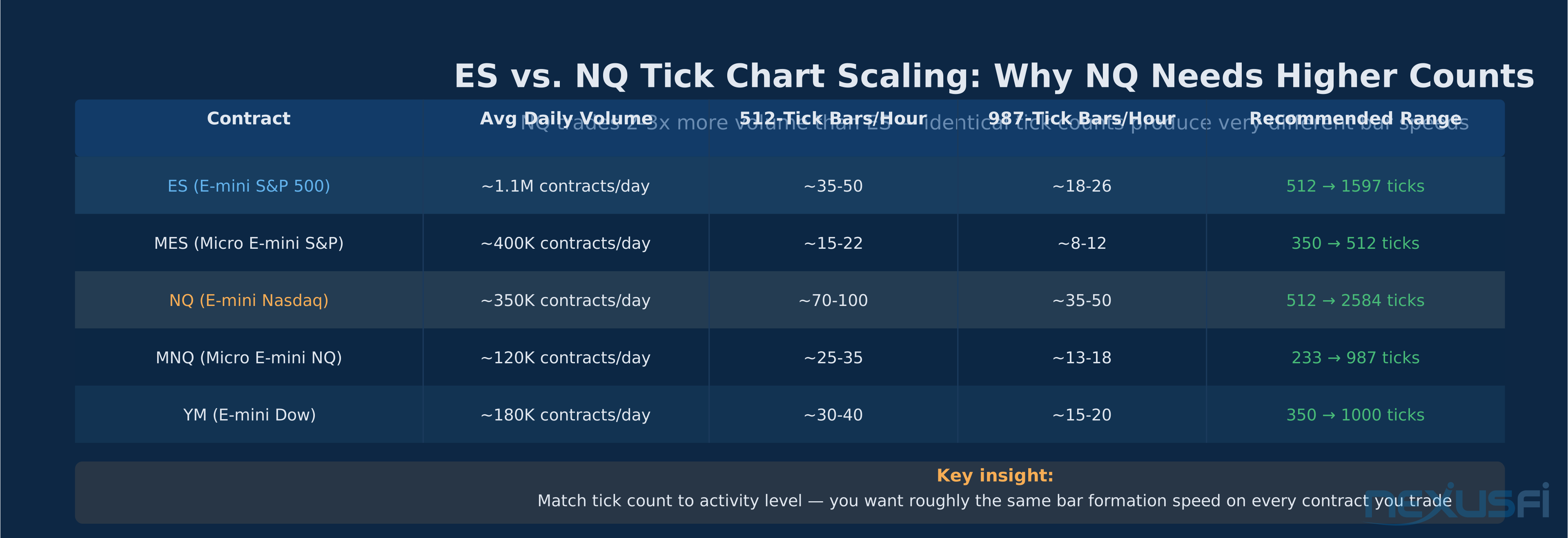
You cannot apply the same tick count to both contracts and expect equivalent behavior. If 512 works on ES, you'll want 987-1597 range for NQ to achieve similar bar frequency. For micro contracts (MES, MNQ), scale down proportionally. @Botts confirmed: "The MES trades about 1/5th the daily volume of the ES, so the 1000 volume chart may not be the right choice? I noted the other day that @wldman was using a 1,600 Tick chart--occasionally. Maybe take a look at a 350 Tick chart on MES and keep it beside a 60 Minute so you can know which direction the 60 is trading for your entry bias."
Practical scaling framework:
| ES Tick Count | ES Equivalent NQ | MES Equivalent | MNQ Equivalent |
|---|---|---|---|
| 233 | 512-600 | 70-100 | 30-50 |
| 512 | 987-1200 | 150-200 | 75-100 |
| 1597 | 2584-3000 | 500-600 | 200-300 |
These are approximate starting points. The goal is matching bar formation speed to your trading style. When in doubt, count bars per session and calibrate empirically.
Reading Breakouts on Tick Charts #
Breakouts are where tick charts provide their clearest edge over time charts. A breakout on a time chart shows a bar that closed above resistance. A breakout on a tick chart shows how much participation accompanied that break--the difference between a clean entry and a whipsaw.
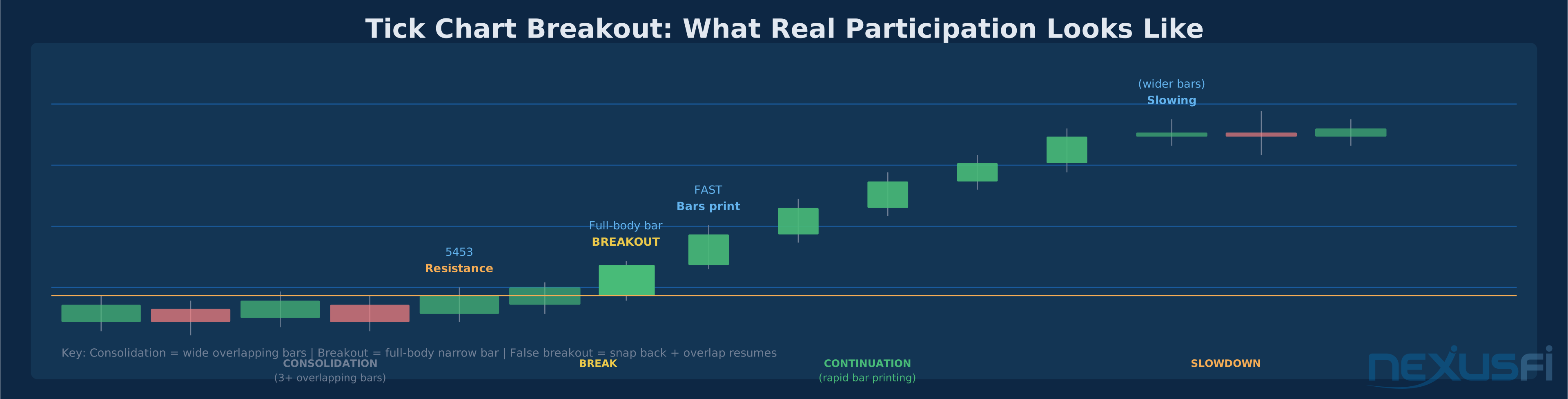
The anatomy of a real breakout on a 512-tick chart:
Consolidation comes first--three or more bars with overlapping ranges, price coiling around a level. Bars take roughly equal time to form and don't extend beyond the range.
The setup bar is often the bar immediately before the break. Range expands slightly, sometimes closing near the level but not quite breaking through. Participation is increasing, and the bar prints slightly faster than its predecessors.
The breakout bar prints a full-bodied bar with small wicks, strong close at or near the extreme, and critically prints faster than consolidation bars with an expanding range.
Continuation bars are the real test. After the initial break, do subsequent bars keep printing quickly and building in the breakout direction? Strong breakouts see continued rapid bar formation stacking directionally.
False breakout signals: After the initial break bar, bars slow down immediately. Within 2-4 bars, overlap increases and price returns into consolidation. The bar-speed deceleration is often visible before price fully returns, giving earlier warning than time charts.
Entry framework:
- Enter on the first confirmed continuation bar after the breakout, not on the breakout bar itself
- Stop below the consolidation range floor (longs) or above the ceiling (shorts)
- Use bar printing speed as ongoing trade confirmation
Bar Formation Speed as a Momentum Indicator #
One of the most powerful features of tick charts is what they reveal about momentum through bar formation speed. On a time chart, every bar is the same width. On a tick chart, the width varies with activity--and that variation is information.
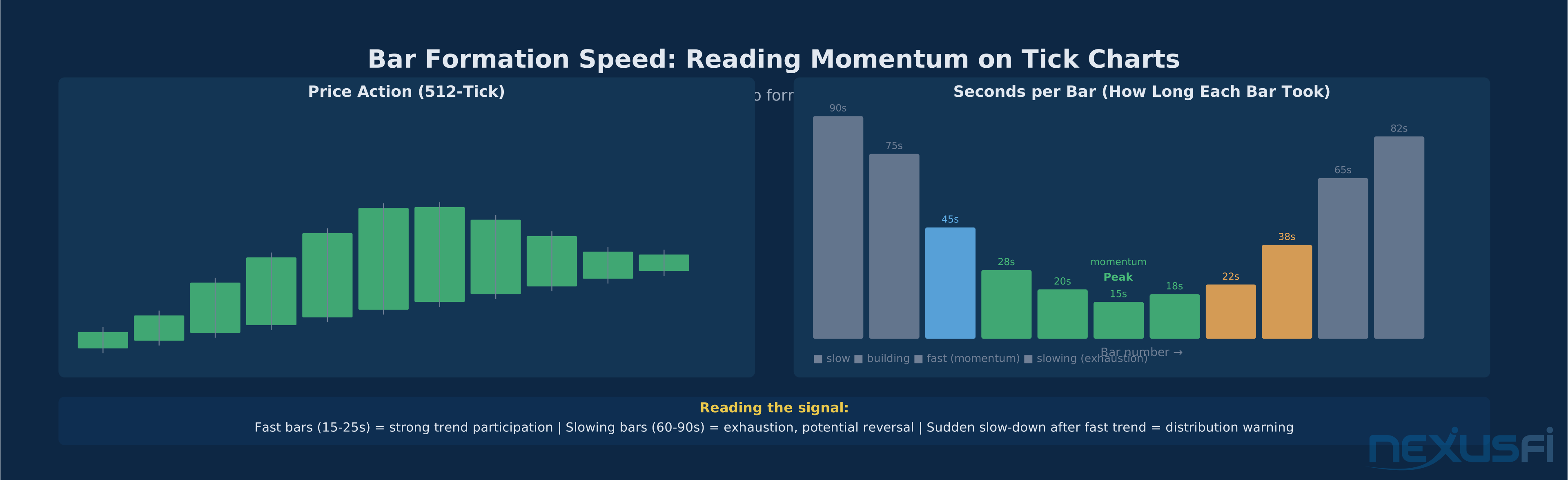
Reading bar speed:
- 10-20 seconds per bar: Strong participation, trend acceleration. Not the time to exit--the market is working for you.
- 30-90 seconds: Normal active-session pace. Healthy trending or range-trading.
- 3-5 minutes: Quiet market--lunch session or trend pause. Avoid new entries until activity resumes.
- Sudden shift from fast to slow: A trend printing bars every 15-20 seconds shifts to 60-90 seconds while price still nominally trends. This is a critical warning--participation has dried up. The trend may continue a bar or two on residual momentum, but exhaustion is likely. This is the setup for the first high-probability counter-trend fade.
This signal is not easily replicable on time charts, where the participation dimension is obscured. On a tick chart, it's explicit: fewer participants means bars take longer to form. Pair this read with volume profile--when bar speed drops at a high-volume node, you have a double signal confirming the level matters.
Trading Trends with Tick Charts #
Trend trading on tick charts uses the same underlying logic as time charts--directional structure, pullback entries, momentum confirmation--but with activity-based confirmations that improve trade quality.
Identifying a healthy trend on 512-tick:
- Higher highs and higher lows (or lower highs/lows for downtrends), each swing reaching approximately equal distance in the trend direction
- Pullbacks are orderly: 2-4 bars retracing, bars taking longer to form during pullback, resuming trend direction once complete
- The 20-period EMA acts as dynamic support in uptrends
- Post-pullback continuation bars print faster than pullback bars
Pullback entry method with 20-EMA:
The highest-probability trade on a trending tick chart is the pullback entry. After the trend establishes, wait for a 2-4 bar retracement toward the 20 EMA on the 512-tick chart. Characteristics of a valid pullback vs. a reversal:
- Valid pullback: Bars slow down, price retraces 30-50% of the previous swing, then a bar closes in the trend direction with accelerating speed near the 20 EMA
- Potential reversal: "Pullback" bars print as fast or faster than trend bars, retracement exceeds 61.8%, structure is being violated
The entry trigger: the first bar that closes in the trend direction, prints noticeably faster than surrounding pullback bars, and has its open near the prior swing's support (for longs) or the 20 EMA level.
The Opening Range Calculation Warning #
Never calculate your opening range from tick bars. Tick bars straddle session boundaries--your first "opening" bar contains pre-market trades. Use 1-minute bars for the opening range, then overlay those levels on your tick chart. This applies to VWAP session starts and gap calculations too.
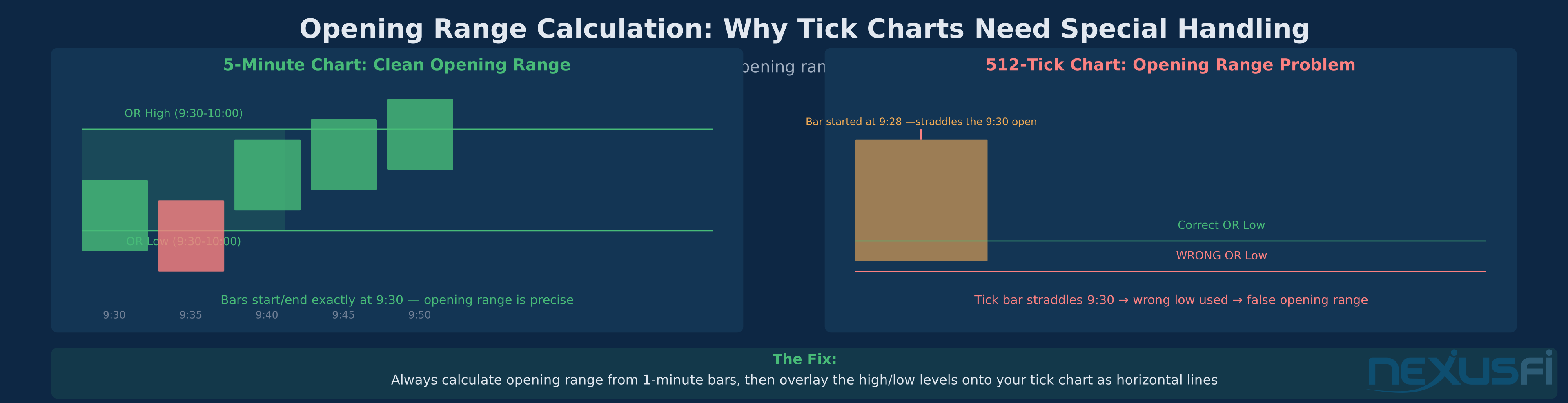
The opening range (the high and low established during the first X minutes of RTH session) requires the 9:30 AM bar to start exactly at the open. On a tick chart, the bar accumulating at 9:29:45 AM continues through 9:30--the tick bar doesn't respect the session boundary. Using its low as your opening range low means using a pre-market price.
The fix: Calculate your opening range from 1-minute bars (or use an indicator loading a secondary 1-minute data series), then overlay the resulting high and low as horizontal lines on your tick chart. This applies equally to VWAP session start and gap calculations--use the actual 9:30 AM open price from minute bars, not the tick chart bar's open price.
Platform and Data Feed Requirements #
Tick charts require tick-by-tick data from your broker or data provider. Not all subscriptions provide this, and quality differences matter more for tick charts than time charts.
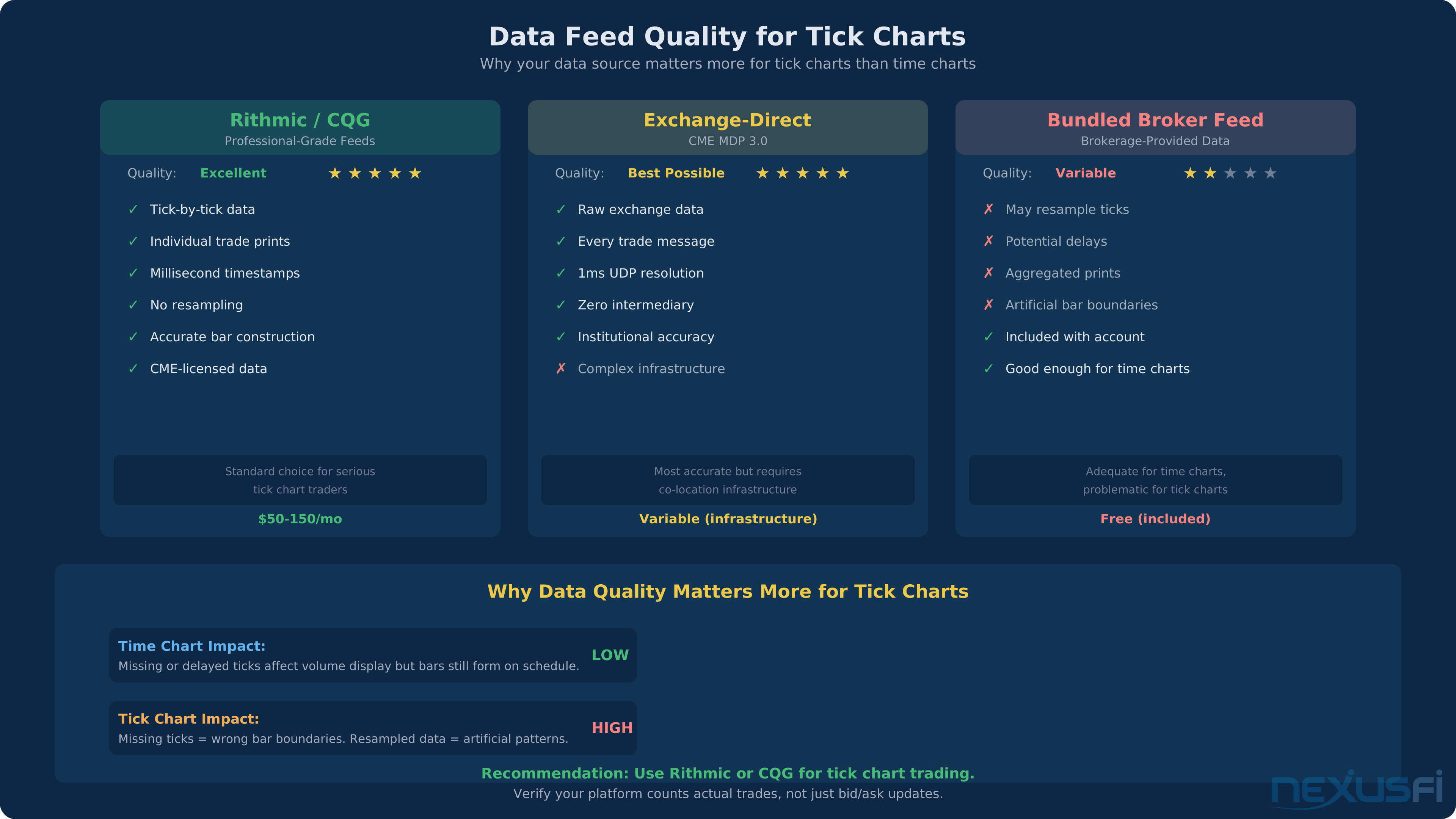
Rithmic and CQG are the dominant professional-grade feeds for futures tick charts. Both provide tick-by-tick data with timestamps ensuring accurate bar construction. Exchange-direct feeds via CME's Market Data Platform provide the most accurate tick count at one-millisecond resolution, but the infrastructure complexity means most retail traders access this data through Rithmic or CQG. Brokerage-bundled feeds vary much--some resample or delay tick data, creating artificial bar boundaries.
Platform behavior: NinjaTrader, Sierra Chart, and TradeStation all support tick bars natively. Sierra Chart labels them "number of trades" bars, which is the most accurate description.
On NinjaTrader,
Tick charts for the ES (@cronosis79)
With equidistant spacing off, NinjaTrader displays bars in proportional width--bars that formed quickly appear narrow, slow-forming bars appear wide. This visualization is instructive for understanding your tick count's behavior across session periods.
Tick Charts and Backtesting #
Backtesting on tick charts is more complex and expensive than on time charts. The constraints are real but not prohibitive.
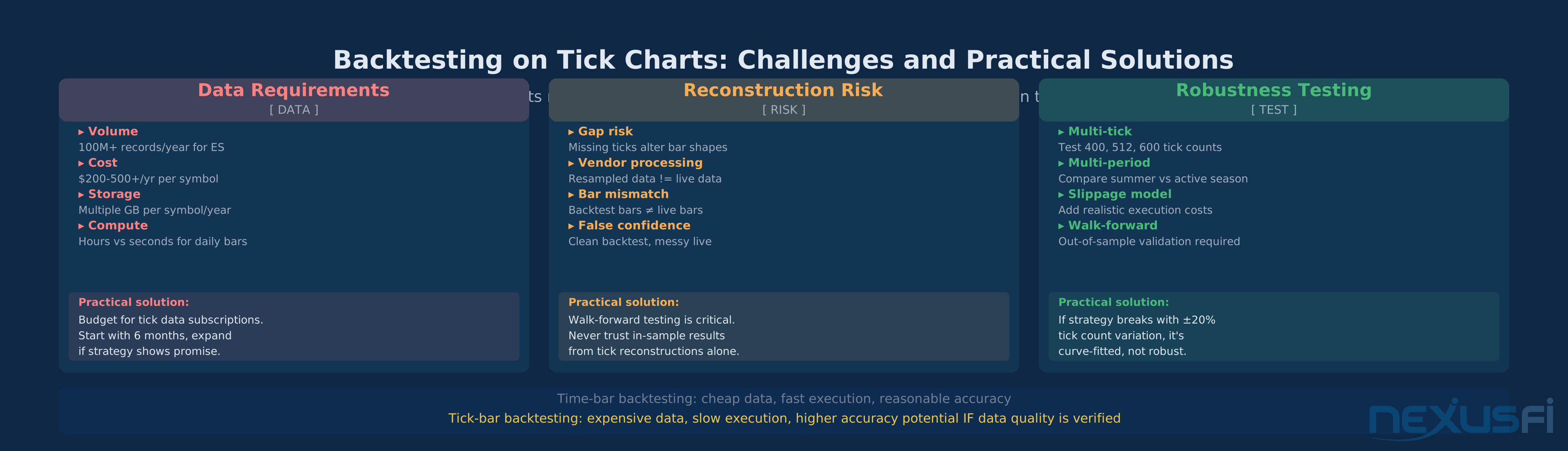
The data requirement: Backtesting a 512-tick ES strategy across 12 months requires tick-level data--every trade print, timestamped. For ES, this means hundreds of millions of records. This data is more expensive ($200-500+ annually per symbol vs. $20-50 for daily bars), storage-intensive (multiple gigabytes per symbol per year), and processing-intensive.
The historical reconstruction problem: Live tick charts are accurate because the platform counts actual trades as they execute. Historical tick data may contain gaps or vendor-side processing artifacts that produce different bar formations than what you'd have seen live.
Practical guidance: Walk-forward testing matters even more for tick-based systems because historical data quality uncertainty is higher--be skeptical of vendor-resampled data versus raw trade prints. Test robustness across multiple tick settings (e.g., 400, 512, 600) rather than relying on the exact Fibonacci number--if the strategy is strong, minor variations shouldn't dramatically change results.
Common Mistakes Using Tick Charts #
Mistake #1: Using the same tick count for every contract
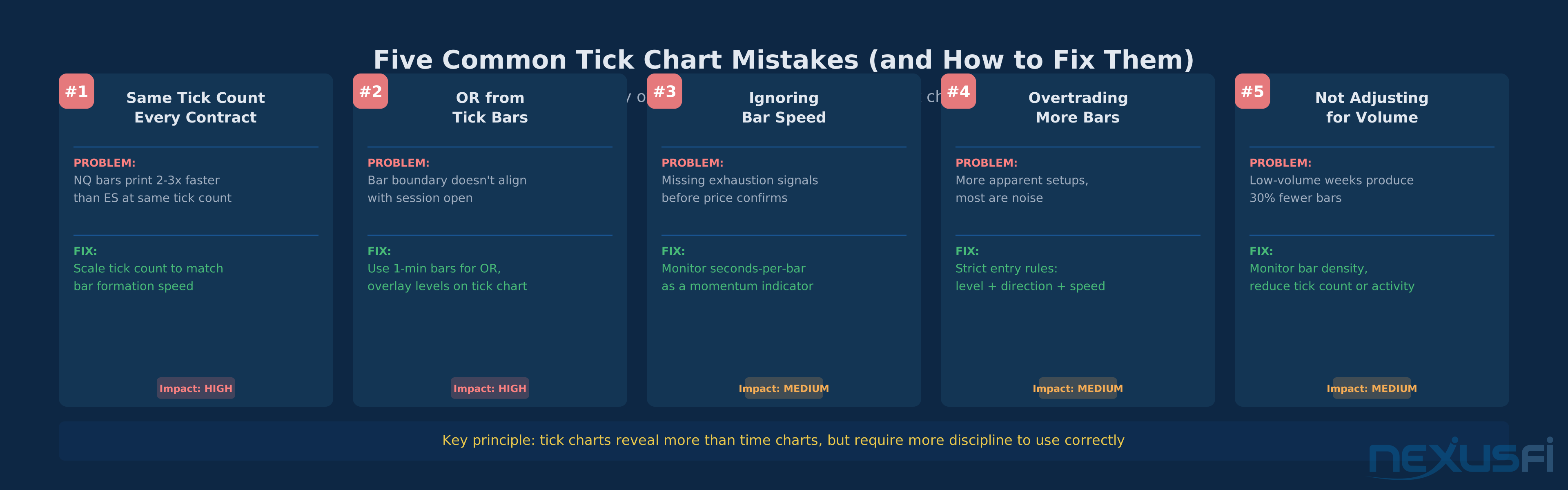
ES and NQ have very different activity levels. A 512-tick chart producing 200-400 bars/day on ES might produce 400-800 on NQ. If comparing setups across contracts, ensure your tick counts produce equivalent bar formation speed, not equivalent bar numbers.
Mistake #2: Overtrading because there are more bars
A 512-tick chart produces 2-4x more bars per session than a 5-minute chart. More bars means more apparent setups. Having clear rules about which setups you take (level + direction + speed confirmation) prevents the "I see a bar, I should trade" response.
Mistake #3: Not adjusting tick count for volume conditions
If ES average daily volume drops 30%+, your 512-tick chart produces fewer bars per day than usual. Consider temporarily reducing your tick count during low-volume periods (summer, holidays, post-rollover) or simply reducing trading activity.
Opening range calculation and bar speed interpretation--two other frequent mistakes--are covered in their dedicated sections above.
Combining Tick Charts with Order Flow #
Tick charts pair naturally with order flow tools because both are activity-based rather than time-based.
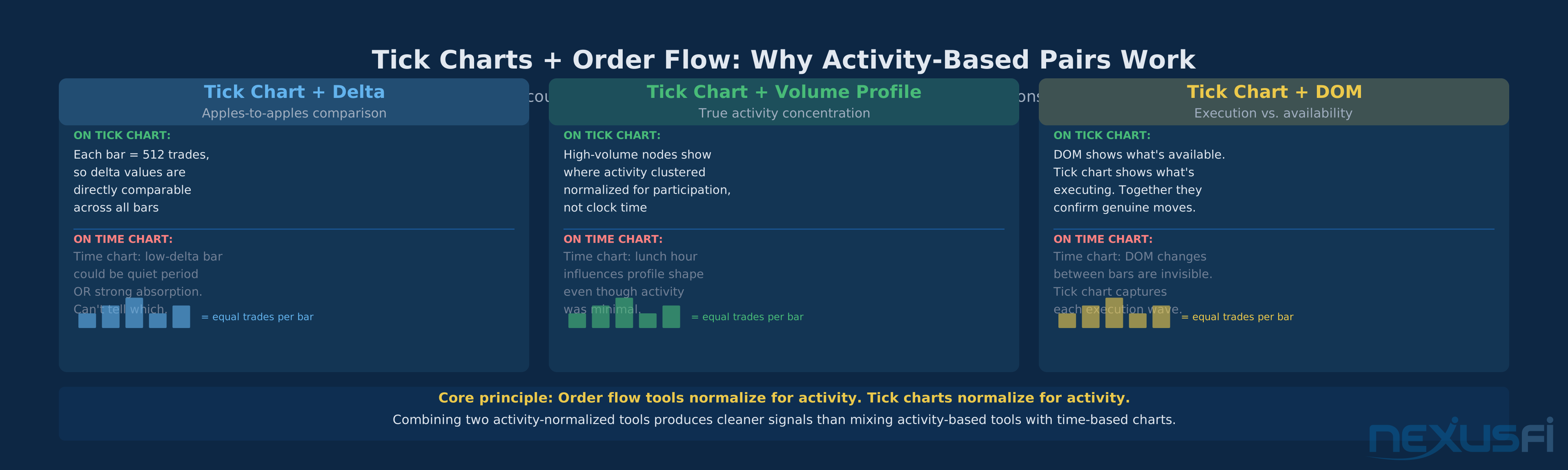
Tick chart + Delta: Delta (net buying minus selling per bar) on a tick chart is reliable because each bar represents the same trade count. On a time chart, a low-delta quiet bar looks similar to a high-delta busy bar. On a tick chart, both represent 512 trades--the delta comparison is apples-to-apples.
Tick chart + Volume profile: Volume profile on tick data shows where activity actually concentrated. High volume nodes represent genuine participation density, not just concentrated clock time.
Tick chart + DOM: The DOM shows what's available; the tick chart shows what's executing. When DOM shows thin bids but the tick chart shows rapid downside bar printing, you have confirmation that selling is genuine and levels will likely break.
Summary: When to Do What #
First-time tick chart setup: Use the ES vs. NQ scaling table above for your contract. Target 250-350 bars per session on your primary chart.
Bars printing every 10-20 seconds: Strong trend territory. Stay with winning positions.
Bars suddenly slow from fast (15s) to moderate (60-90s) mid-trend: Participation drying up. Tighten stops or take partial profits.
Breakout attempt: Continuation bars faster than consolidation → real breakout. Bars slow immediately after break → false breakout, stay out.
Opening range, VWAP start, or gap calculations: Always from 1-minute bars. Overlay those levels on your tick chart.
Volume conditions shift (summer, holidays, post-rollover): Count bars per session. If density drops 30%+, adjust tick count or reduce activity.
Adding order flow tools: Delta and volume profile pair naturally with tick charts because both normalize for activity. The comparison is apples-to-apples.
Tick charts give you visibility into participation intensity that time charts hide. The edge isn't the chart type — it's using that visibility to read breakout conviction, trend exhaustion, and genuine momentum consistently across sessions.
Knowledge Map
References This Article
Articles that build on this topicCitations
- — Discussion
- — Discussion
- — Discussion
- — Discussion
- — Discussion
- — Discussion
- — Discussion