



NIC and Network Cards for Trading Workstations: The Complete Guide for Futures Traders
Overview #
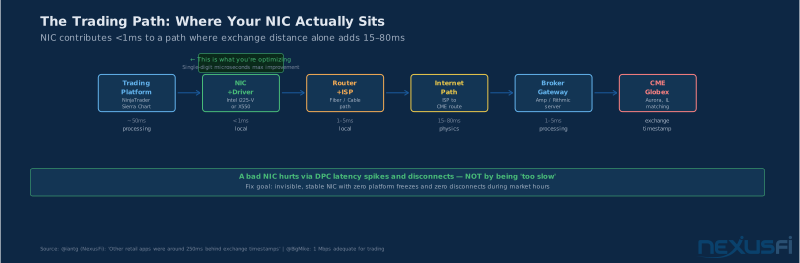
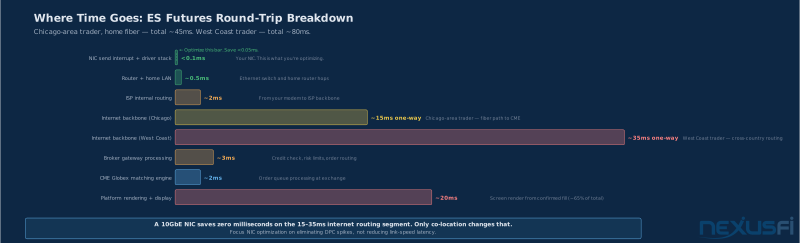
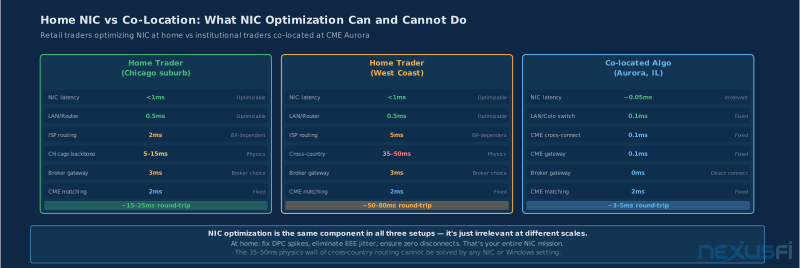
Your NIC is not your problem. That's the blunt truth most traders need to hear before they start shopping for a 10GbE card to fix their order fills. The dominant latency contributors for retail futures traders are the internet path to the broker (covered in Internet Connection for Day Traders), the broker's gateway infrastructure, and exchange processing time — not the Ethernet adapter sitting in your PCIe slot.
The NIC you're comparing between contributes microseconds to that number.
But here's where it gets interesting: a bad NIC absolutely can hurt you. Not by being "too slow" in any bandwidth sense, but by introducing driver-induced jitter, DPC latency spikes that cause platform freezes, and intermittent disconnects at the worst possible moment. The goal isn't the fastest NIC — it's a boring, invisible one that never becomes the problem.
This guide covers everything a retail futures trader needs to know about network hardware: what the specs actually mean for trading (not gaming or video streaming), which settings to change, how to measure whether your current setup is adequate, and when a hardware upgrade is actually justified.
Key Concepts #
Latency is the time it takes a packet to travel from one point to another. In trading, this is the combined time from your NIC sending an order packet to the broker receiving it, or from the exchange sending a market data update to your platform processing it. Measured in microseconds (µs) or milliseconds (ms).
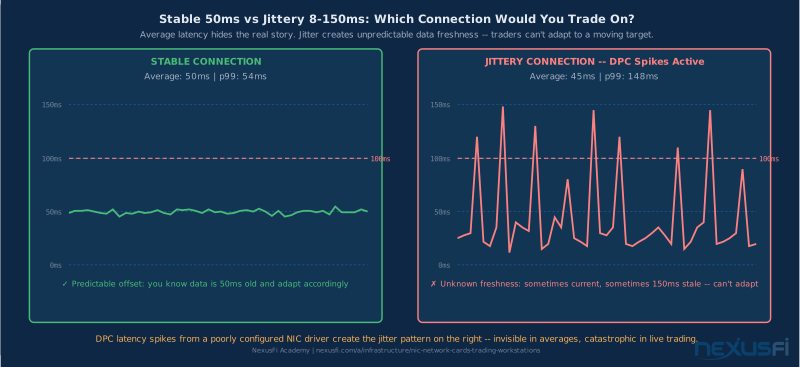
Jitter is the variance in latency over time. A connection with 12ms, 12ms, 13ms, 12ms readings is low-jitter. A connection with 8ms, 15ms, 10ms, 22ms readings is high-jitter. For trading, a stable 15ms path beats an erratic 8-40ms path every time.
p99 latency means the 99th percentile — 99% of observed latency measurements fall at or below this number. The remaining 1% are worse. Traders care about p99 because spikes in that worst 1% cause platform freezes, delayed order handling, and occasional missed ticks. Average latency hides the real story.
Throughput is the raw bandwidth capacity of the connection. For futures trading, this is almost never the limiting factor. A single CME market data feed uses a few Mbps at peak. Your 1GbE connection is already 1,000 Mbps — you'd need to run several thousand concurrent feeds to approach capacity.
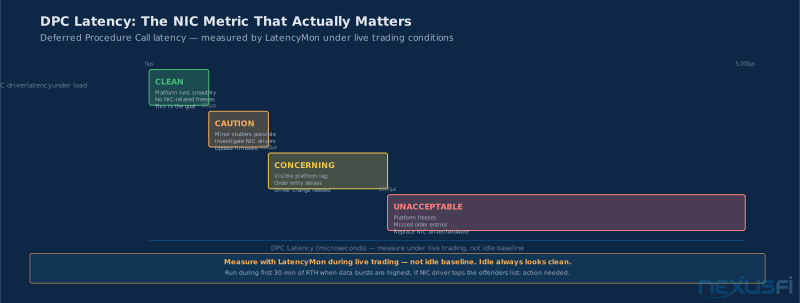
DPC latency stands for Deferred Procedure Call latency — a Windows metric measuring how long the OS spends processing interrupt service routines from drivers. When your NIC driver misbehaves, it creates DPC spikes that steal CPU time and cause everything else on the machine to stall. This is the primary way a bad NIC hurts a trading workstation.
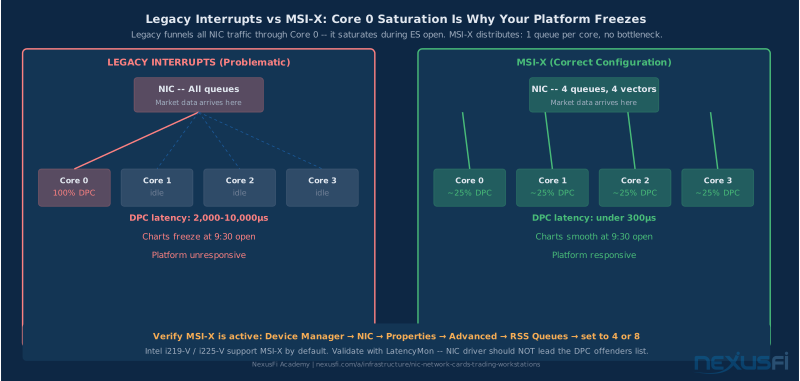
MSI-X (Message Signaled Interrupts Extended) is a modern interrupt delivery method that allows a NIC to use multiple interrupt vectors — one per queue — enabling parallel processing across CPU cores. Much better than legacy line-based interrupts.
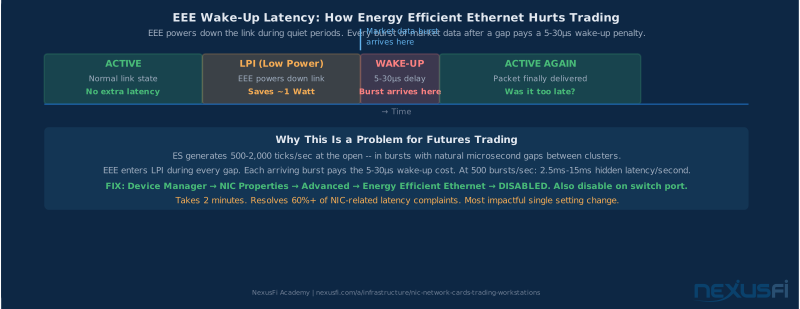
EEE (Energy Efficient Ethernet) is a power-saving feature that puts the Ethernet link into a low-power idle state during quiet periods. Sounds fine in theory. In practice, it introduces 5-30µs wake-up latency every time the link wakes from that sleep state. For a home network streaming Netflix, negligible. For a trading workstation receiving market data bursts, it's a source of exactly the intermittent jitter you're trying to eliminate.
RSS (Receive Side Scaling) distributes incoming packet processing across multiple CPU cores using queue hashing. On a multi-core trading machine, this prevents a single core from becoming the bottleneck during high-frequency market data bursts.
The Real Goal: Stability, Not Speed #
Here's how @BigMike framed internet requirements for trading in 2014: "For trading, priorities are as follows: 1) Reliability/uptime, 2) Minimum bandwidth of about 1 Mbps, 3) Minimal latency." The same hierarchy applies to your NIC. The article continues: "When people buy faster internet connections for their home office in order to have a better trading experience, it isn't really going to help." That was about ISP bandwidth, but the logic extends perfectly to NIC speed tiers.
A 10GbE NIC doesn't get your orders to CME faster than a 1GbE NIC. The bottleneck is the internet path and broker routing, not the Ethernet adapter inside your box. What the NIC can do is fail silently in ways that hurt you: DPC latency spikes from poor drivers, link instability during high-traffic periods, and intermittent disconnects that close positions at the wrong moment.
The practical standard for a trading workstation NIC:
- DPC latency from the network driver should stay below 500µs under normal trading conditions
- DPC spikes above 1,000µs (1ms) are concerning and should be investigated
- Repeated spikes above 2,000µs are unacceptable and need immediate attention
- Zero link drops during trading hours (see Home Network Setup for Futures Traders for router and switch configuration)
- Zero packet loss
If your current setup meets these standards, you don't need a new NIC. If it doesn't, this guide will help you fix it.
NIC Stability Checklist: Before buying anything, validate your current NIC with LatencyMon under live trading load. Most traders who think they need a new NIC actually just need to disable Energy Efficient Ethernet and lower interrupt moderation — changes that cost nothing and take 10 minutes.
Latency vs Jitter: Why Consistency Beats Raw Speed #
@FatTails explained the physics in a detailed post on measuring data feed latency across continents: "In fiberoptical cables you may assume that signals travel at about 60% of the speed of light, which is 300,000 km/sec. A quick calculation shows that the signal will at least take 90 msec for a round trip [from Europe to Chicago]." The implication for domestic US traders: even from the West Coast, you're looking at 30-50ms of unavoidable physics. A better NIC moves that number by single-digit microseconds, maximum.
What you can control at the NIC level is the variability within those round trips. If your connection has 50ms average latency but occasionally spikes to 200ms because your NIC driver stalled while processing a DPC — that's fixable. If your connection has 50ms average latency that's rock-stable at p99 of 55ms — that's good. The difference between those two scenarios is entirely local, and entirely within your control.
Why jitter hurts more than latency for discretionary traders: A consistent 50ms delay means your market data is always 50ms old. You adapt your trading to that offset. A jittery 20-150ms delay means sometimes your data is current and sometimes it's nearly a second old, and you don't know which. Algo traders care more about raw latency; discretionary traders care more about consistency.
Measuring latency distributions that matter for trading:
The tools that actually reveal what's happening on your workstation:
- LatencyMon (free, Windows): Measures DPC and ISR latency, shows which drivers are causing spikes. Run this during a live trading session — not just during idle system baseline.
- Windows Performance Monitor: Add counters for
% Interrupt Time,DPC Time,Packets Received Discardedfor your NIC adapter - PingPlotter: Measures round-trip latency to broker gateways over time, shows p99 and variance
The decision: if LatencyMon shows your NIC driver creating regular spikes during market-data-heavy periods, that's actionable. If everything looks clean, your NIC is fine.
Onboard vs Discrete NIC: The Real Calculus #
Most modern trading workstations ship with Intel-based onboard Ethernet — either the i219-V (1GbE) or i225-V (2.5GbE). For the majority of retail futures traders, this is completely adequate. The driver is mature, the hardware is stable, and the latency profile is clean when configured correctly.
The case for staying with onboard is simple: it works, it's integrated, and the i219/i225 driver stack is well-maintained by Intel. As long as EEE is disabled (critical — more on this below), interrupt moderation is turned down, and you're not seeing DPC spikes in LatencyMon, there's nothing to fix.
The case for a discrete PCIe NIC exists but is narrower than most vendors would have you believe:
- Your onboard NIC is causing DPC spikes during trading. LatencyMon shows the network driver at the top of the latency offenders list. You've tried driver updates and settings changes with no improvement.
- You have a Realtek-based onboard NIC and you're experiencing intermittent instability. Realtek's driver quality is more variable than Intel's, and the trading community consistently reports more issues.
- You're running multiple simultaneous data feeds — CME + ICE + a custom feed, for example — and your onboard NIC is struggling with the combined interrupt load.
- You're running an automated strategy where sub-100µs local latency matters. This is a minority of retail traders, but if this describes you, a discrete Intel X550 or similar enterprise-grade NIC gives you more tuning control and better interrupt architecture.
For everyone else: save the money. A well-configured Intel i219-V or i225-V outperforms a poorly-configured 10GbE card in every metric that matters for trading.
NIC Speed Tiers: What Retail Traders Actually Need #
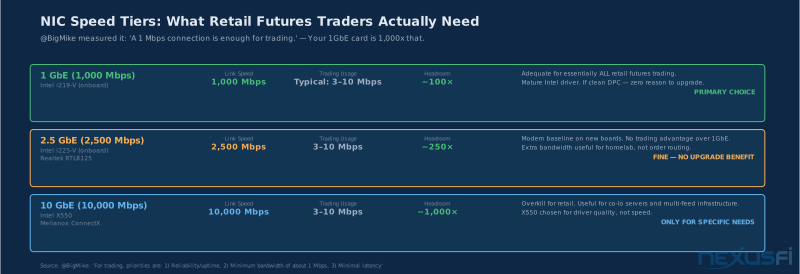
The futures trading community has collectively demonstrated something counterintuitive: bandwidth doesn't matter.
@BigMike measured it directly: "That data would say that a 1 Mbps connection is enough for trading." A 1 Mbps connection. Your 1GbE NIC runs at 1,000 Mbps — a 1,000x margin. Even with multiple feeds, you'd need to aggregate several thousand active symbol subscriptions before approaching bandwidth constraints.
1GbE: Adequate for basically all retail futures trading scenarios. Single feed, single platform, order entry via API — a 1GbE Intel i219-V handles this without breaking a sweat. The overwhelming majority of NexusFi members are in this category.
2.5GbE: A reasonable modern baseline. The Intel i225-V and Realtek RTL8125 both operate here. For pure trading purposes, 2.5GbE offers no measurable latency advantage over 1GbE — the extra headroom is useful for home network file transfers and video, not for order execution. If your new motherboard ships with 2.5GbE onboard, use it — but don't expect trading improvements.
10GbE: Overkill for retail trading. The only scenarios where 10GbE makes sense for a futures trader: you're running a co-located trading server that receives institutional-grade market data feeds, you're building a homelab that handles multiple concurrent data streams, or you want the Intel X550 specifically for its enterprise-grade driver stability and interrupt architecture rather than its bandwidth.
The counterintuitive truth: some traders have achieved better performance by upgrading from a problematic 2.5GbE NIC to a solid 1GbE Intel i219-V card (see Trading Workstation Hardware for full build recommendations), because driver stability trumps link speed every time.
Driver Quality and the Intel Preference #
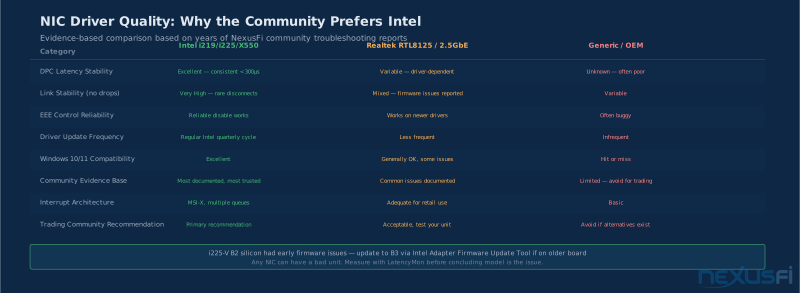
The trading community's preference for Intel NICs isn't brand loyalty — it's a pattern of evidence accumulated over many years of community troubleshooting. Intel network adapters consistently demonstrate:
- Mature, stable Windows driver stack with long release histories
- Good MSI-X support with multiple interrupt vectors
- Predictable DPC latency profiles when properly configured
- Conservative firmware that prioritizes stability over feature velocity
- Proper EEE/power-management controls that actually work when you disable them
The Intel i219-V (1GbE, on Intel-based boards) and i225-V (2.5GbE, on newer platforms) are the most common onboard NICs in the trading community. The i225-V had some early firmware issues in B2 silicon revision that affected link stability in certain configurations — if you have an older board with a B2-revision i225-V and are experiencing link instability, update firmware to B3 or later via the Intel adapter firmware update utility.
What drivers actually control: The NIC driver is software running at the OS kernel level. It handles the handoff between the NIC hardware and the Windows network stack. A well-written driver processes packets efficiently, generates the right number of interrupts, and doesn't hog the CPU. A poorly-written driver creates excessive interrupts, holds DPCs for too long, and competes with your trading platform for CPU cycles.
Energy Efficient Ethernet: Disable It
EEE is the single most impactful setting change for trading workstation NICs. Here's the mechanism: when your trading platform isn't actively receiving packets (say, during a brief lull in order flow), EEE puts the Ethernet link into LPI (Low-Power Idle) state. When the next packet arrives, the link has to wake up — and that wake-up introduces 5-30µs of additional latency for that packet.
For most applications, this is imperceptible. For a trading platform during volatile markets, it creates exactly the kind of intermittent jitter that messes with order timing and data freshness. The fix is two commands:
Windows (PowerShell, run as Administrator):
Set-NetAdapterAdvancedProperty -Name "Ethernet" -DisplayName "Energy Efficient Ethernet" -DisplayValue "Disabled"Or via Device Manager → Network Adapter → Properties → Advanced → Energy Efficient Ethernet → Disabled.
Also disable it on the switch port if you have a managed switch.
Realtek and Marvell drivers: Realtek's driver quality across their RTL8125 lineup is more variable than Intel. The driver works, but the NexusFi community consistently reports more DPC-related issues with Realtek NICs under heavy trading workloads. Marvell AQC107 is found on some premium boards and generally performs well, but it's less universally trusted than Intel for trading-specific stability. The guidance: if you have Realtek onboard and you're experiencing latency issues, an Intel PCIe NIC upgrade is worth testing before deeper troubleshooting.
Interrupt Handling: MSI-X and Moderation #
When your NIC receives a packet, it notifies the CPU via an interrupt. How those interrupts are generated and handled directly affects trading platform responsiveness.
MSI-X gives each receive queue its own interrupt vector — modern NICs support 8-64 vectors. This means packets can be processed across multiple CPU cores in parallel, rather than funneling everything through a single interrupt line. For a trading workstation with 8+ cores, MSI-X is the correct interrupt mode. Almost all modern NICs support it by default; verify it's enabled in Device Manager.
Interrupt moderation (also called interrupt coalescing) is the NIC's strategy for reducing CPU interrupt overhead: instead of generating one interrupt per packet, it bundles multiple packets into a single interrupt. This reduces CPU load but introduces latency proportional to how many packets get bundled.
For trading, the calculus is clear: disable interrupt moderation or set it to the lowest available value. The CPU overhead savings are not worth the added latency.
At default "medium" interrupt coalescing settings, packets are batched for 50-200µs before being passed to the OS. At 100 trades/hour, that's rarely noticeable. But during a fast market open when your platform is processing a burst of tick updates and you're trying to execute a bracket order — those 200µs delays stack. Disable it.
Here's the tradeoff in numbers: with interrupt moderation at "normal" or "default" settings, you're adding 50-200µs of coalescing delay per burst. With it disabled or set to "Low/Minimum," you recover that latency at the cost of slightly higher CPU usage for the NIC interrupt handler.
On a modern 8-12 core processor, this CPU overhead is trivial — the interrupts hit one or two dedicated cores and the trading application runs on separate ones. The configuration:
Windows Device Manager → NIC Properties → Advanced:
Interrupt Moderation→ Disabled (or Lowest Latency)Interrupt Moderation Rate→ 0 (or minimum available)Number of Receive Buffers→ 512 or higher (prevents packet loss during bursts)
RSS configuration: Set RSS queues to 4-8 (matching your CPU core count) and, if your driver supports it, bind RSS queues to specific cores using Set-NetAdapterRss. Keep the RSS-handling cores separate from the cores your trading platform runs on.
NIC Offload Features: What to Enable, What to Kill #
Modern NICs implement various TCP/IP processing in hardware to offload work from the CPU. Not all of these are beneficial for trading workstations:
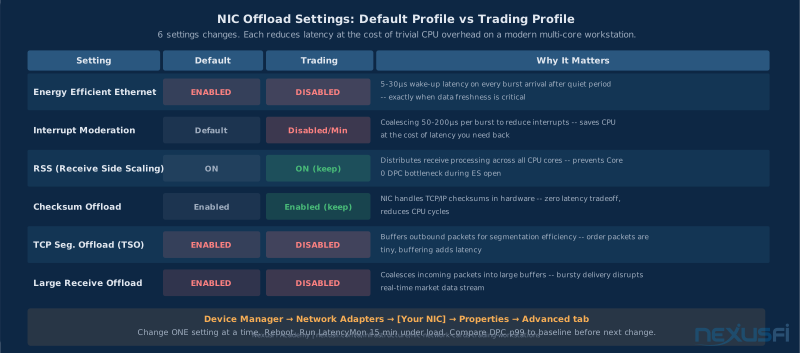
Receive Side Scaling (RSS) — Enable. Distributes receive processing across multiple CPU cores. Zero downside for trading, measurable upside on multi-core systems.
Checksum Offload (RX and TX) — Enable. The NIC handles TCP/UDP/IP checksum calculation instead of the CPU. Fast, invisible, no latency impact. Keep it on.
TCP Segmentation Offload (TSO/LSO) — Disable for trading. TSO lets the OS hand large chunks of data to the NIC for segmentation. For trading, your outbound messages are small (order packets, cancel/replace). TSO adds processing overhead and introduces buffering that can increase jitter. Disable Large Send Offload v2 (IPv4) and Large Send Offload v2 (IPv6) in Device Manager.
Large Receive Offload (LRO) — Disable. LRO coalesces multiple incoming TCP packets into a single large buffer before passing to the OS. This dramatically increases per-packet processing latency and introduces exactly the kind of bursty delivery timing that disrupts trading applications. Futures market data comes in small UDP/TCP packets that need prompt delivery, not coalescing.
Flow Control (802.3x PAUSE frames) — Disable. Flow control allows a device to pause transmissions when buffers fill. On a shared network, this can mean your NIC sends PAUSE frames that delay everything on that switch port. Disable it unless you're seeing actual packet loss from buffer overflow.
Jumbo Frames — Keep at 1500 MTU. Jumbo frames (9000 MTU) require every device in the path — NIC, switch, router, VPN, broker gateway — to support the larger frame size. On a home trading workstation, even one device in the path that doesn't support jumbo frames causes fragmentation, which creates retransmissions, which creates tail latency spikes. The bandwidth benefit is negligible for trading traffic. Keep MTU at standard 1500.
The resulting "trading profile" for offload settings:
- RSS: On
- Checksum Offload: On
- TSO/LSO: Off
- LRO: Off
- Flow Control: Off
- Jumbo Frames: Disabled (MTU 1500)
NIC Models Compared: Intel I225-V, X550, RTL8125, AQC107 #
Intel I225-V (2.5GbE, common onboard)
The current standard for Intel onboard Ethernet on Z490/Z590/Z690/Z790 and AMD X570/B550 era boards. At current firmware (B3 revision), the I225-V is a solid choice for trading. Driver support is mature, DPC profile is clean when configured correctly, and EEE can be fully disabled.
Trading assessment: This is the NIC you probably already have if you built a workstation in the last three years. Keep it, configure it correctly (disable EEE, interrupt moderation low, RSS on), and validate with LatencyMon. If it passes, you're done.
Early-revision boards with B2 silicon had link-stability issues in some configurations. If your I225-V drops the link during high-traffic periods, check the firmware version via Intel Adapter Diagnostics and update if you're on B2.
Intel X550-T1/T2 (10GbE, discrete PCIe)
The enterprise-grade Intel option. The X550 has a deserved reputation in trading circles for rock-solid stability, mature driver stack, and hardware-level DPC behavior that performs well under sustained load. The dual-port T2 variant gives you redundancy (primary + backup link) or separation between market data and order routing.
Trading assessment: This is the right choice if you've decided you need a discrete NIC and want the best-available driver stability. The 10GbE bandwidth is irrelevant for retail trading — you're buying the driver quality and enterprise-grade architecture. Cost is $150-200 for the T1, $200-250 for the T2. Requires a free PCIe 3.0 x4 slot.
Realtek RTL8125 (2.5GbE, common onboard and add-in)
Common on many budget-to-mid-range boards. The RTL8125 works adequately for general networking. For trading specifically, the driver quality is more variable than Intel — the NexusFi community has documented more instances of DPC latency issues and intermittent disconnects under heavy market data load.
Trading assessment: If this is your onboard NIC and your LatencyMon is clean, don't replace it. If you're experiencing jitter or instability, testing an Intel PCIe add-in card is a reasonable first diagnostic step. Not the first choice for a from-scratch trading build.
Marvell AQC107 (10GbE, found on some premium boards)
The AQC107 is found on several premium Z590/Z690 motherboards and dedicated 10GbE PCIe cards. Performance under normal conditions is solid, with DPC latency profiles that compare well to Intel in most configurations. Driver updates are less frequent than Intel, and compatibility with specific Windows builds can require more validation.
Realtek RTL8125 Caution: The RTL8125 works for many traders, but the NexusFi community consistently reports more DPC-related issues with Realtek NICs under trading load compared to Intel. If you have Realtek onboard and experience platform instability or latency spikes, test a discrete Intel PCIe NIC before doing deeper troubleshooting.
Trading assessment: Workable and sometimes excellent, but requires more validation testing than Intel. If you have it onboard and LatencyMon is clean, use it. If building a dedicated trading NIC selection, Intel X550 is the safer bet for guaranteed long-term driver support.
Quick selection guide:
- Already have Intel onboard, LatencyMon clean → Configure and stop there
- Already have Realtek onboard, experiencing issues → Test Intel PCIe card
- Discrete NIC needed → Intel X550-T1 for single port, T2 for redundancy
- Budget discrete upgrade → Used Intel X540-T1 is often available sub-$50 and performs similarly to X550 for retail use
Windows Settings That Actually Matter #
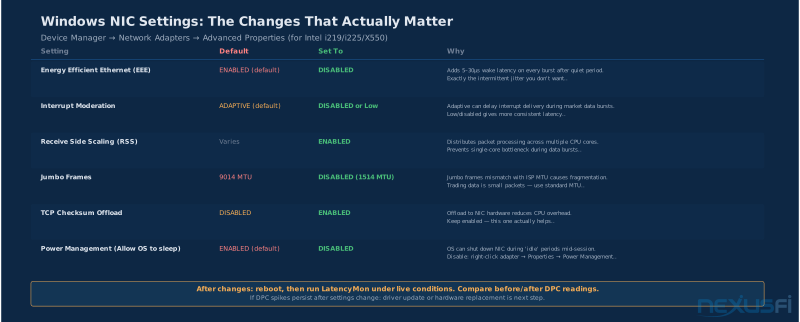
The full Device Manager tuning checklist for a trading NIC. Access via Device Manager → Network Adapters → [Your NIC] → Properties → Advanced tab.
Disable these settings:
- Energy Efficient Ethernet / Green Ethernet → Disabled
- Interrupt Moderation → Disabled (or Lowest Latency)
- Large Send Offload v2 (IPv4) → Disabled
- Large Send Offload v2 (IPv6) → Disabled
- Large Receive Offload → Disabled
- Flow Control → Disabled
- Jumbo Packet / Jumbo Frame → Disabled (1514 or 1500)
- Wake on Magic Packet / Wake on Pattern Match → Disabled
- Power Management (Properties → Power Management tab) → Uncheck "Allow the computer to turn off this device to save power"
Keep enabled or set these:
- RSS → Enabled
- Receive Buffers → 512 (or maximum available)
- Transmit Buffers → 256 (or maximum available)
- Speed & Duplex → Auto Negotiation (force only if troubleshooting a specific mismatch)
- TCP/UDP/IP Checksum Offload → Enabled
Windows Power Plan matters for NICs — this is covered in more depth in the Windows OS Optimization guide: open Power Options → High Performance at minimum. For deeper latency tuning, expose C-state controls in advanced power options via the relevant powercfg registry attribute commands.
BIOS/UEFI settings that affect NIC performance (covered fully in Trading PC BIOS and UEFI Optimization):
- ASPM (Active State Power Management) → Disabled for the PCIe slot containing your NIC
- PCIe Power Management → Disabled or minimum
- C-states → Consider C1 maximum (C6/C7 deep sleep states can add latency as the processor wakes up to handle NIC interrupts)
These BIOS settings are especially important for discrete NICs in PCIe slots — a NIC card in a slot with ASPM enabled can introduce variable latency as the PCIe link cycles through power states.
Measuring Your NIC's Real-World Performance #
Benchmarking on an idle system tells you very little about trading workstation performance. The only meaningful test is during live market conditions with the trading platform active.
Step 1: LatencyMon Baseline
Install LatencyMon (free from resplendence.com). Run it for 5 minutes while the system is idle (browser closed, no background processes). Note the maximum DPC latency and which drivers appear in the highest-execution list.
Step 2: Market Load Test
Open your trading platform, subscribe to your usual symbols, and let it run during active market hours — the first 30 minutes after the 9:30 open is the highest-load period. Run LatencyMon simultaneously.
Key observations:
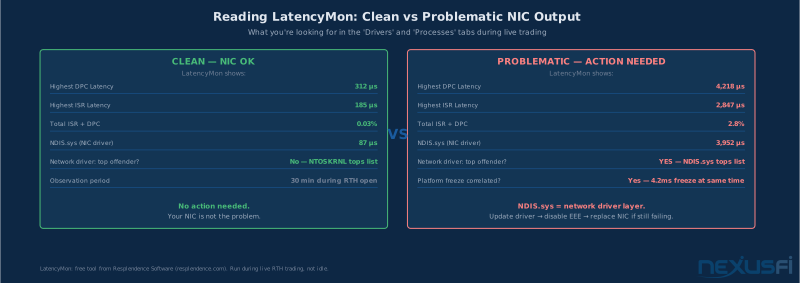
- Does the NIC driver (
tcpip.sys,ndis.sys, or your specific vendor driver) appear at the top of the DPC execution list? - Do DPC latency spikes correlate with market data bursts?
- Are there spikes exceeding 1ms? 2ms?
- Are you seeing "red bars" in the LatencyMon visualization?
Step 3: Packet Loss Verification
Open Windows Performance Monitor and add these counters:
Network Interface → Packets Received Discarded(should be zero or near-zero)Network Interface → Current BandwidthProcessor → % Interrupt TimeProcessor → % DPC Time
Watch these during active trading. Even occasional packet loss (a few per minute) can corrupt market data sequence numbers and cause order book reconstruction gaps.
Step 4: Broker Gateway Round-Trip
Use PingPlotter or mtr to continuously measure round-trip time to your broker's gateway IP. Run for at least 10 minutes during market hours. The key metric isn't the average — it's the 95th and 99th percentile, and whether spikes correlate with specific market events (like economic data releases).
Interpreting results: DPC p99 > 1ms with NIC driver as top offender → disable EEE, update driver, consider discrete NIC. Packets Received Discarded > 0 → increase receive buffers. Everything clean but trades still slow → not a local problem, investigate ISP path and broker routing.
PCIe Slot, Thermal, and Power Management #
If you're installing a discrete NIC, slot selection matters more than you'd expect.
PCIe lane requirements:
- 1GbE PCIe NICs: x1 is sufficient (1 lane at PCIe 3.0 = 8 Gbps theoretical)
- 2.5GbE PCIe NICs: x1 is sufficient
- 10GbE PCIe NICs: x4 minimum (the Intel X550 uses PCIe 3.0 x4)
Verify the NIC is running at its rated width using HWInfo or GPU-Z → PCIe → Bus Width. A 10GbE NIC operating in a x1 slot because you plugged it into the wrong connector will be bandwidth-throttled and may show elevated DPC latency under heavy load.
Slot selection priority: Many motherboards have one or two CPU-connected PCIe slots (running through the CPU's PCIe controller) and additional chipset-connected slots (running through the PCH). For latency-sensitive NICs, prefer CPU-connected slots — they have lower latency to the CPU than chipset-connected slots. Check your motherboard manual to identify which physical slots connect where.
Thermal considerations: 10GbE NICs run warm — the Intel X550 typically operates at 40-55°C under normal trading load. If airflow across the card is restricted (large GPU adjacent, poor case layout), it can run into the 70°C+ range under sustained load. Thermal throttling manifests as elevated interrupt latency and occasional driver stalls. Keep the NIC cool with adequate case airflow.
ASPM (Active State Power Management): This PCIe feature allows devices to drop into low-power link states during idle periods. For a NIC, this introduces exactly the same problem as EEE — variable wake-up latency when traffic resumes. Disable ASPM in BIOS/UEFI for the slot containing your trading NIC. On Intel platforms, look for "PCIe ASPM" or "Active State Power Management" in the advanced CPU/PCIe configuration section.
Common Mistakes and How to Avoid Them #
Leaving EEE enabled: The most common NIC configuration mistake on trading workstations. EEE introduces variable latency spikes during low-traffic periods — which describes every moment your trading platform is waiting for the next data update. Disable it in the NIC driver settings AND on the switch port if you have a managed switch.
Wrong PCIe slot or wrong lane width: Plugging a x4 10GbE NIC into a x4-keyed slot that electrically only runs at x1 (check your motherboard documentation) can cut NIC throughput by 75% and introduce latency under load. Always verify actual link width in HWInfo after installation.
Outdated drivers: Intel releases NIC driver updates quarterly. An outdated driver may have known bugs, poor DPC behavior on newer Windows builds, or unresolved EEE-related issues. Use Intel Driver & Support Assistant for automatic NIC driver management, and verify firmware version with Intel Adapter Diagnostics.
Jumbo frames on a mixed network: Enabling 9000 MTU jumbo frames on the trading NIC without verifying every device in the path supports them. If any device — the switch, router, broker gateway, or VPN tunnel — has a lower MTU ceiling, you'll get packet fragmentation, which causes retransmissions, which causes exactly the latency spikes you're trying to eliminate. Keep MTU at 1500 unless you have a completely controlled end-to-end environment.
LRO or TSO left enabled: Both features work by coalescing or pre-segmenting packets to improve throughput — which adds buffering and latency. Trading traffic doesn't benefit from throughput optimization. Disable both.
Using Windows "Balanced" power plan: The Balanced plan aggressively parks CPU cores and allows C-state transitions. When a NIC interrupt arrives and the relevant CPU core is parked, there's a wake-up delay of 10-80µs. For a trading workstation, use High Performance plan or a custom plan with minimum processor state at 100%.
Sharing the NIC with background processes: Running a cloud backup, OS update, or video stream on the same NIC as your trading platform. The network buffer contention during burst traffic creates latency spikes and occasional packet loss. Configure Windows Firewall or QoS rules to prioritize trading platform traffic, or use a separate physical NIC for background traffic.
Over-tuning without measuring: Disabling every feature without validating improvement. It's possible to make things worse by disabling offloads that the specific NIC/driver combination relies on for stability. Change one setting at a time, reboot, run LatencyMon under load, and compare to baseline before making the next change.
Decision Framework: When to Upgrade #
Start with this diagnostic before spending anything:
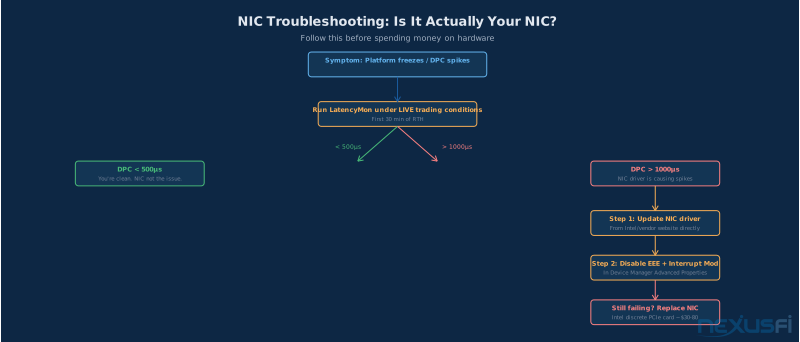
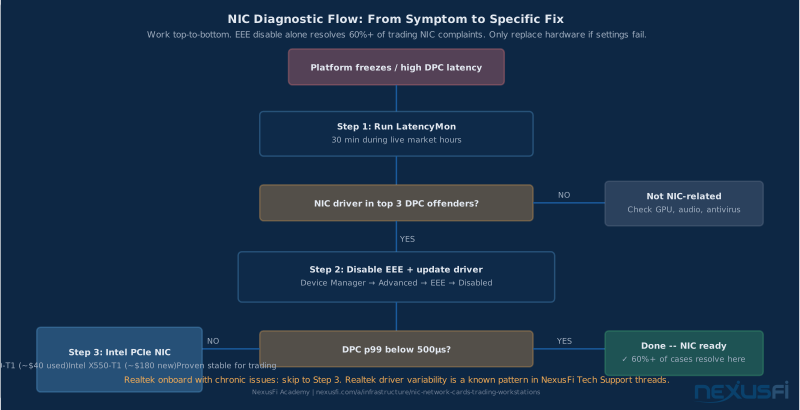
1. Run LatencyMon for 30 minutes during active trading. Is your NIC driver in the top 3 DPC offenders? If no — your NIC is fine. Investigate other drivers or non-NIC issues.
2. Check DPC p99 latency. If it's consistently above 1ms and the NIC driver is implicated, you have a tuning or hardware issue. Start with settings (disable EEE, update driver) before buying new hardware.
3. Verify EEE is disabled. This single change resolves a significant fraction of NIC-related latency complaints in the NexusFi community.
4. Update drivers and firmware. Many DPC stability issues are resolved in driver updates. For Intel NICs, run Intel Driver & Support Assistant. For Realtek, check the motherboard manufacturer's driver page (often has better-validated versions than Realtek's generic download).
5. If settings don't fix it: Test a known-good Intel PCIe NIC (used Intel X540-T1 or new Intel X550-T1). Compare LatencyMon results. If the problem resolves, the onboard NIC or its specific driver version was the issue.
When to buy discrete NIC:
- Onboard is Realtek and causing documented DPC issues
- Intel onboard is causing confirmed DPC spikes after driver updates and EEE disable
- Running 3+ simultaneous data feeds
- Building a co-located or near-exchange trading server
- Want Intel X550 specifically for driver stability assurance
When to stay with onboard:
- LatencyMon is clean
- No disconnects or platform freezes
- DPC latency p99 is stable under 500µs during trading
- Your trading performance issues are not local-network-related
The uncomfortable truth
For discretionary futures trading, the NIC is rarely the limiting factor. Fix the things you can see in LatencyMon. Then focus on the actual alpha.
Knowledge Map
Prerequisites
Understand these firstGo Deeper
Build on this knowledgeReferences This Article
Articles that build on this topicCitations
- — What is your internet speed? (2014) 👍 18“For trading, priorities are: 1) Reliability/uptime, 2) Minimum bandwidth of about 1 Mbps, 3) Minimal latency.”
- — What is your internet speed? (2015) 👍 22“Bandwidth has no benefit to trading. Only latency... even a 1Mbps connection is sufficient for trading even with dozens of charts.”
- — Rithmic Latency Calculations (Plus trading remotely) (2023) 👍 31“Other retail applications I tested were around 250 milliseconds behind the exchange timestamps.”
- — HFT Algo: anyone doing HFT here? (2023) 👍 14“I am using one of their Aurora VPS's and it's decent. Ping is about 1 MS.”
- — Rithmic data latency (2023) 👍 7“TCP buffer tuning and NIC performance settings referenced from Microsoft NIC documentation.”
- — How to measure data feed latencies between continents? (2014) 👍 12“You can also watch OS latency and check for rogue drivers using LatencyMon.”
- — How bad is NT lag? (2023) 👍 8“On ethernet the lag time on the average was 150 milliseconds and on wifi the average was about 350 milliseconds.”
- Intel — Intel Ethernet Adapter Advanced Properties Guide (2024)
- — Rithmic Latency Calculations (Plus trading remotely) (2023) 👍 19“As long as your alpha isn't latency sensitive, you may be able to pull something off.”
- — How bad is NT lag? (2023) 👍 5“Disconnect issues with NinjaTrader resolved after disabling Energy Efficient Ethernet in Device Manager. Has been stable since.”
- — How to measure data feed latencies between continents? (2014) 👍 28“In fiberoptical cables you may assume that signals travel at about 60% of the speed of light, which is 300,000 km/sec. A quick calculation shows that the signal will at least take 90 msec for a round trip.”
- Microsoft — Overview of Receive Side Scaling (RSS) (2023)