



Dedicated Trading Servers: When to Upgrade from VPS to Bare Metal
Overview #
Most futures traders start on a laptop or desktop at home. That works fine — until it doesn't. The first time your chart freezes during a news release, your order gets stuck because NinjaTrader is competing with Windows Update for CPU, or your ISP hiccups right when you have an open position, you start thinking seriously about dedicated infrastructure.
The question isn't whether to run trading software on dedicated infrastructure. For anyone trading real capital with consistent frequency, the answer is eventually yes. The real question is which tier of dedicated infrastructure makes sense for your situation — and why the decision has almost nothing to do with GHz or core counts.
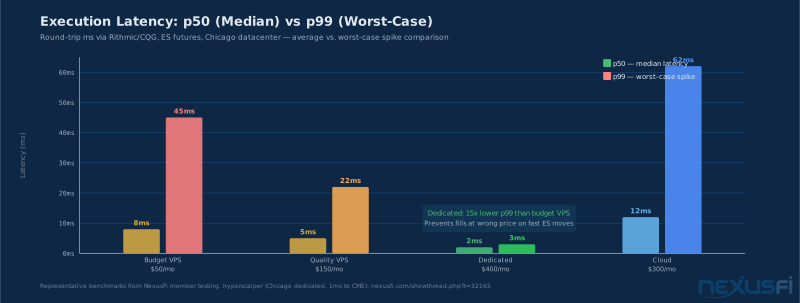
Here's what most articles get wrong: they compare hosting tiers by focusing on raw specs. But for futures trading, the metric that actually matters is latency consistency — specifically worst-case spike frequency and magnitude. A server with average 5ms latency that spikes to 45ms during market opens is far more dangerous than one averaging 8ms that never exceeds 10ms. That distinction is the difference between a good trading server and a bad one, and it's why dedicated bare metal typically beats VPS for serious traders.
This article covers how to pick the right hosting tier, what hardware actually matters, how to evaluate providers like SpeedyTradingServers and NinjaMobileTrader, and where co-location fits for traders who are truly latency-sensitive.
The Three Hosting Tiers: VPS, Dedicated, and Cloud #
Before choosing hardware, understand what you're actually buying — because "low latency" and "trading optimized" get applied to all three tiers regardless of accuracy.
VPS (Virtual Private Server)
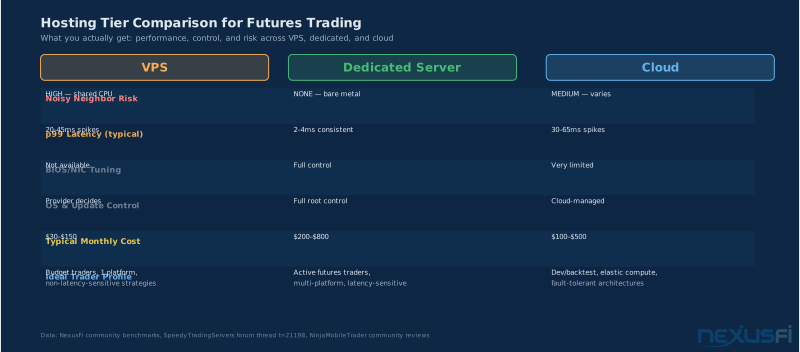
A VPS is a virtual machine sharing a physical host with other VMs. The hypervisor schedules CPU time across all tenants. The core problem for trading: noisy neighbors. When another VM on your host has a CPU burst, your VM gets less CPU. This shows up as jitter — latency spikes hitting at unpredictable times. On a good day your latency is excellent; on a bad day it spikes to 45ms during your most important trade of the session.
VPS works for single-platform light automation and discretionary traders where 20-50ms variance doesn't affect outcomes. It becomes problematic when you're running multiple platforms simultaneously, using heavy indicators across many charts, or trading strategies where being filled 20ms late affects P&L.
Dedicated Bare Metal Server
A dedicated server is a physical machine you rent exclusively — no other tenants, no hypervisor overhead, no noisy neighbors. You get the full CPU, all RAM, and the NIC without sharing. This eliminates the primary source of latency jitter in VPS environments. CPU scheduling is deterministic; RAM access is yours alone; NIC interrupt handling competes with nothing.
@hyperscalper's experience is not unusual. Once you eliminate the noisy-neighbor problem, latency drops and stays dropped. That kind of consistency is structurally impossible on a VPS because the hypervisor introduces scheduling variance that can't be tuned away. [1]
Cloud (AWS, Azure, GCP)
Cloud is basically managed VPS with enterprise tooling — snapshots, auto-scaling, geographic redundancy. Latency characteristics are similar to VPS. Cloud is genuinely useful for development and backtesting workloads, disaster recovery, and teams needing rapid deployment. It's not the right default for active futures execution: you lose BIOS control, NIC tuning, and deterministic scheduling. Per-instance cost also creeps up quickly with egress, storage, monitoring, and premium instance types.
Co-location
Co-location means placing your own physical hardware in a commercial data center — at CME-adjacent facilities like Cermak Data Center in Chicago, this gives you the shortest possible path to the matching engine in Aurora, Illinois. Co-lo is justified when milliseconds materially affect your edge, you have enough trading volume for the infrastructure cost to make sense, and you want maximum control over every stack layer. For most retail and professional individual traders, managed dedicated hosting achieves 95% of co-location performance at 20% of the operational complexity.
Why Latency Jitter Is the Real Metric #
Average latency numbers lie. When a VPS provider says "low latency," they mean the median — which can look excellent while hiding catastrophic worst-case behavior.
Here's a realistic picture from NexusFi community benchmarks: a budget VPS ($50/month) might average 8ms round-trip to a Chicago broker gateway. The p99 — worst-case latency occurring 1% of the time — might hit 45ms or higher. During the equity open at 9:30 AM ET, or during a CPI release, that 1% case fires multiple times per minute exactly when volatility is highest and your fills matter most.
The math is brutal. On ES futures at $12.50 per tick, a fill 40ms late during a fast move easily costs one to two ticks — $12.50 to $25 — on a trade targeting 4 ticks of profit. You've given away 25-50% of intended gain to infrastructure friction that a $300/month dedicated server eliminates entirely.
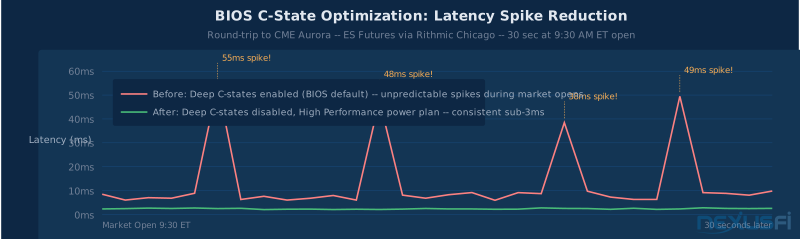
Why dedicated eliminates this: With no hypervisor overhead and no noisy neighbors, CPU scheduling variance drops dramatically. A properly tuned dedicated server — correct BIOS settings, disabled deep C-states, stable NIC driver — typically achieves p50 around 2ms and p99 around 3ms to a Chicago broker gateway. The worst-case spike barely exceeds the median. That's the structural advantage.
@sam028 of SpeedyTradingServers explains: the most common mistake is sizing a VPS too small, making the noisy-neighbor problem dramatically worse — but even a correctly sized VPS has inherent scheduling variance that dedicated avoids entirely. His guidance is to measure actual RAM and CPU usage with your trading apps running before choosing any tier. [2]
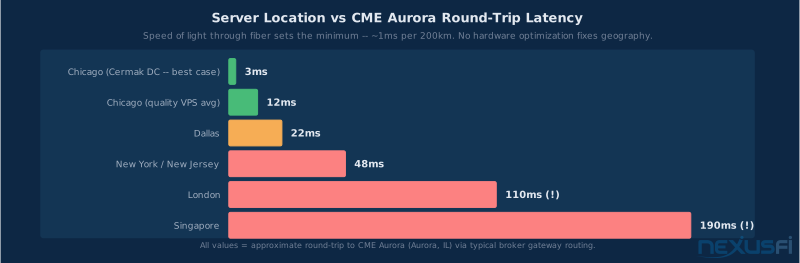
One important clarification: latency consistency only matters within your current network path. If you're running a server in New York connecting to a Chicago broker gateway, even a perfectly tuned dedicated server has 20ms+ baked in by physics. Network proximity to your broker's infrastructure is the dominant factor — no hardware optimization changes geography.
Hardware Selection: What counts #
Most trading server hardware discussions focus on the wrong things. Core count is a marketing metric. Brand debates between Intel and AMD miss the point. The attributes that actually affect trading performance are more specific — and most traders overbuy on some dimensions while underpaying for others.
CPU: Clock Speed Over Core Count
Most futures trading applications — NinjaTrader 8, Sierra Chart, MultiCharts, Bookmap, the DOM ladder — have heavily single-threaded critical paths. Market data processing, order entry, indicator calculation, and DOM updates all happen sequentially within each application. The CPU core handling your order entry needs to finish as fast as possible — that depends on clock speed, not total core count.
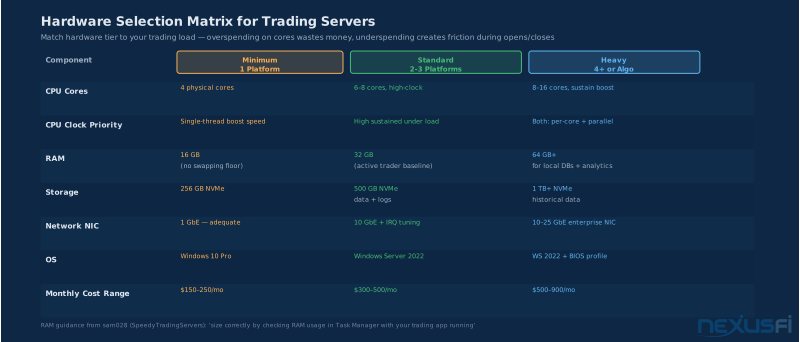
Prioritize high sustained clock speeds over core quantity. A 6-core processor at 4.5GHz is better for trading than a 16-core at 3.2GHz. 4-8 physical cores covers almost every futures trader setup; extra cores handle background processes so they don't compete with trading cores.
Intel vs AMD: both are competitive in 2025. Modern AMD with correctly configured C-state and power management performs comparably to Intel for trading workloads. Ask for the exact CPU model number — not the brand.
RAM: 32GB Is the Working Baseline
16GB is the floor — below that, you'll hit swap with multiple platforms, and disk swapping during a fast market is genuinely dangerous. 32GB is the recommended baseline for any trader running 2+ platforms, multiple instruments, and browser tabs simultaneously. RAM prevents paging; paging during a volatile open adds unpredictable latency to everything.
Traders running heavy analytics, local tick databases, or 4+ platforms should look at 64GB. You want headroom, not exact sizing.
Storage: NVMe for Startup and Recovery
Storage latency isn't the bottleneck during live trading — once platforms are loaded and data is in memory, you're not hitting disk in the critical path. Where NVMe matters: startup time (getting platforms loaded and connected at the open), log write performance for automated strategies, and crash recovery. 256GB handles one or two platforms; 500GB is more comfortable with historical data and multiple platform installs.
Network Interface: Stability Over Speed
For futures trading, even the busiest market data feeds consume well under 100Mbps — bandwidth isn't the issue. What matters is driver stability, interrupt handling, and consistent behavior under load. Enterprise-grade NICs from vendors with stable Windows drivers (Intel ixgbe/i40e family is common in trading environments) perform more consistently than generic hardware. 10GbE is the standard for trading servers.
Ask your provider for the exact NIC model and whether they tune interrupt moderation settings. "We use quality hardware" isn't an answer. "Intel X550-AT2 with interrupt coalescing disabled" is.
OS and BIOS Configuration
For dedicated trading servers, Windows Server 2022 is generally the safer default — designed for 24/7 operation, better update control, more predictable service management. Windows 10/11 Pro works with careful management (disabling automatic restarts, controlling background services), but requires more discipline.
BIOS configuration matters much. Modern CPUs have aggressive power management that drops clock speeds between trades and enters deep sleep states (C-states). Waking from deep C-states takes 50-500+ microseconds — and that variance shows up as occasional, unpredictable latency spikes. The fix: disable deep C-states in BIOS, set Windows power plan to High Performance. Most serious trading server providers do this automatically. If a provider doesn't know what C-states are, you've learned something important.
@Big Mike's principle applies to hosted servers as much as home setups: a machine running only your trading stack, configured correctly, performs completely differently from one running generic Windows with all defaults. [3]
Network Path: The Factor No Hardware Can Fix #
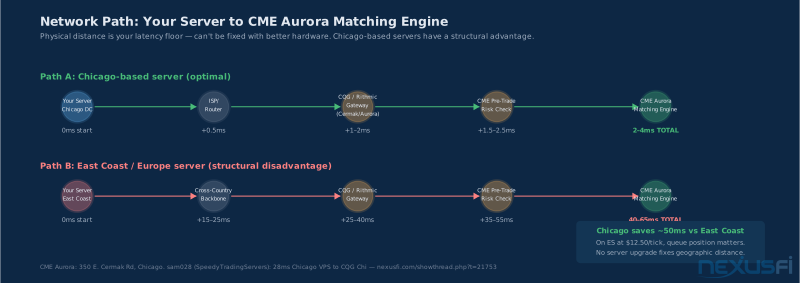
You can have the fastest dedicated server on the market with perfectly tuned BIOS and enterprise NIC — and still have 60ms of unavoidable latency to CME because your server is in Dallas. Network path is the dominant factor in execution latency, and no hardware upgrade changes geography.
The Path From Server to CME Aurora
When you send an order: your trading platform sends to the broker's front-end gateway; the gateway performs a credit/margin check (under 0.2ms for well-positioned brokers); the order goes to CME's matching engine at Aurora, Illinois; acknowledgment returns through the same path.
Speed of light through fiber: approximately 1ms per 200km. Chicago to New York is ~1,250km — 12ms each way just for signal propagation, before routing and gateway processing. East Coast servers realistically see 40-65ms round-trip to CME. Chicago-based servers see 2-4ms total.
@sam028 documented routing subtleties from his own testing: his Chicago VPS sees 28ms to CQG Chicago addresses, while his New Jersey server achieves 18ms to the same CQG Chicago addresses — because of how CQG routes traffic internally. Geographic proximity matters, but empirical testing with your actual broker's gateway IP is the only reliable measure. [5]
Choosing Server Location by Market
- US futures (ES, NQ, CL, GC, ZB, ZN): Chicago is optimal. Cermak datacenter and nearby facilities have 1-4ms to CME gateways. Both CQG and Rithmic have Chicago gateway infrastructure.
- East Coast location: 40-65ms to CME. Better if your broker has primary infrastructure in New York, or if you trade ICE products (ICE is at Equinix NY).
- Europe: Optimal for Eurex FDAX and FDXM. Poor choice for CME products. @Koepisch covers this specific case for Eurex traders needing CQG London proximity. [6]
Testing Latency Before You Pay
Ping averages are not sufficient. You need worst-case measurement under realistic conditions.
- Extended ping during market hours: Run 1000+ pings to your broker's gateway IP during a live session and measure standard deviation and maximum spike
- MTR (traceroute with statistics): Run over 15-30 minutes to see the full path and identify high-variance intermediate hops
- Actual order round-trip timing: Compare the time your platform sends an order to when acknowledgment is received -- full end-to-end picture including broker gateway processing
- Load testing: Test with your full chart setup running during volatile conditions, not just idle pings
Request a trial period before committing to a multi-month contract. Any legitimate provider will offer this. Run realistic tests, not just idle pings.
Evaluating Providers: SpeedyTradingServers, NinjaMobileTrader, and How to Compare Any Option #
The trading server space has established players who understand futures infrastructure specifically — and a larger number of general-purpose hosting providers who slap "low latency" on marketing materials. Here's how to tell them apart.
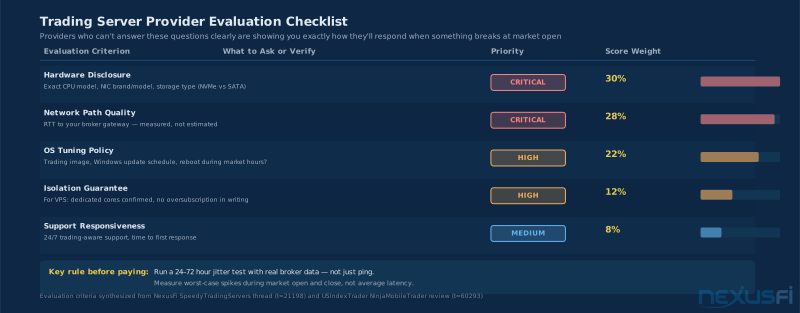
Non-Negotiable Questions Before Committing
- Exact CPU model (not "Intel Xeon" -- the specific model and clock speed)
- Exact NIC model and whether interrupt moderation is tuned for low latency
- Storage type: NVMe or SATA SSD, specific drive if possible
- Measured latency to your broker's trading gateway -- traceroute to a specific IP, not marketing claims
- Update policy: when updates happen, reboot notification procedure, maintenance windows vs market hours
- Support availability: 24/7 with trading-aware staff, response time SLA during market hours
Providers who can't answer these questions in writing are telling you something. "Industry-standard hardware" is not an answer.
SpeedyTradingServers (sam028)
Sam028 has been active on NexusFi's Trading Reviews forum for years with one of the longest and most active provider threads on the site — thread t=21198 has 150+ replies covering hardware specs, latency benchmarks, and support quality in detail. His transparency stands out: he answers technical questions directly, publishes benchmark data, and engages honestly with negative experiences when they occur.
@planetkill independently vouched for the service for automated strategies running ~two years, finding it much better than budget alternatives. [7][9]
MyTradeHost
Offers managed trading servers with active monitoring, failover, and backup services — a fuller managed solution that trades some control for operational simplicity. Their USP is active monitoring (server alerting if connectivity drops) and platform-specific configurations for TradeStation, MultiCharts, NinjaTrader, MetaTrader, and Sierra Chart. @iantg mentioned using them for multi-platform setups requiring monitoring and failover. [8]
Red Flags in Any Provider
- Vague hardware descriptions ("fast processor," "SSD storage")
- No trial period before multi-month commitment
- Support only during business hours when markets are closed
- Can't tell you specific latency to your broker's gateway
- Update policy doesn't account for market hours
- Pricing that seems too good -- legitimate trading-specific hardware costs money
Cost Analysis: When Each Tier Justifies Its Price #
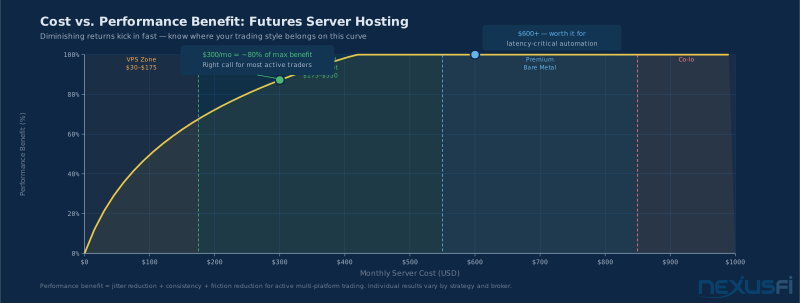
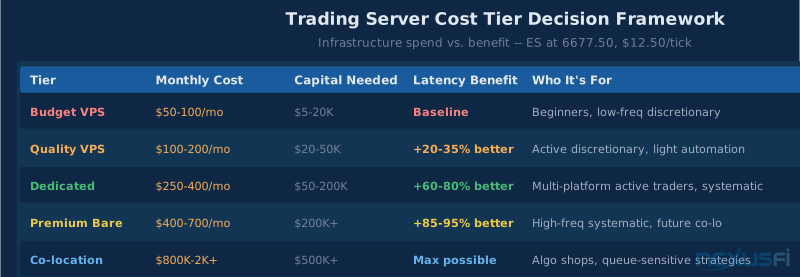
Hosting cost should be proportional to your trading capital and frequency, not an afterthought. The performance curve follows diminishing returns — and most traders can maximize value by landing in the dedicated sweet spot rather than overspending on premium hardware they can't leverage.
The Performance Curve
The jump from a $50 budget VPS to a $150 quality VPS delivers significant improvement — better isolation, more CPU resources, better support. The jump from $150 to $350 dedicated delivers more — no noisy neighbors, consistent scheduling, BIOS tuning. The jump from $350 to $800 premium dedicated or co-location delivers meaningful but smaller gains.
For most active futures traders, spending $250-400/month on a well-chosen dedicated server captures roughly 80% of the maximum achievable performance benefit. The remaining 20% — premium bare metal with co-location, enterprise NIC tuning, and direct market connectivity — costs 3-5x more and is primarily justified for systematic strategies where queue position or tick-level timing is part of the edge.
Cost Components to Budget
- Monthly server rental: $30-900+/month depending on tier and provider
- Windows licensing: Often included in managed hosting, occasionally extra
- Monitoring/alerting: Some providers include this; budget $15-30/month if not
- Backup service: Critical -- budget $10-20/month if not included
- Platform licenses on additional machine: Check your NinjaTrader, Sierra Chart, MultiCharts license terms -- some restrict concurrent installs
Decision Logic by Capital Level
Trading $100,000 in capital: spending $400/month on infrastructure that reduces latency-related friction is under 0.5% annual drag — reasonable for infrastructure that may prevent one-tick slippage multiple times per week.
Trading $10,000 in capital with two /MES contracts: $400/month dedicated is proportionally larger than the benefit. A $100/month quality VPS makes more sense until scale justifies the upgrade.
The question to ask: have I had fills I attributed to platform latency or system instability in the last month? If yes, and you've ruled out local internet issues, a dedicated server is likely the right investment. If your current setup hasn't caused observable problems, the upgrade may be premature.
When Co-location Becomes Worth It
Co-lo jumps from "interesting" to "necessary" when: your strategy targets specific queue positions at key prices, you're placing 50+ orders per minute where 10ms differences affect fill rates meaningfully, you've confirmed through testing that your dedicated setup is the latency bottleneck, and trading capital makes the operational cost ($500-2000+/month for rack space, power, and connectivity) reasonable.
Most traders who think they need co-location actually need a better dedicated server in the right city. Get dedicated first, test thoroughly, and only escalate to co-lo if you can demonstrate with data that it's the constraint.
Migrating to a Hosted Server Without Losing a Trading Day #
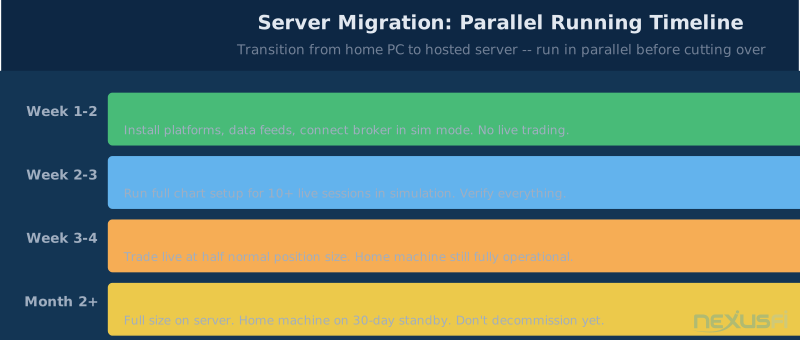
The mechanics of moving to a hosted server are straightforward, but the sequence matters. Done wrong, you can lose a trading day to setup problems at the worst moment.
Migration Sequence That Works
Step 1: Run parallel for at least one week. Set up the new server with your full trading stack while keeping your home setup fully operational. Don't cut over until the server is stable, connected correctly, and performing as expected.
Step 2: Test everything in sim mode first. Run your full setup — platforms, data feeds, charts, automation — in simulation mode for several trading sessions. Confirm order entry, chart rendering, and data feed latency all work correctly before trading live capital.
Step 3: Start live trading with reduced size. Your first week on new infrastructure should be half your normal position size. This gives margin for unexpected platform behavior without full capital at risk.
Step 4: Keep home setup as failover for 30 days. Don't decommission your local setup immediately. For the first month, your home system should be ready to take over within minutes if the server has an issue during a session.
Essential Infrastructure Checklist
- Remote access: Confirm RDP access works from multiple locations and devices. Know exactly how to reconnect if the session drops.
- Monitoring: Set up alerts so you know immediately if the server goes offline. Most providers include this; use an external ping monitor as backup.
- Backup broker access: Know how to access your broker's web-based order entry if your platform fails. Have the broker emergency execution phone number ready.
- Position close procedure: Know exactly how you'll close open positions if your server becomes inaccessible mid-trade. This is non-negotiable planning.
- Second internet path for RDP: If your local internet fails, you can't access your server. Consider a mobile hotspot as backup for your local connection.
Platform Notes
NinjaTrader 8: Runs well on Windows Server 2022. The Rithmic connection from a Chicago server is notably smooth — multiple NexusFi members have documented sub-1ms round-trip to Rithmic Chicago from Chicago-based dedicated servers. [1]
Sierra Chart: Explicitly designed for server environments. Its data and trading architecture is well-suited to hosted setups, and advanced features (automated trading, DTC protocol) perform better with stable connectivity.
MultiCharts: Some licenses are machine-locked and require a license transfer when moving to new hardware. Verify this before starting migration.
The most common mistake: sizing a VPS too small. But even a correctly sized VPS has inherent scheduling variance that dedicated bare metal avoids entirely. Measure your actual RAM and CPU usage with trading apps running before choosing any tier — then add 30% headroom.
Knowledge Map
Prerequisites
Understand these firstGo Deeper
Build on this knowledgeReferences This Article
Articles that build on this topicCitations
- — NinjaTrader Brokerage Services (2023) 👍 9“Dedicated 6 Core Xeon 32gb server in Chicago. My NT8 platform instances are running on the dedicated server; which is 1 millisecond...”
- — speedytradingservers.com review (2022) 👍 3“A simple way to size correctly is to open your trading app on your own machine, and measure the RAM/CPU usage in launching a Windows task manager”
- — Trading Business Infrastructure (2009) 👍 5“Multiple servers, dual redundant internet connections, fastest/best of every component”
- — NinjaTrader with 16+ cores (2012) 👍 7“Everything working great with Windows Server 2008 Enterprise. Windows 7 doesn't support more than 2 physical CPUs”
- — Leased Server anybody every do this? (2012) 👍 1“the latency to CQG Chicago based addresses is better from my VPS in New-Jersey (18ms) than from my Chicago VPS (28ms)”
- — VPS Server Europe - Target CQG London (2020) 👍 4“for every FDAX (Eurex Frankfurt) trader with the need of a VPS there aren't that much good VPS providers, which will satisfy the needs”
- — Your experience with VPS Ninjamobiletrader? (2023) 👍 5“for a VPS platform its the best Ive used. I have the medium sized server, run some pretty heavy Algos and charts for two different systems and it performs very well”
- — Outside the Box and then some.... (2017) 👍 2“MyTradeHost Dedicated Servers, VPS, Trading, Monitoring, Failover, Backup, Recovery, TradeStation, MultiCharts, NinjaTrader”
- — Recommended Windows VPS for NinjaTrader 8 (2021) 👍 4“Over the years of trying many different VPS providers (Speedy, Azure, AWS, RouterHosting, CheapWindowsVPS, etc.), it's the only one that doesn't have remote desktop chart lag”
- — Discussion of a Micro Scalping Day Trading Facility (2021) 👍 2“US futures out of Chicago (Aurora) at the CME, for example, is the physical location of the exchanges”
- — New Computer Build (2020) 👍 6“a fast internet connection with low latency (ideally fiber). Then double it with a different provider, so it is redundant”
- CME Group — CME Group Colocation Services (2024)
- — speedytradingservers.com review (2013) 👍 5“Sam was able to set me up with a VPS about 2 hours after my initial request. This made an outstanding first impression”