



Custom Indicators and Strategy Scripting: Building, Testing, and Deploying Your Own Trading Tools
Overview #
Custom Indicators and Strategy Scripting on Trading Platforms
Every serious futures trader eventually hits the wall where built-in indicators don't cut it. You need a custom oscillator that combines volume delta with price structure. Or an automated strategy that enters on a specific DOM configuration. Or just a modified moving average that handles overnight gaps the way you want it to.
That's when you start writing code — and that's where most retail traders make expensive mistakes.
Custom indicator and strategy development is one of the highest-leverage skills in futures trading. Done right, it turns your edge into a repeatable, testable, deployable system. Done wrong, it produces backtests that look like money printers and live results that bleed your account dry.
This guide covers the three dominant futures trading platforms — NinjaTrader, Sierra Chart, and MultiCharts — their scripting languages, the development workflow that actually works, and the pitfalls that destroy more retail strategies than any market condition ever will.
Key Concepts #
NinjaScript — NinjaTrader's scripting layer built on C# (.NET 4.8). Indicators and strategies extend base classes and override methods like OnBarUpdate() and OnStateChange(). The platform handles bar iteration, order routing, and account management.
ACSIL (Advanced Custom Study Interface and Language) — Sierra Chart's native C/C++ API. Studies are compiled into DLLs that Sierra Chart loads directly. Uses sc.Data, sc.Subgraph, and sc.AddMessageToLog() for output. The fastest execution path available to retail traders.
PowerLanguage — MultiCharts' scripting language, descended from TradeStation's EasyLanguage. Straightforward syntax for indicator and strategy rules. MultiCharts .NET adds full C# support for traders who need more power.
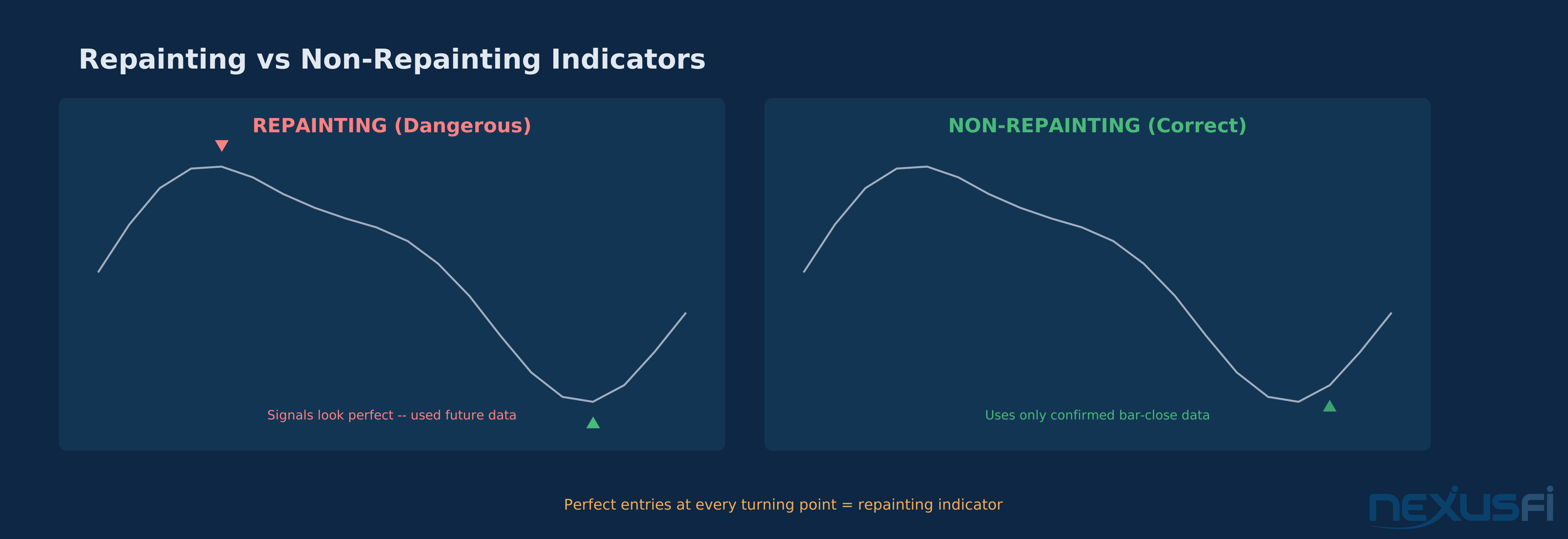
Repainting — When an indicator retroactively changes its historical values based on new data. A repainting indicator can show perfect entries in hindsight that never existed in real time. This is the single most common reason retail custom indicators produce misleading backtests.
Walk-Forward Analysis — A validation method that splits historical data into optimization (in-sample) and testing (out-of-sample) windows, rolling forward through time. Prevents the most common form of overfitting by testing whether optimized parameters hold up on unseen data.
Lookahead Bias — Using information from future bars in calculations that should only have access to current and past data. Subtle and devastating — a single line of code referencing Close[0] when CalculateOnBarClose = false can create a strategy that looks profitable in backtests but can't possibly replicate those results live.
The Platform Language Matrix #
Picking a platform isn't just about charting — it determines which language you'll write in, how you'll debug, and what performance ceiling you'll hit.
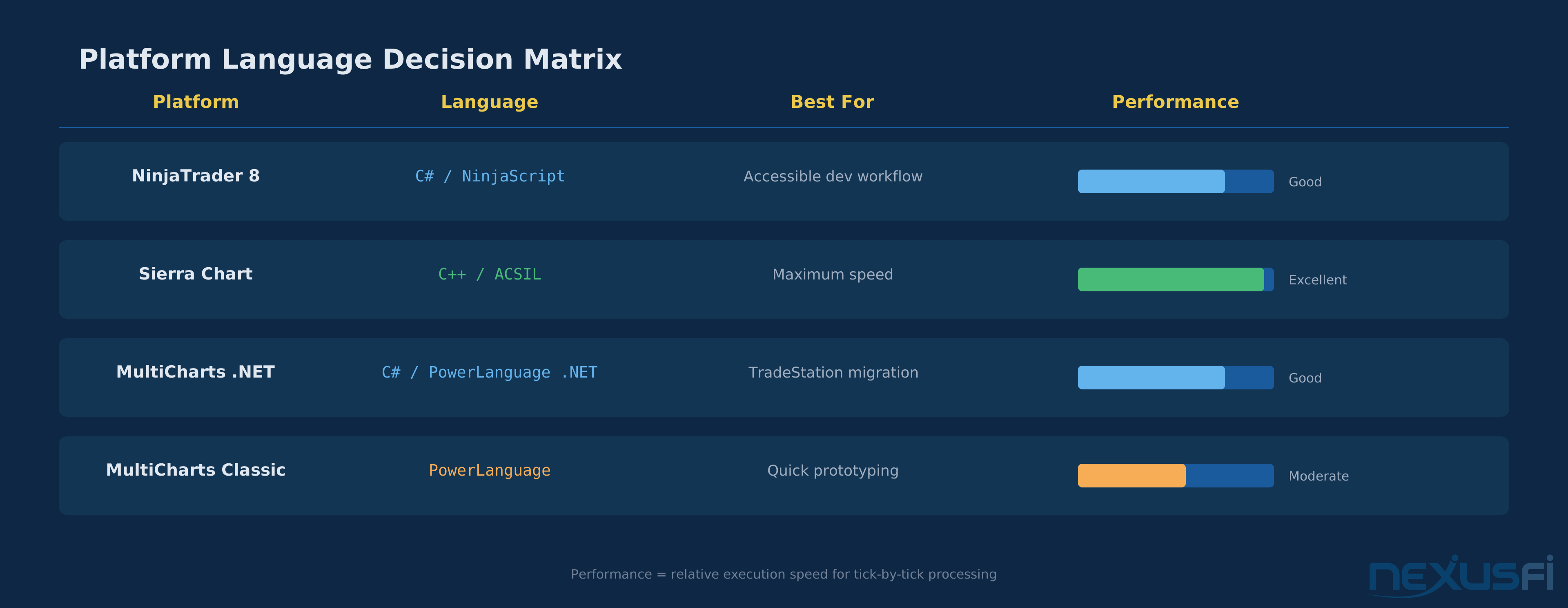
NinjaTrader 8 (C# / NinjaScript) is the most accessible entry point for traders who have any programming background. C# is a modern, well-documented language with strong IDE support. NinjaTrader's built-in editor provides syntax highlighting and basic IntelliSense. For serious debugging, you can attach Visual Studio to the NinjaTrader process and step through OnBarUpdate() line by line. The tradeoff: NinjaTrader's state machine (OnStateChange with states like SetDefaults, Configure, DataLoaded, Realtime) requires understanding platform lifecycle, not just trading logic. Most NinjaScript bugs live in state management, not in the math.
Sierra Chart (C++ / ACSIL) is the performance-first choice. Studies compile to native DLLs with zero managed-code overhead. If you're building tick-level strategies where microseconds matter, or processing large volumes of historical data, Sierra Chart's execution speed is unmatched in the retail space. The cost: C++ demands genuine programming competence. Memory management, pointer safety, and DLL compilation workflows aren't things you can learn on the fly. As @Trembling Hand documents in his ACSIL for Beginners series ([View Discussion][1]), the learning curve is steep — "The very first line of code always is #include sierrachart.h — This brings into our study the framework for building any Sierra Chart study." That framework gives you raw power but zero guardrails.
MultiCharts (PowerLanguage / .NET) occupies the middle ground. Classic PowerLanguage syntax is close to TradeStation's EasyLanguage — if you've used TradeStation, you'll be productive in hours. MultiCharts .NET adds full C# capability for traders who outgrow PowerLanguage. The tradeoff: community code quality varies wildly. Many shared scripts are outdated, miss critical execution-realism settings, or contain subtle bugs that only manifest live.
Here's the practical decision framework:
- You know C# or want to learn it — NinjaTrader. Largest retail futures community, most available indicator code, strongest broker integration ecosystem.
- You need maximum execution speed — Sierra Chart. Accept the C++ learning curve in exchange for the lowest latency retail platform available.
- You're migrating from TradeStation — MultiCharts Classic. Familiar syntax, minimal rewrite effort.
- You want quick prototyping with room to grow — MultiCharts .NET. PowerLanguage for rapid testing, C# for production deployment.
The Development Workflow That Actually Works #
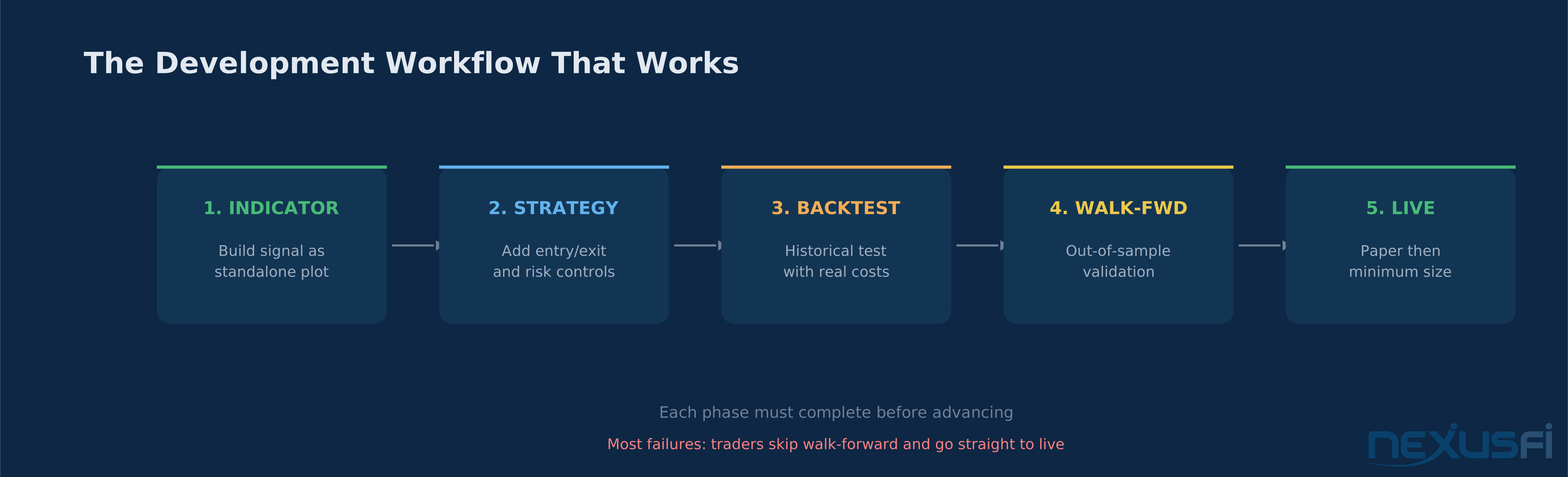
The biggest mistake retail traders make isn't writing bad code. It's writing strategy code before validating the underlying signal. Every platform expert, every professional quant, every seasoned system developer follows the same workflow — and deviating from it is how you build a money-losing machine that looks brilliant in backtests.
Phase 1: Build the Indicator First #
Before you write a single line of order logic, build your signal as a standalone indicator. No entries, no exits, no position sizing. Just the math, plotted on a chart.
In NinjaTrader, this means creating an Indicator class that overrides OnBarUpdate() and outputs to plot series. In Sierra Chart, it's a study function that writes to sc.Subgraph[] arrays. In MultiCharts, it's an indicator script that plots values.
The goal: verify your signal logic visually across hundreds of bars, multiple sessions, different volatility regimes. Does your RSI-volume hybrid actually fire at the spots you expect? Does it cluster during chop? Does it miss obvious entries? You need to see this before execution logic contaminates your assessment.
(post #241695, https://nexusfi.com/showthread.php?t=1261&p=241695#post241695)
The distinction matters enormously. An indicator that updates on the current bar isn't repainting — it's working correctly. An indicator that changes confirmed historical values is at the core broken for strategy use.
Phase 2: Convert to Strategy #
Once the indicator logic is verified, wrap it in a strategy framework:
- Entry logic — translate indicator conditions into order actions
- Exit logic — stops, targets, time-based exits, trailing stops
- Position sizing — fixed contract size for initial testing, then risk-based sizing
- Session management — when can the strategy trade? How does it handle overnight positions?
- Risk controls — max daily loss, max consecutive losses, max position size
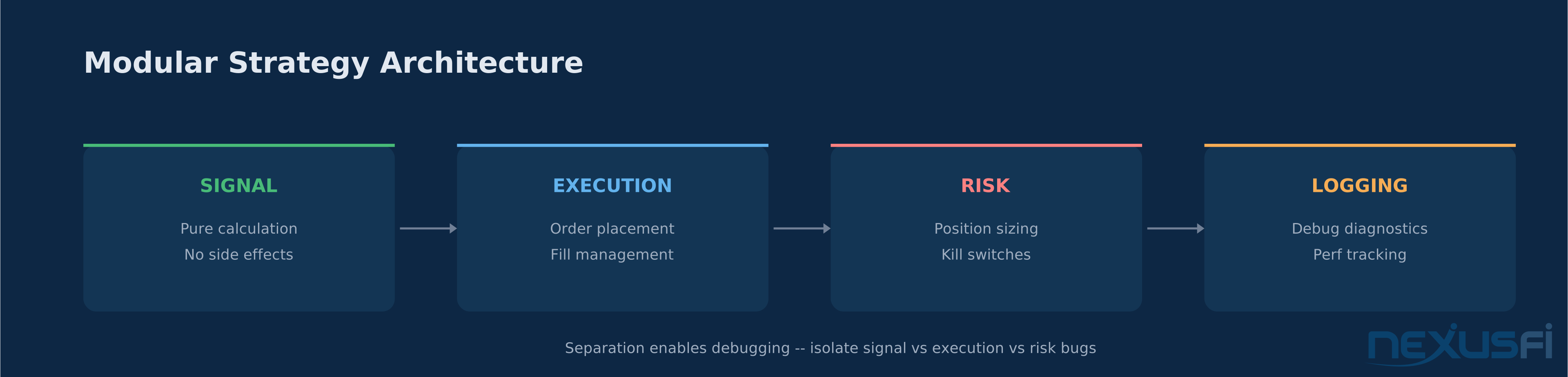
The key discipline: separate your code into distinct modules. Signal calculation in one section, order execution in another, risk management in a third. This separation isn't academic software engineering — it's practical debugging infrastructure. When your strategy does something unexpected live, you need to isolate whether the problem is in the signal, the execution timing, or the risk logic. Monolithic code makes this nearly impossible.
Phase 3: The Validation Ladder #
This is where most retail developers cut corners — and where those corners cost real money.
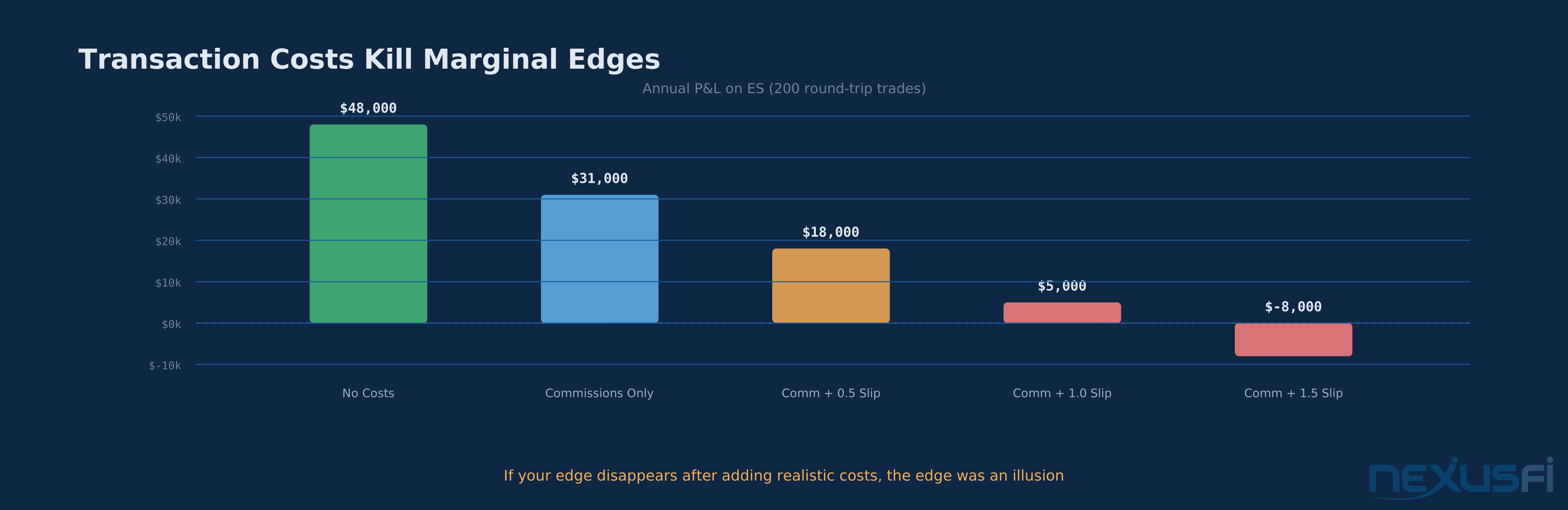
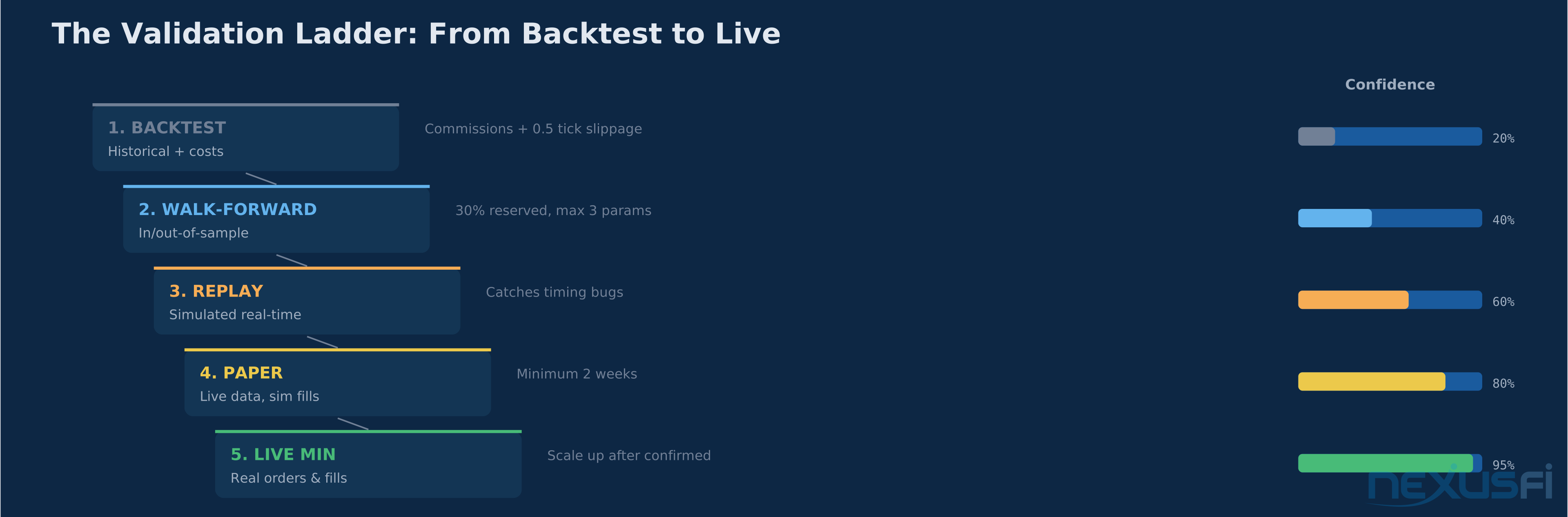
Step 1: Historical Backtest — Run the strategy across your full historical dataset with CalculateOnBarClose = true (or equivalent). Set realistic commissions per contract and add minimum 0.5 ticks slippage per side. If the strategy can't survive realistic costs, it has no edge. Full stop.
Step 2: Walk-Forward Analysis — Split your data into in-sample optimization windows and out-of-sample testing windows. @kevinkdog's journal documents the process in detail: "Run walkforward analysis for different combinations of In/Out periods, select the best In/Out. Then run walkforward analysis using the best In/Out to generate the WF equity curve." (post #360948, https://nexusfi.com/showthread.php?t=28404&p=360948#post360948)
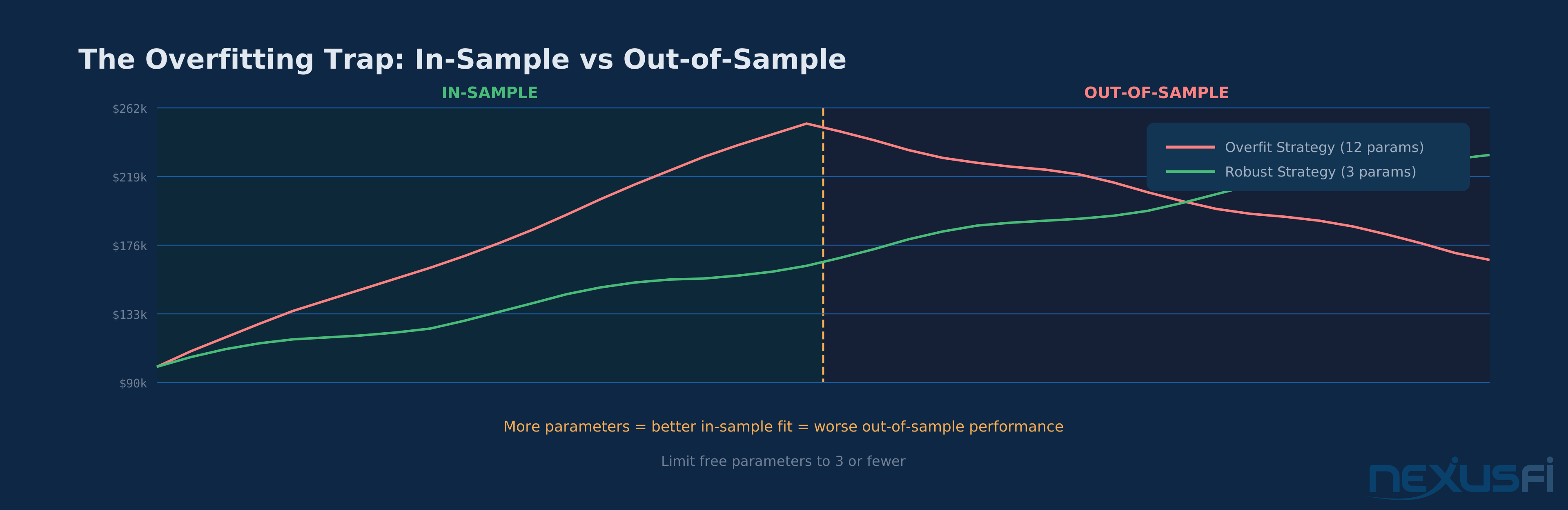
The critical rule: limit your free parameters to 3 or fewer. Every additional parameter multiplies your overfitting risk. As @Fat Tails demonstrated in his curve-fitting experiment, "To cope with this problem, walk-forward analysis cuts the sample period into bits and pieces to use the same data several times, both as in-sample and out-of-sample." (post #42905, https://nexusfi.com/showthread.php?t=3950&p=42905#post42905)
Step 3: Market Replay — If your platform supports it (NinjaTrader and Sierra Chart both do), run the strategy on market replay data. This simulates real-time bar formation and reveals timing issues that bar-close backtests hide.
Step 4: Paper Trading — Deploy the exact same code on a simulated account. Run it for at least 2 weeks. Compare fill assumptions to actual simulated fills. This catches order-handling bugs that backtests miss entirely.
Step 5: Minimum Size Live — Only after passing all four preceding steps. Start with the smallest position size your broker allows. Scale up only after confirming that live execution matches your paper trading results.
The Seven Pitfalls That Destroy Custom Strategies #
These aren't theoretical risks. They're the specific failure modes that account for the vast majority of retail strategy development losses.
1. Lookahead Bias and Repainting #
The most insidious bug in custom development. Your indicator shows perfect signals on historical charts because it's using information that wasn't available when those bars were forming.
In NinjaTrader, the most common cause is running strategy logic with CalculateOnBarClose = false while referencing Close[0] — this gives you the final bar close value during a bar that's still forming. In live trading, Close[0] is whatever the last tick was, not where the bar will eventually close. NinjaTrader's official documentation on the Calculate property spells this out directly: on historical data, OnBarUpdate() only processes at bar close regardless of the Calculate setting, because only OHLCVT data exists for historical bars. This creates a fundamental disconnect between backtest and live behavior that no amount of parameter tuning can fix.
As @Big Mike catalogued in his repainting thread: "So I propose we update this thread with indicators that we know for a fact do not repaint, and under what conditions that is true. What is repainting? Repainting is when an indicator changes previously plotted values." (post #10079, https://nexusfi.com/showthread.php?t=906&p=10079#post10079)
The fix: Set CalculateOnBarClose = true for all backtesting. Reference Close[1] (prior bar) for confirmed values. Test with market replay to verify signals appear when you expect them.
A single repainting bug can make a losing strategy appear profitable in backtests. Verify with market replay before any live deployment.
2. Overfitting Through Optimization #
Parameter optimization is crack cocaine for strategy developers. You run 10,000 combinations, find the one that produced 400% returns on ES over 3 years, and convince yourself you've found an edge.
You haven't. You've found the set of parameters that happened to fit the noise in that particular data window.
(post #165160, https://nexusfi.com/showthread.php?t=13878&p=165160#post165160)
Robert Pardo literally invented walk-forward analysis and documented the methodology in The Evaluation and Optimization of Trading Strategies (Wiley, 2008) — still the definitive text on the subject. Pardo's core argument: optimization without walk-forward validation isn't strategy development, it's data mining dressed up as research.
The fix: Use walk-forward analysis. Keep free parameters at 3 or fewer. Require that every parameter has a logical market reason for existing. If you can't explain why a 14-period lookback works better than a 13 or 15, you're curve-fitting.
The 3-Parameter Rule for Avoiding Overfitting:
- Limit free parameters to 3 or fewer per strategy
- Every parameter must have a logical market reason — if you can't explain why 14 beats 13 or 15, you're curve-fitting
- Use walk-forward analysis to test whether optimized parameters hold on unseen data
3. Unrealistic Execution Assumptions #
Backtests assume you get filled at the exact price you want, exactly when you want it. Live markets laugh at this.
For futures specifically: market orders have slippage that varies with volatility. Limit orders have fill uncertainty — you might not get filled at all. Stop orders become market orders and execute at whatever price is available. During fast moves, that gap can be significant.
The fix: Add minimum 0.5 ticks slippage per side for market orders. For limit orders, assume some percentage of orders never fill. Include full round-trip commissions + exchange fees. If your strategy's edge disappears after adding realistic costs, the edge was an illusion.
4. Session and Timezone Bugs #
Futures trade across sessions with different characteristics. The regular trading hours (RTH) session has different volume, volatility, and spread behavior than the overnight session. Daylight saving time shifts break strategies that hard-code session times. Contract roll dates introduce gaps and volume shifts.
The fix: Use the platform's session template system rather than hard-coding times. Handle timezone-aware timestamps. Test around DST transitions (March/November in the US). Verify behavior across contract rolls.
5. Hard-Coded Contract Specifications #
Embedding tick size, point value, or trading hours directly in your code breaks portability. ES has a $12.50 tick value, NQ has $5.00, CL has $10.00. Hard-coding tickValue = 12.50 means your strategy silently produces garbage results on any other instrument.
The fix: Use the platform's instrument properties. In NinjaTrader: Instrument.MasterInstrument.PointValue and TickSize. In Sierra Chart: sc.TickSize and sc.CurrencyValuePerTick. Parameterize everything that's instrument-specific.
6. Missing Risk Controls #
A strategy without hard risk limits is a loaded gun with the safety off. Data feed drops, flash crashes, fat-finger parameter changes — any of these can turn a controlled strategy into an account-draining disaster.
The fix: Build these directly into the strategy code, not as external add-ons:
- Maximum daily loss (flatten all positions and stop trading)
- Maximum position size (never exceed N contracts regardless of signal strength)
- Maximum consecutive losses (pause trading after N consecutive losers)
- Disconnect protection (flatten if data feed drops for more than N seconds)
7. Garbage Collection Pauses (C# Platforms) #
This one's specific to NinjaTrader and MultiCharts .NET. If you allocate objects inside OnBarUpdate() — new lists, new arrays, new string concatenations — the .NET garbage collector will periodically pause your code to clean up. Those pauses can be tens of milliseconds — enough to miss a fill or submit an order late.
The fix: Pre-allocate everything in OnStateChange(State.DataLoaded). Reuse objects instead of creating new ones. Avoid LINQ queries in hot loops. For tick-by-tick strategies, target less than 0.5ms per OnBarUpdate() call.
Platform-Specific Development Tips #
NinjaTrader: Master the State Machine #
The most common NinjaScript bugs aren't in the math — they're in misunderstanding when your code runs. OnStateChange() cycles through SetDefaults, Configure, DataLoaded, Historical, Realtime, Terminated. Each state has different capabilities and restrictions.
Initialize your variables in DataLoaded, not SetDefaults. SetDefaults runs before the instrument is loaded, so instrument-dependent calculations will throw exceptions. Use State.Historical to differentiate between historical bar processing and real-time execution.
For debugging, Print() outputs to NinjaTrader's Output window, but for complex strategies, attach Visual Studio and set breakpoints. You can step through individual bars in historical mode to verify exactly what your code does at each bar.
Sierra Chart: Respect the Performance Contract #
Sierra Chart's ACSIL gives you raw C++ performance, but with that comes C++ responsibility. Every study function gets called once per bar during initial calculation and once per tick during real-time updates. If your study allocates memory on every call, you'll eventually run out.
As @Trembling Hand's ACSIL tutorial explains: "If there are 100 bars in the chart, then the study function will be called 100 times when your study is initially calculated. After that, the study function is called as the latest bar is updated and new bars are added." (post #813535, https://nexusfi.com/showthread.php?t=55327&p=813535#post813535)
Use sc.Subgraph[] arrays for output — they're pre-allocated by Sierra Chart. Use sc.AddMessageToLog() for debugging instead of writing to files. Set sc.UpdateAlways = 0 unless you genuinely need tick-by-tick updates, because unnecessary updates consume CPU for no benefit.
MultiCharts: Verify Community Code #
MultiCharts has a strong community library, but quality control is inconsistent. Before using any shared script:
- Check the posting date — scripts from 5+ years ago may use deprecated functions
- Verify slippage and commission settings aren't set to zero
- Test on replay before live deployment
- Read the entire source, not just the entry/exit logic
Practical Application: Building Your First Custom Indicator #
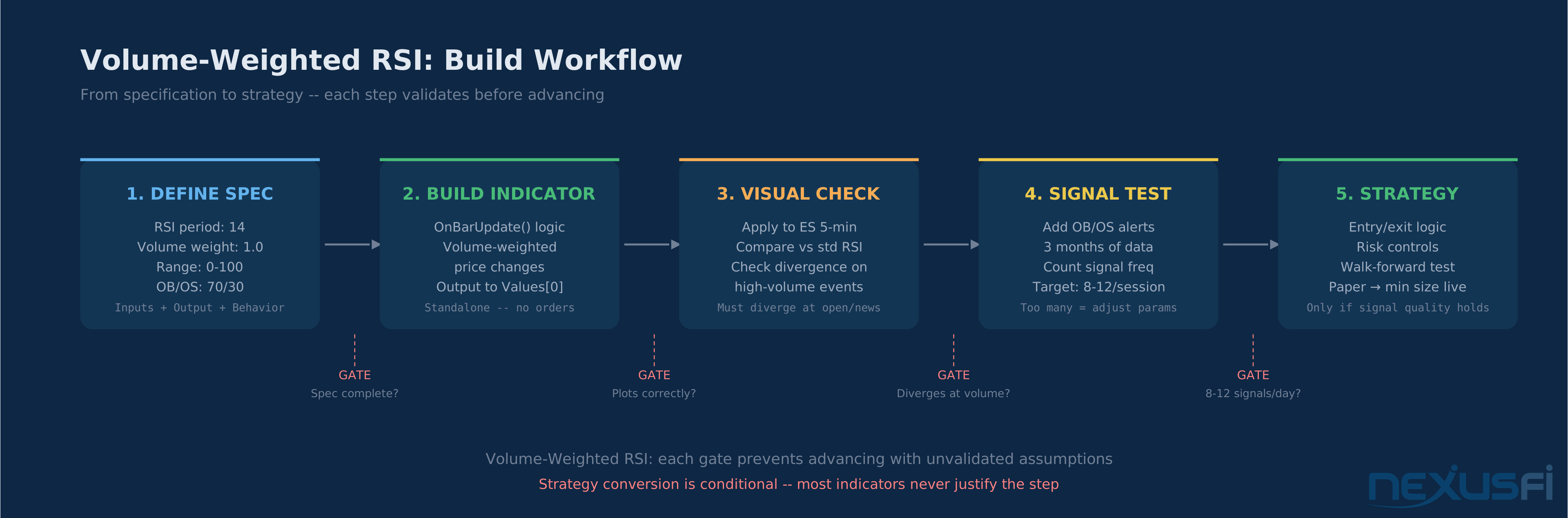
Here's a concrete workflow for building a custom Volume-Weighted RSI indicator from scratch:
Step 1: Define the specification
- Input: RSI period (default 14), volume weighting factor (default 1.0)
- Output: single line plot, range 0-100, overbought/oversold zones at 70/30
- Behavior: standard RSI calculation but each price change is weighted by relative volume
Step 2: Build as indicator
- NinjaTrader: Create new Indicator class. In OnBarUpdate(), calculate volume-weighted price changes and apply the RSI formula. Output to Values[0].
- Sierra Chart: Create new study. In sc.SetDefaults, configure subgraph properties. In the main function body, loop through sc.Index calculating the volume-weighted RSI.
- MultiCharts: Create new indicator. Use Plot1() for output. Calculate in the main body.
Step 3: Visual validation
- Apply to ES 5-minute chart. Compare against standard RSI. The volume-weighted version should diverge most during high-volume events (market open, news releases, settlement). If it tracks standard RSI identically, your volume weighting isn't working.
Step 4: Signal testing
- Add alert conditions for overbought/oversold crosses. Run on 3 months of historical data. Count signal frequency — if it fires more than 8-12 times per session, the parameters need adjustment.
Step 5: Strategy conversion (if warranted)
- Only after the indicator shows consistent, repeatable signal quality across multiple market conditions. Add entry/exit logic, risk controls, and run through the full validation ladder.
The Bottom Line #
Custom indicator and strategy development isn't about writing clever code. The language you use — C# for NinjaTrader, C++ for Sierra Chart, PowerLanguage for MultiCharts — is just the vehicle. The edge comes from correct signal validation, realistic execution assumptions, disciplined parameter management, and strong risk controls.
Build indicator-first. Validate before optimizing. Add realistic costs before evaluating performance. Test on replay before going live. Scale gradually.
The traders who succeed with custom development aren't the best programmers. They're the ones who treat every backtest as a hypothesis rather than proof — and who build their systems to fail safely when (not if) something unexpected happens.
Knowledge Map
Prerequisites
Understand these firstReferences This Article
Articles that build on this topicCitations
- — Sierra Chart ACSIL for Beginners. (2020) 👍 9“Ok so as it stands we have a framework for building any Sierra Chart study in this code we compile in MSVS. The very first line of code always is #include "sierrachart.”
- — Sierra Chart ACSIL for Beginners. (2020) 👍 13“Ok lets do some basic programming. To start we will jump straight into accessing and display some data into the log and plotting a basic Subgraph.”
- — Want your NinjaTrader indicator created, free? (2012) 👍 4“The issue observed here is not a repainting issue, I will try to explain the difference. (1) Genuine repainting: The indicator value is changed for a preceding bar with hindsight knowledge.”
- — Want your NinjaTrader indicator created, free? (2014) 👍 12“I understand what you mean. I think the problem here is not that the indicator repaints, because as far as I can see from the code it does not. I will try to explain.”
- — Confirmed Indicators that do not repaint (2009) 👍 7“I know many of you are wondering how to know for sure if an indicator repaints the past or not. So I propose we update this thread with indicators that we know for a fact do not repaint, and under what conditions that is true.”
- — Taking a Trading System Live (2013) 👍 3“One common mistake during walkforward analysis is to surreptitiously optimize the IN and OUT periods. Say, for example, that you run the walkforward analysis with 4 year In period, and 1 year Out period.”
- — An experiment on curve fitting (2010) 👍 3“Hi shodson, first of all, thanks for bringing the subject up. I have not traded automated systems and I do not intend to do so during the next year, as this is much more demanding than discretionary trading and requires a larger variety of skills.”
- — Common sense trading decisions (2011) 👍 6“Back testing often results in curve-fitted systems. That is your system is perfectly adapted to the past, but not the future. Ideally you would want to test your system on tomorrow's data but I have yet to find a data vendor who sells these data..”
- — An experiment on curve fitting (2010) 👍 1“The book "Evidence Based Technical Analysis" has some great methodology describing how to backtest properly and a lot of detail on data mining vs. curve fitting, and also a lot of detail on in sample and out of sample testing.”
- — Approaches to Avoid Curve Fitting (2018) 👍 2“Sounds Savy but unfortunately it's not the reality. Words such as "meaninglful, limited" by definition are adding bias and hence will add to curve fitting. To avoid curve fitting, use common sense.”