



Alert Systems and Trade Notifications: Building a Signal Framework That Actually Keeps You in the Game
Overview #
Every futures trader eventually faces the same problem: you can't watch everything at once. Markets move 23 hours a day across dozens of instruments, and the moments that matter — the breakouts, the level tests, the volume spikes — don't wait for you to be looking at the right chart. Alert systems solve this by turning your trading rules into automated watchdogs that tap you on the shoulder when conditions align.
But here's the thing — most traders either massively underuse alerts or drown themselves in noise until every ping becomes background static. The difference between a trader who uses alerts effectively and one who doesn't isn't the platform or the technology. It's the architecture of what they're monitoring, why, and how they've structured their response.
This article covers the full environment of alert systems in futures trading: what types exist, how to build multi-condition alert frameworks, how delivery methods affect your response time, and how to keep signal quality high as your trading operation scales. If you're running alerts on a single price level with a popup box, you're operating at maybe 5% of what modern platforms can do.
Key Concepts #
Price Alert — A notification triggered when price reaches, crosses, or dwells at a specific level. The most basic alert type and the foundation everything else builds on.
Indicator Alert — A notification triggered by a calculated study value meeting specified conditions. Moving average crossovers, RSI threshold breaches, VWAP deviations — any study that outputs a numeric value can trigger an alert.
Volume Alert — A notification triggered by traded volume exceeding or falling below thresholds within a time window. Especially valuable in futures where volume spikes signal institutional participation.
Multi-Condition Alert — An alert requiring two or more independent conditions to be true simultaneously before triggering. The core mechanism for filtering noise out of your alert framework.
Alert Delivery Method — The channel through which an alert reaches you: popup window, sound, email, SMS, push notification, or webhook. Each has different latency, attention-interrupt characteristics, and reliability profiles.
Webhook — An HTTP callback triggered by an alert condition, sending structured data to an external service. The bridge between charting platform alerts and external automation, logging, or notification routing systems.
Alert Rearm — The mechanism controlling how quickly an alert can fire again after triggering. Without rearm logic, a price oscillating around your alert level generates dozens of redundant notifications.
Alert Fatigue — The degradation in trader responsiveness caused by excessive, low-quality, or redundant alert notifications. The single biggest failure mode in alert system design.
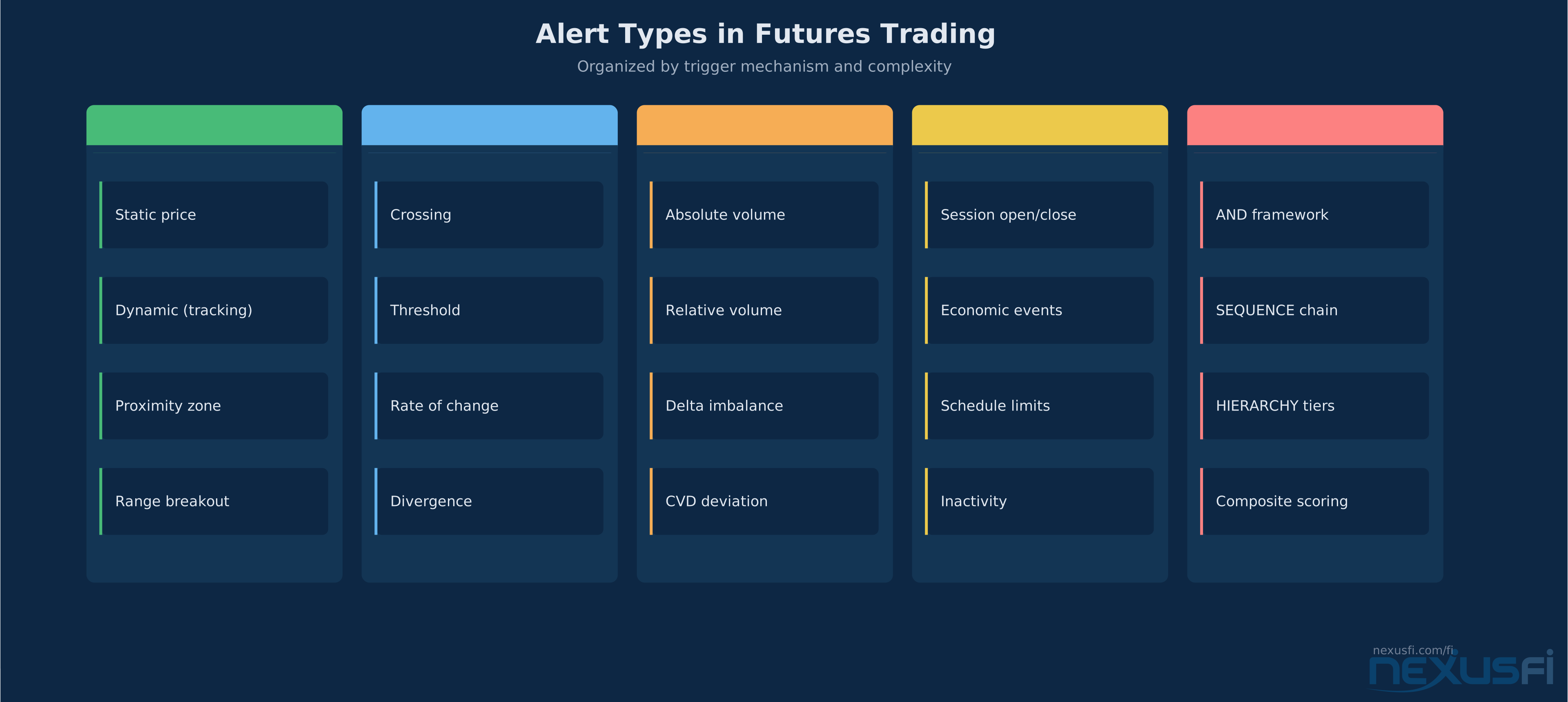
Types of Alerts in Futures Trading #
Price-Level Alerts #
The simplest and most used. Set a price, get notified when it's hit. But even here, there's more depth than most traders realize.
Static price alerts fire when the last trade prints at or through your level. These work for support/resistance levels, round numbers, and predetermined entry points. On platforms like NinjaTrader, you can set these directly on the chart by right-clicking a price level and selecting "Alert." Sierra Chart offers equivalent functionality through its Chart Drawing Alert system.
Dynamic price alerts track levels that move — a developing VWAP, a trailing stop, a moving average. These require indicator-based alert logic because the trigger price recalculates every bar (or every tick, depending on your configuration). As @Fat Tails explained in his NinjaTrader indicator collection, the anaLineAlertsOnPrice series handles this by letting you attach alert conditions to any drawn line or indicator value, with configurable rearm periods and delivery methods.
Proximity alerts fire not when price hits a level but when it enters a zone around it. This gives you lead time — knowing price is approaching your key level rather than learning about it after it's already there.
Indicator-Based Alerts #
This is where the real power lives. Any indicator that outputs a numeric value can drive an alert. The conditions available typically include:
- Crossing: value crosses above or below a threshold (MA crossover, RSI exiting oversold)
- Threshold: value is above or below a fixed number (volume above 500 contracts/bar)
- Rate of change: value is increasing or decreasing faster than a defined rate
- Divergence: indicator direction disagrees with price direction
Sierra Chart's Study Alert system is especially sophisticated here. Sierra Chart's official Study Alerts and Scanning documentation details how alert condition formulas can reference any study's subgraph output using identifiers like ID1.SG1, with options for Alert Only Once Per Bar, Evaluate on Bar Close, and Reset Alert Condition On New Bar. As discussed in the NexusFi community, you can build alert formulas using any study's output as input — including custom studies. You can create conditions like "Traded Bid Volume > 100/sec" by referencing the study's subgraph values directly, without writing any custom code.
NinjaTrader's approach uses C# NinjaScript for complex alert conditions. The platform's built-in Chart Alerts handle basic scenarios, but for multi-condition or indicator-driven alerts, you're writing custom indicators with Alert() method calls. NinjaTrader's official documentation details the full method signature — Alert(id, priority, message, soundLocation, rearmSeconds, backBrush, foreColor) — with built-in rearm logic that prevents the same alert from re-firing within a configurable time window. @Fat Tails' indicator suite demonstrates this extensively — his volume alert indicators fire when cumulative or per-bar volume exceeds configurable thresholds, with options for sound alerts, email notifications, and visual markers.
Volume and Order Flow Alerts #
Volume alerts matter more in futures than in most other markets because volume in futures represents actual committed capital — every contract traded has real margin behind it. A volume spike on ES at a key level tells you something at the core different than a volume spike on a penny stock.
Useful volume alert conditions for futures:
- Absolute volume threshold: bar volume exceeds X contracts (filters for institutional activity)
- Relative volume: current bar volume is N standard deviations above the rolling average
- Delta alerts: net buy/sell imbalance exceeds a threshold (requires order flow data)
- Cumulative volume deviation: cumulative session volume diverges from its typical trajectory
Some platforms integrate these natively — Sierra Chart's Number Bars and Footprint studies can drive alerts on delta, volume at price, and bid/ask imbalance. Others require third-party tools or custom development.
Time-Based Alerts #
Often overlooked but critical for session-aware trading:
- Session open/close warnings: 5 minutes before RTH open, 30 seconds before settlement
- Economic event alerts: CPI release in 2 minutes, FOMC in 15 minutes
- Personal schedule alerts: "Stop trading in 30 minutes" — enforces your trading plan's time boundaries
- Inactivity alerts: no trades placed in X minutes during active session (catches you when you're zoned out or distracted)
Time alerts keep your operational awareness intact. As @lancelottrader noted in his NQ trading journal, an audible alert system prevents missing moves when monitoring multiple markets simultaneously — "if my attention is diverted for even a brief moment I will have an audible alert."
Building Multi-Condition Alert Frameworks #
Single-condition alerts generate too much noise. Price touches your level dozens of times in a session. An RSI reading below 30 fires constantly in a trending market. The solution is combining conditions so alerts only fire when multiple factors align.
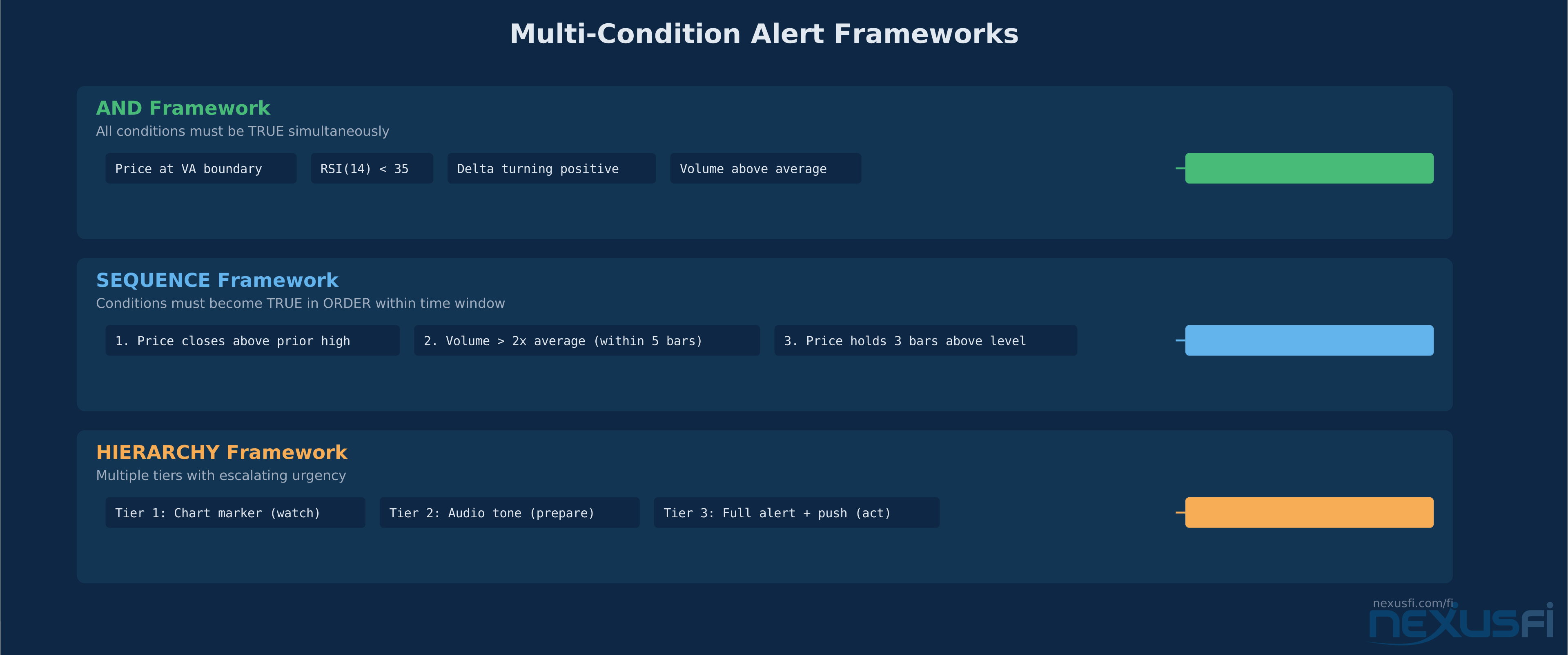
The AND framework: Alert fires only when ALL conditions are true simultaneously.
Example — an ES mean reversion alert:
- Price touches the lower Value Area boundary
- RSI(14) is below 35
- Cumulative delta has been negative for 10+ bars and is now turning positive
- Current session volume is above average
Each condition alone fires constantly. Together, they identify a specific setup worth your attention. You might get 2-3 alerts per session instead of 200.
The SEQUENCE framework: Conditions must become true in a specific order within a time window.
Example — a breakout confirmation:
- First: price closes above the prior session high
- Then (within 5 bars): volume exceeds 2x the 20-bar average
- Then: price holds above the breakout level for 3 consecutive bars
This catches confirmed breakouts, not just level touches. The sequence eliminates false breakouts where price pokes through a level on low volume and immediately reverses.
The HIERARCHY framework: Multiple alert tiers with different urgency levels.
- Tier 1 (Watch): Price approaching key level — quiet visual marker on chart
- Tier 2 (Prepare): Price at level AND volume conditions met — audible tone
- Tier 3 (Act): Full setup confirmed — loud alert, push notification, bring up the DOM
@hyperscalper captured the core challenge in a NexusFi discussion on order flow indicator design: deciding how not to get "too many" or "too few" alerts is the hard part. Too many and it's "crying wolf" — too few and you miss the move. Multi-condition frameworks solve this by requiring convergence before demanding your attention.
Alert Delivery Methods and Latency #
How an alert reaches you matters as much as what triggers it. The delivery method determines your response time and your psychological relationship with the alert.
On-Screen (Popup / Visual Marker) #
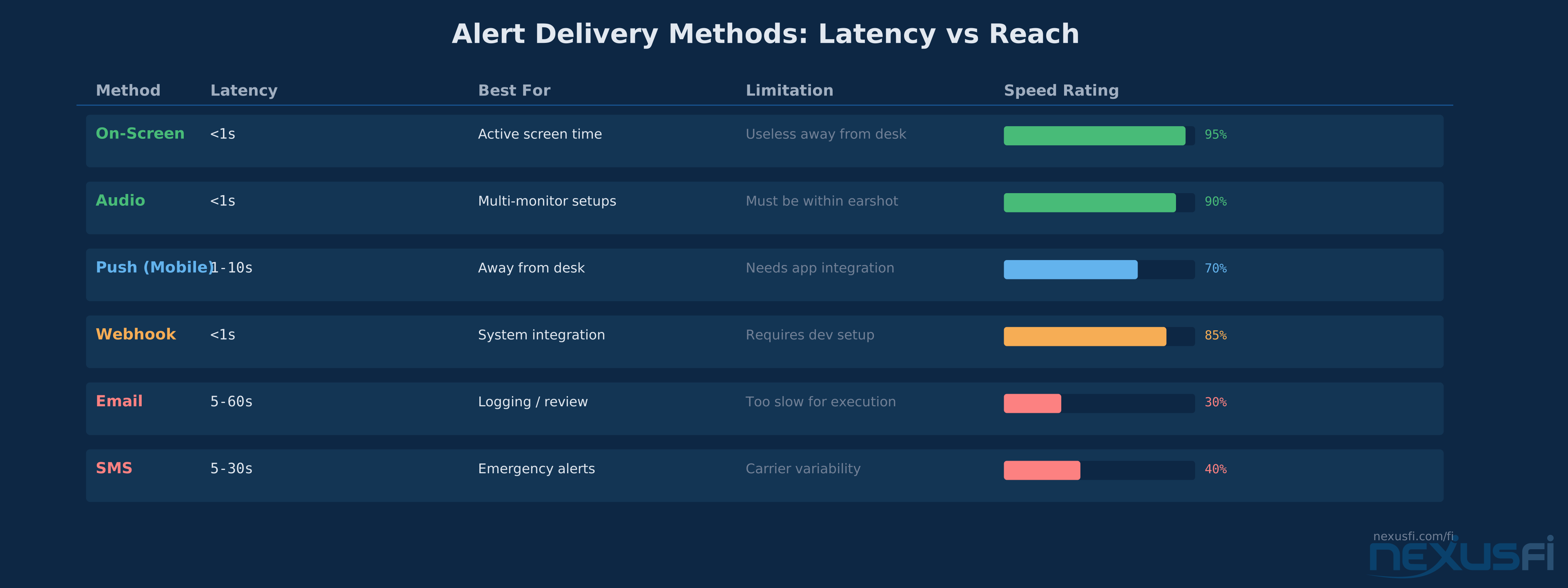
Latency: Near-zero (sub-second) Best for: Alerts you need while actively watching the screens Limitation: Useless if you're away from the desk
Most platforms offer both popup dialogs (which interrupt) and chart markers (which inform without interrupting). For active trading, chart markers are usually better — a color change on a price level or a vertical line on the chart tells you the condition fired without blocking your view.
Audio Alerts #
Latency: Near-zero Best for: Multi-monitor or multi-market setups where your eyes can't be everywhere
Audio is the unsung hero of alert systems.
Different sounds for different conditions — a chime for a level approach, a bell for a level hit, an alarm for a full setup — creates an ambient awareness layer.
The key is sound differentiation. If every alert makes the same noise, audio alerts quickly become useless background noise. Assign distinct sound files to distinct alert categories. Most platforms support custom WAV files.
Email and SMS #
Latency: 5-60 seconds (variable, carrier/provider dependent) Best for: Alerts you need when away from the desk entirely Limitation: Too slow for scalping or fast intraday setups
Email alerts work for swing traders and position managers who need to know about daily-timeframe events. For intraday futures trading, the latency makes them unsuitable as primary delivery for execution-relevant alerts. They're better suited as logging mechanisms — a record of every alert that fired during the session for later review.
Push Notifications (Mobile) #
Latency: 1-10 seconds Best for: Away-from-desk alerts that need faster delivery than email Limitation: Requires platform mobile app or third-party integration
TradingView excels here with native mobile push notifications for any alert condition. Platform-specific solutions like NinjaTrader's mobile app provide push notification capability, though the setup varies by platform generation.
Webhooks #
Latency: Sub-second (HTTP callback) Best for: Integration with external systems, logging, automation chains Limitation: Requires technical setup (server endpoint, parsing logic)
Webhooks are the most powerful delivery method because they connect your alert system to everything else: Discord channels, Telegram bots, custom dashboards, trade logging databases, and even semi-automated order routing. TradingView's webhook system is the most widely used in the retail trading space, but Sierra Chart and NinjaTrader can achieve the same through custom development.
Alert Management and Organization #
As your alert system grows beyond 10-15 alerts, management becomes a real problem. Without organization, you end up with stale alerts from last month firing alongside today's active setups, and you can't tell which is which.
Alert Naming Conventions #
Name alerts with enough context that you know exactly what they mean six months from now:
- Bad: "ES Alert 1"
- Good: "ES-RTH-VAH-touch-long-setup-Apr14"
Include the instrument, session, level/condition, direction bias, and date context. When an alert fires, you should know immediately what it means and what your planned response is.
Alert Expiration #
Every alert should have a defined lifespan. A support level alert from three weeks ago might not be relevant anymore — price structure changes, new highs and lows establish themselves, the entire context shifts.
Set expiration policies:
- Intraday alerts: expire at session close
- Swing alerts: expire after N sessions or when price structure invalidates the level
- Structural alerts: review weekly, expire monthly
Platforms handle this differently. Some offer built-in expiration fields. Others require manual cleanup. Either way, stale alerts are worse than no alerts because they erode trust in the system.
Alert Grouping #
Group alerts by purpose, not by instrument:
- Entry setup alerts: conditions that signal a potential trade entry
- Risk management alerts: stop levels, maximum loss for the day, drawdown warnings
- Informational alerts: market structure changes, session transitions, news timing
- Operational alerts: platform connectivity issues, data feed gaps, order rejections
Each group gets different delivery methods and different urgency treatment. Risk management alerts should be louder and more intrusive than informational ones.
Alert Fatigue: The Silent Killer #
@hyperscalper put it bluntly in a NexusFi discussion about order flow indicator design: if you give too many alerts, "it's like crying wolf too many times." The trader stops responding. The alert system becomes background noise. And then the one alert that actually matters gets ignored.
The concept was first documented extensively in healthcare — a 2019 AHRQ patient safety review found clinicians override or ignore up to 96% of clinical alerts when overwhelmed by volume. The same psychology applies to trading screens. Research on visual attention in professional traders published in Scientific Reports (2023) found that traders process visual information faster than non-traders in small display sets, but the advantage disappears as display clutter increases — confirming that cognitive overload degrades even expert performance.
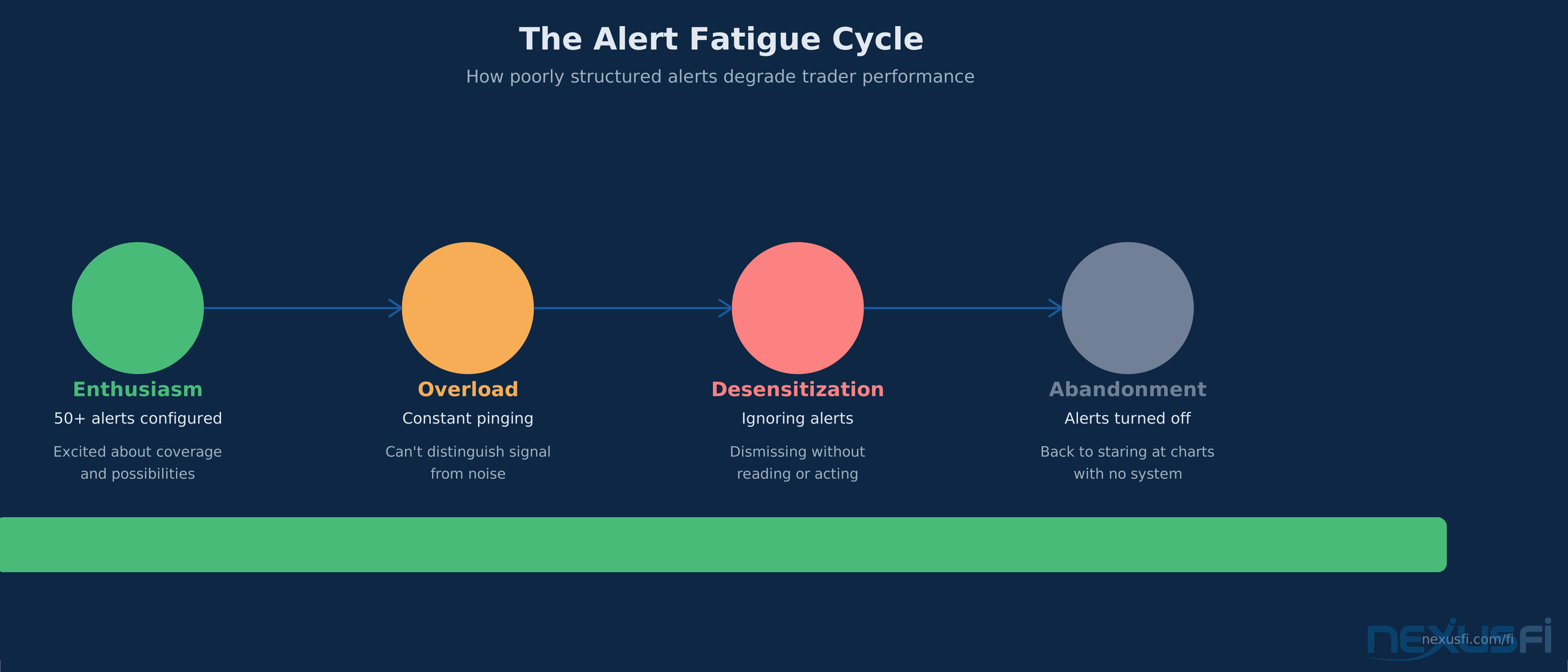
Alert fatigue follows a predictable pattern:
- Enthusiasm phase: trader sets up 50 alerts, excited about coverage
- Overload phase: constant pinging, alerts firing on noise, trader can't distinguish signal
- Desensitization phase: trader starts ignoring alerts, dismissing without reading
- Abandonment phase: trader turns off alerts entirely, goes back to staring at charts
The fix isn't fewer alerts — it's better-structured alerts with appropriate rearm logic, multi-condition filtering, and tiered delivery. A system that fires 3-5 high-quality alerts per session is infinitely more useful than one that fires 50 low-quality ones.
Rearm Logic #
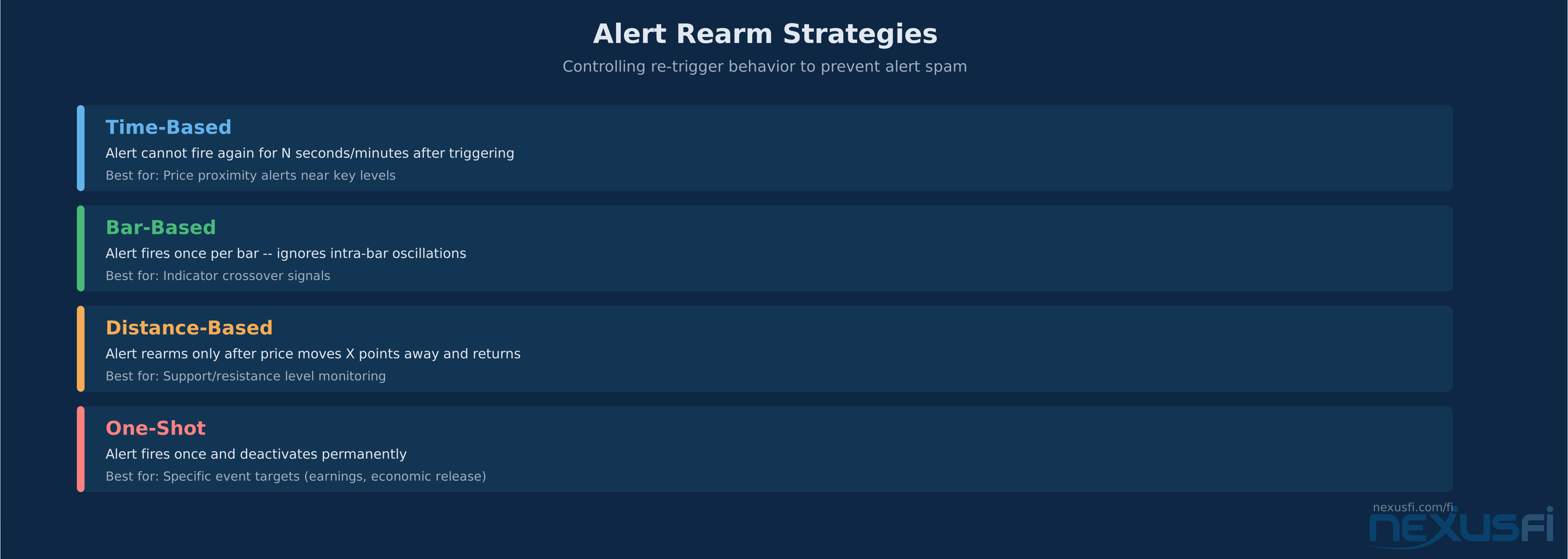
Rearm (or "re-trigger" or "cooldown") controls prevent an alert from firing repeatedly when price oscillates around the trigger level. Without rearm logic, an alert set at ES 5800.00 fires every time price ticks through that level — potentially dozens of times in minutes.
Standard rearm approaches:
- Time-based: alert can't fire again for N seconds/minutes after triggering
- Bar-based: alert fires once per bar, regardless of how many times the condition is met intra-bar
- Distance-based: alert can't fire again until price moves X points away and returns
- One-shot: alert fires once and then deactivates
@Fat Tails' NinjaTrader alert indicators implement configurable rearm with options for Close-On-Bar-Close (COBC) evaluation — alerts trigger intra-bar with sound but email only on bar close. This two-tier approach gives you immediate audio notification while preventing email spam.
Signal-to-Noise Ratio Optimization #
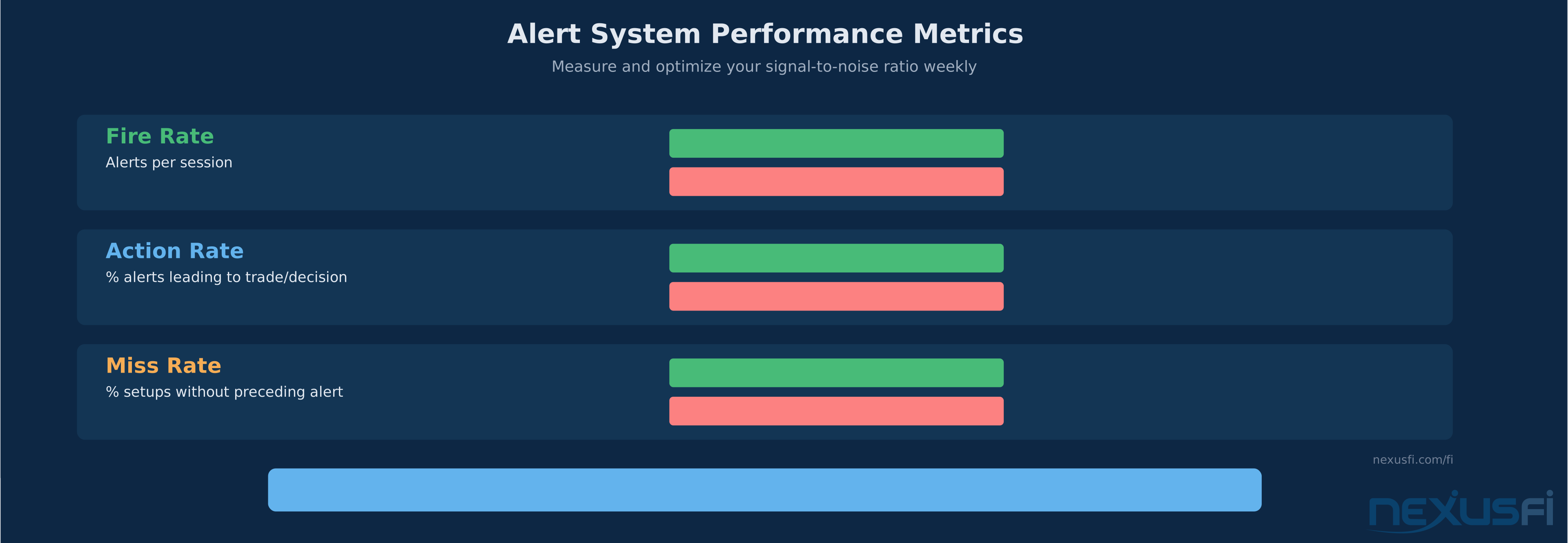
Measure your alert system's performance like you'd measure a trading strategy:
- Fire rate: how many alerts per session? If >10 on a single instrument, you're probably over-alerting
- Action rate: what percentage of alerts lead to a trade or a decision? If <20%, your conditions aren't selective enough
- Miss rate: how many setups did you take that weren't preceded by an alert? If >50%, your alerts aren't covering your actual trading
Review these weekly. Adjust conditions, add filters, remove alerts that consistently fire on noise.
Platform-Specific Implementation Patterns #
Different platforms take at the core different approaches to alert systems. Understanding the architecture matters because it determines what's possible.
NinjaTrader #
NinjaTrader offers two layers. The built-in Chart Alerts handle basic price-level notifications with configurable sound and visual markers. For anything beyond that, you're in NinjaScript territory — custom indicators that call Alert(), PlaySound(), or SendMail() based on programmatic conditions. The NexusFi community has produced extensive NinjaScript alert tools, with @Fat Tails' anaLineAlertsOnPrice series being among the most widely used. These handle user-defined price levels with sound, email, and visual alerts across multiple instruments.
Sierra Chart #
Sierra Chart's Study Alert and Scanning system is arguably the most flexible in the retail space. Alert conditions are formulas referencing any study's subgraph output — you can alert on VWAP deviation, footprint delta, volume profiles, or any custom study without writing code. The formula syntax supports AND/OR logic, comparison operators, and mathematical expressions. As @tulanch noted, you can add a study that includes traded bid volume and build an alert condition like "Traded Bid Volume > 100/sec" — purely through configuration, not development.
TradingView #
TradingView's strength is delivery — native push notifications to mobile, email, webhook, and SMS. Alert conditions use Pine Script for custom logic. The webhook capability is especially powerful for integration with external systems. The limitation is that TradingView is primarily a charting platform, not a full trading platform for futures, so alerts that trigger orders require routing through a broker integration or external automation.
Multi-Platform Considerations #
Many futures traders run multiple platforms simultaneously — charting on one, execution on another, market scanning on a third. Alert synchronization across platforms is a real operational challenge. Webhook-based architectures help here: a Sierra Chart alert fires a webhook that triggers a notification on your phone AND logs to your trading journal AND highlights the level on your TradingView chart.
From Alerts to Semi-Automation #
Alerts don't have to stop at notification. The logical progression is:
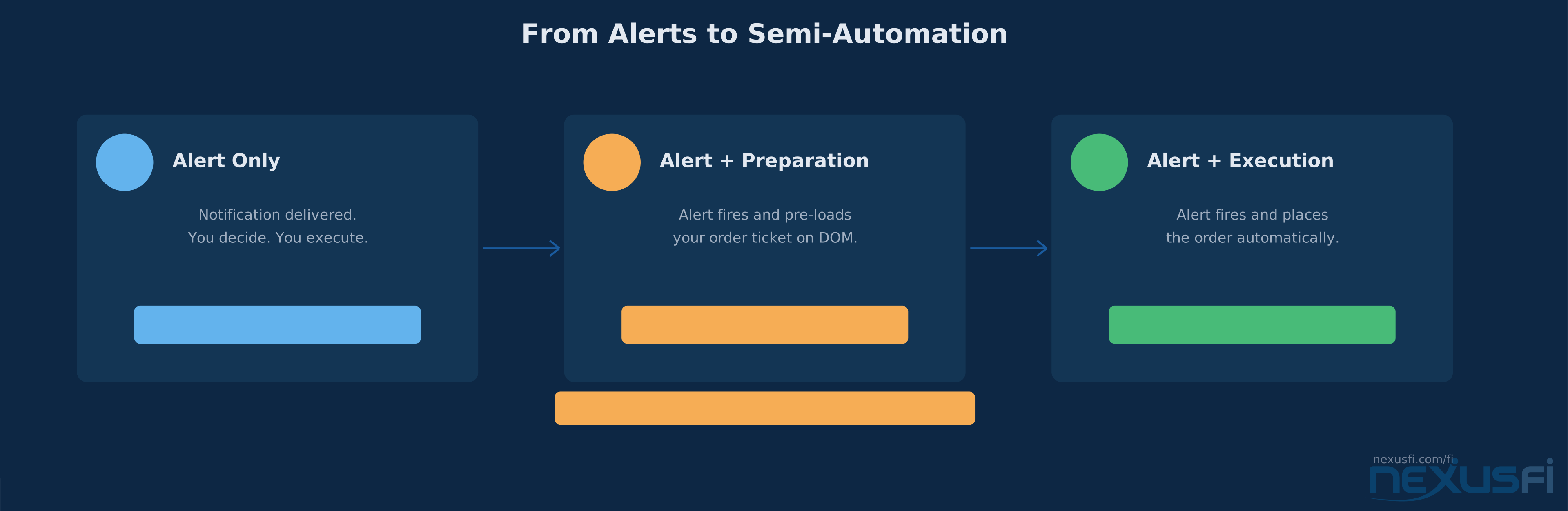
- Alert only: you get notified, you decide, you execute
- Alert + preparation: alert fires and pre-loads your order ticket (instrument, size, level)
- Alert + execution: alert fires and places the order automatically
Step 3 is full automation and belongs in a different article. But step 2 — semi-automation where alerts reduce your execution time without removing your decision authority — is the sweet spot for most discretionary futures traders. An alert that not only tells you "ES is at your level" but also brings up the DOM with your bracket order pre-configured cuts seconds off your response time. In fast markets, seconds matter.
The alert handles the scanning. The trader handles the judgment.
Practical Application: Building Your Alert Framework #
Step 1: Define Your Trading Plan's Key Conditions #
Before touching any alert configuration, list the conditions that define your setups. If you trade mean reversion off the Value Area, your conditions might be: price at VA boundary, volume above average, delta divergence, time of day filter. Write these down outside the platform.
Step 2: Prioritize and Tier #
Not all conditions are equally important. Rank them by significance and assign tiers:
- Must-have conditions (alert won't fire without these)
- Confirming conditions (increase confidence but aren't required)
- Context conditions (nice to know but don't drive the alert)
Build your multi-condition framework using must-haves as AND requirements and confirming conditions as tier escalation.
Step 3: Choose Delivery by Situation #
Map each alert tier to a delivery method:
- Tier 1 (context): visual chart marker only
- Tier 2 (preparation): audio alert + chart marker
- Tier 3 (action): audio + push notification + DOM focus
Step 4: Set Rearm and Expiration #
Every alert gets rearm logic and a kill date. No exceptions. The 5 minutes you spend configuring rearm saves hours of alert fatigue over the next month.
Step 5: Review Weekly #
Spend 15 minutes every weekend reviewing which alerts fired, which led to trades, and which were noise. Remove or tighten the noise generators. Add coverage for setups you took that weren't alerted.
Knowledge Map
Go Deeper
Build on this knowledgeReferences This Article
Articles that build on this topicCitations
- — User defined lines with alerts (2012) 👍 14“I have entirely recoded the line alert indicators, which now have the following features anaLineAlertsOnPrice: -> alert can be selected as Cross_Above, Cross_Below or Both -> an offset can be used, in that case the alert will be triggered before the...”
- — Wanted: Simple Volume alert with sound only (2012) 👍 11“I have entirely recoded the line alert indicators, which now have the following features anaLineAlertsOnPrice: -> alert can be selected as Cross_Above, Cross_Below or Both -> an offset can be used, in that case the alert will be triggered before the...”
- — best platforms (2019) 👍 7“Due to broker issues in that they could no longer support NT, I moved to SC. It is included with with my broker (SC 3 version). I am good at developing, did a lot in NT and now doing so in SC.”
- — And what about SierraChart (2011) 👍 10“A few weeks ago I downloaded SC and started learning the basics and getting it set up like I wanted. Last week, I used it in sim on Monday and then live the rest of the week. The following are my impressions and comparison to NT.”
- — Design a DayTrader Scalping Order Flow Indicator (2021) 👍 2“Things like that are "easy". The hard part is deciding how not to get "too many" or "too few" such Alerts. And, just what are peeps going to do, when an Alert happens? It's like "crying wolf" too many times.”
- — how does one stay focused while watching charts waiting for trade setups? (2012) 👍 7“I use audio extensively so I don't have to be in front of the monitors and still have a good idea of what the market is doing, and whether I should be interested in coming back to the screen.”
- — shodson's Automated Trading Journal (2011) 👍 2“What you're looking for is an alert or signal system, one that alerts you to favorable conditions across multiple markets but lets you act with manual discretion with how you want to trade those conditions.”
- — The Beast Slayer, Lance's NQ Trading Journal (2015) 👍 7“Here's basically what my charts look like spread over two monitors. On the right side I have my 2 range entry charts and on the left, I have the instruments viewed in higher timeframes.”
- — Want your NinjaTrader indicator created, free? (2014) 👍 4“The anaLineAlertsOnPriceV3 indicator allows you to enter up to 10 different price levels. You can configure it for sound alerts and e-mail alerts. It also has an option to select the rearm time in seconds. https://nexusfi.”
- — NinjaScript Alert() method signature with rearmSeconds parameter and priority levels (2025)
- — Study/Chart Alerts and Scanning - formula-based alert conditions referencing study subgraph outputs (2025)
- — Visual attention and memory in professional traders - display clutter degrades expert performance (2023)