



TradingView Community Scripts: How to Find, Evaluate, and Stack Free Indicators That Actually Work
Overview #
TradingView hosts more than 200,000 community-authored Pine Script indicators and strategies — a number that keeps growing as the platform's user base expands past 60 million traders. Most of these scripts are free. Most of them are also worthless for live trading.
That's not an insult to the developers who built them. It's a structural reality: indicators that look extraordinary in backtests often collapse the moment they hit real-time data. The gap between a script that impresses on a chart and one that supports actual trading decisions is enormous, and nothing in TradingView's interface tells you which side you're on.
This article closes that gap. You'll learn how to search the library efficiently, identify repainting traps before they cost you, read Pine Script code well enough to evaluate any indicator without being a developer, backtest with realistic friction, and combine community tools into a disciplined three-layer stack that holds up under live conditions. The last section covers alerts — because a brilliant indicator with a broken alert setup is just an expensive decoration.
TradingView is a genuinely powerful tool for futures traders. See our full overview at TradingView: The Charting and Analysis Platform Futures Traders Actually Use. The community script library — used correctly — is a serious competitive resource. Used incorrectly, it's a distraction machine that makes charts look busy and decisions feel confident when they shouldn't.
The Library: What 200,000+ Scripts Actually Means #
The Indicators button on any TradingView chart opens access to Pine Script scripts across three categories: built-in indicators (official TV tools like VWAP, RSI, and Moving Averages), personal indicators (scripts you've saved or written), and community scripts (everything authored by other users). Community scripts are searchable from the search bar at the top of the panel — type any keyword and results populate immediately.
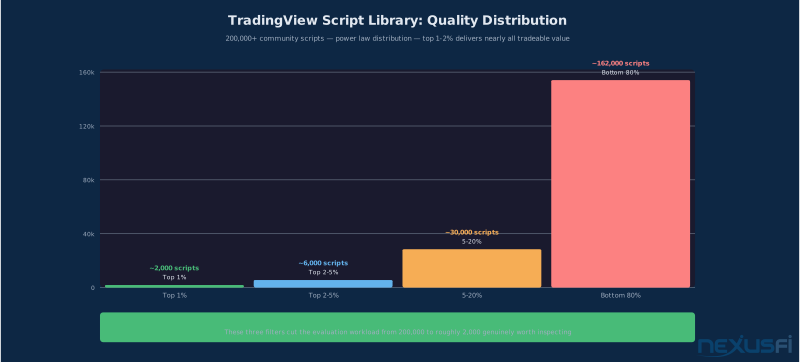
Quality distribution across this library follows a power law. The top 1-2% of scripts — those with thousands of likes, detailed documentation, and a reputation built over years of community scrutiny — account for the majority of legitimate value. The remaining 98% ranges from "mildly useful educational tool" to "actively dangerous for live trading."
Three search filters cut through the noise immediately:
- Sort by likes -- not trending, which can be gamed by new releases. Long-term likes represent sustained community trust.
- Open source only -- filter for scripts where you can read the code. Any script hiding its logic should be skipped entirely. If you can't audit it, you can't trust it.
- Description quality -- scripts with clear documentation, parameter explanations, and disclosed calculation methodology are worth your time. Scripts with vague one-line descriptions typically have vague one-line logic underneath.
NexusFi members have documented indicator evaluation for years. As @cunparis noted in the Traders Hideout optimization thread:
More degrees of freedom in a script — more parameters, more rules, more conditions — means higher risk that apparent performance reflects data mining rather than genuine edge.
Finding Quality Scripts: The Search and Filter Process #
Beyond sorting by likes, TradingView's search supports keyword-based discovery across script names and descriptions. For futures traders, the most productive searches target specific functions:
- Regime identification: "trend filter," "market regime," "volatility percentile," "ATR percentile"
- Momentum triggers: "momentum oscillator," "histogram," "momentum ignition," "swing detection"
- Risk management: "ATR stop," "trailing stop," "position sizing," "volatility stop"
- Market structure: "volume profile," "VWAP bands," "session high low," "fair value gap"
Specific popular community scripts worth evaluating (all open-source and heavily used):
- Nadaraya-Watson Estimator -- kernel regression-based trend detection. Understanding the math is not optional before using this one, as it can repaint aggressively in its default configuration.
- Supertrend variants -- dozens of versions exist, but the core ATR-based framework is genuinely useful as a regime filter. The original is simpler and more auditable than the "enhanced" versions.
- Vix Fix / Williams Vix Fix -- a synthetic volatility measure that approximates the VIX concept on any chart. Useful for identifying volatility regime shifts.
- MACD variants -- TradingView's built-in MACD is cleaner than most community versions. Compare before using any community alternative.
When you find a candidate script, the evaluation process starts before loading it on your chart. Read the description fully. Check the publish date and update history — scripts that haven't been updated in three-plus years may have known bugs or may not work correctly in Pine Script v5. Look at the comment section: if experienced traders have flagged problems, you'll find it there.
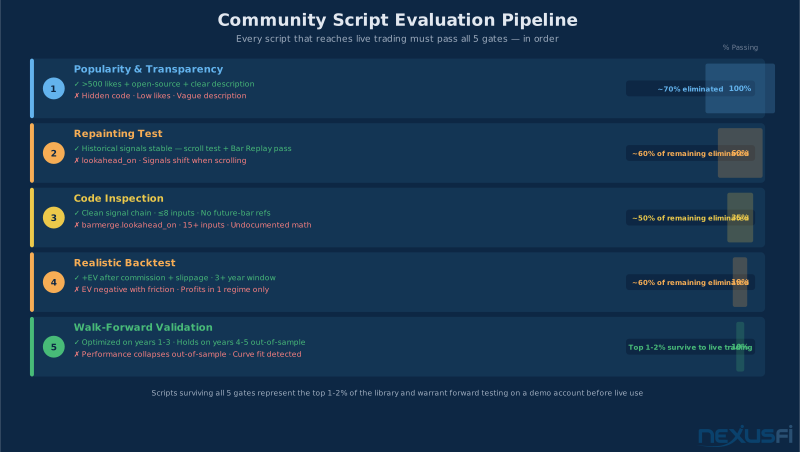
The five-gate evaluation pipeline (library search → repainting test → code inspection → realistic backtest → forward test) eliminates 99% of scripts before live use. Surviving all five gates doesn't guarantee profitability — but it eliminates the most common ways community scripts fail.
The Repainting Problem: Why Most Scripts Fail Before They Start #
Repainting is when an indicator changes its historical signal values when new bars arrive. What looked like a clear buy signal two bars ago quietly becomes a sideways signal or no signal at all. The chart history looks like a brilliant track record. The live performance looks like noise. This is the single biggest cause of community script failures in production trading.
NexusFi has a long history documenting this problem. @Big Mike started one of the earliest threads specifically for confirmed non-repainting indicators:
@cunparis elaborated in the "All you need" thread:
There are two types of repainting that matter for trading:
Honest repainting — where the indicator is clearly designed to show "current best estimate" values that update as the bar develops. A VWAP that updates tick-by-tick is honest repainting: you know it changes intrabar, and that's the design. This is labeled in good documentation.
Deceptive repainting — where the indicator presents historical signals that look stable but were actually recalculated retroactively using future data. Scripts using security() with lookahead enabled, or referencing the barstate.islast flag inappropriately, often produce this behavior. The historical chart looks like a system that called every move. Live trading with the same script is a completely different story.
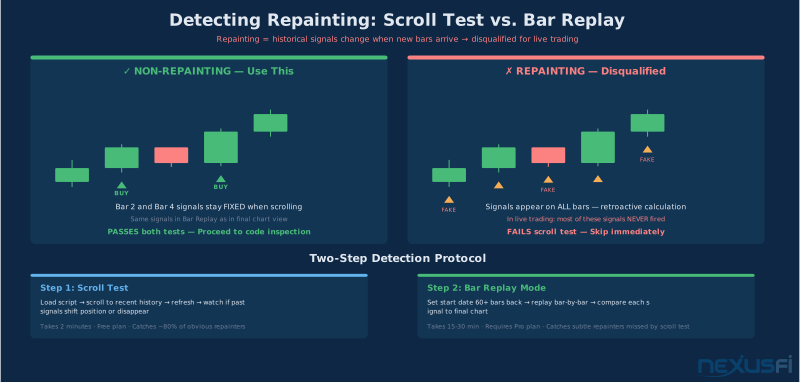
The scroll test catches most repainting: load the script, zoom in on a historical period you haven't seen recently, and watch whether the signals stay fixed as you scroll or refresh. If signals shift as you move around the chart, it's repainting. If they hold static, it's passing the first check.
For a more rigorous test, enable Bar Replay mode (available on Pro and above plans) and run the indicator bar-by-bar. Watch whether signals that appear confirmed in the final chart also appeared at the same bars in real time during replay. Discrepancies confirm repainting.
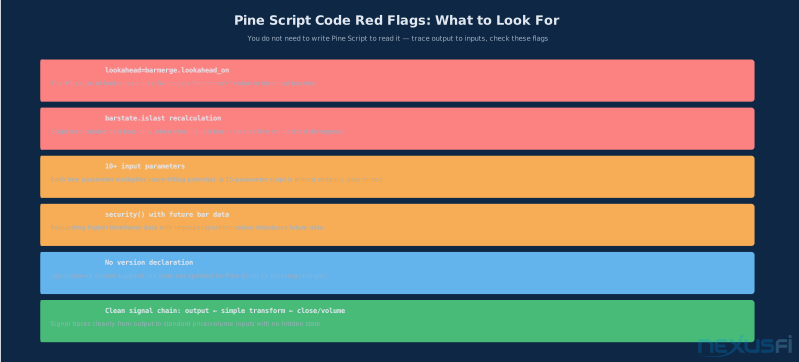
Any community script using lookahead=barmerge.lookahead_on in its Pine Script code is almost certainly a repainter. This single flag is responsible for more "amazing backtest, terrible live" failures than any other cause. Check every script you load.
Evaluating Code: Reading Pine Script Without Being a Developer #
You don't need to write Pine Script to evaluate it. A basic reading ability — tracing the signal chain backward from output to input — is enough to identify the most common failure modes.
Open Pine Editor by clicking the "Pine Editor" button at the bottom of any TradingView chart. Load the script's source and start at the bottom. The last few lines are almost always the output: plot() calls, strategy.entry() calls, or alertcondition() definitions. These tell you what the script produces.
Trace each output variable back to its definition. A chain like signal = ta.crossover(fastMA, slowMA) where fastMA = ta.ema(close, 8) and slowMA = ta.ema(close, 21) is clean: simple, auditable, no hidden state.
Red flags to look for during code inspection:
lookahead=barmerge.lookahead_on-- the most common cause of look-ahead bias. When a script requests higher timeframe data with lookahead enabled, it gets tomorrow's bar's value today in the historical backtest. Instant red flag.- Excessive parameters -- a script with 15+ input variables has enormous curve-fitting potential. Each additional free parameter increases the probability that performance in the backtest period reflects data mining rather than genuine edge.
- Future-bar references -- any variable referencing bars that haven't closed yet in live trading, or using
barstate.islastto recalculate past values. - Hidden
if barstate.islast thenblocks -- sometimes developers recalculate values only on the last bar for performance, producing live-backtest divergence.
@Fat Tails documented the curve-fitting mechanics directly:
If the code traces cleanly from output back to inputs through simple transformations — moving averages, ATR calculations, crossover logic — with no lookahead flags and no excessive parameter counts, you've passed the code inspection gate. Not proof of profitability, but proof of auditability.
Backtesting Reality: What TV's Strategy Tester Gets Wrong #
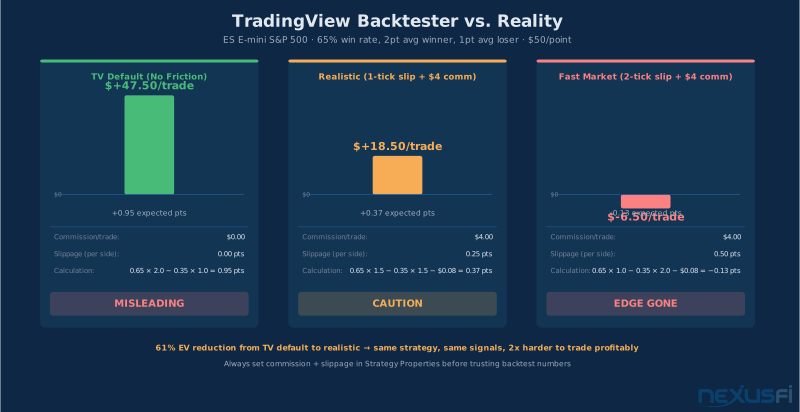
TradingView's Strategy Tester shows backtested results with zero commission, zero slippage, and best-case fill assumptions by default. For futures traders, this produces numbers that are flattering by a significant margin.
The math is straightforward. On ES (E-mini S&P 500), each tick is $12.50. A strategy showing a 65% win rate with 2-point average winners and 1-point average losers looks excellent in TV's tester: 0.65 × 2 - 0.35 × 1 = 0.95 expected points per trade. At $50/point, that's $47.50 expected value per trade.
Add realistic friction: 1 tick of slippage per side (common during fast moves), plus exchange + broker commissions of roughly $4 round-trip. The calculation becomes: 0.65 × (2 - 0.5) - 0.35 × (1 + 0.5) - $4/50 = 0.975 - 0.525 - 0.08 = 0.37 expected points per trade. Drop from $47.50 to $18.50 — a 61% reduction just from adding realistic friction.
The 20-50% win rate discount that experienced traders apply reflects this reality. @Big Mike's backtesting thread put it directly:
How to run a more honest backtest in TradingView:
- Enable commission in Strategy Properties. Use $4 round-trip for ES/NQ, $3 for YM, $5 for CL.
- Enable slippage. Start with 1 tick (0.25 for ES = $12.50). For active scalping strategies, use 2 ticks.
- Test across multiple years, not just the most recent bull run. Any strategy that only works in one volatility regime isn't a strategy -- it's regime detection error.
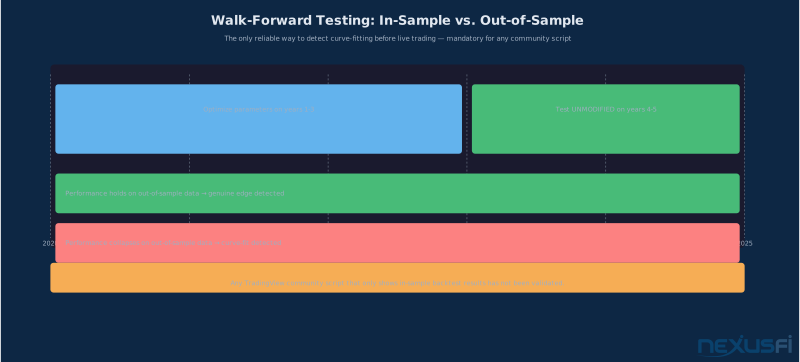
- Walk-forward testing: improve parameters on years 1-3, test unmodified on years 4-5. If performance collapses on the out-of-sample period, you've found a curve fit.
@kevinkdog's research on sustained algo success documented the noise problem directly:
Community scripts that publish their backtests usually show the optimistic numbers. Your job is to run the realistic version. Any strategy that doesn't survive realistic friction in a multi-year backtest doesn't survive live trading. For a deeper dive on backtesting methodology, see Backtesting Futures Strategies: What the Numbers Actually Tell You.
Building Your Stack: The Three-Layer Framework #
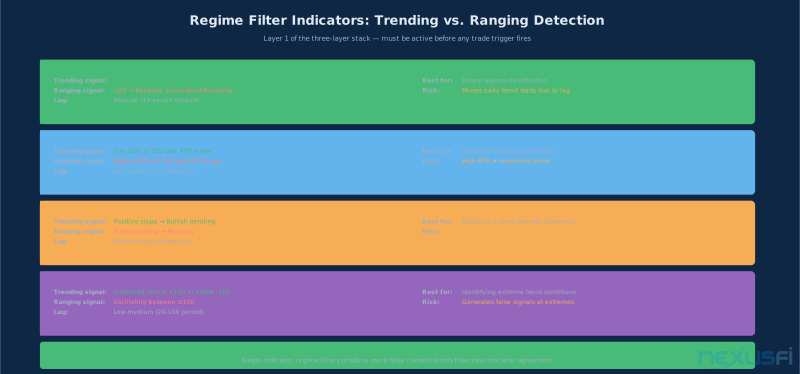
Single-indicator trading — relying on one community script to generate buy and sell signals — almost never survives live markets. Markets cycle between trending and ranging environments, between high- and low-volatility regimes, between news-driven and technical sessions. No single indicator performs equally across all of these.
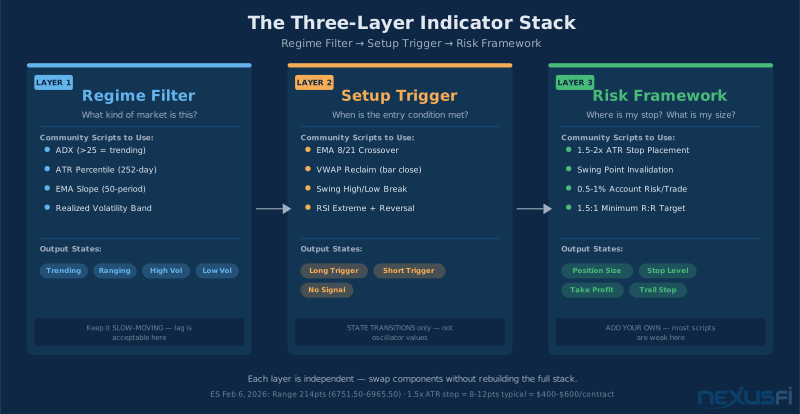
The framework that holds up is a three-layer stack: regime filter, setup trigger, and risk framework. Each layer uses a different community tool designed for its specific function.
Layer 1: Regime Filter
The regime filter answers "what kind of market is this right now?" before any trade decision happens. Its job is to prevent you from taking trend-following signals in a ranging market, or mean-reversion signals during a strong directional move.
Effective regime filters are slow-moving (lag is acceptable here — you want a filter, not a trigger), binary or near-binary in output (trending vs. not, volatile vs. not), and strong across different lookback periods. Community scripts that work well as regime filters:
- ADX (Average Directional Index) -- TV's built-in, or any of dozens of community variants. ADX above 25 indicates trending conditions, below 20 indicates ranging. Not perfect, but directionally correct and auditable.
- ATR Percentile -- compares current ATR to its historical distribution. When current ATR is in the top quintile of its 252-day range, you're in high-volatility regime.
- EMA Slope -- the rate of change of a 50 or 200-period EMA provides a direct read on trend strength and direction.
@Fat Tails built a detailed series on trading system building blocks, including trend filters:
Layer 2: Setup Trigger
The trigger layer operates within the regime the filter identifies. Trend triggers in trending markets. Mean-reversion triggers in ranging markets. The regime filter gates which triggers are active.
Triggers must be state-based — they fire on transitions, not on continuous oscillator values. A MACD histogram crossing zero is a state change. An RSI at 45 is a value. The first is tradeable. The second is noise.
Effective triggers for trending regimes: EMA crossovers (8/21 EMA for short-term, 21/55 for intermediate), swing high/low breaks with confirmation, VWAP reclaims after pullback (price drops below VWAP, then closes back above).
Effective triggers for ranging regimes: RSI extremes with reversal confirmation, mean reversion from Bollinger Band touches with inside bar confirmation, session open range extremes with rejection candles.
@jlwade123's discretionary vs. mechanical system thread illustrates the framework:
Layer 3: Risk Framework
This is where most community scripts are weakest, and where traders must add their own logic rather than relying on what the script provides. Stop placement, position sizing, and exit management are the difference between a signal and a trade.
The minimum viable risk framework:
- Stop placement: ATR-based (1.5-2x ATR from entry) or structural (below/above the most recent swing point). Never arbitrary fixed-point stops unless the instrument's typical range justifies it.
- Position sizing: risk a fixed percentage of account (0.5-1% per trade maximum) rather than a fixed contract count. As account size changes, position size adjusts automatically.
- Exit management: either a target at a defined R:R (1.5:1 minimum), a trailing stop using the same ATR calculation as entry, or a time-based exit if neither is hit.
On ES with Feb 6, 2026 data as a reference (open: 6785.50, high: 6965.50, low: 6751.50, daily range: 214 points), a 1.5x ATR stop on a typical trend day might represent 8-12 points — $400-600 of risk per contract. A 1% risk rule on a $50,000 account allows $500 of risk, corresponding to roughly 1 contract at this stop size. That's disciplined allocation, not leverage-driven sizing.
Setting Up Alerts That Actually Work #
TradingView's alert system is one of the platform's most valuable features for active traders who need reliable notification without automated execution. Most traders misconfigure alerts and end up with either silence when they need signals, or constant noise they start ignoring.
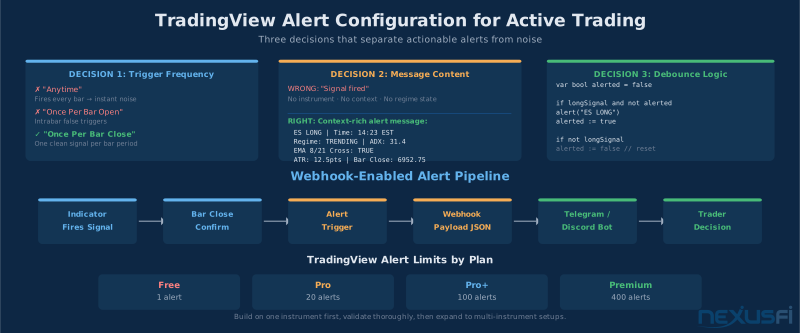
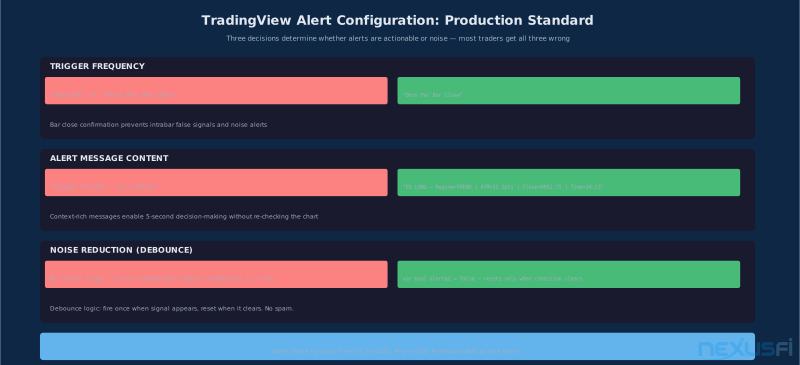
The most common mistake: setting alerts to fire "Anytime" or "Once Per Bar Open" on indicators that produce continuous oscillating values. These fire constantly and become meaningless. The right configuration for almost any indicator-based alert is "Once Per Bar Close" — you get one notification per bar period when a condition is met, confirming that the signal existed at the bar's close rather than during intrabar noise.
NexusFi member @bwolf documented TradingView's phone call alert capabilities:
Alert message content matters as much as trigger configuration. An alert that just says "Signal" tells you nothing actionable. An alert message that says "ES LONG — Regime=TRENDING, EMA8/21 cross, ATR=12.50pts, Bar Close=6952.75, Time=14:23" gives you everything you need to make a decision in 5 seconds.
To write context-rich alert messages in Pine Script:
alertcondition(
    longSignal,
    title='Long Signal',
    message='ES LONG - Regime: ' + str.tostring(regimeActive) +
            ' | EMA Cross: true' +
            ' | ATR: ' + str.tostring(atr, '#.##') +
            ' | Close: ' + str.tostring(close, '#.##')
)
Noise reduction is the second priority. Add a state flag that prevents re-alerting on the same condition:
var bool alerted = false
if longSignal and not alerted
    alert('Long signal confirmed', alert.freq_once_per_bar_close)
    alerted := true
if not longSignal
    alerted := false
This pattern fires once when the signal first appears, then resets when it clears. No spam. Clean, actionable notifications. For a deeper look at alert architecture, see TradingView Alerts: Price, Indicator, Drawing, and Webhook Alerts.
TradingView's webhook integration allows alerts to trigger external systems. Alert limits by plan tier matter for multi-indicator setups: Free accounts get 1 active alert, Pro gets 20, Pro+ gets 100, Premium gets 400. Build your stack on one instrument first, validate it, then expand.
Using the Screener for Futures Traders #
TradingView's built-in screener works well for equities. For futures traders, its utility is narrower — most futures traders track a defined set of contracts: ES, NQ, CL, GC, ZB, and a handful of others. The screener's multi-asset scanning value mostly doesn't apply.
Where it does provide value for futures traders is timeframe and regime selection:
- Identify which contract is in the most favorable regime right now. Filter by trend strength (ADX, EMA slope), volatility regime (ATR percentile), and session activity. If you trade multiple instruments, this narrows focus to whoever has the best setup.
- Cross-timeframe regime confirmation. Use the screener to check whether daily, 4-hour, and 1-hour charts all agree on regime for a given instrument. All three pointing the same direction is a higher-quality setup than a 15-minute trigger without higher timeframe alignment.
- Alert on screener outputs. TradingView allows alerts on screener filter changes. When an instrument switches from "not in screener" to "in screener" based on a technical filter, that transition itself is a signal worth tracking.
For equity futures traders specifically (ES, NQ, YM), screener-based analysis applies more productively to the underlying stocks in the index than to the index futures themselves. Screening for sector leadership, breadth indicators, or individual stock setups can inform futures directional bias without creating direct trading signals from the screener.
The futures screener use case differs at the core from equities. Rather than scanning for breakout stocks, use it to confirm that your target instruments (ES, NQ, CL) are in the right regime before the session starts. Five minutes of pre-market screener review replaces hours of watchlist monitoring.
Free vs. Paid: Does Price Matter? #
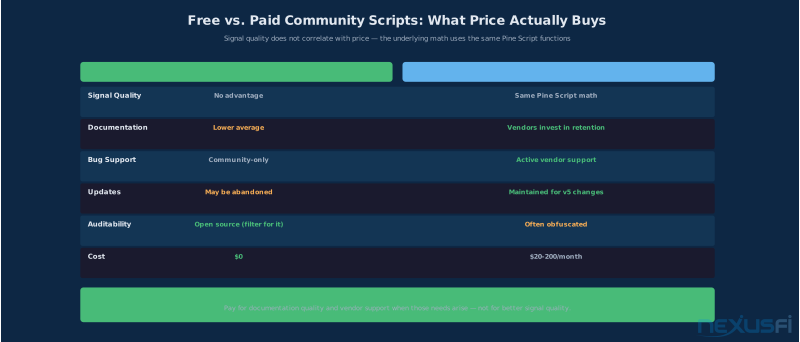
TradingView's marketplace includes paid Pine Script subscriptions (LuxAlgo, Indicator Vault, dozens of individual vendors) ranging from $20/month to $200+/month. The question of whether paid scripts outperform free community scripts doesn't have a clean universal answer — but the evidence leans in a specific direction.
Paid scripts have two genuine advantages over the average free script: documentation quality (paid vendors invest in explaining their tools because their revenue depends on retention) and ongoing support (paid vendors fix bugs, update for Pine Script version changes, and respond to user-identified edge cases).
The claim that paid scripts have better signals than top-liked free scripts doesn't hold up under scrutiny. The underlying math — trend detection, momentum calculation, volatility measurement — uses the same data sources and the same Pine Script functions whether the script costs $0 or $100/month.
NexusFi members reach the same conclusion. In the NexGen indicators review thread, @Fi noted:
@Hiccup's discussion in "How did you learn what you know about trading?" put it directly:
The practical answer: start with high-liked open-source community scripts and do the evaluation work described in this article. If after proper backtesting and forward testing you identify a specific gap that a paid solution addresses — better documentation, active support, a unique calculation you can't replicate — then the paid option is justified. Don't pay for the premise that paid means better signal quality.
Turning Scripts into a Trading System #
The final step — converting a stack of evaluated community scripts into a documented, repeatable system — is where most traders stop short. They run the backtest, see acceptable results, and start trading. The documentation step gets skipped because it doesn't feel like trading.
It's the most important step.
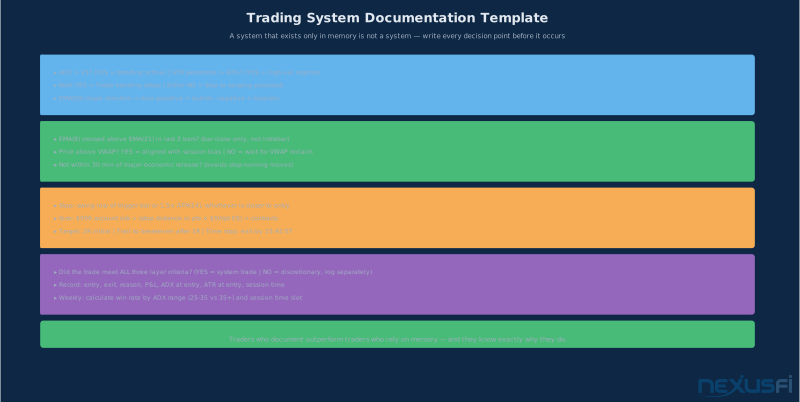
A documented trading system means every decision point is written down before the trade occurs. Not intuition. Not "I'll know it when I see it." Specific criteria. The decision tree format works better than prose:
REGIME CHECK:
- Is ADX above 25? (Yes = trending regime active, No = skip to ranging rules)
- Is EMA(50) slope positive? (Yes = bullish bias, No = bearish bias)
- Did EMA(8) cross above EMA(21) in the last 3 bars? (Yes = trigger valid)
- Is this on bar close? (Must be bar close confirmed)
- Is price above VWAP? (Yes = aligned, No = wait for reclaim)
- ATR(14) at signal bar = X points
- Stop = below swing low or 1.5x ATR, whichever is closer
- Size = ($500 account risk) / (stop in points x $50/point)
- Initial target = 2R from entry
- Trail stop to breakeven after 1R
This format makes two things possible that feel impossible when the system lives in your head: post-trade review (did the trade meet criteria, or did you bend the rules?) and consistent behavior across sessions. Rules you can't articulate can't be enforced. Rules you can't enforce don't exist as a system.
Track performance metrics per condition: win rate when ADX is 25-35 vs. 35+ (higher ADX often doesn't mean better performance, just more extreme trending), average holding time by session (RTH vs. Globex behavior differs much), and P&L by instrument when running the system on multiple futures contracts.
For building custom indicators beyond community scripts, see Pine Script v5 Fundamentals: Writing Your First TradingView Indicator. For custom indicator and strategy scripting frameworks, Custom Indicators and Strategy Scripting covers building and deploying your own tools.
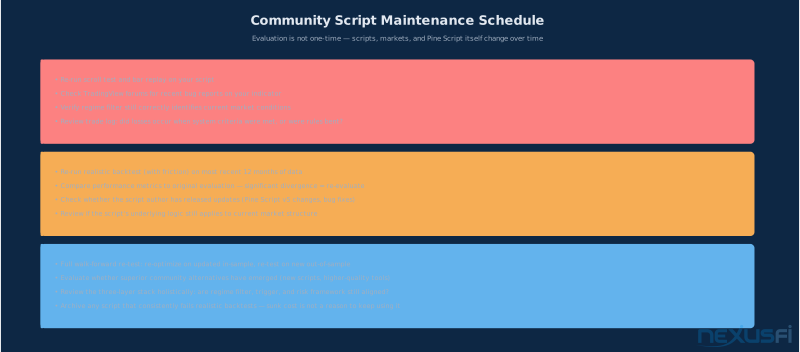
Performance evaluation is ongoing. Community scripts change, markets change, and a script that worked in 2024 may behave differently in 2026 after TradingView updates its Pine Script interpreter or after major market structure shifts. Schedule quarterly reviews. Re-run backtests with updated data. Check whether your evaluation from six months ago still holds.
The traders who extract real value from TradingView's community library aren't using more scripts than everyone else. They're using fewer, evaluated more rigorously, documented explicitly, and reviewed systematically. That's the difference between a chart that looks impressive and a system that holds up under live conditions.
Key Takeaways #
- The TradingView community library has 200,000+ scripts. The top 1-2% with strong like counts and open-source code deserve serious evaluation. The rest deserve skepticism.
- Repainting is the primary failure mode. Test every script with the scroll test and Bar Replay before committing to evaluation. If it changes history, it's disqualified.
- Code inspection requires reading, not programming expertise. Trace from output back to inputs. Flag
lookahead=barmerge.lookahead_on, excessive parameters, and anything that references future bars. - Backtesting on TV requires adding commission and slippage manually. Expect realistic results to be 20-50% worse than the default tester shows. Walk-forward testing on out-of-sample data catches curve fits.
- The three-layer stack -- regime filter, setup trigger, risk framework -- creates a testable, improvable system from community scripts. Each layer is replaceable without rebuilding the whole structure.
- Alert configuration is make-or-break for active trading use. "Once Per Bar Close" for reliability. Context-rich alert messages. Debounce logic to prevent spam.
- Paid scripts don't outperform top-liked free scripts on signal quality. Pay for documentation quality and support when those matter, not for the premise that paid means better edge.
- The system lives in the document, not in your head. Write the decision tree. Track performance per condition. Review quarterly.
Further Reading #
For context on the broader TradingView platform and how it fits into a futures trading workflow, see TradingView: The Charting and Analysis Platform Futures Traders Actually Use. For Pine Script development beyond evaluating community scripts, Pine Script v5 Fundamentals covers writing your own indicators from scratch. For alert architecture using the indicators you select, TradingView Alerts covers price, indicator, drawing, and webhook alert design in depth. For the backtesting discipline that determines whether a script genuinely has edge, Backtesting Futures Strategies covers methodology, walk-forward testing, and realistic performance evaluation.
Knowledge Map
Prerequisites
Understand these firstGo Deeper
Build on this knowledgeCitations
- — Optimization without curve fitting (2009) 👍 1“The results will not be as good as the backtest. However there is a greater risk of curve fitting due to the increased rules and degrees of freedom.”
- — Confirmed Indicators that do not repaint (2009) 👍 7“What is repainting? Repainting is when an indicator repaints the past or not.”
- — All you need (2009) 👍 1“I prefer not-repainting for one reason: If you go back and look at historical charts and your indicator is repainting, you won't see the same thing you saw in real-time.”
- — An experiment on curve fitting (2010) 👍 3“If curve-fitting means translating such repetitive behavior into a period of a moving average, then curve-fitting will work as long as the market continues to exhibit this behavior.”
- — Building Blocks of a Trading System (1) - Trend Filter (2010) 👍 6“The CCI can also be used as a trendfilter. Similar as with momentum, you should use a period such as 100.”
- — Does backtesting work? (2011) 👍 2“Out of sample data is critical for a meaningful backtest, yet most traders don't do it.”
- — Discretionary Trading System vs. Mechanical Trading System (2013) 👍 2“This system uses the 256 Tick Chart for entries and exits. I do not take additional trades if a trade is entered into.”
- — Sustained success with an algo (2022) 👍 3“The problem, from my research, is that regardless of the back test period length, there is noise in the data.”
- — Tradingview Phone Call Alert (2023) 👍 5“Just right-click your chart where you normally set up the alerts, add a webhook for these guys, and get alert calls. Cheap too.”
- — NexGen indicators and review (2026)“Traders who succeeded with it would've succeeded with free tools once they understood context and skill.”
- — How did you learn what you know about trading? (2024) 👍 4“The gurus I got lasting benefit from did not sell indicators, instead they sold monthly subscriptions to their trade room.”