



thinkorswim: The All-in-One Trading Platform That Does Everything Pretty Well and Nothing Best
thinkorswim is the Swiss Army knife of retail trading platforms. Originally built for options traders, acquired by TD Ameritrade, and now owned by Charles Schwab, it's evolved into a full-spectrum platform that handles stocks, options, futures, and forex from a single interface. For futures traders, that "does everything" positioning is both its greatest strength and its most honest limitation.
Here's the deal: if you trade ES during the day, sell premium on SPX options after lunch, and hold some equities in a retirement account, thinkorswim lets you do all of that without switching platforms or managing multiple accounts. That integration isn't trivial. But if you're a dedicated futures scalper who needs microsecond DOM execution and footprint charts, you're going to hit walls that platforms like NinjaTrader and Sierra Chart were specifically built to avoid.
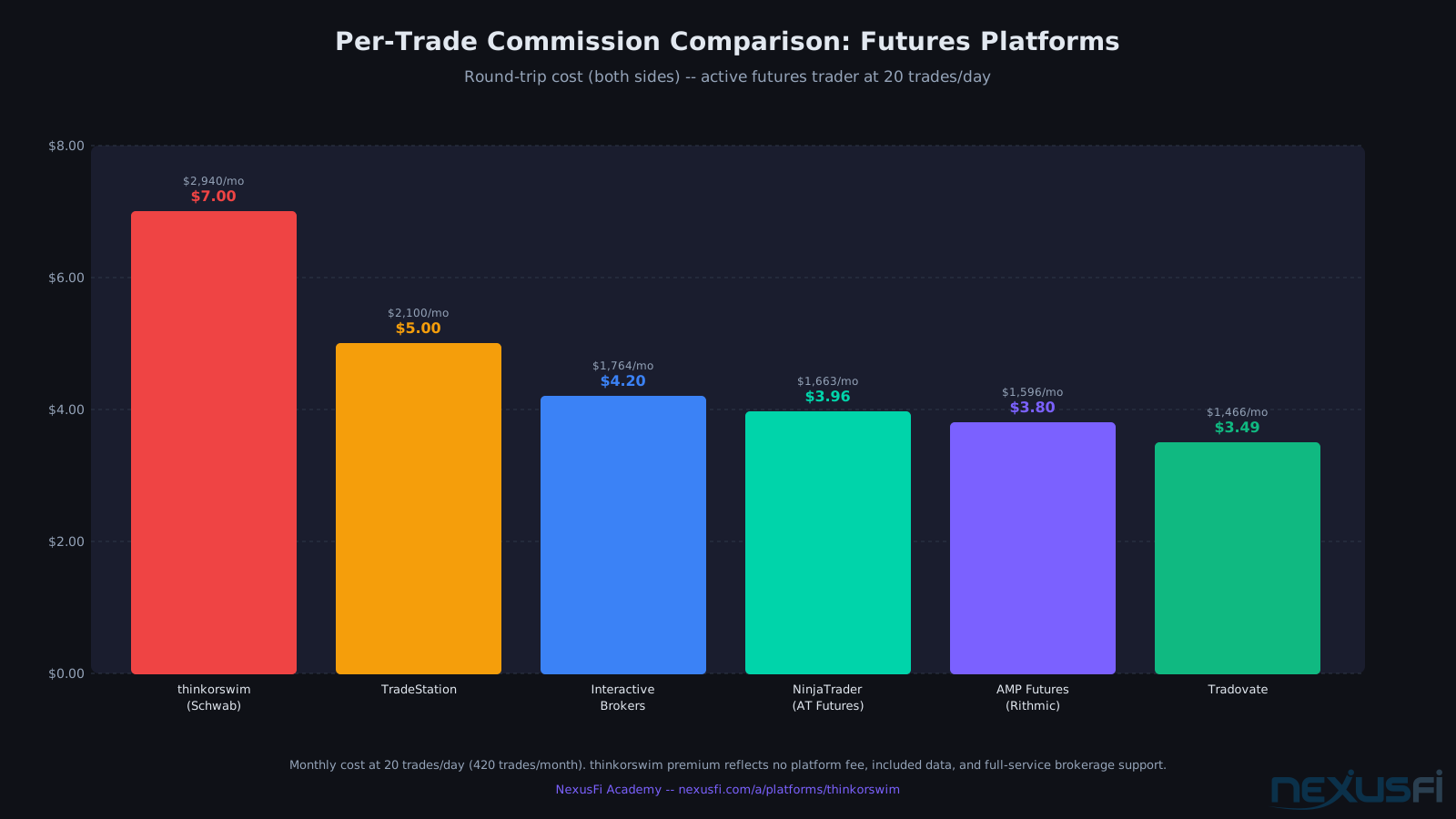
The platform is free for Schwab clients. No monthly software fee. That's a real advantage — but the cost shows up in higher per-contract commissions compared to boutique futures brokers, and that spread adds up fast at scale.
Platform Reality Check thinkorswim is best for: options traders who also trade futures, buy-and-hold investors who dabble in futures, and paper traders learning multiple asset classes. It is NOT optimized for: pure futures scalpers, high-frequency traders, or anyone who needs sub-millisecond execution reliability.
Overview #
thinkorswim is TD Ameritrade's (now Schwab's) flagship trading platform — and it's genuinely impressive for what it is. Multi-asset. Paper trading built in. Options analytics that serious derivatives traders actually use. Futures, stocks, forex, all under one roof.
The honest assessment: thinkorswim does a lot of things well and nothing at an elite level for futures. It's built for retail versatility, not for the speed and depth that active futures scalpers need. If you trade futures options alongside outright futures, or if you want one platform that handles your whole book, thinkorswim is a legitimate choice. If futures are your sole focus and execution quality is critical, you should look at NinjaTrader or Sierra Chart.
Key Concepts #
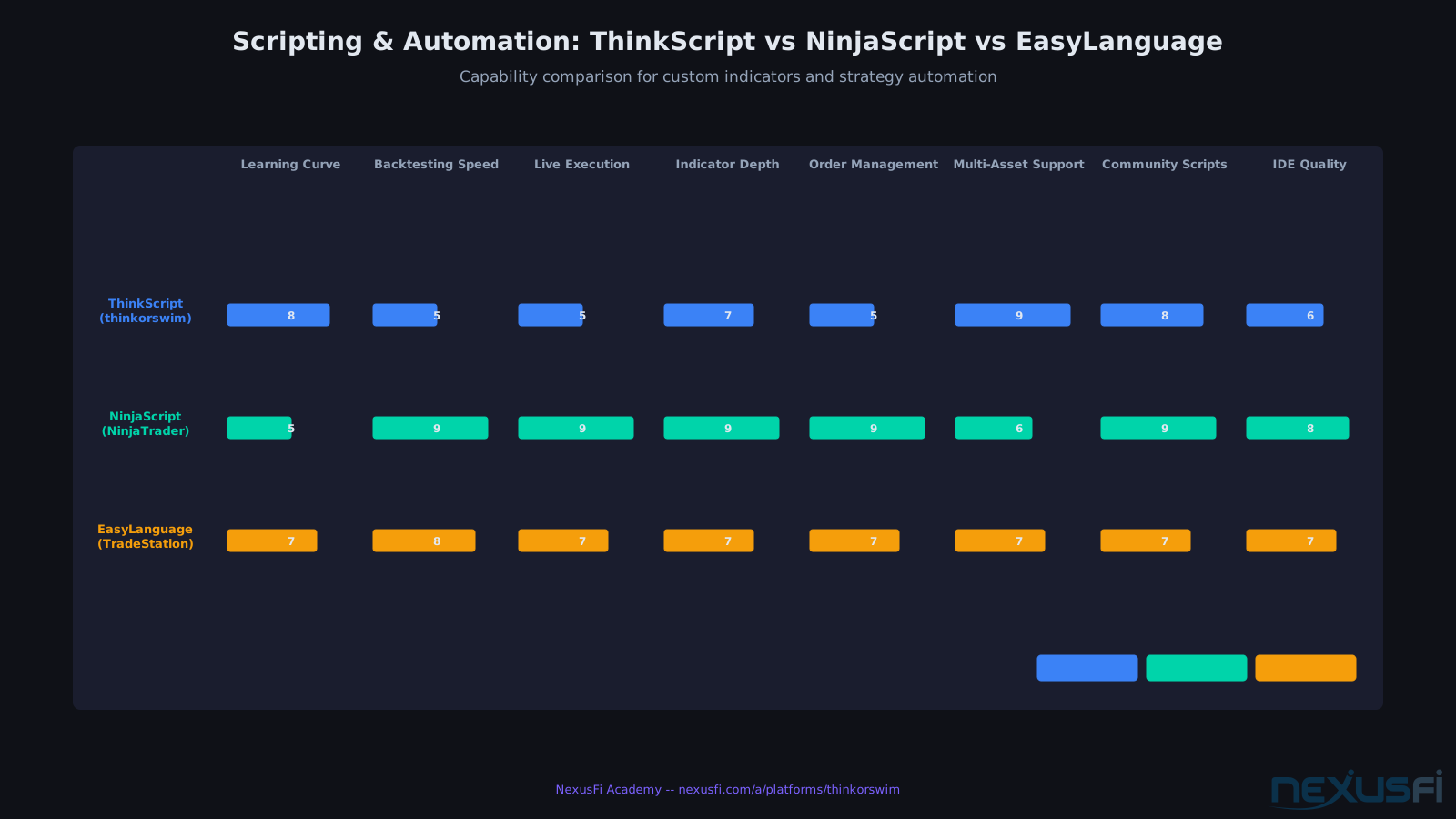
thinkScript — thinkorswim's proprietary programming language for building custom indicators, strategies, and scans. It's accessible enough that non-programmers can modify existing scripts, and powerful enough that experienced coders build sophisticated trading systems with it. It's not NinjaScript or EasyLanguage, but for most discretionary traders, it gets the job done.
OnDemand — A historical market replay feature that lets you practice trading on past data as if it were happening live. This is genuinely unique among retail platforms and valuable for drilling execution without risking capital. Don't confuse it with paper trading — OnDemand replays specific historical sessions, while paper trading runs against live data with simulated fills.
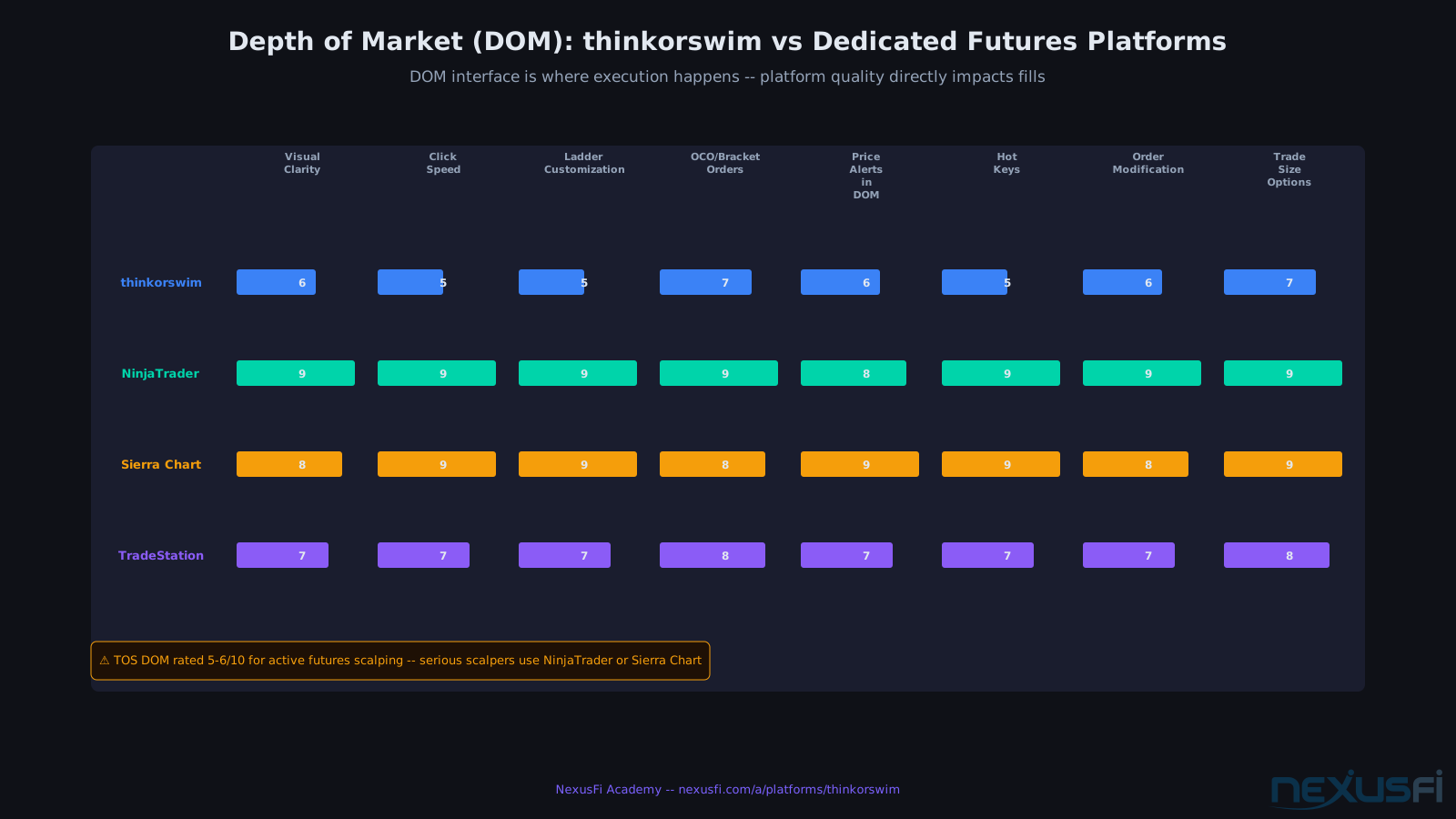
Active Trader — The platform's dedicated order-entry ladder and DOM (Depth of Market) interface for futures execution. Functional for swing trading and moderate-pace day trading, but noticeably slower than purpose-built alternatives during fast markets.
Analyze tab — thinkorswim's risk analysis workspace, especially strong for options. Greeks, probability cones, P&L diagrams, and volatility surfaces all live here. For futures options traders, this tab alone justifies keeping thinkorswim in your toolkit even if you execute futures elsewhere.
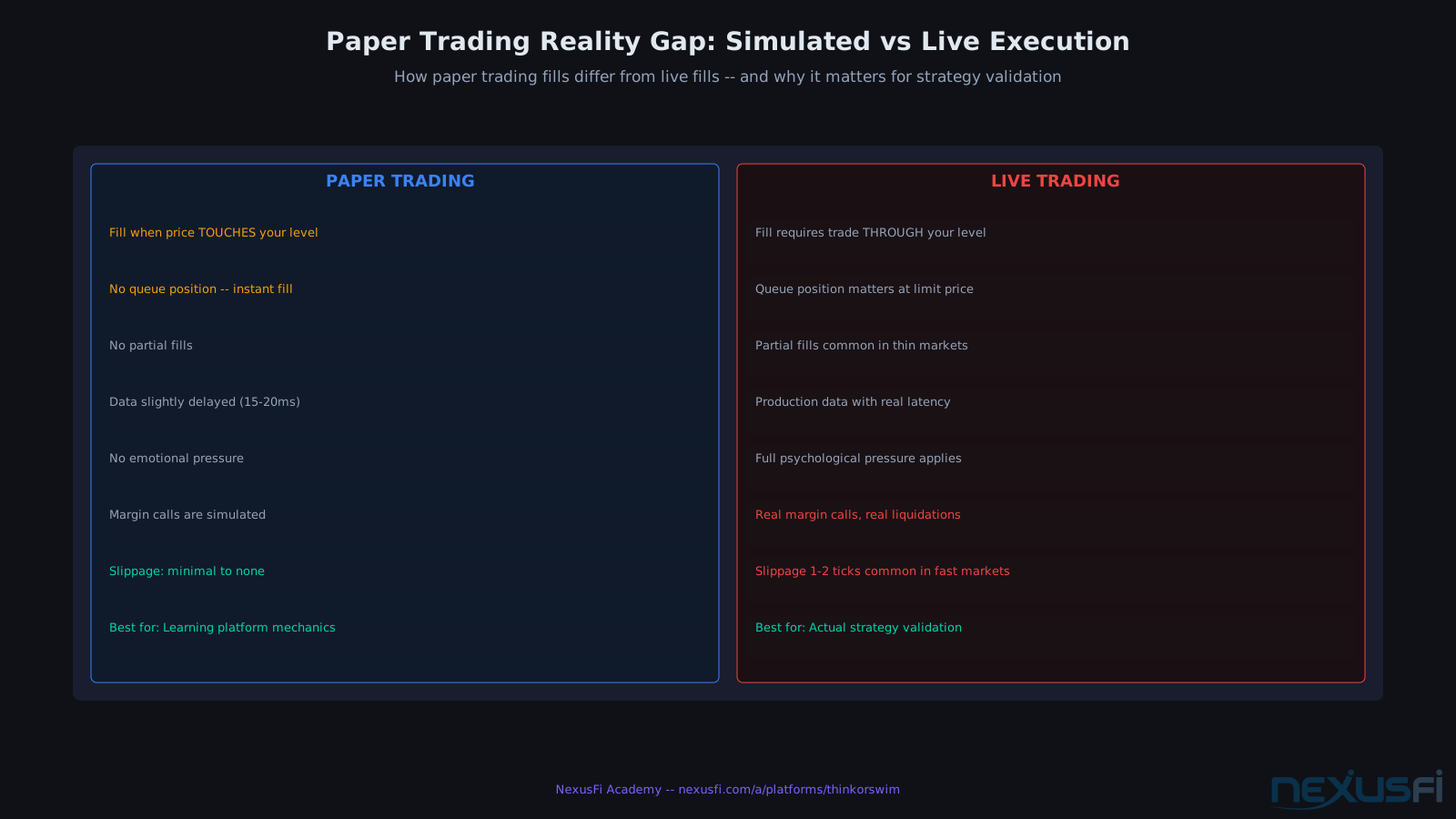
Paper trading mode — A separate simulated account running against live market data with fake capital. Useful for platform familiarization and testing strategies, but fills are idealized — not a reliable predictor of real execution quality.
Gadgets — Widget-style mini-applications that can be embedded in thinkorswim workspaces. Heat maps, economic calendars, watchlists, and more live as gadgets that update live alongside your charts.
History and Evolution #
thinkorswim started in 1999 as a dedicated options brokerage founded by Tom Sosnoff (who later created tastytrade and tastyworks). The platform was purpose-built for options trading from day one — Greeks visualization, multi-leg strategy construction, and risk analysis were core DNA, not bolted-on afterthoughts.
TD Ameritrade acquired thinkorswim in 2009 for $606 million, signaling that serious retail trading tools had real market value. Under TD Ameritrade, the platform expanded into futures, forex, and advanced charting while maintaining its options-first architecture. Futures trading was added incrementally — first as a product offering, then with dedicated tools like Active Trader.
Charles Schwab completed its acquisition of TD Ameritrade in 2020, and the platform became "thinkorswim by Charles Schwab." The transition has been gradual, with Schwab maintaining the thinkorswim interface while integrating it into Schwab's broader brokerage infrastructure. For futures traders, the practical impact has been minimal — same platform, same tools, different logo on the statements.
The key takeaway from this history: thinkorswim was built by options traders for options traders, then expanded to cover futures. NinjaTrader and Sierra Chart went the opposite direction — built for futures first. That heritage shows in the details.
One significant evolution post-Schwab acquisition: the web-based thinkorswim platform received significant investment and now handles a meaningful portion of trading functions without requiring the desktop application. This matters for traders who work across multiple machines or OS environments.
Core Features for Futures Trading #
Charting #
thinkorswim's charting engine is genuinely strong. Multi-timeframe layouts, 400+ built-in studies, flexible drawing tools, and clean visual presentation. You can build workspace layouts with linked chart groups where changing a symbol updates every chart simultaneously.
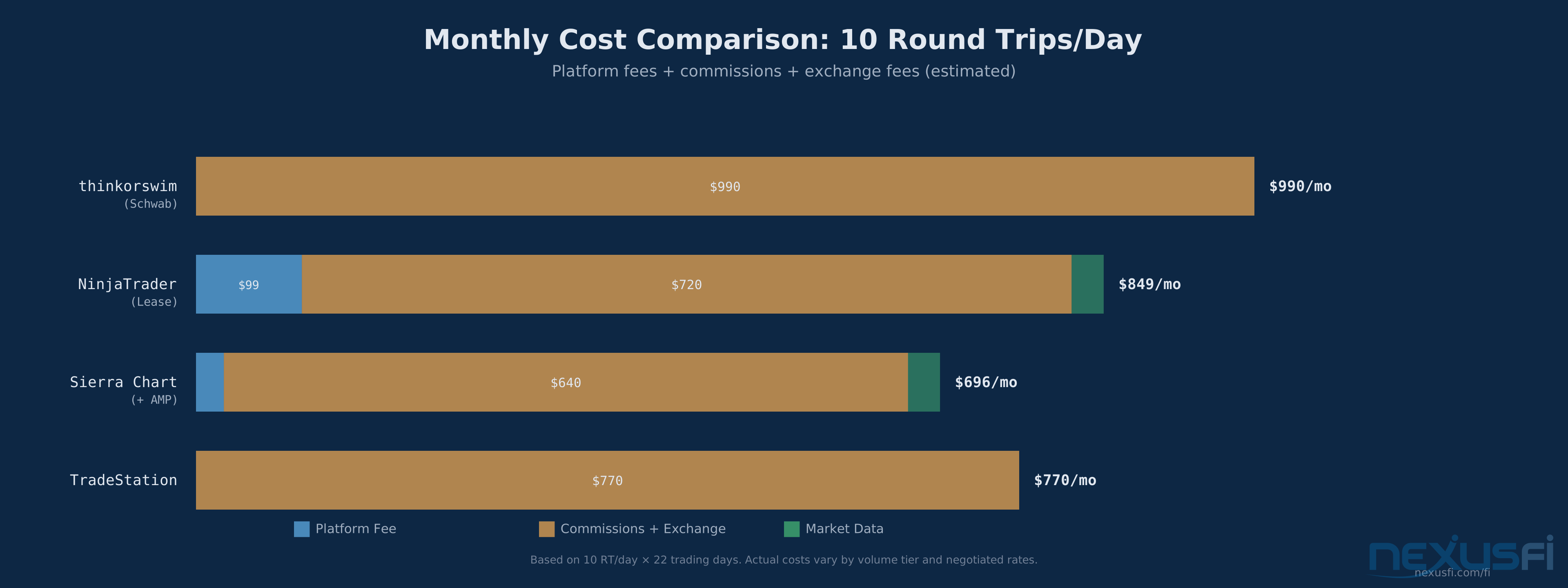
Where it falls short: resource consumption. thinkorswim is a Java application, and it shows. Running 8+ charts with multiple indicators can consume 4-8GB of RAM. As one NexusFi community member noted, "TOS chart lags during high volatility" (post #832099).
Chart types supported include standard OHLC bars, candlesticks, Heikin-Ashi, Renko, point-and-figure, and line charts. Tick and range bars are available, but the options are more limited than Sierra Chart or NinjaTrader. Volume profile studies exist through the built-in study library — the implementation is solid for a bundled tool but doesn't match dedicated volume profile platforms.
Active Trader (DOM/Order Entry) #
The Active Trader ladder provides a functional DOM with one-click execution, bracket orders, and basic position management. A NexusFi member trading 200 contracts per day confirmed it works well for moderate-pace trading (post #475876).
But for aggressive scalping, the gap widens. Another community member reported: "TOS DOM horribly lags and slips compared to NT with Zen-fire" (post #139497). This isn't a universal experience — it depends on your trade frequency and tick-chasing style. For swing entries on futures, the DOM is completely adequate. For 1-2 tick scalps in fast markets, it's a meaningful handicap.
The Active Trader interface also lacks thinkorswim's more sophisticated order types — it's simplified for speed, not for complex conditional strategies. You can place OCO (One-Cancels-Other) orders and basic stop-limit brackets, but nothing approaching NinjaTrader's ATM (Advanced Trade Management) capability.
(post #86624). That's the honest assessment — functional, not elite-level, for futures-specific order management.
thinkScript #
thinkScript is one of thinkorswim's genuine differentiators. The NexusFi ThinkOrSwim forum has hundreds of shared scripts covering opening range plots, custom VWAP calculations, and tick fade indicators.
What it can't do: thinkScript doesn't support full automated execution in the way NinjaScript or EasyLanguage do. The backtesting engine lacks tick-level granularity and fill-modeling transparency.
Options Analytics #
This is where thinkorswim has no peer in the retail space. Complete options chains with real-time Greeks, multi-leg strategy construction, probability analysis cones, risk profiles, and volatility surface visualization.
Paper Trading and OnDemand #
Standard paper trading is "only useful for learning the platform and not for seeing how your method would do in real trading" (post #137555). OnDemand replays historical market data tick-by-tick — a genuinely rare and valuable capability.
thinkScript: A Deeper Look #
thinkScript deserves more than a paragraph. It's the reason many traders stay on thinkorswim even after they've outgrown its execution capabilities.
The language is similar to C# in structure but designed for financial calculations. It operates on bars of data and is event-driven — scripts run on each bar's close, tick, or custom aggregation period. Variables retain state across bars, which makes implementing things like VWAP accumulation and running volume totals straightforward.
What thinkScript does well:
Custom studies and indicators are the core use case. Opening range breakout levels, VWAP with standard deviation bands, custom moving averages with spread alerts, cumulative delta calculations — all of these are readily buildable. The NexusFi ThinkOrSwim community maintains an active library of shared scripts.
(post #773080). That kind of practical, ready-to-use script is typical of what the community produces.
Scans are another thinkScript strength. You can screen the entire futures market for conditions like "ES volume spike above 50k in last 5 minutes" or "CL ATR expanding by X%" — real-time screening against live data. That's not trivial to build in most platforms.
Conditional orders can be triggered by thinkScript conditions. An alert that fires when a custom indicator crosses a threshold, then auto-submits a limit order — that's possible in thinkorswim in ways that don't require full algo development.
The limitations traders hit:
Tick-by-tick strategy testing isn't available. thinkScript backtests execute on bar closes, not individual ticks, which means your fill simulation is naturally optimistic. Every limit order fills if the bar touches the price. Real execution is messier. For strategies that depend on specific fill timing within a bar, thinkScript backtesting produces results that can't be trusted at face value.
Execution automation is limited. thinkScript can trigger alerts and even submit orders conditionally, but it's not a full strategy automation engine. You can't build a high-frequency strategy or one that reacts to order book changes. For rule-based systematic strategies that need more than simple trigger logic, you're better served by NinjaScript or Python-based algo frameworks.
The language is proprietary and doesn't export cleanly. Moving a strategy from thinkScript to another platform means rewriting it. The ecosystem lock-in is real.
For NexusFi community members building custom indicators,
(post #132815). This kind of community knowledge-sharing is what makes the thinkScript ecosystem genuinely valuable despite the platform's technical limitations.
Setting Up Your thinkorswim Workspace for Futures #
A poorly configured thinkorswim workspace is slow and frustrating. A well-configured one is actually pleasant to trade from. Here's how experienced futures traders structure their setups.
Hardware minimums that actually matter:
thinkorswim is RAM-hungry. 16GB minimum for serious use, 32GB if you run 8+ charts with multiple studies. CPU matters more than GPU — most of the rendering is single-threaded, so raw clock speed on one or two cores matters. A fast SSD helps with startup and workspace loading time. thinkorswim running on 8GB RAM with simultaneous browser tabs and communication tools is asking for trouble.
Workspace organization that works:
Experienced traders split their workspace by function: one grid for chart analysis, one for order entry (Active Trader), and one for position/P&L monitoring. The linked symbol groups are the key feature here — assign Chart Group 1 to your primary futures chart, the DOM, and your Time & Sales window, so they all update when you change the symbol in any of them.
The default workspace tries to do too much on a single screen. Learn to create separate workspaces (File → New Workspace) and switch between them with keyboard shortcuts. An analysis workspace can have 6+ charts in different timeframes. An execution workspace has the DOM, T&S, and P&L at the center. Don't try to run both on one screen unless you have 32 inches or more of display real estate.
Performance settings that help:
In the Setup menu, memory allocation is adjustable up to 4096MB. Set this to at least 2048MB and restart. Disable "Fetch extended hours" for instruments you don't trade overnight — this reduces background data polling. Limit the number of active studies on charts you're not actively watching.
The Java garbage collection that plagues TOS performance is worse on machines with older Java versions. thinkorswim installs its own JVM, so you don't need to manage this manually, but keeping the platform updated matters. Stale installations run measurably slower.
Chart configuration for futures:
Start with a primary trading chart (2-minute or 5-minute for day trading, 30-minute for swing), add a context chart (1-hour or daily), and a lower timeframe (30-second or 1-minute) for entry refinement. Volume profile can be added as a study via the built-in "OnBalanceVolume" or community-shared thinkScript VWAP implementations. The VWAP study in the default library is adequate but doesn't offer VWAP standard deviation bands natively — that's a thinkScript add-on.
The Analyze Tab: Where thinkorswim Shines #
The Analyze tab is thinkorswim's crown jewel, and it's primarily built for options. But futures options traders — and any trader managing complex risk across asset classes — will find it indispensable.
Risk Profile visualizations:
Load any position into the Analyze tab and you get a P&L curve plotting expected profit/loss across a range of underlying prices. For futures options like ES options (EW) or CL options (OB), this visualization shows exactly where your trade makes and loses money across price scenarios. Add a date slider and you see how time decay eats into your position as expiration approaches.
Probability cones visualize the market's implied prediction of where price might end up at expiration. These aren't analysis tools — they're derived from implied volatility and show what the options market is pricing in. For traders selling premium, this context is essential for strike selection.
The "What if" functionality:
You can model positions before entering them. Build a hypothetical multi-leg structure — a ratio spread, a defined-risk fly, a futures position combined with options hedges — and see the full risk profile before committing capital. This pre-trade visualization is something no other retail platform does as cleanly.
Greeks panel:
Position Greeks (Delta, Gamma, Theta, Vega) aggregate across your entire portfolio in real-time. Running a mixed book of futures and options? The Analyze tab shows your total portfolio delta (net directional exposure), your daily theta (time decay income), and your gamma risk (how fast delta changes). These are desk-level tools available to retail traders for free.
Volatility surface and skew:
The volchart sub-tab within Analyze shows implied volatility across strikes and expirations. This is useful for identifying where the market is pricing in premium — high IV in specific strikes often corresponds to expected events (FOMC, economic data releases, earnings). Futures traders who also trade options on the underlying futures benefit directly from this visualization.
Data Feeds and Market Access #
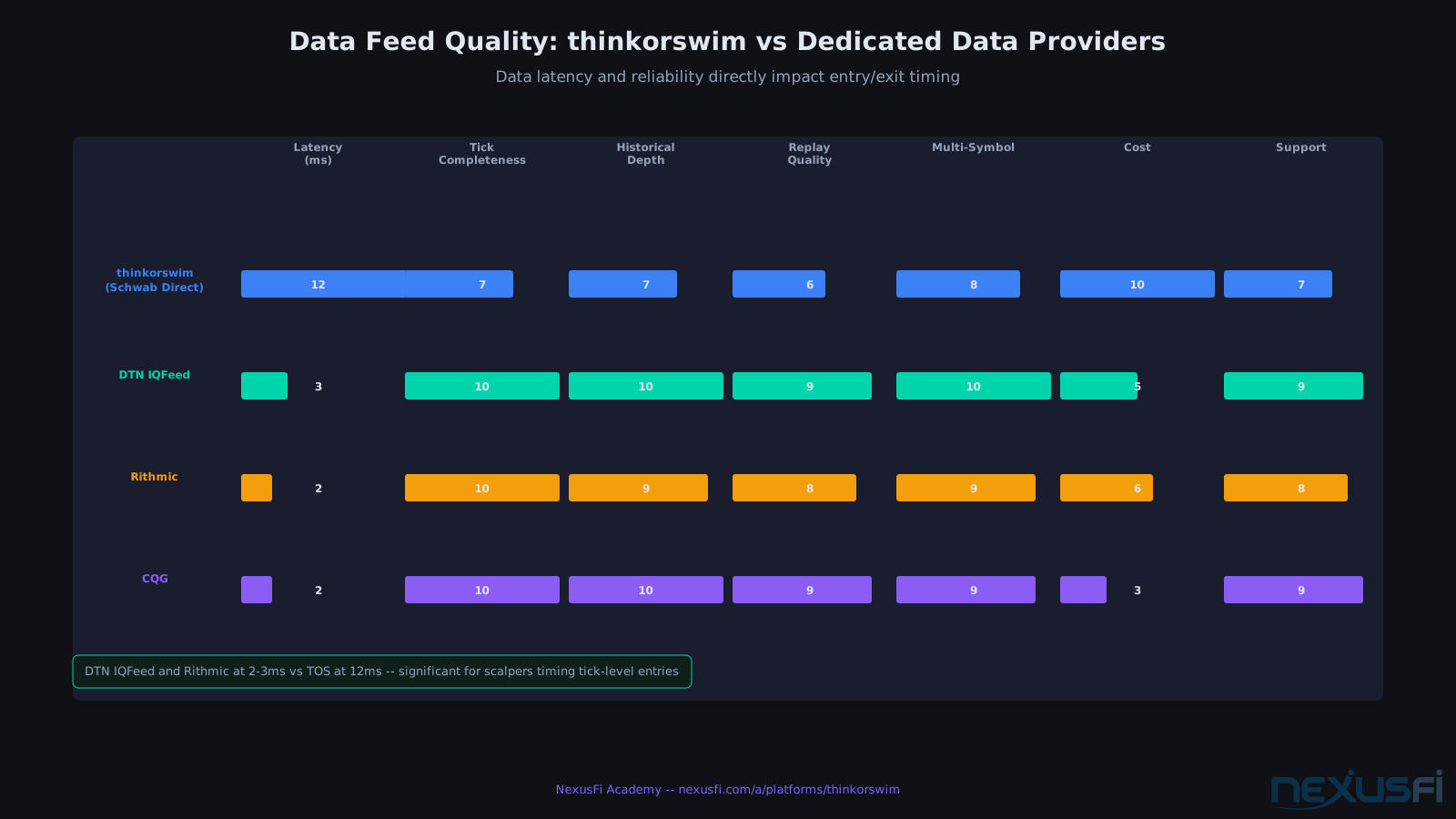
thinkorswim provides direct exchange data feeds from CME Group (CME, CBOT, NYMEX, COMEX) and select coverage from ICE and Eurex. Data quality is solid for retail and active trading use cases.
The tradeoff versus Sierra Chart: less transparency and control. thinkorswim's data is broker-managed — you can't configure backup feeds, validate data integrity independently, or connect third-party data providers.
Supported instruments cover the full CME Group product suite: equity index futures (ES, NQ, YM, RTY), energy (CL, NG), metals (GC, SI), agriculture (ZC, ZS, ZW), currencies (6E, 6J, 6B), and Treasury futures (ZN, ZB, ZF). Micro contracts (MES, MNQ, MCL) are fully supported.
An important data note: as
(post #188182). Feed stability during high-volatility sessions matters more than most traders think until their platform fails at exactly the wrong moment.
Advanced Order Management #
thinkorswim handles standard order types competently: market, limit, stop, stop-limit, and trailing stops. For futures, the relevant advanced types are:
OCO (One-Cancels-Other): Enter with a limit at your target and a stop below simultaneously. When one fills, the other cancels. This is standard bracket order functionality and works reliably in thinkorswim.
First Triggers Sequence: A conditional order that triggers an OCO when your entry fills. You set up the entire entry + management structure before entering the trade. Less sophisticated than NinjaTrader's ATM (which handles partial fills, scaling, and dynamic adjustments), but adequate for position trading and swing approaches.
Conditional orders: Triggered by price, time, or even thinkScript condition evaluation. "If ES closes above 5000 on the daily chart, submit a limit order to buy 1 contract at 5001.25." This kind of logic is genuinely useful for planned entries.
What's missing compared to dedicated futures platforms:
NinjaTrader's ATM strategies handle position scaling automatically — enter 1 contract, scale to 2 when price moves favorably, exit the first contract at a predefined target, trail the stop on the second. thinkorswim doesn't have an equivalent. You manage scaling manually or through thinkScript conditional logic, which isn't as elegant.
For execution speed on limit orders in fast markets, there's measurable slippage risk. As one NexusFi member who tested TOS against dedicated platforms reported: "I'm finding it's slipping fractionally but enough that it's uncomfortable if you're used to a true futures platform" (post #716390). This isn't universal — slower trading styles won't notice it — but scalpers will.
Cost Structure #
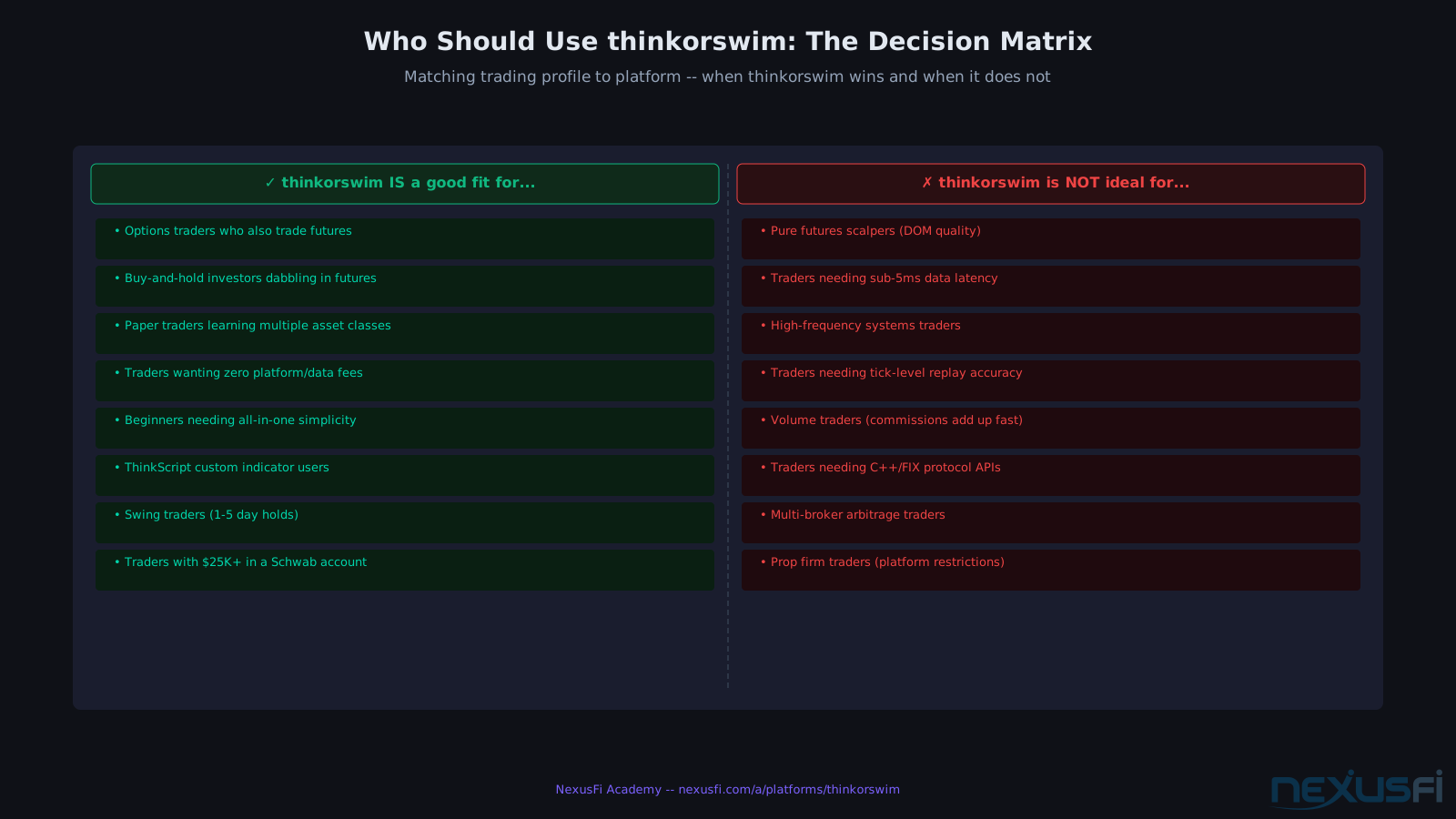
Platform Fees: Zero. thinkorswim is free for all Schwab clients.
Commissions: Schwab's standard futures commission is $2.25 per contract per side ($4.50 round trip). Boutique brokers offer $0.25-$0.75 per side plus exchange fees.
For 10 RT/day on ES: thinkorswim ~$990/month vs. boutique broker ~$910/month. At 50 RT/day, the gap becomes ~$400/month.
As one NexusFi member put it: "There is no cost for the platform, data, historical data, account maintenance, exchange-fees, etc." (post #188648).
Margin Requirements: thinkorswim's intraday margins tend to be higher than dedicated futures brokers (post #457921). Schwab sets margins conservatively — useful if you trade multi-asset and want a single account view, less useful if you need maximum leverage on futures.
(post #21517). That framing captures the trade-off precisely.
Competitive Positioning #
thinkorswim vs. NinjaTrader #
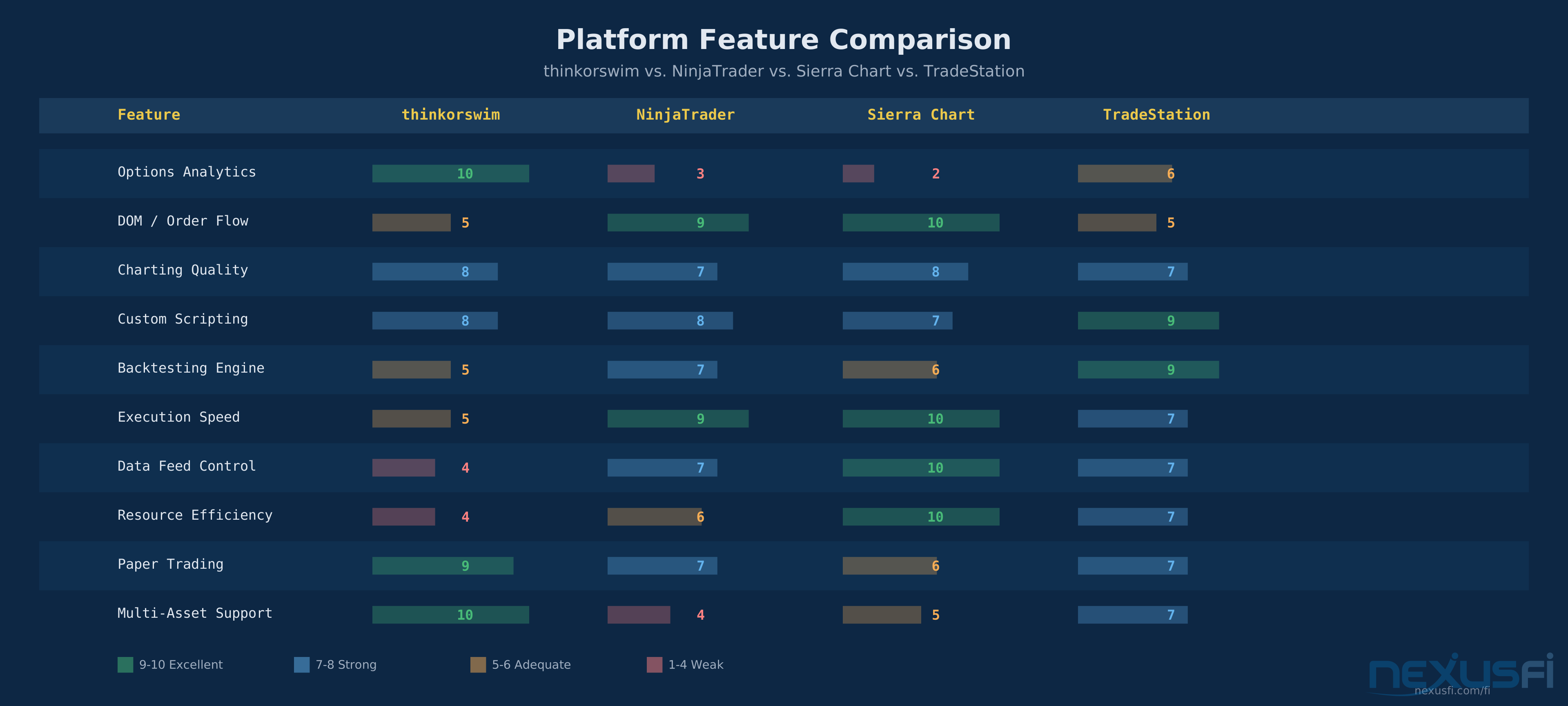
NinjaTrader wins on futures execution. SuperDOM is faster, ATM strategies provide more sophisticated order management, and the NinjaScript ecosystem includes thousands of futures-specific add-ons.
thinkorswim wins on breadth. Options analytics, stock screening, multi-asset portfolio management, and the thinkScript ecosystem.
The practical split: many serious futures traders use NinjaTrader for execution and thinkorswim for chart analysis and options management.
(post #627938). Two platforms, each doing what it's best at.
thinkorswim vs. Sierra Chart #
Sierra Chart wins on performance and data control. Lightweight, configurable, granular control over data feeds and order routing.
thinkorswim wins on usability and options. Sierra Chart's learning curve is steep and its options capabilities are minimal.
The resource profile is dramatically different: Sierra Chart runs comfortably on hardware that would struggle with a multi-chart TOS workspace. Traders who value data feed transparency and tick-level granularity need Sierra Chart. Traders who value a polished interface with integrated brokerage need TOS.
thinkorswim vs. TradeStation #
TradeStation has the edge in strategy backtesting via EasyLanguage. thinkorswim's advantage is options analytics and OnDemand replay.
TradeStation's EasyLanguage is a more mature systematic trading language with better fill-modeling. For traders building and testing rule-based strategies, TradeStation's backtesting is more reliable. But thinkorswim's options analytics make it the better platform for mixed strategy traders.
thinkorswim vs. tastytrade #
The comparison with tastytrade is especially interesting given the shared heritage — Tom Sosnoff founded both thinkorswim and tastytrade. tastytrade's platform is more options-centric and more opinionated (commissions are capped; the platform actively promotes premium-selling strategies). thinkorswim is more neutral: better for futures, more complete for non-options analysis.
If you trade primarily options on futures and equities, tastytrade's platform is arguably better optimized for that use case. If you trade futures alongside a mixed book, thinkorswim's breadth wins.
Who Should Use thinkorswim #
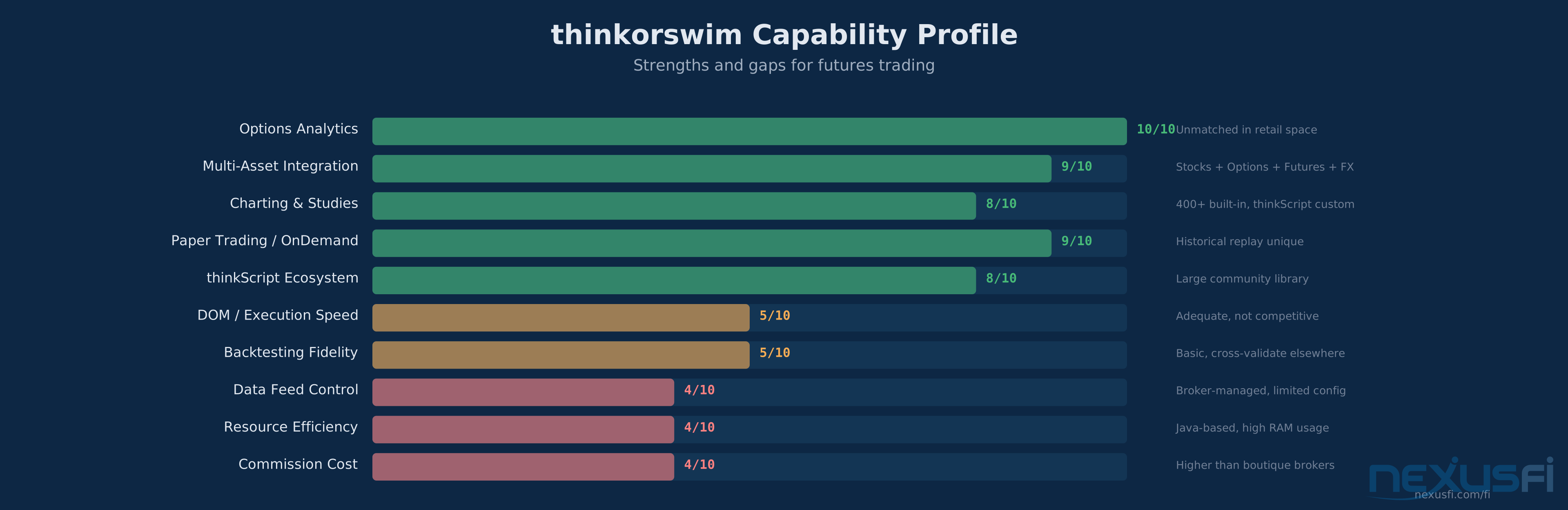
Strong fit:
- Hybrid traders managing stocks, options, and futures in one account
- Swing and position futures traders holding trades for hours to days
- Futures options traders needing Greeks, risk profiles, and multi-leg tools
- Newer futures traders benefiting from OnDemand replay and thinkScript scripting
- Cost-conscious low-volume traders valuing zero platform fees
- Traders who need scan and screening capabilities across multiple instruments
Not the right fit:
- Active scalpers taking dozens of 1-4 tick trades per day
- Quantitative researchers needing tick-level data transparency
- High-volume traders where commission differences compound much
- Order flow specialists relying on footprint charts and Level 2 depth
- Systematic traders who need full algo execution without manual oversight
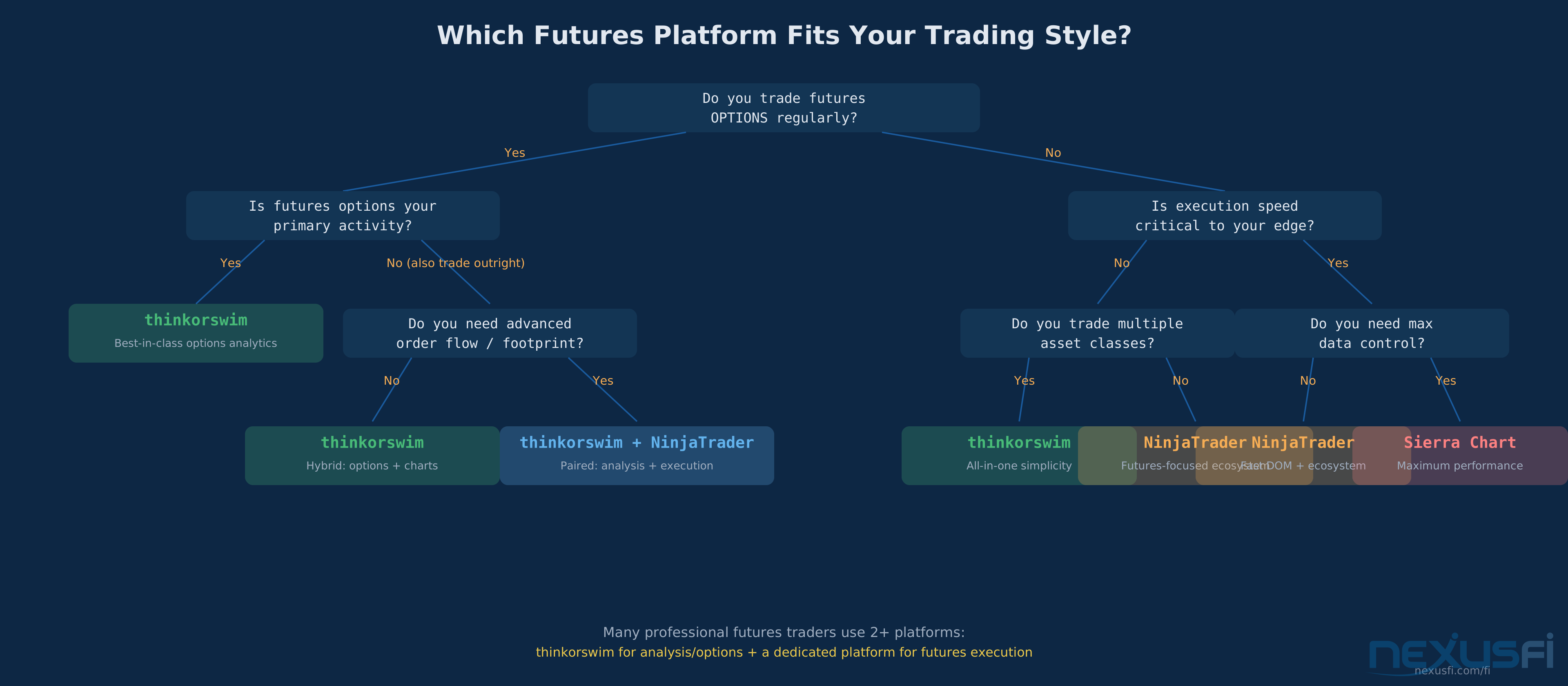
The Platform Pairing Strategy: Use thinkorswim for analysis and options + a dedicated platform for futures execution. The traders using TOS for "98% of trading" (post #464026) are those whose style aligns with its strengths. The traders who struggle with TOS are usually scalpers trying to force it into a role it wasn't designed for.
(post #457484). That's the most honest summary available from real trading experience.
(post #591177). That breadth isn't for everyone, but for traders who actually use multiple asset classes, the integrated account view has real operational value.
Platform Performance Optimization #
thinkorswim's Java foundation creates predictable performance challenges that can be mitigated with configuration changes.
Memory allocation: Work through to Setup → Application Settings → General → Memory Allocation and set to at least 2048MB, preferably 3072-4096MB if your machine has 16GB+ RAM. The default allocation is too conservative for active trading setups.
Reduce active chart studies: Every study running on every chart consumes CPU and memory. Studies that you aren't actively monitoring should be removed from charts. Create separate workspaces with stripped-down chart configurations for high-volatility sessions when you need maximum responsiveness.
Disable unnecessary real-time scans: Background scans running continuously consume data polling resources. Disable any Scanner windows you're not actively using. Active Trader performance degrades when multiple real-time processes compete for the same data feed.
Chart refresh limitations: On tick charts, thinkorswim renders each bar refresh visually. High-frequency tick charts (1-tick or 2-tick) during volatile sessions can produce noticeable rendering lag. Switching to time-based charts (1-minute or 5-minute) during high-volume periods often resolves the visual lag.
Network latency matters: thinkorswim routes all orders through Schwab's infrastructure, which adds a network hop compared to direct-to-exchange routing available through boutique brokers. For position trading, this is irrelevant. For execution-sensitive strategies, it's a real consideration.
Account Management and Schwab Integration #
The Schwab integration post-acquisition created some operational changes worth understanding:
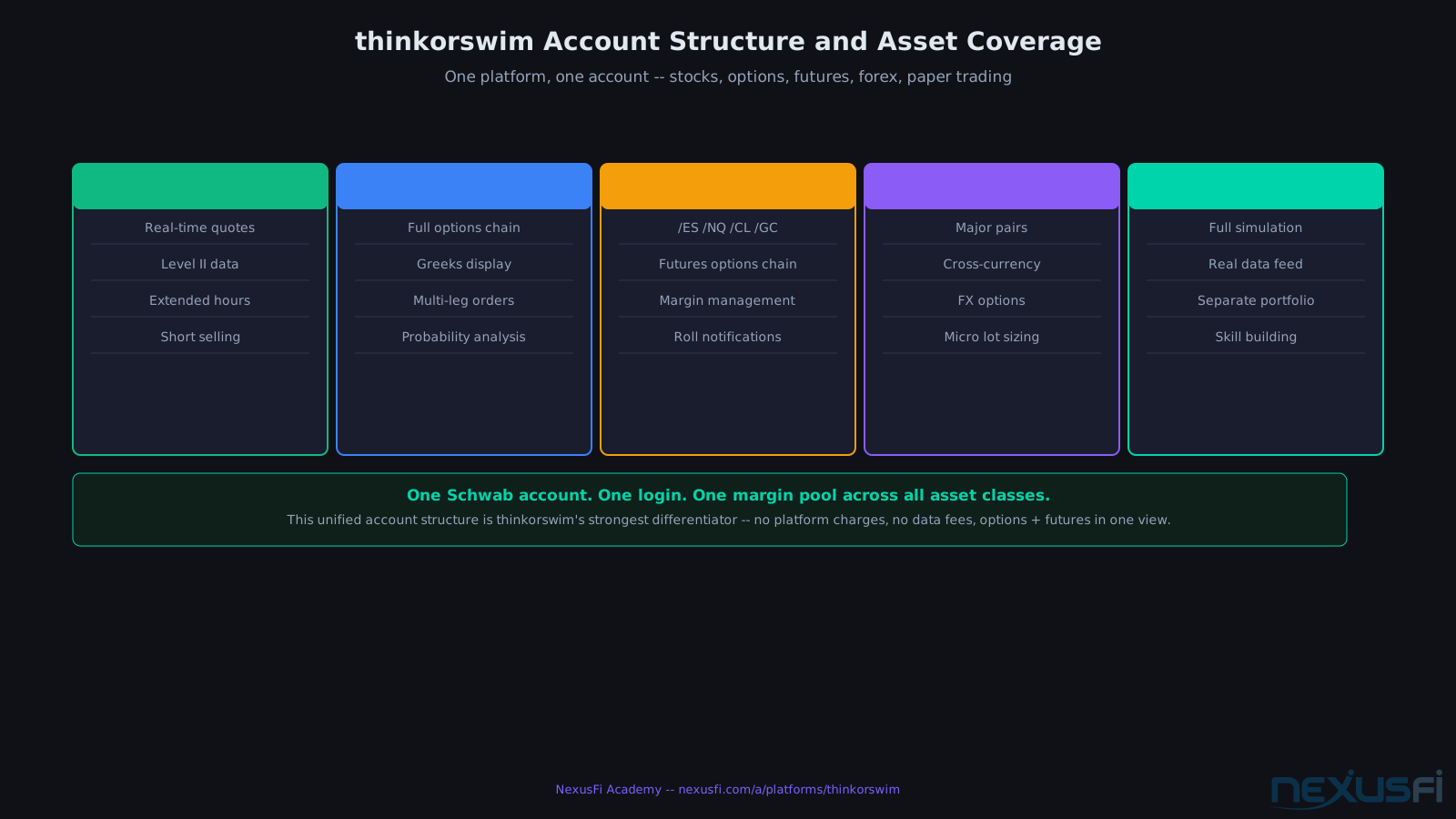
Unified account view: Schwab clients can view their brokerage accounts alongside thinkorswim positions. Cash, equities, and futures all appear in a single account hierarchy. This is genuinely useful for traders who manage capital across multiple strategies.
Margin and buying power: Schwab calculates futures margin requirements conservatively compared to dedicated futures FCMs (Futures Commission Merchants). Day trading margin for ES on thinkorswim is typically higher than on boutique futures brokers. If margin efficiency is critical to your strategy, account for this in position sizing.
Tax documentation: Schwab issues 1099-B forms with futures gains/losses broken out by Section 1256 treatment (60/40 treatment that benefits futures traders). The account statements are complete and export cleanly to tax software. This administrative cleanliness is an underrated benefit for traders who manage multi-asset portfolios.
Fund transfers and wire timing: Schwab's ACH transfer processing is 1-3 business days. Wire transfers are same-day for instructions submitted by 4:00 PM ET. For active traders who need capital deployed quickly, knowing this timing matters — it's not the same-day flexibility that some boutique brokers offer.
Getting Started #
- Open a Schwab account with futures trading enabled
- Download thinkorswim desktop (not the web version for active trading)
- Start with paper trading to learn workspace customization and Active Trader
- Explore thinkScript through the NexusFi ThinkOrSwim forum
- Test OnDemand with a historical session relevant to your trading style
- Run a cost comparison against boutique futures brokers if you trade 10+ RT/day
- Configure memory allocation before your first live trading session
- Build separate workspaces for analysis, execution, and position monitoring
Mobile and Web Versions #
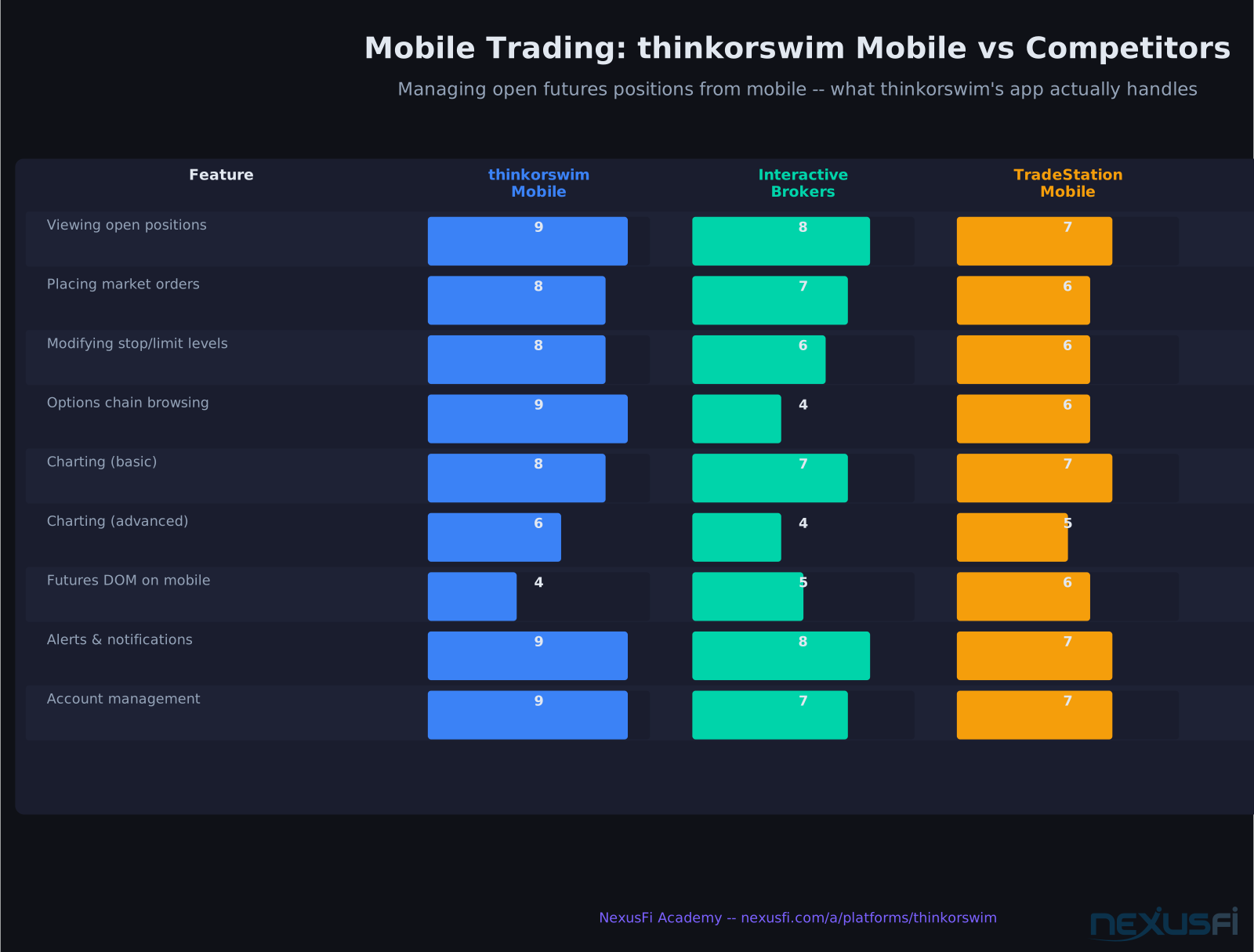
thinkorswim offers mobile apps for iOS and Android, plus a browser-based web version. The mobile app is surprisingly capable for monitoring positions and placing basic orders — more functional than most broker apps. However, for futures execution, especially anything involving Active Trader or complex bracket orders, the desktop application remains essential. The web version sits between mobile and desktop: adequate for charting and analysis, but lacking the full feature set of the desktop platform. Professional futures traders treat mobile thinkorswim as a position monitoring tool and emergency exit tool, not a primary execution platform.
The mobile app has improved substantially since the Schwab acquisition. Real-time positions, P&L, and basic order management are solid. Options chains on mobile are actually usable — Greeks display correctly, and you can manage options positions. For futures, mobile is adequate for viewing and modifying existing positions but not for sophisticated order entry during active trading.
Knowledge Map
Go Deeper
Build on this knowledgeReferences This Article
Articles that build on this topicCitations
- — Is Thinkorswim a good Platform for Futures Trading? (2011) 👍 10“TOS has pretty high commissions, pretty high intra-day margin requirements, pretty slow data, and a pretty clunky DOM. Futures paper trading on TOS is only useful for learning the platform -- not for seeing how your method would do in real trading.”
- — Is Thinkorswim a good Platform for Futures Trading? (2016) 👍 2“TOS platform is easy to work, scripting is fairly easy, menus and platform not too complicated, and buffet all in one (equity, options, forex, futures) platform. Commission is the highest in the market.”
- — Is Thinkorswim a good Platform for Futures Trading? (2012) 👍 9“If you consider all the costs, add them up, and divide it out across your trades, TDA/ToS is actually much cheaper if you do not turn a lot of volume. Ideal for a backup account or a lower-volume trader that does not want monthly overhead.”
- — Is Thinkorswim a good Platform for Futures Trading? (2015) 👍 6“I have traded the /TF 4 hours each day for 3 years with TOS. In my experience it has been as reliable as other platforms I have used. TOS has weaknesses and strengths. Other platforms have different weaknesses and strengths.”
- — Is Thinkorswim a good Platform for Futures Trading? (2015) 👍 5“I only trade futures, CL, GC, NG, KC, CC etc and never had a problem with TOS in 5 years. I have traded 20,000 contracts over the years so far, TOS is the only one I use.”
- — Is Thinkorswim a good Platform for Futures Trading? (2014) 👍 3“Their futures commissions are too high unless you are using futures to hedge against an equity position or swing trading. Their data feed is too slow. If you are day trading successfully, you can save money by shopping elsewhere.”
- — Is Thinkorswim a good Platform for Futures Trading? (2012) 👍 6“It is unquestionably the best platform choice for people who want a broad range of possible instruments and zero monthly overhead or maintenance fees. TDA margins can sometimes be higher than CME requirements.”
- — ThinkOrSwim (TOS) Trading Platform (2011) 👍 3“Their intraday data is slower than most and filtered. Commissions on Futures can be negotiated: $3/side all in for 250 contracts/month, $2.50 for 500 and $2.00 for 1,000. I prefer to use them for swing trades.”
- — thinkorswim Trading Platforms (2024)
- — ThinkOrSwim Platform Reviews by Active Traders (2024)