



TradingView Heat Maps: Sector Visualization and Market Breadth for Futures Traders
Overview #
Pull up TradingView's heat map on a random Tuesday morning and you'll see something most traders never think about: the entire S&P 500, compressed into a single screen, colored by performance. Tech is green. Energy is red. Financials are mixed. That one visual tells you more about market regime in five seconds than scrolling through individual charts for an hour.
That's the point of heat maps. They're not a trading signal. They're a context machine — a way to see the health of the market before you ever touch your execution platform. And most traders either ignore them completely or look at them without knowing what they're actually reading.
This article covers how TradingView's heat map tools work: what the settings do, how to read breadth signals, how to use sector rotation to filter your directional bias, and where heat maps break down. The goal is a concrete workflow you can run every morning before the open — not a theoretical framework, but an actual checklist.
TradingView's heat map ecosystem has three main flavors: Stock Heatmap, ETF Heatmap, and Crypto Coins Heatmap. For futures traders, the stock heat map is the primary tool, specifically the S&P 500 view. That's where actionable signal lives. For a complete overview of TradingView's capabilities for futures traders, see the TradingView platform guide.
Importantly: heat maps are a filter, not a trigger. If you're trying to time individual entries from a heat map, you're using the wrong tool. Use it to answer "What kind of market is this today?" before you ask "Where do I trade?"
How TradingView Heat Maps Work #
The mechanics are straightforward but the settings matter more than most traders realize.
Access: From any TradingView page, hover over Products → Screener → then select the heatmap type. Not the most intuitive path but it's consistent across all plans.
Cell Size: Weight Determines the Tile #
The size of each tile represents the relative weight of that asset according to your selected metric. The default is market cap — which means Apple, Microsoft, and Nvidia dominate the visual the way they dominate the index. That's actually useful context: when the big tiles are red, the index is probably red. When they're green while smaller tiles are mixed, you're seeing narrow leadership.
Available size options for stocks:
- Market Cap (default): Best for index weight context. Matches how cap-weighted indices actually move.
- Volume: Where trading activity is concentrated. High-volume tiles in a sector tell you where real action is.
- Turnover: Similar to volume but normalized.
- Mono Size: All tiles the same size. Useful when you want equal weight per company rather than capitalization-skewed view.
The choice between market cap and volume tells different stories. Market cap shows index weight. Volume shows where traders are actually participating. After a major macro print (CPI, FOMC, payrolls), flipping between the two reveals whether the move is institutional or concentrated in specific areas.
Cell Color: What You're Measuring #
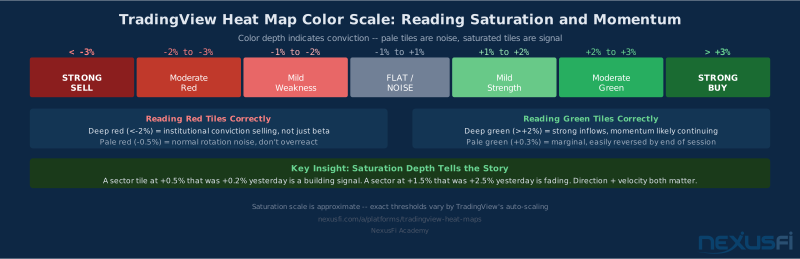
Color is where most analysis happens. The default is percent change over the selected timeframe. Green is up, red is down, saturation indicates magnitude.
Available color metrics:
- Change (% change): The standard. Use this for daily context.
- Performance: Cumulative % change over a longer window. Shows momentum, not just today's move.
- Relative Volume: How current volume compares to average. Bright cells mean unusual activity.
- Volatility: ATR-based measure. Identifies which names are moving versus sitting still.
- Gap: Overnight gap size. Useful for morning analysis before the session.
For day-to-day trading, Change on 1D is the workhorse setting. Switch to Performance on 1W when evaluating rotation regimes or swing setups.
Grouping: Sectors as the Unit of Analysis #
Stocks group by sector by default. Click on a sector header and it expands to show individual constituents. This drill-down is where heat maps become genuinely useful — you see the sector-level picture, then drill into specific names driving it.
The standard GICS sector breakdown:
- Information Technology (XLK), Health Care (XLV), Financials (XLF), Consumer Discretionary (XLY), Communication Services (XLC), Industrials (XLI), Consumer Staples (XLP), Energy (XLE), Real Estate (XLRE), Materials (XLB), Utilities (XLU)
Eleven sectors. At a glance, you can see which corners of the market are healthy and which are leaking.
The S&P 500 Heat Map: Your Daily Context Check #
This is the core application. Every trading day should start with a heat map check. Not to pick trades — to answer a single question: What kind of market is this?
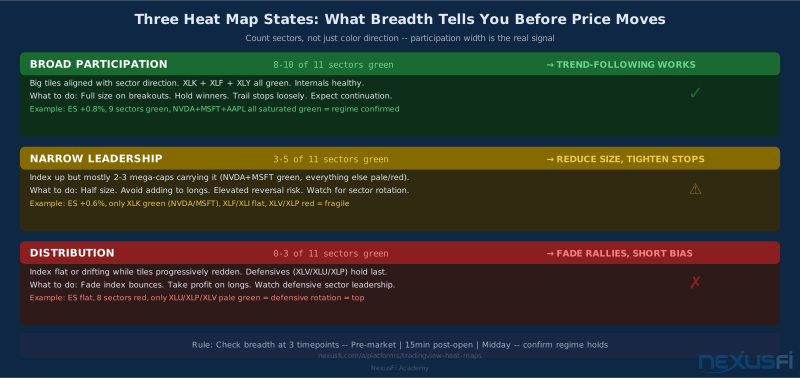
The three states you're looking for:
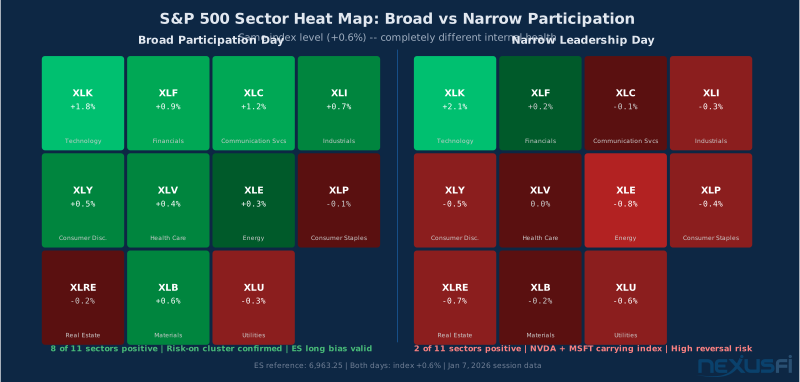
Broad Participation (risk-on): Most tiles are green. Multiple sectors contributing. The big market-cap names (AAPL, MSFT, NVDA) are aligned with the index direction. This is the environment where breakout trades and trend-following work best.
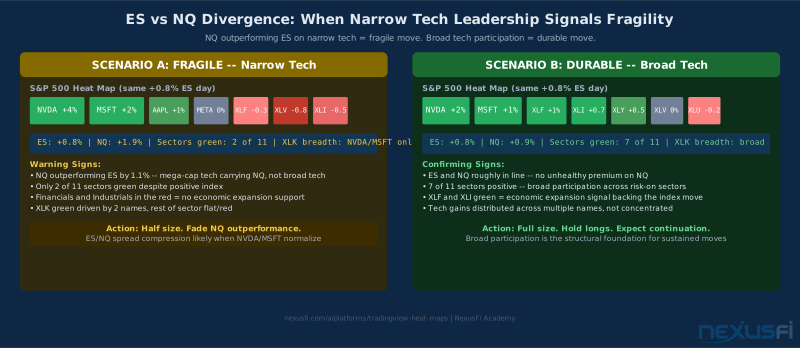
Narrow Leadership: Index is up, but the heat map tells a different story. One or two sectors — often Tech mega-caps — are carrying the green while most tiles are flat or red. This is the signal that the move is fragile. @Inletcap flagged this pattern in the NexusFi Spoo-nalysis thread after exactly this scenario played out:
Distribution: Index stalls while tiles shift from green to neutral to red progressively. This is what a top looks like on a heat map — not a sudden flip, but a slow draining of green tiles. Defensive sectors (XLU, XLV, XLP) hold while cyclicals fade.
The important thing to understand about the S&P 500 heat map is that it's giving you a visual approximation of breadth — not true advance/decline data, but close enough for directional context. As @bobwest observed in the Spoo-nalysis thread:
That distinction matters. The heat map shows sector performance, not individual stock counts. In a 500-stock index, you can have 300 stocks down but still see a green heat map if the big names are up. It's not a substitute for real breadth data — it's a complement to it.
Reading Breadth Signals #
The heat map contains breadth information even though it's not labeled as such.
The Width Test #
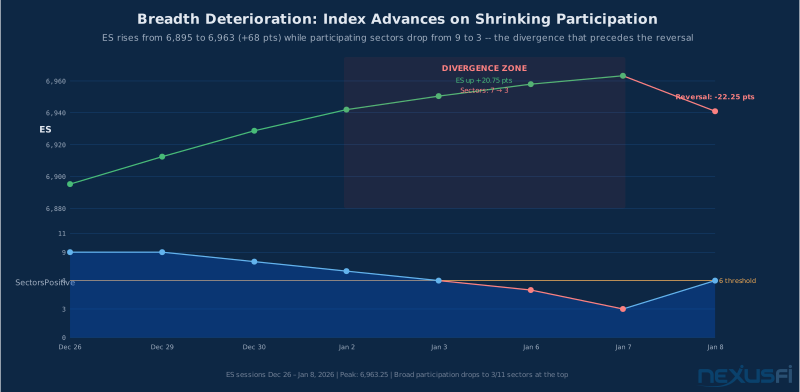
Look at how many sectors are participating, not just which direction. On a healthy trending day in ES, you'll typically see 7-9 of 11 sectors green. On a choppy, rotation-dominated session, you'll see 4-5 sectors mixed in both directions simultaneously — @mfbreakout put numbers on it in the NexusFi COMMON SENSE journal:
A simple rule: fewer than 5 sectors clearly green on a day when the index is up 0.5%+ means the move is suspect. Trade smaller. Tighten stops.
The Depth Test #
Beyond width, check saturation within the leading sectors. A heat map where Tech is uniformly bright green across all tiles — not just the top 5 names — tells you the move is broad within the sector. Contrast that with a "Tech green" day where only NVDA, MSFT, and AAPL tiles are bright while everything else is pale. Same sector color, completely different story.
@tigertrader tracked this in the NexusFi Spoo-nalysis thread, monitoring S&P 500 sector percentage of stocks above the 50-day moving average:
That 86% internal breadth reading is exactly what healthy heat maps look like across tiles — saturated at the constituent level, not just green at the sector level.
The Color Persistence Rule #
A single-session color flip means almost nothing. What matters is persistence — 2-3 consecutive sessions of the same sector color trend. @Inletcap noted this about BP (bullish percent) data, which serves the same function:
One day of green in a sector is noise. Three days of progressive brightening is signal.
Cluster Formation #
Leadership clusters — multiple adjacent sectors moving together — are more reliable than scattered individual moves. When Tech, Communication Services, and Consumer Discretionary all show persistent green together, that's growth-style leadership. When Utilities, Consumer Staples, and Health Care green up together, that's defensive rotation. Scattered sector colors with no thematic cluster means the market is searching, not trending.
In the Spoo-nalysis thread, @Silvester17 consistently posted S&P 500 sector breadth broken down by sector — one of the earliest systematic examples on the forum of what heat maps now show visually at a glance. The value of persistent, sector-level tracking showed up clearly in the Spoo-nalysis thread long before TradingView made it a one-click feature.
Sector Rotation Framework #
Sector rotation is the engine underneath most medium-term market moves. The heat map makes it visible.
The Two-Group Model #
Simplify the 11 GICS sectors into two camps:
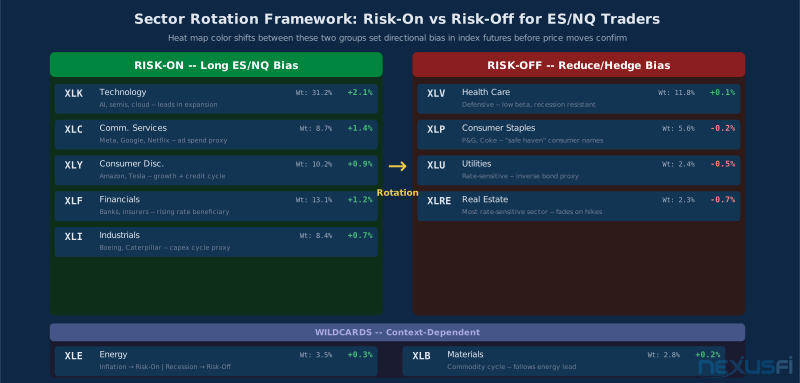
Risk-On: Technology (XLK), Communication Services (XLC), Consumer Discretionary (XLY), Financials (XLF), Industrials (XLI)
Risk-Off: Consumer Staples (XLP), Health Care (XLV), Utilities (XLU), Real Estate (XLRE)
Energy (XLE) and Materials (XLB) are wild cards — inflationary risk-on, recessionary risk-off depending on regime.
The rule: Risk-On leading + Risk-Off lagging = long bias in index futures. Risk-Off leading + Risk-On fading = reduce gross exposure.
@tigertrader tracked this rotation for years in the Spoo-nalysis thread:
Index level alone doesn't tell the story. Sector leadership tells you whether the move has legs.
Translating Rotation to Futures Trades #
For ES and NQ traders, the rotation framework filters directional bias:
- Tech + Financials leading: Long bias in ES. Broad participation often precedes continuation.
- Tech leading, everything else flat: Cautious long. Narrow leadership increases reversal risk.
- Defensives leading: Fade rallies. Risk-off leadership in a rising index is a divergence that historically resolves downside.
- Energy + Materials leading: Inflation-driven environment. CL and GC trades may outperform index futures.
For NQ specifically: when tech mega-caps carry NQ higher while the broader tech sector is flat, that's fragile. The ES-NQ spread often signals this — NQ outperforming ES on narrow tech leadership sets up mean reversion when rotation reverses. For more on spread chart analysis, see TradingView Spread Charts: Inter-Market Analysis for Futures Traders.
@Neo1 explored Relative Rotation Graphs (RRG) in the Spoo-nalysis thread as the formal version of this analysis:
RRGs are the quantitative version of what the heat map shows visually — sectors plotted on a momentum vs. relative-strength grid showing rotation trajectories. The heat map is the faster, less formal read of the same underlying dynamic.
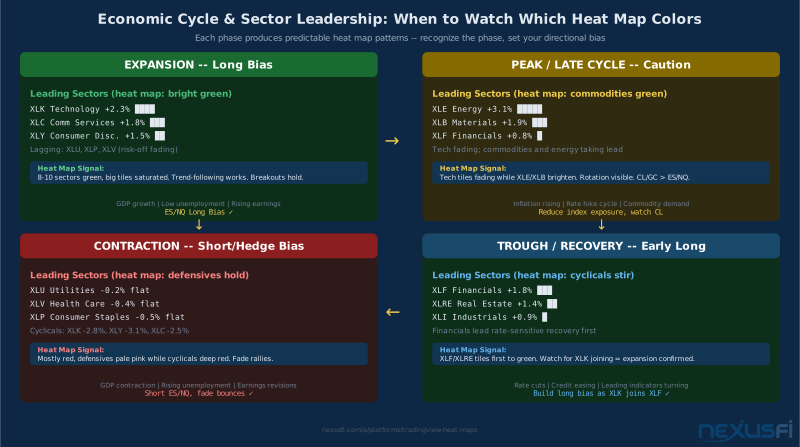
The Economic Cycle Connection #
Sector rotation doesn't happen randomly. It follows the economic cycle with enough regularity that it's worth building into your framework:
- Expansion: Tech (XLK), Consumer Discretionary (XLY), Industrials (XLI) lead
- Peak/Late cycle: Energy (XLE), Materials (XLB) take leadership
- Contraction: Utilities (XLU), Health Care (XLV), Consumer Staples (XLP) hold while cyclicals sell off
- Trough/Recovery: Financials (XLF), Real Estate (XLRE) begin recovering first
The heat map lets you see which phase is dominant right now, without waiting for an economist to declare it official months later. When Utilities and Consumer Staples are consistently brightening while Tech and Consumer Discretionary fade, the market is telling you something about economic outlook that's worth paying attention to for index futures bias.
Custom Heat Maps: Building Your Own Market Dashboard #
The default S&P 500 heat map is useful for general context. Custom heat maps are where you build actual edge.
The concept: instead of all S&P 500 constituents, create a watchlist of specific instruments relevant to your strategy and use that as your heat map universe. Pair this with TradingView watchlists to keep your universe organized and ready for quick heat map switching.
Practical Custom Map Designs #
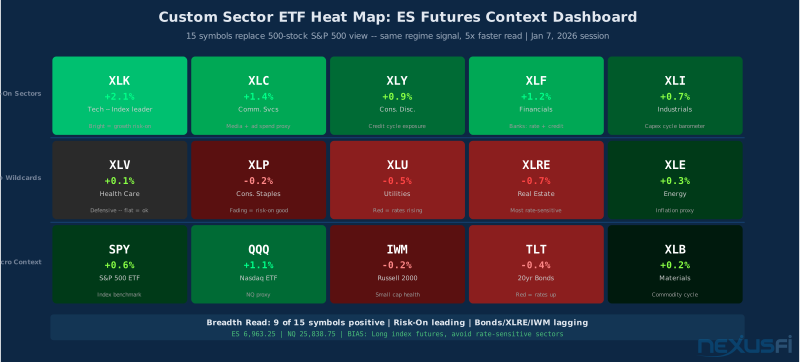
The ES Futures Context Map: A watchlist with major sector ETFs (XLK, XLF, XLE, XLV, XLY, XLP, XLU, XLC, XLI, XLB, XLRE) plus key proxies (SPY, QQQ, IWM, TLT). Before every session, instant sector leadership read without filtering through 500 individual stocks.
The Factor Proxy Map: Factor ETFs — growth (IWF), value (IWD), momentum (MTUM), quality (QUAL), low volatility (USMV), small cap (IWM). Shows which investment style is in favor, which is critical for whether ES or NQ leads on a given day. When growth factors outperform value by 2%+ on 1W, NQ typically leads ES.
The Rate Sensitivity Map: Rate-sensitive sectors (XLF, XLRE, XLU) alongside TLT and UUP. When rates rise and the dollar strengthens, XLF brightens and XLRE/XLU fade simultaneously — the correlation visible without doing the math.
The Hedge Universe Map: Your core longs plus their historical hedges. If you're long ES/NQ, add TLT, defensive ETFs, and VIX proxies. When hedges start brightening while core longs fade, that's early warning.
@metalhe4der described exactly this multi-context TradingView setup in the NexusFi platforms thread:
The principle extends to heat maps: execution chart is micro-context, heat map is macro-context, and they should tell the same story before you put on risk.
Timeframe Alignment #
Match the heat map timeframe to your trading horizon:
- Day trading: 1-day performance
- Swing trading: 5-day or 1-month performance
- Position trading: 1-month or 3-month performance
Running a 3-month heat map as a day trader gives you false confidence about trend direction that doesn't translate to your actual timeframe. Running a 1-day heat map as a swing trader creates overreaction to noise.
Relative Performance: The More Powerful Metric #
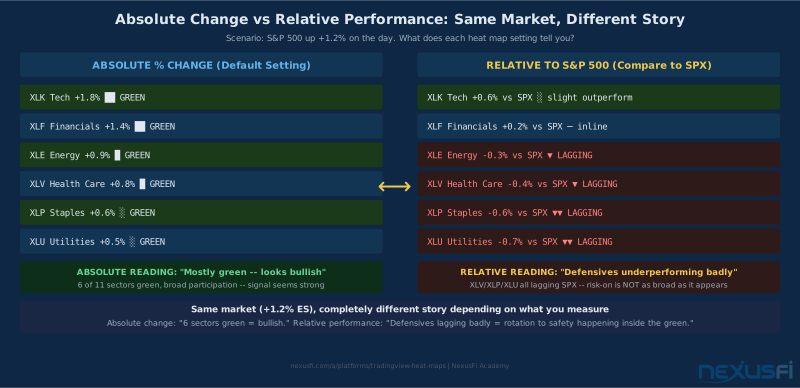
The default heat map color shows absolute % change. Useful but limited — it doesn't tell you whether a sector is outperforming or underperforming the index. For rotation analysis, relative performance is more actionable.
Setting up relative performance in TradingView: Open a sector ETF chart (e.g., XLK), click the Compare button, add SPX as the comparison symbol. The chart now shows XLK's performance versus SPX. A rising relative performance line means XLK is outperforming. A falling line means it's lagging even if it's nominally positive.
This is more powerful than absolute change because it strips out the market-wide move and shows you which sectors are getting disproportionate capital flows.
@Big Mike demonstrated the underlying logic in the Spoo-nalysis thread — calculating sector breadth against VWAP to get a percentage reading:
SELECT Sector, SUM(Close > VWAP) as Count, COUNT(Sector) as TotalThe visual heat map gives you the same information in 2 seconds without running a query. The trade-off: less numerical precision, much faster interpretation.
Relative Volume as a Color Metric #
Switching the heat map color to Relative Volume gives you a different signal: where is unusual trading activity concentrated?
After a major macro print, the relative volume heat map lights up the sectors that are actually reacting versus those that are just moving sympathetically. A sector with 3x+ relative volume alongside a significant color change represents genuine institutional repositioning, not beta correlation.
The practical rule: after a macro event, look for bright relative volume tiles that contradict the index direction. If the index is up but Financials shows 2x relative volume with a red color, institutions may be selling into the rally in the rate-sensitive sector even as the headline index lifts. That's the divergence worth knowing before you buy the index.
Free vs. Premium: What Actually Changes #
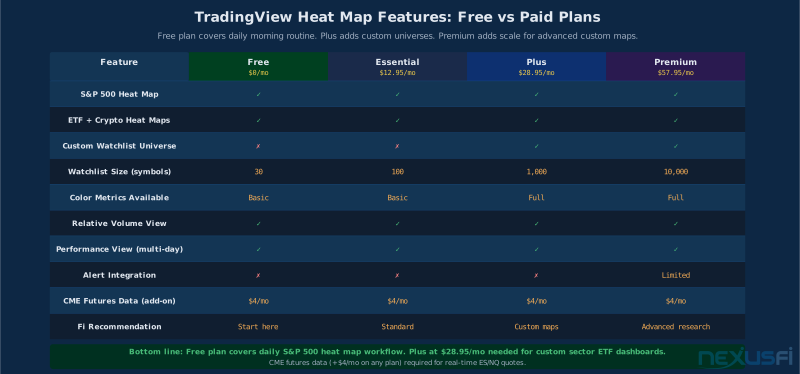
TradingView's pricing tiers affect heat map capability in specific ways.
Free Plan: Access to stock, ETF, and crypto heat maps, standard S&P 500 view, basic % change color, default sector grouping. No custom universe support. No alerts.
Essential Plan ($12.95/mo): Slightly more customization, watchlist up to 100 symbols. Still limited for custom heat maps.
Plus Plan ($28.95/mo): Watchlists up to 1,000 symbols, better custom heat map options. The minimum viable tier for custom sector map workflows.
Premium Plan ($57.95/mo): Up to 10,000 symbols per watchlist, full custom universe, more advanced relative performance metrics.
For futures traders using heat maps as context tools, free or Essential is sufficient for the S&P 500 default view. The main premium value — larger custom watchlists — only matters if you're building complex multi-sector custom maps. The free plan covers the core morning routine.
The critical limitation across all plans: no native heat map alerts. You can't set TradingView to ping you when Tech sector turns red. Heat maps require manual visual checks at defined times. If you want systematic tracking, you either build a Pine Script screener that approximates the conditions, or set up TradingView Alerts on sector ETF proxies to notify you when key thresholds are hit. Otherwise, commit to a scheduled manual check.
Add CME futures data ($4/month) for real-time ES/NQ quotes. Total cost for a functional setup with heat maps and futures data: $4/month on the free plan, or $33-40/month on Plus. Well below dedicated execution platforms that don't have heat map tools.
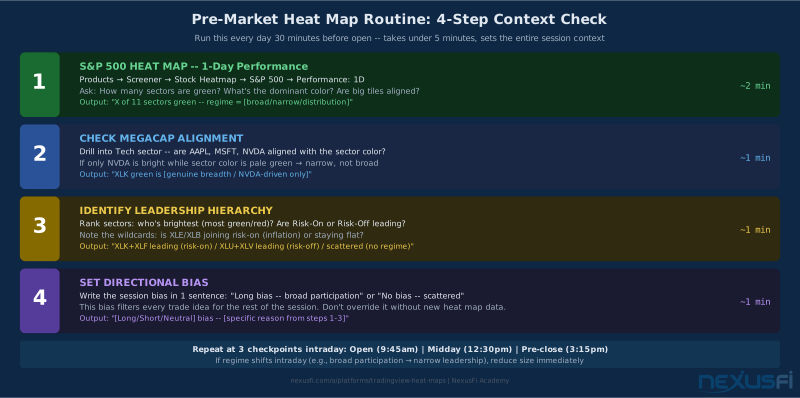
Practical Workflow: Daily Heat Map Routine #
Here's the morning routine that makes heat maps useful rather than decorative:
Pre-Market Check (30 minutes before open) #
Step 1 — S&P 500 heat map, 1-day performance (2 minutes): Note the dominant color. Count sectors that are clearly green vs. red. Identify clusters.
Step 2 — Check breadth texture: Are the big tiles (AAPL, MSFT, NVDA) aligned with sector color? Or are they outliers? NVDA as the only bright tile in a mixed Tech sector means the sector color is misleading.
Step 3 — Note leadership hierarchy: Which sectors are brightest, darkest? Write it down: "Tech and Financials leading. Energy lagging. Bias: long ES/NQ, monitor CL for fades."
Step 4 — Check overnight vs. pre-market: Did leadership change between yesterday's close and now? A sector that was green at 4pm but red at 9am suggests overnight news rotating the bias.
Intraday Checkpoints #
At the open (9:30am): Quick scan after the first 15 minutes. Did the pre-market heat map regime hold?
Midday (12:00-1:00pm): Heat maps often clarify at midday after morning volatility settles. This is when true session leadership becomes visible.
Pre-close (3:00-3:30pm): Who's leading into the close? Strong Financials and Tech color into the close often foreshadows overnight futures direction.
The 2-Minute Daily Briefing Format #
- Breadth score: "8 of 11 sectors positive"
- Leadership: "Risk-on leading — XLK, XLC, XLY all green"
- Laggards: "Defensives flat/red — XLU, XLP lagging"
- Bias: "Broad participation. Long bias in index futures."
Two minutes. Sets context for the entire session.
Limitations and Failure Modes #
Heat maps mislead in specific, predictable ways.
Megacap Distortion #
In a cap-weighted heat map, the top 10 S&P 500 holdings account for 30-35% of the index. When AAPL, MSFT, and NVDA move strongly, the Tech sector tile looks uniformly colored even if the remaining 490 stocks are mixed. The fix: switch to Mono Size occasionally to see whether breadth is actually as strong as the cap-weighted view suggests. If the mono-size map tells a different story, trust it for breadth assessment.
Event-Driven Whipsaws #
During major macro events (FOMC, CPI, NFP), heat maps become temporarily unreliable. The first 15-30 minutes after a major print sees algorithmic repositioning that moves sector colors rapidly without reflecting true conviction. Wait at least 30 minutes after a major macro print before drawing heat map conclusions.
The Lagging Indicator Reality #
Heat maps show you what has happened, not what will happen next. They're backward-looking by definition — the color reflects trading decisions already executed. They cannot replace order flow, volume profile, or any microstructure tool. They tell you the regime, your execution tools tell you whether there's a tradeable setup within it.
Megacap Earnings Distortion #
If one sector looks anomalously different from the rest, check whether a major constituent reported earnings. One after-hours miss in a sector's largest component can color the entire sector tile without representing sector-wide weakness. Cross-check the sector heat map color against the sector ETF chart before drawing conclusions.
Common Mistakes #
Trading directly off heat map colors: Seeing bright green Tech and immediately buying QQQ without execution-level analysis. Heat maps set regime context, not entry triggers.
Ignoring breadth width: Looking at dominant color without checking how many sectors it affects. Eight sectors green is a at the core different environment than two sectors green.
Not checking constituent depth: Taking sector tile color at face value without drilling in. One mega-cap can carry an entire sector's color.
Running the wrong timeframe: Day traders looking at 1-month heat maps and getting false confidence. Swing traders reacting to intraday heat map flips.
Missing the index/heat map divergence: When ES is up but fewer than 5 sectors are green, something is wrong underneath. That divergence raises reversal probability enough to warrant tighter risk management. It's the most valuable signal and the most commonly missed.
Summary #
TradingView heat maps give you a fast visual read on market regime: 30 seconds instead of 30 minutes. The core applications are daily sector leadership check, breadth health assessment, and rotation framework for directional bias.
The settings that matter: cell size (market cap for index weight, mono for equal comparison), color metric (% change for daily, performance for swing), grouping by sector for the S&P 500 view.
The signals to look for: broad participation versus narrow leadership, sector cluster formation versus scattered moves, color persistence across 2-3 sessions versus single-day spikes.
The limitations to respect: megacap distortion in cap-weighted views, event-driven whipsaws after macro prints, and the fundamental reality that heat maps show what has happened — not what will happen next.
Build the 30-second morning habit: heat map check, note sector leadership, set directional bias, then go to your execution tools. It doesn't replace market internals, order flow, or volume profile analysis — it complements all of them by providing the sector-level picture those tools don't directly give you.
The traders on NexusFi who spent years tracking sector breadth — @tigertrader with sector % above 50-day MA, @bobwest noting that sector participation is the real story underneath index movement, @Neo1 exploring formal RRG rotation analysis, @Silvester17 posting consistent sector breadth tables in the Spoo-nalysis thread — all converged on the same principle: market direction matters less than market composition. Heat maps make composition visible. Use them.
Knowledge Map
Prerequisites
Understand these firstGo Deeper
Build on this knowledgeCitations
- — Spoo-nalysis ES e-mini futures S&P 500 (2015) 👍 8“This weeks rally is really concerning me... just stuck out like a sore thumb when sector breadth failed to confirm the index move.”
- — Spoo-nalysis ES e-mini futures S&P 500 (2016) 👍 7“This is essentially a type of breadth of market chart: how different sectors are participating.”
- — COMMON SENSE (2014) 👍 7“70% of yearly trading days are rotation/choppy days.”
- — Find Strong sectors (2012) 👍 2“86% of the sector stocks are now above the key level.”
- — Spoo-nalysis ES e-mini futures S&P 500 (2016) 👍 5“17+ years I've been following BPs. I use them as more of a risk barometer primarily and look for clues as to what the future holds given the readings.”
- — Spoo-nalysis ES e-mini futures S&P 500 (2012) 👍 1“Sector Relative Strength with S&P 500 near new bull market closing high.”
- — Spoo-nalysis ES e-mini futures S&P 500 (2015) 👍 19“Relative Rotation charts showing sector rotation trajectories.”
- — Spoo-nalysis ES e-mini futures S&P 500 (2014) 👍 6“SQL query: SELECT Sector, SUM(Close > VWAP) as Count calculating sector breadth.”
- — TradingView cloud based software (2016) 👍 1“ES 5min, 1min with VWAP and broader context on TradingView.”
- — Spoo-nalysis ES e-mini futures S&P 500 (2014) 👍 5“S&P 500 sector breadth broken down in sectors.”
- TradingView — TradingView heatmaps: from global trends to details
- Savvy Insights — Analyzing Stock Sectors on TradingView