



TradingView Watchlists for Futures Traders: Organization, Custom Columns, and Alert Workflows
Overview #
Your TradingView watchlist panel has the potential to be one of your most powerful trading tools — or it can be a cluttered list of symbols you scroll through mindlessly before the open. Most traders use it like a phone contacts list. Professionals use it like an operating system.
The difference is architecture. A watchlist system built with purpose — multiple lists, each serving a distinct role in your workflow, with custom columns that surface what matters and flags that track where each symbol sits in your session — turns a passive viewer into an active decision engine. You go from "here are my symbols" to "here is my priority queue, here are my triggers, here are my live positions."
This guide covers everything futures traders need to maximize TradingView watchlists: the 5-tier architecture that separates your universe from your actionable setups, custom column expressions for relative volume and ATR%, the flag state machine that prevents you from re-analyzing the same symbol four times in one session, and alert design that stays actionable instead of becoming noise. We also address TradingView's portfolio tracking limitations and the practical workarounds futures traders use to compensate.
One note before diving in: the forum community has been using TradingView watchlists for years with varying degrees of sophistication. Member @matthew28 observed the free tier's single-watchlist limitation and found a workaround using the Lists tab within the star icon. Member @tradergino confirmed the multiple-watchlist creation path: click the plus symbol in the upper right, name the list, and manage symbol groups from there. The paid tier opens up watchlist organization much, but the free tier has workable options if you know where to look.
Why Most Watchlists Fail #
The most common watchlist mistake is not having the wrong symbols — it is having no organizational system at all. One giant list with 60+ symbols, sorted alphabetically or by how you happened to add them, with no custom columns and no flags. You look at it every morning, scroll through, maybe remember a few names, then open charts manually for whatever catches your eye.
That is browsing, not scanning. Browsing is reactive and random. Scanning is systematic and filtered.
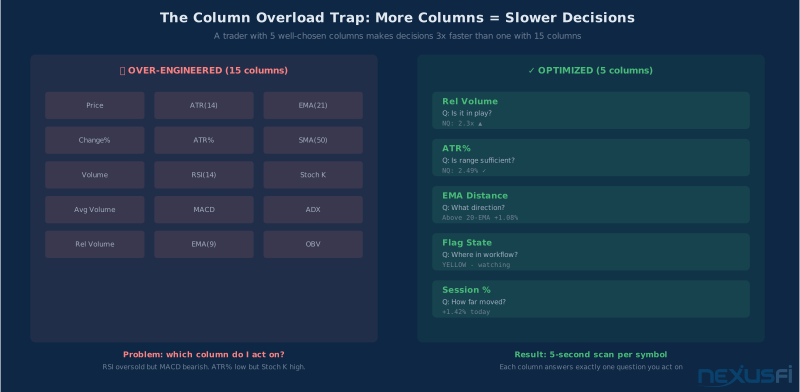
The second most common mistake is overcomplicating the columns. Fifteen custom indicators, all green/red based on various conditions, none of which you actually use to make a decision. More columns do not create more clarity — they create analysis paralysis. A well-structured watchlist has 3-6 columns maximum, each answering a specific question you act on.
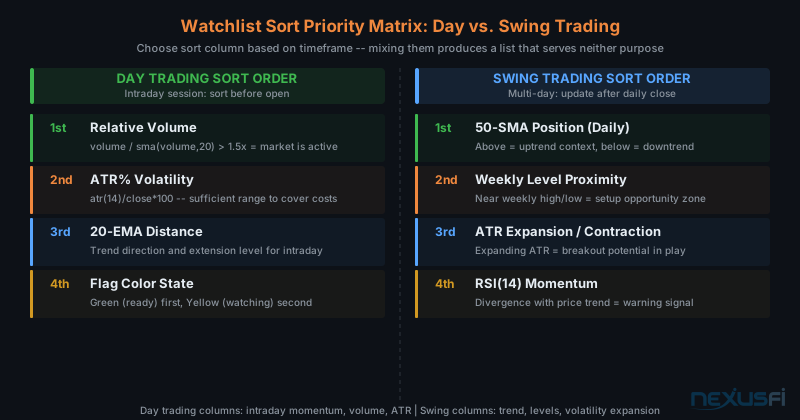
Third mistake: treating day trading and swing trading criteria the same way in the same list. The metrics that matter for a 15-minute ES scalp are completely different from those that matter for a week-long NQ swing. Mixing them produces a list that serves neither purpose well.
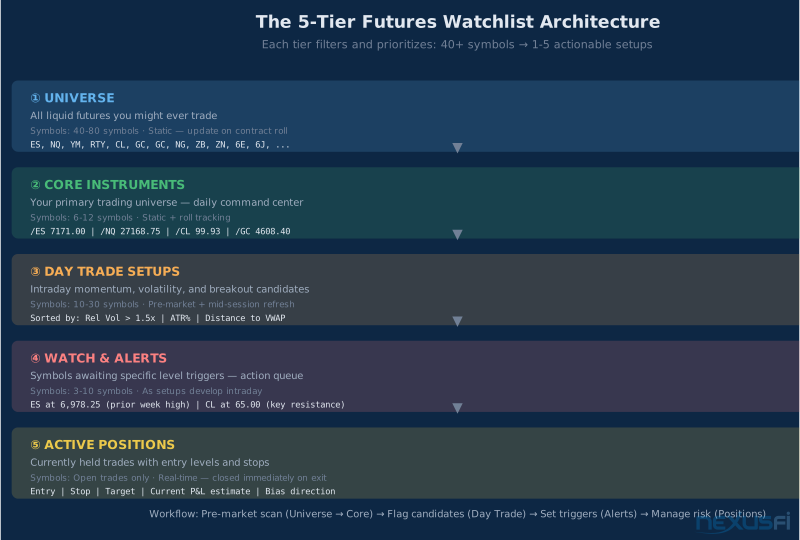
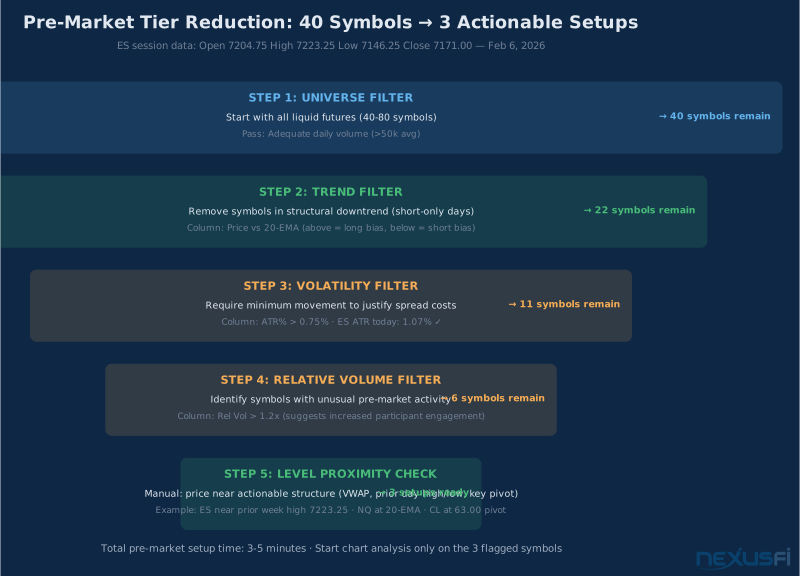
The solution is a five-tier architecture. Each tier has a specific purpose, a specific size, and specific update cadence. Together they create a workflow that moves you from 40+ symbols at start of day to 3-5 actionable setups in under five minutes.
The 5-Tier Futures Watchlist Architecture #
Think of your watchlist system as a funnel. You start broad and filter down. Each tier answers a different question, and each tier feeds into the next.
Tier 1: Universe (40-80 symbols) Your universe is every liquid futures contract you might ever consider trading. This is a static list — you do not update it daily, just when major contract rolls happen or you add a new market to your repertoire. ES, NQ, YM, RTY for equity indices. CL and NG for energy. GC and SI for metals. ZB, ZN, ZF for rates. 6E, 6J, and other currency futures you follow. Micro contracts alongside their full-size equivalents if you trade size differently.
The universe list is not for active trading decisions. It is your reference layer. When you see a market discussed on NexusFi that you have not looked at in months, you already have it in the universe list, ready to promote to an active tier.
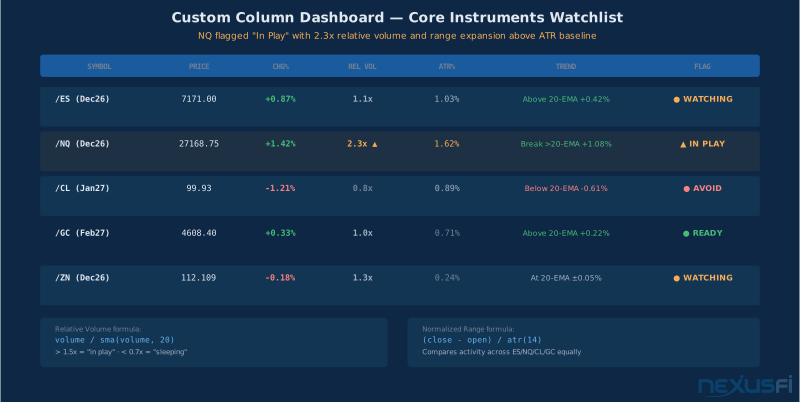
Tier 2: Core Instruments (6-12 symbols) Your core list is your command center. These are the contracts you watch every single session without exception. For most futures traders, this is 6-12 symbols: maybe ES and NQ as primary equity index trades, CL or GC for alternatives, ZN for rates context, and whatever currency future you follow. Custom columns here should cover all the bases — price, change %, relative volume, ATR%, trend filter, and flag status all visible at once.
This list has one column configuration that does not change. It is your opening dashboard every morning. You should be able to look at it for 30 seconds and know which markets are behaving unusually today.
Tier 3: Day Trade Setups (10-30 symbols) The day trade list is dynamic. It updates pre-market and potentially mid-session. These are contracts that meet your intraday criteria today — specific volatility thresholds, volume conditions, or setup patterns that have emerged. You refresh this list by applying your column filters and dragging symbols up or down based on where they rank.
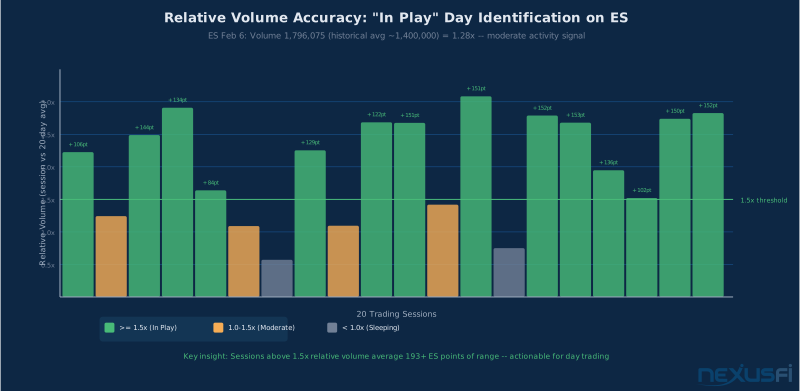
Sort this list by your "in play" metric — typically relative volume combined with ATR. If ES is showing 2.3x relative volume and its range today has already exceeded its average ATR, it is in play. If CL is sleeping at 0.7x volume with a tiny range, it is not worth monitoring actively.
Tier 4: Watch and Alerts (3-10 symbols) The alert list is tactical. A symbol lands here when you have identified a specific level you want to trade. ES is approaching the prior week high at 6,965.50. NQ has a measured move target at 25,400. CL has a key pivot at 65.00. These symbols go on the alert list and you set the specific trigger directly from the watchlist — right-click the symbol, set the alert, and the system does the rest.
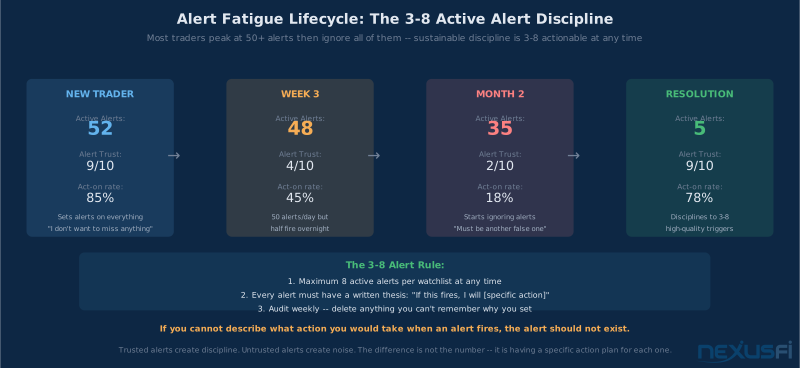
Keep this list small. The power of alerts is precision. If you have 50 alerts across 30 symbols, you stop trusting any of them. Keep 3-10 symbols actively alerted at any time. When an alert fires and you have traded or decided not to trade the setup, remove it from the list immediately.
Tier 5: Active Positions (open trades only) Your positions list contains only what you currently hold. Nothing more. The moment you exit a trade, remove the symbol from this list or move it to the avoid list for a cooldown period. Custom columns here focus on entry context: entry price, stop level, target, and a running approximation of unrealized P&L.
The positions list exists for one reason: so you never lose track of what you are in and what your risk is. It is not for finding new trades. It is for managing existing ones.
Custom Columns: The Analytical Edge #
Custom columns are where watchlists become scanners. The default columns — price, change %, and volume — are a start, but they do not tell you what you actually need to know. Is this market's current volume unusual relative to its recent average? Is it moving more than it typically does? Is it above or below its key moving average?
Custom column expressions answer these questions. Here are the four most valuable for futures day trading:
Relative Volume: volume / sma(volume, 20) This is the most important column for day trading. Understanding relative volume (RVOL) at a conceptual level makes these column expressions more intuitive. It tells you whether this market's current volume is unusual relative to the last 20 sessions. A reading above 1.5x means unusual participation — the market is "in play." Below 0.7x means it is sleeping and likely to generate false signals.
The reason relative volume matters more than absolute volume is that futures contracts have different baseline volume profiles. ES averages 1.7 million contracts on a normal day; CL averages around 400,000. Comparing them directly is meaningless. Relative volume normalizes them — a 2.0x reading on ES means the same thing as a 2.0x reading on CL in terms of participation significance.
Normalized Range: (close - open) / atr(14) This expression shows today's directional movement as a fraction of the instrument's typical range. A reading of 0.8 means today's move from open to current price is 80% of the average true range — significant directional pressure. A reading near zero means the market is balanced and going nowhere.
Like relative volume, normalized range lets you compare activity across different futures regardless of their absolute price levels. You cannot directly compare a 5-point ES move to a 0.50 CL move. Normalized range tells you which one represents more unusual behavior relative to that instrument's own history.
Trend Filter: Distance from Key Moving Average A simple column showing price position relative to a 20-period EMA accomplishes two things: it tells you the short-term trend direction (positive = above, negative = below) and the degree of extension (how far above or below). An ES that is sitting 0.05% from its 20 EMA is in a neutral zone — no strong directional bias. An ES that is 1.2% above its 20 EMA is extended to the upside.
For swing trading, use a 50-period SMA instead and shift the lookback to daily bars. The interpretation is the same — position relative to the MA tells you trend direction, the percentage distance tells you extension risk.
ATR% Volatility: atr(14) / close * 100 ATR as a percentage of price shows you whether this market offers sufficient movement to justify your transaction costs. If your all-in trading cost is $10 per round trip on a micro contract, and the market is only offering a 0.2% ATR, the math may not work for your strategy. ATR% helps you quickly identify which markets have the volatility profile your strategy requires today.
Keep your column set to 3-6 per watchlist. More than six and you have created a scoreboard you will stop reading. The goal is to answer specific questions: Is this market active? Is it moving? What direction? If yes to all three, it earns a closer look. If not, skip it.
Binary Decision Columns (Advanced) Pine Script expressions can create simple 1/0 flags for specific conditions. The expression ta.crossover(ema(close, 9), ema(close, 21)) ? 1 : 0 produces a 1 when the fast EMA crosses above the slow EMA on the current bar, and 0 otherwise. Sort by this column and you instantly see which markets just had a crossover event. Use binary columns sparingly — they are most useful for very specific setup conditions where you need to scan across 20+ symbols quickly and need a yes/no answer.
The Flag State Machine: Session Memory #
Flags are the most underused feature in TradingView watchlists. Most traders either do not use them or use them inconsistently — today green means "interesting," tomorrow green means "in progress." That inconsistency makes them useless.
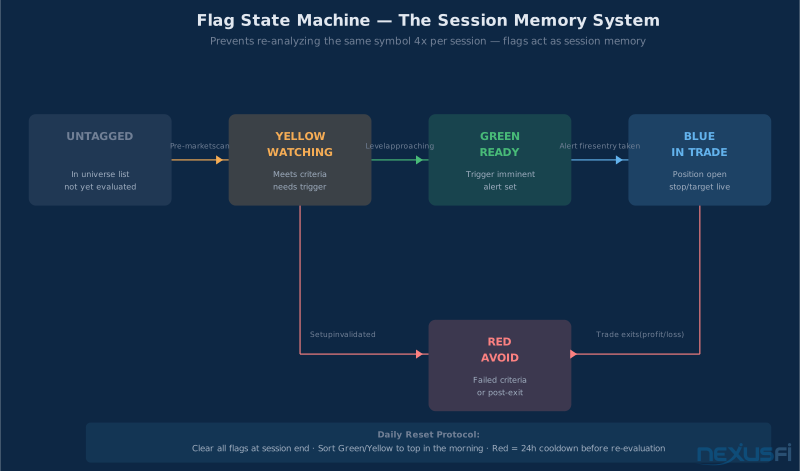
The power of flags comes from treating them as a formal state system. Every symbol can be in exactly one state, and each state has a specific meaning that never changes. Here is the system:
Untagged: Not yet evaluated. The symbol is in your universe but you have not looked at it today. Default state for all symbols at the start of each session.
Yellow — Watching: Meets your setup criteria but has not reached the trigger yet. You have done the analysis, the setup is valid, and you are waiting for a specific condition to fire. Set an alert and move on to the next symbol — do not keep watching this one actively.
Green — Ready: The trigger is imminent. Price is approaching the level, alert has been set, you are in pre-execution mode. Green means "be at your keyboard, action required soon."
Blue — In Trade: Position open. This symbol is in your positions list and has been removed from active scanning. You are managing it, not looking for entries in it.
Red — Avoid: Failed its setup criteria, got invalidated, or you have just exited a trade and are imposing a cooldown. Do not re-enter analysis on a Red symbol for at least the remainder of the session.
The state machine eliminates a common time waster: re-analyzing the same symbol multiple times per session. If you have flagged NQ Yellow after your pre-market scan, you do not need to re-evaluate it at 10am and again at 1pm. The flag tells you: "You already did this work. You are waiting for the trigger. Stop looking at it."
Forum member @Bermudan Option documented this workflow while trading options — moving setups to relevant watchlists, separating the "developing intraday" list from the "ready to act" list, and using broker scans to feed new candidates in. The same architecture applies directly to futures. The key discipline: symbols move between states systematically, not randomly based on emotional re-evaluation.
Sort by flag color: Every morning after pre-market analysis, sort your Core Instruments and Day Trade lists by flag color. Green at top, Yellow next, untagged after that, Red at the bottom. This instant visual priority queue means you do not have to mentally reconstruct your session plan every time you glance at the watchlist panel.
Daily reset: At the end of every session, clear all flags. Red symbols get a 24-hour cooldown — if a setup failed today, it needs fresh conditions before re-evaluation. Start every session with a blank slate.
Sorting: What "Top of List" Actually Means #
Sorting by default change percentage puts the biggest movers at the top. That is intuitive but often wrong. The biggest absolute move today is not necessarily the best trade — it might be a market that already made its move and is now extended and prone to reversal.
Sort by your ranking function instead. For day trading, that is typically a combination of relative volume (unusual activity) and ATR% (sufficient range). A market showing 2.3x relative volume with 1.6% ATR and a trend alignment above its 20 EMA ranks higher than one showing 0.5% change even if the change number looks bigger.
Member @lancelottrader described the challenge of trading multiple instruments from his NQ journal — arranging chart setups across monitors to efficiently monitor each contract. The watchlist sorting system solves the same problem at a smaller scale: you want the highest-quality setups at the top so your first chart opens are your best opportunities, not your most recent additions.
For swing trading, sort differently. Replace the intraday momentum sort with a trend alignment sort — strongest trend relative to weekly MA at top, weakest at bottom. Then within that, sort by level proximity: contracts nearest to key weekly or monthly levels rank highest because that is where the next significant move initiates.
Alert Design: Action Triggers vs. Noise #
Alerts are where most traders undermine their own watchlist system. They set too many, make them too generic, and then stop trusting them entirely. After three weeks of alerts firing for irrelevant reasons at inconvenient times, they turn off notifications and lose the tool entirely.
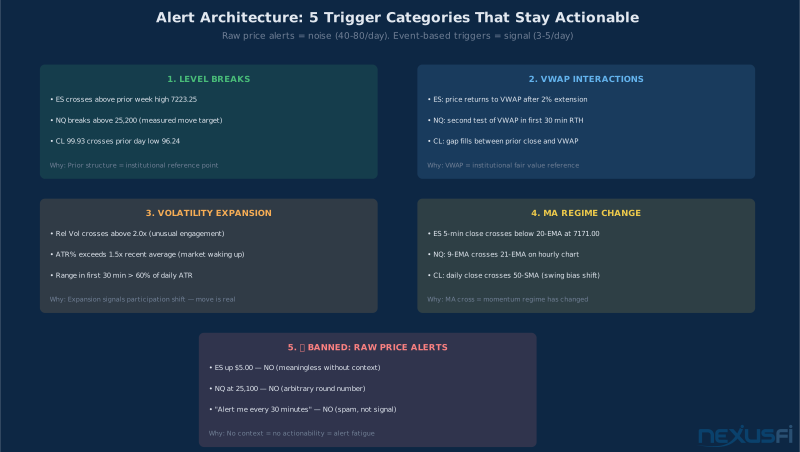
Effective alert design follows one principle: every alert must represent permission to act. When it fires, you should be ready to open a chart and potentially execute within seconds. If an alert fires and your first thought is "oh, that? I do not care about that right now," you have designed the alert wrong.
Level breaks are the highest-quality alert type. Prior session highs and lows, opening range boundaries, weekly pivots, key price levels that have produced significant reactions previously. ES breaking above the prior week high at 6,965.50 is permission to open a chart and look for entry. That is specific, actionable, and tied to a reference point that institutional participants actually use.
VWAP interactions work well for intraday day trading. The Anchored VWAP variant anchors to session open or significant swing points for greater precision. Price returning to VWAP after a 1.5%+ extension in the first hour often marks the setup for the next directional move. Set an alert when ES price crosses the VWAP on the 5-minute chart and you get notified exactly when the potential setup window opens.
Volatility expansion alerts serve a different purpose: identifying when a sleepy market wakes up. If NQ is sitting at 0.8x relative volume at 9:45 AM and that jumps to 2.3x, something changed. An alert on relative volume crossing 1.8x on NQ lets you know the market is becoming relevant for your day trading universe.
MA regime change alerts are most useful for swing traders. A daily close crossing the 50 SMA represents a regime shift that typically takes days or weeks to develop. Setting this alert on the markets in your swing universe means you get notified of meaningful structural changes without having to check charts manually every day.
Alert discipline: keep active alerts to 3-10 at a time per watchlist. When an alert fires, make a decision — trade, wait, skip — and immediately delete or modify the alert. Never let stale alerts accumulate. A system with 60 active alerts across 20 symbols has alert fatigue built in. You will stop trusting alerts you cannot remember setting.
Timezone awareness matters in futures. The CME night session opens at 6 PM ET and runs through 5 PM the next day with a break. An alert you set for "ES crosses 6,900" might fire at 2 AM on a thin overnight session — not the scenario you intended. Qualify your alerts with session filters when possible, or at minimum be aware that overnight alert fires require context before action.
Day Trading vs. Swing Trading: Different Systems #
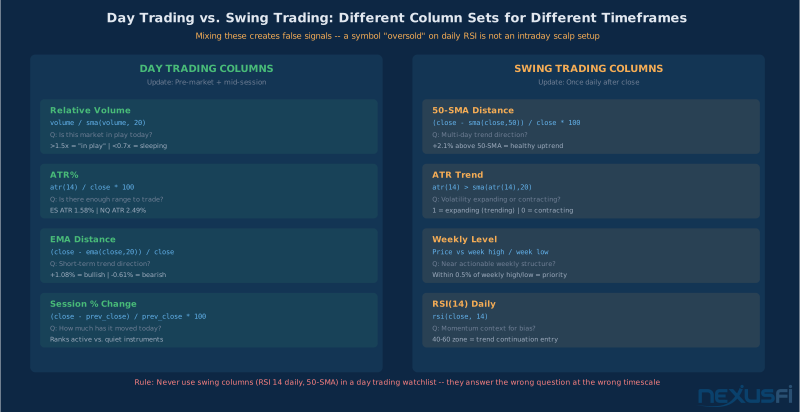
The most important organizational principle: never mix day trading and swing trading criteria in the same watchlist. They require different column definitions, different sort priorities, different alert thresholds, and different update cadences. Mixing them creates a list that serves neither purpose.
Day trading watchlists should emphasize intraday momentum, session volume, and short-term trend status. The questions they answer: Is this market active right now? Is it moving in a direction? Is there enough range to make money today net of costs? Update them before market open and potentially at midday if the session environment has shifted much.
Member @forestcall described using TradingView connected to Tradovate — one monitor for execution, a second for TradingView charting and watchlist. That dual-screen workflow maximizes the watchlist panel utility: it is always visible, always current, and surfaces the information needed to make the next decision without disrupting the primary execution monitor.
Swing trading watchlists should emphasize multi-day trend direction, level proximity, and volatility expansion signals. The questions: Is this market trending? Is it near a weekly or monthly level? Is the volatility expanding or contracting? Update them once per day, ideally after the daily close when you can evaluate the full session's price action.
The column sets differ: Day trading columns: volume / sma(volume, 20) for relative volume, atr(14) / close * 100 for ATR%, distance from 20-EMA for intraday trend, session % change. Swing trading columns: price vs. 50-SMA on daily, distance to weekly high/low, ATR expanding/contracting relative to its own average, RSI(14) for momentum context.
Create separate watchlists for these two trading modes even if there is symbol overlap. Running the same NQ symbol in both a day trade list and a swing list is fine — the columns and context are different, and each list serves a specific analytical purpose.
Portfolio Tracking: The Honest Assessment #
TradingView's portfolio tracking functionality is equity-centric. It does not handle futures P&L well, does not account for contract multipliers accurately in all cases, does not handle rolls, and does not integrate with broker positions. For equity swing traders, it is a useful approximation. For futures traders, it is unreliable as a primary P&L tracking tool.
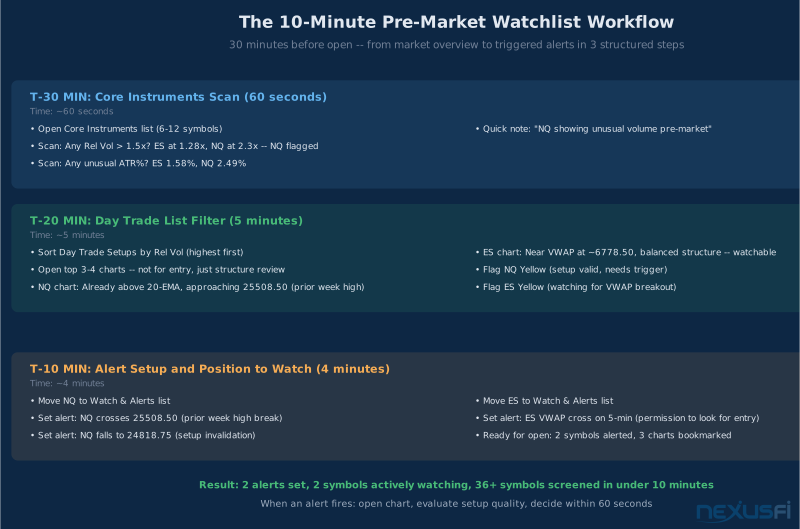
The practical workaround that futures traders use: create a dedicated "Positions" watchlist. Add only your currently open contracts. Add a custom column for entry price — you update this manually when you enter a trade. Add a second custom column with the expression (close - [entry_price]) * point_value to approximate running P&L. It is manual and approximate, but it keeps your risk context visible in your watchlist panel without requiring a separate application.
For example, if you are long ES from 6,920.00, your entry price column shows 6,920.00, and with ES current at 6,952.75, the column shows approximately +$1,637.50 per contract (32.75 points x $50/point). It is not exact — it does not include commission, does not account for partial fills, does not reconcile against your broker — but it is a fast visual check on whether you are up or down and by roughly how much.
Always reconcile against your broker statement at the end of the session. TradingView's approximation is for in-session awareness only. Your broker statement is the ground truth. The distinction matters most for tax records, drawdown tracking, and any performance reporting.
Contract Mapping and Roll Awareness #
Futures traders deal with a challenge that equity traders do not: contracts expire and roll. An ES front-month contract trades actively for about two months, then volume shifts to the next quarterly expiration. If your watchlist is hardcoded to a specific expiry (e.g., ESZ2026), you will wake up one morning and find your "front month" is now thinly traded with wide spreads.
The solution is continuous contracts. TradingView uses the notation /ES or @ES# for continuous-series contracts that automatically roll to the front month based on volume. This is generally what you want for watchlist monitoring — you are tracking the liquid, actively traded market, not a specific expiry.
The trade-off is that continuous contracts can have price discontinuities at roll dates. If you are using a continuous contract to track a key level and there has been a roll since you set that level, verify it is still valid. Some traders keep both continuous and specific-expiry symbols in their core list during roll periods — the continuous for general monitoring, the specific expiry for precise level mapping.
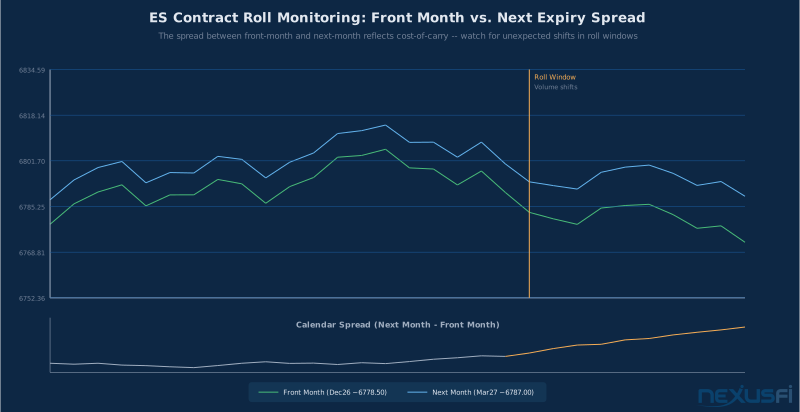
During roll windows (typically 2-3 weeks before expiry), also track the calendar spread — the price difference between front month and next month. For index futures, this spread reflects the cost of carry. Significant changes in the spread can signal institutional positioning shifts that affect your intraday analysis.
Common Pitfalls and How to Fix Them #
Column overload: You have 12 custom columns and scroll horizontally to see them all. Fix: keep 3-6 columns maximum. If a column is not directly connected to a trading decision, delete it. The standard question: "If this column showed X, would I take a different action?" If you cannot answer yes clearly, the column does not belong.
Inconsistent flag usage: Green means one thing today, something else tomorrow. Fix: write down your flag definitions and put them in a text note attached to your trading setup. Review them every Monday. After a month of consistent use, the definitions become automatic.
Mixing day and swing lists: You are looking at an 18% RSI on a symbol in your day trade list and wondering if it is oversold. Fix: if it is a day trade list, RSI(14) on daily closes is irrelevant. Remove it. Keep each list's columns appropriate to its purpose.
Over-alerting: You have 80 active alerts and your phone buzzes constantly. Fix: audit your alerts once per week. Delete anything you cannot remember setting. Keep only alerts where you have an active, documented thesis about the setup. Use "once per bar close" logic to prevent the same level from alerting multiple times.
Continuous vs. expiry confusion: Your alert for "NQ crosses 25,200" fires, but the chart you open shows a different contract than expected. Fix: standardize which contract type you use per watchlist. Core list = continuous. Alert list = specific expiry you are actually trading. Review your alerts at each roll date.
Forum member @NowRisk21 noted that TradingView's learning curve is low compared to Sierra Chart and that the Level 1 CQG data at $5/month for the CME bundle makes it viable for long-term and swing trading. For watchlist organization purposes specifically, this is accurate — the organizational discipline works regardless of whether your data is live or delayed. The techniques in this guide do not require tick-level data resolution. What they require is consistent application across trading sessions.
Pre-Market Rule: If your pre-market scan takes longer than 15 minutes, you have a configuration problem — not a discipline problem. Either your scanning lists have too many symbols (reduce from 30+ to 10-15) or your columns are not filtering effectively enough.
The Pre-Market Routine #
The watchlist system is only as good as the discipline around using it. Here is the pre-market routine that extracts maximum value from the architecture described above:
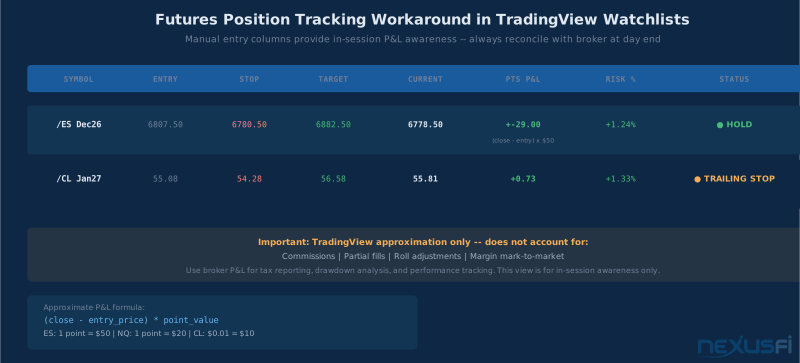
T-30 minutes before session open: Open Core Instruments list. Scan custom columns. Any symbol showing relative volume above 1.5x or unusual ATR%? Note it. This takes 60 seconds if your columns are set up correctly.
T-20 minutes: Open Day Trade Setups list. Sort by relative volume, then ATR%. Identify the top 3-5 symbols that show unusual activity. Look at their charts briefly — not for entry, just to understand the structure. Are they near key levels? Have they already made their move? Flag the best setups Yellow.
T-10 minutes: Set alerts for the specific levels on your flagged symbols. Move them to the Watch and Alerts list. You are now in execution-ready mode. You know what you are watching, you know the triggers, and you have alerts set so you do not have to stare at charts.
During session: When an alert fires, open the chart, evaluate the setup in context, decide. If you trade, update your Positions list immediately. If you do not trade, remove the alert and decide whether to reset it at a different level or move the symbol to Red.
The entire pre-market process should take 10-15 minutes when your watchlist architecture is functioning correctly. If it is taking longer, you either have too many symbols in your scanning lists or your column configuration is not filtering effectively enough.
Building Your System: A Practical Starting Point #
For traders new to this level of watchlist discipline, start simpler than the full five-tier architecture. Build it in stages:
Stage 1 (Week 1-2): Create one Day Trading list with your 6-10 primary futures contracts. Add just two custom columns: relative volume and ATR%. Sort by relative volume each morning. This alone creates better session preparation than most traders have.
Stage 2 (Week 3-4): Add the flag system. Use only Yellow (watching) and Red (avoid). Do not worry about Green or Blue yet. Start pre-market flagging the 2-3 symbols that rank highest. Notice how the flags reduce repetitive re-analysis during the session.
Stage 3 (Month 2): Separate your Universe list from your active Day Trade list. Add the Positions list. Add the Watch and Alerts list. Begin using all five flag states. Create your first swing trading list with different column definitions.
The system compounds over time. After a month of consistent flag usage, the states become automatic. After two months, you will find yourself wondering how you managed sessions without it.
Member @bobwest noted that TradingView is one of a number of different trading platforms that brokers may offer and that delayed data limits some features on the free tier. For watchlist organization purposes, this is largely a non-issue — the organizational discipline works regardless of whether your data is live or delayed. Build the system. Apply it consistently. Adjust based on what actually improves your session preparation and trade selection. The goal is not a perfect theoretical architecture but a practical system that makes you a better, more disciplined operator of your own trading process.
Knowledge Map
Prerequisites
Understand these firstGo Deeper
Build on this knowledgeReferences This Article
Articles that build on this topicCitations
- — Watch list in tradingview (2023) 👍 4“The free version of TradingView allows you to create the one watchlist. The paid version allows you to create multiple watchlists and save them so one can easily swap between them.”
- — Watch list in tradingview (2023) 👍 2“Go to the Lists inside of the star icon tab, and you can actually create multiple watchlists here. Click the plus symbol in the upper right-hand corner to add more custom watchlists.”
- — Using Options for Swing Trading (2020) 👍 3“Review watchlists and intraday price alerts. Move setups to the relevant watchlists. Move standout setups to a separate trading spreadsheet. Use broker to scan for new setups.”
- — The Beast Slayer, Lance NQ Trading Journal (2014) 👍 4“It took me a while to arrange my chart setups on my monitors so that I could view things properly. The key for me is to have audible alerts at key price levels.”
- — Tradovate -- Im trading Micro E-Mini Futures (2020) 👍 14“What I do is connect TradingView to Tradovate and I have 1 monitor for Tradovate and the 2nd monitor with TradingView. I like to have as much visual data as possible for making trades.”
- — Tradingview (2023) 👍 1“Level 1 CQG data (CME bundle is $5). The platform is great for long term trading. The learning curve is low compared to Sierra. They have volume profile, VWAP and tons of other tools.”
- — Quickest/Cheapest way to a live futures data feed (2020) 👍 2“TradingView is pretty good if it suits your needs. It is simply one of a number of different trading platforms that brokers may offer.”
- — Watchlists Overview (2024)
- — Understanding Futures Contract Specifications (2024)
- — Not missing the boat...as in how to (2014)“I do swing trading of small caps, and I still look through charts manually to build a watchlist, which takes me 2-3 hours/week. For day-trading futures, I just follow the particular instrument I trade since those markets are liquid enough to be worth watching all the time.”