



Broker Platform Outages and Business Continuity: What to Do When Your Trading Setup Goes Dark
Overview #
Your platform just went dark. It could be 9:31 AM with a position open, volatility spiking, and your order entry screen frozen. Or it could be quieter — a data feed that stalls, a connection that silently drops, a platform that accepts your order and then does nothing. Either way, you're flying blind during live risk.
This isn't hypothetical. The NexusFi community has lived through the [Interactive Brokers crash on January 5, 2018][1], the [Phillip Capital/TT outage chain of February 2021][2], and the [ZenFire disconnects of late 2013][3], among dozens of smaller incidents. The traders who handled them well had a plan. The ones who got hurt badly — either through missed exits or panic decisions — didn't.
Broker platform outages fall into a predictable category: low-frequency, high-severity events. They happen rarely enough that most traders never prepare for them. They happen often enough that every serious trader eventually faces one. And when they hit, they hit fast, usually when markets are most active and alternatives are least convenient.
This guide breaks down what actually happens during different outage types, what your immediate response should look like, how to build a redundancy stack that survives most failures, and how to evaluate your broker's reliability before you're staring at a disconnected platform with an open position.
Key Concepts #
Platform Outage — A failure in the trading software, connection layer, or data infrastructure that prevents you from viewing positions, entering orders, or receiving market data. Outages range from total blackouts to subtle partial failures where data feeds or order routing malfunction while the rest of the platform appears functional.
Connectivity Failure — Loss of the network link between your trading software and your broker's servers. Could be on your end (internet provider, modem, router), at your broker's connectivity layer, or somewhere in the network path between you and the exchange.
Data Feed Failure — Market data stops updating while order entry remains functional — or vice versa. One of the most dangerous partial failure modes because the platform appears to be working normally.
FCM (Futures Commission Merchant) — The entity that actually holds your funds and clears your trades. When a platform outage occurs, the FCM's infrastructure and trade desk are your backup execution channel.
Trade Desk — Your broker's human fallback — a phone line staffed by licensed personnel who can enter, modify, or cancel orders on your behalf during platform failures. Every regulated FCM must maintain one.
Redundancy Stack — The layered set of backup systems you maintain so that no single point of failure takes out your entire trading capability: backup internet, backup platform, backup broker account, backup device.
SLA (Service Level Agreement) — A broker's formal commitment to system uptime and performance standards. Most retail futures brokers do not publish formal SLAs, making historical incident records a more practical reliability measure.
Order Persistence — Whether your working orders survive a connection loss or platform crash. Some routing architectures cancel working orders when the connection drops (a feature to prevent runaway positions). Others leave them alive on the exchange. This matters enormously when you go dark with resting stops or entries.
The Anatomy of a Broker Platform Outage #
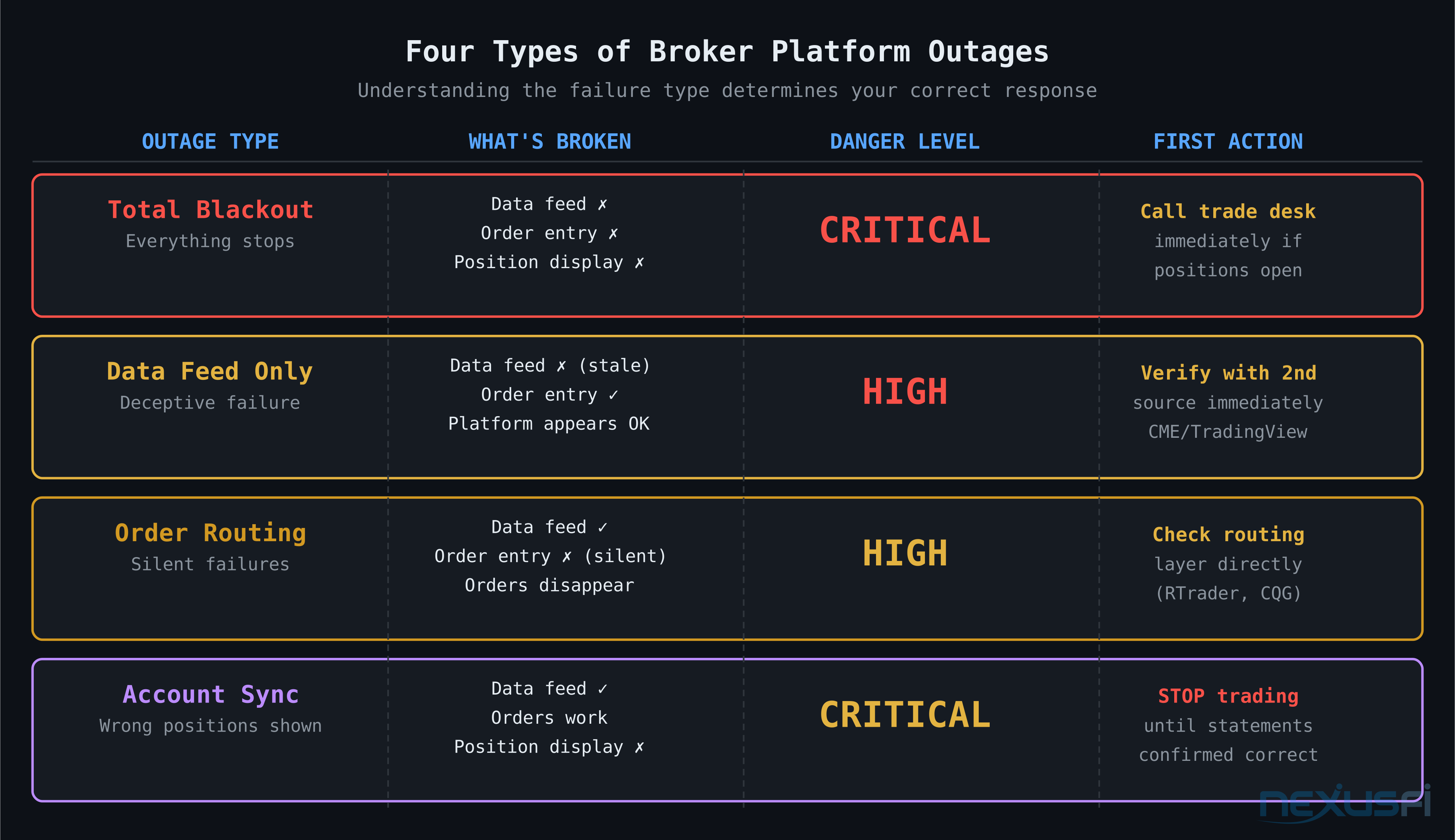
Not all outages are the same. Understanding the failure type determines your correct response.
Total Blackout #
Everything stops: data feed, order entry, position display, account P&L. This is the most obvious failure — you know immediately that something is wrong. The risk: you have open positions and no visibility into price or exposure.
Typical causes: broker server failures, major data provider outages, network infrastructure failures at the broker's datacenter.
Immediate response: call the trade desk. Don't try to restart the platform, reinstall, or troubleshoot your connection. Your first move is establishing human contact with someone who can see your positions and act on them.
Data Feed Only #
The platform is connected and appears functional, but market data has stopped updating. Prices are stale. This is deceptive — you might not notice immediately if you're watching a relatively quiet instrument.
The danger: you're making trading decisions based on prices that are several seconds, minutes, or more out of date. You don't know what the market has done. A stop order that should have triggered hasn't — or a limit order you thought was safe has been filled and re-filled.
Typical causes: connectivity issues between your broker's platform and their data provider, quote server overload during high-volume events, CQG or Rithmic feed interruptions.
Response: verify data staleness immediately by comparing your platform quote to a second source (CME website, TradingView, another data provider). If data is stale, treat it as a total blackout until you confirm data integrity.
Order Routing Only #
You can see prices and your positions, but order entry is broken. Orders time out, get rejected without explanation, or simply disappear. As one NexusFi member documented, their platform accepted the order input, showed no error message, and then did absolutely nothing — the order never reached the exchange.
Typical causes: FIX connectivity issues between the platform and the order management system, routing server overload, exchange connectivity problems at the broker level.
This is dangerous because traders often assume orders went through. As @Miesto documented when dealing with NinjaTrader platform issues[4], maintaining a separate window showing your actual broker position (RTrader Pro for Rithmic accounts, for example) gives you ground truth independent of the front-end platform.
Partial Account / Statement Sync Issues #
Orders execute normally, but your position display is wrong — showing closed positions as open, wrong fills, incorrect P&L. This was the core of the Phillip Capital situation in early 2021, where a back-office outage caused incorrect statements to upload to platforms, showing positions that didn't exist.
This type is the most operationally dangerous because it can trigger unnecessary actions: liquidating positions you don't actually hold, or leaving positions open you think you've already closed.
Response: when in doubt, cross-reference with your broker directly. @NT Brokerage's guidance during the Phillip Capital incident was clear[2]: "If your account remains impacted by the outage, we continue to suggest you do not trade until corrected statements are available."
Exchange-Level Issues #
Sometimes the problem isn't at your broker at all — it's at the exchange. CME Globex has experienced routing issues that affected order management across all brokers routing to affected instruments. TT (Trading Technologies), which acts as middleware routing infrastructure for many FCMs including the one at the center of the 2021 Phillip Capital incident, experienced multiple sequential CME routing outages.
As @SMCJB noted during the February 2021 TT outage chain[5]:
When the connectivity disruption is at the exchange or routing infrastructure level, no amount of platform restarts or internet troubleshooting will help — you're waiting on the exchange or routing provider to restore the link.
Real-World Outage Case Studies #
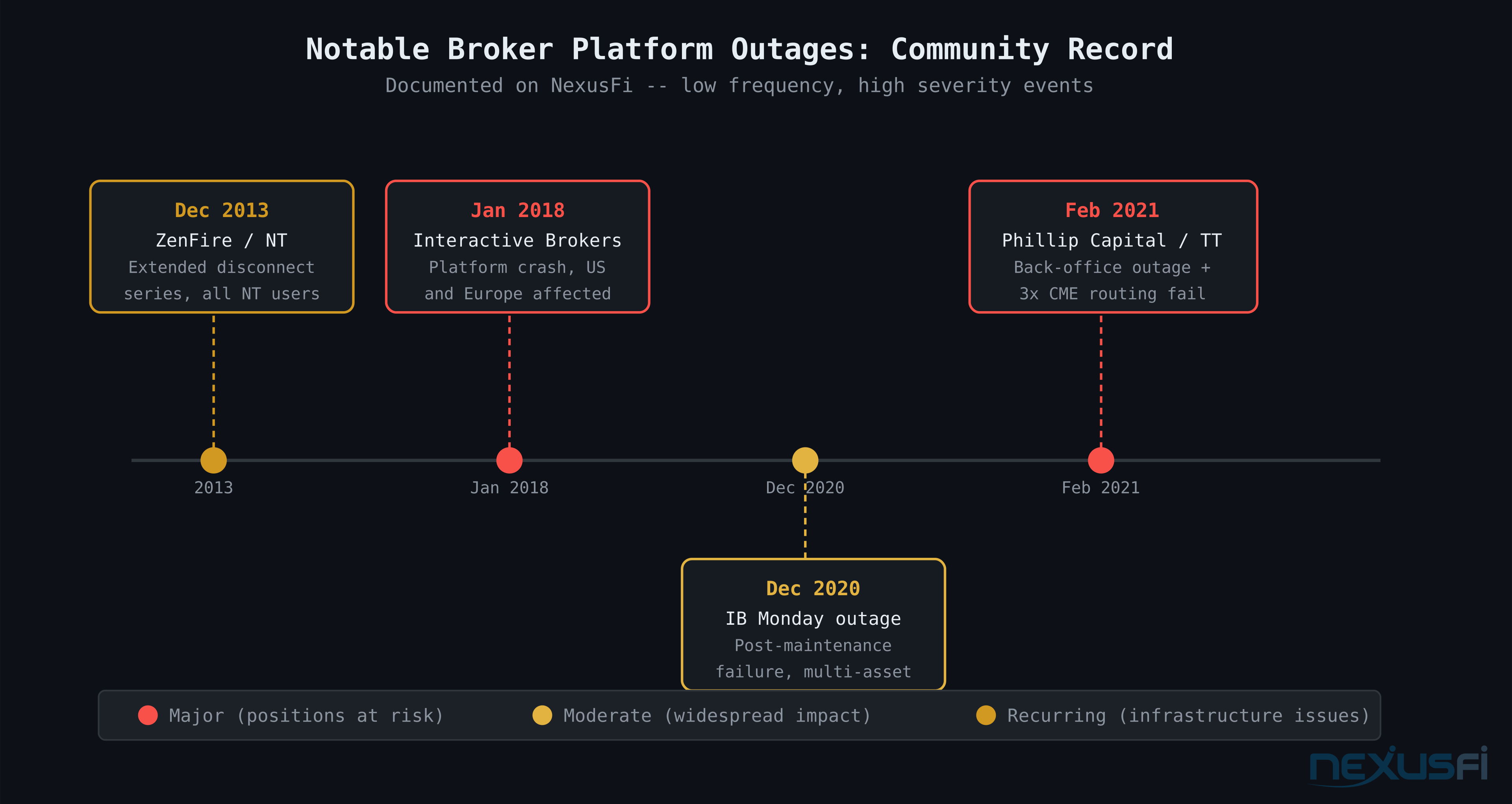
Interactive Brokers Crash — January 2018 #
The IB platform experienced a significant failure on January 5, 2018 that left traders unable to access accounts. As @geodoc described, the failure spanned multiple continents[1]: "As I work in Europe, I imagine that their failure included the US and Europe, since you guys are on the Westcoast. They were of course completely unavailable on the phone."
Two lessons: First, major outages can affect geographically dispersed infrastructure simultaneously — a "backup connection in Europe" isn't always a real backup if the problem is broker-side. Second, phone availability collapses at exactly the wrong moment — brokers with limited phone capacity get overwhelmed instantly when a platform fails because every affected trader is calling at once.
Phillip Capital / Trading Technologies — February 2021 #
The most instructive recent case study. The sequence: a Phillip Capital back-office outage triggered incorrect position data in statements. Trading Technologies, which multiple FCMs used for order routing, then experienced sequential CME routing failures. The situation cascaded into days of account statement inaccuracies, trade execution uncertainty, and position reconciliation problems.
The key warnings that came from NexusFi during this event:
- @Lfx987 documented the TT notice in real time: "TT Outage: CME Order Routing Issues (PENDING) — We are going to disable trading on CME today. NO NEW Trades."[6]
- @EdgeClear explained the mechanism: incorrect start-of-day positions because the statement uploaded incorrect open positions when Phillip's systems came back online[2]
- @NT Brokerage spent weeks working on statement corrections[7]
The takeaway: when middleware routing infrastructure (TT, CQG, Rithmic) fails, the impact is cross-broker. Your individual broker's platform health doesn't matter if their routing layer is down.
ZenFire Disconnects — December 2013 / January 2014 #
NinjaTrader's ZenFire data feed infrastructure experienced extended reliability problems that generated one of the longest broker-related threads on NexusFi. As the NinjaTrader team posted publicly during the crisis[3]: "We are aware that a number of traders are encountering disconnects and the ZenFire technology team is working to fully resolve the issue."
The practical lesson from ZenFire: data infrastructure reliability varies dramatically by provider. Rithmic, CQG, and ZenFire have different track records. Traders who had backup data feeds or broker accounts routed through alternative infrastructure were less affected. Those entirely dependent on the single infrastructure had no fallback.
The Interactive Brokers December 2020 Event #
A Monday outage in December 2020 caught traders across asset classes. As @Pa Dax noted[8]: "IB TWS is down today so no trading. As a rule, when systems are down earlier in the day, I usually don't use them for the rest of the day either." The Monday timing pointed to weekend maintenance that didn't complete cleanly.
The "don't trade on a shaky platform even after it comes back up" principle is sound. Systems that have experienced instability earlier in the session may have residual issues: stale position data, unsynchronized fills, session state inconsistencies that could affect order processing.
Your First 60 Seconds When Going Dark #
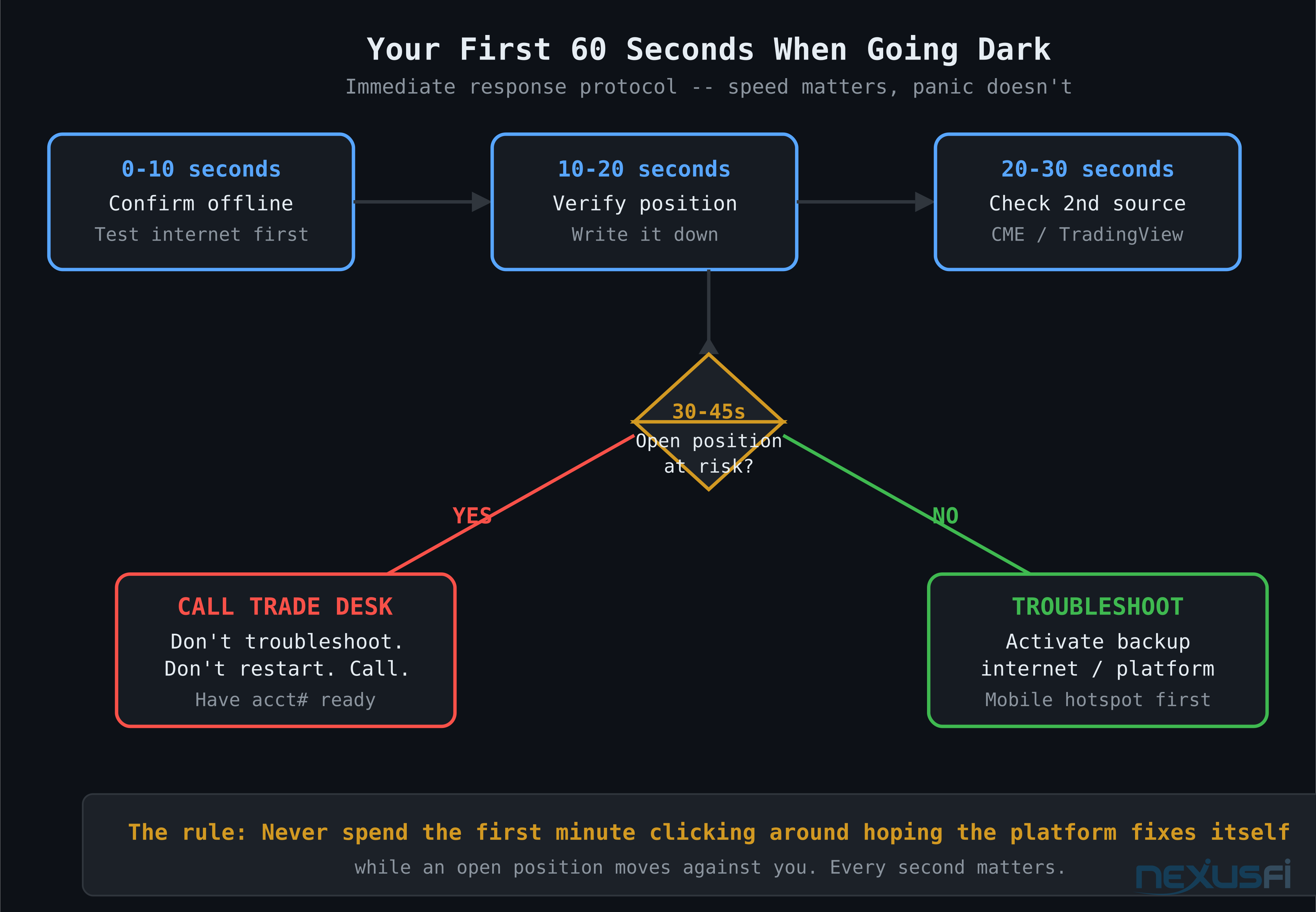
Speed matters, but panic doesn't. The 60-second decision tree:
Second 0-10: Confirm you're actually offline. Check your internet connection. If a second browser tab loads normally, your internet is up — the issue is at your platform or broker. If internet is down, activate your backup immediately.
Second 10-20: Verify your last known position. Before doing anything, know: Are you flat? Do you have resting stops? What contracts are you holding and in which direction? Write it down if needed. This is your operational state and you need it accurate.
Second 20-30: Check for a second data source. Pull up the instrument on TradingView, CME's direct quote page, or a different broker's platform. Know where the market actually is, not where your stale platform says it is.
Second 30-45: Assess immediate risk. If you're flat or market conditions are benign — take a breath, proceed to troubleshoot. If you're long or short with an open position and price is moving against you — go directly to the trade desk. Don't troubleshoot. Don't restart the platform. Call.
Second 45-60: Act. Either call the trade desk to flatten your position/place protection, or begin systematic troubleshooting if you have no immediate risk. Never spend the first minute clicking around hoping the platform fixes itself while an open position moves against you.
The community consensus on this is direct:
As @Fat Tails[9] stated plainly — it's the obvious answer that panicking traders often forget.
The Trade Desk: Your Essential Backup #
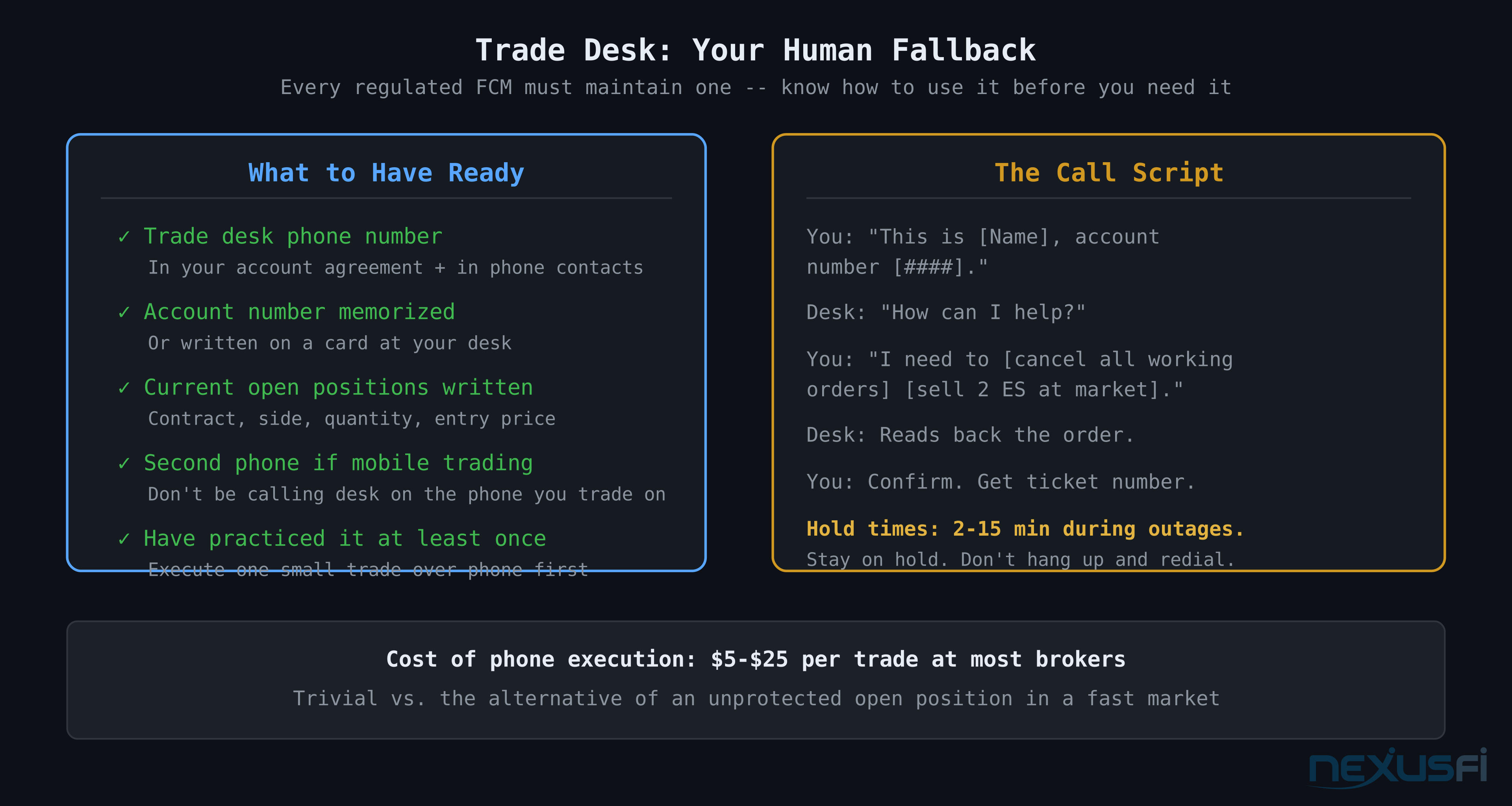
Every regulated FCM maintains a trade desk — a phone line staffed by licensed personnel who can execute orders on your behalf. This is non-optional under regulatory requirements. And it is your primary backup when your platform fails.
Most traders who've never used the trade desk are surprised by how functional it is. As @HiLatencyTRDR documented after actually testing it[10]: "Make a few trades over the phone and see how slow or good the desk is. Who cares if they charge you $5. Typical convo to trade desk: Hi, this is Frank, acct #12456 [wait for response] Can I..."
That last bit is exactly right: you need to have practiced this before you need it. The trade desk call under pressure has a script:
- Your name and account number — have it memorized or on a card at your desk
- What you need — "I want to cancel all working orders" or "I want to sell 2 ES at market"
- Confirmation — get a verbal confirmation and order ticket number if possible
The practical steps to take now, before you need the trade desk:
- Find your broker's trade desk number (it's in your account agreement)
- Add it to your phone as a contact
- Call it during low-volatility hours and execute one small trade through it. Learn the process. Learn the hold times. Know what to say.
Trade desk charges vary. Most FCMs charge $5-$25 per trade for phone execution — a trivial cost compared to the alternative of an unprotected open position during a platform failure.
Order Persistence During Outages #
Find out now: does your broker cancel working orders when you disconnect, or leave them active?
Some routing architectures — especially through certain API configurations — kill all working orders on disconnect. This is designed to prevent runaway automated systems. For a discretionary trader, it means your resting stop order disappears the moment your connection drops.
Other configurations leave orders alive on the exchange through the disconnect. Your stops and entries remain active even while your platform is offline. This seems safer but creates its own risk: you can't see or cancel those orders without reconnecting or calling the trade desk.
The schranzi9 post in the NinjaTrader Brokerage thread[11] captures the practical answer: use Rithmic Trader tool as an emergency option to close open orders when NinjaTrader loses connection. The lesson: know the direct-to-routing-layer tools your broker offers separate from the front-end platform.
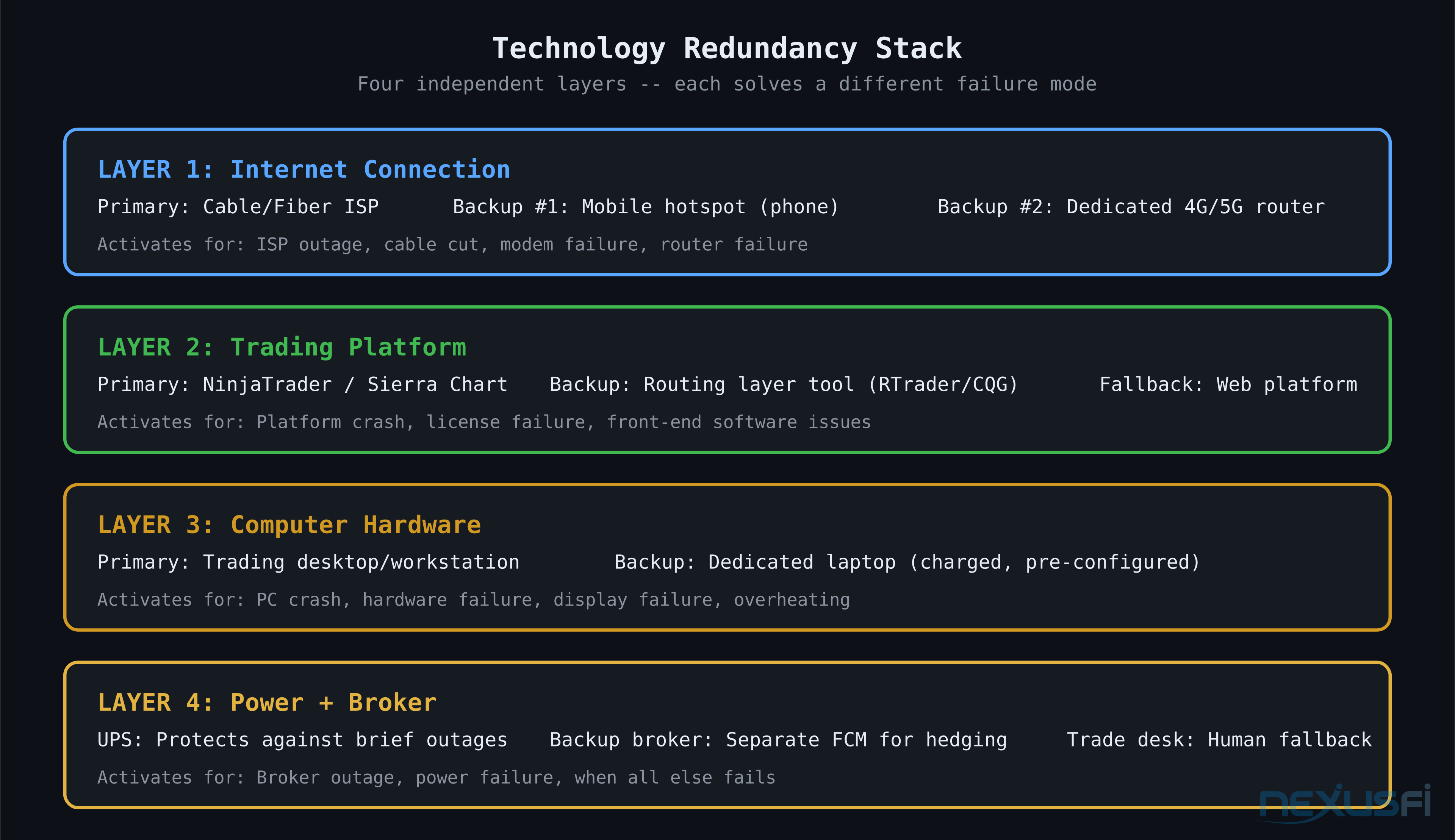
Technology Redundancy Stack #
There's a spectrum from "no preparation" to "full institutional redundancy." Here's what makes practical sense for a retail trader who's serious about uptime.
Layer 1: Backup Internet Connection #
A single internet connection is a single point of failure. If your cable goes out on a volatile morning — and cable outages happen — you're done unless you have a backup.
Options, in order of reliability:
- Mobile hotspot (cellular) — Your phone as a WiFi hotspot when your primary internet fails. Not fast enough for high-frequency strategies, but completely adequate for manual entry and monitoring. Every retail trader should have this as an automatic reflex. As @Saroj detailed[12]: "Turn your phone as a WiFi hotspot using your data plan."
- Dedicated 4G/5G router — A separate cellular data device that's always on, ready to switch. More reliable than hotspotting your phone because it has a dedicated antenna and doesn't interfere with other phone functions.
- Secondary ISP — Two different internet providers from two different technologies (cable + DSL, cable + fiber). Expensive but eliminates most single-provider outages. Warranted for traders who are trading significant size.
@Fat Tails described his redundancy setup[9]:
That's a solid three-layer approach: backup internet, backup computer, and the backup computer handles power failures too.
Layer 2: Backup Data Feed / Platform Access #
For NinjaTrader traders using Rithmic: Rithmic Trader Pro is a free tool from the data provider itself that lets you view positions and enter orders directly through the Rithmic layer, bypassing the NinjaTrader front-end. If NT crashes, RT Pro still works.
For CQG-connected brokers: CQG's own web trader provides a similar escape hatch.
For brokers that provide web-based platform access: keep the URL bookmarked and test it. Many brokers have a web version of their platform that's architecturally separate from the desktop client. If your desktop platform fails, the web version often still works because it's running off different infrastructure.
As @Fonz described his redundancy setup[13]: "I use 2 trading platforms with the same broker when I day trade — the 1st and free broker trading platform + Jigsaw. In case of an Internet, Power, Hardware, Software failure, I would open the phone app to close all intra-day positions."
Three layers: primary platform, secondary platform on same broker, mobile app as tertiary.
Layer 3: Backup Computer #
@Fat Tails again: "In case of a PC failure, I have a notebook to connect to my broker. The notebook also works during a power failure."
A dedicated trading notebook — even an older, inexpensive machine — stored in a known location and kept charged, gives you a fallback when your primary computer fails. It doesn't need to be powerful. It needs to be able to run your broker's web platform or trade desk software.
Critically: if you have a desktop and a backup laptop, make sure both are logged into your broker account. Don't discover on the day of a crash that your backup machine doesn't have the login credentials or the right software installed.
Layer 4: UPS (Uninterruptible Power Supply) #
A battery backup for your computer and modem handles the "power blip" scenario — a brief power interruption that would otherwise restart your entire setup. For traders in areas with unreliable power, this is basic infrastructure.
A basic UPS runs $50-$150 and handles most brief power events. At full trading size, a 15-minute power outage without a UPS is not a negligible risk.
Backup Brokerage Accounts #
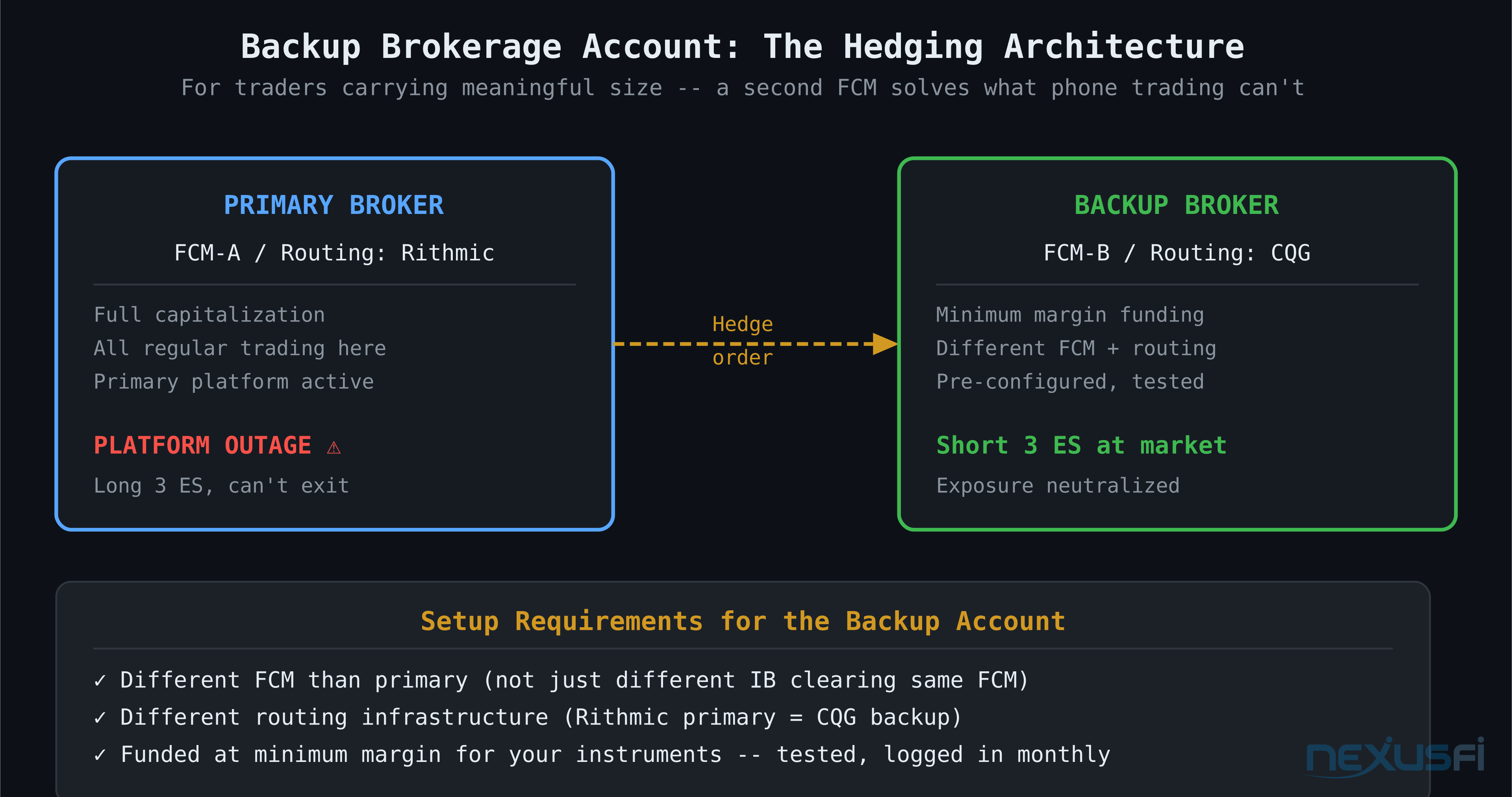
For serious retail traders, a backup broker account is not paranoid — it's prudent risk management. As @Big Mike detailed in his discussion of multiple accounts as a hedge for technology failure[15]: when you have a position you can't exit at your primary broker due to a platform failure, a backup account at a separate FCM lets you hedge the position rather than hold it unprotected.
The mechanics: if you're long 3 ES contracts at your primary broker and can't exit because the platform is down, you can go short 3 ES at your backup broker to neutralize the exposure while you wait for your primary platform to recover or while the trade desk processes your exit.
Big Mike's analysis of cost vs. benefit is accurate[15]: "If you are trading 3 lots, then all the expense of backups and redundancy probably cost more than the time it would take to get someone on the phone." At small size, phone execution is sufficient. At larger size, the friction costs of phone execution during a volatile outage become real enough to justify maintaining a hedging account.
What a backup brokerage account requires:
- Funded at minimum margin levels for the instruments you trade (enough for emergency use)
- Logged in and tested before you need it
- At a different FCM than your primary — not a different IB clearing through the same FCM
- Using a different routing infrastructure if possible (if your primary uses Rithmic, your backup using CQG routing through a different FCM addresses the "routing infrastructure failure" scenario)
@steve2222 described an elegant real-world backup using CQG on a phone[16]: "It is an alternative to phoning the broker. Because it is on my phone it gives redundancy for my home fibre going down but the mobile network is still up."
Routing through a different provider (CQG on mobile) when your primary home connection and platform are both down solves multiple failure modes simultaneously.
Pre-Market Preparation: The Daily Checklist #
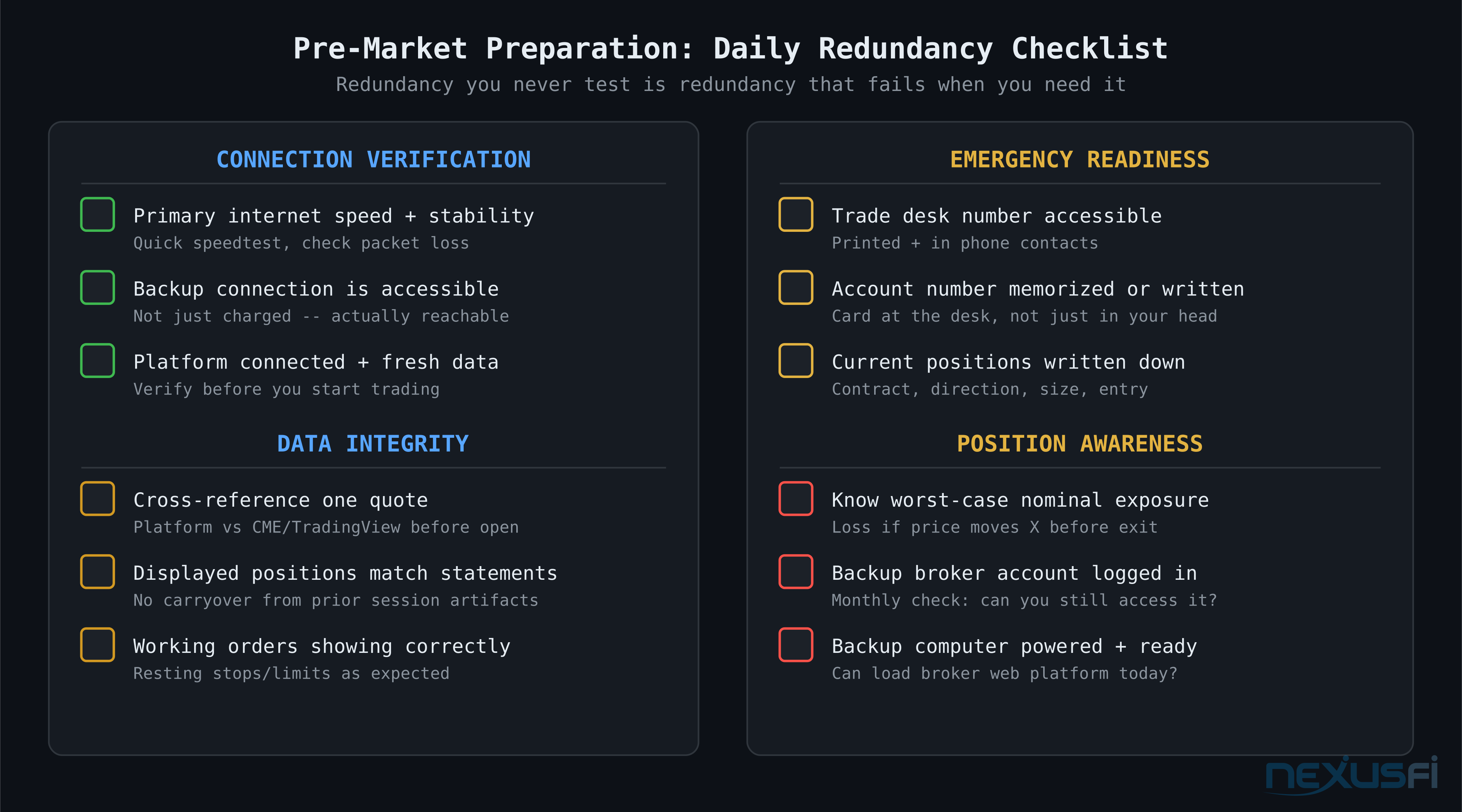
Redundancy you never test is redundancy that fails when you need it. These are the checks that make your backup systems reliable rather than theoretical.
Connection verification:
- Confirm primary internet speed and stability (brief speedtest, check packet loss)
- Verify backup connection is active and accessible — not just charged and available
- Confirm platform is connected and showing fresh data before you start trading
Platform data integrity:
- Cross-reference one quote against a second independent source before the open
- Check that your displayed positions match your actual account statements
- Verify any resting orders are showing correctly
Trade desk readiness:
- Trade desk number visible and accessible at your desk (printed card or phone contact)
- Account number memorized or written down
- Know what you would say: "This is [name], account [number], I need to [action]"
Emergency contacts:
- Broker phone number confirmed working (not stale from an old account document)
- If you use API or FIX connectivity, know the direct support line for your data provider
Critical information card (written, not just in your head):
- Current open positions and direction
- Any resting orders (stops, limits) and where they sit
- The worst-case exposure in nominal terms (what would you lose if price went to zero before you could exit)
@Pa Dax described a useful rule for post-outage trading[17]: when systems are down earlier in the day, don't use them for the rest of the day. The principle behind this is sound — a system that has experienced a failure hasn't necessarily returned to full stability. Give it time and a track record before trusting it with live risk.
Post-Outage Account Reconciliation #
When the platform comes back up after an outage, the immediate instinct is to start trading again. Wrong move.
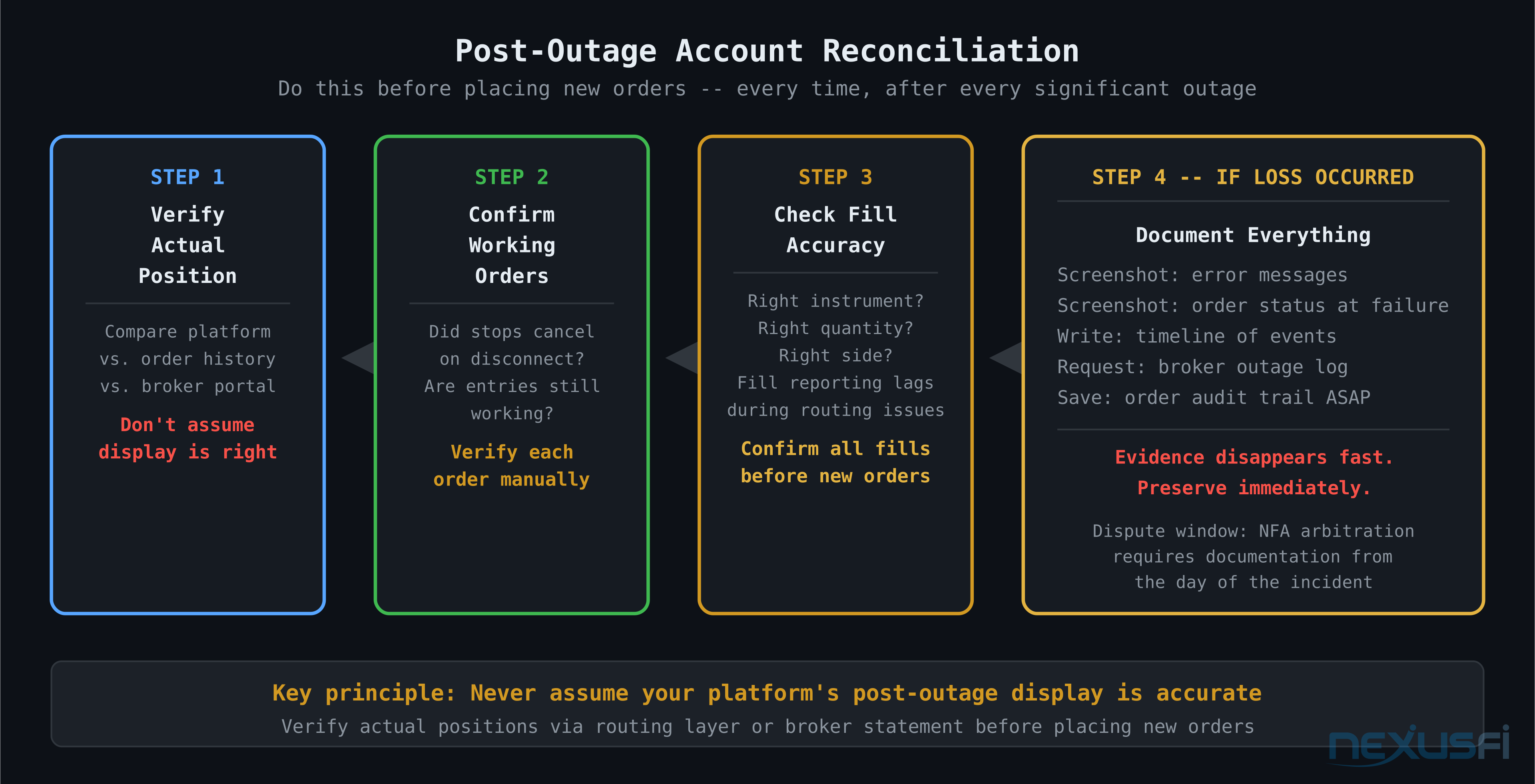
Before resuming trading after a significant outage:
Verify your actual position. Your platform's displayed position may not reflect reality. This is exactly what happened during Phillip Capital — incorrect statements showed wrong positions. Cross-reference your displayed position against your order history, any fills you received confirmation for, and your broker's statement system directly.
Confirm all working orders. Know the status of every order that was working when the outage occurred. Did they cancel (if your broker has auto-cancel on disconnect)? Did they execute? Are they still working? Don't assume — verify each one.
Check fills for accuracy. If any orders filled during the outage or immediately after reconnection, confirm the fills match what you expected: correct instrument, correct quantity, correct side. During routing instability, fill reporting can lag or mismatch.
Wait for statement sync if back-office outage was involved. If the outage touched back-office infrastructure (as Phillip Capital's did), confirmed position data may not be available for hours. Trading before positions are confirmed means trading without knowing your actual exposure. As @NT Brokerage directly advised during the 2021 incident: do not trade until corrected statements are available.
Document everything. If you believe you experienced loss because of the outage — incorrect fills, missed exits, forced liquidations at unfavorable prices — preserve screenshots, timestamps, platform logs, and your own notes immediately. System failure disputes are the hardest broker arbitration cases to win precisely because of documentation gaps. Build your record immediately.
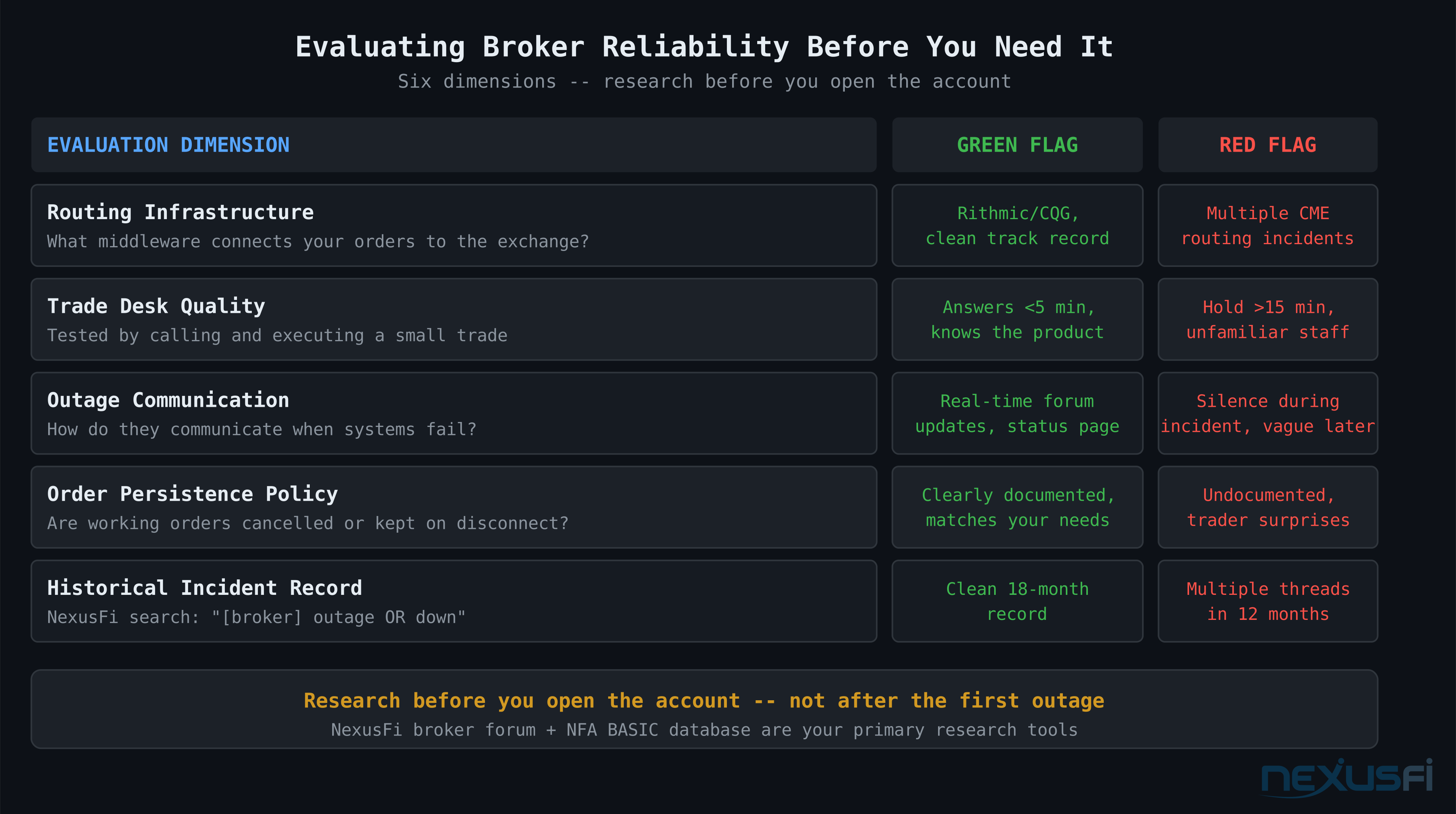
Evaluating Broker Reliability Before You Need It #
Platform reliability is a broker selection criterion that most traders underweight. They improve for commissions and platform features and discover the reliability dimension only during an incident.
Signals worth evaluating before choosing or continuing with a broker:
Routing infrastructure they use. Is it Rithmic, CQG, TT, proprietary? Look for their track record separately. TT had significant CME routing issues in early 2021. Rithmic has had its own historical incidents. This isn't about avoiding specific providers permanently — it's about understanding the failure history of the infrastructure you're relying on.
Their communication record during incidents. When a broker goes down, how do they communicate? During ZenFire incidents, NinjaTrader posted to forums and provided trade desk numbers. During the Phillip Capital incident, NinjaTrader Brokerage posted regular updates to NexusFi directly. Transparent, proactive communication during failures signals a professionally operated broker. Silence is a red flag.
Their trade desk capacity and response time. The only way to know this is to use it. Call during normal hours, execute a small trade, note the hold time and professionalism. Discovering that the trade desk puts you on hold for 20 minutes is important information — do it when you have time to wait, not when you have an open position moving against you.
Historical incident frequency. Search NexusFi for the broker's name + "outage" or "down" or "disconnection." The community documents these incidents in real time. A broker with multiple significant outage reports in 12-18 months deserves more scrutiny than one with a clean record.
Their backup/failover procedures. Ask directly: what happens to my open orders if your servers go down? Are there hot standby systems? What's the documented failover time? Not all brokers can answer this clearly, which is itself informative.
Size, Stakes, and Right-Sizing Your Redundancy #
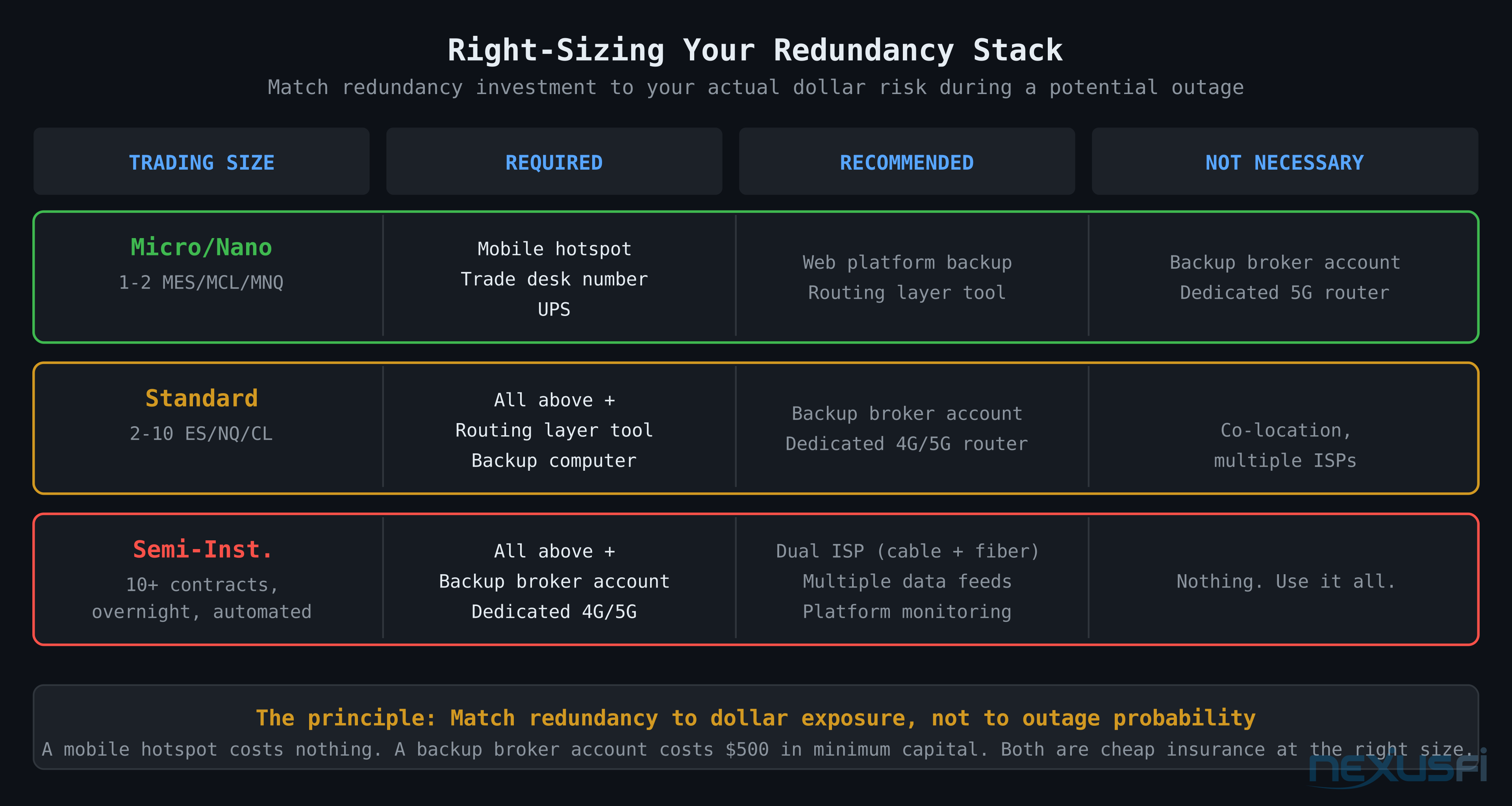
The right level of redundancy investment scales with your trading size and the risk of a bad outcome during an outage.
At micro/nano contract sizes — 1-2 MES or MCL contracts — phone execution during a failure is adequate. The dollar risk during a platform disruption is manageable. Backup broker accounts and dedicated cellular routers probably cost more in time than the risk justifies.
At standard contract sizes — multiple ES, CL, or NQ contracts — the math changes. A 5-minute outage during a volatile session can represent significant dollar exposure. Backup routing through a second broker starts to make sense.
At semi-institutional levels — dozens of contracts, overnight positions, automated strategies — redundant infrastructure is table stakes: multiple data feeds, redundant internet with diverse providers, backup execution venues, and platform-independent position monitoring.
@CenFlo made the point directly about internet redundancy[18]: "I'd like to make one very important point here and that's Internet access and having a backup." It's the foundation everything else rests on. No backup internet means every other redundancy measure doesn't help when your connection drops.
The principle: match your redundancy stack to the dollar exposure you're carrying during a potential failure, not to the probability of a failure. Outages are rare but not theoretical. The cost of the right redundancy stack at your trading size is almost always less than the expected cost of a single unprotected position during a bad outage.
Practical Takeaways #
Have the trade desk number ready before you need it. Print it. Put it in your phone. This is non-negotiable. Platform outages don't give you time to search for contact information.
Know your position state at all times, independent of your platform. Maintain a separate window showing your actual broker position (RTrader Pro, CQG Trader, your broker's web portal) that's architecturally separate from your front-end platform. Your platform's display can lie. Your routing layer's display almost never does.
A mobile hotspot costs nothing and solves most connectivity failures. Your existing smartphone data plan is already your backup internet. Know how to enable the hotspot in under 10 seconds.
Test your backups. Use the trade desk once. Log into your backup broker account monthly to verify it still works. Make sure the backup computer can actually load your broker's web platform. Systems that are never tested fail at the worst possible moment.
Post-outage reconciliation before resuming. Always verify your actual position state before placing new orders after any significant platform disruption. The few minutes spent confirming your position is far cheaper than discovering you were doubly long when you thought you were flat.
Knowledge Map
Go Deeper
Build on this knowledgeReferences This Article
Articles that build on this topicCitations
- — Anyone Caught in Interactive Brokers Platform Crash on 1.5.18? (2018) 👍 3“As I work in Europe, I imagine that their failure included the US and Europe. They were of course completely unavailable on the phone.”
- — Need Help: Urgent Broker Problem (Phillip Capital: NT Brokerage, Edge Clear) (2021) 👍 3“If your account remains impacted by the outage, we continue to suggest you do not trade until corrected statements are available.”
- — Zenfire no more? (2013) 👍 8“We are aware that a number of traders are encountering disconnects and the ZenFire technology team is working to fully resolve the issue.”
- — Live Trading Bugs that NT Blames on Custom Indicators (2025) 👍 3“I have a separate window open with all open positions at my broker (RTrader Pro from Rithmic). That way I always know the real positions I have.”
- — Need Help: Urgent Broker Problem (Phillip Capital: NT Brokerage, Edge Clear) (2021) 👍 4“TT having their 3rd CME outage since Thursday.”
- — Need Help: Urgent Broker Problem (Phillip Capital: NT Brokerage, Edge Clear) (2021) 👍 1“TT Outage: CME Order Routing Issues (PENDING) -- We are going to disable trading on CME today. NO NEW Trades.”
- — Need Help: Urgent Broker Problem (Phillip Capital: NT Brokerage, Edge Clear) (2021) 👍 8“Since there was an outage at Phillip, when the statements uploaded to the platform, it pulled in the incorrect open positions.”
- — PA Dax CL, ES and Bund Price Action Trading Log (2020) 👍 1“IB TWS is down today so no trading. As a rule, when systems are down earlier in the day, I usually don't use them for the rest of the day either.”
- — Outage with a live position on Ninja (yikes) what to do? (2012) 👍 3“A backup internet connection (mobile) to replace my fixed line. In case of a PC failure, I have a notebook to connect to my broker.”
- — Anybody here trade with Rithmic? (2022) 👍 5“Make a few trades over the phone and see how slow or good the desk is. Who cares if they charge you $5.”
- — NinjaTrader Brokerage Services (2014) 👍 1“Use Rithmic as data feed to have an emergency option to close your open order with the Rithmic Trader tool.”
- — Doomsday senerio (2019) 👍 4“Turn your phone as a WiFi hotspot using your data plan.”
- — Fail to Plan - Plan to Fail: What can go wrong? (2021) 👍 2“I use 2 trading platforms with the same broker when I day trade. In case of an Internet failure, I would open the phone app to close all intra-day positions.”
- — Doomsday senerio (2019) 👍 4“Have an UPS or your Notebook with batteries for a couple of hours.”
- — Multiple Accounts as Hedge for technology failure (2011) 👍 3“In this case you need a backup broker where you can hedge the trade.”
- — The HSI Index Futures Scalping Experiment (2020) 👍 5“It is an alternative to phoning the broker. Because it is on my phone it gives redundancy for my home fibre going down.”
- — PA Dax CL, ES and Bund Price Action Trading Log (2018) 👍 6“Trading is risk management, so I want to be fully redundant on my trading equipment and account.”
- — Spoo-nalysis ES e-mini futures S&P 500 (2016) 👍 6“I'd like to make one very important point here and that's Internet access and having a backup.”