



Market Replay Data for Futures Trading: What You Need, Where to Get It, and Why Quality Changes Everything
Overview #
Market replay is one of the most powerful practice tools in futures trading — and one of the most misunderstood. Most traders think of it as "playback." Hit a button, watch the chart move, take some practice trades. But the value of replay lives or dies on something most traders never examine: the data underneath.
This article is about the data side of market replay. What data primitives you need. Where to source them. How to tell good data from garbage. And why a seemingly small quality difference — a few milliseconds of timestamp drift, some missing depth updates — can turn your practice sessions from genuine skill-building into expensive self-deception.
Here's the uncomfortable truth: if you're practicing DOM trading on replay data that only captures L1 best bid/ask, you're training on a hallucination. If your timestamps drift by 10+ milliseconds, your "reads" on tape speed are fiction. If your vendor aggregates multiple trades into single prints, your volume analysis is compromised before you start.
The good news? Once you understand what separates high-fidelity replay from low-fidelity replay, you can make informed choices about what data you need for your specific trading style — and stop wasting practice hours on data that can't teach you what you think it's teaching you.
Key Concepts #
What Market Replay Data Actually Is #
Market replay data is a recorded historical sequence of market events — trades, quote changes, and (optionally) order book depth updates — that can be replayed through a trading platform to simulate live market conditions. The critical word there is events, not bars.
A 5-minute OHLCV bar tells you where price opened, where it went, and how much volume traded. It doesn't tell you the sequence. It doesn't tell you whether the move happened in a smooth grind or a violent spike-and-reverse. For chart-based analysis, bars are fine. For anything involving tape reading, order flow, or execution practice, you need the actual event stream.
In futures specifically, replay data must be tied to the exact contract month, not a continuous series. If you're replaying ES from March 2025, the data must reference ESH25 with its specific tick size, session boundaries, and roll date. Continuous contract constructions introduce price adjustments that don't exist in real trading — and your practice fills need to reflect actual prices.
The Three Data Primitives #
Every piece of market replay data boils down to three primitives:
Trades — A timestamped record of executions: price, size, and (when available) aggressor side. The aggressor side tells you whether the trade was initiated by a buyer hitting the ask or a seller hitting the bid. This is the foundation of delta, cumulative delta, and footprint charts. Without aggressor-side attribution, those tools become unreliable.
Quotes (L1) — Best bid price and size, best ask price and size, last trade price. This is top-of-book data. It gives you the spread, the last traded price, and the current inside market. For chart-based replay, this is usually sufficient.
Depth (L2) — Multiple price levels on both sides of the book. CME provides up to 10 levels of aggregated depth. True market-by-order (MBO) data goes further — it shows individual orders at each level, not just the aggregated size. L2 data is what makes DOM replay, footprint analysis, and order flow practice meaningful.
Recording vs Downloading #
There are two at the core different ways to acquire replay data, and the distinction matters more than most traders realize.
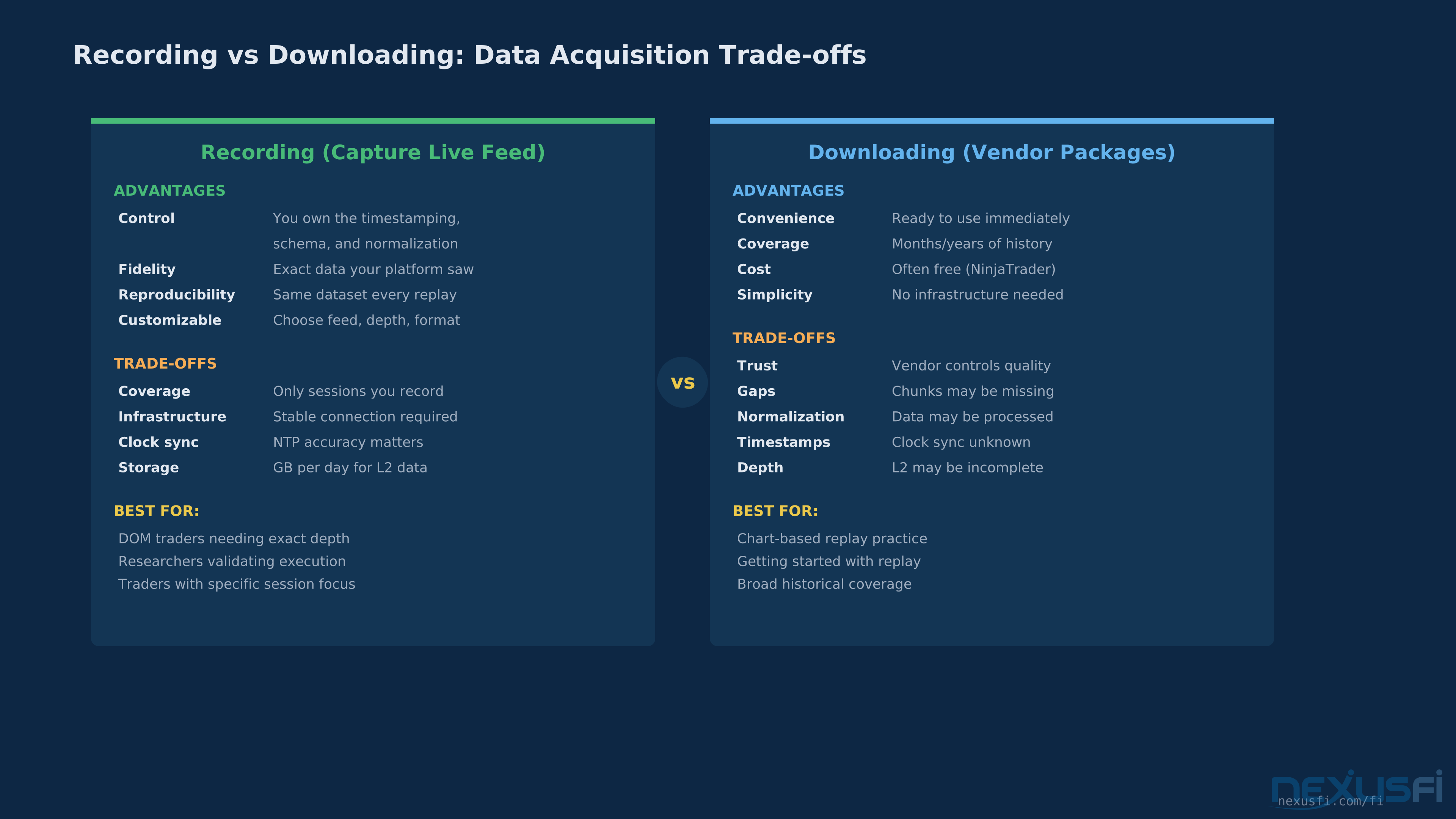
Recording means capturing the live data feed as it arrives at your platform. You control the timestamping, the data schema, and the completeness. If your connection is clean for that session, you get exactly what your platform saw — the same information that was available to you for making live trading decisions. The downside: you only get data for sessions you actively record, and your recording quality depends on your infrastructure (internet connection, platform stability, system clock accuracy).
Downloading means pulling pre-packaged historical data from a vendor or your platform provider. NinjaTrader offers free downloadable replay data. Bookmap provides cloud-based historical data files. Commercial providers sell tick-level archives going back years. The upside is convenience and coverage. The downside is that you're trusting the vendor's data pipeline — their normalization, their timestamping, their completeness.
As @Jigsaw Trading's Peter Davies notes on NexusFi, "the downloaded replay data isn't always perfect — there can be chunks of data missing, sometimes there's L1 data there but no L2 data." [1] This is the trade-off. Downloaded data gives you breadth; recorded data gives you control.
Fidelity Tiers: L1, L2, and True Event-Feed #
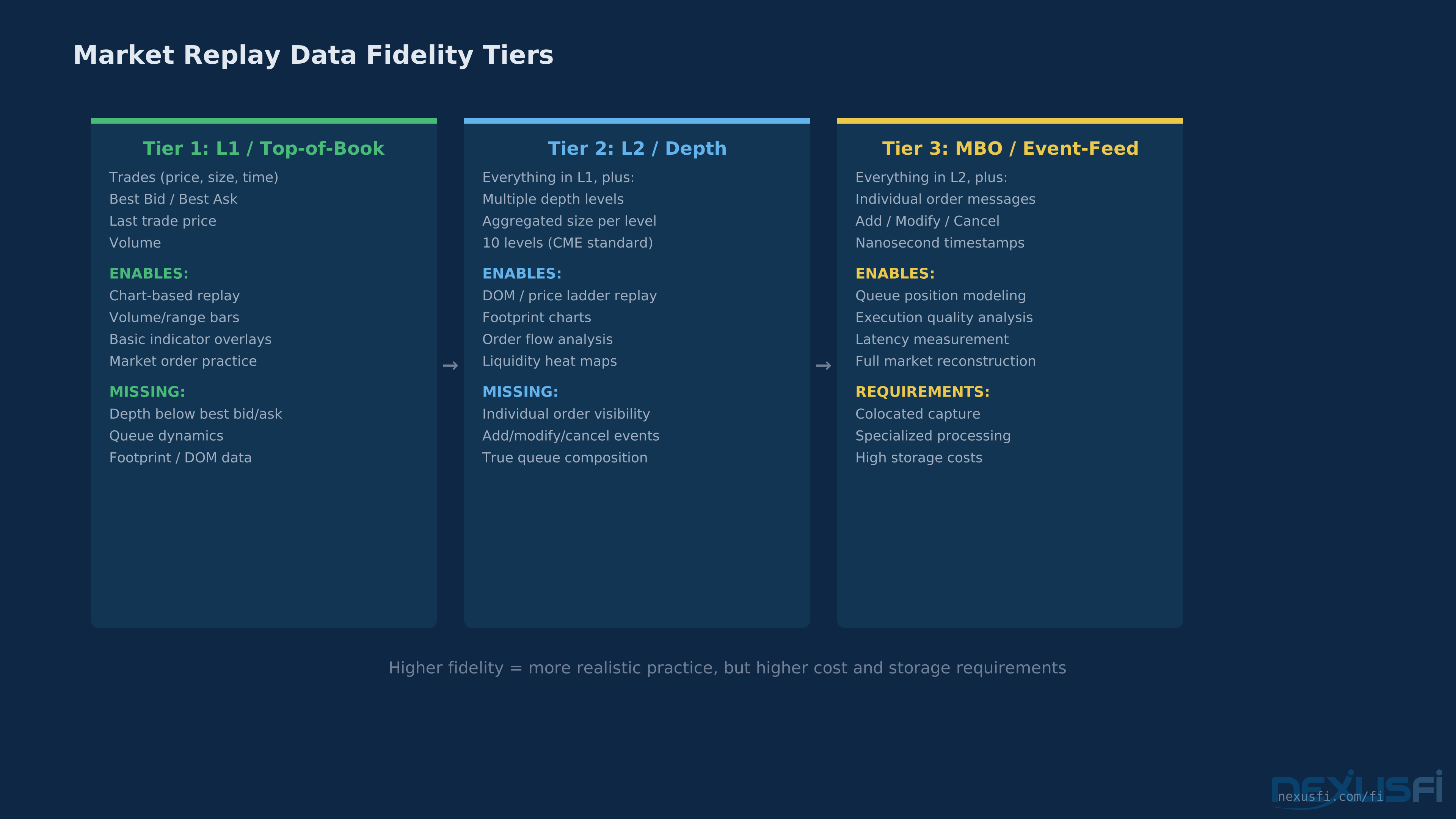
Not all replay data is created equal. Think of it as three tiers of fidelity, each enabling different types of practice:
Tier 1: L1 / Top-of-Book — You get trades and best bid/ask. This supports chart-based replay (candlesticks, volume bars, range bars), basic indicator overlays, and practice with market and limit orders at the top of book. What you can't do: DOM trading, footprint analysis, order flow reading, or anything that depends on queue dynamics below the best bid/ask. For swing traders and chart-based discretionary traders, L1 is often enough.
Tier 2: L2 / Aggregated Depth — You get multiple price levels on each side of the book, typically showing total size at each level. This enables DOM replay, basic footprint charts, liquidity heat maps, and order flow analysis. What you're still missing: individual order visibility. You see that 500 contracts are sitting at 5200.00, but you don't know if that's one large order or fifty small ones. For most DOM traders and order flow practitioners, L2 is the practical minimum.
Tier 3: MBO / True Event-Feed — You get individual order add, modify, and cancel messages. This is the raw exchange feed. It reveals queue composition, individual order behavior, and the actual sequence of events at the matching engine level. As @artemiso documented in extensive research shared on NexusFi, this level of data provides "nanosecond precision in the timestamps and one-to-one correspondence with exchange message sequence numbers" [2] — a level of fidelity that exposes significant gaps in what retail platforms capture. For high-frequency analysis and execution quality research, MBO is the gold standard. For most retail traders, L2 is sufficient.
The critical question is: what tier does your practice actually need? A trader practicing chart-based entries on the ES doesn't need MBO data. A trader refining DOM scalping technique absolutely needs L2 at minimum. Using L1 data for DOM practice is like practicing surgery on a mannequin — the motions look right but the feedback is meaningless.
How It Works #
Timestamp Accuracy: The #1 Hidden Failure Mode #
Timestamps are where most replay data silently fails. And "fails" doesn't mean crashes or error messages — it means your practice sessions are subtly misleading you about timing, speed, and sequence.
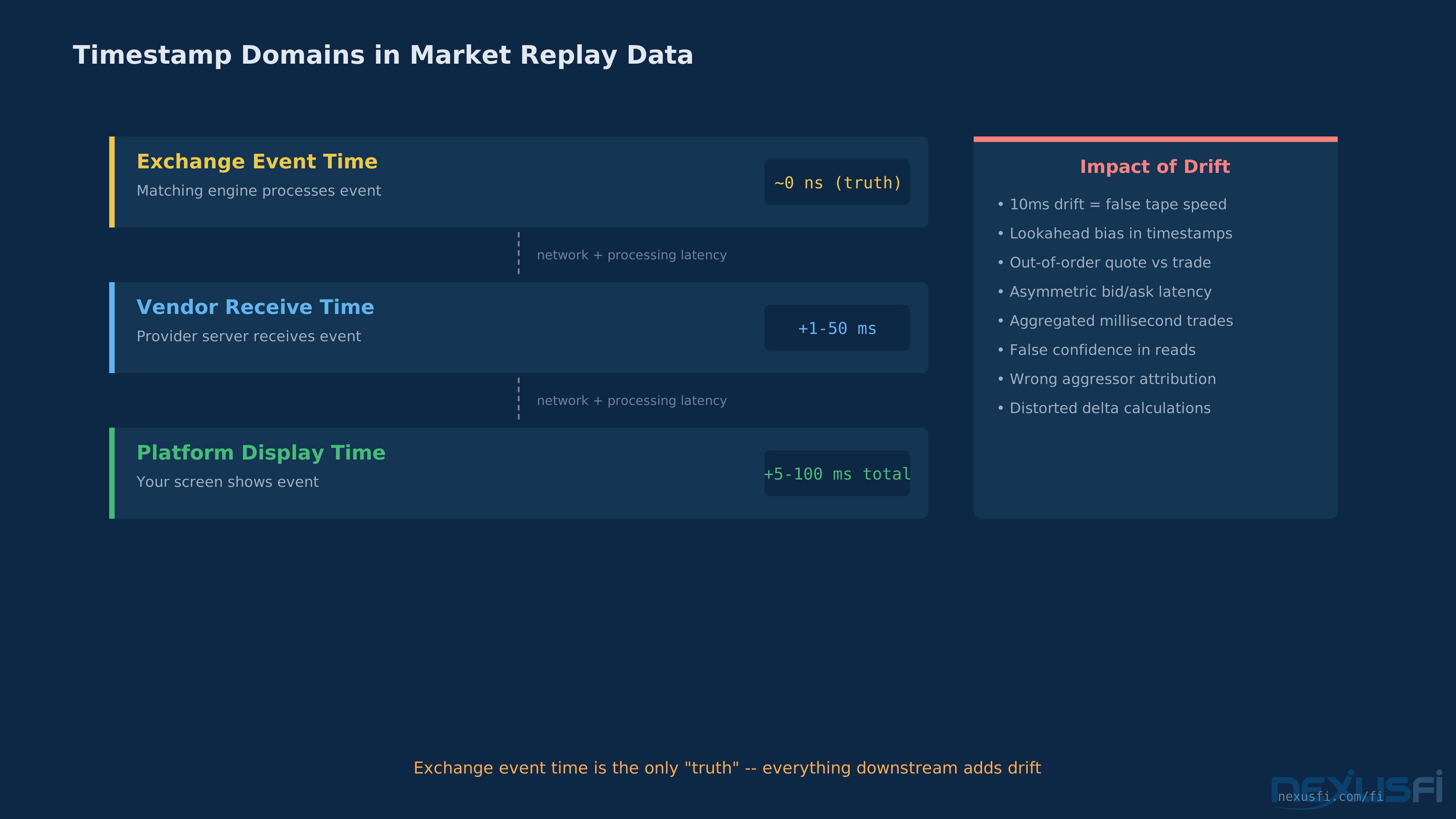
There are three timestamp domains in play:
Exchange event time — When the exchange's matching engine processed the event. This is the "truth" timestamp. CME embeds this in every message with nanosecond precision.
Vendor receive time — When your data provider's server received the event. This includes network latency from the exchange to the vendor, plus any processing delay.
Platform display time — When your trading platform received and rendered the event. This adds another layer of latency from the vendor to your platform, plus local processing time.
Research by @artemiso found that NinjaTrader's market replay timestamps have "large drift (10+ ms), lookahead advantage (timestamped ahead of CME's timestamp because of clock synchronization error), and large fluctuations (10-27 ms in the span of 10 seconds of data)." [3]
10 milliseconds of drift might sound trivial. It's not. In fast-moving markets, 10ms is the difference between seeing a trade before or after the book update that caused it. If you're practicing tape reading — training your eyes and instincts to recognize speed and aggression — timestamp drift corrupts the feedback loop. You think you're reading the tape. You're reading a slightly scrambled version of it.
@gomi's research on NexusFi measuring data feed latencies across different providers demonstrated that "bid/ask ticks have greater lag than price ticks" [4] — meaning quote updates and trade prints may arrive out of their true sequence. For strategies that depend on the relationship between quote changes and trade execution, this asymmetric lag is a real problem.
Data Quality Dimensions #
When evaluating replay data, assess these five dimensions:
Completeness — Are all events captured? Missing ticks, dropped depth updates, or gaps during volatile periods are common. If your data shows a 200-tick move in ES but the actual session had 50% more trades during that burst, your replay underrepresents the speed and aggression of the move. Check event counts per time interval against exchange-reported volumes.
Accuracy — Are prices, sizes, and timestamps correct? Price errors are rare in modern feeds but timestamp errors are common. Verify that trade prices fall within or at the contemporaneous bid-ask spread. If you see trades at prices that don't match any level in the reconstructed book, something is wrong.
Resolution — What's the smallest unit of data? Tick-level data preserves individual events. Some vendors aggregate trades that occur in the same millisecond into a single print —
[3] For volume analysis and footprint charts, this aggregation distorts the picture.
Continuity — Are there gaps, disconnections, or partial recordings? Recording live data is vulnerable to internet interruptions, platform crashes, and system clock drift. Downloaded data from vendors can have missing segments too. Check for suspicious flat periods where no events occur — either the market was genuinely quiet, or your data has a hole.
Normalization — How has the vendor processed the raw data? Some vendors clean, filter, or reorder events. This can improve usability (consistent formatting, proper sequencing) or damage fidelity (removing "anomalous" events that were actually real). Know what your vendor does to the data between receiving it and delivering it to you.
Practical QA Checklist #
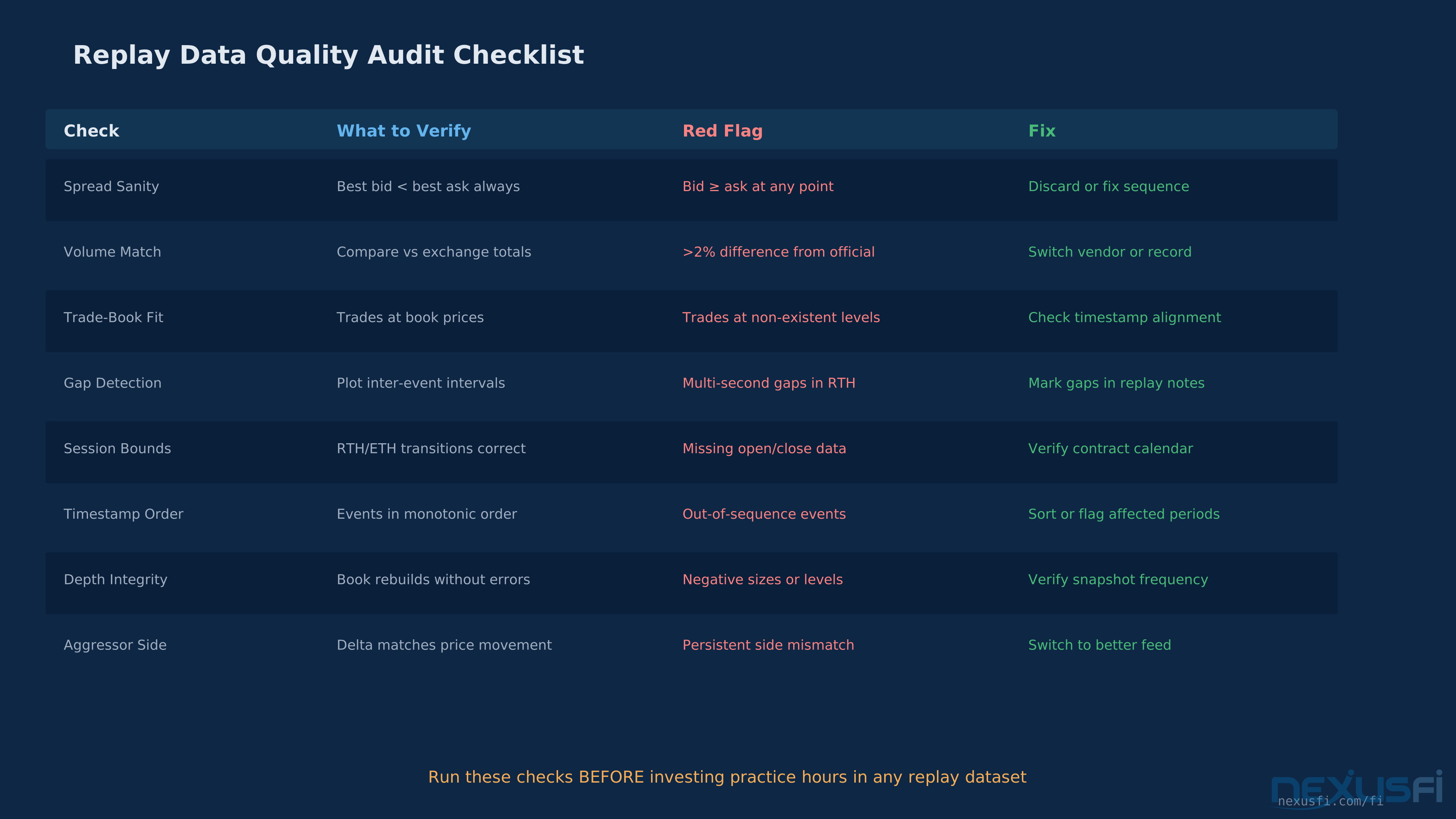
Before trusting any replay dataset, run these checks:
- Spread sanity — Best bid should always be below best ask. If your reconstructed book ever shows bid ≥ ask, the data has sequencing or completeness issues.
- Volume reconciliation — Compare total volume in your replay data against exchange-reported volumes for that session. A difference of more than 1-2% suggests missing trades.
- Trade-book consistency — Trades should occur at prices that exist in the contemporaneous order book. If trades hit at prices with no visible liquidity, either depth data is incomplete or trade timestamps are misaligned with book snapshots.
- Gap detection — Plot inter-event time intervals. Normal market sessions show a consistent rhythm with predictable quiet periods (lunch, settlement). Unexplained multi-second gaps during active periods indicate missing data.
- Session boundary verification — Confirm that your data correctly handles RTH vs ETH boundaries, daily settlement breaks, and any halts or pauses that occurred during the session.
Practical Application #
Matching Data Fidelity to Trading Style #
Not every trader needs the same data quality. Here's a practical framework:
Swing and position traders (holding hours to days) — L1 tick data is sufficient. Your entries and exits are based on chart structures, not order book dynamics. Focus on price and volume accuracy. Timestamp precision matters less when your holding period is measured in hours.
Intraday chart-based traders (trading off 1-5 minute charts, volume charts, range bars) — L1 with good timestamps serves you well. You need accurate price sequence and volume to build your chart types correctly. If you use volume-based chart types (volume bars, tick charts), verify that your data doesn't aggregate trades inappropriately.
DOM and tape readers (watching the price ladder, reading speed and size) — L2 is the minimum. You need multiple levels of depth to see where size is sitting, how the book is behaving, and how trades interact with resting liquidity. Without L2, your DOM in replay shows a skeleton — numbers but no structure.
As @icbto09 posted on NexusFi, asking for "a data feed purely utilized for market replay functionality — more specifically, the connection must have level II data as I'd mainly be using it to practice my DOM trading outside of open market times" [5] — this is the exact right question. DOM practice on L1 data teaches you nothing about depth dynamics.
Order flow and footprint traders (delta, cumulative delta, volume at bid/ask) — L2 with accurate aggressor-side attribution. Delta analysis depends entirely on correctly identifying whether a trade was buyer-initiated or seller-initiated. Feeds differ in how they attribute side — some use a simple trade-price-vs-midpoint heuristic, others use order-matching logic. The method matters for your delta accuracy.
Quantitative and research-focused traders (backtesting execution logic, studying microstructure) — MBO event-feed or the highest fidelity L2 available. If you're modeling queue position, fill probability, or order book resiliency, you need the full event stream. @artemiso's MBO data samples on NexusFi demonstrate the gap: retail data feeds miss significant events that are visible in the raw exchange feed. [2]
Choosing Your Data Source #
The futures data vendor environment breaks down into several categories:
Platform-provided free replay — NinjaTrader offers downloadable replay data for major futures contracts. It's free, easy to access, and supports both L1 and (with the L2 checkbox enabled) depth data. Quality is generally good but not perfect — expect occasional gaps. For getting started with replay practice, this is the path of least resistance.
Data feed providers with recording capability — CQG, Rithmic, and Denali (IQFeed) are the three dominant futures data feeds. Each has different characteristics. CQG and Rithmic both provide 10 levels of depth for CME products. Rithmic additionally supports Market By Order (MBO) data, providing granular visibility into individual orders. IQFeed is known as a reliable reference feed for price/volume comparison but doesn't provide the same depth of L2 data.
As documented in extensive feed comparison research on NexusFi, "CQG, Rithmic & GAIN are all good. Bear in mind that the most popular feed out there — TT (by the fact so many pros use it) — is a bit less accurate in matching the 'side' a trade occurred" [6] when it comes to aggressor attribution. This matters directly for delta and footprint accuracy in replay.
Specialized replay platforms — Bookmap's .bmf feed files capture full order book depth, making their replay especially valuable for heat map and order flow practice. The trade-off is platform lock-in — Bookmap's data format is proprietary.
Commercial historical data providers — For research purposes, vendors like TickData, Algoseek, and Databento offer institutional-quality historical data with varying levels of depth and timestamp precision. Costs range from hundreds to thousands per year depending on coverage.
Session Selection for Practice #
Not all replay sessions teach equally. Prioritize these high-value sessions:
Regular Trading Hours (RTH) opens — The first 30-60 minutes of RTH is where most retail traders need the most practice. Volatility is highest, the book is dynamic, and execution decisions are time-critical.
FOMC announcements and economic releases — These create distinct market regimes (pre-announcement compression, spike, reversion or trend continuation) that repeat predictably. Practicing through these builds pattern recognition that transfers directly to live trading.
Trend days and range days — Replay both. Range days develop patience and mean-reversion skills. Trend days develop the ability to hold through pullbacks and add on continuation. If you only replay one type, you'll be unprepared for the other.
Avoid cherry-picking — Don't select sessions based on the outcome. "I want to practice on a great trend day" trains you to recognize patterns you've already seen, not to identify conditions in real time. Select sessions randomly or chronologically. The ambiguous days — where the market isn't clearly trending or ranging — are where the real practice value lies.
The Recording Setup #
For traders who want maximum control over their replay data:
- Choose your feed — Rithmic for MBO/L2, CQG for clean aggregated depth, IQFeed for reliable L1 price/volume baseline.
- Use a dedicated recording tool — Many platforms support recording (NinjaTrader's built-in recorder, Sierra Chart's data recording, Bookmap's native capture). Ensure recording is enabled BEFORE market open. A partial recording that misses the first 10 minutes of RTH is missing the most valuable data.
- Verify clock sync — Your system clock must be synchronized via NTP. Drift of even a few hundred milliseconds makes your timestamps unreliable relative to exchange time.
- Check recording integrity — After each session, verify the recording completed without gaps. Compare your recorded trade count against exchange-reported volume for that contract and session.
- Storage discipline — One day of L2 tick data for a liquid contract like ES can range from hundreds of megabytes to several gigabytes depending on format. @patbateman shared a 12.9 GB dataset on NexusFi covering Q3'11 through Q1'12 for 16 contracts [7] — and that was before the explosion in trading volume over the past decade. Plan your storage so.
When Replay Data Lies #
Every replay user should know these limitations:
Fill simulation is fiction — Replay platforms simulate your fills, but they can't replicate the actual execution environment. Your limit order in replay "gets filled" when price trades at your level. In live trading, queue position, hidden liquidity, and your own order's impact on the book all affect whether you'd actually get filled. Replay consistently overestimates fill rates on limit orders.
Your presence isn't in the data — In live trading, your orders affect the market. A 50-lot resting on the ES bid changes the depth at that level. In replay, the data doesn't know you exist. Your "limit orders" have zero market impact. This makes replay fills systematically optimistic for larger size.
Latency is invisible — Replay happens at the speed of your platform's playback engine, not at the speed of the actual market data pipeline. You see events as if you had zero latency to the exchange. In live trading, the events you're reacting to happened milliseconds before they appeared on your screen.
These limitations don't make replay useless — they make it a tool for developing pattern recognition, decision-making speed, and process discipline. Don't use replay to estimate P&L. Use it to build the skills that produce P&L live.
Knowledge Map
Prerequisites
Understand these firstGo Deeper
Build on this knowledgeCitations
- — Jigsaw Trading's Peter Davies - AMA (2015) 👍 2“the downloaded replay data isn't always perfect”
- — Historical market depth and MBO data (2019) 👍 16“nanosecond precision in the timestamps”
- — Historical market depth and MBO data (2019) 👍 10“timestamps in market replay have large drift”
- — How to measure data feed latencies (2014) 👍 7“bid/ask ticks have greater lag than price ticks”
- — DOM Replay Data Feed (2022) 👍 3“data feed for market replay with level II data”
- — reliable datafeed for jigsaw trading (2018) 👍 3“CQG, Rithmic & GAIN are all good”
- — Market Replay Users Unite! (2012) 👍 9“12.9gb dataset for 16 contracts”