



Tick Data vs Bar Data in Futures Trading: Resolution, Aggregation, and the Tradeoffs That Matter
Overview #
Every chart you've ever looked at started as tick data. Every candlestick, every volume bar, every range bar
Tick data is the atomic unit of market information
This article breaks down what tick data actually contains, how different bar types aggregate it, when you need raw tick resolution versus aggregated bars, and the practical storage, performance, and backtesting implications that matter for futures traders.
Key Specifications #
What Tick Data Contains #
A single tick in futures markets represents one matched transaction at the exchange. For CME Group products (ES, NQ, CL, GC), each tick record from the market data feed contains:
As @Fat Tails puts it, "A tick is the smallest unit of the time series which cannot further be divided. So tick data is maximum resolution data." [1]
A single ES session can generate 500,000 to 2,000,000+ ticks depending on volatility. CL might produce 300,000-800,000. That volume of data is why aggregation exists
Bar Data Types #
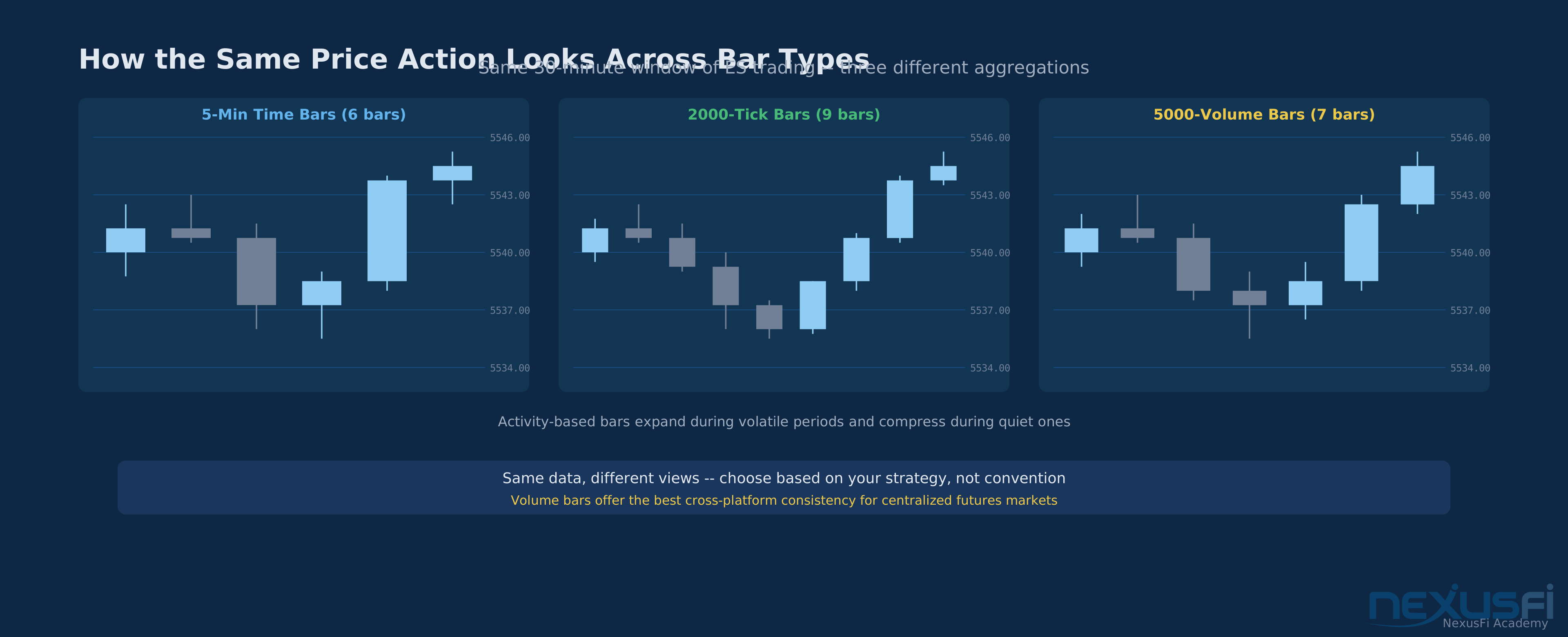
All bar types aggregate tick data into OHLCV format (Open, High, Low, Close, Volume). The difference is the aggregation rule:
Time Bars
Tick Bars
Volume Bars
Range Bars
Renko Bars
How It Works #
From Exchange to Chart: The Aggregation Pipeline #
The path from raw market data to your chart follows a specific path:
1. Exchange Match Engine
2. Market Data Feed
3. Data Provider
4. Platform Aggregation
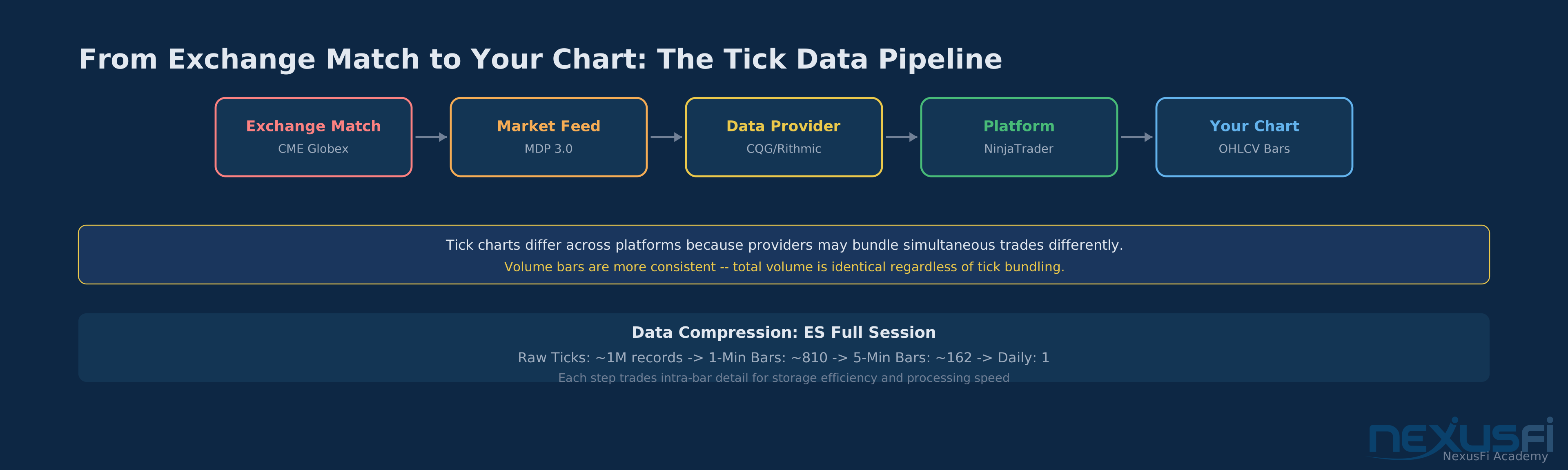
Each step in this pipeline can introduce subtle differences. As @Feibel explains, "Tick data represents transactions regardless of time and volume. In the Chronicles I use 3500 ticks, this equates to 3500 individual transactions between buyers and sellers, regardless of time and volume. There may be 3500 transactions all with 1 contract, or perhaps 3500 transactions with a 100 contracts per transaction." [2]
Why Tick Charts Differ Between Platforms #
This is one of the most common sources of confusion in futures trading. Two traders using 2000-tick charts on different platforms will see different bars. The reasons:
Data bundling
Session start alignment
Historical data reconstruction
Despite these differences, the general picture remains consistent. Price support and resistance levels, trend structure, and volume patterns all appear in roughly the same places. Don't obsess over matching another trader's exact bars
Activity-Based Bars vs Time-Based Bars: The Core Tradeoff #
The fundamental distinction isn't between tick data and bar data. It's between time-based aggregation and activity-based aggregation.
Time bars produce a fixed number of bars per hour regardless of market activity. This creates a visual problem: overnight sessions (low activity) take up the same chart real estate as the RTH open (high activity).
Activity-based bars (tick, volume, range) compress quiet periods and expand active periods. This has real analytical implications:
Volume Bars: The Futures Trader's Sweet Spot #
For centralized futures markets, volume bars have a distinct advantage over tick bars. Futures exchanges report exact contract volume for every trade. Unlike spot forex or crypto, there's no question about whether the volume data is complete.
Volume bars also solve the data bundling problem that plagues tick charts. A 5000-contract volume bar closes at 5000 contracts regardless of whether the data feed reported 50 large trades or 500 small ones. The aggregation rule is based on reported volume, which is consistent across providers.
Practical Considerations #
Storage and Performance #
Tick data is expensive to store and process. Approximate sizes for common futures contracts:
| Data Type | ES (1 session) | CL (1 session) | 1 Year ES |
|---|---|---|---|
| Raw tick data | 30-80 MB | 15-40 MB | 8-20 GB |
| 1-minute bars | 0.5-1 MB | 0.3-0.7 MB | 150-300 MB |
| 5-minute bars | 100-200 KB | 60-150 KB | 30-60 MB |
The ratio holds: tick data is 50-100x larger than minute bars for the same period. Running backtests across 5 years of multiple instruments means the difference between gigabytes and terabytes.
Backtesting: When Tick Resolution Matters #
This is where the choice between tick data and bar data has the most concrete impact on your trading decisions.
The core problem: when a bar's range is large enough that both your stop loss and profit target could have been hit within the same bar, the backtesting engine doesn't know which one got filled first without tick-level data. It has to guess
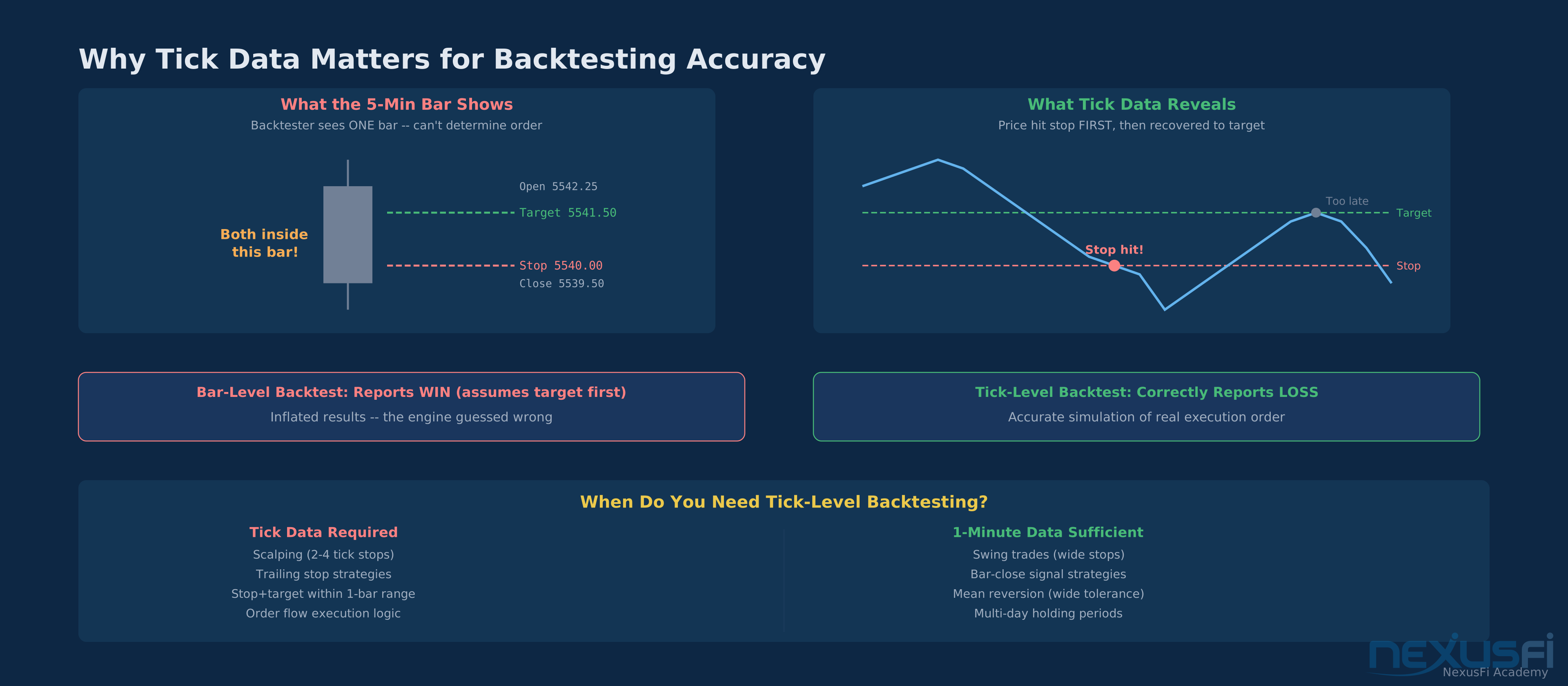
kevinkdog's practical test approach works well: run the same backtest at three resolutions (no Look Inside Bar, 1-minute LIBB, 1-tick LIBB). If the results converge, you don't need the finer resolution. [6]
Choosing Your Bar Type: A Decision Framework #
Use time bars when: You need consistent visual spacing across sessions. You're applying VSA, ATR-based stops, or volatility analysis. You want your charts to match published analysis and education materials. You trade higher timeframes (15-minute and up) where activity differences compress.
Use volume bars when: You trade centralized futures markets with reliable volume data. You want activity-normalized charts that compress quiet periods. You need consistency across platforms (volume bars agree better than tick bars). Your strategy relies on volume patterns or market-generated information.
Use tick bars when: You trade markets without reliable volume data (spot forex). You want the most granular activity-based view. You understand and accept that your tick charts may differ from others'. You're analyzing transaction-level market microstructure.
Use range bars when: You want normalized volatility in your chart. Your strategy is purely price-action based (no volume or volatility indicators). You understand that VSA, ATR stops, and volatility measures are meaningless on range charts.
Avoid Renko bars for backtesting entirely
Real-Time vs Historical: The Reconciliation Problem #
One gotcha that catches traders: real-time tick data and historical tick data may not match. Your platform builds bars from a live stream during the trading day, but when you reload that same day's data from the historical server, the bars may differ slightly.
This happens because the live feed may include order messages your platform filtered differently, historical data providers may apply post-session corrections, and rounding, bundling, and timestamp precision can shift between live and historical feeds.
For time bars, this is usually invisible
Knowledge Map
Go Deeper
Build on this knowledgeReferences This Article
Articles that build on this topicCitations
- — Why is true tick data so important? (2010) 👍 4“A tick is the smallest unit of the time series which cannot further be divided. So tick data is maximum resolution data.”
- — The S&P Chronicles (2018) 👍 7“Tick data represents transactions regardless of time and volume.”
- — Are all Tick Charts Different? (2020) 👍 18“For futures I would use volume bars as you have a central exchange with proper complete volume data.”
- — Are all Tick Charts Different? (2020) 👍 8“The pre-market is portrayed very differently if you are using tick or volume bars vs time bars.”
- — Better Volume Indicator with Sound Alerts (2019) 👍 4“VSA can only be applied to time based bars. It fails on range or renko charts.”
- — TS Trend Strategy - Futures - Feedback (2021) 👍 4“The trailing stop definitely needs tick data.”