



Market Data for Futures Trading: Understanding Feeds, Providers, and the Infrastructure Behind Every Tick
Overview #
Every chart you look at, every DOM you read, every Time & Sales print scrolling past your screen — all of it is market data. And the quality of that data shapes every trading decision you make.
Most traders treat market data like electricity. You plug in and it works. But data quality is not uniform. A missing tick during a fast CL spike. A DOM that throttles updates during high volume. A backfill that doesn't match what actually traded. These aren't edge cases — they're everyday realities that quietly distort your analysis if you don't know what to look for.
This article covers how futures market data works from the exchange to your platform, what the different feed types deliver, who the major providers are, how continuous contracts work, and how to choose the right setup for your trading style. Platform-specific configurations live in the platform Academy pages.
What Market Data Contains #
Level 1: Top of Book #
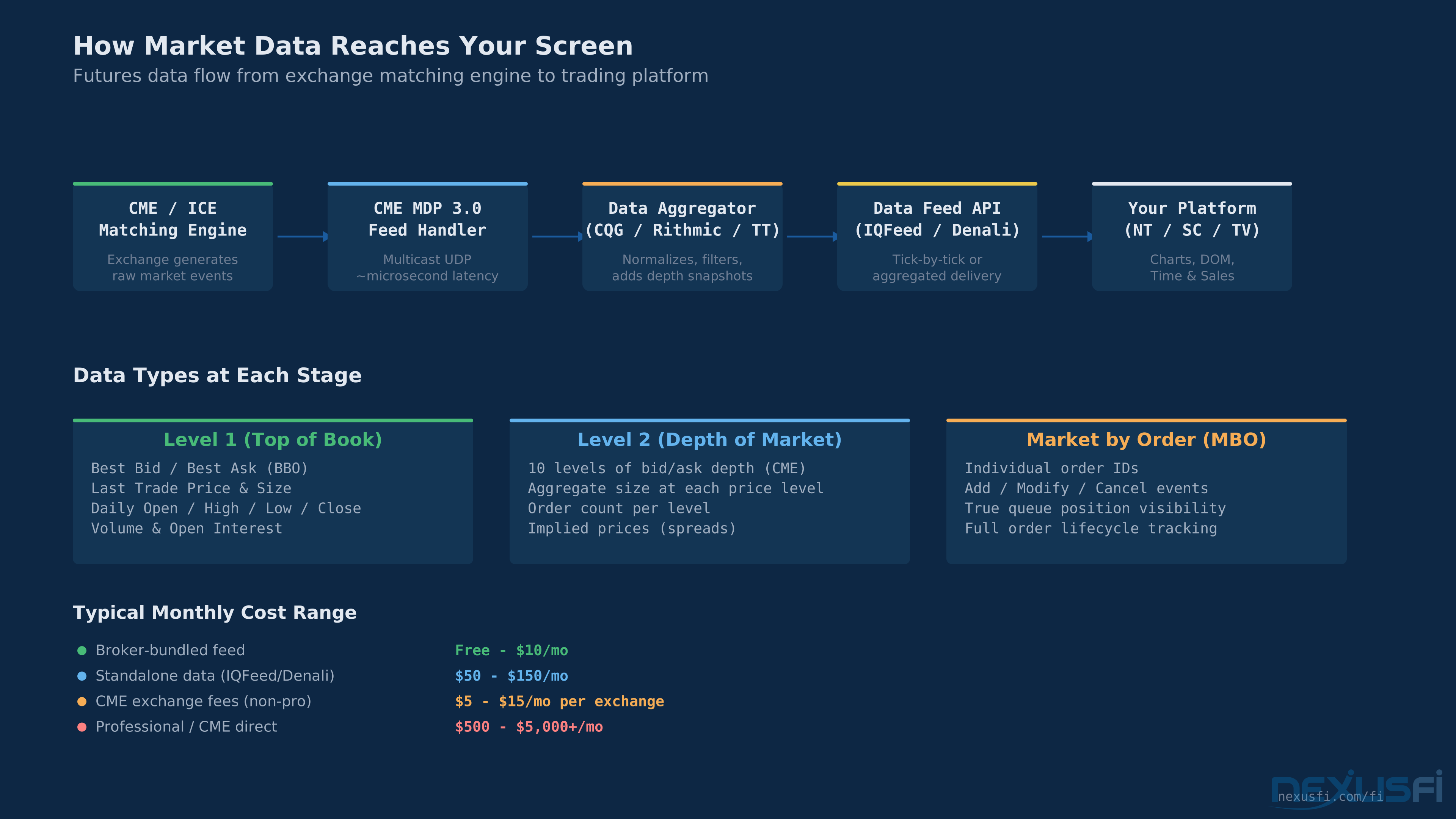
Level 1 is the minimum viable data. It delivers the best bid and ask (BBO), last trade price and size, daily OHLCV, and open interest. For liquid contracts like ES, the spread is almost always 1 tick (0.25 points, $12.50). Level 1 is sufficient for chart-based trading, swing trading, and position management. If you're running moving averages, oscillators, or candlestick strategies, Level 1 covers you.
Level 2: Depth of Market #
Level 2 adds the order book — the ranked queue of resting bids and asks at multiple price levels beyond the best bid/offer, showing where liquidity is stacked and how depth shifts in real time.
Level 2 powers the DOM ladder. It's essential for scalping, order flow analysis, and any approach that reads resting liquidity to inform entries and exits.
Market by Order (MBO): The Full Picture #
MBO data shows every individual order in the book — not just the aggregate size at each price, but the actual individual orders with their sizes and queue positions. It's the most granular view of market structure available.
MBO matters for order flow traders who use footprint charts and cumulative delta. It's the difference between "500 contracts at this level" and "one 400-lot and twenty 5-lots at this level." Different game entirely.
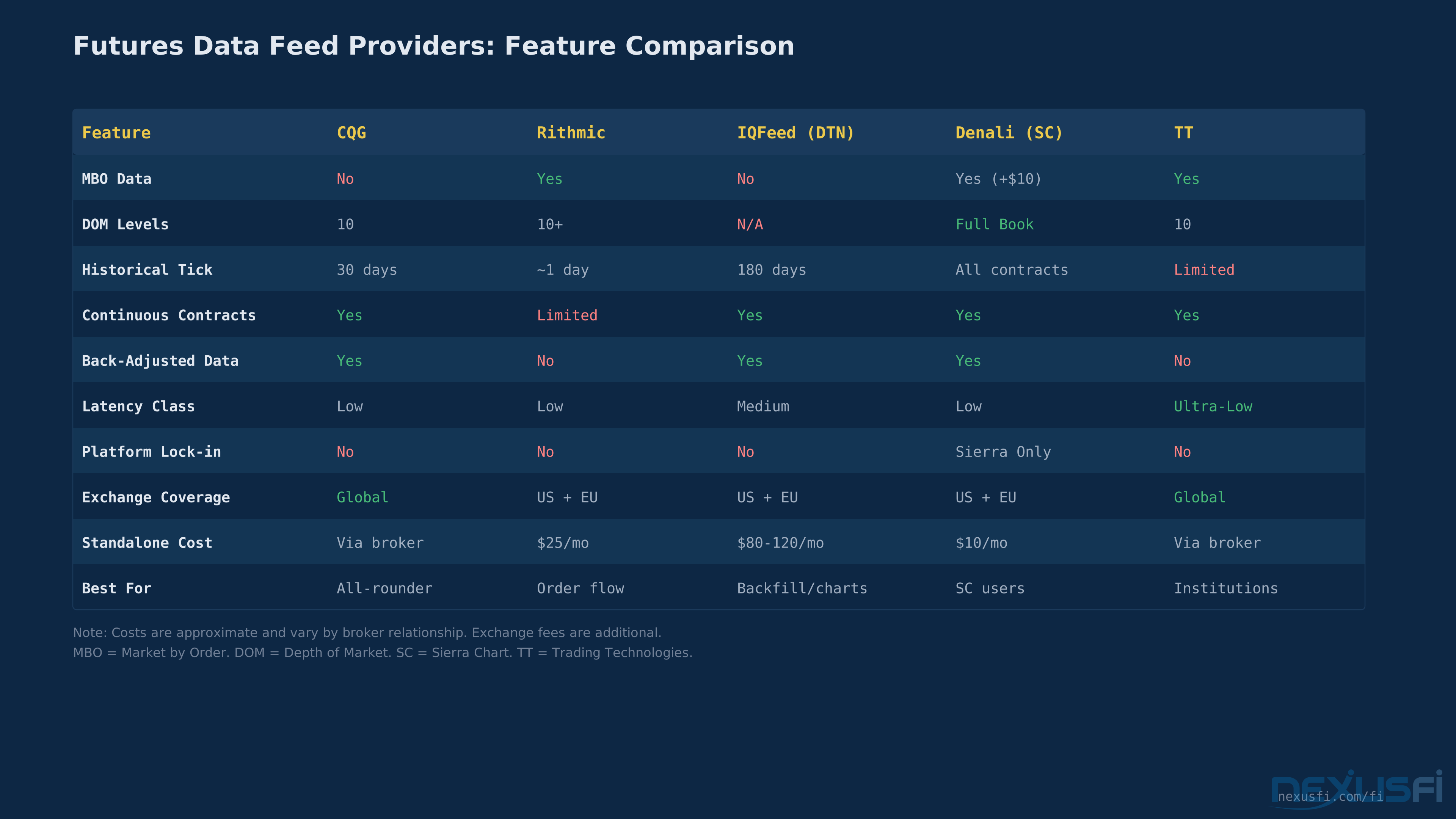
Not every provider offers MBO. Rithmic provides it natively. Denali (Sierra Chart's feed) offers it as an add-on. Trading Technologies includes it. CQG and IQFeed do not.
Data Feed Providers #
Futures data flows through a chain: Exchange Matching Engine → Feed Handler → Data Aggregator/Provider → Your Platform. The provider you choose determines what data you receive, how fast it arrives, what history is available, and what it costs.
DTN IQFeed #
The data quality benchmark for retail traders. IQFeed provides 180 days of historical tick data and 11+ years of minute-level OHLCV data, making it unmatched for backtesting and historical analysis in the retail space.
IQFeed is a standalone data-only subscription ($80-120/month depending on exchanges). You need a separate broker for order execution. It doesn't provide Level 2/DOM data or MBO. It's a chart and analysis feed, not an execution gateway.
Best for: Historical analysis, backtesting, breadth tickers (TICK, ADD, TRIN), multi-instrument chart setups.
CQG (Continuum) #
The workhorse of retail futures data. Most brokers bundle CQG connectivity at minimal cost (often $0-10/month with an active trading account), making it the default data path for most retail futures traders.
CQG doesn't offer MBO data, and historical backfill is limited compared to IQFeed. But for the average discretionary trader, CQG through a broker is reliable, cheap, and good enough.
Best for: Cost-conscious traders, global exchange access, standard DOM trading.
Rithmic #
The go-to for order flow traders. Rithmic provides native MBO data with full market depth subscription. As @qsceszwasdx [notes from experience] [2]: "Rithmic has MBO and can see all order book changes at the individual order level."
Best for: Order flow analysis, MBO-dependent strategies, algo development via API.
Denali Exchange Data Feed #
Sierra Chart's proprietary feed is remarkably capable for its price ($10/month, MBO add-on $10/month). It provides full order book depth with native MBO support, Level 2 data, and real-time order-by-order updates.
The catch: Denali only works with Sierra Chart. If you use NinjaTrader, MultiCharts, or anything else, it's off the table.
Best for: Sierra Chart users who need deep data at minimal cost.
Trading Technologies (TT) #
The institutional standard. Professional desks run TT for ultra-low latency execution and data with MBO support and global exchange coverage. The retail version is more accessible but remains the most expensive option ($50/month platform fee + highest per-contract routing). For most retail traders, TT is overkill.
Best for: Institutional traders, professional spread trading, colocation setups.
Continuous Contracts: Handling Futures Expiration #
Futures contracts expire. ES rolls quarterly, CL monthly. Building a long-term price chart from a series of expiring contracts is a fundamental data challenge with no perfect solution.
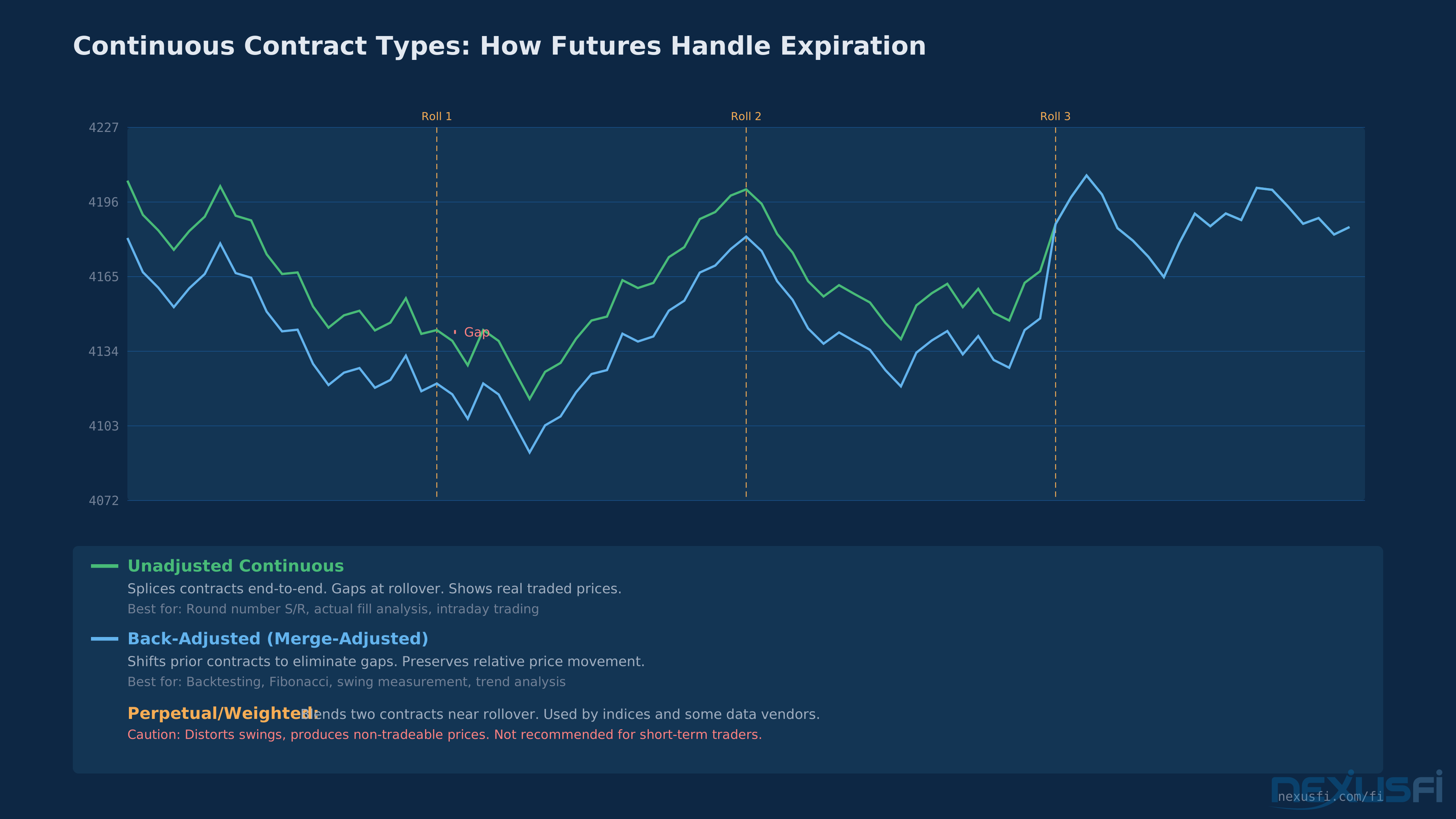
Unadjusted Continuous #
Splice contracts end-to-end and accept the gaps. When March ES expires and June ES starts trading, the chart shows a visible gap from contango or backwardation. This is the only type that shows actual traded prices.
Use unadjusted for: round-number support/resistance, actual fill analysis, intraday trading on the current contract, and regulatory audit trails.
Back-Adjusted (Merge-Adjusted) #
Shift all historical contract data by the rollover gap so the chart appears continuous. @Fat Tails provides [the definitive treatment] [3] (30 thanks) with the key warning:
"The backadjusted contract correctly shows the relative price movement, but the absolute values shown are only correct for the last contract shown on the chart."
-- @Fat Tails
He demonstrates that a back-adjusted CL chart showed crude at $185.88/barrel in 2008 when the actual high was $141.89 — a $44 distortion that makes absolute price levels meaningless on adjusted charts.
Back-adjusted data preserves relative swings, making it valid for Fibonacci retracements, swing measurement, and backtesting. But the absolute price levels are fiction for everything except the current front month.
@FuturesTrader71 [draws the practical line] [4]: "For trading purposes, I have to have adjusted data for my composites and to look back in time." But for automated systems: "We test on unadjusted tick-level bid/ask data... We need to know where it really traded when it traded."
Use back-adjusted for: backtesting strategies, Fibonacci analysis, long-term trend studies, composite profile building.
Perpetual (Weighted Continuous) #
Perpetual contracts blend two adjacent contracts with shifting weights near rollover, eliminating gaps without shifting history. Looks smooth but introduces constant micro-distortions in price movement.
Perpetuals serve long-term investors. Short-term traders should avoid them.
The bottom line on contract types: there's no universal answer.
Use unadjusted for intraday, back-adjusted for backtesting and swing analysis, and understand why the prices don't match across contract types.
Data Quality: What Can Go Wrong #
Settlement vs. Close Price #
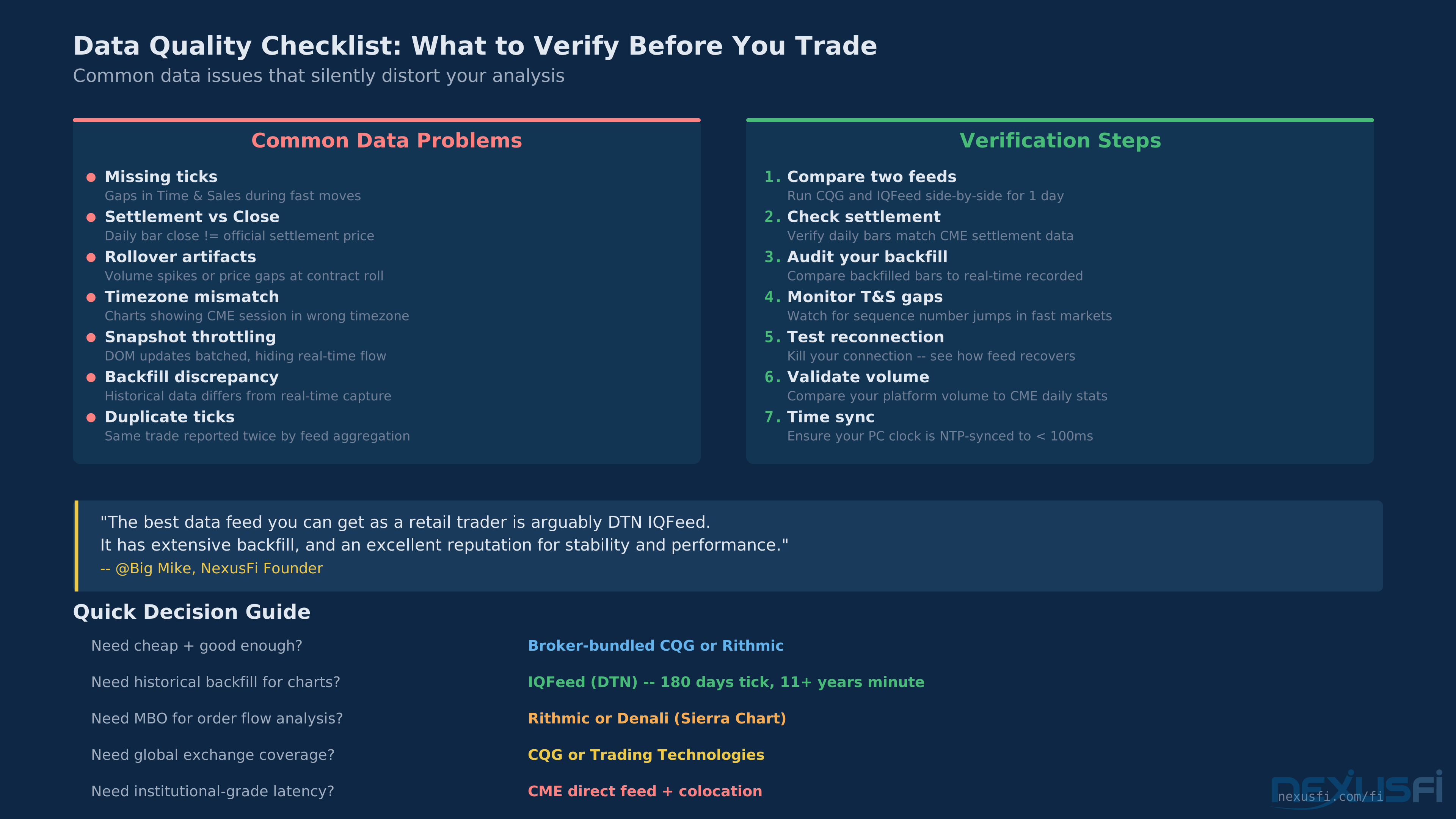
The official daily settlement price is not the last trade of the session. CME calculates settlement using a volume-weighted average during a specific window — for equity futures like ES, this window is 14:59:30-15:00:00 CT, while energy products like CL use 14:28:00-14:30:00 ET [6]. Many feeds report the last trade as the "close" instead. The difference is usually a tick or two, but it compounds in daily pivot calculations, ATR, and backtest results.
Tick Gaps During Fast Markets #
During FOMC, NFP, or flash events, feeds can lose ticks. The handler can't keep up with matching engine message bursts. Aggregated feeds (IQFeed) are more susceptible than direct feeds (CQG, Rithmic). For discretionary traders, occasional missed ticks are irrelevant. For tick-level systematic strategies, they poison your data.
DOM Snapshot Throttling #
Not all feeds deliver DOM updates on every order book change. Some throttle or batch DOM updates into snapshots delivered at fixed intervals, meaning the DOM you see during fast markets may lag the actual book by several updates. As @artemiso [demonstrates through historical market depth and MBO data analysis] [5] (16 thanks), comparing depth feeds across providers reveals measurable differences in update frequency, data integrity, and latency — factors that directly affect execution quality. If you're scalping off DOM levels, ask your provider whether updates are event-driven or interval-based — the difference matters.
Backfill Discrepancies #
Historical data from a provider may not match data captured in real-time. Different aggregation methods, different handling of pre/post-session trades, and different rollover dates produce slightly different bars. Always test strategies against the same data source you'll trade live.
Aggressor Side Assignment #
When a trade prints, did the buyer lift the offer or the seller hit the bid? This classification powers delta and CVD calculations. Different feeds can disagree, especially for trades right at the inside quote. If you're comparing delta numbers with another trader, make sure you're both on the same feed.
Verifying Your Data: A Practical Protocol #
Knowing what can go wrong is half the battle. Here are concrete steps you can run periodically to catch data problems before they distort your analysis:
1. Settlement Price Audit: After each session, compare your feed's daily close to CME's official settlement prices published at cmegroup.com/market-data/settlements. If they differ consistently, your feed is reporting last-trade close instead of the official settlement. This matters for daily pivots, ATR, and any indicator that uses the daily close — a 2-tick discrepancy compounds across every calculation that references it. CME's official settlement procedures documentation [6] confirms settlement is calculated as a volume-weighted average during a specific window, not at the session close. For ES, that window ends roughly 3 hours and 45 minutes before the session actually closes.
2. Volume Sanity Check: Pick one high-volume event per month (FOMC, NFP, CPI release). Record the total volume on your 1-minute charts for the 30-minute window around the announcement. After the session, compare to CME's published session volume for that contract. If your feed shows much less (>5% gap), you're dropping ticks during fast markets. This is more common on aggregated feeds than direct feeds and affects the reliability of any tick-level backtesting.
3. Backfill vs. Live Comparison: Once a month, export a live 5-minute bar series to CSV during a regular session. After the session closes, pull a historical backfill of the exact same time window. Compare bar counts and OHLCV values side by side. Differences reveal inconsistencies between your feed's real-time and historical data paths — and those inconsistencies will show up as backtests that don't match live trading results.
4. Rollover Date Verification: When your continuous contract rolls, verify the roll date matches your provider's published schedule. IQFeed, CQG, and Rithmic may roll on different days for the same contract. Mismatched roll dates produce phantom gaps in continuous charts or missing bars at contract transitions. Check this quarterly for ES/NQ (quarterly rolls) and monthly for CL/GC (monthly rolls).
Run the settlement price audit daily for the first week, then weekly once you've confirmed your feed's behavior. The volume sanity check and backfill comparison can be monthly. Rollover verification only needs to happen at each roll date.
Latency: How Much Speed Do You Need? #
Latency ranges from sub-millisecond (CME colocation) to 10-100+ milliseconds (standard retail feeds). The honest truth: unless you're running automated execution where microseconds determine fill quality, latency below ~50ms is functionally identical for manual trading.
Your reaction time is 200-500ms at best. Paying a premium for low-latency data when you're clicking a mouse is optimizing the wrong variable.
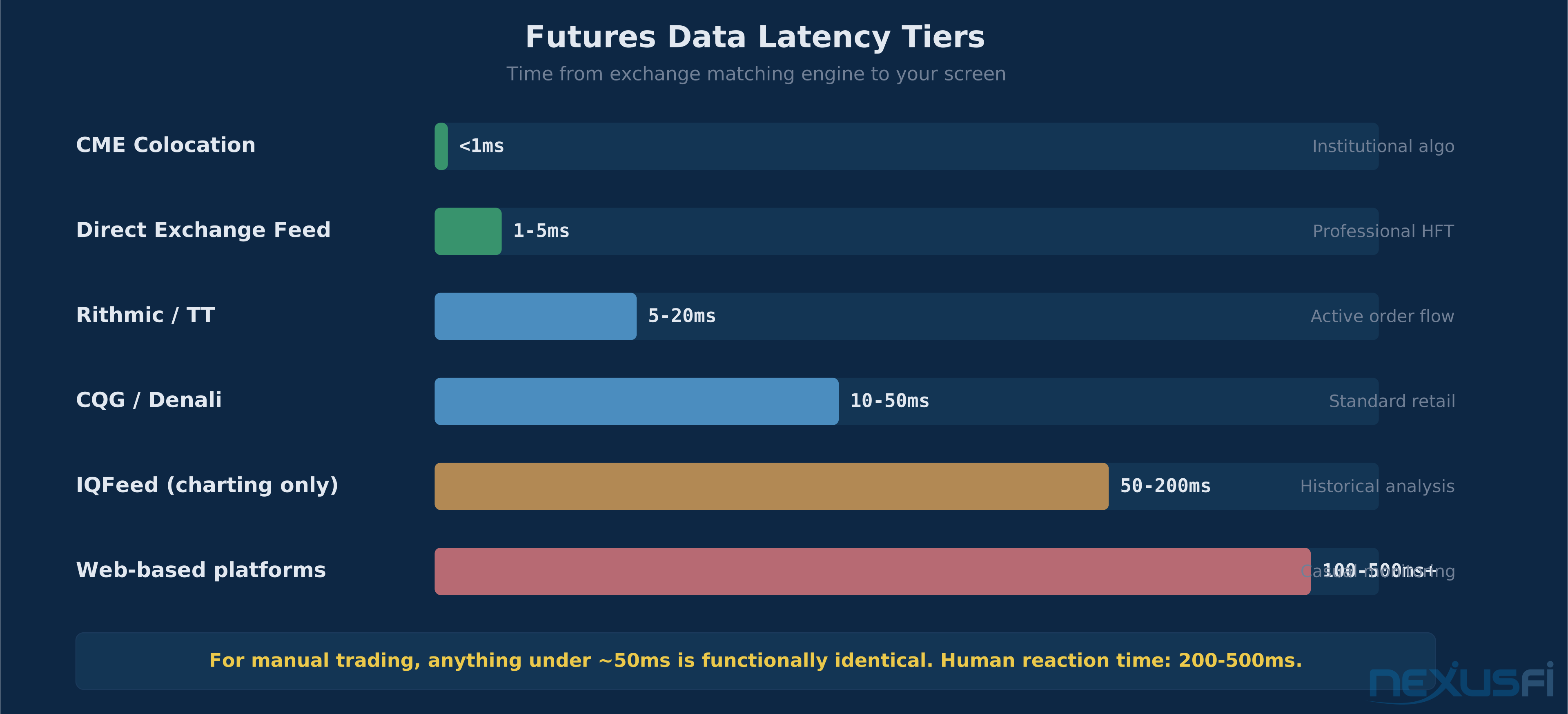
Where latency genuinely matters: automated strategies that detect and react to order book changes, especially absorption patterns at key levels.
Choosing Your Setup: The Decision Framework #
The Two-Feed Solution (Most Common) #
Most active traders run two data connections: an execution feed (CQG or Rithmic through their broker) for real-time trading, and IQFeed for charting and historical analysis.
Two-Feed Setup Checklist #
Getting two feeds running isn't complicated, but there are specific steps you need to hit in order. Platform-specific configuration details live in the platform Academy pages, but the general sequence applies everywhere:
- Subscribe to IQFeed and add exchange data modules for the exchanges you trade (CME, NYMEX, etc.). Each exchange is a separate add-on with its own monthly fee.
- Install the IQFeed client on your trading machine. It runs as a background service that your charting platform connects to via a local TCP socket.
- Configure IQFeed as your charting data source in your platform's connection settings. This handles charts, indicators, historical backfill, and backtesting data.
- Connect your broker's execution feed (CQG or Rithmic, provided by your broker) for order routing, real-time DOM, and live execution.
- Verify both feeds show matching prices on the same instrument. Pull up the same contract on each feed and confirm prices track within a tick. If they diverge, check your symbol mapping — IQFeed, CQG, and Rithmic each use different symbol conventions for the same contracts. Your platform documentation will specify the exact symbol format for each data source.
Single-Feed Approach #
If you trade 1-3 instruments intraday without needing deep historical data, a single broker-provided feed (usually CQG or Rithmic) works fine. Lowest cost, simplest setup.
Decision Matrix #
- Need historical backfill for backtesting? → IQFeed + execution feed
- Order flow trader needing MBO? → Rithmic, or Denali if on Sierra Chart
- Global exchange access (Asia, Europe)? → CQG or TT
- Budget-conscious starting out? → Broker-bundled CQG (cheapest routing)
- Sierra Chart power user? → Denali ($10/month, full depth, MBO add-on)
- Institutional algo trader? → CME direct feed + colocation
What Doesn't Matter for Most Traders #
Don't obsess over microsecond latency differences between CQG and Rithmic. Don't chase depth beyond 10-20 levels without a tested strategy that uses it. The difference between a good data setup and a bad one isn't speed or depth — it's reliability, completeness, and alignment with how you actually trade. Match the data to your method, not to what sounds impressive on a spec sheet.
Knowledge Map
Prerequisites
Understand these firstGo Deeper
Build on this knowledgeReferences This Article
Articles that build on this topicCitations
- — What is best broker for intermediate term futures trader? (2012) 👍 2“Rithmic (Optimus Futures) is one of the best broker data feeds. There is no backfill with Rithmic, however. IB's data feed is terrible. The best data feed you can get as a retail trader is arguably DTN IQFeed.”
- — Rithmic independent of broker possible? (2021) 👍 3“Hi, I have experience with Rithmic and CQG and Denali. Rithmic Pros: Have MBO and can see all order book(subscribe market depth). cons: Have monthly connect fee about 25. order route fee is 0.1 or 0.25 per side.”
- — Back-adjusted, Continuous contracts - best for support and resistance? (2012) 👍 30“Let me just summarize a few points on continuous and backadjusted contracts. Backadjusted Contract The backadjusted contract correctly shows the relative price movement, but the absolute values shown are only correct for the last contract shown on th...”
- — Back-adjusted, Continuous contracts - best for support and resistance? (2012) 👍 7“Hi Mike, If you are using DTN IQFeed, to get the continuous, back-adjusted data for roll-over, you would have to use @ES#C. IRT/MarketDelta assume automatically that you are using the continuous, so you don't need to enter more than just @ES#.”
- — Historical market depth and MBO data: Assess your latency, data and execution quality (2019) 👍 16“I decided to start a thread to provide some samples of historical market depth and MBO data to consolidate a solution for different questions on execution quality, data integrity and latency.”
- — CME Group Daily Settlement Procedures
- — CME Group Market Data Fee List (January 2026)