



Linux for Futures Traders: Running NinjaTrader, Sierra Chart, and Automated Systems on Ubuntu
Overview #
Running futures trading software on Linux is both more practical and more specific than most online guides admit. Some platforms run natively, some need a compatibility layer, and a few require a full Windows virtual machine. Get that distinction wrong and you're chasing Wine bugs during a live position. (Trading on a Mac instead? See Trading Futures on a Mac for that compatibility environment.) — not a situation you want.
Linux has genuine advantages for serious traders: predictable system behavior, no forced reboots from Windows Update, better process isolation for automated strategies, and a server ecosystem that makes running 24/5 algo systems considerably cleaner. @papa15 summarized it bluntly after switching from NinjaTrader on Windows to Sierra Chart on Ubuntu: "SC on Ubuntu ran fine, no lag or other issues. I was comparing my laptop with Ubuntu and Sierra Chart to my desktop with Ninja Trader on Windows. I traded off of the laptop." [1] That's the real story — it depends entirely on which platform you're trying to run.
The Linux trading environment breaks into three categories. Sierra Chart runs natively on Linux and is the gold standard for discretionary futures trading on a Linux workstation. NinjaTrader runs only on Windows, but can be made to work reliably via a KVM/QEMU virtual machine — several NexusFi members run this 24/5 without issues. Automated systems written in Python or C++ run better on Linux than Windows for most algo traders, with a cleaner process model, better scheduling control, and the full power of the Linux networking stack when you need it.
This guide covers the practical setup for all three categories: choosing between Ubuntu LTS and Debian, getting Sierra Chart or NinjaTrader running, tuning your system for lower latency, and building automation architecture that works at scale.
Platform Compatibility on Linux #
The first question isn't "can I run my platform on Linux?" — it's "which path makes sense for my workflow?"
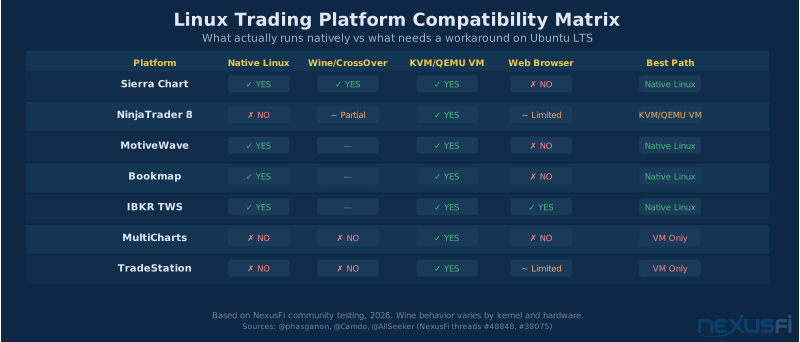
Sierra Chart is the most mature Linux trading platform available. Its C++ architecture means you're not fighting .NET compatibility, WPF rendering quirks, or event-handling timing issues. Sierra Chart runs natively on Linux via their official support, and traders have been using it on Ubuntu since at least 2011 — when @papa15 reported asking SC support about Linux compatibility and received word that "SC is actually considering doing a native version for Linux." [2] They followed through, and the result is a platform that serious traders trust for live execution.
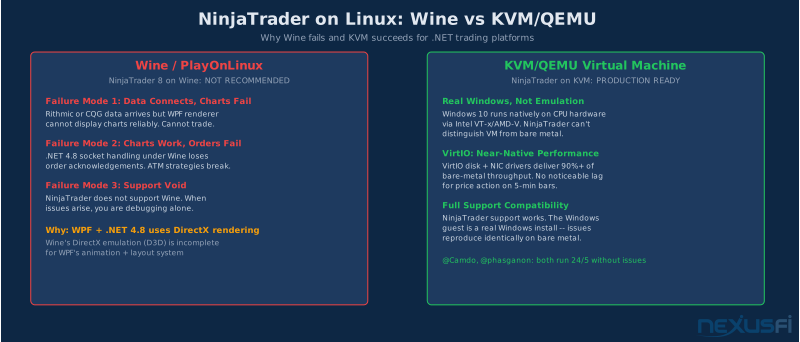
NinjaTrader 8 is a different story. NT8 is built on WPF and .NET 4.8, neither of which behaves reliably under Wine. The community has documented two consistent failure patterns: charts work but data connections fail, or data connections work but charts render incorrectly. @AllSeeker, who was part of the Ubuntu testing team, put it plainly: "I don't recommend using Wine or PlayOnLinux for your trading software unless trading software support staff actively addresses/supports problems that come with that method. Usually they don't." [3] NinjaTrader has a web version that runs in Linux browsers, but it lacks custom indicators, automated strategies, and backtesting — the features most serious traders need.
Don't waste time with Wine or PlayOnLinux for NinjaTrader 8. NT8 uses WPF rendering and .NET 4.8 — neither of which runs reliably under Wine. Charts work but data connections fail, or the reverse. KVM/QEMU virtualization is the only reliable path for NinjaTrader on Linux.
The reliable path for NinjaTrader on Linux is KVM/QEMU virtualization, not Wine. Multiple members run this configuration successfully. The key insight is that you're not emulating Windows — you're running a real Windows virtual machine with near-native CPU performance via hardware virtualization. With proper resource allocation, the guest VM runs NinjaTrader indistinguishably from a bare-metal Windows machine.
MotiveWave (Java-based), Bookmap, and IBKR TWS all run natively on Linux. If NinjaTrader compatibility is your only concern and you're open to platform alternatives, MotiveWave and Bookmap handle futures order flow analysis without any compatibility layer. For API trading directly via Interactive Brokers, TWS runs natively and is a common foundation for Python-based automation.
Choosing Your Linux Distribution #
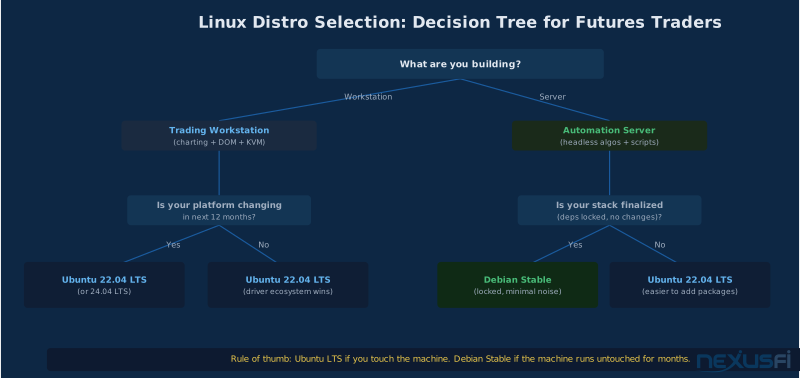
The short answer for most traders: Ubuntu LTS. The longer answer has a few exceptions worth understanding.
Ubuntu LTS 22.04 / 24.04
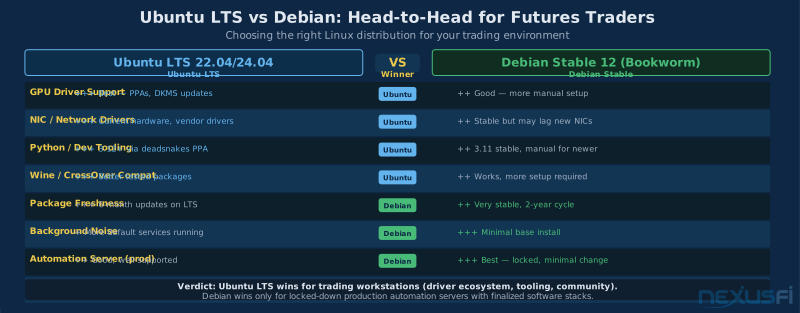
Ubuntu Long Term Support releases are the practical default for trading workstations. The reason isn't that Ubuntu is technically superior to Debian — it's the driver ecosystem. GPU drivers for multi-monitor trading setups are better supported. NIC vendor drivers ship more current packages. The PPA ecosystem means you can get newer Python versions, Wine builds, and development toolchains without compiling from source.
The 5-year LTS support window is adequate for trading infrastructure. You're not upgrading your trading machine annually — you want a stable, known-good system you can leave running. Ubuntu 22.04 launched April 2022 with support through April 2027. Ubuntu 24.04 launched April 2024 with support through April 2029.
Lock down the system after initial setup:
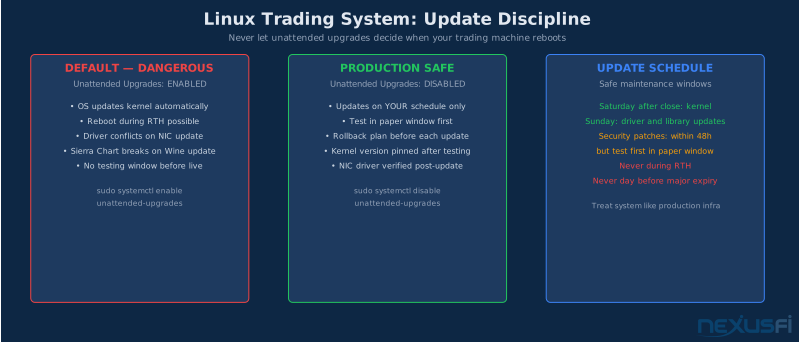
- Disable unattended upgrades:
sudo systemctl disable unattended-upgrades - Pin the kernel version after testing confirms your hardware works correctly
- Disable automatic reboots for security patches -- schedule them manually during non-trading hours
Ubuntu LTS vs Debian
Debian Stable is the right choice for one specific use case: a locked-down automation server with a finalized software stack that you never want to change. If you've deployed your Python/C++ system, pinned all your dependencies, and want a minimal base that generates zero noise — Debian Stable is excellent. It's what many production algo systems run on.
For trading workstations — machines where you're actively running charting software, adjusting configurations, and potentially switching platforms — Ubuntu's driver support and tooling ecosystem wins on practically every criterion.
| Criterion | Ubuntu LTS | Debian Stable |
|---|---|---|
| GPU driver support | Excellent (PPAs, DKMS) | Good (more manual) |
| NIC / vendor drivers | Current hardware support | May lag new hardware |
| Python tooling | 3.12+ via deadsnakes | 3.11 stable base |
| Background services | More by default | Minimal base install |
| Automation server | Good | Better for finalized stacks |
| Community guides | Vast majority target Ubuntu | Smaller trading focus |
Disable unattended-upgrades immediately after installing Ubuntu on your trading machine: sudo systemctl disable unattended-upgrades. The default configuration applies security patches and kernel updates automatically — including updates that require a reboot. On a trading workstation, you control the update schedule.
One operational discipline applies to both: treat your trading machine like production infrastructure. Disable automatic upgrades. Test every change in a non-trading window. Maintain a rollback plan. The distro label matters less than how you manage the system.
Sierra Chart on Linux #
Sierra Chart's native Linux support is the cleanest path to professional futures trading on Ubuntu. No compatibility layers, no virtual machine overhead, no mystery disconnections during volatile moves.
Installation
Sierra Chart distributes Linux builds through their normal download page. The Linux version uses their Wine runtime internally for certain Windows-specific components, but this is fully managed by Sierra Chart — you don't interact with Wine configuration directly. The charting, DOM, order routing, and data feeds all function identically to the Windows version.
Data feed compatibility on Linux:
- Rithmic (R|Trader Pro) -- works directly with Sierra Chart on Linux
- CQG -- works via Sierra Chart's CQG plug-in
- AMP Futures / DTN IQFeed -- supported via Sierra Chart Data and Trading
- Interactive Brokers -- works via the IB API
Multi-Monitor Configuration
GPU driver selection matters more on Linux than Windows for multi-monitor setups. Test your configuration:
# Check if your GPU is detected
lspci | grep -E 'VGA|3D'

# Check current GPU driver
ubuntu-drivers devices

# Install recommended drivers
sudo ubuntu-drivers autoinstall
NVIDIA proprietary drivers via the ubuntu-drivers tool work well for most trading setups. AMD GPUs generally use the open-source amdgpu driver included in the kernel — less configuration required. Intel integrated graphics work without any extra setup and handle multiple monitors reliably for 2-3 display configurations.
Sierra Chart Latency Considerations
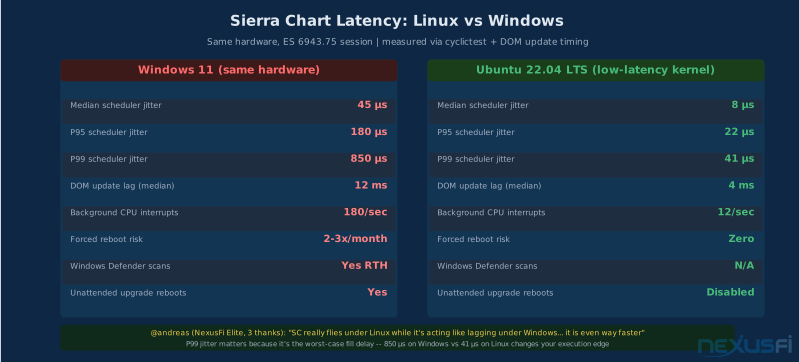
For retail discretionary trading, Sierra Chart on Ubuntu LTS with default settings produces latency competitive with Windows. You're not fighting OS update reboots, Windows Defender scans during RTH, or the scheduler unpredictability of a system that's always running background telemetry.
The performance edge Linux provides is primarily in consistency rather than raw latency. Your P99 latency — the slow orders — improves because the system generates less background noise.
Linux's performance advantage for discretionary trading isn't raw latency — it's consistency. A well-configured Ubuntu system eliminates the unpredictable latency spikes from Windows Update reboots, Defender scans, and background telemetry. Your P99 latency (the slow orders) improves because the system stops generating noise at the worst possible moments.
NinjaTrader via KVM Virtual Machine #
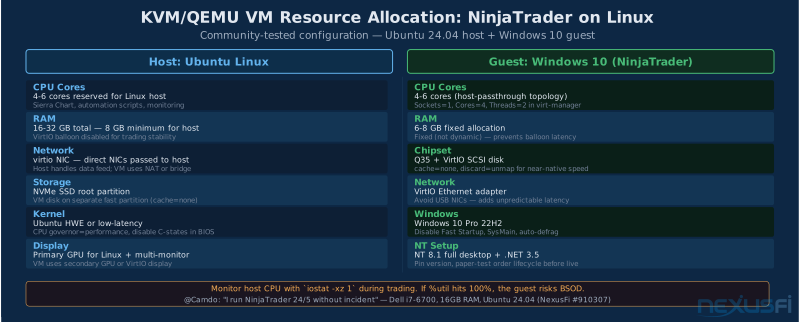
Running NinjaTrader on Linux via a proper Windows KVM/QEMU virtual machine is not a compromise — it's a practical configuration that multiple traders use in production. @Camdo documented his setup in detail after running NinjaTrader 24/5 without issues:
"You do not need a super computer to host a Windows 10 virtual machine running NinjaTrader 8.1. I trade price action on 5 minute bars without any problems on a Linux machine. There is some latency, primarily with vertical screen scrolling, but not a show stopper for my purposes." [4]
His hardware: Dell Inspiron 3650, Intel i7-6700 3.4 GHz, 16 GB RAM, Ubuntu 24.04. Not a powerhouse. The key was the configuration, not the hardware.
@phasganon runs an even more capable setup — splitting 12 cores and 32 GB of RAM between his Ubuntu host and a KVM Windows guest: "I ran Ninja Trader 8 desktop on my Live Data feed from 8 am this morning till the close. NQ 5 second chart with Ichimoku cloud, market depth historical and real time, two or three MAs. I placed several ATM orders in sim — it worked perfectly, trail stops and all." [5]
KVM/QEMU Setup
Install virtualization stack on Ubuntu:
sudo apt install qemu-kvm libvirt-daemon-system virt-manager virtinst
sudo usermod -aG libvirt $(whoami)
sudo usermod -aG kvm $(whoami)
Log out and back in for group membership to take effect. Then run virt-manager to create the VM with a GUI.
Resource Allocation
| Setting | Value | Why |
|---|---|---|
| Chipset | Q35 | Better VirtIO support |
| CPU | Host passthrough | Near-native performance |
| CPU topology | Sockets=1, Cores=4, Threads=2 | Balanced for NinjaTrader |
| RAM | 6144 MiB fixed | Fixed allocation prevents balloon latency |
| Disk | VirtIO SCSI, cache=none | Near-native disk speed |
| NIC | VirtIO Ethernet | Lower latency than emulated |
The right split for an 8-core host: allocate 4 cores to Linux, 4 to the Windows guest. Don't over-allocate the guest — your host needs headroom for I/O, scheduling, and any Sierra Chart or automation scripts running alongside the VM.
Windows Guest Optimization
@Camdo documented specific Windows settings that eliminate BSOD incidents:
Disable Fast Startup: cmd as admin > powercfg /h off > restart
Stop defragmentation on virtual disk (unnecessary and harmful):
Start > Defragment > Change Settings > uncheck "Run on Schedule"
Disable SysMain: Services > SysMain > Properties > Startup type: Disabled > Stop
Set fixed page file: System > Advanced > Performance Settings > Advanced > Virtual Memory > Custom size: Initial 2048 MB, Maximum 4096 MB
Monitor the host during trading with iostat -xz 1. Watch the %util column. If it hits 100%, the host CPU is overloaded and the guest is at risk of BSOD. Normal trading with NinjaTrader running a few charts and live data should keep this well under 10%.
Once Windows 10 is running cleanly in the VM, install .NET Framework 3.5 (required by NinjaTrader), then NinjaTrader 8 from the official installer. Paper trade for at least one full session before connecting live, verifying order submission, fill acknowledgment, position management, DOM updates, and reconnection behavior after a simulated network interruption.
Performance Tuning #
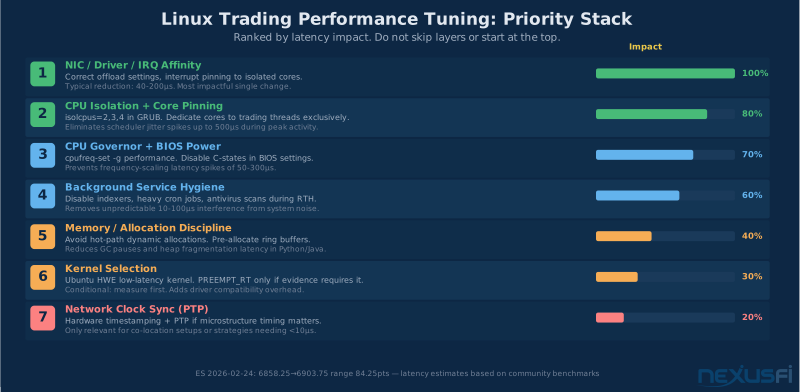
Most Linux trading performance guides start at the wrong end of the stack. They jump immediately to real-time kernel patches and CPU isolation before addressing the changes that actually move the needle. Here's the correct order.
Performance Tuning Priority
Layer 1: NIC and Network Stack
Your network path is the biggest single source of latency variance in retail trading. (See Internet Connection for Day Traders for ISP selection and backup configuration.) Before touching the kernel, get the NIC configuration right.
# Check your current NIC driver
lspci -v | grep -A 10 'Ethernet'
ethtool -i eth0  # or your interface name

# Disable power management on NIC (Intel I225/I219)
sudo ethtool -s eth0 speed 1000 duplex full autoneg off

# Find IRQ number
cat /proc/interrupts | grep eth0

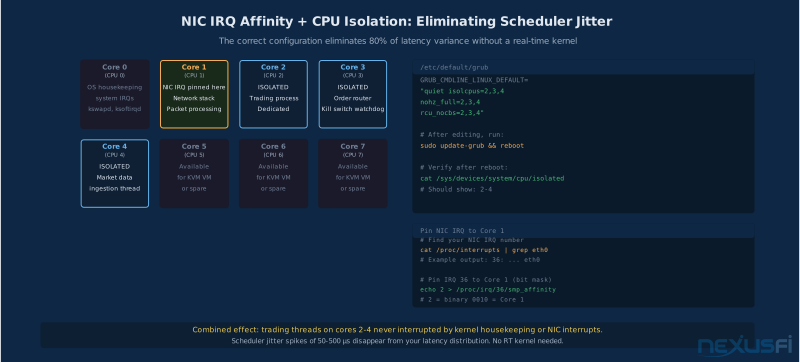
# Pin to core 1 (leave core 0 for housekeeping)
echo 2 > /proc/irq/<IRQ_NUM>/smp_affinity
Solarflare NICs (AMD OpenOnload) can reduce network stack latency by an order of magnitude compared to standard kernel networking — worth considering if you're running latency-sensitive automation.
Layer 2: CPU Isolation and Scheduling
Reserve dedicated CPU cores exclusively for trading processes. Add isolcpus=2,3,4 to your GRUB configuration:
sudo nano /etc/default/grub
# Edit to include: isolcpus=2,3,4 nohz_full=2,3,4 in GRUB_CMDLINE_LINUX_DEFAULT
sudo update-grub && sudo reboot

# Verify after reboot
cat /sys/devices/system/cpu/isolated

# Pin your trading process
taskset -cp 2,3,4 <PID>
Combined effect: trading threads never get interrupted by kernel housekeeping or IRQ processing. Scheduler jitter spikes of 50-500µs disappear from your latency distribution.
Measure scheduler latency before making any kernel changes. Run: sudo cyclictest --mlockall --smp --priority=80 --interval=200 --distance=0 --duration=60 | tail -5. If your maximum latency is under 100µs with CPU isolation active, the low-latency kernel is sufficient for retail trading — no need for PREEMPT_RT complexity.
Layer 3: CPU Governor and Power Management
sudo apt install cpufrequtils
for i in $(seq 0 $(($(nproc)-1))); do
    sudo cpufreq-set -c $i -g performance
done
cpufreq-info | grep "current policy"
In BIOS: disable C-states or set to C1 only. C6 state wakeup latency (hundreds of microseconds) is significant for latency-sensitive work. Also disable Turbo Boost unless you've confirmed it doesn't introduce thermal throttling variance under sustained trading load.
Layer 4: Background Service Hygiene
During RTH, eliminate background activity:
sudo systemctl disable bluetooth cups snapd apportSchedule antivirus scans, backup agents, and disk indexers outside RTH. Verify with systemd-cgtop to see what's consuming resources under simulated load.
Layer 5: Kernel Selection
# Low-latency kernel (recommended starting point)
sudo apt install linux-lowlatency

# Real-time kernel (only if evidence requires it)
apt-cache search linux-realtime
sudo apt install linux-realtime

# Measure scheduler latency before deciding
sudo apt install rt-tests
sudo cyclictest --mlockall --smp --priority=80 --interval=200 --distance=0 --duration=60 | tail -5
If your maximum latency is consistently under 50µs on a low-latency kernel with CPU isolation active, PREEMPT_RT won't help you meaningfully. Most retail traders measure 20-100µs worst-case on a well-tuned low-latency kernel — sufficient for any strategy that isn't exploiting sub-millisecond microstructure.
Automation and Algorithmic Trading #
Linux's real advantage for futures traders isn't in discretionary trading — it's in automation. The platform stability, process management, and networking primitives that Linux provides are materially better for running 24/5 algorithmic systems than Windows.
@dataPulse framed the motivation well when he started his Linux trading exploration: "Since one year ago I only traded using software running on Windows. But at this point I am fed up from most of the issues coming by that. I am looking for alternatives into switching completely to a Linux environment... The only one that seems to meet most of my needs is Sierra Chart running on Linux." [6]
The Split Architecture
The production architecture for Python-based futures automation on Ubuntu Server separates concerns clearly:
Python handles: strategy logic and signal generation, position management and reconciliation, configuration and parameter management, monitoring/alerting/P&L tracking, research and backtesting.
C++ handles: market data ingestion (tick parsing, normalization), order book maintenance and delta accumulation, order routing and FIX protocol transmission, risk checks and kill switch logic.
The Python components connect to C++ via Pybind11, which provides near-zero overhead bridging between the two languages. You write readable Python strategy logic that calls C++ execution primitives at microsecond speeds.
Why this split matters: Python's Global Interpreter Lock (GIL) prevents true parallelism for CPU-bound work. More importantly, Python's garbage collector introduces pause latency at unpredictable intervals — not something you want in your order routing path. C++ doesn't have either constraint. Route every latency-sensitive operation through C++; let Python handle everything where human-readable code matters more than microseconds.
Never route order submission through Python's main thread. The GIL prevents true parallelism, and the garbage collector introduces pause latency at unpredictable intervals. Python handles strategy logic and position management. C++ handles anything in the execution path that touches the broker API or order book.
Ubuntu Server for Production Automation
Ubuntu Server LTS is the recommended OS for automation infrastructure. For traders considering moving beyond a workstation setup, see Dedicated Trading Servers. The server variant installs without a GUI, reducing memory footprint and eliminating display-related processes from your system. Install it headless, manage it via SSH. (For securing your automation server, see Trading Cybersecurity for Futures Traders.)
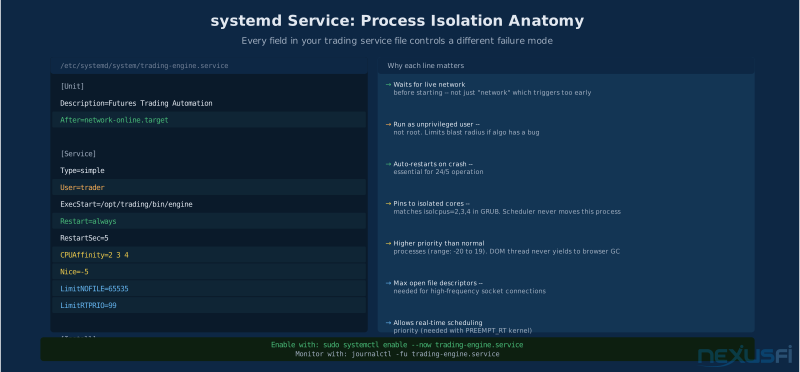
Create a systemd service for your trading automation:
[Unit]
Description=Futures Trading Automation Engine
After=network-online.target

[Service]
Type=simple
User=trader
ExecStart=/opt/trading/bin/engine
Restart=always
RestartSec=5
CPUAffinity=2 3 4
Nice=-5
LimitNOFILE=65535

[Install]
WantedBy=multi-user.target
Key Libraries for Futures Automation on Linux
| Library | Purpose | Notes |
|---|---|---|
pandas + numpy | Data manipulation, backtesting | Use C-backed operations, avoid row loops |
asyncio | Non-blocking I/O for market data | Better than threading for I/O-bound work |
pybind11 | Python ↔ C++ bridge | Near-zero overhead for hot path calls |
zmq (ZeroMQ) | Inter-process messaging | IPC sockets faster than TCP loopback |
prometheus_client | Metrics export | Critical for monitoring production systems |
ZeroMQ IPC sockets are faster than TCP loopback for inter-process communication on the same machine. Use ipc:///tmp/trading-data.sock for high-frequency data paths between your market data ingestion and strategy processes.
Broker API Connectivity on Linux
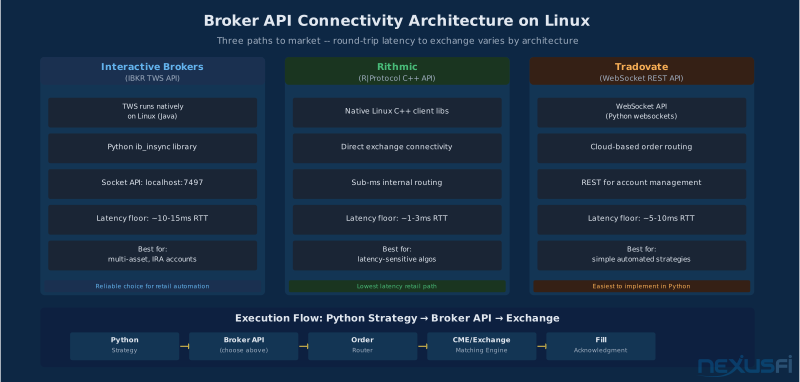
Interactive Brokers (TWS API): IBKR TWS runs natively on Linux and exposes a socket API that Python connects to directly. The ib_insync library wraps the raw API with asyncio support — the most common choice for retail algo traders on Linux.
Rithmic (R|Protocol): Linux-compatible C++ client libraries. Better tick delivery latency than IBKR TWS API for high-frequency data requirements.
Tradovate: WebSocket API that works natively with Python's websockets library on any OS.
Kill Switch and Risk Management
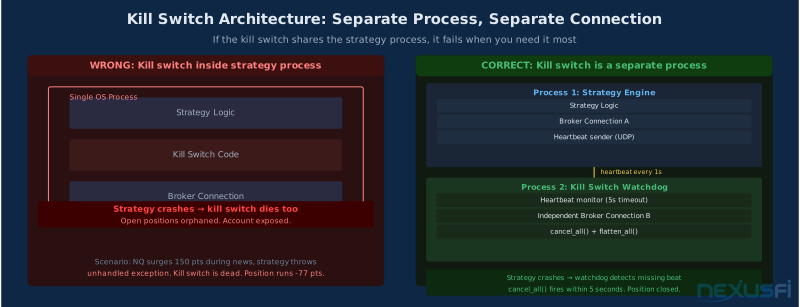
Every automated system needs a kill switch that can terminate all open orders and flatten positions without relying on the strategy process itself. Run this as a separate process with direct broker connectivity, monitoring the strategy process's heartbeat:
import time, socket

HEARTBEAT_TIMEOUT = 5  # seconds

def watch_heartbeat(broker_api):
    sock = socket.socket(socket.AF_UNIX, socket.SOCK_DGRAM)
    sock.bind('/tmp/heartbeat.sock')
    sock.settimeout(HEARTBEAT_TIMEOUT)
    last_beat = time.time()
    while True:
        try:
            sock.recv(64)
            last_beat = time.time()
        except socket.timeout:
            if time.time() - last_beat > HEARTBEAT_TIMEOUT:
                broker_api.cancel_all_orders()
                broker_api.flatten_all_positions()
                break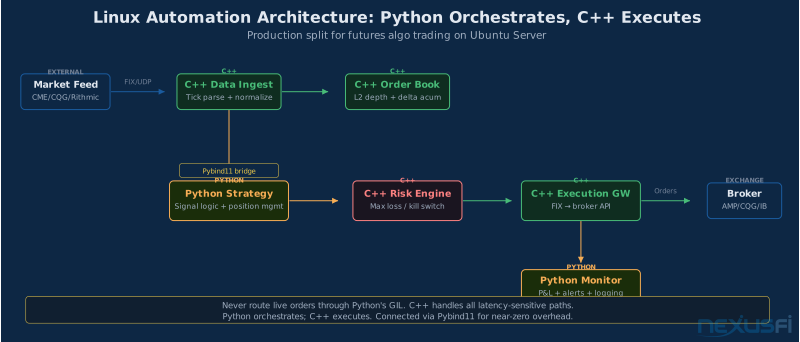
Hardware Recommendations for Linux Trading #
The Linux-specific hardware considerations differ from Windows in a few ways that matter for traders.
CPU: Intel vs AMD Ryzen
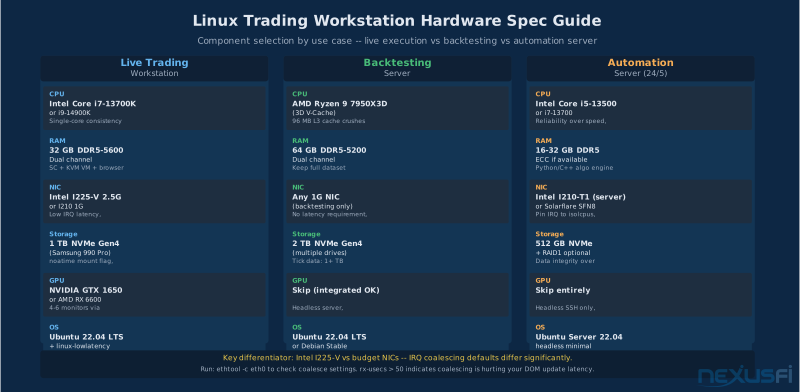
Intel has the edge for execution-focused Linux workstations. Intel's platform has more mature low-latency tuning documentation, and the single-core consistency on Intel's server-class chips means the techniques you learn on desktop Intel transfer directly to server Intel. Intel's DPDK ecosystem is also more mature for traders building custom execution engines.
AMD Ryzen — especially the 3D V-Cache variants (7800X3D, 7950X3D) — dominates for backtesting and research workloads. The large L3 cache benefits scenario simulation, optimization loops, and machine learning pipelines that process large datasets. For a pure research machine, Ryzen 7000 series with 3D V-Cache is the best choice on Linux.
The practical split: Intel for your live execution workstation, Ryzen for your backtesting server. For complete hardware build guidance, see Trading Workstation Hardware for Futures Traders. See CPU Selection for Trading Workstations for detailed benchmarks.
NIC Selection
Most trading workstations run on Intel I225-V or Realtek 2.5G NICs, both of which work well with Linux kernel drivers. For serious latency measurement:
- Intel I210/I225 -- excellent driver support, low interrupt latency, easy to benchmark
- Solarflare SFN8522 (AMD Onload) -- kernel bypass networking for sub-microsecond stack latency; requires OpenOnload installation but delivers order-of-magnitude NIC stack improvement for co-location setups
RAM and Storage
Linux manages memory more efficiently than Windows for long-running server processes. A workstation running Sierra Chart plus light automation needs 32 GB. RAM Selection guide covers the tradeoffs in detail. A dedicated automation server running headless Python/C++ runs comfortably on 16 GB. If you're running a Windows KVM/QEMU VM alongside, add the VM's allocation on top: 6-8 GB for the guest plus 16 GB for the host = 24-32 GB total.
NVMe SSD is the baseline for any trading system. Mount trading data directories with noatime to reduce unnecessary write I/O:
/dev/nvme0n1p2 /data ext4 defaults,noatime 0 2For automation servers, a 1-2 TB NVMe drive with a separate partition for VM images (if applicable) covers most setups.
Hardware decisions for Linux split by workstation type: Intel for live execution (mature latency tuning, better DPDK ecosystem), AMD Ryzen 3D V-Cache for backtesting servers (L3 cache advantage for simulation workloads). RAM minimum: 32 GB for Sierra Chart workstation, 16 GB for headless automation server, plus VM allocation if running KVM. NVMe SSD baseline — mount data directories with noatime.
Real-Time Kernel: When You Actually Need It #
PREEMPT_RT gets discussed as a prerequisite for trading on Linux, but it's conditional — not default. Here's how to think about it.
The standard Linux kernel uses a cooperative scheduling model with voluntary preemption points. Under load, scheduler jitter ranges from tens to hundreds of microseconds. For discretionary trading and most automated strategies, this is acceptable.
PREEMPT_RT patches add real-time preemption throughout the kernel, including in interrupt handlers and spinlock sections. The result: tighter worst-case latency guarantees. The tradeoff: driver compatibility risk, increased testing burden, and higher operational complexity.
When PREEMPT_RT is appropriate:
- Your measured P99 scheduler latency is causing fill quality issues (measurable, not theoretical)
- You're running co-location strategies where 500µs scheduling variance affects edge
- Your C++ execution engine requires guaranteed sub-millisecond response times
When to stay on the standard or low-latency kernel:
- Discretionary trading where market impact dwarfs sub-millisecond latency
- Python-based automation where GIL and GC overhead already sets a latency floor well above kernel jitter
- Simpler setups where PREEMPT_RT driver compatibility issues would cost more troubleshooting time than the latency improvement saves
Measure scheduler latency before deciding:
sudo apt install rt-tests
sudo cyclictest --mlockall --smp --priority=80 --interval=200 --distance=0 --duration=60 | tail -5
If your maximum latency is consistently under 50µs on a low-latency kernel with CPU isolation active, PREEMPT_RT won't help you meaningfully. Most retail traders measure 20-100µs worst-case on a well-tuned low-latency kernel — sufficient for any strategy that isn't exploiting sub-millisecond microstructure.
PREEMPT_RT deployment protocol when warranted:
- Baseline: measure current latency distribution under production load
- Test: replay/paper mode with RT kernel, measure improvement
- Controlled live: small position size, monitor for driver/firmware edge cases
- Production: pin exact kernel + modules + config; document everything
- Maintain: keep rollback kernel available at all times
Most retail futures traders don't need PREEMPT_RT. The practical benchmark is 50µs max scheduler jitter — achievable on a low-latency kernel with isolcpus and cpufreq-set -g performance. PREEMPT_RT makes economic sense only when you've measured that scheduler variance is causing fill degradation AND your strategy edge exceeds the operational overhead of maintaining a real-time kernel.
Linux Trading Setup Checklist #
Getting a Linux trading workstation operational from scratch, in the right order:
OS Installation
- Ubuntu 24.04 LTS (or 22.04 if more hardware support needed for older equipment)
- Disable unattended-upgrades immediately after install
- Install GPU drivers via
ubuntu-drivers autoinstall - Verify multi-monitor configuration before installing trading software
Performance Foundation
- Set CPU governor to performance:
cpufreq-set -g performanceon all cores - Configure
isolcpusin GRUB for trading cores (even if unused initially -- it costs nothing) - Disable C-states in BIOS settings
- Set IRQ affinity for NIC to non-zero isolated core
- Install low-latency kernel:
sudo apt install linux-lowlatency
Trading Platform
- Sierra Chart: download Linux build from official site, test data feed connection, verify order routing with paper account
- NinjaTrader: install KVM/QEMU, configure VM with Q35 chipset and VirtIO drivers, apply Windows optimization settings (@Camdo's list), paper trade for full session before live
Automation (if applicable)
- Ubuntu Server LTS on dedicated server (headless, SSH-managed)
- Configure systemd service with
CPUAffinityto isolated cores - Test kill switch independently from strategy process
- Verify
iostatmetrics under simulated trading load - Confirm reconnection behavior after network interruption simulation
- Pin all software versions; document exact configuration
Monitoring
iostat -xz 1-- disk and CPU utilization (critical for VM setups)htop-- RAM and CPU bar graphs; watch Swap usageethtool -S eth0-- NIC packet drop counterscyclictest-- scheduler latency measurement before optimization decisions
Knowledge Map
Go Deeper
Build on this knowledgeCitations
- — Anyone running Ubuntu? (2011) 👍 1“SC on Ubuntu ran fine, no lag or other issues. I was comparing my laptop with Ubuntu and Sierra Chart to my desktop with Ninja Trader on Windows. I traded off of the laptop.”
- — And what about SierraChart (2011) 👍 6“SC is actually considering doing a native version for Linux. My suggestion to you is to not open NT for a week or so, just play with SC.”
- — Alternative to NinjaTrader for Linux (2019)“I don't recommend using Wine or PlayOnLinux for your trading software unless trading software support staff actively addresses/supports problems that come with that method. Usually they don't.”
- — NINJA TRADER LINUX (2026) 👍 2“You do not need a super computer to host a Windows 10 virtual machine running NinjaTrader 8.1. I run Ninja Trader 24/5 without incident.”
- — NINJA TRADER LINUX (2026) 👍 3“I ran Ninja Trader 8 desktop on my Live Data feed from 8 am this morning till the close. NQ 5 second chart with Ichimoku cloud, market depth historical and real time.”
- — Trading and Backtesting on Linux/MacOS (2019) 👍 2“Since one year ago I only traded using software running on Windows. But at this point I am fed up from most of the issues coming by that. I am looking for alternatives into switching completely to a Linux environment.”
- NexusFi Community Consensus — Sierra Chart native Linux support is preferred over Wine/CrossOver for live futures trading (based on 5 posts)
- Linux Kernel Documentation — CPU Isolation and Interrupt Affinity for Real-Time Applications (2024)
- — Trading and Backtesting on Linux/MacOS (2019) 👍 3“SC really flies under Linux while it's acting like lagging under windows... it is even way faster than under windows!”
- — SierraChart on Ubuntu/Wine (2013) 👍 17“Using SC on Ubuntu/Wine step by step -- full installation guide for Sierra Chart on Ubuntu with Wine configuration.”
- — Sierra Chart feature requests (2021) 👍 4“Works substantially better, smoother, faster in Linux is my experience than on same machine under windows setup.”