



SSD and Storage for Futures Traders: Drive Selection, Tick Data, and Backup
Overview #
Drive technology is the most underestimated performance variable in a trading workstation. The bottleneck is not your CPU or RAM — it is your storage. Every futures trader who has waited 40 minutes for NinjaTrader to load five years of tick data knows the feeling: charts are still calculating, the session is starting, and the platform is frozen. The fix is almost always NVMe storage, combined with separating your OS drive from your tick data drive.
This guide covers the practical decisions that matter: NVMe vs SATA latency in real trading workflows, why separating your drives eliminates platform hiccups, how to size storage for your trading style, and how to protect irreplaceable historical archives your data vendor will not regenerate.
The single highest-impact storage upgrade for most traders: add a second NVMe drive and move NinjaTrader historical data to it. Most desktop motherboards have 2-3 M.2 slots and traders use only one. Separating OS I/O from trading data I/O eliminates the background contention that creates invisible platform lag.
Why Storage Architecture Matters More Than Most Traders Think #
Every futures trader who has waited 45 minutes for NinjaTrader to load historical data on a spinning hard drive knows the feeling: the session is starting, charts are still calculating, and the platform is frozen. The fix is not more RAM or a faster CPU. It is storage.
Drive technology is the most underestimated performance factor in a trading workstation. Not because the benchmarks are unclear — they are not — but because storage failures are subtle. A SATA SSD does not crash your platform. It makes everything slightly slower: chart loads take two seconds instead of one, replay initialization lags, historical data calculations stall while the live feed keeps ticking. By the time you notice, you have already missed setups.
Storage bottlenecks in trading workstations have three failure modes, none of which look like a hard crash:
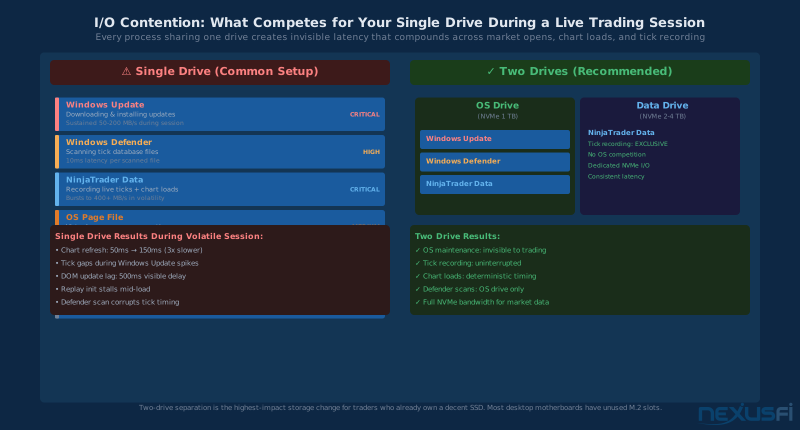
- I/O contention during live sessions -- When NinjaTrader records incoming ticks, loads historical data for a new chart, and serves DOM updates simultaneously, a single SATA SSD becomes the bottleneck. The drive processes these requests sequentially. During a volatile session when you are opening multiple chart timeframes at once, that queue creates lag you will feel as missed fills and stale quotes.
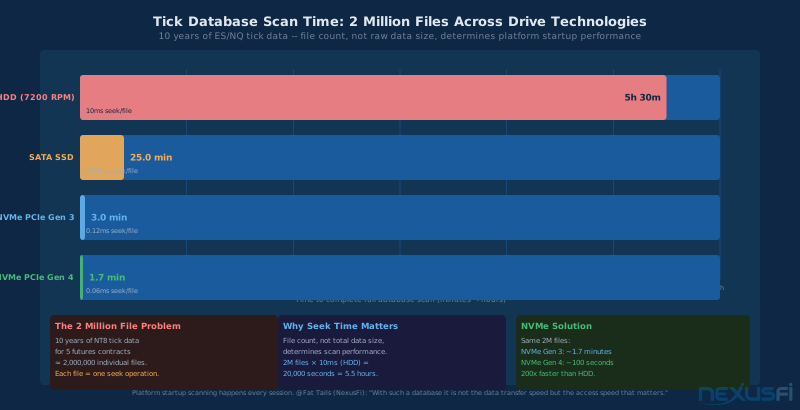
- File count explosion in tick databases -- NinjaTrader native storage format creates individual files for each trading day per instrument. Ten years of historical data for five ES contracts produces approximately 2 million files. Mechanical hard drives spend 10 milliseconds seeking each file -- scanning that entire database takes hours. NVMe handles the same scan in under two minutes.
- OS contention on shared drives -- Windows Update, Defender scans, browser cache writes, and pagefile access all compete for I/O on a shared OS/data drive. During a volatile session when every millisecond matters, the OS scheduler does not know or care that you are watching a trade. Separate drives eliminate this competition entirely.
"Storage — next most important [after CPU]. Ensure you get an NVMe SSD. As fast as you can get and as large as you can get. NinjaTrader still does most of its work via reads and writes to storage."
NVMe vs SATA SSD: The Practical Difference for Trading Workstations #
Both NVMe and SATA SSDs are solid-state — no spinning platters, no mechanical seek arms. The difference is in how they connect to your system and how many requests they can handle simultaneously.
The Three Drive Interface Standards
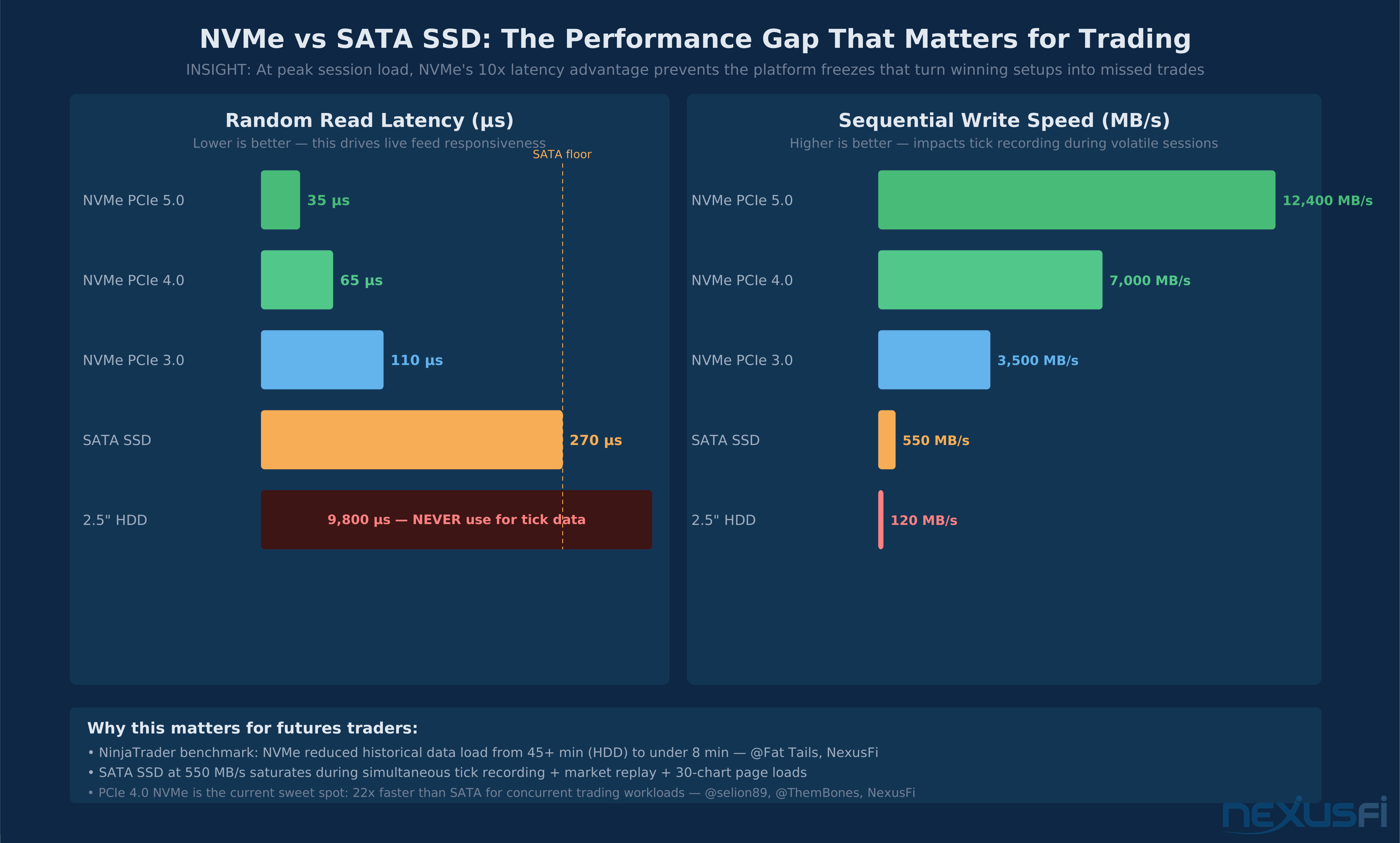
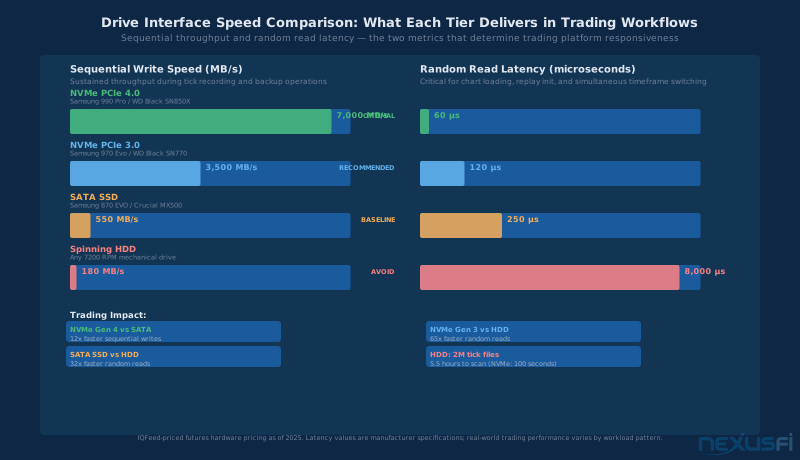
NVMe PCIe 4.0 connects through the PCIe bus — the same high-bandwidth channel your GPU uses. Random read latency runs around 50-70 microseconds, sequential writes reach 5,000-7,000 MB/s, and the protocol handles tens of thousands of concurrent I/O requests. A Samsung 980 Pro or WD Black SN850X represents the current mainstream sweet spot at this tier.
NVMe PCIe 3.0 uses the older PCIe generation — still dramatically faster than SATA, with random reads around 100-130 microseconds and sequential writes of 3,000-3,500 MB/s. If you are on a platform that does not support PCIe 4.0 (most systems older than Intel 11th gen or AMD Ryzen 5000), Gen 3 NVMe is the correct choice and still delivers the performance traders need.
SATA SSD uses the legacy SATA III interface, capped at around 600 MB/s regardless of the drive internal NAND speed. Random read latency runs 200-270 microseconds — roughly 4x slower than NVMe Gen 3. The SATA protocol handles one outstanding command at a time (NCQ), while NVMe can handle 65,535 simultaneously. In practice, SATA becomes a bottleneck the moment your platform issues multiple simultaneous read requests — which happens constantly during a live trading session.
Spinning HDD has no place in an active trading workstation except for cold archive storage. Random read latency is 5-10 milliseconds — roughly 100 times slower than SATA SSD. The 2 million file problem is not theoretical: scanning an NT8 tick database on a HDD takes literally hours. Even for archive purposes, a SATA SSD is preferred unless you are storing truly cold data that you will access at most once a month.
"Backup of my historical database took 10 days with two conventional hard drives, but only 2 hours with two large SSDs."
Where NVMe Advantage Actually Shows Up in Trading
The latency gap between NVMe and SATA does not matter much for sequential workloads — reading one large file from beginning to end. Both technologies handle that efficiently. The gap compounds in random access patterns, which is exactly what trading platforms create:
- Opening a new chart initiates random reads across the tick database for that instrument history
- Switching timeframes (5-minute to 15-minute to daily) requires reading different date ranges from the same file
- Market replay pre-loads multiple instruments historical data into memory before playback starts
- The platform simultaneously writes incoming live ticks while reading historical data for calculations
Community benchmark from @selion89 on NexusFi: NVMe reduced NinjaTrader historical data load to under 8 minutes for a multi-year, 5-contract dataset that took 45+ minutes on a mechanical drive. PCIe Gen 3 NVMe is the minimum threshold where the platform stops feeling sluggish during initialization.
The Two-Drive Minimum: OS and Data Drive Separation #
This recommendation has the most practical impact for traders who already own an SSD. Separating your operating system drive from your trading data drive is more valuable than upgrading from one good drive to another good drive of the same type.
Why Separation Matters
A single drive running Windows and NinjaTrader data simultaneously faces competing demands:
- Windows Update downloads and installs in the background, generating sustained sequential write I/O exactly when you do not want it
- Windows Defender scans open and read every file on the drive -- including your tick database -- during scheduled scans
- The Windows indexing service builds a searchable index of all files, reading and writing continuously in the background
- Browser cache, temporary files, and application logs accumulate and fragment available space
None of these cause a visible crash. They create random microsecond-to-millisecond delays that compound: chart refreshes that normally take 50ms take 150ms, tick recording pauses for a few samples, the DOM updates with a half-second lag. During a high-volatility session, this is the difference between entering at your target price and chasing a fill.
"Have a second drive fitted and move the My Documents folder there. That way the data writes that Ninja performs do not compete with stuff your OS is doing. If it is all on a single drive, it can contribute toward the occasional hiccup."
The Three-Drive Architecture
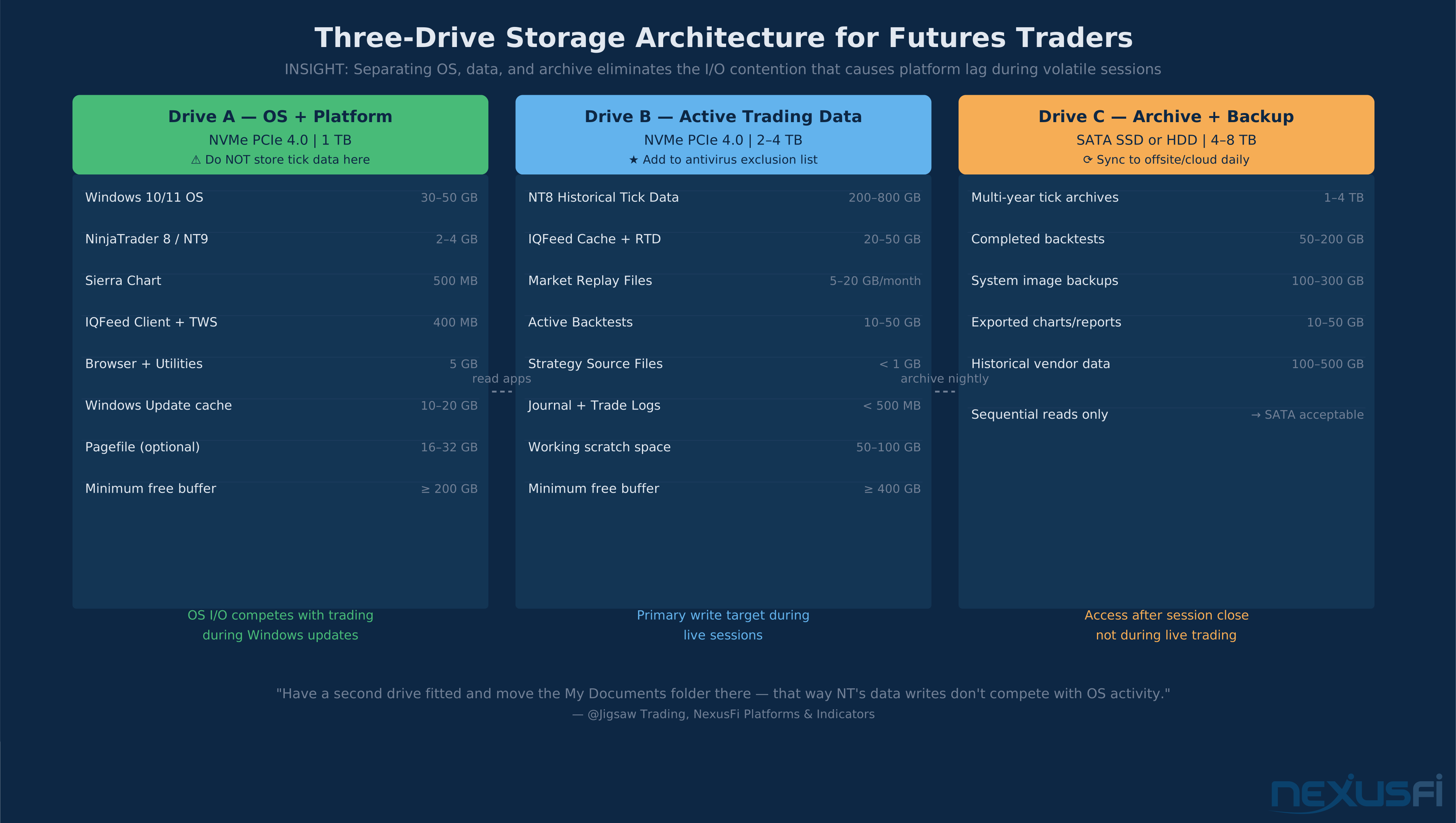
The setup that most active traders converge on uses three drives with distinct roles:
Drive A — OS and Platform Binaries (NVMe, 1 TB)
Operating system, trading platform executables, browser, utilities. This drive handles OS maintenance without any impact on market data. Sizing: Windows 10/11 requires 40-60 GB after updates; platform binaries add another 5-10 GB; budget 200 GB free buffer for OS operations. Total: 1 TB is appropriate for most traders.
Drive B — Active Trading Data (NVMe, 2-4 TB)
NinjaTrader historical data folder, IQFeed cache, active market replay files, strategy source files, running backtests. This is the drive that gets hammered during live sessions — it must be NVMe. Sizing depends on trading history depth and instrument count. Most active futures traders land in the 1-2 TB range of actual data, so a 2 TB drive with the 20% buffer gives comfortable headroom.
Drive C — Archive and Backup (SATA SSD or HDD, 4-8 TB)
Multi-year historical archives, completed backtest datasets, system image backups, old market data. This drive is only accessed during off-hours archiving — never on the critical path during live sessions. SATA SSD is preferred for faster archive access; high-capacity HDD is acceptable if you only access this data occasionally.
Antivirus Exclusion Rules
After separating your drives, configure your antivirus to exclude the trading data directories. Defender real-time protection scanning a tick database file that NinjaTrader is simultaneously reading creates I/O conflicts. The Trading Cybersecurity guide covers exclusion configuration in detail without compromising your overall protection posture.
Tick Data Storage: How Much Space Does Trading Actually Need? #
The most common question from traders setting up a new system is how big the data drive should be. The honest answer is: measure your own data, then extrapolate with a safety factor. But here is a framework for sizing before you have data to measure.
What Determines Storage Requirements
Four variables drive tick data storage consumption:
Data depth (L1 vs L2) — L1 data (top of book: best bid, best ask, last trade) generates roughly 1/10th the storage of L2 full depth data. Most retail futures traders subscribe to L1 with time and sales. Institutional and quant traders may need L2, which multiplies storage requirements much.
Instrument count — ES and NQ add roughly the same storage footprint per year. Adding crude oil, gold, and the 10-year Treasury note multiplies your storage proportionally. Continuous contracts (the front month rolling forward) are smaller than storing each individual contract to expiration.
Session coverage — RTH-only data (6.5 hours/day for US futures) produces roughly 1/4 the volume of 24-hour Globex session coverage. If your strategy only trades the opening hour, you are also storing 22+ hours of ETH data you will never use. Some platforms allow selective session storage.
Platform format and compression — NinjaTrader stores tick data as individual compressed binary files per day per instrument. Sierra Chart uses a different format. Some third-party data solutions use columnar formats (Parquet, HDF5) that achieve much better compression ratios but require separate tooling to read.
Practical Sizing Ranges
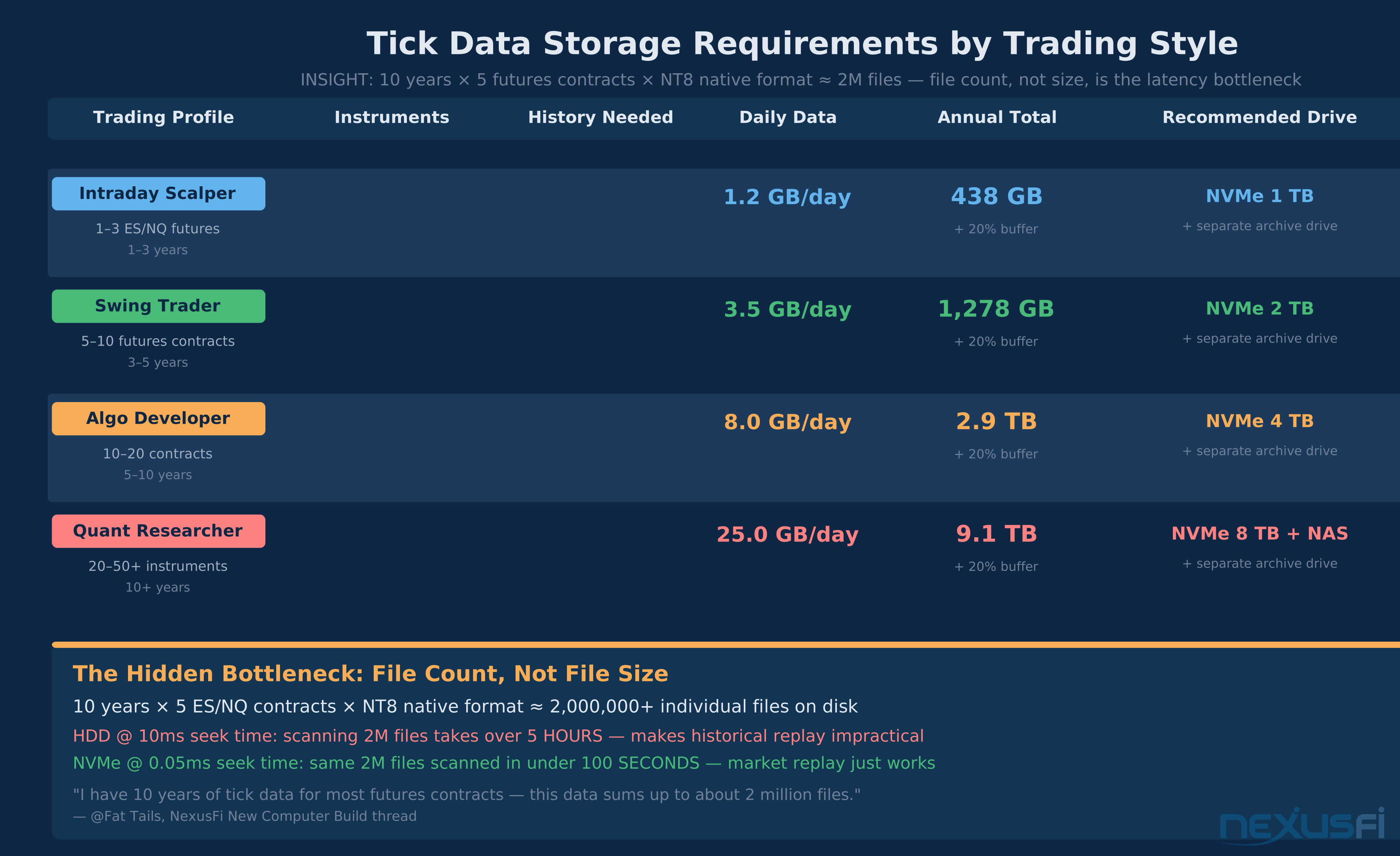
- Intraday scalper, 1-3 ES/NQ contracts, 1-3 year history: 300-500 GB on NT8 native format
- Swing trader, 5-10 instruments, 5 years: 1-2 TB
- Algo developer, 10-20 contracts, multi-year backtests: 3-5 TB hot storage
- Quant researcher, full depth data, 50+ instruments: 10+ TB
"I have 10 years of tick data for most of the futures contracts, and this data sums up to about 2 million files. With such a database it is not the data transfer speed but the access speed that matters."
At scale, file count dominates performance, not raw file size. 2 million files at 10ms seek time (HDD) equals 5.5 hours to scan the database. At 0.05ms (NVMe) equals 100 seconds. This is why tick database performance is an NVMe problem, not a capacity problem.
Market Replay Storage Planning
Market replay in NinjaTrader and Sierra Chart reads historical tick data and replays it in real-time at configurable speed ratios. The storage requirements for replay itself are modest — it reads from the same tick database you already have. Replay pre-loads data into RAM before starting: for a full trading day across 5-10 instruments, NT8 may buffer 500 MB to 2 GB of tick data. This comes from your data drive, so NVMe latency matters during initialization.
"If your studies or chart replays need to load several days of tick/L2 data (e.g. footprint charts or historical market depth), you will appreciate fast storage and memory."
NVMe Drive Health and Performance Maintenance #
NVMe drives do not fail gradually in ways you can easily notice. Unlike HDDs that click and groan, NVMe drives typically report healthy SMART metrics right up until sudden failure — or they degrade silently in ways that do not show up in basic health checks.
The 20% Free Space Rule
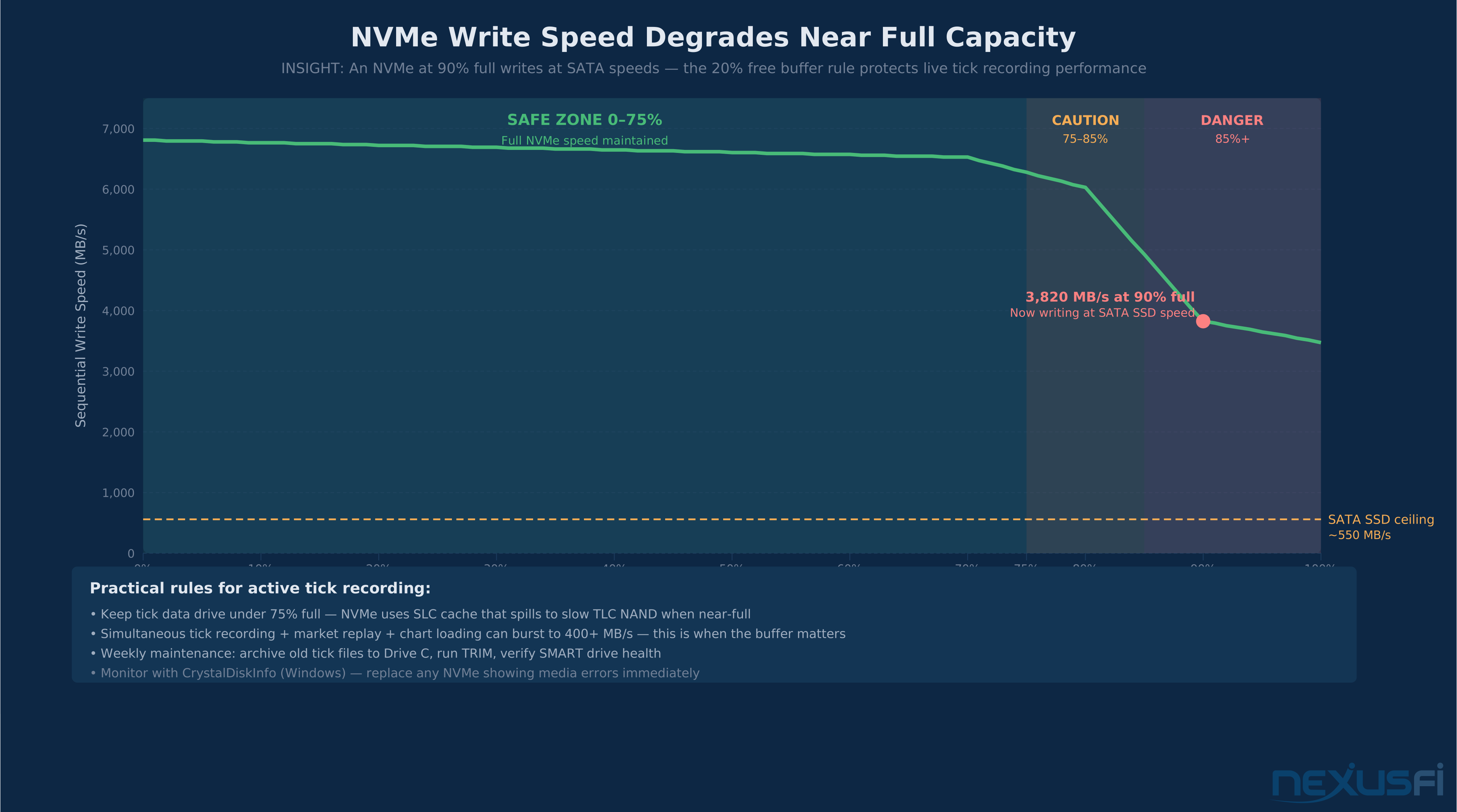
SSDs maintain a pool of spare NAND cells for wear leveling. When a drive approaches capacity, the controller must garbage-collect old data before writing new data, adding latency. NVMe drives also use SLC cache — when the drive is nearly full, this cache exhausts and write performance drops to the sustained NAND speed, which can approach SATA territory for consumer drives.
Keep your active data drive below 75% utilized. NVMe write performance drops sharply above 85% capacity — tick recording during volatile sessions can burst to 400+ MB/s. A nearly-full drive throttles to SATA speeds exactly when you cannot afford it. Archive completed tick data to your archive drive monthly.
Keep your data drive under 75% utilized. Archive completed tick data to Drive C regularly as part of monthly maintenance.
TRIM and Wear Monitoring
Windows automatically runs TRIM on NVMe and SATA SSDs during scheduled maintenance windows. Verify it is active: open Command Prompt as Administrator and run fsutil behavior query DisableDeleteNotify. A result of 0 means TRIM is enabled.
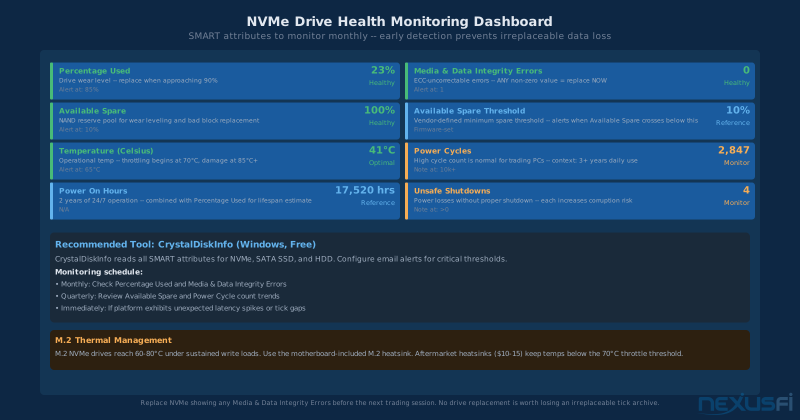
For health monitoring, CrystalDiskInfo is the standard tool for Windows. It surfaces NVMe-specific SMART attributes including Media and Data Integrity Errors and Percentage Used. Monitor monthly. Replace any NVMe showing Media and Data Integrity Errors before the next session.
Thermal Considerations for M.2 NVMe
M.2 NVMe drives can reach temperatures of 60-80 degrees Celsius under sustained write loads. At these temperatures, the controller throttles performance to protect the NAND — you get a sustained throughput drop during extended tick recording sessions. Use the M.2 heatsink included with your motherboard. Aftermarket heatsinks add passive thermal mass for under $15 and keep temperatures below the throttle threshold.
NAS for Market Data: When It Helps and When It Hurts #
Network Attached Storage occupies a useful but narrow role in a trading infrastructure setup.
Where NAS Works Well
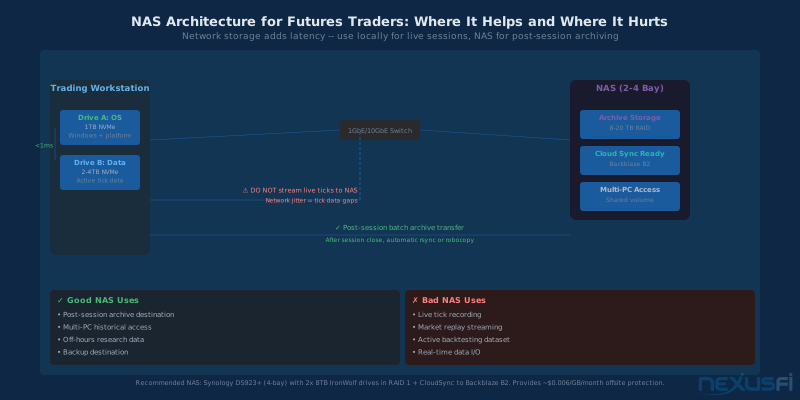
Archive destination — NAS is excellent for storing completed historical data after it moves off your active trading drive. A 4-bay NAS running RAID 5 gives you several TB of redundant archival storage accessible from any workstation.
Multi-workstation environments — A NAS lets both a desktop and laptop access the same historical data without maintaining duplicate archives.
Backup destination — NAS with offsite replication (Synology CloudSync or similar) provides a middle tier in your backup chain: local enough for fast restoration, offsite-replicable for disaster protection.
Where NAS Creates Problems
Live tick recording — Writing live feed data to a NAS during a trading session is a latency trap. Even a 10GbE network introduces jitter and occasional latency spikes that interrupt tick recording. For a tick database, 50-100ms network hiccups show up as missing data during replay.
Active market replay — A 1GbE connection maxes out at about 125 MB/s — potentially insufficient when loading multiple instruments simultaneously. The practical pattern: use local NVMe for everything during live sessions; NAS for post-session archiving and background research access.
Building a High-Performance Historical Data System #
For traders doing quantitative research or multi-strategy backtesting, data organization matters as much as drive selection. A clean directory structure:
- D:\TradingData\raw\ -- Immutable vendor data (never overwrite, only append)
- D:\TradingData\processed\ -- Derived datasets (rebuildable from raw)
- D:\TradingData\research\ -- Working datasets for active strategies
- D:\TradingData\replay\ -- Active replay staging area
Keeping raw vendor data immutable means you can rebuild any derived dataset by reprocessing from source. A data manifest file prevents the mystery file problem that accumulates over years of trading.
"A key part of the storage design is to have: high availability, single namespace, near-line storage for recent data, archive storage for older data."
Time Zone and Session Normalization
This is the most common source of silent data corruption in multi-year backtests. Store timezone information with every tick — either embed it in the filename convention or maintain a metadata file. DST transitions can introduce data gaps or double-counting that show up as unrealistic backtest results in March and November.
Backup Strategies: Protecting Irreplaceable Tick Archives #
Most retail data subscriptions — IQFeed, Rithmic, CQG — do not maintain downloadable archives of historical tick data. You can re-download recent data (typically 30-90 days) but the multi-year archive you built up is gone when a drive fails. This makes backup non-negotiable for serious traders.
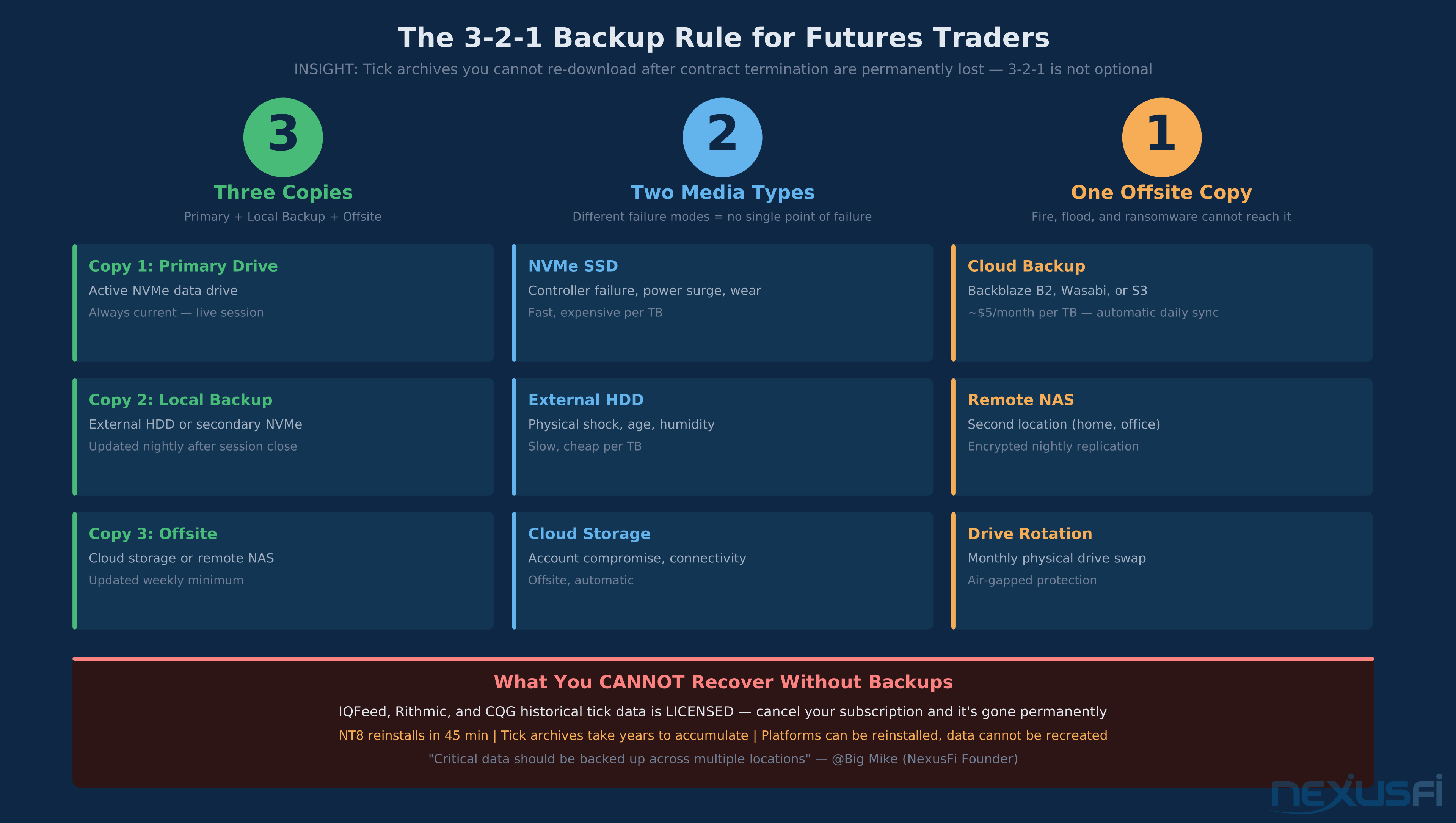
Tick archives are not recoverable from your vendor. Most retail data subscriptions (IQFeed, Rithmic, CQG) provide 30-90 days of re-download history. The multi-year archive you built is gone when a drive fails. Treat irreplaceable tick data the same way a photographer treats original negatives — 3-2-1 backup, no exceptions.
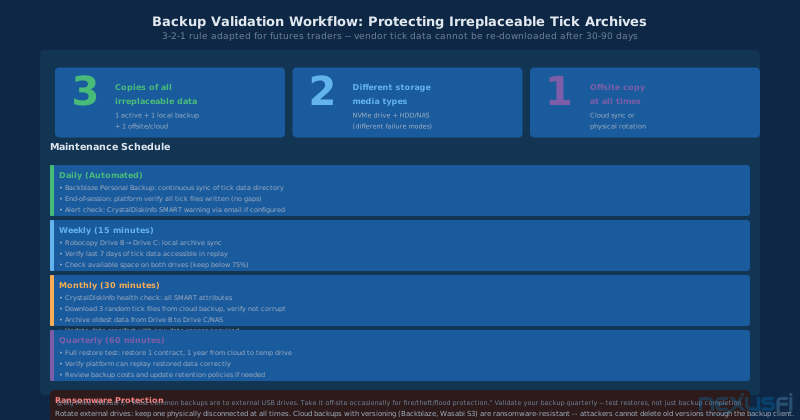
The 3-2-1 Rule for Traders
3 copies of any data you cannot afford to lose — primary drive, local backup, and offsite copy.
2 different storage media types — different failure modes ensure no single incident destroys all copies. NVMe fails by controller failure or wear; HDD by physical damage; cloud by account issues.
1 offsite copy — local redundancy protects against drive failure; offsite protects against fire, flood, theft, and ransomware that encrypts all locally accessible drives.
What Is Mission-Critical vs Recoverable
Irreplaceable (highest priority): Raw tick archives from your data vendor. Strategy source code. Data manifests and normalization scripts. These cannot be recreated.
Important but rebuildable: Normalized and processed datasets. Backtest results. Platform indicator settings.
Recoverable: OS installation, platform binaries, browser bookmarks. All can be reinstalled in a few hours.
Practical Backup Configuration
The simplest 3-2-1 system for most retail futures traders: Backblaze Personal Backup running as a background service syncing your tick data directory at approximately $9 per month. After each session close, sync Drive B to Drive C (local archive). Validate your cloud backup quarterly by downloading and verifying a sample of files.
"Most common backups are to external USB drives, or eSATA drives. You attach them to the computer, and run some software to backup critical files. Take it off-site occasionally for fire/theft/flood protection."
Ransomware Protection
Ransomware encrypts all locally accessible storage — including mapped network drives and connected USB drives. Cloud backups with versioning (Backblaze, Wasabi, S3 with version policies) are naturally ransomware-resistant if the ransomware cannot delete old versions through the backup client. External drives rotated on a schedule — one connected, one physically disconnected and stored offsite — provide the strongest protection.
Recommended Storage Configurations by Trading Style #
Intraday Futures Trader (1-5 instruments, 1-3 year history)
- Drive A: 1 TB NVMe PCIe Gen 4 (OS and platform)
- Drive B: 1-2 TB NVMe PCIe Gen 4 (tick data and replay)
- Drive C: 4 TB external HDD (archive and backup, rotated offsite monthly)
- Cloud: Backblaze B2 or equivalent for continuous offsite backup
Swing and Multi-Timeframe Trader (5-15 instruments, 5+ year history)
- Drive A: 1 TB NVMe PCIe Gen 4 (OS and platform)
- Drive B: 2-4 TB NVMe PCIe Gen 4 (tick data and replay)
- Drive C: 8 TB NAS (2-bay RAID 1) for archive and backup, with cloud sync
Algo Developer and Systematic Trader (10-25 instruments, 10+ years)
- Drive A: 2 TB NVMe PCIe Gen 4 (OS and active research)
- Drive B: 4-8 TB NVMe PCIe Gen 4 (full tick database and backtesting datasets)
- Drive C: 4-bay NAS (RAID 5, 10+ TB) for archive and warm research data
- Cloud: Wasabi S3-compatible for NAS replication with versioning
For more detail on the broader hardware picture, see the Trading Workstation Hardware guide and the Building vs Buying a Trading PC comparison.
Getting Started: Priority Order for Implementation #
If you are building a new workstation or upgrading an existing one, implement changes in this order — highest impact first:
1. Add a second NVMe drive if you only have one. Physically separate your OS and trading data. This is the single highest-impact change available to traders with a decent existing SSD. Most desktop motherboards have 2-3 M.2 slots; most traders use only one.
2. Move NinjaTrader historical data folder to the dedicated data drive. In NT8: Tools, Options, Data, Historical Data directory. Point it to your new data drive.
3. Configure antivirus exclusions for your tick data directory and platform working folders.
4. Set up basic backup. Install Backblaze Personal Backup or equivalent. Point it at your tick data directory. This takes 30 minutes to configure and protects years of irreplaceable archives.
5. Keep drives under 75% full. Archive completed tick data to Drive C regularly. NVMe performance degrades sharply above 85% utilization, and tick recording is the workload most sensitive to this degradation.
For traders considering a VPS as an alternative to local storage management, the NinjaTrader VPS guide covers the trade-offs. For redundancy at the system level, the Trading Redundancy and Backup Systems guide addresses power protection, internet failover, and disaster recovery.
Knowledge Map
Prerequisites
Understand these firstGo Deeper
Build on this knowledgeReferences This Article
Articles that build on this topicCitations
- — NinjaTrader Performance on 6 year Laptop Vs. NEW (2025) 👍 6“Storage -- next most important [after CPU]. Ensure you get an NVMe SSD. As fast as you can get and as large as you can get. NinjaTrader still does most of its work via reads and writes to storage.”
- — NinjaTrader Performance on 6 year Laptop Vs. NEW (2025) 👍 3“NVMe is next most important. Loading massive tick databases can take minutes on SATA vs seconds on NVMe.”
- — Ninja Tunes (2013) 👍 7“Have a second drive fitted and move the My Documents folder there. That way the data writes that Ninja performs do not compete with stuff your OS is doing.”
- — New Computer Build (2020) 👍 7“I have 10 years of tick data for most of the futures contracts, and this data sums up to about 2 million files. With such a database it is not the data transfer speed but the access speed that matters.”
- — Computer suitable for Ninjatrader8 (2019) 👍 7“Backup of my historical database took 10 days with two conventional hard drives, but only 2 hours with two large SSDs.”
- — Which PC for Sierra Chart? (2021) 👍 7“If your studies or chart replays need to load several days of tick/L2 data, you will appreciate fast storage and memory.”
- — Disaster Strikes! Backup your data (2011) 👍 11“Most common backups are to external USB drives, or eSATA drives. You attach them to the computer, and run some software to backup critical files. Take it off-site occasionally for fire/theft/flood protection.”
- — Building a high-performance data system (2020) 👍 7“A key part of the storage design is to have: high availability, single namespace, near-line storage for recent data, archive storage for older data.”
- — Digital back up NT8 across multiple drives (2019) 👍 1“Data safety is paramount. Multiple drives with different backup strategies help protect years of historical data.”