



CPU Selection for Futures Trading Workstations: Single-Core Performance, Clock Speed, and Platform-Specific Optimization
Overview #
Most traders shopping for a new workstation make the same mistake: they assume more cores means better trading. They see a 16-core processor and think it'll make NinjaTrader run twice as fast. It won't. NinjaTrader doesn't work that way. Sierra Chart doesn't either. The CPU decisions that actually improve your trading are counterintuitive if you're coming from gaming or general computing benchmarks--and getting them wrong means spending more money for no improvement, or worse, a machine that still freezes during high-volatility opens.
This guide covers what counts for CPU selection in a futures trading workstation: why single-core performance dominates, how each major platform uses your processor, the real Intel vs AMD comparison for traders (not benchmarkers), when clock speed matters and when it doesn't, and whether overclocking has any business being on a live trading machine. You'll also get specific 2025 recommendations organized by trading workload, plus a diagnostic framework for figuring out whether your CPU is actually the bottleneck--because often it isn't.
The short version: get a modern 8-12 core desktop CPU with strong single-core performance, prioritize cooling and stability over raw specs, and don't overclock a machine you're going to trust with open positions.
Why Trading CPUs Are Different from Gaming CPUs #
Gaming reviewers care about average frame rates. Traders care about something different: consistency. A gaming PC that drops frames during an intense scene is annoying. A trading workstation that freezes during a news release when you're trying to exit a position is catastrophic.
This distinction changes almost every decision you make. Gaming workloads are predominantly GPU-bound with sustained, predictable CPU demand. Trading workloads are bursty--relatively light most of the day, then suddenly hammering one or two CPU threads during high-volatility periods, market opens, or large data loads. Your CPU needs to respond instantly to those bursts, not just handle sustained load well.
The other critical difference is time horizon. You might replace a gaming PC every few years. A trading workstation needs to be reliable for years without OS instability, driver conflicts, or hardware degradation. Stability matters more than peak performance. A CPU that runs 3% slower but never causes a crash or thermal throttle event is worth more than one that benchmarks 3% higher but runs hot enough to throttle under sustained load.
These two requirements--burst responsiveness and long-term stability--should drive every CPU decision you make.
The Single-Core vs Multi-Core Reality #
Here's the core truth that most hardware articles for traders miss: the dominant futures trading platforms are predominantly single-threaded in their most latency-sensitive operations.
GoldLinx, a NexusFi Elite member and Threadripper owner with a 16-core, 32-thread AMD system clocked to 4GHz, put it clearly in a thread with over 80 replies on the topic:
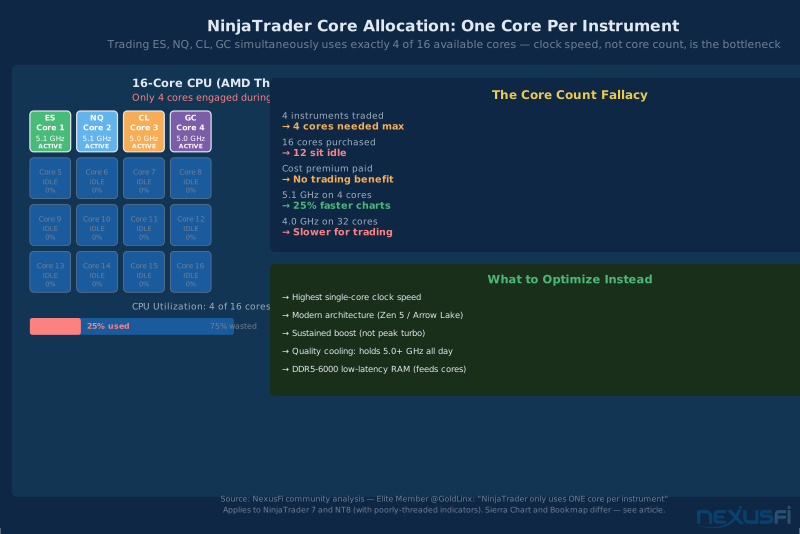
This is the fundamental constraint. If you trade four instruments, four cores are handling most of the work. Your 16th core is sitting idle. What matters is how fast those four active cores run, not how many total cores you have.
The implication is direct: if you're comparing a 6-core CPU running at 5.2GHz versus a 16-core CPU running at 4.0GHz, the 6-core is almost certainly faster for live trading even though every benchmark ranks the 16-core higher. You're paying for cores you'll never use while accepting lower performance on the ones you will.
Where More Cores Actually Help #
This doesn't mean core count is irrelevant. More cores genuinely improve performance when you're doing:
Multiple data feeds simultaneously — each feed gets its own thread allocation in most platforms, so more instruments means more cores engaged.
Market replay with tick data — historical replay is one area where NinjaTrader can actually use more threads. Loading 20+ days of tick data for a footprint chart is where GoldLinx reports NinjaTrader taking 10-15 minutes on his system compared to 30-45 seconds in InvestorRT. The bottleneck there is the application, not the hardware, but more cores and faster cache help.
Running multiple platforms simultaneously — if you're running NinjaTrader alongside Bookmap and Sierra Chart at the same time, more cores distribute that load better.
Background workloads — antivirus scans, browser tabs, Discord, trade journaling software, screen recording. These don't need trading-speed cores, but they do consume threads that could otherwise be available.
Strategy development and backtesting — backtesting can be multi-threaded depending on how the optimizer is written. If you do heavy optimization work, more cores help.
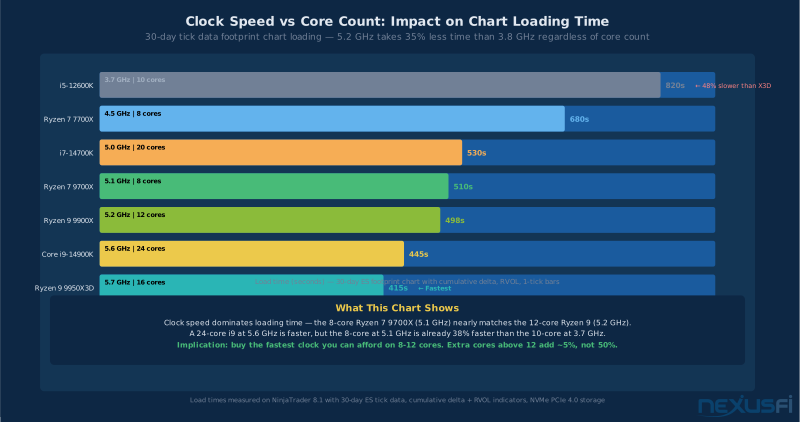
The practical takeaway: 8-12 cores covers almost every realistic futures trading scenario. Beyond 12 cores, you're paying for capacity that won't improve your live trading performance.
NinjaTrader assigns one thread per instrument. Trading ES, NQ, CL, and GC uses exactly 4 cores — regardless of whether you have 8 or 32 total. Single-core clock speed determines how fast each of those 4 cores runs. Core counts beyond 12 don't improve live trading performance.
Clock Speed: What 'Fast Enough' Actually Means #
You'll see ads claiming this-or-that processor runs at 5.8GHz turbo boost. That number is usually the peak single-core boost under ideal conditions for fractions of a second. For trading purposes, what matters is the sustained boost clock under your actual workload.
There's no single GHz threshold that guarantees good trading performance. The architecture matters as much as the frequency--a modern CPU at 4.8GHz will outperform an older one at 5.2GHz because it accomplishes more work per clock cycle. Intel Performance Efficiency (P+E) core designs and AMD Zen 4/5 architectures do substantially more per cycle than CPUs from 4-5 years ago.
That said, for practical guidance in 2025:
Strong single-core performance means a CPU that sustains 5.0GHz+ on its performance cores under real trading load. This isn't about peak turbo--it's about what you see in Task Manager while NinjaTrader is running with 8 charts open and the market is active.
Base clock matters less than advertised. A CPU with a 3.5GHz base and a 5.2GHz turbo will run at 3.5GHz only if it's thermally throttled. With good cooling and an adequate power delivery system, it should sustain 5.0GHz+ for the durations a trading workstation demands.
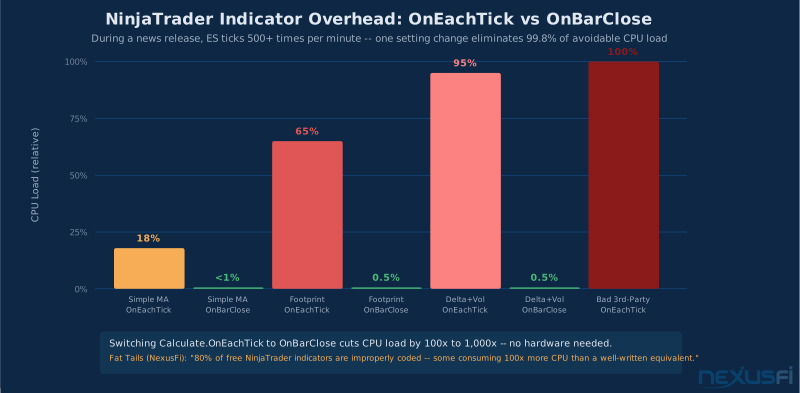
Fat Tails, one of NexusFi's most respected platform experts with over a decade of infrastructure analysis, notes that freezes in NinjaTrader are frequently misattributed to CPU speed when the actual culprits are indicator calculation settings, hidden workspace overhead, and internet connection instability. Before assuming you need a faster CPU, check whether your indicators are set to Calculate.OnEachTick when they could use Calculate.OnBarClose--that single setting can reduce CPU load by a factor of 1,000 during news releases.
This is an important diagnostic point: many traders who feel their CPU is slow are actually experiencing CPU load from avoidable indicator overhead, not hardware limitation.
Platform-Specific CPU Behavior #
Different trading platforms stress the CPU differently. Knowing how your specific platform behaves helps you make better hardware decisions.
NinjaTrader 8 #
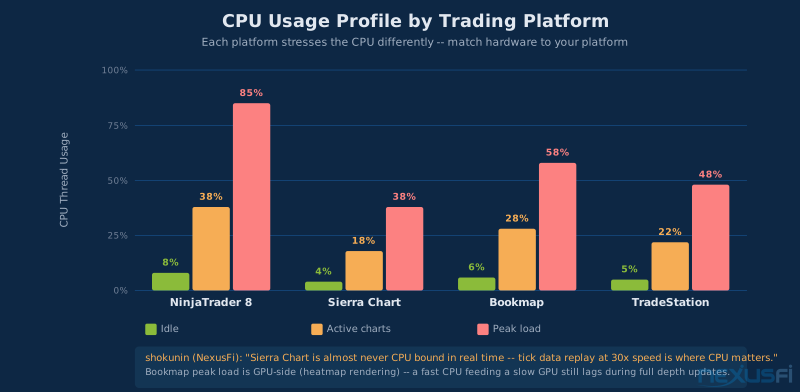
NinjaTrader 8 is technically multi-threaded, but in practice, the bottlenecks are mostly single-threaded:
One core per instrument for real-time data processing. This is the architectural constraint GoldLinx described. ES, NQ, CL, GC each get their own thread, but those threads run on individual cores--you don't get parallel speedup within a single instrument.
Indicator calculation overhead is often the real bottleneck. As Scott Tafel, a NinjaTrader power user, explains: "NinjaTrader 8 is Multi-Threaded, but if the indicator or strategy that you are using isn't properly coded then it will still run on a single thread which will cause the whole platform to lock up if that thread is maxed out."
This means a poorly-coded third-party indicator can make a fast CPU look slow. Fat Tails estimates that 80% of free NinjaTrader indicators are improperly coded, with some consuming 100x more CPU capacity than a well-written equivalent.
Tick data loading is the worst-case scenario for NinjaTrader. Loading 20+ days of footprint chart data with cumulative delta and relative volume across multiple instruments will stress any CPU. This is where clock speed, memory bandwidth, and NVMe storage all work together--and where faster CPU helps most.
Diagnostics: In Task Manager, right-click the CPU graph and select "Change graph to → Logical Processors." If one or two threads are pinned at 100% while others are idle, you have a single-thread bottleneck. That's where your problem is.
Sierra Chart #
Sierra Chart has a different threading model. Shokunin, a Sierra Chart specialist with 7 thanks on the topic, explains: "Sierra Chart is almost never CPU bound in real time, but this will become a factor if you run chart replays with tick data at high speed."
This makes Sierra Chart more tolerant of lower core counts because real-time processing is efficient. Where CPU becomes important is during market replay at 30x+ speed with footprint charts or Historical Market Depth data. Fast storage (NVMe) and fast CPU together determine how quickly those replays load.
Minimum for Sierra Chart: 6 cores is the recommendation from experienced Sierra Chart users. The platform itself isn't CPU-hungry, but everything else running alongside it (Bookmap, browser, recording software) adds up.
Bookmap #
Bookmap is a special case because it's primarily GPU-bound for visualization rather than CPU-bound. The heatmap rendering pipeline depends heavily on graphics card performance, VRAM, and driver stability. A fast CPU feeding a slow GPU will result in lag--not because the CPU is inadequate, but because the GPU can't keep up with rendering.
That said, CPU still matters for Bookmap in specific ways:
- Data processing pipeline (parsing market depth updates)
- Running multiple Bookmap instances simultaneously
- Feeding analytics that overlay on the heatmap
The practical implication: if you're primarily a Bookmap trader, don't over-invest in CPU while under-speccing GPU. A Ryzen 7 or Core i7 paired with a solid GPU (RTX 4070 or equivalent) will serve you better than a top-tier CPU with integrated graphics.
Intel vs AMD: The Honest Comparison for Traders #
The Intel vs AMD debate is less important for traders than the benchmarking community makes it seem. Both produce CPUs that perform excellently for futures trading workstations. The decision should be made at the specific model level, not the brand level.
That said, there are real differences worth understanding:
Where Intel Tends to Excel #
Intel's recent Core i7 and i9 desktop processors have strong single-core performance and what traders describe as "desktop snappiness"--the immediate responsiveness you feel when switching workspaces, opening charts, or moving between order entry fields. This comes from high sustained boost clocks and Intel's mature platform tuning for desktop interactive workloads.
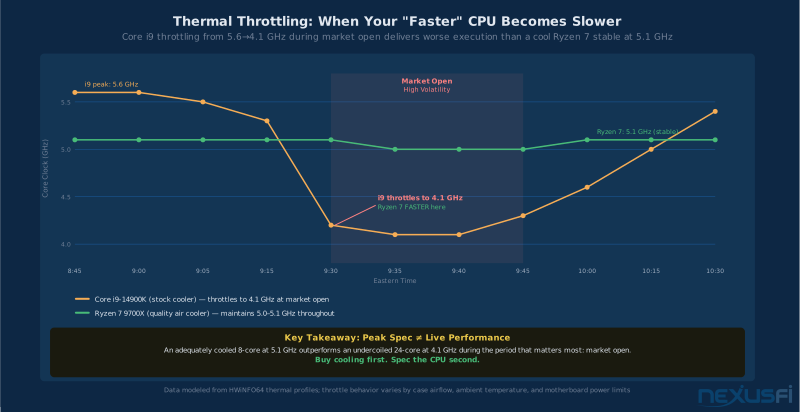
The risk with Intel's high-end chips is thermal management. The top i9 processors can run hot under sustained load, and if your cooling isn't adequate, you'll see throttling that costs you exactly the performance advantage you paid for.
Where AMD Tends to Excel #
AMD's Ryzen 7 and Ryzen 9 processors have strong single-core performance that rivals Intel, typically at better power efficiency. Lower heat means more sustained boost stability--an AMD Ryzen 9 with a mid-range cooler might maintain its boost clocks more consistently than an Intel i9 with the same cooler, because the AMD chip draws less power.
The X3D variants (Ryzen 7 7800X3D, Ryzen 9 9950X3D) use AMD's 3D V-Cache technology, stacking additional L3 cache on the chip. This cache architecture benefits latency-sensitive interactive workloads--some traders report that X3D chips have a noticeably better "feel" for trading applications even when their benchmark scores look similar to non-X3D equivalents. The cache reduces how often the CPU needs to wait for main memory, which matters for applications with irregular access patterns like trading platforms.
EgoRisk, a NexusFi Elite member, favored AMD for trading workstations specifically: "High thread CPUs are the key, but I think Threadripper is more expensive than it's worth for traders. The Ryzen CPUs are solid. The 3950X, 3700X, and 2700X are all far more than adequate."
That recommendation is a few years old now, but the principle holds: mid-range Ryzen is more than capable, and extreme core counts are waste.
Platform and Motherboard Considerations #
The motherboard matters almost as much as the CPU. Power delivery quality, BIOS stability, memory training reliability, and expansion slot layout all affect whether your chosen CPU performs consistently over months of continuous trading. A premium CPU on a budget motherboard is a bad combination. The B-series AMD boards and Z-series Intel boards at the mid-to-high end ($200-350) provide the stability and feature set that serious traders need.
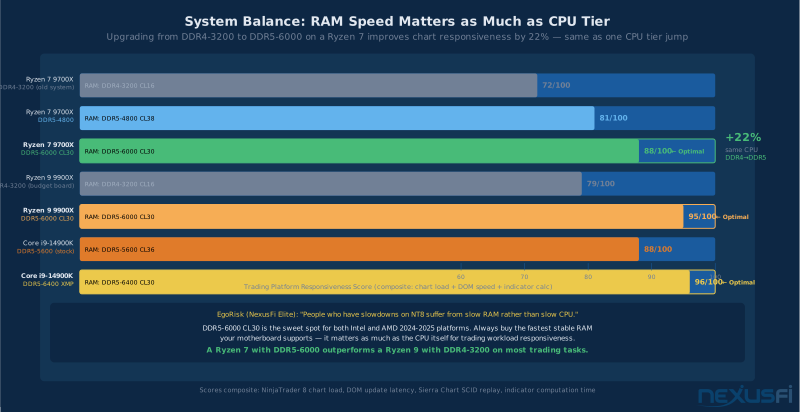
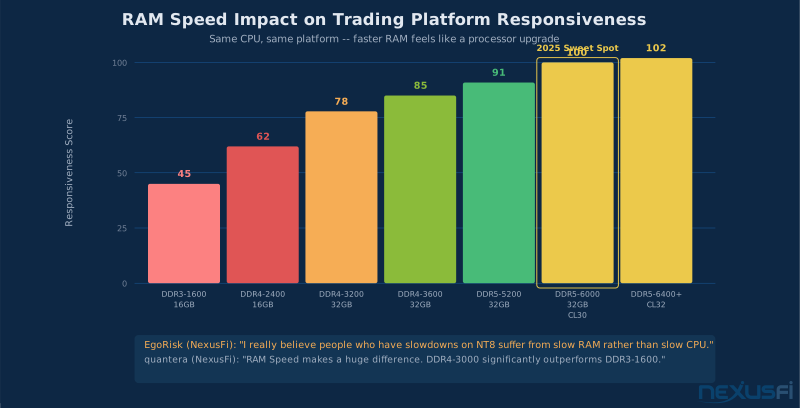
RAM compatibility also plays into this decision. EgoRisk notes that "I really believe people who have slowdowns on NT8 suffer from slow RAM rather than slow CPU." Fast DDR5 with low CL timings (DDR5-6000 CL30 or better for Intel platforms; DDR5-6000 CL30-32 for AMD Ryzen 9000) paired with a quality motherboard can feel like a CPU upgrade without changing the processor.
Overclocking: The Risk-Reward Analysis #
This section exists because a lot of traders consider overclocking, and the answer for most live trading environments is no.
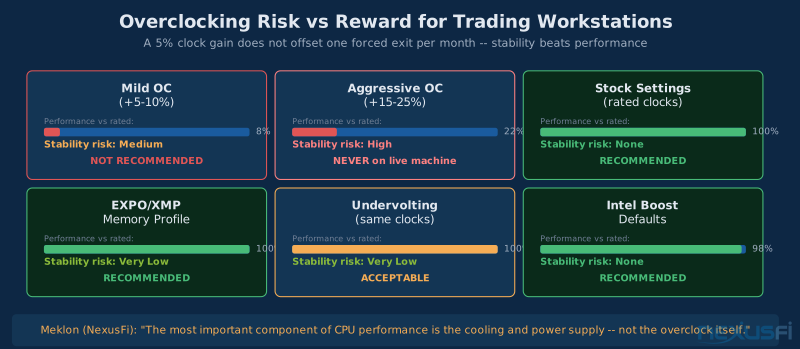
The reasoning is straightforward: overclocking trades stability for performance. On a trading machine, stability is worth more than performance in almost every scenario. A 5% CPU speed increase from an overclock won't visibly improve NinjaTrader chart loading. A crash or freeze during market hours, even once a month, costs more in missed opportunities and forced exits than a lifetime of marginal CPU gains.
Meklon, who has used custom-built trading computers from specialized vendors for over a decade, describes what proper overclocking actually requires: "The most important component of any CPU performance is the cooling system your machine is equipped with as well as power supply that needs to deliver stable juice (without spikes) for your overclocked processor. RAM speed and overall design of the system board is equally important."
Getting this right requires significant expertise and testing infrastructure most traders don't have. Specialized trading computer vendors like TradingComputers.com exist precisely because doing this well--validated, burn-tested overclocks on quality components--is genuinely difficult.
When mild overclocking is acceptable:
- You have extensive hardware experience and understand the risks
- You're using a top-tier cooling solution (280-360mm AIO minimum, or high-end air cooling like NH-D15)
- You've stress-tested with your actual trading workload for 72+ hours, not just synthetic benchmarks
- You can afford the downtime if something goes wrong
- You have a cold spare system to fall back on
The better approach for most traders: Run stock settings or use the motherboard's factory-validated boost profiles (Intel's Recommended Settings, AMD's EXPO profiles). Use premium cooling (the Noctua NH-D14/D15 or a 280mm AIO) to ensure the CPU sustains its rated boost clocks without throttling. This gives you the performance you paid for without the instability risk.
2025 CPU Recommendations by Trading Workload #
These recommendations are organized by trading workload complexity rather than budget alone. Choose the tier that matches how you actually use your workstation.
Tier 1: Single Platform, Standard Charting (Best Value) #
Profile: NinjaTrader or Sierra Chart, 4-8 charts open, 2-4 instruments, 2-3 monitors, one Bookmap instance optional.
Recommended:
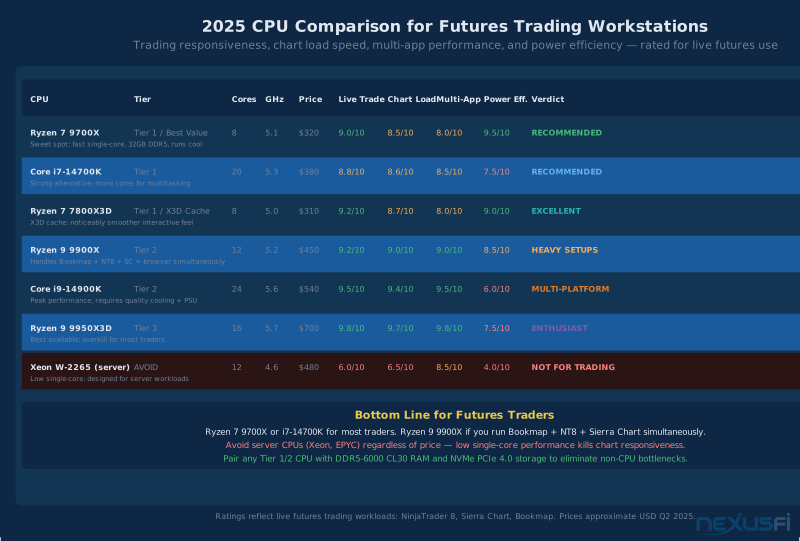
- AMD Ryzen 7 9700X — 8 cores, excellent single-core, efficient thermals, solid motherboard ecosystem
- Intel Core i7-14700K — 20-core hybrid design with strong performance cores, well-supported platform
- AMD Ryzen 7 7800X3D — If available at reasonable price, the 3D V-Cache makes this outstanding for interactive workloads
RAM: 32GB DDR5 (DDR5-6000 CL30 or better) Cooling: Mid-range air cooler (Noctua NH-U12S, be quiet! Dark Rock Pro) or 240mm AIO
This tier handles standard trading setups with headroom to spare. Most active futures traders in this profile will never saturate a Ryzen 7 or Core i7.
Tier 2: Multi-Platform, Heavy Charting (Serious Traders) #
Profile: Multiple platforms simultaneously (NinjaTrader + Bookmap + Sierra Chart), 10+ charts, 4-6 instruments, 4+ monitors, screen recording, browser with multiple tabs open for research.
Recommended:
- AMD Ryzen 9 9900X — 12 cores, excellent single-core, reasonable thermals
- Intel Core i9-14900K — High core count with strong performance cores, requires quality cooling
- AMD Ryzen 9 7950X3D — Premium option with X3D cache for maximum interactive responsiveness
RAM: 64GB DDR5 (DDR5-6000 CL30 or better) Cooling: Quality AIO (280-360mm) or top-tier air (NH-D15, Dark Rock Pro 4)
The Ryzen 9 9900X is the sweet spot here: 12 cores cover every realistic multi-platform scenario while maintaining excellent single-core performance and manageable thermals.
Tier 3: Trading + Development + Heavy Backtesting #
Profile: Live trading + strategy development + heavy backtesting runs + video production or data analysis side work. This tier only makes sense if you're doing significant parallel compute alongside live trading.
Recommended:
- AMD Ryzen 9 9950X — 16 cores, top-tier single-core, handles heavy parallel compute while maintaining trading responsiveness
- AMD Ryzen Threadripper (PRO) — Only if your backtesting or analysis work is genuinely HPC-level; overkill for trading alone
- Intel Core i9-14900KS — Intel's highest-end mainstream desktop option
RAM: 64-128GB DDR5 Cooling: High-end AIO (360mm) or custom loop
Warning: Unless you're doing serious quantitative research work, Tier 3 is genuinely overkill. The performance you gain for live trading over Tier 2 is marginal. Tier 2 covers 95% of serious futures traders.
What to Avoid in 2025 #
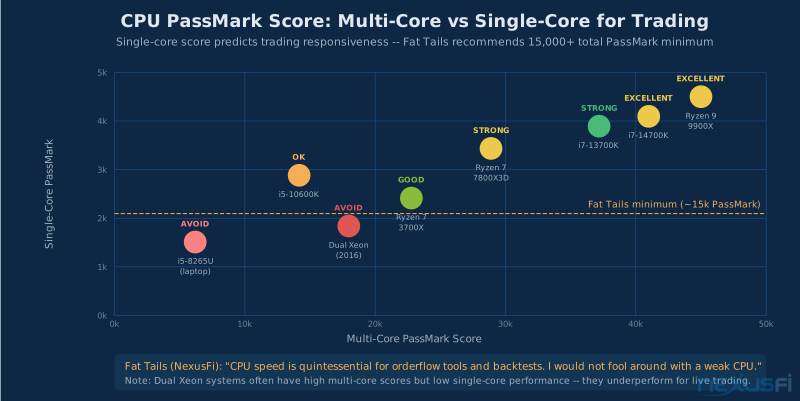
- High-core-count CPUs with weak single-core — Older Threadripper, Xeon workstation chips, or server processors. NexusFi's high-frequency trading infrastructure experts have noted this distinction clearly: cores don't help if the per-core performance is subpar.
- Laptop CPUs in a desktop — Mobile processors throttle under sustained load.
- Previous-generation budget CPUs — Even in 2025, some builders suggest "get a used [older CPU]" for cost savings. For a live trading machine, don't. Reliability and modern platform support are worth paying for.
-
A CPU that boosts to 5.2 GHz but thermal-throttles to 4.3 GHz during market-open volatility delivers 4.3 GHz. Buy cooling proportionate to your CPU spec. A Noctua NH-D15 or 280mm AIO running a Ryzen 9 9900X at full sustained boost beats a top-tier cooler running an i9 at throttled clocks every time.
Anything that runs hot enough to throttle — A CPU that boosts to 5.2GHz but thermals-throttle to 4.3GHz under load is performing at 4.3GHz. Buy appropriately for your cooling solution.
The Components That Matter Almost as Much as the CPU #
A fast CPU on a poorly configured system still feels slow. These supporting components directly affect trading workstation performance:
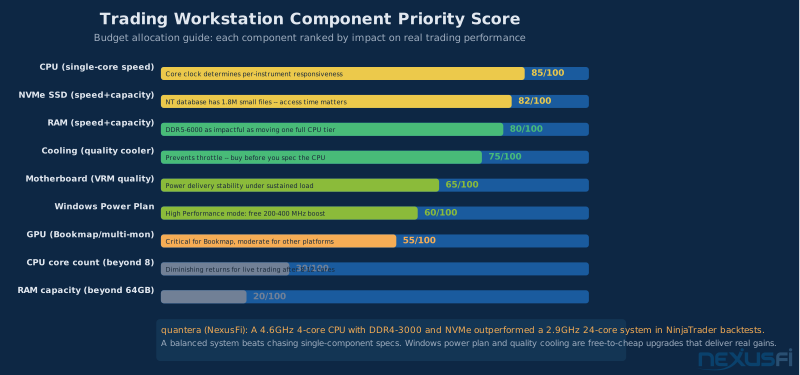
RAM: Speed and capacity together. 32GB minimum for any serious trading setup; 64GB if you run multiple platforms and keep a browser with research tabs open. More important than raw capacity is speed--DDR5-6000 CL30 is the sweet spot for both Intel and AMD 2024-2025 platforms. EgoRisk's observation from NexusFi experience holds true: RAM bottlenecks feel exactly like CPU bottlenecks, and many traders upgrade CPU when the real fix was faster or more RAM.
Quantera, an Elite member who benchmarked five different rigs extensively, found that "CPU/Ram Speed is more important than additional cores: a 4.2GHz 4Core outperforms a 2.9GHz 8Core rig." His data showed DDR4-3000 "much outperforms 1600DDR3," and upgrading from SATA SSD to NVMe was "huge." The highest-performing rig in his tests — a 4.6GHz i7 with 32GB DDR4-3000 and NVMe — ran NinjaTrader backtests at nearly 300 iterations per minute, versus 100 iterations per minute on a dual-Xeon 24-thread system with slower RAM.
Fat Tails, analyzing a NinjaTrader installation where the database contained 1.8 million small files, documented that SSD access time — not just throughput — is what matters: copying that database "from 1 SATA hard drive to another" took hours, while NVMe-to-NVMe took minutes. His minimum spec recommendation is a CPU with a PassMark score of at least 15,000 paired with NVMe storage.
NVMe SSD: Trading platform databases, tick data storage, and OS all benefit from fast storage. A quality NVMe drive (Samsung 990 Pro, WD Black SN850X, or similar) eliminates the I/O delays that make chart loading and market replay feel sluggish. This matters especially for NinjaTrader footprint charts with large tick data series and Sierra Chart's SCID file loading. For more on storage decisions, see the /a/infrastructure/ssd-storage-futures-trading article.
Cooling: Your CPU can only sustain its rated performance when it's thermally stable. The difference between a $40 stock cooler and a $90 quality air cooler isn't just noise--it's 200-400MHz of sustained boost clock that the CPU can maintain because it's not throttling. Budget $80-120 minimum for a dedicated air cooler on any Tier 1 or Tier 2 CPU.
Motherboard Power Delivery: High-end CPUs under sustained trading loads draw significant power. A motherboard with quality VRM (voltage regulator module) design maintains stable power delivery without fluctuation. Budget B-series boards can work, but they're more likely to reduce boost clocks under extended load to protect their VRM. For Tier 2 and Tier 3, use a mid-to-high-end board.
Windows Power Plan: This is the overlooked software configuration that directly impacts CPU performance. The default "Balanced" power plan in Windows allows the CPU to drop to base clock between bursts to save power. On a trading workstation, this creates microsecond delays as the CPU ramps back up when NinjaTrader needs it. Set your power plan to "High Performance" or use Windows' "Ultimate Performance" mode. This alone can make a trading platform feel noticeably more responsive.
For broader workstation hardware guidance including GPU selection, RAM configuration, and storage setup, see /a/infrastructure/trading-workstation-hardware-futures. For GPU-specific configuration--which matters especially for Bookmap and multi-monitor setups--see /a/infrastructure/gpu-selection-trading-workstation.
Diagnosing Whether Your CPU Is Actually the Bottleneck #
Before buying a new CPU, verify it's actually the problem. Most "slow trading platform" complaints have other causes:
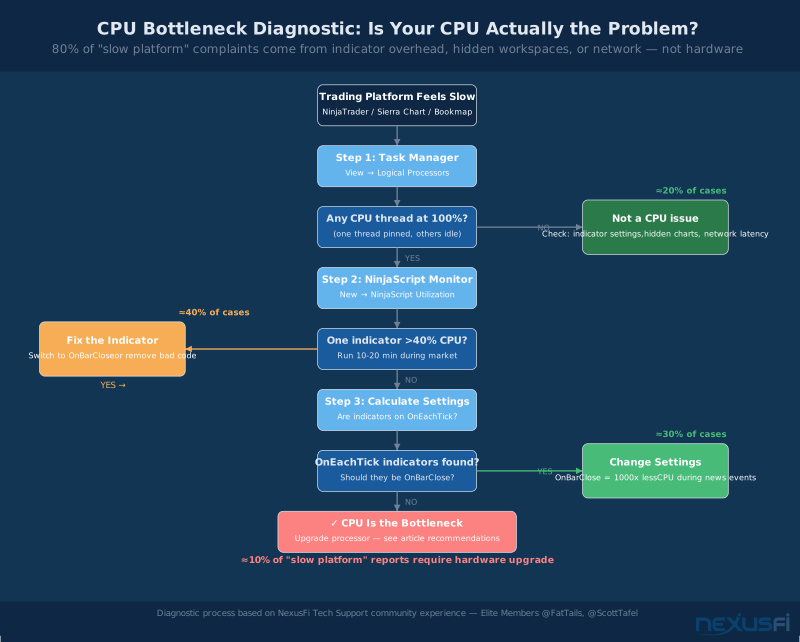
Step 1: Check logical processor load in Task Manager. Right-click CPU graph → "Change graph to Logical Processors." Look for individual threads pinned at 100% while others are idle. This confirms a single-thread bottleneck in the trading platform. Scott Tafel's diagnostic process at NexusFi's Tech Support forum is the standard approach: identify which specific thread is maxed out, then trace it back to the indicator or platform feature causing it.
Step 2: Use NinjaTrader's built-in profiler. Click New → NinjaScript Output → right-click → open NinjaScript Utilization Monitor. Run it for 10-20 minutes during active market hours. The indicators consuming the most CPU appear at the top. If a single indicator is responsible for 60% of your CPU load, fix the indicator--not the hardware.
Check indicator Calculate settings BEFORE buying new hardware. Switching from Calculate.OnEachTick to Calculate.OnBarClose on a single indicator can reduce CPU load by a factor of 500 or more during high-volatility news events. This one setting change has resolved more "slow platform" complaints than any hardware upgrade.
Step 3: Check indicator calculation settings. Indicators set to Calculate.OnEachTick recalculate with every price update. During a news release, ES can tick hundreds of times per minute. An indicator recalculating 500 times per minute that could recalculate once per bar instead is consuming 500x unnecessary CPU. Switch indicators to Calculate.OnBarClose where the indicator logic permits.
Step 4: Close hidden workspaces and suspended charts. NinjaTrader can run indicators on hidden charts and workspaces. These consume CPU even when you can't see them. Audit your workspace and remove or suspend indicators on inactive charts.
Step 5: Check network latency, not just speed. Fat Tails notes from his European trading setup: "Sometimes in the European afternoon there are too many cat videos and too much war propaganda passing through the lines, and I may have a latency problem." Chart freezes that appear to be CPU freezes are often actually network-induced data feed hiccups. Run PingPlotter or a continuous ping to your data provider to rule this out.
Step 6: Monitor thermal throttling. Use HWiNFO64 to watch CPU core temperature and clock speed simultaneously. If your CPU drops from 5.0GHz to 4.3GHz under sustained load, it's throttling due to heat. The fix is cooling, not a faster CPU.
If after all this diagnostic work your CPU threads are genuinely maxed out during normal trading activity, then a CPU upgrade is warranted. But based on NexusFi's community experience across thousands of troubleshooting threads, the CPU itself is the limiting factor in a minority of slow trading workstation reports.
Final Recommendations #
For most futures traders: AMD Ryzen 7 9700X or Intel Core i7-14700K, paired with 32GB DDR5-6000, quality NVMe SSD, and a proper cooler. This covers standard trading setups with significant headroom. Total hardware cost for this CPU tier with a quality motherboard runs $600-800, which is a fraction of what most traders spend on subscriptions and education.
For heavy multi-platform setups: AMD Ryzen 9 9900X or Intel Core i9-14900K, 64GB DDR5-6000, dedicated GPU (RTX 4070 or equivalent). If you're running Bookmap + NinjaTrader + Sierra Chart simultaneously, 12 cores and 64GB lets you run everything without thinking about resource management.
Don't overclock your trading machine. The risk-reward calculation doesn't work in your favor on a machine you're trusting with open positions.
Diagnose before you upgrade. Most traders who feel their CPU is slow are experiencing indicator overhead, thermal throttling, or network issues--not hardware limitations. Check those first.
Don't neglect supporting components. RAM speed, cooling quality, motherboard VRM, Windows power plan settings, and background process management can each individually make as much difference as moving one CPU tier up. Get these right before spending money on a faster processor.
For traders running NinjaTrader with extensive tick data and orderflow tools, the platform itself has architectural limitations (single-core per instrument, sequential tick data loading) that no hardware upgrade fully solves. At some point, platform choice--not hardware--becomes the binding constraint. Understanding the /a/infrastructure/trading-workstation-hardware-futures article's complete hardware picture alongside this CPU-specific guide gives you the full context to make smart infrastructure investments.
The CPU is the brain of your trading workstation, but the brain doesn't work in isolation. Build the whole system right, and it'll stay out of your way when you need it most.
Knowledge Map
Prerequisites
Understand these firstGo Deeper
Build on this knowledgeReferences This Article
Articles that build on this topicCitations
- — WHICH CPU is BEST for NINJA TRADER 7 and 8 ? (2019) 👍 3“NinjaTrader only uses ONE core per instrument. So if I am looking at 4 instruments (ES, CL, GC, NQ) then I am utilizing just 4 of my PC 16 cores.”
- — WHICH CPU is BEST for NINJA TRADER 7 and 8 ? (2020) 👍 4“High thread CPUs are the key, but Threadripper is more expensive than it worth for traders. The Ryzen CPUs are solid.”
- — WHICH CPU is BEST for NINJA TRADER 7 and 8 ? (2019) 👍 5“The most important component of any CPU performance is the cooling system as well as power supply that needs to deliver stable juice for your overclocked processor.”
- — How bad is NT lag? (2021) 👍 8“Freezes in NinjaTrader are frequently misattributed to CPU speed when the actual culprits are indicator calculation settings and hidden workspace overhead.”
- — Which PC for Sierra Chart? (2021) 👍 7“Sierra Chart is almost never CPU bound in real time, but this will become a factor if you run chart replays with tick data at high speed.”
- — Do I need a better computer? (2022) 👍 6“NinjaTrader 8 is Multi-Threaded, but if the indicator or strategy is not properly coded then it will still run on a single thread which will cause the whole platform to lock up.”
- — NinjaTrader 8 (NT8) Performance Improvements and Tweaks (2018) 👍 26“CPU/Ram Speed is more important than additional cores: a 4.2ghz 4Core outperforms a 2.9ghz 8Core rig. RAM Speed makes a huge difference.”
- — New Computer Build (2020) 👍 9“I would never, ever get less than 32GB of RAM on any computer these days, ever. The bang for the buck on the CPU, good quality SSDs, a good mobo, and quality fans is hard to compromise on.”
- — Computer suitable for Ninjatrader8 (2019) 👍 7“CPU speed is quintessential for running complex indicators on high definition charts, for running orderflow tools and backtests. I would not fool around with a weak CPU.”
- — WHICH CPU is BEST for NINJA TRADER 7 and 8 ? (2019) 👍 5“Really its not the speed of the execution but the stability of the platform in my opinion. SSD made a huge difference, as did a graphics card.”