



Trading VPN Guide: When to Use (and When Not to Use) a VPN for Futures Trading
Overview #
Most VPN advice for traders gets it backwards. Consumer VPN marketing promises "faster, safer internet" — and for everyday browsing, some of that holds. For futures trading, the calculus is almost entirely different. A VPN that adds 8ms to your broker RTT isn't a security upgrade. It's a handicap.
The honest answer on whether you should use a VPN for trading isn't "yes" or "no." It's: it depends entirely on what you're protecting against, where the VPN endpoint is, and which protocol you use. A well-configured WireGuard tunnel to a same-city VPN endpoint might add only 1.3ms to your round-trip time — invisible in practice. The same machine running NordVPN or ExpressVPN through a server three states away? That's a different conversation.
This guide covers the situations where VPNs genuinely help futures traders, the situations where they create more problems than they solve, and the specific configuration decisions that make the difference.
The core question isn't "should I use a VPN?" It's "does this specific VPN configuration improve or degrade my trading setup?" Always measure before deciding.
The underlying issue is that most consumer VPN products are designed for privacy and geographic unblocking, not for low-latency financial applications. They route your traffic through shared servers optimized for anonymity, not for execution quality. Understanding what VPNs actually do — and don't do — at the network level is the starting point for making a sensible decision.
How VPNs Add Latency (and How Much) #
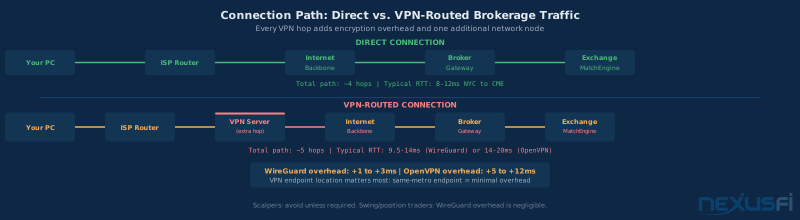
Every VPN adds latency through two mechanisms: crypto overhead (the time to encrypt and decrypt each packet) and routing overhead (the extra hop through the VPN server). The second one is almost always bigger.
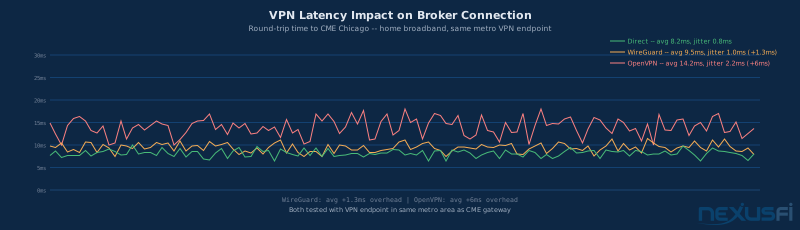
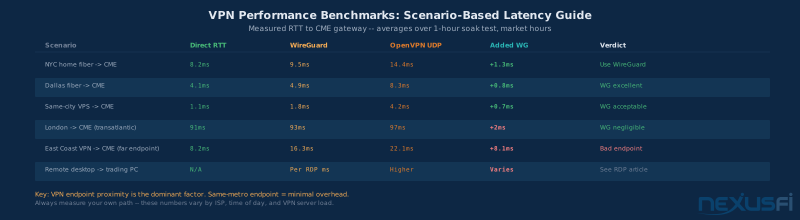
Modern CPUs handle WireGuard's ChaCha20-Poly1305 encryption in nanoseconds. The crypto itself contributes maybe 0.1-0.3ms on typical hardware. What matters far more is whether the VPN server is in Chicago (when you're trading CME products) or in Dallas, or in a data center on the East Coast. If the VPN endpoint is geographically near your broker's gateway, you might add 0.8-1.5ms total. If it's far away, you're adding the physical propagation delay of the detour, which can be 5-15ms on top of your baseline.
Typical real-world overhead by protocol:
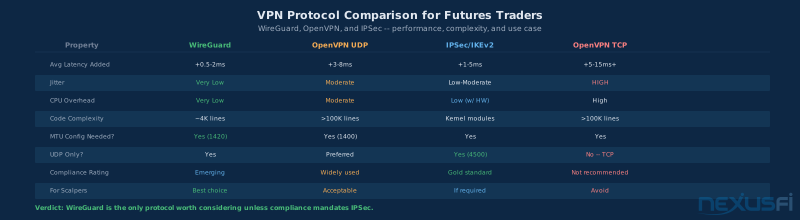
- WireGuard: +0.5 to +3ms -- kernel-mode implementation, minimal per-packet overhead
- IPSec/IKEv2: +1 to +5ms -- strong performance with hardware crypto acceleration
- OpenVPN (UDP): +3 to +10ms -- user-space processing, more CPU per packet
- OpenVPN (TCP): +5 to +20ms+ -- head-of-line blocking makes this unsuitable for trading
The numbers above assume a well-placed VPN endpoint. Move that endpoint to a different region and you're adding physical propagation delay on top of protocol overhead — the protocol numbers become almost irrelevant.
Average latency is a misleading metric for evaluating VPNs for trading. What matters is tail latency (P95/P99) and jitter. A VPN that adds 2ms average but occasionally spikes to 20ms during volatility is far worse than one that consistently adds 4ms. Always measure at market hours under load, not during quiet periods.
MTU issues are the hidden killer. When packet sizes exceed the MTU of the VPN tunnel, packets get fragmented. Fragmentation doesn't just add latency — it creates unpredictable latency spikes. WireGuard uses an MTU of 1420 by default, which accounts for its overhead on most standard 1500-byte Ethernet links. OpenVPN configurations often ship with MTU settings that cause fragmentation problems, especially through ISPs with unusual path MTUs. Setting MTU explicitly is not optional for trading use.
@shokunin, a 30-year networking specialist turned day trader, summarizes the reliability concern well:
@You will add a small amount of latency if the route is sensible, or a large amount of latency if the egress servers are not optimal. You need to find out where your data provider is located and choose a VPN endpoint near there. As well as routing, it depends on how congested the VPN servers are and if your ISP does different traffic shaping on VPN traffic.
There's one more latency factor worth understanding: jitter from shared VPN infrastructure. Consumer VPN services run their servers at high utilization. During peak hours, your packets queue behind thousands of other users' traffic. This creates burst latency — not visible in a brief ping test, but very visible during fast markets when you're trying to execute. Self-hosted or dedicated VPN infrastructure avoids this entirely.
When NOT to Use a VPN for Trading #
Let's start with the most common situation: you trade from home on a dedicated wired connection, your machine is reasonably hardened, and you're not on a prop firm that mandates VPN usage. You probably don't need a VPN during live trading sessions.
Here's why. Your brokerage connection is already encrypted at the application layer — TLS 1.3 handles transport security for most modern brokers and data feed providers. The VPN adds a second layer of encryption that protects only the segment between your machine and the VPN server, not the segment between the VPN server and your broker. You're adding latency and complexity without meaningfully improving the security of the most important part of the path.
Situations where VPN actively hurts traders
Active scalping or high-frequency manual execution. If your strategy depends on reaction time — reading Level 2, watching the tape, clicking fills at the bid/ask — every millisecond of added latency is a real cost. A WireGuard tunnel to a nearby endpoint might add 1.3ms. That's within the noise for most strategies. But OpenVPN with a distant endpoint? You're adding 8-15ms, which means your market data is stale by the time you act on it.
Prop firm evaluation periods. Many prop firms monitor trader connectivity patterns. An unrecognized VPN IP showing up during your evaluation is a flag. Some firms will void funded accounts for VPN usage without prior disclosure. Check your trader agreement before enabling anything. This is covered in detail in the prop firm policies section below.
When you can't control VPN server load. Consumer VPN services like NordVPN or ExpressVPN run thousands of concurrent users through their servers. During market hours when latency matters most, those servers may be under load. You have no insight into server utilization, and no SLA on performance. The latency you measured during off-hours setup is not the latency you'll see during the 9:30 open.
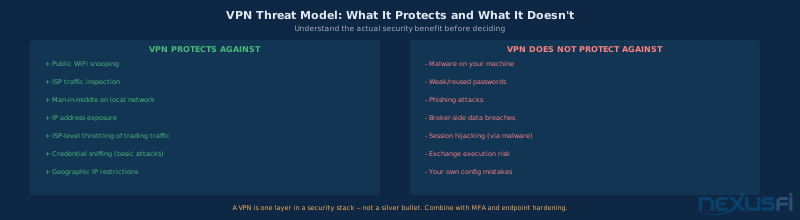
As a substitute for proper endpoint security. Some traders use VPNs as a proxy for "I'm being careful about security." This is backwards. A VPN doesn't protect against malware on your machine, credential theft via phishing, or a compromised router on your local network. If your endpoint hygiene is poor, a VPN doesn't fix it — it just adds latency to an already-compromised setup.
Unexpected VPN disconnection is a real trading risk. If your kill switch activates mid-session, all network traffic drops. If you don't have a kill switch configured, a VPN disconnect can briefly expose traffic in plaintext before reconnecting. Neither outcome is good. Every VPN adds a new failure mode.
@rahulgopi, writing from a network security background, notes a less-obvious risk with consumer services:
@Without strict auditing standards, this could expose your application credentials via their log files. Based on the services enabled, public VPN services may add significant latency and security risks to normal transport.
The point about logging is worth sitting with. Consumer VPN providers claim no-logs policies, but these are rarely independently audited at the level required for financial trading credentials. You're routing your broker login, API keys, and order flow through a third party's infrastructure. For a home trader on a trusted ISP, this is a tradeoff that often isn't worth making.
The ISP throttling exception
There's one legitimate use case for VPN on a home connection that doesn't involve untrusted networks: ISP-level traffic shaping. Some residential ISPs throttle specific traffic patterns — and in some cases, trading data feeds get caught in those filters. If you've confirmed via testing that your ISP is throttling your trading traffic (not just having general congestion issues), a VPN can mask the traffic pattern and bypass that throttling. This requires measuring both with and without VPN during market hours to confirm the improvement is real.
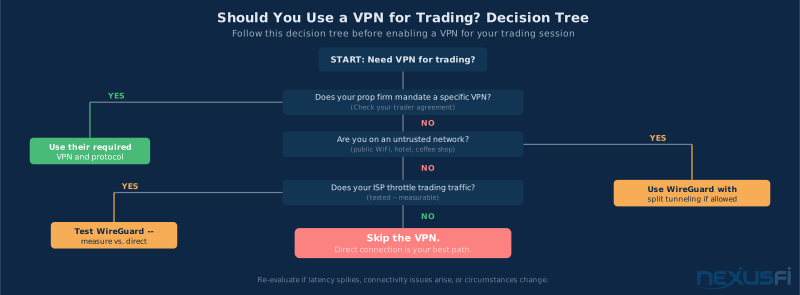
When VPNs Are Appropriate for Traders #
There are situations where not using a VPN is the wrong call. Understanding the difference comes down to what you're protecting and what you're willing to sacrifice.
Public WiFi and untrusted networks
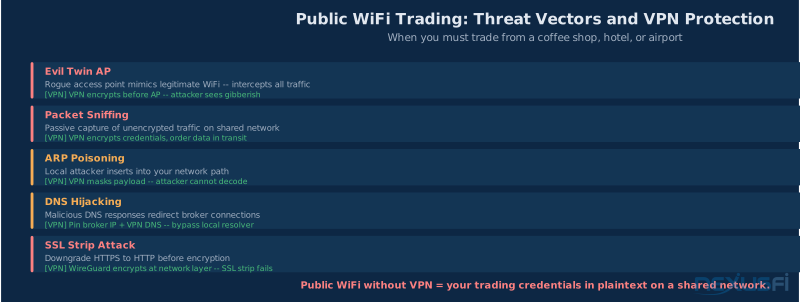
This is the clearest case. If you're checking positions from a hotel, working from a coffee shop, or connecting through any network you don't control, a VPN is not optional — it's basic hygiene. Public WiFi exposes your traffic to anyone on the same network. Evil twin access points can intercept connections. ARP poisoning attacks are trivially easy with freely available tools. Trading credentials on an unencrypted public connection are a real target.
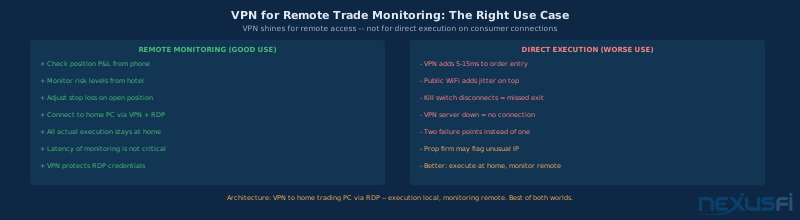
The key nuance: when you're on public WiFi, you're not trying to execute sub-second scalps. You're monitoring positions, adjusting stops, or getting an update on where things stand. For monitoring, 5-15ms of VPN overhead is completely irrelevant. Your execution already happened at home on your wired connection. The VPN is protecting your credentials and account access, not your fills.
The architecture that makes sense for most traders: primary execution happens at home on wired Ethernet with a direct broker connection. Remote monitoring connects through VPN to either the broker directly (if security is adequate) or via RDP to the home trading machine. As @Fat Tails explained when discussing remote trading setups:
@The easiest solution would be to rent a VPS close to the access point of your broker/exchange and then connect any mobile device — such as a laptop, tablet or smart phone — by logging into that private server. By selecting a location close to the broker access point, you would also reduce latency.
The same logic applies to VPN for remote monitoring: the execution stays near the exchange, the VPN protects your remote access credentials.
Geo-IP restrictions
Some brokers restrict connections based on geographic IP. If you're traveling internationally — or if your broker only allows connections from certain countries — VPN lets you present as connecting from an authorized location. This is a legitimate operational use case, not circumventing broker rules in bad faith. If you're going to be traveling and need continued access, set this up before you leave and test it thoroughly.
ISP traffic inspection concerns
Some ISPs perform deep packet inspection on residential connections. If your ISP can see your trading activity — order flow patterns, position sizes, timing — that's a genuine privacy concern. VPN prevents ISP-level traffic analysis. For most traders this is theoretical, but it's a real concern in some regulatory environments.
Remote access to home trading PC
If you run a home trading PC and want to access it remotely via RDP or similar, a VPN is the right way to secure that connection. Exposing RDP directly to the internet is inadvisable — it's a well-known attack surface. VPN + RDP means the RDP port is only accessible through the encrypted tunnel. This is a specific, well-contained use case where the security benefit is concrete and the latency impact is irrelevant (RDP has far more latency than any VPN adds).
@glennts describes the latency reality of remote server setups clearly:
@Remote co-located servers are best for hands off, fully automated trading that does not require your participation. That is the only way you can benefit from the low latency.
VPN Protocols for Traders: WireGuard, OpenVPN, IPSec #
If you've decided you need a VPN for your trading setup, protocol choice matters. Here's how each one compares for trading-specific requirements.
WireGuard -- the right choice for most traders
WireGuard is the only VPN protocol worth considering if you have any choice in the matter. It's not a matter of opinion — the design is objectively better for low-latency applications.
The key advantages for trading:
- Kernel-mode implementation: No user-space context switching per packet. OpenVPN handles every packet in user space, which adds CPU overhead and latency. WireGuard lives in the kernel alongside the rest of your network stack.
- ~4,000 lines of audited code: OpenVPN is over 100,000 lines. Smaller codebase means fewer attack surfaces, fewer bugs, and faster code paths.
- Modern cryptography: ChaCha20-Poly1305 by default, hardware-accelerated AES-GCM as option. No negotiation phase to exploit, no legacy cipher support to misconfigure.
- One-round-trip handshake: OpenVPN needs 2-3 round trips to establish a session. WireGuard does it in one. This matters when VPN connections drop and need to re-establish during a session.
- Roaming support: WireGuard handles IP changes gracefully. If your home IP changes or you switch networks, the tunnel reconnects without a full renegotiation.
WireGuard runs on UDP port 51820 by default. If your ISP or corporate firewall blocks UDP, that's a problem — WireGuard doesn't have a TCP fallback. In that case, you're looking at OpenVPN or other tunneling options.
OpenVPN -- acceptable for position traders
OpenVPN has been around long enough that it works everywhere and is accepted by basically all corporate environments and prop firms. For swing traders and position traders where sub-millisecond execution isn't critical, OpenVPN is usable. The overhead is higher — 3-10ms on UDP in typical configurations — but for a trader who's holding for hours or days, that's immaterial.
Two things to get right if you're using OpenVPN: UDP mode (never TCP for trading) and modern ciphers. Default OpenVPN configs that ship with many consumer providers often use older cipher settings tuned for compatibility rather than performance. AES-256-GCM or ChaCha20-Poly1305 with the right MTU settings reduces the overhead substantially.
OpenVPN over TCP is a trap. TCP handles its own retransmission, which creates "TCP-over-TCP" problems. When the underlying link drops a packet, TCP on both the VPN tunnel layer and the application layer try to handle it, causing exponential retransmission delays. Under any network stress, OpenVPN TCP latency becomes completely unpredictable. Never use it for trading.
IPSec/IKEv2 -- for compliance-driven environments
IPSec is the standard in enterprise and prop firm environments where compliance and auditing requirements drive the choice. It satisfies PCI-DSS, ISO 27001, and most financial regulator frameworks. Many prop firms that require VPN specify IPSec.
Performance is comparable to WireGuard when hardware crypto acceleration is available (which it is on modern CPUs and purpose-built VPN appliances). The downside is operational complexity — IKEv2 configuration is much more involved than WireGuard, and misconfiguration is harder to debug. If your prop firm requires IPSec, use their provided configuration and don't deviate from it.
As @artemiso noted on NexusFi:
@Software-based VPN access will probably add less than 1ms of traffic encryption and protocol latency. It's not discernible to the naked eye, honestly. You have to benchmark the latency yourself.
The observation is accurate for well-configured VPN with a nearby endpoint. The "less than 1ms" figure is achievable with WireGuard to a same-city endpoint. It's not achievable with OpenVPN to a server two regions away.
Choosing a VPN endpoint location
This matters more than protocol. Place the VPN endpoint as close as possible to your broker's gateway. If you trade CME products, your broker's routing likely touches the Equinix Chicago CH3/CH4 data centers. A VPN server also in Chicago adds the crypto overhead but not a geographic detour. A VPN server in New York adds New York-to-Chicago propagation time on top of the crypto overhead.
Self-hosting a WireGuard server on a VPS in the same region as your broker is genuinely the best approach for traders who need VPN functionality. A minimal VPS in the right data center costs $5-20/month and gives you dedicated infrastructure with no shared server load issues. The configuration is 15 minutes of work following WireGuard's official documentation.
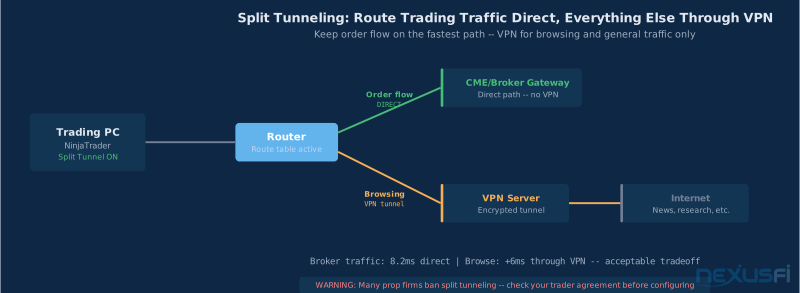
Split Tunneling: The Right Architecture When VPN Is Required #
Split tunneling routes only specified traffic through the VPN while everything else travels direct. For traders who need VPN for some reason but don't want to penalize their order flow, split tunneling is the right architecture — when your prop firm allows it.
How split tunneling works
In a full-tunnel VPN, every packet from your machine goes through the VPN server. In split tunneling, you define which traffic uses the VPN and which uses your direct internet connection. Typically, you'd send browsing, email, and research traffic through the VPN while sending order flow and market data direct to the broker's gateway IPs.
The implementation varies by VPN client:
- WireGuard: The
AllowedIPsparameter in the peer config controls this. By default it's0.0.0.0/0(full tunnel). To exclude your broker's IP range, you'd add specific routes that bypass the VPN for broker IPs. - OpenVPN: Uses
redirect-gatewayfor full tunnel or specific route push for split. Many consumer clients expose this as a GUI toggle. - Dedicated routers: pfSense and OPNsense make split tunneling by destination IP relatively straightforward at the router level, so all devices on the network benefit automatically.
What you need to configure it correctly
To route broker traffic outside the VPN, you need the specific IP ranges used by your broker's order routing gateways. Most brokers publish these in their technical documentation or API guides. Rithmic, CQG, and most major futures connectivity providers have documented IP ranges.
Run a traceroute to your broker's gateway to identify the IPs involved. Then add those specific IP ranges to your routing table as direct (non-VPN) routes. Test with pings to confirm the path is correct — you should see your direct ISP latency to broker IPs, and slightly higher latency to everything else.
Important warnings on split tunneling
Many prop firms explicitly prohibit split tunneling. Their compliance requirement is full-tunnel VPN specifically because they need all traffic logged. If your trading agreement requires VPN, it almost certainly requires full-tunnel. Verify in writing before configuring split routing. The consequences of a violation during evaluation or while funded are not worth the 2-3ms of latency you'd save.
Routing table errors can send broker traffic through the VPN accidentally. If you misconfigure the routes, your order flow goes through the encrypted tunnel anyway and you've gotten the latency penalty without the intended optimization. Test thoroughly with traceroute before trading live.
Broker IP changes can break your setup. If your broker changes their gateway IPs and you've hardcoded the old ones in your routing table, your traffic might suddenly get routed through the VPN without you noticing — until you start seeing higher latency at market open. Check broker IP ranges periodically, especially after major platform updates.
Split tunneling architecture: broker IPs go direct, everything else goes through VPN. Best of both worlds when prop firm policy allows it. Always verify with traceroute that the routing is actually working as intended before trading live.
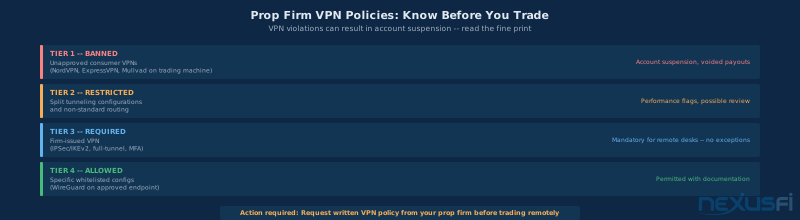
Prop Firm VPN Policies: Read the Fine Print #
VPN policy violations are treated seriously by prop firms — some void payouts, others suspend or ban accounts. Read your trader agreement before enabling anything.
What prop firms care about
Compliance and audit trails. Regulated trading firms need to log who connected, from where, when, and what orders they placed. A consumer VPN obscures your actual IP and routes through shared infrastructure the firm can't audit. Full-tunnel firm-issued VPN with logging solves this — which is why many firms mandate specific VPN rather than banning it entirely.
Trading rule integrity. Geographic restrictions, account sharing detection, and pattern monitoring depend on consistent, identifiable connection patterns. An unknown consumer VPN IP during evaluation triggers review flags automatically.
Common policy patterns
Consumer VPN = violation: Many retail prop firms explicitly prohibit NordVPN, ExpressVPN, and similar services in their terms. These are flagged by fraud detection systems. This is the most common restriction.
Full-tunnel firm-issued VPN required: Professional prop desks often provide their own VPN client. You use it for all trading activity with no split tunneling permitted. This is a compliance requirement, not a suggestion.
Permitted with disclosure: Some firms allow VPN if you disclose the endpoint IP in advance for whitelisting.
Questions to ask in writing before trading remotely
- Is VPN explicitly permitted or prohibited?
- Which protocols are approved (WireGuard, OpenVPN, IPSec)?
- Is split tunneling allowed or is full-tunnel required?
- Do I need to disclose my endpoint IP?
- What happens if a VPN connection is detected during evaluation?
Never use a consumer VPN (NordVPN, ExpressVPN, Mullvad) during prop firm evaluation without explicit written approval. These are commonly flagged by trading firm risk systems. The risk of voided evaluation results is real.
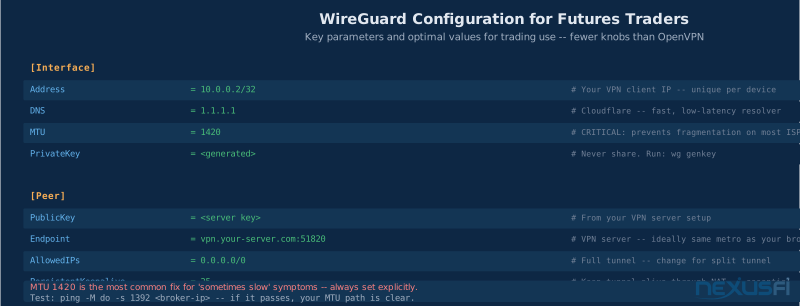
Setting Up WireGuard for Trading: Practical Configuration #
If you've determined that WireGuard is right for your setup, here's what a correct trading-oriented configuration looks like.
Server placement: the most important decision
Before any config file: where does the VPN server live? For CME products, target Chicago (Equinix CH3/CH4 neighborhood). For equity futures, target NJ/NY. A minimal VPS on Vultr, Linode, or DigitalOcean costs $5-20/month. Self-hosted beats consumer VPN on every trading metric: dedicated resources, consistent latency, no shared server congestion at market open, and an IP that doesn't appear on prop firm blacklists. [6][9]
Critical configuration parameters
MTU = 1420. Non-negotiable. WireGuard adds ~60-80 bytes per packet overhead. Default MTU 1500 causes fragmentation on most ISP links, creating unpredictable 5-15ms latency spikes. Set explicitly in the [Interface] section. Test: ping -M do -s 1392 <broker-gateway-ip> — pass means you're clear. [7]
PersistentKeepalive = 25. NAT devices close idle UDP connections after 25-30 seconds. Without this, the tunnel dies silently during quiet periods and you find out when you try to execute.
DNS = 1.1.1.1. Pin a fast, reliable resolver. Don't trust the VPN server's default DNS.
Full tunnel vs. split tunnel config
Full tunnel (all traffic through VPN): AllowedIPs = 0.0.0.0/0, ::/0
Split tunnel (broker direct, everything else VPN): exclude broker IP ranges from AllowedIPs. Requires knowing your broker's gateway IP blocks — get them from your broker's API documentation or traceroute.
Kill switch setup
Configure a kill switch to drop all traffic if VPN disconnects. On Linux: PostUp/PreDown iptables rules per WireGuard docs. On Windows: "Block untunneled traffic" option in the official WireGuard client. Without a kill switch, VPN dropout briefly exposes traffic in plaintext. With one, VPN dropout = no connectivity — build this into your contingency plan for open positions.
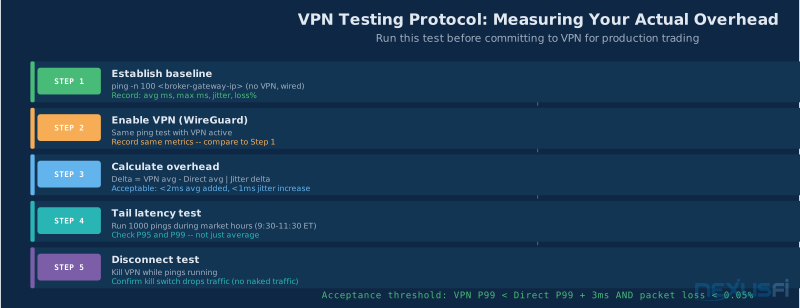
Pre-live testing checklist
- Ping broker gateway 100x with VPN active -- record avg, max, jitter
- Compare against same test without VPN -- delta should be 1-3ms with good WireGuard config
- Run test during market hours, not quiet periods
- Test kill switch: manually drop interface, confirm traffic stops
- Test reconnection: bring interface back, confirm tunnel re-establishes within 1-2 seconds
Self-hosted WireGuard in the same metro area as your broker: $10/month VPS, 30 minutes of configuration, dedicated resources, no shared server load. If you're using VPN for trading at all, this is the right way to do it.
Getting Started: Your Decision and Setup Checklist #
Based on everything above, here's how to make the VPN decision and implement it correctly.
The decision in order
Step 1: Check your prop firm agreement. Before anything else. Consumer VPN during evaluation = potential void. Get the policy in writing, not from a support chat.
Step 2: Assess your actual threat environment. Home on dedicated wired connection to a trusted ISP? VPN for live execution is likely unnecessary overhead. Regularly on hotel or coffee shop WiFi? VPN is essential for credential protection when accessing accounts remotely.
Step 3: Separate execution from monitoring. Execute at home on direct connection. Monitor and manage remotely via VPN + RDP to your home PC. VPN latency affects only remote control, not execution. Best architecture for most traders.
Step 4: If VPN for live execution is needed, choose WireGuard and measure. Self-host on a VPS in the same metro as your broker. Set MTU to 1420. Measure before going live. Less than 2ms added at a nearby endpoint is acceptable. More than that — investigate endpoint location and config before trading.
Setup checklist
- [ ] Verified prop firm VPN policy in writing
- [ ] VPN endpoint: same metro as broker gateway
- [ ] WireGuard installed, MTU = 1420 set explicitly
- [ ] PersistentKeepalive = 25 set
- [ ] Kill switch configured
- [ ] Baseline ping test complete (no VPN vs VPN)
- [ ] P99 latency tested during market hours
- [ ] Kill switch disconnection and reconnection tested
Ongoing maintenance
Check server load impact quarterly during market hours. Verify broker IP ranges haven't changed if you've configured split tunneling. Update WireGuard client periodically for security fixes. Re-run baseline comparison every few months — VPN server performance changes over time as providers add users or change routing.
If your trading situation changes — you've moved to colocated infrastructure, prop firm policy changed, or home connection security improved — remove the VPN from the live execution path. The fewer intermediary points in your order flow, the better.
For the complete picture: the internet connection article at /a/infrastructure/internet-connection-day-trading covers ISP selection and latency optimization. Cybersecurity beyond VPN is at /a/infrastructure/trading-cybersecurity-futures-traders. Remote access setup combining VPN with RDP is at /a/infrastructure/remote-access-futures-traders.
Most home traders on dedicated wired connections don't need VPN for live execution. Public WiFi or untrusted networks: WireGuard to a nearby endpoint is essential. Prop firm mandates: follow their exact requirements in writing. When in doubt, measure — your actual latency numbers are the only thing that matters.
Knowledge Map
Prerequisites
Understand these firstGo Deeper
Build on this knowledgeReferences This Article
Articles that build on this topicCitations
- — Will a VPN slow down the speed of my short term futures trading? (2021) 👍 12“Before I became a daytrader, I was a networking specialist for 30 years. I would not recommend using a VPN while trading. The VPN will add an additional point of failure. You should aim for the most reliable setup possible.”
- — Will a VPN slow down the speed of my short term futures trading? (2021) 👍 4“Public VPN services may add significant latency and security risks to normal transport. Some VPN providers provide additional capabilities like malware detection which may involve SSL decryption to inspect encrypted traffic.”
- — latency advantage of VPN? (2015) 👍 1“Software-based VPN access will probably add less than 1ms of traffic encryption and protocol latency. It's not discernible to the naked eye, honestly. You have to benchmark the latency yourself.”
- — New Mac Pro 2013 -- VPS for remote trading (2013) 👍 3“The easiest solution would be to rent a VPS close to the access point of your broker/exchange and then connect any mobile device by logging into that private server. By selecting a location close to the broker access point, you would also reduce latency.”
- — Rithmic Latency Calculations (Plus trading remotely) (2022) 👍 2“Remote co-located servers are best for hands off, fully automated trading that does not require your participation. That is the only way you can benefit from the 1.3-3ms latency.”
- WireGuard Project — WireGuard: Fast, Modern, Secure VPN Tunnel (2024)
- Cloudflare Blog — WireGuard Performance vs OpenVPN -- Benchmark Analysis (2023)
- CISA — VPN Security -- CISA Guidelines for Remote Access (2023)
- WireGuard Documentation — WireGuard Quick Start: Configuration and Deployment (2024)
- CME Group — CME Globex Technical Information: Connectivity and Routing (2024)
- NexusFi Community Consensus — Consumer VPN services are flagged by many prop firm risk systems and can result in evaluation violations (based on 8 posts)