



Getting Started on Kalshi: Account Setup, Funding, and First Trade
Everything you need to open an account, deposit funds, find contracts, read the order book, and place your first YES/NO trade on Kalshi — plus platform comparisons with Polymarket and Robinhood Event Contracts.
Overview #
Prediction markets are the newest frontier for retail traders in the United States, and Kalshi is the platform leading that frontier. As of 2025, Kalshi operates as a Designated Contract Market (DCM) regulated by the Commodity Futures Trading Commission (CFTC) — the same regulatory framework that governs the CME Group. That's not a minor distinction. It means your funds sit in segregated, FDIC-insured accounts, you receive 1099 tax forms, and you're trading under the same federal protections as any futures market participant.
This guide gets you from zero to first trade on Kalshi in the most efficient path possible. It then introduces Polymarket (the decentralized, crypto-based alternative) and Robinhood Event Contracts (the simplest retail option) so you can choose the platform that fits your situation.
Everything you need to open an account, deposit funds, find contracts, read the order book, and place your first YES/NO trade on Kalshi — plus platform comparisons with Polymarket and Robinhood Event Contracts.
Part of the NexusFi Academy Prediction Markets series. For core mechanics and contract theory, start with Introduction to Prediction Markets and How YES/NO Contracts Work.
What Kalshi Actually Is #
Kalshi was founded in 2018 by Tarek Mansour and Luana Lopes Lara, both MIT graduates who previously worked at major financial institutions. The thesis was simple: financial markets let you hedge almost everything except the events that matter most — elections, economic outcomes, weather events, regulatory decisions. Kalshi built the infrastructure to close that gap.
The platform launched commercially in 2021 and fought a multi-year legal battle with the CFTC to expand into political event contracts. The CFTC lost that case in 2024, and Kalshi's market selection exploded. By 2025 it covered categories including macroeconomics, politics, sports (added 2025), weather, crypto prices, and entertainment milestones.
What you're trading on Kalshi isn't futures on commodity prices. Every contract answers a YES/NO question. Will GDP growth exceed 2% this quarter? Will the Fed cut rates at the June meeting? Will the Seahawks win the Super Bowl? Each contract trades between $0.01 and $0.99. If you buy a YES contract at $0.65, you're paying 65 cents for a contract that pays $1.00 if the event happens — a potential profit of 35 cents per contract.
This is at the core different from buying and selling stocks or futures. There's no open-ended upside or downside. Every contract has a defined maximum gain and maximum loss at the point of entry. That binary structure is simultaneously prediction markets' biggest appeal (defined risk) and their biggest danger (100% of stake at risk if wrong).
Platform Selection: Kalshi vs Polymarket vs Robinhood #
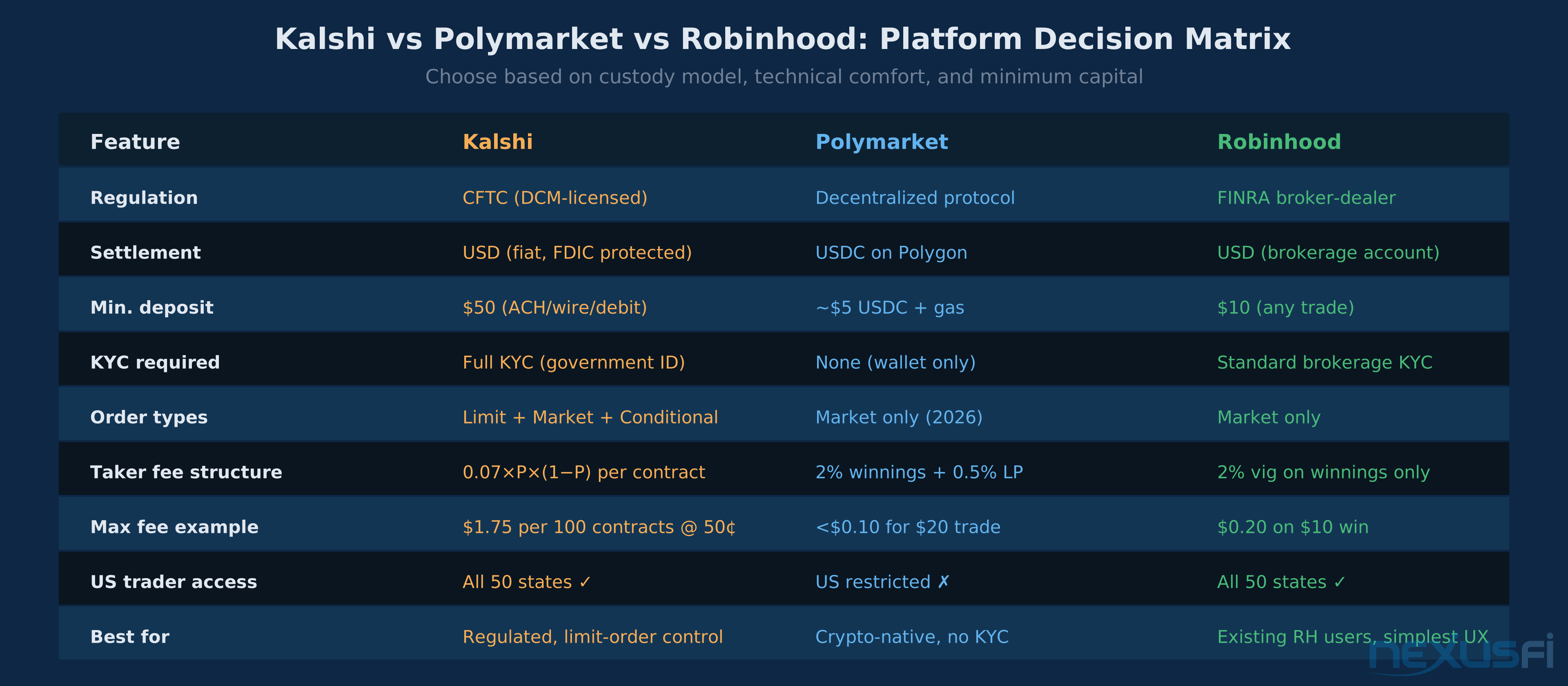
Before diving into Kalshi setup, you need to make one decision: which platform fits your situation. The three major options have meaningfully different tradeoffs.
Kalshi is the right choice for US-based traders who want a fully regulated, fiat-money environment with order-book control. The $50 minimum deposit, full KYC, and limit order support make it the most "traditional finance" prediction market. If you want to size trades precisely and control execution costs, Kalshi is your platform.
Polymarket operates on the Polygon blockchain with USDC settlement. No KYC, no government ID. You connect a crypto wallet (MetaMask) and trade. The tradeoff: Polymarket officially restricts US traders, and the learning curve includes managing wallet private keys, USDC bridging, and understanding gas costs. Market-only orders with no limit functionality. For crypto-native traders who want access to certain markets not available on Kalshi, Polymarket can be compelling — but it's not the beginner platform.
Robinhood Event Contracts is the simplest entry point for anyone who already has a Robinhood brokerage account. Contracts are $10 each with a $20 payout (2:1 fixed), market orders only, and a 2% vig on winnings. Limited contract selection. No sophisticated order management. Good for dipping a toe in before moving to Kalshi.
For traders serious about prediction markets, Kalshi is the destination. This guide covers Kalshi in depth, with Polymarket and Robinhood sections for context.
Part 1: Setting Up Your Kalshi Account #
Step 1: Account Creation #
Go to kalshi.com and click Sign Up. The initial registration collects standard information: name, email address, phone number, date of birth, and a password. US residency is required — Kalshi operates under CFTC jurisdiction.
After submitting, you'll receive a verification email. Click the link to activate the account. Until you complete the full KYC process below, you can browse markets but cannot fund the account or place trades.
Step 2: Identity Verification (KYC) #
Kalshi is a FINRA-registered broker-dealer, which means Know Your Customer (KYC) requirements are non-negotiable. The verification process typically takes minutes to a few hours.
What to prepare:
- Government-issued photo ID (driver's license, passport, or state ID — front and back)
- Your SSN for the W-9 tax form (US persons)
- Clean selfie / liveness check (the platform does facial matching against your ID)
- Some accounts require address verification: a recent utility bill or bank statement works
Execution tips that prevent rejection:
- Use consistent name formatting between your sign-up form and ID — minor variations trigger manual review
- Photograph your ID in good lighting with zero glare; blurry or partially shadowed IDs fail automatically
- Ensure the ID is not expired
- Complete this step before you plan to deposit — clearing can take up to 24 hours for manual reviews
Once verification clears, your account shows as "Verified" and all platform features unlock.
Step 3: Tax Form Submission #
Because Kalshi settles in USD and reports gains to the IRS, you must complete a W-9 form (US persons) before trading. The platform presents this during onboarding. Fill it out accurately — Kalshi sends 1099 forms annually, and mismatch between your account name and tax ID creates filing complications.
Part 2: Funding Your Account #
Available Funding Methods #
| Method | Speed | Fees | Limits |
|---|---|---|---|
| ACH Bank Transfer | 1--2 business days | Free inbound, $0 outbound | No stated maximum |
| Wire Transfer | Same day (if before cutoff) | Varies by bank; Kalshi charges nothing | Withdrawals require $500K minimum |
| Debit Card (Visa/MC) | Instant | Up to 2% (per Kalshi fee schedule) | $2,500/day |
| Crypto Deposit | Varies | Third-party processor fees apply | Disclosed at transaction |
Minimum deposit: $50. This is the minimum to activate trading. There's no specific minimum per trade beyond having sufficient balance.
Where your money sits: Kalshi holds customer funds in segregated accounts at FDIC-insured banks. This isn't your brokerage account in the traditional sense — funds are not invested in money-market securities. They're held as cash. Kalshi does offer 4% annual interest on idle cash balances (as of 2025/2026), which is a meaningful feature versus other platforms.
Practical first deposit: Fund $100--$200 for initial exploration. You'll want enough to place several small trades (10--20 contracts at varying prices) and absorb one or two learning losses without depleting your balance. Don't fund with more than you can afford to lose entirely — prediction markets can and do resolve against you 100%.
Part 4: Reading the Kalshi Order Book #
Prediction market order books look different from equity or futures order books because both sides (YES bids and NO asks) refer to the same event.
How the YES/NO Relationship Works #
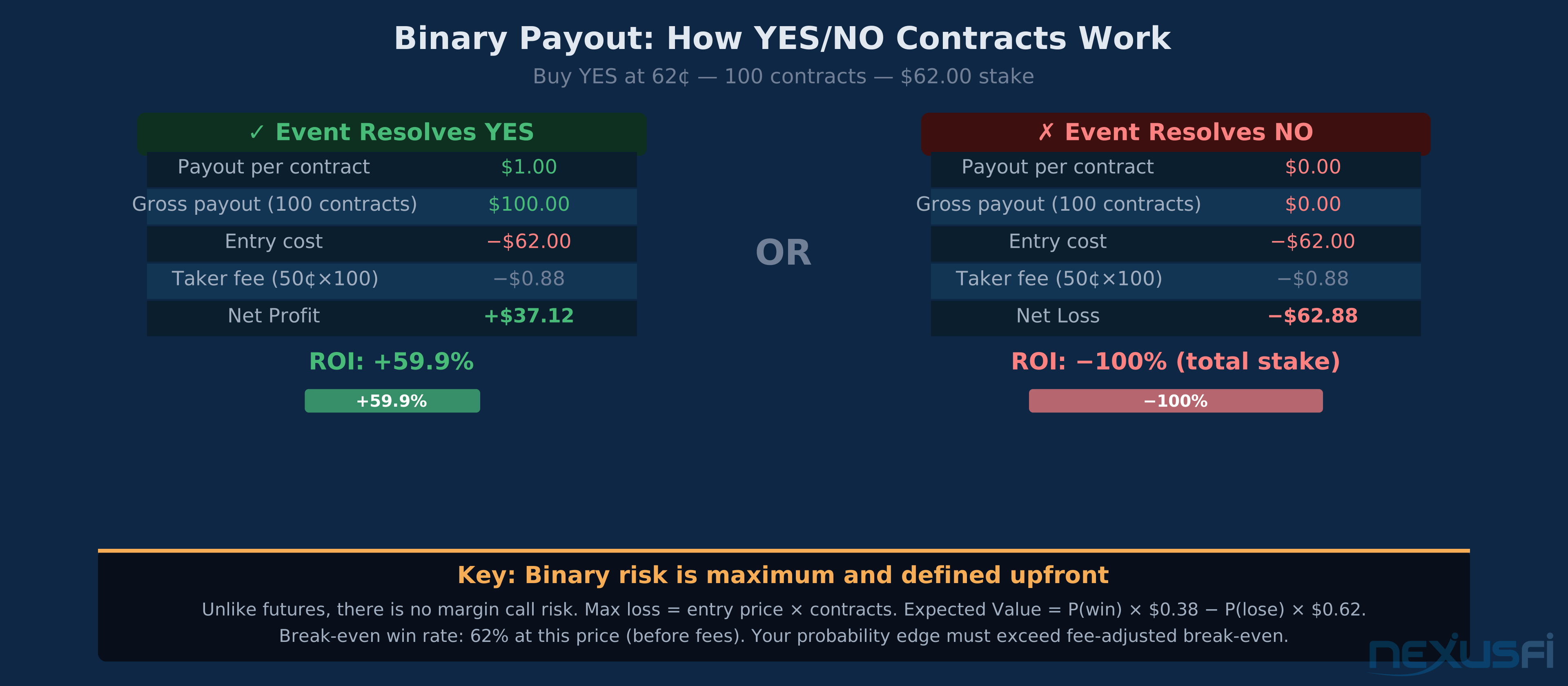
Here's the non-obvious part: buying NO at 42¢ is economically equivalent to selling YES at 58¢. The platform shows this as two sides of the same book.
When you look at the order book for a contract trading at 58¢ YES:
- Bids (buy YES): Standing orders from traders willing to pay up to 58¢ for YES exposure
- Asks (sell YES / buy NO): Standing orders from traders willing to sell YES at 59¢ or higher (which is equivalent to buying NO at 41¢ or lower)
The spread is the gap between best bid and best ask. A 1¢ spread on 100 contracts adds $1.00 to your effective cost if you use a market order. On a $58 trade (100 contracts at 58¢), that's roughly 1.7% slippage — not trivial.
Depth Matters #
Depth tells you how much size is available at each price level. If 450 contracts are bid at 58¢ but 10,000 at 55¢, placing a large limit order will partially consume liquidity and then sit waiting. Thin depth on high-volatility events creates the opportunity for adverse price movements right before resolution.
Using Limit Orders on Kalshi #
Kalshi supports proper limit orders — this is the main operational advantage over Polymarket and Robinhood. For beginners:
- Use limit orders 95% of the time. Set your price at or inside the spread to avoid paying the spread as taker.
- Market orders are for emergency exits or when speed matters more than price (e.g., breaking news that should move the market before your limit fills).
- Conditional orders allow stop-loss-like behavior by triggering a limit order when the market moves to a specified price. Available on Kalshi, though setup is not as intuitive as futures platforms.
Part 5: The Kalshi Fee Formula #
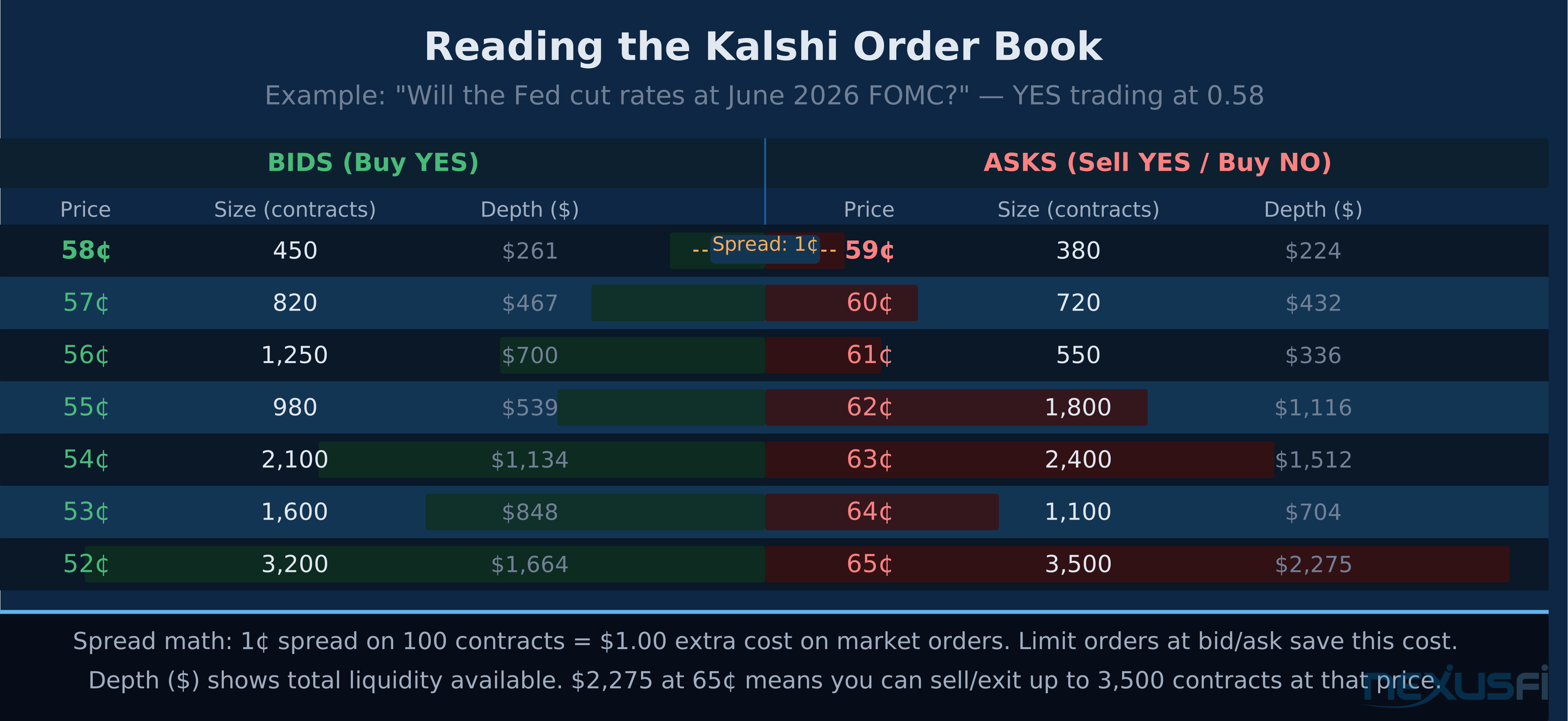
Kalshi's fee structure is unique in financial markets: fees scale with the uncertainty of the contract. The formula:
Taker fee = $0.07 × C × P × (1 − P)
Where:
- C = number of contracts
- P = contract price in dollars (e.g., 0.50 for a 50¢ contract)
- (1 − P) = implied probability of the opposite outcome
Maker fee = $0.0175 × C × P × (1 − P) (25% of taker fee)
Why This Formula Makes Sense #
The P × (1 − P) term is the variance of a Bernoulli distribution. It peaks at P = 0.5 (maximum uncertainty) and approaches zero at P = 0 or P = 1 (near-certain outcomes). In plain English: Kalshi charges more on coin-flip contracts and almost nothing on near-certainty contracts.
Fee Calculations by Price Point #
| Contract Price | Taker Fee/Contract | Taker Fee/100 Contracts | Maker Fee/100 Contracts |
|---|---|---|---|
| 50¢ (coin flip) | $0.0175 | $1.75 | $0.44 |
| 40¢ or 60¢ | $0.0168 | $1.68 | $0.42 |
| 30¢ or 70¢ | $0.0147 | $1.47 | $0.37 |
| 20¢ or 80¢ | $0.0112 | $1.12 | $0.28 |
| 10¢ or 90¢ | $0.0063 | $0.63 | $0.16 |
| 5¢ or 95¢ | $0.0033 | $0.33 | $0.08 |
Key insight: Kalshi rewards conviction. If you think a Fed cut is 90% likely (YES at 90¢), you pay only $0.63 per 100 contracts. If you think it's a coin flip (50¢), you pay $1.75. The formula aligns your trading costs with the perceived difficulty of the trade.
Deposit and withdrawal fees (updated Feb 2026):
- ACH deposits: Free
- ACH withdrawals: Free (no fee as of Feb 2026 update)
- Wire deposits: Free (Kalshi side); bank fees may apply
- Wire withdrawals: Require $500K minimum — not relevant for retail
- Debit card deposits: Up to 2% (per Kalshi fee schedule)
- Settlement fee: None
- Membership fee: None
This is a significant improvement from earlier fee schedules. As of the Feb 5, 2026 fee schedule update, there is no ACH withdrawal fee — previous third-party sources citing "$0.25 outbound" reflect outdated information.
Part 6: Placing Your First Trade #
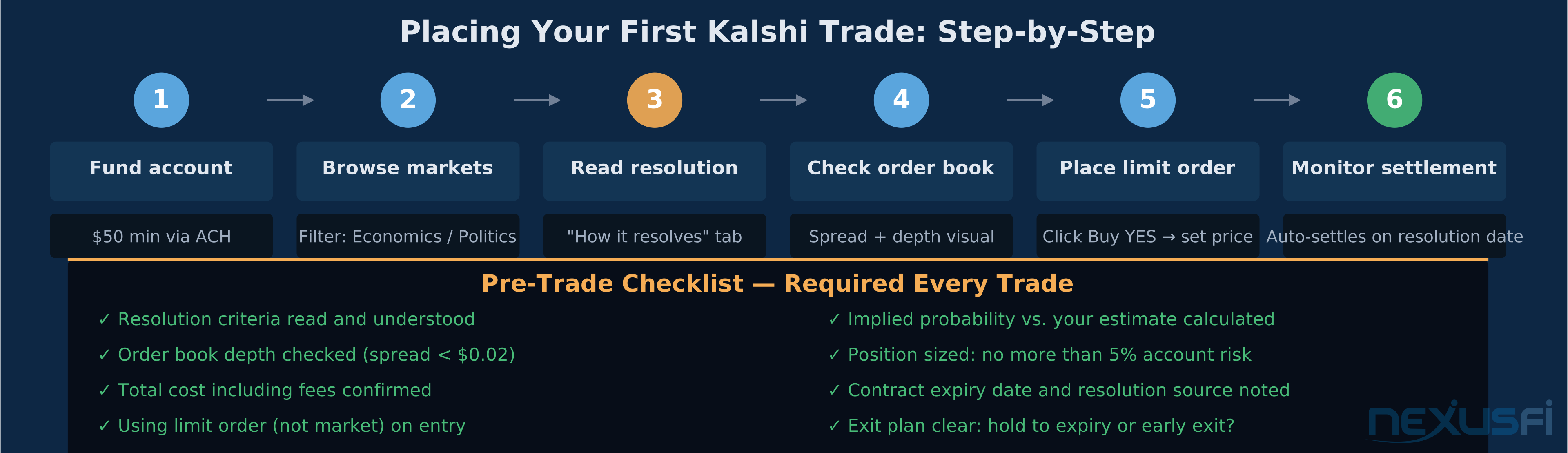
The Workflow #
1. Select a contract you understand and can research.
For your first trade, pick something in Economics — a scheduled Fed meeting, a CPI release date, or a GDP estimate. Economic events have precise resolution criteria (official government data), meaningful public forecasting, and higher liquidity than political or sports markets.
2. Read the resolution criteria completely.
This cannot be overstated. The most common source of "I got robbed" complaints in prediction markets is entering a trade without fully reading how it resolves. Example trap: a contract asking "Will CPI print below 3.0% for September 2025?" sounds simple — but if it resolves based on the CPI "headline" number and you're thinking about "core" CPI, you've taken a different trade than you intended.
3. Check the order book for spread and depth.
Click the contract. Look at best bid vs. best ask. If the spread is 1¢ or less on a 100+ contract position, you're in good shape. If the spread is 5¢+ on a thin book, factor that slippage into your expected value calculation.
4. Calculate your expected value.
This is the actual decision. If the market implies YES at 60¢ but your research suggests 70% probability:
- Your edge = 70% − 60% = 10 percentage points
- Expected value per contract: 0.70 × $0.40 − 0.30 × $0.60 = $0.28 − $0.18 = $0.10 net edge per contract
- After taker fee at 60¢: $0.07 × 0.60 × 0.40 = $0.0168 per contract
- Net expected value: $0.10 − $0.0168 ≈ $0.083 per contract
Positive expected value is the only reason to trade. If your probability estimate doesn't meaningfully exceed the market price (after fees), you're speculating, not trading with edge.
5. Place a limit order inside the spread.
Click Buy YES (or Buy NO depending on your side). Select Limit. Set your maximum price — for a contract at 60¢ ask, you might bid 59¢ to try to save the spread, or pay up to 60¢ if you want to fill immediately. Enter quantity.
Review the order preview: it shows your total estimated cost including the taker or maker fee. The fee calculates in real time based on the price you set.
6. Confirm with 2FA.
Kalshi requires 2FA confirmation on new trades. This is mandatory and can't be disabled. Have your phone ready.
7. Track the position under Portfolio → Open Positions.
The UI shows your entry price, current market price, unrealized P&L, and contract expiration. Kalshi marks positions to market — you can see the float on open trades.
Trade Example: Fed Rate Cut Contract #
Contract: "Will the Fed cut rates at the June 2026 FOMC meeting?" YES trading at: 0.58 ($0.58 per contract) Your research: You believe 70% probability based on recent fed funds futures pricing and FOMC commentary.
Trade setup:
- Buy 50 YES contracts at limit $0.59 (paying up one tick to guarantee fill)
- Total cost: 50 × $0.59 = $29.50
- Taker fee: $0.07 × 50 × 0.59 × 0.41 = $0.85
- Total outlay: $30.35
If YES resolves (Fed cuts):
- Payout: 50 × $1.00 = $50.00
- Net profit: $50.00 − $30.35 = +$19.65 (+64.7% ROI)
If NO resolves (Fed holds or hikes):
- Payout: $0
- Net loss: −$30.35 (total stake)
Expected value calculation:
- EV = 0.70 × $19.65 − 0.30 × $30.35 = $13.76 − $9.11 = +$4.65 per trade
The trade is worth placing if your 70% estimate is accurate. If the market is right at 58%, you have zero edge and should stand aside.
Part 7: Profit Calculation and Settlement #
Binary Payoff Math #
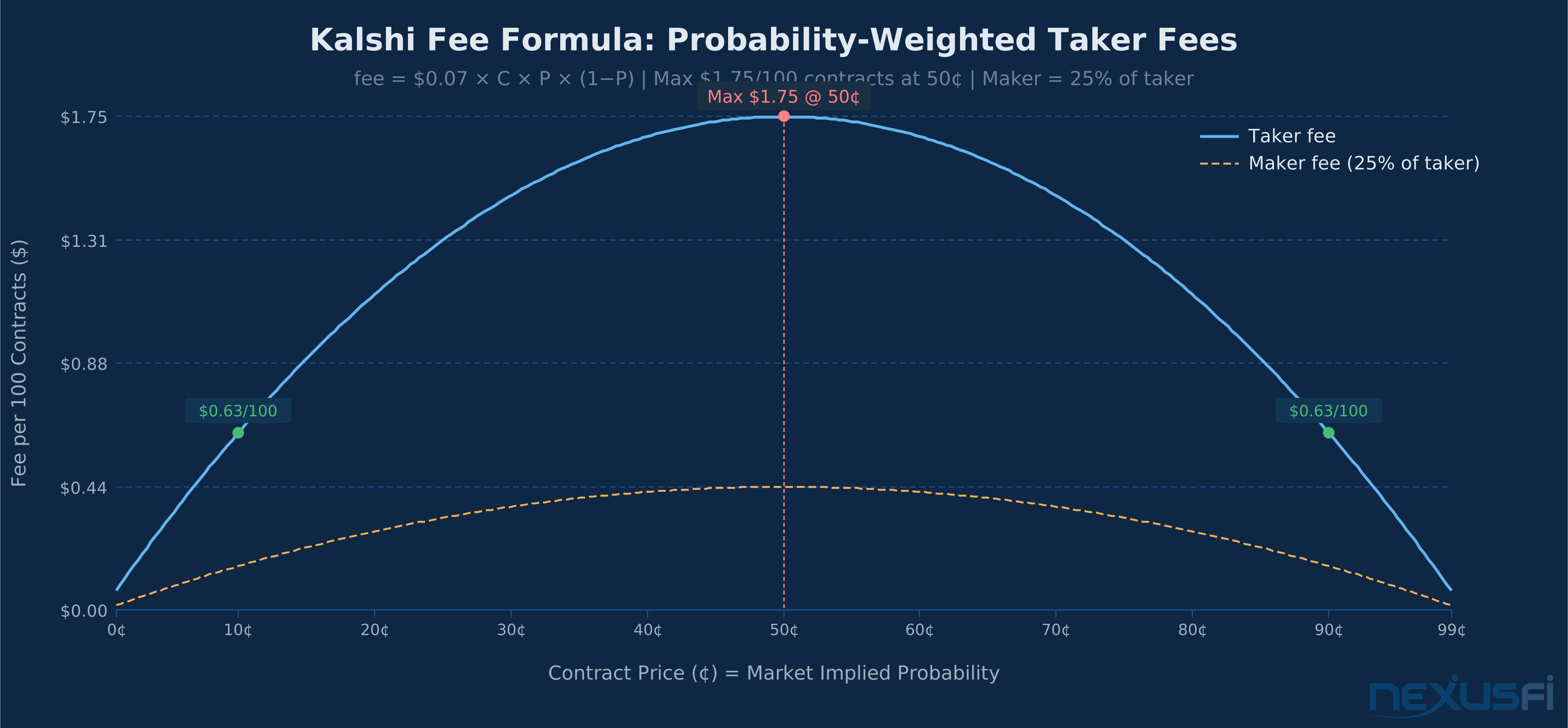
Every Kalshi contract pays exactly $1.00 to the winning side and $0.00 to the losing side. No partial payouts, no time-weighted settlement, no Greeks.
Your profit (or loss) on any position:
Profit = (Settlement payout × Contracts) − (Entry price × Contracts) − Fees paidTracking your P&L before settlement:
Kalshi's UI shows mark-to-market P&L based on current market prices. If you bought YES at 58¢ and the contract is now trading at 72¢, the platform shows unrealized profit. This is only realized if:
- You sell the position before expiry (exit the trade), or
- The contract settles and you were right
Early exit:
Unlike futures, you can exit a Kalshi position before expiration by selling your YES contracts back into the order book. If you bought YES at 58¢ and the market moves to 78¢ before expiry, you can sell YES at 78¢ and lock in the 20¢ profit per contract without waiting for the event to actually occur.
This is a critical concept: prediction markets aren't just about being right at expiry. They're about identifying mispricing and either trading to expiry or exiting when the market corrects toward your estimate.
Settlement timing:
When a contract expires, Kalshi doesn't instantly resolve it. Depending on the event, resolution can take anywhere from a few minutes (for events with real-time data) to several days (for some economic data releases that get revised). The platform will show "Pending Resolution" until the official outcome is confirmed and the cash hits your account.
Part 8: Position Sizing for Prediction Markets #
Binary risk requires a different position sizing framework than futures or stocks. When your max loss is 100% of the stake and your max gain is (1/P − 1) × stake, the Kelly Criterion applies directly.
Full Kelly for a binary market:
f* = (p × b − (1 − p)) / b
Where:
- p = your probability estimate (0.70 for 70%)
- b = odds on a win = (1 − price) / price = $0.40 / $0.60 = 0.667 at 60¢ YES
- f* = fraction of bankroll to bet
Example at 70% estimate, 60¢ market: f* = (0.70 × 0.667 − 0.30) / 0.667 = (0.467 − 0.30) / 0.667 = 0.25 = 25% of bankroll
Full Kelly is aggressive and assumes perfect probability estimation. Most professional bettors use fractional Kelly (1/4 to 1/2 Kelly) to account for estimation error:
Quarter Kelly: 6.25% of bankroll per trade in this example.
For a $500 account, that's $31.25 per trade — approximately 50 contracts at 60¢.
For beginners, simpler rules work fine:
- Never risk more than 5% of your total prediction market bankroll on a single contract
- Keep single-event exposure below 10% regardless of your confidence level
- Avoid concentrating in correlated events (multiple Fed-related contracts all lose together)
Part 9: Withdrawal Process #
Getting money out of Kalshi is straightforward via ACH:
- Work through to Cash → Withdraw (or the Balance area in settings)
- Select your linked bank account (must have been verified during setup)
- Enter the withdrawal amount (minimum $10)
- Confirm via the 2FA code sent to your phone/email
- ACH processing: 1--2 business days
Important constraint: You can only withdraw available cash — funds tied to open positions cannot be withdrawn until those markets settle. If you have $200 staked across open trades and $150 in idle cash, you can only withdraw up to $150.
Wire transfers: Wire withdrawals require a $500,000 minimum per the current Kalshi fee schedule. Not relevant for retail traders.
Tax reporting: Kalshi provides 1099-B forms for reporting trading gains and losses. Keep records of every trade — the IRS treats prediction market winnings as ordinary income, not capital gains, in most interpretations. This is an evolving regulatory area; consult a tax professional for your specific situation.
Part 10: Polymarket Introduction (Crypto-Native Traders) #
For traders comfortable with crypto infrastructure, Polymarket offers a meaningful alternative. Important caveat: Polymarket officially restricts US users — you are responsible for verifying your legal access before trading.
MetaMask Wallet Setup #
- Install MetaMask browser extension (Chrome, Brave, or Edge) or mobile app
- Create a new wallet and immediately write down the 12-word seed phrase offline — not in screenshots, not in cloud notes, not in email
- Add the Polygon network to MetaMask (Polymarket will prompt this automatically when you connect)
- Fund your wallet with MATIC for gas transactions (~$1 worth is sufficient for months)
USDC Funding #
Polymarket settles in USDC on the Polygon network. The common path:
- Buy USDC on a centralized exchange (Coinbase, Kraken, Binance)
- Withdraw USDC to your MetaMask wallet — critical: select Polygon network, not Ethereum mainnet
- Sending USDC on the wrong chain to a Polygon address is typically unrecoverable
Minimum usable balance: ~$5 USDC (enough for a small test trade plus several gas transactions)
Trading on Polymarket #
Polymarket currently offers market orders only (limit order support is planned but not released as of 2026). Click "Buy YES" or "Buy NO", enter your USDC amount, confirm price, sign the MetaMask transaction.
Fee structure:
- Protocol fee: 2% of winnings
- Liquidity provider fee: 0.5% of trade size
- Gas: <$0.05 per transaction on Polygon
The 2.5% total cost on winnings is higher than Kalshi's variable formula for most price points, but Polymarket often lists markets not available on Kalshi, especially international political events.
Settlement: Automatic. When an oracle confirms the outcome, winning USDC goes directly to your wallet. No platform withdrawal needed — funds are already in your MetaMask wallet and available immediately.
Part 11: Robinhood Event Contracts #
Robinhood added event contracts in 2024 as a simplified binary contract product for existing retail customers. It's not a standalone prediction market — it's an additional feature within the Robinhood brokerage app.
How They Differ from Traditional Options #
The confusion is understandable — Robinhood is primarily known for options trading. Event contracts are at the core different:
| Traditional Options | Robinhood Event Contracts | |
|---|---|---|
| Underlying | Stock/ETF price movement | Real-world event outcome |
| Payoff | Strike-based, continuous | Binary: $20 win or $0 |
| Greeks | Delta, gamma, theta, vega | None |
| Contract size | 100 shares | $10 stake |
| Fixed payout | No | Yes: $20 per $10 contract (2:1) |
| Early exercise | Yes (American style) | No |
| Fees | Commission-free + spread | 2% vig on winnings |
The 2:1 payout structure means every YES contract at any implied probability pays $20 if correct. This is different from Kalshi's $1.00 settlement — on Robinhood, you're betting on a fixed payout, not a probability-scaled settlement.
Implied odds math: If a Robinhood contract shows YES at "65%" implied probability, that means the market is pricing a ~$0.65 / $1.00 value for YES, but the payout is $20 per $10 contract regardless. The "probability" is informational — it reflects market pricing of the event, not the contract's payout mechanics.
Getting Started on Robinhood Event Contracts #
- Open/use an existing Robinhood account (standard KYC completed)
- In Account Settings → Trading Permissions, enable Event Contracts
- Fund via ACH or debit (minimum $10 to place one contract)
- Work through to Explore → Event Contracts
- Select an event, view implied probability, tap Buy YES or Buy NO
- Enter number of contracts (each = $10 stake, pays $20 if correct)
- Orders fill instantly at displayed odds
Fee: 2% settlement fee on winnings. No commission. On a $20 win (one contract), you keep $19.60.
Withdrawal: Winnings post to your Robinhood buying power balance immediately on settlement. Withdraw via ACH to linked bank (2--3 days), minimum $5.
Common Beginner Mistakes #
Mistake 1: Not reading resolution criteria. Every "I got screwed" story in prediction markets involves this. The contract resolves based on specific language, not your interpretation of what the question means. Read it before buying.
Mistake 2: Using market orders on thin books. A 5¢ spread on 200 contracts is $10 of avoidable cost. Always check the spread and use limit orders on Kalshi.
Mistake 3: Confusing implied probability with certainty. A 90¢ YES contract isn't 90% safe. Markets can misprice. The 10¢ tail scenario exists and will hit you eventually. Always size to survive the max loss.
Mistake 4: Overconcentration. Buying YES on five different Fed-related contracts means you're not diversified — they're all the same underlying risk. One FOMC surprise wipes them all.
Mistake 5: Ignoring fees in EV calculations. At 50¢, the taker fee is $1.75 per 100 contracts. On a $50 position, that's 3.5% round-trip cost. Factor fees in before deciding if your edge is real.
Mistake 6: Funding withdrawal timing. Funds in open positions can't be withdrawn. If you need liquidity, keep a separate emergency buffer outside your trading positions.
Key Takeaways #
- Kalshi is the CFTC-regulated, fiat-money, limit-order-enabled platform — the right starting point for US traders
- Minimum $50 to open, full KYC required, ACH deposit is free
- Contract prices = market implied probability; $1.00 payout to winning side
- Fee formula: $0.07 × C × P × (1−P) — peaks at $1.75/100 contracts at 50¢
- Always use limit orders; always read resolution criteria; always calculate expected value before trading
- Polymarket (crypto, no KYC, Polygon/USDC) and Robinhood (market-only, 2:1 fixed payout) are valid alternatives for specific use cases
Citations #
- How to Use Kalshi: Complete Beginner's Guide (2026) — PredScope, updated April 2026
- Kalshi Fee Schedule 2026: Maker & Taker Rates Explained — pm.wiki, updated April 2026
- Kalshi Fee Schedule PDF — Kalshi official fee schedule, effective Feb 5, 2026
- What Is Kalshi? A Beginner's Guide — Kalshi News, Feb 2026
- How to Bet on Kalshi: A Step-by-Step Guide for Beginners — PolyPunter, Feb 2026
- Polymarket 101 — Polymarket Documentation
- How Does Polymarket Work? — PredScope
This article is part of the NexusFi Academy Prediction Markets series. Full series at /a/prediction-markets/.
Knowledge Map
Prerequisites
Understand these firstGo Deeper
Build on this knowledgeReferences This Article
Articles that build on this topicCitations
- — Kalshi, Polymarket, Prediction Markets etc (2025)
- — Kalshi Hits $1 Billion in Super Bowl Trading Volume (2026)
- — CME Group Launches 24/7 Futures Trading (2025) 👍 3
- — Cboe Eyes Prediction Markets With Regulated Binary Options (2026)
- — CME Group Event Contracts Blast Past 100 Million Traded (2026)
- — Event Contracts - New Way to trade the CME Futures markets (2022) 👍 6