



UPS and Power Protection for Futures Traders: The Infrastructure Layer That Saves Open Positions
Overview #
You're in a live ES trade. NQ is ripping through your entry zone. And the power goes out.
If you have a UPS, you have 10-20 minutes to close positions, fail over to cellular, and breathe. If you don't, your trading platform crashes mid-session, open positions sit unprotected on the exchange, and you call your broker's trade desk hoping the stop you set is actually held server-side. That call doesn't always go well.
Power protection is the most overlooked piece of trading infrastructure. Traders spend thousands on workstations, data feeds, and monitors — then plug everything into a $15 power strip. A quality UPS costs $150-300 for most trading setups. The math is simple: one blown trade covers ten years of UPS costs.
A UPS (Uninterruptible Power Supply) does three things. It provides battery backup when utility power fails. It regulates voltage through brownouts and sags that don't cut power entirely. And it filters electrical noise that corrupts data and shortens hardware life. A surge protector — the $25 strip most traders use — only addresses one threat out of seven. The UPS with automatic voltage regulation (AVR) handles all of them.
This article covers everything you need to select the right UPS for your trading desk, size it correctly, install it properly, and maintain it so it actually works when you need it. This connects directly to the broader trading redundancy framework — a UPS is Layer 1 of a complete power and connectivity protection stack.
What a UPS Actually Protects Against #
Most traders think power protection means "the power goes out and the computer stays on." That's one scenario out of seven. The other six happen constantly, cost you money slowly, and don't make the emergency obvious until something breaks.
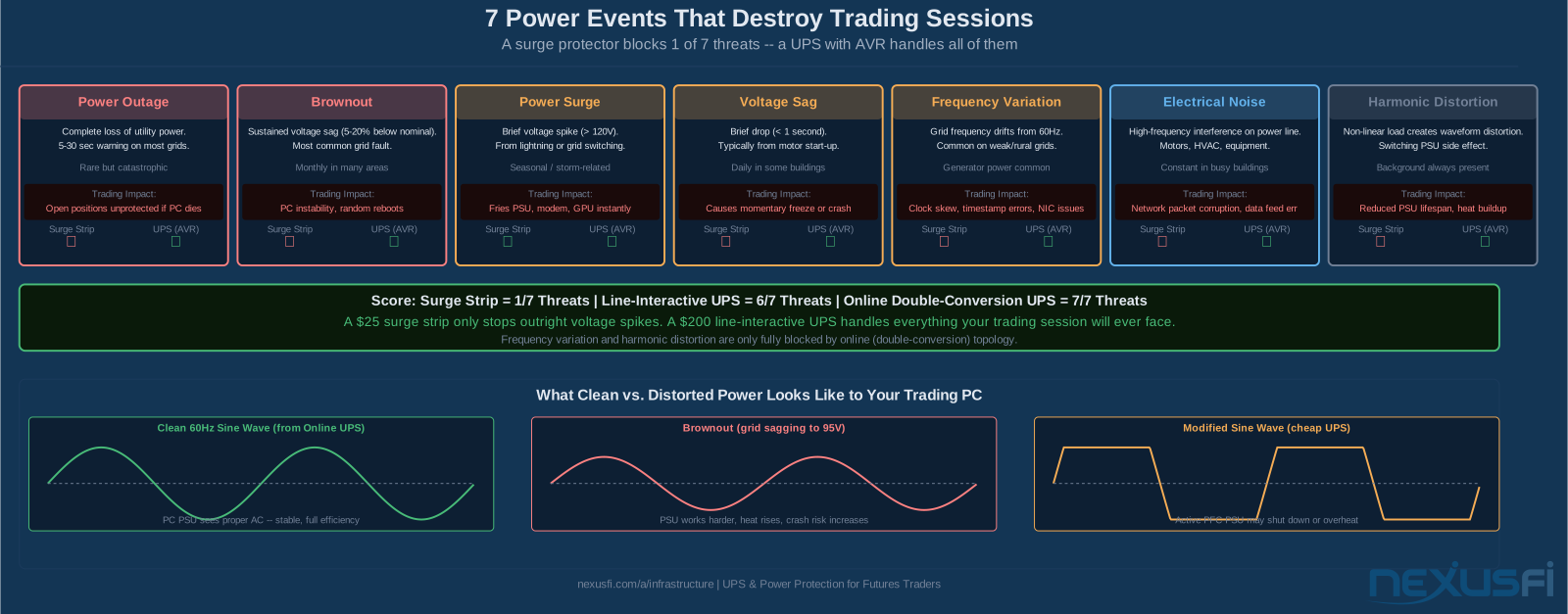
Here are the seven power events that affect trading setups — and which protection solution handles each:
- Power outage: Complete loss of utility power. Obvious and catastrophic -- your PC dies, open positions are unprotected. A surge strip does nothing. A UPS buys 10-20 minutes to close out and fail over.
- Brownout: Sustained voltage sag 5-20% below nominal -- say, 95-105V instead of 120V. The most common grid fault, especially in summer when AC load is high or in older residential buildings. A brownout doesn't cut power -- it makes your PSU work harder, generates heat, and causes random crashes and instability. Surge strips don't help. A line-interactive UPS with AVR corrects the voltage without using the battery.
- Power surge: Brief spike above nominal voltage, often from lightning or when neighboring industrial equipment switches on or off. This is the only event a surge strip actually handles. A UPS handles it better, with higher joule ratings and MOV protection that's part of a complete system.
- Voltage sag: Brief drop lasting under one second -- too short to be a brownout, but enough to cause a momentary freeze or crash. Motor start-up in your building is the classic cause. AVR regulation in a line-interactive UPS prevents this from touching your equipment.
- Frequency variation: Grid frequency drifts from 60Hz. This is rare on stable utility grids but common when running on a generator -- which is exactly when you need the UPS most. Frequency variation causes clock skew, timestamp errors, and NIC instability. Only a UPS with inverter output (especially online double-conversion) addresses this.
- Electrical noise: High-frequency interference riding on the power line. HVAC systems, motors, and other equipment inject this continuously. It corrupts network packets, causes data feed errors, and degrades hardware over time. AVR filtering reduces this substantially.
- Harmonic distortion: Waveform distortion from non-linear loads (including your own switching PSU). Reduces PSU efficiency and generates heat. Only addressed by online double-conversion UPS with continuous AC-DC-AC conversion.
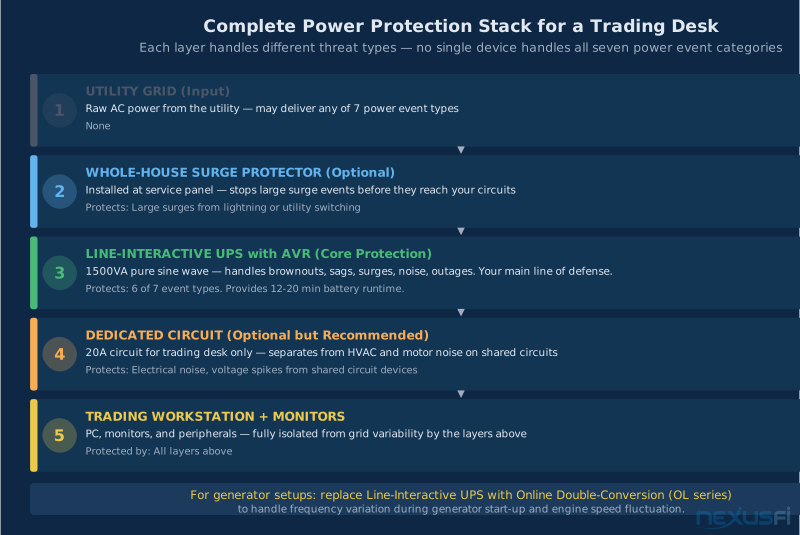
A surge strip protects against exactly one of these. A line-interactive UPS with AVR handles six of seven. An online double-conversion UPS handles all seven. For most home trading setups, line-interactive is the right call — it handles everything you'll realistically face at 40% of the cost of online topology.
Power is the most basic single point of failure in any trading setup. [1]
UPS Topology: Which Type Do You Need? #
Three at the core different UPS architectures exist, and they behave completely differently when power events occur. Choosing wrong means either overpaying for protection you don't need, or having a UPS that fails you in the one scenario where you need it.
Standby (Offline) -- Skip This for Trading
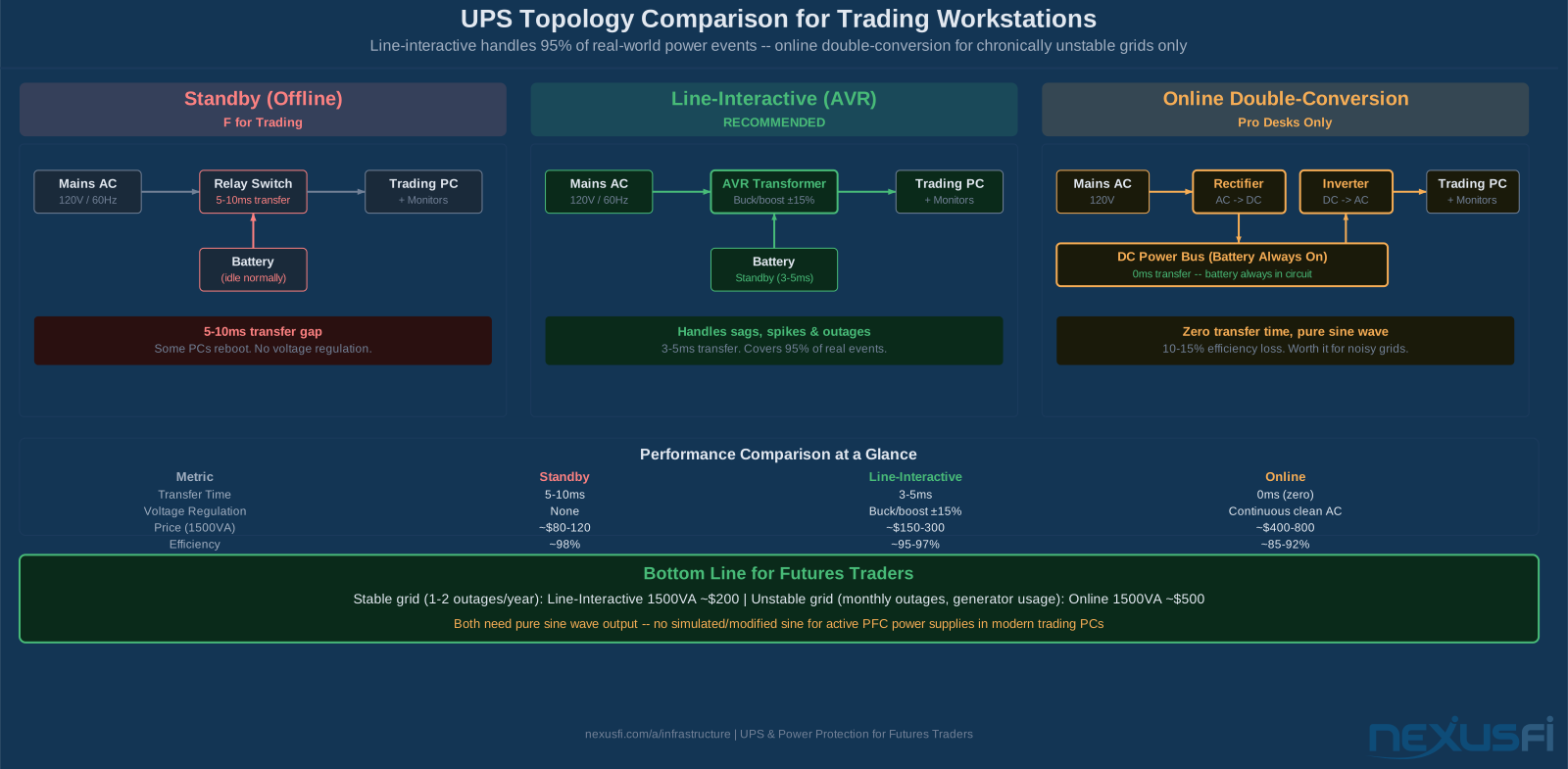
A standby UPS passes mains power directly to your equipment during normal operation. When power fails, a relay switches to battery power. The transfer takes 5-10 milliseconds.
That sounds fast. It isn't always fast enough. Modern gaming and workstation PSUs handle this gap fine. But the real problem is what standby UPS units don't do: there's no voltage regulation. During brownouts and sags — which are far more common than full outages — the standby UPS passes the degraded voltage straight to your equipment. You get the worst of both worlds: no protection against the most common events, and a battery that doesn't kick in until power actually fails.
Standby units cost $60-120. They're appropriate for non-critical devices — a lamp, a printer, equipment that doesn't care about power quality. Don't use one for a trading workstation.
Line-Interactive (AVR) -- The Right Choice for Most Traders
A line-interactive UPS adds an autotransformer between the mains and your equipment. This transformer automatically adjusts (bucks or boosts) the output voltage to maintain it within ±15% of nominal even when the incoming voltage sags or surges. Your PC sees clean 120V even when the grid is delivering 95V or 135V.
When power fails entirely, the battery kicks in with a 3-5ms transfer — fast enough that modern PSUs don't notice it. The output is pure sine wave on quality models (critical — more on this shortly).
This handles six of the seven power event categories at a price point of $150-300 for a 1500VA unit. It's the sweet spot for home traders, small trading rooms, and anyone on a reasonably stable utility grid.
@mastadee described the practical reality: "I bought 2 UPS units for around $40 each and they work like a charm. When power goes off, I have around 1h to 1.5h run time on the 2 batteries. One UPS has my router and laptop charger and then the other UPS runs my 2 monitors." [2] That separation instinct — keeping the network UPS independent from the PC UPS — is exactly right, and we'll cover that in detail later.
Online Double-Conversion -- For Unstable Grids and Pro Setups
An online UPS continuously converts AC to DC and back to AC. Your equipment never runs directly from mains power — it always runs from the inverter's output. The battery is always in circuit. Transfer time is zero milliseconds because there's nothing to transfer.
The output is perfectly clean: pure sine wave, precise 60Hz, consistent voltage, no electrical noise from the utility. For traders on unstable grids, prop trading desks with rack-mounted servers, or anyone who's had line-interactive UPS units fail during brownouts (the transfer relay clacking repeatedly during prolonged sags), online double-conversion eliminates the problem entirely.
The trade-offs: 10-15% efficiency loss (the conversion cycle wastes some power as heat), higher cost ($400-800 for 1500VA), and more noise from the fans in some models. @Big Mike chose online for exactly the right reason — trading in Ecuador with a generator setup: "I decided against the whole inverter/battery setup, and decided in favor of an online double conversion UPS to hook up to the generator." He chose the CyberPower OL1500RTXL2U. [3]
Online double-conversion is worth the premium when: you have a generator and need to handle frequency variation; you're on a weak or rural grid with frequent brownouts; or you run automated strategies that can't tolerate any power interruption.
How to Size a UPS for Your Trading Desk #
This is where most traders get it wrong. They buy a UPS based on the VA number on the box without understanding that VA (volt-amps) and watts are not the same thing — and it's watts that matter.
VA vs Watts: The Number That Actually Controls Runtime
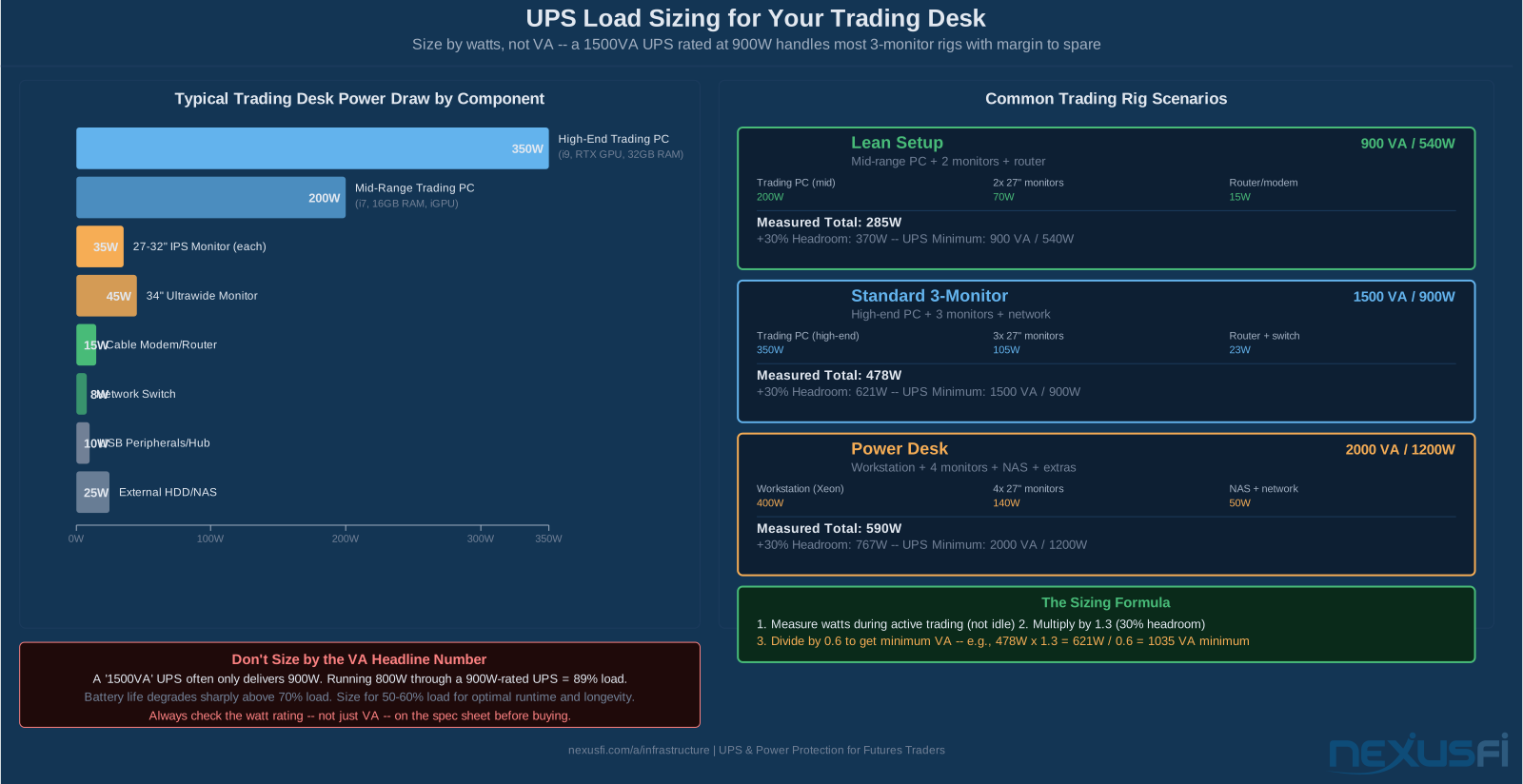
A UPS rated at 1500VA doesn't deliver 1500 watts. VA is apparent power; watts is real power. The relationship is: Watts = VA × Power Factor. For most UPS units, that factor is 0.6 — meaning a 1500VA UPS delivers about 900 watts of real power to your equipment.
This is why you can't compare UPS units by VA alone. A 1500VA unit with a 0.6 power factor delivers 900W. A 1000VA unit with a 0.9 power factor delivers 900W. Same usable capacity. Check the watt rating on the spec sheet, not just the VA headline number.
Calculate Your Load
Here's what a typical 3-monitor futures trading rig draws:
| Component | Typical Watts |
|---|---|
| High-end trading PC (i7/i9, discrete GPU for charts) | 250-350W |
| Mid-range trading PC (i7, 16GB RAM, integrated graphics) | 150-220W |
| 27-32" IPS monitor (per monitor) | 25-45W |
| 34" ultrawide monitor | 40-55W |
| Cable modem + router | 20-35W |
| Network switch | 5-12W |
| USB hub, peripherals | 5-15W |
A common 3-monitor setup (high-end PC + 3x27" monitors + router/modem) totals roughly 430 watts during active trading. At idle (markets closed, monitoring only), it might draw 250-280 watts.
Size for the active trading load — not idle, not peak. Measure it with a wall power meter (a Kill-A-Watt meter costs $25 and is the single best tool for this). Estimates are fine for planning, but measurement before buying a UPS removes all uncertainty.
Add 25-30% Headroom
After calculating your measured or estimated watts, add 25-30% headroom. This covers:
- GPU power spikes when a chart redraws with heavy tick data
- Battery capacity that degrades 10-20% per year over the 3-4 year replacement cycle
- Future monitor or peripheral additions
- Optimal load range -- UPS units perform best at 40-70% of rated capacity
For the 430W example: 430 × 1.3 = 559W minimum UPS watt capacity. The nearest standard unit is a 1500VA/900W — which gives comfortable margin. Running at 430W on a 900W unit is 48% load, right in the optimal zone.
@matthew28 described measuring his actual load before buying: "For reference the 1300VA model gives me about 45 minutes of run time with charting packages open on an i7 at 3.5GHz with 16GB RAM, an SSD and standard hard drive, an okay graphics card and a couple of monitors." [4] That runtime — 45 minutes — comes from running at well under 50% load, which is exactly the right approach.
@jonesr9 summarized the original sizing insight that holds true today: "One thing that you need to be sure of is the wattage of your power supply. These are rated kind of high so if you have a 450 watt power supply then these will double your up time." [5] Wattage not VA — that's the key.

Understanding Runtime and What You Actually Need #
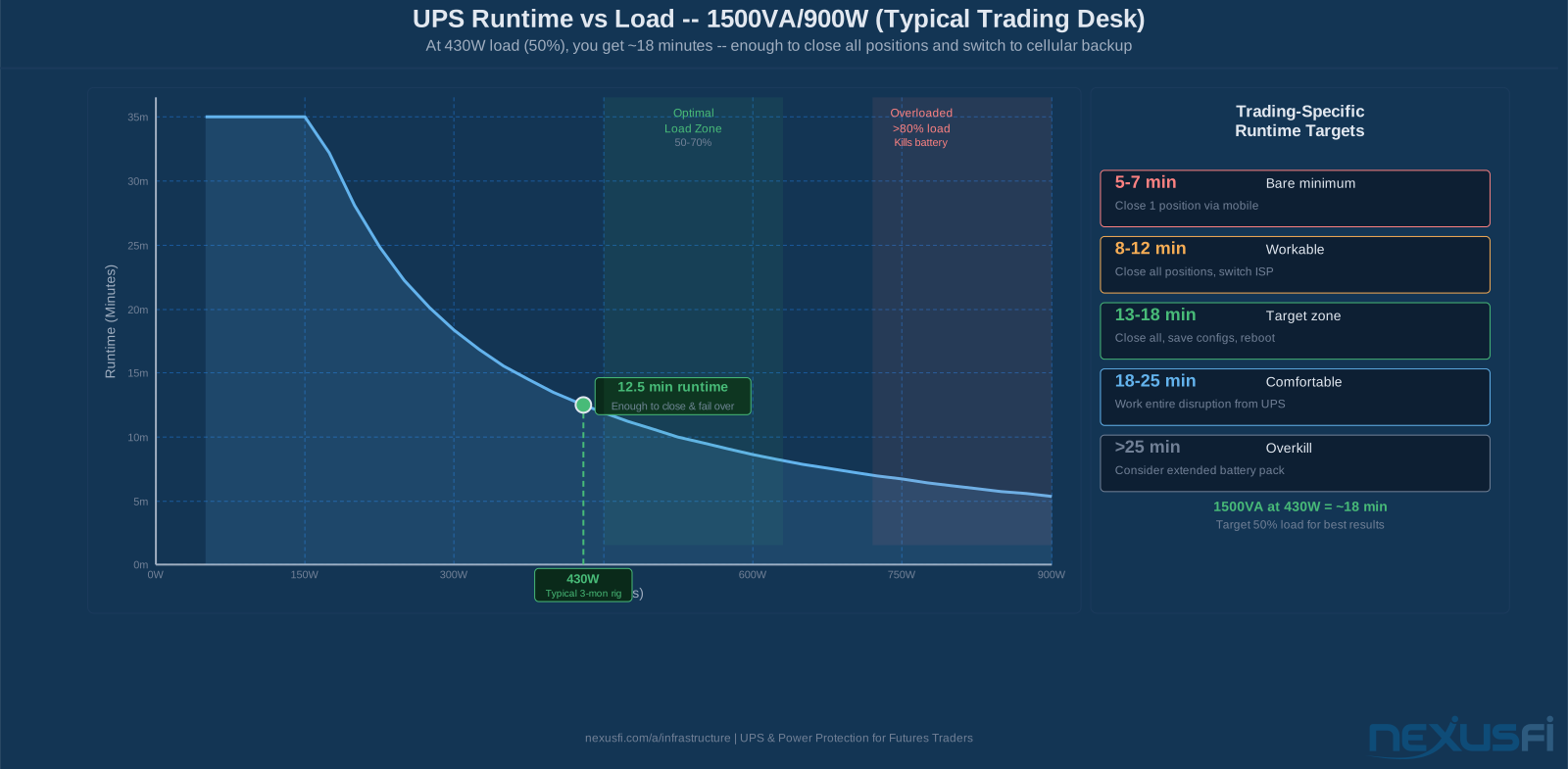
A UPS doesn't need to run your trading desk for hours. It needs to run it long enough to close positions, save your state, and fail over to a backup internet source. For most traders, that's 8-15 minutes. If you're not in a position, even 5 minutes lets you save configs and shut down gracefully.
How Runtime Is Calculated
Runtime follows a predictable curve: double the load, roughly halve the runtime. The engineering approximation is:
Runtime (min) = (Battery Wh × efficiency) / Load (W) × 60
A typical 1500VA UPS has a 12V × 9Ah internal battery = 108Wh. At 70% efficiency: 108 × 0.70 / 430W × 60 ≈ 10.5 minutes at full 430W trading load. At the same load on a 40% load profile (load is 430W, capacity is 900W, so 48% load), real-world runtime for this unit is typically 14-18 minutes.
Don't trust the headline runtime number on the box — it's usually measured at 25% or 50% load, not at your actual draw. Use the manufacturer's runtime chart at your specific wattage. APC, CyberPower, and Eaton all publish these.
What 10-15 Minutes Actually Lets You Do
The runtime target for trading is derived from three sequential actions:
- Close or hedge open positions (2-4 min): Market orders to flatten, broker's trade desk on phone as backup. @Fat Tails outlined the hierarchy: "In case that I lose connectivity, I have a backup internet connection (mobile) to replace my fixed line. In case of a PC failure, I have a notebook. If nothing works, I have the phone number of the trade desk of the broker ready to flatten everything." [6]
- Fail over to cellular backup (2-3 min): Switch your phone to hotspot, connect the laptop or tablet. Slow but sufficient for position management. @Devil Man noted: "I have a cellular backup for internet and a backup UPS power supply. I go one step further and have all my orders collocated on a server in Chicago, so if I do lose power it doesn't affect the integrity of my open positions." [7]
- Save state and shut down gracefully (3-5 min): Save chart templates, close applications properly, hibernate rather than hard-shutdown so recovery is faster. Avoid corrupted database files from abrupt shutdown.
Ten minutes covers all three stages. Twelve is comfortable. Fifteen is generous. You don't need thirty.
Pure Sine Wave vs Simulated Sine Wave #
Active PFC compatibility is not optional. Nearly every trading workstation built since 2015 uses an Active PFC power supply. These PSUs can fail to start, overheat, or shut down randomly on modified sine wave UPS output. When comparing UPS models, verify the spec sheet explicitly says "pure sine wave output" — if it doesn't say it, assume it's modified. This is worth zero negotiation: the cost difference is negligible; the compatibility risk is real.
This matters more than most traders realize. Modern PC power supplies — specifically those with Active Power Factor Correction (Active PFC) — are designed to receive clean sine wave AC. Many are sensitive to the waveform quality of their input.
Simulated or modified sine wave UPS units output a stair-stepped approximation of a sine wave. It delivers the right voltage at the right frequency, but the waveform shape is wrong. For equipment with Active PFC power supplies, this can cause:
- Unexpected shutdowns under load when the PSU detects the abnormal waveform
- Audible whining or buzzing from the PSU
- Reduced efficiency and extra heat generation
- In some cases, refusal to operate at all from battery
Any PC built in the last five years almost certainly has an Active PFC PSU. The PSU and power supply selection guide covers how to choose the right unit for your trading build — and why 80 Plus Gold efficiency matters for both heat output and UPS load calculations. Your monitors may as well. If your UPS manual says "simulated sine wave" or "modified sine wave" and your equipment has Active PFC, you have an incompatibility. The system may work from battery — or it may not.
Pure sine wave UPS units cost 15-30% more than simulated sine equivalents. That premium is worth paying. Every UPS recommendation in this article assumes pure sine wave output. Verify before buying — it should be listed prominently in the specs.

Brand Comparison: APC, CyberPower, and Eaton #
All three are legitimate choices. The right decision is based on the specific model's runtime tables at your load, not brand preference.
APC (Smart-UPS Series)
The industry default. APC's Smart-UPS X series (1500, 2000, 3000 VA) is the most widely deployed professional UPS line. Strong management software (PowerChute Business), SNMP monitoring, and a global service network. Battery replacement is straightforward, parts are widely available, and the support ecosystem is mature.
The Smart-UPS 1500 LCD (model SRT1500XLI) delivers 1500VA/1350W, pure sine wave, with about 14 minutes at 700W load. For most trading desks, it's the safe, well-documented choice.
CyberPower (OL and PFC Series)
CyberPower matches APC's spec sheet at 10-15% lower cost on comparable models. The OL1500RTXL2U (the one @Big Mike chose) is an online double-conversion unit with pure sine wave output. For line-interactive, the PFC Sinewave series (CP1500PFCLCD, CP2000PFCLCD) delivers AVR, pure sine wave, and competitive runtime at a lower price than equivalent APC units.
The trade-off is support infrastructure — APC has more service centers and a longer track record in enterprise deployments. For a home trading desk, CyberPower is an excellent value choice.
Eaton (5S, 9PX Series)
Eaton is the choice for rack-mounted or industrial deployments. Their 9PX series online double-conversion unit is widely used in server rooms and prop trading firms. For home traders, Eaton's 5S series offers line-interactive, pure sine wave — but for most home setups, APC or CyberPower is simpler to source, maintain, and replace.

Battery Replacement and Maintenance #
This is where trading setups fail. The UPS was installed three years ago, nobody thought about it again, and when the first real power event hits, the battery delivers 90 seconds of runtime instead of the expected 15 minutes. The battery died silently months ago.
Battery Lifespan
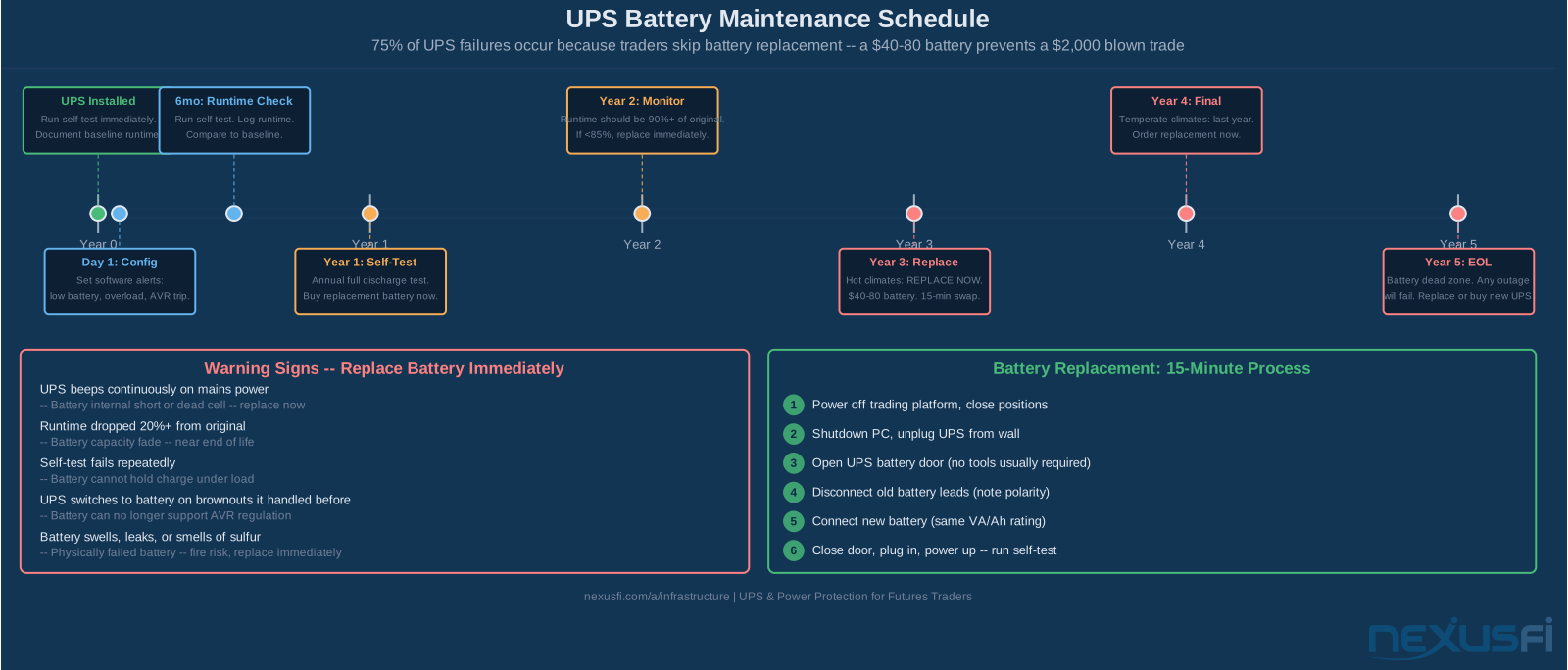
Standard sealed lead-acid (AGM) batteries in UPS units last 3-5 years under normal conditions. Heat is the primary enemy — for every 10°C above 25°C (77°F), battery life roughly halves. A UPS in a warm equipment closet (35°C) will need battery replacement at 18-24 months, not 3-5 years.
Lithium-ion batteries (available in some newer UPS models) last 5-10 years but cost more upfront. The total cost of ownership over 10 years often favors lithium-ion when you factor in replacement batteries and downtime risk.
Replacement Schedule
- Hot climate or poorly ventilated space: Replace at 2-3 years
- Temperature-controlled environment (≤25°C): Replace at 3-4 years
- Frequent outages (battery cycles monthly or more): Replace at 2-3 years
- Stable grid, battery rarely cycles: Replace at 4-5 years maximum
Don't wait for the battery to fail. Set a calendar reminder at purchase and replace proactively. A replacement AGM battery for a 1500VA unit costs $40-80. @Pa Dax described the professional approach to infrastructure maintenance: "Trading is risk management, so I want to be fully redundant on my trading equipment and account." He maintains full backups of router settings, NinjaTrader configs, chart templates, and trading dashboards. For a complete hardware maintenance and selection framework, see the trading workstation hardware guide. [8] Battery replacement is part of that systematic maintenance mindset.
Warning Signs -- Replace Immediately
- UPS beeps continuously while on mains power: Battery internal short or dead cell -- replace now
- Runtime dropped 20%+ from original measurements: Battery capacity fade -- near end of useful life
- Self-test failures (most UPS units test monthly automatically): Battery cannot sustain load
- UPS switches to battery during brownouts it previously handled: Battery can no longer support AVR regulation
- Battery swells, leaks, or smells of sulfur: Physically failed -- fire risk, replace immediately
The Replacement Process
Most UPS batteries are user-replaceable without tools. The process: power off the PC and trading platform, close all positions, shut down, unplug the UPS from the wall, open the battery access panel, disconnect old battery leads (note polarity — red positive, black negative), connect new battery, close panel, plug in, power up, run a self-test. Total time: 10-15 minutes.
Use the UPS manufacturer's replacement battery or a reputable third-party that lists compatibility. Nominal voltage (12V or 24V) and amp-hour (Ah) rating must match exactly. Going slightly higher in Ah (say, 9Ah to 12Ah) generally extends runtime without harming the charging circuit — verify with the manufacturer first.
Setting Up Your Power Protection System #
A complete trading desk power protection setup has two UPS units. This is the key insight that most traders miss when they think about UPS for the first time.
Two-UPS Architecture
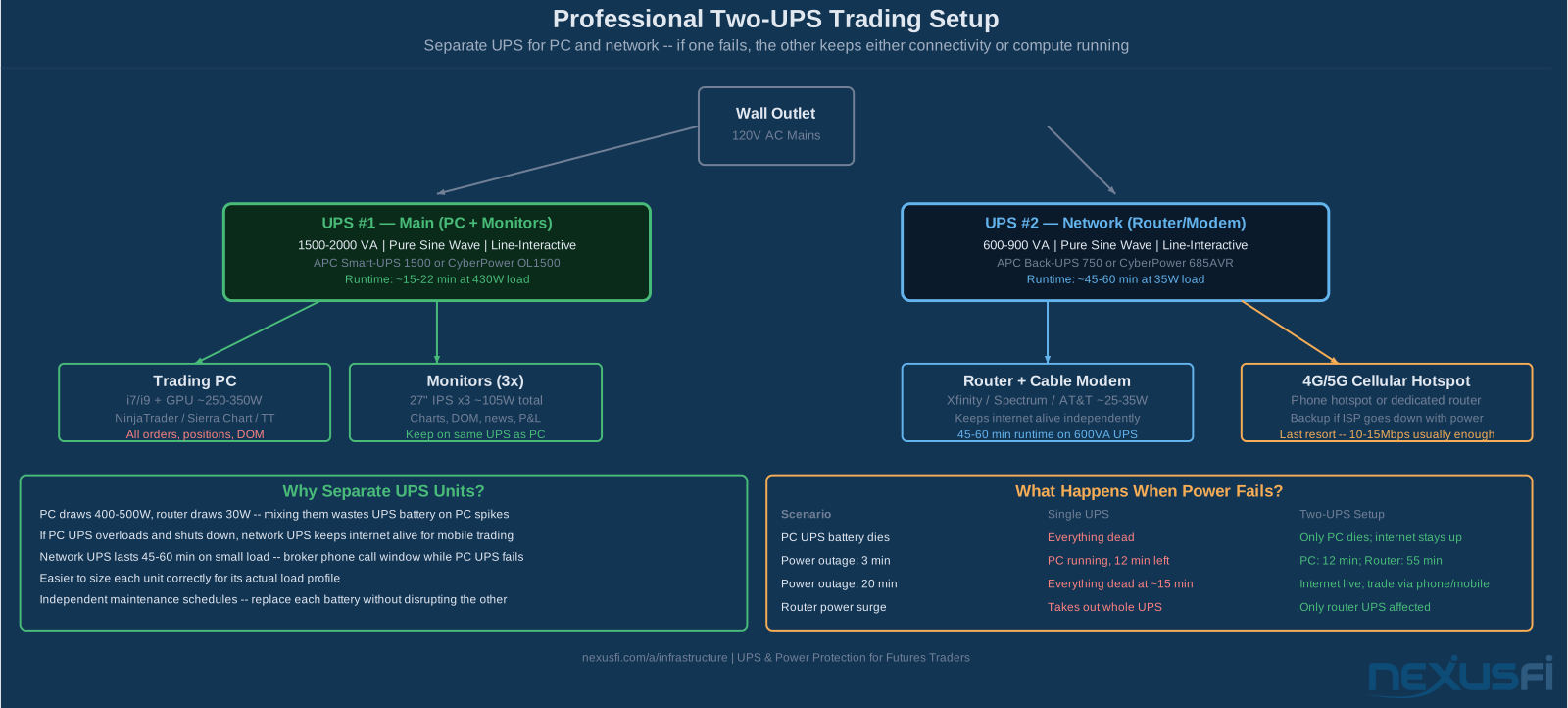
The trading PC and monitors go on one UPS. The network gear (router, modem, switch) goes on a separate, smaller UPS. This separation is critical for two reasons.
First, the load profiles are incompatible. Your PC draws 300-400W with spikes to 500W when a GPU-heavy chart redraws. Your router draws 25W constantly. Mixing them on one UPS forces you to buy a larger unit to handle the PC while most of the battery capacity sits idle serving the router's tiny draw.
Second, the failure modes separate gracefully. If your PC UPS overloads and shuts down, your network stays up. You can connect via tablet or phone and manage positions remotely. If your network UPS fails, you lose connectivity but the PC stays up — you can call your broker's trade desk while keeping charts visible. With a single UPS serving both, a single failure takes everything down simultaneously.
The network UPS can be small and cheap. A 600-750VA unit at $80-120 runs a router and modem for 45-90 minutes on that tiny load — more than enough to outlast any realistic power event. For optimal router and switch configuration on that protected circuit, see the home network setup guide. You don't need pure sine wave for most network gear, though it doesn't hurt.
What Goes on Each UPS
PC UPS (1500-2000VA):
- Trading workstation
- All monitors
- External hard drives used during trading
- USB hubs serving trading peripherals
Network UPS (600-900VA):
- Cable modem or fiber ONT
- Primary router
- Network switch (if separate from router)
- VoIP phone (for broker trade desk calls)
NOT on any UPS (surge-only outlets):
- Printers (high startup current spikes)
- HVAC or space heaters
- Coffee makers or other high-draw appliances
@Saroj laid out the redundancy stack: "Have your cable modem and tower both plugged into your UPS. Have a whole house generator. Have your cell phone ready to set up as a hotspot; slow, but could let you cancel out of trades. ALWAYS HAVE DEFENSIVE STOPS IN PLACE WHEN THE TRADE IS PUT ON." [9] The defensive stop point is worth emphasizing — it's the ultimate last line of defense when everything else fails.
Management Software Configuration
Install the UPS management software on your trading PC (APC PowerChute, CyberPower PowerPanel, or Eaton Intelligent Power Manager). Configure:
- Low battery threshold: Set the alert at 5-8 minutes of runtime remaining, not the default 2 minutes. You need time to flatten positions before the PC shuts down.
- Automatic shutdown sequence: Configure graceful shutdown in the UPS software so it closes applications in the right order before power cuts -- trading platform first, then save state, then OS shutdown.
- Email/SMS alerts: Battery low, overload, AVR correction, self-test failure. Know about problems before they become emergencies.
- Runtime display: Most UPS software shows estimated remaining runtime in the system tray. Check it when you see the battery indicator activate.
Where to Place the UPS
- On the floor or on a sturdy shelf below the desk -- not on the desk surface where vibration or accidental contact could tip it
- In a ventilated area -- UPS batteries generate heat during charging; airflow extends battery life much
- Away from heat sources -- heating vents, sunny windows, space heaters all degrade batteries faster
- Accessible for battery replacement -- you'll need to get to the battery access panel every 3-4 years
- Near but not directly under water sources -- plumbing leaks above UPS locations have destroyed equipment
Emergency Contingency When the UPS Hits Battery #
A UPS buys time. You have to use that time correctly. Having a plan before the event happens is the difference between controlled position management and panic.
The Three-Tier Response Protocol
For automated traders running strategies unattended, power loss has even more implications — see the automated trading emergency protocols guide for kill switches and recovery procedures specific to algo systems.
Tier 1: 0-3 minutes after power loss
Assess whether power will recover quickly (local breaker trip vs utility outage). Check your phone or radio for utility outage information. If you're in a position and unsure about duration, begin closing. Use market orders for a clean exit — this is not the time for limit order optimization.
Tier 2: 3-8 minutes
If power isn't back, activate cellular backup. Switch your phone to hotspot, connect the backup laptop or tablet if you have one. For a complete breakdown of failover hardware and ISP redundancy, see the internet redundancy and backup connectivity guide. Most trading platforms have mobile apps that let you verify position status and submit orders. The mobile futures trading guide covers the full setup for managing positions from your phone, including NinjaTrader Mobile configuration and cellular latency expectations. Verify your positions on the exchange directly through your broker's mobile app — don't assume your desktop shows the correct state if connectivity was disrupted.
Tier 3: 8-12 minutes (before battery dies)
Close remaining positions, save critical files (templates, settings, journal data). Begin graceful shutdown sequence. @Fat Tails described having the broker's trade desk number ready as the final backstop: "If nothing works, I have the phone number of the trade desk of the broker ready to flatten everything if need." [6] Keep this number in your phone, on a printed card, and laminated near the desk — not saved only on your trading PC.
@Devil Man kept broker contact info physically accessible: "I have all my brokers' 24-hour desk on speed dial and also have a laminated card with their phone numbers and email addresses sitting on my desk." [7] This is the correct operational posture — your phone works when your PC doesn't.
Server-Side Orders as Fallback
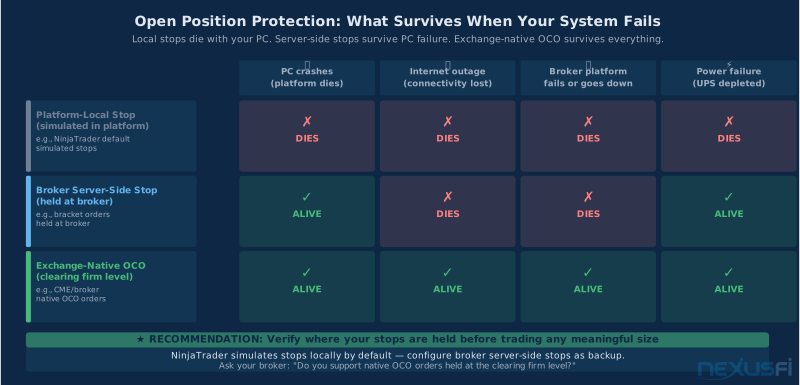
Before trading any position size that matters, understand what happens to your stops if your PC dies. @bobwest explained the structure: "Always have a stop loss order in the market so you will have protection independent of your local PC. Most (perhaps all) trading platforms do not keep stops and targets locally for this reason. Look into this and be sure in your case." [1]
NinjaTrader simulates stops locally by default, which means a crash kills them. Understanding what happens when your broker's platform goes down entirely is covered in the broker platform outages and business continuity guide. Configure your broker to hold stops server-side (most offer this for market stops). For OCO orders, many brokers support native OCO held at the clearing firm level — these survive both your platform crash and your broker's platform going down, since they're held at the exchange.

Power Conditioning Beyond the UPS #
A UPS handles power protection. Power conditioning addresses the subtler, continuous-quality issues that affect long-term equipment health and performance.
Dedicated Circuit for the Trading Desk
A dedicated 20A circuit for the trading desk separates it from the noise and load fluctuations of other circuits in the house. HVAC compressors, refrigerators, and other motor-driven equipment on shared circuits inject voltage spikes and noise every time they cycle. Isolation at the circuit level is the cleanest solution when renovating or setting up a new trading space.
EMI/RFI Filtering and Ground Quality
A quality UPS includes basic EMI/RFI filtering. For especially noisy environments (older buildings, proximity to industrial equipment, shared circuits with HVAC), an additional EMI filter ($30-80) between the wall outlet and the UPS provides an extra filtering stage. Most persistent power quality problems trace to poor grounding — if you experience random crashes that don't correlate with obvious power events, have an electrician check the grounding at your trading desk circuit.
Generator Integration
If you use a whole-house generator as power backup, you need online double-conversion topology — not line-interactive. Generator output has significant frequency and voltage variation, especially during the first 30-60 seconds as the engine comes up to speed. An online UPS isolates your equipment from all of this — it always runs from the inverter regardless of what the generator is doing. @Saroj ran a propane whole-house generator for his NY trading setup. [9] If you're in an area with frequent extended outages and run a generator, budget for online double-conversion.

Recommended Models by Budget and Use Case #
Concrete recommendations based on what the NexusFi community has used and what the specs support for trading workloads:
| Use Case | Model | Specs | Price | Runtime at Load |
|---|---|---|---|---|
| Budget home trader (1-2 monitors) | CyberPower CP1500PFCLCD | 1500VA/900W, pure sine, AVR | $180-220 | ~22 min at 300W |
| Standard 3-monitor setup | APC Smart-UPS 1500 LCD | 1500VA/1000W, pure sine, line-interactive | $350-450 | ~14 min at 430W |
| Generator/unstable grid | CyberPower OL1500RTXL2U | 1500VA, pure sine, online double-conversion | $400-500 | ~12 min at 430W |
| Heavy desk / automated trading | APC Smart-UPS 2200 or CyberPower OL2000 | 2000VA/1800W, online, pure sine | $500-700 | ~18-22 min at 600W |
| Network UPS (any setup) | APC Back-UPS 750 or CyberPower 685AVR | 685-750VA, AVR, surge protection | $80-120 | ~45-90 min at 35W |
Quick Setup Checklist #
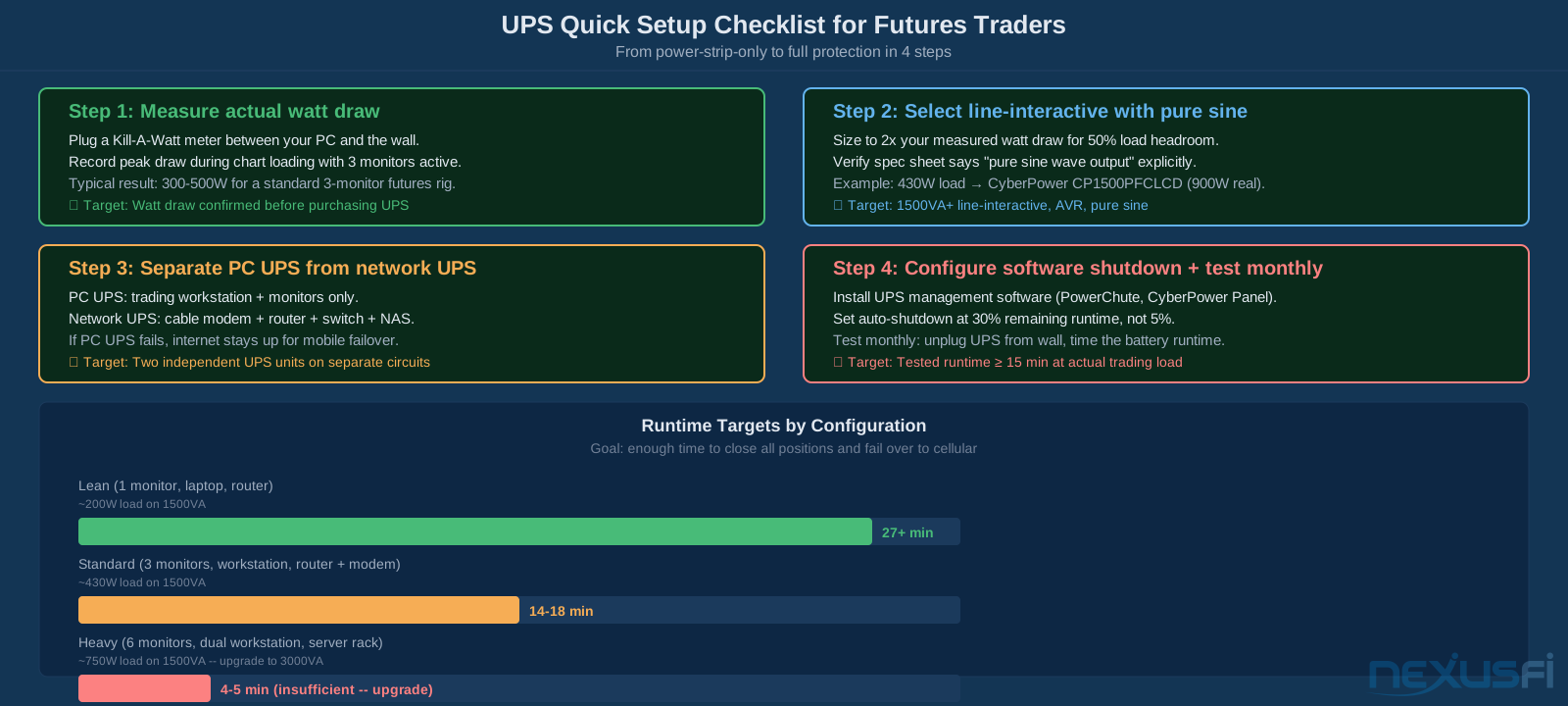
- Measure actual watt draw during active trading with a Kill-A-Watt meter
- Add 25-30% headroom to measured watts
- Select line-interactive UPS with pure sine wave output at that watt capacity
- Verify runtime at your wattage on manufacturer's runtime chart -- target 12+ minutes
- Select online double-conversion if you use a generator or have frequent brownouts
- Buy a separate 600-900VA UPS for router and modem
- Install UPS management software, configure low battery alerts at 8+ minutes remaining
- Plug only PC + monitors into PC UPS battery outlets (not printers or non-critical gear)
- Place UPS in ventilated, cool location -- away from heat sources
- Run first self-test after installation; log baseline runtime
- Print broker trade desk numbers and laminate near desk
- Set calendar reminder for battery replacement in 3-4 years
- Know where your open orders reside (platform-local vs broker server vs exchange)
Knowledge Map
Prerequisites
Understand these firstReferences This Article
Articles that build on this topicCitations
- — Doomsday senerio (2019) 👍 12“First, look at your situation and determine where you have a 'single point of failure' -- something where if just one thing fails, you are screwed. Always have a stop loss order in the market so you will have protection independent of your local PC.”
- — The Scalper's Journey (2017) 👍 2“I bought 2 UPS units for around $40 each and they work like a charm. When power goes off, I have around 1h to 1.5h run time on the 2 batteries. One UPS has my router and laptop charger and then the other UPS runs my 2 monitors.”
- — Big Mike in Ecuador (2014) 👍 4“I decided against the whole inverter/battery setup, and decided in favor of an online double conversion UPS to hook up to the generator. I went with the CyberPower OL1500RTXL2U and BP36V60ART2U extended battery.”
- — UPS opinions? (2017) 👍 1“The 1300VA model gives me about 45 minutes of run time with charting packages open on an i7 at 3.5GHz with 16GB RAM, an SSD and standard hard drive, an okay graphics card and a couple of monitors.”
- — How protected is your Computer??? (2009) 👍 2“UPS = Uninterruptible Power Supply. Whenever you have power glitches or outages it will allow your PC to continue running without shutting down. Make sure your PC, monitor, router, cable modem are all running through the UPS.”
- — Outage with a live position on Ninja (yikes) what to do? (2012) 👍 3“In case that I lose connectivity, I have a backup internet connection (mobile). In case of a PC failure, I have a notebook. If nothing works, I have the phone number of the trade desk of the broker ready to flatten everything.”
- — Hardware bakup (2020) 👍 2“I have a cellular backup for internet and a backup UPS power supply. I go one step further and have all my orders collocated on a server in Chicago, so if I do lose power it doesn't affect the integrity of my open positions.”
- — PA Dax CL, ES and Bund Price Action Trading Log (2018) 👍 6“Trading is risk management, so I want to be fully redundant on my trading equipment and account. Overcame connection glitches, software not working, internet outages, power outages. As traders, our job is to manage risk, and all these measures are risk management measures.”
- — Doomsday senerio (2019) 👍 4“Have your cable modem and tower both plugged into your UPS. Have a whole house generator. Have your cell phone ready to set up as a hot spot. ALWAYS HAVE DEFENSIVE STOPS IN PLACE WHEN THE TRADE IS PUT ON.”
- — risk trading internet outage liability LLC (2010) 👍 5“Operational risk cannot be excluded, but it can be reduced. I have a second PC (laptop), which is always charged. I have a mobile backup internet connection, in case my fixed line does not work. I have a fixed and a mobile telephone line.”
- — Battlestations: Show us your trading desks! (2018) 👍 15“Box: Dell T3610. Xeon E5 @ 3GHz, 16GB ram. Win10. Nvidia NVS-510 4-head. UPS: APC XS1500. 20m run time for this load.”
- — Building a PC for Discretionary/Automated Trading and Strategy Development (2010) 👍 1“I own many of these: CyberPower 1500. I have one for my monitors, one for my PC, one for my networking stuff (routers, switches, DSL/cable) and accessories.”
- CyberPower Systems — UPS Selector and Runtime Calculator (2026)
- Eaton Corporation — UPS Basics Whitepaper (2024)