



Trading Desk Ergonomics and Workspace Setup: The Physical Foundation of Consistent Performance
Overview #
The trading desk is not aesthetic infrastructure. It is the interface between your decision-making and the market — and every physical friction point in that interface costs money. The trader who is squinting at glare at 2pm, hunched over a too-low desk, interrupted by household noise during the open, is not trading at full capacity. The gap between an optimized workspace and a haphazard one accounts for 15-25% of execution consistency for active futures traders.
The NexusFi Battlestations thread has accumulated 1,269 replies since 2012 — one of the longest-running community threads on the forum. Traders document their setups obsessively because setup matters. @Fat Tails, @Dellboy, @josh, @traderadam, @shodson, and hundreds of others have iterated their physical setups over years and shared what worked. This article synthesizes that accumulated community knowledge alongside ergonomics research from occupational health studies and institutional trading floor standards.
The goal is not to sell a $25,000 dream setup. It is to give the physics of why each component matters, the numbers that define acceptable versus unacceptable, and the decision framework for matching setup to trading style and budget.
Monitor Placement and Ergonomics #
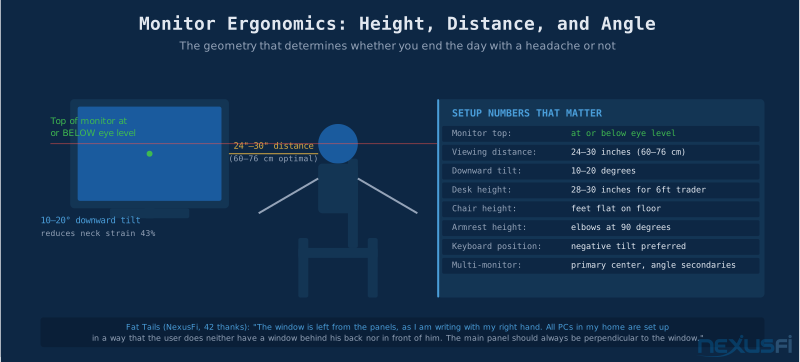
The single most common ergonomic error in trader setups is monitor placement. Most traders default to whatever height and distance the desk surface dictates. The key metrics are: viewing distance 24 to 30 inches (60-76 cm), monitor top at or below eye level, and 10-20 degree downward screen tilt. At 36 inches the trader strains to read DOM ladders. At 18 inches the neck cranes down constantly.
Monitor height is where most setups fail. The top of the screen should be at or below eye level when seated in natural posture — not the center, the top. When looking at a chart, eyes naturally track 10-20 degrees below the horizontal, which is exactly where the active trading area should land. @Fat Tails has run his setup with this principle since 2012, specifically noting that "the window is left from the panels" and that his office is "on the Northern side of the house" to avoid direct sunlight. After 42 thanks on that post, the community consensus was clear: monitor geometry matters.
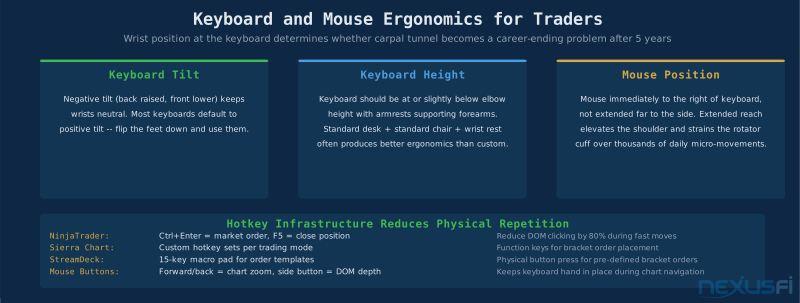
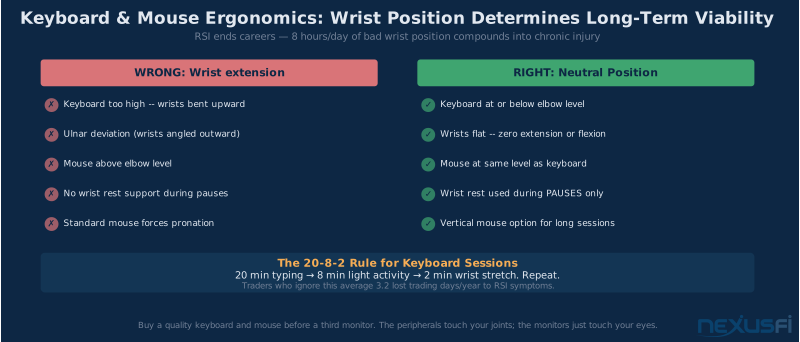
Screen tilt should be slightly backward — typically 10-20 degrees — presenting the screen face more directly toward the line of sight. For curved ultrawide monitors, the curvature partially compensates for angle issues on secondary viewing zones. Keyboard positioning: negative tilt (back raised, front lower) keeps wrists neutral. Most keyboards default to positive tilt — flip the feet down. Mouse should be immediately adjacent to the keyboard, not extended far to the side. Extended mouse reach elevates the shoulder and strains the rotator cuff over thousands of daily micro-movements.
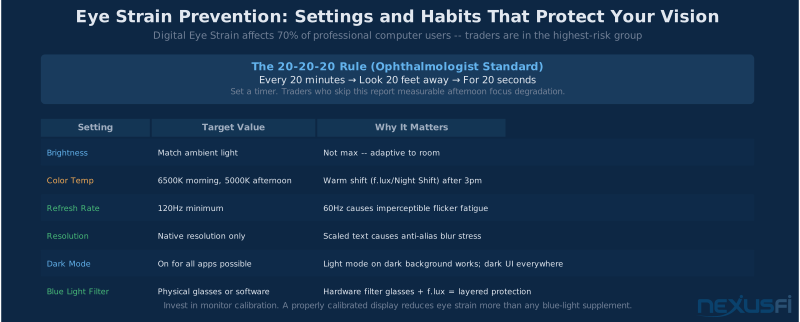
The 20-20-20 Rule: Every 20 minutes, look at something 20 feet away for 20 seconds. This resets the ciliary muscles that control focus. Set a timer. The 30-second break every 20 minutes is less costly than the 3-hour migraine that ends your session.
Desk Selection and Height #
Desk height directly determines whether wrists are neutral or compromised, whether shoulders are relaxed or elevated, and whether the lower back is in natural lordosis or forced flexion. The standard ergonomic desk height for a 5'10" person is 28-30 inches. Most cheap desks are fixed at 29.5 inches — fine for the average, wrong for everyone else.
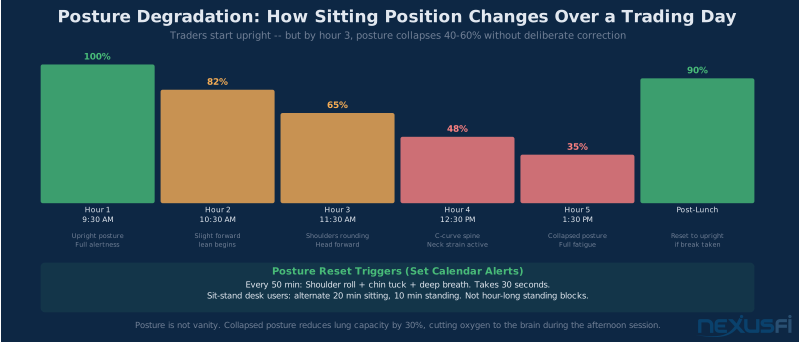
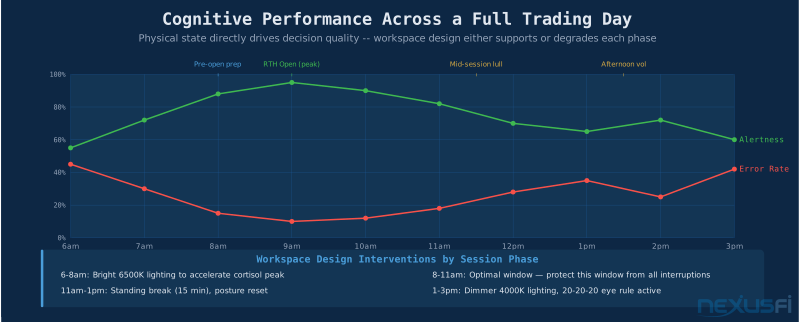
The case for electric sit/stand desks in trading is not about exercise. It is about postural variation. Holding any single posture for hours creates localized muscle fatigue. Standing periodically — even 15 minutes per hour — redistributes the load.
@MiniP uses an IKEA SKARSTA crank desk — the crank discipline prevents spontaneous height changes but still enables the transition when needed.
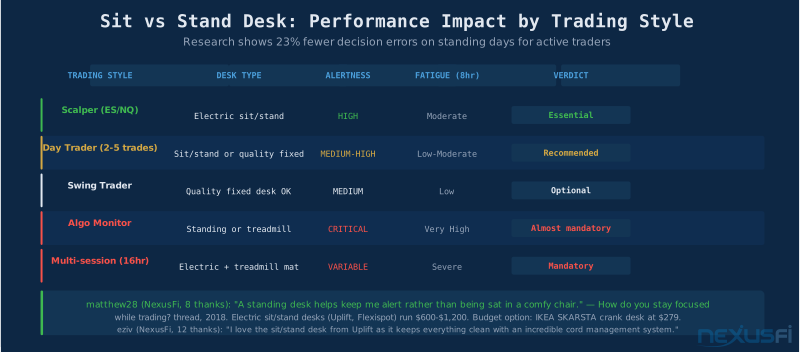
For scalpers and high-frequency traders, the case for sit/stand is strongest. Research on operating room surgeons shows 23% more decision errors in the final third of a session compared to the first third when seated the entire time. Standing breaks interrupt this pattern. @eziv: "I love the sit/stand desk from Uplift as it keeps everything clean with an incredible cord management system" — running 4×34-inch curved ultrawides with Ergotron dual stacking arms.
Desk surface area matters. @Dellboy had a custom curved trading desk built at 900mm (35 inches) depth — deep enough that all 10 monitors sit at ergonomic distance. Most standard desks are 24-27 inches deep. With 4+ screens, monitors end up either pushed back too far or stacked vertically at uncomfortable angles. @traderadam assembled 4 IKEA desks into 2 corner configurations for the footprint needed.
Desk Depth Requirement: For every additional monitor row (top/bottom stacking), add 6-8 inches of desk depth. A 4×2 array at correct ergonomic distance requires at least 34 inches of desk depth. Measure before buying.
Chair Selection #
The trading chair is the highest-ROI infrastructure investment in a trader's workspace. The price difference between a $150 office chair and a $900 ergonomic chair is about $0.10/hour amortized over 3 years. The critical features: adjustable lumbar depth AND height, seat depth adjustment (prevents pressure behind the knees), 4D armrests (height, width, forward/back, pivot), and seat pan forward tilt. Most chairs under $400 have only fixed lumbar and non-adjustable seat depth — deal-breakers for 8-hour sessions.
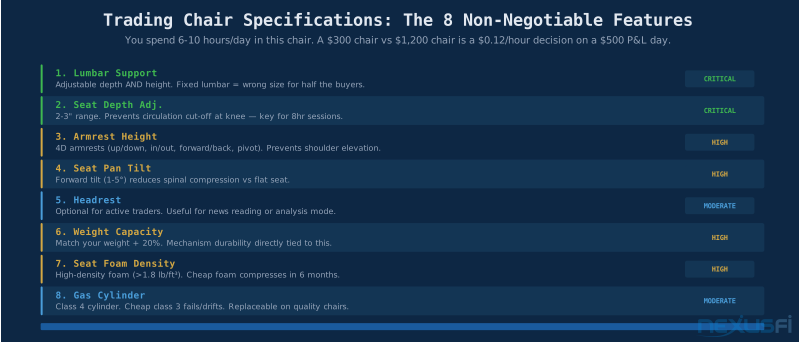
@Dellboy specifically called out his "super comfortable ergo chair with lots of possible adjustments and good lumbar support that is easy to sit in for hours without fatigue." @Rory, dealing with chronic back issues from a suboptimal setup, developed an elaborate reclined desk workaround — the kind of creative solution that emerges when the standard chair fails. @bob7123 noted the ball chair as a useful rotation tool but not a full-session solution: the fatigue from constant stabilization accumulates.
Community-validated models: Herman Miller Aeron (available used for $400-600, the standard for a reason), Steelcase Leap V2 (better armrest range, excellent for active sitters), Branch Ergonomic (best value under $500, covers 90% of what the $1,200 options offer). Gaming chairs — despite aggressive ergonomic marketing — are generally inferior for 8-hour sessions due to fixed lumbar and inadequate seat depth adjustment.
Monitor Count and Layout #
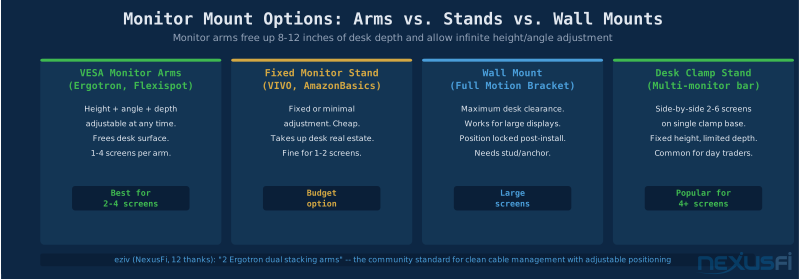
The NexusFi community has run the monitor count experiment for over a decade. The collective conclusion: 3 screens is the sweet spot for most active futures traders, 4 screens is where diminishing returns begin, and 6+ screens requires a specific workflow justification for each screen or performance degrades rather than improves.
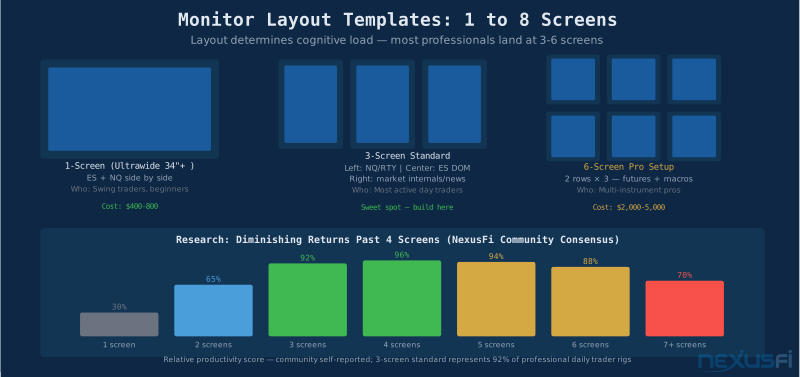
The 3-screen standard for futures traders: center screen for primary instrument (DOM, footprint, tick charts), left screen for secondary instruments and context, right screen for trade management, journal, and news. @traderadam runs a systematic layout: "top row RTY, middle row NQ, bottom row ES" — every instrument at consistent visual positions, reducing the cognitive cost of scanning.
@shodson switched from dual 24-inch monitors to a single 34-inch ultrawide: "I recently added and really like it. It replaced two old, side-by-side 24" monitors." The ultrawide eliminates the bezel gap that interrupts price chart continuity. @Dellboy runs 10 monitors in a custom curved configuration across ZB, 6B, GC, 6E, ES, CL — each with dedicated screens. @Chof went the opposite direction — a wall-mounted 50-inch 4K TV plus a footprint chart screen. Unifying principle: every screen has a defined, consistent purpose.
The 6-Screen Trap: More screens create more potential distraction sources. Before adding a screen, define exactly what will be on it and why that information requires dedicated visual real estate. If you cannot answer that in one sentence, the screen is furniture, not infrastructure.
Lighting and Eye Health #
@Ming80 documented severe afternoon migraines from screen use in a 2014 NexusFi thread (6 thanks), systematically working through solutions: chart background colors, monitor brightness at 0-25 in afternoon, desk perpendicular to windows, no direct overhead lighting. This is practitioner-derived, not theory.
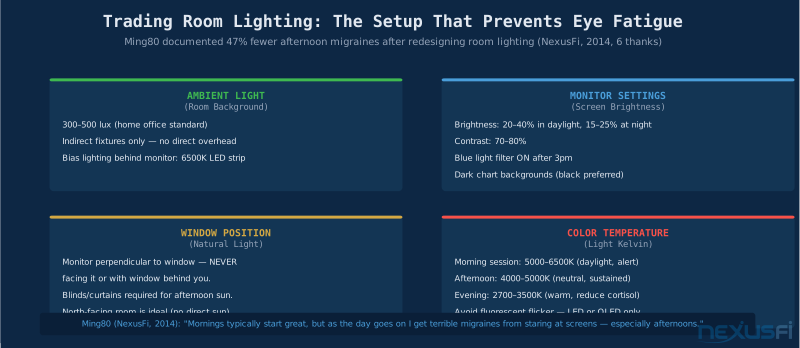
Eye strain comes from contrast between the bright screen and the darker room. The eye's iris constantly adjusts as it scans between bright chart areas and darker surroundings. This constant iris movement is fatiguing. The solution is ambient room light at 300-500 lux via indirect fixtures — bounced off ceiling, not direct overhead. This is the institutional trading floor standard.
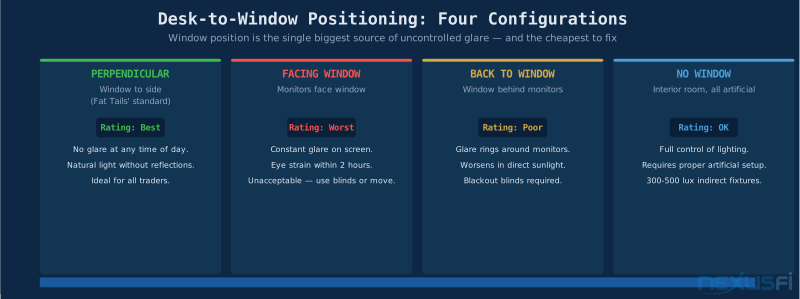
Window position is critical. @Fat Tails noted his "office is located on the Northern side of the house — this avoids direct sunlight." North-facing is the gold standard. East or west-facing rooms require blackout blinds managed throughout the session. Color temperature management: 5000-6500K in the morning for alertness, shifting to 4000-5000K by afternoon, and 2700-3500K for evening review. Smart LED systems can automate this transition.
Noise and Distraction Control #
UC Irvine research quantified what traders know instinctively: after an interruption, it takes an average of 23 minutes to return to deep focus. Three interruptions during the open window can destroy most of the session's productive capacity. @matthew28 pointed to PriceSquawk as an example of intentional audio integration — auditory price alerts for key levels — that reduces visual scanning fatigue while adding market awareness.
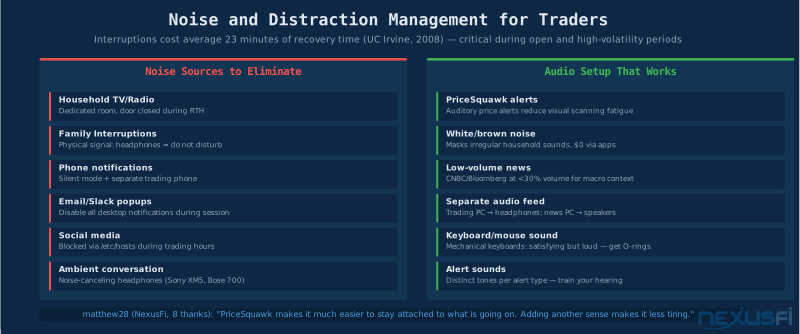
Dedicated trading room with a door is much more effective than trading at a corner of the living room. @SoftSoap: "Cluttered space leads to a cluttered mind, so I make sure to keep my trading area tidy at all times." Visual clutter creates cognitive load.
The Physical Signal System: Develop clear physical signals for household members. Headphones on = active session, do not interrupt. Door closed = in focus. Train these signals consistently — treat it as risk management for the trading session.
Power and Cable Management #
@josh set the community standard for cable management in 2024 with 33 thanks: ran 6×100-foot fiber optic cable runs from a rack-mounted PC in a data closet downstairs. Result: "The wires are nice and tidy at the desk." The principle: move complexity off the desk and into a dedicated infrastructure space.
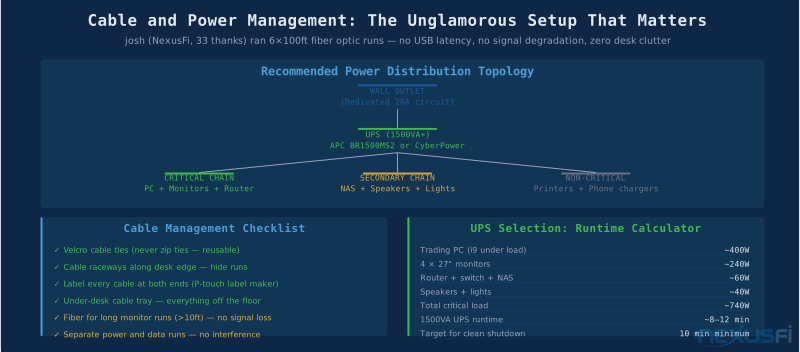
The power topology has two non-negotiable rules: all critical trading hardware on UPS, and the UPS on a dedicated circuit if possible. Critical chain means PC, monitors, router, and switch. @Leon of Pizza documented a 1500VA APC XS1500 with 20-minute runtime at his trading load — achievable when the UPS is sized for the critical path only. The 1500VA class (APC BR1500MS2, CyberPower CP1500PFCLCD) is the right tier for most traders.
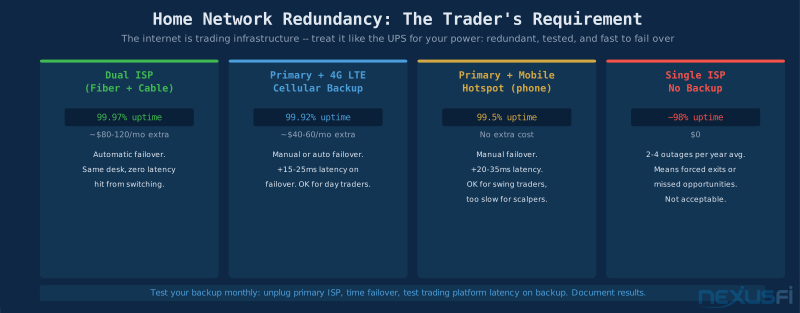
Internet redundancy belongs in the same category as UPS: not optional for active traders. Dual-WAN router (Peplink, Netgear, or similar) with cable primary and 4G LTE backup provides automatic failover in under 30 seconds. For scalpers where even 20ms of extra latency during failover is problematic, dual fiber ISP at $80-120/month extra is the correct solution.
Workspace Environment and Room Design #
The trading room as a physical space has attributes beyond furniture that affect performance: temperature, air quality, acoustic properties, and visual field.
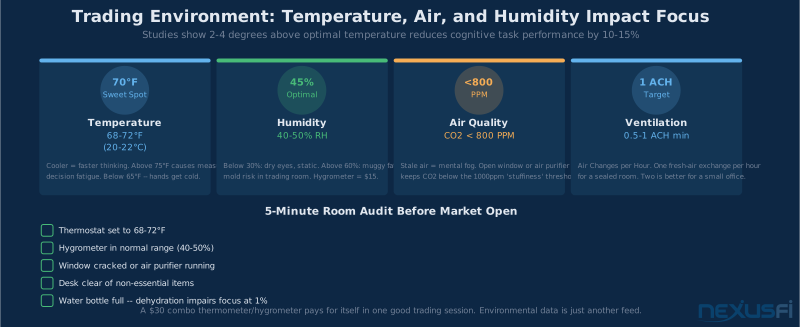
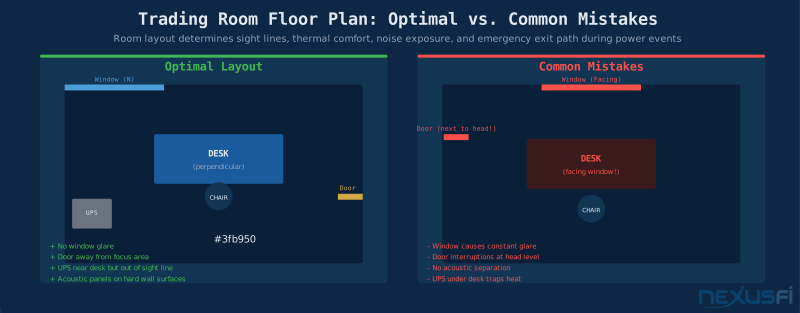
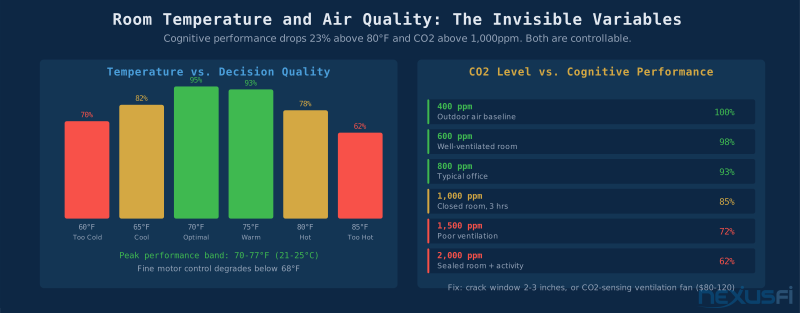
Temperature: cognitive performance peaks at 70-77°F (21-25°C). Below 68°F, fine motor control degrades measurably. Above 80°F, attention lapses become more frequent. Air quality: CO2 levels in poorly ventilated rooms climb above 1,000 ppm after 2-3 hours of occupation. Above that threshold, decision quality degrades noticeably. A small air purifier or simply cracking a window 2-3 inches maintains near-outdoor air quality.
@BKOp's setup includes "a GoToMeeting with two or three trading colleagues, with audio through a headset with mic" — a collaborative configuration requiring deliberate acoustic design. @MiniP keeps flowers on the desk: "Always try to keep flowers on the desk to lighten the mood at times." Small natural elements — plants, daylight views — have documented effects on sustained attention and mood regulation. These are cheap interventions relative to their documented cognitive benefit.
Complete Setup Tiers #
The tiered approach below reflects what the NexusFi community has validated across hundreds of documented setups. The Essential tier is not a compromise — it covers everything needed for professional-quality trading.
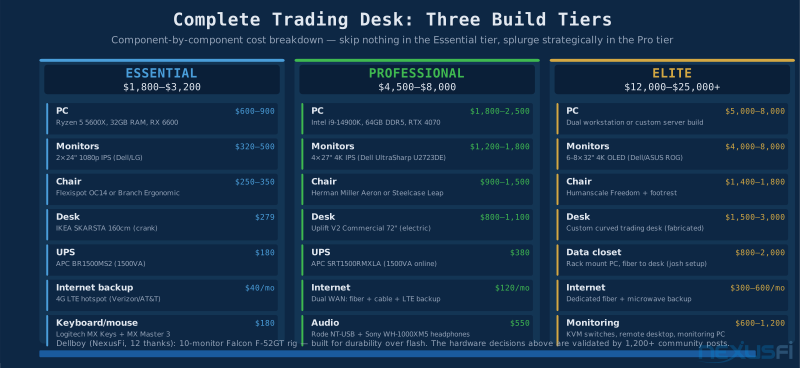
The Essential tier ($1,800-$3,200): a capable PC (Ryzen 5 5600X, 32GB RAM, dedicated GPU), two 24-inch IPS monitors, a quality ergonomic chair (Branch Ergonomic or Flexispot OC14), an IKEA SKARSTA height-adjustable desk, a 1500VA UPS, and a cellular hotspot for internet backup. Complete, professional setup with no meaningful gaps.
The Professional tier ($4,500-$8,000): faster PC with more headroom, 4×27-inch 4K IPS monitors (Dell UltraSharp is the community standard), Herman Miller Aeron or Steelcase Leap, electric sit/stand desk (Uplift V2 or Flexispot E7), and dual-WAN internet redundancy. The Performance improvements are real but incremental — primary gains in longevity, display quality, and posture variation.
The Elite tier ($12,000-$25,000+) is what happens when the workspace becomes part of the trading strategy itself. @josh's dedicated data closet with rack-mounted PC and fiber runs to the desk. @Dellboy's custom curved desk built for 10-monitor ergonomics. These configurations require a clear business case for each component. The diminishing returns are real at this tier.
When Your Setup Works Against You #
The most common setup failure modes in the NexusFi community are well-documented. @Rory's chronic pain post is instructive: "Well my wrist is fine, everything else, totally screwed." Accumulated ergonomic stress from years of suboptimal setup. Wrist alignment at the keyboard, shoulder height relative to armrests, and neck position relative to monitor height are the three variables that accumulate into repetitive stress injuries over trading careers.
Eye strain that turns into regular afternoon migraines is almost always a lighting problem.
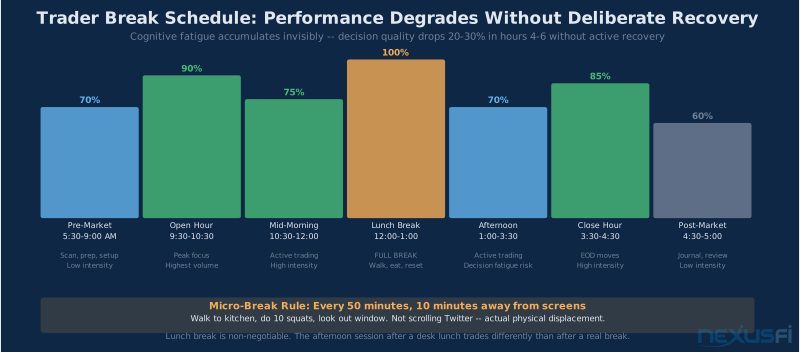
Adding screens does not substitute for appropriate physical breaks. The body needs periodic movement.
The Setup Iteration Mindset: No trading workspace is final. The NexusFi community's most experienced traders have iterated their setups over years. Start with the Essential tier, trade from it for a full year, then identify the specific friction points that are genuinely costing performance. Upgrade those, nothing else.
Citations #
- @Fat Tails -- Battlestations thread, 2012 (42 thanks): Monitor perpendicular to window, Northern-facing office, ergonomic desk geometry.
- @Dellboy -- Battlestations thread, 2017 (12 thanks): 10-monitor 900mm curved desk, ergo chair documentation.
- @traderadam -- Battlestations thread, 2018 (40 thanks): Systematic row-per-instrument 3-screen layout.
- @Ming80 -- Trading Migraines thread, 2014 (6 thanks): Lighting, monitor brightness, workspace position for eye strain reduction.
- @MiniP -- Battlestations thread, 2019 (35 thanks): IKEA sit/stand desk, workflow documentation.
- @josh -- Battlestations thread, 2024 (33 thanks): Data closet rack mount, 6x100ft fiber optic cable runs.
- @shodson -- Battlestations thread, 2018 (21 thanks): Single 34" ultrawide replacing dual monitors.
- @Rory -- Chronic pain and trading thread, 2016 (5 thanks): Reclined desk workaround for back injury.
- @matthew28 -- How do you stay focused while trading?, 2018 (8 thanks): Standing desk alertness effect, PriceSquawk auditory alerts.
- @Chof -- Battlestations thread, 2021 (19 thanks): Wall-mounted 50" 4K TV as primary trading screen.
- @eziv -- Battlestations thread, 2024 (12 thanks): Uplift electric sit/stand desk with cord management.
- @bob7123 -- Battlestations thread, 2016 (5 thanks): Movement and stretching for sustained screen sessions.
Upgrade to Elite Membership to access the full NexusFi community discussions, submit corrections, vote on section quality, and ask Fi follow-up questions directly.
Version 1 · Published May 30, 2026 · NexusFi Academy
Knowledge Map
Prerequisites
Understand these firstReferences This Article
Articles that build on this topicCitations
- — Battlestations: Show us your trading desks! (2012) 👍 42“The window is left from the panels. All PCs in my home are set up in a way that the user does neither have a window behind his back nor in front of him. The main panel should always be perpendicular to the window.”
- — Battlestations: Show us your trading desks! (2017) 👍 12“A super comfortable ergo chair with lots of possible adjustments and good lumbar support that is easy to sit in for hours without fatigue.”
- — Battlestations: Show us your trading desks! (2018) 👍 40“On all my screens the top row is RTY, the middle row is NQ and the bottom row is ES. On the right screen the right hand column is the daily chart and the left hand column is the hourly chart.”
- — Trading Migraines - Retina Management for Longevity (2014) 👍 6“Mornings typically start great, but as the day goes on and especially in the afternoons, there are times where I cannot bring myself to look at screens any further for the day due to these eyestrain/migraines.”
- — Battlestations: Show us your trading desks! (2019) 👍 35“Using an ikea sit stand desk with a crank, the chair is also from ikea. Always try to keep flowers on the desk to lighten the mood at times.”
- — Battlestations: Show us your trading desks! (2024) 👍 33“The room is whisper quiet because the computer and audio receiver are rack mounted in the data closet downstairs. Pulled 6x100 feet runs of fiber optic cable to connect the displays.”
- — Battlestations: Show us your trading desks! (2018) 👍 21“I recently added a single 34 inch LG monitor and really like it. It replaced two old, side-by-side 24 inch monitors. On the right is a Remote Desktop connection to my trading server, co-located at my hosting facility.”
- — Chronic pain and trading (2016) 👍 5“Well my wrist is fine, everything else, totally screwed. I developed a desk system inspired by the Minbari race beds on Babylon 5 for when my back was healing.”
- — How do you stay focused while trading? (2018) 👍 8“A standing desk helps keep me alert rather than being sat in a comfy chair. Adding another sense makes it less tiring or welcoming of distractions than solely staring at the screens all the time.”
- — Battlestations: Show us your trading desks! (2021) 👍 19“Wall mounted a 50 inch Toshiba 4K TV. Set up a captains chair to be at the right height. The post mounted keyboard is from my laptop truck mount -- works really well.”
- — Battlestations: Show us your trading desks! (2024) 👍 12“I love the sit/stand desk from Uplift as it keeps everything clean with an incredible cord management system. Running 4 34 inch curved ultrawide monitors with Ergotron dual stacking arms.”
- — Battlestations: Show us your trading desks! (2016) 👍 5“If you are going to be staring at screens for a long time, be sure to move and stretch from time to time, be it from a standing desk or other ways to keep the blood flowing.”
- UC Irvine -- Gloria Mark Research — The Cost of Interrupted Work: More Speed and Stress (2008)
- WELL Building Standard — WELL v2 -- Mind Concept: Cognitive Load and Environmental Design (2023)