



Market Scanner Tools for Futures Trading: Monitoring Multiple Instruments and Finding the Best Setups
Overview #
Most futures traders start with one instrument. ES, NQ, CL — pick one, learn it, live in it. Good advice for beginners. But once you've got a methodology that works, the next question is always the same: how do I find the best setup every day, not just across one instrument, but across everything I'm qualified to trade?
That's the scanner problem. Futures markets run 23 hours a day. CL gaps overnight on inventory data. 6E trends while ES chops. ZB explodes on a Fed surprise while the equity index contracts go sideways. The opportunity exists — but you'll miss it unless you've got a system for monitoring multiple instruments simultaneously and surfacing the ones worth your attention.
Market scanner tools solve this. They replace the manual process of opening 15 charts and checking each one with a structured, systematic view — a table where each row is an instrument and each column is a condition you've defined. Green light means worth watching. Red light means sit on your hands. No scanner is a trading signal. But a well-built scanner dramatically reduces the cognitive load of market preparation and keeps you focused on the best opportunities rather than the ones you happened to click on last.
This article covers how to build and use a scanner workflow for futures trading — the architecture behind effective scanners, how to define scan conditions that matter, how to run pre-market and intraday scans, and where the whole framework breaks down.
The Scanner Framework #
Before building scanner conditions, you need to understand the three distinct tools that traders often conflate:
A static watchlist is a fixed list of instruments you monitor regularly. It doesn't change day-to-day based on conditions. You're looking at the same 8-12 contracts every session. This is where you start — curating a universe of instruments you understand and are qualified to trade.
A dynamic scanner evaluates multiple instruments against defined conditions and returns only the ones meeting your criteria. In a platform like NinjaTrader's Market Analyzer or Sierra Chart's Study Summary system, you define the conditions (price, volume, volatility, indicator states) and the scanner tells you which instruments are qualifying right now. This is active filtering — you're reducing a universe of instruments to a shortlist.
An alert system is a scanner that triggers notifications when conditions are met, rather than requiring you to actively monitor a dashboard. Most platform scanners support alerts — when instrument X crosses condition Y, the platform fires a visual, audio, or email notification.
Professional scanner workflows combine all three: a curated watchlist of instruments you understand, scanner conditions that rank or filter them by daily opportunity quality, and alerts that notify you when a specific setup is forming without requiring constant screen staring.
The scanner's job isn't to find trades — it's to eliminate noise. You're not looking for buy and sell signals. You're looking for which instruments have the environmental conditions that make your setups worth watching today versus which ones you should bench and ignore.
Key Concepts #
Scanner Anatomy: Rows, Columns, and Conditions #
Every platform scanner follows the same basic architecture. Rows are instruments. Columns are data values or condition evaluations. The scanner populates each cell in real-time.
A minimal scanner might have three columns per instrument:
- ATR(14) — yesterday's average true range. Higher ATR means more daily movement, more opportunity for your setups to develop.
- RVOL — relative volume. Today's volume compared to the average for this time of day. RVOL > 1.0 means higher-than-normal participation. RVOL > 1.5 is often a leading indicator of trending conditions.
- Trend state — whether price is above or below key moving averages, or in some predefined trend state from your methodology.
A more sophisticated scanner might add columns for: distance to key levels (POC, VWAP, overnight high/low), indicator readings (RSI, momentum), time-frame alignment (are the daily, 4H, and 60m charts in the same directional mode?), and real-time alert flags.
[1] The key move here: each row in the Study Summary pulls data from 5 separate charts. The scanner collapses multi-timeframe analysis into a single glanceable row.
NinjaTrader Market Analyzer #
NinjaTrader's Market Analyzer is the native scanner tool in NT8. It functions as a spreadsheet embedded in the platform: you populate rows with instruments, then add columns using built-in or custom NinjaScript indicators. Values update in real-time during the session.
Key features:
- Conditional highlighting — cells change color when values exceed thresholds. ATR above 20 turns green, below 8 turns red, immediately flagging high vs. low volatility environments.
- Sorting — sort the entire instrument list by any column value in real-time. Sort by RVOL and the highest-participation instruments float to the top.
- NinjaScript integration — any indicator you can write in NinjaScript can appear as a Market Analyzer column. This means you can build custom multi-bar pattern detection, custom trend state outputs, or any other condition directly into the scanner.
- Alerts — each column can trigger alerts when conditions are met. The alert fires on instrument X when the ATR column crosses a threshold, or when a custom indicator returns a specific value.
The limitation: Market Analyzer evaluates conditions based on a single timeframe per row. Multi-timeframe scanning — displaying the 4H and 60m trend states simultaneously for a single instrument — requires either multiple rows per instrument or custom indicator logic that aggregates multiple timeframe values into a single output.
Sierra Chart Study Summary #
Sierra Chart approaches scanning through its Study Summary system — a window that aggregates indicator values from any chart in any open chartbook. Because Sierra supports 50+ charts in a single chartbook, you can have full multi-timeframe charts for 10 instruments (5 timeframes each = 50 charts) running silently in the background, with a Study Summary window pulling key values from every one of them into a single table.
This is the professional approach to multi-timeframe scanning in Sierra: background chartbook handles the data, Study Summary provides the dashboard, execution chartbook stays clean. The cognitive load drops much — instead of opening and closing 10 different sets of charts, you glance at the Study Summary, find what's interesting, and open one execution view.
Condition Categories #
Scanner conditions fall into four categories. Effective scanners use at least two — most use three or four in combination.
Price-based conditions: Current price relative to key levels. Distance from VWAP. Gap from prior close. Position within overnight range. These tell you where the market is relative to structural reference points.
Volume-based conditions: Relative volume (today vs. average). Volume rate (how fast volume is accumulating). Whether today's volume is above the prior session's pace. Volume conditions flag participation anomalies — a market trading 2x its normal volume at 9:35 AM is likely trending, not ranging.
Volatility-based conditions: ATR (daily and intraday). Bollinger Band width. Range as a percentage of prior range. Low-volatility conditions (compression) set up for expansion plays. High-volatility conditions flag trending environments or news-driven days where your normal levels lose predictive value.
Indicator state conditions: Trend alignment across timeframes. Specific indicator readings (RSI extremes, MACD crossovers, moving average relationships). Pattern flags from your methodology. These are the most custom to your trading approach — and the ones most likely to produce false positives if not validated carefully.
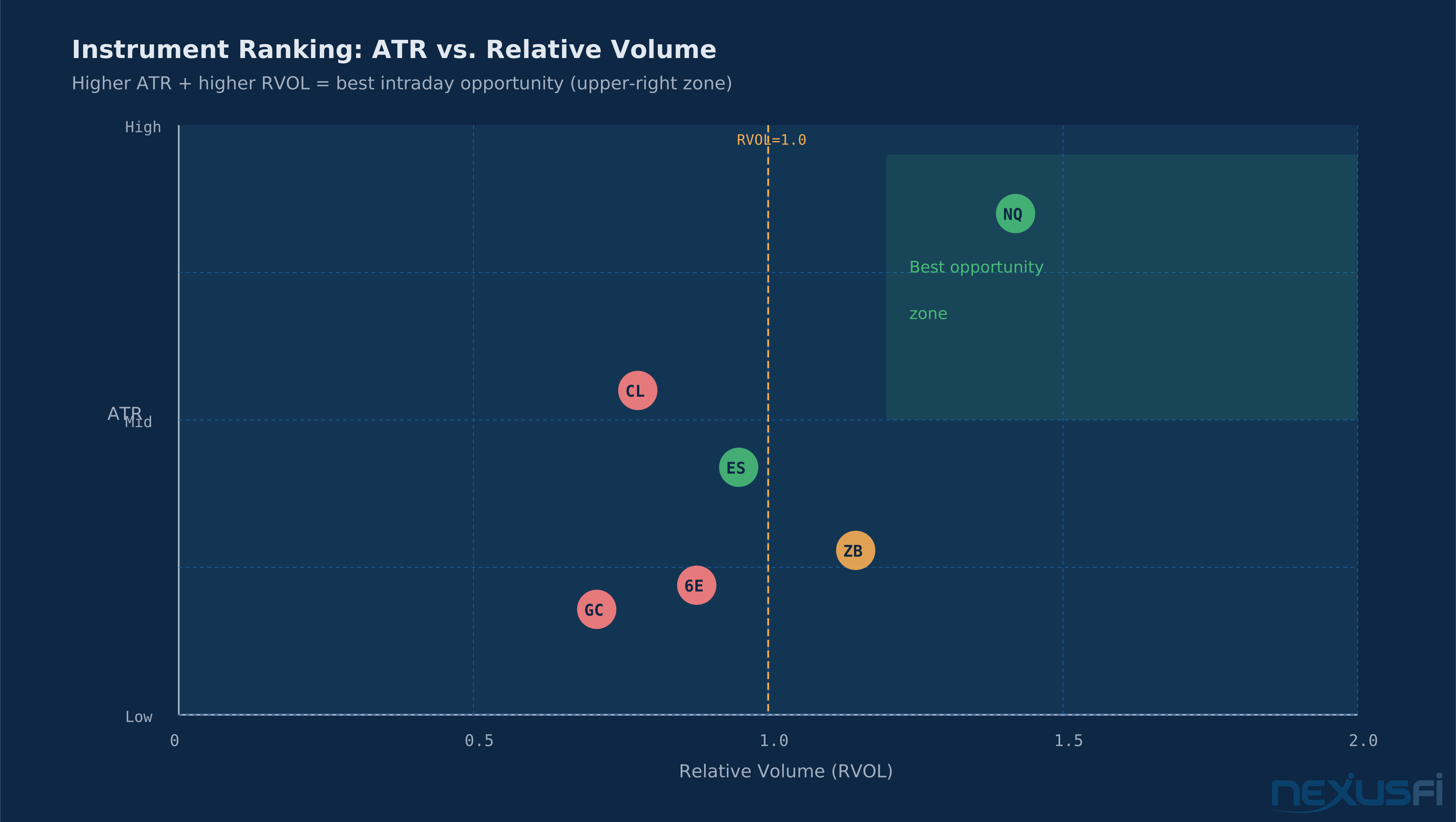
Start with ATR and RVOL as your only two scanner columns. Run them for a month before adding anything else. These two data points answer the only two questions that matter before RTH: does this market have enough range to make my setups worth the risk, and is there enough participation to expect normal behavior? Everything else is refinement.
Building Your Instrument Universe #
A scanner is only as useful as the instruments it's watching. Scanning 50 futures contracts simultaneously sounds impressive; it's mostly noise. Professional traders scan a curated universe — instruments they understand mechanically, instruments their strategy is validated on, and instruments with sufficient liquidity to execute their size.
A realistic starting universe for a futures day trader:
Equity index futures: ES, NQ, YM, RTY — highly correlated but different personalities. NQ amplifies tech-sector moves, RTY often leads risk-on/risk-off turns. Scanning all four helps identify which index is leading intraday.
Energy: CL primary, NG and RB for context. Each has distinct volatility profiles around their specific demand drivers.
Metals: GC (gold) trades as a macro instrument — inverse to the dollar, positive to uncertainty. SI (silver) more volatile, more industrial-demand driven.
Rates: ZB (30-year), ZN (10-year), ZF (5-year). Essential context for equity index traders — bond moves often lead equity moves around economic data.
Currencies: 6E, 6J, 6A, DX for traders incorporating macro context.
For most traders, 8-10 instruments is the right scanning universe — enough to find daily opportunity without drowning in noise.
@SoftSoap documented a disciplined pre-market routine that included "Lay out areas in NinjaTrader where I will likely enter a trade, as well as no trade zones, Enter alerts in NinjaTrader, Ensure my ATM strategies are set and good to go" — the scanner setup phase that happens before the open to define exactly which instruments are in play and where. [3]
Pre-Market Scanning Workflow #
Pre-market scanning is where most of the analytical work happens. RTH is execution time — the scanner should largely be pre-populated before the open. Here's how to structure it:
Step 1: Economic Calendar Check (6:00-7:00 AM EST) #
Before looking at any chart, check the economic calendar. High-impact releases (NFP, CPI, FOMC decisions, GDP) at the core alter scanner behavior. On a high-impact data day:
- Volatility conditions immediately before the release are compressed and unreliable
- ATR-based filters become less meaningful because the release will gap price through levels
- Position exposure increases dramatically around release time
Know what's scheduled. Know when. Bench any instruments with upcoming high-impact data until after the release and initial price discovery.
— documented before looking at a single chart. [4] The calendar check gates everything else. No point identifying an ES breakout setup at 9:30 if there's a FOMC statement at 1 PM that will invalidate whatever setup you took in the morning session.
Step 2: ATR and RVOL Pre-Market Assessment #
With the calendar checked, populate your scanner with last night's ATR values and compare to the 5-day and 20-day ATR averages. This tells you immediately which instruments are in high-volatility vs. low-volatility environments.
— three numbers that immediately characterize each instrument's opportunity quality for the day. [5] CL with ATR 17 and RVOL 75% is a lower-opportunity day. NQ with ATR 30 and RVOL 90% is trending toward normal participation. GruttePier's pre-market prep is a model of scanner efficiency: two metrics per instrument, evaluated before the open, leading directly to an explicit session classification (range day vs. trend day).
Step 3: Overnight Range and Key Level Markup #
After ATR/RVOL, map the overnight range for each instrument in your universe. Overnight high, overnight low, prior day high and low, previous settlement close. These four levels frame the day.
Scanner condition: flag any instrument where the current price is within 15% of the overnight high or low. These instruments are approaching significant levels and warrant closer attention at the open.
Four reference prices, gap assessment, done. [4] His checklist also notes S/R zones and the instrument's average true range for the prior sessions — everything needed to assess whether today's range is typical or extended.
Step 4: Trend State Assessment #
The final pre-market scan step: trend alignment across timeframes for each instrument. You need to know, before the open, whether each instrument is in an uptrend, downtrend, or balance on your relevant timeframes (typically daily, 4H, 60m).
Scanner condition: define a simple trend state output from your methodology's indicator set. Flag instruments where daily, 4H, and 60m are all aligned in the same direction. These are the "full trend" instruments — all timeframes agree, which means your directional bias is clear.
Flag instruments where timeframes conflict. These are the "chop" instruments — avoid or trade very small until the conflict resolves.
The pre-market trend state scan tells you the directional bias going into the open — it does not tell you where to enter. An instrument in full uptrend on the daily/4H/60m can still open below VWAP and chop sideways for 2 hours before resuming the trend. The scan narrows your universe and establishes bias; RTH price action determines whether and when you trade.
Intraday Scanner Monitoring #
Once RTH opens, scanner use shifts from preparation to monitoring. You're no longer building the picture — you're watching for deviations from what the pre-market scan suggested.
RVOL Intraday Progression #
Track RVOL through the session. A market that opens at RVOL 0.8 and climbs to RVOL 1.5 by 10 AM is attracting increasing participation — a sign that institutional activity is entering. A market that opens at RVOL 1.2 and drops to 0.7 by 10 AM is losing participation — typical of a day that had an early gap fade and is now in dead-money consolidation.
Scanner condition: flag any instrument where RVOL crosses 1.5 during RTH. This is often a sign of trend-day conditions forming.
Alert-Based Scanning #
The most efficient intraday scanner setup uses alerts, not constant visual monitoring. You pre-define the conditions that matter to your methodology and let the platform notify you when they're met.
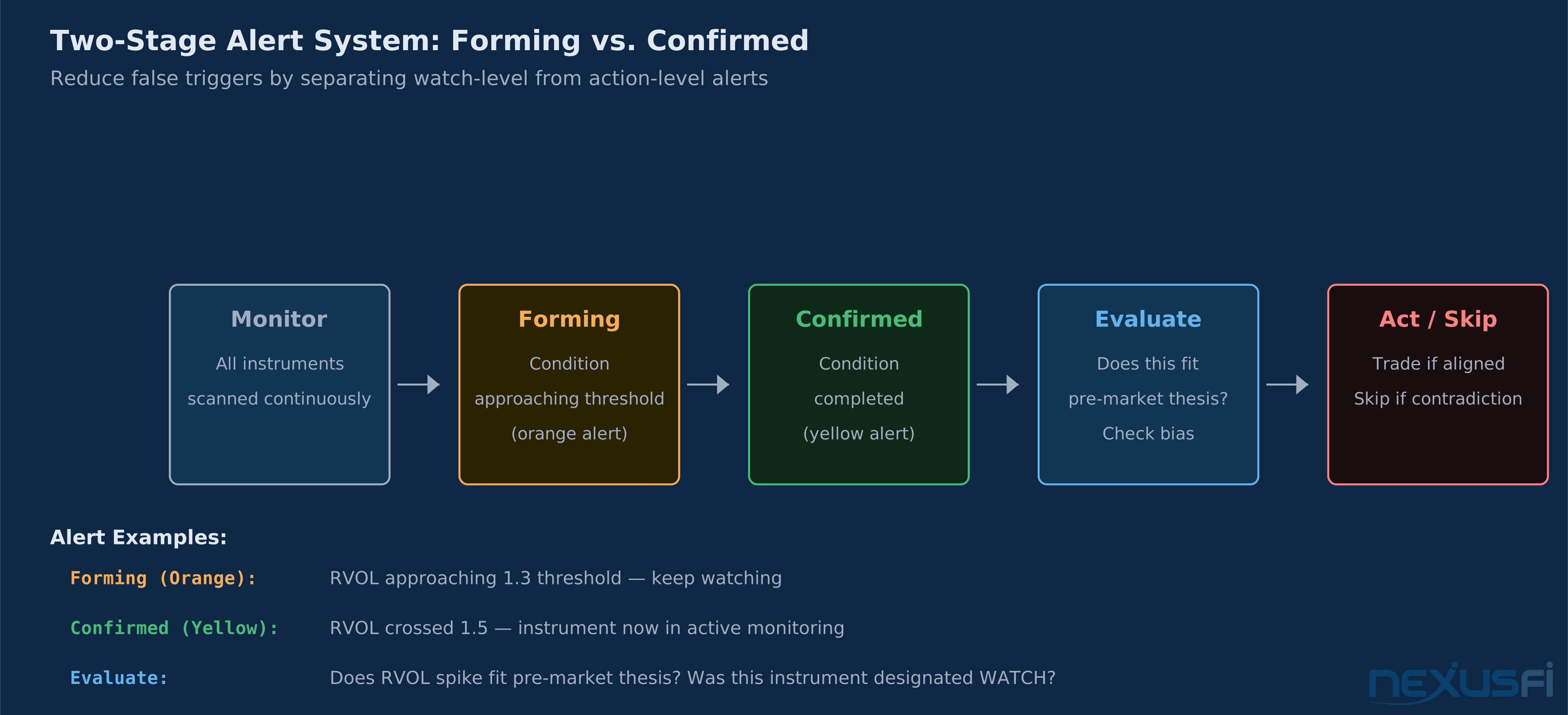
The architecture: alerts fire when a condition is forming (orange — watch it) and when it's confirmed (yellow — now it qualifies). Two-stage alerting reduces false triggers. You get pinged when something warrants attention, not every time a bar closes.
Practical alert conditions for most methodologies:
- Instrument X crosses VWAP — directional change signal, assess the fill pattern on the cross
- ATR expansion crosses threshold — volatility pickup, potential trend day developing
- Instrument X touches overnight high/low — approaching key structural level
- RVOL crosses 1.5 — participation inflection, reassess session character
- Multi-timeframe alignment achieved — all monitored timeframes now in agreement
Intermarket Correlation Scanning #
Futures markets don't trade in isolation. ES and NQ move together most of the time but diverge at specific moments that tell you something about sector rotation or market character. ZB (bonds) and ES often trade inversely — when bonds rally, money is seeking safety, and equity futures often fall. USDJPY and ES correlate positively under normal risk conditions.
A professional scanner doesn't just watch each instrument in isolation — it also monitors key intermarket relationships for confirmation and conflict signals.
Index Correlation Confirmation #
When trading an equity index future, watch the other index contracts for confirmation.
The scanner application: add a cross-instrument confirmation column. Flag ES setups where NQ and RTY are simultaneously at their own equivalent levels. This is high-confluence — three correlated instruments all at structural reference points simultaneously. Trade the one with the best entry, size up.
Contrast: ES at a key support level, NQ ripping higher, RTY making new session lows. This conflict tells you equity index participation is fragmented. The ES setup is lower-quality — the other indices aren't confirming the signal.
Macro Correlation Monitoring #
For traders who trade instruments affected by macro flows, the scanner should include key intermarket relationships as explicit columns:
- USDJPY — tracks risk sentiment. USDJPY falling while ES is at support is a warning: safe haven flows are building, the support may not hold.
- ZB/ZN (Treasury bonds/notes) — inverse to equity risk appetite under normal conditions. Bonds and equities rallying simultaneously is anomalous — it usually means QE-driven liquidity distortion and requires extra caution on directional trades.
- VIX — rising VIX while ES is at support is a warning. Falling VIX while ES is consolidating suggests the consolidation is healthy and a breakout higher is more likely.
- DX (Dollar Index) — matters for commodity futures. Falling dollar typically supports gold and crude; rising dollar headwinds commodities.
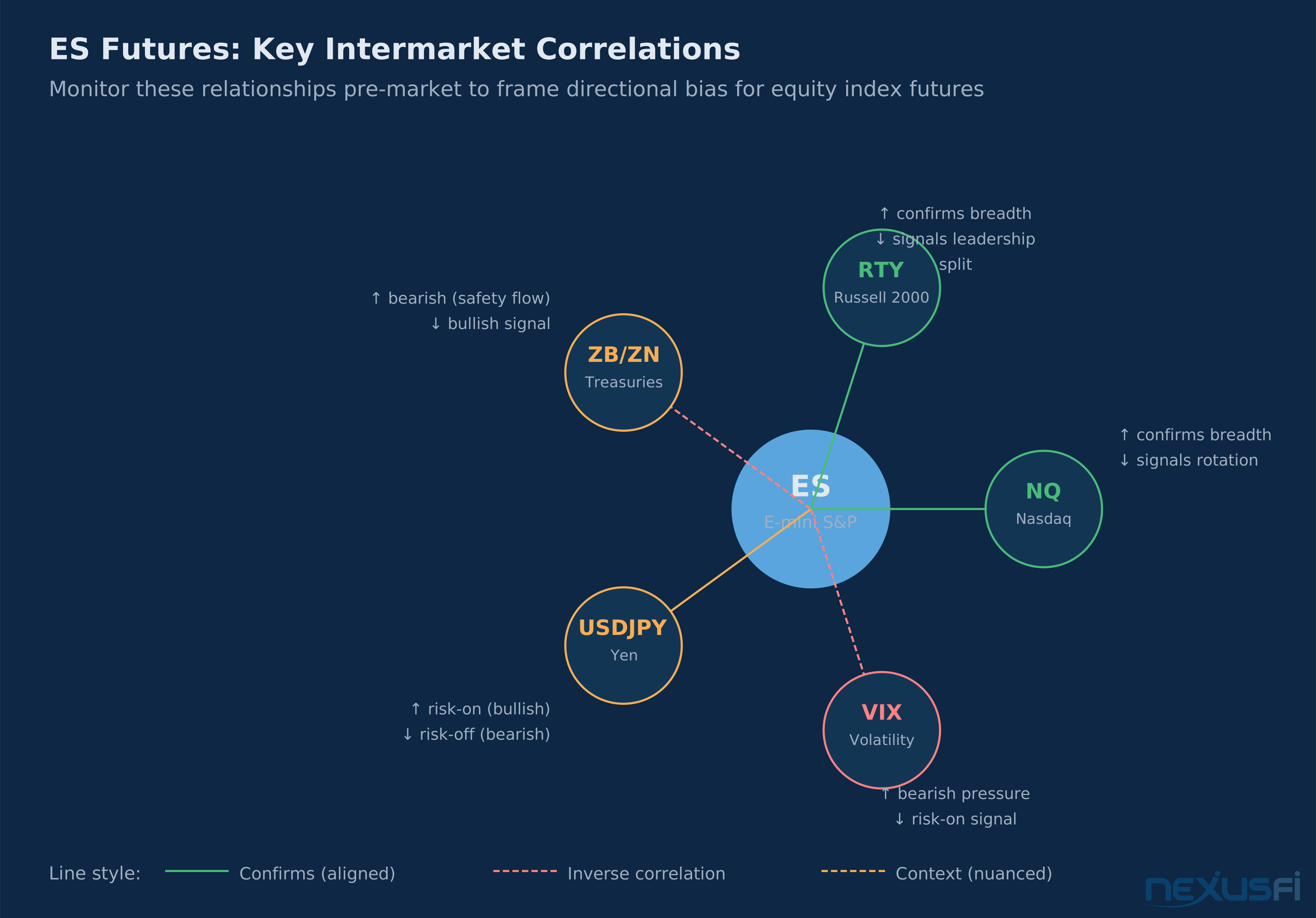
Scanner implementation: add columns for the macro instruments relevant to your primary trading instruments. Don't add all of them — add the three or four that your methodology actually uses for context. Review the relationship values pre-market, then check for divergences intraday.
When Scanners Fail #
Scanner tools have specific failure modes. Knowing them prevents over-reliance at exactly the wrong moments.
High-impact news events render pre-market scanning irrelevant. When NFP prints 200K jobs versus an expectation of 185K, the ATR and RVOL readings you calculated pre-market mean nothing. Price discovery after a major surprise is chaotic — instruments gap through established levels, volatility spikes 3-4x the scanner's ATR reading, and correlation relationships temporarily decouple. The scanner correctly identifies that conditions changed; it cannot tell you what the new setup looks like.
Low-liquidity sessions break volatility filters. Overnight sessions between 6:00 PM and 8:00 AM EST often have 10-20% of RTH volume. RVOL calculations during this window are unreliable — a 1.5 RVOL reading on ES at 3 AM means something completely different than the same reading at 10 AM. If your scanner uses RVOL alerts overnight, expect excessive noise.
Simultaneous market-wide events disable intermarket confirmation scanning. Flash crashes, geopolitical shocks, circuit breaker events — in these moments, every instrument in your scanner moves together in one direction. The cross-instrument confirmation logic that normally filters setups now confirms every instrument simultaneously, which is useless signal. When everything turns red at the same time, the scanner isn't telling you to trade everything — it's telling you that normal market structure has been suspended.
Threshold scanning creates setup chasers. Scanners are better at identifying which instruments are worth watching than at timing entries. Traders who use scanner alerts as direct entry triggers — "RVOL crossed 1.5, buy immediately" — are using the tool wrong. The scanner surfaces opportunity. Your methodology determines when and whether to take it.
A scanner that fires alerts on 6 instruments simultaneously is almost always telling you nothing useful. Normal market behavior produces setups across different instruments at different times. When multiple instruments trigger simultaneously, check for a macro trigger that's driving everything. In those moments, the normal setup evaluation process doesn't apply.
Correlation assumptions break during regime changes. The USDJPY-ES positive correlation holds under normal risk conditions — but Bank of Japan interventions, geopolitical shocks, and major policy shifts can decouple these relationships for weeks. Macro correlations need periodic re-evaluation; what worked in 2022 doesn't always work in 2024.
Custom conditions often overfit. A scanner column that triggered perfectly on historical data but rarely fires live has been over-tuned to past conditions. Keep scanner conditions simple — ATR, RVOL, price-to-level relationships. Complex multi-condition logic with specific parameter settings tends to stop working when market character shifts.
Practical Application #
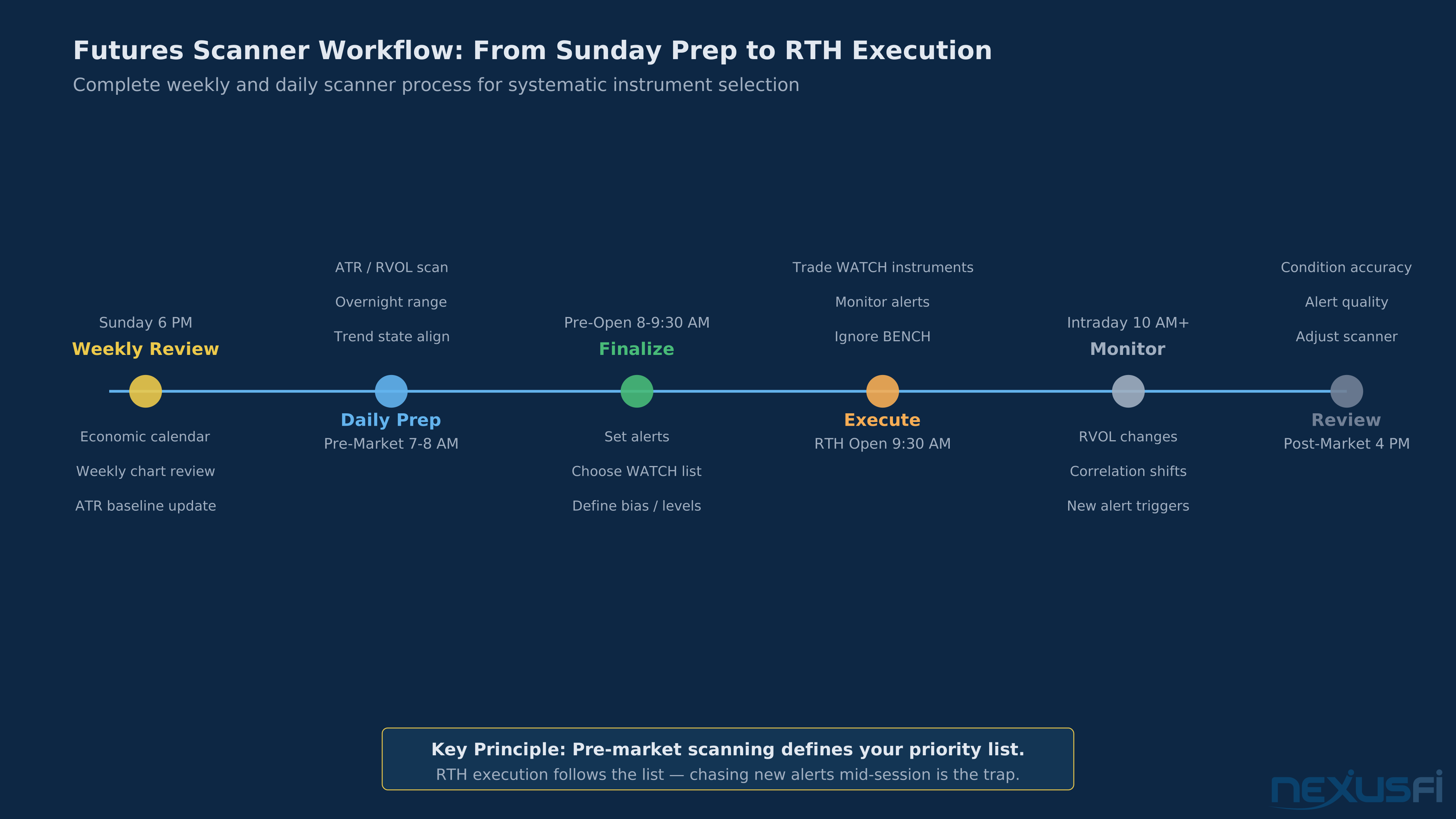
Here is a complete scanner workflow from Monday pre-market through Friday close:
Sunday Preparation (20 minutes) #
Review the economic calendar for the week. Note high-impact releases and flag those dates — on those mornings, delay the ATR/RVOL evaluation until after the release is absorbed (30-45 minutes post-print). Review weekly charts for each instrument: which are at key weekly levels vs. mid-range? Update your ATR baselines — compare today's ATR to the 20-day ATR rather than using fixed thresholds.
Daily Pre-Market (30-45 minutes, 7:00-8:00 AM EST) #
- Check the economic calendar for today's releases. Note times and expected magnitude.
- Populate ATR and RVOL scanner. Sort by RVOL to see which instruments are attracting above-normal volume.
- Map overnight range and prior day high/low for each instrument in your top 3-4 by RVOL.
- Assess trend state alignment (daily/4H/60m) for the top-ranked instruments.
- Set alerts for the session: VWAP crossings, key level approaches, RVOL inflection points.
- Define which instruments you're actively trading vs. monitoring vs. benching today.
The output of pre-market scanning should be a short list — two or three instruments that you're actually watching, with a clear bias and specific levels where your methodology activates.
RTH Execution Session #
During RTH, the scanner runs in the background. You're trading the one or two instruments you identified in pre-market prep — not staring at the scanner. Alerts trigger when something warrants attention: RVOL spike on a benched instrument, unexpected volatility expansion, correlation divergence.
The critical discipline: an alert means "look at this," not "trade this immediately." Check the alert, assess whether the developing condition fits your pre-market thesis, decide consciously whether to add this instrument to your active list.
Post-Session Review (15 minutes) #
Review which conditions fired during the session. Did RVOL alerts correctly identify instruments that moved? Track this over time. Conditions that consistently identify high-opportunity instruments stay in the scanner. Conditions that fire frequently but don't identify real opportunity get adjusted or removed.
What Effective Scanner Output Looks Like #
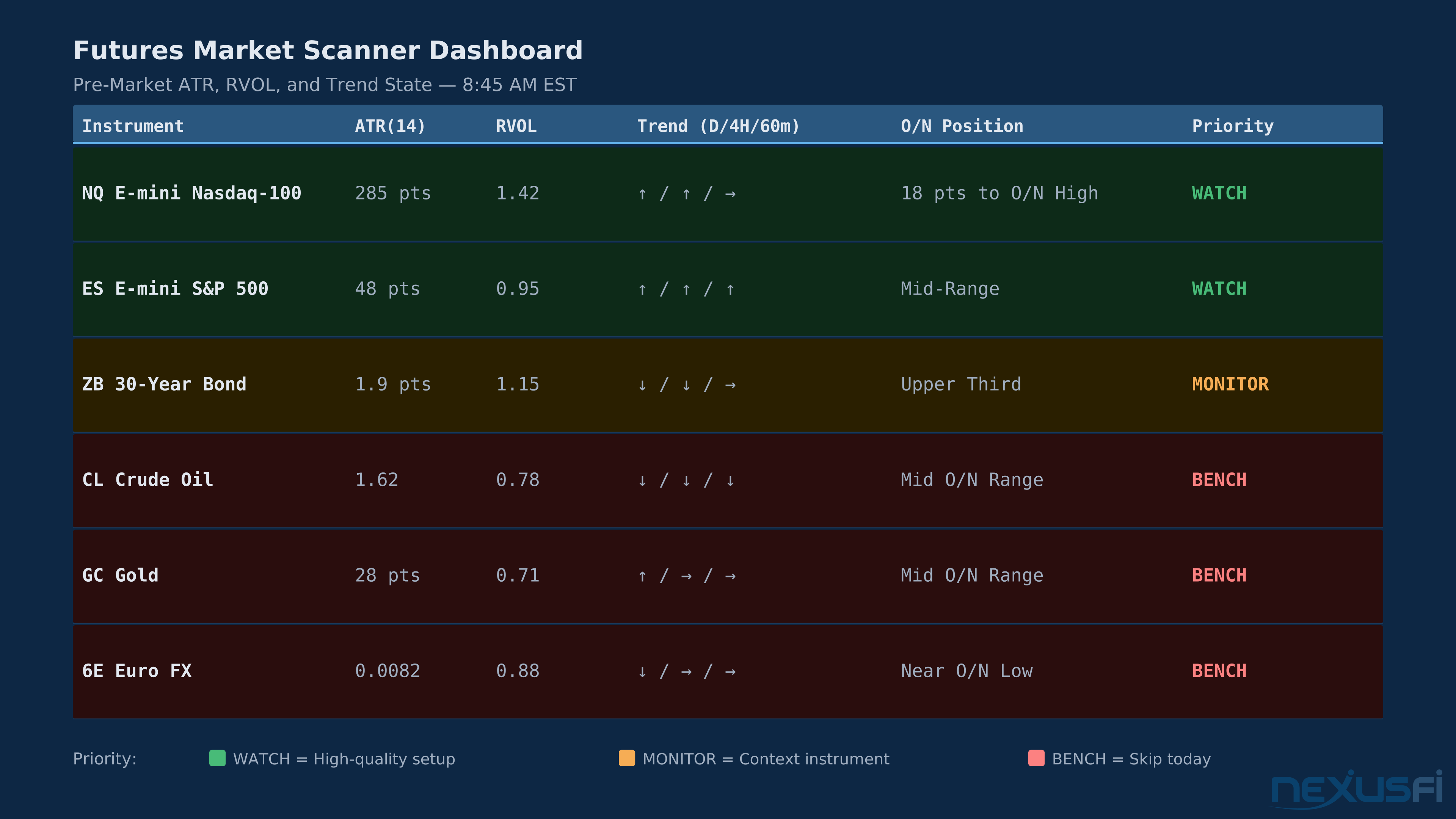
On a normal day without major economic releases, a well-built scanner outputs something like this at 8:45 AM EST:
| Instrument | ATR (14d) | RVOL | Trend (D/4H/60m) | Distance to Overnight High | Priority |
|---|---|---|---|---|---|
| NQ | 285 pts | 1.42 | Up/Up/Flat | 18 pts (6%) | WATCH |
| CL | 1.62 | 1.31 | Down/Down/Down | 0.38 (24%) | BENCH |
| ES | 48 pts | 0.95 | Up/Up/Up | 12 pts (25%) | WATCH |
| GC | 28 pts | 0.78 | Up/Flat/Flat | 8 pts (29%) | BENCH |
| ZB | 1.9 pts | 1.15 | Down/Down/Flat | 0.21 pts (11%) | MONITOR |
Knowledge Map
Go Deeper
Build on this knowledgeCitations
- — Ninjus Journal (2020) 👍 13“I went looking for something similar for futures but couldn't find anything close. So naturally I've done my best to hack something together in Sierra Chart.”
- — Ninjus Journal (2020) 👍 13“I have two versions. One for scanning 5 markets and another for scanning 10. Each instrument has a Monthly, Weekly, Daily, 4H and 60M chart. This all is then presented as a Study Summary.”
- — SoftSoap's NQ Journey - from SoftSoap to SoftGold (2016) 👍 29“Lay out areas in NinjaTrader where I will likely enter a trade, as well as no trade zones, Enter alerts in NinjaTrader, Ensure my ATM strategies are set and good to go on NinjaTrader.”
- — Price Action Ripper's Journal (2014) 👍 4“Here is my pre-market checklist: 1. Review Economic Calendar 2. Check Daily Chart for Macro Picture 3. Mark Overnight High and Low / Mark PHOD and PLOD”
- — GruttePier's trading journal to getting profitable (2018) 👍 14“CL - ATR 17, RVOL 75%. ES - ATR 10, RVOL 93%. NQ - ATR 30, RVOL 90% - Intraday action is completely in sync with ES.”
- — Ninjus Journal (2020) 👍 10“I have alerts for the actionable signals I like across all time frames. Separated inside/outside forming and inside/outside confirmed alerts. The purpose of this is to keep me out of the noise.”
- — Markets to watch whilst trading ES (2015) 👍 2“The moves where all three markets are out of balance in the same direction have the greatest power, its like the breaks have come off.”
- — The Scalper's Journey (2017) 👍 14“Market correlation exists. I believe that all traders with extensive screen time would agree on this. The ES only serves as a confirmation tool as to whether I take a trade in the CL/GC/TF or not.”
- — Correlations and Inverse correlation ES (2015) 👍 11“USDJPY down is bearish for the ES. ZB/ZN up is bearish for the ES. The logic is if haven flow goes to bonds seeking safety, it flows out of equities. VIX up is bearish for the ES.”
- — A new (open source?) trading platform (2026) 👍 7“Hoping to resuscitate this thread... :idea: As a 40+ year IT professional, I've spent a considerable amount of time (past 18+ years) trying to mesh my passions for both trading and programming, initially as a hobbyist and now full-time. I've used most of the popular retail trading platforms ([UR”
- — Automated trading on VPS (2019) 👍 4“[QUOTE=edgefirst;8741]You are welcome. I am glad that my post can be of help of other people. You will probably need 90MB to run NinjaTrader with a single strategy. You will also need a lot of memory for TWS if you use IB as your broker. I am using 896MB at this time because I have to run Trades”