



Pine Script Strategy Backtesting: The Complete Guide to Reliable TradingView Backtests
Overview #
TradingView's Strategy Tester is the most democratized backtesting tool in retail trading — millions of traders use it to evaluate Pine Script strategies before risking capital. Most of them are looking at results that lie.
The lies aren't obvious. The equity curve climbs steadily. The win rate looks reasonable. The drawdown feels manageable. Then you run the strategy live and watch the edge disappear within two weeks. This isn't bad luck. It's a predictable consequence of how TradingView's backtesting engine works, compounded by how most traders configure their tests.
This article is specifically about Pine Script strategy backtesting — not just whether your strategy looks good, but whether you've tested it in a way that predicts live performance. That means understanding repainting, commission and slippage configuration, parameter optimization bias, walk-forward methodology, and the specific performance metrics that separate real edges from statistical noise.
The Pine Script fundamentals article covers how to write strategies. This one covers how to test them. See backtesting trading strategies for a platform-agnostic treatment. The backtest-to-live performance gap covers why even correctly configured tests diverge from reality.
Key Concepts #
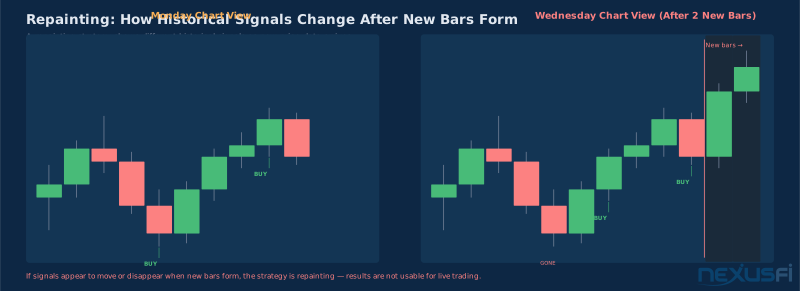
Repainting — When a script's historical signals change as new bars form. The chart shows a beautiful, profitable-looking signal in the past, but that signal only appeared after future data influenced the calculation. In live trading, you never have future data, so the signal never appears the same way.
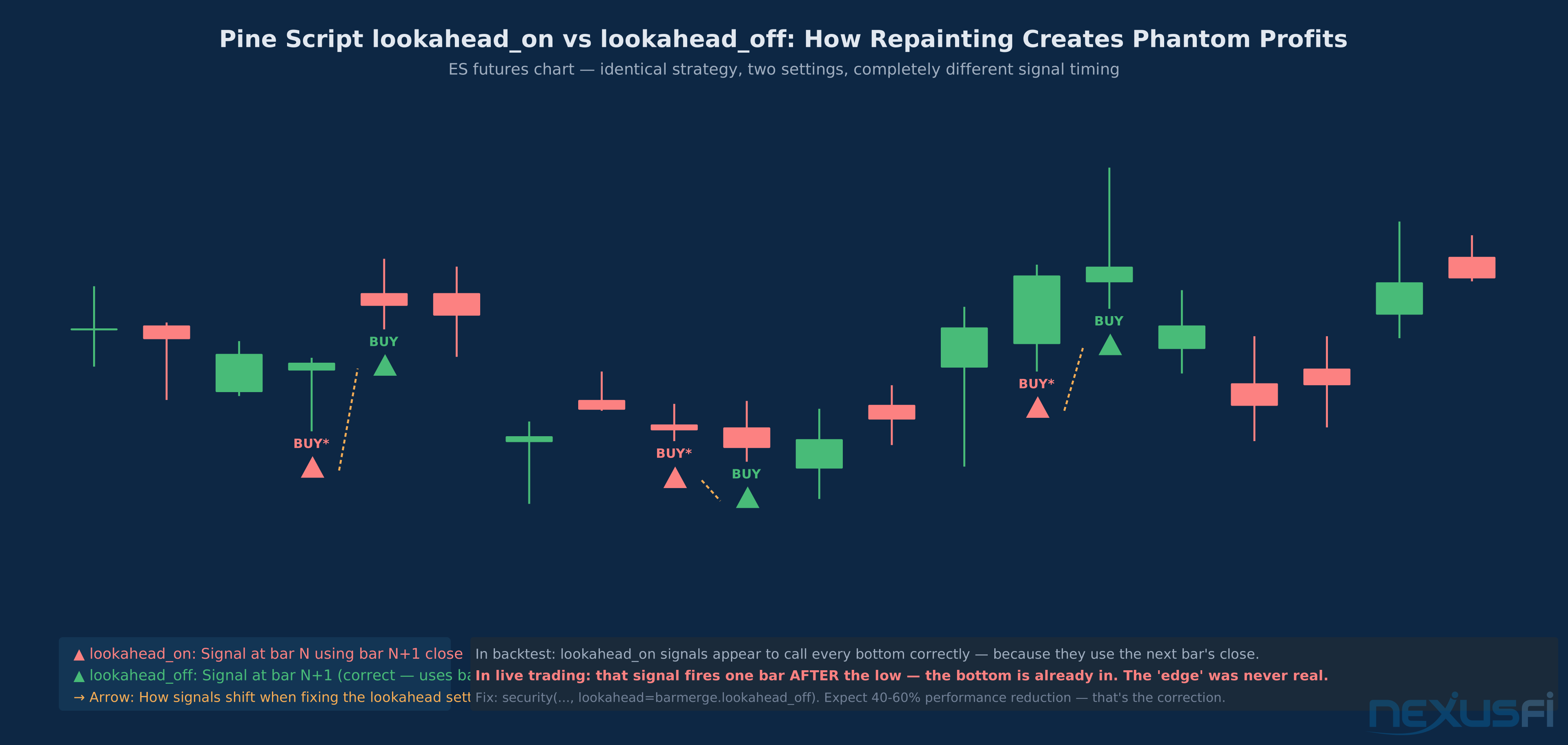
Lookahead Bias — A calculation that uses data from the current bar's close or future bars to generate a signal that pretends to execute at the open. Common in scripts that use close price to generate a signal and claim entry on the same bar's open.
Curve Fitting (Overfitting) — When a strategy's parameters are tuned so specifically to historical data that they capture noise rather than signal. The strategy performs brilliantly in backtests and fails systematically live because the noise patterns it learned don't repeat.
Walk-Forward Analysis — Testing methodology that divides historical data into sequential in-sample and out-of-sample periods. Parameters are optimized on in-sample data and tested on subsequent out-of-sample data, mimicking how a strategy would actually be deployed over time.
Bar Magnifier — TradingView's feature (available on Premium accounts) that lets strategies execute intrabar using tick or minute data rather than just on bar close. Critical for futures day trading backtests where entry timing within a bar matters.
Profit Factor — Gross profit divided by gross loss. The single most useful summary metric for evaluating a strategy's edge quality — values above 1.5 are worth investigating; values below 1.0 mean the strategy loses money before friction.
Net Profit Factor — Total winning trades divided by total losing trades. Often confused with Profit Factor (gross profit / gross loss). Net Profit Factor is less useful than raw Profit Factor because it includes commissions and slippage, making it account-specific rather than strategy-specific.
Why TradingView's Strategy Tester Produces Misleading Results #
Three structural issues with TradingView's backtesting engine affect virtually every strategy test:
Default Execution Is Unrealistic
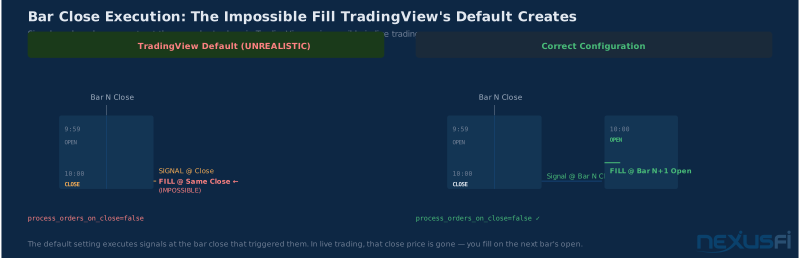
TradingView strategies execute at bar close by default. If your strategy generates a signal on bar close, TradingView fills the order at that same bar's close — the price you just used to generate the signal. In live trading, this is impossible. You can't both observe the close price and fill an order at that close price simultaneously. The order fills on the next bar's open at best.
Fix: Add process_orders_on_close=false to your strategy declaration or ensure your entry logic uses close[1] or triggers explicitly on bar open. This single fix often reduces backtested performance by 15-30% — which is actually good news. That reduction reveals the inflation that was hidden in the default setting.
Default Commission and Slippage Are Zero
TradingView's default configuration sets both commission and slippage to zero. As @kevinkdog has documented, this is the single most common source of backtest inflation — even a 60% win rate strategy can become unprofitable after realistic transaction costs.
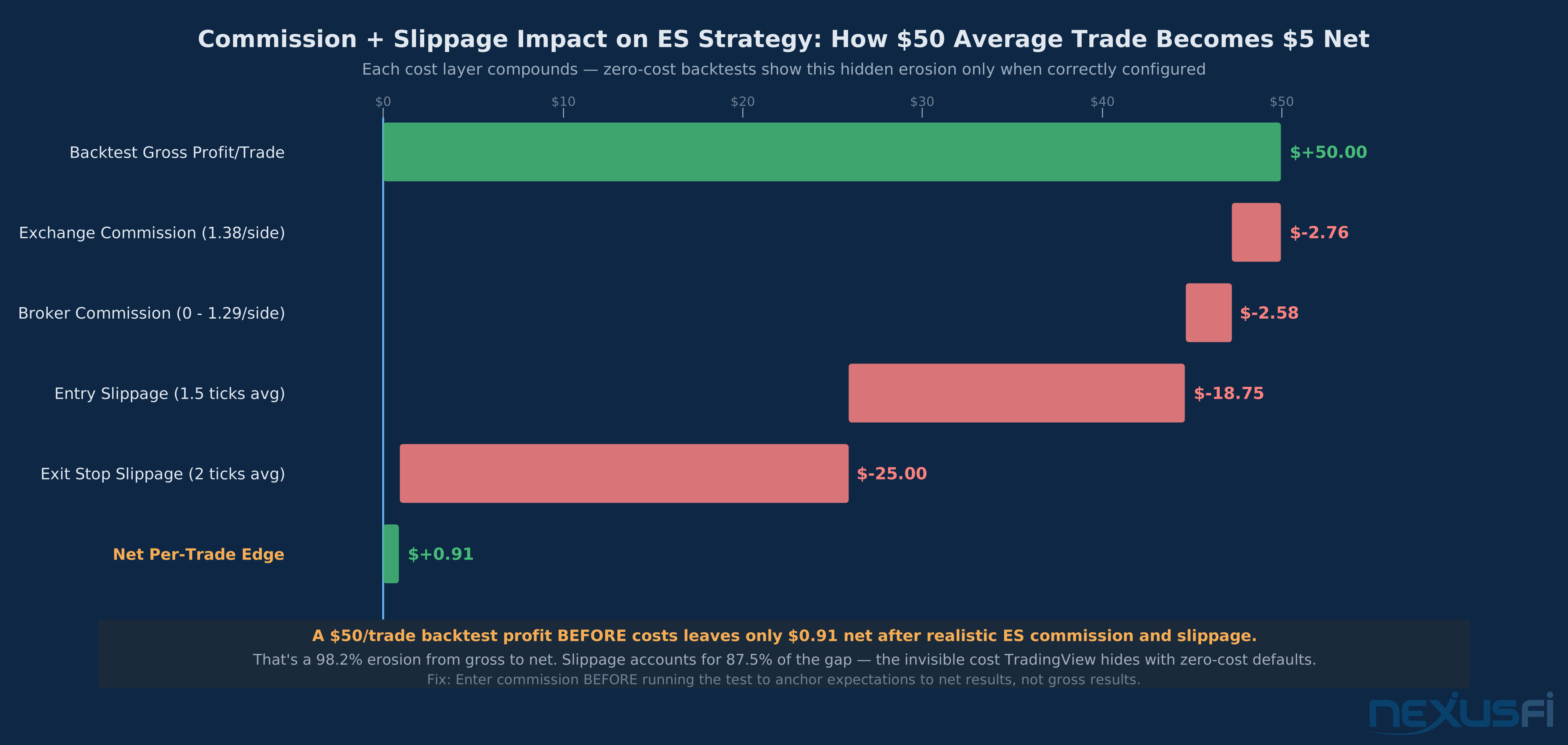
For ES futures: Use 1-2 ticks of slippage per side ($12.50-$25 per side) and $4-$5 per round trip for commission. A strategy making $50/trade looks very different after $30-50 in realistic costs. As @kevinkdog's 2023 analysis confirms, slippage is not static — it scales with volatility and the specific instrument.
Bar Resolution Distortion
When you backtest on daily bars, each bar represents an entire day of price movement. A "buy on bar close" signal on a daily chart represents executing at the end of a trading day — a specific, executable moment. But on a 1-minute chart, a "buy on bar close" at 9:31 means you need to monitor every minute. The execution realism requirements scale with chart resolution, and most traders never adjust their configuration as they move to shorter timeframes.
The compounding effect: shorter timeframes produce more trades (inflating statistical significance artificially), interact badly with default execution assumptions, and accumulate transaction costs faster. A strategy that looks adequate on daily bars often disintegrates when moved to 5-minute bars, not because the edge is weaker but because the costs and execution assumptions become proportionally larger relative to the average trade size.
Repainting: The Most Dangerous Backtest Problem #
Repainting is both common and catastrophic for backtesting reliability. Many popular community scripts exploit this quirk specifically to make their historical performance look extraordinary while being completely useless in live trading. As @Fat Tails identified in his analysis of repainting indicators, the problem is often that the non-repainting version of the same indicator generates signals 100 bars later — making the repainted version look like it has prophetic accuracy it doesn't actually possess.
How to Detect Repainting
Pine Script's security() function with lookahead=barmerge.lookahead_on is a common culprit. This setting passes the current bar's close to calculations that appear to use historical data. The result looks accurate in backtests because the script literally uses information that wasn't available when the signal was "generated."
The manual detection method: Screenshot your strategy's current signals. Wait for two or three new bars to form. Screenshot again. If any historical signals have moved, changed direction, or disappeared, the strategy is repainting. This takes five minutes and will save you from losing money on strategies that were never as good as they appeared.
The code-level test: Any use of security() with lookahead=barmerge.lookahead_on, any indicator using the current bar's close in the same line as a signal, any script with recalculation warnings in its description. Pay specific attention to scripts that use higher-timeframe data pulled with security() — this is the most common repainting mechanism in community scripts.
Multi-Timeframe Indicators and Repainting
Multi-timeframe (MTF) indicators are a specific repainting minefield. As @Fat Tails explains in his MTF indicator coding guide, the core problem is that strategy mode and visual mode behave differently: in strategy mode, the indicator uses the value retrieved from the secondary bar series only after the secondary bar has closed, introducing a lag of one bar. In visual mode, the indicator may interpolate intrabar, creating signals that look precise but don't reflect executable timing.
The practical implication: If your Pine Script strategy uses a higher-timeframe signal (e.g., daily MACD crossover as a filter for 15-minute entries), confirm that the higher timeframe signal is only used after the higher timeframe bar has confirmed — not updated in real time as the higher timeframe bar forms. The correct pattern: use security(syminfo.tickerid, "D", macd_signal, lookahead=barmerge.lookahead_off) and accept that you're working with yesterday's daily signal, not today's current state.
Repainting That Isn't Fraud
Not all repainting is intentional deception. Some repainting is a design characteristic — volume profile levels shift as more volume data accumulates through the session. Understanding whether repainting is harmful (affects your entry signals) or benign (only affects visual display elements that don't drive decisions) requires actually reading the source code.
The critical question: Does the repainting indicator value affect the decision to enter or exit a trade? If yes, the indicator is a lookahead exploit. If no (e.g., a VWAP line that updates as new transactions occur but your entry signal is based on price crossing VWAP, not VWAP's exact historical level), the repainting is benign.
Repainting Quick Test Open your strategy on a shorter-resolution chart than your signal chart. If a daily strategy shows signals that weren't there yesterday when you switch to the live daily chart, it's repainting. The signals you saw yesterday were calculated with today's data projected backward.
Configuring Realistic Backtests in TradingView #
Commission Configuration
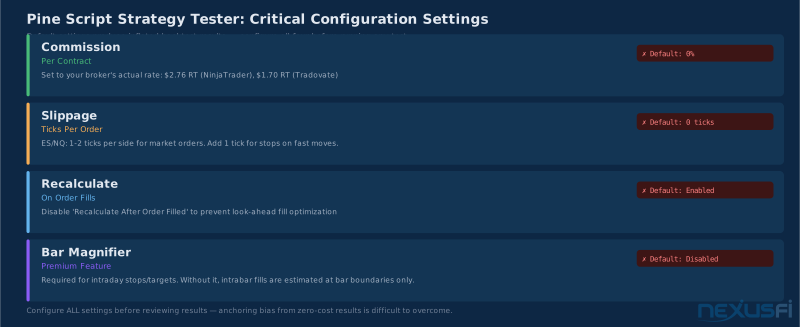
In the Strategy Properties tab, set "Commission" using the "Per Contract" option rather than "Percent of Order Value" for futures. Commission Per Contract should include both exchange fees and broker fees. For most retail futures brokers:
- NinjaTrader Brokerage: $0.09 exchange + $1.29 broker = $1.38/contract/side, $2.76 round trip
- Tradovate: ~$0.85-1.19/contract/side depending on plan
- Interactive Brokers: $0.85-2.05/contract/side depending on volume
- Amp Futures: Among the lowest retail commission structures at $0.49/side on base plans
For most retail ES traders testing daily strategies, $4-5 round trip is realistic. As @iantg documented in his analysis of strategy analyzer vs. market replay discrepancies, you should only use market replay or live SIM to validate execution assumptions — strategy analyzer will only be in the ballpark if your cost configuration is accurate. The execution modeling gap compounds rapidly across hundreds of trades.
Slippage Configuration
Slippage in TradingView is set in ticks. For ES futures (0.25 point = $12.50/tick):
- Market orders, liquid sessions (9:30-4pm ET): 1-2 ticks slippage realistic
- Market orders, illiquid sessions (overnight, news events): 3-5+ ticks
- Limit orders with confirmed fills: 0 slippage is reasonable
- Stop-loss fills on fast moves: 2-5+ ticks depending on market conditions
A common approach is 1 tick slippage for entry market orders and 1-2 ticks for stop-loss exits. Limit order entries should be modeled conservatively — if your backtest assumes limit order fills, be aware that in fast markets those limits may not fill at all. @Fat Tails' comparison of index futures highlights an often-overlooked point: the slippage characteristics of ES, NQ, and YM differ meaningfully, and a strategy calibrated for ES's tight spreads will have its cost assumptions violated immediately when tested on NQ during high-volatility periods.
Session Filtering
Futures trade 23 hours a day. Most retail day traders only trade RTH (Regular Trading Hours) — 9:30 AM to 4:00 PM ET for equity index futures. Backtesting without session filtering includes overnight data where spreads are wider, liquidity thinner, and your strategy's assumptions likely don't hold.
In Pine Script, add session filtering:
inSession = (hour(time, "America/New_York") >= 9 and
             (hour(time, "America/New_York") < 16 or
              (hour(time, "America/New_York") == 9 and minute(time, "America/New_York") >= 30)))
Only execute strategy.entry() calls when inSession is true. This alone can dramatically change backtest results — especially for strategies that look for breakouts or momentum, which behave very differently in Globex versus RTH sessions.
Bar Magnifier for Intrabar Strategies
Without Bar Magnifier (Premium feature), TradingView assumes all executions happen at bar close or open with no visibility into intrabar price action. For day trading strategies on 5-minute bars, this means:
- A stop loss set at 10 points below entry may not trigger if the low of the bar hit -12 points intrabar but closed at -3 points
- A profit target at 8 points may not credit if price briefly touched the target intrabar but closed below it
Bar Magnifier resolves this by using tick or 1-minute data within each strategy bar. It dramatically increases processing time but produces more accurate fill simulation for short-term strategies. For any strategy that relies on intrabar stop-loss or profit target execution — which is most short-term futures strategies — Bar Magnifier is not optional. Without it, your drawdown estimates are understated and your win rate is inflated.
Walk-Forward Analysis: The Only Test That Predicts Live Performance #
Standard backtesting optimizes parameters on all available history. Walk-forward analysis tests whether those parameters generalize to unseen data — the only thing that matters for live trading.
Basic Walk-Forward Process
As @kevinkdog's systematic documentation of taking strategies live establishes, a 3:1 in-sample to out-of-sample ratio is well-established for walk-forward testing. The process:
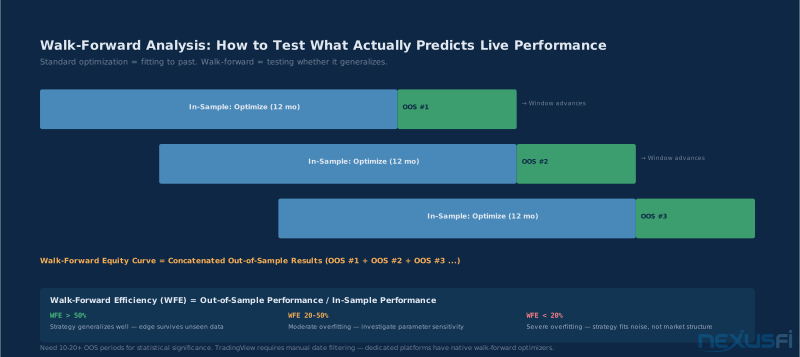
- Divide your data into overlapping in-sample/out-of-sample periods (e.g., 12-month in-sample, 3-month out-of-sample, rolling quarterly)
- Improve parameters on in-sample period #1, record best parameters
- Test those parameters on out-of-sample period #1, record performance
- Move window forward one out-of-sample period, repeat
- Concatenate all out-of-sample results to get walk-forward equity curve
@kevinkdog's AMA discussion on walk-forward makes a critical point: one out-of-sample period isn't real walk-forward — you need 10-20+ out-of-sample periods for the results to be statistically meaningful. A strategy tested on one out-of-sample period may have just gotten lucky on that window's market regime.
TradingView doesn't have a native walk-forward feature. You can approximate it by:
- Manually restricting the chart date range for optimization periods
- Using the date range filter in Strategy Properties
- Running the strategy on multiple historical periods and comparing parameter stability
For proper walk-forward, most systematic traders use Python (backtrader, zipline, vectorbt), NinjaTrader's Walk-Forward Optimizer, or MultiCharts. As @SMCJB describes in his strategy journals, even manually executing walk-forward by restricting date ranges produces much more reliable estimates than in-sample-only testing. TradingView is adequate for hypothesis testing and visual validation but has real limitations for rigorous optimization workflows.
Walk-Forward Efficiency Ratio
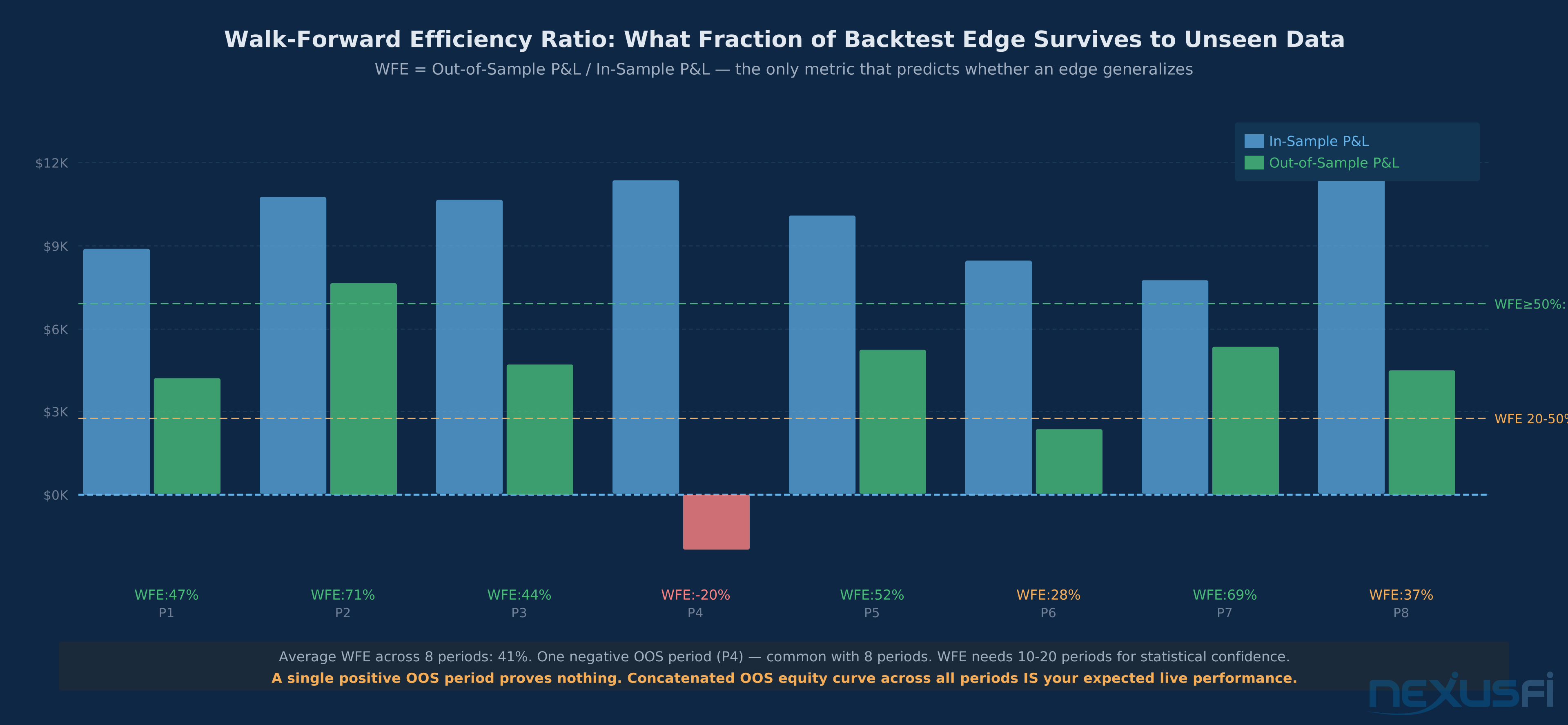
Walk-Forward Efficiency (WFE) = out-of-sample performance / in-sample performance — the methodology formalized by Robert Pardo in The Evaluation and Optimization of Trading Strategies (Wiley, 2nd ed.). Values above 50% suggest the strategy generalizes. Values below 20% suggest severe overfitting. As @kbellare's walk-forward testing guide notes, many traders never compute WFE — they see positive out-of-sample results and call it validated. The ratio tells you how much of your in-sample edge actually survives into unseen data.
Example: Strategy makes $10,000 in-sample. Out-of-sample performance = $4,200. WFE = 42%. Acceptable, but worth investigating whether the gap narrows with different parameter sets or wider optimization search.
Robustness Testing
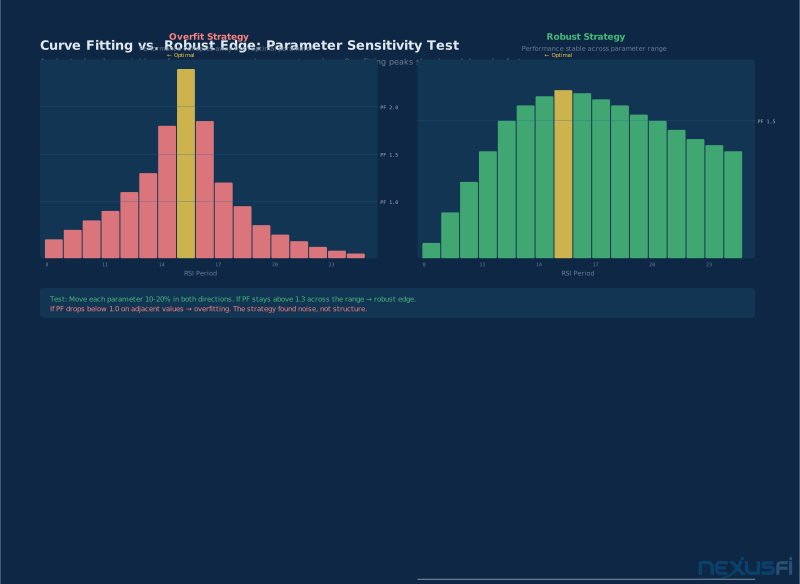
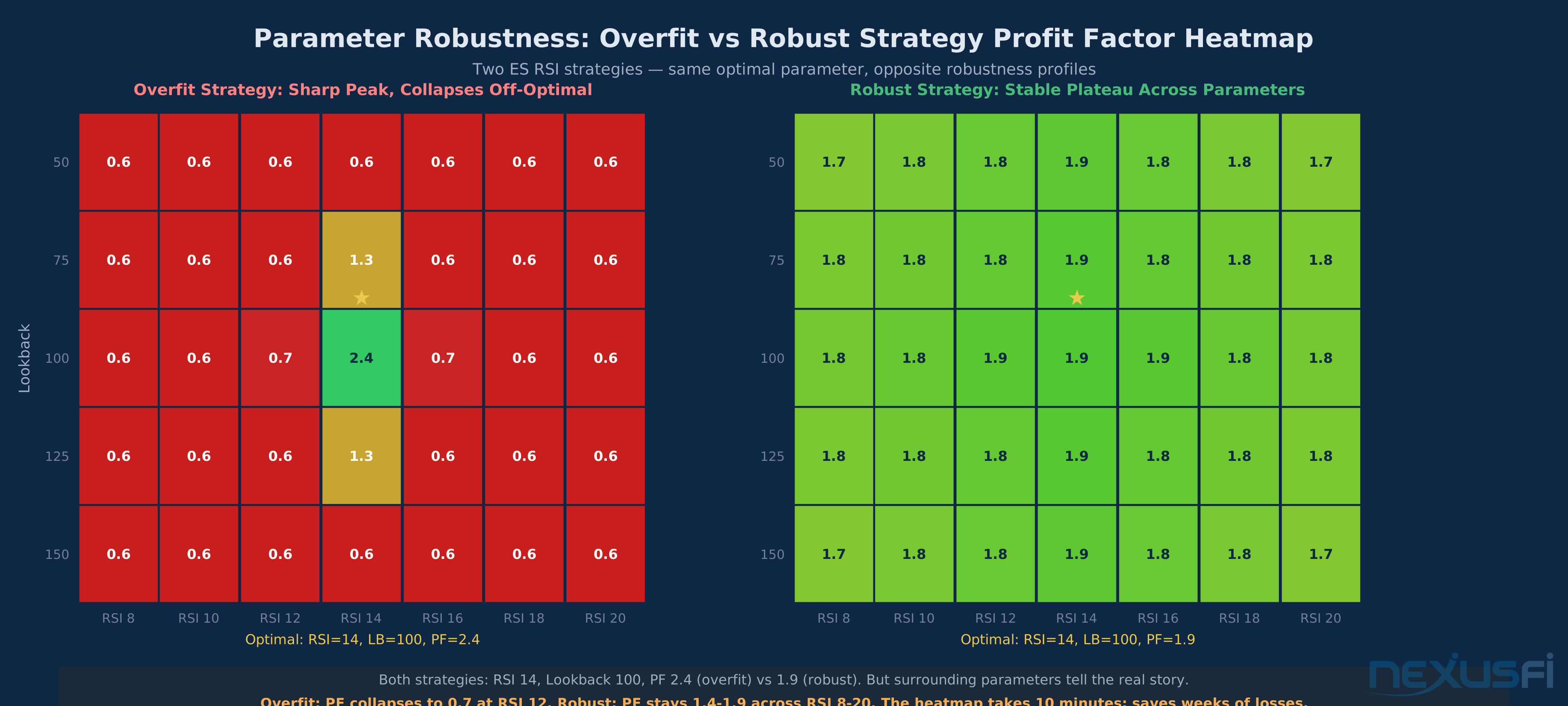
A more accessible robustness test for TradingView strategies: Test your strategy on the same instrument with slightly modified parameters. If the strategy is genuinely capturing market structure, small parameter changes should not dramatically change results.
As @sefstrat's optimization without curve fitting thread explains, good curve fitting shows a range of nearby parameters that all give similar performance. Bad curve fitting finds the best parameter set which is an outlier in an unstable region — the performance falls off sharply on either side of the optimal value.
If moving the RSI period from 14 to 12 turns a 65% win rate into 41%, the strategy is overfit to specific parameter values, not market dynamics. Legitimate edges show stability across nearby parameter values. As @Trembling Hand notes in his algo degradation analysis, a strategy optimized on the latest data and then tested backwards on old data is a huge red flag for curve fitting — the directionality of the optimization matters as much as the results.
Reading the Performance Report #
TradingView's Strategy Performance report has multiple tabs. Most traders only look at "Overview." The deeper analysis comes from "Performance Summary" and the underlying trade list.
Metrics That Matter
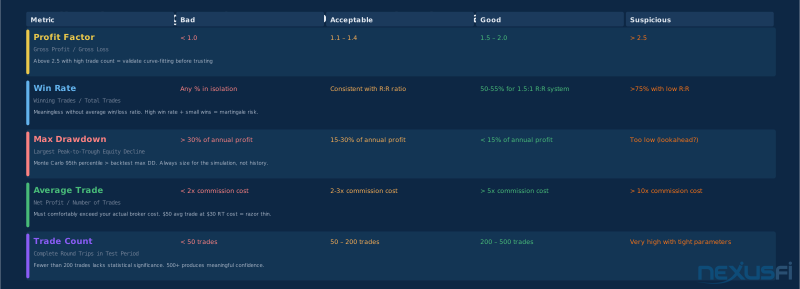
Profit Factor: Gross profit / gross loss. Values above 1.5 suggest edge worth investigating. Values above 2.0 in high-trade-count tests suggest strong edge or curve fitting — validate carefully. Values below 1.0 mean the strategy loses money before friction. The strategy evaluation metrics guide covers Profit Factor alongside Sharpe, Sortino, and the numbers that actually predict live performance.
Percent Profitable: Win rate. Meaningless in isolation. A 30% win rate with a 3:1 reward:risk is better than a 70% win rate with 0.5:1 reward:risk. Always evaluate alongside average win/loss ratio. @DowDaddy's King of the Nasdaq journal shows the specific trade-off: a 2.38 Profit Factor with modest win rate vs. a 1.45 Profit Factor with higher win rate — the first generates more value per trade but requires tolerance for more frequent small losses.
Max Drawdown: Largest peak-to-trough equity decline. The critical question: is this drawdown length or magnitude acceptable if it repeats in live trading? Most traders underestimate how psychologically difficult a drawdown is live versus as a number on a screen. As @Big Mike's risk of ruin analysis establishes, your max backtest drawdown is almost certainly an underestimate of your worst-case live drawdown — Monte Carlo simulation should be used to get the 95th percentile scenario, not the median.
Sharpe Ratio: Return / standard deviation of returns. Values above 1.0 are acceptable; above 2.0 are strong. TradingView calculates this per bar, which can inflate the ratio for strategies with many non-trading bars. Compare against strategies benchmarked on the same timeframe and instrument.
Average Trade: Net profit per trade. This should comfortably exceed your commission + slippage cost. If average trade is $50 and your round-trip cost is $30, you have very little margin for live performance variance.
Red Flags in Performance Reports
- High win rate with tiny wins and large losses: The classic martingale / stop-loss avoidance pattern. The strategy takes small profits quickly and holds losers indefinitely. Looks great until the large losses stack.
- Performance concentrated in a short period: Check the trade distribution. If 80% of profits came from a 3-month window two years ago, the "edge" may have been a regime-specific phenomenon that no longer exists.
- Very few trades: Fewer than 30-50 complete round trips and statistical significance becomes unreliable. 200+ trades produces more meaningful results; 500+ is where real confidence begins. As @Fat Tails notes in his analysis of good test results, running backtests on Renko bars or exotic bar types that cannot be properly simulated introduces a specific danger -- the strategy tester cannot accurately reproduce the exact bar formation timing.
- Perfect equity curve shape: Straight-line equity curves with minimal drawdown in backtests are almost always evidence of overfitting or lookahead bias. Real edges have bumpy equity curves.
- Very high Sharpe ratios on short-term strategies: Sharpe ratios above 3.0 in day trading backtests are suspicious. High ratios often reflect lookahead or repainting rather than genuine low-volatility edge.
Monte Carlo Simulation for Pine Script Strategies #
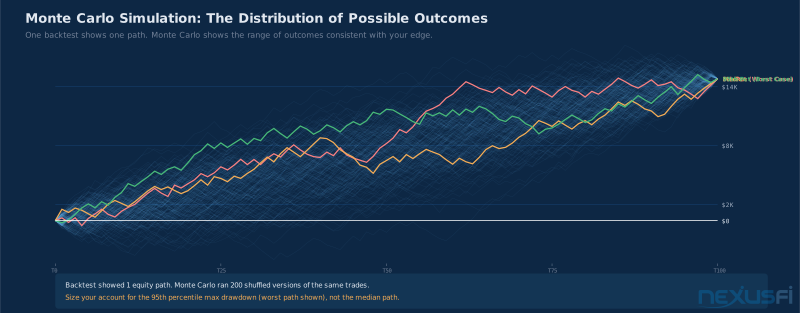
Once you have a backtest with 200+ trades, Monte Carlo simulation helps you understand the distribution of possible outcomes — not just the median result from your specific test window. Your backtest shows one particular sequence of wins and losses. Monte Carlo randomly reorders those trades thousands of times and shows you what range of equity curves is consistent with your historical trade outcomes.
As @Fat Tails explains in his analysis of risk of ruin, you take the backtest of your trading system, randomize trade order through Monte Carlo simulation, and read the probability that maximum drawdown will be reached or exceeded. The key output: 95th percentile max drawdown. If your backtest shows $8,000 max drawdown but Monte Carlo's 95th percentile is $18,000, you need to size the strategy as if the worst case is $18,000 — not $8,000.
As @kevinkdog's systematic approach shows, he multiplies the first drawdown estimate by 1.5 and uses Monte Carlo's 95% level — whichever is larger — to determine capital requirements. If Monte Carlo shows a 15% probability of hitting your max drawdown threshold within 100 trades, that's not a strategy you should run with real capital until you've reduced position size to lower that probability below 5%. See Monte Carlo simulation for futures strategy validation for the full methodology.
The Performance Gap: Why Live Results Differ From Backtests #
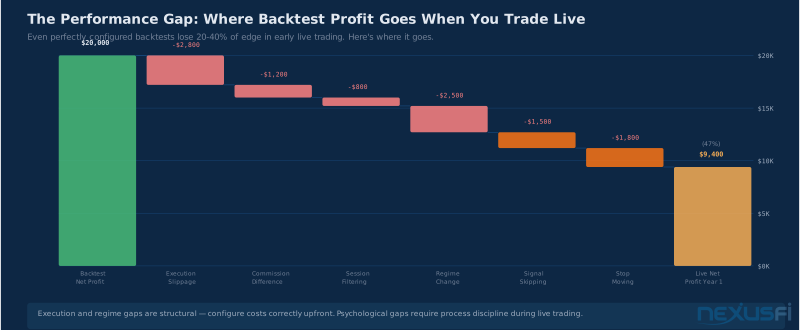
Even correctly configured backtests diverge from live performance. As @dom993 explains, the foundational rule is CalculateOnBarClose=True (always) — any variation creates real-time divergence that compounds across a session. Sources of the gap:
- Regime change: The period you backtested had different volatility, trend character, or liquidity profile than current markets
- Execution differences: Live limit order fill rates differ from backtest assumptions; real slippage on fast moves exceeds configuration
- Survivorship bias: You likely discarded many strategies before backtesting the one you're now deploying -- the one that "worked" may have just been the best of many random configurations
- Psychological execution errors: Skipping signals, moving stops, overriding exits -- all zero-cost in backtests, all common in live trading
- Market adaptation: If an edge is real and exploitable by retail traders, institutions will eventually adapt around it, reducing profitability over time
As @treydog999 recommends: run a comparison between backtest signals and live fills for at least 30 trades before trusting the system with real size. That comparison period calibrates confidence in your execution model.
Practical Application #
A realistic Pine Script backtesting workflow for futures traders:
Step 1: Reality-test the strategy description before running any backtests. Does it have any reason to believe a market inefficiency exists? If the entry logic is "buy when RSI crosses 30 from below," what market reality would cause this to be consistently profitable? No answer = high probability of noise.
Step 2: Configure costs before looking at results. Set realistic commission and 1-2 tick slippage before running the test. Looking at zero-cost results first creates anchoring bias toward inflated expectations.
Step 3: Check for repainting. Review the source code for security() calls with lookahead, current-bar signal generation, and any indicator that claims extraordinary historical performance on a community script.
Step 4: Test with sufficient history. If the backtest covers fewer than 200 complete trades, you don't have enough data for statistical confidence. Increase the lookback period (requires Premium for most short timeframes) or test on a longer timeframe to generate more trade instances.
Step 5: Parameter robustness check. Move each parameter 10-20% in both directions. If performance degrades rapidly, the strategy is overfit. If performance is stable across a range of nearby values, the edge is more likely genuine.
Step 6: Walk-forward approximation. Restrict the backtesting date range to your "optimization period" using TradingView's date filter. Note the parameters. Then extend the date range to include a more recent "out-of-sample" period and re-run without changing parameters. If out-of-sample performance is materially worse than in-sample, the edge likely doesn't generalize.
Step 7: Compare against a benchmark. Your ES strategy should outperform passive ES exposure on a risk-adjusted basis. Lower Sharpe ratio or similar drawdown without better returns = no edge.
Step 8: Monte Carlo stress test. Run Monte Carlo to get 95th percentile max drawdown. Size capital requirements to survive that scenario.
Step 9: Paper trade with real signals. Run the strategy in paper mode for 20-30 trades before committing capital. Compare live signal timing to backtest predictions — any systematic divergence is a problem to solve before real money is at risk.
TradingView's Limitations vs. Dedicated Backtesting Platforms #
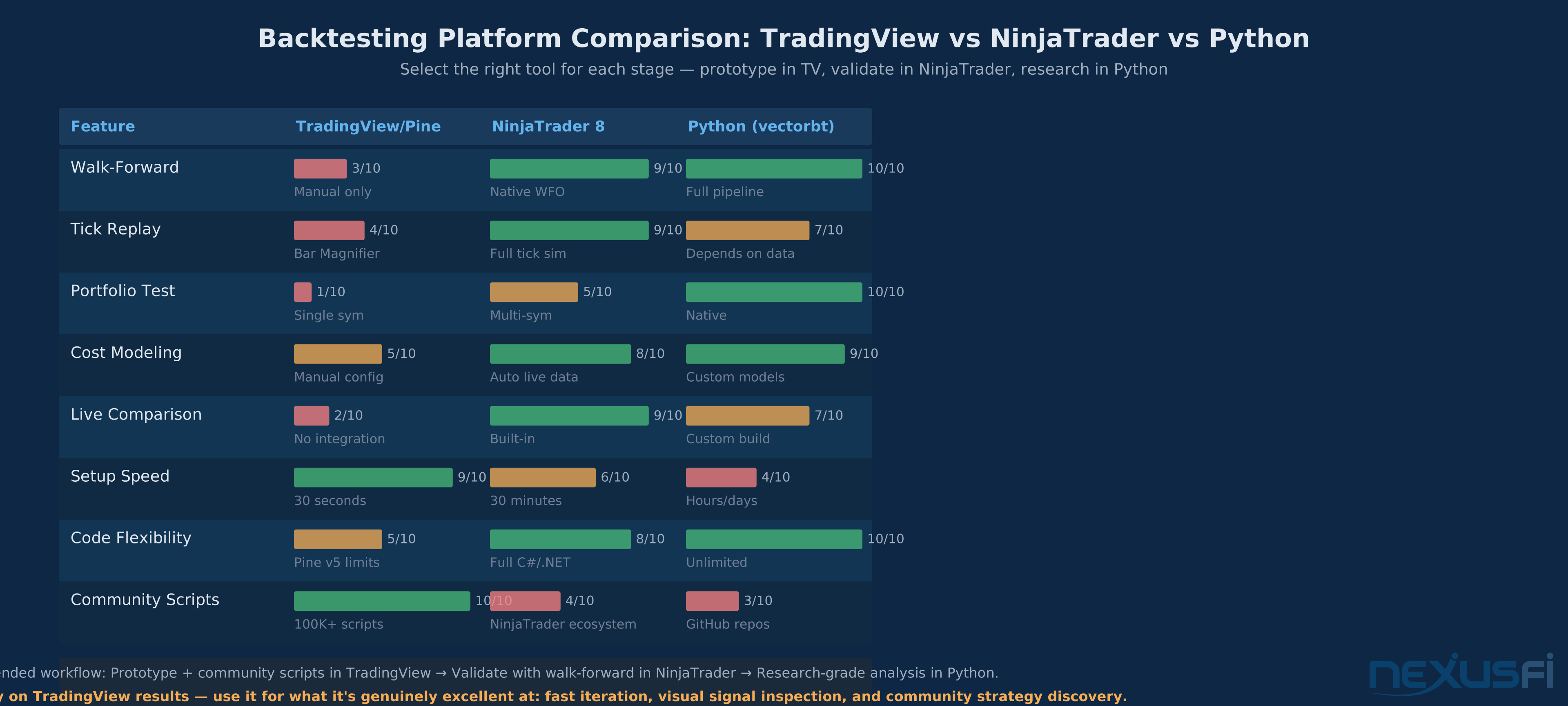
TradingView is a charting platform with backtesting capability, not a purpose-built strategy development environment. Understanding where it falls short helps you decide when to use it and when to move to a dedicated platform like NinjaTrader, MultiCharts, or Python-based frameworks.
TradingView's limitations for serious backtesting:
- No native walk-forward optimizer: Manual approximation only
- No tick-level replay: Bar Magnifier approximates intrabar using the smallest available resolution, but it's not true tick-by-tick simulation
- Limited historical data on free/lower tiers: 10,000-bar limits constrain short-timeframe testing
- No portfolio backtesting: Testing a strategy across multiple instruments simultaneously isn't possible
- No integration with live execution logging: You can't automatically compare your backtest signals to your live fills for systematic validation
Where TradingView excels: hypothesis testing, visual signal inspection, rapid iteration on indicator logic, and generating entry/exit alerts for manual or semi-automated trading. For systematic traders who've validated an edge and need rigorous walk-forward testing and live/backtest comparison, NinjaScript strategy development in NinjaTrader 8 provides much more strong infrastructure. For quantitative researchers who need Python-native workflows, vectorbt and backtrader offer programmatic control that TradingView's Pine Script can't match.
The right approach for most traders: Use TradingView to explore and prototype. When a strategy shows promise — Profit Factor above 1.5, consistent across parameter variations, sensible logic — move to a platform with proper walk-forward tooling for final validation before going live. Don't skip the validation step. TradingView's results almost always look better than they deserve to.
See walk-forward analysis for the full methodology. See overfitting and curve-fitting detection for diagnosing the most common Pine Script failure mode.
Knowledge Map
Prerequisites
Understand these firstGo Deeper
Build on this knowledgeCitations
- — Taking a Trading System Live - Walk-Forward Analysis (2022) 👍 15“Taking a Trading System Live - Walk-Forward Analysis”
- — Slippage Now 2023 vs Past (2022) 👍 15“Slippage Now 2023 vs Past”
- — Big Discrepancies in Execution between Strategy Analyzer and Market Replay (2022) 👍 15“Big Discrepancies in Execution between Strategy Analyzer and Market Replay”
- — Fisher for NT7 - Repainting indicator analysis (2022) 👍 15“Fisher for NT7 - Repainting indicator analysis”
- — Coding Multi Time Frame MTF Indicators with NinjaTrader (2022) 👍 15“Coding Multi Time Frame MTF Indicators with NinjaTrader”
- — Comparing Index Futures - Slippage characteristics (2022) 👍 15“Comparing Index Futures - Slippage characteristics”
- — Backtest vs historical strategy performance issue (2022) 👍 15“Backtest vs historical strategy performance issue”
- — Reasons that backtesting works but live walking forward does not (2022) 👍 15“Reasons that backtesting works but live walking forward does not”
- — Optimization without curve fitting (2022) 👍 15“Optimization without curve fitting”
- — How quickly do algos go bad (2022) 👍 15“How quickly do algos go bad”
- — Walk Forward Testing and Optimization Best Practices (2022) 👍 15“Walk Forward Testing and Optimization Best Practices”
- — KJ Trading Systems AMA - Walk-forward significance (2022) 👍 15“KJ Trading Systems AMA - Walk-forward significance”
- — Hope is not a strategy - Walk-forward manual execution (2022) 👍 15“Hope is not a strategy - Walk-forward manual execution”
- — King Of The Nasdaq - Profit Factor and Sharpe analysis (2022) 👍 15“King Of The Nasdaq - Profit Factor and Sharpe analysis”
- — Risk of Ruin - Monte Carlo simulation (2022) 👍 15“Risk of Ruin - Monte Carlo simulation”
- — Why 7 Percent is the Difference between Failure and Success (2022) 👍 15“Why 7 Percent is the Difference between Failure and Success”
- — Taking a Trading System Live - Monte Carlo drawdown sizing (2022) 👍 15“Taking a Trading System Live - Monte Carlo drawdown sizing”
- — Good Test Results Should I go LIVE - Renko backtest dangers (2022) 👍 15“Good Test Results Should I go LIVE - Renko backtest dangers”
- — Backtesting Vs Live Trades (2022) 👍 15“Backtesting Vs Live Trades”
- — Backtesting with TS intrabarordergeneration - Cross-instrument validation (2022) 👍 15“Backtesting with TS intrabarordergeneration - Cross-instrument validation”