



Tradovate Cloud-Native Futures Trading: How Browser-Based Access Changes the Game
Overview #
Tradovate built its futures brokerage around a single architectural bet: that serious traders don't need an installed desktop application to access professional-grade futures execution. Everything you need — order entry, DOM ladder, charts, account management, position tracking — runs in a browser or mobile app, with your account state living in the cloud rather than on a single workstation.
This isn't just a convenience play. It's a at the core different approach to where trading state lives, how orders are processed, and what happens when your connection drops. Understanding the architecture behind Tradovate's cloud-native model tells you both what it delivers and what it asks of you in return.
This article covers the technical mechanics of Tradovate's platform, what cross-device trading actually means in practice for futures traders, how it compares to traditional desktop platforms, and what you need to know about connectivity risks before you trade live.
Prerequisites: Familiarity with futures commissions and fee structures helps for context on Tradovate's subscription model. Understanding introducing broker vs. FCM relationships is useful for understanding account custody. If you're evaluating platforms broadly, read futures broker evaluation framework first.
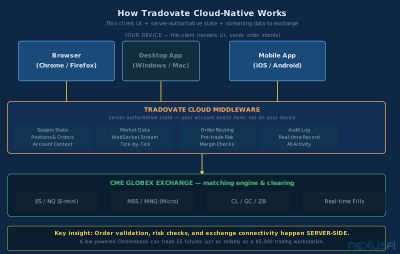
The Architecture: How Tradovate Actually Works #
Most trading platforms are thick clients — they install on your machine, maintain local state, connect to a data feed, and route orders through a broker API. The platform and its state live on your workstation. Lose the machine, lose the platform.
Tradovate inverted this model. The trading interface (browser, mobile app, or desktop wrapper) is a thin client. It renders the UI, captures your intent, and sends requests upstream. The authoritative system — your orders, positions, account context, saved layouts, and alerts — lives in Tradovate's cloud.
Rick Tomsic, Tradovate's founder, described it directly on NexusFi:
That distinction matters. Traditional platforms using ISV middleware depend on third-party connectivity layers between your platform and the exchange. Tradovate owns its own execution stack — their middleware handles order validation, risk checks, and CME connectivity directly.
The architecture layers:
- Thin client (your device): Browser, mobile app, or desktop wrapper. Renders charts, DOM, order tickets, and account views. Sends order requests upstream. Does not hold authoritative trading state.
- Cloud middleware (Tradovate's servers): Manages session state (positions, working orders, account context, saved layouts), pre-trade risk checks (margin, exposure, position limits), and market data streaming to all connected devices.
- Market data streaming: Real-time ticks, quotes, and DOM data stream from Tradovate's backend to your device via WebSocket-based protocols. The UI reconstructs the order book and chart data from these streams.
- Exchange connectivity: Tradovate's backend routes orders directly to CME Globex. Fill acknowledgments stream back to all your connected devices simultaneously.
What this means practically: The CPU-intensive parts of trading happen server-side. Order validation, risk evaluation, and exchange connectivity are not dependent on your device's performance. A Chromebook running Chrome can trade ES futures as reliably as a dedicated trading workstation running NinjaTrader — because neither device is doing the heavy lifting.
Cross-device continuity in Tradovate isn't magic. It works because your account state is server-authoritative. When you log in on a new device, the platform rehydrates your session from the cloud — current positions, working orders, account context — rather than relying on local memory that would be lost with a device failure.
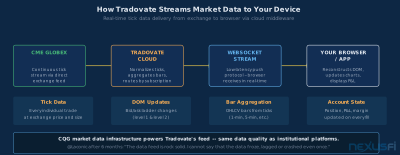
Cross-Device Trading: What It Actually Means #
"Trade from anywhere" is marketing language. Understanding what cross-device trading delivers in practice — and where it has limits — is what turns that slogan into a usable workflow.
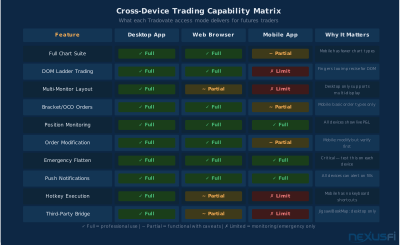
Desktop app: The Tradovate desktop application (Windows and Mac) provides the fullest feature set — multi-monitor support, the complete indicator library, DOM ladder trading, and compatibility with third-party bridges to tools like Jigsaw and BookMap. This is the primary execution environment for active discretionary traders.
Web browser: The browser platform (Chrome, Firefox, Edge) delivers basically the same trading capability as the desktop app without installation. Same charts, same order entry, same DOM ladder. For traders who switch computers regularly, the browser eliminates the "I need to install the platform" step. @forestcall, an active scalper, captured the experience accurately: "The BEST part of Tradovate is it is primarily browser-based which means all my settings, indicators, layouts are all stored in the Cloud. I can trade from my wife's travel laptop for example. Heck, I even traded on a Chromebook." [1]
Mobile app (iOS and Android): The mobile application gives you real-time position monitoring, order placement, and P&L tracking from your phone. Where it falls short is DOM ladder trading — fingers aren't precise enough for fast DOM execution — and complex multi-monitor workflows. Mobile is best understood as a monitoring and emergency management layer, not a primary execution environment.
What syncs across devices:
- Current positions and working orders (authoritative on the server — always accurate)
- Account balance and P&L
- Saved chart layouts and workspace configurations
- Custom indicator settings
- Watchlists and alert configurations
What doesn't sync automatically:
- Open chart windows (you resume sessions, not exact window states)
- Local hotkey configurations (desktop-only feature)
- Third-party bridge connections (device-specific)
The practical workflow for most traders is desktop or browser for primary execution with mobile as a backup monitor and emergency flatten tool. Running a bracket order on desktop while checking position status on mobile from a different location is exactly what the architecture supports — the server holds the truth, every device displays that truth.
Order Management in the Cloud: What Changes #
Order management is where cloud-native architecture has the most consequential differences from traditional platforms.
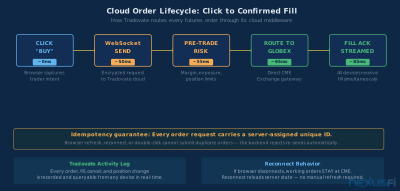
Order lifecycle: When you click "Buy" on Tradovate, your browser sends an encrypted order request to Tradovate's cloud middleware. The middleware runs pre-trade risk checks (margin availability, position limits, exposure limits), then routes the validated order to CME Globex. The exchange acknowledgment streams back to your device — and simultaneously to every other device logged into your account. A fill on desktop appears on mobile in the same breath.
Idempotency guarantees: Every order carries a server-assigned unique identifier. If your browser refreshes during order submission or your connection drops and reconnects, the backend rejects duplicate sends for the same order ID. You can't accidentally double-submit by clicking twice or refreshing the page — the system is built to prevent it.
Activity Log: Tradovate's real-time Activity Log records every action — order submissions, fills, cancellations, position changes, cash transactions — and makes it queryable from any device. If you're in a dispute or need to trace execution sequence, you don't rely on local memory; the cloud record is the authoritative source.
Rick Tomsic described this directly when asked about order tracking: "We have a real-time record of all your orders, fills, etc. So, if an FCM sends inaccurate information, you can always look to the Tradovate platform to compare. Since Tradovate also includes all fees on every trade, you are not left guessing at your actual account balance. It updates in real-time." [2]
Reconnect behavior: If your connection drops while you have working orders, those orders remain active at CME Globex. The exchange doesn't know or care about your browser session. When you reconnect — on the same device or a different one — Tradovate's platform reloads your current position and order state from the cloud. You don't manually refresh or re-enter your working orders. The server tells you where you are.
This is categorically different from traditional platforms where working orders might be locally managed. If your NinjaTrader machine crashes mid-trade, your orders are still active at the exchange, but your local platform state is gone. You need to call your broker, check the exchange, and reconstruct what happened. With Tradovate's cloud model, reloading the browser shows you exactly where you are.
Cloud order management eliminates some failure modes while creating others. Local machine crashes don't destroy your trading state. But a Tradovate service outage — rare but possible — can make you temporarily blind to positions that are still active at the exchange. This is why a backup contingency plan (covered below) is mandatory before trading live.
Performance and Latency: What the Cloud Model Changes #
The most common concern about browser-based trading is latency. Does sending orders through a cloud layer add meaningful delay compared to a native platform?
The honest answer is: sometimes, but less than you'd expect, and the critical math is not what most traders assume.
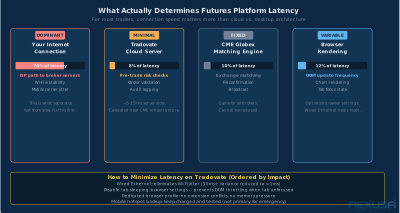
Where latency actually lives: For most retail futures traders, the dominant latency factor is the internet connection between their device and the broker's servers — not the processing time within those servers. Tradovate's cloud middleware is co-located near exchange connectivity infrastructure. The round-trip from your click to a fill acknowledgment depends far more on your ISP path to Tradovate's data center than on whether Tradovate uses a native vs. web protocol.
What the cloud model doesn't change: Pre-trade risk checks are milliseconds. CME matching engine response is milliseconds. Tradovate's middleware processes orders the same way regardless of whether the request came from a browser or a native app.
What the cloud model does affect: DOM rendering and update frequency can vary based on browser engine, device hardware, and tab state. Active background throttling in Chrome or Firefox can reduce DOM update frequency if the trading tab isn't focused. This matters for DOM-intensive scalping strategies where every tick update counts.
For discretionary traders using charts and bracket orders, the performance difference is basically invisible. For DOM-intensive scalpers executing 50+ trades per day, the rendering overhead can occasionally be perceptible on lower-end devices or with unstable Wi-Fi. @Laconic, an early Tradovate adopter, noted after months of use: "The data feed is rock solid. Tradovate uses CQG data, and that cost is included in the Tradovate annual fee. I cannot say that the data froze, lagged or crashed even once." [3]
Browser best practices for trading:
- Use a dedicated trading-specific browser profile or browser
- Disable tab sleeping/background throttling in browser settings
- Use wired Ethernet instead of Wi-Fi for the trading session
- Keep the Tradovate tab as the active, focused tab during trading
Getting Started: Account Setup and Onboarding #
The onboarding experience is where cloud-native architecture most visibly delivers on its promise. You can be watching real-time futures data in minutes without installing software.
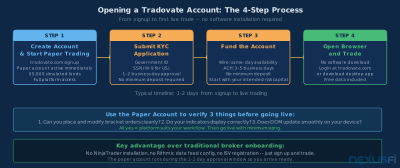
Step 1: Create an account at tradovate.com. The paper trading account is available immediately on signup — no deposit, no approval wait. You get real-time data in paper mode and access to the full platform.
Step 2: Submit a live account application. Standard KYC process — personal information, government ID, W-9 for U.S. accounts. Approval typically takes 1-2 business days.
Step 3: Fund via wire transfer or ACH. Wire provides same-day availability; ACH takes 3-5 business days. Tradovate has no minimum deposit requirement.
Step 4: Open Tradovate in your browser or download the desktop app. Platform selection is up to you — both deliver the same trading capability.
The difference from traditional platform onboarding is the absence of a software installation step. No NinjaTrader licensing, no Rithmic data feed configuration, no ISV registration. Sign up → fund → trade. That simplicity is a genuine feature, especially for traders evaluating whether futures is right for them before committing to a full desktop setup.
Using the paper account effectively: The 14-day paper account runs on the same platform as live trading. Use it to verify three things: (1) Can you place and modify bracket orders cleanly? (2) Do the indicators you rely on work correctly? (3) Does the DOM update smoothly on your device? If yes to all three, the platform is suitable for your workflow. Don't use paper account P&L to validate a trading strategy — fill quality in simulation and live trading are different.
The Subscription Model: Cost Structure Context #
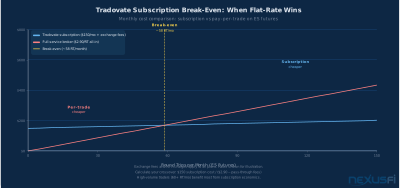
Tradovate's pricing has historically used a subscription model: pay a monthly or annual fee to reduce or eliminate per-trade commissions.
[5] DOM execution traders who don't need advanced charting tools find the flat cost structure especially compelling — the more they trade, the more they save.
The subscription economics work in Tradovate's favor when monthly trading volume is high. Below a certain volume threshold, pay-per-trade plans are cheaper. The crossover depends on the specific plan. For a detailed breakdown of Tradovate's pricing tiers, commission math, and volume break-even analysis, see the dedicated article on Tradovate subscription pricing and plan selection.
Cloud-Native vs Traditional Desktop: Where They Differ #
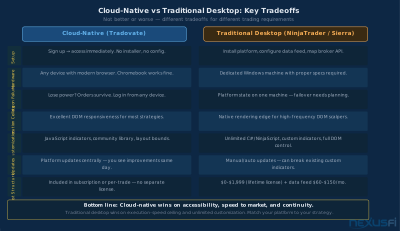
The cloud-native vs. traditional desktop debate is often framed as "convenience vs. performance." That's not quite right. It's a tradeoff across several dimensions simultaneously, and the right choice depends on what your trading actually demands.
Where cloud-native wins:
Speed to market. No installation, no configuration. Open browser, log in, trade. For traders evaluating futures for the first time, this eliminates the 2-4 hours of platform setup that traditional broker/platform combinations typically require.
Operational continuity. If your trading workstation fails, you can log in from any device and see your exact current state. Working orders remain active at the exchange regardless of what happens to your device.
Update management. Platform improvements deploy centrally. When Tradovate releases a new feature or bug fix, you see it the next time you open the platform. You don't manage NinjaScript compatibility or data feed version mismatches.
Hardware flexibility. Any modern device with a browser works. You can trade futures on a Mac, a budget laptop, or a Chromebook — none of which are viable options for NinjaTrader's full feature set.
Where traditional desktop wins:
Execution ceiling for DOM trading. Native applications render faster and maintain local state more consistently. For high-frequency DOM scalpers where every DOM update matters, the additional rendering overhead of a browser UI can be perceptible on lower-end hardware.
Customization depth. NinjaTrader's NinjaScript (C#) and Sierra Chart's custom study framework give professional-level customization that Tradovate's JavaScript indicator system can't match. If your strategy depends on custom code that you've spent years refining, migrating to a different platform's scripting environment is a significant undertaking.
Third-party integration depth. While Tradovate supports Jigsaw and BookMap bridges, the ecosystem of third-party tools built for desktop platforms like NinjaTrader or Sierra Chart is substantially larger.
@forestcall, who switched from NinjaTrader 8 to Tradovate, put the tradeoff directly: "The #1 best thing I like about Tradovate is I am now 100% browser-based trading. So I can trade on any computer. I felt that using NT8 was making me feel imprisoned." [6]
That "imprisoned" framing captures something real. Traditional platforms chain you to a specific machine and a specific software environment. Tradovate's cloud model removes that chain — at the cost of the ceiling that native applications can achieve.
Connectivity Risk and Contingency Planning #
The trade-off for cloud flexibility is that your internet connection becomes a critical dependency. Traditional platforms also need internet connectivity for data and order routing, but local application state is preserved through brief outages. With Tradovate's thin client, connectivity is the platform.
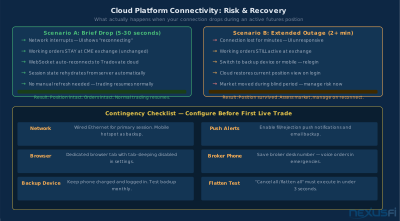
Brief drops (5-30 seconds): Working orders remain active at CME Globex. Tradovate's WebSocket reconnects automatically. Session state reloads from the cloud without manual intervention. Brief drops typically resolve without any action needed.
Extended outages (minutes): Working orders remain active at the exchange — the exchange doesn't know about your connection state. The risk is that market conditions change while you're reconnecting. Your contingency plan for extended outages must account for this blind period.
Contingency protocol for cloud-native trading:
- Network: Use wired Ethernet for primary trading sessions. Keep a mobile hotspot available as backup.
- Browser settings: Disable aggressive tab sleeping. Use a dedicated browser profile for trading.
- Backup device: Keep a phone or tablet logged in and tested monthly. Know how to flatten positions from it.
- Push notifications: Enable fill and rejection notifications so you're not blind if the UI hangs.
- Broker phone: Save Tradovate's support number. Voice orders exist precisely for technical emergencies.
- Monthly flatten test: Verify that "cancel all / flatten all" executes cleanly from each device you trade on.
Most cloud-native traders who've structured their contingency correctly find outage events manageable. The real risk is the trader who hasn't thought through the plan before an outage happens during a volatile market.
Third-Party Platform Integration #
Tradovate's architecture supports connections to several popular third-party analysis and execution tools:
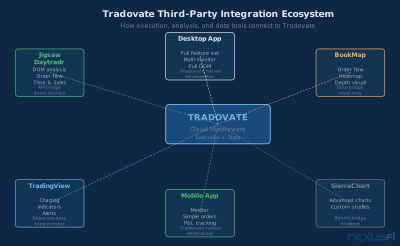
Jigsaw Trading: The Jigsaw DOM and order flow analysis tools integrate directly with Tradovate via an API bridge. This is one of the most popular combinations for order flow traders on Tradovate — Jigsaw provides the advanced DOM capabilities while Tradovate handles execution and account management.
BookMap: Real-time market depth visualization and order flow heatmaps work through a Tradovate data bridge. BookMap runs as a separate application on your desktop while Tradovate handles order routing.
TradingView: Many Tradovate users run TradingView on a separate monitor for charting while using Tradovate's DOM and order entry directly. This isn't a formal integration (separate platforms, separate data connections) but it's a common and effective workflow.
The practical takeaway: Tradovate's cloud architecture doesn't prevent integration with desktop-based analysis tools. The browser handles order execution; other applications on your machine handle specialized analysis. The two can coexist.
Who This Platform Fits #
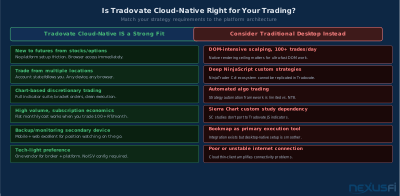
Tradovate's cloud-native model is a strong match for:
Traders new to futures from equities or options. No platform installation. No data feed configuration. The barrier between "decided to try futures" and "watching real ES data" is measured in minutes, not hours. The paper account runs on the same platform as live trading, so nothing changes when you go live.
Traders who work across multiple devices or locations. If you travel, work from different locations, or want to monitor positions without being tied to one machine, cloud-native architecture is functionally superior to any desktop alternative.
Traders who prefer subscription economics over per-trade commissions. If you trade enough volume to benefit from a fixed monthly cost, Tradovate's model makes the math work in your favor.
Discretionary traders using charts and bracket orders. The browser platform is fully capable for chart-based technical trading, bracket order management, and standard position tracking. The performance gap with desktop platforms is invisible for these use cases.
Tradovate is less suited for:
DOM-intensive scalpers on lower-end hardware. If you're executing 100+ trades per day from a DOM ladder, native platform rendering gives you a ceiling that browser-based rendering can't match, especially on modest hardware.
Traders requiring deep custom indicator code. If your strategy depends on NinjaScript, Sierra Chart custom studies, or other platform-specific code environments, the migration cost to Tradovate's JavaScript indicator system may not be worth it.
Automated strategy traders. Tradovate's automation capabilities are limited compared to NinjaTrader's strategy framework. Algo traders generally look elsewhere.
Regulatory Structure and Account Safety #
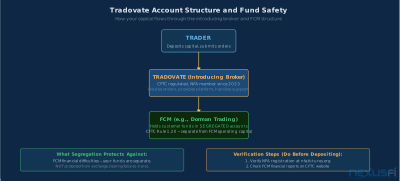
Tradovate is regulated by the CFTC and is an NFA member. As an introducing broker, Tradovate does not directly clear trades or hold customer funds — those functions are handled by its FCM partners (including Dorman Trading).
Customer funds are held at the FCM in segregated accounts per CFTC Rule 1.20, separate from both Tradovate's and the FCM's operating capital. This is the same segregation structure that applies to all regulated U.S. futures brokers.
Verify Tradovate's current registration and disciplinary history at nfa.futures.org before opening an account. NFA BASIC shows registration history and any regulatory actions — five minutes of verification before depositing is basic due diligence.
For detailed mechanics of how FCMs hold customer funds and what segregation protects you from, see futures customer segregated funds. For the full framework on evaluating broker financial health, see evaluating futures broker financial health.
Knowledge Map
Go Deeper
Build on this knowledgeReferences This Article
Articles that build on this topicCitations
- — Tradovate - Im trading Micro E-Mini Futures - Do I need Market Internals data feed? (2020) 👍 14“The BEST part of Tradovate is it is primarily browser-based which means all my settings, indicators, layouts are all stored in the Cloud. I can trade from my wife's travel laptop for example. Heck, I even traded on a Chromebook.”
- — Tradovate's Ask Me Anything (AMA) w/Rick Tomsic (Founder) and Brian Weis (President) (2021) 👍 9“Tradovate is not just a front-end like many other trading software connecting to an ISV. Tradovate is a complete cloud-based middleware.”
- — Trading futures with Tradovate no commissions broker? (2017) 👍 17“The data feed is rock solid. Tradovate uses CQG data, and that cost is included in the Tradovate annual fee. I cannot say that the data froze, lagged or crashed even once in that time.”
- — Trading futures with Tradovate no commissions broker? (2018) 👍 11“For me, unlimited is the boss and I just figure in 50 a week or 10 a day if I trade all 5 days. On days that I am slightly ahead, say 100 or so, most of that comes from what I did not pay someone else.”
- — Trading futures with Tradovate no commissions broker? (2016) 👍 6“Instead of adding on a broker commission per contract to the fixed fees, you would be paying a low fixed monthly subscription. So the more contracts you trade in a month, the greater the cost benefit of the subscription.”
- — IQFeed VS Kinetick --> Interactive Brokers (Futures) (2020) 👍 2“The #1 best thing I like about Tradovate is I am now 100% browser-based trading. So I can trade on any computer. I felt that using NT8 was making me feel imprisoned.”
- Tradovate — Tradovate: Cloud-Native Futures Trading Platform
- NFA — NFA BASIC: Background Affiliation Status Information Center
- — Jigsaw Trading's Peter Davies - Ask Me Anything (AMA) (2021) 👍 1“You can trade directly from the Jigsaw DOM if you purchase the Jigsaw trading license. Tradovate feed works well with Jigsaw.”
- — Tradovate Discussion, Review & Feature Requests (2021) 👍 2“Tradovate does have an iPhone and Android app as well as the desktop and browser based platforms. I would never trade off a phone's screen but the ability to monitor from anywhere is useful.”