



Trading Futures with Bookmap Through a CQG Broker: Reading Liquidity Heatmaps and Executing via MetroTrade
Overview #
Every futures trader knows what the DOM shows: current bids and asks at each price level. What most DOM displays can't show you is what happened to those bids and asks over time. Were those 500 contracts on the bid there for the whole session, or did they appear 30 seconds ago? Did the seller at resistance hold their position through multiple tests, or did they pull and replace each time price approached?
Bookmap was built to answer these questions. Its liquidity heatmap converts the order book into a time-series visualization — a thermal map of where orders have been sitting, how long they stayed, how they moved, and what printed as actual trades. The result is a display that makes order flow patterns visible to the eye that a standard DOM ladder simply cannot show.
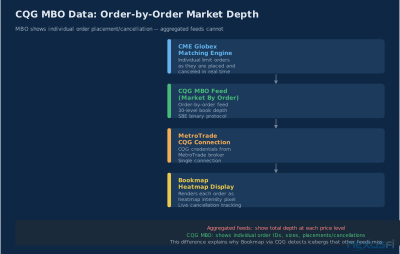
The quality of that display depends entirely on the quality of the data underneath it. Bookmap running on aggregated 1-second snapshots shows a blurry picture. Bookmap running on CQG's order-by-order feed shows individual order lifecycles — placement, modification, cancellation, and execution — in real time. MetroTrade connects to CQG as its execution infrastructure, which means MetroTrade clients using Bookmap get the highest-quality data feed available to retail futures traders.
This article covers what Bookmap actually shows, how the CQG connection affects data quality, how to read the heatmap for actionable signals, and how to execute those signals through MetroTrade's CQG-connected infrastructure.
"BookMap is Nothing but reading the ORDER FLOW. It's called reading the ORDER FLOW." — @Flyer873, NexusFi Bookmap AMA Thread
What Bookmap Actually Shows You #
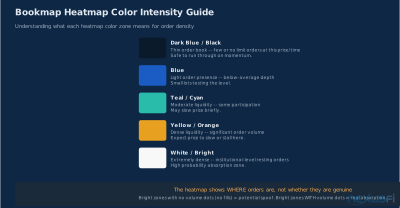
Bookmap's core display is a heatmap — a two-dimensional chart where the X-axis is time and the Y-axis is price. Color intensity at each point represents the volume of limit orders resting at that price at that moment in time. As time passes, the heatmap scrolls left, leaving a record of where order volume has been concentrated.
What the colors mean. Bookmap's default color scheme uses yellow for highest order concentration and dark blue for lowest. A bright yellow horizontal band at a specific price means a large limit order (or many smaller ones) has been sitting there for an extended period. A faint trace means minimal orders that came and went quickly.
Trades vs. resting orders. Bookmap distinguishes between resting limit orders (shown in the heatmap bands) and executed trades (shown as volume dots). The dots appear when actual transactions print, layered over the heatmap. The combination shows you not just where orders are, but whether price is actually trading through them.
Order book depth in time. A standard DOM shows current depth at one moment. Bookmap shows how that depth has evolved. An order that appeared 2 minutes ago and has survived multiple price tests carries more weight as a signal than an order that appeared 10 seconds ago. Bookmap's time dimension makes this distinction immediately visible.
Key indicators within Bookmap. Beyond the raw heatmap, Bookmap provides several built-in analytical tools:
- Volume Dots: Size-coded circles that show where and at what size trades occurred
- Imbalance Bars: Footprint-style overlays showing buy vs. sell aggression at each price
- VWAP and anchored VWAP: Standard volume-weighted average price displayed in the Bookmap context
- Custom add-ons: Liquidity Tracker, MBO Indicators (for order-by-order feeds), and third-party tools available through the Bookmap add-on ecosystem
— but the word "entire" requires a qualifying asterisk. What Bookmap displays depends on what the data feed provides. CQG makes a significant difference.
Why CQG Makes Bookmap Work Better #
Not all market data is equal. The difference between data sources is most visible in Bookmap because Bookmap's core value proposition — showing you the order book with precision — depends directly on how granular your data feed is.
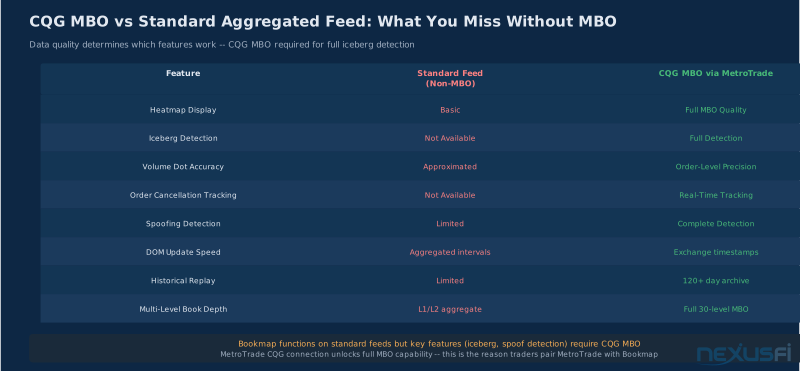
Aggregated feeds vs. MBO feeds. Most retail data providers aggregate market depth into price-level snapshots: at each second (or fraction thereof), they transmit the total volume at each bid and ask level. You see the result but not the individual orders that compose it. You can't tell if 500 contracts on the bid is one large order or 500 small ones. You can't detect an order being replaced (cancel + new order) because the aggregated view just shows 500 contracts throughout.
CQG's MBO (Market By Order) feed transmits individual order events. Every placement, modification, and cancellation at the CME exchange level is a separate event in the feed. Bookmap can process these events to reconstruct individual order histories — showing not just that there are 500 contracts on the bid, but that it's specifically one order that was placed 3 minutes ago, has survived 4 price tests, and hasn't been modified.
What this changes in practice. With an aggregated feed, Bookmap shows you bands of order density that may or may not reflect actual orders. With CQG MBO data, those bands represent trackable individual orders. The difference matters most for:
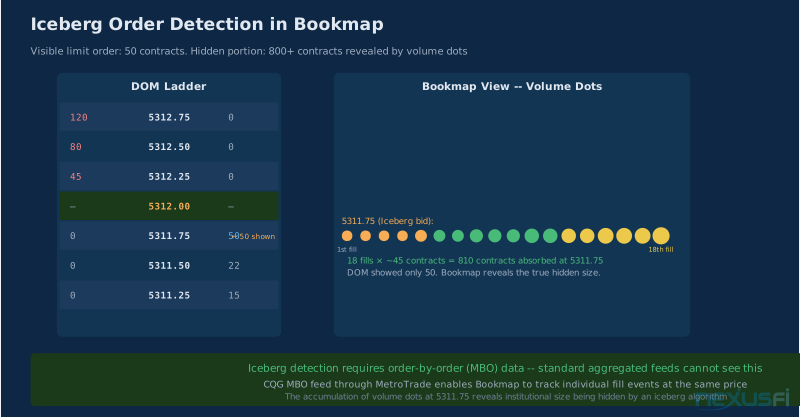
- Iceberg detection: An aggregated feed may show 50 contracts repeatedly refilling at a price. An MBO feed shows that 50 contracts are being replaced by a new order each time they fill — signaling a large participant working hidden size through iceberg logic.
- Spoof detection: An aggregated feed shows a large order appearing and disappearing. An MBO feed shows the order lifecycle: placed, resting for a specific duration, canceled before fill, reappearing. The pattern distinguishes genuine institutional orders from manipulation attempts.
- Order clustering: With MBO data, Bookmap can show you how many distinct orders compose the bid at a price level, not just the total size. Fifty orders of 10 contracts each carries different signal value than one order of 500 contracts.
MetroTrade's CQG infrastructure provides access to this higher-quality data stream. Not every Bookmap-connected broker offers MBO-level data. This is one of the practical reasons experienced order flow traders evaluate CQG-connected brokers specifically for Bookmap use.
From a NexusFi discussion: "The product I use is the S5 Bookmap which is the same as Bookmap. It is my preferred execution tool now because it puts the DOM, prints, depth, my orders and... right in front of you." — @FuturesTrader71. The quality of what gets put in front of you is the data quality question.
Reading the Liquidity Heatmap #
Reading Bookmap's heatmap is a skill. The patterns that matter are not self-evident on first inspection. Most traders spend their first weeks looking at impressive colors without understanding what they're seeing.
Horizontal band significance. A dense horizontal band at a price level means significant limit orders have been resting there for an extended period. This is significant because:
- Someone with enough size to affect the market chose to work orders at that specific level
- They've kept those orders there through time and price movement, suggesting conviction
- Price has not yet fully traded through that level — the orders are still partially or fully intact
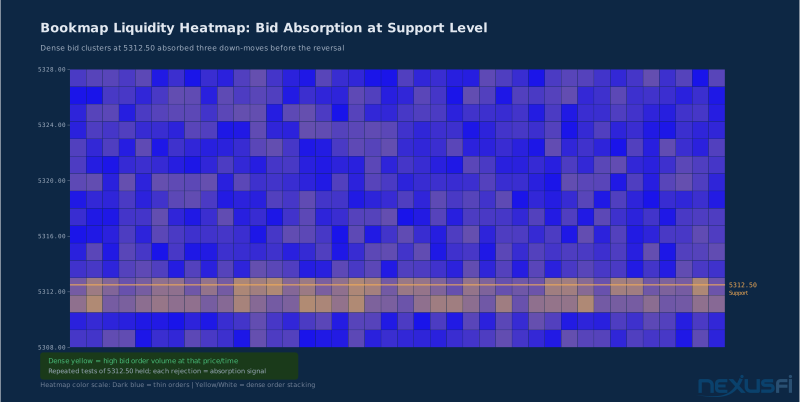
Bands that persist through multiple price tests without being consumed are the most meaningful. They indicate a participant with sufficient size and conviction to hold their position as price approaches.
A band that survives three price tests tells you more than a band that just appeared. Persistence is the single best proxy for conviction in the order book.
Where the heatmap goes dark. Equally important to where bands appear is where they're absent. A gap in bid density below current price — a thin zone in the heatmap — is a low-volume node, a price area where there isn't much support. If price enters that zone with momentum, it tends to travel quickly through it. Experienced Bookmap traders use these gaps to estimate target distance for trending moves.
Band pullback. Bookmap's history shows you when large orders pull. If a 500-contract bid sitting at support suddenly disappears from the heatmap without trading through it, the absence is as informative as the presence. Someone moved their interest. Price may now move more easily through the level that appeared supported.
Converging bands. When bid bands from below and ask bands from above are both dense and converging toward the current price, it signals a balanced market preparing for breakout. Neither side wants to take the other's offer — they're both trying to be passive. The resolution, when it comes, is often sharp.
Scale matters. Bookmap's X-axis (time) compression affects how patterns look. Zoomed out, you see structural patterns across hours. Zoomed in, you see microstructure patterns within minutes. Experienced traders work at multiple time compressions — structural levels on the wide view, entry precision on the compressed view.
— this kind of call is exactly what the heatmap is designed to make visible before the trade happens, not after.
Order Flow Signals: Absorption, Stacking, and Icebergs #
Bookmap's most actionable signals come from specific patterns in how the heatmap interacts with the trade flow displayed through volume dots.
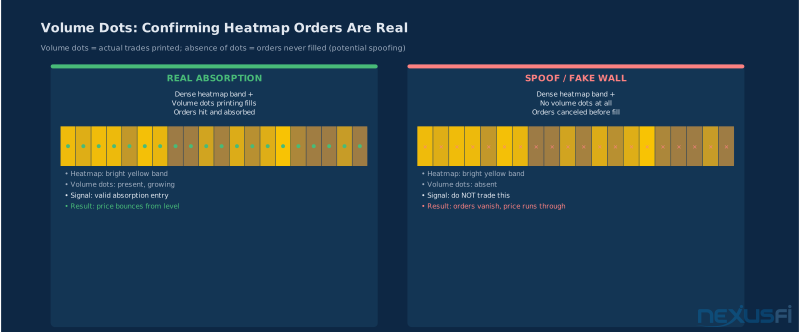
Absorption. Absorption occurs when large selling pressure hits a bid level and the bid holds. In Bookmap, this shows as:
- Volume dots printing at or near the bid band
- Large number of sell-initiated trades (downward-pointing dots) at the band level
- The bid band not disappearing despite trades flowing through it
- Price stabilizing or reversing
The absorption signal says: there's a buyer large enough to take everything the sellers are delivering, and they're not finished. When absorption happens at a structurally significant level — a prior day's value area high, a naked POC, a volume gap — it's one of the highest-quality entry signals available.
Absorption without volume dots is not absorption — it is a bid that has not been tested yet. Wait for the dots before calling the signal.
Stacking. Stacking is when multiple large bid orders appear at the same price level simultaneously, or across a range of price levels in a tightly compressed zone. The heatmap shows multiple bright bands close together. This is sometimes institutional accumulation (multiple fund managers targeting the same level independently) and sometimes a single participant placing layered orders to make their size less visible while still establishing a floor.
Stacking is most significant when it appears at a level that had previously been meaningful (prior high-volume node, prior day's close, key swing point) and when it persists through minor tests.
Iceberg detection. Iceberg orders are large orders that display only a small portion of their total size at a time. When the visible portion fills, the order automatically refreshes with another small tranche. In a standard DOM, you see a small number repeatedly reappearing at the same price. In Bookmap with MBO data, you can see this in the volume dot accumulation: many small prints at the exact same price over an extended period, with the bid never appearing to decrease despite constant trading.
Iceberg orders in the bid indicate a large buyer working discretely. Iceberg orders in the ask indicate a large seller distributing. The direction of the iceberg relative to price context determines whether it's a support or resistance signal.
Pulling vs. consuming. The critical distinction in Bookmap signal reading is between orders that are consumed (traded through) and orders that are pulled (canceled before being hit). Consumed orders create volume dots. Pulled orders don't. A large bid that disappears without volume dots is a pull — potentially a spoof, or simply an order that no longer represents genuine interest. A large bid that shows volume dots absorbing into it is being consumed — that's real demand meeting real supply.
From the NexusFi community: "I immediately gravitated to Bookmap because foot print charts did not allow me to read the levels of liquidity. I knew there was an important piece of order flow analysis I was missing." — NexusFi community member in the Bookmap review thread. This describes exactly the gap Bookmap fills: footprint tells you what happened inside each bar, Bookmap tells you where the orders were waiting before the bar formed.
The Spoofing Problem: When Heatmap Data Lies #
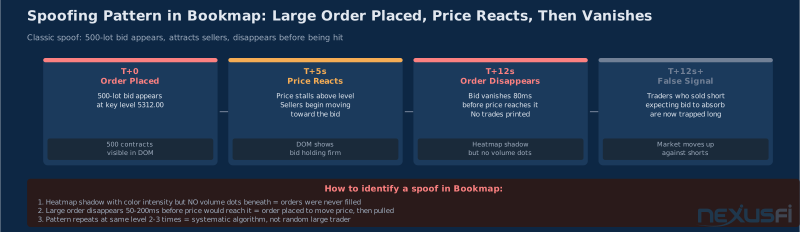
Bookmap traders need to understand spoofing because ignoring it produces losing trades. Spoofing is the placement of large visible orders with no intention of letting them fill — the order is there to move the market in a favorable direction, not to trade.
How spoofing appears in Bookmap. A spoofed order shows up as a brief bright band in the heatmap, often at a key level that would appear technically significant. Price reacts to the order's presence — other participants see the apparent support or resistance and adjust their behavior. The spoof order is then canceled before price reaches it. The heatmap shows the band appearing and then disappearing, with no volume dots underneath.
Why CQG data helps. With MBO-level data from CQG, Bookmap can show the individual order event history. A genuine institutional bid tends to:
- Persist for minutes or hours before being hit
- Show modification activity rather than pure cancel/replace loops
- Absorb some volume before the main move
A spoofed order tends to:
- Appear quickly when price is moving away from it
- Disappear quickly when price starts moving toward it
- Show no volume dots underneath it
- Repeat the pattern (cancel, replace, cancel) in rapid succession
This distinction is observable in Bookmap's display, especially with quality data. With an aggregated feed, you see the order appearing and disappearing but not the individual cancel/replace events that signal manipulation intent.
The practical filter. Experienced Bookmap traders add a simple filter: before acting on a heatmap signal, wait for volume confirmation. A large bid band that has actual volume dots printing into it — sellers testing the level and buyers absorbing — is behaving like a genuine order. A band that has no trades flowing through it while price approaches is suspicious until confirmed.
Every heatmap signal requires volume dot confirmation before entry. A bright band with zero volume underneath is a candidate spoof until proven otherwise.
As @matteo83 raised on NexusFi: "Huge part of liquidity is fake/spoofing. How can you make constructive decisions using visualisation of something that is mostly fake?" — this is the right question. The answer is always volume confirmation. The heatmap identifies candidates; the volume dots confirm genuine participation.
Volume Dots and Trading Activity Markers #
Volume dots are Bookmap's representation of executed trades. Every transaction that prints at the exchange shows up as a dot in the Bookmap display, positioned at its price and time, scaled by its volume.
Reading dot size. Small dots represent retail-sized trades. Large dots represent institutional-scale prints. Bookmap scales dots to the distribution of trade sizes in the instrument — what constitutes "large" in ES differs from what's large in crude oil (CL). Once you've spent time with an instrument in Bookmap, the scale becomes intuitive: you learn what a normal retail print looks like versus a dealer-sized print versus something anomalous.
Dot color. Bookmap color-codes dots by direction. The default scheme distinguishes buy-initiated from sell-initiated trades. A cluster of large sell-initiated dots at a price level that has a dense bid band is the absorption signal — you're watching sellers try to push through a buyer and the buyer holding.
Print clusters. When multiple large prints appear at nearly the same price within a short time window, Bookmap clusters them visually. A cluster of large prints at a support band that holds is a high-quality signal. A cluster of large prints at a support band that then breaks through indicates the support was exhausted.
Trade pace. Bookmap's tape display alongside the heatmap shows how quickly trades are printing — a visual extension of the tape reading fundamentals that order flow traders rely on. Rapid-fire small prints indicate retail participation; periodic large prints indicate institutional execution. The change in pace — from slow and steady to rapid — often precedes directional moves.
Bid/ask dot separation. The distinction between buy-initiated (printed on the ask) and sell-initiated (printed on the bid) trades is fundamental. A price level where large buy-initiated prints are accumulating while the bid band remains intact is absorbing sellers. A price level where sell-initiated prints are progressively larger, eating through bids, is distributing support.
From a discussion on bid/ask reading: "you see the acceleration in Volume as they absorb these Market Orders instantly. Bookmap with many of the 'Add-On' offerings basically made all the other Retail Trader Indicators Obsolete IMHO." — @jbmiguel. The acceleration pattern @jbmiguel describes is visible in Bookmap's dot density — the rate of dots increasing at an absorption level before the reversal.
Imbalance Bars and Footprint Integration #
Bookmap's imbalance bars add a footprint-style analysis layer to the heatmap display. Each bar shows the ratio of buying to selling pressure at each price increment within the bar's time range.
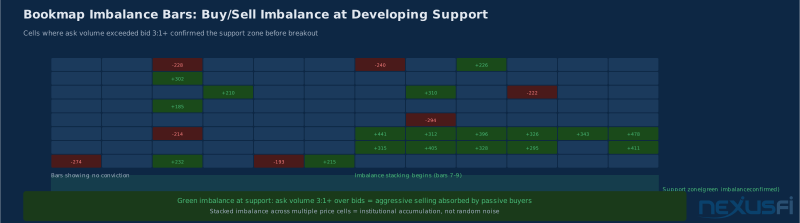
What imbalance means. A cell where ask volume (buy-initiated trades) much exceeds bid volume (sell-initiated trades) is an imbalance. Imbalances indicate that one side was much more aggressive than the other at that specific price. In the context of a developing support level, a bid imbalance at the lows (buyers more aggressive than sellers at that price) is a signal that the level has genuine demand interest.
Stacked imbalances. When multiple consecutive price levels within a single bar all show imbalances in the same direction, it's a stacked imbalance — a concentrated zone of one-sided aggression. Stacked bid imbalances at a heatmap support level are one of the higher-probability setups in Bookmap analysis: both the order book (bid band present) and the trade flow (buyers aggressive) are aligned.
Delta Divergence: When Bears Win the Move but Bulls Win the Volume #
Delta footprint. The imbalance bar can also display cumulative delta — the running net difference between buy and sell aggression within the bar. A bar closing with negative price movement but positive delta is a delta divergence: sellers won the price battle but buyers won the volume battle. This pattern often precedes reversal on the next bar.
Integration with heatmap context. Imbalance bars are most powerful when read in heatmap context. An isolated imbalance bar without a corresponding bid band may be noise. An imbalance bar sitting directly on top of a persistent bid band confirms that the band is being actively defended, not just sitting passively in the order book.
Timing with Bookmap. Unlike standalone footprint charts, Bookmap's imbalance bars are time-synchronized with the heatmap. You can see exactly which heatmap event corresponds to which footprint behavior. A large bid band appearing (visible in heatmap) followed by buy imbalances printing into it (visible in footprint bars) followed by price reversing is a complete picture of the trade.
Setting Up Bookmap with MetroTrade #
Bookmap is a standalone platform that connects to your broker for order routing and market data. The MetroTrade setup uses CQG as the connection layer.
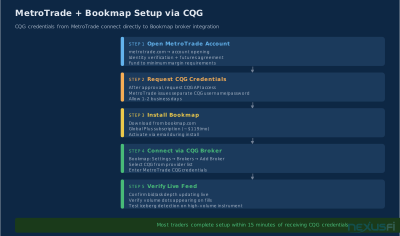
Bookmap account. Bookmap charges a subscription fee independent of your broker. Go to bookmap.com and create an account. Choose the tier that includes CQG broker connections — the Global Plus tier or higher. The free tier does not support live trading.
MetroTrade account. Open a futures trading account at metrotrade.com. Once approved and funded, MetroTrade provides CQG login credentials — a username and password separate from your MetroTrade portal login. These are your CQG access credentials.
Connecting Bookmap to MetroTrade via CQG. In Bookmap:
- Go to Connections → Add New Connection
- Select CQG from the broker list
- Enter your MetroTrade-issued CQG username and password
- Select the instruments you want to trade
- Choose CQG or CQG Hosted for the connection type (confirm with MetroTrade support which applies to your account)
Bookmap handles both market data display (from CQG's feed) and order routing (through CQG to MetroTrade to the exchange) in the same connection. You don't need a separate data subscription if you're connected through MetroTrade.
Enabling MBO data. CQG's MBO (Market By Order) feed requires explicit activation on your account. Ask MetroTrade to enable the MBO Indicators add-on when you request your CQG credentials. Without MBO, Bookmap uses aggregated market depth — functional, but missing the individual order tracking that makes CQG data distinctly better for Bookmap analysis.
Initial configuration. After connecting:
- Set your instrument preference (ES, NQ, CL, ZN, or whichever futures you trade)
- Configure your DOM appearance — Bookmap's DOM is separate from its heatmap view
- Set up order templates for standard position sizes
- Enable risk management: maximum position size, daily loss limit
- Run in simulation mode for at least one week to learn the display before trading live
The MetroTrade-CQG-Bookmap stack is one of the most capable order flow setups available to retail futures traders — CQG connectivity powers several front ends including Quantower, but Bookmap's heatmap is uniquely built for MBO data. The setup time is an investment — budget several weeks of replay and simulation before expecting profitability from heatmap-based entries.
Bookmap Pricing and MetroTrade Costs #
Understanding the total cost structure prevents surprises.
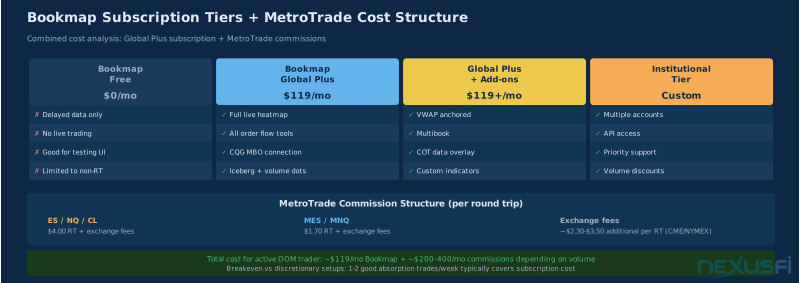
Bookmap subscription tiers. Bookmap charges a monthly subscription. As of current pricing (verify at bookmap.com):
- Global Lite: Free, simulation only, limited features
- Global Plus: Full live trading features, CQG/broker connectivity, imbalance bars, basic add-ons (~$99/month, confirm current pricing)
- Add-on subscriptions: MBO Indicators, Liquidity Tracker, other specialized tools carry additional monthly fees
Most traders starting with MetroTrade + Bookmap begin with Global Plus and the MBO Indicators add-on. The MBO add-on is what enables the full order-by-order analysis described throughout this article.
MetroTrade commissions. MetroTrade charges per-side commissions on futures trades. For full-size contracts (ES, NQ, etc.), competitive per-side rates apply. For micro contracts (MES, MNQ), the per-side rate is lower in absolute terms. Exchange and NFA fees are added at cost. See current rates at metrotrade.com — commission structures change periodically.
Total cost for active traders. For a trader doing 10-20 round trips per day on full-size ES contracts:
- Monthly Bookmap cost: ~$100-150 (platform + MBO add-on)
- Monthly commission cost: depends on volume and rate
The all-in cost is competitive with running Sierra Chart plus a dedicated data subscription, and provides capabilities that Sierra Chart's standard DOM analysis doesn't match for order book visualization.
Platform fee comparisons. Bookmap's fee model differs from Quantower (free with broker) and NinjaTrader (license + data separately). The monthly fee is the trade-off for Bookmap's specialized heatmap visualization — a capability that doesn't exist at the same depth in any free platform. For traders who find genuine edge in liquidity heatmap analysis, the subscription cost is typically recovered within the first month of profitable use.
MetroTrade sponsors NexusFi and maintains a directory listing at nexusfi.com/d/brokers/metrotrade/ where you can find current commission schedules and Elite Member offers.
Practical Trading Strategies Using Bookmap Signals #
The following frameworks translate Bookmap's visual patterns into executable trade logic. These are starting points, not complete systems — every trader adapts them to their instrument, style, and risk tolerance.
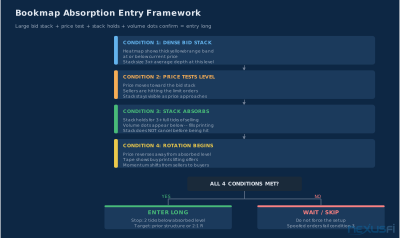
Absorption reversal entry. Prerequisites: price in a trending move, approaching a level with dense Bookmap bid (for long) or ask (for short) band. Signal: large volume dots printing into the band with price slowing. The band holds for 3+ ticks without being consumed. Entry: limit order at or near the band level. Stop: 2-3 ticks below the band's lower edge. Target: measured move based on prior value area or swing structure.
This is the core Bookmap trade. It works because you're seeing large participant demand before the reversal, not after it. The heatmap provides advance notice; the volume dots confirm execution.
Band breakout entry. Prerequisites: dense ask band above price (resistance) has been repeatedly tested. Signal: price accelerates through the band with large buy-initiated volume dots consuming the band. The band disappears quickly (consumed, not pulled). Entry: market or limit just above the prior band level. Stop: just below where the band was. Target: low-volume gap above.
Band breakout trades work when a recognized institutional level is finally exhausted. The consumption of a persistent ask band is the signal that the sellers have been overwhelmed.
Opening range heatmap context. For the first 30 minutes of the CME session, Bookmap shows institutional order placement patterns. Large orders placed in the opening range that persist through price oscillations are often the day's structural reference levels. Traders who identify these levels in the first hour have a framework for the rest of the session.
Avoiding manipulated levels. Always apply the volume confirmation filter described in The Spoofing Problem section before acting on any large heatmap signal.
From @Flyer873 on the Bookmap approach: "on to BookMap and look for increase or decrease of volume, (Stop Run or Iceberg orders from the MBO indicators) and decide if I want to take the trade." This describes the confirmation workflow — heatmap identifies the level, MBO data confirms the order type, trade decision follows.
Common Mistakes When Starting with Bookmap #
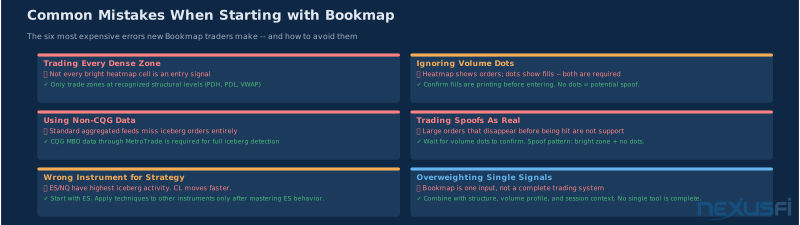
Treating every band as significant. New Bookmap users see colors everywhere and try to trade everything. Most order book activity is noise. The bands that matter are the ones that are larger than the instrument's baseline, persist through time, and survive tests.
Ignoring the spoofing filter. The volume confirmation filter from The Spoofing Problem section is non-negotiable. Trading any large visible order without confirming actual volume dots underneath it is the fastest way to fund someone else's account.
Overcomplicating the display. Bookmap offers many add-ons and overlays. New traders often activate everything at once. The display becomes visually cluttered and the core heatmap signal gets lost. Start with just the heatmap and volume dots for the first month. Add imbalance bars after you've internalized the base display. Add MBO indicators after that.
Trading too many instruments. Pick one instrument and stick with it for at least the first two phases of the Practical Framework below. You can't learn what "unusual" looks like until you've internalized what "normal" looks like.
Using too short a time window. Bookmap's structural significance requires historical context. Setting the display to show only the last 30 minutes misses the structural bands that formed earlier in the session. Most traders show at least the full RTH session, and extend to include the overnight if they trade near key overnight levels.
Skipping simulation. See Phases 1-2 in the Practical Framework below — sim trading with real CQG data is where you build the pattern recognition that makes live execution profitable.
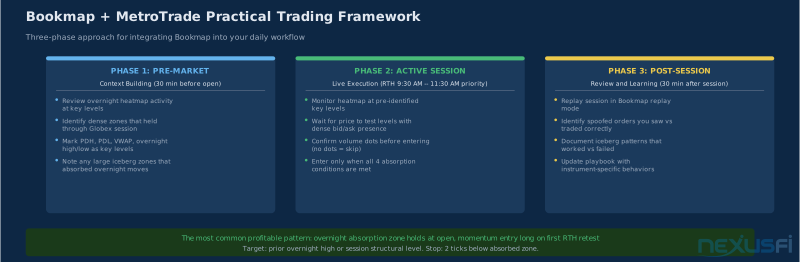
A Practical Framework for Bookmap Traders #
Getting started with the MetroTrade + Bookmap combination has a natural progression.
Phase 1 (Weeks 1-4): Pattern recognition. Connect Bookmap to CQG via MetroTrade in simulation mode. Don't trade — only observe. Watch how absorption, stacking, and iceberg patterns resolve. Use replay mode to review sessions. Build a library of screenshots: "this band held," "this band pulled before price," "this was a spoof because no volume."
Phase 2 (Weeks 5-8): Sim trading. Begin executing in simulation with defined entry rules based on the patterns you've identified. Track your entry accuracy separately from P&L — did you correctly identify the pattern, and did the pattern resolve as expected? These are different questions. An accurate pattern read with bad risk management produces losses. An inaccurate pattern read that happened to work produces false confidence.
Phase 3 (Live at micro size): Validation. Trade MES and MNQ — micro contracts at one-tenth full-size — for the first 60 days of live trading. The goal is not profitability; it's validation that your sim execution translates to live market behavior. Commission costs on micros are low enough that this is educational expense, not capital risk.
Phase 4 (Scaling): Standard size. Once you have 60 days of consistent live micro trading that matches your sim expectations, scale to standard size contracts. Keep your sim account running for developing new setups — test everything in sim before adding it to your live framework.
MetroTrade's Elite Member offer includes enhanced support for NexusFi members — see nexusfi.com/d/brokers/metrotrade/ for current terms.
The Bookmap + MetroTrade stack gives active futures traders the best available order flow visualization at the retail level. The heatmap doesn't predict the future — no tool does. What it does is make the current order book state visible in a way that no other retail tool matches, allowing traders to see institutional participation patterns before, during, and after significant price moves.
Related articles: Trading Futures with Quantower and CQG | Futures Broker Evaluation Framework | Time and Sales Tape Reading | Futures Broker Due Diligence
MetroTrade is a NexusFi sponsor. View their directory listing: nexusfi.com/d/brokers/metrotrade/
Knowledge Map
Go Deeper
Build on this knowledgeReferences This Article
Articles that build on this topicCitations
- — Bookmap - Bruce Pringle (Chief Educator) - Ask Me Anything (AMA) (2021) 👍 3
- — Bookmap - Bruce Pringle (Chief Educator) - Ask Me Anything (AMA) (2019) 👍 1
- — Review for BookMap www.bookmap.com (2019) 👍 4
- — Bookmap vs Jigsaw Daytradr (2020) 👍 5
- — Market Depth Historical Graph (2016) 👍 2
- — Bookmap - Bruce Pringle (Chief Educator) - Ask Me Anything (AMA) (2021) 👍 1
- — Volume Pace or Speed of Trades Indicator ? (2023) 👍 1
- — Review for BookMap www.bookmap.com (2017) 👍 2
- — Bookmap Features -- Liquidity Heatmap and Order Flow Tools
- — CQG Market Data -- MBO and Level 2 Data Feeds
- — MetroTrade Futures Broker -- CQG-Connected Execution