



Trading Automation Fundamentals: Event Loop, Order Routing, and Python Execution
Overview #
Most traders who want to automate start with the strategy. That's backwards. The strategy is the easy part — write a signal, define entry and exit rules, test it. What kills automated systems isn't bad signal logic. It's the plumbing: how events flow, how orders route through a broker API, how state gets corrupted when a fill arrives out of order. Get that wrong and even a profitable strategy blows up your account.
This guide builds the infrastructure layer first. Event loop architecture, order routing mechanics, Python execution patterns — the fundamentals that determine whether your system survives contact with live markets.
The Event Loop: Why Traditional Code Fails in Trading #
Every automated trading system is a loop. Market data comes in, your strategy processes it, orders go out, fills come back. The question is what kind of loop.
A naive implementation does this synchronously: wait for tick, process tick, wait for fill, process fill. This works fine in backtesting because you control the clock. In live markets, ticks don't wait. A 1-millisecond data gap while your code is blocking on a broker API call can mean a missed signal, a duplicate order, or worse — a hung state where your system thinks it has an open order that was already filled.
The event loop pattern solves this by inverting control. Instead of your code calling functions and waiting for results, your code registers handlers and the event loop delivers events when they arrive. Your market data handler fires when new ticks come in. Your order update handler fires when a fill arrives. Your session timer fires at 16:00 to flatten positions. Nothing blocks.
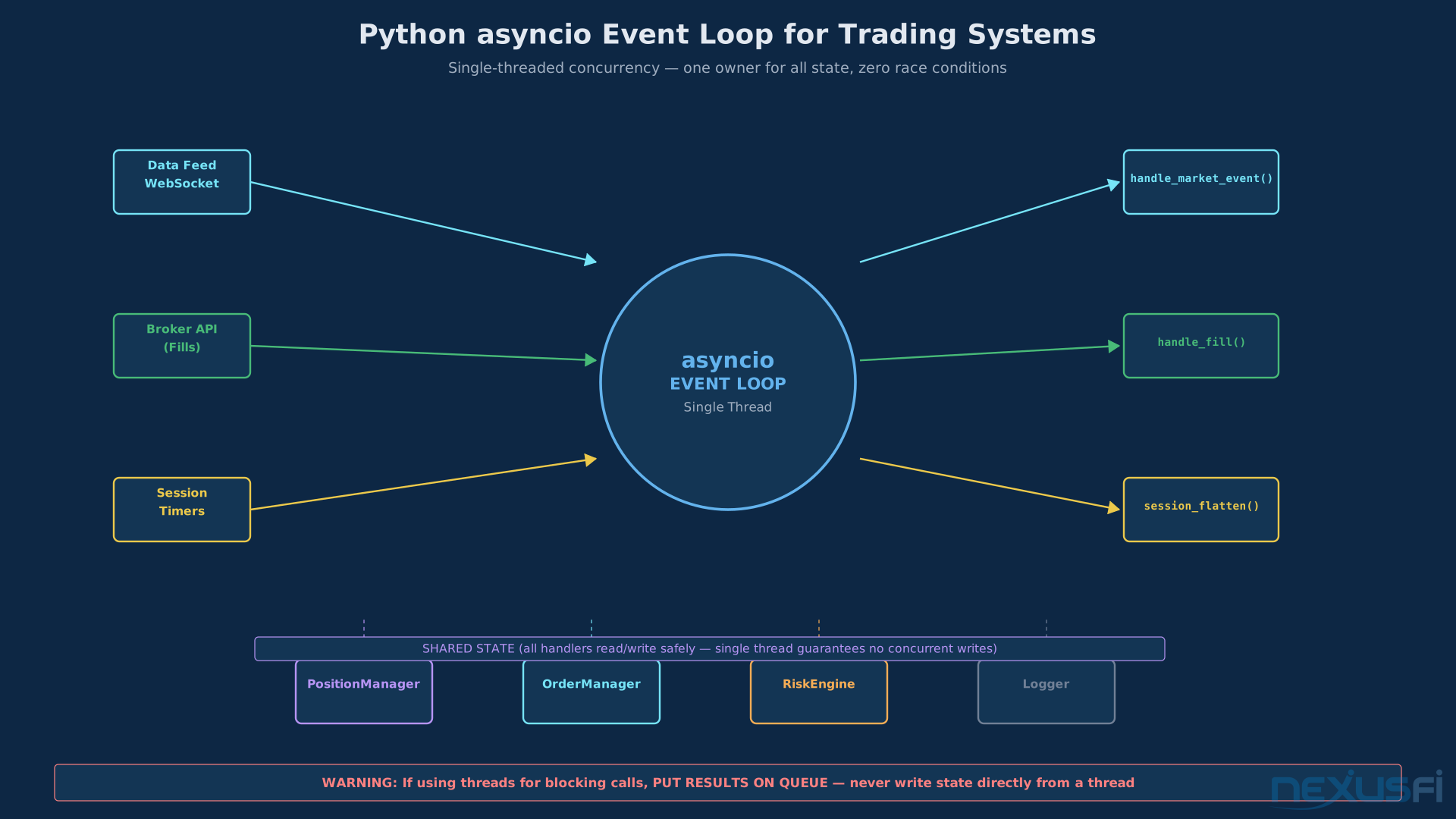
Python's asyncio library implements this pattern natively. In trading systems, it means you can run a WebSocket connection to your data feed, handle order updates from your broker API, run housekeeping timers (session end, reconciliation, health checks), and process strategy logic — all in a single-threaded event loop, with no race conditions on your core state.
The key insight: one thread owns the state, events deliver updates to that thread, nothing else writes position or order data. The moment multiple threads write to your position tracker simultaneously, you have race conditions. You'll see phantom positions, doubled orders, corrupted P&L — bugs that appear randomly and are nearly impossible to reproduce.
The event-driven trading automation pattern is well-established for good reason. It maps perfectly to how markets actually work.
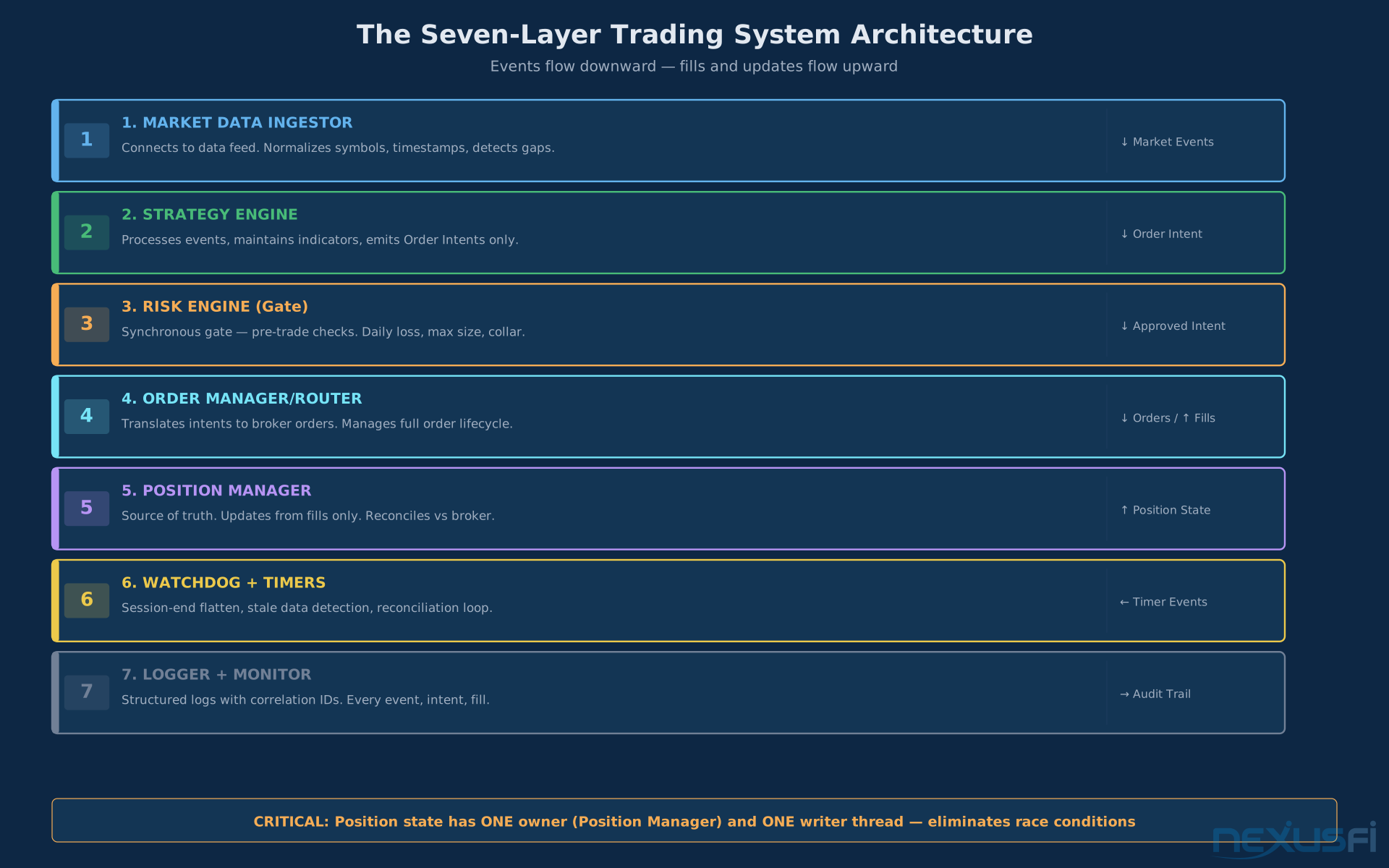
The Seven-Layer Architecture #
A production-grade futures trading system has seven layers. Each has a single responsibility. They communicate through events, not direct function calls.
Layer 1: Market Data Ingestor
Sits at the boundary between your system and the outside world. Connects to your data feed — whether that's a broker WebSocket, CQG, Rithmic, or DTN IQFeed — and normalizes everything into internal events.
Key responsibilities:
- Subscribe to price updates, order book changes, trade data
- Normalize symbols and contract specs (multiplier, tick size, session calendars)
- Attach monotonic timestamps -- not just the exchange timestamp, but your local receive time
- Detect data gaps and stale feeds, and halt trading when data quality degrades
- Handle reconnections without losing state or sending duplicate signals
The market data handling layer is where most retail systems are weakest. Data gaps during high-volatility periods — exactly when you can least afford blind spots — are common. Build detection logic that recognizes when your feed has gone quiet longer than expected and halts strategy execution.
Critical implementation detail: use both exchange timestamp and local receive timestamp. This lets you calculate feed latency and detect anomalies like timestamps that arrive out of order.
Layer 2: Strategy Engine
The only layer that does signal logic. Consumes market events, maintains indicator state, emits order intents — not actual orders.
This separation is critical. The strategy engine shouldn't know what a broker API looks like. It says "I want to buy 2 ES at market" and emits that intent. The execution layer handles the mechanics of actually doing it.
A clean strategy engine takes only market events as input, maintains its own internal state (indicators, signal values, regime detection), never calls broker APIs directly, and is pure enough to run identically in backtest and live. That last point matters for backtest-to-live performance gap. When your strategy logic runs identically in both environments, the performance gap becomes about execution realism, not logic divergence.
Layer 3: Risk Engine
Every order intent goes through the risk engine before anything else sees it. This is your centralized gate.
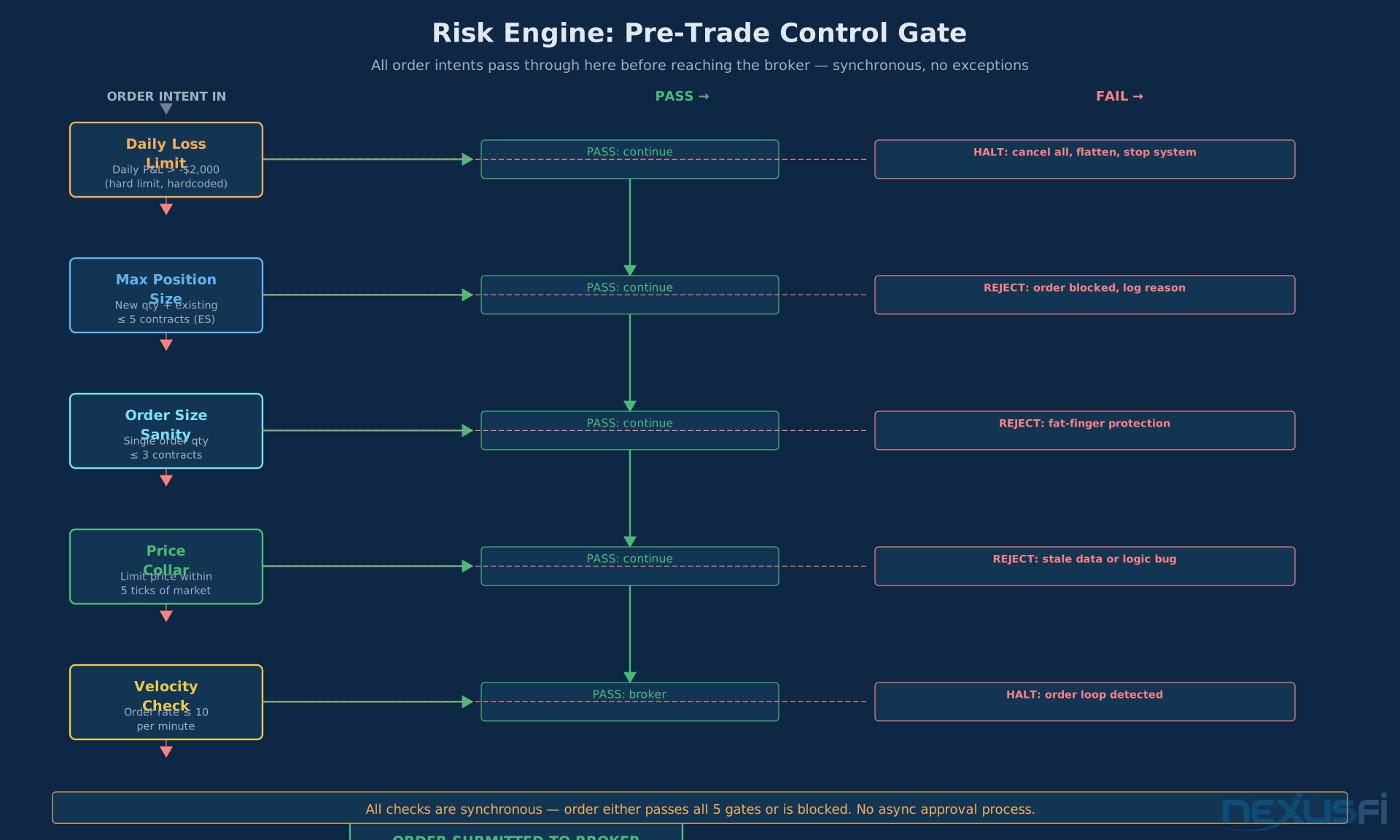
Pre-trade checks the risk engine enforces:
- Max position size -- absolute ceiling per instrument and in aggregate
- Order size limit -- catches fat-finger errors (someone types 20 instead of 2)
- Price collar check -- reject orders priced more than N ticks from the current market
- Duplicate order prevention -- block orders with the same client order ID
- Daily loss circuit breaker -- halt new orders if daily P&L is below the configured threshold
The automated risk controls implementation is where professional systems separate from amateur ones. Your risk engine should be synchronous with order creation — the order either passes the gate or it doesn't. No async approval processes.
Layer 4: Order Manager / Router
Takes approved intents and translates them into broker orders. Manages the entire lifecycle of every order.
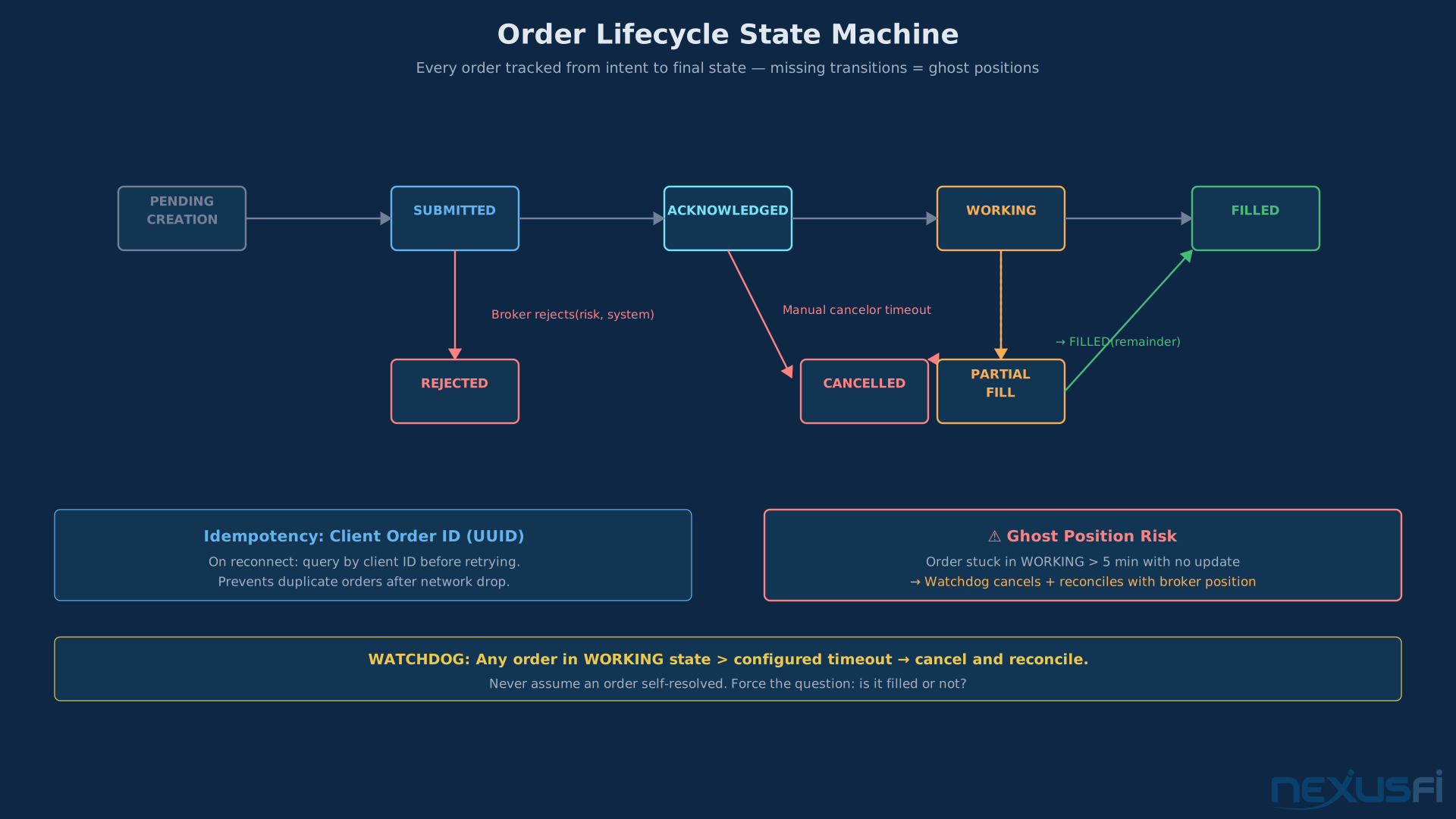
The order lifecycle for a simple market order:
PENDING_CREATION -- SUBMITTED -- ACKNOWLEDGED -- FILLED
or: SUBMITTED — REJECTED
or: ACKNOWLEDGED — CANCELLED
A limit order adds WORKING and PARTIAL_FILL states. Every state transition is logged with a timestamp. Every order has a client order ID (a UUID you generate, not the broker's order ID). This client order ID is how you maintain idempotency — if you lose connectivity and reconnect, you can query open orders and match them to your internal state by client order ID without accidentally re-submitting.
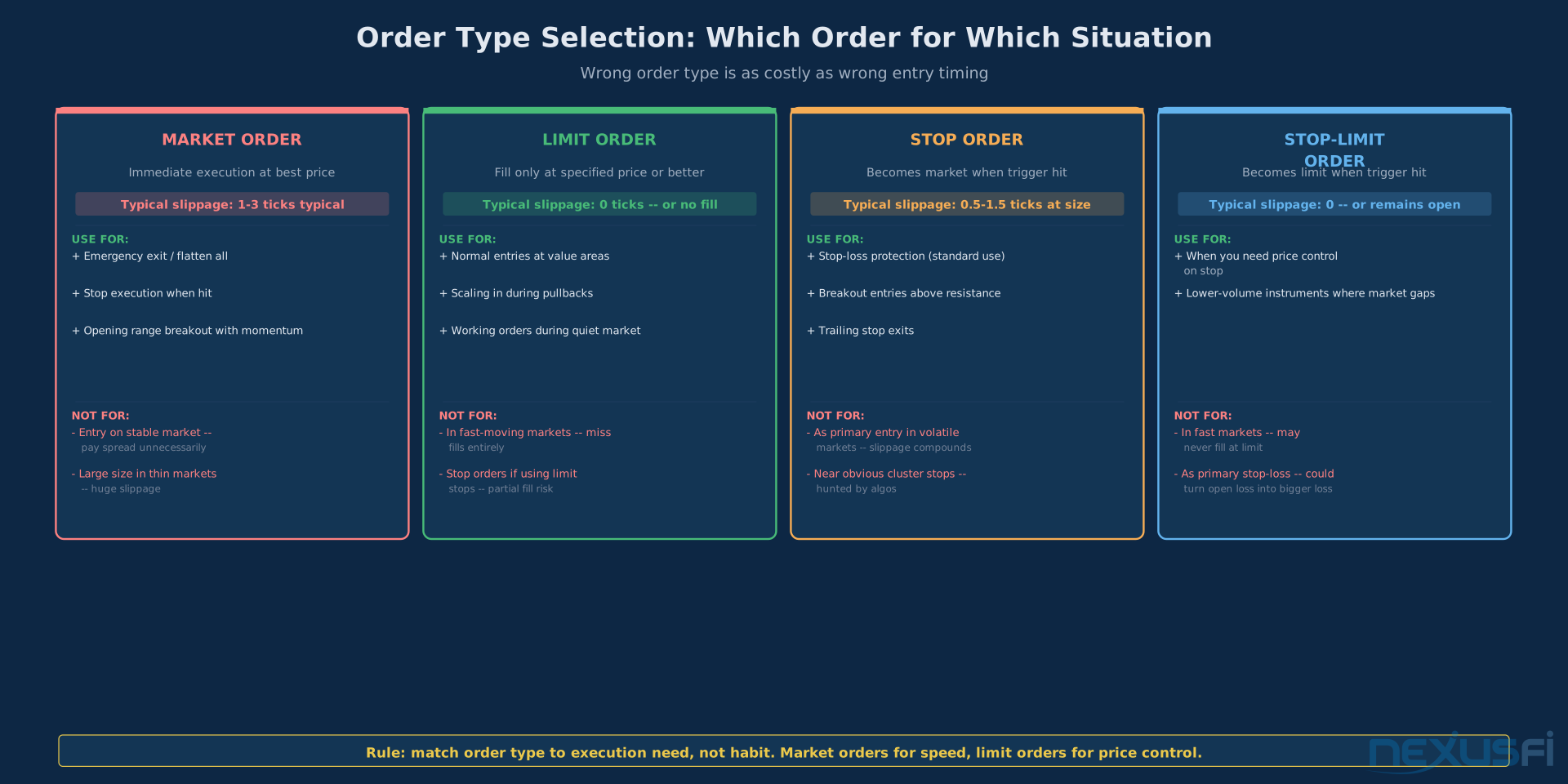
The automated order execution deep dive covers slippage management, order type selection, and smart routing. For fundamentals: always track orders by your ID, not the broker's. Brokers change order ID formats. Your client order ID is stable.
Retry logic: when a submit fails due to temporary network error, retry with the same client order ID. The broker will either process it or reject it as a duplicate. Either response tells you the true state of the order. Never submit a new order without first knowing whether the previous submission actually reached the broker.
Layer 5: Position Manager
The source of truth for what you actually own. Not what you intended to own — what you actually own according to fill confirmations.
The position manager updates from fill events from the order manager, and periodic position reconciliation from the broker. These two should agree. When they don't, you have a problem: either a fill came in that your order manager didn't capture, your order manager thought something filled that didn't, or there's a ghost position from a prior trading session.
Automated position management covers the full mechanics of size tracking, average price calculation, and P&L attribution. For the fundamentals: never assume your calculated position is correct without reconciling against the broker's position feed.
For futures specifically, the position manager must understand contract roll timing, margin requirements (initial vs. maintenance), and multiple expiry dates — don't conflate ESM26 and ESU26 as the same position.
Layer 6: Watchdog and Session Timer
No strategy logic here. This layer runs housekeeping on a timer: session-end flatten at your configured close time, cancellation of orphaned orders, broker connection health checks, and the periodic reconciliation loop.
@author="Breukelen" url="https://nexusfi.com/showthread.php?t=59175&p=876519#post876519" year="2022" forum="Elite Quantitative GenAI/LLM"
The watchdog layer is what makes that kind of protection possible. It runs independently of your strategy and has unconditional authority to halt trading. The automated contract roll management process also lives here — checking whether today is a roll date and transitioning positions when needed.
Layer 7: Logger and Monitor
Every intent, every order action, every fill, every risk decision, every reconciliation diff — logged with timestamp, event type, and full context. Not print statements. Structured logging with correlation IDs that let you trace a single trade from signal generation through to final fill.
The trading bot monitoring guide covers dashboards, alerting, and real-time health metrics. For the foundations: log enough that you can reconstruct every decision the system made.
Python Execution: asyncio in Practice #
Python is the most common language for retail futures automation. It's readable, has excellent library support, and is fast enough for bar-to-minute frequency strategies. For tick-by-tick strategies needing sub-millisecond response times, you're looking at C++ or Rust. For everything else, Python works.
The core pattern for a Python trading system:
class TradingSystem:
    async def handle_market_event(self, event):
        intent = await self.strategy.process(event)
        if intent is None:
            return
        approved, reason = self.risk_engine.check(intent)
        if not approved:
            self.logger.warning(f"Risk block: {reason}")
            return
        await self.order_manager.submit(intent)

    async def run(self):
        await asyncio.gather(
            self.data_feed.subscribe(self.handle_market_event),
            self.broker.subscribe_fills(self.handle_fill),
            self.watchdog.run_timers()
        )
The asyncio.gather() runs all three coroutines concurrently in the same event loop, sharing the same object state. Because Python's asyncio is single-threaded, there are no race conditions — one coroutine runs at a time, yielding control only at await points.
If you use threading.Thread for blocking calls, that thread must NEVER write to position state directly. Put results on a queue that the asyncio event loop consumes. Break this rule and you'll have race conditions that show up only under load — the worst kind of bug.
Broker API Integration
The futures trading APIs guide covers the environment. The major options for retail futures traders:
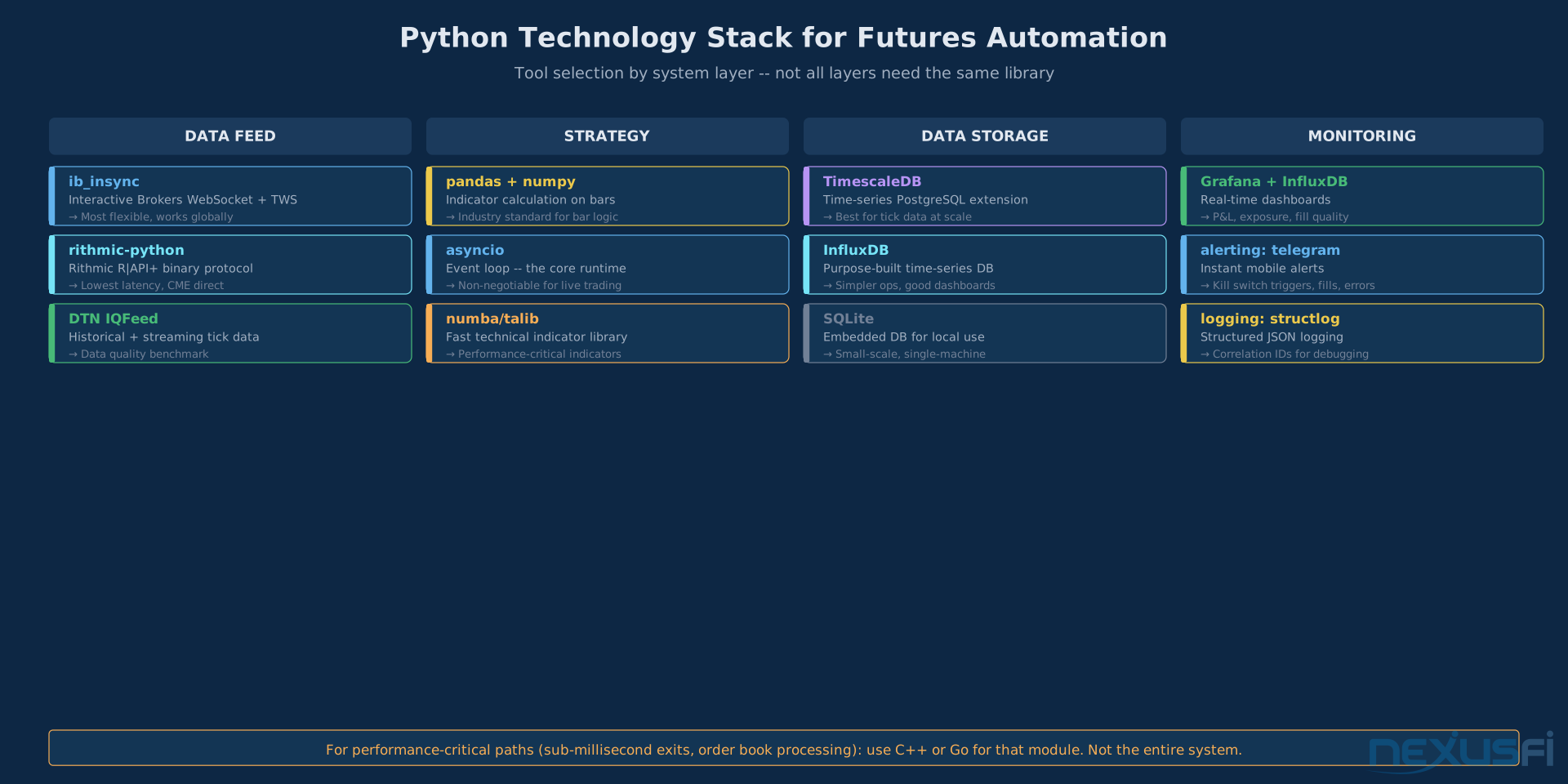
Interactive Brokers / ib_insync: the most flexible API for retail, wrapping the TWS API in asyncio-compatible coroutines. Requires running TWS or IB Gateway locally. Build strong reconnection logic — the gateway has quirks.
Rithmic: professional-grade solution used by prop firms. Lower latency than IB for futures. The protocol is binary and less documented. Worth the learning curve if you're trading ES or NQ seriously.
NinjaTrader: if you're building on NinjaScript strategy development, NinjaTrader handles the execution layer for you. The tradeoff: you're inside NT's execution model, which has its own behaviors to understand and work around.
The Reconciliation Loop
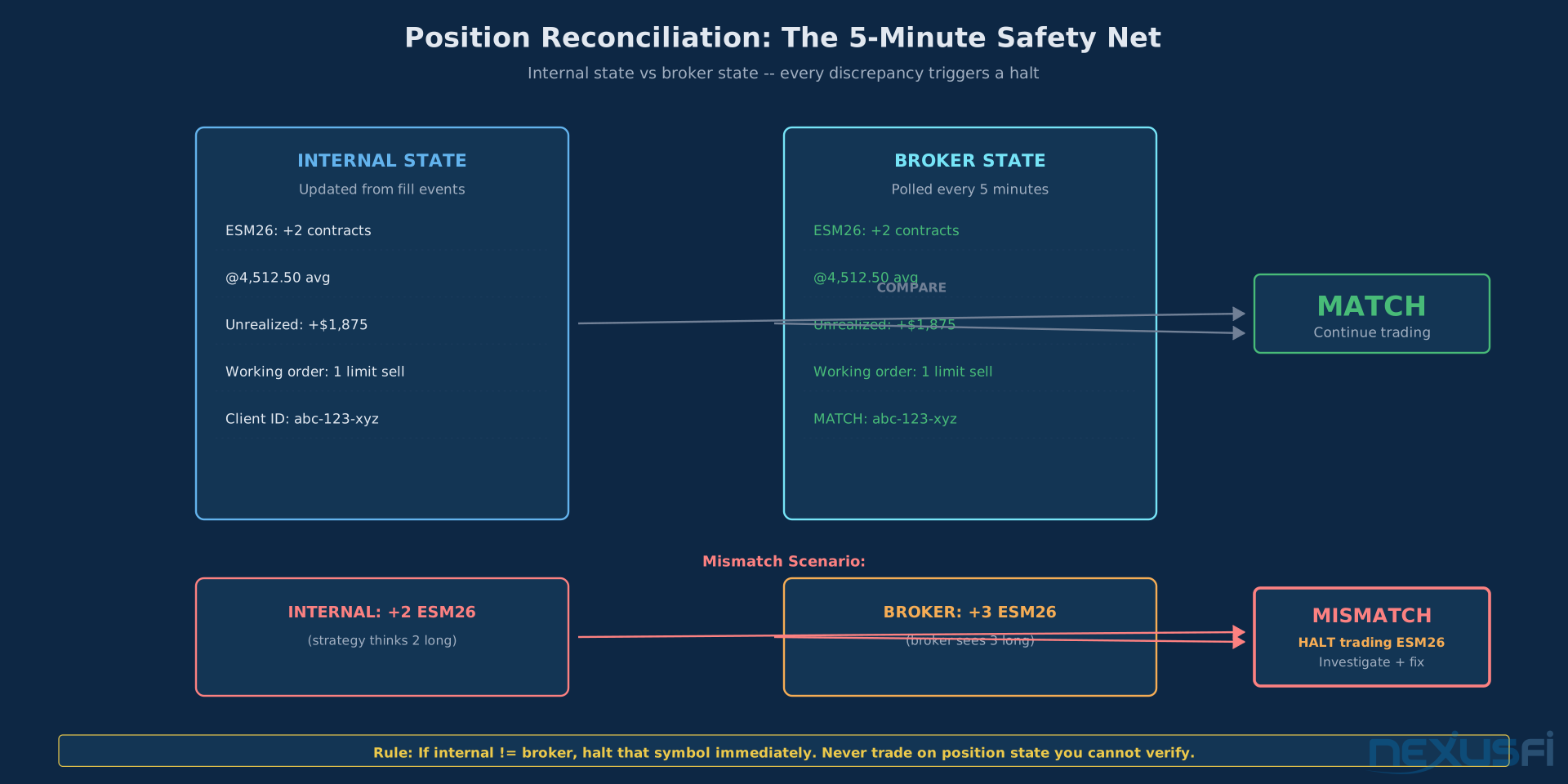
Even with perfect event handling, you need a reconciliation loop. Run it every 5 minutes. Query the broker's current positions and compare against your internal position state. If they disagree, halt trading on that symbol until you understand why.
@author="iantg" url="https://nexusfi.com/showthread.php?t=47162&p=720508#post720508" year="2019" forum="Elite Algorithmic NinjaTrader Trading"
The same principle applies to live position tracking. Never assume internal state is correct without an independent verification source.
Risk Controls: Non-Negotiable #
Every item in this section maps to a real story from someone who lost significant money because they skipped it.
Daily Loss Limit -- Hardcoded
Not configurable at runtime. Hardcoded in your system. When daily P&L hits this number, the system stops: cancels working orders, flattens positions, shuts down the strategy engine.
@author="MmmDeion" url="https://nexusfi.com/showthread.php?t=57078&p=841274#post841274" year="2021" forum="Psychology and Money Management"
@Big Mike noted the same pattern when discussing broker daily loss limit features:
@author="Big Mike" url="https://nexusfi.com/showthread.php?t=12824&p=144651#post144651" year="2011" forum="Brokers"
For automated systems, implement this yourself — don't rely solely on the broker's margin call process.
Velocity Checks and Platform Risk Controls
Set a hard cap on orders per second. More than N orders per second and something is wrong — either your strategy has a bug creating an order loop, or connectivity issues are causing retries to cascade.
@author="Liberty88" url="https://nexusfi.com/showthread.php?t=59736&p=884385#post884385" year="2023" forum="Platforms and Indicators"
Platform-level controls are a safety net. Your system-level controls are the first line of defense. Both should be active.
The Kill Switch
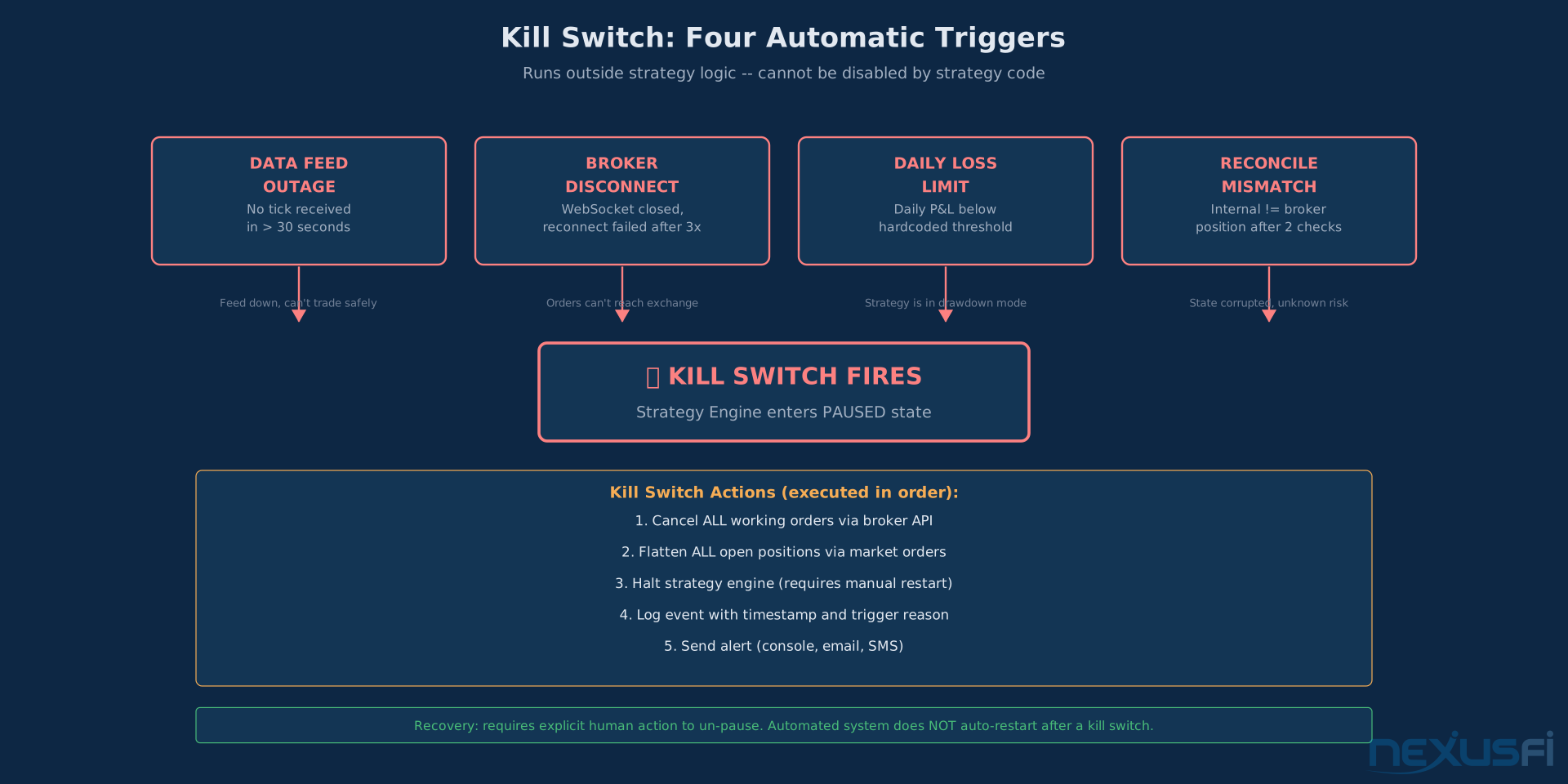
A separate mechanism, hardcoded outside your strategy logic, that can stop everything. Fires automatically on: data feed outage, broker disconnect, daily loss limit breach, or reconciliation discrepancy. Cancels all open orders via market orders, flattens all positions, shuts down the strategy engine.
@author="dsraider" url="https://nexusfi.com/showthread.php?t=2641&p=25933#post2593" year="2010" forum="NinjaTrader"
The automated trading emergency protocols guide covers the full protocol including recovery procedures. Your kill switch must be reachable even when everything else has failed.
Futures-Specific Considerations #
Session Management
ES trades 23 hours a day on Globex. RTH (Regular Trading Hours) runs 9:30 AM to 4:15 PM ET. Your system must know which session is active, when session transitions happen (CME uses Central Time internally), and whether your position was opened in the current session or carried over.
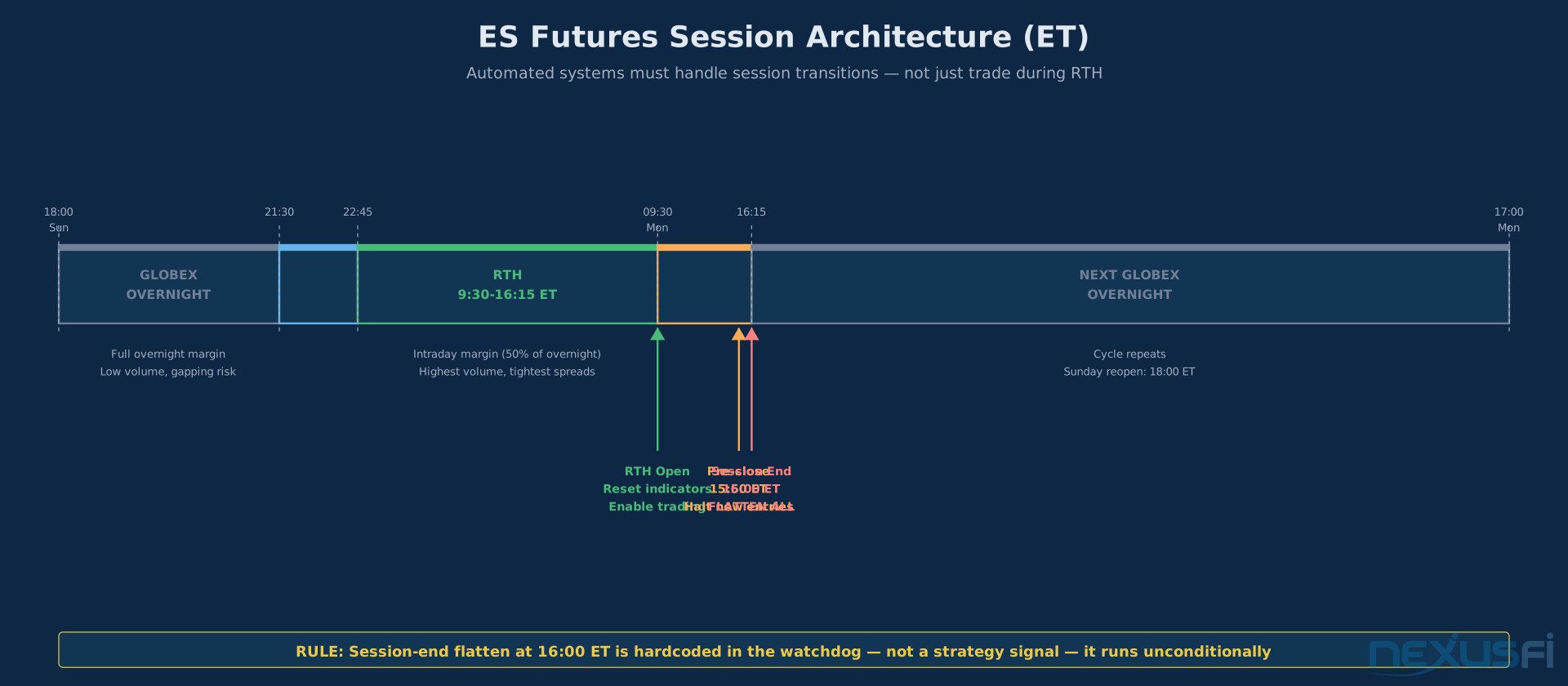
Most retail strategies should close intraday before 16:00 ET for ES. Build this into your watchdog layer as a hard flatten event, not a soft signal from the strategy.
Contract Roll Logic
ES futures expire quarterly. Your system needs to know which contract is the front month, when the roll date is, and how to handle open positions during the roll. Automated contract roll management covers this in detail. For backtesting, use adjusted continuous contracts — but actual live trading happens in specific expiry contracts, not continuous synthetics.
Margin Calls and Intraday Margin Changes
CME intraday SPAN margin for ES is roughly 50% of the overnight requirement during RTH. Your position sizing logic must know the margin requirement at the time of entry. Build a margin checker into your pre-trade risk controls with at minimum a 20% safety buffer above the minimum requirement.
Backtest Reality: Where the Gap Lives #
Every automation trader eventually confronts this: your backtest looks great, but live trading underperforms.
@author="kevinkdog" url="https://nexusfi.com/showthread.php?t=61327&p=909140#post909140" year="2026" forum="The Elite Circle"
That's the professional discipline — treat the backtest as a hypothesis, verify against live results, reconcile the differences systematically.
The most common sources of backtest-to-live gap for automated systems:
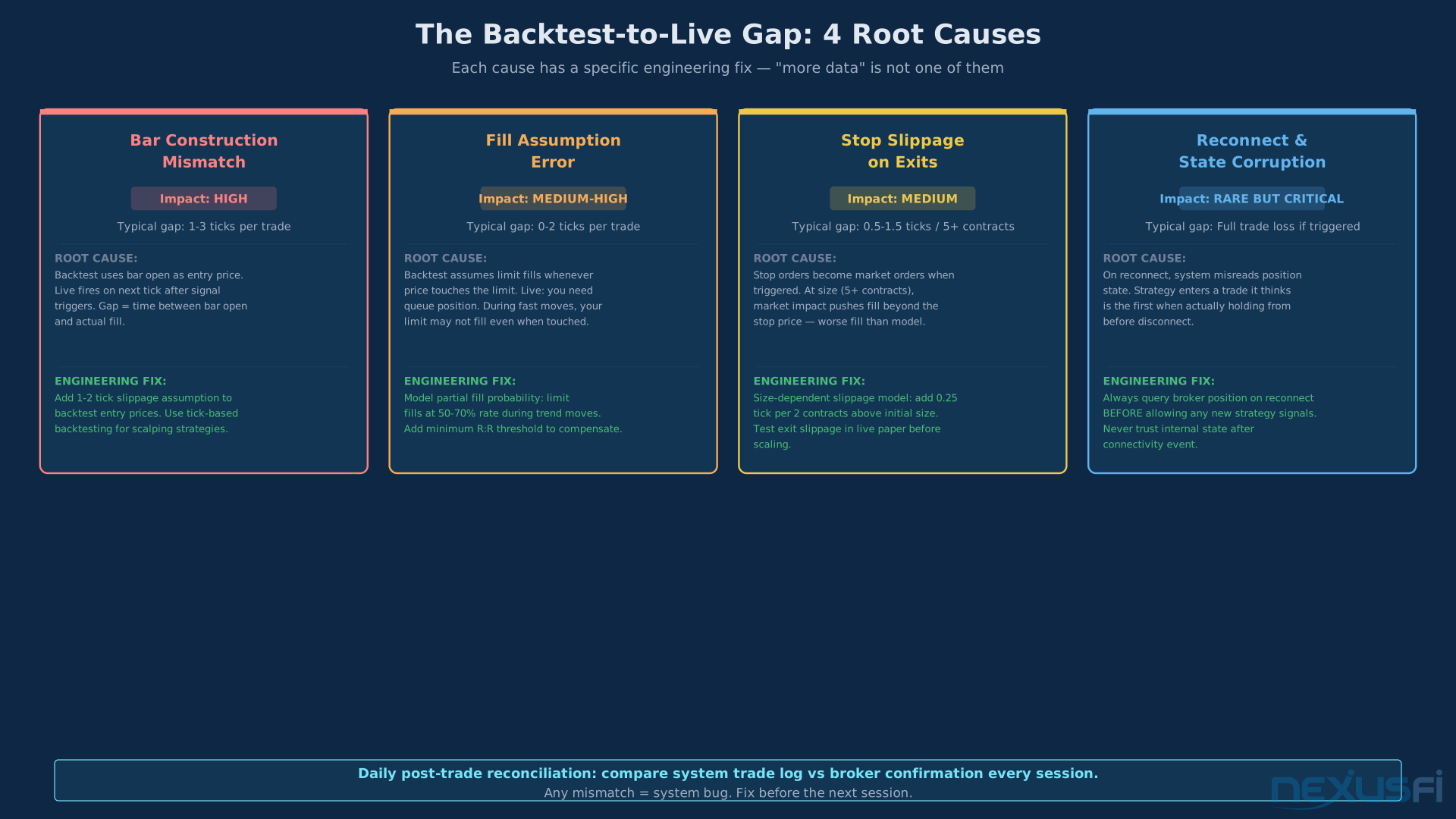
Bar construction differences: most backtests use OHLCV bars. Live trading fires on individual ticks. If your entry logic triggers "at the open" of a new bar, the actual entry price in live trading may be several ticks different from the bar open.
@author="Big Mike" url="https://nexusfi.com/showthread.php?t=15578&p=173946#post173946" year="2011" forum="Elite Algorithmic NinjaTrader Trading"
Fill assumption: backtests typically assume you fill at the bid/ask. Live markets don't guarantee fills at the limit price even when the market trades at your price — queue position matters. For liquid instruments like ES, assume you fill at the next price after your limit if you're entering at market-moving times.
Slippage on exits: if your backtest shows a 1-tick stop and you're trading 5+ contracts, you're going to have slippage on exit. @MWinfrey's analysis on SuperTrend Bot testing covers the methodology:
@author="MWinfrey" url="https://nexusfi.com/showthread.php?t=14692&p=172070#post172070" year="2011" forum="Elite Algorithmic NinjaTrader Trading"
From Paper to Live: The Progressive Rollout #
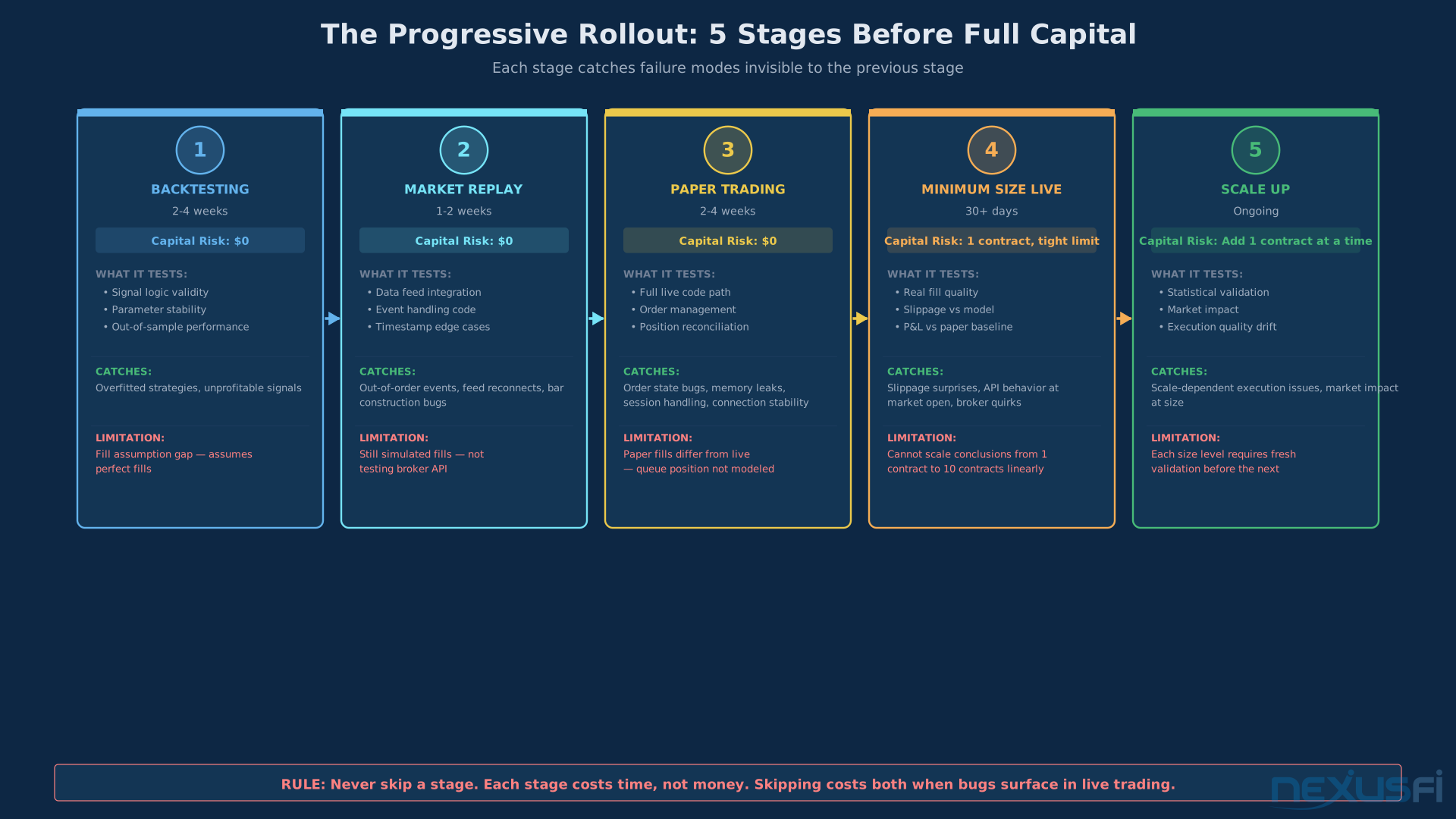
Don't flip a switch and go live with real capital. The progression is:
Stage 1: Backtesting — full historical simulation with realistic fills and slippage assumptions. Reference backtesting trading strategies for fill modeling standards.
Stage 2: Market Replay — live data feed, your orders execute against historical data. Tests your data feed integration and order management code without real money.
Stage 3: Paper Trading — live data feed, simulated execution against the live market. Your system operates identically to live mode — same code path, same event loop, same risk controls — but orders don't go to the exchange. Run this for at minimum 2-4 weeks. Reference paper trading and simulation for what to measure.
Stage 4: Minimum Size Live — one contract, tight risk controls, full monitoring. Run for 30+ trading days. Compare live fills to what your paper trading system would have gotten on the same signals.
Stage 5: Scaling — only after Stage 4 is validated do you scale up. Add one contract at a time. Re-validate at each new size level.
The algo trading live deployment guide covers the full validation framework including statistical tests for when you have enough live data to make scaling decisions.
Common Failure Modes and Their Engineering Solutions #
Ghost positions: positions your system thinks you have but don't exist at the broker. Cause: position update event lost during reconnect. Solution: reconciliation loop that halts trading on any discrepancy.
Duplicate orders: the same order submitted twice because the first submission's ACK was lost. Solution: client order IDs with idempotency checks. Before retrying any submission, query open orders by client order ID.
Hung state: an order in WORKING state for longer than it should be. Cause: fill event was lost or order was silently cancelled by the exchange. Solution: watchdog timer that cancels orders not seen in any update within N minutes.
Strategy re-entry after kill switch: after your kill switch fires, the strategy should not re-enter. Build a "paused" state into your strategy engine that requires explicit human action to un-pause after an emergency halt.
Timestamp drift: your system's clock drifts from exchange time, causing events to appear out of order. Solution: NTP synchronization and monitoring of the delta between exchange timestamp and local receive timestamp.
The latency and infrastructure guide covers infrastructure-level solutions including clock synchronization and network configuration.
The Minimum Viable Architecture #
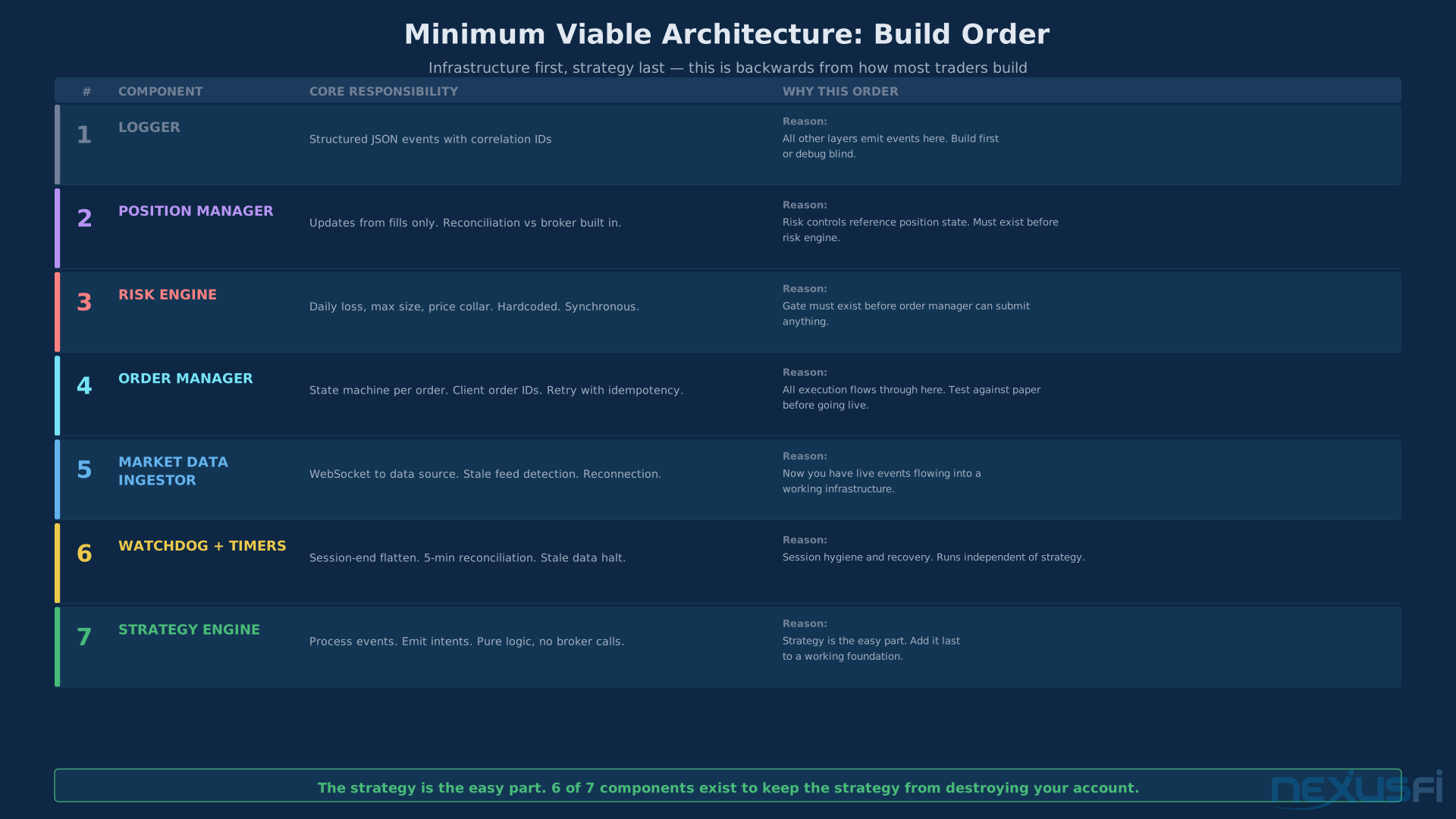
If you're building from scratch, here's the simplest version that covers all the critical bases:
- Logger -- structured JSON events with correlation IDs. Build first.
- Position Manager -- updates from fills only, reconciliation built in.
- Risk Engine -- daily loss, max size, price collar. Hardcoded. Synchronous.
- Order Manager -- state machine per order. Client order IDs. Idempotent retry.
- Market Data Ingestor -- WebSocket to data source. Stale feed detection. Reconnection.
- Watchdog + Timers -- session-end flatten. 5-min reconciliation. Stale data halt.
- Strategy Engine -- process events, emit intents, pure logic, no broker calls.
This is seven components, and every one of them exists because something went wrong for someone without it.
The order matters. Don't build the strategy first.
- Build the logger first. Every other layer emits events to it.
- Build the position manager second. This is the source of truth your risk controls reference.
- Build the risk engine third. Hardcode your limits. Do not make them runtime-configurable for the initial build.
- Build the order manager fourth. Test it against paper trading before connecting to live capital.
- Build the market data ingestor fifth. Now you're connected to a real feed.
- Add watchdog sixth. Session hygiene and recovery -- runs independent of strategy.
- Add strategy logic last. The infrastructure was the hard part. The strategy slots into the top of a system that already handles all the mechanics.
This sequence is backwards from how most traders build it. Most traders write the signal logic first and bolt on infrastructure as problems emerge. The professional approach is infrastructure first — you get a strong foundation that the strategy runs on top of.
Build the foundation. The strategy is the easy part. The trading system architecture guide shows how these components connect at the codebase level with concrete implementation patterns.
Knowledge Map
Go Deeper
Build on this knowledgeReferences This Article
Articles that build on this topicCitations
- — My algo hit the kill switch, CME said no! Lady Luck Saved Me! (2022) 👍 6“Today has been an interesting trading day! I'm comfortable enough with the performance and fail safes of my algo that I do not spend all day watching it.”
- — I finally blew up an account (2021) 👍 9“One suggestion that I don't believe has been made already is to have your broker or platform put in a daily loss limit.”
- — New Risk Management Settings built-in to NinjaTrader (2023) 👍 6“Daily Loss Limit, Weekly Loss Limit, Daily Profit Trigger, Weekly Profit Trigger. Lock risk settings if trading locked.”
- — Daily Loss Limit (2011) 👍 6“A user can request their own personal daily loss limit with Velocity (ie: $500 or whatever) and VF will close a position when it reaches this.”
- — Big Discrepancies in Execution between Strategy Analyzer and Market Replay (2019) 👍 5“Yeah, for testing a strategy you should only ever use market replay or live SIM. Strategy analyzer will only be in the ball park if you use really liquid instruments.”
- — Automated DayTrading: Market Replay vs. Live SIM. Why are results different? (2011) 👍 10“I am also answering specifically with NinjaTrader in mind since that is what you are using and what I am most familiar with.”
- — SuperTrend Bot Contest and Testing (2011) 👍 12“Some things you might consider doing to help your back testing be closer to forward testing. Session template needs to be the same between each of your forward and backward runs.”
- — Backtesting the right way (2026) 👍 4“In my own trading, I find the backtest to be a good match to real time. I compare them after the fact to ensure that is the case, after accounting for slippage.”
- — Sample Advanced Automated Strategy v1.0 (2010) 👍 35“I have put together a fully-automated, advanced strategy which includes a kill switch and only enters between 10:15 AM and 3:15 PM (EST).”