



Trading Bot Monitoring and System Health: Keeping Your Automated Strategy Alive When You're Not Watching
Overview #
Trading Bot Monitoring and System Health: Keeping Your Automated Strategy Alive When You're Not Watching
Here's the uncomfortable truth about automated trading: the algorithm that made you money while you slept can blow your account while you're in the shower. The code runs. The market moves. And somewhere between "everything looks fine" and "why am I flat with a $5,000 loss," your system failed silently.
Monitoring isn't the glamorous part of algo trading. Nobody brags about their alerting pipeline at the trading desk. But the traders who survive long enough to compound their edge? They all have one thing in common: obsessive monitoring.
This article covers the full monitoring stack for automated futures trading: from heartbeat checks that prove your system is alive, to position reconciliation that proves it's correct, to kill switches that shut everything down when neither is true.
Key Concepts #
Before getting into the architecture, here are the core concepts every automated trader needs to understand:
Heartbeat — A periodic signal your strategy sends to prove it's alive and functioning. If the heartbeat stops, something has failed. Think of it as a dead man's switch for your trading system.
Position Reconciliation — The process of comparing your system's internal state (what it thinks your position is) against reality (what the exchange and broker say your position is). Discrepancies here are where the catastrophic losses hide.
Kill Switch — An automated mechanism that halts all trading activity and flattens positions when predefined thresholds are breached. The most important safety mechanism in any automated system.
My algo hit the kill switch, CME said no! Lady Luck Saved Me! (@Breukelen)
Failover — The ability to switch from a primary system to a backup when the primary fails. For automated trading, this means your strategy can continue operating (or safely flatten) even when hardware, network, or software components go down.
Data Staleness — When the market data your strategy is using is no longer current. Your strategy might be making decisions on prices from 30 seconds ago while the market has moved much. Detecting staleness is critical because the strategy won't know on its own.
The Monitoring Stack: Five Layers Deep #
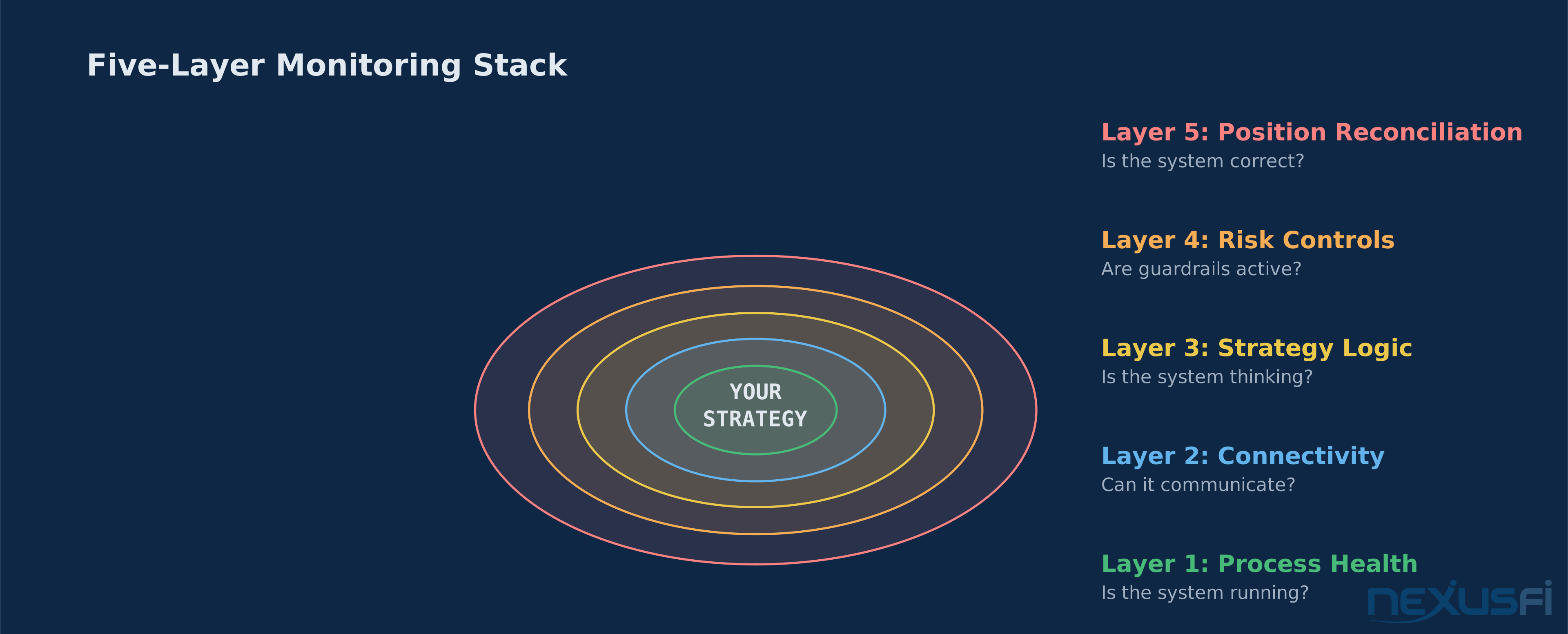
Think of monitoring as five concentric rings, from the innermost (is the process running?) to the outermost (is the position correct?). A failure at any ring can destroy your account, but the outer rings are where the real money-destroying bugs hide.
Layer 1: Process Health
The most basic check. Is your strategy process alive? Is it consuming CPU? Is it allocating memory within expected bounds?
This is where most traders stop — and it's not enough.
Process health monitoring should include:
- Process existence (PID check, service manager status)
- Memory utilization trends (gradual leaks kill strategies over days)
- CPU utilization within expected bounds (spikes suggest infinite loops or error cascades)
- Disk I/O for log writing (a full disk silently kills logging, then kills everything else)
@nikke on NexusFi shared a practical approach: running a lightweight monitoring service from a separate physical location that polls text files your strategy updates. If the files stop updating, you know the strategy has hung.
Monitoring multicharts SA is running (@nikke)
Layer 2: Connectivity
Your strategy needs three communication channels, and all three must be independently monitored:
Market Data Feed
@MXASJ built an "Exchange Data Delay Test" tool on NexusFi specifically to measure the latency between when an exchange event occurs and when your platform processes it. This kind of instrumentation separates professional algo operations from hope-based monitoring.
Exchange Data Delay Test (@MXASJ)
Order Gateway
Monitor:
- Round-trip latency for order submissions (measure from send to acknowledgment)
- Order rejection rates (sudden spikes indicate session or permission issues)
- Time since last successful order state change
- FIX sequence number gaps (for FIX-protocol connections)
Broker/Clearing Connection
@sam028 described a VPS monitoring setup where "we install a monitoring agent and this agent is polled by our monitoring servers (which are not in the same data center)." That geographic separation is key — if your monitoring runs on the same box as your strategy, a hardware failure takes out both.
speedytradingservers.com review (@Happyface)
Layer 3: Strategy Logic
Your process is running. Your connections are live. But is your strategy actually producing rational output?
Strategy heartbeats should verify:
- Signal generation cadence (if your strategy evaluates every bar, verify you're evaluating every bar)
- Order sizing within expected bounds (a bug that sends 100 lots instead of 1 lot is the classic nightmare)
- P&L tracking accuracy (compare your internal P&L calculation against broker-reported P&L)
- State machine integrity (if your strategy has states like "waiting for entry," "in position," "scaling," verify transitions are legal)
The hardest monitoring problem in automated trading is detecting subtle logic errors — the kind where your strategy runs, generates signals, and submits orders, but the logic itself has drifted from what you intended.
The best defense: track your P&L variance. Compare realized P&L against what your backtest model predicts for the same market conditions. If the variance consistently trends negative, something in your live execution differs from your model.
Layer 4: Risk Controls
This is the layer where monitoring meets risk management, and it's where the NexusFi community has generated some of the most valuable real-world experience.
Daily Loss Limits
The most important automated risk control, period.
I finally blew up an account (@blew)
@bobwest confirmed that "Sierra Chart lets you put in a daily loss limit and it closes any open positions if you hit it."
Daily Loss Limit supervised by Broker/Software (@Schebbi)
New Risk Management Settings built-in to NinjaTrader (@Liberty88)
The pattern is clear: platform-enforced limits are better than strategy-enforced limits. If your strategy is the one checking whether it should stop trading, a bug in your strategy can bypass that check. Platform-level or broker-level enforcement is independent of your code.
@SBtrader82 took this further by implementing "a mechanical way to prevent big losing days. I will impose a max daily loss in Rithmic."
SBtrader82 's Trading Journal (@SBtrader82)
Position Limits
Monitor your actual position size against your allowed maximum. Set hard caps at the platform or broker level, not just in your strategy code. A runaway sizing bug is the fastest way to destroy an account.
Margin Utilization
Track available margin as a percentage of account equity. Set alerts at 50%, 70%, and 90% utilization. At 90%, your broker starts making decisions for you — and those decisions are liquidation, not risk management.
Kill Switch Implementation
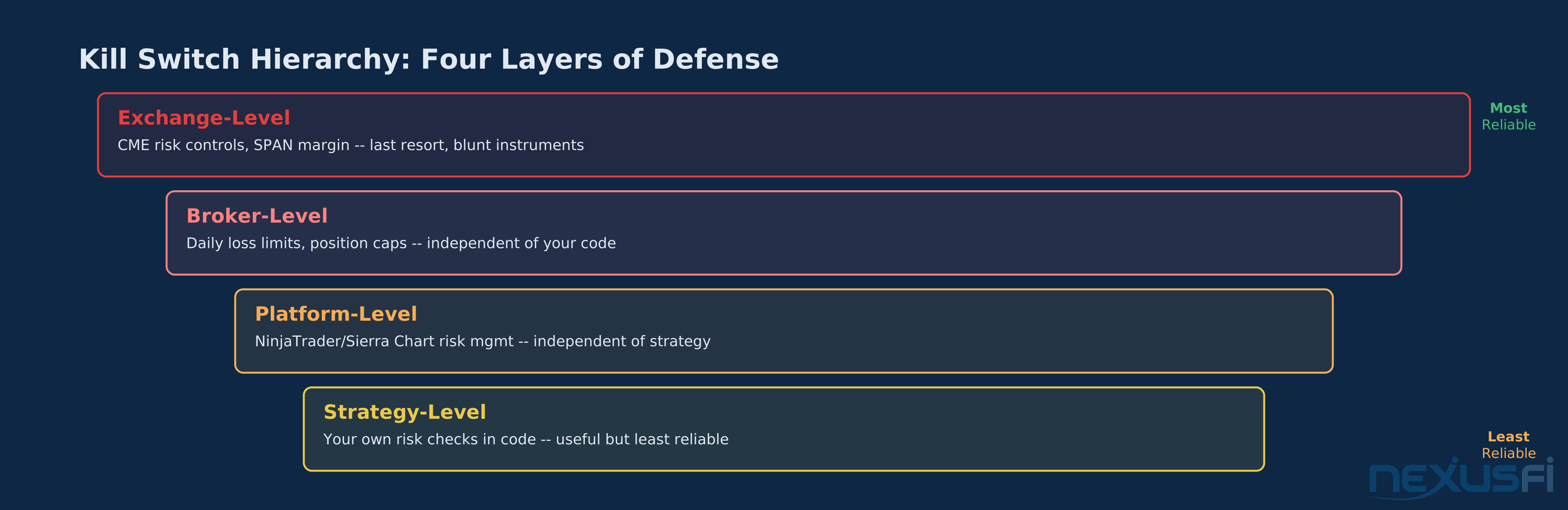
Your kill switch needs to be independent of your strategy. Here's the hierarchy:
- Exchange-level
- Broker-level
- Platform-level
- Strategy-level
Each layer should be configured, and each layer should be monitored to confirm it's active. A kill switch that's been accidentally disabled is worse than not having one — it creates a false sense of safety.
Layer 5: Position Reconciliation
This is the most critical monitoring layer and the one most traders underinvest in.
Position reconciliation answers one question: does your system's internal state match reality? If your strategy thinks you're flat but the exchange says you're long 5 NQ contracts, every subsequent decision your strategy makes is wrong.
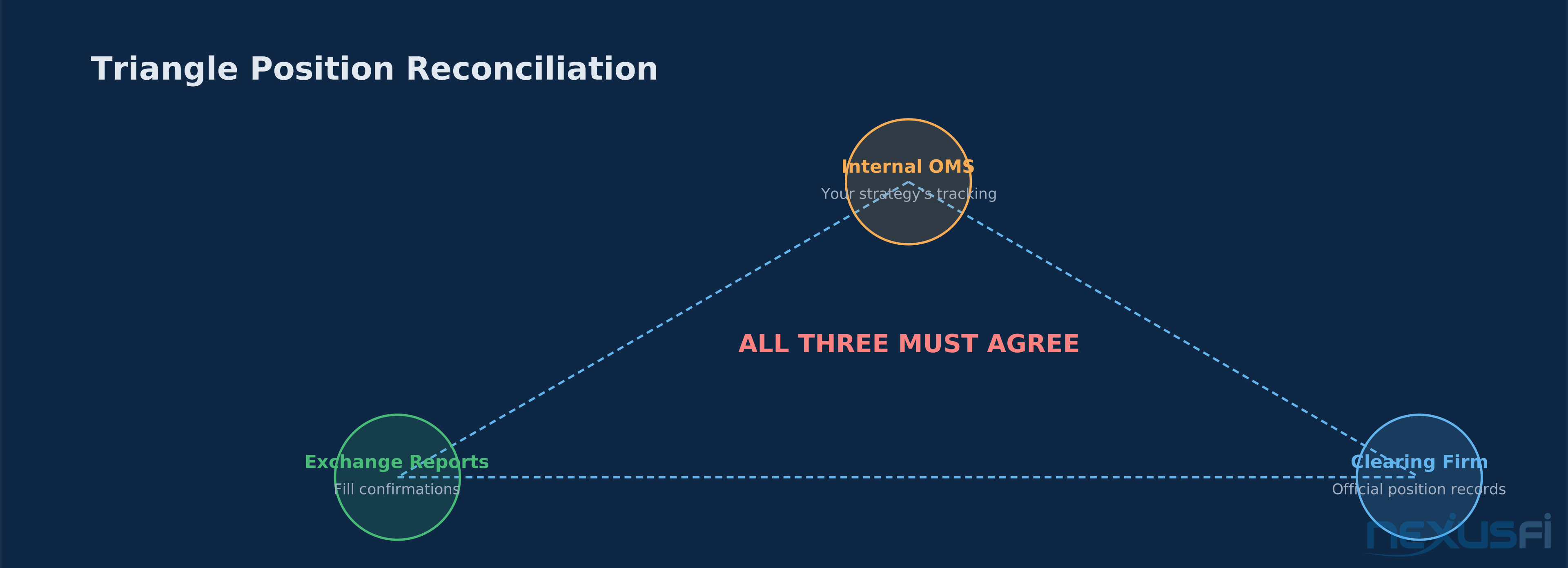
The Triangle Reconciliation Model
Professional trading operations reconcile across three sources:
- Internal OMS
- Exchange Reports
- Clearing Firm
All three must agree. If any two disagree, trading stops until the discrepancy is resolved.
For retail-level automated traders, the practical version: compare your strategy's internal position tracking against your broker's reported position at regular intervals. Most platforms expose an API for querying account positions.
@dom993 solved this problem for a 24/7 strategy on NexusFi: "I have a strat which is always in the market, 24/7 ... I had to solve that problem." The solution involved querying exchange state on every reconnect and rebuilding internal state from the broker's truth.
Best way to sync positions on re-connecting (@quantismo)
@Adamus added that in NinjaTrader, "you can set NT7 to adopt the positions" on reconnection.
When to Reconcile
- On every reconnection to the data feed or order gateway
- On every strategy restart
- After every partial fill (partial fills are the #1 source of position drift)
- At the start and end of every trading session
- Every N seconds as a continuous background check (60 seconds is a reasonable interval for non-HFT)
- After any cancel/replace burst (rapid modifications can cause race conditions)
What to Do on Mismatch
If reconciliation detects a discrepancy:
- Immediately halt all new order submissions
- Cancel all open orders
- Alert the operator with full details (internal state vs external state)
- Do NOT automatically flatten
- Log every detail for post-incident analysis
Alerting Architecture: Signal vs. Noise #
Bad alerting is worse than no alerting. Alert fatigue kills faster than inattention.
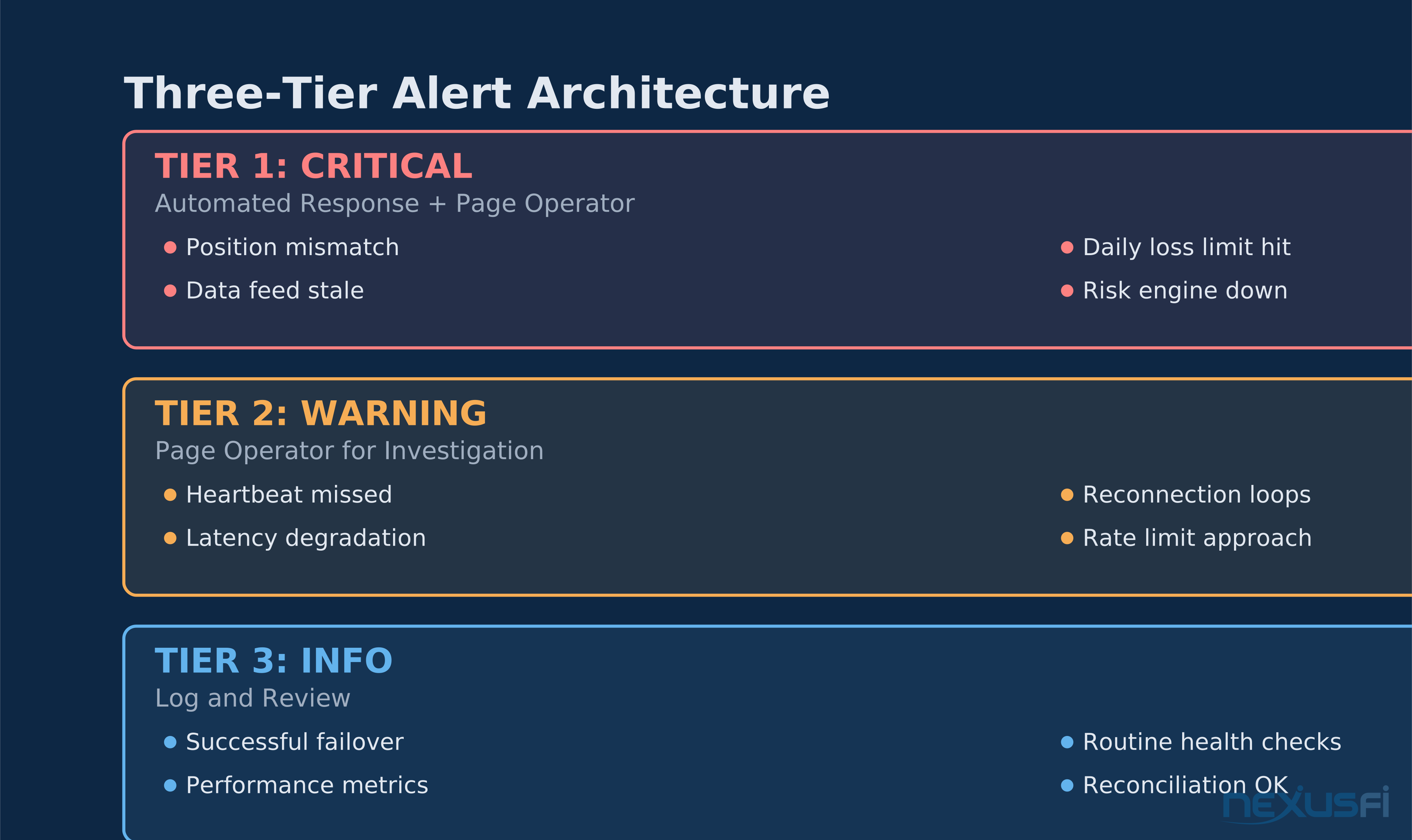
Three-Tier Alert Design
Tier 1: Critical -- Automated Action + Page
These alerts trigger automated action AND page the operator:
- Position mismatch detected (halt trading)
- Daily loss limit approaching (reduce position size)
- Daily loss limit hit (flatten and disable)
- Data feed stale > threshold (halt new orders)
- Risk engine unreachable (halt trading)
- Failed order executions exceeding threshold (investigate)
Tier 2: Warning -- Page Only
These alerts page the operator but don't trigger automated action:
- Heartbeat missed for > X seconds
- Repeated reconnection cycles
- Latency degradation vs. baseline
- Approaching rate limits on API calls
- Unusual slippage patterns
Tier 3: Informational -- Log Only
These get logged for review but don't interrupt:
- Successful failover events
- Routine health check results
- Strategy performance metrics
- Daily reconciliation summaries
Alert Content Standards
Every critical alert must include:
- Current trading state (enabled/disabled)
- Current position and exposure
- Last known market data timestamp
- Last order state transition time
- What automated action was taken (if any)
- What the operator should do next
An alert that says "ALERT: Position mismatch detected" is useless. An alert that says "CRITICAL: Position mismatch — Internal=FLAT, Broker=LONG 5 NQ @ 21,450. Auto-halted trading. Last reconcile: 14:32:07. Action required: verify broker position and restart strategy" tells you everything you need to act.
Delivery Channels
Critical alerts need to reach you through whatever channel you're most likely to see. Most traders use a hierarchy:
- Push notification to phone (fastest)
- SMS (bypasses do-not-disturb on most phones)
- Email (for documentation)
- Platform audio alert (only useful if you're at the desk)
Configure alerts to escalate: if a critical alert isn't acknowledged within 60 seconds, automatically flatten all positions. If monitoring can't confirm the flatten succeeded, send a secondary alert to a backup contact.
Failover and Recovery #
When your primary system fails, what happens to your money?
The State Machine Approach
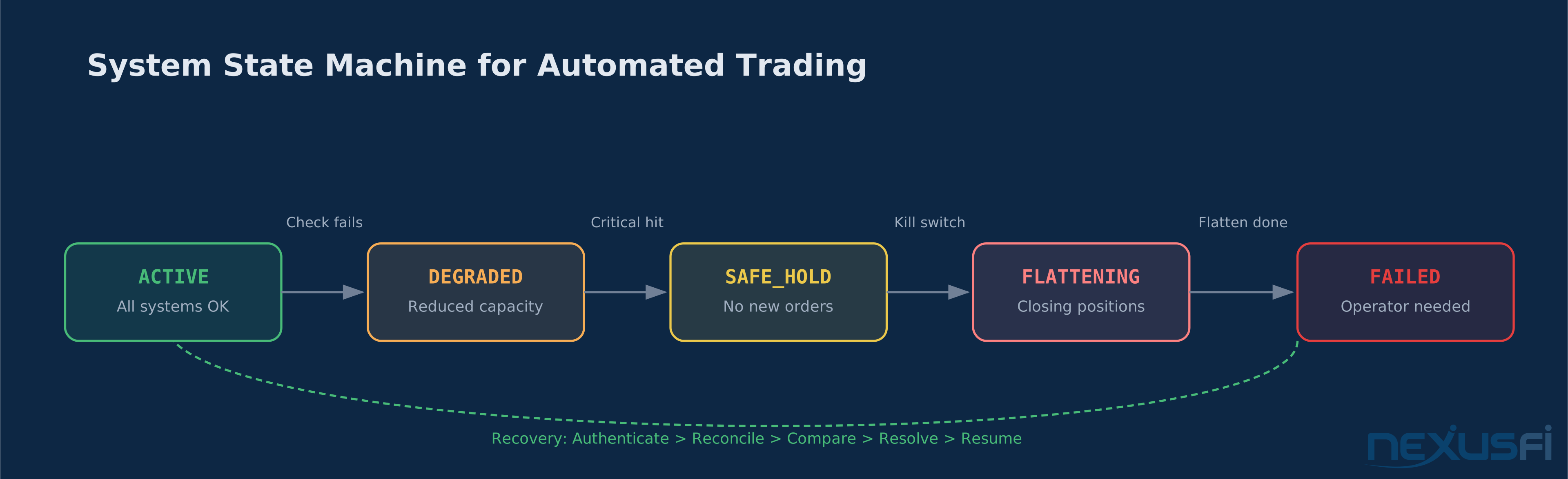
Define your system's operational states explicitly:
- ACTIVE — All systems nominal, strategy is trading.
- DEGRADED — One or more subsystems impaired but strategy can continue with reduced risk.
- SAFE_HOLD — Strategy paused, existing positions maintained, no new orders.
- FLATTENING — Actively closing all positions, no new entries.
- FAILED — System down, all positions should be flat, operator intervention required.
Each state transition should be logged and alerted. The transitions should be triggered automatically by monitoring signals, not by manual intervention.
Recovery Protocol
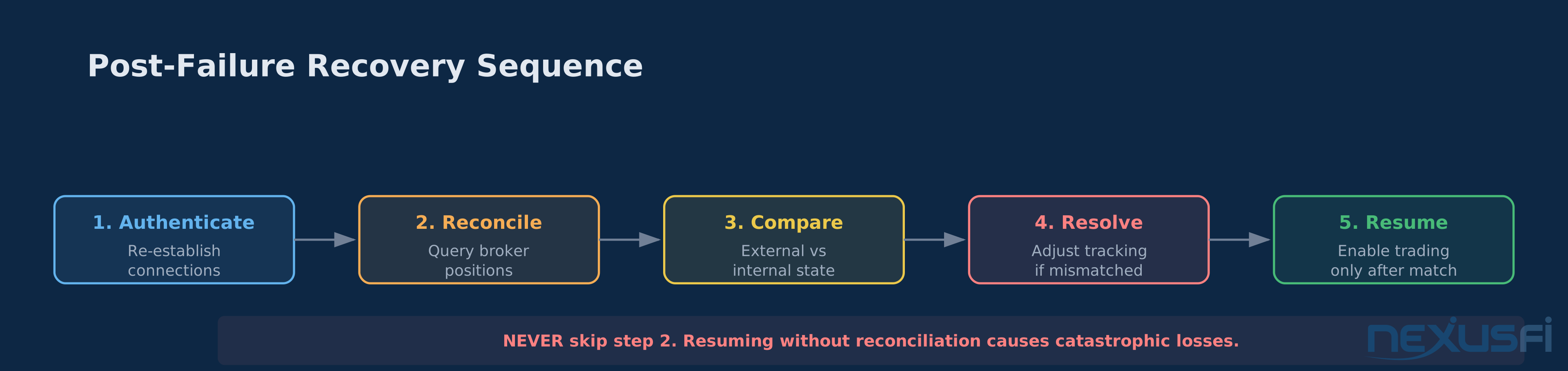
After any system failure, the recovery sequence is:
- Authenticate
- Reconcile
- Compare
- Resolve
- Resume
Step 2 must complete before step 5 starts. Never resume trading without reconciling first. This is the #1 cause of catastrophic post-failure losses: the system comes back online and immediately starts trading based on a stale internal state.
Idempotency
Every order operation (submit, cancel, modify) must be idempotent — meaning submitting the same operation twice produces the same result as submitting it once.
Use unique order IDs (client order IDs) for every order. On retry, submit the same client order ID. The exchange will reject the duplicate instead of executing it twice.
The Dashboard: One Screen, One Glance #
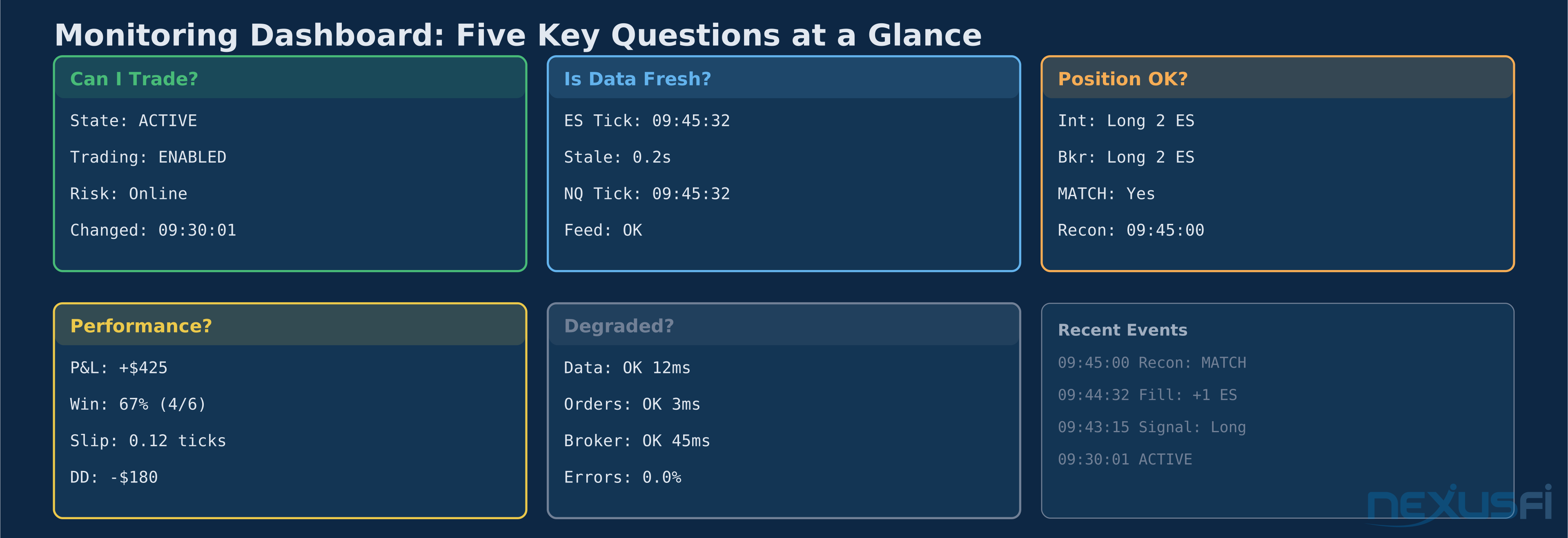
Your monitoring dashboard should answer five questions instantly:
- Can I trade right now? (System state: ACTIVE/DEGRADED/HALTED)
- Is my data fresh? (Last tick timestamp, staleness age)
- Is my position correct? (Internal vs. broker, last reconcile time)
- How am I performing? (P&L, win rate, slippage vs. expected)
- Is anything degraded? (Connection status, latency, error rates)
Anything beyond these five questions belongs in a secondary view. The primary dashboard is for crisis detection, not analysis.
Building It: Practical Architecture #
For solo traders running one or two automated strategies, here's a practical monitoring stack:
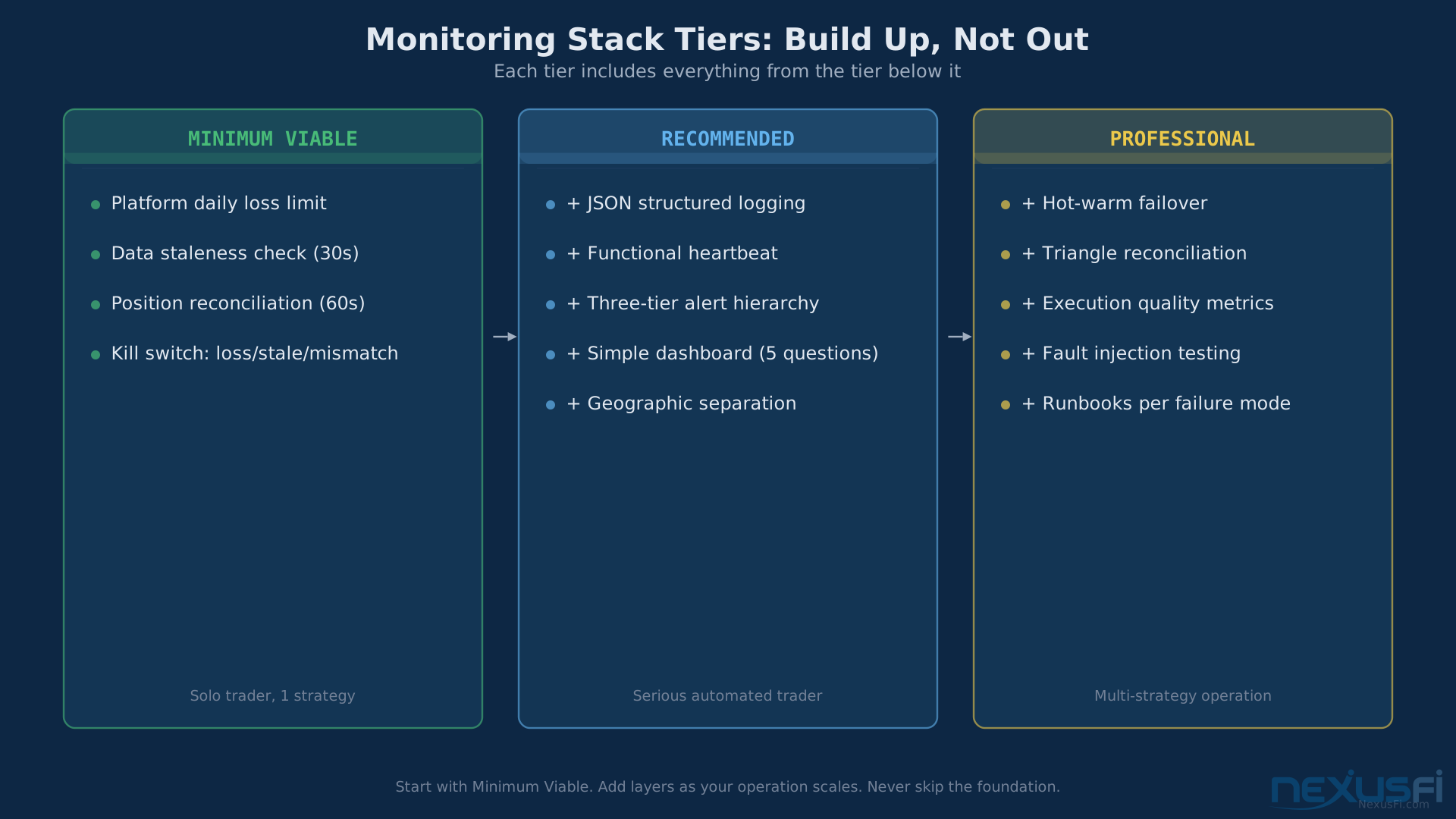
Minimum Viable Monitoring
- Platform-enforced daily loss limit (NinjaTrader, Sierra Chart, or broker-level)
- Data staleness check every 30 seconds with SMS/push alert
- Position reconciliation against broker every 60 seconds
- Kill switch: if daily loss hit OR data stale > 30 seconds OR reconciliation fails, flatten and disable
Recommended Stack
- All of the above, plus:
- Structured JSON logging for all order events, fills, and state changes
- Strategy heartbeat with functional verification (not just process alive)
- Alert hierarchy: critical triggers flatten + SMS, warning triggers SMS, info logs only
- Dashboard (even a simple web page) showing the five key questions
- Geographic separation: monitoring runs on a different machine than the strategy
Professional Stack
- All of the above, plus:
- Hot-warm failover with automated switchover
- Triangle reconciliation (OMS, exchange, clearing)
- Execution quality monitoring (slippage, fill ratios, latency percentiles)
- Fault injection testing in staging environment
- Runbooks for every failure scenario
@vmodus on NexusFi described a practical approach: setting up email notifications in TradeStation as a monitoring heartbeat
What ports to monitor on VPS (@Prophet85)
Simple? Yes. But it works. An email you don't receive tells you something broke. Start there and build up.
Common Failure Modes and Their Monitoring Solutions #
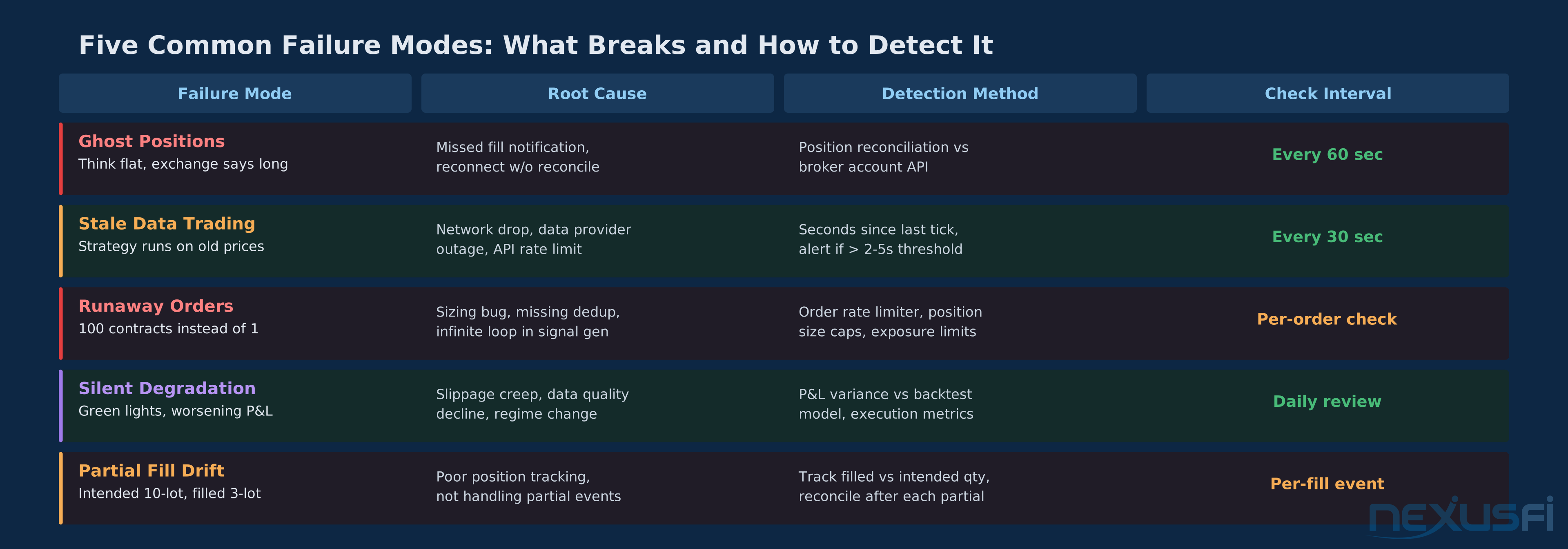
Ghost Positions
What happens: Your system believes it's flat. The exchange says you're in a position. Cause: missed fill notification, reconnection without reconciliation, duplicate order submission. Monitor: Periodic position reconciliation against broker. Frequency: every 60 seconds minimum.
Stale Data Trading
What happens: Your data feed disconnects but your strategy keeps running on the last known prices. Cause: network interruption, data provider outage, API rate limiting. Monitor: Track seconds since last tick. Alert if staleness exceeds your threshold (2-5 seconds for liquid futures).
Runaway Orders
What happens: A bug causes your strategy to submit orders in a tight loop. 100 contracts when you meant 1. Cause: logic error in position sizing, missing deduplication, infinite loop in signal generation. Monitor: Order rate limiting (max N orders per second), position size caps, aggregate exposure monitoring.
Silent Degradation
What happens: Everything looks green but performance slowly deteriorates. Cause: increasing slippage, data quality degradation, changed market conditions your model doesn't adapt to. Monitor: P&L variance tracking (expected vs. actual), execution quality metrics, daily performance review.
Partial Fill Drift
What happens: A 10-lot order gets partially filled at 3 lots. Your system tracks the intended 10-lot position. Cause: insufficient position tracking granularity, not handling partial fill events. Monitor: Track actual filled quantity vs. intended quantity, reconcile after every partial fill event.
The Bottom Line #
Monitoring is where automated trading separates from automated gambling. Your edge exists in the model. Your survival exists in the monitoring.
Build monitoring before you build the strategy. Not after. Not "when things are stable." Before. Because the first time your strategy encounters a situation your backtest never saw, you will be grateful that monitoring caught the divergence before your capital did.
Core Invariant If you cannot verify your state and manage your risk, you must not trade. Build monitoring before you build the strategy — not after, not when things are stable.
The core invariant: If you cannot verify your state and manage your risk, you must not trade.
Start with a daily loss limit enforced at the broker level. Add position reconciliation. Add data staleness checks. Build from there. Every layer you add is another wall between your capital and the infinite ways that complex systems can fail silently.
The traders who survive aren't the ones with the best entry signals. They're the ones whose monitoring catches the 2 AM position mismatch before it turns into a 9:30 AM catastrophe.
Knowledge Map
Go Deeper
Build on this knowledgeReferences This Article
Articles that build on this topicCitations
- — My algo hit the kill switch, CME said no! Lady Luck Saved Me! (2022) 👍 6“Today has been an interesting trading day! I'm comfortable enough (or used to be) with the performance and fail safes of my algo that I do not spend any time watching it anymore. It chugs away, and usually makes me money.”
- — Monitoring multicharts SA is running (2011) 👍 3“Hi! Just writing it up here so maybe others can use similar solution. After some research I am settling for a solution like this: 1. Strategies write to a textfile when they are running. 2. These textfiles are available over lighttpd 3.”
- — Exchange Data Delay Test (2010) 👍 4“Version 2.02 attached. The wav files can be found in the previous post. This version cleans up the code and adds the option to flatten everything and disable all strategies in the event a specific host is unreachable.”
- — speedytradingservers.com review (2019) 👍 7“Statistically the unexpected downtime we see are network glitches, which are fixed in seconds or minutes.”
- — I finally blew up an account (2021) 👍 9“A suggestion that I don't believe has been made already is to have your broker or platform but in a daily loss limit. In Sierra Chart I know there's an option to restrict trading after you've lost $x per day.”
- — Daily Loss Limit supervised by Broker/Software (2020) 👍 6“Well, Sierra Chart lets you put in a daily loss limit and it closes any open positions if you hit it. I imagine there are other platforms that have something similar.”
- — New Risk Management Settings built-in to NinjaTrader (2023) 👍 6“NinjaTrader now has built-in Risk Management Settings! These settings only recently appeared in March 2023, but I just became aware today. It seems that for years many people have been asking for Risk Management for NT8.”
- — SBtrader82 's Trading Journal (2021) 👍 4“Thanks a lot, this time I will use a mechanical way to prevent big losing days. I will impose a max daily loss in Rithmic and then I will block rithmic through a specific software so that I will no longer be able access it.”
- — Best way to sync positions on re-connecting (2013) 👍 3“I have a strat which is always in the market, 24/7 ... I had to solve that problem, and here is a summary of what I did: - find out a way to trigger a reload of historical data, after a loss of connectivity - there are a few hurdles with that, the sm...”
- — Best way to sync positions on re-connecting (2013) 👍 3“If you hold positions over the weekend, and in fact this applies to recovering from crashes too, you can set NT7 to adopt the positions that "should be" in force when you restart.”
- — What ports to monitor on VPS (2020) 👍 1“I know this sounds rudimentary, but here is what I did about 10 years ago with TradeStation. My wife wanted an email notification every time an Alert condition was met in one of her indicators.”
- — Monitoring multicharts SA is running (2011) 👍 4“Checking for automated strategies that are on or off can be done with GetAppInfo(aiStrategyAuto) which will give an value of 1 if automated trading execution is on, else a 0.”