



Webhook Automation for Futures Traders: Connecting External Signals to Automated Execution
Overview #
Most futures traders reach the same wall eventually. You've built a system--maybe it's a TradingView setup with custom indicators, maybe it's a Sierra Chart spreadsheet strategy, maybe it's a Python research environment that generates signals from tick data. The signals are good. The edge is there. But every trade still requires you to physically enter the order, and that means you're the bottleneck.
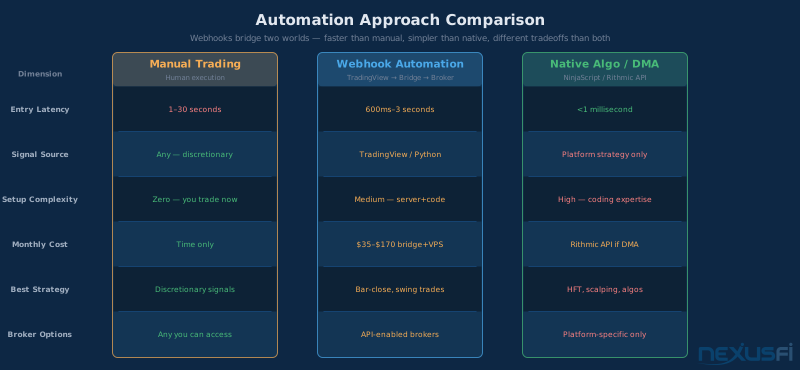
Webhooks are one of the most practical bridges between your signal generator and your broker's order system. Not the fastest solution--co-located algos on Rithmic or CQG handle microsecond execution. Not the most sophisticated--native NinjaScript or Sierra Chart automation runs code inside the platform itself. But for traders who want to automate execution without rebuilding their entire workflow from scratch, webhooks thread a needle: they let external tools (TradingView, Python scripts, custom indicators) trigger real broker orders with a surprisingly small amount of infrastructure.
This article covers the complete webhook automation pipeline for futures traders: what webhooks are, how the signal flows from chart alert to executed order, which brokers support external order routing, what the security and risk requirements look like, and where the approach breaks down. If you're asking "can I automate my TradingView alerts to actually place trades?"--this is the answer.
What Is a Webhook, and Why Does It Matter for Trading #
A webhook is an HTTP POST request automatically sent to a URL when a specific condition occurs. That's the complete technical definition. What it means for a futures trader: your charting platform--TradingView, for example--can send a structured message to a server URL the moment a condition fires on your chart. That server receives the message, interprets it, and submits an order to your broker.
The alternative to webhooks is polling: your server repeatedly asks "did anything happen?" every few seconds. Polling wastes bandwidth, introduces latency, and scales poorly. Webhooks flip the model--the source system pushes to you the instant something happens.
For trading, webhooks enable a specific architecture that's proven useful for active retail traders:
Signal Generator → Webhook → Bridge Server → Broker API → Exchange
Each step in that chain is replaceable. The signal generator could be TradingView, a Python script running on your local machine, a Sierra Chart spreadsheet formula, or a custom indicator in any platform that supports HTTP requests. The bridge server receives the webhook and translates it into broker-specific order format. The broker API accepts the order and routes it to the exchange.
The appeal is modularity. You don't have to learn NinjaScript to automate your NinjaTrader execution. You don't have to rebuild your TradingView setup in Python just to get automated orders. The webhook handles the connection between your preferred signal environment and your preferred execution environment.
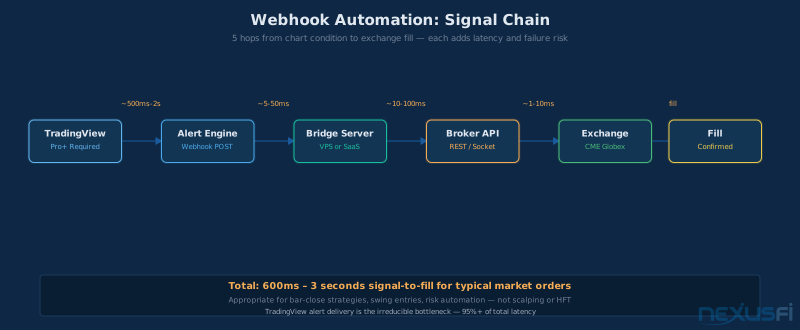
How the Signal Chain Works: From Alert to Fill #
Understanding every hop in the chain is essential before you build anything. Each hop adds latency and can introduce failure modes.
Step 1: Signal Generation and Alert Trigger
The signal source--TradingView in the most common case--monitors market conditions and fires an alert when criteria are met. On TradingView, you create an alert with a condition (indicator crossing, price hitting a level, Pine Script strategy firing) and configure a webhook URL as the alert destination instead of (or in addition to) email or app notifications.
TradingView requires a Pro, Pro+, or Premium subscription to enable webhook alerts. The free plan doesn't support them. When the condition triggers, TradingView sends an HTTP POST request to the URL you specify, with a message body you define.
Step 2: The Webhook Payload
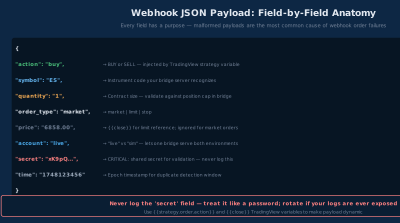
The webhook payload is a JSON object (or plain text, depending on configuration) that tells your bridge server what to do. You define this in the TradingView alert's "message" field. A typical payload looks like:
{
  "action": "buy",
  "symbol": "ES",
  "quantity": 1,
  "order_type": "market",
  "secret": "your-secret-key-here",
  "account": "sim"
}
The secret field is critical for security--more on that in the security section. The other fields are whatever your bridge server is designed to interpret. There's no universal standard; different bridge solutions expect different JSON structures.
Step 3: The Bridge Server
The bridge server is the most variable component. Options range from third-party services to self-hosted Python scripts.
Third-party bridge services (Alertatron, AutoView, 3Commas for crypto, custom SaaS solutions) handle the server infrastructure for you--they receive your webhook, parse the payload, and submit orders to connected broker accounts. Setup is typically a web interface where you link your broker API credentials and map incoming webhook fields to order parameters.
Self-hosted bridges are Python or Node.js scripts you run on a server (VPS or local machine) that:
- Listen for incoming HTTP POST requests at a specific port
- Validate the secret key in the payload
- Map the JSON fields to broker API calls
- Submit the order and log the response
Self-hosted gives you full control over order logic, risk checks, and failure handling. Third-party services are faster to deploy but introduce a dependency on someone else's server.
Step 4: Broker API Execution
The bridge server submits an order via the broker's API. This is where broker support becomes the critical constraint--not every futures broker offers an API that supports external order submission.
Step 5: Fill Confirmation
The broker API returns a confirmation (or rejection) to the bridge server. Your logging should capture this response. If the order was rejected--margin insufficient, symbol mismatch, position limit hit--you need to know immediately.
Brokers That Support External Order Routing #
This is where most traders run into their first wall. Your broker choice determines whether webhook automation is even possible.
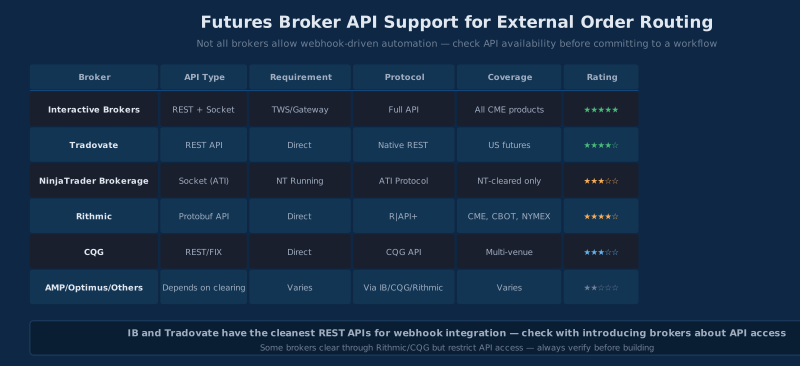
Interactive Brokers (TWS API)
IB's TWS API is the most feature-complete automated trading interface available to retail futures traders. It supports all futures products available on IB (CME, CBOT, COMEX, NYMEX through Globex), handles complex order types, and returns detailed fill and position data.
The catch: TWS (Trader Workstation) or IB Gateway must be running and logged in on a machine that's accessible to your bridge server. The API connects over a local socket--your bridge server doesn't connect directly to IB's servers, it connects to your TWS instance, which then forwards orders.
For webhook automation, this means either running TWS on the same machine as your bridge server, or running TWS on a machine on the same LAN and configuring TWS to allow connections from your bridge server's IP.
# Simplified IB connection via ib_insync (popular wrapper library)
from ib_insync import IB, Future, MarketOrder

ib = IB()
ib.connect('127.0.0.1', 7497, clientId=1)

es = Future('ES', '202506', 'GLOBEX')
ib.qualifyContracts(es)

order = MarketOrder('BUY', 1)
trade = ib.placeOrder(es, order)
ib.sleep(1)  # Wait for fill
print(trade.orderStatus.status)
@GrayCrane documented a production TradingView-to-IB webhook implementation on NexusFi, flagging the core pain point: IB session management. IB's session dependency is the most consistently cited challenge for traders building external bridges to Interactive Brokers.
@"The biggest problem in all this is actually maintaining a valid session with IB on the back-end side... often times the reset happens during night and there's nothing to be done there as you can't approve the session during sleep. Without a valid session orders can't be placed."
Tradovate
Tradovate offers a REST API that's among the cleaner broker APIs for retail traders. Unlike IB, Tradovate's API connects directly to their servers--no local platform installation required. This makes it more naturally suited to bridge server deployments.
The API supports market orders, limit orders, and stop orders for all Tradovate-listed products. Authentication uses access tokens obtained via username/password flow or API credentials. For automated systems, you'll want to implement token refresh logic--access tokens expire.
NexusFi member discussions have highlighted Tradovate as a practical choice for automation-focused traders who want REST-based order submission without the TWS dependency. Thread participants on the platforms forum noted that the API documentation is reasonably complete and the rate limits are generous for typical trading volumes.
Rithmic
Rithmic's R | API+ gives access to CME Globex, CBOT, and other exchange products with a focus on low-latency execution. The API is more complex than Tradovate's REST interface--it's based on protobuf messaging--and requires a separate API subscription beyond standard brokerage fees.
For webhook automation specifically, Rithmic is overkill unless you need Rithmic's specific routing or have an existing account there. The latency advantages of Rithmic's infrastructure are irrelevant at webhook timescales (seconds vs. microseconds).
NinjaTrader Brokerage
NinjaTrader's platform includes an execution API accessible via a TCP/IP socket interface (NinjaTrader's ATI--Automated Trading Interface). External applications can send order commands over this interface.
This is different from NinjaScript automation--NinjaScript runs inside NinjaTrader itself. ATI allows external programs to place orders through a running NinjaTrader session, which is what makes webhook integration possible.
The ATI protocol is text-based: commands are strings sent over a socket connection, and NinjaTrader responds with order status messages. It's less clean than a REST API but it works.
@Liberty88 discovered an important complementary layer for NinjaTrader Brokerage users: broker-side risk controls at account.ninjatrader.com, including daily loss limits, trailing max drawdown, and automatic position liquidation when limits are hit. These settings operate independently of your bridge server — even if your automation code fails to enforce its own limits, the broker-level circuit breakers activate. For webhook automation into NinjaTrader accounts, this provides a safety net that can't be bypassed by a software bug in your bridge.
@"The Risk Management Settings are not located in the desktop platform. They are activated on the broker side — NinjaTrader Brokerage."
CQG
CQG offers web API access through CQG QTrader and related products. CQG's infrastructure routes orders to CME Globex, ICE, and other venues. API access typically requires CQG account and may have minimum volume requirements depending on the brokerage relationship.
What About AMP Futures, Optimus, and Other IB/CQG/Rithmic Introducing Brokers?
Many popular futures brokers--AMP Futures, Optimus Futures, Cannon Trading--are introducing brokers that clear through entities like CQG, Rithmic, or are IB correspondents. Whether you can use API automation depends on their clearing relationship and what API access they've enabled. Call them directly before assuming API access is available.
The JSON Payload in Detail #
The payload structure depends entirely on your bridge server's expectations. But there are patterns worth understanding.
Minimum Required Fields
Any useful webhook payload needs to specify:
- Action: What to do (buy, sell, close, flatten)
- Symbol or contract: What instrument to trade
- Quantity: How many contracts
- Order type: Market, limit, stop
- Authentication: A secret to validate the sender
TradingView Pine Script Variables in Payloads
TradingView allows dynamic variables inside the alert message using double braces. This lets you pass live market data into the payload:
{
  "action": "{{strategy.order.action}}",
  "contracts": "{{strategy.order.contracts}}",
  "price": "{{close}}",
  "time": "{{timenow}}",
  "secret": "your-secret-key"
}
The {{strategy.order.action}} variable automatically fills "buy" or "sell" based on which order fires. {{close}} is the bar's close price. This is how you build dynamic payloads that don't require separate buy/sell alerts--one alert fires for all strategy signals.
Idempotency and Duplicate Prevention
A well-designed bridge server includes duplicate order prevention. TradingView has been known to fire alerts multiple times in edge cases (candle close timing, alert queue behavior). Your bridge server should track recently processed alerts and reject duplicates within a time window--typically 5-10 seconds.
One approach: hash the alert contents plus a timestamp bucket. If the same hash arrives twice within the window, reject the duplicate. Log the rejection so you can audit it.
Security Considerations #
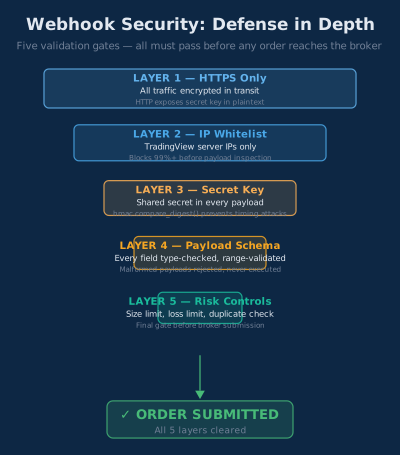
Webhook security is not optional. An open webhook endpoint that accepts orders from any source is an attack vector--anyone who discovers your URL can send arbitrary order commands.
Secret Key Validation
Every incoming webhook request should include a shared secret in the payload or request headers. Your bridge server validates this secret before processing any order. Generate secrets using cryptographically secure random generators, not memorable words.
import hmac, hashlib, os

EXPECTED_SECRET = os.environ.get('WEBHOOK_SECRET')

def validate_webhook(payload: dict) -> bool:
    received_secret = payload.get('secret', '')
    return hmac.compare_digest(received_secret, EXPECTED_SECRET)
hmac.compare_digest prevents timing attacks--it compares strings in constant time regardless of how early a mismatch occurs.
HTTPS Only
Your bridge server should only accept HTTPS connections. HTTP webhooks expose your secret key in plaintext on the wire. If you're self-hosting on a VPS, use Let's Encrypt for a free SSL certificate. HTTPS is table stakes, not optional.
IP Whitelisting
TradingView publishes the IP addresses their servers send webhooks from. Your firewall or bridge server can whitelist these addresses and reject requests from other sources. This adds an additional layer on top of secret key validation.
Third-party bridge services handle this for you--they validate and forward alerts through their own servers, which you then whitelist.
Payload Injection
Validate every field in the incoming payload before using it. A malformed payload shouldn't cause your bridge to submit a 100-lot order because it parsed an unexpected value. Define expected types, ranges, and allowed values for every field, and reject anything that doesn't conform.
Risk Controls: The Layer That Keeps You Safe #
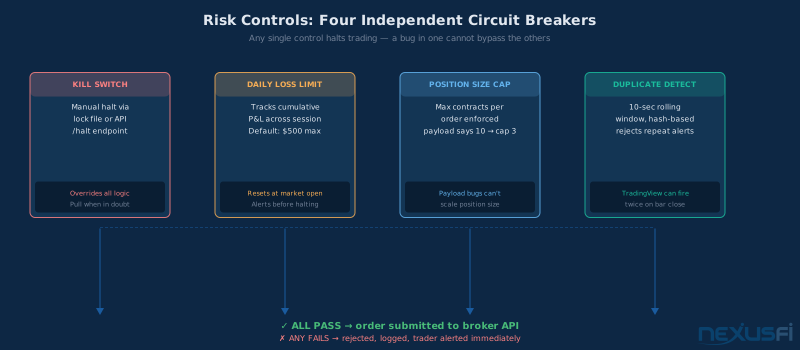
Webhook automation introduces risks that manual trading doesn't have. A bug in your payload structure can fire repeated orders. A runaway alert condition can submit orders every minute for hours. Position-tracking issues can lead to inadvertently adding to a position when you meant to reverse it.
These risks are manageable but require deliberate controls.
Position Flattening Timeout
Every automated system should have an automatic flat-at-close or flat-on-disconnect rule. If your bridge server loses connection to the broker API, or if TradingView's alert stops firing, you need a defined fallback state. Many traders set a hard rule: all positions flatten at 5 minutes before market close, period.
Maximum Position Size Limits
Your bridge server should enforce an absolute maximum position size regardless of what the payload says. If the payload requests 10 contracts but your limit is 3, the order goes in for 3. This protects against payload formatting errors or Pine Script strategy bugs that generate unrealistically large sizes.
MAX_CONTRACTS = 3

def process_order(payload: dict):
    qty = min(int(payload.get('quantity', 1)), MAX_CONTRACTS)
    # submit order with qty
Kill Switch
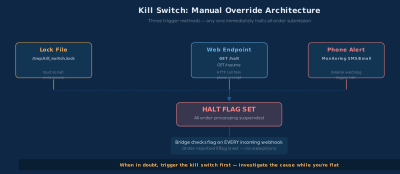
A manual kill switch--a way to immediately halt all order submission--is essential. This can be as simple as a flag file: if /tmp/kill_switch.lock exists, reject all orders. You create the file when you want to halt, delete it to resume.
@kevinkdog, who professionally manages multiple automated strategies, emphasizes that the specific kill criteria matter less than having them established before deploying. His framework uses probability cones, monthly profitability threshold checks, and a simple hard stop: turn off the strategy if its maximum historical drawdown is ever exceeded.
@"The real key is not necessarily what the quit criteria is, but rather that you have the quit criteria in the first place. You should have your quit point established BEFORE you start trading a strategy, and stick to it no matter what. Most people cannot do this."
For remote control, a simple web endpoint (GET /halt and GET /resume) that toggles the flag is practical and doesn't require shell access while you're away from your machine.
Consecutive Loss Circuit Breaker
Track P&L across automated trades and halt when cumulative losses exceed a threshold. See daily loss limits for the broader framework. This prevents a strategy that's entered a drawdown from continuing to trade in adverse conditions.
daily_loss = 0
MAX_DAILY_LOSS = -500  # $500 drawdown limit in USD

def check_loss_limit():
    if daily_loss <= MAX_DAILY_LOSS:
        raise Exception("Daily loss limit reached - halting automation")
Duplicate Order Detection Window
As mentioned, maintain a rolling 10-second window of recently processed alerts. If the same alert arrives twice in that window, log it and skip--don't submit a second order.
Latency Characteristics: What to Expect #
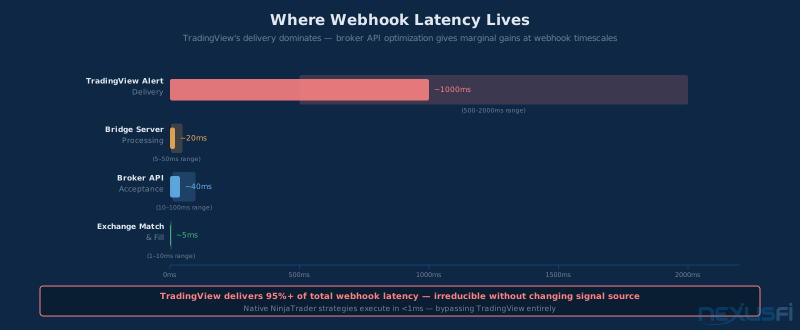
Webhook automation is not low-latency automation. The signal chain has multiple network hops and blocking operations. Understanding the latency profile prevents false expectations.
Typical signal-to-fill latency on a webhook system:
- TradingView alert fires to server delivery: 500ms--2 seconds
- Bridge server processing: 5--50ms (parsing, validation, API call formation)
- Broker API acceptance to exchange: 10--100ms (depending on broker routing)
- Exchange to fill: 1--10ms for market orders in liquid instruments
Total: typically 600ms--3 seconds from alert condition to fill.
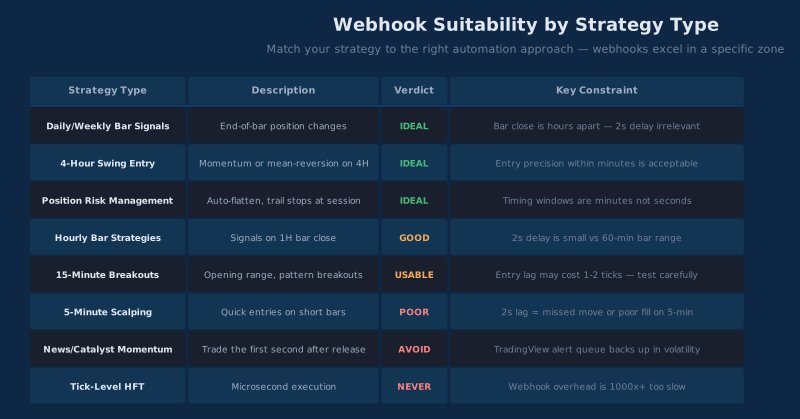
In a fast-moving market, this is meaningful. A breakout entry at 9:30 AM that fires at the bar close might be 2 seconds behind the initial move. For strategies that are time-sensitive on entries, this matters. For strategies that care about closing above a level rather than the next tick after, it's often acceptable.
Webhook automation is not appropriate for:
For lower-latency automation, see latency and infrastructure for automated futures trading.
- High-frequency strategies (HFT requires nanoseconds, not seconds)
- Scalping on 1-minute bars where entry precision matters
- News-driven strategies that require sub-second reaction
- Strategies that need direct market access (DMA) for order placement
Webhook automation is appropriate for:
- End-of-bar signal strategies (4-hour, daily bars)
- Swing trade entries where a 2-second delay is irrelevant
- Risk management automation (stops, position flattening)
- Alert-based execution where you already trade on alerts manually
Paper Trading and Testing Protocol #
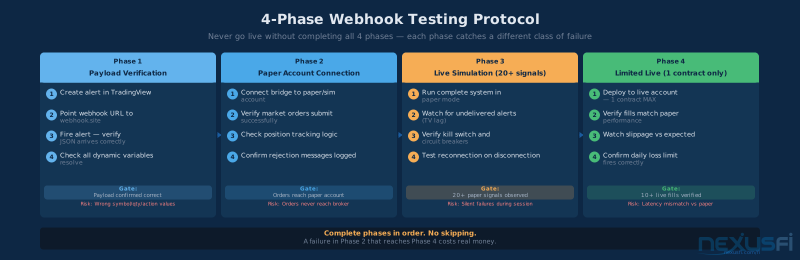
Never deploy webhook automation directly to a live account. Testing follows a specific sequence.
Phase 1: Payload Verification
Before connecting to any broker, verify your payload construction. Set up a test webhook endpoint (webhook.site offers free temporary endpoints) and fire your TradingView alerts. Confirm the payload arrives with the correct structure and values.
Phase 2: Simulated Broker Connection
Connect your bridge server to a paper trading account or broker simulation. Verify that orders are submitted, positions update correctly, and your position tracking logic handles all order outcomes (fills, partial fills, rejections).
For NinjaTrader users, the Simulated Data Feed provides a paper trading environment that behaves like live markets. For IB users, IB's paper trading account is a separate account you can enable from your portal.
Phase 3: Live Simulation
Run the complete live system in paper mode through at least 20--30 signals. Watch for:
- Any alert that fires but doesn't reach the bridge server
- Payloads that arrive malformed
- Position tracking discrepancies after fills
- Any scenario where your kill switch or circuit breakers would have activated
Phase 4: Limited Live Deployment
Deploy to a live account with a single contract only. Verify fills against your expectations across at least 10 live signals before increasing size.
Third-Party Bridge Services vs Self-Hosted #
The build-vs-buy decision on your bridge server is a practical choice with real tradeoffs.
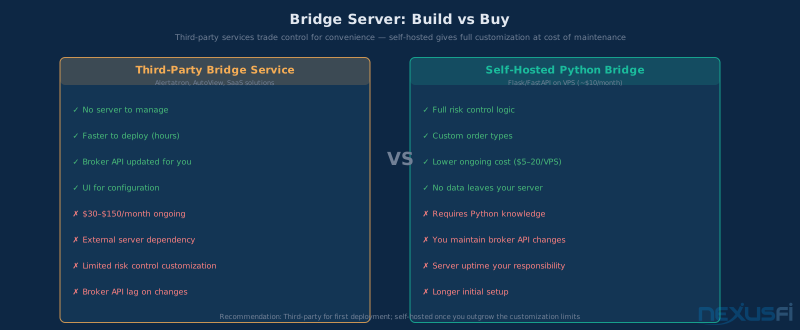
Third-party bridge services handle hosting, uptime, and broker API maintenance. When a broker changes their API, the service updates it. The cost is typically monthly subscriptions ($30--$150/month depending on the service), a dependency on someone else's server availability, and limited ability to customize risk controls or order logic beyond what the service offers.
Self-hosted bridges require server infrastructure (a VPS running $5--$20/month is typically sufficient), programming knowledge (Python is the most common), and ongoing maintenance when broker APIs change. The upside is complete control: you define every risk check, every order type, every failure handling behavior.
For traders who want automation without programming, third-party services are the practical path. For traders comfortable with Python and willing to maintain infrastructure, self-hosting gives better control and lower ongoing cost.
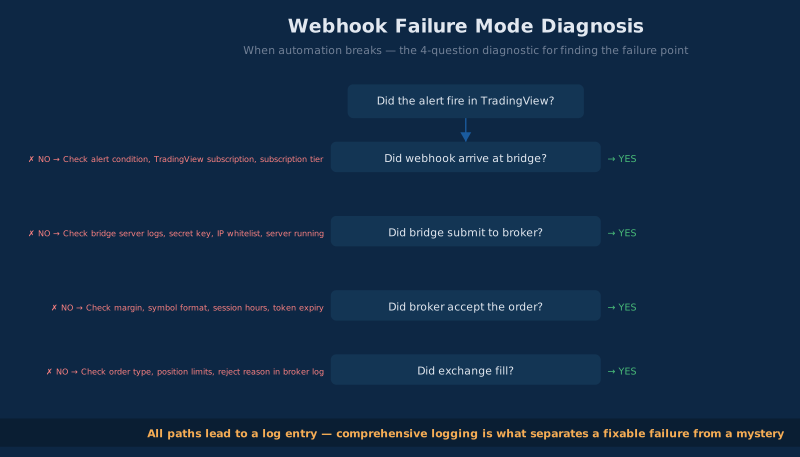
Real-World Deployment Checklist #
Before going live with webhook automation, work through this list:
Signal generator:
- [ ] Alert triggers correctly on intended conditions
- [ ] Alert does NOT trigger on repaints or look-ahead bias
- [ ] Alert fires correctly in extended hours if you trade them
- [ ] Payload variables resolve to correct values (test with webhook.site)
Bridge server:
- [ ] HTTPS with valid certificate
- [ ] Secret key validation implemented
- [ ] IP whitelist configured (TradingView source IPs)
- [ ] Duplicate alert detection active (10-second window minimum)
- [ ] Position tracking initialized correctly on startup
- [ ] Kill switch functional and tested
- [ ] Daily loss limit circuit breaker operational
- [ ] Maximum position size limit enforced
- [ ] All orders logged with timestamps, payloads, and broker responses
Broker connection:
- [ ] Connection tested and stable
- [ ] Reconnection logic implemented (what happens if connection drops?)
- [ ] All positions flatten on bridge shutdown
- [ ] Paper account testing complete (20+ signals observed)
Monitoring:
- [ ] Error alerts sent to your phone (email, text, Slack webhook) on any order failure
- [ ] Daily summary of positions and P&L from bridge server
- [ ] Process monitoring to restart bridge server if it crashes
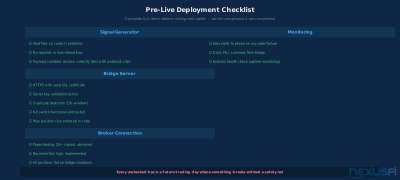
Common Failure Modes and How to Handle Them #
Alert fires but no webhook arrives
Most commonly caused by TradingView's alert queue backing up during high-volatility periods. TradingView processes alerts sequentially and can have delays of 30 seconds or more during active market events. This is a known limitation of using TradingView as your signal source--it's not built for latency-sensitive execution.
Duplicate orders submitted
Alert fired twice due to TradingView edge case. Your bridge server's duplicate detection window should catch this. If it doesn't, add logging to identify why--the duplicate might have come from a different source, or the window might be too short.
Order rejected by broker
Possible causes: insufficient margin, position limit exceeded, invalid symbol format, expired session token. Your bridge server should log the full rejection reason from the broker API and alert you immediately.
Bridge server crashes while position is open
This is the most dangerous failure mode. When your bridge restarts, it needs to query the broker for current positions before accepting new orders. Don't assume position is flat--verify via API. This is also why position flattening rules and hard stop orders at the broker level (separate from your automation) are essential.
TradingView subscription lapses
If your TradingView subscription drops to free tier, webhook alerts stop firing. Your positions don't get managed. Set a calendar reminder to verify subscription renewal.
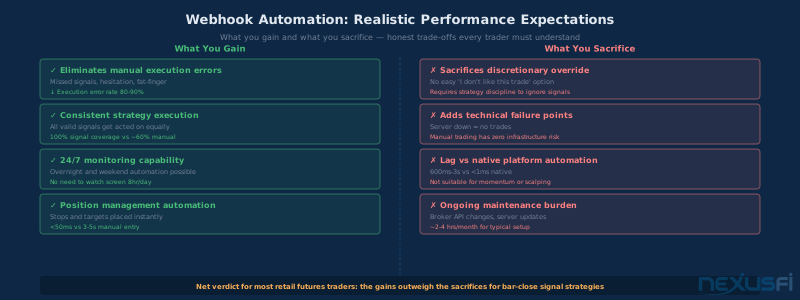
When Webhooks Make Sense--and When They Don't #
Webhooks make sense when:
- Your signal generator is TradingView or another platform that supports HTTP alerts
- Your strategy uses bar-close signals (5-minute, hourly, daily)
- You're looking to remove manual execution errors while keeping your current workflow
- The latency profile (600ms--3 seconds) is acceptable for your strategy
Webhooks don't make sense when:
- You need sub-second execution (use native platform automation or co-located algos)
- Your strategy requires complex order management that can't be expressed in JSON payloads
- You're already fully in a platform like NinjaTrader or Sierra Chart (native automation is faster and simpler)
- You're trading thin markets where 2 seconds of slippage is material
The primary value of webhook automation is bridging two worlds--visual charting tools that retail traders know and love, and broker execution that requires programmatic interaction. If both worlds are already inside a single platform, webhooks add complexity without benefit.
Building Reliability Into Your System #
Any automated trading system will experience failures. The question isn't whether something will go wrong--it will--but whether your system handles failure gracefully.
Defensive design principles for webhook automation:
Assume disconnection. Build reconnection logic into every broker connection. Use exponential backoff--wait 1 second, then 2, then 4, then 8, capped at 60 seconds. Never infinite-reconnect at full speed.
Log everything. Every incoming webhook, every order submitted, every broker response. Logs are your audit trail when something breaks at 2 AM.
Fail safe, not fail dangerous. When something unexpected happens, the safe default is to not trade. An alert you can't parse should be logged and discarded, not partially executed. An order you can't confirm should be treated as potentially submitted (check via position query) not assumed to have failed.
Monitor externally. Your bridge server should be monitored — the same discipline applied in trading bot monitoring. Your bridge server should be monitored by an external service that alerts you if it stops responding. A simple heartbeat endpoint (GET /health) that your monitoring service pings every minute provides early warning before a silent failure becomes a missed trade or an unmanaged position.
The traders who succeed with webhook automation are those who treat it as infrastructure that requires the same rigor as production software--not a script they fire up and forget about.
The Bottom Line #
Webhook automation occupies a specific niche in the futures trading toolkit. It's not the fastest automation approach--native platform algorithms or co-located systems are faster. It's not the simplest--turning on NinjaTrader's built-in strategy automation is simpler. But for traders who live in TradingView and want to stop manually entering orders that their charts are already generating, webhooks are the practical bridge.
The key to making it work is discipline at every layer: structured payloads, authenticated connections, meaningful risk controls, and honest testing before live capital is at risk. Get those right, and a webhook automation system can execute your signals consistently, around the clock, without you watching the screen.
Get them wrong, and you'll discover exactly which failure modes weren't covered in the setup documentation — usually during a fast-moving session when you'd rather be watching your position than debugging a JSON parsing error.
Build carefully. Test thoroughly. Then automate.
Webhook automation is the practical bridge between TradingView signals and broker execution for bar-close strategies. The full pipeline: alert fires → HTTPS POST → bridge server validates → broker API submits → position tracking updates. Non-negotiables before going live: HTTPS with secret key validation, IP whitelist, duplicate detection window, maximum position size cap, daily loss circuit breaker, and a manual kill switch. Expect 600ms--3 second end-to-end latency — adequate for 5-minute+ bar strategies, unusable for scalping. Test through 20+ paper signals before touching live capital.
Knowledge Map
Go Deeper
Build on this knowledgeReferences This Article
Articles that build on this topicCitations
- — Automated trading integration Tradingview to Interactive Brokers (2023) 👍 2“The biggest problem in all this is actually maintaining a valid session with IB on the back-end side... often times the reset happens during night and there's nothing to be done there as you can't approve the session during sleep. Without a valid session orders can't be placed.”
- — New Risk Management Settings built-in to NinjaTrader (2023) 👍 6“The Risk Management Settings are not located in the desktop platform. They are activated on the broker side -- NinjaTrader Brokerage.”
- — Sustained success with an algo (2022) 👍 2“The real key is not necessarily what the quit criteria is, but rather that you have the quit criteria in the first place. You should have your quit point established BEFORE you start trading a strategy, and stick to it no matter what. Most people cannot do this.”
- — Is it possible to have an algorithm in python send signals to ninjatrader? (2017) 👍 4“There is an API which is a TCP/IP interface, you can access it with a DLL a bit tricky in Python, or you can create a server with listener port”
- — Please suggest a trading platform with API access (2019) 👍 2“their API is in C#/.Net but I can write a server with listener port on their API and have my system send orders via TCP/IP port”
- — We need a Bridge between Tradestation 10 and CQG web API (2022)“Looking for a simple bridge to plug Tradestation 10 into the CQG WEB API for order routing and automated futures trading”
- — Webinar: 3 Excellent Entries, and How To Automate Them (2020) 👍 2“Entry automation concepts for futures trading strategies using webhook-style signal generation”
- — Automation for the programmatically impaired trader (2020) 👍 5“Alert-based trading automation for traders who want automated execution without full programming”
- — ATM Strategy Assistance (2011) 👍 7“ATM strategies with automated stops and targets for NinjaTrader automated execution”
- — Bot Trading - MCL Futures (2022) 👍 1“I have been working on a strategy using tradingview for the past 2 months. I am in the process now of developing a bot. I am working on integration with the API instead, and it will run on a server in conjunction with tradingview webhooks/alerts.”
- — Auto-Trading with NinjaTrader 7 - For newbies (2011) 👍 38“If you are starting out, hopefully this thread can save you months of frustration and maybe lost money (hopefully you are SIM TRADING to start your testing).”