



Algorithmic Trading Compliance and Pre-Trade Risk Controls in Futures Markets
Overview #
Running an algo in futures is at the core different from running one in equities. The leverage is higher, the contracts are larger, and the operational risk of a runaway system doesn't just wipe your account — it can generate losses that exceed your account balance in minutes. That's not a hypothetical. It happened to @Breukelen in December 2022: his algo hit its daily loss limit at exactly 2:00 PM during an FOMC announcement, tried to exit 14 long ES contracts via market order, and CME rejected it — "Order type not permitted while the market is reserved." He was 78 microseconds away from a $2,000 loss because his failsafe code assumed Rithmic would always execute the exit.[1]
The regulatory framework governing algorithmic trading in futures — centered on CFTC Regulation AT — exists precisely because these failures are predictable. Leverage amplifies everything: good trades, bad trades, and broken algos. Pre-trade risk controls are the infrastructure that keeps a bad day from becoming a catastrophic one.
This article covers the complete compliance picture: what Regulation AT requires, how pre-trade controls are layered in practice, what a kill switch actually does (and what it can't do), how position limits interface with automated order flow, and what retail algo traders must do operationally to trade safely and legally.
This article focuses on what must exist before orders are sent to the exchange — the pre-trade compliance safety net. Post-trade surveillance, recordkeeping requirements, and market manipulation enforcement are separate topics covered in linked articles.
The Regulatory Framework: Reg AT, Exchanges, FCMs, and NFA #
Regulation AT is the CFTC's primary framework for algorithmic trading in futures markets. It establishes two pillars: pre-trade risk controls and algorithm development and testing requirements. But treating Reg AT as the entire universe is a mistake. In practice, most futures traders' day-to-day compliance is shaped by three overlapping layers:
Layer 1: CFTC Regulation AT — The federal framework that defines what algorithmic trading is, who is subject to regulation as an "AT Person," and what minimum controls and governance must exist. Reg AT was proposed in 2015, much revised in 2016, and portions remain in proposed (not final) form as of this writing. The parts that are operationally real: FCMs and floor brokers that engage in algorithmic trading have mandatory pre-trade risk control obligations under existing CFTC rules (notably Rules 1.73 and 1.11).
Layer 2: Exchange Rules — CME Group, ICE, Eurex, and other DCMs (Designated Contract Markets) have their own detailed risk management requirements that operate independently of Reg AT. CME's PRISM (Pre-execution Risk and Safeguards Management) system, for example, enforces order-size limits, price banding, and quantity limits at the matching engine level — before orders are even processed. Exchange rules set the operational floor.
Layer 3: FCM Risk Controls — Your clearing firm is legally required to have pre-trade risk controls in place for all orders it clears. This is one of the most practical compliance realities for retail traders: your FCM is already checking your orders before they reach the exchange. The question is whether their controls match your risk tolerance, and whether you've configured them appropriately.
"AT Person" is a defined category under Reg AT. Not every algo trader is an AT Person. Generally, if you're trading your own account algorithmically through a retail FCM, you fall under less stringent obligations than a registered AT Person. But you still need pre-trade controls — the distinction affects regulatory registration and documentation requirements, not operational safety.
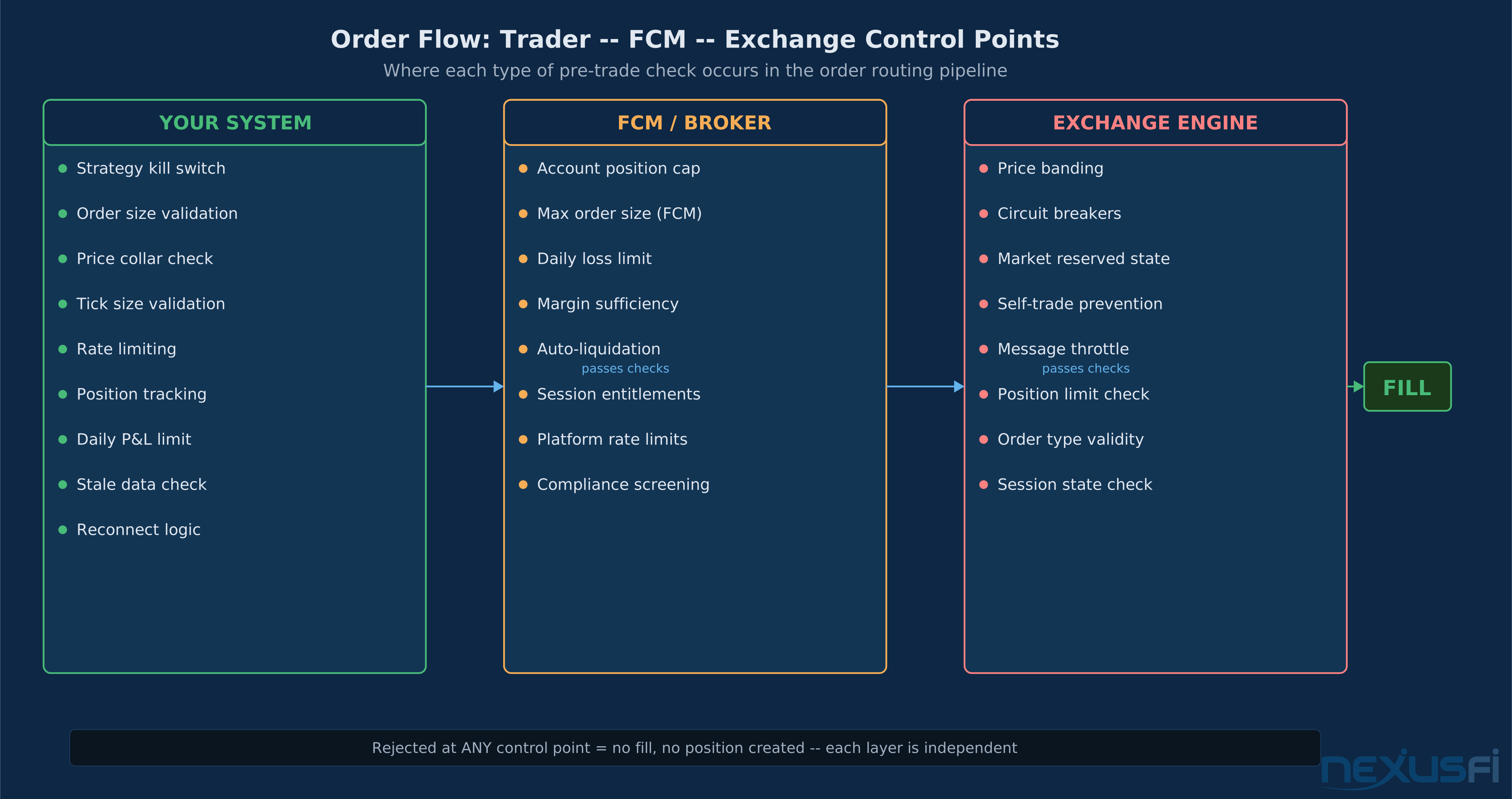
The practical takeaway: Reg AT tells you what the CFTC expects conceptually. Exchange rules tell you what the matching engine will and won't accept. Your FCM's controls are the layer you actually interact with daily.
Layered Pre-Trade Risk Control Stack #
Pre-trade risk controls work in layers. The analogy is a circuit breaker panel: multiple independent breakers, each catching different failure modes. If one trips, others still hold. Designing a single control to catch every failure is asking one breaker to protect the entire house.
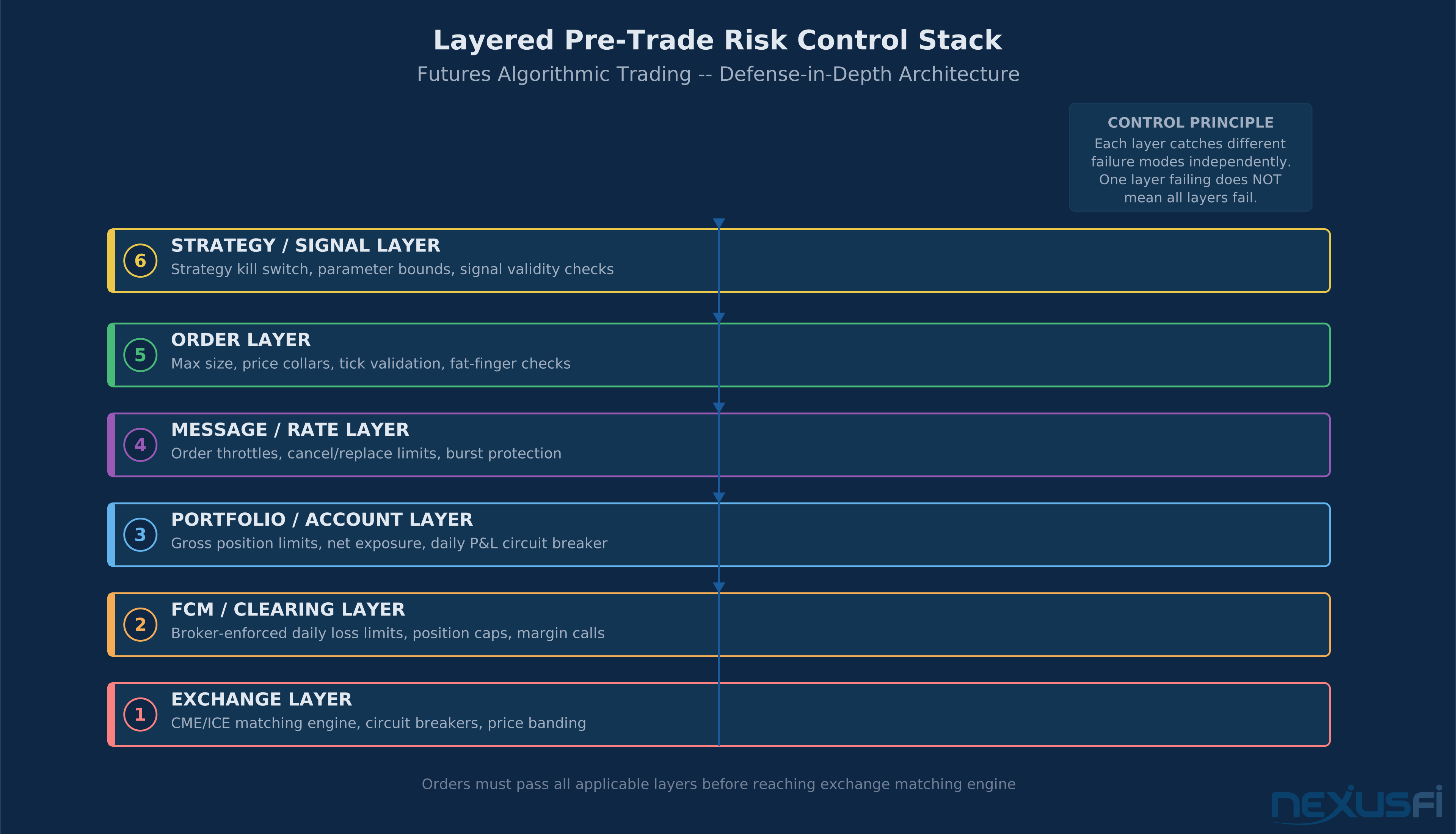
Here's the layered architecture that experienced futures algo traders use:
Order-Level Controls #
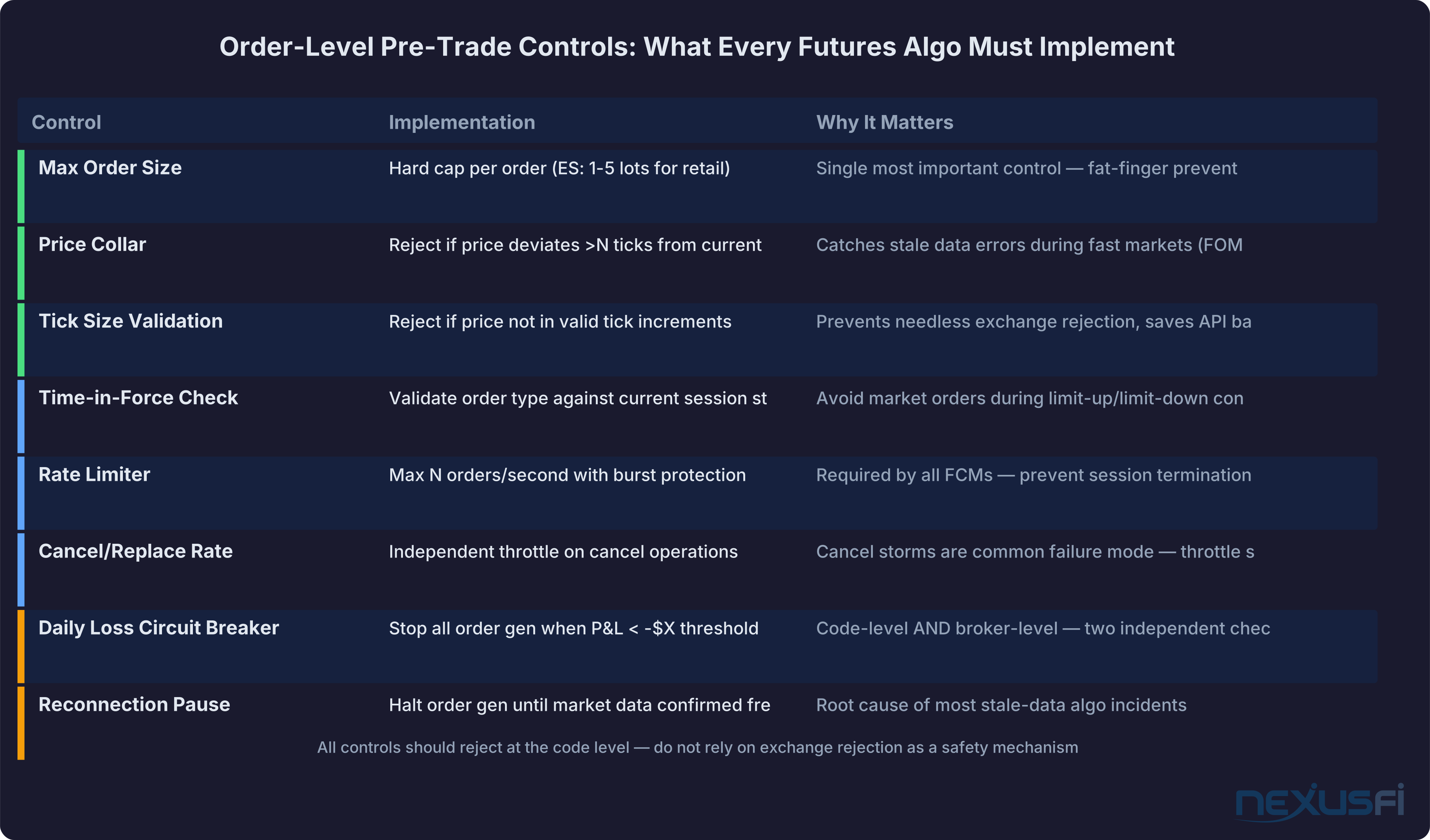
These fire on every individual order before it leaves your system.
Max order size: The single most important order-level control. An ES e-mini contract at 50x multiplier means a 100-lot order touches $25 million notional at 5,000. A typo in a multiplier variable, an integer overflow, a unit conversion error — all of these have produced catastrophic fat-finger trades in live markets. Set a hard cap per order and enforce it at the code level, not as an assertion.
Price collar / price band: Your system should reject orders where the limit price deviates from the current bid/ask by more than a defined tolerance. In fast markets (FOMC announcements, CPI prints, unexpected news), your algo may have stale market data — an old bid/ask that's already 10 ticks away from reality. A price collar catches this before the order reaches the exchange.
Tick size validation: Orders must be in valid tick increments. Sending an ES order at 5432.10 instead of 5432.00 will be rejected by the exchange anyway — but catching it in your own pre-check is better than relying on exchange rejection as a safety mechanism. Rejections still consume API bandwidth and can trigger rate limit counters.
Time-in-force sanity: Market orders during limit-up/limit-down conditions or pre-market sessions are frequently rejected at the exchange level. Your system should know the current session state and avoid sending orders that will predictably fail.
Message and Rate Controls #
These govern the rate of order flow, not individual order quality.
Order rate limits (message throttles): Every FCM and exchange imposes maximum orders-per-second limits. CME, for example, enforces message throttles at the account and firm level. Exceeding these limits results in order rejections, and repeated violations can trigger session termination. More importantly, a runaway loop that hammers the exchange with thousands of orders per second is a compliance event — it's the kind of behavior that triggers market surveillance review.
Cancel/replace rate limits: Cancel-and-replace operations are common in market-making and systematic strategies. But cancel storms — where an algo repeatedly cancels and replaces orders in rapid succession due to a state machine error — are one of the most common failure modes. Set independent rate limits for cancel operations, not just new orders.
Order-to-trade ratio monitoring: CME and other exchanges track the ratio of order messages to actual trades. Excessive order-to-trade ratios attract surveillance attention. Your system should track this internally and self-throttle before exchange limits are hit.
Reconnection logic: When your market data feed drops and reconnects, your algo's internal state view may be stale. Many catastrophic algo failures happen at reconnection — the system re-evaluates positions with old data and sends a burst of corrective orders. Build explicit reconnection logic that pauses order generation until market data is confirmed fresh.
Account and Portfolio-Level Controls #
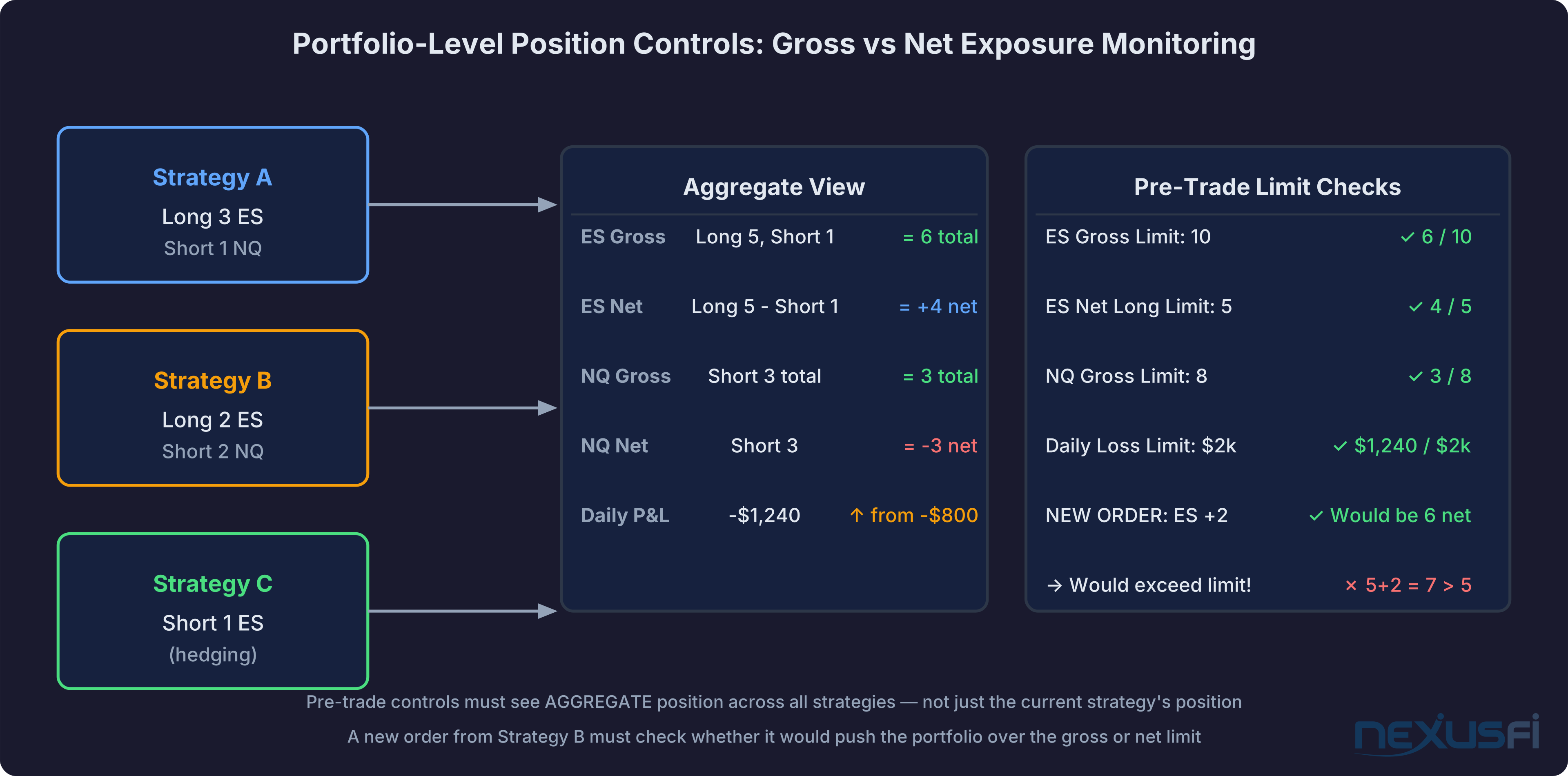
These operate above individual orders and govern aggregate exposure.
Gross position limit: The maximum total long or short exposure your system is permitted to hold across all instruments in the portfolio. This is your backstop against position accumulation from a strategy that works correctly in testing but generates runaway correlation in live markets.
Net position limit: Maximum net long or short position per instrument. This is what most traders think of as "position limit," but it's distinct from gross limits in portfolios with spread or hedge structures.
Margin utilization check: Pre-trade margin estimation catches orders that would push your account into margin call territory before they're sent. Prop firm traders face additional pressure: platform-level daily loss limits are mandatory in most funded accounts, and some NinjaTrader users have found third-party addons more reliable than built-in settings for maintaining discipline.[9] Know whether your platform's margin check happens pre-trade or only post-fill.
Daily P&L circuit breaker: When your net P&L for the session crosses a pre-defined loss threshold, your system should stop generating new orders automatically. Implementing this in NinjaTrader requires explicit strategy-level P&L tracking since the platform's Performance object reflects cumulative results.[10] As @Big Mike noted in a 2011 discussion of broker-enforced daily limits: traders should request these controls from their FCM in addition to their own internal controls, not as a replacement.[2]
Instrument-Specific Controls #
Contract multiplier awareness: Different instruments have dramatically different notional values. A 1-lot ES trade is $250 per point. A 1-lot CL (crude oil) trade is $1,000 per point. Hardcoding multipliers is a source of bugs — use a centralized contract spec lookup rather than literals scattered through your codebase.
Trading hours enforcement: Your algo should be session-aware and either restrict trading to defined hours or use session-specific parameters.
Delivery risk awareness: For physical delivery contracts, position management rules must change dramatically as first notice day approaches. Most retail traders shouldn't be running algos on delivery-eligible contracts without explicit delivery date checks.
Don't rely on exchange rejections as your risk control. An order that the exchange rejects still consumed API bandwidth, still incremented your message rate counter, and still created a latency event. Design your system to not send bad orders, not to let the exchange catch them.
Kill Switches and Emergency Controls #
A kill switch is not a panic button. Some traders implement external heartbeat monitors: a separate server that pings the trading system, and if the ping is missed, connects directly to the broker and flattens the account — bypassing the strategy software entirely.[8] A panic button implies you grab it in a crisis. A kill switch must be pre-designed, tested in failure scenarios, and proven to work before you need it. If your kill switch hasn't been tested under load with degraded connectivity, it isn't a kill switch — it's an untested hope.
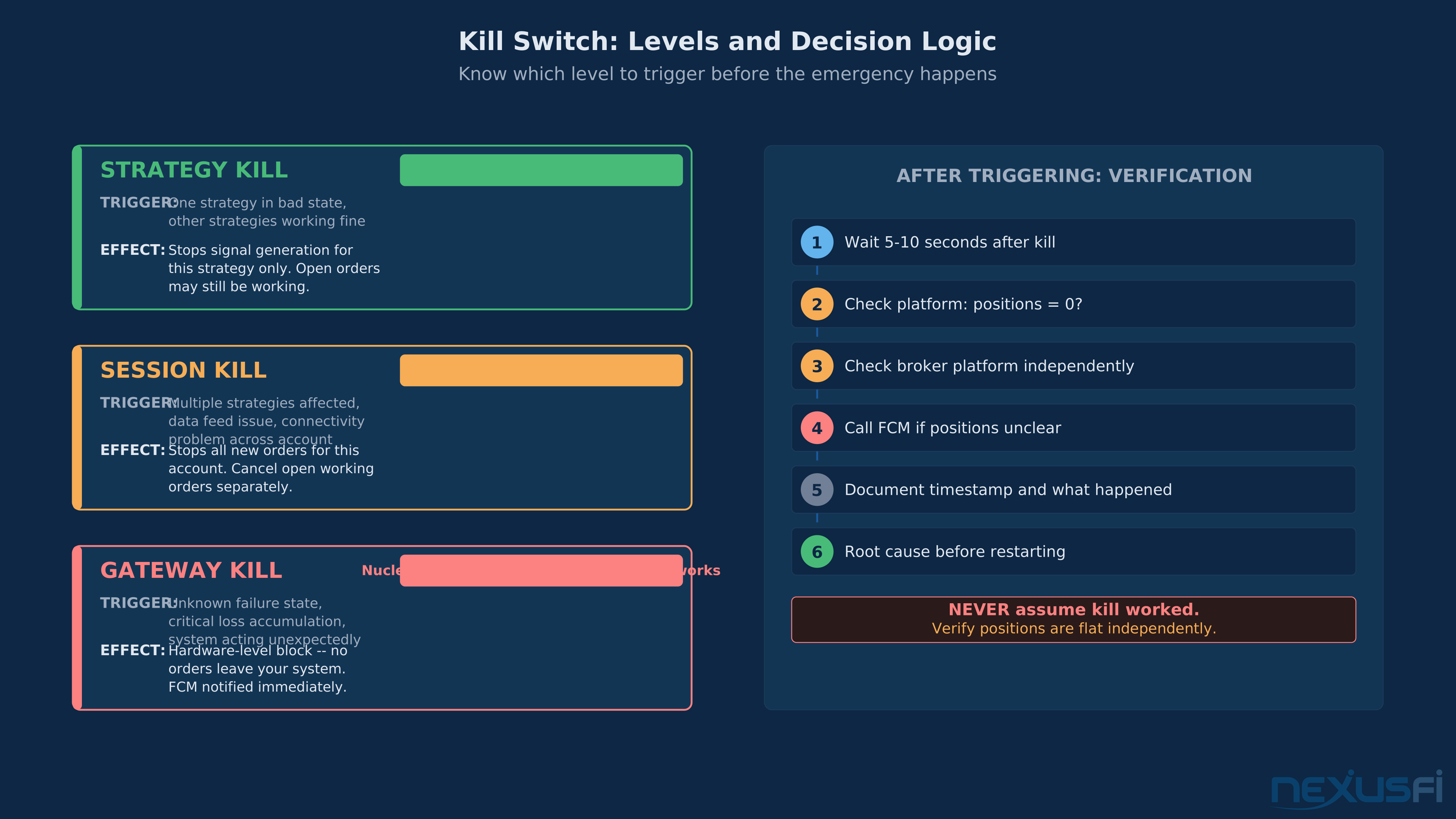
The operational structure of a kill switch has multiple levels:
Strategy-level kill: Stops the specific algorithm or strategy from generating new orders, while leaving other strategies unaffected. This is appropriate when one strategy has entered a bad state but others are functioning correctly.
Session-level kill: Terminates all order generation for a specific trading session (account, API key, platform session). This is the right response to a data feed issue or a connection problem that affects all strategies.
Gateway-level kill: Disables all outbound order messages at the protocol/connection level, regardless of what your code thinks it's doing. This is the hardest guarantee — even if your strategy code continues to try to send orders, nothing gets through. Rithmic's built-in exitPositions() function is a form of this, but as @Breukelen discovered, it's not infallible — and assuming it worked without verification was the root cause of his near-disaster.[1]
The cancellation question: Kill switches stop new orders. Open working orders are a different problem. Your kill switch sequence must address both: stop new order generation first, then cancel all open working orders. The order matters — if you cancel open orders first, your strategy logic may immediately replace them.
Platform implementations vary much. @sstheo noted that Rithmic allows setting a 'shut it down' level that closes all trades and prevents new positions for the day — a platform-enforced session kill.[6] @Liberty88 documented in 2023 that NinjaTrader added built-in risk management controls to NinjaTrader Brokerage accounts including daily loss limits, trailing max drawdown, and automatic position liquidation — accessed through the account dashboard at account.ninjatrader.com, not the trading platform itself.[3]
@Arch raised the practical question of where these controls actually live — at the FCM level, the data feed level, or the exchange level — when asking about broker-enforced risk parameters.[4] The answer varies by FCM: some enforce them at their routing layer regardless of which platform you use, others rely on the platform to implement them.
Test your kill switch in these specific conditions: (1) during a market data outage, (2) during reconnection after a dropped connection, (3) during high message rate periods, and (4) when the market is in a volatile/reserved state like FOMC. These are the conditions where kill switches most commonly fail.
Position Limits and Exposure Management #
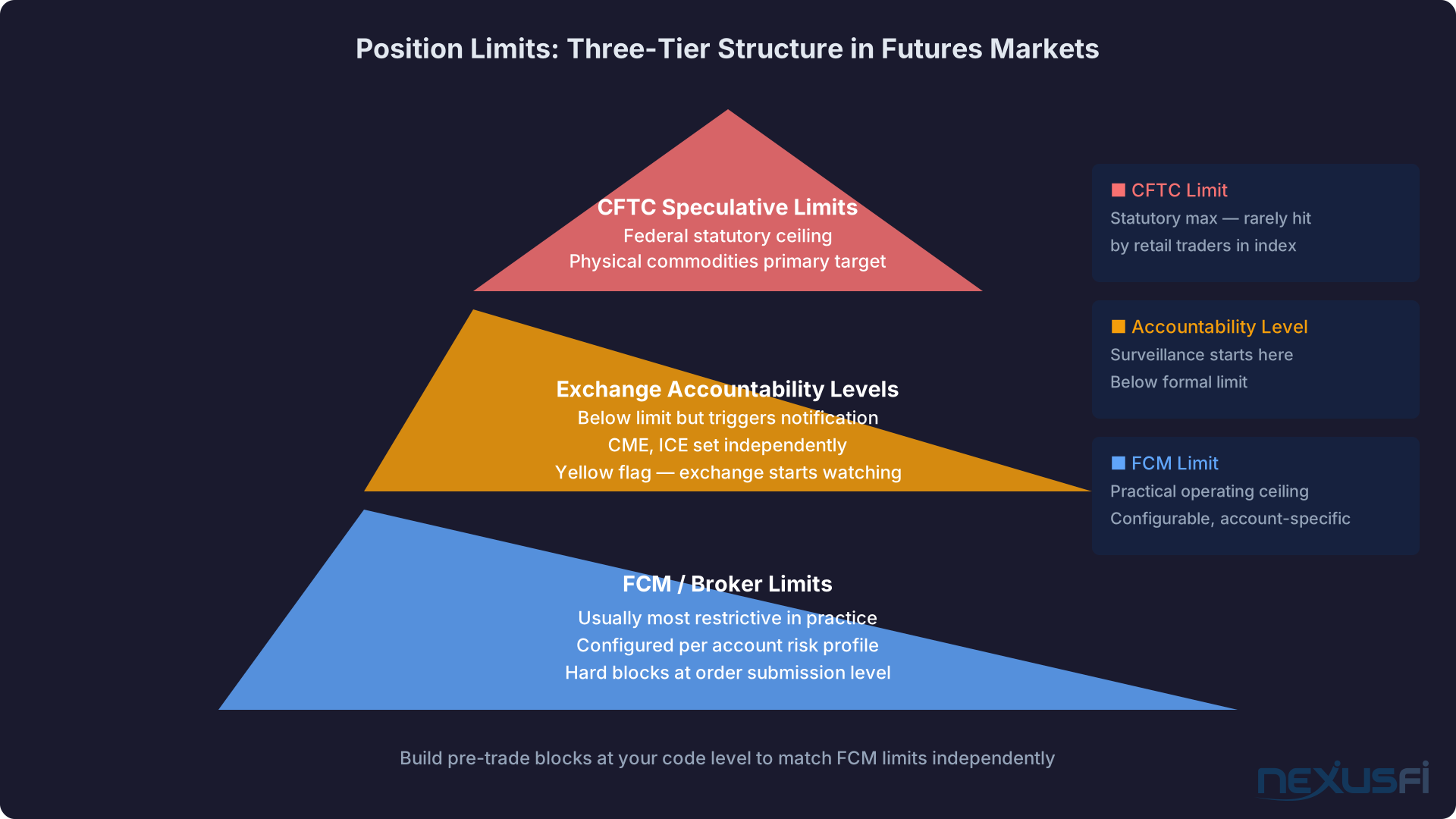
Position limits in futures operate at three levels that traders frequently conflate:
Exchange/CFTC speculative position limits: Legally mandated caps on the maximum position a single trader can hold in physical commodity futures. For retail traders in equity index futures (ES, NQ, RTY), speculative position limits aren't typically a constraint. For agricultural, energy, and metals futures, they're more operationally relevant.
Exchange accountability levels: Positions below the formal limit but above the accountability level may trigger notification requirements or exchange inquiries. It's a yellow flag system — you haven't broken a rule, but the exchange is watching.
FCM/broker risk limits: Your FCM almost certainly has its own internal position limits for customer accounts that are much lower than the exchange limits. @TradingTech clarified in a 2016 discussion that TT Platform's position limits can be configured at multiple levels — by the FCM, by the trader — but final configuration is at the FCM's discretion.[5]
For algo traders, the key is designing position limits into your pre-trade logic:
Hard blocks: When a new order would take your position beyond the limit, reject it before sending. This is the correct behavior 95% of the time.
Soft throttling: For some strategies, you may want to slow down (rather than stop) position accumulation as you approach limits. This allows partial execution of large orders without hitting a hard wall.
Aggregation complexity: If you run multiple strategies on the same account, your pre-trade controls need to see the aggregate position across all strategies, not just the position from the strategy generating the current order.
Message Throttling and Order Rate Governance #
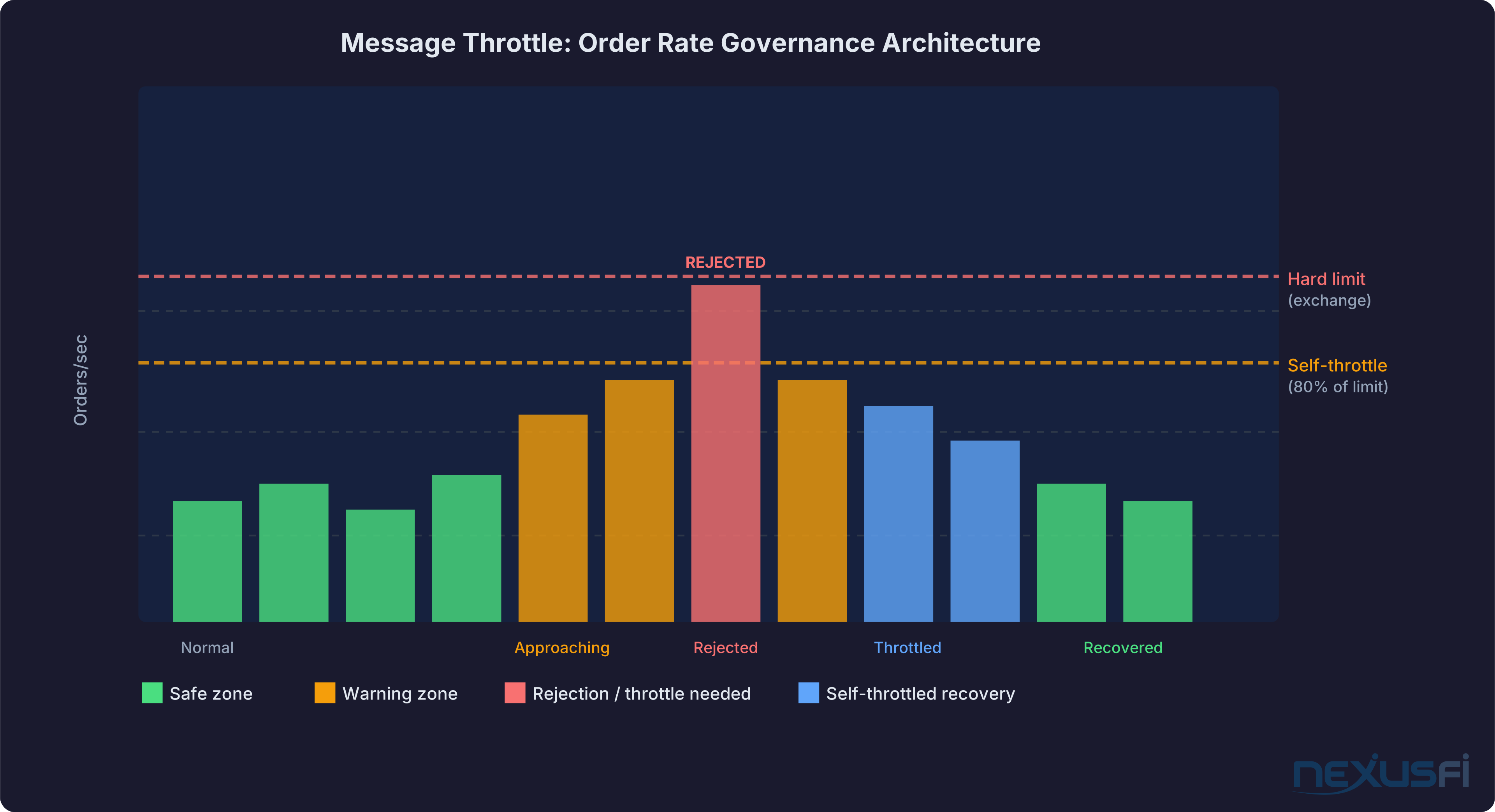
Message throttles are about operational safety as much as regulatory compliance. Every message you send to the exchange — order submission, cancel, replace, status query — consumes bandwidth and counts against rate limits. There is no "free" message.
CME enforces message throttle rates at the account level, the firm level, and the gateway level. As @artemiso explained in a discussion of HFT infrastructure, messaging limits at CME are set at the clearing firm level and carry over to all trading accounts within that firm — meaning your FCM's message capacity is shared across all its customers, making FCM-level throttle limits a real constraint.[7] Exceeding any of these triggers order rejections, and sustained violations can result in session termination.
Key metrics to monitor internally:
Orders per second: Track the current rate and compare against your FCM's and the exchange's limits. Build in automatic throttling (slow down, not crash) when approaching limits.
Cancel/replace ratio: A healthy strategy should have a reasonable ratio of fills to cancels. An algo that cancels 99% of its orders is either a high-frequency market maker (who knows this) or a strategy with a logic bug.
Burst protection: Even within average rate limits, burst activity (100 orders in a single second, then nothing) can trigger exchange risk systems. Smooth your order generation rate rather than allowing unconstrained bursts.
Testing and Validation Requirements #
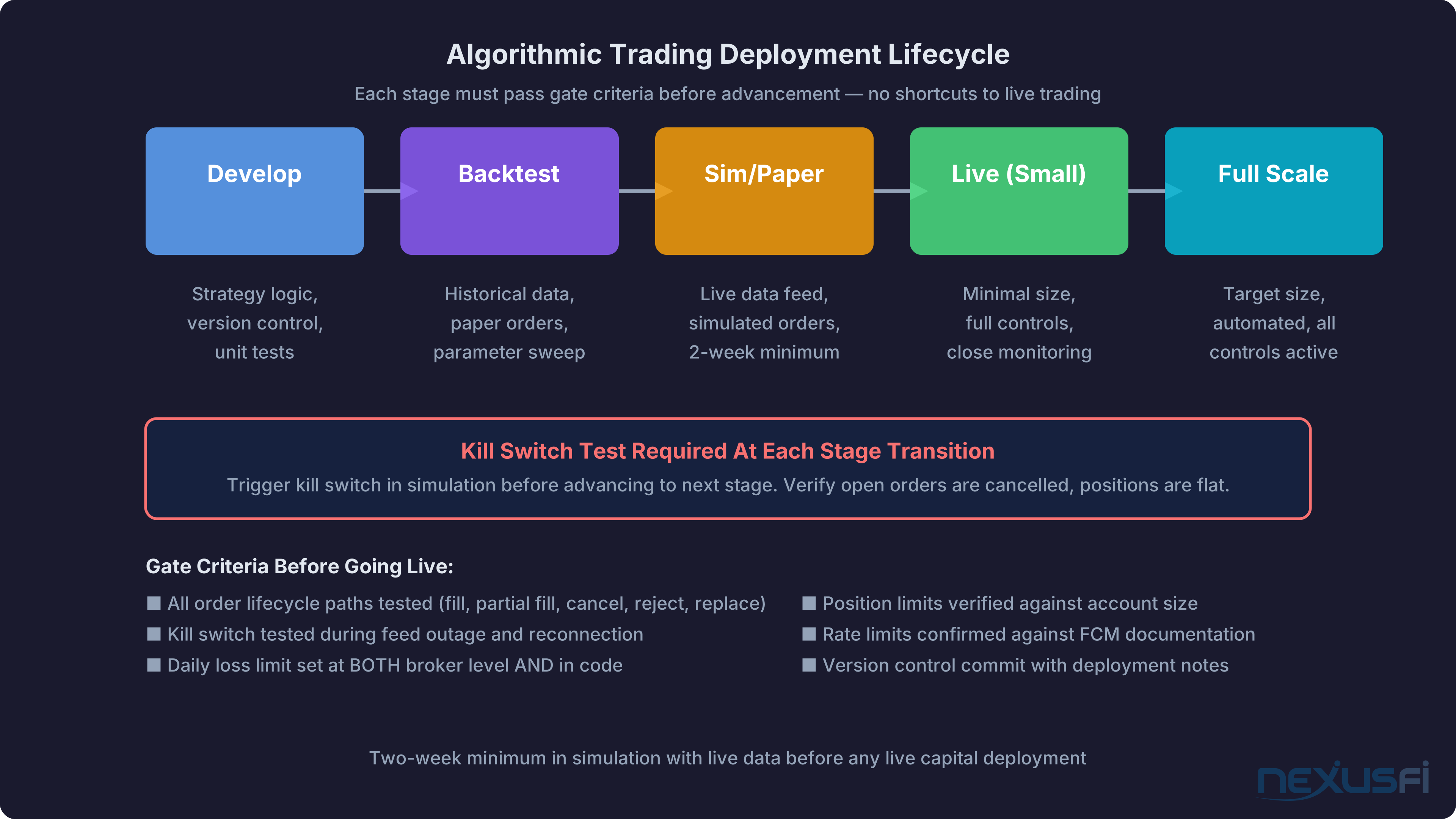
Under Reg AT and practical operational standards, algorithmic trading requires documented testing before live deployment.
Segregated testing environments: You need at minimum two environments — simulation/paper trading and production. CME offers a certification environment that mirrors production matching engines.
Order lifecycle testing: Your testing must cover: new order submission and acknowledgement, partial fills and position tracking, order cancellation and confirmation, order replacement, and rejection handling across all possible rejection reasons.
Failure mode testing: You need to test what happens when your market data feed drops mid-session, when you reconnect after a disconnect, when the exchange is in a reserved state, when your order is rejected unexpectedly, and when your fill confirmation is delayed or missing.
Version control for strategies: Every live strategy should be under version control. When something goes wrong — and eventually it will — you need to be able to identify exactly which version of the code was running.
Pre-Deployment Checklist
- Paper/sim trading for minimum 2 weeks with live market data
- All order lifecycle paths exercised in testing
- Kill switch tested in disconnected conditions
- Position limits validated against account size
- Daily loss limit configured at both code and broker levels
- Rate limits verified against FCM and exchange documentation
- Reconnection logic tested with simulated feed drops
- Version control commit with deployment notes
Practical Compliance for Retail Algo Traders #
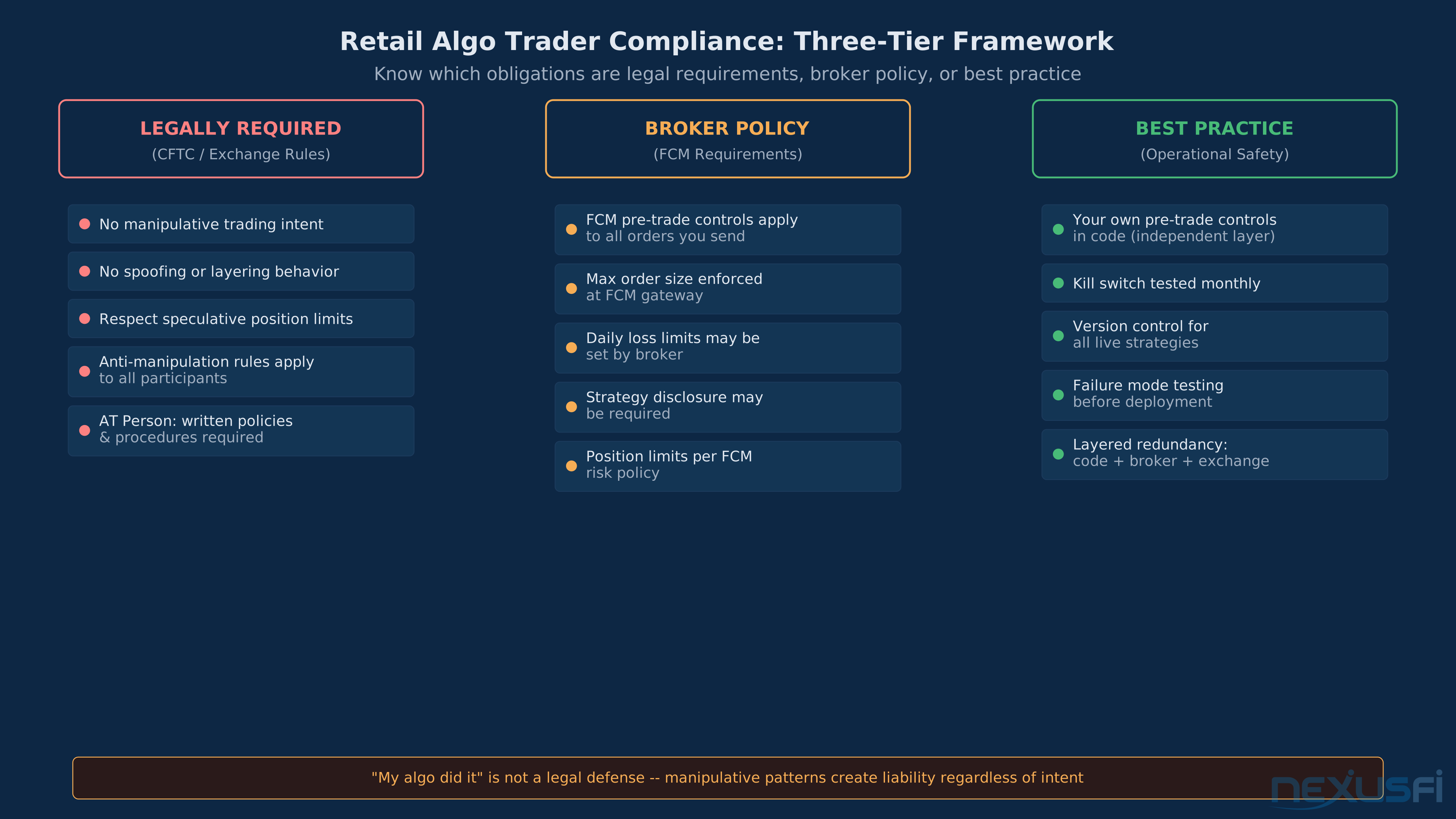
What is Legally Required #
If you're trading your own account through a retail FCM and you're not registered as an AT Person, your direct legal obligations under Reg AT are limited. However:
- You're legally prohibited from manipulative trading behavior regardless of intent. An algo that inadvertently creates the appearance of spoofing or layering creates legal exposure even without manipulative intent.
- CFTC anti-manipulation rules apply to all market participants. "My algo did it" is not a defense.
- Position limits compliance is your responsibility. Ignorance of applicable limits is not a defense.
What Your FCM Requires #
- FCMs are required under CFTC Rule 1.73 to have pre-trade risk controls for all algorithmic orders they clear. These controls will apply to your orders whether or not you configure anything.
- Your FCM may impose its own limits on maximum order sizes, daily loss limits, and position sizes that are more restrictive than exchange limits.
- Some FCMs require trading strategy disclosure for algorithmic accounts. Check your account agreement.
Best Practice (Beyond Minimum Requirements) #
- Implement pre-trade controls at your code level, independent of broker controls. Relying solely on broker controls means a broker system failure can cause a runaway algo.
- Set a daily loss limit at both the broker level and in your own code. Two independent checks are better than one.
- Document your strategy version before every deployment. If something goes wrong, you need to know what code was running.
- Test with real-time market data, not recorded replays. Replay testing misses time-of-day effects and session transition behavior.
- Know your kill switch and test it monthly. If you haven't manually triggered your kill switch in simulation conditions recently, you don't know if it works.
- Use your broker's risk controls as backup, not primary. Configure daily loss limits, max position sizes, and automatic liquidation at the broker level as a backstop. As Big Mike noted in one of the earliest discussions of this topic on NexusFi, brokers like Velocity Futures offered user-defined daily loss limits specifically as a safety tool — traders should be using them.[2]
The question @Arch was asking — where should these controls live? — is the right question. The answer is: everywhere. Layered redundancy is not over-engineering; it's the minimum viable safety architecture for live automated trading.
Common Failure Modes #
The failures that actually happen in live futures algo trading follow predictable patterns:
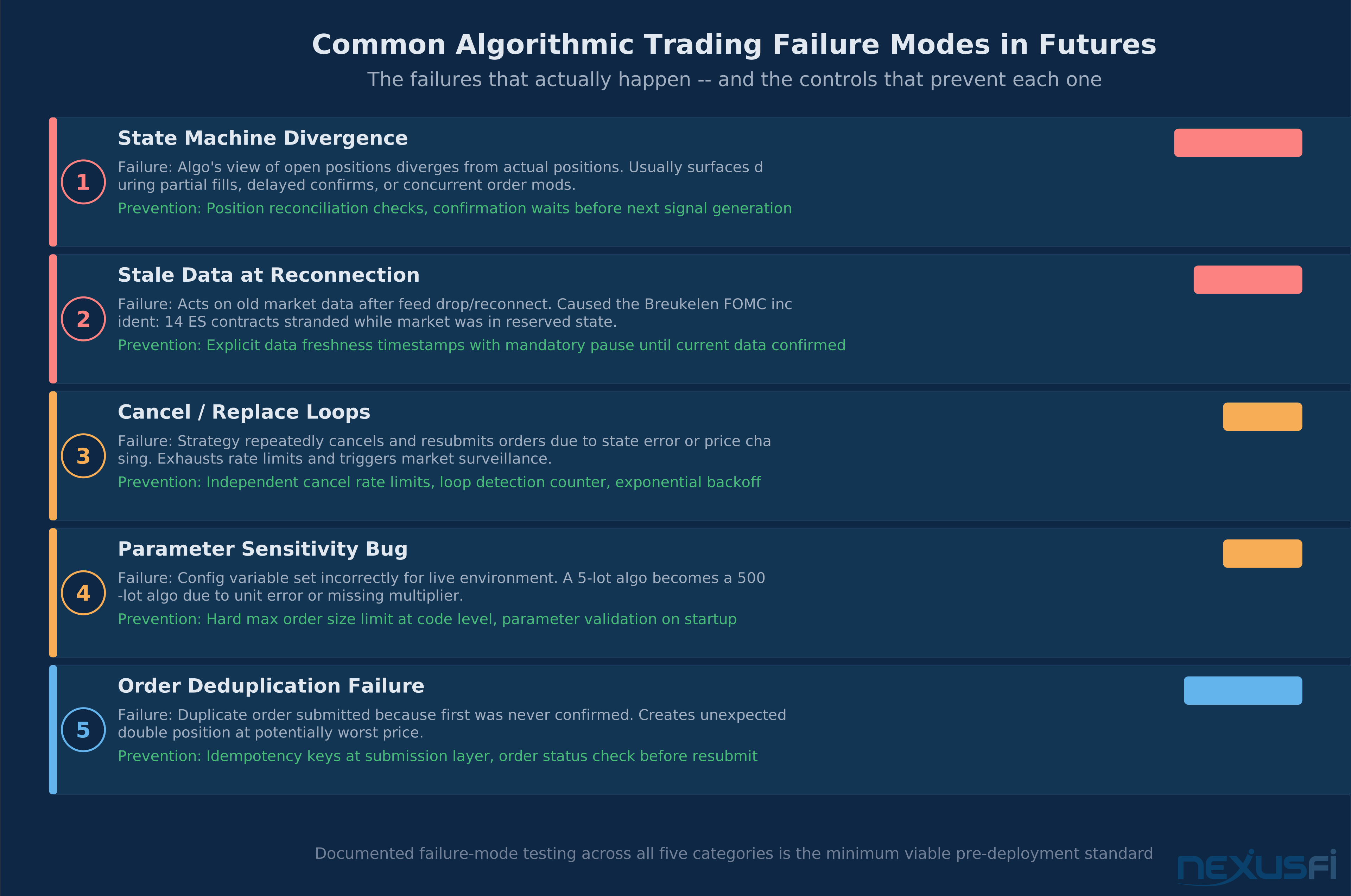
State machine divergence: Your algo's internal model of the world diverges from reality. State machine errors are the root cause of most catastrophic algo failures, and they typically emerge during edge cases: partial fills, fill confirmations delayed by connectivity issues, orders that are modified while in-flight.
Stale data at reconnection: The @Breukelen FOMC incident is a perfect case study. Reconnecting after market data interruption and acting on stale data is responsible for a significant portion of retail algo losses. Explicit market data freshness checks — with hard pauses until data is confirmed current — are not optional.
Parameter sensitivity: Strategies that work in testing often have undocumented parameter sensitivity that only reveals itself in live markets. An algo that generates 5 contracts per signal in simulation may generate 500 contracts per signal if a multiplier variable is set incorrectly in the live config.
Cancel/replace loops: A strategy that repeatedly cancels and replaces orders in a loop can exhaust message rate limits, trigger surveillance review, and generate significant transaction costs while accomplishing nothing.
Order deduplication failures: Sending the same order twice because your system didn't confirm the first one was received is a common edge case in API-based trading. Implement idempotency keys at your order submission layer to prevent duplicate submissions.
Prerequisites #
Further Exploration #
Citations #
[1] @Breukelen | My algo hit the kill switch, CME said no! Lady Luck Saved Me! | Elite Quantitative GenAI/LLM | https://nexusfi.com/showthread.php?t=59175&p=876519#post876519
[2] @Big Mike | Daily Loss Limit | Brokers | https://nexusfi.com/showthread.php?t=12824&p=144651#post144651
[3] @Liberty88 | New Risk Management Settings built-in to NinjaTrader | Platforms and Indicators | https://nexusfi.com/showthread.php?t=59736&p=884385#post884385
[4] @Arch | Broker enforced risk parameters | Traders Hideout | https://nexusfi.com/showthread.php?t=59206&p=876988#post876988
[5] @TradingTech (Patrick Rooney, Trading Technologies) | AMP Futures unable to set risk limits in TT Platform | Trading Reviews and Vendors | https://nexusfi.com/showthread.php?t=40452&p=596517#post596517
[9] @injpowwetrust | Max Daily Loss Setting in NT8.1 for Prop Accounts? | NinjaTrader | https://nexusfi.com/showthread.php?t=59482&p=886222#post886222
[10] @redratsal | Daily Loss Limit | NinjaTrader | https://nexusfi.com/showthread.php?t=8700&p=102714#post102714
Knowledge Map
Go Deeper
Build on this knowledgeReferences This Article
Articles that build on this topicCitations
- — My algo hit the kill switch, CME said no! Lady Luck Saved Me! (2022) 👍 6“I was 78microseconds away from losing 2k today. CME rejected the order with Order type not permitted while the market is reserved.”
- — Daily Loss Limit (2011) 👍 6“A user can request their own personal daily loss limit and VF will close a position when it reaches this.”
- — New Risk Management Settings built-in to NinjaTrader (2023) 👍 6“NinjaTrader now has built-in Risk Management Settings: Daily Loss Limit, Weekly Loss Limit, Daily Profit Trigger, Trailing Max Drawdown.”
- — Broker enforced risk parameters (2022) 👍 1“I am looking for trader defined risk parameters hosted at the FCM, data feed, or exchange level.”
- — AMP Futures unable to set risk limits in TT Platform (2016) 👍 2“Within TT, it is possible to configure max position sizes at various levels, as well as auto-liquidation based on daily loss dollar amounts.”
- — Making a Living with the Micros (2021) 👍 2“The Rithmic platform allows you to set a "shut it down" level where it closes all your trades and does not let you continue for the day.”
- — HFT High Frequency Trading (2015) 👍 3“The messaging limits for CME are set at the clearing firm level and carry over to the trading accounts within that firm.”
- — server based auto strat (2012) 👍 2“Separate data center that gets regularly pinged by the Ninja instance. If the ping is not received, it connects to the broker, evaluates all orders and positions and flattens the account.”
- — Max Daily Loss Setting in NT8.1 for Prop Accounts? (2023) 👍 3“I switch over to GA addon. I no longer have that itch to change my risk settings.”
- — Daily Loss Limit (2011) 👍 4“Customized on strategy setup, you will have to set a bool variable on historical. correct function is Performance.AllTrades.TradesPerformance.Currency.CumProfit”