



Daily Loss Limits and Account Preservation Protocols for Futures Trading
Overview #
Daily Loss Limits and Account Preservation Protocols for Futures Trading
The Circuit Breaker Between You and a Blown Account #
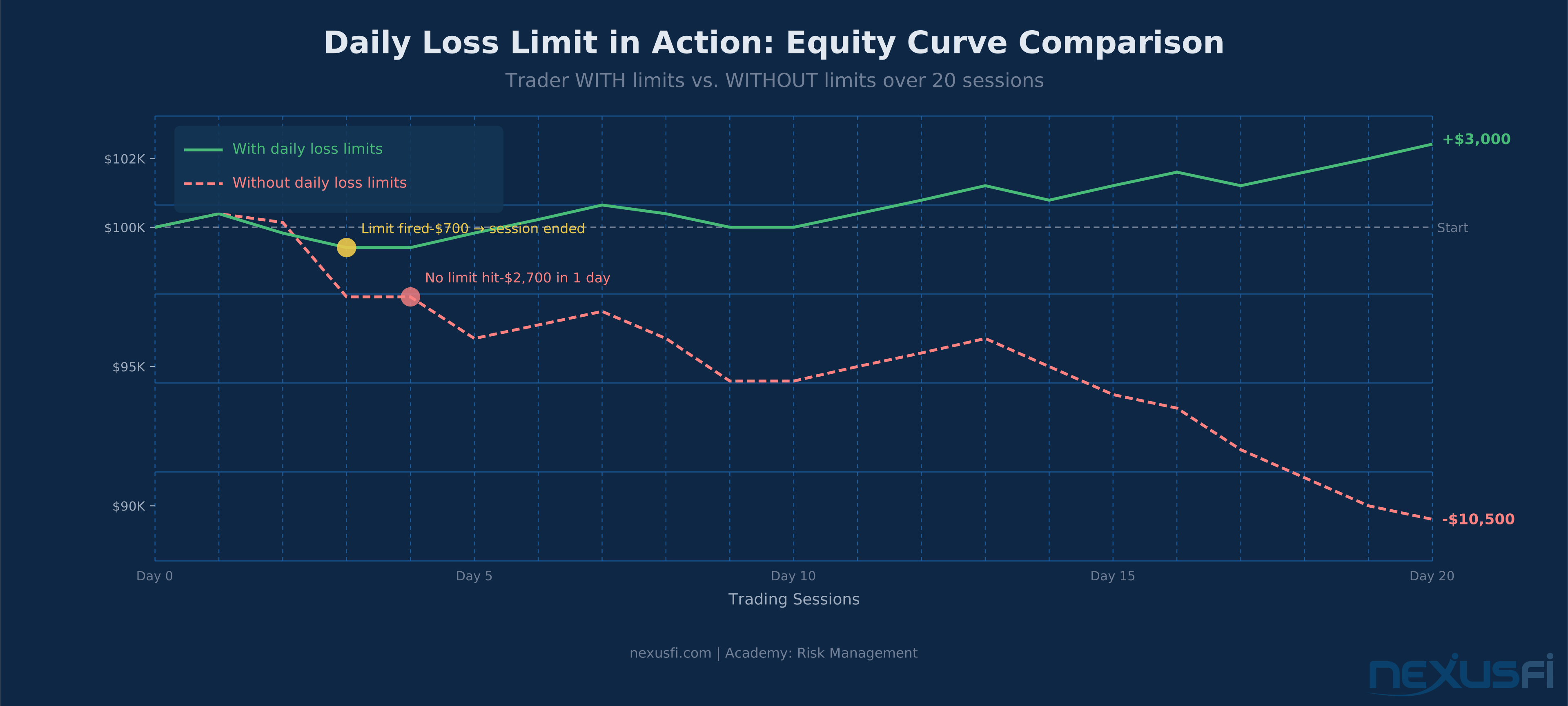
Every futures trader eventually faces a losing session. The question isn't whether you'll have bad days — you will. The question is whether a bad day destroys your week, and whether a bad week destroys your month. Daily loss limits exist to break that chain before it starts.
A daily loss limit is exactly what it sounds like: a predefined maximum amount you're willing to lose in a single trading session. When that amount is reached, trading stops. No exceptions. No "just one more trade to get it back." The session is over.
Simple concept. Brutal execution. The traders who survive long enough to build an edge are almost always the ones who've turned this from a vague intention into a mechanical, automated, non-negotiable rule.
Key Concepts #
Daily loss limit (DLL): A predefined maximum monetary loss per trading session, after which no new positions may be opened. Can be set as a fixed dollar amount, a percentage of account equity, or a risk-based multiple (R-based).
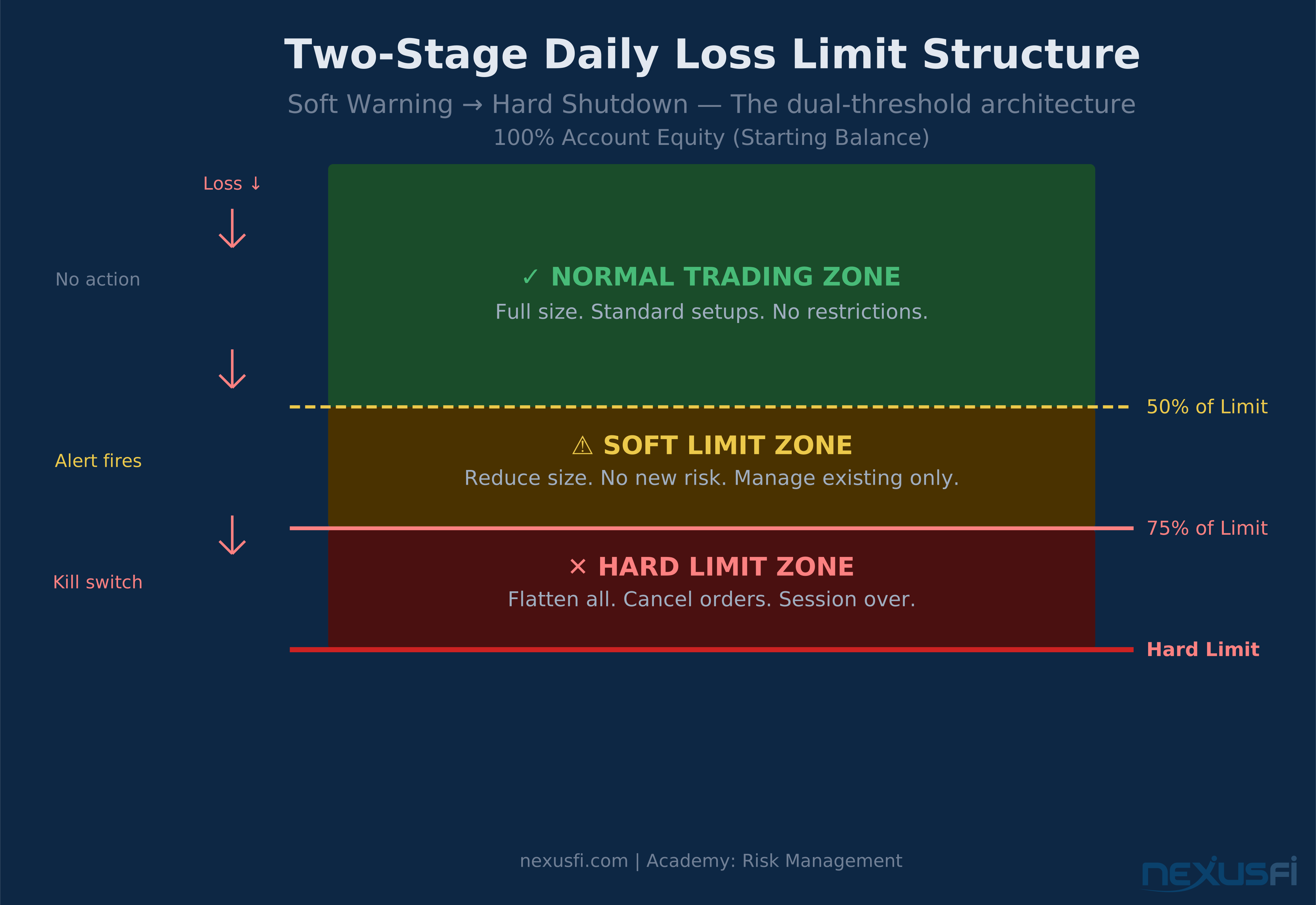
Soft limit: A warning threshold set below the hard limit — typically 50--75% of the daily maximum. Reaching the soft limit triggers a behavioral protocol: reduce position size, stop adding new risk, manage existing trades only.
Hard limit: The absolute maximum loss for the session. When the hard limit is reached, all positions are flattened and order entry is disabled. Non-negotiable.
Kill switch: A mechanical enforcement tool — typically a platform setting or API script — that automatically flattens positions and disables order entry when the daily limit is hit. Not a suggestion. Not a reminder. An automatic circuit breaker.
Trailing drawdown: A variation used by prop firms where the limit is calculated from the session's equity peak rather than its starting point. If your account reaches $52,000 before declining, the trailing drawdown limit locks in from the high — you can't lose back to your starting balance from that new peak without hitting the limit.
Realized vs. unrealized P&L: The distinction matters for limit enforcement. Realized P&L tracks closed trades only. Unrealized P&L includes open positions marked to market. A limit based only on realized P&L can allow traders to accumulate dangerous unrealized losses while appearing technically within limits.
R-based limit: A daily loss limit expressed in multiples of your planned risk per trade (R). If you risk $200 per trade, a 5R hard daily limit equals $1,000. This method ties your limit directly to your strategy's expected behavior.
Cool-down period: A mandatory break from trading after the hard limit is hit. Not discretionary. At minimum, the rest of the trading session.
Why Traders Blow Up Without One #
The account destruction pattern is predictable. A trader takes a loss. The loss triggers frustration. Frustration leads to "getting it back" thinking. The trader increases size or abandons their setup criteria. They take another loss. Now they're down enough that the math becomes brutal — a 20% drawdown requires a 25% gain just to break even. They keep trading. By end of day they're down 30%, 40%, more.
This isn't a strategy failure. This is psychology hijacking the session.
NexusFi member @MmmDeion put it plainly in a thread about account blowups: the key protective measure is "to have your broker or platform put in a daily loss limit." The technology exists. The psychology won't save you. The mechanism will.
That's the move. Stop fighting yourself. Automate the limit.
Setting Your Daily Loss Limit #
The right limit is unique to your account size, strategy, and typical trade frequency. Here's a calibration framework that works for most futures traders:
Method 1: Percentage of Equity #
The most common approach for self-directed traders:
- Conservative: 0.5--0.75% of account equity per day
- Standard: 1% of account equity per day
- Aggressive: 1.5--2% of account equity per day
The 1% rule is the most widely recommended starting point. It's large enough to absorb normal variance in most strategies but small enough that even three consecutive limit-hit days only affect 3% of your account — recoverable without destroying your equity curve.
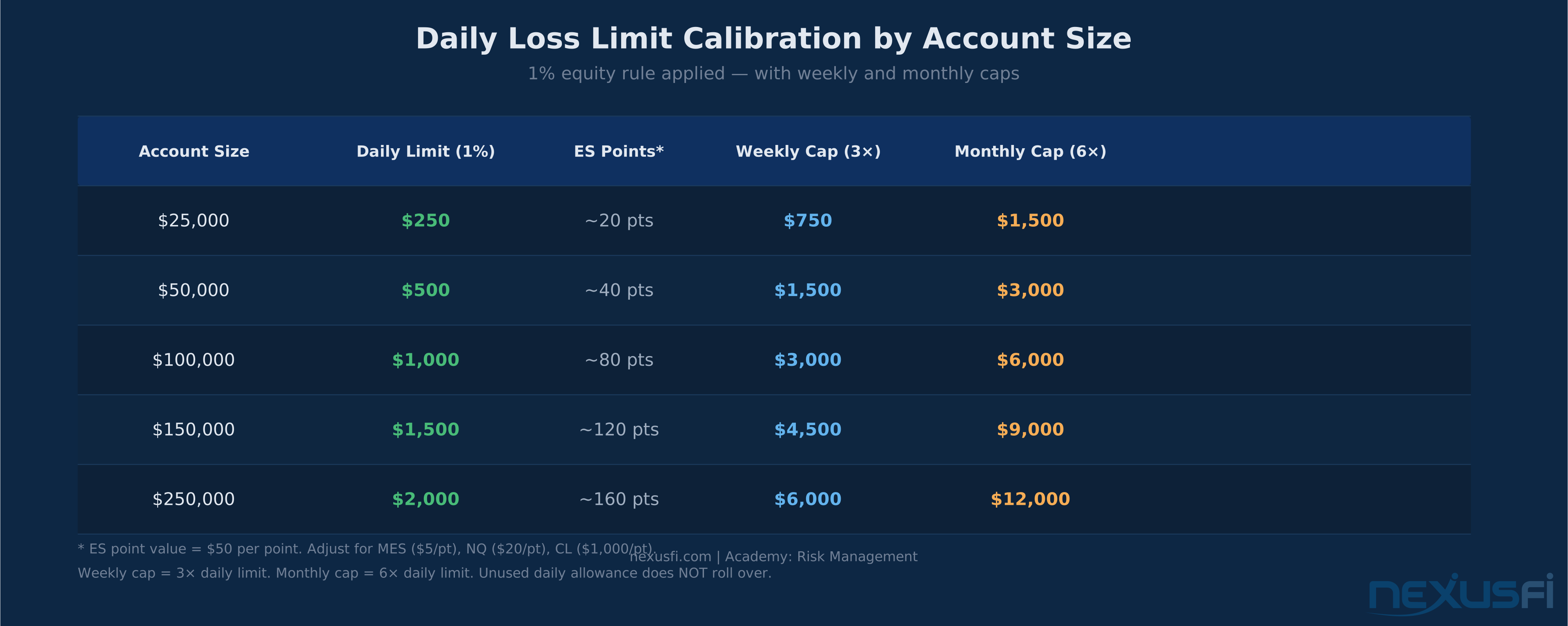
Sample calibration table:
| Account Size | 1% Daily Limit | Weekly Cap (3×) | Monthly Cap (6×) |
|---|---|---|---|
| $25,000 | $250 | $750 | $1,500 |
| $50,000 | $500 | $1,500 | $3,000 |
| $100,000 | $1,000 | $3,000 | $6,000 |
| $250,000 | $2,000 | $6,000 | $12,000 |
Note: Adjust for your specific instrument's point value. The ES has a $12.50 per tick / $50 per point value. The MES is $1.25 per tick / $5 per point. These differences compound quickly at size.
Method 2: R-Based Limit #
For traders with a well-defined edge and consistent position sizing, an R-based limit ties your daily cap directly to how your strategy actually behaves:
- Soft limit: 1--2R (warning, reduce size)
- Hard limit: 3--5R (shutdown)
If you risk $200 per trade (1R = $200) and take an average of 5 trades per day:
- Soft limit at 2R = $400 lost → reduce to half-size or fewer setups
- Hard limit at 4R = $800 → session over
The advantage of R-based limits: they scale naturally with your strategy's risk profile. A tighter stop = lower R = lower dollar limit, which is exactly right.
Method 3: Volatility-Adjusted (ATR-Based) #
For instruments with variable daily ranges, tying your limit to the Average True Range prevents the limit from becoming either too tight on high-volatility days or too loose on quiet days.
Set the hard daily limit at approximately 1.0--1.5× the instrument's daily ATR converted to dollar value. For ES, if the 20-day ATR is 30 points ($1,500 at full size), a 1× ATR limit equals $1,500 for a standard account. Adjust for position size.
This approach is especially useful for crude oil (CL) traders and other commodity futures where daily ranges vary much by news cycle.
The Practical Test #
Whatever method you use, ask this question: If I hit this limit today, would continuing likely produce lower-quality decisions?
If yes — the limit is correctly placed. If you'd honestly answer "probably not," your limit is too loose.
Also verify: Can a bad day at this limit still let me trade effectively for the rest of the month?
If a single day's loss would meaningfully impair your ability to take setups next week, the limit is too large.
The Two-Stage Structure: Soft Warning → Hard Shutdown #
Running a single hard limit without a warning stage is like driving without a fuel gauge. The two-stage system gives you time to adjust before the session ends:
Soft Limit Protocol (50--75% of Daily Maximum) #
When your P&L hits the soft limit:
- Reduce position size immediately — half-size or smaller on all new entries
- Stop adding risk to existing positions — no averaging in, no scaling up
- Set more conservative stop distances — tighter risk on new entries
- Consider time-boxing remaining trades — only the cleanest setups qualify
- No new instrument exposure — if you trade ES, no jumping to NQ to "make it back"
The soft limit is a check-in, not a shutdown. You can still trade, but with full acknowledgment that you're operating in reduced-quality territory for the day.
Hard Limit Protocol (100% of Daily Maximum) #
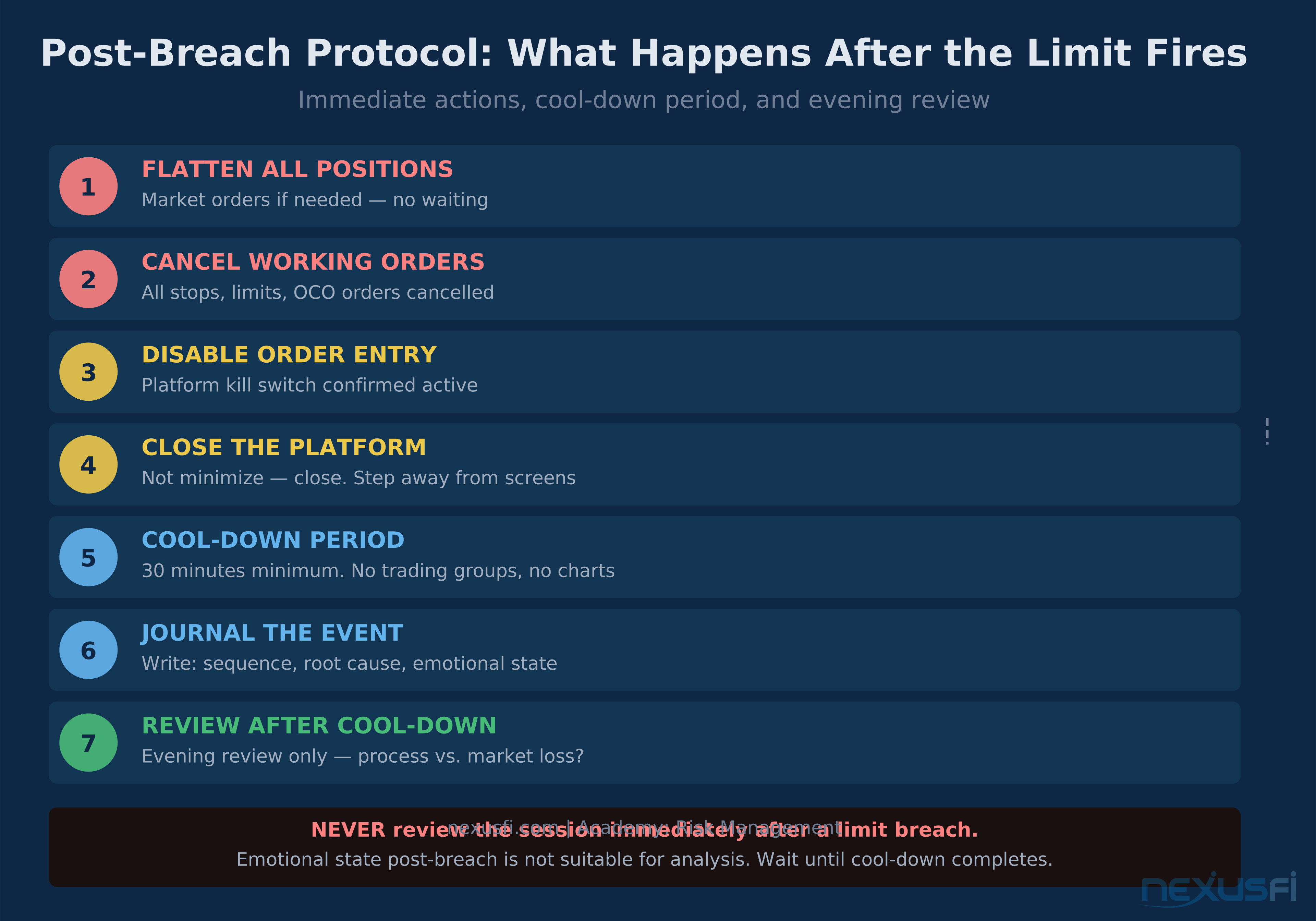
When your P&L hits the hard limit:
- Close all positions immediately — market orders if needed
- Cancel all working orders
- Disable order entry — mechanically, not voluntarily
- Start the cool-down timer — at minimum, rest of session; for serious breaches, next day off
- Journal the event — what happened, was the loss process-driven or market-driven
- Review later, not now — emotional state post-limit breach is not suitable for analysis
The critical word is mechanically. If disabling order entry requires willpower, it won't work when you need it most.
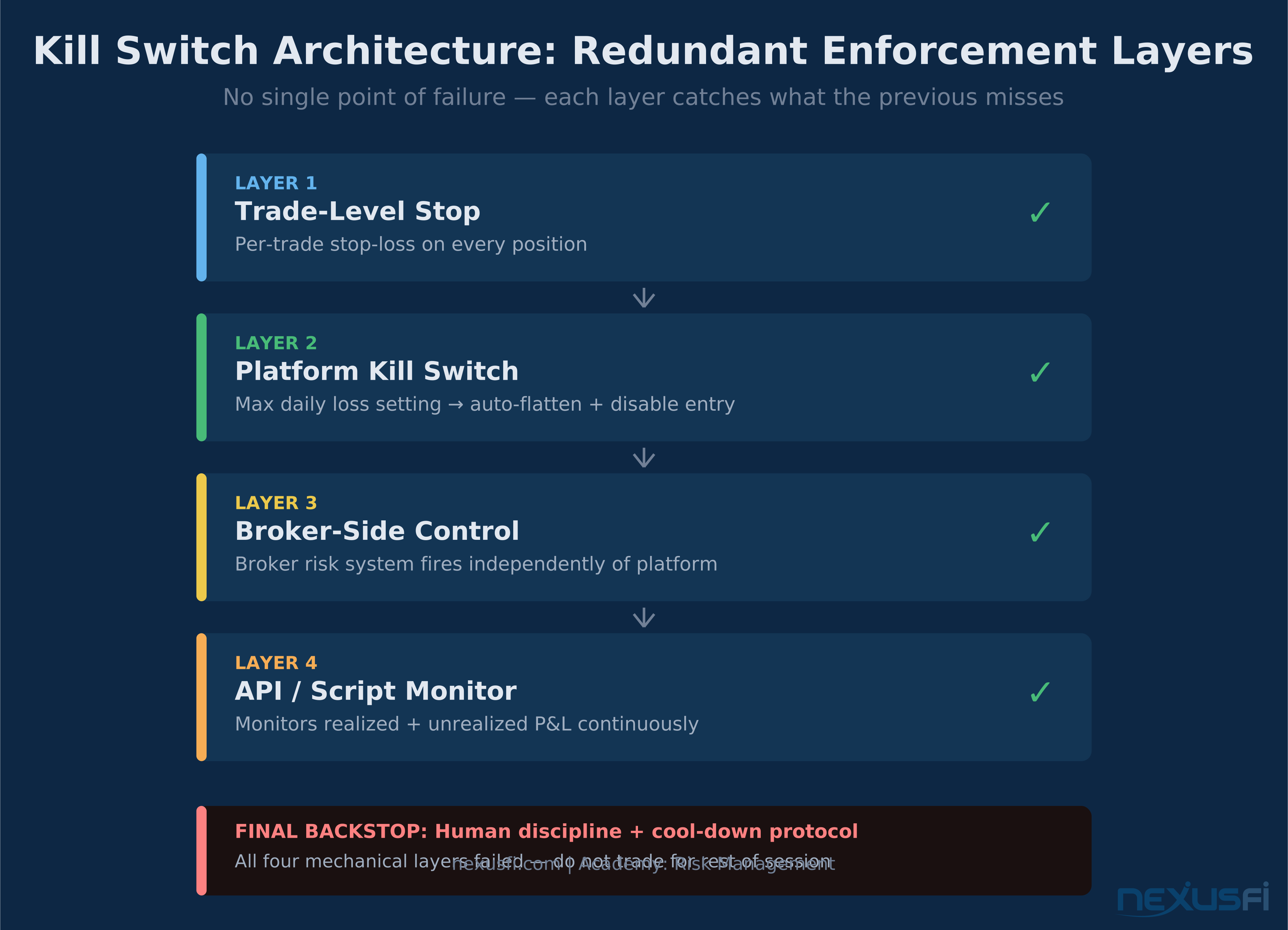
Mechanical Enforcement: The Kill Switch Architecture #
This is where most traders fail. They set a limit in their head and trust themselves to enforce it. The market is designed to make that trust misplaced.
Professional enforcement is redundant. Layer multiple systems so that no single point of failure lets you continue trading past the limit:
Layer 1: Platform-Level Kill Switch #
Most serious trading platforms support daily loss limits with automatic position liquidation:
- NinjaTrader: Global Profit/Loss Management settings allow you to set a daily loss limit that auto-flattens positions and prevents new orders when the threshold is reached. As @Liberty88 noted in a platform thread, NinjaTrader now includes "Max Drawdown, Real-Time Trailing Max Drawdown" settings where "when risk settings are hit, open positions are liquidated."
- Sierra Chart: Has built-in daily loss limit functionality that restricts trading after you've lost a specified amount. Community member @bobwest specifically recommended Sierra Chart's broker-side limits as preferable to platform-only settings: "broker-side limits might be better since it's more work for the trader to change them and that might impose some additional discipline."
- TradeStation / MultiCharts: Support similar account-level risk controls through the Global Portfolio Trader or equivalent risk management tools.
Layer 2: Broker-Side Risk Controls #
Request a broker-implemented daily loss limit — one that triggers at the execution layer, before orders even reach the exchange. Velocity Futures was an early adopter of this, as
Broker-side limits are stronger than platform limits because they don't depend on your local software running correctly. If your platform crashes and you're in a losing position, the broker-side limit still fires.
Layer 3: API/Script Automation #
For technically-inclined traders, a simple monitoring script watching your account's equity provides an additional enforcement layer:
# Conceptual Python structure (IB API / similar)
def check_daily_limits(account, start_equity, soft_limit, hard_limit):
    current_equity = account.get_net_liquidation()
    daily_pnl = current_equity - start_equity

    if daily_pnl <= -hard_limit:
        account.cancel_all_orders()
        account.flatten_all_positions()
        account.disable_new_orders()
        send_alert("HARD LIMIT HIT -- Session Ended")

    elif daily_pnl <= -soft_limit:
        send_alert("SOFT LIMIT WARNING -- Reduce Size Now")
The script monitors realized P&L plus unrealized exposure continuously, not just when orders are submitted. This catches the scenario where a trader is sitting in a losing open position that hasn't been closed yet.
The P&L Metric: Realized vs. Unrealized #
One of the critical design decisions for your kill switch: which P&L metric triggers it?
Realized-only triggers: Simple to implement and reliably automated. The problem: a trader can accumulate large unrealized losses while remaining technically within limits on realized P&L. You can be down $2,000 on an open position while your "daily P&L" shows -$300 of realized losses.
Hybrid triggers (recommended): Use realized P&L for the main automation (reliable, unambiguous) plus a separate unrealized exposure monitor with its own alert threshold — typically set at 50% of the hard limit. When unrealized losses approach that threshold on open positions, the alert fires regardless of realized P&L status.
Most prop firm kill switches use open equity (unrealized included) precisely because it catches this gap.
Psychological Protocol: After the Limit Fires #
The hours immediately after hitting your daily limit are the most dangerous trading period in your session. You're not trading — but you're thinking about trading. That thinking is adversarial.
The Behavioral Traps #
Revenge trading: "I'll make it back." This is the most common account destruction vector. The impulse to recover the loss through more trading is almost always triggered by the loss itself. It's not a market opportunity; it's an emotional reaction.
Rule rationalization: "That last trade wasn't a real loss, it was a hedge." "The limit doesn't count that position." Any creative reinterpretation of why today's loss doesn't trigger the rule. This is a tell — if you're constructing arguments for why the limit doesn't apply, it applies.
Unrealized P&L blindness: "My stop will come back." Watching an open position move against you and waiting for the market to return instead of taking the loss. The daily limit exists partly to prevent this.
Overtrading after the soft limit: Traders who hit the soft limit and reduce size sometimes compensate by increasing frequency — taking more setups than usual to "make up" for reduced size per trade. Net exposure often increases.
The Post-Breach Routine #
After the hard limit fires:
- Close the platform. Not "minimize." Close it.
- Physical break. 30 minutes minimum. Longer is better.
- No social media trading groups. Watching others trade is a trigger.
- Journal entry. Write down: what happened, the specific sequence of trades, whether losses were process-driven (you deviated from your plan) or market-driven (your plan executed correctly but the market moved against you). This distinction matters for what you adjust.
- Review after full cool-down. Not for an hour. That evening, or tomorrow morning.
@Scalpingtrader's journal on NexusFi captures the emotional reality: "I have been kind of vague and intransparent in the last couple of days regarding my struggle. But I need to get this out, for my own sanity." This is what breaching your limits repeatedly looks like from the inside. The limit isn't the problem. The limit is the solution.
Integrating Daily Limits into the Risk Budget Hierarchy #
Daily limits don't stand alone. They're one layer of a nested risk control structure that spans multiple time horizons:
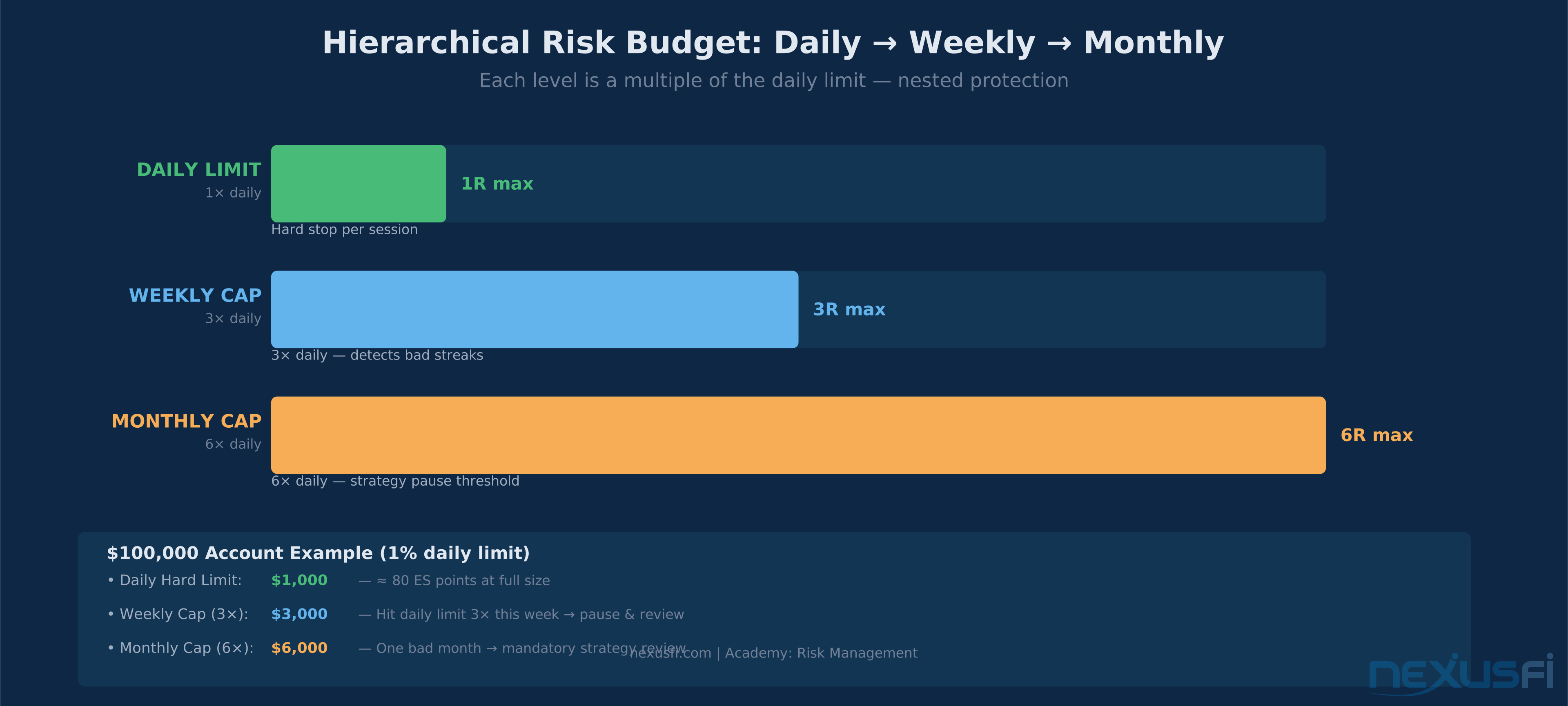
Per-Trade Risk (1R) → Daily Limit (3--5R) → Weekly Cap (3× Daily) → Monthly Cap (6× Daily)The Hierarchy Rules #
Per-trade risk: The smallest unit of the structure. Every trade has a predefined stop. The stop defines R.
Daily limit: Aggregates per-trade risk into a session-level ceiling. Should be large enough to absorb normal variance (3+ losing trades) but small enough that hitting it twice in a week doesn't jeopardize the week.
Weekly cap: Usually 3× the daily limit. If you hit the daily limit Monday and Tuesday, you've used 2/3 of your weekly budget. Wednesday's trading should be reduced — maybe to 50% position size or a tighter individual stop.
Monthly cap: Usually 6× the daily limit. One bad week shouldn't destroy the month. The hierarchy ensures it can't.
Carry-Forward Logic #
Critically: unused daily allowance does not roll over. Each session starts fresh at zero.
This prevents the dangerous thinking of "I only used $200 of my $500 limit yesterday, so I have $800 available today." That's not how risk works. A bad day is a bad day. The limit resets.
The Dynamic Adjustment Trigger #
When you hit the daily limit twice in one week, that's a signal — not a statistical fluke. The correct response:
- Reduce position size next week by 25--50%
- Review whether the strategy is in a regime mismatch (the market conditions changed and your edge doesn't apply)
- Increase setup selectivity — fewer, higher-quality trades only
If you hit the daily limit three or more times in a week, consider pausing live trading entirely and returning to simulation or reduced size until conditions improve.
Prop Firm Accounts: A Harder Version of the Same Problem #
If you're trading a funded account through a prop firm, you're already living inside a daily loss limit system. The firm enforces it for you — and the consequences of breaching it are immediate account termination.
How Prop Firm Daily Limits Work #
Most major prop firms (Apex Trader Funding, Topstep, OneUp Trader, Bulenox, etc.) structure their daily limits in one of two ways:
Fixed daily drawdown: A set dollar amount that cannot be lost in a single session. For a $50,000 combine at Topstep, the daily loss limit is typically $1,000 on the 50K plan. If your account equity (including unrealized open positions) drops by $1,000 at any point during the session, you're in liquidation-only mode.
Trailing drawdown: More complex.
If your account peaks at $52,000, the trailing drawdown might lock in $1,000 below that peak — creating a $51,000 floor. Hit that floor and you're out, even if your account started the day at $50,000.
The critical nuance with trailing drawdown: It typically uses unrealized P&L at the peak to set the high-water mark. This means a trade that reached $52,000 in unrealized gains and then gave it all back triggers the trailing limit — even if you closed the trade at breakeven and your realized P&L is zero.
As the Topstep AMA thread documented: "every day, you need to be sure you don't lose more than the daily drawdown on an open trade (unrealized) basis."
Self-Directed vs. Prop Firm: The Key Differences #
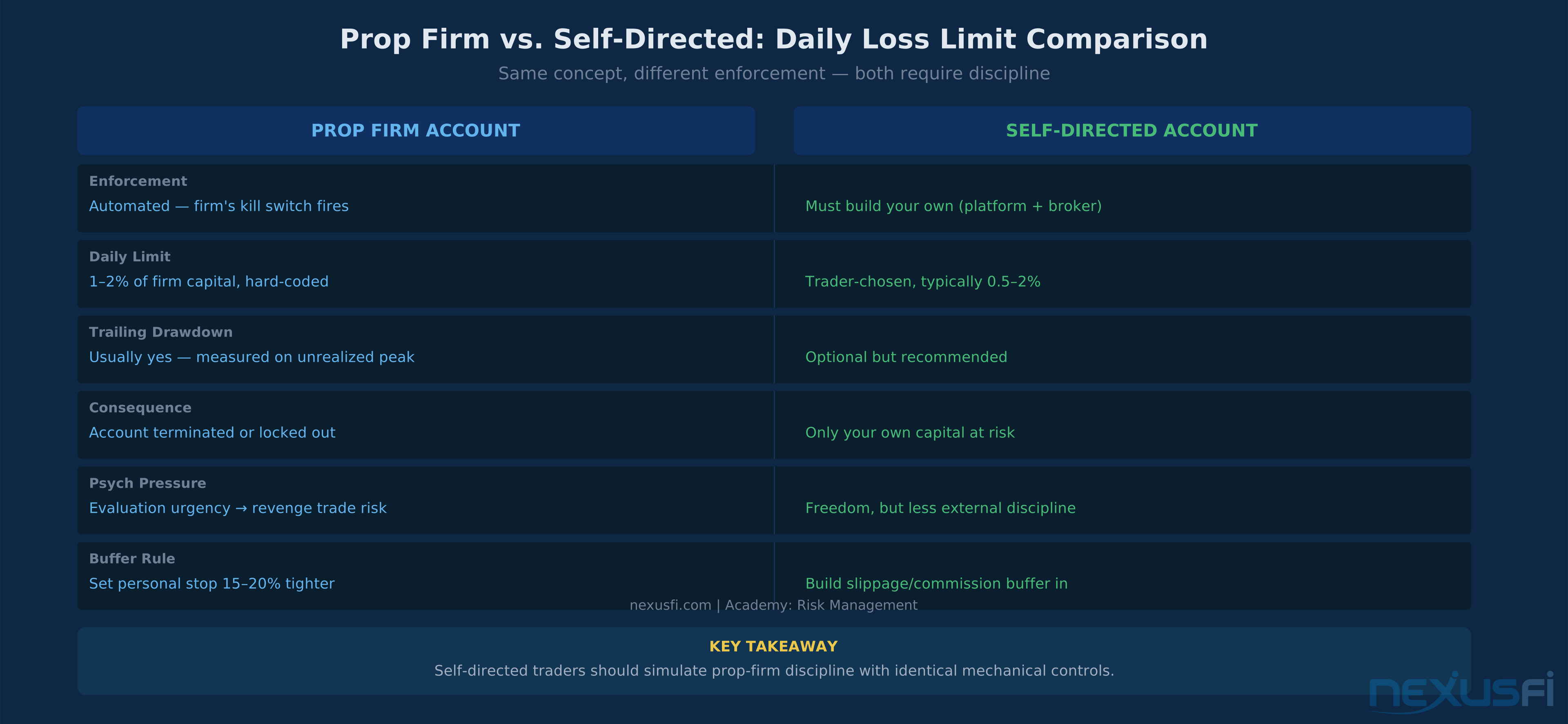
| Dimension | Prop Firm | Self-Directed |
|---|---|---|
| Enforcement | Automated by firm, immediate lockout | Must be self-built |
| Consequence of breach | Account terminated (evaluation) or size reduction (funded) | Only your own capital at risk |
| Daily limit size | 1--2% of firm capital, non-negotiable | Trader-chosen, typically 0.5--2% |
| Trailing drawdown | Common, measured on unrealized P&L peaks | Optional, but advisable for drawdown control |
| Psychological pressure | Evaluation stage creates urgency → revenge trading risk | More freedom, less external discipline |
| Buffer recommendation | Set personal limit 15--20% tighter than firm's | Build in slippage/commission buffer |
The buffer rule: If your prop firm's daily limit is $1,000, set your personal kill switch at $800. The $200 gap absorbs execution slippage, platform latency, and the possibility that your platform's position flattening generates a market-order fill worse than expected.
He set his personal limit at less than half the firm's limit. That's not excessive caution — that's operational intelligence.
Platform-Specific Implementation #
NinjaTrader #
Access via Tools → Account Settings → Global Profit/Loss Management:
- Daily Loss Limit: Set a dollar amount. When reached, NinjaTrader cancels all working orders, flattens positions, and blocks new order entry for the remainder of the session.
- Real-Time Trailing Max Drawdown: Calculates from the session's equity peak (unrealized included). More conservative than fixed limits.
- Profit Target: Mirror of the loss limit — stops trading when a daily profit target is hit (useful for discretionary traders prone to giving back gains).
Test these settings in simulation before enabling on live accounts. Verify the flatten mechanism works as expected during fast market conditions.
Sierra Chart #
Global Settings → Data / Trade Service Settings → Trade Simulation / Risk Management:
- Max Daily Loss: Fixed dollar amount, triggers automatic position flattening
- Position/Order Blocking: When limit is hit, chart trading is disabled until reset
@bobwest specifically noted Sierra Chart's reliability for this feature in the Psychology and Money Management forum.
TradeStation / EasyLanguage #
Sierra Chart-style position management via the Portfolio Maestro or through custom EasyLanguage scripts that monitor equity and submit market orders when thresholds are breached.
Broker-Side Controls #
Call your broker directly and request a hard daily loss limit at the account level. This operates independently of your trading platform and provides a true backup layer. Most major FCMs (Ironbeam, AMP, Amp Global, Tradovate) offer some form of this. The feature may be called "Daily Loss Limit," "Max Daily Drawdown," or "Account Risk Controls."
Common Mistakes (and How to Fix Them) #
Mistake 1: Setting the Limit Too Loose #
Symptoms: You rarely hit the limit, and when you do, you've already done significant damage. The limit exists after the psychological devastation, not before it.
Fix: Test your limit against your actual historical P&L distribution. If your worst 5% of days all exceed the limit by 2× or more, the limit is cosmetic.
Mistake 2: Setting the Limit Too Tight #
Symptoms: You hit the limit 3+ times per week on normal, non-solid sessions. This suggests the limit is within your strategy's ordinary variance range.
Fix: Review your average losing trade size and typical sequence of losses. If your strategy has a 40% win rate and you take 8 trades, strings of 4--5 consecutive losers are statistically normal. Your limit needs to absorb that.
Mistake 3: Manual Enforcement Only #
Symptoms: You've set a limit in your head but have no mechanical enforcement. The limit only fires when you voluntarily decide to stop.
Fix: Implement at least one automated enforcement layer immediately. Platform kill switch is the minimum. Broker-side control is better.
Mistake 4: Limits Based Only on Realized P&L #
Symptoms: You're technically within your limit but sitting in a $1,500 unrealized loss on an open position, hoping it comes back.
Fix: Add an unrealized exposure monitor. Set a secondary alert when open trade equity approaches 50--60% of your hard limit, regardless of realized P&L.
Mistake 5: No Hierarchy Above the Daily Limit #
Symptoms: You have a daily limit but no weekly or monthly cap. You hit your daily limit four times in a week and think "well, each day was within the rules."
Fix: Build the hierarchy explicitly. Weekly cap ≤ 3× daily. Monthly cap ≤ 6× daily. Put these numbers in your trading plan.
Mistake 6: Ignoring the Cool-Down #
Symptoms: You hit your daily limit, close positions, and then immediately open the platform again to "just watch."
Fix: Close the platform. Leave the room. The urge to "just watch" is a gateway to taking more trades. The cool-down is non-negotiable.
The Account Preservation Protocol #
Bring these elements together into a daily routine that's repeatable and automatic:
Pre-Session Checklist #
- [ ] Confirm daily loss limit is set in platform AND broker-side controls
- [ ] Verify soft limit alert is configured (50--75% of hard limit)
- [ ] Check weekly and monthly P&L — am I operating with a reduced budget today due to prior losses?
- [ ] Identify today's no-trade conditions (high-impact news, unusual volatility, personal schedule)
- [ ] Write one line in your trading plan: today's max risk per trade and today's maximum number of trades
During-Session Protocol #
- [ ] Display P&L prominently — real-time, not delayed
- [ ] At soft limit: cut size in half, tighten stops on new entries, no new instruments
- [ ] At hard limit: flatten, cancel, disable, start cool-down timer
- [ ] Track correlated exposure — if you're long ES and NQ simultaneously, your effective position is larger than each trade individually
Post-Session Documentation #
- [ ] Record actual P&L vs. limit status (normal / soft hit / hard hit)
- [ ] For any hard limit breach: journal entry with trade-by-trade review
- [ ] Update weekly/monthly cumulative drawdown tracker
- [ ] If second consecutive soft limit hit: note in plan for next session
Weekly Review #
- [ ] How many sessions hit soft limit? (2+ suggests size is too large or edge is thin)
- [ ] How many sessions hit hard limit? (1+ requires strategy/size review)
- [ ] Is weekly cumulative drawdown within the weekly cap? (Adjust if not)
- [ ] Is the edge behaving as expected? (Regime mismatch requires size reduction, not more attempts)
Connecting to the Broader Risk Framework #
Daily loss limits are one component of a complete risk framework. They work best when integrated with:
Position sizing: How you size each trade determines how quickly you approach the daily limit. Volatility-Based Position Sizing and The Kelly Criterion provide frameworks for calibrating per-trade risk that feed directly into meaningful daily limits.
Maximum adverse excursion (MAE): Understanding the worst-case intraday movement against your positions helps set appropriate stop levels that don't trigger unnecessary daily limit breaches on otherwise-valid trades. See Maximum Adverse Excursion (MAE).
Drawdown management: Daily limits protect individual sessions, but the broader drawdown management framework governs longer-term equity preservation. See Drawdown Management and Drawdown Recovery Mathematics.
Risk of ruin: The mathematical foundation for understanding why daily limits matter at all. See Risk of Ruin.
The Bottom Line #
Daily loss limits are not optional risk management. They're the structural element that separates professional capital preservation from gambling. Without them, every session is an existential event — a bad run of luck or a moment of emotional trading can permanently impair your ability to execute.
With them, you get something precious: the knowledge that no single session can destroy what you've built. That knowledge changes how you trade. It reduces desperation. It removes the urgency that leads to overtrading. It lets you take clean setups without the background noise of "I need to be up today."
Set the limit. Automate the enforcement. Build the hierarchy. Treat a breached limit as data, not failure.
The traders who survive this game long enough to build a real edge are the ones who protected their capital when protecting it was uncomfortable. Every other variable — strategy, platform, instrument, market — can be changed. Your trading account is the one resource that can't be replaced.
Knowledge Map
References This Article
Articles that build on this topicCitations
- — Discussion
- — Discussion
- — Discussion
- — Discussion
- — Discussion
- — Discussion
- — Discussion
- — Discussion
- — Discussion